
Wireless wedding ceremony audio fails in two quiet ways, a battery that sags at the worst moment and a radio signal that gets blocked or crowded out, and both are easy to prevent when the checks happen in the right order and the right person owns each one.
Quick answer
Treat wireless wedding ceremony audio as two separate jobs. Power: every transmitter that will be on during the ceremony gets fresh, name-brand batteries (or a charged purpose-built pack) shortly before the guests arrive, plus labeled spares within reach. Radio: your sound vendor scans the actual site, picks clear channels, keeps a clear line between each transmitter and the receiver antennas, and tests with the real people standing where they will stand. Ask for both in writing, run the walk test at the rehearsal, and decide ahead of time who may touch a microphone during the ceremony. The checklist later in this guide turns all of that into steps by phase.
What wireless wedding ceremony audio actually involves
Most couples never see the equipment until the day of the ceremony, and by then it is mostly hidden: a small pack clipped inside a jacket, a thin cable up a shirt, a box on a stand near the aisle. That invisibility is why problems with wireless wedding ceremony audio feel mysterious. Once you know the handful of parts involved, wireless wedding ceremony audio becomes something you can ask intelligent questions about, even if you never touch a dial.
The signal chain from voice to speaker
Think of the system as a relay race with four runners. A microphone turns a voice into a small electrical signal. A transmitter turns that signal into a radio signal. A receiver, somewhere nearby, catches the radio signal and turns it back into audio. A mixer and speakers make it loud enough for the back row. Wireless wedding ceremony audio adds only the middle two runners, and almost every wireless-specific failure happens at one of those handoffs.
Transmitter, receiver, and what sits between
A transmitter is either a bodypack (a small box worn on a belt or tucked into clothing, connected by a thin cable to a lavalier or headset microphone) or the handle of a wireless handheld microphone. The receiver is a separate box, usually near the sound operator, with one or two antennas. Between them is open air, plus whatever is in the way: guests, tent poles, a stone wall, a parked car. DPA Microphones, a manufacturer, describes the goal in plain terms: the transmitter should have a clear, unobstructed path to at least one of the receiver’s antennas at all times.
Where couples usually meet the system
In practice you meet wireless wedding ceremony audio in three places: the officiant’s microphone, a handheld or lavalier for vows or readings, and sometimes a lavalier on the person who walks the longest distance, such as a processional leader. If you want a deeper look at how those microphone types behave around speakers, our guide to preventing feedback at an outdoor ceremony covers it; this guide stays on the wireless link itself, meaning power and radio.
Who is responsible for what
A common source of trouble is not a technical one but an ownership gap. The venue assumes the DJ has it covered, the DJ assumes the officiant brings their own microphone, and the officiant assumes the venue has a house system. Settling the ownership early removes more risk than any piece of hardware.
What the vendor owns
A professional sound provider owns the equipment for your wireless wedding ceremony audio: the battery supply, the frequency choices, the scan on arrival, the placement of receiver antennas, and the decision about which microphones are live at which moment. If your system is rented, that includes making sure the gear is legal to use in the United States, a point that comes up again in the radio section. Our list of questions to ask a wedding DJ is a good starting point for the conversation if your DJ is also providing ceremony audio.
What the couple and planner own
You own the ceremony plan for wireless wedding ceremony audio: who speaks, in what order, with which microphone, and who is allowed to hold or wear it. You also own the rehearsal time, because the walk test needs real people and real minutes. If a planner or coordinator is involved, ask them to put the sound check and the battery swap into the timeline. This guide does not give electrical or safety advice, and anything involving power cables, generators, or rigging belongs with qualified professionals.
How batteries fail at a ceremony and how to prevent it
Of everything in wireless wedding ceremony audio, batteries are the part you can most fully control, and the part most often treated as an afterthought. A ceremony is short, which tempts people to reuse half-spent batteries from the sound check. The sources we reviewed point the other way, and they apply to any wireless wedding ceremony audio setup.
Why a weak battery sounds like interference
A fading battery does not usually fail like a flashlight, going dim and then dark. It tends to produce symptoms that sound like something else entirely, which is why it is the first thing an experienced operator checks when a microphone misbehaves.
Voltage sag causes distortion and dropouts
Shure, a microphone manufacturer, notes that low-quality batteries reduce performance, and that low voltage can cause audible distortion or dropouts. A voice that crackles or cuts out for a half second can look exactly like radio interference, but the cure is a fresh battery, not a new channel.
Range shrinks before the display reads empty
Sweetwater, an audio retailer, makes a related point: a transmitter’s signal strength and range drop as its battery weakens, so it recommends putting in fresh batteries at the start of every show, event, or service, even if the old ones are not dead. For a ceremony, that means the officiant who stands close to the receiver may sound fine during the sound check while the same pack, half drained, struggles when the officiant walks to the far end of the aisle.
Choosing battery types
You rarely choose the batteries yourself, but you can ask what the vendor uses and why. The answers fall into three groups, and the differences matter more than most people expect.
Disposable alkaline and lithium
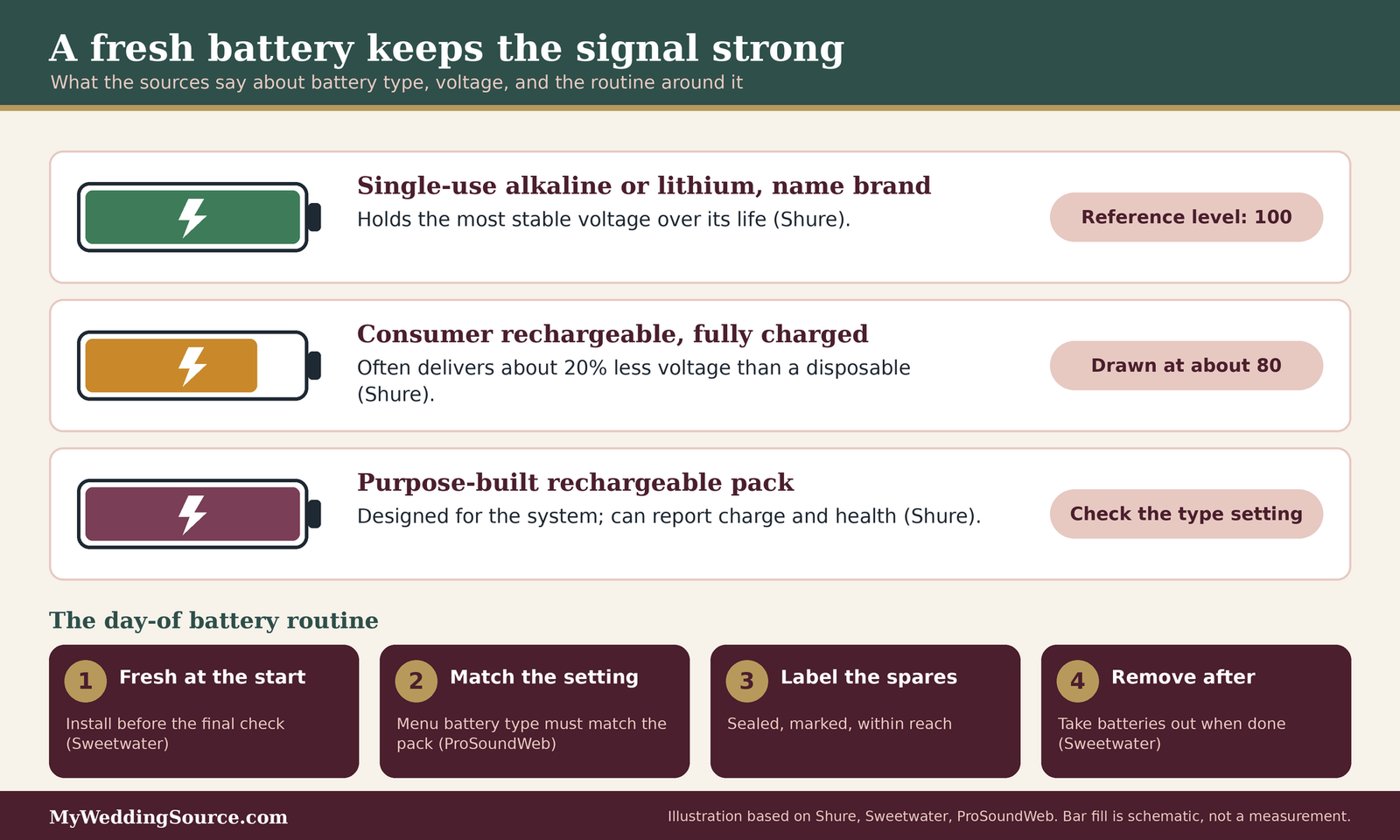
Shure advises that high-quality alkaline or lithium single-use batteries hold the most stable voltage over their life. This is why many professionals still use them for short, high-stakes events. For wireless wedding ceremony audio, the cost per ceremony is small relative to the cost of a dead microphone during the vows. Cheap generic batteries are the weak point: Sweetwater advises brand-name batteries, and taking them out of transmitters after each performance.
Consumer rechargeables and purpose-built packs
Shure says that consumer rechargeable batteries often deliver around 20 percent less voltage than disposables, even when fully charged, and calls rechargeable systems designed for wireless microphones the better option. Those systems use lithium-ion packs and can report the battery’s charge and health. DPA adds a warning that some off-the-shelf rechargeables can fall quickly from nearly full to empty. If a vendor uses ordinary rechargeables for your wireless wedding ceremony audio, ask how they are tested and rotated. Sweetwater suggests replacing rechargeable batteries roughly every six months.
The battery type setting on the unit
ProSoundWeb, a trade publication, points out a detail that is easy to miss: many newer systems use different power curves for alkaline and rechargeable batteries, so the battery meter is only accurate when the setting in the menu matches the battery that is actually in the pack. Ask your operator whether the setting was checked. A meter that reads half full when the pack is nearly empty is worse than no meter.
A battery routine for the day
The routine below for wireless wedding ceremony audio batteries is built from the manufacturer and trade advice above. It is not a standard, and a professional operator may do things differently for good reasons. Treat it as a way to check whether the vendor has a routine at all.
Fresh at the start, not at the end
Install fresh batteries before the guests arrive and before the final sound check, so the test reflects how the system will behave during the ceremony. A mic technician quoted by Mix magazine recommends leaving a pack switched on once it is on, rather than cycling it, and swapping batteries during an intermission when an event runs long. A ceremony is usually too short for a mid-event swap, which is a reason to start fresh and not hope.
Spares, labels, and the swap moment
Ask where the spare batteries and a spare transmitter will physically be during the ceremony. A spare in the van helps nobody. Marked spares (sealed, with a label showing they are fresh) prevent the common mix-up where a used battery goes back into the pocket of a bag. Agree on a hand signal with the operator, so that if a pack warns of low power, the swap happens at the next natural pause, such as a reading or a song, not in the middle of vows.
After the ceremony
Sweetwater’s advice to remove batteries after each performance is simple and sensible: it is simple housekeeping, and the pack may be reused at the reception. Ask whether the ceremony packs are reused for toasts, because a pack that served the ceremony should either get fresh batteries or be marked as used.
Interference at a ceremony: where it comes from
Interference in wireless wedding ceremony audio is any signal that shares or overlaps the channel your microphone is using, and it comes in more varieties than most couples expect. The good news is that the most common kinds are predictable and a trained operator checks for them before the first guest sits down.
Radio basics without the jargon
A wireless microphone is a very small radio station. Like any station, it needs a frequency that nobody else nearby is using. Two facts do most of the work in understanding wireless wedding ceremony audio: frequency bands differ by country, and the clear channels differ by place.
Bands differ and location matters
Sennheiser’s help center explains that a wireless microphone bought for one frequency band may not work or be allowed everywhere, because countries set their own rules and busy bands can disrupt audio. It calls buying gear in the wrong band one of the most common mistakes. For a couple planning wireless wedding ceremony audio, the practical meaning is that equipment brought to your venue from another country, or bought online and shipped, may not be a legal choice for the United States.
TV channels and the power gap
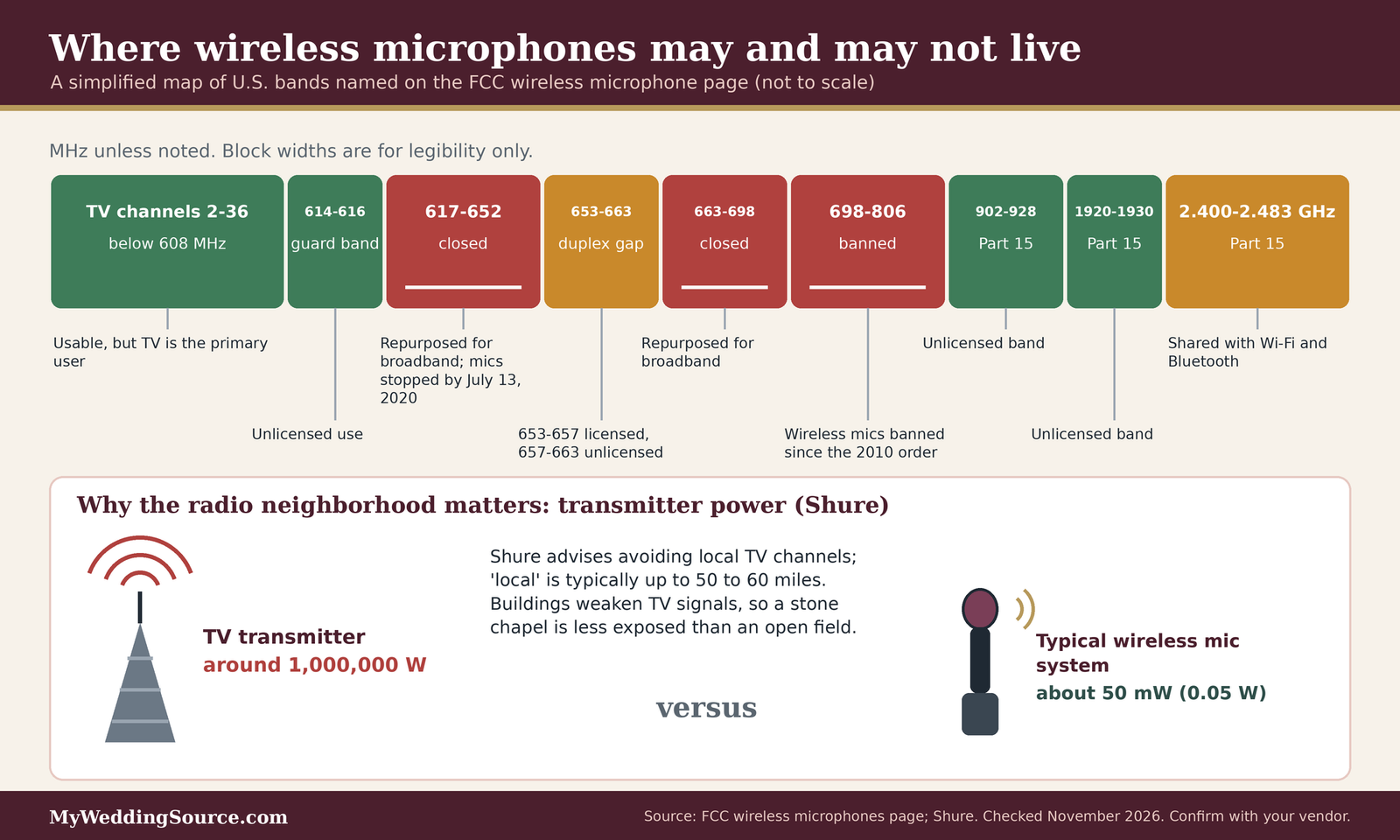
Shure’s article on common wireless mistakes explains why location matters: television transmitters can run at around one million watts, while a typical wireless microphone system transmits at about 50 milliwatts. Shure suggests avoiding local TV channels, and says “local” is typically up to 50 to 60 miles, though that varies. Indoors, buildings weaken TV signals, so stations that are 30 to 40 miles away might be ignorable inside a substantial building. A ceremony in an open field is more exposed than one in a stone chapel.
What the FCC rules mean for a rented system
You do not need to memorize regulations to plan wireless wedding ceremony audio, but a few facts from the Federal Communications Commission explain why a professional vendor behaves the way they do and why you should be skeptical of unusually cheap or mysterious equipment. This is general information, not legal advice.
Licensed and unlicensed use
The FCC’s wireless microphone page explains that most wireless microphone users now operate without a license. In 2015 the FCC allowed unlicensed use in television band spectrum, with lower power limits than licensed use, and with two conditions: unlicensed devices must not cause harmful interference and must accept any interference they receive. Licensed use under Part 74 is open to categories such as broadcasters and film and TV producers, and since 2014 to large venue operators and professional sound companies that routinely use 50 or more devices. Some Part 15 bands are also open to unlicensed use, including 902 to 928 megahertz, 1920 to 1930 megahertz, 2.4 gigahertz, and parts of 5 gigahertz.
Banned bands and outdated gear
The same FCC page says that the 617 to 652 and 663 to 698 megahertz bands were repurposed for wireless broadband, and wireless microphones had to stop using them by July 13, 2020. It also says manufacture, import, sale, lease, offer, or shipment of wireless microphones for the 600 megahertz band for use in the United States is now prohibited, and that a separate 2010 order banned wireless microphones in the 698 to 806 megahertz range. For you, this turns into one question for any wireless wedding ceremony audio vendor: are your microphones legal to operate in the United States today, and when was the equipment last updated? Older used gear is the likeliest place for the answer to be no.
Wi-Fi, Bluetooth, phones, and the 2.4 gigahertz band
Many modern compact wireless systems, including some marketed for presentations and video, operate in the 2.4 gigahertz band, the same crowded band that Wi-Fi uses. That is not automatically a problem, but it changes what you should ask about.
What shares the 2.4 gigahertz band
Church Production, a trade publication, described the 2.4 gigahertz band as running from 2.400 to 2.483 gigahertz, license free worldwide, and shared by Wi-Fi, Bluetooth, tablet remotes for digital mixers, remote camera controls, and even thermostats. Any of these can shorten range, reduce the number of usable channels, or cause dropouts. The article, from 2016, says many manufacturers stop around eight channels and drop to four or five when many Wi-Fi-type systems operate nearby. RF Venue, an accessories maker, adds that UHF systems are not affected by Wi-Fi, while 2.4 gigahertz systems can be, especially with multiple channels or heavy Wi-Fi use in a crowded venue. Both articles are several years old, so treat the specific numbers as illustrations and ask your vendor for current ones.
Cellphones are a smaller suspect than people think
Guests’ phones are the usual scapegoat for wireless wedding ceremony audio trouble. RF Venue’s article says carrier cellular transmissions generally do not interfere with wireless audio, and that the main exception is an unintended effect called GSM buzz, in which phones near cables, speakers, and PA systems create audible noise, which was common on older 2G networks and is now rare on 4G and LTE. A guest holding a phone near a speaker cable is a better explanation for a buzz than a phone interfering with a microphone’s radio signal. A polite request to keep phones away from the sound table costs nothing, and our guide to the unplugged ceremony shows how some couples word it.
Other electronics and power
RF Venue’s article also says that malfunctioning power supplies, poorly shielded electronics, faulty wiring, amplifiers, and power lines can cause spurious interference, and the author considers these a bigger risk than well-built phones or routers. Shure similarly advises turning off nearby electronics such as computers and wireless routers within about five feet of a receiver, and says to confirm local interference by moving the system at least half a mile away and seeing whether it works there. If your ceremony runs on generator power, our wedding generator rental guide explains what to ask, and any electrical work should be done by qualified staff.
Blocking the signal: bodies, antennas, and line of sight
If batteries are the most controllable risk and interference the most misunderstood, signal blocking is the one that surprises people most, because the main obstacle is the guest list. Radio waves at microphone frequencies are absorbed by water, and people are mostly water, so wireless wedding ceremony audio has to be planned around the guest list.
Why people and metal matter
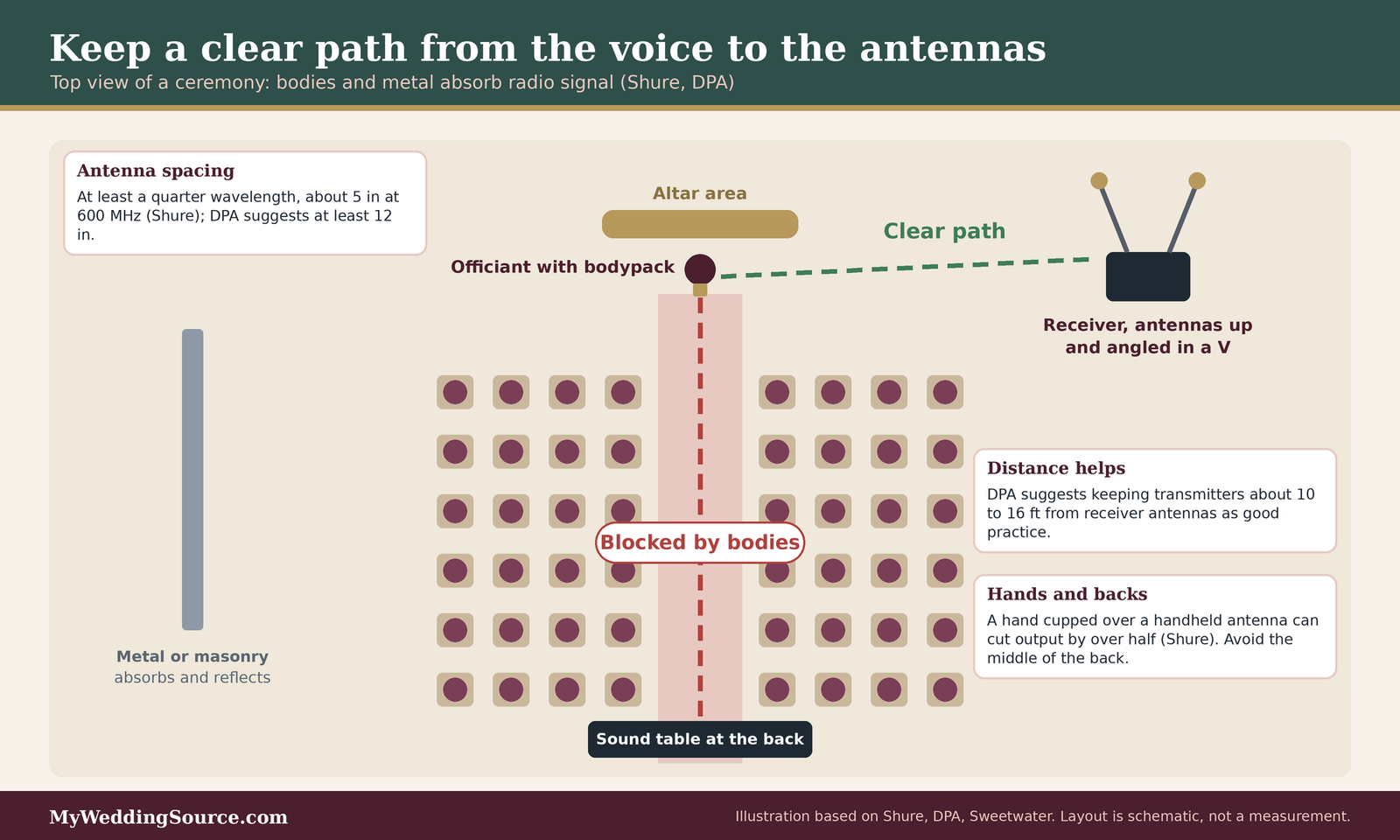
Shure lists blocking the signal first among common wireless mistakes: keep a clear line of sight between transmitter and receiver antennas, and avoid metal objects and walls. DPA says metal, concrete, brick, and human bodies all absorb radio energy. Crowds are a particular concern, which is relevant because a ceremony is a crowd standing or sitting in a block between the people speaking and, often, the sound table.
Crowds and bodies absorb the signal
A full row of guests between the officiant and the receiver is a wall as far as a radio signal is concerned, and the effect grows as more guests arrive. A sound check done in an empty room can therefore be misleading. Shure makes the same point about checking: frequencies and interference can change during an event, so monitor and re-check throughout, instead of relying on the sound check alone.
Hands, bodies, and bodypack position
Shure says cupping a hand around a handheld transmitter’s antenna can cut its output by more than half. Sweetwater advises keeping transmitter antennas uncovered, holding a handheld close to the capsule so the hand does not block the antenna, and not letting a bodypack’s antenna get wadded up or bent. DPA suggests avoiding a bodypack worn on the back where the wearer’s own body blocks the path to the receiver, and recommends not placing the antenna against the body.
Receiver antenna placement
Where the receiver antennas sit in a wireless wedding ceremony audio setup often matters more than which brand of microphone is used. Sweetwater describes improper antenna placement as the most common cause of signal dropouts, which is the reason a professional operator will walk the aisle with a bodypack before the guests arrive.
Height, spacing, and the V
Shure advises placing receiver antennas in the same room or area as the transmitters, elevated above the audience, and not coiling or folding flexible antennas. For diversity receivers with two antennas, Shure suggests spacing them at least a quarter wavelength apart, about 5 inches at 600 megahertz, with a full wavelength improving performance. DPA suggests at least 30 centimeters, about 12 inches, between antennas. For people who move, Shure advises angling the antennas apart in a wide V, a suggestion Sweetwater repeats. You do not need to measure anything; you only need to see whether your operator has done something of the kind.
Remote antennas and cable
If the receiver sits far from the ceremony, for example in a tent, a van, or behind a wall, the usual fix is to mount antennas remotely, closer to and above the people speaking. Shure cautions never to remotely mount quarter-wave antennas, because they rely on the receiver chassis, and says long cable runs may need an antenna amplifier so total cable loss stays under 5 decibels. Sweetwater suggests low-loss cable and notes a booster may be needed beyond 25 feet. DPA recommends keeping transmitters roughly 3 to 5 meters, or 10 to 16 feet, from the receiver’s antennas as good practice, which is another reason to place the sound table near the action instead of at the back of the chairs.
Where the bodypack goes on a ceremony outfit
Wedding clothes are not designed for hiding the electronics behind wireless wedding ceremony audio. A fitted dress has no pockets, a tuxedo jacket has a particular silhouette, and an officiant may wear a robe or a stole. Agree on placement during the rehearsal, not ten minutes before the processional.
Dresses, jackets, and robes
A mic technician interviewed by Mix suggests a belt designed to hold a transmitter when a costume has no pockets, a lavalier clipped just above the breastbone and tucked inside clothing, and strain relief for the cable, such as a loose knot clipped to a belt or collar. The same article warns that fabric rubbing against the microphone causes much of the noise, so stitching or taping anything that touches the mic is common. Suits are generally noisy, the technician says, and the outfit should be tested before the event.
Cold, sweat, and rain
The Mix technician also suggests warming a transmitter in a pocket in cold weather and letting a sweated-on microphone dry, with a sealed bag of desiccant as a last resort. Windscreens help with wind outdoors but do not protect against rain, and can wick moisture into the capsule in some cases. If rain is in the forecast, ask your vendor what they bring for moisture, and decide with them whether a lavalier or a handheld is the better choice for the officiant that day.
The battery and interference checklist for wireless wedding ceremony audio
This is the working part of the guide, a battery and interference checklist for wireless wedding ceremony audio. It is organized by phase, so you can hand a phase to the person who owns it. Nothing here replaces your vendor’s own procedure, and a vendor who does something different for a good reason is not wrong. The point is that each item has an owner and a moment.
Weeks before the wedding
The weeks before are when you can change wireless wedding ceremony audio plans cheaply. A frequency conflict discovered at the venue costs a channel change; discovered at the processional, it costs the officiant’s voice.
Contract and equipment questions
Put these wireless wedding ceremony audio questions into the vendor conversation and save the answers with the contract. Our wedding vendor contract guide explains what to look for in the paperwork, and the vendor due diligence checklist helps you compare answers across vendors.
- Who is providing the ceremony microphones, and is that vendor present from setup to the end of the ceremony?
- Which kind of system is it (UHF, 2.4 gigahertz, or digital), and is it legal for use in the United States?
- How many wireless channels will be in use at the ceremony, and are any shared with the reception?
- What battery type goes in each transmitter, and how many spare sets are on site?
- Is a spare transmitter and spare microphone on site, ready to use?
- Will an RF scan be done at the venue on the day, and when?
- What is the plan if a microphone drops out during the vows?
Venue conflicts
Ask the venue whether other events, a house sound system, or a broadcaster operates wireless equipment on site, and whether any other ceremony is scheduled nearby on the same day. Our venue questions guide covers what else to ask, and the outdoor infrastructure checklist covers power and access. If your ceremony site is in a dense area, remember Church Production’s note that adjacent buildings can add interference in the 2.4 gigahertz band.
The rehearsal and the day before
A rehearsal is where you test wireless wedding ceremony audio and find what an empty room cannot tell you: how the actual people move, what they wear, and what they do with their hands. If your rehearsal cannot include the sound operator, ask for a separate walk test with a stand-in.
The walk test
For wireless wedding ceremony audio, have the person who will wear each microphone stand in every spot they will occupy and walk the full route, wearing the real jacket or dress or a stand-in that is close to it. Ask the operator to listen for dropouts at each point and watch the receiver’s signal indicators if the unit has them. Repeat the test with a few people sitting in the guest area, since Shure notes that crowds absorb signal. This is the single most useful test in the guide, and it takes only a few minutes.
Cues and handoffs
Write down which microphone is live at which moment, and who hands what to whom. Our wedding rehearsal guide explains how to run the rehearsal itself, and the wedding processional order guide helps place people. Agree that the operator, and only the operator, turns microphones on and off. The couple’s job is to hold or wear them correctly, and the operator’s job is to manage the rest.
The day of the ceremony
This phase of wireless wedding ceremony audio is the vendor’s, and your job is to know that these steps happen. A good operator will not need to be reminded, and a simple question like “have you had a chance to scan?” is a polite way to confirm.
Arrival and scan
The operator arrives early enough to set up, scan, and test before guests arrive. Shure recommends scanning for open frequencies and notes that frequencies are not permanent, so the operator should monitor and re-check throughout the event, not only once at setup. The Shure and Sweetwater guidance on resolving interference, summarized above, supports the same sequence: batteries first, then a clean channel, then antenna placement.
Thirty minutes before
Confirm that fresh batteries are in, that the battery type setting matches, and that the microphones have been checked at their wearing positions. Make sure each person who will speak has had the microphone explained: where the switch is, that they should not touch it, and that they should not cover the antenna. Ask the operator where the spares are. Agree on a signal if anything seems wrong.
During the ceremony
Keep the operator in a position to see the ceremony. Shure’s advice to monitor throughout applies here: a good operator watches the receiver, listens, and acts quickly. If a microphone fails, the fastest fix is usually to hand over the spare, not to troubleshoot while the guests wait. A calm line from the officiant, such as asking to repeat a sentence, is better than a long pause.
After the ceremony
When the vows are done, the gear does not stop mattering. The same microphones often have another job at the reception, and the handoff is where small things get lost.
Who owns the microphones next
After the ceremony, the wireless wedding ceremony audio gear usually has another job. Ask the operator to confirm who is responsible for it, and whether it moves to the reception or is packed away. If you hired a separate vendor for the reception, make sure the handoff is not left to chance, and our wedding vendor timeline guide helps place those handoffs.
Batteries before toasts
Sweetwater’s advice to remove batteries after each performance is simple housekeeping if the packs are being put away. If they will be used again for toasts, ask whether fresh batteries go in first, and apply the same routine as before the ceremony.
A symptom decoder for wireless wedding ceremony audio problems
When wireless wedding ceremony audio misbehaves, the sound itself carries clues. The table below is built from the manufacturer and trade advice cited in this guide, ordered by what the sources suggest checking first. It is a decoder for understanding what your operator is doing, not a repair manual, and the fixes belong to the operator.
| What you hear | Likely cause | First move for the operator |
|---|---|---|
| Crackle or distortion that gets worse over time | Weak or low-quality battery, or gain set too high | Swap in a fresh brand-name battery; check gain and the overload indicator |
| Brief cutouts when the person turns or walks | Body blocking the path, bodypack worn on the back, covered antenna | Move the bodypack, uncover the antenna, check receiver antenna position |
| Cutouts only when guests are seated | Crowd absorbing the signal | Raise or move the receiver antennas closer to the speakers |
| Steady hiss or a faint voice that is not yours | Another transmitter or a TV channel on the same frequency | Scan, move to a clear channel, confirm the new channel on both units |
| Crackles near a power source | Poorly shielded electronics, a bad power supply, or generator noise | Move the receiver away from nearby electronics; ask qualified staff to look at power |
| Buzz from cables or the sound table | Phones near cables, or an audio cable fault | Keep phones away; swap the cable |
| Mic works, but the meter reads full while the sound is weak | Battery type setting does not match the battery | Correct the setting and replace the battery |
| Works at the sound check, fails when the venue fills | Interference or absorption that was not present earlier | Re-scan with guests present; reposition antennas |
Reading the decoder
The decoder is a way to tell a battery problem from a radio problem in wireless wedding ceremony audio, because the first move differs. Battery problems tend to get worse over time and often show up on a meter. Radio problems tend to depend on position, time, or the crowd. Interference from another transmitter tends to be steady in a given spot.
A battery problem gets worse as it goes
Shure’s guidance links low voltage with distortion and dropouts, and Sweetwater’s links weaker batteries with shrinking range. If the problem began mild and grew, suspect power first. If the same pack was fine at the sound check and is worse an hour later, power is the first guess, though not the only one.
A radio problem depends on place or crowd
If the microphone drops out in one spot and works a few steps away, the cause is likely blocked line of sight, a reflection off a wall, or a dead spot. Sweetwater mentions that walls can cause reflections and dead spots. If the problem began as the chairs filled, think about body absorption. If it began when a device was switched on nearby, think about that device.
Who fixes what
Most of this table is for the operator running your wireless wedding ceremony audio. The couple’s role is to avoid making things worse and to pass information to the operator quickly. The most useful thing an officiant or a relative can say is exactly where and when a dropout happened, because that information narrows the cause.
What the operator does
Check batteries, scan, change channels, move antennas, and swap equipment. Do not expect a couple or a planner to fix these, and do not encourage anyone to fiddle with a receiver during the ceremony.
What you and your guests can do
Keep hands away from antennas, keep phones away from the sound table, and report problems calmly. If a guest wants to bring their own microphone or speaker to the ceremony, ask the operator first, because an unknown transmitter can add a new source of interference.
Edge cases that complicate wireless wedding ceremony audio
The checklist handles a typical ceremony with wireless wedding ceremony audio. These cases fall outside it, and each has a different answer. In each case, the best move is to tell the vendor early.
Unusual venues
Venues change both the radio environment for wireless wedding ceremony audio and the options for placing antennas. A vendor who has worked at your venue before is worth asking about, and so is the venue’s own staff.
Stone, metal, and historic buildings
DPA says metal, concrete, and brick absorb radio energy, and Sweetwater says walls cause reflections and dead spots. A historic chapel with thick stone walls and a metal roof can therefore behave differently from an open lawn. Ask whether the vendor has worked there, and whether the receiver antennas can be mounted inside the sanctuary, since Shure advises keeping receiver antennas in the same room as the transmitters.
Open sites with other events nearby
Outdoor venues can be quiet, but they may sit near other events, a radio tower, or a venue with its own wireless equipment. Shure notes that interference from other systems at the venue or nearby can appear even if your setup is unchanged, which is a reason to scan on the day and not rely on an earlier visit. If the venue hosts several weddings in a day, ask whether the same channels are used for each.
Unusual speakers
Not everyone who speaks at a ceremony fits the wireless wedding ceremony audio plan. A reader, an interpreter, a child, or a grandparent may need a different arrangement.
Readers and guest speakers
If a reading is passed to a guest, decide whether they will walk up to a stand microphone or receive a handheld. Handing a wireless handheld to a guest introduces a hand over the antenna risk, and Shure notes cupping a hand around a handheld’s antenna can cut its output by more than half. A stand microphone, which can be wired or wireless, avoids the risk. Our wedding vows guide and the officiant guide help with ceremony roles.
Interpreters and accessibility needs
If a guest needs an interpreter or an assistive listening system, tell the vendor early and ask whether any of that equipment is wireless. A vendor who knows in advance can coordinate it with the microphones, and Shure advises frequency coordination software for mixed setups. Our guide to ASL interpretation for toasts covers related planning.
Recording and streaming
Ceremonies are often recorded or streamed, and the people doing it may bring their own wireless gear that competes with your wireless wedding ceremony audio. That gear shares the same airwaves.
The videographer’s own microphones
A videographer who places a wireless microphone on the officiant adds another transmitter, which may be on a different system. Ask both the sound vendor and the videographer to share their equipment and frequencies, and to coordinate. Shure advises frequency coordination software for mixed setups, and Sennheiser’s help center describes tools to scan the environment, which is what a professional would use for that purpose.
Livestreams and shared internet
A livestream often uses a venue’s Wi-Fi or a hotspot, and Wi-Fi shares the 2.4 gigahertz band with some wireless microphones, according to Church Production. If your microphones are UHF, RF Venue says Wi-Fi does not affect them, but if they are 2.4 gigahertz, a busy network could. Ask your vendor which kind of system they use before you decide how to stream.
Weather and safety
Weather decisions come before wireless wedding ceremony audio decisions. This section is general guidance from public safety sources, and any decision about shelter or equipment belongs with the venue and qualified staff.
Lightning and storms
The National Weather Service says to go indoors when thunder is heard and to wait 30 minutes after the last thunder or lightning before returning outside. It also says rain shelters, small sheds, and open vehicles are not safe, and advises having a lightning safety plan and canceling or postponing early if storms are expected. Our wedding insurance guide explains how to think about what a policy may or may not cover. A wireless system does not change any of this, and the system should come second to the guests.
Rain, humidity, and cold
The Mix technician advises that windscreens do not protect against rain and may wick moisture into a capsule, and that a sweated-on microphone should be allowed to dry. If rain is likely, ask the vendor for their plan for moisture, and consider a covered position for the operator and the receiver. Keep the wedding emergency kit in mind for small items such as towels.
Questions to ask about wireless wedding ceremony audio
Good questions about wireless wedding ceremony audio get specific answers, and specific answers reveal whether a vendor has a routine. Ask by email so the answers are written down, and save them with the contract.
Questions to ask your sound vendor and venue
- Which wireless system and frequency band will you use, and is it legal for use in the United States today?
- How many wireless channels will be active at my ceremony, and who else is using wireless equipment at the venue that day?
- Will you scan the site on arrival, and will you re-check during the ceremony?
- What battery type goes in each transmitter, and how do you confirm the battery setting matches?
- When are batteries replaced, and where are the spares and a spare transmitter during the ceremony?
- Where will the receiver and its antennas sit, and how will you keep a clear line to the speakers?
- How will you handle a dropout during vows, and who makes the call to swap a microphone?
- Do you coordinate with the videographer and any assistive listening or streaming equipment?
- What is your weather plan for the equipment, and who decides to pause?
Questions for the sound vendor
These questions are about the vendor’s wireless wedding ceremony audio equipment and routine. The aim is not to test the vendor but to hear whether the answers are specific.
Equipment and legality
Ask what system they use, in which band, and how old it is. The FCC page says 600 megahertz band microphones can no longer be sold, leased, or used for operation in the United States, so a vendor with older gear should be able to say which band it is in. A vendor who answers wireless wedding ceremony audio questions with specifics, such as the band and the number of channels, is a better sign than one who says it is professional gear.
Routine and backup
Ask what happens when a microphone drops out. A good answer names a spare, a person, and a moment. Ask what the vendor does about batteries before every event, and whether the routine includes the battery type setting, since ProSoundWeb notes the meter is only accurate when it matches. Our wedding audio and lighting checklist places those answers within the wider production plan, and a sibling guide on a wedding AV backup plan goes deeper on contingencies.
Questions for the venue
The venue knows the site’s quirks. Some venues restrict outside vendors or limit sound, so ask early.
Site and policy questions
Ask whether the venue has a house system, whether there are rules about outside sound vendors, and whether there are sound limits. For limits and permits, see our guide to wedding permits and a sibling guide on wedding reception noise limits. We did not review local noise ordinances, and they vary by location.
Power, access, and other events
Ask where power is available, when the vendor can load in, and whether other events or wireless equipment operate nearby. Sound checks need time before guests arrive, so ask for it in writing, as our wedding venue capacity and venue questions guides suggest for other logistics.
What this costs, and what we could not verify
We did not find reliable published prices for wireless wedding ceremony audio, and we are not quoting any, because prices vary by region, vendor, and what is included. What we can say is where the cost shows up. A package that includes a technician who stays through the ceremony generally costs more than a drop-off rental, and extra microphones, spare transmitters, and a pre-ceremony scan may be separate line items. Batteries are a small cost compared with a failed microphone, but ask whether they are included. Ask each vendor to list what is included, what is extra, and what the overtime terms are. Our wedding venue cost guide and vendor contract guide explain how to compare. This is not financial advice.
Frequently asked questions
Batteries and power
How often should the batteries in a wedding microphone be changed?
Sweetwater recommends installing fresh batteries at the start of every show or event, even if the old ones are not dead, because signal strength and range fall as a transmitter’s battery weakens. For a ceremony, that means fresh batteries before the final check, with sealed spares nearby. Ask your vendor how their routine works.
Are rechargeable batteries safe to use for a ceremony?
Purpose-built rechargeable packs can be a good choice, and Shure calls them the best option for wireless systems. It cautions that ordinary consumer rechargeables often deliver about 20 percent less voltage than disposables. Ask the vendor which they use, how they are tested, and whether the battery type is set correctly on each unit.
Interference and channels
Can guests’ cellphones ruin the audio at a ceremony?
Rarely, according to RF Venue, which says carrier cellular signals generally do not interfere with wireless audio. The main exception is a buzz in cables or speakers when phones sit close to them. Wi-Fi can affect 2.4 gigahertz microphones. A polite request to keep phones away from the sound table is cheap protection.
Does the number of wireless microphones matter?
Yes, because each one needs its own clear channel, and channels can run short in crowded areas. Church Production notes that some 2.4 gigahertz systems offer fewer reliable channels when many Wi-Fi-type devices operate nearby. Ask your vendor how many channels they will use and how they coordinate them with other wireless gear at the site.
Placement and testing
Why does the microphone work in rehearsal but cut out when the guests arrive?
Bodies absorb radio signals, as Shure and DPA explain, so a full seating area can weaken the link that worked in an empty room. Ask the operator to test with some guests seated, to place receiver antennas above the audience, and to re-check during the event.
Where should the officiant wear the transmitter?
Usually where the antenna is not pressed against the body or blocked by it, which means avoiding the middle of the back, according to DPA. The best spot depends on the outfit, so settle it at the rehearsal. A belt for the pack and strain relief for the cable help, as the Mix interview suggests.
Rules and weather
Is it legal to use a wireless microphone at my wedding?
Most unlicensed use is allowed, according to the FCC, with limits: devices must not cause harmful interference and must accept interference, and some bands are closed to microphones. Equipment sold for the 600 megahertz band can no longer be used in the United States. This is general information, not legal advice. Ask your vendor to confirm compliance.
What should we do if a storm threatens the ceremony?
Follow your written weather plan. The National Weather Service advises going indoors when thunder is heard and waiting 30 minutes after the last thunder or lightning, and says small sheds and rain shelters are not safe. Name a decision-maker beforehand, and leave equipment decisions to qualified staff. Guest safety comes before the sound system.
Your next steps
Before you book
Ask the equipment questions in writing
Send the wireless wedding ceremony audio questions above by email and save the replies with the contract. Look for specifics: the band, the channel count, the battery routine, the spare, and the scan. Our wedding planning checklist helps place this among the other tasks, and the wedding ceremony guide covers the ceremony itself.
Confirm site policies
Ask the venue about outside vendors, load-in time, power, and any sound limits. If your ceremony is outdoors, our outdoor wedding venues guide and the guide to preventing feedback at an outdoor ceremony are good companions.
Before the day
Book the walk test
Ask for a short wireless wedding ceremony audio walk test at the rehearsal, with the real outfits, the real route, and a few people seated. Write down who wears each microphone, who hands it off, and who is allowed to switch it, and give the sheet to the operator and the planner.
Brief the people who will speak
Tell the officiant, readers, and anyone holding a microphone to keep a hand off the antenna, to leave the switch alone, and to wait for the cue. Sibling guides on first dance lighting and the AV backup plan cover the rest of the production day.
Sources & methodology
How we built this guide
What we relied on
This guide combines the Federal Communications Commission’s page on wireless microphones, National Weather Service safety pages, manufacturer and audio-retailer guidance on batteries, antennas, and interference from Shure, Sennheiser, DPA Microphones, and Sweetwater, and trade articles from ProSoundWeb, Church Production, RF Venue, and Mix. Where a statement comes from a company, we say so, because manufacturer and retailer advice reflects the company’s products and habits. Several trade articles are older (for example, Shure’s article on wireless failure is dated 2015 and the Church Production and RF Venue pieces are from 2015 and 2016), so we use them for principles, not for current product details. We checked the sources listed below in November 2026. Rules and guidance can change, so confirm anything time-sensitive with your vendor and the issuing agency. The figures in the illustrations are taken from the sources named in each figure, and the layouts are editorial illustrations, not measurements.
What we did not do
We did not test any equipment, scan any venue, or review local noise ordinances, permits, or venue policies. We did not find reliable published prices for ceremony sound, so we quote none. We could not retrieve the FCC’s consumer guide on wireless microphones, so we rely on the FCC topic page. This is general planning information, not electrical, engineering, safety, or legal advice. Electrical work and rigging should be done by qualified professionals.
Source list
Government and public-safety sources
- Federal Communications Commission, Wireless microphones: https://www.fcc.gov/topic/wireless-microphone
- National Weather Service, Weather safety: https://www.weather.gov/safety
- National Weather Service, Lightning safety overview: https://www.weather.gov/safety/lightning-safety-overview
Manufacturer, retailer, and trade sources
- Shure, Top 5 most common wireless mistakes: https://www.shure.com/en-US/insights/top-5-most-common-wireless-mistakes
- Shure, Top 7 reasons for wireless system failure and how to avoid them: https://www.shure.com/en-us/insights/top-7-reasons-for-wireless-system-failure-and-how-to-avoid-them
- Sennheiser Help Center, Why picking the correct frequency band is important: https://help.sennheiser.com/hc/en-us/articles/23101461170450-Why-is-picking-the-correct-frequency-band-important
- Sweetwater, 5 tips to optimize your Sennheiser wireless system: https://www.sweetwater.com/insync/5-tips-to-optimize-your-sennheiser-wireless-system/
- Sweetwater, How to resolve wireless interference and wireless problems: https://www.sweetwater.com/sweetcare/articles/how-to-resolve-wireless-interference-and-wireless-problems/
- DPA Microphones, Your first wireless system, a comprehensive guide: https://www.dpamicrophones.com/mic-university/background-knowledge/your-first-wireless-system-comprehensive-guide/
- ProSoundWeb, The other things with wireless systems: https://www.prosoundweb.com/the-other-things-with-wireless-systems/
- Church Production, Wi-Fi wireless mics: safe or sorry: https://churchproduction.com/education/wi-fi-wireless-mics-safe-or-sorry
- RF Venue, Do cellphones and Wi-Fi interfere with wireless audio equipment: https://rfvenue.com/blog/2015/05/04/do-cellphones-and-wifi-interfere-with-wireless-audio-equipment
- Mix, Experts share their tips (lavalier and wireless placement): https://www.mixonline.com/?p=93652