
Learning how to preserve wedding speeches as audio and text comes down to a short plan made before the day and a calm weekend of file handling afterward, because a toast lasts about three minutes and is gone unless someone captured it on purpose.
Quick answer
The reliable way to approach how to preserve wedding speeches as audio and text is to treat it as three small jobs: capture each speech from at least two independent sources, secure the original files in at least two or three separate places within days of the wedding, and transcribe them into text that someone has proofread against the audio. Tell each speaker that you are recording and how you plan to share it. Keep the untouched original files, make working copies for editing, and check that you can still open everything once a year. Recording rules vary by state, so this guide is general information, not legal advice.
What it means to preserve wedding speeches as audio and text
People often say they want to “save the toasts” without deciding what that means. Some picture a video clip on a phone. Others picture a printed page tucked into a keepsake box. Both are reasonable, and neither is the same as a preserved speech. This section sets out what each format holds, so that your plan for how to preserve wedding speeches as audio and text fits what your family will actually want to revisit.
Audio and text do different jobs
An audio file keeps a voice, and a text file keeps words. Each fails in a way the other does not, which is the strongest argument for keeping both rather than choosing one.
What audio keeps that text loses
A recording keeps the pauses, the laugh that interrupts a sentence, the crack in a father’s voice, the cheer from a table in the back, and the way a best friend rushes the last line because she is nervous. Those details are often what relatives remember most, and none of them survive a typed page. Audio also protects against a transcriber’s errors, because the original remains the authority. If a name in a transcript looks wrong, the recording settles it.
What text keeps that audio loses
Text can be searched, skimmed, printed, read aloud at an anniversary dinner, and read by people who cannot hear a recording well. The W3C’s accessibility guidance describes a text alternative as something that people can take in through sight, hearing, or touch, and notes that deaf and hard-of-hearing people, deaf-blind people who use braille, and anyone who struggles with audio can use it. Text is also more durable in one practical sense: a plain text file can be opened by nearly any software, while a recording depends on a player that understands its format. Keeping both means each covers the other’s weakness.
What counts as a speech worth keeping
Not every spoken moment needs the same effort, and trying to preserve everything equally is how people end up preserving nothing. A short triage before the wedding keeps the effort focused.
Formal toasts and short remarks
Start with the planned speeches: the parents, the maid of honor and best man, a welcome from a host, a toast from a grandparent, and any readings or blessings. Our guides to wedding speeches, best man duties, and maid of honor duties cover how those speeches are usually scheduled, and the schedule is useful here because it tells you exactly when the microphone will be live. A rehearsal dinner often has its own round of toasts, so read our notes on rehearsal dinner toasts and decide whether that evening gets the same plan.
Informal moments you may not think about until later
The unplanned moments are the ones people ask about afterward: a guest who stands up and speaks from the floor, a surprise message from someone who could not attend, a grandparent who says a few words during dinner, the couple’s own thank-you remarks. You cannot schedule these, but you can make sure that a recording source is already running when they happen. That is the main reason this guide recommends capturing a continuous recording of the whole speech block, rather than switching a device on for each name on the program.
Ask first: consent, recording rules, and ownership
The first step in how to preserve wedding speeches as audio and text is permission, since capturing speeches involves people’s voices and words, so a few minutes spent on permission pays off. Nothing here replaces advice from a lawyer, and nothing in this guide is legal advice. What follows is the courtesy that most families and wedding professionals consider sensible, plus a plain summary of what the sources we checked say.
Speakers should know before the microphone is live
A wedding toast feels public, and in one sense it is: guests are listening on purpose. Even so, a speaker who knew only that “someone might film it” can feel differently about a recording that is shared widely, posted online, or transcribed word for word.
Tell speakers early and in writing
When you send speakers their time slot, add two sentences: that the speech will be recorded, and who will hold the recording. For example, you might say the couple and their immediate families will keep a copy and that nothing will be posted publicly without asking. A short message sent weeks ahead is easier to read than a surprise at the head table, and it gives nervous speakers time to ask questions.
Offer a simple choice
Some people are comfortable being recorded but not shared. Others are fine with sharing among family but would not want a text version circulating. Offering a choice, such as “family copy only” or “okay to share with guests”, is a small gesture that prevents hurt feelings later. Write the answer in your evidence record, which is described in the template later in this guide, so that your later sharing decisions follow what each person agreed to.
What the recording rules say, in general terms
Recording laws deal with whether one person may record a conversation without telling the others. We checked two primary sources, and both point in the same direction: the details depend on where you are.
The federal rule, summarized
The federal wiretap statute, 18 U.S.C. section 2511, says that a private person does not violate that chapter by recording an oral or electronic communication if that person is a party to it, or if one of the parties has given prior consent. The same provision includes a caveat: the exception does not apply if the recording is made to commit a crime or a civil wrong. This is our paraphrase of the statute text as published by Cornell’s Legal Information Institute, and it describes only the federal law, not any state’s.
State rules differ, so check yours
The Reporters Committee for Freedom of the Press maintains a guide that summarizes each state’s laws on recording phone calls and in-person conversations, and it warns that many of those laws carry criminal penalties and some allow civil lawsuits. We did not extract a state-by-state comparison, and we do not give one, because the right answer depends on your state, the room, and the circumstances. At a wedding reception, a speaker standing at a microphone in front of a room is a different situation from a private whispered conversation, but you do not need to resolve that question to follow the courtesy above. If you have a specific concern, such as guests joining from several states or a speech that will be shared widely, ask a lawyer licensed in your state.
Who owns the recording, and what sharing means
People sometimes assume that because they hired the videographer or recorded the toast on their own phone, they can do anything with it. Ownership is less tidy than that, so it helps to know the basics and to read your contracts.
The basic copyright picture
According to the U.S. Copyright Office’s Circular 1, copyright attaches automatically once an original work is fixed in a tangible form, and registration is not required for that protection to exist. Ownership generally starts with the author, and a transfer of ownership generally must be in writing and signed. The Copyright Office’s FAQ adds that for certain works made for hire, the hiring party is treated as the author. We are not offering an opinion about who owns a particular speech or recording, because that turns on facts we cannot see. The practical lesson is smaller: if a vendor made the recording, the contract decides what you may do with the files, so read it before the wedding.
Decide on sharing before you share
Sharing is a separate decision from preserving. You can preserve a speech privately for decades and still decide not to post it. Settle the plan with the speakers’ preferences in hand: which relatives receive copies, whether guests get a link, and whether anything goes onto a public video platform. A private archive can always be shared later, while something posted online is hard to take back.
Capture the audio: how to preserve wedding speeches as audio and text on the day
Anyone working out how to preserve wedding speeches as audio and text soon learns that most disappointments come from a single point of failure: one phone in one pocket, a venue sound system that was never recorded, or a microphone that cut out for ten seconds in the middle of a toast. The cure is boring and effective: record from more than one place.
Plan at least two independent sources
An independent source is a recording made by a different device, with its own battery and storage, taking its signal from a different point. If one fails, the other probably will not fail at the same moment.
The venue sound feed
If a DJ, band, or venue technician is running a mixing board for the microphones, ask whether the board has an output that a simple recorder can capture. This is usually the cleanest source for speeches, because it carries each speaker’s voice at a consistent level without the clatter of the room. Whether it is possible depends on the equipment and on the vendor’s policy, so ask early, using the questions in our guides on wedding DJ questions and the wedding audio and lighting checklist. If the day has a wireless setup, our piece on wireless wedding ceremony audio explains why batteries and channel planning matter to a recording as much as to a speaker.
The videographer’s audio
If you have a videographer, the camera audio, and any microphone clipped to the person speaking, is a second source. Ask in advance whether the audio will be delivered as a separate file along with the edited film. Many couples receive only a highlight film in which toasts are trimmed, so ask whether complete, unedited speeches are included. Our guide to wedding photography deliverables walks through how to read a deliverables list, and the same habit applies to video.
A phone or small recorder as the independent backup
Assign a trusted friend or relative, not a speaker and not a member of the wedding party, to run a phone or small handheld recorder near the speaking position. This is the source you control, so it is the one that most needs a plan. Put it where the person speaking will be a few feet away, not across the room, and keep it away from loudspeakers where possible, since a recorder placed next to a speaker can pick up a distorted, echoing version of the room. Set the phone to airplane mode or silence notifications so a call does not interrupt, and confirm it has enough free storage for the whole speech block.

Test and place the equipment
A recording that sounds fine in a quiet afternoon test can sound very different when two hundred people are talking, so test with the room set up if you can.
Do a short test before guests arrive
Have someone speak at the microphone while you play back the recorder’s file with headphones. You are listening for four things: whether the voice is clearly audible, whether there is a steady hum or hiss, whether the sound is distorting when the speaker is loud, and whether the recording actually saved. This takes five minutes and catches the most common failures. Make a note in your evidence record of which devices were tested and by whom, so you can retrace the setup later.
During the speeches
Start recording a minute before the first speaker and let it run through the last toast, rather than starting and stopping. A continuous file avoids missing the beginning of a sentence while someone fumbles for a button, and it is easy to trim afterward. The StoryCorps guidance for recording interviews gives similar basic advice: use a quiet room, silence notifications, charge devices, and have your questions ready. A reception is not a quiet room, which is exactly why a second source matters. ### Choose a file format and settings you can live with
You do not need to become an audio engineer to follow this guide on how to preserve wedding speeches as audio and text, but a few choices made once, before the day, decide how much quality survives. The Library of Congress gives two useful anchors, one for personal archiving and one for institutions.
Open formats, and what the Library of Congress prefers
For personal collections, the Library of Congress’s personal archiving guidance advises saving audio in open file formats where possible, because they stay usable with a wide range of software later. For its own collections, the Library’s Recommended Formats Statement lists uncompressed WAVE files at high resolution (96 kHz and 24-bit or higher) with embedded Broadcast WAVE metadata as preferred, and CD-quality WAVE (44.1 kHz and 16-bit) as acceptable. It also prefers that files not be upsampled, which means converting a lower-quality file to a higher setting does not restore anything that was never captured. For a family archive, the practical reading is this: record in a lossless or uncompressed setting if your recorder offers one, keep that original, and make smaller compressed copies for listening and sharing.
Why you keep the original and edit a copy
Compressed formats such as MP3 and AAC are convenient and small, but they discard information to get there, and repeated editing and re-saving can make that loss worse. We could not verify a single rule for every app, so do not rely on our summary of any one device’s settings; look at the recording-quality option in whichever app you use and pick the highest-quality choice available. Then treat that first file as a master. Make a copy for trimming, level changes, or sharing, and leave the master alone.
What the files cost in storage, as an estimate
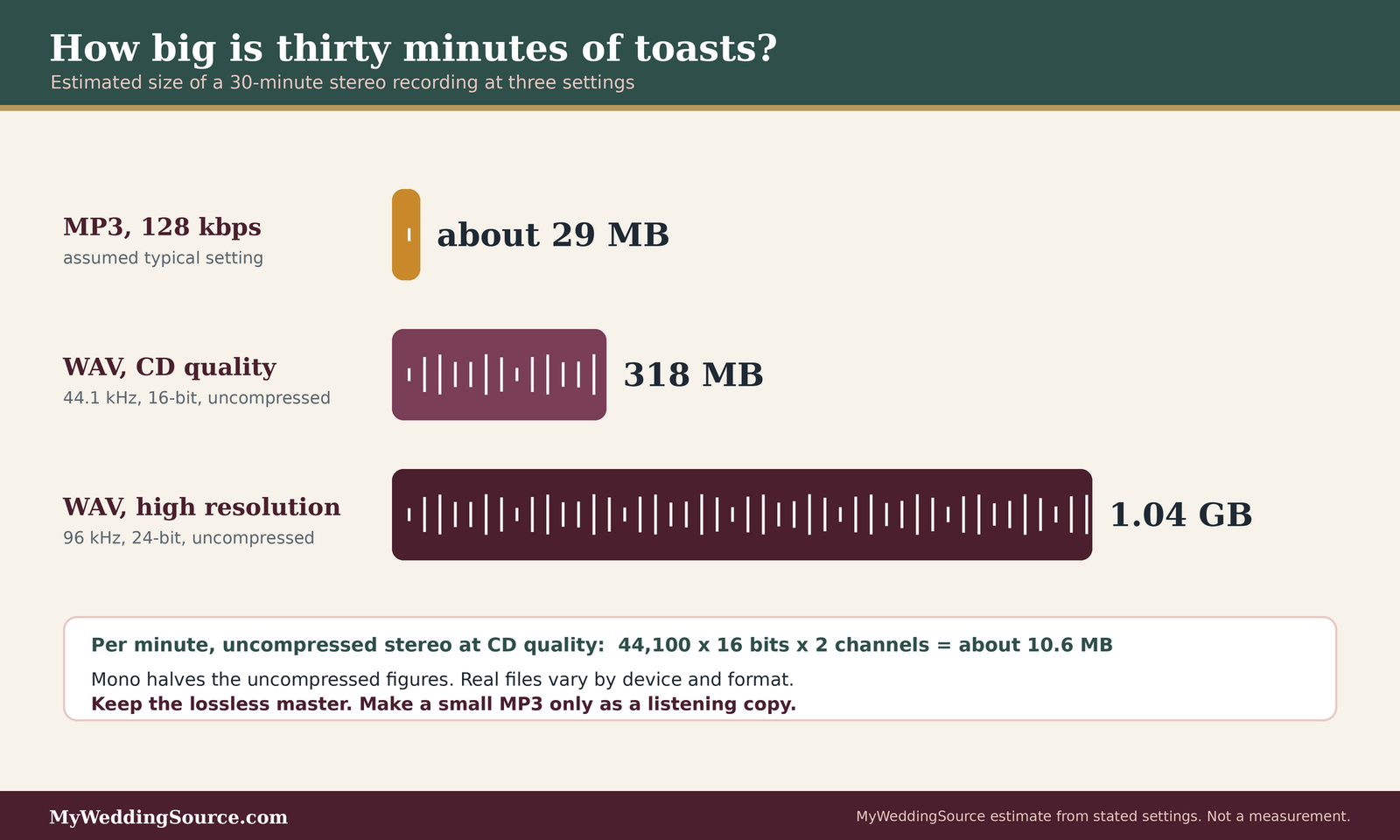
The arithmetic is simple. Uncompressed CD-quality stereo audio uses 44,100 samples per second, 16 bits per sample, and two channels, which comes to roughly 10.6 megabytes per minute. A thirty-minute block of toasts is therefore about 318 megabytes. At 96 kHz and 24 bits, the same thirty minutes is about 1.04 gigabytes. A 128 kilobit-per-second MP3, an assumed typical setting, is about 29 megabytes for thirty minutes. These are our own estimates from the stated settings; real files vary with the recorder, the number of channels, and the format. Recording in mono halves the uncompressed figures. The point is that even a high-resolution recording of every speech is small compared with wedding video, so storage is not a good reason to settle for low quality.
What this might cost
The core of how to preserve wedding speeches as audio and text can be free or close to it: a phone you already own, a friend to run it, and cloud or drive space you already pay for. The cost of the plan shows up in three places. A small dedicated recorder, an external drive, and extra cloud storage are purchases, and their prices change often, so we do not quote any. A vendor may charge to deliver separate audio files, or may include them, so ask before you sign. Professional transcription is another optional cost, and rates vary by provider and by how clean the audio is, so ask for a quote based on a sample of your own file. The W3C notes that hiring professionals is the best option when resources allow, and that automatic transcripts need significant proofreading. If you are watching your budget, spend first on a second recording source, then on a second storage location, and last on transcription.
Vendors, evidence, and fairness
Many couples never touch the microphone, which complicates how to preserve wedding speeches as audio and text without help. A DJ, band, venue technician, or videographer controls the sound, which means the plan depends on what those vendors agree to. This section gives you the questions to ask, then a record template that works both as your own archive log and as fair evidence if something goes wrong.
Ask vendors in writing before you sign
Verbal promises are easy to misremember a year later, and a vendor who is willing to write down what they will do is usually a vendor who has thought about it. Our guide to vendor due diligence covers the broader habit of checking before you pay.
Questions to ask about speech recording
- Will the toasts be recorded by you at all, and if not, may a guest or friend record from the board output?
- Is a separate audio file delivered, or only the edited film?
- Are complete, unedited speeches included, and in what file format?
- Who holds the original files, for how long, and will you keep a backup copy?
- What happens if a microphone fails or a speaker moves away from it?
- How will the files reach us, and by what date?
- Does your contract say what we may do with the recording once we have it?
Questions for the DJ, band, or venue sound technician
Ask who runs the speech microphones, how many microphones will be available, and whether a clean feed is available for a recorder. Ask whether there is a limit on connecting your own device, and whether a technician will be present during the toasts or only at the start. If the vendor declines to allow outside connections, ask whether they will record the board themselves, and whether files are delivered. A clear “no” is useful information, because it tells you to rely on the other sources in your plan.
Questions for the videographer
Ask what audio the camera and any clip-on microphone capture, whether speeches are filmed in full, and whether complete unedited clips are delivered or only a highlight edit. Ask how files are delivered and how long the vendor stores them. Ask whether the contract gives you permission to share clips, to edit them, or to post them online. If the answer is vague, ask for it in the contract, as covered in our piece on contract change orders.
The evidence and fairness template
This is the working record we suggest keeping from the first conversation through the final backup. It has two purposes. It stops information from living only in one person’s head, and it gives you a fair basis for judging a vendor’s work, because it separates what was promised from what was delivered. It is our own editorial template for how to preserve wedding speeches as audio and text, not a legal form.
| Field | What to write | Why it helps |
|---|---|---|
| Speaker and role | Full name, relationship, time slot | Identifies the recording later |
| Speaker’s choice | Family copy only, or okay to share with guests, and the date they said so | Guides every sharing decision |
| Planned sources | Board feed, camera, phone, handheld recorder | Shows the plan had no single point of failure |
| Who ran each source | Name and phone number | Tells you whom to ask if a file is missing |
| Test done | Date, who, what was heard | Proves the setup was checked |
| Files received | File names, format, date received, from whom | Separates promised from delivered |
| Original saved | Where, with the date copied | Protects the master |
| Copies made | Location of each copy | Confirms two or three places |
| Transcript status | Draft, proofread, speaker reviewed | Prevents unchecked text from circulating |
| Notes | Gaps, noise, anything unusual | Context for the future |
What to record as you go
Fill in the first columns before the wedding, the middle ones on the day, and the rest after. Keep it in a shared spreadsheet or a simple document, and give a second person access so the record survives if the person keeping it is unavailable. If you use online accounts to share it, read our notes on sharing planning passwords and accounts first.
How to use it fairly if a vendor falls short
If a promised recording is missing or unusable, the record lets you describe the situation with facts: what the contract or message said, what was delivered, and when you asked. That helps in a polite request to fix the problem, in a refund conversation if one is warranted, and in a review that someone can trust. A fair account states what was agreed, what arrived, what you asked for, and how the vendor responded, and avoids guessing at motives. Keep screenshots and dates, and keep the tone factual. If the dispute involves money or a contract term, this guide cannot advise you; check the contract and consider legal help.
When a recording fails
Failure is common enough that planning for it is not pessimism, and any guide to how to preserve wedding speeches as audio and text should say so. The question is what you can still recover.
Gather everything before judging
Before deciding that a speech is lost, collect every possible source: the vendor’s raw clips, guests’ phone videos, a livestream recording if there was one, and any written notes the speaker kept. Our piece on livestream and recording consent explains how a livestream raises its own permission questions. A guest’s clip that is poor as video may have perfectly usable audio.
Ask politely for what you need
When you contact a vendor or guest, give a specific request: which speech, which time, and which file type. People respond better to “Could you send the original file of the toast at about the second hour?” than to a general complaint. Thank those who help, and tell speakers if one of their recordings has a gap, so they hear it from you.
Secure the files in the first few days after the wedding
The hours after a wedding are busy, and the middle of how to preserve wedding speeches as audio and text is file handling. and files sent by well-meaning people end up scattered across phones, email attachments, and chat threads. A small routine in the first week prevents most losses, and it is the least glamorous part of how to preserve wedding speeches as audio and text.
Gather and copy without editing
The first rule of how to preserve wedding speeches as audio and text is to separate the keeping from the fixing. Nothing you do in this section should change an original file.
Collect every source into one folder
Ask each person who recorded to send the original file, not a screenshot, a compressed message version, or a link that expires. Some messaging apps shrink audio and video when you send it, so for the original, a cloud-folder upload or a direct file transfer is safer than a text message. Put every received file into one folder named for the wedding date, and note the source and date received in your record.
Make the first copy straight away
As soon as a file arrives, copy it to a second place before you listen, rename, or trim. Mark the original copy as read-only if your system allows it. If you edit anything, edit a duplicate. The Library of Congress’s personal archiving advice also suggests keeping the highest-quality version when you have several versions of one recording, so label the master clearly.
Name, organize, and describe
A recording called “New Recording 14” tells nobody anything in ten years. Descriptive names and a short written guide to the folder are what make an archive usable by someone who was not there.
A naming pattern that sorts itself
Put the date first so files sort in order, then the event, speaker, and source. For example: wedding date, “reception”, “toast-maid-of-honor”, “source-phone”. Use the same pattern every time, avoid special characters, and put the version in the name if you create edited copies, such as “master” and “listening copy”. Consistency matters more than the exact pattern.
A one-page summary for the folder
The Library of Congress advises writing a short summary of the folder structure and contents, and storing a copy of it with your important papers. For this archive, the summary can be a single page: what the files are, who is in them, what format they use, where the copies live, and who to ask. A future relative who finds a drive in a drawer can then make sense of it.
Keep two or three copies in separate places
Copies protect against failure only if they do not fail together. A backup on the same laptop as the original is not much of a backup.
The copies rule, in plain language
The Library of Congress advises at least two copies, with one on your computer and others on separate media such as portable drives or internet storage, kept in places physically far apart. CISA’s guidance for protecting data describes the 3-2-1 approach: three copies, on two different types of media, with one stored off-site. These sources address different audiences, but they agree on the idea. For a family archive, a workable pattern is the master on your computer, a copy on an external drive kept at home, and a copy in a cloud account or at a relative’s house.
Check that the copies still open
CISA stresses that backups help only if they work, and recommends testing recovery. The Library of Congress suggests checking at least once a year that you can open and read the files, and creating fresh media copies every five years or sooner if needed. Put both dates in a calendar reminder when you finish the first backup. If you open the files and the audio plays, the check is complete.

Turn the audio into text: the second half of how to preserve wedding speeches as audio and text
The text half of how to preserve wedding speeches as audio and text is where many people stop, because it is slow. A clear plan makes it manageable, and it matters, because text is the version that more of your family will read.
Choose how to create the transcript
There are three routes, and the W3C’s guidance on transcribing audio describes each: doing it by hand, using automatic speech-to-text, or hiring a professional. Our companion piece on wedding speech transcripts goes further into the options, and this section covers what matters for a preservation plan.
Typing it yourself
The W3C describes manual transcription as accurate but tedious, because you stop and restart constantly, and suggests software that slows playback and makes pausing easy. For a few three-minute toasts, it is a reasonable weekend project, and it has a side benefit: you hear every word again.
Automatic drafts and professional help
Automatic software can produce a first draft quickly, but the W3C warns that accuracy varies and errors can change meaning, with a dropped negation as an example. If you use one, treat the result as a rough draft, not a finished transcript. A professional service is the option the W3C calls best when resources allow, and you can also start from an existing script, provided you edit it to match the final audio. If you upload speeches to an online service, read its privacy terms first, since the recording contains family voices.
What a good transcript contains
A transcript is more useful when it follows a few conventions. These come from the W3C’s transcribing guidance, adapted to a wedding.
Speakers, sounds, and unclear moments
Identify who is speaking, using the full name on first mention and a single name afterward. Note sounds that carry information, such as laughter, applause, or a glass being tapped, in parentheses. Where speech cannot be understood, mark it, for example with “[unintelligible]”, instead of guessing. Wedding toasts are full of laughter and interruptions, and those notes preserve some of the atmosphere that plain words lose.
Verbatim or lightly cleaned
Legal-style transcripts are verbatim, including filler words, while for most web content filler can be left out, as long as the text is not altered, censored, or corrected. For a family record, we suggest keeping the speaker’s actual phrasing, including the jokes and the odd sentence structure, and removing only stumbles that make reading harder. Whatever you choose, write the rule at the top of the document, so a reader knows how faithful it is.
Proofread against the audio
A transcript that has not been checked is a draft. The cost of an error is higher than it seems, because text looks authoritative.
Check names, numbers, and negations
Names, dates, places, and the word “not” are the most likely errors and the most damaging. Listen to those passages again at normal speed. If a speaker mentions a relative’s name, ask the family to confirm the spelling, and fix it in the transcript.
Let speakers review their own words
Offer each speaker the chance to read their transcript and flag anything wrong. Some will want a mumbled joke removed from the shared copy, and honoring that is generous. Keep the audio original unchanged, and keep a note about what was changed in the text and why, so the record stays honest about the difference. ## Sharing, privacy, and access
Preservation is quiet, and sharing is social, so the last part of how to preserve wedding speeches as audio and text is deciding who sees it. Once the files are safe, you can decide who sees and hears them, and how.
Decide who gets which version
Different people want different things, and it is simpler to prepare a few versions than to answer each request one by one.
The family archive and the listening copy
The family archive holds the masters, the transcripts, and the record, and only one or two trusted people need access to it. The listening copy is a smaller, compressed file, with the transcript attached, that you can send to relatives. Keeping them separate means a casual share never touches the master. A relative who asks for “the toast” gets the listening copy, and the archive stays intact.
Private links, not public posts
When you share by link, choose a setting that limits access to people you invite, and note in your record who received which speech. A private link can be revoked, while a public post can be copied. If a speaker agreed to a family copy only, respect that choice; if you later want to widen it, ask again.
Accessibility and privacy for guests and speakers
How to preserve wedding speeches as audio and text also raises a privacy question: a recording involves both the person speaking and the people who laugh, cry, and answer in the background. Both groups deserve a thought.
Offer text so more people can take part
In any plan for how to preserve wedding speeches as audio and text, a transcript lets a grandparent with hearing loss, a guest who is deaf, or a relative abroad follow the toast. If you plan to share a video of the speeches with guests, captions do the same job in sync with the picture, and our guide to wedding video captions covers them. A transcript and a caption file serve overlapping needs, and neither replaces the other. For live interpretation, see our guide to arranging ASL interpretation for wedding toasts, because an interpreter in the frame changes how the video is shot.
Think about what a speech reveals
Toasts can include stories about health, family disagreements, past relationships, or children’s names. Before you share beyond the immediate family, read the transcript with that in mind. You can share a version with a sensitive passage removed, and mark the edit in the text, while keeping the complete master in the archive. This respects the people mentioned without rewriting what was said. Our overview of wedding planning website privacy and security covers where a shared file might end up if it is posted on a wedding site.
Edge cases that need their own plan
Most weddings fit the plan for how to preserve wedding speeches as audio and text described above. A few situations do not, and it is better to meet them before the day than during it.
When the audio is thin or missing
Sometimes the best source did not work, a common snag when working out how to preserve wedding speeches as audio and text, and you are left with a distant or noisy recording. Do not discard it, because a poor recording is still evidence of what was said.
A speech captured only from the room
A phone clip recorded from a guest’s seat will pick up the room more than the speaker. Keep the original, make a copy, and try gentle cleanup, such as raising the volume or trimming silence, on the copy only. Do not expect software to produce clarity that was never recorded. The transcript becomes more important here, since a careful listener can often make out words that a casual one cannot, and marking unclear passages honestly is better than guessing.
Rebuilding from notes and memory
If nothing usable exists, a written version can still be a keepsake. Ask the speaker for their notes or script, and ask two or three listeners what they remember. Label the result clearly as a reconstruction, with the date and the contributors, so nobody mistakes it for a verbatim record. The W3C notes that an existing script can serve as a starting point for a transcript if it is edited to match the final audio, and for a lost recording, this is the closest equivalent.
Unusual speakers and formats
A few speeches strain the usual setup, and each has a simple adjustment.
Remote speakers, livestreams, and speeches in another language
A remote speaker may be on a screen, with their audio coming through the room’s speakers. Record the source as well as the room, if you can, and treat the livestream as one more file. If a speech is in another language, ask the speaker or a relative to review a transcript, and keep the original-language text alongside any translation, labeling the translation as one. Our guide to livestream and recording consent is worth reading if remote guests are watching and recording on their own devices, and our note on an unplugged wedding ceremony explains how couples handle guest recording at the ceremony itself.
Emotional, unscripted, or contested moments
Some speeches become more than expected: a speaker who is overcome, a joke that lands badly, a toast the couple would prefer not to keep. You do not have to decide in the moment. Keep the original files, mark the speech in your record, and discuss it later with the people involved. Preserving something and distributing it are different decisions, and you can make the second slowly. If a speaker asks you to delete a recording of their own words, consider the request carefully and honor what you can, while thinking about whether other family members hold copies.
Keep it findable for decades
How to preserve wedding speeches as audio and text includes the years afterward: an archive is not finished when the files are copied. It is finished when someone other than you could find it, open it, and understand it.
Maintenance that takes minutes
Digital files fail quietly, which is why how to preserve wedding speeches as audio and text includes upkeep. Drives stop working, accounts lapse, and software changes. Light, regular attention is what prevents that.
The yearly check
Pick a date, such as the wedding anniversary, to open a few files from each copy, play a few seconds, and confirm the transcript opens. The Library of Congress suggests this check at least once a year. Note the date in your record. If a file will not open, restore it from another copy straight away, and then make a replacement copy so you again have more than one.
The five-year refresh
The Library also suggests creating new media copies every five years, or sooner if needed. In practice, this means replacing an old drive with a new one and moving the files over, and checking that cloud accounts are still active and paid. Opening the files after the move confirms the copy. Update the record with the new locations and the date.
Pass the archive on
Sooner or later someone else will be the person who knows where the files are, and how to preserve wedding speeches as audio and text should include handing that knowledge on. Making that easy is part of the work.
Tell someone where it lives
Give one trusted person, such as a sibling or parent, the one-page summary and the location of each copy, and explain how to reach the cloud account. Keep account access in a password manager or another secure method, not on a sticky note. This is also the sensible moment to review our notes on keepsake storage, because a drive kept with your wedding keepsakes should be stored carefully too.
Add it to the larger after-wedding list
Work on how to preserve wedding speeches as audio and text belongs with the other after-wedding tasks: thank-you notes, photo delivery, and record-keeping. Our after-wedding checklist gives you the broader list, and wedding thank-you cards is a good place to remember the people who recorded for you. A short note of thanks to the friend who ran the backup phone is a kind way to close the loop.
FAQ: how to preserve wedding speeches as audio and text
Planning and consent
Do I need permission to record wedding speeches?
Federal law, as summarized from the statute, allows a participant or a party with consent to record, but state laws differ, and this is not legal advice. As a courtesy, tell each speaker in writing beforehand and ask how they want the recording shared. If you have a specific concern, ask a lawyer licensed in your state.
How many recordings of each speech are enough?
When working out how to preserve wedding speeches as audio and text, aim for at least two independent sources, such as a recorder on the venue’s sound board plus a phone near the speaker. If one fails or captures only noise, the other can still hold the speech. Camera audio can be a third source if delivered.
Should I ask my videographer for the audio separately?
Yes, ask before signing. Many deliverables include only an edited film in which toasts are shortened. Ask whether the complete, unedited speeches and any separate audio files are delivered, in what format, by what date, and how long the vendor keeps copies. Put the answers in the contract or in writing.
Files and storage
What file format is best for wedding speech audio?
The Library of Congress advises open formats for personal archives. For its own collections it prefers uncompressed, high-resolution WAVE files, with CD-quality WAVE acceptable. For a family, record at the highest quality your device offers, keep that original untouched, and make smaller compressed copies for listening and sharing.
How many backup copies do I need?
The Library of Congress advises at least two copies, kept in physically separate places. CISA describes a 3-2-1 approach: three copies, on two kinds of media, with one off-site. A master on your computer, a drive at home, and a cloud or relative’s copy is a workable pattern. Check them once a year.
How big are the files?
Our estimate: uncompressed CD-quality stereo audio is roughly 10.6 megabytes per minute, so a thirty-minute block of toasts is about 318 megabytes. A 128 kilobit MP3 of the same length is about 29 megabytes. Real files vary with the device and settings, so check a test recording on yours.
Transcripts and sharing
Can I rely on automatic transcription?
Treat it as a rough first draft. The W3C warns that accuracy varies and that errors can change meaning, as when a dropped word reverses a sentence. Listen to the audio while reading, correct names and negations, and mark unclear passages. A professional service is an option when resources allow.
Is it okay to share a speech on social media?
That depends on the speaker’s choice and your own judgment. Preserving a speech privately is separate from posting it, and a public post is hard to withdraw. Ask each speaker beforehand, prefer private links for family, and keep the complete master in your archive in case anyone changes their mind.
Your next steps
Before the wedding
Write down the plan and tell the speakers
To put how to preserve wedding speeches as audio and text into practice, list each speech, the two sources that will record it, and the person running each. Send speakers a short note saying they will be recorded, who keeps the copy, and how it may be shared. Add your vendors’ answers to the record, and read our wedding planning checklist to place these tasks on the wider timeline.
Test the equipment on the day
Arrive early, record a short sample with the room set up, listen back with headphones, and note the result. Confirm that the recording device has power, storage, and silenced notifications.
After the wedding
Copy, name, and back up in the first week
Collect original files from every source, make a first copy before you do anything else, name the files consistently, and place copies in at least two separate locations. Write the one-page summary and give it to a trusted person.
Transcribe, proofread, and schedule the checks
Draft transcripts by hand or software, then proofread against the audio and let speakers review. Put the yearly check and the five-year refresh in your calendar, and thank the people who recorded for you.
Sources & methodology
How we built this guide
What we relied on
This guide on how to preserve wedding speeches as audio and text combines the Library of Congress’s personal archiving advice for digital audio, its Recommended Formats Statement for audio, the W3C’s guidance on transcribing audio and its accessibility explanation of text alternatives, CISA’s backup guidance, the federal wiretap statute as published by Cornell’s Legal Information Institute, the Reporters Committee’s recording-law guide, the U.S. Copyright Office’s circular and FAQ, and the StoryCorps interview-recording page. The file-size figures are our own arithmetic from the stated audio settings and an assumed 128 kilobit-per-second MP3, and they are estimates. We checked these sources on November 12, 2026, and we do not claim they are current beyond that date. Where we describe a source, we paraphrase it.
What we did not do
We did not test recorders, apps, or transcription services, and we do not recommend a product. We did not compare state recording laws, and nothing here is legal advice about consent, copyright, or contracts. We did not verify the details of any specific phone or app’s recording settings. Costs for equipment, storage, and transcription change often, so we quote none.
Source list
Government, legal, and standards sources
- Library of Congress, Personal Archiving: Preserving Your Digital Memories, digital audio: https://digitalpreservation.gov/personalarchiving/audio.html
- Library of Congress, Recommended Formats Statement, audio: https://www.loc.gov/preservation/resources/rfs/audio.html
- Library of Congress, Ask a Librarian, preserving audio/visual collections: https://ask.loc.gov/preservation/faq/338796
- CISA, Back Up Business Data: https://www.cisa.gov/back-business-data
- Legal Information Institute, 18 U.S. Code section 2511: https://www.law.cornell.edu/uscode/text/18/2511
- U.S. Copyright Office, Circular 1, Copyright Basics: https://www.copyright.gov/circs/circ01.pdf
- U.S. Copyright Office, FAQ definitions: https://www.copyright.gov/help/faq/faq-definitions.html
- W3C Web Accessibility Initiative, Transcribing audio: https://www.w3.org/WAI/media/av/transcribing/
- W3C, Understanding Success Criterion 1.2.1, audio-only and video-only (prerecorded): https://www.w3.org/WAI/WCAG22/Understanding/audio-only-and-video-only-prerecorded.html
Journalism and oral-history sources
- Reporters Committee for Freedom of the Press, Reporter’s Recording Guide: https://www.rcfp.org/reporters-recording-guide/
- StoryCorps, How to record your interview: https://storycorps.org/how-to-record-your-interview-cecile-richards/