

A digital contingency plan for your wedding day is a short, practical document that says what you will do when a phone, an app, a file, a login or a connection stops working. This guide shows you how to build one that survives a dead battery, a venue with no signal, a locked account and a vendor who cannot find the file. It is written for couples, planners and the friend who has been asked to “just handle the logistics.”
Write your wedding day digital contingency plan around one rule: everything the day needs to keep moving must exist in a form that works without a signal. That means a printed runbook, a contact owner chart that names one person for each vendor, a second copy of every critical file on a device that is not a phone, and an access list that says who can open which account. Test the digital contingency plan once before the wedding. Keep it to a few pages so that someone other than you can run it.
Most wedding problems are not dramatic. A text goes unanswered. A playlist will not load. The photographer needs the family-photo list and it lives in a shared document that the venue Wi-Fi will not open. The coordinator’s phone is at four percent, and nobody has a cable that fits. None of these ruins a wedding by itself, but each one pulls a competent person away from what they should be doing, and they tend to arrive together, late in the day, when everyone is tired.
A digital contingency plan is the cheap insurance against that pile-up. It does not require technical skill. It requires an afternoon of honest listing, a printer, and a willingness to decide in advance who does what. The rest of this article walks through building a digital contingency plan, in the order you will actually do it.
What a wedding day digital contingency plan is, and what it is not
Think of the digital contingency plan as the answer to one question: if the digital part of this task fails, what do we do in the next five minutes? The answer has to be specific enough that a person who did not write the digital contingency plan can follow it.
A wedding day digital contingency plan covers four areas.
Communication. How the people running the day reach each other and the vendors, and what happens when the usual channel is down.
Files. The documents, images, audio and records the day depends on, and where the extra copies live.
Permissions. Who is allowed to open which account, folder, shared calendar or device, and how access is handed over if the person who normally has it is unavailable.
Power and connectivity. The batteries, chargers, hotspots and venue Wi-Fi that everything else rests on.
It is not a cybersecurity program, and it is not an insurance policy. It will not replace a wedding insurance policy, which handles financial loss from cancellations and vendor failures; if you are weighing that question, our guide to wedding insurance explains what those policies usually cover. It is also not a substitute for the planner’s or coordinator’s own timeline. It sits beside the timeline and protects it.
Why the wedding day needs its own digital contingency plan
Ordinary life has slack. If your phone dies on a Tuesday, you plug it in. On a wedding day the people who hold the information are moving between rooms, dressing, greeting, performing, driving or eating, and the information itself is spread over a dozen devices and accounts. The couple often cannot help, and should not be asked to. The stakes are not high in every case, but the margin for fixing things calmly is small.
There is a second reason. Weddings gather an unusual amount of personal information in one place: guest names, home addresses, phone numbers, dietary and allergy notes, accessibility needs, payment details, and sometimes passport or travel data. That information lives in spreadsheets, vendor portals, photo albums and message threads. A plan that only thinks about failure and ignores exposure will leave a different kind of gap. This article treats both.
The five places a wedding day digital contingency plan has to cover
Before you write anything, it helps to see the shape of the problem. Almost every digital hiccup on a wedding day falls into one of five groups. If your digital contingency plan has an answer for each group, you have covered most of what can realistically happen.
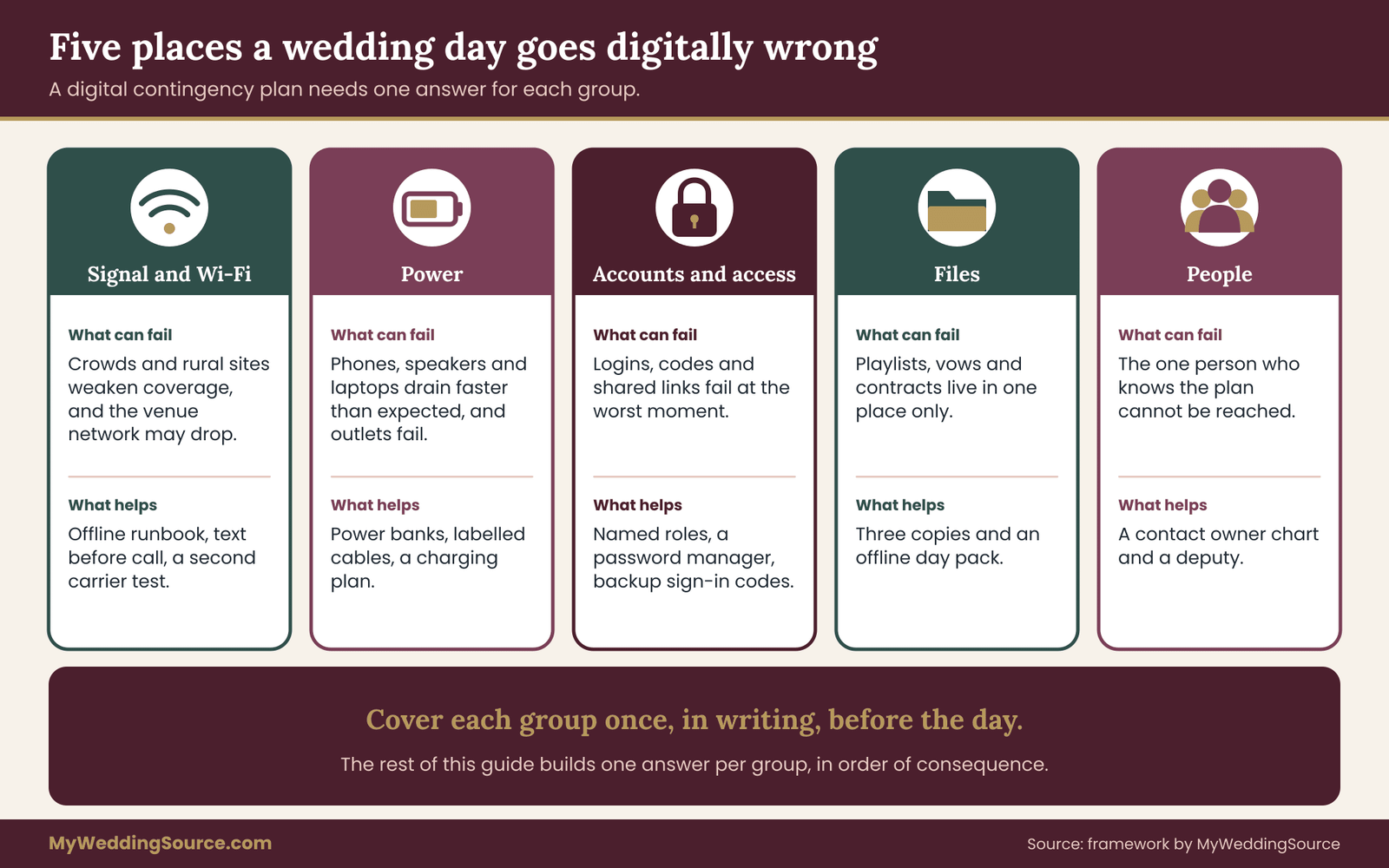
Signal. Cell coverage is patchy at barns, vineyards, parks, beaches, mountain lodges, old stone buildings and anywhere with thick walls. Even good coverage can degrade when many guests are uploading photos at the same time. Venue Wi-Fi, where it exists, is usually built for a handful of staff, not two hundred phones.
Power. Phones, cameras, speakers, lighting controllers, card readers and laptops all draw power, and the day is long. Batteries run down faster in heat and in cold, and screens stay on more than usual. A venue power cut is rare, but a single overloaded circuit or a tripped breaker is not.
Accounts. Logins fail. A two-step code goes to a phone that is in another room, or to the old number. A shared folder was owned by someone who is now in the ceremony. A vendor portal asks for a password that only the groom knew.
Files. The wrong version is open. The file did not sync. The USB stick will not mount. The playlist was streamed instead of downloaded. A memory card is corrupt. A single copy of the vows lives on a phone that is about to be handed to a stranger for a photo.
People. The person who knew the digital contingency plan is unreachable, ill, late or overloaded. A vendor does not have the coordinator’s number. A message went to the wrong group. A well-meaning guest posts a photo that was meant to stay private.
Notice that “people” is on the list. Most digital failures on a wedding day are really handoff failures: the information existed, but it was not where the right person needed it, when they needed it. A good plan spends as much effort on who knows what as it does on backup batteries.
The principle that holds a digital contingency plan together: offline first
If you remember one idea from this article, make it this one. For anything the day cannot run without, the working copy should not depend on a network.
Offline first does not mean “avoid technology.” It means you use your phones, shared folders and apps in the weeks before the wedding, because they are fast and convenient, and then you freeze and export the critical material into forms that keep working when the network does not. Printed pages. Files saved to the device, not just linked. A second device that holds a full copy. A spoken protocol that does not need a screen.
The reasoning is simple. A network is a chain of things you do not control: the venue’s router, the carrier’s tower, a cloud service’s servers, an app’s login system, the battery in the phone you are using to check it. Each link can fail independently. Paper, a charged device and a person who knows the digital contingency plan have almost no shared failure points, which is exactly what you want from a backup.
Offline first is not anti-digital: how a digital contingency plan still uses apps
Couples sometimes read this advice as a call to run the day on clipboards. That is not the point. You can keep a lively group chat, a live photo album and an online guest list. What changes is what you rely on at the moments that matter: the processional cue, the hand-off between the ceremony and the reception, the toasts, the cake, the send-off. For those, nobody should be waiting for a page to load.
How much digital contingency plan does your wedding need?
Not every wedding needs the same depth. A courthouse ceremony with ten guests and a restaurant dinner needs a half-page plan and a charged phone. A rural wedding for a hundred and fifty people with a live band, a livestream and shuttle buses needs a more careful one. Use these questions to judge the scale.
- Is the venue in an area where you have not personally tested coverage?
- Are more than two vendors working from digital files, such as a DJ with a laptop, a photographer who needs a shot list or a florist with a delivery schedule?
- Do you plan to livestream, project slides or run a digital seating chart?
- Will guests travel from outside the area, so that day-of messages matter?
- Are key tasks held by a single person who also has a role in the ceremony?
- Are you sharing sensitive guest data with several people?
Every “yes” raises the value of a written plan. Three or more, and you should treat it as a proper project, with an owner, a deadline and a rehearsal. The rest of this guide is built so that you can do the short version or the full version. The short version is marked as we go.
Who should own the digital contingency plan
Give the digital contingency plan one owner. This is the most common gap. If the digital contingency plan belongs to “the couple,” it belongs to nobody on the day, because the couple will be busy being married. A better owner is your wedding planner or day-of coordinator if you have one. If you do not, choose a calm, organized person who has no major role in the ceremony: a sibling, a cousin, a trusted friend, a member of the wedding party who is not in the processional.
The owner does three things. They build the plan with you. They hold the master printout and the backup device on the day. And they decide, using the severity ladder later in this article, when a problem is small enough to fix quietly and when it needs to reach the couple or a parent. If you are also working with a coordinator, our guide on wedding party coordination shows how to divide duties among the people around you so that the plan owner is not doing everything. ## Start your digital contingency plan with a dependency inventory
You cannot protect what you have not listed. The first working step in any wedding day digital contingency plan is an inventory of every digital thing the day touches. This is a one-evening job, and it is more revealing than it sounds. Couples routinely discover that the ceremony depends on a single phone, or that the only copy of the vendor arrival times is in an email thread on a laptop that will be at home.
The simplest method is to walk through your timeline from the first hair appointment to the last shuttle and ask at every step, “What digital thing does this rely on?” If you do not have a detailed timeline yet, build that first; our guide to planning a wedding timeline covers the structure, and the digital contingency plan you are making here simply adds a layer on top.
As you go, write each dependency as one short line with four parts: what it is, who uses it, what stops or slows if it fails, and what the fallback is. You are not building a spreadsheet for its own sake. You are forcing yourself to notice the fallback column, because that is the column that is usually empty.
What usually ends up on the list
Most inventories look similar, so you can use these groups as prompts.
- Communication. Group chats, the coordinator’s phone, vendor phone numbers, the venue’s on-site contact, the guest text service, walkie-talkies or headsets if you use them.
- Documents. The timeline, the contact list, vendor contracts and arrival sheets, the family photo list, the seating chart, the meal and allergy list, the ceremony script, readings and vows, the speech order.
- Audio and media. Processional music, first dance, playlists, announcements, the DJ’s library, slideshow files, videos for the reception.
- Guest-facing items. The wedding website, QR codes on signs or programs, a digital seating chart, a shared photo album, a hashtag, a livestream link, a rideshare or shuttle schedule.
- Money. Final balances, tip envelopes or payment links, a vendor’s card reader, a venue’s deposit refund process.
- Accounts and devices. Email, cloud storage, shared calendars, password manager, vendor portals, phone and laptop logins, the device that runs the music or the slides.
- Connections. The venue’s Wi-Fi, a mobile hotspot, cell coverage in each area of the venue, a hardwired speaker or projector cable.
Do not worry if the list reaches forty or fifty items. Most are trivial. The next step sorts them.
Sort your digital contingency plan by consequence, not by gadget
The common mistake is to rank items by how technical they feel. A QR code feels more fragile than a paper timeline, but if the QR code only opens a menu card and the timeline runs the day, the paper timeline matters more. Sort by what happens when the thing fails.
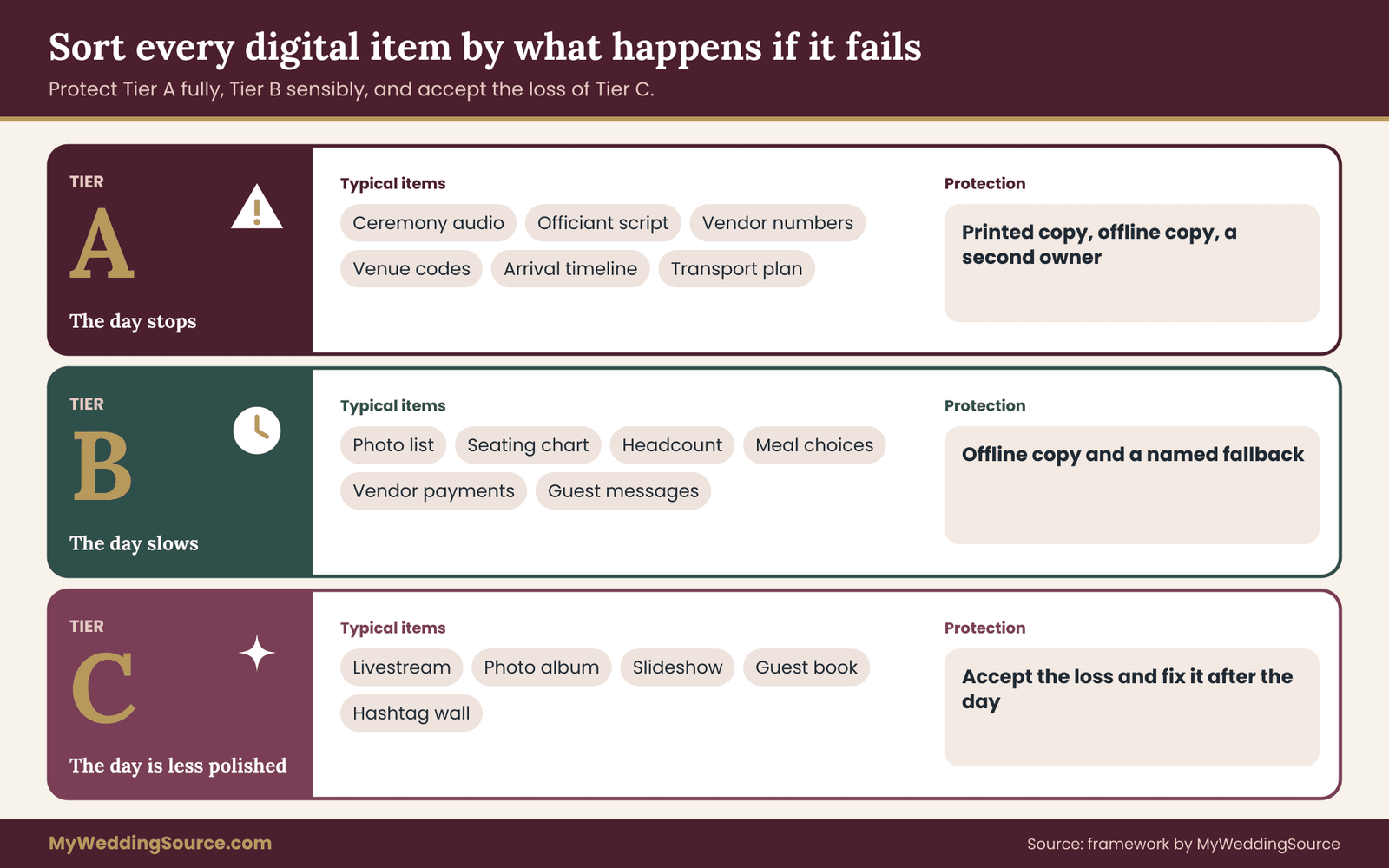
Tier A: the day stops. These are the items without which a key moment cannot happen or a vendor cannot do their job. Typical examples: the ceremony audio and processional music, the officiant’s script and any vows that will be read aloud, vendor contact numbers and the arrival timeline, venue access details such as gate codes and who has the key, and the transport plan for guests or the couple.
Tier B: the day slows. If these fail, things get awkward and someone has to improvise, but the day goes on. Examples: the family photo list, the seating chart, the final headcount and meal choices, payment details for vendors, guest messaging, the reception run-of-show.
Tier C: the day is less polished. These are the extras. The livestream, a shared photo album, a looping slideshow, a digital guest book, a hashtag wall.
Each tier gets a different level of protection.
- Tier A gets a printed copy, a saved copy on a second device that is not a phone, and one named owner. Nothing in this tier should exist only in a cloud link.
- Tier B gets a printed or saved copy, and the owner knows where it is.
- Tier C gets a decision in advance about what you will do if it fails. Often the answer is “nothing, and we will not mention it,” which is a perfectly good answer.
Decide what your digital contingency plan can drop
This step is easy to skip and worth taking seriously. Write one line for each Tier C item that says what you will do if it fails. If the livestream drops, your cousin posts a short update to the family group and you send the recording later. If the slideshow will not play, it is skipped and the photographer shares the photos after the wedding. If the digital guest book does not work, there is a notebook on the table. Deciding ahead removes the guilt and the scramble. Nobody should be fixing the projector while the first dance is being announced.
Build the offline-first runbook for your digital contingency plan
The runbook is the heart of the digital contingency plan. It is a printed packet of a few pages that contains everything the day cannot run without. The point is not to make a thick binder. It is to make a short, ordered set of pages that any calm adult could pick up and use.
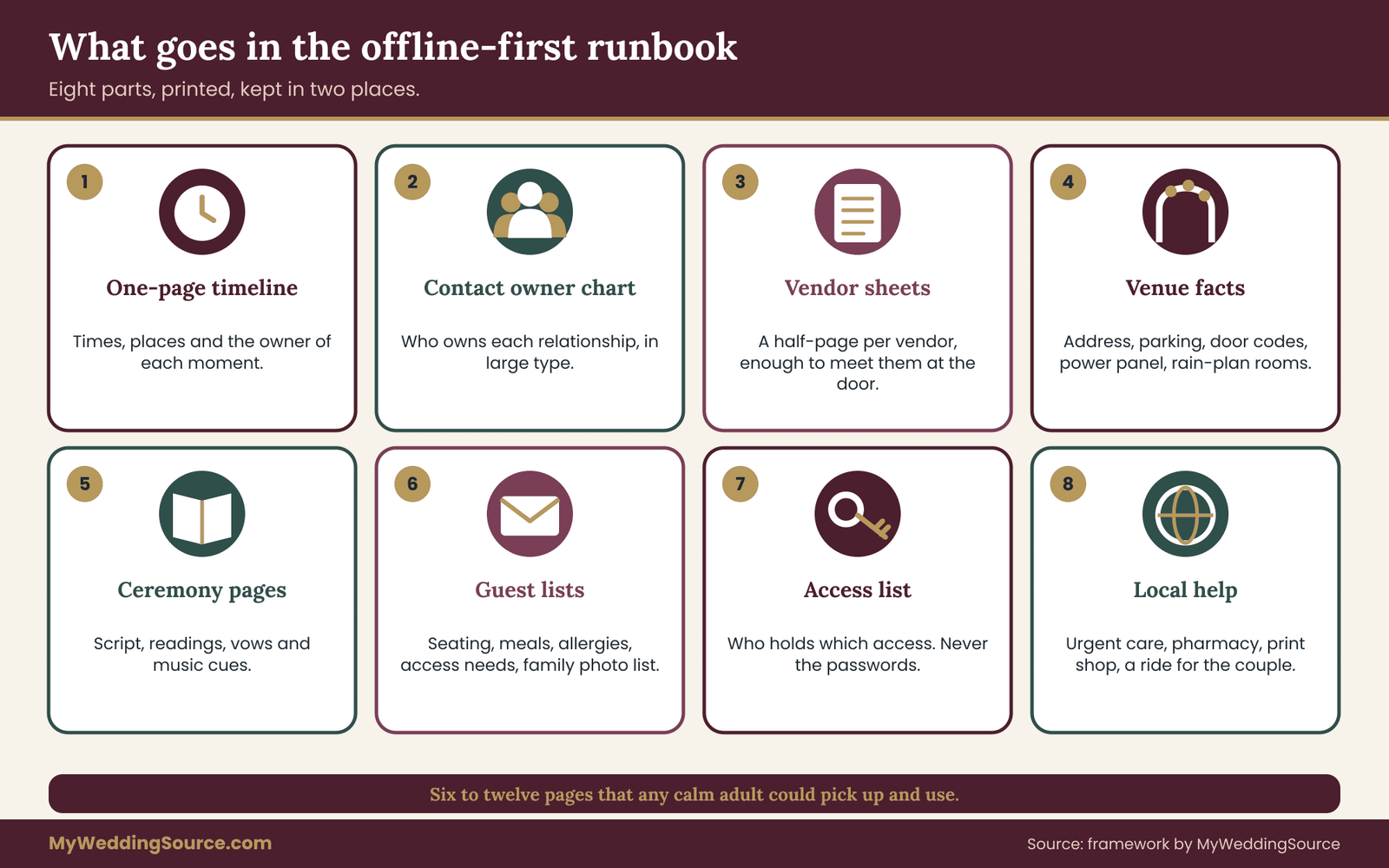
A good runbook has eight parts.
- One-page timeline. Times, places, and the owner of each moment. If you also run a longer vendor timeline, put the short version first. Our guide to a wedding vendor timeline shows how vendor arrival, setup and teardown windows fit around the guest timeline.
- Contact owner chart. One page, large type, listing who owns each relationship. The next section explains how to build it.
- Vendor sheets. One half-page per vendor: company, the person on site, their mobile number, arrival and load-in time, what they need from the venue, who pays or tips them and when, and what they need from you. Keep the sheet to what a stranger would need to meet them at the door.
- Venue facts. Address and parking, the on-site contact, gate or door codes, the location of power panels or the person who knows it, Wi-Fi details if the venue provides it, rain-plan locations, and the venue’s quiet hours.
- Ceremony pages. The script, the readings, printed copies of the vows, the order of the processional and any cues that depend on music.
- Guest lists. The seating chart, the meal and allergy list, any accessibility needs, and the family photo list. These contain personal information, so the packet has to be held carefully; the permissions section explains how.
- Access list. Not passwords. A list of who holds which access, and where the sealed emergency envelope is, if you use one.
- Local help. Nearest urgent care, a pharmacy, a printer or office supply store, and a taxi or rideshare option for the couple.
Format matters more than it seems
Use a plain typeface at a size that a tired person can read without glasses. Put the time on the left. Avoid color as the only signal, because the printout may be black and white. Number the pages. Staple or clip each vendor sheet so it can be handed over without taking the whole packet. Make two copies: a master that stays with the plan owner and a second that stays in a known place, such as the bridal suite or the planner’s bag. Photograph the pages and save the images to the phone’s photo library. A photo works with no signal and no app.
Freeze the digital contingency plan, then control changes
Pick a freeze date about three days before the wedding. After that date, the content of the digital contingency plan is fixed except for a short change log. Print the packet after the freeze. Name the files with the date and keep one master. Any change after the freeze goes into the change log on the front page and is sent by text to the people it affects. Without a freeze, every printed copy is a slightly different version, and the vendor who has yesterday’s arrival time becomes a problem at six in the morning.
If you only have an evening for your digital contingency plan, do three things. List the Tier A items. Print a one-page timeline and a one-page contact owner chart. Save a copy of the ceremony audio and the timeline on a second device. That alone covers most of the realistic failures.
Backup communication in a digital contingency plan starts with a contact owner chart
When people say “we had a communication breakdown” on a wedding day, they usually mean one of two things. Either nobody was assigned to talk to a vendor, so everyone assumed someone else would, or three people were assigned and the vendor received three different instructions. The contact owner chart fixes both at once.
The idea is simple. Every vendor, venue contact and key guest group gets exactly one owner on your side. The owner is the only person who gives them instructions and the first person who answers their questions. Each owner also has a deputy who steps in if the owner is busy or unreachable. The couple are not owners. Their phones should be the quietest on the day.
A realistic chart might say that the photographer’s owner is a sister, with the coordinator as deputy; the DJ’s owner is the best man, with the coordinator as deputy; the caterer, the venue manager and the transport company belong to the coordinator, with the plan owner as deputy; the officiant belongs to a parent, with a cousin as deputy. The names are examples. What matters is that the chart has no blank cells and no double entries.
For each line, write the owner’s mobile number and one backup way to reach them, such as the number of the person next to them or a second app. Print the chart on a single page in large type and put it at the front of the runbook. Send the same page to every owner and deputy a week before the wedding, so nobody learns about their job on the morning.
Ask vendors for one day-of contact
The chart only works if the other side cooperates. When you confirm each vendor, ask for the mobile number of the person who will actually be at the venue, not just the office line or the account manager. Photographers often have a second shooter, caterers have a site lead, and bands have a tour manager. Those are the numbers that matter at four in the afternoon. Our guide to vendor due diligence lists the questions worth asking before you sign, and a day-of contact is one of them.
Build a channel ladder with time limits
A channel is how a message travels: text, phone call, another messaging app, radio, or a person walking over. A channel ladder is an agreed order for trying them, with a time limit at each rung, so nobody has to decide under pressure whether it is time to escalate.

Rung one: text. Texts are quick, leave a written record, and work on weak signal better than calls or data-heavy apps. Use text first for almost everything.
Rung two: a phone call. If a Tier A issue has gone unanswered for five minutes, call. If a Tier B issue is unanswered for fifteen, call. Agree the times in advance so that nobody feels they are nagging.
Rung three: a different channel. If the call also goes unanswered, switch to something that does not share a failure point: a different messaging app, a call to a second number, a message through the deputy, or a radio if you use them.
Rung four: a person. Send a runner. At most weddings, the fastest reliable channel for an urgent problem within the venue is a person on foot. Name who the runners are: usually a member of the wedding party who is not needed at that moment, or a venue staff member.
Write the ladder on the contact owner chart, so that the rules sit next to the names. The time limits are the useful part. They turn “I wonder if I should call” into “it has been five minutes, I call.”
Test coverage before your digital contingency plan relies on it
You cannot judge signal from the venue’s marketing page. If you can, test the places that matter during a site visit, and do it with more than one phone.
Walk the full route of the day: the parking area, the bridal suite, the ceremony spot, the cocktail area, the reception room, the kitchen or service area, and the exit where the shuttles will pick up. At each place, check whether a call connects and whether a message sends. Ask friends or family who use different carriers to repeat the walk, because coverage can differ a lot from one network to another. If you have both a call and a data test, note which of them works.
Then write what you find in the venue facts page. Something as plain as “no signal in the barn; one bar by the north door; the kitchen has Wi-Fi” changes how the coordinator plans. If coverage is poor in a key area, ask the venue what they use themselves. Many venues with weak signal have a landline, a staff radio system or a Wi-Fi network that they can open to vendors.
If you cannot visit before the wedding, ask the venue three questions in writing: Is there reliable mobile coverage in the ceremony and reception areas? Is there Wi-Fi, who can use it, and how many devices can it handle? Where is the nearest landline or staff phone? Keep the answers.
Use a second connection where it counts
A common and inexpensive backup is a second path to the network. If your phone supports it, Wi-Fi calling lets calls and messages go through a Wi-Fi network when the cell signal is weak. A phone with two SIM or eSIM lines can keep a second carrier active. A mobile hotspot from a different carrier from the one on the coordinator’s phone covers the case in which one network has a local problem. None of these are necessary for every wedding. All are quick to set up in the week before, and a coordinator who handles forty vendors’ messages will benefit.
Two-way radios in a digital contingency plan for the small team
Radios are not glamorous, and they are the best answer to bad signal on a large site. Handheld radios in the Family Radio Service need no individual license in the United States, though they come with limits on power and equipment, and the General Mobile Radio Service uses a different set of rules and does require a license. The FCC explains both on its personal radio pages, and it is worth reading before you buy or borrow a set.
A few practical points. Range indoors is much shorter than the number on the box, because walls and metal absorb signal. Everybody on the same channel can hear everything, including strangers on the same frequency, so keep conversations short and free of personal information. Use plain words, say who you are calling and who you are, and agree on one code phrase that means “come to me now.” Headset earpieces are less intrusive than a radio on the hip.
Give radios only to the small team that needs them: the coordinator, the venue manager, the caterer’s site lead and perhaps the DJ and the photographer. Ask the venue first; many already have a set they will lend.
Group chats inside your digital contingency plan
The way group chats are set up can help or hurt. Three separate chats work well.
An operations chat holds only the people who run the day: the plan owner, the coordinator, the vendor owners and the venue contact. It is for questions, arrivals and problems. Pin the timeline and the three numbers to call. No jokes, no photos, no side conversations.
A wedding party chat is for the people who are dressing, standing up and being photographed. Reminders and group coordination live there.
A family chat is for parents and relatives. It can be warm and chatty, but it is where the day’s rumors start, so leave operational questions out of it.
Name each chat clearly. Mute the others during the ceremony. And tell everyone in the operations chat that if a message could be read as a problem, it begins with a word that shows the severity, such as “Urgent” or “FYI.” The severity ladder later in this article explains the levels.
Short messages that work under stress
Under pressure, people write long, vague messages. Agree on a few short formats ahead of time and put them in the runbook.
- Arrival check. “[Vendor], are you on site? Reply with your ETA if not.”
- Delay notice. “Running about fifteen minutes behind. Next step is [step]. Please hold [thing].”
- Problem alert. “Urgent: ceremony audio not working at the ceremony site. Need the DJ there now.”
- Resolved. “Fixed. Carry on.”
- Handover. “I am stepping away until [time]. [Name] has the digital contingency plan.”
The “resolved” message matters more than it seems. Without it, people keep worrying about an issue that has already been solved.
Guest messaging in a digital contingency plan
Guests need to know about changes to shuttles, the start time, weather or parking, and you do not want to be the one typing those updates. Choose one sender, preferably the coordinator, and write five or six short messages ahead of time that you can send at a moment’s notice: shuttle running late, ceremony start delayed, move to the rain location, parking closed, dinner is served.
Remember that guests gave you their numbers for RSVPs, not for marketing. Use the list only for event updates, let anyone ask to be removed, and delete the list after the wedding. Then add a non-digital layer. Post a printed sign at the hotel lobby and the venue entrance, brief the hosts or ushers to pass on changes by word of mouth, and ask the hotel front desk to hold a short message sheet. If the weather plan changes, our guide to an outdoor wedding rain plan has wording for guest announcements.
Severe weather and other public emergencies can also trigger Wireless Emergency Alerts, which authorities send to compatible phones in the affected area. Those alerts are sent through a different path from ordinary texts and can reach phones when other messages are slow. They are a reason to keep phones on and audible for guests who are in the area, not a tool you control.
Protect the couple’s phones
The couple should not be the first line of defence for any problem. Decide whether their phones are with them at all. Some couples hand their phones to a trusted person for the ceremony and the formal photographs. Others keep them but set Do Not Disturb with an allow list that includes only the plan owner and the parents. Either way, give the plan owner’s number to the people who might otherwise call the couple, so questions reach the right person.
If the owner of the digital contingency plan disappears
Plans break when the owner is unreachable. Name a deputy, make sure the deputy has a copy of the runbook, and tell every vendor owner who the deputy is. The deputy does not need to do anything until needed. They need to know that they might be needed, and they should have the master printout within reach. ## Power is the quiet single point of failure in a digital contingency plan
Nearly everything in your wedding day digital contingency plan assumes that a device has charge. That is why power deserves its own section. A dead phone is the most likely digital failure at any wedding, and it is also the easiest to prevent.
Estimate what you need
You do not need a spreadsheet, only a rough count. Start with the devices that matter to the day: the coordinator’s phone, the plan owner’s phone, the couple’s phones if they carry them, the phone or tablet that runs any music or slides, the photographer’s batteries, and any laptop or controller that a vendor uses. Then think about how long the day lasts and how heavily each device is used. A coordinator who is texting, calling, taking photos of setup and checking the timeline from seven in the morning until eleven at night will drain a phone far faster than a guest will.
A useful rule is to plan for two full charges per heavily used phone across the day. Portable chargers are sold by the capacity written on the label, but the amount you actually get is lower, because some energy is lost when the battery converts power for your phone. Treat a ten thousand milliamp-hour battery as roughly one and a half to two phone charges rather than three. Check the capacity of your own phone, which is usually between three and five thousand milliamp-hours, and do the arithmetic.
Build one power kit for the digital contingency plan and give it an owner
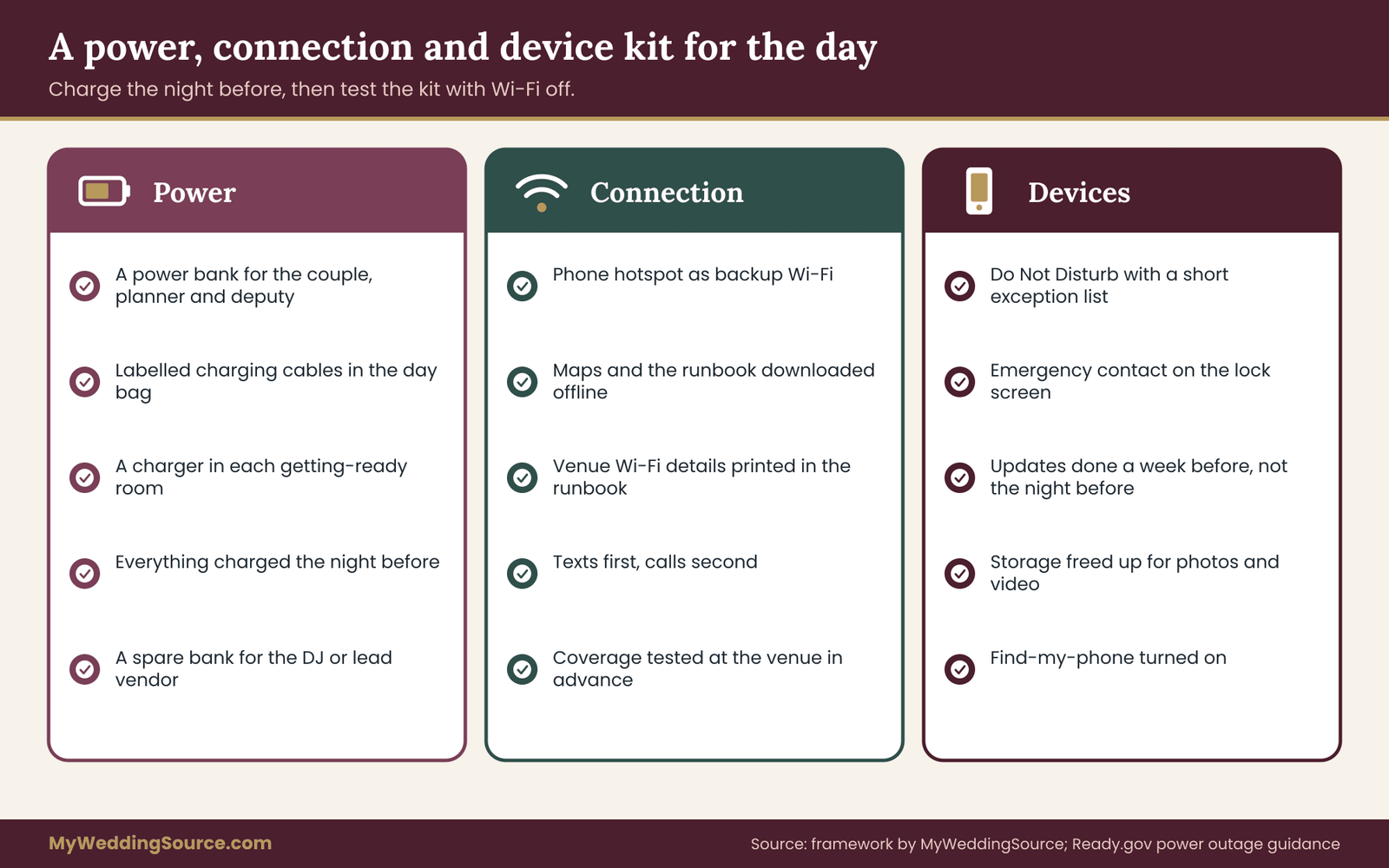
The plan owner or coordinator should carry a single, clearly labelled power kit. It does not need to be big.
- Two or three charged portable batteries, at least one with a fast-charging output
- Short cables for every phone type in the core team: Lightning, USB-C and any older connector in use
- A multi-port wall charger that can charge several devices at once
- A small power strip or extension cord, if the venue allows it
- A charging spot in the bridal suite and one near the coordinator’s base, so devices are topped up during quiet moments
Ask the wedding party to bring their own cables, because the wrong cable is the most common reason a charger does not help. Put a note in the group chat the week before.
Charge, then conserve
Charge every device the night before, and charge again in the morning. During the day, a few habits stretch the battery: lower the screen brightness, close apps that refresh in the background, switch on the phone’s low-power mode when it is not needed, and turn off automatic photo uploads for devices that are not used by the photographer. Batteries drain faster in the cold and can shut down in heat, so keep phones inside a jacket pocket in winter and out of direct sun and parked cars in summer.
Ask vendors about their power
Bands, DJs and lighting teams draw a lot of power, and the venue’s circuits are rarely labelled the way anyone would hope. Ask each vendor for their power needs in writing, then ask the venue which outlets and circuits are available, where the breaker panel is, and who has the key to it. Avoid chains of extension cords and consumer-grade power strips for heavy equipment. Our audio and lighting checklist covers the questions to put to a DJ or a band about equipment, and it is worth reading alongside this section.
If a generator is part of the digital contingency plan, for example for a tent or a field venue, follow the rental company’s instructions about where it can safely run. Ready.gov warns that generators produce carbon monoxide and must never run indoors or close to windows and doors. That is a safety rule, not an optional detail.
What happens if the venue loses power
A venue-wide power cut is rare, but you can plan for it in a few lines. Write down who calls the venue manager first, where the emergency lighting is, and whether the venue has a backup generator. For the ceremony, a battery-powered speaker is a modest purchase or a loan from a friend and means the vows can still be heard. Keep two or three flashlights or headlamps with the coordinator. Decide who has the authority to pause the program while the problem is checked. Ready.gov has plain advice on staying safe in an outage, including food and heat considerations, which the caterer and venue will already be familiar with.
Connectivity in your digital contingency plan: decide what needs a network
Venue Wi-Fi is the part of the infrastructure that couples most often assume and least often test. Treat it as a bonus, not a foundation.
Do not stream the music. If your DJ or playlist uses a streaming service, ask for a downloaded version of the critical songs: processional, recessional, first dance and any song with a cue. Keep them on the device itself and on a second device. If you are making your own playlist, use the offline download feature of your music app, then check that it plays in airplane mode.
Ask what a livestream needs. A live video feed needs a steady upload connection, which is much more demanding than ordinary browsing. If the livestream vendor says they will use the venue Wi-Fi, ask whether they have tested the upload speed there. A better arrangement is a dedicated connection that the vendor brings. Whatever the answer, decide what happens if the stream fails: ideally, the video is also recorded locally and shared afterwards.
Test card readers and payment methods. If a vendor takes final payments or tips on the day through a card reader, ask what happens when the reader has no connection. The simplest solution is to settle balances before the wedding, and to keep tips in labelled envelopes handed over by the plan owner.
Keep QR codes optional. A QR code is a link to a website that has to load. It is fine for a menu or a photo album, and a poor choice for something guests cannot do without. If the seating chart is a QR code, print a paper backup at the door. If directions to the reception are a QR code, add the address in text.
Know the guest Wi-Fi limits. If you offer guest Wi-Fi, expect it to be slow when many people connect. Do not link critical vendor activity to it, and avoid putting the network password on a sign that invites a crowd to use the bandwidth during the ceremony.
Prepare the devices that run the show
A handful of devices matter more than the others: the laptop or tablet running music, the phone with the vows, the tablet used for a slideshow. A few steps in the week before cost nothing.
- Stop software updates for the week before the wedding, so nothing restarts or changes its settings unexpectedly. Run any updates a week or more ahead and test again afterwards.
- Turn on Do Not Disturb or airplane mode with Wi-Fi off, where practical, on devices that play audio, so a call or a notification does not interrupt a song.
- Disable automatic screen locks while a device is running a slideshow or a playlist.
- Label each device and its charger with a name or number, so the right charger goes back to the right device.
- Keep a spare cable and a second device that can run the same files.
None of this is hard. It is the difference between a smooth handover to the DJ and an anxious moment in front of a hundred guests. ## Files in a digital contingency plan: where the copies live and which is real
If the digital contingency plan’s communication layer is about reaching people, its file layer is about making sure the right information is in the right place when someone needs it. The usual problems are not exotic. Two versions of the timeline exist. The only copy of the ceremony audio is on a phone that is also running the group chat. A vendor was sent a link that requires a login they never created.
List the files the day depends on
Go back to your inventory and pull out every document and media file that belongs to Tier A or Tier B. For most weddings the list looks like this: the timeline, the contact owner chart, the vendor sheets, the ceremony script and readings, the vows if they will be read aloud, the processional and recessional music, the reception playlist or the DJ’s set list and do-not-play list, the seating chart, the meal and allergy list, the family photo list, the signed vendor contracts with their payment schedules, and the insurance policy if you have one.
One document is special: the marriage license. Rules differ by state and county, and the paper document usually has to be signed and returned within a set period. Ask your county clerk who is allowed to carry and file it, then decide in advance who has it on the day. Keep a photograph of it in a safe place for your own records, and do not treat that photograph as a replacement for the original.
Use a simple version of the three-copy idea
Backup guidance for small organizations often uses a three-copy rule: keep three copies of anything important, on two different kinds of storage, with one kept in a different place. CISA’s guidance for protecting business data describes the same general approach of keeping separate, tested copies. You can borrow it for a wedding without any technical overhead.
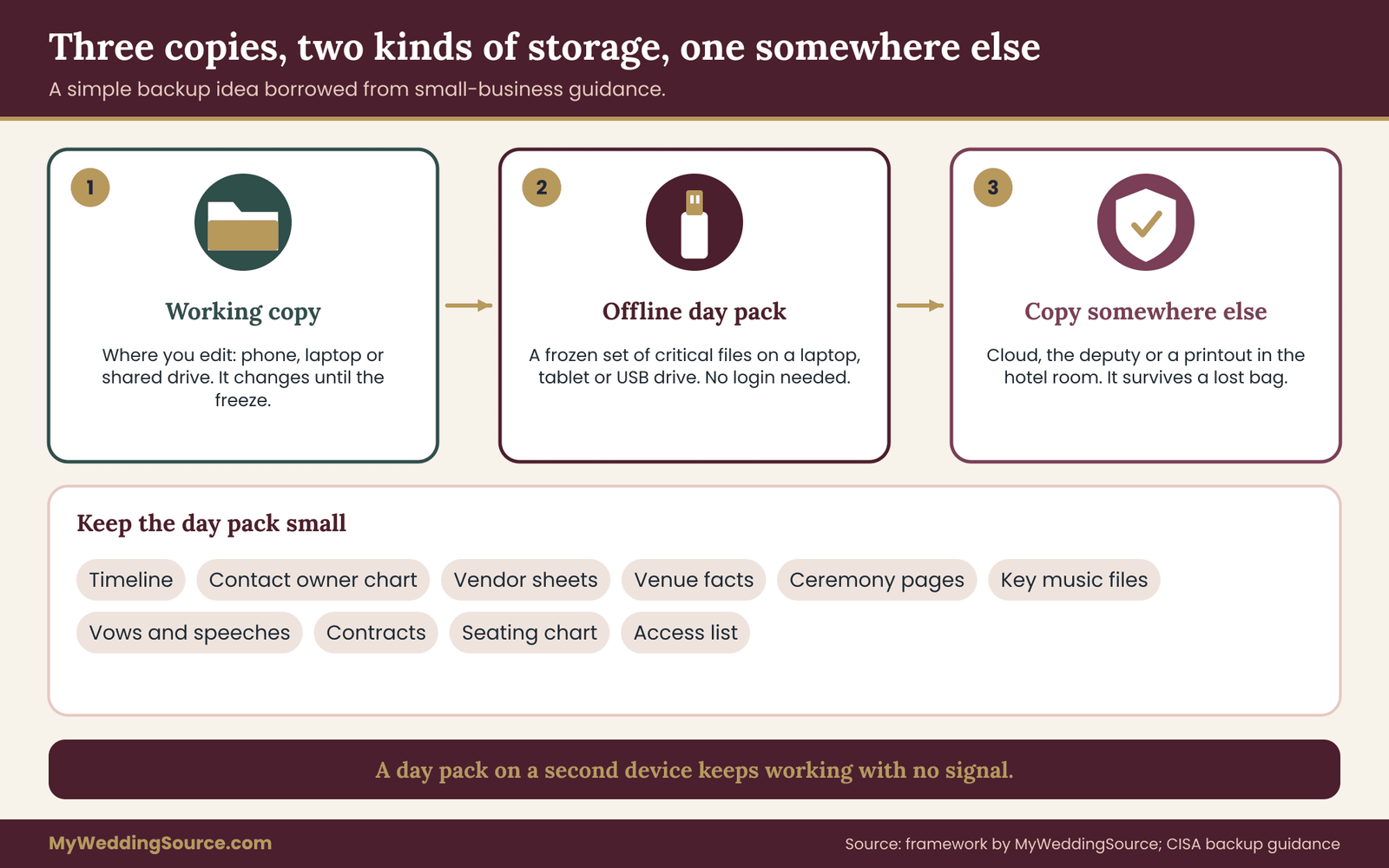
Copy one is the working copy. It lives where you edit it: your phone, laptop or shared drive. It is the one that changes in the weeks before the wedding.
Copy two is the day pack. It is a frozen, saved set of the critical files on a device that is not a phone, such as a small laptop, an old tablet or a USB drive. The plan owner holds it. It does not rely on any account or network.
Copy three is somewhere else. That might be the cloud, a copy with the deputy, a printout in the hotel room or the planner’s bag. Its purpose is to survive the loss of the first two, for example if the bag with the laptop and USB drive is left in a taxi.
The “two kinds of storage” part is easy to satisfy. A device and paper are two kinds. A phone and a USB drive are two kinds. What you want to avoid is three copies that all depend on the same login or the same battery.
Keep the day pack small
A day pack should not be a full archive. Include the files above, plus the music, and leave out the rest. If it contains guest data, such as addresses or allergy details, treat the drive as sensitive: protect it with a password or the device’s built-in encryption, and keep it with a named person. Many couples split it into two packs. A public pack with music, ceremony text and the timeline can be handed to a vendor or a deputy without worry. A private pack with guest details stays with the plan owner.
Folder names and file names
A boring structure saves time. Use numbered folders such as 01 Runbook, 02 Ceremony, 03 Music, 04 Vendors, 05 Guests, 06 Money. Put the date in the file name, and when you freeze the digital contingency plan, add the word “locked” and the date. Avoid “final”, “final2” and “final-revised”, which tell a stranger nothing about which file is right. One master file per document, and old versions in an archive folder.
Music and audio files in your digital contingency plan
Music is the most visible file dependency at a wedding, and the one where a failure is most obvious. The advice from earlier applies, and a few extra points help.
Ask your DJ, band or musician what file types and playback system they use, and ask them to confirm the processional, recessional and first dance in writing. Give them the song titles with exact version names, because the radio edit, the album version and the live recording can differ by a minute. If you are bringing your own playlist, download the files to the device instead of streaming, and check them by playing the playlist in airplane mode.
Have a second playback path that does not depend on the first. A Bluetooth speaker and a phone with the key songs is cheap, light and good enough to carry a ceremony if a sound system fails. Assign one person to be the “play button” for the ceremony, and write the cues in the runbook: the first note at a particular moment, the stop at the end of the processional. For more on equipment questions to ask, see the audio and lighting checklist mentioned earlier, which also covers microphones and backup gear.
Photo and video files in your digital contingency plan
The couple rarely holds the photographer’s files on the day, and that is as it should be. Still, you are allowed to ask how those files are protected, and the answers tell you how much risk you carry.
Ask whether cameras write to two cards at once, when and how the files are copied off the cards, how many copies exist by the end of the night, how long the photographer keeps the originals, and what the delivery timeline looks like. A professional will have an answer to each. If you work with a video team or a drone operator, ask the same questions. The wedding photography timeline guide explains how the photo schedule fits into the day, including the family photo list that the photographer needs in a usable form.
Guest photos are a separate matter. If you plan a shared album for guests, choose a service that does not require everyone to create an account, and decide who can view and download the images. If you plan an unplugged ceremony, tell guests in the invitation or on a sign so that phone screens do not interfere with the photographer’s work.
Vows, speeches and readings
Print them. Phones can lock, alert or run out of power at the worst possible moment. Anyone who speaks, including the couple, parents, the best man and a reader, should bring a printed copy on paper or cards, and the plan owner should have a spare. If someone prefers to read from a phone, turn on Do Not Disturb and set the screen to stay awake before they start.
Contracts, receipts and payments
Save the signed contracts as files on the working copy and the day pack. Print the page of each that shows the payment schedule and the date the balance is due, and note the vendor’s name and number on the page. When a vendor asks whether the final payment has been received, the answer should be a minute’s search, not an hour’s panic.
Run a restore test on your digital contingency plan
A backup you have never opened is a hope, not a digital contingency plan. Take the device that holds the day pack, turn off Wi-Fi and mobile data, and open each critical file. Play the processional. Open the timeline. Check that you can read the guest list. This takes about ten minutes and catches most of the real problems: a file that is stored only as a cloud link, a font that does not display, a music file in a format the player cannot read, a password you forgot. Do it twice, once a month before the wedding and once the week before.
After the day: closing out the digital contingency plan
The day pack is temporary. Once the wedding is over, hand any vendor files back, delete the guest details from devices that do not need them, and move the contracts and receipts into your permanent records. If you do not delete guest information, it will sit in old messages and shared folders for years. ## Permissions in a digital contingency plan: who can open what
Permissions are the least glamorous part of a digital contingency plan and the part most likely to cause a quiet disaster. The word covers any kind of access: to an email account, a shared folder, a calendar, a vendor portal, a phone, a laptop, a ticketing or guest-list tool. Three questions matter. Who needs access? What exactly do they need? And what happens if the person who normally holds it is not available?
The guiding idea is to give each person the least access that lets them do their job, and to give it for as short a time as is practical. This is called the principle of least privilege in security circles, and it applies as well to a wedding as to a company. The DJ needs the timeline, the music list and the contact chart. The DJ does not need the guest list with home addresses. The photographer needs the family photo list and the timeline. The caterer needs the meal and allergy list. Parents want the schedule. Almost nobody needs the budget.
Name the roles in the digital contingency plan
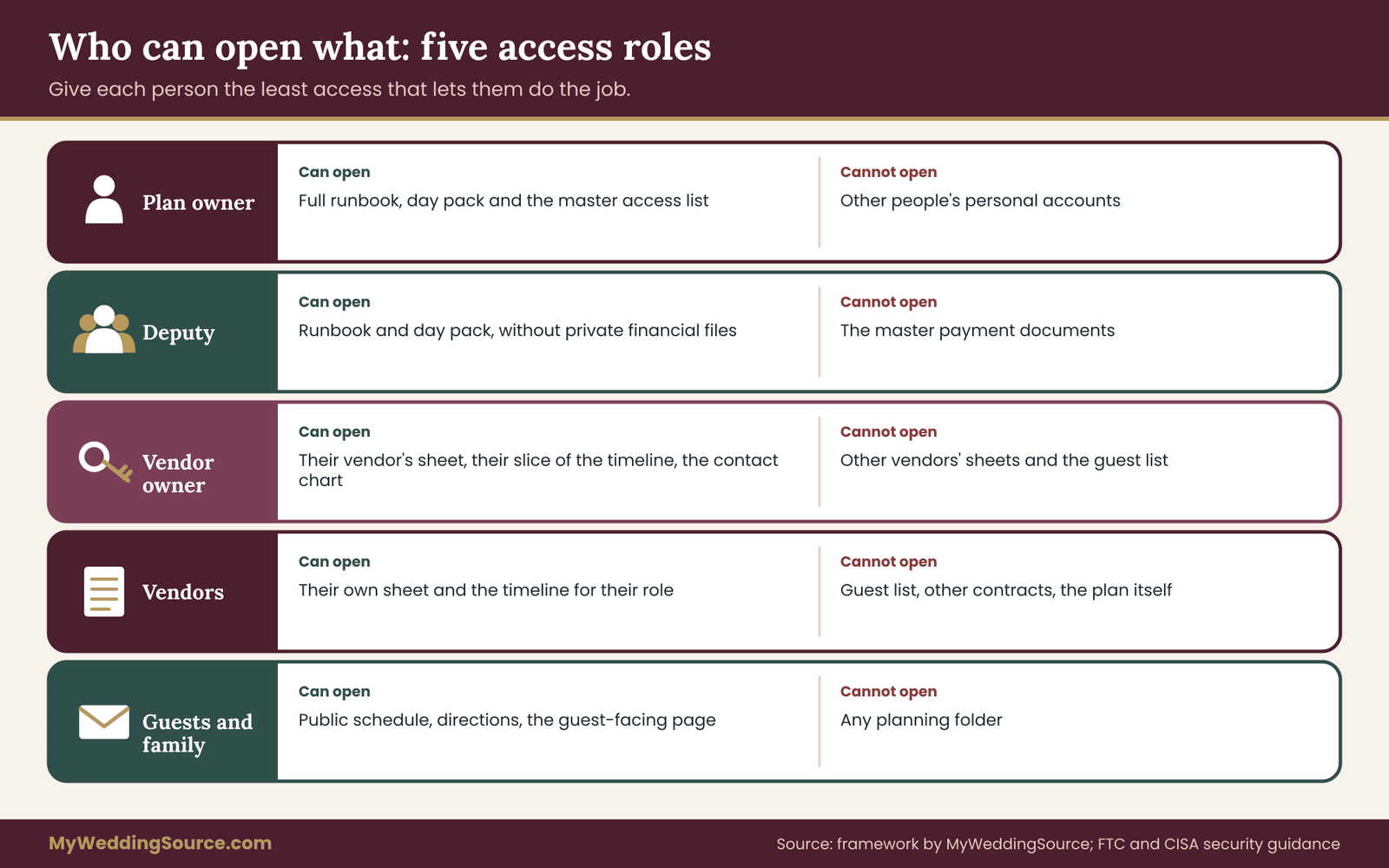
Five roles cover most weddings.
Plan owner. Holds the full runbook, the day pack and the master access list. Can open the shared folders, and knows where the emergency access instructions are.
Deputy. Can open the same runbook and day pack, except for private financial documents. Steps in when the owner cannot act.
Vendor owner. Sees the sheet and the part of the timeline that concern their vendor, plus the contact owner chart.
Vendors. See their own sheet and the timeline for their role, and nothing else.
Guests and family. Receive only the public information: the schedule, directions and the guest-facing page.
Write the roles into the access list in the runbook, with the names that go with them. This is not a password list. It is a map of who holds what.
Share carefully
Most cloud storage and document tools allow three levels: view only, comment, and edit. Use the lowest level that works. Share with named email addresses rather than turning on “anyone with the link,” which lets anyone who sees the link open the file. Treat a shared guest list as sensitive. If you must send it to a vendor, send only the columns they need.
If a partner or helper will manage your calendar or inbox in the weeks before the wedding, most email and calendar services offer a delegate or sharing feature that lets another person act without learning your password. That is safer than handing over a login, and it can be removed when the wedding is over.
Two-step sign-in: set it up so that it cannot lock you out
Two-step verification, also called multi-factor authentication, makes an account much harder for a stranger to open. CISA recommends it for exactly that reason. It also creates a wedding-day risk: the code goes to a phone, and the phone is in another room, out of charge or in someone else’s hands. A few steps make it safe.
- Add a second method to important accounts, such as a code generator app on a second device, or a hardware key where supported.
- Save the backup codes that many services provide, print them, and keep them sealed with a trusted person.
- Do not change your phone number, replace your phone or reset your SIM in the two weeks before the wedding.
- Before the wedding, log in to every vendor portal and photo-delivery site you may need, so that any verification happens on a quiet day.
Passwords belong in a password manager, not in the runbook
Do not print passwords in the runbook. Do not text them. CISA’s guidance on strong passwords recommends using unique passwords for each account and storing them in a password manager, which is also the easiest way to share a login with a trusted person. Most password managers include an emergency access or sharing feature that lets a named person get in if you cannot. Set it up weeks ahead and test it. If a particular login must be passed along on the day, hand it over in person, and change it afterwards.
Protect the devices themselves
Every phone and laptop used for the digital contingency plan should have a screen lock and the ability to find, lock or erase it remotely if it goes missing. Do not hand an unlocked phone to a stranger to take a group photo. Many phones have a mode that locks them to one app so that a borrowed device cannot be used to read messages or open other apps. Learn how yours works before the day.
Guest and vendor privacy inside a digital contingency plan
A guest list is more than a list of names. It usually holds home addresses, phone numbers and email addresses, plus notes on dietary needs, allergies, mobility or health. Some of that is sensitive. The Federal Trade Commission’s guidance for small businesses on protecting personal information boils down to a few habits, and they carry over neatly to a wedding: collect only what you need, keep it only as long as you need it, lock it up, limit who sees it, and dispose of it properly. You are not a business, but you hold the same kind of data.
In practice:
- Print only what each person needs. The caterer needs the meal and allergy list, not the addresses. The ushers need the seating chart, not the phone numbers.
- Mark printouts that contain personal details, and collect them at the end of the night. Shred them afterwards.
- Do not leave the private pack in a car, in a coat check or on a table.
- Do not put guests’ full addresses on a public wedding website or in a shared album’s description.
- Remove phone numbers from any guest-facing document.
- Keep allergy and health notes to a short, practical form: “Table 6: severe peanut allergy,” not a medical history.
If you plan to share photos or videos that show children or other guests, ask permission first and set the rules in advance. Our guide to photography usage rights for vendors and social media explains what to settle with vendors about publishing, and the same thinking applies to guests.
Payment scams and look-alike messages: a rule for the digital contingency plan
Weddings involve large payments, many vendors and a lot of urgent messages, which is an ideal setting for fraud. A common pattern is a message that appears to come from a vendor, saying that the bank details have changed and the final balance must go to a new account. Another is an urgent text from a “coordinator” or “venue” asking for a payment link to be clicked.
The defence is a habit, not a tool. Do not act on a change to payment details sent by email or text. Call the vendor on the number in your signed contract, and confirm the change in a voice conversation. Do not pay by gift card, and do not pay through a link you cannot verify. Tell the coordinator and the plan owner about the rule, so that they apply it too. The FTC’s small business cybersecurity pages describe these warning signs in more detail.
A related point concerns public Wi-Fi. Networks in venues, hotels and airports are shared by many people, and the FTC advises caution about what you do on them. Avoid entering banking details or passwords on an open network. Use your mobile data connection for anything sensitive.
Take access away when the digital contingency plan ends
A week after the wedding, go through the access list and close the loop. Remove edit rights from shared folders. Delete or archive shared links. Change any login that was handed to another person. Turn off the delegate access on your email and calendar. Delete the guest text list and any exports of the guest list that are no longer needed. This takes half an hour and removes a surprising amount of long-term exposure. ## Handling problems on the day: a digital contingency plan severity ladder
Even a good wedding day digital contingency plan will meet problems it did not predict. What keeps the day calm is not that nothing goes wrong. It is that people know how big a problem is and who decides what happens next. A three-level severity ladder gives the team a shared language.
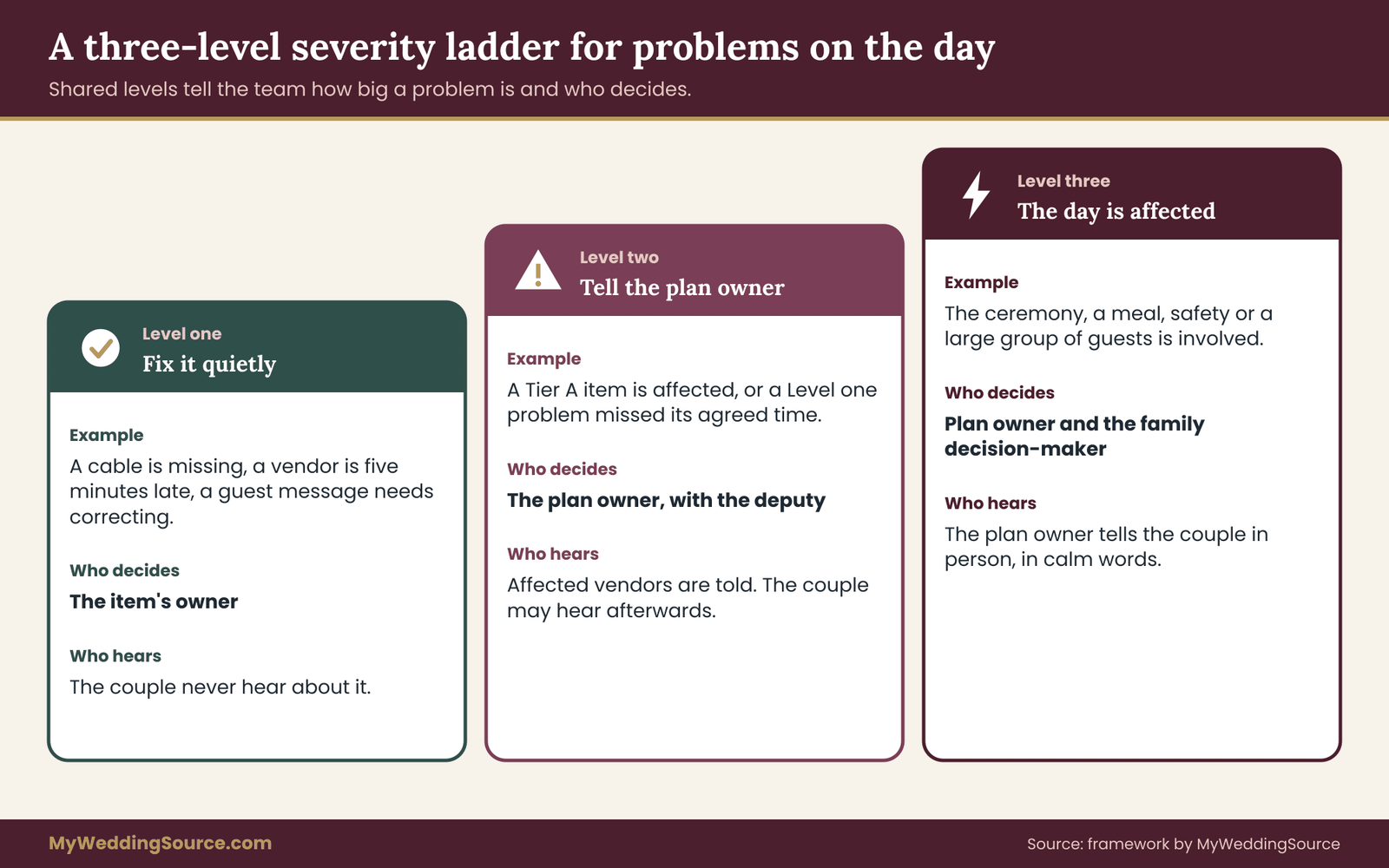
Level one: fix it quietly. The problem is small, belongs to one owner, and has a known fallback. A cable is missing, a vendor is five minutes late, a guest message needs correcting. The owner handles it, sends a short “resolved” message if anyone else was told, and moves on. The couple never hear about it.
Level two: tell the plan owner. The problem affects a Tier A item, or a Level one problem has not been fixed by the agreed time. The plan owner is told at once, decides on the fallback, and informs the vendor owners who are affected. The couple may be told afterwards, if at all.
Level three: the day is affected. The ceremony, a meal, safety or a large group of guests is involved. The plan owner and the person with authority for the family, usually a parent or the couple’s chosen decision-maker, decide together whether to pause, move or change the program. The couple are told by the plan owner, in person, in calm words.
Write the three levels in the runbook with one example for each. Agree before the day who is allowed to declare Level three, which should be only the plan owner or the deputy.
The first five minutes of any problem in a digital contingency plan
Whatever the level, the steps are the same, and writing them down makes them easier to follow when you are stressed.
- Name it. Say what is not working, in one short sentence, and in which place.
- Find the owner. Use the contact owner chart. If it is yours, act. If it is not, pass it on.
- Use the fallback. Pick up the printed copy, the second device, the radio, the backup speaker.
- Say so. Send a short message to the people affected, using the formats in the runbook.
- Close it. Send “resolved.” Note it on the incident log.
Keep a short incident log for the digital contingency plan
A single sheet of paper in the runbook is enough. Write the time, the problem, who handled it, and what happened. The log is useful for two reasons. It helps you remember what to tell a vendor afterwards, and it provides a record if a claim has to be made, for example under a vendor contract or an insurance policy. Keep it factual, without blame.
A digital contingency plan scenario playbook
The cases below are the ones that come up in practice. Use them as prompts for your own plan. Adjust each to your venue and vendors, and cut those that do not apply.
There is no signal at the venue
The first fallback is the radio system or the venue’s landline. The second is a runner. The ceremony start is not delayed for guests’ sake alone; the coordinator uses the printed timeline and the channel ladder, and the plan owner sends the next messages when they walk to a place with signal. Next time, test the coverage earlier and note dead zones on the venue facts page.
The coordinator’s phone dies or goes missing
The deputy takes over the master runbook. The vendor owners are told in person or by radio, and every owner uses the contact owner chart to reach the deputy’s number. The coordinator borrows a charger or a phone, logs in with a backup code, and does not take back control until the deputy hands it over. This is why the deputy has a printed copy and a charged phone from the start.
The ceremony audio fails
Check the simplest causes first: power, cables, volume, the wrong input. If the DJ or sound technician cannot fix it quickly, switch to the battery speaker and the phone with the processional music, and ask the officiant to speak up. Delay the start by a few minutes at most. Most guests would rather wait than watch a repair, and the vows can be heard in a small space without amplification if the group gathers close.
The DJ’s laptop or playlist fails
The DJ’s backup is the first call. If there is none, the plan owner’s day pack has the key songs, and a Bluetooth speaker or the venue’s sound system can carry them. Cue sheets in the runbook say which songs are needed at which moment. The couple can usually keep dancing to anything that has a beat and a familiar tune.
Wi-Fi fails during a livestream
The livestream is Tier C, so the decision was made in advance. The vendor records locally, an agreed person posts a short message to the family group, and the full recording is sent afterwards. No one on the wedding team tries to fix the network during the ceremony.
The venue loses power
The venue manager is called first. Emergency lighting is used, battery speakers and flashlights come out, and the plan owner decides with the venue whether to pause the program. The caterer is asked whether food safety is affected and how long it can safely wait. Guests are told clearly, in short sentences. Ready.gov guidance on outage safety applies to the venue as much as to a home.
The wedding website or QR codes are unavailable
Guests use the printed signs, the programs and the hosts. The plan owner points them to the address in text. This is why you print the essentials and avoid hiding important information behind a link.
An account locks, or a code goes to the wrong phone
The owner of the account follows the recovery path set up in advance: the backup code, the second device or the emergency access person. They do not attempt repeated logins, which can lock the account for longer. If a vendor portal is involved, the plan owner calls the vendor and asks for a manual confirmation.
The photographer reports a card problem
The photographer is professionally responsible for recovering their files, and they will usually have a procedure. The couple’s role is to stay calm and not to ask for a progress report in the middle of the reception. The plan owner notes the time and the details in the incident log. If the issue affects a key moment, ask whether a second shooter or a guest photograph can fill the gap.
A payment terminal or payment link fails
Settle the balance by another route, such as a bank transfer or a check that the plan owner pre-arranged, and ask for a written receipt. Tips should already be in envelopes. If a message arrives asking for urgent payment to a new account, apply the rule of calling the vendor on the number in the contract.
A phone with guest data is lost
The owner uses the device’s find or lock function immediately, tells the plan owner, and changes the passwords for the accounts that were open on the device. If the phone held a guest list, the plan owner records the incident and, if the list was extensive, considers whether guests need to be told. The best protection is that the device has a screen lock and the private pack is on a different device.
A message to guests is wrong or a rumor spreads
One sender sends one correction, short and clear. The hosts and the ushers repeat it in person. The plan owner stops other people from posting conflicting updates by asking the family chat to leave logistics to the coordinator.
A worked example of a digital contingency plan
This example is invented. It shows how the pieces fit, with numbers chosen to be realistic rather than exact.
Nora and Ben are planning a vineyard wedding for about 120 guests, forty-five minutes from the nearest town. They have a DJ, a photographer, a caterer, a shuttle company and a livestream for grandparents who cannot travel. They ask Nora’s cousin Dana to be the plan owner and her friend Sam to be deputy.
In an evening, they list about forty digital dependencies. Nine fall into Tier A: ceremony audio, processional music, the officiant’s script, the vendor contacts, the arrival timeline, the gate code, the shuttle schedule, the family photo list and the final headcount. The livestream, the shared album and a digital guest book go into Tier C, with one line each about what they will do if the item fails.
On a site visit, Dana walks the property with two phones on different networks and finds no signal on the ceremony lawn and one bar at the barn door. The venue says the manager has a handheld radio system. Nora and Ben add three borrowed radios, one for Dana, one for the caterer’s lead and one for the DJ. They add a battery speaker for the ceremony and a printed timeline for each vendor owner.
Two weeks before the wedding, Dana runs a thirty-minute drill with the vendor owners, using three scenarios from the playbook. The drill reveals two gaps: the DJ was planning to stream the processional from a music service, and nobody had the shuttle driver’s mobile number. They download the song to the DJ’s laptop and a second device, and Dana adds the number to the contact owner chart.
A week before, they freeze and print the runbook, run the airplane-mode restore test, and send the contact owner chart to every owner. On the day, the venue’s Wi-Fi is slow and the livestream stutters. Because the decision was made ahead, the videographer records locally, Sam posts a short update to the family group, and the grandparents see the recording the next morning. Nobody pauses the ceremony.
None of that is dramatic, and that is the whole point. A wedding day digital contingency plan is working when people hardly notice it.
A timeline for building your digital contingency plan
Eight weeks is comfortable. You can do it in three if you need to.
- Eight weeks out. Make the dependency inventory. Choose the plan owner and the deputy. Ask each vendor for their day-of contact.
- Six weeks out. Sort the inventory into tiers, write the fallbacks, and draft the contact owner chart and the channel ladder. Check the details in your master wedding planning checklist so the digital contingency plan matches the rest of your preparations.
- Four weeks out. Test coverage and Wi-Fi at the venue. Confirm power needs with vendors. Set up two-step sign-in methods and the emergency access path.
- Two weeks out. Run the drill. Do the first restore test. Fix what the drill shows.
- One week out. Freeze the digital contingency plan and print the packet. Send the contact owner chart to all owners. Run the second restore test.
- The day before. Charge everything. Pack the power kit and the day pack. Brief the owners and the deputy in a short call or a message.
- The morning. Check batteries, confirm vendor arrivals, and read the runbook once.
- A week after. Remove access, delete guest data you do not need, and file the contracts and receipts.
Run a thirty-minute drill of the digital contingency plan
A drill is the best test of a digital contingency plan, and the cheapest. Gather the plan owner, the deputy and the vendor owners, in person or on a call. Pick three scenarios from the playbook. For each, ask one person to say, in order, what they would do, whom they would call, which fallback they would use and what they would say. Time it. If anyone hesitates, that is a gap: a missing number, a document nobody can find, an unclear decision. Fix the gap, update the runbook and do not run the drill again unless the changes were large. Most gaps are small and take minutes to close.
What to ask vendors to put in writing for your digital contingency plan
Many digital failures can be reduced by a short exchange with a vendor, ideally in your contract or confirmation email. Ask each relevant vendor for:
- A named day-of contact with a mobile number
- Their backup equipment policy: a second laptop, a spare microphone, a second camera body
- How they store and back up files, and for how long
- Their power requirements and any special equipment
- How they handle a change of plan, such as a delay or a rain move
- What they do if the file or equipment fails, and how they will tell you
The same questions suit the venue, with the addition of the coverage, Wi-Fi and landline details.
Common mistakes in a digital contingency plan
- Writing a digital contingency plan that only the author understands
- Giving the couple a role in the digital contingency plan on the day
- Keeping the only copy of the vows or the playlist on a phone
- Relying on venue Wi-Fi without testing it
- Sharing the full guest list with every vendor
- Using a two-step sign-in code that goes to a phone that is not at hand
- Changing the timeline after the freeze without telling anyone
- Skipping the drill because the digital contingency plan “looks fine”
The one-page digital contingency plan checklist
- Plan owner and deputy named, with copies of the runbook
- Dependency inventory sorted into tiers, with fallbacks
- Printed runbook: timeline, contact owner chart, vendor sheets, venue facts, ceremony pages, guest lists, access list, local help
- Channel ladder with time limits
- Coverage tested; radios or a landline in place where signal is weak
- Power kit packed; devices charged; cables for each phone type
- Day pack on a second device, tested in airplane mode
- Music downloaded, with a second playback path
- Roles and access list written; two-step sign-in backed up; password manager emergency access tested
- Guest data limited, marked and scheduled for deletion
- Payment-change rule shared with the team
- Drill run; plan frozen and printed
FAQ
Do we need a wedding day digital contingency plan if we have a planner?
A good planner will already keep a runbook, a vendor contact list and a backup kit, so ask to see theirs and fill the gaps. What they cannot do is decide what you are willing to drop, who your deputy is or how your guest data is handled. A short conversation and a one-page contact owner chart are usually enough. If you have no planner, the digital contingency plan matters more, because nobody else is holding the details.
How many pages should the printed runbook of a digital contingency plan be?
Aim for six to twelve pages. A one-page timeline, a one-page contact owner chart, a half page for each vendor, a page of venue facts, the ceremony pages and the guest lists. If it grows beyond that, the plan owner will not find things quickly, and the point of the packet is speed.
Should a digital contingency plan include walkie-talkies?
They are useful when the venue is large, when coverage is weak, or when many vendors need to coordinate. Consumer Family Radio Service handhelds do not need an individual license, but other radio services do, and FCC rules limit what equipment you can use. Keep conversations short, because others on the channel can hear them. If coverage is good and the team is small, texts and calls may be enough.
What is the simplest backup for the ceremony music?
A battery-powered Bluetooth speaker and a phone with the processional, the recessional and any other cue music downloaded in advance. Test them together in airplane mode. Give one person the job of pressing play, and write the cue in the runbook.
How do we protect guest information without making things awkward?
Share the minimum with each vendor, print only what is needed, mark and collect the sheets with personal details, and delete the lists after the wedding. Keep allergy notes short and practical. Do not publish addresses or phone numbers on your wedding website, and use a guest text service only for event updates.
What if our two-step sign-in code goes to a phone we do not have?
Set up a second method before the wedding and keep printed backup codes with a trusted person. If you are locked out on the day, use the backup code or the second device. Avoid changing phone numbers or SIM cards in the two weeks before the wedding, and test your vendor portal logins in advance.
Can wedding insurance cover digital failures?
Wedding insurance usually addresses financial loss from specific events such as cancellations, vendor failures, damage or illness, and the terms vary by policy. It is unlikely to cover a dead phone or a lost file in a general way. Read the policy, ask the insurer about particular situations, and keep a factual incident log, which can help if you ever make a claim.
How do we test a digital contingency plan?
Run two tests. The first is a restore test: with Wi-Fi and mobile data off, open every critical file on the second device, play the processional and read the printed pages. The second is a thirty-minute drill with the owners, using three scenarios from the playbook. Together they take about an hour and find most real problems.
Your next steps
Pick one evening this week. List what the wedding depends on digitally, mark the Tier A items, and name a plan owner and a deputy. The next evening, draft the one-page timeline and the contact owner chart. Within two weeks, test coverage at the venue, set up the day pack and write the fallbacks for the Tier C items.
Then schedule the drill and the freeze date, and send the contact owner chart to everyone on it. A wedding day digital contingency plan does not have to be elaborate. It has to be written down, tested once, and held by someone calm.
Sources
- Back Up Business Data, CISA
- More Than a Password, multifactor authentication, CISA
- Use Strong Passwords, Secure Our World, CISA
- Responding to a Cyber Incident, NIST Small Business Cybersecurity
- Cybersecurity for Small Business, Federal Trade Commission
- Cybersecurity Basics, Federal Trade Commission
- Are Public Wi-Fi Networks Safe? What You Need to Know, Federal Trade Commission
- Family Radio Service (FRS), Federal Communications Commission
- Personal Radio Services, Federal Communications Commission
- Wireless Emergency Alerts (WEA), Federal Communications Commission
- Power Outages, Ready.gov
- Family Emergency Communication Plan, Ready.gov