

A wedding AV backup plan is a short, written answer to one question: if the microphone, the music, or the power stops at the worst moment, who does what in the next thirty seconds, with which spare item, so that guests barely notice.
Quick answer
A workable wedding AV backup plan has four layers, and most of it costs attention, not money. Spare microphones with fresh batteries, plus one wired microphone that needs no radio signal. Duplicate music files on a second device, saved locally so they do not depend on Wi-Fi. Protected power, meaning outdoor-rated cords, ground-fault protection, and a battery-powered fallback for the one thing that must keep working. And a written runbook that names who switches over, and when. Ask your DJ, band, or AV company what they already carry, fill the gaps, and keep the rules in mind: electrical work belongs to qualified people, and noise limits are set by your venue and your city, not by us.
What a wedding AV backup plan covers (and what it does not)
Most couples never think about audio and video equipment until it fails. A microphone cuts out during the vows, a playlist stalls on a phone that decided to update, or a power strip trips just as the first dance begins. None of these problems is rare, and none is anyone’s fault in particular. They are the ordinary risks of running electronics for several hours with guests watching.
A wedding AV backup plan does not try to remove those risks. It decides ahead of time what happens when one of them shows up. That is a smaller, calmer job than it sounds, and most of it costs more attention than money. This guide walks through the pieces: spare microphones, music and slideshow files, power, the curfew and decibel limits that can end an evening early, and a one-page runbook you can hand to the people who will actually press the buttons.
We are not a sound company and we are not giving electrical, legal, or engineering advice. Where a task involves wiring, generators, or venue rules, we tell you what to ask and who should do it. The goal is to make you a good client for your own vendors.
The four ways sound fails on a wedding day
Failures usually fall into four buckets. Naming the bucket tells you which spare you need, and it stops you from buying a backup for a problem you were never going to have.
Gear fails
A handheld microphone’s battery dies, a cable develops a loose connection, a speaker stand tips, or a mixer input stops working. This is the most familiar kind of failure, and in a wedding AV backup plan it is the one a spare microphone, a spare cable, and a spare battery set can answer. It also covers the small items nobody budgets for, such as a headphone adapter or a second HDMI cable.
Content fails
The gear works, but what it plays does not. A file is missing, the wrong version of a song plays, a streaming app asks you to log in, a video will not open on the venue’s projector, or a phone notification interrupts a vow. The backup in a wedding AV backup plan is a second copy of the content on a second device, and a rule about who touches which device.
Power fails
A circuit trips because too many things share it, a cord has been run through a puddle, a generator runs out of fuel, or a battery quits halfway through the evening. Power problems can take down several pieces at once, so the wedding AV backup plan usually covers the loss of everything on one circuit, not a spare for one item.
Rules and environment fail
The equipment is fine, but the evening cannot go on as planned. A venue enforces a quiet time, a neighbor calls about noise, or a thunderstorm forces everyone indoors. The wedding AV backup plan answers this with a decision made in advance about what to cut or move, and a list of who is authorized to decide.
Who owns the plan: you, the vendors, or the venue
A wedding AV backup plan is a shared document, and it works best when each party knows its own part of it. The cleanest approach is to ask who carries what, then fill in only the gaps.
What a professional usually already handles
A working DJ, band, or AV company generally plans for equipment failure as part of the job, and many bring spares as a matter of habit. We cannot tell you what any specific vendor carries, which is the point of asking. A good answer is specific: “We bring a second wireless handheld and a wired microphone, and we keep a laptop with the same music as the primary.” A weak answer is a general reassurance with no named items.
What you still need in writing
Even with an experienced vendor, put the essentials in the contract or in an emailed confirmation. That includes the spare equipment they will bring, how soon they can reach the venue if something fails and they are not on site, and who on their team is the point of contact for the day. Our guides to vendor replacement policies and contract change orders explain how to get these details in writing without a confrontation.
How much backup is proportionate
The right amount of backup depends on how much would be lost if a piece failed. A short backyard ceremony with a quiet officiant can run on very little. A large reception with a live band, a slideshow, and a toast schedule needs more. Think in terms of consequences, not equipment lists.
Smaller and simpler weddings
For a small gathering, a wedding AV backup plan can be as light as a second or battery-powered speaker, a second copy of the music on a different device, and a fresh set of batteries. Our guide to micro wedding planning discusses how scale changes what a day needs, and the same logic applies here.
Larger productions
With live music, video, and several microphones, the number of things that can fail multiplies, and so does the number of people who need to know the wedding AV backup plan. A larger production’s wedding AV backup plan benefits from a written runbook, a named person who owns the switchover, and a pre-event check with the vendor on site. We lay those out below.
What backup costs, and what we did not find
We did not find a reliable, current published benchmark for what spare AV equipment or a second technician costs at U.S. weddings, so this guide gives no dollar figures. What we can say is how the cost tends to show up. In a wedding AV backup plan, some layers are nearly free: a second copy of your playlist, a written runbook, fresh batteries, and a mic check. Others are priced by a vendor: a spare wireless system, an extra technician, or a backup generator. Ask for each of these as a separate line item, so you can decide which ones are worth buying for your size of event. Our vendor overtime rates guide covers how to keep add-ons visible in your budget.
Rank the moments by how badly a failure would hurt
Before you list spares for your wedding AV backup plan, decide which moments cannot stall. Not every minute of audio carries the same weight. A thirty-second silence during the cake cutting is awkward. A thirty-second silence during the vows can feel like the whole ceremony has stopped. Ranking the moments tells you where to put your backup effort first.
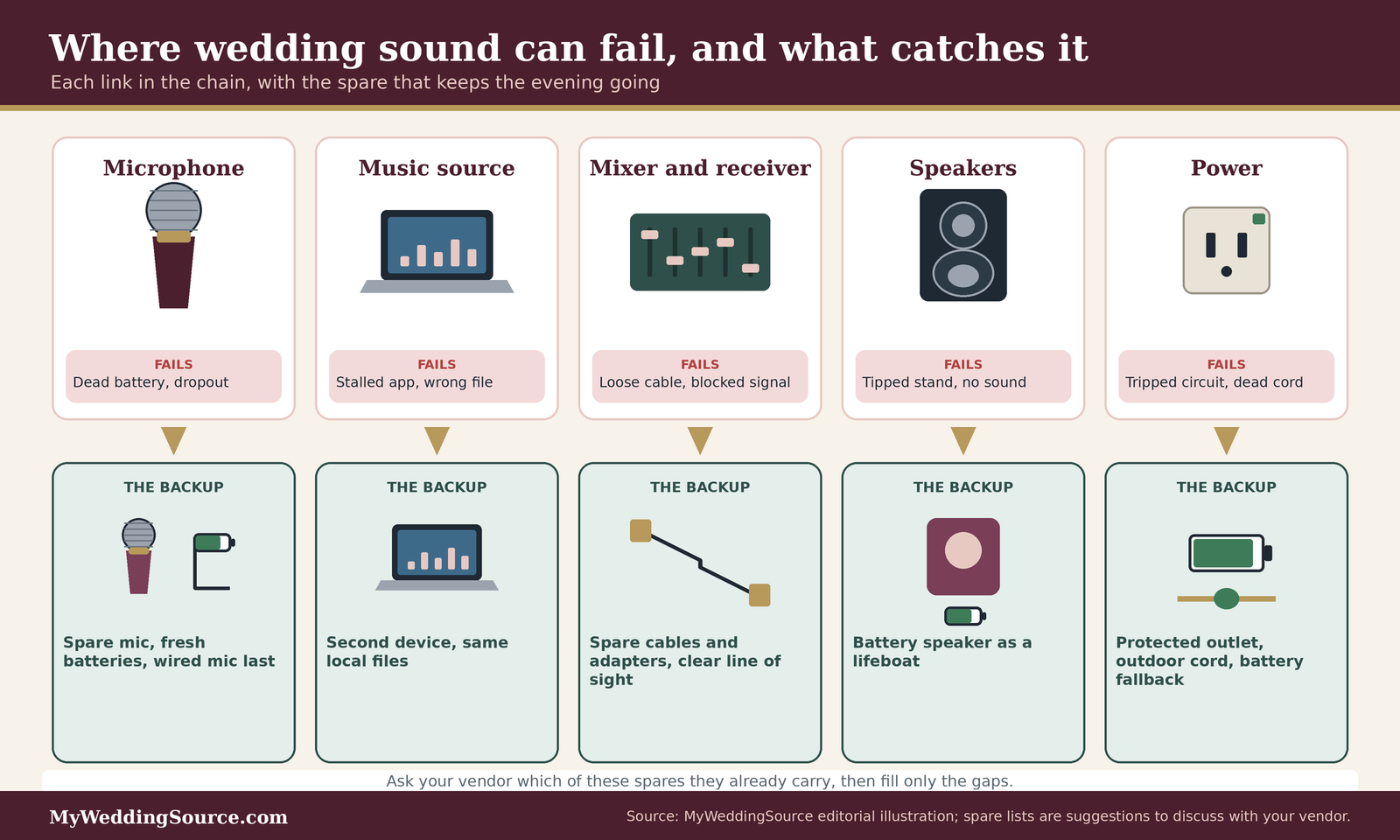
The illustration below maps the usual signal chain, from the microphone or the music source to the speaker, and shows where a spare helps at each link.
The ceremony: sound that cannot be repeated
The ceremony is short, it happens once, and guests in the back rows depend on the sound system to hear it. It also often happens outdoors, with the least infrastructure.
The officiant and vows microphone
In any wedding AV backup plan, the officiant’s microphone is the most important piece of audio on the day if the vows must be heard. Ask your vendor to place a second microphone on or near the officiant, tested and switched off, so it can be turned on immediately. A wired microphone on a stand is a reasonable last fallback because it does not depend on a radio link or a battery. Our guide to wireless wedding ceremony audio covers microphone types and placement for this moment.
Processional and recessional music
The music for the entrance and exit is usually a small number of tracks with exact start points. The risk is not that the music fails but that the wrong thing plays, or nothing plays when someone expects it. Give the person pressing play a written cue sheet with the song, the start point, and the visual signal for each cue, and make sure a second device has the same files ready to go. Our wedding songs guide helps with the choices behind the playlist.
Readings, guests with quiet voices, and the person who will not use a microphone
Plan for a reader who speaks softly or who steps away from the microphone. A second handheld passed down the line, or a lavalier on the reader, may help. If a family member is nervous about a microphone, tell the officiant in advance so they can repeat the words if needed. Our wedding readings guide has more on structuring this part of the ceremony.
Cocktail hour and dinner: continuity matters more than volume
Background music during the hour between the ceremony and the dinner rarely needs a perfect show. It needs to keep going. A stalled playlist leaves a room full of people in an unplanned silence, and the fix is almost always a second source.
Background music that does not stop
Ask your vendor how background music is handled during cocktail hour. If a person is running it from a laptop, ask whether there is a second device on standby. If a playlist is running from a phone, switch the phone to a mode that blocks notifications, and consider a second device that can take over. We explain the notification setting below.
Toast microphones
Toasts depend on a clear microphone, and they are often handed between people who have never used one. Ask for a spare microphone to stay at the head table, tested, and tell the speakers to hold it at a comfortable distance from the mouth. Our wedding speeches guide covers how to prepare the people who will be speaking.
The reception: dances, announcements, and the dance floor
Reception audio carries the most variety, and it carries the largest number of cues. It also tends to run late, when everyone is tired and the venue’s rules are about to apply.
The first dance and special dances
These are the moments you are most likely to remember, which makes the file the thing to protect. Have the song saved as a local file on the primary device and on the backup device, and ask the DJ or band to do a quick check that it is the correct version. Our first dance songs guide covers the choice of song and the edit.
Announcements and the grand entrance
Announcements require a working microphone and an agreed script. Keep the announcement microphone separate from the one used for toasts, so a single failure does not take out both. If the entrance uses a specific track, give the DJ the exact name and the start time.
Spare microphones: what to ask for and how to test them
Microphones are the part of a wedding AV backup plan that most people think of first, and with good reason. They are small, they run on batteries, and many of them depend on a radio link that can be disturbed by things nobody can see. The good news is that the main defenses are simple.
Building the microphone inventory
The first step is to know what is in the vendor’s case. A written inventory for your wedding AV backup plan takes two minutes to request and removes a surprising amount of guesswork.
Spare handhelds and body-worn microphones
Ask how many wireless microphones will be on site and how many of those are spares. A useful rule for your conversation, which is our editorial suggestion and not an industry standard, is that every microphone with a job should have a replacement that is already tested and within reach, even if it is turned off. Handhelds are easy to pass from person to person. Lavalier and headset microphones are less forgiving because they are clipped to a person, so ask what happens if one fails and how quickly a handheld can step in.
A wired microphone as the last fallback
Wireless microphones depend on batteries and on a clean radio channel. A wired microphone depends on a cable. That makes it a good last resort for a short, important moment, such as the vows, if everything else has gone wrong. Ask whether the vendor carries one, whether it comes with a stand, and whether a cable long enough to reach the officiant is part of the kit.
Batteries, and how to treat them
Battery trouble is one of the most common and most avoidable causes of a dead microphone. Shure, a major microphone manufacturer, advises using high-quality alkaline or lithium batteries and notes that low voltage can cause distortion and dropouts. It also says that consumer rechargeable batteries often deliver around twenty percent less voltage, which matters in a transmitter that is designed for a higher level. Because this advice comes from a manufacturer, treat it as one expert source, and ask your own vendor what they use. A simple practice is to start the day with fresh batteries, replace them at a set time before the main events, and keep the used ones in a marked pouch so no one reinserts them by mistake.
Wireless interference, frequencies, and the rules
Wireless microphones are radio transmitters. That means they share the air with television stations, other microphones, and other devices, and they are subject to federal rules. This is one reason a wedding AV backup plan should include a check of the radio environment at the venue and not only a check of the batteries.
Why older wireless gear can be a problem
The Federal Communications Commission has explained that an auction in 2017 reassigned most of the 600 MHz band to wireless service, and that microphones operating in the 617 to 652 and 663 to 698 MHz ranges had to stop operating by July 13, 2020. The agency also says microphones and similar devices have been banned in the 698 to 806 MHz band since 2010, and that manufacturing, importing, or selling microphones for the 600 MHz band is now prohibited. For a couple, the practical meaning is a question: is the wireless equipment used at your wedding on an allowed band? A professional vendor should be able to tell you in one sentence. Equipment that a friend lends you, or that was bought secondhand years ago, is worth checking before the day.
Licensed and unlicensed use, in plain terms
The FCC says licensed wireless microphone use is intended for certain groups, such as broadcasters and professional sound companies that routinely use fifty or more devices at large events, and that many users operate without a license under rules that require them not to cause harmful interference and to accept interference from others. In other words, a wedding microphone usually has no special protection from interference. That makes planning the channels and checking them on site more valuable, not less. We are not offering legal advice about licensing, and the details of eligibility are in the FCC’s own materials, linked in the sources.
Frequency coordination and a scan on site
Shure’s guidance on wireless planning recommends starting with the location, since the distance to television and public-safety transmitters shapes the radio environment. It suggests scanning more than one area of the venue and using an accurate scanner, and it recommends assigning backup frequencies in advance for important systems. Most weddings do not need the full toolkit that a touring production uses, and a wedding AV backup plan can stay simple. But the idea applies at any size: choose channels on purpose, scan the room before guests arrive, and keep a few spare channels in mind. If your vendor says that they scan for interference at every venue, that is a good sign. If they say they never do, ask how they handle a dropout.
Line of sight and antenna placement
Shure’s advice includes keeping a clear line of sight between transmitters and receivers, avoiding metal and large crowds because bodies absorb radio signals, and raising receiver antennas above the audience. For you, this becomes a practical request. Ask that the receivers be placed where they can see the officiant and the dance floor, and not tucked behind a wall or a large piece of metal furniture. It is a simple detail that can affect whether the audio holds up.
A mic check that proves something
A real mic check tests the conditions of the actual event, not only whether a microphone is on. It is quick, and it is the best single habit in a wedding AV backup plan.
Walk the room
Have someone speak into each microphone in each place it will be used: at the officiant’s spot, at the head table, and on the dance floor. Another person should stand in the back row of the audience and in the far corners, and say whether the voice is clear. Do this after chairs are set and guests are not yet seated, then briefly again if the room is going to fill, because bodies change the way sound travels.
Gain, feedback, and the high-risk spots
If a microphone squeals, the gain is usually too high or the speaker is pointed back at it. This is a task for the sound technician, not for a guest, but you can ask that it be checked at the loud end of the evening and not only during a quiet test. Our guide to preventing feedback at an outdoor ceremony goes deeper on the causes and the fixes.
A quick decoder for microphone trouble
Symptoms and quick responses
The table below is a starting point for the person on your team who will watch for problems. It does not replace a technician, and it is meant to help you describe what you hear.
| What you notice | Common cause | Quick response | Owner |
|---|---|---|---|
| Voice cuts in and out | Low battery, blocked line of sight, or radio interference | Swap to the spare microphone; technician checks the battery and the receiver position | Sound technician |
| Sudden silence, power light off | Dead battery or switched off | Hand over the spare microphone and restart the original later | Sound technician |
| High-pitched squeal | Gain too high or speaker aimed at the microphone | Lower the volume; move the speaker or the speaker position | Sound technician |
| Voice is distorted or harsh | Gain set too high at the transmitter or weak battery | Reduce gain at the transmitter; replace batteries | Sound technician |
| Buzzing or hum | Cable fault or power issue | Switch to the wired microphone or another channel | Sound technician |
| Guest cannot hear from the back | Level too low or speaker placement | Ask for a level check from the back row; adjust the speaker | Coordinator and technician |
When to stop guessing
If the first quick response does not fix the problem within the time you wrote in the runbook, stop troubleshooting in front of guests. Switch to the spare, keep the event moving, and let the technician diagnose the original microphone later. Guests rarely remember a quick swap; they remember a long pause.
Music, files, and playback: the backup you can build at home
Of all the layers in a wedding AV backup plan, the music layer is the one a couple can do most of themselves. It costs very little, and it depends on habits, not equipment.
Files: a backup plan for the songs themselves
The files in a wedding AV backup plan are just data, and data is easier to protect than a microphone. The principle is old and simple: keep more than one copy, in more than one place.
Use the three-two-one idea
The Cybersecurity and Infrastructure Security Agency recommends the approach known as three-two-one for important business data: three copies, on two different types of media, with one kept off-site. It also advises that people be able to reach critical files without an internet connection, and that backups be tested. A wedding playlist is not a business database, so a wedding AV backup plan can scale the idea down. The spirit is: the master copy on your computer, a second copy on a USB drive or a second device, and a third in cloud storage that you can reach from anywhere before the day.
Naming, formats, and a final-versions folder
Create one folder called something like “final wedding audio” and put only the final versions of each file in it. Name each file in the order it will be played, for example “01 processional” and “02 recessional”, so no one has to search while guests are waiting. If a song has been edited, keep the edit and the original in clearly different names, so the wrong one cannot be selected under pressure. Share the folder with your DJ or band in whatever format they ask for, and ask them to confirm in writing that they received it and that the files play.
Test the exact files on the exact device
A file that plays on your laptop may not play on the venue’s equipment. Ask the vendor to open your files on the equipment they will use, and to play a few seconds of each important track. If a slideshow or a video is part of the evening, test that file on the projector or screen it will use. Our guide to wedding projection screens covers the display side of a wedding AV backup plan.
Streaming and downloaded playlists: know the limits
Many couples use a streaming service for background music. It is convenient, and it comes with conditions that matter for a wedding AV backup plan.
What offline downloads require
Spotify’s help pages say that only Premium plans can download albums and playlists. They also say that you need to go online at least once every thirty days to keep your downloads, that downloads can be removed if you reinstall the app or download to a sixth device, and that you cannot download single songs without first placing them in a playlist. This is one service’s policy as of the date we checked it, and other services and plans differ, so confirm the rules for whichever service you use.
Offline mode and the day-of habit
Spotify also explains that with Offline Mode on, only downloaded content plays, and without it, downloads play automatically when the connection drops. The point for a wedding is to avoid depending on venue Wi-Fi or a weak cell signal. A good habit is to download the playlist well before the day, play it once through to make sure it works, and switch the device to offline mode before the event.
Silencing everything else on the device
A text message or a calendar reminder is a small thing until it appears over a vow or a toast. Apple’s help pages explain that Do Not Disturb silences calls, alerts, and notifications, and that you can allow specific people or apps to come through. Use it on any phone or tablet that is playing audio, and consider placing the device in airplane mode if it is working from downloaded files. A device used only for playback should have no other job during the event.
Two sources and one cue sheet
A backup device is only useful if someone knows when to switch to it. That is the job of the cue sheet.
The second device
Keep a second laptop, tablet, or phone with the same files, charged and unlocked, in a known place. It should be tested as though it will be used. Many failures happen because the backup was never opened in advance and turned out to ask for an update or a password.
A bridge playlist
A bridge playlist is a long, neutral playlist you can start in seconds if the main program stalls, so the room is never silent while the problem is fixed. Pick music that suits any mood in the room and keep it on both devices. It gives your technician time to work and spares the guests a long wait.
Who presses play
The person running the music should be named in the wedding AV backup plan runbook, along with the person who takes over if they are unavailable. Our wedding DJ questions guide has more to ask a DJ about their workflow, and our live band stage plot guide covers the equivalent details if there is a band.
Slideshows, videos, and screens
Visual content adds more points of failure than audio: cables, adapters, resolutions, and file types. A short check makes a big difference.
Adapters and cables
Ask what connection the venue’s display uses, and bring an adapter for each device that might connect. A second cable of the same type costs little and takes up almost no room in a bag. Label each one so it does not wander away during setup.
File formats and a plain-version fallback
Save the slideshow in two forms: the editable version, and a plain exported video. If a program has trouble on the venue’s equipment, the video is more likely to play. Keep both on the backup device. If the screen fails entirely, decide ahead of time whether the slideshow will be skipped or shown later on a smaller screen, so no one has to make that call in the middle of dinner.
Power: protect the circuit, the cords, and the battery fallback
Power is the layer that couples understand least and that can take down the most at once. A speaker, a mixer, a laptop, a lighting rig, and a microphone receiver may all share one outlet. A wedding AV backup plan treats power as a path with weak points, and it asks who is responsible for each one. A note before we go further: wiring, generators, and anything involving rigging or distribution should be handled by qualified people, such as your venue’s electrician or a licensed vendor. This section tells you what to ask, not how to do the work.
What the venue provides, and what that means for your equipment
Venues differ a great deal in the power they offer, and your wedding AV backup plan has to work with what the venue actually provides. A ballroom may have plenty of dedicated circuits. A barn, a garden, or a backyard may have a few outlets shared with the kitchen, the lights, and the caterer.
Circuits, outlets, and who else is plugged in
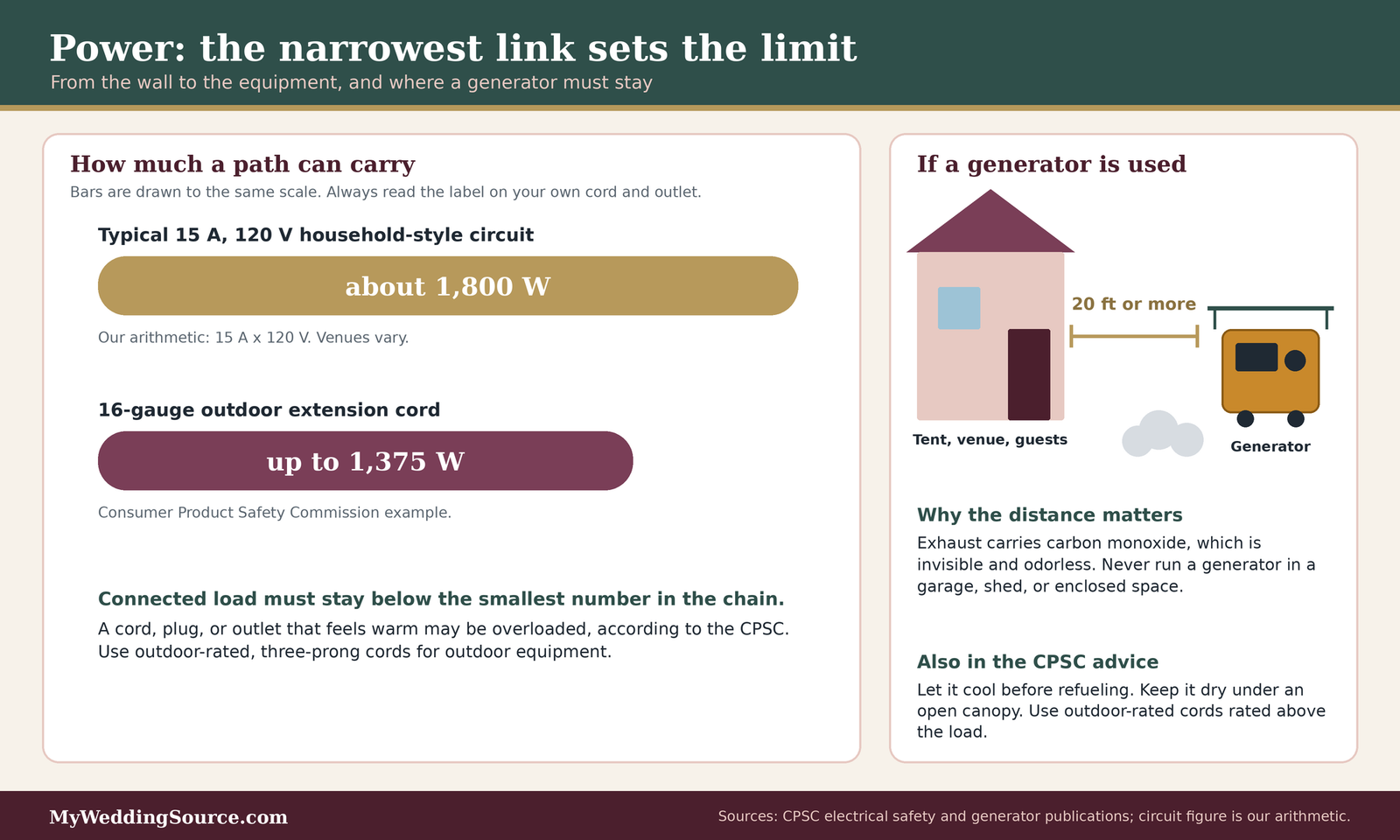
Ask the venue how many circuits are available near the audio equipment, whether the kitchen or lighting shares them, and who can reset a tripped breaker during the event and how quickly. As a rough illustration of why this matters, a typical household-style circuit rated at fifteen amps and one hundred twenty volts is nominally good for about eighteen hundred watts, which is our own arithmetic and not a promise about any venue. A single high-draw appliance on the same circuit can use a large share of that. Ask your caterer and vendors to list their power needs and share them with the venue so the load can be spread out. Our outdoor wedding infrastructure checklist and venue load-in restrictions guides explain how to ask about access, outlets, and limits.
Ground-fault protection outdoors
The Consumer Product Safety Commission says outdoor outlets should have ground-fault circuit interrupter protection, and that these devices are sensitive to moisture and should be protected when used outdoors. It says that if an outdoor outlet has no such protection, a portable one can be plugged in first, and it recommends testing these devices monthly by following the manufacturer’s directions. You do not need to do this yourself. The practical question for your vendor and venue is whether outdoor outlets used for audio are protected, and who has checked that the protection works.
Cords, and the weakest link in the chain
The same agency advises using only cords marked for outdoor use, using three-prong cords for three-prong equipment so the grounding is not lost, and noting that a cord, plug, or outlet that feels warm may be overloaded. It gives an example of a sixteen-gauge cord being suited to loads up to thirteen hundred seventy-five watts, and it advises against using extension cords as permanent wiring. The insight for your wedding AV backup plan is that the cord is often a weaker link than the outlet, which is why the picture below shows them side by side.
Generators: useful, and a real hazard
If the venue has no power or not enough, a generator may be part of the plan. It may also be the part of your wedding AV backup plan that deserves the most caution.
Where and how a generator can be used
The Consumer Product Safety Commission says portable generators should be used only outdoors, kept at least twenty feet from doors, windows, and vents, and never run in garages, sheds, or other enclosed spaces. It warns that carbon monoxide is invisible and odorless and can build quickly. It advises letting a generator cool before refueling, storing fuel in labeled non-glass containers away from living areas, and using heavy-duty outdoor-rated cords with a rating higher than the total load. It also describes protecting the generator under an open, canopy-like structure on a dry surface where water cannot pool. For a wedding, that means the generator needs a planned location away from the tent and the guests, which is a conversation for the venue and the vendor.
Who runs it, and who fuels it
A generator is not a plug-and-forget item. It needs fuel, and it needs a person who knows how to start it, monitor it, and shut it down. Ask who is responsible, whether that person will be present the whole time, and how refueling will happen without interrupting the event. Our wedding generator rental guide covers the questions to ask a rental company and the details to look for in the quote.
When a generator is the wrong answer
If the load is small, a battery-powered solution may be safer and quieter than a generator. If the site is tightly enclosed, crowded, or wet, the risks multiply. The CPSC’s advice is clear about enclosed spaces. If you cannot place a generator safely, ask your venue or planner about other options, such as extending a permanent circuit or using battery-based equipment.
Batteries and battery-powered fallbacks
Batteries are the quiet heroes of a wedding AV backup plan. They do not depend on the grid, a generator, or the Wi-Fi.
A battery-powered speaker as a lifeboat
A small battery-powered speaker will not fill a large room, and we do not suggest it as a replacement for a professional system. But a charged speaker with a microphone input, or a simple portable amplifier, can carry the vows or a short announcement if the main system fails. Ask your vendor whether they bring one, and ask them to test it with the actual microphone it would use.
A battery calendar for the day
Make a simple schedule: which batteries are replaced, when, and by whom. Many wireless microphones show a battery indicator, and a good technician checks it throughout the event. Put the swap times in the runbook, for example before the ceremony and again before the reception, and keep new and used batteries in separate, marked containers.
Phones, laptops, and chargers
Playback devices need power too. Charge them fully the night before, bring chargers and a spare cable, and place the playback device on a charger if it will be running for hours. Check that the charging cable is plugged into a circuit that will not be disturbed, such as one that is not shared with a heater or a kitchen appliance.
The curfew and decibel check
Some failures are not equipment failures. The venue’s contract, a city rule, or the weather can end the music before you planned. A wedding AV backup plan that ignores this is incomplete, because the best-prepared microphone will not help if the sound has to stop at ten.
Read the rules before you plan the encore
Rules about sound come from several places, and they do not always match. Knowing which applies to you prevents an unpleasant surprise.
The contract curfew and the legal limit are not the same thing
A venue may require music to end at a certain hour because of its own rules, its lease, or its neighbors. A city or county may also have a noise ordinance with limits that depend on the time of day and the place. We cannot say what applies in your area, and this is not legal advice. Ask your venue for its sound policy in writing and ask your vendor whether they have worked under it before. Our guide to wedding reception noise limits covers this subject at more length.
Who measures, and where
If a limit is expressed as a sound level, the next question is where it is measured. It might be at the property line, at the speaker, or at a neighbor’s house. It might apply to the whole evening or only after a certain hour. These details change the wedding AV backup plan, so ask for them before the contract is signed and write the answers in your runbook.
A plan for the last hour
Your wedding AV backup plan should say what happens in the last hour of the evening. Will the music be turned down, will the band switch to an acoustic set, or will the final dance be moved earlier? Our guide to the last dance can help you choose the moment to protect.
A simple decibel check on the day
You do not need to measure sound levels yourself, and in most cases a professional will do it better. But you can set up the conditions for a good check.
A hearing-safety reference
The National Institute for Occupational Safety and Health recommends a limit of eighty-five A-weighted decibels over an eight-hour workday for workers, and it offers a practical test: if you have to raise your voice to be heard by someone an arm’s length away, the noise is likely hazardous. That guidance is written for workplaces, so it is not a wedding rule. We mention it because it gives a simple, free test that you can use at the dance floor, and a reason to think about guests who will be near speakers for a long time, including children and older relatives.
Phone apps and calibrated meters
Many phones can run a sound-meter app, and they can give you a rough idea of relative changes. We have not tested them, and we did not find a source that lets us say how accurate they are, so treat any app reading as a rough guide. If your venue enforces a numerical limit, ask whether the sound technician has a calibrated meter, and agree on one reference point.
One person owns the volume
During the evening, one person should own the volume decision. It might be the DJ, the band’s sound engineer, or the venue’s manager. If a neighbor or a security officer asks for a reduction, that is the person who answers. Write the name in the wedding AV backup plan runbook. Otherwise, several people will each make a change, and the result is hard to predict.
When weather eats the clock
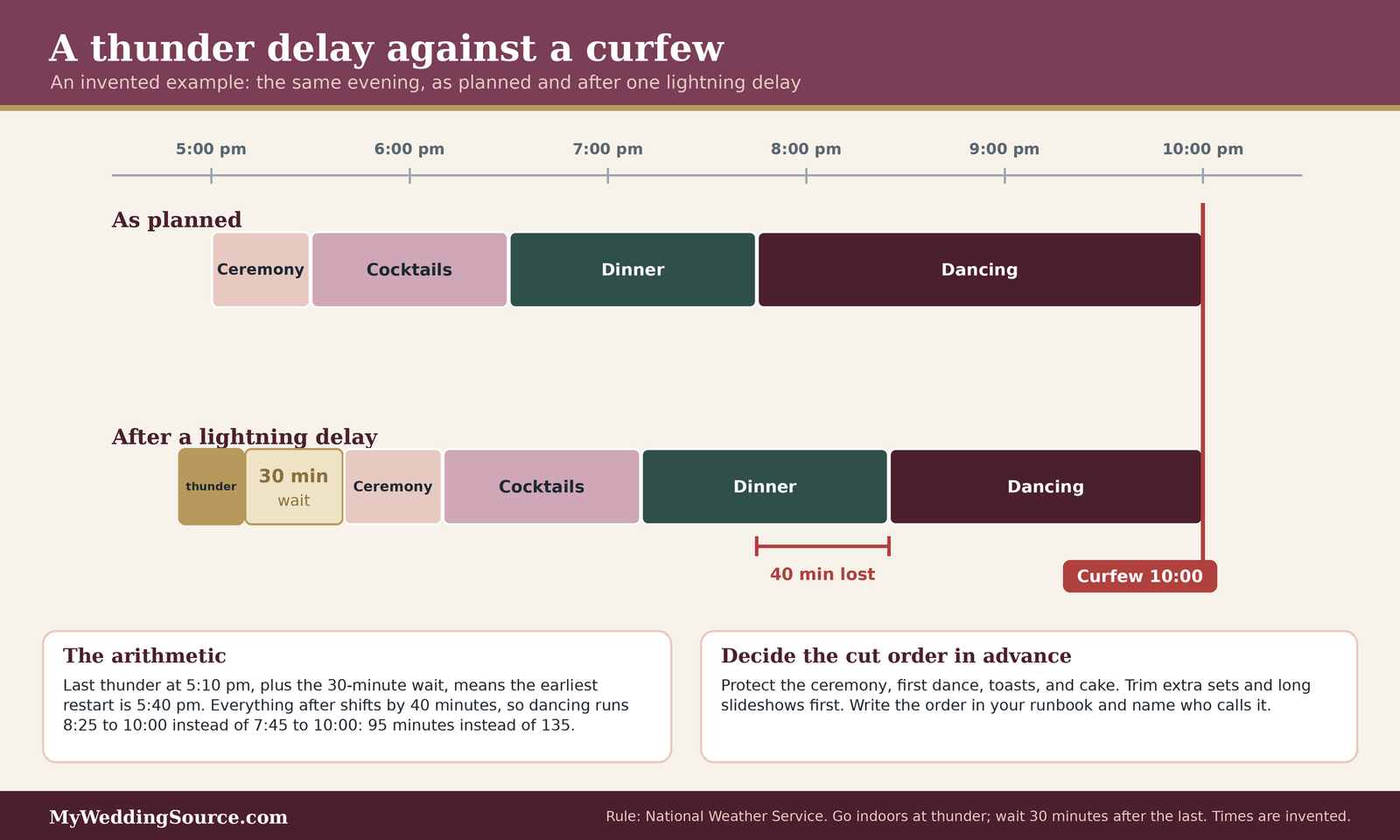
Weather does not respect a schedule, and a delay may push the evening into the curfew. The National Weather Service gives a simple rule for lightning: when thunder is heard, go indoors, and wait thirty minutes after the last thunder before returning outside. It also says that substantial buildings and hard-topped vehicles are safe shelters, and rain shelters and small sheds are not.
The thirty-minute lightning clock
For a wedding with an outdoor ceremony, the thirty-minute rule matters because it adds time that cannot be shortened by good intentions. If thunder is heard shortly before the ceremony, the earliest restart is thirty minutes after the last thunder. If thunder continues, the clock keeps restarting. The infographic below shows how a delay like that could eat into an evening with a fixed curfew, using an invented example so you can substitute your own times.
Wind and equipment
The National Weather Service says that when winds are sustained at forty to fifty miles per hour, isolated wind damage is possible, and that thunderstorm gusts can be much stronger. For audio, that means speakers on stands, banners, and lightweight equipment need to be secured or lowered, and your vendor should have a plan for tipping stands. Our wedding ceremony wind limits guide covers how to think about wind at a ceremony site. The weather page does not give event-specific advice about tents or speakers, so ask your tent company and sound vendor what their limits are, and note them in your wedding AV backup plan.
Deciding what to cut
If a delay eats into the evening, decide in advance what is cut first. A typical order might protect the ceremony, the first dance, the toasts, and the cake cutting, and drop longer slideshows or extra sets. That order is yours to set, and it should go in the written wedding AV backup plan. Our guide to photography rain backup pairs well with this decision.
The wedding AV backup plan runbook, moment by moment
The runbook is the part of a wedding AV backup plan that people actually read: a one-page script for a bad moment. It is what turns a good intention into an action under pressure. It does not need to be fancy. It needs to say, for each important moment, what could go wrong, how anyone will know, who acts, and what they do first.
How to build and use the runbook
Build the runbook with your vendor or coordinator, print a copy for each key person, and keep one at the sound station. You are writing for someone who is stressed and has ten seconds.
The five columns that matter
For each moment, record the primary setup, the backup, the trigger that tells you to switch, the person who switches, and the time you expect the switch to take. The triggers should be things anyone can see or hear, such as “no sound for five seconds” or “the microphone light is off.” The times are estimates you agree on with the vendor, not guarantees.
Decide the switch rules in advance
Decide who has the authority to call a switch under the wedding AV backup plan. Our editorial suggestion is that a single named person works better than a group vote. Write down the signal they use, whether that is a nod, a hand sign, or a radio call, and make sure the officiant, the DJ, and the coordinator all know it. Also agree on what happens if the named person is unavailable, and who takes over.
The ceremony runbook
The ceremony table is short because the ceremony is short. Use it as a template and replace the entries with what your vendor will actually bring.
The ceremony table
| Moment | Primary | Backup | Trigger to switch | Who switches |
|---|---|---|---|---|
| Prelude and seating | Music from the main playback device | Second device with the same files, or the bridge playlist | Silence for several seconds | Music operator |
| Processional | Cued track from the main device | Same track on the second device, cued and paused | Wrong track or no sound at the cue | Music operator, signaled by coordinator |
| Vows and officiant | Wireless microphone on the officiant | Spare wireless handheld, then a wired microphone | Voice drops, distorts, or goes silent | Sound technician, with officiant holding the spare |
| Readings | Handheld passed to the reader | Second handheld or lavalier | Reader is too quiet or the microphone fails | Coordinator hands over the spare |
| Recessional | Cued track | Second device | No sound at the cue | Music operator |
Who needs to know
Tell the officiant where the spare microphone is and what signal means “switch now.” Tell the music operator who gives the cue for each track. A rehearsal is the easiest time to practice both, even if it takes only a few minutes.
The cocktail hour and dinner runbook
This part of the evening carries many small jobs, and the runbook needs to cover transitions as much as equipment.
The cocktail hour and dinner table
| Moment | Primary | Backup | Trigger to switch | Who switches |
|---|---|---|---|---|
| Background music | Downloaded playlist in offline mode | Bridge playlist on second device | Silence, or a pop-up that interrupts playback | Music operator |
| Welcome and blessing | Microphone at the head table | Spare handheld kept at the table | No sound when speaker begins | Sound technician |
| Toasts | Handheld passed between speakers | Spare handheld, stand microphone | Squeal, dropout, or silence | Sound technician or coordinator |
| Slideshow or video | File on the display device | Exported video on the second device | No picture or no sound | Technician; if not fixed in a minute, skip and reschedule |
Watch the handoffs
Many problems in this part of the evening happen between activities: a microphone left on a table, a device that went to sleep, or a cable that was moved for the caterer. Assign one person to walk the sound station before each new activity and confirm that everything is where the runbook says it is.
The reception runbook
The reception has the most moving parts and the highest chance of a conflict with the curfew, so the runbook should include a line for the end of the night.
The reception table
| Moment | Primary | Backup | Trigger to switch | Who switches |
|---|---|---|---|---|
| Grand entrance | Cued track, announcement microphone | Same track on the second device; spare microphone | Wrong track, no microphone | DJ or band lead |
| First dance | Local file on the main device | Same file on the second device | Stalls, skips, or wrong version | Music operator |
| Dance sets | DJ or band | Bridge playlist on the second device | Equipment trouble that takes more than a minute to fix | DJ or band lead |
| Volume complaint | One owner adjusts | Predetermined lower level or acoustic set | Venue or neighbor request | Volume owner |
| Last dance and end | Planned track at the agreed time | Same track started early if weather or rules shorten the night | Curfew moves up or weather delay | Coordinator and DJ |
Protect the moments you chose
The last row matters more than it looks. If the evening is cut short, the runbook is where you decide in advance which moments are protected, such as the first dance and the last dance, so no one has to negotiate with a band while the clock runs. Keep the cut order from the curfew section next to this table.
The timeline for checks
A runbook is only as good as the checks behind it. A short schedule of checks, repeated at each wedding, keeps surprises small.
One week before
Send final files to the vendor and confirm that they arrived and play. Confirm the spare equipment list and the name of the person who will be on site. Confirm the venue’s power and noise rules in writing. Make the second copy of your playlist and charge any device you will use.
The day before
Download playlists for offline use and play each one through at least briefly. Update devices well before the event, not on the morning of the wedding, so an update cannot prompt a restart at the wrong time. Print the runbook, the cue sheet, and the contact list.
On the day, at vendor arrival
Walk the vendor through the spaces and ask them to run a mic check, a file check, and a power check. Make sure a person on your team knows where the spare microphone, the second device, and the breaker panel are. Take a photo of the equipment layout so that if anything is moved, someone can put it back.
Between the ceremony and the reception
Swap batteries on the schedule you set. Confirm that nothing was moved or unplugged during the ceremony. Check that the music device is still in offline mode and still has its notifications silenced.
Questions to ask your vendors and your venue
The best questions about a wedding AV backup plan are specific and invite specific answers. They also let a vendor show the care they take, and they give you a written record to refer to later.
Questions worth asking before you sign
- What spare microphones, cables, and batteries do you bring, and are they tested and set up before the ceremony?
- Do you bring a wired microphone and a small battery-powered speaker?
- Is your wireless equipment on a band the FCC currently allows, and do you scan for interference at each venue?
- Will music play from files saved on the device, or from a streaming service, and is there a second device with the same files?
- What happens if you cannot be reached, and who is on site as your backup?
- What are the venue’s circuits, outlets, and rules for outdoor power, and who handles a tripped breaker?
- What are the venue’s sound curfew and sound-level rules, where are they measured, and how are they enforced?
- What is our plan if lightning or high wind delays the event?
Questions for the DJ, band, or AV company
These questions confirm what the contract will actually deliver.
About equipment and spares
Ask them to list the microphones, receivers, speakers, and cables they will bring, and the spares of each, so the wedding AV backup plan names real items. Ask how they test the equipment before the event, and whether they will do a mic check in the actual rooms. Ask how long it takes them to switch to a spare microphone and a spare playback device, and write down the answers. These answers feed the “who switches” and “time” entries in your wedding AV backup plan. A vendor who answers these questions easily is giving you information about how they work.
About response and replacement
Ask what happens if a piece of equipment fails and cannot be fixed, and whether the contract states a remedy. Ask whether another technician can be sent if the primary person is ill. Our wedding vendor replacement policy and vendor subcontractors guides explain why it matters to know who is actually coming.
Questions for the venue
The venue’s answers set the limits inside which your wedding AV backup plan must work, so ask early.
About power and access
Ask about the number and location of outlets, which circuits are shared, whether outdoor outlets are protected, and what the venue’s own electrician can do on the day. Ask when vendors can load in and test, because a test with no time to fix anything is of limited use. Our guide to wedding vendor timelines and vendor communication deadlines can help you set these dates.
About rules and decisions
Ask for the sound policy in writing, including the hour that music must end, the sound level if one applies, and where it is measured. Ask who at the venue can grant an exception on the day, if anyone can, and who enforces the rule. Ask what the venue’s bad-weather plan is for indoor and outdoor spaces. Keep all of the answers in one place so your coordinator can find them.
Edge cases and special situations
Not every wedding fits the standard picture. These are situations that change a wedding AV backup plan.
Remote, outdoor, and off-grid sites
Fields, beaches, and rural properties have fewer options and more risk, and the wedding AV backup plan needs more attention to power and signal.
No Wi-Fi and little cell signal
Plan as though there will be none. That means offline files, local copies, and no reliance on a streaming service. If a guest or a vendor needs a signal for payments or for messaging, plan for that separately. Our outdoor wedding infrastructure checklist offers a wider view of what to confirm for a site with limited services.
Generator-only power
When all the power comes from a generator, the generator becomes a single point of failure. Ask about a second source or a battery-based fallback for the microphone and a minimal sound system, and ask who monitors the generator throughout the event. Remember the placement and fueling cautions from the Consumer Product Safety Commission above.
Weekends, multiple rooms, and moved events
A wedding that spreads across spaces or days multiplies the things to check.
Welcome party, rehearsal dinner, and the main event
Each event may use different equipment and a different vendor, so each needs its own short wedding AV backup plan. Give each one its own short runbook, even if it is only half a page, and reuse the same file folder and the same naming habit. Our wedding weekend event planning guide offers ideas for managing several events.
Ceremony in one place and reception in another
If equipment moves between spaces, ask who moves it, how long it takes, and what happens to the music during the move. A second playback device and a battery-powered speaker are useful in this case because one can run while the other is set up. Confirm that the receivers and microphones are rechecked in the new space, because the radio environment is different.
Friends, family, and do-it-yourself sound
Some couples ask a friend to run the music or rent the equipment themselves. It can work well, and it changes the wedding AV backup plan.
When a friend is the DJ
Give the friend the cue sheet, the backup device, and a copy of the wedding AV backup plan. Make sure they can reach you or a coordinator during the evening, and that they are not also expected to be a guest at the same time. Ask them to practice at the venue before the day if possible. A friend with a good attitude and a clear plan can do very well, but they should not be left to solve problems alone.
When the venue provides the equipment
Some venues provide a sound system and a microphone. Ask whether the system is tested before each event, whether spares are available, and who is present to fix problems. If the answers are unclear, a modest rental of your own backup items, such as a spare microphone, may be worth discussing with the venue.
Guests who depend on amplified sound
Some guests rely on amplification more than others, such as those with hearing loss, and a failed microphone affects them first, and a good wedding AV backup plan includes them.
Planning for hearing needs
Ask your venue whether any assistive listening equipment is available, and place seating for guests who need it near a speaker or the front. Our accessible wedding guest experience guide has more ideas on this subject. It is a good idea to talk with those guests, if they are comfortable, about what would help.
Captions and a printed fallback
If speeches or readings are important, a printed copy, a program insert, or a short note with the words can help guests who cannot hear them. Our wedding programs guide shows how to build one. A backup like this works even when the sound does not.
FAQ: wedding AV backup plan questions
Gear and files
What is a wedding AV backup plan?
It is a written plan for what you will do if the microphones, music, or power fail during your wedding. It lists spare equipment, duplicate music files, who decides when to switch, and the first action in each case. A good plan fits on one page and is shared with the vendor, the coordinator, and the officiant.
How many spare microphones should we have?
There is no official number for a wedding AV backup plan. A reasonable starting point is one tested spare for every microphone that has an important job, such as the officiant, the toasts, and the announcements, and one wired microphone as the last fallback. Ask your vendor what they bring and why, and adjust for the size of your event.
Should the music be streamed or saved as files?
Saved files are safer, because they do not depend on a network. If you use a streaming service, download the playlist ahead of time, check the service’s offline rules, and switch the device to offline mode. Spotify, for example, requires Premium for downloads and an internet connection at least every thirty days. Keep a second copy of the files on another device.
Power and weather
Do we need a generator?
Only if the venue cannot provide enough safe power for the equipment. Generators add cost and risk, and the Consumer Product Safety Commission says they must be used outdoors and at least twenty feet from doors, windows, and vents. Ask your venue and vendor to assess the load, and ask who will run and fuel it.
What if it storms during the ceremony?
The National Weather Service advises going indoors when you hear thunder and waiting thirty minutes after the last thunder before going back out. Your plan should include an indoor location, a power plan for it, and a decision about what to shorten. The person who calls the delay should be named in advance.
Can we use a phone speaker as a backup?
A small speaker can cover a short announcement or a quiet moment, but it will not fill a large space. Treat it as a lifeboat and not a replacement. Charge it, test it with the same device and file, add it to the wedding AV backup plan, and place it where a person can reach it quickly if the main system fails.
Rules and contracts
How do we find out about the noise limit?
Ask the venue for its sound policy in writing, and check your city or county’s noise ordinance with the local government. Ask where the limit is measured, when it applies, and who enforces it. This is not legal advice, and the rules differ from place to place. Share the answers with your DJ or band.
What should the contract say about equipment failure?
Ask that the contract or an attached list names the spare equipment, the on-site contact, and what happens if the main technician cannot attend. It helps to know whether any remedy is offered if the equipment fails. For legal questions about a specific clause, consult a lawyer who works with contracts.
Your next steps
This week
Write the one-page wedding AV backup plan
Fill in the three tables above with your own details, even in rough form, and send it to your DJ, band, or AV company for comment. A draft that a vendor can correct is more useful than a perfect plan that no one has seen. Our wedding audio and lighting checklist is a good companion for the wider list.
Ask the questions in writing
Send the vendor and venue questions by email, so the answers to your wedding AV backup plan questions are saved. If an answer is unclear, ask a follow-up. If the answer is a promise you want to rely on, ask that it be added to the contract.
Before the day
Duplicate your files and test them
Make the second copy, download the playlists, and have the vendor play the key tracks on their equipment. Print the cue sheet and put a copy at the sound station.
Share the plan with the people who will use it
Give the wedding AV backup plan to your coordinator, officiant, and a trusted friend or family member who will be present and available. Our wedding emergency kit and wedding rehearsal guides pair well with a short briefing at the rehearsal.
Sources & methodology
How we built this guide
What we relied on
This guide builds a wedding AV backup plan from guidance from the National Weather Service on lightning and wind, the Federal Communications Commission on wireless microphone rules, the Consumer Product Safety Commission on outdoor electrical safety and portable generators, the Cybersecurity and Infrastructure Security Agency on data backups, the National Institute for Occupational Safety and Health on noise exposure, and manufacturer and platform help pages from Shure, Spotify, and Apple. Where a statement comes from a manufacturer or a service, we say so, because it reflects that company’s products and policies. The circuit-capacity figure is our own arithmetic, the runbook structure and the thirty-minute curfew example are our own editorial work, and any suggestion in this guide that is not attributed to a source is our judgment, not a standard. We checked these sources on November 12, 2026; rules, apps, and policies change, so confirm current terms before you rely on them.
What we did not do
We did not test equipment, measure sound levels, or inspect any venue. We did not find a reliable published price benchmark for AV backup equipment at U.S. weddings, so we gave no dollar figures. We do not give electrical, legal, or engineering advice. Electrical work, generators, and rigging should be handled by qualified staff, and noise limits are set by your venue and your local government.
Source list
Government and public-agency sources
- National Weather Service, Safety hub: https://www.weather.gov/safety
- National Weather Service, Lightning safety overview: https://www.weather.gov/safety/lightning-safety-overview
- National Weather Service, Wind safety: https://www.weather.gov/safety/wind
- Federal Communications Commission, Wireless microphones: https://www.fcc.gov/topic/wireless-microphone
- Federal Communications Commission, Operation of wireless microphones: https://www.fcc.gov/sites/default/files/operation_of_wireless_microphones.pdf
- Consumer Product Safety Commission, Electrical safety publication: https://www.cpsc.gov/s3fs-public/513.pdf
- Consumer Product Safety Commission, Portable generator safety alert: https://www.cpsc.gov/s3fs-public/Portable-Generator-Safety-Alert-2017_5123.pdf
- Cybersecurity and Infrastructure Security Agency, Back up business data: https://www.cisa.gov/back-business-data
- CDC National Institute for Occupational Safety and Health, Understand noise exposure: https://www.cdc.gov/niosh/noise/prevent/understand.html
Manufacturer and platform help pages
- Shure, Top wireless mistakes: https://www.shure.com/en-us/insights/top-5-most-common-wireless-mistakes
- Shure, Wireless system planning, coordination, and monitoring: https://www.shure.com/en-US/performance-production/louder/all-about-wireless-system-planning-coordination-and-monitoring
- Spotify Support, Listen offline: https://support.spotify.com/za-en/article/listen-offline
- Apple Support, Turn Do Not Disturb on or off: https://support.apple.com/105112