
Wedding programs are optional, and whether your guests need one comes down to a handful of practical facts: how long and how unfamiliar the ceremony is, how many people are coming, where you are standing, and how much time and money you have to spare.
Quick answer
Every source we checked treats a printed program as optional. A simple default is to print wedding programs when the ceremony runs long, includes rituals or languages many guests will not know, or takes place outdoors where guests need a fan and a plan. Skip them, or replace them with one large sign or a web page, when the ceremony is short, the guest list is small, and everyone knows the people involved. Print one per household plus about 15% extra, check the draft against a person who has never seen it, and order only after your guest count is final.
Most couples meet wedding programs the same way they meet other stationery: someone mentions them, a shop shows a matching suite, and a line appears on the budget before anyone has asked what the program is for. This guide slows that down. It treats wedding programs as a small tool with two jobs, helping guests follow the ceremony and giving you a keepsake, and it asks whether your wedding actually needs that tool. If you want the larger picture of invitations, save-the-dates, and the rest of your paper, start with our wedding invitations guide and come back here for this one decision.
What wedding programs do that nothing else at the wedding does
Before comparing options, it helps to be precise about what wedding programs are. The word covers a one-sided card, a folded booklet, a paddle fan, and a web page, and each does the work a little differently. Defining the job first keeps you from buying a format that solves a problem you do not have.
What a program is, and what it is not
A ceremony program is a short printed or digital document that tells guests what is about to happen, who is taking part, and anything they need to do. Zola compares it to the program at a performance: it lists the order of events and the key people, and it gives you a direct place to thank guests and share details. That comparison is useful, because nobody needs a playbill for a five-minute performance, and most people appreciate one for a long concert in a language they do not speak.
Ceremony program versus whole-day program
Older etiquette treated the program as a ceremony-only document. A wedding-planning platform called Sayi.do notes that wedding programs once covered only the ceremony and now often cover the whole day, which is why many modern ones include the cocktail hour, dinner, and dancing. A whole-day program is a different tool. It answers “what happens after this?” for guests who have traveled, while a ceremony-only program answers “what am I watching right now?” Decide which question your guests are asking before you decide what to print.
Program, sign, and wedding website are three separate tools
A program lives in a guest’s hand. A sign lives at the entrance and is read once. A wedding website lives on a phone and can change after you print anything. Zola and The Knot both describe all three as workable ways to share the same information, and later sections compare them directly. For now, the useful point is that you do not have to choose one tool for everything. A short printed program plus a web page for details is a common and sensible split.
Why this is a decision rather than a default
Wedding stationery arrives with a lot of social momentum, and wedding programs are one of the easiest items to add without thinking. Every source we read describes them as helpful rather than required. Zola says a ceremony works fine without one, and The Knot says some couples skip programs because of cost. The question is not “are wedding programs expected?” but “will this wedding be better with one?”
Optional by every source we checked
We found no etiquette authority or vendor that says a ceremony program is mandatory. The only firm requirements around a wedding ceremony, such as your marriage license and the legal wording your officiant uses, have nothing to do with printed paper. If you are working through the legal pieces, our marriage license guide covers that side, and our wedding officiant guide explains what your officiant will handle.
Two jobs: guide the guests and keep the memory
The first job is practical. A program tells guests the order of events, names the people at the front, and explains anything unfamiliar. The second job is sentimental: a couple of cards kept in a box, a place to thank parents, a way to remember someone who cannot be there. These jobs pull in different directions. A program that is heavy on thanks and story can be a lovely keepsake and a poor guide, and a bare list of readings can be an excellent guide and a cold keepsake. Knowing which job matters more to you will settle half of the later choices.
The inputs that change the answer on wedding programs
Some inputs matter far more than others when you are deciding on wedding programs. Five of them do most of the work: who is coming, what the ceremony contains, where it takes place, what you can spend, and how much time is left. The sections below take them in turn, and the decision matrix after them puts them together.
Guest-side inputs
The guests are the audience for the program, so their needs come first. Two guests with identical seats can need very different things from the same piece of paper.
Guest count and household mix
Guest count changes cost and effort, not necessity. A program for 30 people is not more or less useful than one for 300, but it is far cheaper and quicker to produce. Household mix matters for quantity. Zola suggests one program per couple or family, and The Knot suggests one per household with a few extras, so a list of 150 invitees made of couples, families, and singles will need far fewer wedding programs than 150. We work through the arithmetic in the cost section.
Familiarity with the traditions and the language
This is the strongest reason to print one. Zola says wedding programs are most useful when many guests may not know the traditions, and the Zola sample for a Jewish ceremony includes short explanations of elements such as the chuppah and the seven blessings. Sayi.do gives similar examples. If your ceremony includes readings in another language, a ritual that is central to your family’s culture, or a religious service with a set order, a few lines of plain explanation help people feel included instead of watching from outside.
Travel, age, and who is sitting in the back
Guests who flew in tend to want the schedule for the rest of the day, not only the ceremony. Older guests and guests with low vision may find small type hard to read, and guests in the back row may not hear the officiant. Greenvelope points out that a program serves guests who traveled, especially out-of-town ones, who want the order of events and the names of the people involved. If a meaningful share of your list falls into any of these groups, treat the program as an access tool, not decoration.
Venue and weather inputs
The place changes both the need and the format. A program that works in a quiet church can be a nuisance on a windy beach.
Outdoor, heat, wind, and sun
The Knot calls fan-style wedding programs useful for sunny outdoor events, and notes that outdoor wedding programs can blow away, which is a reason to print a few extras. Zola describes a paddle fan as a card on a wooden stick that suits outdoor summer weddings. A guest holding a flat card in a breeze will tuck it under a leg, and a guest holding a fan will use it. If your ceremony is outside in warm weather, the format matters as much as the words.
Entrances, seating, and how the programs get handed out
Wedding programs have to reach hands. The Knot says ushers traditionally hand them out, and that without ushers a family member, friend, or coordinator can do it, or programs can sit on seats or in a basket or tray at the entrance. A venue with several entrances needs several handout points. A venue where guests find their own seats, such as a small garden, can use the seats themselves, provided the weather allows it. Our wedding ceremony guide covers the layout questions that come before this one.
Budget and time inputs
Programs are small purchases that add up when you multiply them by every item in a stationery suite. They also take time that is easy to underestimate.
The money
The Knot’s 2026 Real Weddings Study surveyed 10,474 U.S. couples who married in 2025, and its stationery breakdown lists about $510 for a full suite, about $220 for invitations including RSVP cards, about $150 for save-the-dates, and about $150 for day-of paper such as signage and menus. It gives no separate average for wedding programs, so we will not invent one. What we can do is price wedding programs per piece from vendor listings, which we do in the cost section, and label those prices as vendor listings, not survey averages. For the wider picture of where the money goes, see our average wedding cost guide and our wedding budget calculator.
The hours
Printing is quick and proofing is not. Paperlust, a printing company, estimates 6 to 15 hours across several sessions for a do-it-yourself folded program, including design, test prints, printing, folding, and checks, and about 90 seconds of folding per copy for a tri-fold, which is nearly four hours for 150 copies. That is the retailer’s estimate and your pace may differ, but it shows why a program that looks simple can take the place of a weekend. If your remaining time is short, a one-sided card or a sign takes far less of it.
Hard constraints versus social pressure
Some reasons to print are real, and others are habit. Separating them is the most useful thing you can do before you open a design tool.
Hard constraints
A hard constraint is something that will cause a problem if you ignore it. Examples are a ceremony with several readers and a long order that guests would otherwise lose track of, a religious service whose participants need to be named correctly, a venue that asks guests to stay out of certain areas, or a group of guests who will not be able to follow without an explanation. If one of these applies, a program or an equivalent is not optional in practice, even though no rule requires it.
Social pressure
Social pressure is a sense that a wedding “should” have a program, that your mother-in-law expects one, or that a photo will look unfinished without it. These feelings are real, and they deserve a conversation, but they are not guest needs. A sign, a web page, or a printed card with three lines can answer the pressure without the cost and time of a full booklet. Our wedding etiquette guide can help when pressure comes from family and the question is how to respond kindly.
A decision matrix for whether your guests need a program
The matrix below combines the inputs from the previous section into one reusable view. It is our own synthesis, built from the guidance in Zola, The Knot, Greenvelope, and other sources, and from common sense. It is not a survey result, and it is meant to be argued with.
The matrix
Read across a row that describes your wedding. The “lean” column is a starting point, not a verdict, and the last column names the condition that should make you change your mind.
| If your wedding looks like this | Lean | Why | What flips it |
|---|---|---|---|
| Short ceremony, small list, everyone knows the people involved | Skip, or one sign | Little to explain and little to hand out | Several guests with low vision or hearing loss who would benefit |
| Long ceremony with several readings, songs, or a full religious order | Guests lose their place without a list | Guests all know the service by heart | |
| Rituals, languages, or customs most guests have not seen | Print, with short explanations | Guests feel included instead of watching from outside | Your officiant explains each part aloud |
| Outdoor summer ceremony | Print as fans, or skip | Programs double as shade and air | Strong wind makes loose cards a nuisance |
| Many out-of-town guests | Program or web page with the day’s schedule | Travelers want the full day, not only the ceremony | Your invitation and website already carry the schedule |
| Tight budget or short on time | Sign or web page | Almost free and quick | Guests who cannot reach a phone or read a sign easily |
| Large list with several entrances | Print extras, plan handout points | Programs have to reach hands | A seated, assigned ceremony where programs sit on chairs |
How to read the matrix
If three or more rows describe your wedding and they all lean the same way, that is your answer. If they disagree, give extra weight to the rows that describe a real guest need, such as unfamiliar traditions or guests with low vision, and less to the rows that describe convenience. A budget row is a real constraint, but it points to a cheaper tool rather than to no tool.
Where two options tie
Printing and a sign tie more often than people expect. For a ceremony of moderate length with mostly familiar traditions, a single printed card and a large entrance sign give guests about the same information. In a tie, choose the option that costs the least time, because the hours you save can go somewhere more useful. A tie also shifts toward printing when you value the keepsake and toward a sign when you value having fewer items to produce and carry.
Scoring the options without fake precision
It is tempting to add numbers and total them. We recommend against that, because the inputs are not equal, and a score of 7 versus 8 can feel decisive when the underlying judgments are rough.
Use ranges and qualitative thresholds
A better method is to mark each row as high, medium, or low need, and then ask whether any single high-need row is present. One high row, such as a language barrier or low-vision guests, is usually enough to justify a program or an equivalent. If every row is low, you have permission to skip. That is a rule you can defend to a relative, and it does not pretend to be more exact than it is.
Check the result against a real guest
Pick a guest who will be at the wedding and who is not in the wedding party, such as a cousin or a friend of your parents, and describe the ceremony to them in two sentences. Ask what they would want to know that you did not say. This is a five-minute test, and it will tell you more about guest needs than any matrix. ## What to include in wedding programs, and what to skip
Once you have decided to print, the next question is how much to put on the page. The sources agree on a short list of essentials for wedding programs and then diverge on extras. The notes below separate the core from the optional, and we mark where a recommendation is our own judgment.
The core that earns its space
Three items show up in every guide we read. If space is tight, these are the ones to protect.
Names, date, and place
Zola lists the couple’s names, the wedding date, and the location as the basics, and PsPrint treats names and date as required with time and location optional. A formal version spells out the date and time, and a casual one uses first names and numerals. The choice should match your invitation, so a guest who sees both recognizes them as a set. If you sent paper invitations, our wedding invitations guide and save-the-date cards guide explain how to keep the look consistent.
The order of events
A running order is the heart of the program. PsPrint lists the usual sequence as prelude, attendants’ processional, bride’s processional, greeting or opening prayer, readings, exchange of vows, exchange of rings, a unity ceremony if you have one, presentation of the couple, and recessional. Zola’s sample outline is similar and adds a welcome, a message, and the seating of grandparents and mothers. Give each step its own line, and cut any step that you would not name aloud. A program that lists a unity ritual you decided against is worse than no program.
The people who take part
PsPrint describes a common order that runs from parents and grandparents, through attendants and ushers, to the officiant, musicians, and special guests. Relationship labels such as “cousin of the groom” are optional, and Greenvelope notes that a short label can start conversation at the reception. Full names are the safe choice in formal or religious wedding programs. The people on this list will read it carefully, so it is the part of the program most worth proofreading twice.
Items that help only sometimes
These are real improvements for some weddings and clutter for others. Use the matrix from the previous section to decide.
Short explanations of rituals
If your ceremony includes customs that guests might not recognize, a line or two of explanation is the most useful extra you can add. Zola’s Jewish template does this for the chuppah, the ketubah, the rings, the seven blessings, and the breaking of the glass. Sayi.do suggests brief notes on rituals such as the seven blessings or seven steps. Keep each note to a sentence or two. Guests will read them during the ceremony, and a paragraph turns the program into a reading assignment.
Practical requests and logistics
Zola lists post-ceremony plans, shuttle times, what to toss or wave at the exit, requests for an unplugged ceremony, and photo or social media rules among the details a program can carry. Sayi.do includes directions to the reception or cocktail hour. These are worth including when a guest would otherwise have to ask someone, because a printed line saves several conversations. If you want a photographer’s perspective on unplugged ceremonies and guest phones, our wedding photography guide is a good next read.
Thanks and remembrance
PsPrint describes an optional back section that thanks guests, remembers relatives who have died or could not attend, and gives reception details, and Julia Kay Design calls the thank-you note her favorite element. A “Loving Memory” line is common, and Zola names remembrances of absent or deceased loved ones as an option. This is where the keepsake job of the program lives. Because it is personal, it should be the part you write most carefully and the part you ask family to review.
What to skip or trim
None of our sources gives a list of things to leave out, so this section is our own editorial view and should be read that way.
Full vows, long readings, and lyrics
Zola mentions that you can include song lyrics or full readings if space allows. We would usually skip them. Full vows are often written close to the date, and printing them can remove the surprise for guests. Long readings pull attention to the page and away from the person speaking. Naming the author and the reader gives guests what they need, and the rest belongs in the moment.
Anything likely to change after you print
A program is printed once. If a reader might drop out, a song might change, or a family member’s participation is uncertain, the safest choice is to describe the role without naming a person, or to leave that line for a handwritten insert. A name printed incorrectly cannot be fixed on the day, and a missing name can feel like an omission to the person who is left out. Our wedding vows guide covers the writing side if you are deciding how much of that to share in print.
Names, families, and sensitive details
Wedding programs list real people, and families are complicated. A few choices are worth making deliberately.
Divorced and blended families
PsPrint describes three ways to handle divorced parents: list a parent and stepparent on one line, list the parents escorted by stepparents, or list parents and stepparents separately. All three are described as acceptable, and none is described as the standard. The right choice is the one that your family can read without wincing. Ask each person how they would like to be listed, which is a short conversation and avoids a surprise on the day.
Name accuracy and titles
Spell every name the way its owner spells it, including nicknames, hyphens, and accents. Use full names with roles, the way Truly Engaging’s etiquette guide presents them, such as “Maid of Honor, Jane Smith,” unless your style is deliberately casual. Ask the officiant how they prefer to be listed, since titles vary. Then have someone who did not write the program read it aloud, because errors that your eyes skip over tend to show up when the mouth has to say them.
Formats, sizes, and how programs feel in the hand
Wedding programs are physical objects, and their shape changes how guests use them. The sources describe a handful of formats, with the common sizes they give, and we have drawn them to scale below so that you can judge them against your hand.

Formats compared
Zola describes six styles: flat card, paddle fan, multi-panel fan, tri-fold, accordion, and booklet. The first three are the ones most couples consider.
Flat card
Zola calls the flat card the most standard and affordable option, with space on both sides. Minted lists a flat card at 4 inches by 9.375 inches, and Zola’s shop lists a classic size of 5.25 by 7.25 inches. A flat card suits a ceremony with a short order and a simple list of names. It is the easiest to print, to proof, and to hand out, and it takes up the least room in a handbag.
Folded programs and booklets
Folded wedding programs give you panels for each section. PsPrint describes a two-panel layout and a four-panel layout, and The Knot gives 5.5 by 8.5 inches folded as a common size. A folded program suits a longer order with a full wedding party list and a back-panel message. Paperlust, a printing company, recommends at least 80-pound text paper for a folded program and notes that heavier stock is often beyond a home printer, and scoring before folding prevents cracking.
Fans and paddles
A paddle fan is a card on a stick, and Zola and The Knot both describe fans as useful for outdoor summer weddings. Paperlust gives about 3.5 by 8 inches for a paddle. Fans need cutting and sticks, and DIY fans are time-consuming. If your ceremony is outdoors in warm weather, a fan can be the most useful program you can print, because guests will actually hold on to it.
Making it readable
The Knot says wedding programs should be large enough to read and small enough to hold. That sentence hides most of the design work.
Type size and contrast
The American Printing House for the Blind publishes research-based large print guidelines. They set a floor of 18 points for body text and treat anything between 12 and 18 points as enlarged print, not large print. They recommend a sans-serif face such as Verdana or Helvetica, 1.25 line spacing, and black text on a white or off-white background, and they advise against gray paper and gray text. Those guidelines are written for documents for people with low vision, so they are stricter than a wedding program needs to be. They are a useful reference for deciding how far to go for guests who need larger type.
Wording and length
Aim for fewer words than you think you need. The Greenvelope guide advises keeping the program short so guests focus on the ceremony, and Zola’s advice is to keep it simple and brief. A good check is whether a guest could read the entire program in the minute before the processional begins. If not, the extra material belongs on a website, where guests can read it at their own pace.
Accessibility without turning it into a legal question
Accessibility at a wedding is mostly a matter of hospitality, and it is worth saying clearly that this guide is general information, not legal advice.
Large-print copies
The ADA explains effective communication for people with vision, hearing, or speech disabilities and gives large print, Braille, and screen-reader-compatible files as examples of auxiliary aids. That framework applies to businesses open to the public and to government, so it is not a rule for your private wedding, and we are not suggesting that it is. We mention it because its examples are a handy menu of practical ideas. Ask your guests when they respond, and print a few large-print copies at 18 points or more for anyone who asks, or hand them to ushers to offer.
Digital and screen-reader friendly options
A web page can be read with a phone’s screen reader, resized by the guest, and updated at any time. If you rely on a printed program and a web page together, keep the text on the page as real text and not as a photo of the printed card, because screen readers cannot read an image of text. If you ask a vendor to produce a PDF, ask for a text-based file. These are small steps, and they matter to the guests who rely on them. ## What wedding programs cost and how many to print
Wedding programs are cheap per piece and easy to over-order. The method below gives you a quantity, and then three published price points turn that quantity into a range. Every figure here is either a vendor listing, which we attribute, or our own arithmetic, which we label as an estimate.
A quantity method you can reuse
The sources agree that you rarely need one program per guest. They disagree slightly on the margin, which is why we show the range instead of one number.
Count households, not guests
Zola suggests one program per couple or family, and The Knot says a common rule of thumb is one per household or couple plus a few extras. Zola adds that couples with many children among their guests might print two per family. Start with your list of invitations, not your headcount. Couples, families, and roommates sharing a household take one, and single guests each take one.
Add a margin, then adjust for the venue
Zola’s shop suggests about 15% extra, and gives the example that a 150-person list needs roughly 80 to 90 wedding programs. The Knot says to print more if the venue has several entrances or is outdoors, where programs can blow away. Our estimate is to use the 15% as a floor, then add a few more for each additional entrance, for large-print copies, and for the ones you will keep. Rounding up to a multiple your printer sells is usually free.
Per-piece prices from published sources
Printing prices move often, so treat the figures below as snapshots. We checked them in November 2026.
Online and designer printing
Minted listed a flat program of 4 by 9.375 inches at 100 for $159 when we checked, which is about $1.59 each at that quantity, with foil as a paid add-on and free proofs with a dedicated designer. Zola’s shop listed standard designs at $1.29 each, shown at $0.77 under a promotion on the day we looked, and foil designs at $1.69, shown at $1.01. Zola’s page did not state a minimum order or a turnaround time. Promotions end, so use the regular listing for planning.
Do-it-yourself and print-shop printing
Paperlust, a print company, says doing it yourself costs about $0.40 to $1.20 per program at a quantity of 100, against $1.50 to $4.00 or more for professional printing, and a local print shop charges roughly $0.15 to $0.50 per color page. Those are one vendor’s figures and its own article gives two slightly different DIY ranges, so we use the wider band. Paperlust also notes that home printing is impractical past about 100 copies because of overheating and jams, and that a do-it-yourself job suits guest lists under about 80.
What this could cost
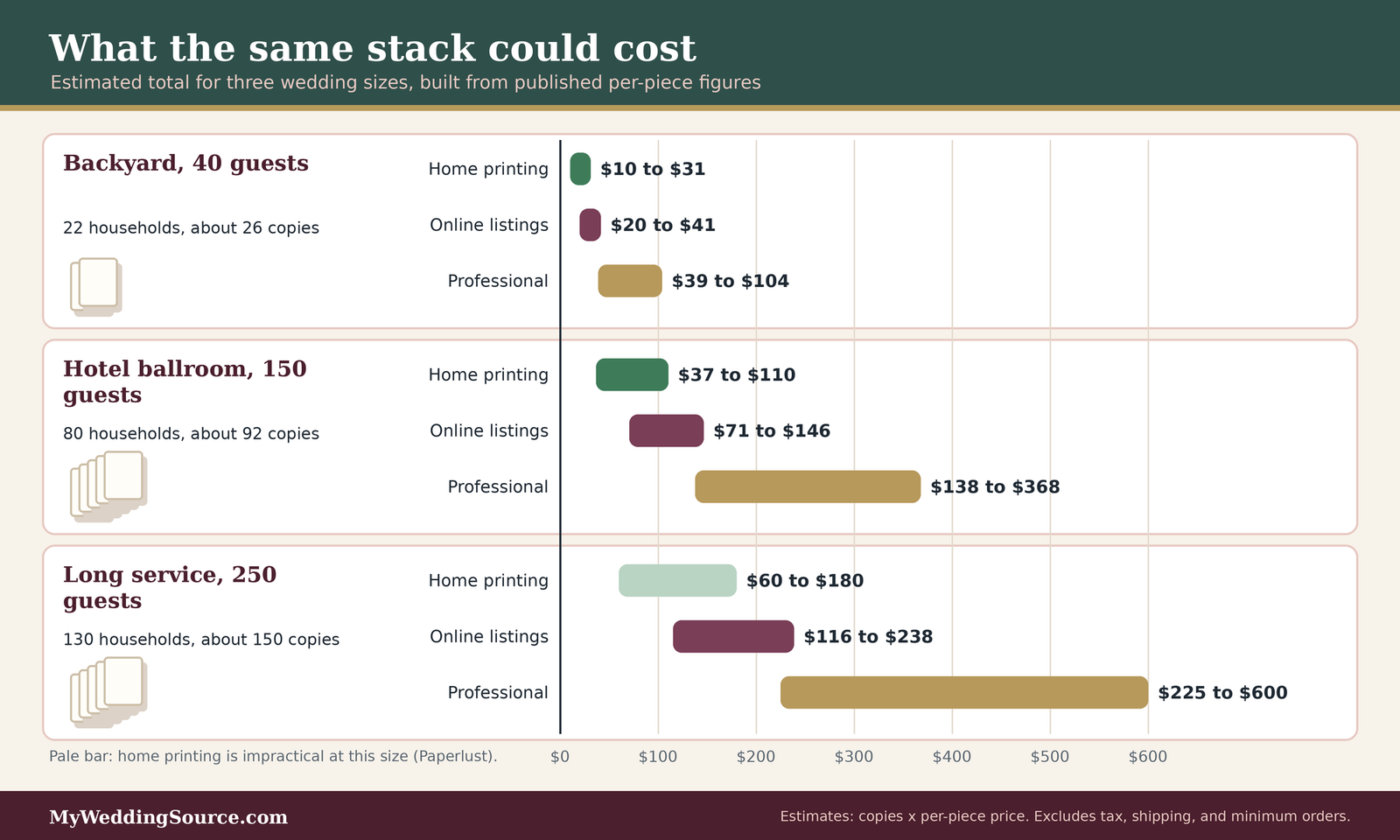
Our estimate for a 150-guest wedding with about 80 households and a 15% margin is about 92 wedding programs. At the per-piece figures above, that is roughly $37 to $110 printed yourself, $71 to $146 from the online listings, and $138 to $368 at professional rates. These are estimates built from vendor listings, not quotes. They exclude tax, shipping, envelopes or sticks for fans, and your time. Minimum orders and quantity tiers will change the real number.
Why we do not give a national average
The Knot’s stationery breakdown does not list wedding programs separately, and its “day-of paper” line, about $150 in the 2026 study, is described as signage and menus. A single survey line would make wedding programs look more standardized than they are. Prices depend heavily on format, paper, foil, and how many you order, so a range with a stated method is more honest than an average.
Worked scenarios
Three contrasting weddings show how the same method leads to different answers. The numbers are illustrative assumptions, not predictions.
| Scenario (our assumptions) | Programs needed | Recommendation | Estimated cost range | What flips it |
|---|---|---|---|---|
| 40 guests, about 22 households, 15-minute backyard ceremony, everyone knows the people involved | About 26 | One welcome sign with the order of events, or no program | Cost of a sign; printed cards would be roughly $10 to $41 | A guest with low vision, or an unfamiliar ritual |
| 150 guests, about 80 households, 30-minute ceremony in a hotel ballroom, mixed ages, some travelers | About 92 | One flat card, both sides, with a web page for the day’s schedule | Roughly $37 to $146 | Several entrances or an outdoor setting, which adds extras or fans |
| 250 guests, about 130 households, 60-minute religious service with readers and rituals, many out-of-town guests | About 150 | Folded program with short explanations, plus a few large-print copies | Roughly $116 to $600 depending on printing route; home printing is impractical at this size | Guests who all know the service well, which makes a card enough |
A small, simple case
In the first scenario the ceremony is short and everybody knows the people involved. The matrix leans toward a sign or no program at all. A printed card would work and would cost little, roughly $10 to $41 by our arithmetic, but it would mostly repeat what the officiant says out loud. The better use of the same effort is a large, readable sign by the seating, and perhaps a line on your website.
A large, complex case
In the third scenario, a long service has several readers, set rituals, and many guests who traveled. The matrix leans strongly toward a folded program, and the short explanations Zola and Sayi.do describe are the most valuable content. Printing 150 copies is past the point at which Paperlust says home printing is practical, so an online or local printer is the realistic route, and the wide cost range reflects that gap between the cheapest and most expensive routes. This is also the scenario in which a few large-print copies matter most.
Why the preferred option changes
The preferred option changes with the need to explain, not the size of the guest list. The 150-guest wedding gets a card because guests need a running order and little else. The 250-guest wedding gets a booklet because guests need explanations of unfamiliar elements. The 40-guest wedding gets a sign because guests need almost nothing. The flip thresholds in the last column are the questions to keep asking as your plans change.
Alternatives to a printed program
If the matrix says your wedding programs can be skipped, you still may want to share some information. Three alternatives cover most needs, and they combine well.
Signs and displays
A sign is the lowest-effort replacement. It gives guests the order of events in one glance, and it costs a single print instead of a stack.
One large sign at the entrance
Zola suggests a large chalkboard, mirror, or acrylic sign at the entrance in place of individual wedding programs, and The Knot describes a framed sign or easel for a web link. A sign works best when the information is short and guests pass it on the way in. Use large, high-contrast lettering, since the same readability rules apply as for a card, and place it where guests can stop without blocking the line.
Creative substitutes
Zola’s other ideas include printing details on favor bags or on paper bags filled with toss petals or confetti, and formatting a program like a newspaper or a playbill. These can be charming, and they carry the same risk as any printed item: the text has to be proofread, and a guest with low vision may find it hard to read. Use them for lighter content and keep essential information in a plain format as well.
Digital programs
A web page costs almost nothing and can change after you print. It also depends on guests having a phone, a signal, and the patience to use them during a ceremony.
Your wedding website as a program
Sayi.do says your wedding website can serve as a digital program, with the order of events further down the page, and The Knot describes a free QR code to an online program as nearly free. This suits destination and outdoor weddings, where paper is awkward to carry. It does not suit a ceremony where phones are unwelcome, so if you plan an unplugged ceremony, a digital-only program sends a mixed message. Our wedding planning guide covers how a wedding website fits into the rest of your plans.
QR codes, with care
QR codes are convenient and have a known downside. The Federal Trade Commission warns that scammers hide harmful links in QR codes and may cover legitimate codes with their own. It advises checking the web address after you scan. A code on a printed sign at your own ceremony is low-risk, but a guest has no way to know that. Print the web address in plain text beside the code, and place the sign where only your venue staff and guests have access.
A hybrid that often works
Many weddings land between the two ends. A short printed card with the essentials, plus a web page for the extras, gives each guest a choice.
A short card with a pointer
The card carries names, the order of events, and perhaps a line of thanks. It points to the website for the rest. This keeps the card to one side and avoids the cost of a booklet, and it means you can update the web page if a detail changes after printing. It also gives guests with phones and guests without phones the same essential information.
What to put only online
Biographies of the wedding party, the story of how you met, a long note on a tradition, and the schedule for the weekend all work well online. Zola lists a hashtag as an optional program element, and a website is a more natural home for it. Keep anything guests need during the ceremony on paper, and anything they would enjoy later on the web.
When to order, and how programs reach the guests
Wedding programs are almost always the last piece of stationery to be printed, because they depend on details that settle late. That makes the timeline short and the proofing step important.
When to order
The sources give different windows, and the differences depend on whether you design the program yourself and which printer you use.
Published windows
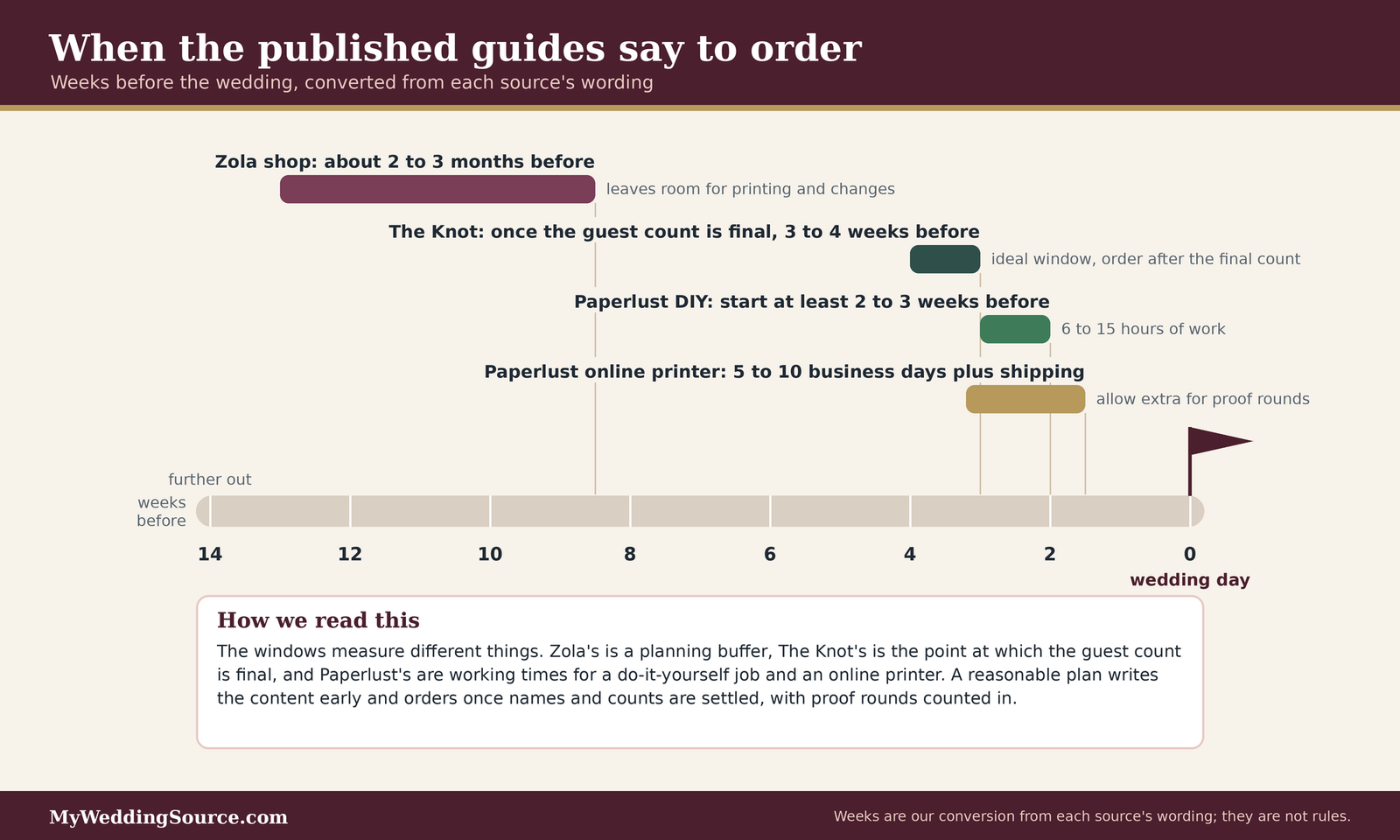
Zola’s shop advises ordering about two to three months before the event to leave room for printing and last-minute changes. The Knot suggests ordering once you have a final guest count, ideally three to four weeks before the wedding. Paperlust says to start a do-it-yourself job at least two to three weeks before, and that an online professional printer needs roughly 5 to 10 business days plus shipping. These guides are not in conflict. They describe different amounts of buffer.
Our approach: work backward from the people list
Wedding programs depend on names, and names settle late. A practical approach is to write the content early, confirm the people list as soon as your wedding party and readers are fixed, and order when your guest count is final. Count your proofing rounds into the schedule. If you are not sure, order earlier and choose a format that has no dependence on the final count, such as a card where an extra stack costs little. Our wedding timeline guide and wedding planning checklist show where this step sits in the larger plan.
Getting programs into hands
Wedding programs that sit in a box do nothing. A plan for distribution is part of the decision.
Ushers, hosts, and handout points
The Knot says ushers traditionally hand wedding programs out, and that a family member, friend, or coordinator can do it when you have no ushers. Choose handout points to match the entrances, and tell the people involved where to stand. A short note to your ushers, with a count of programs at each point, avoids a crowd at one door and a shortage at another. If your wedding party includes ushers, our wedding party attire guide helps with planning their day.
Seats, baskets, and the weather
The Knot also says wedding programs can go on guest seats when weather permits, or in a basket or tray at the entrance. On a windy day, seats are a poor choice, and a basket with a light weight is a better one. If you use fans in hot weather, a box of extras near the back is a kind gesture, since guests who arrive late will otherwise miss them.
Proofing before you print
A printed error is permanent. Proofing is the cheapest part of the process and the one most often rushed.
A proofing routine
Read the program aloud, name by name. Check every name, title, spelling, and date against the source, not against the draft. Have two people who did not write it read it, and have one person who is mentioned in it read their own line. Minted says its proofs are free and unlimited with a designer, which is helpful, but the checking is still yours. For a folded program, print a test copy at full size and fold it, since layout errors often appear only on paper.
Questions to ask before you approve a print order
Questions to ask
- What is the minimum order, and what does each additional batch cost?
- Is there a proof, how many rounds are included, and how long does each take?
- What are the finished size, fold, paper weight, and finish?
- What is the production time, and is shipping separate?
- What happens if a name is misspelled by the printer, and what if it is misspelled by us?
- Can we order a small run of large-print copies, and in what type size?
- If a reader or participant changes, can we reprint a smaller batch, and at what cost?
A rule you can apply to your wedding programs
The analysis comes down to a rule that you can say in a sentence. It has a default and an exception, and a short list of people and facts to gather before you commit.
The default and the exception
A good rule has to survive uncertainty, because the details of a wedding change as the date comes closer.
A default when you are unsure
Our default is a single flat card with names, the order of events, and a short thanks, printed at one per household plus 15%, paired with a web page for anything else. It costs little, it is easy to proofread, and it helps nearly every guest. If you cannot decide, this is the option you are least likely to regret.
The exception that overrides it
The exception is a guest need that a card cannot meet. If many guests do not know the traditions, use a folded program with explanations. If the ceremony is outdoors in heat, use fans. If guests have low vision, add large-print copies. If the ceremony is short and everyone knows the people involved, skip the card and use a sign. Any one of these can override the default, and none of them needs permission from a rule.
Who must agree, and what to collect
Wedding programs involve more people than most stationery. A few short conversations before you design anything will save time later.
Who must agree
Your partner, your officiant, and anyone who is named in a way that might be sensitive, such as divorced parents or a person being remembered. Your officiant can confirm the order and the wording of religious elements. Ask family members how they want to be listed. If you are working with a planner or coordinator, ask who will hand wedding programs out.
What to collect before you design
You need the final order of events from the officiant, the full names and spellings of everyone taking part, the titles or roles you will print, a count of invited households, and the number of entrances. Add the ceremony start time, the reception details, and any requests you want to make of guests. With those in hand, the design is a short job, and your program will be about the right size for your wedding. ## FAQ: wedding programs questions
Whether you need one
Are wedding programs required?
No. Zola says a ceremony works fine without one, and The Knot notes that some couples skip wedding programs to save money. A program is a courtesy that helps guests follow the order of events and learn who is taking part. Whether wedding programs are worth the time and cost depends on your ceremony, as the decision matrix above shows.
When do guests actually need a program?
Guests need one most when the ceremony is long, has several readings or songs, includes rituals or languages many people do not know, or is attended by travelers who want the day’s schedule. Zola names long ceremonies and unfamiliar traditions as the clearest cases. For a short ceremony among friends, a sign usually covers it.
What goes in them
What should wedding programs include?
At minimum, the couple’s names, the date, and the order of events. Most guides add the wedding party, the officiant, readers and musicians, a short thanks, and brief explanations of rituals. Logistics such as shuttle times or an unplugged request are useful when guests would otherwise have to ask. Everything else is optional and can live on a website.
Should I list divorced or deceased family members?
It is your choice, and it should be a family conversation. PsPrint describes three ways to list divorced parents and stepparents, and Zola names remembrances of loved ones who have died as an option. Ask each person how they would like to appear, and remember that an unlisted name can feel like an omission to someone.
Quantity, cost, and timing
How many wedding programs should I print?
Count households, not guests. Zola suggests one per couple or family plus about 15% extra, and The Knot suggests one per household plus a few extras, with more for several entrances or an outdoor ceremony. By our estimate, 80 households plus 15% is about 92 wedding programs. Add a few large-print copies if guests may want them.
How much do wedding programs cost?
It depends on format and route. Vendor listings we checked ran from roughly $0.77 to $1.59 per card online, and one print company estimates $0.40 to $1.20 per program for DIY and $1.50 to $4.00 or more professionally. The Knot gives no separate program average. Our estimate for 92 wedding programs is about $37 to $368.
Digital and accessible options
Can a QR code or website replace printed wedding programs?
Yes, for many weddings. Sayi.do says a wedding website can serve as the program, and The Knot describes a QR code sign as nearly free. Keep a plain-text address beside the code, since the FTC warns about harmful QR codes in general, and keep paper for guests without phones or for an unplugged ceremony.
How can I make wedding programs easier to read?
Use a plain sans-serif typeface, high contrast, and generous spacing. The American Printing House for the Blind sets 18 points as the floor for large print, with 1.25 line spacing and black text on white or off-white paper. A wedding program need not meet those standards, but a few copies in large type help guests who ask.
Your next steps
Decide on purpose
Run the matrix with your own details
Mark each row of the matrix as high, medium, or low need for your wedding. If any single row is high, plan a program or an equivalent. If all are low, a sign or a web page is enough, and you can spend the saved hours elsewhere. Our wedding ceremony guide helps you settle the order of events that the program will list.
Ask one guest
Describe the ceremony to a guest who is not in the wedding party and ask what they would want to know. Their answer is the best test of whether a program, a sign, or nothing will serve your guests. If the question touches family expectations, our wedding etiquette guide can help you reply kindly.
Collect and confirm
Gather the details in one document
Write down the final order of events, the spellings and roles of everyone involved, the household count, and the number of entrances. Share it with your officiant and your partner, and confirm that every person named is comfortable with how they appear. Our wedding officiant guide covers what to settle with the person leading the ceremony.
Place the order on the calendar
Work backward from the wedding date, allow for proofing, and order once the guest count is final. Add the order to your wedding planning checklist, and check the cost against your wedding budget calculator. If you are also choosing the rest of your paper, our wedding invitations guide and save-the-date cards guide keep the look consistent.
Sources & methodology
How we built this guide
What we relied on
This guide combines published advice from wedding-planning platforms and stationery sellers, the 2026 Real Weddings Study as reported by The Knot, research-based large print guidelines from the American Printing House for the Blind, the ADA’s description of effective communication, and a Federal Trade Commission consumer alert on QR codes. Where a statement comes from a seller or printer, we say so, because sellers describe the products they sell. The household counts, quantities, and cost ranges in the scenarios are our own arithmetic from the figures cited, and they are estimates. Prices were checked in November 2026 and will change.
What we did not do
We did not test programs, survey couples, or obtain quotes. The Knot’s stationery breakdown does not report a program average, so we did not state one. The scenarios are illustrations, not predictions. Nothing here is legal advice, and the ADA material is cited as a source of practical ideas, not as a rule for private weddings. Confirm prices, minimums, and turnaround with the printer you choose.
Source list
Planning platforms and etiquette guides
- Zola, A Guide to Wedding Ceremony Programs: https://zola.com/expert-advice/wedding-ceremony-ideas
- The Knot, Wedding Programs for Every Guest: https://www.theknot.com/content/wedding-programs-for-every-guest
- The Knot, National Average Cost of Wedding Invitations and Stationery (2026 Real Weddings Study): https://www.theknot.com/content/average-cost-of-wedding-invitations
- Sayi.do, What to Include in Your Wedding Program: https://sayi.do/articles/what-to-include-wedding-program
- Truly Engaging, A Thorough Look at Wedding Program Etiquette: https://blog.trulyengaging.com/blog/a-thorough-look-at-wedding-program-etiquette
- Julia Kay Design, What Is a Wedding Ceremony Program and Do I Need One: https://juliakaydesign.com/blogs/juliakaydesign/what-is-a-wedding-ceremony-program-and-do-i-need-one
Printers and stationery sellers
- PsPrint, Wedding Program Wording Guide: https://www.psprint.com/resources/wedding-program-content-guide/
- Greenvelope, Wedding program wording: https://greenvelope.com/blog/?p=6968
- Zola, Wedding programs shop: https://www.zola.com/wedding-planning/programs/shop
- Minted, Wedding Programs (printed, flat card): https://www.minted.com/product/wedding-programs/MIN-Z41-WPR/printed
- Paperlust, DIY Wedding Programs: Design and Print at Home: https://paperlust.co/blog/diy-wedding-programs/
Government and accessibility sources
- American Printing House for the Blind, Research-Based Large Print Guidelines: https://www.aph.org/app/uploads/2022/04/Research-Based-Large-Print-Guidelines.pdf
- ADA.gov, Effective Communication: https://www.ada.gov/resources/effective-communication/
- Federal Trade Commission, Scammers hide harmful links in QR codes to steal your information: https://consumer.ftc.gov/consumer-alerts/2023/12/scammers-hide-harmful-links-qr-codes-steal-your-information