
AI wedding planning works best as a fast, tireless first-draft assistant that you supervise, and it goes wrong when couples hand it decisions that depend on contracts, state rules, family history, or private information it cannot verify, so the useful question is never “should we use it?” but “which tasks, with which checks?”
Quick answer
Use AI wedding planning for work where a wrong first draft costs you a few minutes: brainstorming, reorganizing notes, drafting polite vendor emails, laying out a backward timeline, and turning messy quotes into a comparison table. Keep a person in charge of anything involving money you will actually pay, a signature, a legal requirement, someone’s feelings, or personal data. A simple rule covers most cases: the higher the stakes and the harder the decision is to reverse, the less you should rely on a chatbot’s answer and the more you should rely on a document, an official source, or a professional. Write your own vows and your own hard messages, and let the tool be the editor. This guide is general planning information, not legal, financial, or professional advice.
What AI wedding planning means, and what couples are actually doing with it
Most couples who say they tried AI wedding planning mean something modest. They typed questions into a general chat assistant, asked for a draft of an email, or used a feature inside a planning app. Very few handed over the wedding. Before judging whether AI wedding planning is a good idea, it helps to say what it is, what the tools can and cannot know, and what the two largest U.S. wedding surveys say couples are really doing. If you want the full planning framework first, our wedding planning guide covers it, and this article stays on the narrower question of where AI helps, where it adds risk, and where a person has to stay in the loop.
A working definition of AI wedding planning
For this article, AI wedding planning means using a generative AI tool, usually a chat assistant that writes text and answers questions, to help with any part of planning a wedding. It does not mean a search engine, a spreadsheet with formulas, or a vendor’s online booking form, although some of those now contain AI features. The distinction matters for AI wedding planning because a generative tool produces fluent, plausible language whether or not the content is correct, and that single property drives most of the advice below.
The three kinds of tools you will meet
The first kind is a general chat assistant that you open in a browser or an app and talk to. It is flexible and knows a great deal about wedding customs in general, but it knows nothing about your venue, your contract, or your guest list unless you tell it. The second kind is an AI feature inside a wedding platform. Zola’s guide, for example, mentions a contract uploader that it describes as AI-powered and designed for reviewing vendor contracts. Features like that are narrower, but they still produce summaries you should check against the document. The third kind sits on the vendor side: website chatbots that answer questions about packages and availability, and tools that help photographers, planners, and florists write proposals and marketing. You will meet these without choosing them, which is one reason it is worth knowing how to read what they say.
What these tools do not know
A general assistant used for AI wedding planning does not have your quote, your deposit schedule, your county’s marriage license rules, your venue’s noise ordinance, or the fact that your aunt will not sit near your uncle. It also cannot see whether a vendor is actually available on your date. When it appears to know such things, it is either repeating what you supplied, producing a typical answer, or making something up. We say “making something up” plainly because the U.S. National Institute of Standards and Technology uses a similar description in its generative AI risk profile. It calls the problem confabulation and describes it as content that is confidently stated but erroneous or false, which can mislead or deceive users. A wedding is a project built from specifics, so the gap between typical and specific is exactly where the trouble lives.
What the two big surveys say, and why they disagree
Two industry sources give the most useful picture of AI wedding planning among U.S. couples right now, and their headline numbers differ by a wide margin. The difference is a lesson in how to read wedding surveys, not a contradiction. Both come from companies that sell wedding products and recruit respondents from their own audiences, so the figures describe those audiences and not every engaged couple in the United States.
Thirty-six percent or fifty-four percent: two different groups
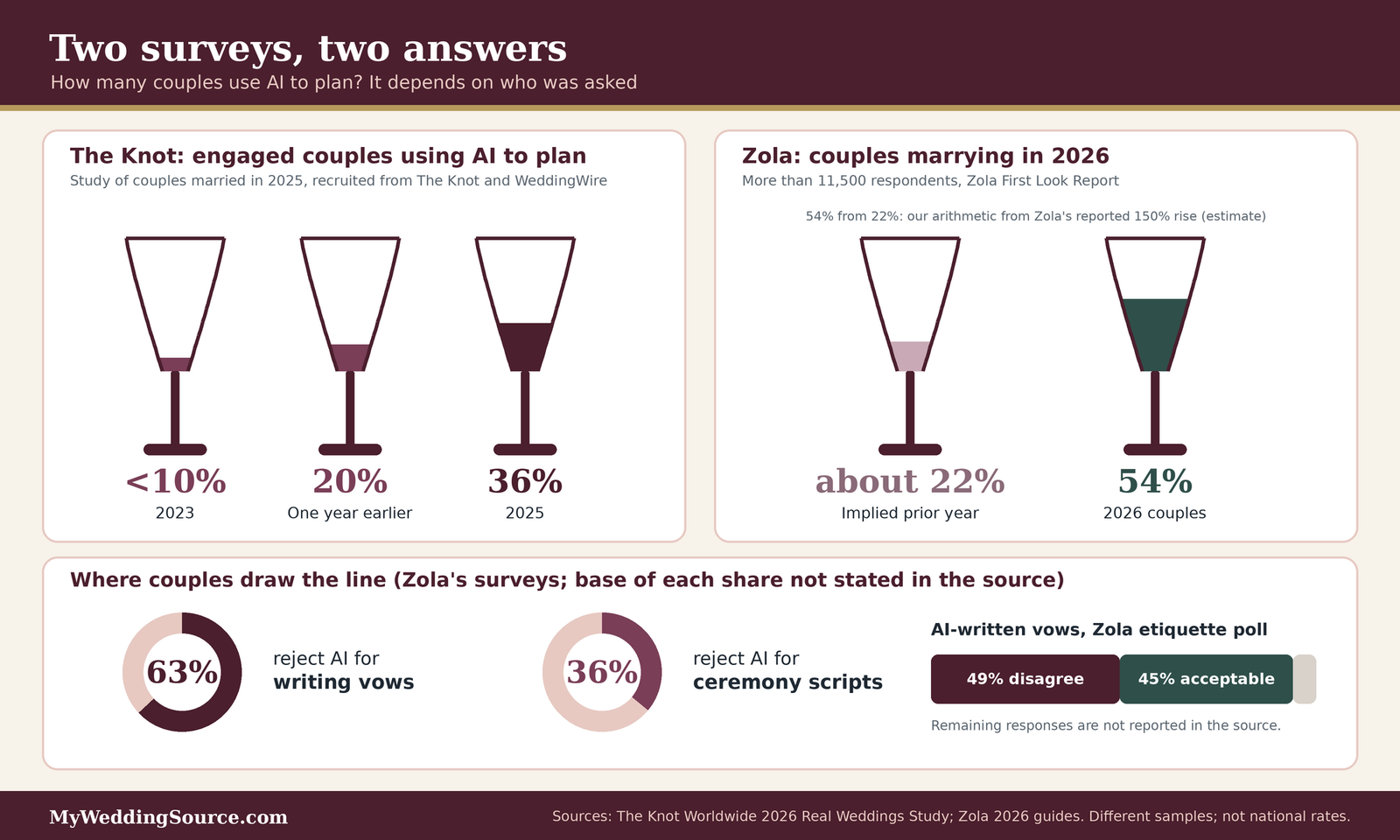
The Knot Worldwide’s 2026 Real Weddings Study, released in February 2026, surveyed 10,474 U.S. couples who married during 2025. According to the company, respondents were recruited by email invitation from The Knot and WeddingWire membership throughout 2025, and the report also draws on separate studies of engaged and newlywed couples. From that work, The Knot reports that the share of engaged couples using AI for planning rose from 20 percent to 36 percent in a year, and describes 2023 as below 10 percent.
Zola’s 2026 First Look Report surveyed more than 11,500 couples getting married in 2026, which Zola calls its largest survey ever. Zola reports that 54 percent of those couples use AI in some way to plan, which we treat as AI wedding planning in a broad sense, and describes that as a 150 percent jump from the year before. Our own arithmetic, which is an estimate, is that a 150 percent increase to 54 percent implies a prior-year share of about 22 percent, which is close to The Knot’s 20 percent figure for the same period. The two surveys may be more consistent than they first look. The populations differ, the question wording differs, and one counts engaged couples while the other counts couples marrying in a single year, so neither number should be treated as a national rate.
What couples use it for, and what they refuse to use it for
Both companies describe a similar pattern in AI wedding planning. The Knot says couples mainly use AI for inspiration, early questions, and drafting messages, then turn to established wedding platforms to verify details and make final decisions. WeddingPro’s write-up of the study lists inspiration and advice at 60 percent and logistics and timelines at 46 percent, and also mentions drafting website copy, guest messages, and vows. That summary does not spell out the base for those shares, so we read them as shares of couples who use AI, which is an assumption.
Zola reports that among its respondents, 54 percent use AI for etiquette questions, 44 percent for logistics, and 40 percent for vendor emails. On the other side of the ledger, 63 percent reject AI for writing vows and 36 percent reject it for ceremony scripts. Zola’s guide does not state the base of these shares either. Read together, the surveys describe a clear division of labor that couples arrived at on their own: let the tool help with the paperwork and the first draft, and keep the personal words personal. That division is a good starting point for the rest of this article.
Define the decision: the inputs that change how much to lean on AI
Couples sometimes ask whether AI wedding planning is a good idea in general, and the honest answer is that the question is too broad to answer. A better question is how much any particular task in your AI wedding planning should rely on a chatbot, given the facts of your wedding. This section lists the inputs that change the answer and the second-order effects that are easy to miss, so you can set your own level instead of copying someone else’s.
The inputs that materially change the answer
Five facts about your wedding do most of the work in deciding how far to trust AI wedding planning, and two sorting questions help you tell real constraints from pressure. None of this requires a survey. It requires about twenty minutes and an honest conversation.
Guest count, venue, budget, relationships, and timeline
Guest count changes how much coordination work there is, which changes how tempting it is to automate with AI wedding planning tools. A 30-person gathering has few moving parts, and a chatbot’s help with a timeline is easy to check by eye. A 150-person wedding with a rehearsal dinner and out-of-town guests has dozens of dependencies, and an error in an AI-generated timeline can cost real money because other things are scheduled around it. For reference, The Knot reports an average guest count of 117 and an average cost of $34,000 for 2025 weddings, and Zola’s guide cites an average of $36,000 and 145 guests for its 2026 audience. Those are survey averages from two different samples and not quotes for your wedding.
Venue matters because venues often impose rules, such as vendor lists, catering exclusivity, end times, and insurance requirements, and those rules live in documents a general chatbot has not seen. Budget matters because a mistake of a few hundred dollars is a nuisance in a $60,000 wedding and a crisis in a $12,000 one. Relationships matter because the more family members have opinions, the more of the work is diplomacy, and diplomacy is not a task to outsource. Timing matters because a long runway lets you verify and iterate, while a six-week sprint pushes people to accept the first plausible answer. If three or four of these five inputs are tight, lean on AI wedding planning less for anything that has to be right the first time, and more for sorting and drafting.
Hard constraints versus social pressure
Sort every planning decision into two bins before involving a chatbot. A hard constraint is something with a real external deadline or rule: a venue’s capacity, a state’s license requirements, a contract’s cancellation date, a religious calendar, a relative who can only travel in one month. Social pressure is a preference somebody else holds. A chatbot is useful for the second kind because it can generate options and wording, such as a polite way to say no. It is a poor judge of the first kind, because hard constraints are specific to you, and the tool will happily produce an answer that sounds right for a typical couple.
A practical test is to ask what would happen if the answer were wrong. If the consequence is a rewrite, treat the output as a draft. If the consequence is a lost deposit, a missed filing, or a hurt relative, treat the output as a prompt for a question to ask someone who knows. Our wedding etiquette guide covers a number of situations where the right answer is social and not computational.
The second-order effects that are easy to miss
The first-order effect of AI wedding planning is that a task gets done faster. The second-order effects are what the decision changes downstream, and they are where couples are most often surprised. They show up in time, in fairness between partners, and in what guests experience.
What delegating a task changes downstream
When a chatbot drafts a timeline, you now own a document you did not think through. If it is wrong, you may not notice until a vendor asks why the photographer is booked before the hair appointment ends. Faster drafting can also create more decisions: ask for ten theme ideas and you have ten new things to react to. That widens the funnel at the top, which feels productive but can slow the narrowing that actually gets a wedding planned. This is our own observation about how the tools tend to behave, not a measured result, and it suggests asking for fewer, better-constrained options. A request such as “give me three options under these stated constraints” produces something you can actually decide between.
There is also a verification cost. Time saved on drafting is partly spent on checking, and for high-stakes items the checking can take as long as doing the task directly. We found no reliable independent figure for how many hours couples save with AI wedding planning, and we would be skeptical of any single number, because the answer depends on the task, the tool, and how carefully you check. The honest version is that the savings are real for low-stakes drafting and smaller or negative for anything you must verify line by line.
Workload, fairness, and what guests experience
Planning work is often unevenly shared. Zola’s 2026 reporting, discussed in our wedding planning stress guide, says the great majority of women in opposite-sex couples carry most of the planning. AI wedding planning that lets one partner produce plans faster can quietly widen that gap if the other partner never sees the reasoning. A better pattern in AI wedding planning is to let the tool help produce a shared document that both partners read and edit, and to agree on who verifies what. Treat the chatbot as a junior assistant that works for both of you.
Guest experience is the other effect. Most guests will never know that AI wedding planning was part of your process, and most will not care about a well-written email or a clear timeline. They will notice a generic toast, a website that reads like a template, or an invitation message that does not sound like you. They will also notice mistakes: a wrong address, a wrong time, an invented dress code. Our wedding invitations guide and wedding RSVP wording guide are useful places to check the specifics that a chatbot is most likely to get slightly wrong. ## Where AI wedding planning saves time, task by task
The benefits of AI wedding planning are real but narrow. They concentrate in work that is mostly language and arranging, where you can see at a glance whether the output is right. This section sorts common AI wedding planning tasks by how much a tool helps and how much a mistake costs, walks through a worked example of comparing vendor quotes, and ends with prompts that keep you in control of the result.
A delegation matrix for common planning tasks
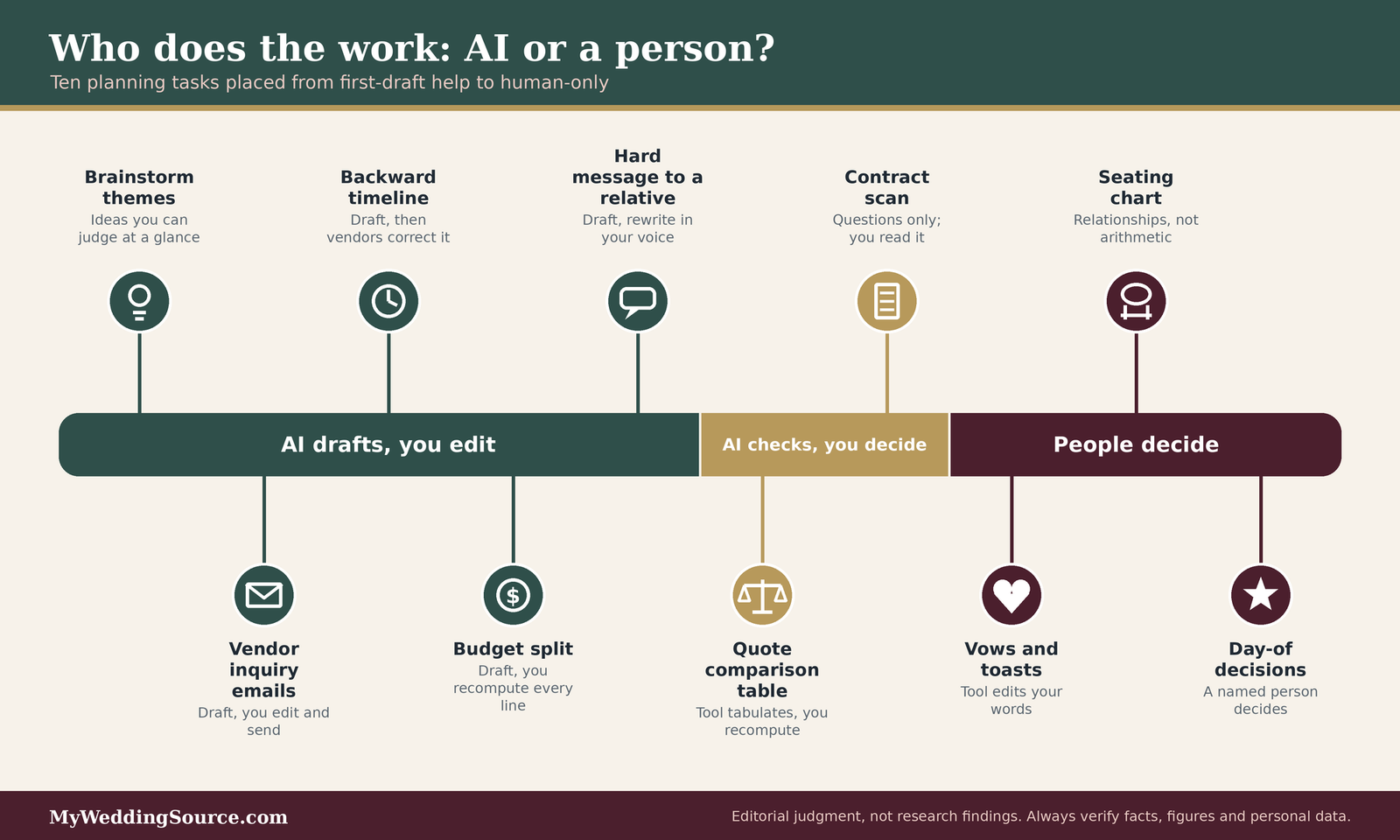
The matrix below is our editorial judgment, not a research finding. It rates each task on two things that genuinely change the answer: how much time a tool can plausibly save, and what happens if the output is wrong and nobody catches it. The last column turns those into one of three roles for the tool: drafter, checker, or bystander.
| Task | Time a tool can plausibly save | If the output is wrong and unnoticed | Suggested role for AI |
|---|---|---|---|
| Brainstorming themes, color palettes, welcome-sign wording | Moderate | Low: you will see it | Drafter |
| Drafting inquiry emails to vendors | Moderate | Low to moderate: a vague email, not a wrong contract | Drafter, you edit and send |
| Summarizing a long email thread with a vendor | Moderate | Moderate: a missed condition | Checker, with the thread open beside it |
| Backward-planned timeline from the ceremony time | Moderate | Moderate to high: a clash between vendors | Drafter, then you and the vendors verify |
| Splitting a total budget into categories | Small to moderate | Moderate: a cost you assumed would be small | Drafter, you recompute every figure |
| Putting three vendor quotes into one table | Moderate to large | High: a hidden fee ignored | Checker, with a recomputed total |
| Reading a vendor contract | Small | High: a clause misread | Checker only, and not a substitute for reading it |
| Wording a hard message to a relative | Moderate | Moderate: a tone that does not sound like you | Drafter, you rewrite in your voice |
| Vows, toasts, ceremony script | Small | High, because it is personal | Editor of your own words |
| Seating chart | Small | High: social fallout | Bystander, or a sorting aid only |
| State marriage license rules | None | High: a missed requirement | Bystander; use the issuing office |
| Day-of problem solving | None | High and immediate | Bystander; a named person decides |
Tasks that suit a first draft from AI
In AI wedding planning, the common thread in the first rows is that the output is quick to read and cheap to correct. A welcome-sign line, an inquiry to a florist, or a draft of a save-the-date message is something you can judge in seconds, and you are going to edit it anyway. In those cases the tool takes you from a blank page to something you can react to, which is the part many people find hardest. Our save the date cards guide and wedding registry guide list the facts such messages need to contain, so you can check a draft against a short list instead of relying on how polished it sounds.
One caution applies even to the easy tasks. A draft that reads well can carry details you never supplied, such as a time, a dress code, or a registry detail. Read every sentence for facts and delete any you cannot trace to something you wrote or confirmed.
Tasks where AI should check rather than author
A different group of tasks has the human produce the first version and the tool look for problems. Summarizing an email thread, comparing quotes, and scanning a contract for fees belong here, because the risk is not that the tool writes badly but that it summarizes wrongly. The safe pattern is to keep the original document open and ask the tool to point to where in the text each claim comes from. If it cannot point to the passage, treat the claim as unverified. When the tool flags something, read that clause yourself. When it says it found nothing, do not take that as an all clear, because a tool that misses a clause will say so with the same confidence as one that found it.
A worked example: putting three catering quotes on one page
Comparing quotes is one of the most useful things AI wedding planning can do for you, and one of the easiest to get wrong. The example below is illustrative. We invented the vendors and numbers to show the method, and none of them is a real quote or a typical price. The method is the point.
The method, in five steps
First, remove names, phone numbers, email addresses, and anything else personal from the quotes before you paste them anywhere. The amounts and terms are all the tool needs. Second, ask for a single table with the same rows for every quote: price per guest, service charge or gratuity, tax, setup and breakdown, rentals, staffing, delivery, and anything the quote says is excluded. Third, ask the tool to mark every cell where the quote does not say, rather than guessing. Fourth, recompute each total yourself, or in a spreadsheet, using the stated rates. Fifth, send the questions the table exposes back to the vendors in writing. The recomputation in the fourth step is non-negotiable, because language tools are less reliable at arithmetic than a calculator, and a total that looks authoritative is the most likely place for an error to hide.
The arithmetic, and why the cheapest headline can lose
Assume 100 guests and an 8 percent sales tax rate, which is an assumption for illustration. Quote A advertises $85 per guest, adds a 24 percent service charge on the food, and does not include rentals, which we estimate at $1,400 from a separate rental quote. Quote B advertises $98 per guest with service included, and its rentals are not included, which we estimate at $900. Quote C advertises $92 per guest, adds an 18 percent service charge, a $750 staffing fee, and a $250 delivery charge, and includes rentals.
For Quote A, food is $8,500, the service charge is $2,040, and tax on both is about $843, which gives $11,383, and rentals bring it to about $12,783. For Quote B, food is $9,800, tax is $784, and rentals bring the total to $11,484. For Quote C, food is $9,200, the service charge is $1,656, the staffing and delivery fees are $1,000, and tax on everything is about $948, which gives about $12,804. Per guest, the all-in figures are roughly $128 for A, $115 for B, and $128 for C. The quote with the lowest headline price per guest ends up near the top, and the one with the highest headline ends up lowest. These numbers are invented, and your own quotes will differ, but a low headline price hiding add-ons is plausible enough to justify the method. Where a quote does not say how tax or service charges apply, ask. A tool cannot know.
Cost reality check
Here is the arithmetic, labeled as our estimate. Using the illustrative example above, the difference between the highest and lowest all-in totals is about $1,320, or roughly $13 per guest at 100 guests. For comparison, The Knot reports an average cost of $292 per guest across 2025 weddings. In AI wedding planning, a tool that saves you from misreading one quote can be worth more than any time it saves on drafting, but only if you recompute the totals yourself. Survey averages are not your quotes, and prices vary widely by city and vendor. We are not financial advisers; if a wedding will involve borrowing, consider speaking with one. Our wedding budget calculator and average wedding cost guide can help you build a baseline to compare quotes against.
Timelines and budgets: let the tool arrange, and you check
Timelines and budgets are the tasks where AI wedding planning feels most impressive, because the output looks organized. They are also the tasks where an organized-looking error is most persuasive. Use the tool for structure and do the verification yourself, which is the safest pattern in AI wedding planning.
Backward-planned timelines with buffers
A backward timeline starts from the ceremony time and works toward the morning, adding travel, hair and makeup, photos, and buffers. This is a good use of a tool because it is mostly arithmetic with sequencing, and because you can ask for variants quickly: what if the first look runs long, or the venue allows access only after noon? Give it the facts you have confirmed, ask it to list its assumptions, and then send the timeline to your vendors and ask them to correct it. Their corrections are the real source of truth. Our wedding planning timeline and wedding photographer shot list show the milestones and photo blocks that a day-of schedule needs to make room for.
The most common failure is invisible optimism: a plan that has everyone on time. Ask the tool to build in a buffer after every transition and to flag the three steps most likely to run late. It will not know which ones are, but the exercise forces you to think about it.
Budget splits and why you recompute them
Asking a tool to divide a total budget among categories produces a tidy list with percentages, and the percentages are generic. They do not know that your venue includes tables and chairs, or that your officiant is a friend, or that your city charges more for everything on a Saturday in June. Use the split as a starting conversation, replace each line with a real quote as quotes arrive, and keep a reserve for what you cannot see yet. Our how to pay for a wedding guide covers the funding side. When the tool suggests how much to allocate, ask it what assumption it is making. If the answer is “typical,” you have learned that the figure is not about your wedding.
Prompts that keep you in control
How you ask changes how useful the answer is in AI wedding planning. The prompts below are our suggestions, not an industry standard, and they are built around one principle: give the tool constraints, ask it to show its assumptions, and keep the final decision with you.
Prompts for drafting
Good drafting prompts name the audience, the purpose, the facts you want included, and the facts you do not want invented. For example: “Draft a short, friendly email to a florist asking whether they are available on the date below and what their minimum is. Use only the facts I give you and do not add any prices or details. Leave a clear blank where information is missing.” Adding “do not invent any facts” does not make the tool reliable, but it reduces the chance of invented details, and the blanks are easy to see. Ask for two versions with different tones, then combine the parts you like and rewrite the opening in your own voice.
Prompts for checking
Checking prompts should force the tool to cite your text. For example: “Here is the text of a vendor contract with personal details removed. List every clause that mentions fees, deposits, cancellation, substitution, or overtime. Quote the exact words of each clause and tell me which section it is in. If you are unsure whether a clause exists, say so.” Then read the quoted clauses yourself. A second useful prompt is “What questions should I ask this vendor that the quote does not answer?” which turns the tool into a source of questions, a role where being sometimes wrong costs little because a question you did not need is easy to ignore. We offer more questions in the checklist later in this guide, and our wedding planning checklist is a good companion for building your own. ## Where AI wedding planning creates risk
The risks of AI wedding planning are not mysterious, and most are manageable once you know where they sit. They fall into four groups: answers that are wrong but sound right, personal information you paste into a tool, contracts and reviews you might trust too much, and questions of who owns what the tool produces. The register at the end of this section pulls them into one reusable table.
Wrong answers delivered with confidence
The central risk is that a chatbot’s tone does not change when its content is wrong. A person who is unsure usually sounds unsure. A language model usually does not. That is why the standard advice from risk frameworks, and from common sense, is to separate how an answer sounds from whether it is supported.
What confabulation looks like in a wedding setting
NIST’s generative AI profile describes confabulation as confidently stated but erroneous or false content, and notes that outputs can include invented reasoning or citations that make a wrong answer look justified. In wedding planning, that can take the form of a venue rule that does not exist, a deadline that is wrong for your state, a vendor policy invented to fit the question, or an etiquette claim presented as universal that is really one family’s custom. We have no measured rate for how often a general chatbot gets wedding facts wrong, and we would not trust anyone who claims a precise figure. Our view, which is a judgment and not a finding, is that the categories most at risk are the ones where the answer depends on local, current, or document-specific facts: prices, availability, lead times, state rules, and contract terms. A general model has no live view of any of them.
A useful habit in AI wedding planning is to ask the tool for its source and then check the source. If it names a government site, open the site. If it cannot name one, treat the answer as an idea to verify, not a fact. For anything legal, such as who can officiate or how a license works in your county, go to the office that issues the license. Our marriage license guide and wedding officiant guide explain what to check, and the final authority is your state or county.
When the other side is a chatbot, too
You may also be asking questions of a vendor’s chatbot, and its answers can be wrong in the same way. A well-known example comes from outside the United States and outside weddings, but it is instructive. In 2024, a British Columbia tribunal found that Air Canada was responsible for incorrect information its website chatbot gave a customer about a bereavement fare. According to the American Bar Association’s summary, the chatbot said a discount could be claimed within 90 days of ticketing, which was wrong, and the airline argued the chatbot was a separate entity. The tribunal rejected that argument and awarded the customer roughly 650 Canadian dollars plus interest and fees.
We are not suggesting that a tribunal in Canada predicts how a U.S. court would treat a wedding vendor’s chatbot. It does not, and we are not giving legal advice. The practical lesson is simpler: if a chatbot on a vendor’s site tells you something that affects money, such as a refund rule, a package inclusion, or a date, take a screenshot and ask the vendor to confirm it in your written agreement. A promise that exists only in a chat window is a weak thing to rely on, and it is much easier to fix before you pay than after.
Privacy: what you paste in
Planning documents are full of personal data, and AI wedding planning tempts you to paste them in. Guest lists have names and home addresses. Contracts have your signature block, phone number, and payment details. Itineraries show where you will be and when. Treat what you paste into a chatbot as something that leaves your control, and decide in advance what you are willing to share.
Guest lists, addresses, and contracts
NIST’s profile describes data privacy risk as including leakage, unauthorized use, disclosure, and de-anonymization of personal or sensitive information. For a couple, the realistic version is simple. Your guests did not agree to have their names and addresses entered into a third-party tool, and some of them, such as relatives with safety concerns or friends who keep a low profile, may care a great deal. Our recommendation is to replace names with initials or labels, strip addresses, and never paste payment details, government identification numbers, or login credentials. You can usually get the structural help you want, such as a seating framework, a table-balancing method, or an invitation wording, without any real names at all.
Settings to check before you start
Tool settings differ and change often, so read the current terms of whichever tool you use. As one example, OpenAI’s help center says that for consumer ChatGPT accounts, conversations can be used to improve its models unless you turn off the setting labeled “Improve the model for everyone,” and that Temporary Chats are not used for training and are deleted from its systems within 30 days. The page we read did not carry an exact date, and it described features that were still being rolled out when it was written, so check the current version before relying on it. The broader point applies to any tool: find the data controls, decide whether to opt out of training, learn how to delete a conversation, and ask whether an account shared with your partner is also shared with anyone else. If a vendor, planner, or venue brings AI wedding planning tools to your documents, you can ask what it does with them. Many will not have a ready answer, and asking is still reasonable.
Contracts, reviews, and money
Contracts and reviews are where a wrong answer in AI wedding planning costs the most, and where a tool’s polish is most likely to persuade you to skip a step. Neither a contract summary nor a review summary is a substitute for the document or the evidence behind it.
AI contract summaries are not legal review
Some platforms offer tools that summarize contracts and flag fees. Zola’s guide says an AI-powered contract uploader can help review vendor contracts, and suggests general assistants can flag hidden fees and check whether a service charge includes tips. Those are reasonable uses for a first pass, and we would use them the same way: as a prompt to ask questions. A summary can miss a clause, misread a defined term, or fail to notice that a cancellation date depends on a different section. It also does not know whether a term is unusual in your state. Read the contract yourself, with the summary beside it, and confirm anything unclear with the vendor in writing before you sign. For a large contract, consider paying an attorney licensed in your state to review it. This is general information and not legal advice. Our wedding insurance guide is a useful companion when you are weighing what happens if something goes wrong and a deposit is at stake.
Reviews and vendor copy written by machines
You may reasonably wonder whether the glowing reviews and polished descriptions you read were written by a person. The Federal Trade Commission announced a final rule in August 2024 that prohibits fake reviews and testimonials, and the agency’s announcement says the rule covers reviews that misrepresent their author as someone who does not exist, including AI-generated fake reviews. Under the rule, businesses may not create or sell such reviews, buy them, or spread them when they knew or should have known they were false, and the FTC can seek civil penalties against knowing violators. A rule does not guarantee that every review you read is genuine. It does mean there is a federal standard against the practice. In practice, read reviews for specifics. A review that names the date, the venue, the problem that came up, and how the vendor handled it is more informative than a wall of general praise. Ask vendors for recent references you can call.
Ownership and originality
Some couples extend AI wedding planning to design work such as logos, monograms, invitations, or signage. Others use it for writing. A short note on ownership helps you set expectations.
What the Copyright Office has said about AI output
In a report released in January 2025, the U.S. Copyright Office concluded that copyright protects only works of human authorship, that wholly AI-generated output is not protected, and that prompts alone do not amount to sufficient human authorship. According to a summary from the Copyright Alliance, the Office also said that a human’s original selection and arrangement of AI-generated material, and creative modifications a person makes to AI output, can be protected. For most couples this is a low-stakes issue. It matters mostly if you plan to sell a design, if a stationery designer promises exclusive artwork, or if you want to be sure a custom monogram is yours alone. If a vendor says its work is original, ask whether any part is AI-generated. This is general information and not legal advice, and the law may change.
A risk register you can reuse
The register below pulls the risks into one table. The likelihood column is our editorial judgment about how often each risk is likely to bite an ordinary couple who is not careful, not a measured probability.
| Risk | Where it shows up | Our rough judgment | A guard that works |
|---|---|---|---|
| Confident wrong fact | Rules, dates, lead times, etiquette claims | Common | Ask for the source, then open the source |
| Wrong arithmetic | Budgets, quote totals, guest math | Common | Recompute in a spreadsheet |
| Missed contract clause | Summaries of agreements | Occasional, high cost | Read the contract with the summary beside it |
| Personal data exposure | Guest lists, addresses, payment details | Avoidable | Strip names and details before pasting |
| Vendor chatbot promise | Refund, inclusion, or date claims | Occasional | Screenshot it and get it in writing |
| Fake or generic reviews | Vendor research | Uncertain | Read for specifics and ask for references |
| Generic personal words | Vows, toasts, invitations | Common | Write the first draft yourself |
| Unclear ownership | Logos, art, monograms | Rare for most couples | Ask the designer what is AI-generated |
What should stay human
Everything above can be summarized in one sentence: use AI wedding planning to save effort on tasks you can verify, and keep people in charge of the parts that depend on trust, feeling, or judgment in the moment. This section looks at the three areas where the surveys, the industry guidance, and common sense all point the same way.
Vows, toasts, and ceremony words
Words that carry personal meaning are where couples most clearly draw a line around AI wedding planning, and the line is easier to explain than it may appear.
What the surveys say about vows
Zola reports that 63 percent of its surveyed couples reject AI for writing vows and 36 percent reject it for ceremony scripts. In Zola’s etiquette reporting, 49 percent of respondents explicitly disagree with using AI to write vows, while 45 percent rate AI vows as totally acceptable, and Zola’s matrix labels the practice controversial. WeddingPro’s write-up of The Knot’s study lists vows among the things couples draft with AI and says nearly half of Gen Xers are already using AI-assisted vows, without giving the sample behind that claim. Those figures come from different samples with different questions, so you should not treat them as a vote. They do show that couples and guests are divided. If you plan to use any AI help for your vows, think about who will hear your words and whether they would be surprised.
An approach that works: tool as editor, not ghostwriter
Zola’s own guidance is to treat AI as an editor and not a ghostwriter, and to write your own vows. We agree, with a practical reason. A vow is useful because it is specific: a memory only the two of you have, a promise that fits how you actually live. A general tool has none of that unless you supply it, and by the time you have supplied it, you have already done the hard part. Write a rough draft, in your own words, with real stories. Then, if you like, ask a tool to point out repeated phrases, suggest cuts, or check that the length fits your ceremony. Compare its suggestions with your original and keep the lines that sound like you. Our wedding vows guide offers structure and examples for people who feel stuck.
Family messages and hard conversations
Etiquette is the use Zola calls most common, and it is a good fit for a certain kind of help, with a boundary.
Draft with the tool, send as yourself
A chatbot can help you find a polite way to say that you are not able to host a plus-one, or that a gift conversation should wait. It is good at calm, neutral phrasing, and that can take heat out of a message you are dreading. The boundary is that the message must still sound like you and carry your meaning. If a relative can tell the note was generated, the tone can read as cold, and the stakes of that are personal. Rewrite the draft in your own voice, read it aloud, and send it from your own account. Do not paste the relative’s private messages into a tool without thinking about whether they would mind. Our wedding etiquette guide covers the situations where the social norm is more useful than any wording.
Decisions that involve people stay with people
A tool can build a seating framework, but it cannot know that two guests are not speaking. It can suggest a way to organize a guest list into tiers, but it cannot know which relative will be hurt by being left in tier three. Decisions about who is invited, who is seated where, and who gets a role in the ceremony are relationship decisions. Make them with the people who have standing in them, such as your partner and any family members who are contributing, and then use a tool, if you like, to turn the decisions into a clean list. Our wedding planning stress guide discusses how to decide who has a vote and who has a voice.
Day-of judgment
On the wedding day, the situations that matter happen in real time, and they depend on knowing people and places.
Real-time problems need a person with authority
Zola’s guide says vendors and planners handle what AI wedding planning cannot, such as family dynamics and real-time problems like a sudden rain plan. We agree. A chatbot cannot see the sky, call the venue manager, or move a table. If you are hiring a planner or a day-of coordinator, that person’s job is to decide quickly with incomplete information. If you are not, name a trusted person who will be that decision-maker, give them the timeline and the vendor contacts, and tell guests and vendors who it is. Our wedding officiant guide and wedding photographer shot list can help you decide who needs what information before the day.
Accountability needs a name
When something goes wrong, someone has to be accountable, and a tool cannot be. A named person, whether you, a partner, a planner, or a friend, should own each vendor relationship, each payment, and the day-of timeline. If a tool helped produce a plan, that does not change who is responsible for checking it. This is partly practical and partly emotional. A plan in which nobody owns a task tends to leave that task undone until it becomes urgent. That is our editorial opinion, not a research finding, but it is a useful test of any plan, with or without a tool. ## Compare four ways to use AI wedding planning
Couples do not choose between AI wedding planning and no AI at all. They choose a level, and the levels have different costs, benefits, and risks. This section compares four of them against the same criteria, then tests them on two weddings that could hardly be more different, so you can see what changes the answer.
Score the four levels on the same criteria
A fair comparison asks the same questions of each option. We use four: how much time it saves, how much risk it adds, how much it protects your privacy, and how easily you can change course. Each is scored in plain words because we do not have measured data to support numbers, and false precision would mislead you.
Plain words instead of fake precision
Nobody can honestly say that a chatbot saves a couple a specific number of hours or reduces errors by a specific percentage, and we found no independent study that says so. What you can say is that some options move work from you to a tool, that moving work always adds some checking, and that some of the risks fall on other people, such as guests whose data you pasted. The table is a way to think, not a prescription.
| Level of use | Time saved | Added risk | Privacy exposure | How easily you can change course |
|---|---|---|---|---|
| No AI tools | None | Lowest | Lowest | Fully |
| A general chat assistant for drafts, with checks | Moderate on low-stakes tasks | Low if you verify | Low if you strip personal data | Fully |
| Chat assistant plus platform features (budget, contract, guest tools) | Moderate to large | Moderate: more outputs to verify | Moderate: data sits with more companies | Mostly, though data you uploaded may stay |
| A planner or vendor who uses AI in their own work | Large for you | Depends on their checks | Depends on their practices | Hard once a deposit is paid |
The pattern is the same one you see in most planning decisions. The options that save the most time ask you to trust more people and systems. The options that protect you most cost more of your own attention. Only the first two rows are fully reversible, which is a reason to start there.
Where two options tie
The second and third rows often tie. If you already use a wedding platform for your website and registry, its built-in features may be convenient, and the added privacy exposure is small because the data is already there. If you do not, there is little reason to open a new account for a feature you can approximate with a chat assistant and a spreadsheet. The decision turns on where your information already lives.
A second tie sits between hiring a planner and doing it yourself with a chat assistant. Both can reduce the load, and they cost different things: money in one case and checking time in the other. If your calendar is the scarce resource, pay for a person. If your budget is, spend the hours. Ask any planner you consider how they use AI tools with client information, whether they use them on contracts, and who checks the output. A good planner will have a clear answer, and the question does not need to sound like an accusation.
Test the levels on two very different weddings
The two scenarios below are our illustrations, built on stated assumptions. They are not data about real couples. The numbers are chosen to be round and easy to follow.
A small, simple wedding and a large, complex one
Scenario A: a small, simple wedding. A couple plans an afternoon ceremony and lunch for about 30 guests at one venue, with a nine-month runway and no family funding. They are comfortable with spreadsheets and have time. Their main work is decisions, because there are few vendors. For them a general chat assistant is a reasonable helper for drafts, a timeline, and a quote table, and the checks are easy because the wedding has few moving parts. They gain little from a planner, and a platform’s extra features would add accounts without adding much. Our small wedding planning guide and micro wedding planning guide cover that scale in more depth.
Scenario B: a large, complex wedding. A couple plans a Saturday wedding for about 150 guests with a rehearsal dinner, a welcome event, out-of-state relatives, and a one-year runway. Two sets of parents are contributing and have opinions. The scarce resources are coordination and trust. A chat assistant can help with drafts, but the risk of a wrong timeline or a missed contract clause rises with every added vendor. For them a planner or day-of coordinator is worth pricing, a platform’s guest and budget tools may earn their place, and a written plan for who verifies what matters more than any prompt.
| Scenario A: small and simple | Scenario B: large and complex | |
|---|---|---|
| Assumptions | About 30 guests, one venue, nine months, self-funded, comfortable with spreadsheets | About 150 guests, several events, twelve months, family contributing |
| Where AI helps most | Drafts, quote table, backward timeline | Email and thread summaries, first-draft timelines, guest-communication drafts |
| What stays human | Vows, hard messages, any contract signature | Seating and family decisions, vendor negotiation, day-of authority |
| Suggested level | General chat assistant with checks | Assistant plus a planner or coordinator, with a named verifier |
| Threshold that flips it | If either partner will not check outputs, use the assistant only for wording | If the budget cannot absorb a planner, split the verifying across two named people and cut vendors |
Why the preferred option changes
In AI wedding planning, the preferred option changes because the constraint changes. In Scenario A, the number of things that could go wrong is small, and the couple has time to check. Any approach works as long as they verify the numbers. In Scenario B, the number of dependencies is large and mistakes spread, so the value of a person with authority rises. The same tool is more useful in the first case because errors are cheap to catch, and less useful in the second because they are expensive to find.
The last row of the table is the useful part. It names what would change the answer, such as an unwilling partner or a tight budget. If you can name your own flip condition in advance, you are less likely to be nudged into a level of AI wedding planning by whoever is most enthusiastic or most alarmed.
A rule you can apply: stakes and reversibility
For AI wedding planning, after the surveys, the tasks, and the risks, one rule does most of the work. It is our own editorial rule, built from the guidance cited in this article, and it is meant to be simple enough to use under time pressure.
The threshold that should drive the choice
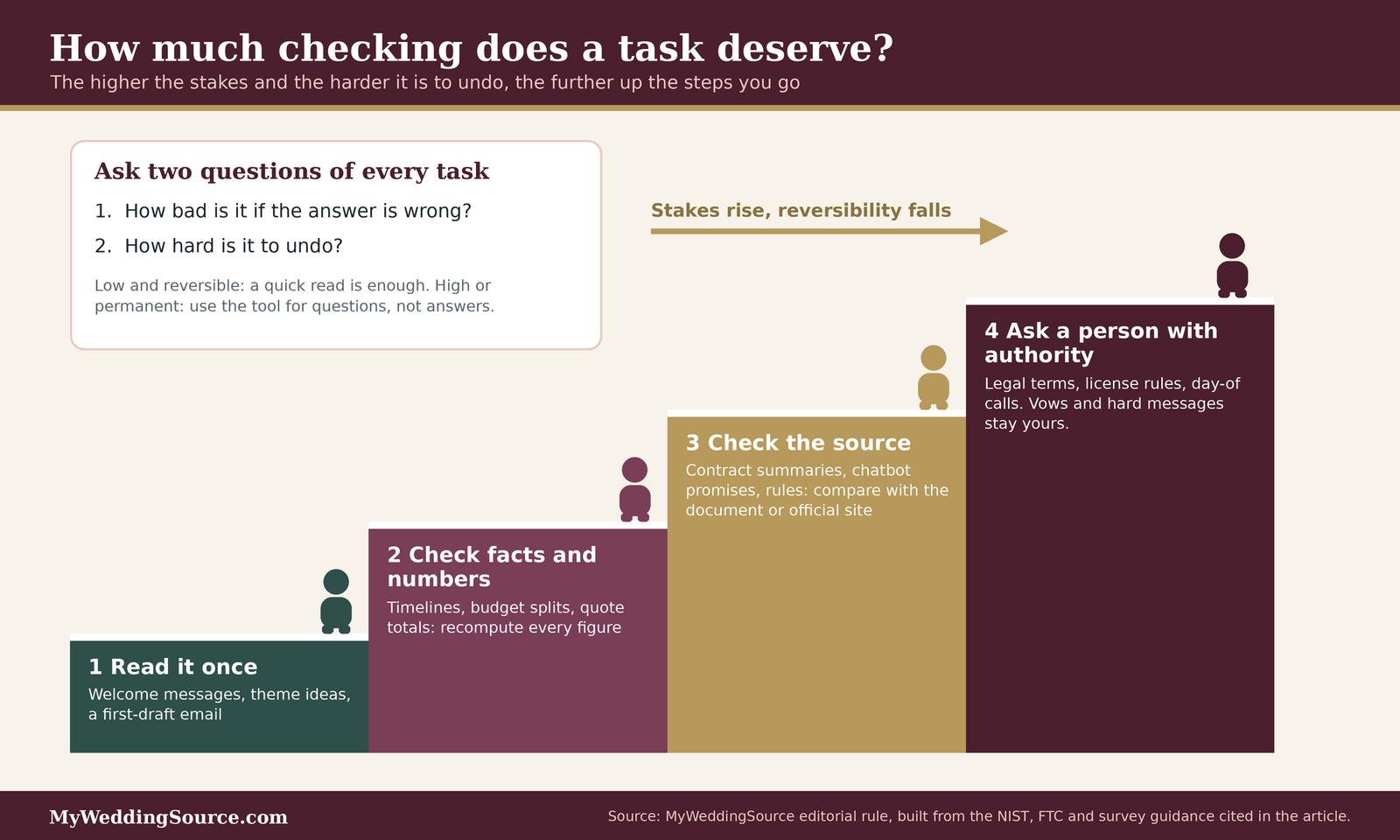
Ask two questions of any task you are considering handing to a tool. How bad is it if the answer is wrong? And how hard is it to undo? The answers tell you how much checking the task deserves.
The default when you are unsure
When you cannot decide how far to take AI wedding planning, treat the tool’s output as a draft and give it a check proportional to the stakes. For a low-stakes, reversible task such as a welcome message, read it once and send it. For a moderate task such as a timeline or budget, verify every fact and recompute every figure. For a high-stakes or hard-to-reverse task such as a contract, a legal requirement, or a payment, use the tool only to generate questions, and rely on the document, the official source, or a professional. A default of “draft, then check in proportion” will rarely steer you wrong.
The exception that overrides it
The default has an override: anything involving a person’s feelings or trust stays with a person, whatever the stakes look like in dollars. A vow or a message to a grieving relative may be cheap to produce and impossible to repair if it lands badly. The same override applies to anything you would not want the other person to learn was machine-written. A good test is whether you would be comfortable telling the recipient how the words were produced. If the honest answer makes you hesitate, write it yourself.
A second override applies to data. If a task requires pasting information that you are not willing to share with a third party, such as guests’ home addresses or payment details, either remove the information or do the task another way.
The next conversation and the data you need
Many decisions about AI wedding planning are really waiting for a conversation between partners. Settle it early and the rest of the process is calmer.
Who has to agree
Start with the two of you. For AI wedding planning, agree on which kinds of tasks you are comfortable handing to a tool, what you will never paste into one, and who will do the checking for each task. Include anyone who is contributing money or who will hear your words, such as a parent who is funding the catering or a friend who will officiate, if the use of AI touches their part. Write the agreement down in a few lines. A short written rule prevents the common problem in which one partner assumes a plan was verified and the other assumes the same.
If a planner, venue, or coordinator is involved, ask how they handle your information and whether they use AI tools with client data. Our wedding planning checklist is a good place to record who owns each task.
The quotes, facts, and settings to gather first
Before you start prompting, collect the facts a tool cannot invent: your confirmed date or date range, your guest range, your budget ceiling, the cancellation and payment terms in each written quote, and the rules your venue has given you in writing. Prepare a version of your guest list with no real names or addresses. Then review the privacy settings of any tool you plan to use and decide whether to turn off training on your conversations. With those in hand, AI wedding planning becomes a way to organize what you know instead of a way to guess what you do not.
Questions to ask before you rely on an AI answer
- Is this a fact I can check against a document, an official site, or a person who would know?
- What happens if this is wrong, and can I undo it?
- Did I remove names, addresses, and payment details before pasting?
- Can the tool show me where in my text each claim comes from?
- Did I recompute the numbers myself?
- Does this message sound like me, and would I be comfortable telling the recipient how it was written?
- Is a vendor’s chatbot making a promise that should be in writing?
- Who is the named person who owns this task if it goes wrong?
FAQ: AI wedding planning questions
Getting started
Is it acceptable to use AI to plan a wedding?
Yes for most planning tasks in AI wedding planning, judging by how couples behave: The Knot reports 36 percent of engaged couples now use AI, and Zola reports 54 percent of its 2026 couples do. Acceptance is lower for personal words. Zola found 49 percent explicitly disagree with AI-written vows, so keep those yours.
What are the best tasks to start with?
Start AI wedding planning with low-stakes drafting you can read in seconds: vendor inquiry emails, a welcome message, a backward timeline from your ceremony time, or a table that puts quotes side by side. These save effort and are easy to check. Avoid starting with contracts, legal requirements, or anything you would struggle to undo.
Accuracy and privacy
How do I know if an AI answer is wrong?
You often cannot tell from the tone, because NIST describes AI errors as confidently stated. Ask for the source and open it, recompute any numbers, and compare facts with a document or a person who knows. Treat anything about prices, availability, deadlines, or state rules as unverified until an official or written source confirms it.
Is it safe to paste my guest list into a chatbot?
For AI wedding planning, we would not paste real names and addresses. NIST lists leakage and unauthorized disclosure of personal data as a generative AI risk, and your guests did not agree to share theirs. Use initials or labels and remove addresses. Check the tool’s data controls, and turn off training on your chats if the setting exists.
Contracts and vendors
Can AI review my vendor contract?
In AI wedding planning, a tool can help you find questions, such as clauses about fees, deposits, and cancellation, but it is not legal review. Summaries can miss or misread terms. Read the contract yourself, confirm unclear points in writing, and consider an attorney licensed in your state for a large agreement. This is general information, not legal advice.
Can I trust a vendor’s chatbot or online reviews?
Treat both as leads. A chatbot’s promise about refunds or inclusions should appear in your written agreement. The FTC’s 2024 rule prohibits fake reviews, including AI-generated ones, but you should still read reviews for specifics, such as dates and how problems were handled, and ask vendors for recent references.
Vows and personal words
Should I use AI to write my vows?
Most couples in Zola’s survey, 63 percent, reject AI for writing vows. Zola recommends using AI as an editor, not a ghostwriter. Write a rough draft with your own memories, then ask a tool to flag repetition or length. Compare its edits with your draft and keep what sounds like you.
Do I need to tell guests or vendors I used AI?
No rule we found requires disclosure of AI wedding planning for ordinary tasks, and Zola’s etiquette page does not address disclosure. A practical test is whether you would be comfortable telling the recipient how a message was written. If not, rewrite it yourself. Vendors who use AI on your documents should be asked how they handle your information.
Your next steps
Set your rules this week
Agree on what you will and will not hand over
Sit down together and list the AI wedding planning tasks you would give to a tool, the ones you would only let it check, and the ones that stay human. Add what you will never paste. Keep the list short and put it somewhere both of you can see, such as the top of your shared planning document. Our wedding planning guide can help you place those tasks in the larger plan.
Try one low-stakes task and check it
Pick a drafting job, such as an inquiry email or a backward timeline, and run it through the process in this guide: constraints in, assumptions out, every fact checked. Notice how long the checking takes. That tells you more about whether AI wedding planning suits you than any survey.
Protect the big decisions this month
Put every number and promise in writing
Before you pay a deposit, normalize your quotes into one table, recompute the totals, and ask vendors to confirm any chatbot or verbal promise in the contract. Our wedding budget calculator is a good place to hold the final figures.
Keep the personal parts personal
Block time to write your vows and any toast by hand, then use a tool, if you like, only to edit. For the day itself, name the person who has authority to decide when something goes wrong. If you want a broader plan, our plan a wedding guide can help with the parts of the project that are not about tools.
Sources & methodology
How we built this guide
What we relied on
This guide combines two industry surveys of U.S. couples, a federal rule on fake reviews, a federal risk framework for generative AI, a federal report on copyright and AI, a legal commentary on a chatbot liability decision, a vendor help page on data controls, and wedding-platform guidance on how couples use AI. Where a number comes from The Knot Worldwide or Zola, we say so, because both companies recruit respondents from their own audiences and sell wedding products and services, so their figures describe those audiences and are not national rates. Several of the pages we read did not state sample sizes, bases, or methodology in detail, and we say so where it matters. The quote example, delegation matrix, risk register, scenarios, and the stakes-and-reversibility rule are our own editorial work. They are illustrations and judgments, not research findings, and the quote numbers are invented for the example.
What we did not do
We did not test any tool used for AI wedding planning, survey couples, or interview vendors, and we found no independent measure of how many hours AI saves a couple or how often general chatbots err on wedding facts. We did not give legal, financial, or professional advice. The Air Canada decision is a Canadian tribunal ruling and is not a prediction of how U.S. courts would treat a wedding vendor’s chatbot. Tool settings and company policies change often, so check the current terms of any tool you use, and verify state-specific rules with the issuing office and, where needed, an attorney licensed in your state.
Source list
Government and standards sources
- Federal Trade Commission, Federal Trade Commission announces final rule banning fake reviews and testimonials (August 14, 2024): https://www.ftc.gov/news-events/news/press-releases/2024/08/federal-trade-commission-announces-final-rule-banning-fake-reviews-testimonials
- National Institute of Standards and Technology, Artificial Intelligence Risk Management Framework: Generative Artificial Intelligence Profile (NIST AI 600-1): https://nvlpubs.nist.gov/nistpubs/ai/NIST.AI.600-1.pdf
- U.S. Copyright Office, Copyright and Artificial Intelligence, Part 2: Copyrightability (January 2025): https://www.copyright.gov/ai/Copyright-and-Artificial-Intelligence-Part-2-Copyrightability-Report.pdf
Industry surveys and wedding-platform guidance
- The Knot Worldwide, 2026 Real Weddings Study release (February 18, 2026): https://www.businesswire.com/news/home/20260218045442/en
- The Knot, Real Weddings Study facts: https://www.theknot.com/content/real-weddings-study-facts
- WeddingPro, write-up of AI findings from The Knot Real Weddings Study 2026 (February 23, 2026): https://pros.weddingpro.com/?p=37856
- Zola, The AI Wedding Planning Guide: https://zola.com/expert-advice/ai-wedding-planning-guide
- Zola, Modern Wedding Etiquette: https://www.zola.com/expert-advice/modern-wedding-etiquette
Legal commentary and vendor documentation
- American Bar Association, Business Law Today, BC Tribunal Confirms Companies Remain Liable for Information Provided by AI Chatbot (February 2024): https://www.americanbar.org/groups/business_law/resources/business-law-today/2024-february/bc-tribunal-confirms-companies-remain-liable-information-provided-ai-chatbot/
- Copyright Alliance, Summary of the USCO Copyright and AI Report, Part 2: Copyrightability: https://copyrightalliance.org/ai-report-part-2-copyrightability/
- OpenAI Help Center, Data controls FAQ: https://help.openai.com/en/articles/7730893-data-controls-faq