

A wedding party group chat works best when it has a few written rules, one owner for each kind of information, and a clear line between what belongs in the chat and what does not, and the wedding party group chat rules that reduce planning confusion in this guide are built to be pasted into your chat on day one.
Quick answer
The short version of the wedding party group chat rules that reduce planning confusion is this: name the chat’s job in one sentence, pin a single source of truth for dates and addresses, give every recurring topic an owner, ask for one thing per message with a day and time attached, and move money, body measurements, health, and conflicts out of the group and into private messages or a call. Review the rules with the whole party once, in writing, before the first real planning message goes out. Everything else in this guide is a way to make those five habits easier to keep.
Most wedding party chats begin the same way. Someone is added, a few excited messages arrive, a photo or two gets shared, and then the real planning starts: attire sizes, travel dates, who is hosting which event, how much things will cost. Within a few weeks the same chat is holding a hotel address, a joke, a half-finished poll, an unanswered question about a dress deadline, and a message that three people replied to in three different ways. Nobody did anything wrong. The chat simply was never given a job, and so it took on all of them.
This guide gives it a job, in the form of wedding party group chat rules that reduce planning confusion. It covers how to choose a place for the conversation, how to write rules that people will actually read, how to decide which topic lives where, how to talk about money without putting anyone on the spot, and what to do when the chat has already drifted. It includes a copyable chat charter, an owner matrix that covers everything from schedule changes to rental returns and late fees, message templates, and a set of questions to ask your wedding party and any vendor or planner you add to a thread. The wedding party group chat rules that reduce planning confusion are not complicated, but they work best when they are specific, so the examples below are concrete.
A note on scope. This is general planning and etiquette guidance, not legal, financial, or mental health advice. Where we describe how a messaging app behaves, we describe what the app’s own help pages said when we checked them on November 12, 2026, and apps change their features often, so check your own version.
Why wedding party chats turn into planning confusion
Confusion in a group chat is rarely about the people. It is about structure: how messages are ordered, who sees what, and what everyone assumes someone else is handling. Understanding the failure patterns first makes the rules in the rest of this guide feel less like policing and more like plumbing, which is the idea behind every one of the wedding party group chat rules that reduce planning confusion here.
What a wedding party chat is for
A chat is good at speed and presence. It is poor at storage, at deadlines, and at anything that needs a record. Deciding which of those jobs you want the chat to do is the first rule of any set of wedding party group chat rules that reduce planning confusion.
What a chat does well
One planning guide describes the wedding party text as a place to organize bachelor or bachelorette plans, order attire, coordinate travel and lodging for the wedding weekend, and ask bridesmaids or groomsmen for feedback (WeddingWire, retrieved November 12, 2026). Those are all conversations that benefit from a quick back-and-forth: a poll on dates, a reminder about a fitting, a photo of a venue. A chat also builds familiarity. In a party where people did not know each other before the engagement, a shared thread is often where the first jokes and the first sense of being a team happen.
What a chat does badly
A chat buries information. The Knot’s 2025 real weddings study, which surveyed couples who married in 2025, reports that the average wedding party size was 13, and that about 41 percent of planning was done on a mobile device (The Knot Real Weddings Study, 2026 read-out). A party of that size on a phone-first thread produces a lot of scrolling. A hotel address posted three weeks ago, a deadline hidden inside a joke, or a correction that appears after the original message are all easy to miss, even for careful readers.
Three patterns that cause most of the confusion
A chat that has stopped working usually shows one or more of three patterns. We did not find a study that measures how often each one happens, so treat this list as our own reading of how the apps are built and of the etiquette guidance we read, not as a statistic.
Buried facts
A fact that matters later, such as a fitting date or a return deadline, gets posted once and then scrolls away. Anyone who joins late, anyone who mutes the chat for a week, and anyone who simply glanced at the preview will miss it. The fix is a pinned or linked plan (see the matrix below), not a louder reminder.
Mixed audiences
A wedding party can include close friends, siblings, a future in-law, and a person the couple met two years ago. Not every message is for every reader. A reminder about hair appointments is useful to all of them. A discussion of what a particular dress costs, or a question about someone’s size, is not. When everything goes in one place, the quietest people tend to say the least, and the couple loses the information they most need.
Money and pressure in public
Splitting costs in a group is where most social friction starts. A public tally of who has paid, or a message asking everyone to chip in by a certain date, puts people with different budgets in an awkward position. We cover this in its own section later, and in our guide to wedding party costs.
The cost of leaving it unmanaged
Planning takes real time. The Knot’s study reports an average engagement of 14 months and an average of about 7 hours a week spent planning by couples (The Knot Real Weddings Study, 2026 read-out). Part of that time is spent answering the same question twice. A chat with clear rules gives some of it back, and gives your wedding party a calmer experience of being asked to help.
Time lost to repeat questions
If the wedding party group chat rules that reduce planning confusion are working, the same question should not appear twice in a month. When it does, treat it as a signal that the answer is in the wrong place, not that someone is not paying attention.
Goodwill lost to tone
Short messages without context can read as curt. A message that says only “Need sizes by Friday” is clear to the sender and ambiguous to everyone else: Whose sizes? Sent where? In what format? Specific, kind, and complete messages are not extra work. They are the cheapest way to protect the friendships the chat is meant to serve.
Choose the place before you write the rules
Rules written for one app often do not work in another, because each app gives you different controls. Pick the place first, then write rules that fit it, because wedding party group chat rules that reduce planning confusion have to match what the app can actually do. Our review below sticks to what the apps’ own support pages say, and we note where a feature depends on everyone in the group using the same service.
What the main apps can and cannot do
The big three for most U.S. wedding parties are Apple’s Messages, Google Messages, and WhatsApp. Plenty of groups also use email or a private social media group, which we cover after the app comparison.

Apple Messages: most controls need everyone on iMessage
Apple’s support pages say you can name a group and choose a photo for it, but this requires everyone in the group to use an Apple device with iMessage turned on. Adding a contact to a group of at least three people has the same requirement, and so does leaving a group: Apple says you need at least three other people on the thread, and that if the option is missing, one or more participants is probably not using iMessage on an Apple device (Apple Support). Muting is easier. Regardless of group size, you can hide alerts for a single thread. Apple also supports mentions, and it notes that a mentioned person may still be notified in a muted conversation depending on their settings.
For wedding party group chat rules that reduce planning confusion, the practical lesson is that one Android user in a thread changes what the group can do. If your party is mixed, do not rely on renaming, adding, or removing people through the thread itself.
Google Messages: group type and RCS decide what works
Google’s help page describes two ways to send group messages. One sends replies as a single MMS to everyone in the group, and the other, a mass text, sends SMS replies that come back to each person individually. You can rename a group, but the page says only you see the name you give it. Adding people requires all members to have RCS chat turned on, and removing a participant works only in RCS conversations: Google’s page says you cannot remove a user from SMS or MMS groups (Google Messages Help). Snoozing a conversation is available for 1 hour, 8 hours, 24 hours, or always.
For wedding party group chat rules that reduce planning confusion, the takeaway is that a mixed Android and iPhone group may end up as an MMS thread with fewer controls, and some members may see messages arrive as separate replies.
WhatsApp: the most structured controls, but it needs an account
WhatsApp has the most explicit group-management tools. Its 2018 announcement introduced a setting that lets admins limit who can send messages, which makes a group suitable for announcements (WhatsApp blog, June 29, 2018). More recently, a post dated August 4, 2026 describes poll end times that lock voting automatically, polls that can hide who voted for which option, a 15-minute window for the creator to edit a poll, and @all mentions that reach members even in muted chats unless they turn that off. In groups of up to 32 people, any member can use @all, and in larger groups only admins can (WhatsApp blog, August 4, 2026).
As a base for wedding party group chat rules that reduce planning confusion, WhatsApp works well for a party that spans several states or countries, as one wedding site notes, because it avoids texting charges, but it requires everyone to have the app.
When the chat is the wrong place
Some topics are better placed somewhere else, even in a well-run chat. The best chat rules say so out loud.
Email for records and schedules
WeddingWire’s guide to communicating with a wedding party describes an email chain as a good place for wedding-day schedule details and for planning pre-wedding events, because messages are easy to search. The same guide recommends choosing one main channel and sticking with it, a point we build on in the charter below. In practice, wedding party group chat rules that reduce planning confusion should send schedules to email too: a single emailed schedule that people can star or print will serve a wedding party better than a message that scrolled out of sight.
A shared document or poll for dates
For scheduling, a dedicated poll tool can find dates that work for everyone, according to the same guide, and WhatsApp’s newer polls with end times serve a similar purpose inside the app. A shared document with a clear title, a date at the top, and one person who edits it makes a better “source of truth” than a pinned message, because it can hold a table, a map link, and a list of who is responsible for what.
How many chats should you run?
A large party may need more than one chat. The question is how many, and with what boundaries.
One chat for the whole party, plus narrow side chats
WeddingWire notes you might run separate chats for bridesmaids, groomsmen, and the full party, and that in a large party, a side chat often forms on its own, with a private text to the maid of honor or best man being a common version. Our view on wedding party group chat rules that reduce planning confusion is that you can reduce the damage from side chats by creating small, named ones on purpose for specific jobs (a shower planning group, a travel group, a bachelor or bachelorette planning group) and leaving the main chat as the place for everything that affects everyone.
Keep the surprises separate
The same wedding party group chat rules that reduce planning confusion should cover surprises. Anything the couple should not see, including gift planning and surprise events, needs its own chat that does not include the couple. Give it a clear name, tell everyone in the main chat that it exists, and keep it short-lived. Our guides for bridesmaid gifts and groomsmen gifts cover what the couple typically gives the party, which is a different conversation from this one.
Ten wedding party group chat rules that reduce planning confusion
A set of rules only works if it is short enough to read and specific enough to follow. The charter below is ours, written from the planning and messaging guidance in the sources section, and it is meant to be edited. Cut anything that does not fit your group. The goal of these wedding party group chat rules that reduce planning confusion is not strictness. It is that nobody has to guess what is expected.
The rules themselves
Post the charter as one message, pin it if your app allows it, and also put it at the top of your shared plan so it can be found later.
Rules one through five: purpose and structure
- This chat is for planning and for being a team. Logistics, questions, and encouragement are welcome. Gossip, complaints about other members, and anything someone would not say in front of the whole group go elsewhere.
- The plan lives in one place. Dates, addresses, schedules, and deadlines are in the pinned plan (a shared document or an email). If a message in the chat conflicts with the plan, the plan is right and the plan gets updated.
- Every recurring topic has an owner. The owner’s name is in the plan. Questions about that topic go to the owner, and the owner posts the answer so everyone sees it once.
- One ask per message. Start with the topic, make one request, and include a day, time, and time zone if there is a deadline. Reply to the message that asked, not to the newest message.
- Replies mean something. A thumbs-up means “I read this and I agree.” If an answer is needed, the ask says what form it should take, such as “reply with your size” or “vote in the poll.”
Rules six through ten: money, privacy, and tone
- Money is not discussed in the chat. Costs are posted as amounts per person, once, with the date they apply to. Questions about what someone can afford, and all payments, go through private messages or the person collecting.
- Personal details are private. Sizes, health or access needs, and family or work circumstances are shared with the owner of that topic only, unless the person chooses to share them.
- Quiet hours are real. Nothing urgent is posted between 9 p.m. and 8 a.m. in the earliest time zone in the group, and nobody is expected to reply during that time. (These hours are our suggestion, not a standard. Pick your own.)
- Muting is fine; disappearing is not. Anyone can silence the chat. If someone needs to step back from a task, they tell the couple or the owner directly.
- Disagreements move to a call. If a thread has more than three replies without resolving, the owner suggests a short call or an in-person talk, and posts the outcome in the chat afterward.
Making the charter stick
Writing wedding party group chat rules that reduce planning confusion is the easy part. Getting a group to follow them depends on who introduces them and how.
Have the couple introduce it, once
The couple should post the first message, even if someone else will administer the chat, so that the rules read as the couple’s wishes and not as one friend’s preferences. Keep the tone light and specific: “To keep things easy for everyone, here is how we would like to use this chat.” Then post the charter and ask for a thumbs-up from each person, which doubles as a quick check that everyone has the message.
Revisit the rules at three moments
Even good wedding party group chat rules that reduce planning confusion drift over a long engagement. We suggest checking the charter when the chat’s membership changes, when a major planning phase begins (for example, attire ordering or the travel stretch), and in the final month before the wedding, when the volume of messages usually rises. Each time, ask whether any rule is getting in the way. If so, change it and say so.
Writing for people who skim
Many people read group chat messages on a lock screen, in a hurry, with half their attention. Writing for that reader is a kindness.
Use the plain language habits that agencies recommend
The U.S. Office of Personnel Management’s guidance on plain language recommends sentences of roughly 15 to 20 words, one topic per paragraph, active voice, and everyday words (OPM, Plain Language). That advice was written for government documents, but it fits a chat message well, and it belongs in any set of wedding party group chat rules that reduce planning confusion. “Please send your dress size to Jordan by Friday at 6 p.m. Eastern” beats “Just a reminder that sizes are due soon.”
Put the ask first and the reason second
If a message needs a reply, lead with the request and follow with context. People reading a preview see only the first line. Compare “Quick context: the shop needs final sizes because of the production schedule, so could everyone…” with “Please send your size by Friday at 6 p.m. Eastern. The shop needs final sizes to start production.” The second version works even if only the first sentence is read.
The owner matrix: which topic goes where, and who handles it
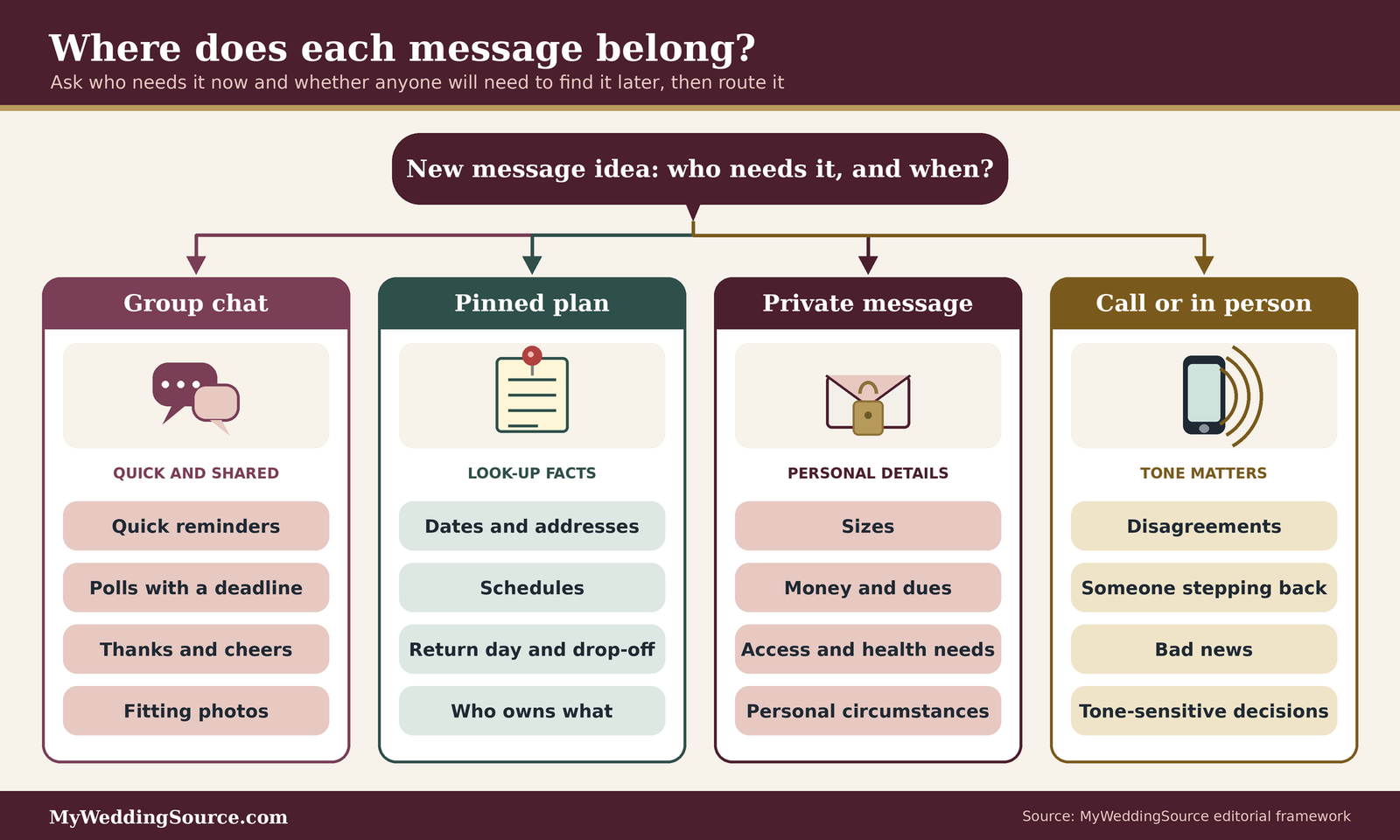
The most useful single piece of any set of wedding party group chat rules that reduce planning confusion is a table that answers two questions for every recurring topic: where does this live, and who owns it? The matrix below covers the topics most wedding parties deal with, including attire rental returns and late fees, which cause more late-stage trouble than most people expect. Treat the “owner” column as a role, not a person, so that it still works if someone steps down.
How to read and adapt the matrix
Each row names the topic, the place where the final answer lives, the role that owns it, and the habit that keeps it from slipping. A “role” here is a job someone agreed to, not a rank. The couple can hold several of them, or give them to anyone in the party.
The four places
Everything in the matrix lands in one of four places. The group chat holds quick pings, polls, reminders, and encouragement. The pinned plan (a shared document or an email) holds anything that someone will need to look up: dates, addresses, schedules, who owns what. A private message holds money, sizes, health or access needs, and anything personal. A call or in-person talk is for disagreements, bad news, and anything where tone matters more than speed.
The roles
The couple owns decisions that change the plan. The chat lead is the person who administers the chat, posts the charter, and keeps the pinned plan current. This is often the person of honor, the best man or best person, or a friend who enjoys organizing, but it can be anyone the couple chooses. A topic owner handles one stream, such as attire, travel, or an event. Each member owns their own responses and their own logistics.
The matrix
| Topic | Final answer lives in | Owner (role) | Habit that prevents confusion |
|---|---|---|---|
| Schedule changes | Pinned plan, then a chat note | Chat lead | Update the plan first, then post one message saying what changed and the date it changed |
| Availability and date polls | Chat poll or scheduling tool, result in plan | Event host | State the closing time in the poll; post the result once and stop the thread |
| Attire sizing and order dates | Private message to the attire contact, dates in plan | Attire contact | Collect sizes privately; post only the order deadline in the chat |
| Attire rental returns and late fees | Order confirmation, return date and drop-off place in plan | Attire contact named on the order | Post the return day and place once; each person handles their own return; ask the company who is billed for late fees |
| Hair and makeup times | Pinned plan | Beauty lead | One list with name, time, and location; confirm changes with the vendor, then update the plan |
| Travel and lodging | Pinned plan; sub-chat for car shares | Travel lead | Keep a list of who is arriving when, with each person’s own booking details kept private |
| Showers, bachelor and bachelorette events | Dedicated sub-chat; summary in plan | Event host | Set a cost per person before inviting; share the budget privately with anyone who asks |
| Costs, dues, and reimbursements | Private messages and the collector’s records | Person collecting | Post amounts once; never post who has or has not paid |
| Group gifts and surprises | Sub-chat without the couple | Gift organizer | Name the chat so the couple’s absence is clear; delete or archive after the gift |
| Photo plans and shot lists | Pinned plan | Couple or photo contact | Send the group-photo list to the photographer; remind people of the call time |
| Day-of logistics | Pinned plan and emailed copy | Chat lead | Send the final version a few days before; post a short reminder the evening before |
| Access, dietary, and comfort needs | Private message to the topic owner | Relevant topic owner | Ask once, privately, with an open question; record answers in a private note |
| Vendor questions | Email or call by the person who holds the contract | Couple or planner | Vendors are not added to the party chat unless the couple decides to |
| Conflicts and hard conversations | Call or in-person | Couple or chat lead | Do not argue in the chat; post only the decision afterward |
Reading across a row
Read each row left to right. If the topic is attire sizing, the final answer lives in a private message to the attire contact, the attire contact owns it, and the habit is to collect sizes privately while posting only the deadline in the chat. If you cannot fill in all four cells for a topic, the topic is probably the one causing your confusion.
Rows to add for your party
Add rows for anything your wedding has that most do not: a rehearsal dinner with its own guest list, a religious or cultural ceremony with specific roles, a destination weekend with group transport, or a child in the party. Our guides to the wedding rehearsal and the wedding weekend event planning are useful starting points for those extra rows.
Filling in names and handing off
A matrix with blank owner names is only a wish list. The point is to put real people against each row.
Ask for volunteers, then assign the rest
Post the matrix in the chat as a draft, ask people to claim the topics they would enjoy, and assign leftover rows with a short note. People are more consistent when they chose the job. If someone’s life gets busy, they hand the row to someone else and update the plan. Our maid of honor duties and best man duties guides describe the traditional version of these responsibilities, and our wedding party coordination checklist covers the full list of streams a party handles over the months before the wedding.
Give every owner a backup
Each row should have a second name for the case where the owner is traveling, sick, or simply buried at work. Put the backup in the plan and tell the party who it is. When a topic has no backup, the topic’s questions end up in the main chat, and the confusion returns.
The rental returns and late fee row in detail
Attire rental returns are the row in the matrix most likely to cost real money and the one most likely to be forgotten, because the wedding is over and everyone is tired.
Why it needs its own owner
The wedding party group chat rules that reduce planning confusion should include a single named person for returns, because the late fee is usually the rental company’s business with whoever is on the order, and people in the chat will otherwise assume someone else is handling it. Our groomsmen rental returns guide compares published return windows and late fees across several rental companies as of the date we checked and explains the shipping and record-keeping questions. We do not repeat those numbers here, because rules change and you should read your own order.
What the chat should and should not say
The chat should say, once, in the week before the wedding: the return day, the drop-off place, and the name of the person to ask. It should not become a place to chase individuals about late items or to discuss who owes what, which belongs in a private message. If a late fee does show up, the attire contact asks the company how it was assigned and talks to the person privately.
Money, dues, and payments without public pressure
Money is the topic most likely to damage a friendship, so wedding party group chat rules that reduce planning confusion need a rule for it. The principle is simple: nobody should learn what another person has paid or can afford from the group chat.
Cost check
Before any amount goes into the chat, confirm four things with the couple or the host: the per-person figure, the date it applies to, who collects it, and whether taking part is optional. Post that once. Payments sent through an app are very hard to reverse (FTC), so share the collector’s handle privately and confirm it by phone if anything looks unfamiliar. Estimates in the chat should be labeled as estimates until a vendor or host confirms them.
What to post and what to keep private
The group chat can hold information that applies to everyone equally. It should not hold information that compares people.
Say what things cost, per person, once
A message like “The shower is planned at about $X per person, to be confirmed by the host by this date” helps everyone plan. Post it once, in a pinned note, and let people ask the owner privately if they want to adjust their participation. Our guide to wedding party costs covers the typical categories a party is asked to cover, and our sibling article on how to ask wedding party members about financial boundaries goes deeper on the private conversation.
Never post who has or has not paid
A public list of who has paid turns a logistics question into a measure of commitment. If you must track payments, keep a private record and send individual reminders. This is a courtesy rule, not a legal one: we are not offering legal or financial advice here, only etiquette.
Using payment apps carefully
Many groups collect money through a payment app. The risks are mostly ordinary ones: sending to the wrong person, a copycat account, or a scam that borrows a friend’s name.
Know that payments are hard to reverse
The Federal Trade Commission advises treating payment apps like cash, because money sent through an app is very hard to get back, and warns that scammers sometimes pose as a loved one in an emergency (FTC Consumer Alerts, August 14, 2023). A separate FTC page advises sending money only to people you can positively identify, and says that if someone you know asks for money, you should confirm using a phone number you already trust (FTC, Making Mobile Payments). Both points matter for wedding party group chat rules that reduce planning confusion, especially in a large group where a new number can appear in a thread.
Double-check the recipient and the amount
A 2018 blog post from the Consumer Financial Protection Bureau, now archived, suggests double-checking the amount and recipient, asking a first-time recipient to send a payment request if the app offers one, or sending a small test payment first (CFPB, September 13, 2018). It also notes that payments are typically deducted right away and that new payment apps generally lack a way to recall them. Because the page is archived, confirm current protections with your own provider. We suggest the person collecting money share their handle in a private message, and ask members to confirm it by phone if anything seems off.
Keeping the process kind
How you ask matters as much as how you collect.
Give people a way to say no that is not awkward
Phrase requests so that declining is easy: “If any of these do not work for your budget, message me privately. We can find a version that does.” A party member who has to explain themselves in public is more likely to stay silent and then drop out, and the couple loses the chance to adapt the plan.
Let the couple decide what to cover
When a cost keeps coming up, the couple may decide to absorb it, scale it back, or make it optional. That decision belongs to them, and the chat lead should pass it along in a neutral tone: “The couple has decided that the group dinner is optional.” For more on setting expectations, see our guide to bridal party size, since a smaller party can mean a smaller shared bill.
Messages that get answered: templates and habits
The wedding party group chat rules that reduce planning confusion set the frame. The messages themselves decide whether people respond. The templates below are ours, they are part of the wedding party group chat rules that reduce planning confusion, and they are meant to be adapted to your voice. They share a pattern: topic, one ask, a deadline with a time zone, and a named owner.
The anatomy of a clear message
A message that gets answered usually has four parts, in a fixed order, so the reader can find each one at a glance.

Topic, ask, deadline, owner
Start with a short topic tag in capitals or brackets, such as ATTIRE or TRAVEL. Then make one request. Add a deadline with day, time, and time zone. End with the name of the person to answer to. “ATTIRE: Please send your size to Jordan by Friday, 6 p.m. Eastern.” is one message with one job.
Why the time zone matters
Wedding parties often span regions, and “tonight” or “by 5” means different things to different people. ConnectSafely’s etiquette guidance advises considering the time zones and sleep schedules of everyone in the group before posting. Adding the zone to every deadline costs two words and prevents a common confusion.
Templates you can copy
Adapt the wording, but keep the structure.
An ask with a deadline
“ATTIRE: Please send your size to Jordan in a private message by Friday, 6 p.m. Eastern. The shop needs final sizes to place the order. If you are unsure, message Jordan and we will work out the fit together.” The last sentence matters: it gives people an easy way to say they need help, and it keeps measurement worries out of the group.
A poll for dates
“EVENT: Vote for the weekend that works best by Sunday, 9 p.m. Central. We will confirm the date on Monday morning.” Where your app supports it, use a poll with an end time. WhatsApp’s August 2026 update describes polls that can lock voting automatically and can hide who voted for which option, which can make people more comfortable answering honestly. In an app without polls, ask for a one-word reply and let the owner count the answers.
A schedule change
“SCHEDULE UPDATE: Hair and makeup now starts at 9:30 a.m., not 9:00. The plan is updated. No reply needed unless this does not work for you.” Saying “no reply needed” is a small rule that reduces clutter. Silence means yes.
A thank-you and a nudge
“Thank you to everyone who has sent sizes. We are still missing two. If that is you, please send it to Jordan by tonight so the order can go in tomorrow.” Naming the number rather than the names keeps the nudge public and the people private.
Using mentions and alerts with care
Mentions are powerful because they cut through muted threads, which is also why they can annoy people if overused.
@mentions for a person, not a crowd
Apple notes that a person you mention may be notified even in a muted conversation, depending on their settings. Reserve a mention for a question that only that person can answer. A mention for a general reminder trains people to ignore them.
Use “notify everyone” sparingly
WhatsApp’s new @all mention reaches members in muted chats, though members can turn @all off in their notification settings (WhatsApp blog, August 4, 2026). The post gives time-sensitive examples such as closures, deadlines, and schedule changes. Our suggestion is to use it only for a message that changes someone’s plans in the next day or two. Anything else can wait for a normal message.
Notifications, quiet hours, and the right to step back
Planning fatigue is real, and so is chat fatigue, which is why wedding party group chat rules that reduce planning confusion should include a muting rule. The Knot’s study found couples spend an average of about 7 hours a week planning. Giving people clear permission to manage their own notifications keeps them in the party for the long run.
Make muting normal
Muting is not rude, and wedding party group chat rules that reduce planning confusion should say so. It is how people stay in a chat they cannot always attend to.
Say it out loud in the charter
ConnectSafely’s etiquette advice is that you can mute a group that becomes overwhelming instead of leaving it. Putting that permission in the charter (“muting is fine”) removes the guilt, and the “plan lives in one place” rule means a muted member can still catch up by reading the plan.
Know how to do it on the main apps
On an iPhone, Hide Alerts silences a single thread. Apple’s page says it silences only that group and that you still receive notifications for other conversations. On Google Messages, snoozing a conversation is available for 1 hour, 8 hours, 24 hours, or always. In WhatsApp, members can also turn off @all alerts in their notification settings. Share these short instructions with anyone who asks, since the menus vary by version.
Plan for time zones and daily rhythms
A quiet-hours rule is an easy way to be considerate.
Pick quiet hours for the earliest zone
Rule eight in the charter suggests nothing urgent between 9 p.m. and 8 a.m. in the earliest time zone in the group. That means a party member on the East Coast and one on the West Coast both have a window to sleep, and a member overseas can be added to the rule by choosing the zone that makes the window work. Adjust the numbers freely. The point is that the rule exists and is written.
Batch non-urgent updates
If you are the chat lead and want your wedding party group chat rules that reduce planning confusion to feel light, consider posting non-urgent updates in one daily or weekly digest instead of a stream of separate messages. A single weekly message with a heading and a short list is easier to read than six fragments, and it gives the plan a rhythm that people learn to expect.
Leaving, stepping down, and re-entering
Sometimes a person needs to step back from the party or from a task. The chat should make that easy.
Tell people directly first
ConnectSafely advises leaving or muting discreetly and telling anyone affected in person rather than through the group, since an announcement in the chat can be misread and strain relationships. For a wedding party member, that means telling the couple and the topic owner before changing anything in the chat. Our sibling guide on handling a wedding party member who cannot travel covers a common reason someone steps back.
Remember what the app lets you do
Apple’s page says leaving a thread requires at least three other participants and everyone using iMessage on an Apple device, and Google’s says you cannot remove someone from an SMS or MMS group. If you cannot remove or leave, the practical alternative is to start a new group without the person and say so privately, or ask them to mute. Do this only with the person’s knowledge and the couple’s agreement.
Inclusion, privacy, and sensitive topics
A wedding party can include people of different genders, ages, budgets, abilities, and cultures. The wedding party group chat rules that reduce planning confusion should keep the chat welcoming for all of them, so a good chat is built so that every member can take part comfortably.
Use language that does not assume
Small wording choices keep the chat welcoming, and they belong in wedding party group chat rules that reduce planning confusion.
Address roles, not assumptions
Say “the party” or “everyone” rather than “the girls” or “the guys,” and use people’s chosen names and roles. If the party is mixed, as many are, avoid splitting tasks by gender. Ask who wants which task. Our guide on how to coordinate attire across different body types shows the same principle applied to clothing, and our wedding party attire guide covers the broader choices.
Invite needs without asking people to disclose
Instead of “Does anyone have special requirements?” in the group, try “If there is anything that would make the weekend easier for you, such as food, access, or timing, message [owner] privately. You do not need to explain.” That invites without requiring disclosure.
Protect personal information
A group chat is a poor place for details people might not want shared.
Keep sizes, health, and finances out of the main thread
Sizes should go to the attire contact privately. Health, access, and financial circumstances go to the relevant owner, who shares only what the work requires. Record answers in a private note, not in the plan. Our guide to wedding planning website privacy and security covers related questions about what to publish and where.
Think about who sees the group
ConnectSafely advises including only people the group already knows, so messages are not misread by someone without context. Before adding a partner, a parent, or a vendor to a party chat, ask the group. If a new person joins, consider a quick “welcome and recap” message so they are not reading months of history.
Handle side chats with care
Side chats will form. The question is whether they help or harm.
Expect them and aim them at tasks
WeddingWire’s guide predicts a side chat in a large party, where members may split into factions over drama. Rather than fight it, give side chats a purpose and a name: shower planning, travel, a surprise. Task-based side chats keep conversation in the open where it belongs and give people a place to work without cluttering the main thread.
Watch for the venting chat
A venting chat is a normal human response to a stressful project. The risk is that it becomes the real center of the party and the main chat becomes performative. If you suspect that is happening, the best remedy is a direct, kind conversation with a trusted member, and perhaps some lighter group events that are not about planning. Our wedding planning stress guide has more on keeping the process manageable.
Edge cases that break chat plans
The charter of wedding party group chat rules that reduce planning confusion handles ordinary situations. A few unusual ones deserve their own handling.
Mixed devices and unusual setups
Technology differences cause more confusion than people expect.
One person is not on a smartphone or the app
If someone does not use the group’s app, do not make them the exception who misses things. Send them the pinned plan by email and a short text for key deadlines, and tell the group that you are doing this so nobody wonders why they are not replying in the thread. Offering a call or an email thread is a courtesy, not a burden.
The group is too big for the app’s controls
WhatsApp’s @all feature, for example, is open to all members only in groups of up to 32 people. Most wedding parties are well under that. The Knot’s study reports an average party size of 13 in 2025, down from 14 in 2021 through 2024 and 15 in 2019. If you combine the party with families, though, you may exceed the limit, in which case only admins can send an @all.
Life events and surprises
Real life interferes with planning.
Someone leaves or is added mid-planning
When a member joins, post the charter again and pin the plan. When a member leaves the party, the chat lead updates the matrix, hands off their rows, and tells the group neutrally: “Alex is stepping back from the party. Jordan is taking over travel.” Do not discuss reasons in the chat.
A conflict spills into the thread
If two members disagree publicly, step in early and kindly: “Let’s take this to a call. I will post the outcome here.” Then do exactly that. Do not let a dispute run for days in front of everyone.
Vendors, planners, and family
Not everyone belongs in the party chat.
Vendors and planners
WeddingWire’s guide notes that some vendors, usually a planner, may text in a group chat, especially close to the wedding, and advises keeping vendor messages focused on logistics. We suggest a separate vendor thread for the couple and planner, and a single point of contact between that thread and the party. That keeps vendors from receiving a flood of casual messages and keeps party members from getting direct vendor requests.
Parents and in-laws
The same guide advises, for an in-laws group chat, following the family’s lead, keeping messages polite, and raising conflicts with your partner. For the wedding party chat, our suggestion is to keep family out unless a family member is also in the party, and to share a summary of the plan with parents in a different channel.
Questions to ask before you start
Questions to ask
Your wedding party: Which app does everyone already use? Does anyone prefer email or calls? Are there hours or days when you would like not to be messaged? Is there anything about the plan that would make it easier for you to take part? Who would like to own which topic?
Your planner or a vendor you add to a thread: Which channel do you prefer for changes and confirmations? Will you reply in a group, or only to the couple? Who on your team sees the thread? How do you handle a message sent after hours? Where do final timelines live?
The couple, privately: What decisions are ours alone? What do we want the party to know, and when? Who is the chat lead, and who is the backup?
Questions for the party
These are the questions that make wedding party group chat rules that reduce planning confusion fit the people using them.
Ask them in one message
Post the party questions as one short message with numbered items, and give a deadline. A single list is easier to answer than five separate questions, and it makes the answers easy to collect into the plan.
Act on the answers
If most people prefer email, use email. If three people want quiet evenings, make the rule. A charter that ignores the answers teaches people that asking was a formality.
Questions for vendors, planners, and sources
Before adding an outside person to a chat, confirm how they work.
Ask about their communication rules
A planner or vendor may have their own preferred channel and response times, which is normal. Ask early and write it down in the plan, so nobody expects an instant reply from someone who answers within a day.
Check the facts you pass along
If you post a vendor’s policy or a deadline in the chat, link or attach the original so nobody relies on a paraphrase. Our wedding vendor timeline guide shows what typically needs confirming and when.
Fixing a chat that has already gone sideways
A chat that has drifted can be reset without drama, using the same wedding party group chat rules that reduce planning confusion. The key is to treat the reset as housekeeping, not a reprimand.
Reset in four steps
A reset takes about an hour of the chat lead’s time and one message to the group.
Gather and sort what exists
Scroll back and collect every date, address, deadline, and decision into one document. Note any conflicts, such as two different hotel addresses, and confirm the correct one with the owner or the couple. This step often reveals who owns what in practice, which helps fill in the matrix.
Post a reset message
“We have a lot going on, so here is a one-page plan with everything in one place. From now on, dates and addresses live there, and this chat is for quick questions and reminders. Please tell [owner] privately if anything in the plan is wrong.” Then post the charter. A reset message works best when it is warm, brief, and specific.
Avoid common reset mistakes
A reset can go wrong if it is handled carelessly.
Do not call anyone out
If a particular member caused a problem, handle it privately. A public correction teaches the group to stay quiet, and the quietest members are often the ones whose input you most need.
Do not over-engineer
You do not need a complicated system, a new app, and a color-coded spreadsheet. A single shared document and a charter of wedding party group chat rules that reduce planning confusion are enough for most parties. If the system takes more effort to maintain than the confusion it replaced, simplify.
FAQ: wedding party group chat rules
Setting up the chat
Should the couple be in the wedding party group chat?
Usually yes, because the couple’s decisions drive the plan and their presence signals that the rules are theirs. The exception is a surprise or gift chat, which should be a separate, clearly named thread without the couple. Tell the main chat that the surprise thread exists so nobody feels excluded or confused.
Which app is best for a wedding party chat?
The best app is the one everyone already uses and can reach. Apple Messages controls mostly require everyone to use iMessage, Google Messages controls depend on RCS, and WhatsApp offers admin-only sending, poll end times, and @all but requires an account. For a mixed group, WhatsApp or email plus a shared plan is often easier.
Running the chat
How many messages a day is too many?
There is no research-backed number, so we do not offer one. A useful test is whether each message needed the whole group at that moment. If most did not, move updates into a weekly digest or the pinned plan, and use the chat for quick questions and reminders only.
How do we keep people from missing deadlines?
Put each deadline in the pinned plan, post it once in the chat with a day, time, and time zone, and send one reminder to anyone still outstanding, by name, privately. Naming the count publicly and the people privately keeps the nudge polite while still reaching the right readers.
Money and privacy
How do we talk about costs in the group chat?
Post costs once, per person, in a pinned note, and move every other cost conversation to private messages. Do not post who has paid or who has not. If anyone needs a different arrangement, invite them to message the owner privately, and let the couple decide whether a cost becomes optional or is covered.
Is it safe to collect money through a payment app?
It can be, with care. The FTC advises treating payment apps like cash because money sent is very hard to get back, and recommends confirming requests through a phone number you already trust. Share the collector’s handle privately, check the recipient and amount before sending, and keep screenshots of payments. This is general consumer advice, not financial advice.
When things go wrong
What if the chat has already become a mess?
Gather every date, address, and deadline into one shared document, confirm any conflicts with the owner or the couple, then post a short, warm reset message with the plan and the charter. Do not single anyone out. A reset is housekeeping, and most chats recover once the facts live in one place.
What if someone ignores the rules or goes quiet?
Start by assuming a missed message, not bad intent. Message them privately with the specific ask and the deadline, and offer a call. If they are overwhelmed, suggest muting and moving their tasks to someone else. Avoid correcting anyone in front of the group, since public corrections tend to silence people.
Your next steps
Set up the foundation
Write the one-sentence job
Complete this sentence: “This chat is for , and everything else goes .” Use it as the first line of your wedding party group chat rules that reduce planning confusion, then edit the ten rules above to fit your group.
Create the pinned plan
Open a shared document or draft an email with the dates, addresses, and the owner matrix. Link it in the chat, and name the person who keeps it current. Our wedding party coordination checklist and wedding planning checklist can help you fill in the rest of the timeline.
Launch and maintain
Post the charter with the couple’s voice
Have the couple introduce the chat, post the charter, and ask for a thumbs-up from each member. Then post the matrix as a draft and ask for volunteers. For the week itself, our wedding week checklist and our sibling guide on wedding party entrance logistics are good companions.
Review the rules at three moments
Check the charter when someone joins or leaves, when a big phase begins, and in the final month. Ask whether any rule is getting in the way, and change it if so. For broader etiquette questions, see our wedding etiquette guide.
Sources & methodology
How we built this guide
What we relied on
This guide combines the app makers’ own help and announcement pages (Apple, Google, and WhatsApp), federal consumer guidance on payment apps and plain language (the Federal Trade Commission, the Consumer Financial Protection Bureau, and the Office of Personnel Management), and wedding-industry guidance on communicating with a wedding party (WeddingWire) and on planning habits (The Knot’s real weddings study). Where a statement comes from an app maker or a wedding site, we say so. The charter, the owner matrix, the message templates, the suggested quiet hours, and the four-part message structure are our own editorial work and are not drawn from a study. We checked all pages on November 12, 2026, and app features and terms change often, so check the current version of your own app.
What we did not do
We did not test the apps on every device combination, survey wedding parties, or measure how often any chat problem occurs. We did not find a study of wedding party chat behavior, so we make no claims about how common any problem is. This guide is etiquette and planning guidance, not legal, financial, or mental health advice.
Source list
Government and public-agency sources
- Federal Trade Commission, Do you use payment apps like Venmo, Cash App, or Zelle? (Consumer Alert, August 14, 2023): https://www.consumer.ftc.gov/consumer-alerts/2023/08/do-you-use-payment-apps-venmo-cashapp-or-zelle-read
- Federal Trade Commission, Making mobile payments: protect yourself from scams: https://consumer.ftc.gov/making-mobile-payments-protect-yourself-scams
- Consumer Financial Protection Bureau (archived), Helpful tips for using mobile payment services and avoiding risky mistakes (September 13, 2018): https://www.consumerfinance.gov/archive/blog/helpful-tips-using-mobile-payment-services-and-avoiding-risky-mistakes/
- U.S. Office of Personnel Management, Plain language: https://www.opm.gov/information-management/plain-language/
App makers and platform help pages
- Apple Support, Leave a group text message thread on your iPhone or iPad: https://support.apple.com/102448
- Apple Support, iPhone User Guide, Send and receive messages in Messages (group features): https://support.apple.com/en-mn/guide/iphone/iphb10c80fc5/16.0/16.0
- Google Messages Help, Group messaging: https://support.google.com/messages/answer/9367099
- WhatsApp Blog, New group setting for admins (June 29, 2018): https://blog.whatsapp.com/new-group-setting-for-admins?lang=en
- WhatsApp Blog, Your group chats upgraded: better polls, @all, and more (August 4, 2026): https://blog.whatsapp.com/your-group-chats-upgraded-introducing-better-polls-all-and-more?lang=en
Wedding-industry and etiquette sources
- The Knot, Real Weddings Study landing page: https://www.theknot.com/content/real-weddings-study
- The Knot Real Weddings Study, 2026 data read-out (couples married in 2025): https://images.theknot.com/rules/2026/the-knot-real-weddings-study-data-read-out-2026.pdf
- WeddingWire, Wedding planning group texts: https://weddingwire.com/wedding-ideas/wedding-planning-group-texts
- WeddingWire, How to communicate with your wedding party: https://www.weddingwire.com/wedding-ideas/communicate-with-your-wedding-party
- ConnectSafely, Group text best practices and etiquette: https://connectsafely.org/group-text-best-practices-and-etiquette/