
Wedding livestream planning is the work of deciding who will watch your wedding from far away, what they will see and hear, who agreed to be on camera, and who is responsible when something goes wrong. This guide gives you one runbook with seven gates, from consent and rights to cameras, audio, delivery and the remote guest experience, so the broadcast stays quiet and the wedding stays yours.
Good wedding livestream planning moves through seven gates in order: purpose and audience, consent, rights and content, capture (cameras), sound, delivery, and show control. Decide the purpose first, get consent and music questions settled before you buy anything, give audio more attention than video, name one person who runs the stream and one who can stop it, and write the stop conditions down. Then rehearse once in the actual room.
A livestream sounds like a technical add-on, a camera and a link. In practice, wedding livestream planning is closer to producing a short broadcast inside a social event, and it fails for social reasons as often as technical ones.
A grandmother hears nothing because the microphone was on the groom’s lapel and he whispered. A guest finds out after the ceremony that she was on camera. A song in the processional gets the stream muted by the platform. A cousin in another time zone opens the link an hour early and sees an empty room and a ticking clock.
None of those problems needs expensive gear to prevent. They need decisions made early, by the right people, in a sensible order. That order is what this article provides. It is built as a runbook: each gate has a question to answer, a person who owns the answer, and a clear sign that the gate is closed. If you prefer to read straight through, every section also stands on its own.
A note on scope. This is general planning information, not legal advice, and it cannot replace the rules of your venue, your platform or your state. Where a rule matters, the article points to the body that issues it so you can confirm the current version.
This guide focuses on the whole production. Narrower questions have their own treatment elsewhere on the site, and the sections below only touch them briefly. For what happens when the internet fails, your wider wedding day digital contingency plan is the right companion, and this article assumes you will read it next.
Why wedding livestream planning needs a runbook, not just a camera
Most couples begin their wedding livestream planning with equipment: which camera, which app, which microphone. That is the natural question and also the wrong first one, because equipment answers depend on decisions that have not been made. A camera for a four-minute civil ceremony in a county office is different from a camera for a ninety-minute cathedral Mass. A microphone that suits a garden does not suit a stone church. The right setup follows from the purpose.
A runbook is the document professional event crews use to avoid improvising. It lists the steps in order, who does each, what “done” looks like and what to do when a step fails. Wedding livestream planning benefits from the same discipline for a simple reason: the event happens once, nobody gets a second take, and the people running it are often friends who have never done it.
The runbook in this guide has seven gates, and each one is a stage of wedding livestream planning. Think of a gate as a checkpoint you cannot skip without paying later.
Gate one, purpose and audience. Who is watching, and what do you want them to experience? Everything downstream, including budget, depends on the answer.
Gate two, consent. Who is in the frame, who has been told, and who has asked not to be shown? This gate comes before equipment because it can change the camera positions and the seating chart.
Gate three, rights and content. Which music, readings and recorded material will pass through the broadcast, and does each have permission to be there?
Gate four, capture. Cameras, positions, lighting and the person who operates them.
Gate five, sound. The chain from the voices and music in the room to the ears of the person watching on a phone.
Gate six, delivery and the remote guest experience. The platform, the link, the access rules, and what a viewer actually goes through from the invitation to the final goodbye.
Gate seven, show control. The roles, the countdown, the cue sheet and the stop conditions that tell everyone when to continue, lower the quality or stop.
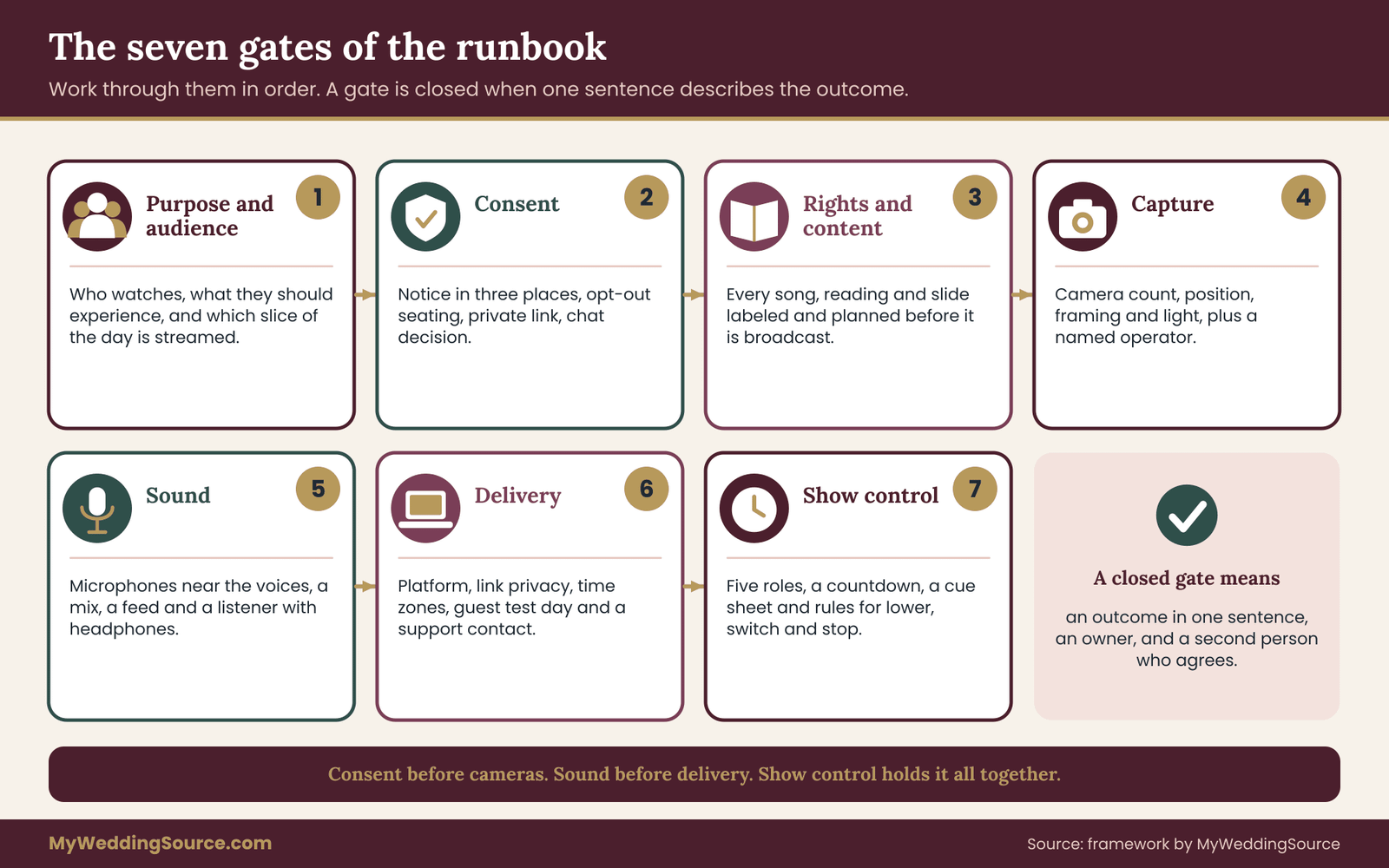
The order matters. Consent before cameras, because a camera position is a promise about who appears. Sound before delivery, because the best connection in the world cannot fix a ceremony nobody can hear. Show control last, because it holds the earlier decisions together on the day.
A gate is closed when you can write its outcome in one sentence and a second person agrees with it. “We will stream the ceremony only, with a single camera at the back and a lapel microphone on the officiant, to about forty remote guests, with a link that needs a password” is a closed set of gates. “We will stream the wedding” is not.
What the runbook is not
This wedding livestream planning runbook does not tell you which brand to buy, and it does not rank vendors. It also does not repeat the full internet-failure plan, which has its own article on this site. Its job is the planning layer above the gear: the decisions, the owners and the failure conditions. Where a vendor or platform has current rules, you will be asked to read them yourself, because they change faster than any article can.
Gate one: purpose, audience and the level of wedding livestream planning you need
Start wedding livestream planning by writing down why you are streaming. There are only a handful of honest reasons, and each leads to a different build.
Some couples have a grandparent who cannot travel, and the real audience is two or three people who need to hear the vows clearly. Others have a large extended family abroad and want a shared event. Some have a ceremony limited by venue capacity and want a way to include people who could not be seated. A few simply want a live version of the recording they would have made anyway.
The audience size matters less than its needs. Three elderly relatives on a tablet need large, steady video and clear speech. Forty people across five time zones need a link that works on any device, a start time they can read correctly and someone who answers when they are confused.
Three levels of production
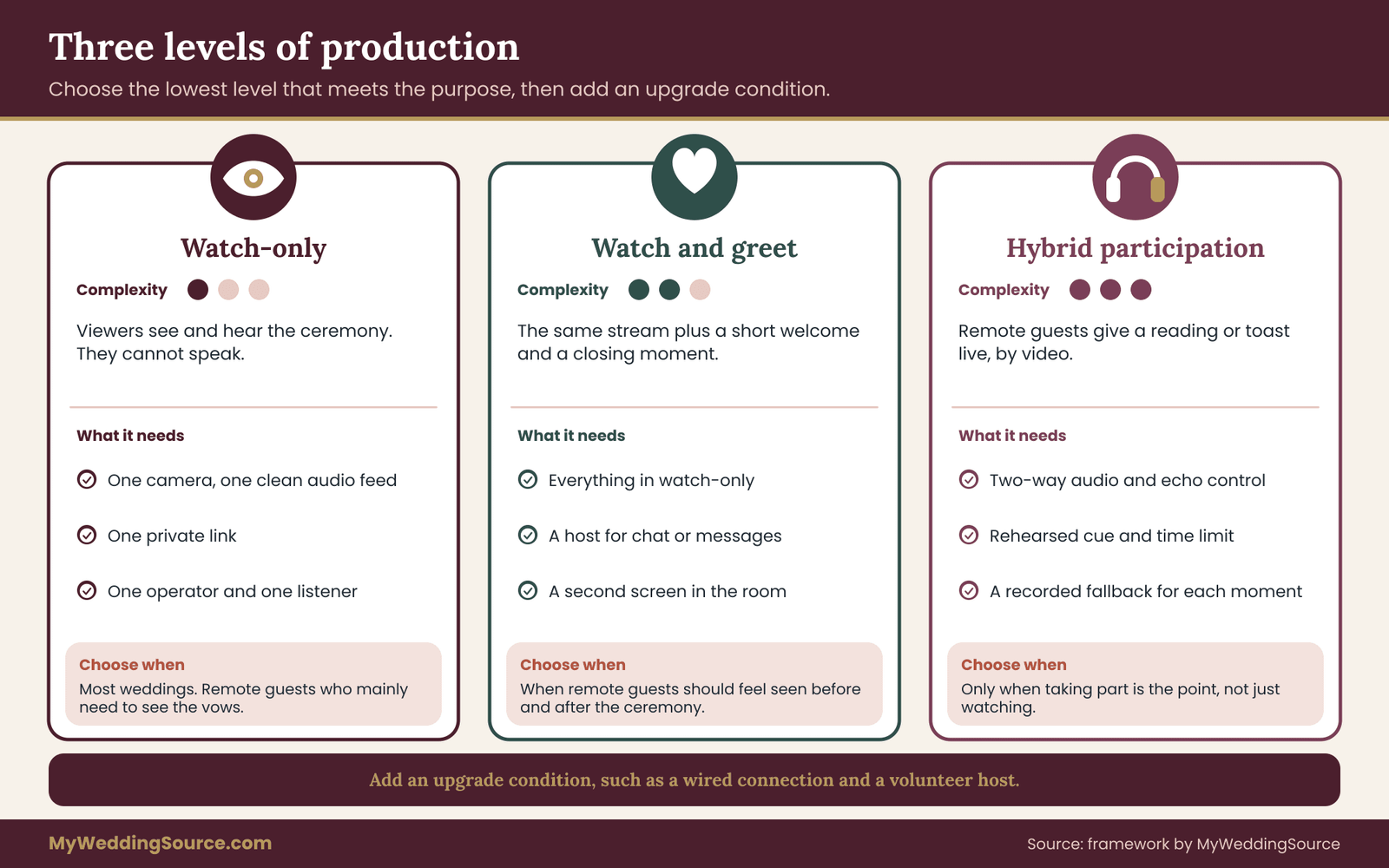
It helps to name three levels of wedding livestream planning, because couples often drift into the most complicated one without noticing.
Watch-only. Viewers see and hear the ceremony and perhaps the toasts. They cannot speak. One camera, one clean audio feed, one link. This is enough for most weddings and it is the level most couples should start from.
Watch and greet. The same stream, plus a short moment before and after when remote guests are welcomed, shown on a screen in the room or invited to type a message. This needs a host who handles chat or a simple greeting, and it needs a second screen.
Hybrid participation. Remote guests appear in the room, give a reading, offer a toast or take part in a ritual by video. This is a different production, because two-way audio brings delay, echo and the risk that the room hears a stranger’s kitchen. It needs separate planning. Choose this level only if the participation is the point.
Write the level in your runbook. If you cannot decide between two levels, choose the lower one and add an upgrade condition: “If the venue gives us a wired connection and a volunteer host, we add a greeting moment.”
Deciding what is streamed
Next, decide the slice of the day that your wedding livestream planning will cover. The ceremony is the usual choice: it has a fixed start, a defined audience and a clear sound source. A reception brings noise, movement, alcohol, children and a hundred moments when someone does not want to be on screen. Streaming the first dance or the toasts is possible, but it should be a separate decision made with its own consent check and its own audio plan.
A useful rule is to stream the part of the day that remote guests would otherwise miss entirely, and to record the rest for later. A recording can be edited, shared with the right people and kept private, and it asks less of everyone in the room.
Counting the people who actually need it
Make a short list with three columns in your head: who cannot attend, who might attend if they could see it, and who is only curious. Plan for the first group. The second group is a bonus. The third group is exactly who a public link will attract, and that is a privacy question handled at gate two.
For each person in the first group, write down one practical fact: their time zone, their device and their comfort with technology. A guest who has never joined a video call needs a different invitation from a cousin who streams for a living. Your wedding livestream planning should include one named helper for the guests who will struggle, and that helper should be reachable before the day.
A worked decision for gate one
Suppose a couple is marrying in a historic hall with a seating limit of sixty. They have eighty relatives, twelve of whom live abroad and four of whom are in their eighties. The honest purpose is to include the twelve, and to give the four a good view. They choose watch-only for the ceremony, plus a greeting moment of about two minutes before it begins. They record the reception toasts for later and decide against streaming dinner.
That decision is already worth more than any equipment list, and it is the real start of wedding livestream planning. It tells them one camera is enough, that audio is the priority, that the link should be private, and that they need a single host to greet people in the minutes before the processional. Every later gate can be checked against it.
The sign that gate one is closed
Your wedding livestream planning has passed this gate when the runbook’s first page contains the purpose, the level, the slice of the day, the audience groups and the name of the person who owns the plan. Keep that page short. A page you can read in thirty seconds is a page people will actually consult on the wedding day.
Gate two: consent and privacy in wedding livestream planning
Wedding livestream planning has one feature that photography does not: a livestream happens in real time and cannot be recalled. A photographer can delete a frame. A live stream has already reached every viewer by the time anyone notices a problem. That is why consent comes before cameras.
Consent in this context has three audiences. The first is the people in the room, who may appear on camera. The second is the people watching, who receive a link that carries the couple’s trust. The third is the people who handle the stream and the recording afterward, such as a videographer, a platform and a volunteer with a laptop. Each needs a different kind of clarity.
Who is in the frame
Start consent planning with the room, not the rule. Walk through the ceremony and list who will be visible from the planned camera position: the couple, the officiant, the wedding party, the front rows, the aisle and anyone who stands to read. Then ask three questions about each group.
Do they know? Do they mind? Is there a reason they might not be able to say so? The third question covers children, whose parents decide, and guests who may have safety reasons to avoid being broadcast, such as someone avoiding an estranged relative or someone whose location should stay private. You will not always know these reasons, which is why the invitation should give everyone an easy way to say something.
The site’s guide on wedding photography consent covers how to collect and record guest preferences for photos. The same tools work for video: a line on the invitation or website, a short reply option and a person who keeps the list. This article adds the points that are specific to live broadcast and to wedding livestream planning.
A notice that actually gets read
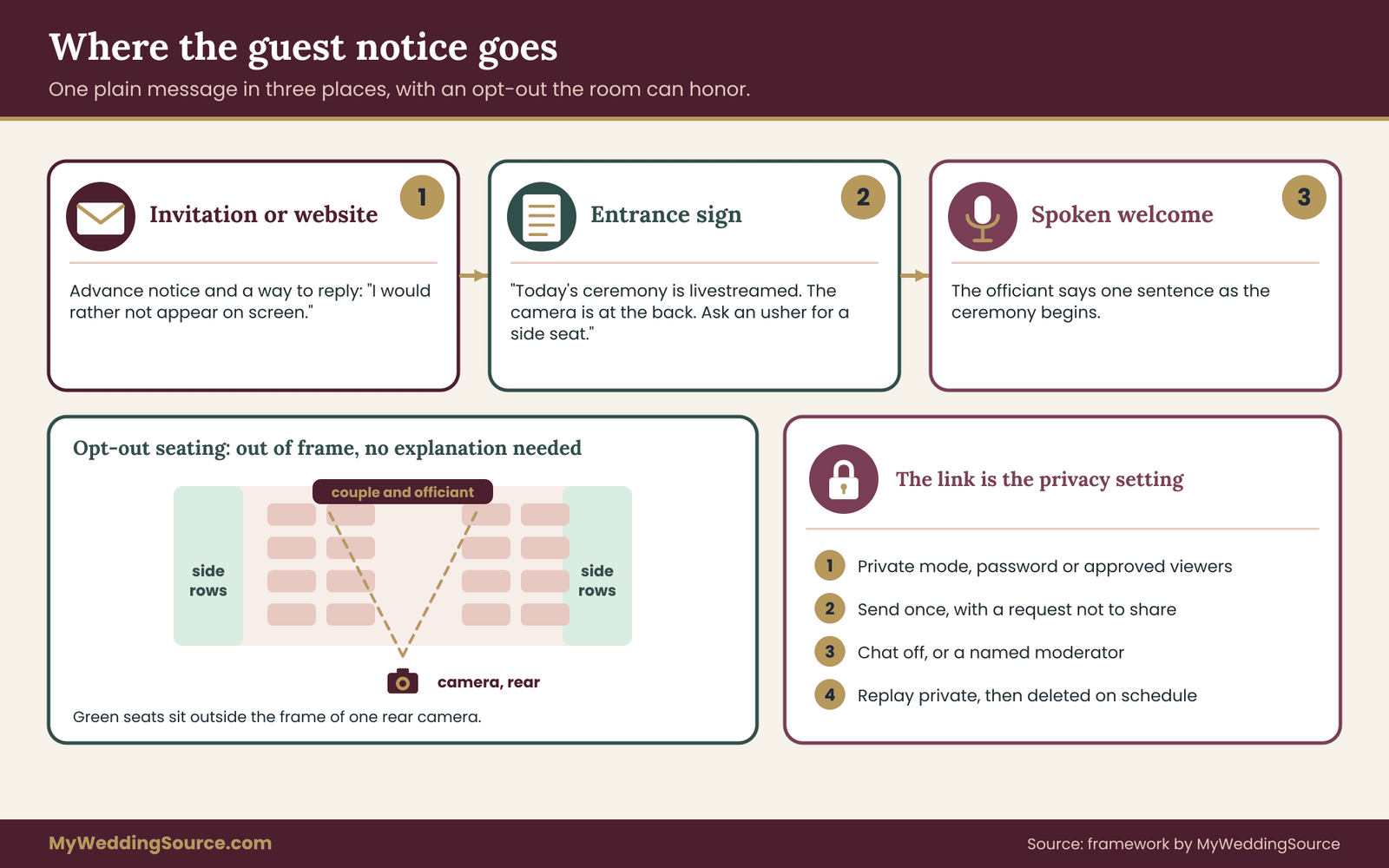
Put the notice in three places, because each reaches a different moment. The invitation or wedding website gives advance warning and a way to opt out. A small sign at the ceremony entrance reminds people on the day. The officiant or host says one sentence at the start. Each should say the same thing, in plain words.
A workable wording for the sign is: “Today’s ceremony is being livestreamed for family who could not travel. The camera is at the back. If you would rather not appear on screen, please ask an usher for a seat in the side rows.” The spoken version can be shorter: “This ceremony is being shared live with family far away. Thank you for being part of what they see.”
Avoid vague language such as “photos and video may be taken.” It tells nobody whether the ceremony is public, who will see it, or whether they can decline. Specific wording lets people make an actual choice.
Seating that respects an opt-out
An opt-out is only real if the room can honor it. Before you finalize the camera position, decide where a guest can sit and stay out of the shot. In many rooms the side rows and the far back corners are outside the frame of a single camera at the rear. Tell the ushers, and give them the list of guests who asked.
Do not make the guest explain. A short, quiet “I would rather not be on camera” should be enough. If a seat out of frame is not possible because of venue geometry, say so in advance so the guest can decide whether to attend a different part of the day.
Children and minors
Children’s images deserve extra care. Parents should be told in advance and asked, and the default for a child in a front row can reasonably be that the camera frames the couple and officiant, with children appearing only incidentally and briefly. Flower children and ring bearers who walk the aisle will be seen; their parents should know, and the couple should not post the recording publicly without asking them.
The link is the privacy setting
For most weddings the main privacy risk in wedding livestream planning is not the camera but the link. A link sent to forty people and forwarded to four hundred is no longer a private broadcast. Treat the link like a key.
Use the platform’s private or unlisted options and read its current help pages to learn exactly what those words mean, because platforms use them differently. An unlisted video, for example, can still be opened by anyone who has the address. If the platform offers a password, a registration step or an approved-viewer list, use it for anything you would not want a stranger to see.
Then decide, in the runbook, who sends the link, to whom, when, and with what instruction. A sentence on the invitation such as “Please do not share this link or post the recording” costs nothing and sets expectations. It will not stop a determined person, but it will stop the casual forward.
Chat, comments and recording by viewers
Live chat is a small but real choice in wedding livestream planning, because it invites a stranger’s comment into a private ceremony. Decide whether chat is on. For watch-only streams, turning it off is usually the calm choice, with one trusted person watching a separate message channel for questions. If you do want chat, assign a moderator, since an open box can carry an unkind remark at the worst possible moment.
Viewers can also record their own screen. You cannot technically prevent it, and you should not promise otherwise. What you can do is ask guests not to record or repost, and make sure no remote guest receives anything on the stream that would be harmful in someone else’s hands, such as a visible address, a guest list or an itinerary on a sign in the shot.
The people who handle the stream
Anyone who operates the stream is handling guest images. A hired videographer should have a written agreement about who owns the recording, how long they keep it, where it is stored and whether they may use it in their portfolio. A friend with a laptop should be told the same things, even informally: do not post it, do not keep it after delivering it, and do not use a personal account for the broadcast if it could expose personal information.
The site’s guide on choosing and documenting a wedding vendor contract explains how to get these terms in writing. For a livestream, add three lines to the usual contract questions: who controls the stream account, who holds the recording and when it is deleted.
Consent for the audio
Audio carries its own consent questions. A microphone worn by the officiant or a groom records conversations that happen near them, including whispers before the ceremony. Decide when the microphone goes live and when it is muted. Recording laws about audio differ from state to state, and some places require the consent of everyone in a conversation. If you are unsure, ask the venue or a local attorney, and keep wired or wireless microphones muted outside the ceremony itself.
A simple practice solves most of the problem: microphones are live only when the officiant says the first word, and muted by the audio operator when the ceremony ends. Whispered pre-ceremony moments with the wedding party stay private.
Sensitive situations to plan for
Some guests have reasons for more caution than a seating tweak. A relative may be in a custody dispute. A guest may have left a controlling household. A colleague may work in a role where public images carry risk. You do not need to ask anyone to explain. Offer a visible, private way to ask for no camera, such as a reply option on the response card, and honor it without comment.
If the couple’s own situation is sensitive, wedding livestream planning should start by asking whether to stream at all. If one family does not know about the wedding, the safest livestream is often none, and a recording delivered privately afterward. A broadcast is hard to take back, and the plan should make room for that choice without shame.
The sign that gate two is closed
Your wedding livestream planning has passed this gate when the runbook records the notice wording, the three places it appears, the list of guests who opted out, the seats that keep them out of frame, the link settings, the chat decision, the microphone rule and the written terms for whoever handles the recording. If any of those is blank, the gate is open, however good the equipment is.
Gate three: music, readings and rights in wedding livestream planning
Rights are the part of wedding livestream planning that couples discover last and regret most. A stream is a public performance by technical definition, even when only forty people watch, and the platform’s systems often scan audio automatically.
Why music gets streams muted
Most major platforms run automated checks on audio. If a recognized recording plays during your stream, the platform may mute the audio, block the replay or restrict the video. This happens regardless of whether anyone intended a violation. The sentence that matters to you is simple: a commercial recording playing in the room can disrupt a live stream or its replay.
Platform rules vary and change, and wedding livestream planning has to follow them, so read the current help pages for the one you choose. The U.S. Copyright Office publishes general information about copyright, and its site is the right place to learn the basics. For your own stream, the platform’s own music policy is the rule that actually applies.
The ceremony music decision
List every piece of music in the ceremony: prelude, processional, any song during a ritual, recessional. For each, mark one of four answers.
Live and original or in the public domain. A friend playing a piece by a composer long out of copyright, or an original piece written for the wedding, is generally the safest. Confirm the specific arrangement and recording, since a modern arrangement or recording of an old piece can have its own rights.
Live cover of a copyrighted song. A live performance of a protected song is not the same as playing a recording of it. Venues and platforms often handle this differently, so ask both.
A commercial recording played in the room. This is the highest-risk category for a stream. Plan to either replace it, mute the stream during that piece, or accept that the replay may be limited.
Licensed or royalty-free music. Music from a service that explicitly permits livestream and event use. Read the license for the words “livestream” or “broadcast” and keep a copy of the terms.
The site’s guide on wedding reception music planning covers the music decisions for the party. This gate asks only one extra question: what does the stream carry?
Muting the stream on purpose
A cleaner approach in wedding livestream planning for tricky pieces is to cut the broadcast audio deliberately. During a processional song that is a commercial recording, the audio operator can fade the room music out of the stream and replace it with a short silence or a quiet bed. Remote guests see the procession and hear the room’s natural sound. This is better than an unplanned mute by the platform in the middle of the vows.
Agree on the signal in the cue sheet, and test the fade in the rehearsal. The operator needs to know exactly which songs, which moments and which levels.
Readings, poems and written material
A reading spoken aloud in a ceremony is usually a simple matter, but a stream records and replays it. Short quotations are one thing; a full poem or passage from a recent book is another. Check who holds the rights, which is usually the author or the publisher. For a stream, the question is whether the reading may be broadcast and kept in a recording. If the author or publisher has said no, choose another reading or ask for permission in writing.
Other people’s content in the shot
Visual material can create the same problem. A video montage or slideshow shown on a screen during the ceremony may include licensed music or photos taken by others. Signs and printed programs with artwork or fonts have their own terms. When the camera captures them, the stream carries them too. Check the usage terms before the day, and avoid putting someone else’s work in a frame you do not control.
What to do with the recording
The recording from your wedding livestream planning carries the same rights questions as the live broadcast, plus a longer life. If you keep it, store it privately, and think before posting it anywhere public. A replay on a platform can trigger the automated checks again. Many couples keep the file themselves and share a private link or a download with the guests who asked.
The sign that gate three is closed
Your wedding livestream planning has passed this gate when every piece of music has one of the four labels and a plan, the fade or mute moments are in the cue sheet, every reading has a permission note, and you know whether the recording will be posted anywhere or only shared privately.
Gate four: cameras, positions and light for wedding livestream planning
Camera choices in wedding livestream planning are less about brand than about three plain questions: where does the camera stand, who watches the picture, and what happens when the light changes. A modest camera in a good position beats an expensive one in a bad spot.
How many cameras
One camera is a complete production for a watch-only ceremony, and it is often the right answer in wedding livestream planning. A single, steady, wide-to-medium shot from the back or the side shows everything remote guests need: the couple at the front, the officiant and the room. The risk of one camera is that it is a single point of failure and a single angle, so the plan should say who adjusts it and when.
Two cameras add choices. A second, closer camera on the couple lets the stream cut to faces during the vows. It also needs a second operator or a switcher, and the decisions about when to cut multiply. For most weddings, two cameras are worth it only when someone with live-switching experience is available.
Three or more cameras start to look like a television production. They suit a large ceremony in a big venue, a hired crew and a long list of moments. They also raise the bar for consent, because more angles mean more of the room in view.
Decide the number of cameras from the purpose of your wedding livestream planning, not the other way around. If the purpose is that a grandmother sees the vows, one camera with a steady frame and good sound is enough.
Choosing the position
The camera position in wedding livestream planning decides the picture, the consent list and the distraction for the room. Work through it in the actual venue, ideally during the technical walkthrough covered in the guide on a wedding venue technical walkthrough.
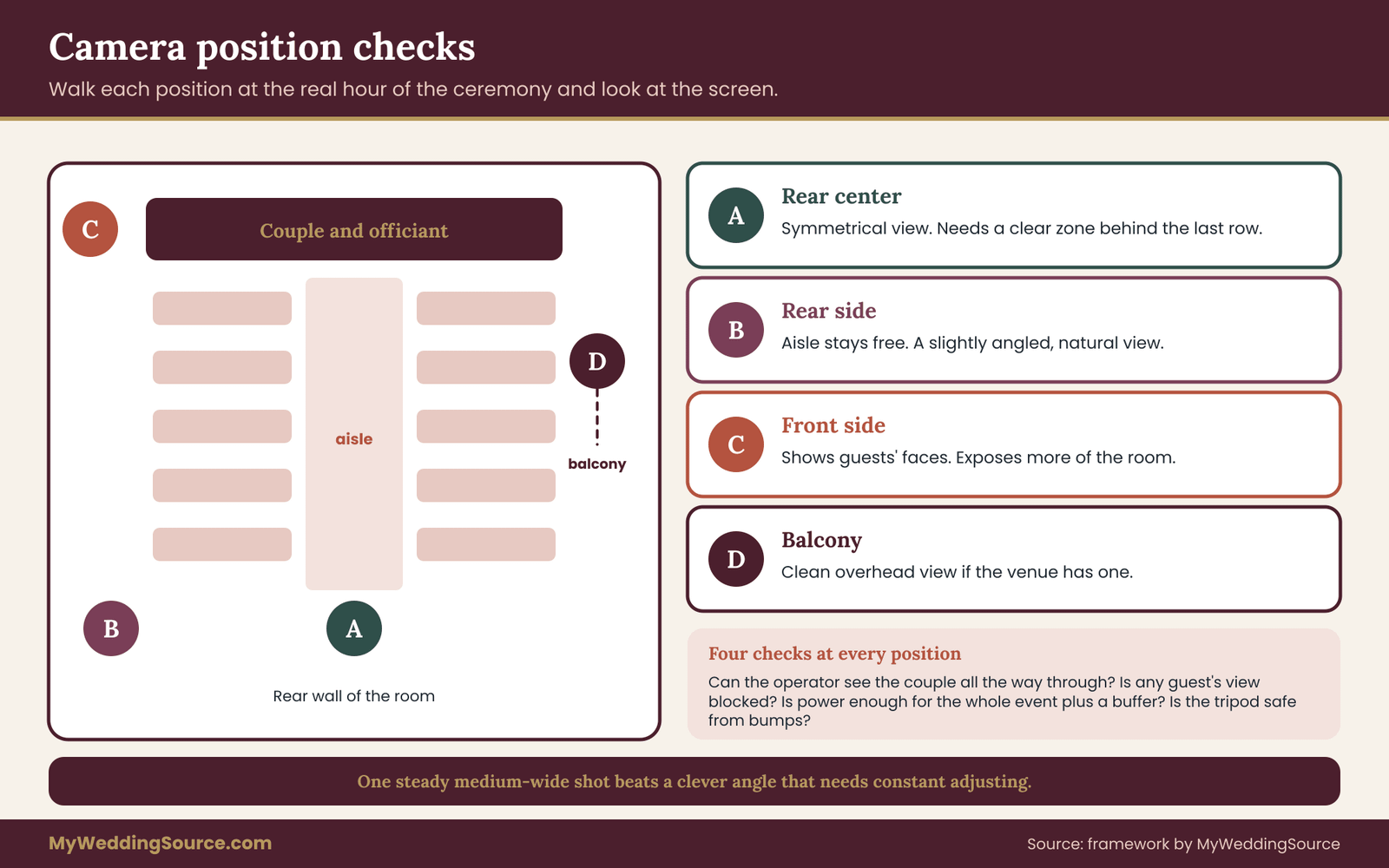
A rear-center position gives a symmetrical view but puts the camera in the aisle’s line, so it may need a clear zone behind the last row. A rear-side position keeps the aisle free and gives a slightly angled view of the couple, which can look more natural. A front-side position, near the officiant, shows the guests’ faces and may expose the room more than you want. A balcony or raised position gives a clean overhead view without blocking anyone, if the venue has one.
Check four things at each candidate position. Can the operator see the couple during the entire ceremony? Does the camera block a guest’s view? Is there power or a battery long enough for the whole event plus a buffer? Is the floor stable, with no one likely to bump the tripod?
Distance and framing
A wide frame shows the room but makes faces small, which matters on a phone. A tighter frame shows faces but cuts off the wider ceremony. The usual compromise is a medium-wide shot that shows the couple and officiant from roughly knees up, with room at the sides for a bridesmaid or a reader who steps in.
Plan the framing for the three moments that matter most: the processional, the vows and ring exchange, and the kiss and recessional. If one frame can hold all three without constant adjustment, the operator can leave it alone. If the couple kneels, sits or moves around a ritual, mark that moment in the cue sheet so the operator can reframe.
Phones, camcorders, mirrorless cameras and PTZ units
A recent phone on a stable mount makes a perfectly acceptable camera for a small, watch-only stream, provided it is plugged into power, set to do-not-disturb, and has enough storage. Its weakness is audio, handled at the next gate, and its habit of interrupting itself with notifications and calls.
A camcorder or a mirrorless camera with a clean video output gives better low-light performance and optical zoom, and it usually stays on longer. It needs a way to send the picture to the streaming software, which means a capture device and a laptop or an encoder.
A remote-controlled pan-tilt-zoom camera can be moved by an operator from a distance without walking through the room. It suits venues where the operator needs to stay out of sight. It adds cabling and software, and the movement can distract if used carelessly.
None of these is the correct choice in the abstract. Match the camera to the person who will run it. A volunteer who has never used a capture device should not be handed one on the wedding morning.
Light, which decides more than the camera
Cameras struggle with mixed lighting, backlit windows and dim rooms. A ceremony in front of a bright window can turn the couple into silhouettes. A candlelit chapel can produce grainy, shaky video. Look at the room at the real hour of the ceremony, because light changes through the afternoon.
Walk the venue with a phone camera at the right time and look at the screen, not the room. If faces are dark, ask the venue about lighting options, adjust the time of day or the couple’s position, or accept a lower quality. Do not add your own lighting without checking with the venue, since stands and cables are safety and liability concerns.
The operator
Every camera in wedding livestream planning needs a human, or at least a person responsible for it. The operator checks focus, framing and exposure, watches the battery, and speaks to nobody during the ceremony. Choose someone calm. A friend who wants to enjoy the wedding is a poor operator, because they will either watch the ceremony or the screen, not both.
If you hire a videographer, ask whether they livestream, whether they bring their own connection, who owns the recording and how they will coordinate with the photographer in a small room. If a friend runs the camera, give them the cue sheet, a rehearsal and a replacement for the moment they need to step away.
Coordinating with the photographer and the room
A livestream camera is one more person in the room, which wedding livestream planning should treat as a real presence. The photographer and the videographer should know each other’s positions in advance, with the aisle kept clear and neither blocking the other. The officiant should know where the camera is and whether to face it. Guests should not be asked to avoid the lens, and the camera should not become the center of attention.
The sign that gate four is closed
Your wedding livestream planning has passed this gate when the runbook names the number of cameras, the position, the framing for the three key moments, the operator and the backup operator, the power plan and the lighting check you made at the real hour. A photo of the planned view, taken from the camera position, is worth attaching.
Gate five: the audio chain in wedding livestream planning
If remote guests can see but not hear, the stream has failed, however sharp the picture. Of all the decisions in wedding livestream planning, audio is the one most often under-planned and the one remote guests notice first. People forgive a soft picture. They do not forgive silence.
Why the camera microphone is not enough
A microphone built into a camera or phone hears the room, not the speakers. It picks up the coughs, the chairs and the air conditioning as clearly as the vows. The farther the speakers are from the camera, the worse the ratio. At the back of a ceremony space, the vows can be a faint murmur under the noise of the room.
This is the single most useful rule in the audio part of wedding livestream planning: put the microphone near the voice, not near the camera. A small wireless microphone on the officiant or a handheld at the lectern puts the voice directly into the stream.
The chain, step by step
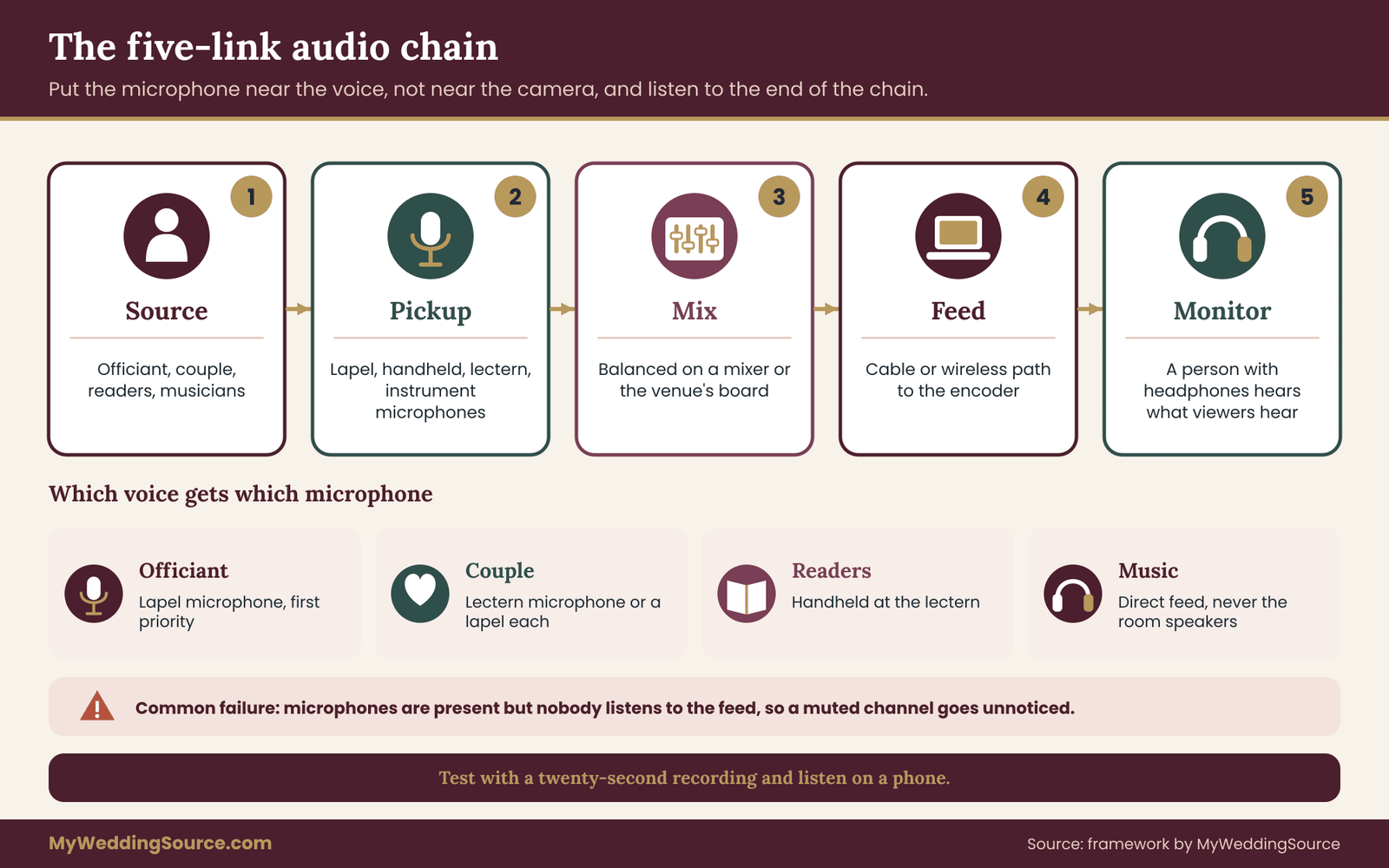
Think of audio in wedding livestream planning as a chain with five links, and check each one.
Source. The voices and the music: the officiant, the couple, the readers and the musicians.
Pickup. The microphones that capture them: lavalier, handheld, lectern, instrument microphones.
Mix. Where the signals combine and are balanced, whether that is a small mixer, the venue’s sound system or the music player.
Feed. The cable or wireless path to the encoder or the computer running the stream.
Monitor. A person with headphones who hears exactly what the remote guest hears.
If any link is missing, the stream suffers. A common failure is the second link without the fifth: microphones are present, but nobody listens to the feed, so a muted channel goes unnoticed through the vows.
Which voices need a microphone
The officiant is the first priority, because they speak the most. The couple is the second, since the vows are the center of the event. Readers come third. For each, decide whether they will use a lapel microphone, a handheld or a fixed microphone at a lectern.
A fixed microphone near the couple can capture both vows without anyone wearing equipment, but it may also pick up the room. A lapel microphone on each partner gives the best clarity but needs fresh batteries and a clean attachment under clothing. If the couple is nervous or the clothing is delicate, the officiant’s microphone and a lectern microphone may be enough.
The venue’s sound system
Many venues already have a speaker system and a mixer. A feed from the venue’s board can be the cleanest source, because the audio is already balanced. Ask whether the venue lets you connect to it, what connector the mixer offers and whether a technician is on site. The venue’s technical contact, not the sales contact, knows the answer.
If the venue’s system is for the room only and has no spare output, a separate microphone path for the stream may be needed. In a room with its own sound system, the stream microphone and the room microphone can fight, so test them together.
Wireless microphones and interference
Wireless microphones, a common tool in wedding livestream planning, use radio frequencies, and busy venues, hotels and city centers can have crowded airwaves. A microphone that works at home can cut out in the ceremony space. The remedy is simple: test on site, use fresh batteries, keep receivers in line of sight to the transmitters and have a spare. The Federal Communications Commission regulates the use of wireless microphones, and a rental company or professional crew will know which equipment is appropriate.
Echo, wind and room sound
Stone and glass rooms echo, which blurs speech. Outdoor ceremonies face wind, and a gust against a microphone sounds like a roar. A foam or fur cover on the microphone reduces wind noise, and placing the microphone close to the mouth reduces the need to boost the level. Visit the room at the real hour and clap once: the length of the echo tells you a lot about what a microphone will hear.
Music in the mix
Live music can overwhelm a speech microphone and vice versa. Decide who controls the balance. A common arrangement is that the audio operator lowers the music during speech and raises it between moments, working from the cue sheet. If the music comes from a player, feed it directly into the mixer rather than letting the microphone hear the speakers.
The monitor person and the headphone rule
In wedding livestream planning, assign a person to wear headphones from the first prelude note to the recessional. They listen to the stream feed, not the room. Their job is to notice silence, distortion, hum and levels, and to raise a hand to the audio operator, who may be the same person in a small production.
For a one-person production, the same person can wear one earphone and listen with one ear. Even this beats nothing.
A short list of questions for the audio operator
Before the wedding, put the same plain questions to the person who runs sound. Which microphone is on whom? What is the plan if a battery dies? Where does the mix go? Who can hear the stream? When does each microphone mute? What happens if the venue system and the stream fight? A confident answer to each is a good sign.
The sign that gate five is closed
Your wedding livestream planning has passed this gate when the runbook lists each voice, its microphone, the mix path, the feed to the encoder, the person monitoring with headphones, the spare batteries and the mute and unmute moments. A twenty-second test recording, listened to on a phone, is the best proof.
Gate six: delivery and the remote guest experience in wedding livestream planning
The remote guest is the reason for the whole exercise, and their experience starts well before the ceremony and ends well after it. Wedding livestream planning that ignores the viewer’s side produces a technically correct stream that nobody enjoys. This gate covers the platform, the link and the journey from invitation to goodbye.
Choosing a delivery method
There are three common ways to deliver the stream to remote guests, and each trades control against convenience.
A broadcast platform such as a video-sharing service lets viewers join with a link and watch, with little to install. It scales easily, it works on most devices and it has a replay. It is less interactive and its privacy settings vary.
A meeting platform, the kind used for video calls, lets guests see and speak. It suits small groups and hybrid participation, and it gives you a participant list. It can show remote guests’ faces and noise in the room, which is a risk for a ceremony.
A private streaming service gives a branded page, passwords and tighter control, often at a cost. It suits couples who want a polished page and a limited audience.
The site covers the choice between a meeting format and a private link in a dedicated comparison. For this runbook, a simple rule works: use a broadcast-style private link for watch-only, and a meeting platform only if remote guests need to speak.
Latency, which is a gift and a trap
Every stream in wedding livestream planning has a delay between the room and the screen, from a few seconds to over half a minute depending on the platform and settings. For watch-only, delay is harmless, and a longer delay often gives a more stable picture. For two-way moments, it is the main trouble: a remote guest who answers a question will be heard long after the room has moved on.
Tell the host and the officiant that remote guests are slightly behind. If the ceremony includes a call and response, such as “Do you take”, the remote guest’s answer cannot be part of it. Plan any remote participation as a separate, rehearsed moment instead.
The link, the schedule and the time zone
Most remote guest frustration in wedding livestream planning comes from three small failures: the wrong time, the wrong link and no clear instructions. Fix them in the invitation.
Give the start time in the venue’s local time and in the guest’s own time zone, written out in full for each major group. A line such as “The ceremony begins at 4:00 p.m. in the hall’s local time, which is 9:00 p.m. for guests in London” is clearer than a time zone abbreviation. Mention that the stream opens fifteen minutes early so people can test their sound.
Send the link at least a week ahead and again the day before, with a one-line reminder of the local start time. Keep the message short and put the link on its own line so it can be tapped on a phone.
The testing step for guests
Invite remote guests to open the link a day or two before, in a test mode if the platform has one, or with a short test stream. Many viewing problems are device-related: an old browser, a blocked app, a phone on low-power mode. Finding them early removes the heat of the wedding day.
Offer a human fallback: a named person and a way to reach them, whose only job is to help guests who cannot get in. Put the contact on the invitation. The contact should not be a member of the wedding party.
What the viewer sees before the ceremony
In wedding livestream planning, the minutes before a ceremony are the viewer’s waiting room. A stream that opens on a static empty room with silence, then abruptly starts, leaves people unsure whether it works. A better approach is a short holding screen, a simple title card with the couple’s names, the date and the line “The ceremony will begin shortly,” with a quiet music bed that is cleared for streaming. If the platform allows it, a countdown clock helps.
If the host plans to welcome viewers, the welcome should happen on a defined cue and last a minute or two. A host who greets guests by name from the chat, if chat is enabled, gives remote guests a sense of presence.
Hearing and seeing well
Wedding livestream planning should also consider that remote guests may include people with hearing loss or vision problems, and a stream is a good chance to help them. Closed captions, if the platform supports them, can be generated automatically or by a person, and quality varies. Check the platform’s current captioning options and test one in the rehearsal. The Web Accessibility Initiative at the World Wide Web Consortium publishes plain guidance on captions and accessible media, and it is a good place to learn the basics.
Also consider the viewing size. A guest on a small phone sees a small ceremony, so the frame should keep faces large enough to read.
Including remote guests during the event
Good wedding livestream planning gives remote guests a part in the day, because they like to feel included, not behind glass.
Several small touches help without adding risk. A screen in the room showing a few viewer names or messages after the ceremony reminds the room that others are present. A short message from the couple spoken to the camera, either at the start or at the end, gives remote viewers a moment addressed to them. A recorded toast from a remote relative, sent in advance and played at the reception, gives them a role without the delay problems of a live link.
Ask guests to send such messages as short files a few weeks ahead. A prerecorded message is nearly always more reliable than a live one.
Hybrid moments done carefully
If a remote guest must take part live, for example by giving a reading or offering a toast, treat it as its own mini-production. Test the connection, test the audio in the room, set a time limit and have a backup: a recorded copy of the same reading. Place the remote guest’s screen so the room can see and hear it, and assign a person to cue them, since they cannot see the room.
Decide in advance what happens if the connection fails during the moment. The backup should play without comment, and the ceremony should move on. A guest who cannot join live should never feel they caused a problem.
After the ceremony
Wedding livestream planning should not drop remote guests the moment the recessional ends. A closing message from the host, such as “Thank you for being with us. The couple will share a recording soon,” tells people what to do. If a reception stream follows, say when it starts. If not, say so, and tell viewers they can close the window.
Planning for the internet side
The detail of backup connections, bandwidth and failure drills belongs to a separate plan. Use your wider wedding day digital contingency plan for the internet ladder and the failure drill, and use this runbook to decide the stop conditions that tell the team when to invoke it.
Two points belong here. First, ask the venue in writing what internet is available in the ceremony space, who manages it and whether a wired connection is possible, since a cable is generally steadier than wireless. Second, treat a stream-ready connection as a required deliverable of the venue conversation, not a pleasant surprise.
Platform rules and settings to check
Each platform used in wedding livestream planning has its own rules on age limits, content, privacy options, music and recording. Read them before the day, not on it. Check whether the platform requires account verification for live streaming, because some accounts need a waiting period before they can stream, which has caught couples a day before the wedding. Check the replay and storage rules and the way the platform describes private and unlisted modes.
Use the official help pages of the platform you choose. Do not rely on a blog, including this one, for current account rules.
Cost logic without invented figures
Delivery costs in wedding livestream planning fall into three buckets. Platform fees, which range from free to a subscription. Equipment, which you may own, borrow, rent or hire. And labor, which is the part people forget: the hours of the person who tests, hosts and monitors. Ask each vendor for a written quote and compare like with like. A free platform with a free volunteer is not free if it costs a friend the ceremony.
The sign that gate six is closed
Your wedding livestream planning has passed this gate when the runbook records the platform and its privacy mode, the link plan with dates, the time zone wording, the guest test day, the support contact, the holding screen, the welcome and closing messages, the captioning decision, any live remote moments with their fallbacks and the venue’s written internet answer.
Gate seven: show control, cue sheet and stop conditions
The first six gates decide what you build. The seventh decides how it runs, and it is the gate that turns wedding livestream planning from a list of ideas into something a calm person can follow under pressure. Show control is the set of roles, the countdown and the rules that tell people what to do next.
The five roles
A small stream in wedding livestream planning needs five jobs, even if one person holds several. Write the names next to each in the runbook.
Owner. The person who answers for the stream’s plan. This is not the couple. It might be a sibling, a planner or the videographer. The owner decides when a rule applies.
Operator. The person at the camera and the encoder, who starts and stops the broadcast and watches the picture.
Audio monitor. The person with headphones, described at gate five.
Host. The voice that welcomes remote guests and keeps them informed, in chat or by message.
Support contact. The person who helps guests who cannot get in, on a phone or messaging channel, away from the ceremony space.
In a tiny production, one friend can be operator and monitor, and a second can be host and support. Do not combine the owner with the officiant or a wedding party member, and do not assign any of these to the couple.
One person with the power to stop
Write down the name of the person who can stop the stream, and make it a rule that they do not need to ask anyone. The reasons to stop are not only technical. A guest may object. A child may become distressed. A medical event may happen in the room. In each case the stream should stop immediately, and the owner should be able to do it with one action.
Give that person a way to do it quickly: a visible button on the encoder, a cable to unplug or a command on the platform. Test it. A stop switch nobody has practiced is a switch that will be found too late.
The countdown
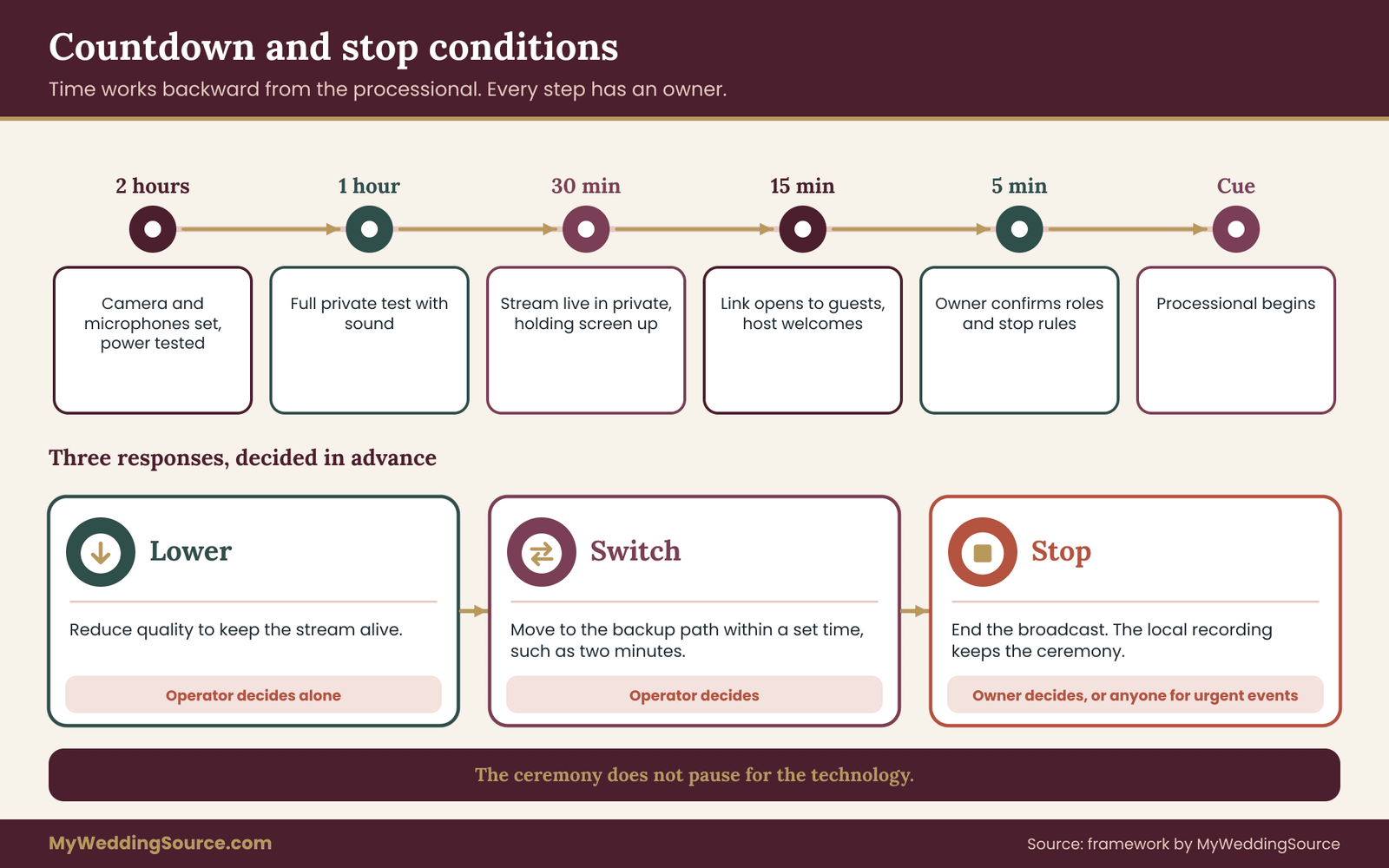
In wedding livestream planning, time works backward from the processional. A countdown gives each role something to do and a time to do it.
Two hours before: the operator arrives, sets up the camera and tests power. The audio monitor places microphones and tests.
One hour before: a full test of the stream from the camera to a private viewing device, with sound. Thirty minutes before: the stream starts in private, the holding screen is up and the host sends the first message to remote guests. Fifteen minutes before: the public link opens to guests. Five minutes before: the owner confirms the roles, the stop conditions and the microphone mute plan. At the cue: the host says the welcome, the officiant speaks, the ceremony starts.
The times depend on your venue and your crew. What matters is that every step has an owner and a time, and that the sequence is on paper.
The site’s guide to the wedding ceremony cue sheet shows how to write the ceremony side of this, and the stream’s lines can sit alongside.
The cue sheet for the stream
A stream cue sheet is a list of moments where something technical changes. It is shorter than the ceremony script. A typical set includes: holding screen off and camera live; music fades or mutes for any commercial recording; microphone live on the officiant; microphones live on the couple; reading microphones; unplugged-ceremony reminder; recessional music; microphones muted; stream continues for two minutes with a closing message; stream ends.
Keep the cue sheet to one page, large type, with the ceremony order on the left and the stream action on the right, in sentences rather than a grid. Print two copies: one for the operator, one for the owner.
Stop conditions
This is the part of wedding livestream planning that most couples never write, and it is the part that makes a stream calm. A stop condition is a rule you decide in advance, so nobody has to decide it in the moment. There are three kinds of response: lower, switch and stop.
Lower means reducing the quality to keep the stream alive. If the picture stutters, the operator drops the resolution or the frame rate. This is a technical choice that the operator can make alone.
Switch means moving to a backup path. If the main connection fails, the operator switches to the backup described in the contingency plan. This is also an operator decision with a time limit, such as two minutes.
Stop means ending the broadcast. This is a decision for the owner, and it follows a clear trigger.
Write the triggers in plain sentences. “If the audio is lost for more than thirty seconds and cannot be restored, the owner tells the host to post a short message, and the ceremony continues recorded.” “If a guest asks to be off camera and cannot be moved out of frame, the operator reframes, and if that fails, stops the stream.” “If anything urgent happens in the room, the nearest person stops the stream, and the owner decides about restarting.”
The point is that the stream serves the wedding, not the other way around. A ceremony does not pause for the technology.
A recording rule that makes stopping easy
The reason many people hesitate to stop a failing stream is fear of losing the moment. Remove the fear with a local recording. If the camera or encoder also records to a card or a drive, a stopped or failed stream does not mean a lost ceremony. The remote guests can watch the recording later, and the couple has it either way.
Confirm before the day that the local recording works, that there is enough storage and that someone knows where the file will be. Treat the local recording as the primary deliverable and the livestream as a live copy of it.
What to say to remote guests when it goes wrong
A message sent in a calm moment is better than silence. Prepare three short messages in advance, ready to paste. One for a brief interruption: “We are having a small technical delay and will be back in a moment.” One for a longer outage: “The live stream has stopped. The ceremony is being recorded, and we will send the recording to you as soon as we can.” One for the end: “Thank you for being with us. We will be in touch soon.”
The host posts them. The tone should be plain, warm and short. Remote guests are not asking for an explanation. They want to know that someone is paying attention.
The rehearsal
The rehearsal is where wedding livestream planning meets the room. Schedule a full run at the venue, at the hour of the ceremony if you can, a week or less before the wedding. Run the whole chain from the microphones to a viewing device outside the building. Play the music cues. Test the stop switch. Time the countdown.
Walk through one failure on purpose: unplug the main connection, mute a microphone, drop a battery out. See who reacts and how. A rehearsal that finds one problem has paid for itself, and a rehearsal that finds none is a good sign, not a wasted hour.
Day-of habits for a calm stream
A few small habits help wedding livestream planning succeed on the day. The operator keeps a card with the stop rule and the three messages. The owner stands where they can see the operator without being seen by the camera. The audio monitor never takes off headphones. The host does not chat during the vows. Nobody touches equipment during the ceremony unless a defined fault appears.
Phones in the equipment area go on silent. Spare batteries and cables sit in a labeled bag. A small flashlight helps in a dim hall. A bottle of water for the officiant, whose microphone sits near the mouth, is a kindness.
Putting the runbook on the vendor calendar
The tasks of wedding livestream planning belong in your vendor schedule alongside everything else. The site’s guide to a wedding vendor timeline can hold the dates: platform account ready, consent notice sent, rehearsal booked, link sent, support contact confirmed. Early dates matter because account verification, equipment rental and venue permission all take time.
The sign that gate seven is closed
Your wedding livestream planning has passed this final gate when the runbook names the five roles, the person who can stop the stream, the countdown, the one-page stream cue sheet, the stop conditions in lower, switch and stop form, the local recording check, the three messages and a rehearsal date. The runbook is now a complete document, and anyone can pick it up.
A worked case of wedding livestream planning: an illustrative example
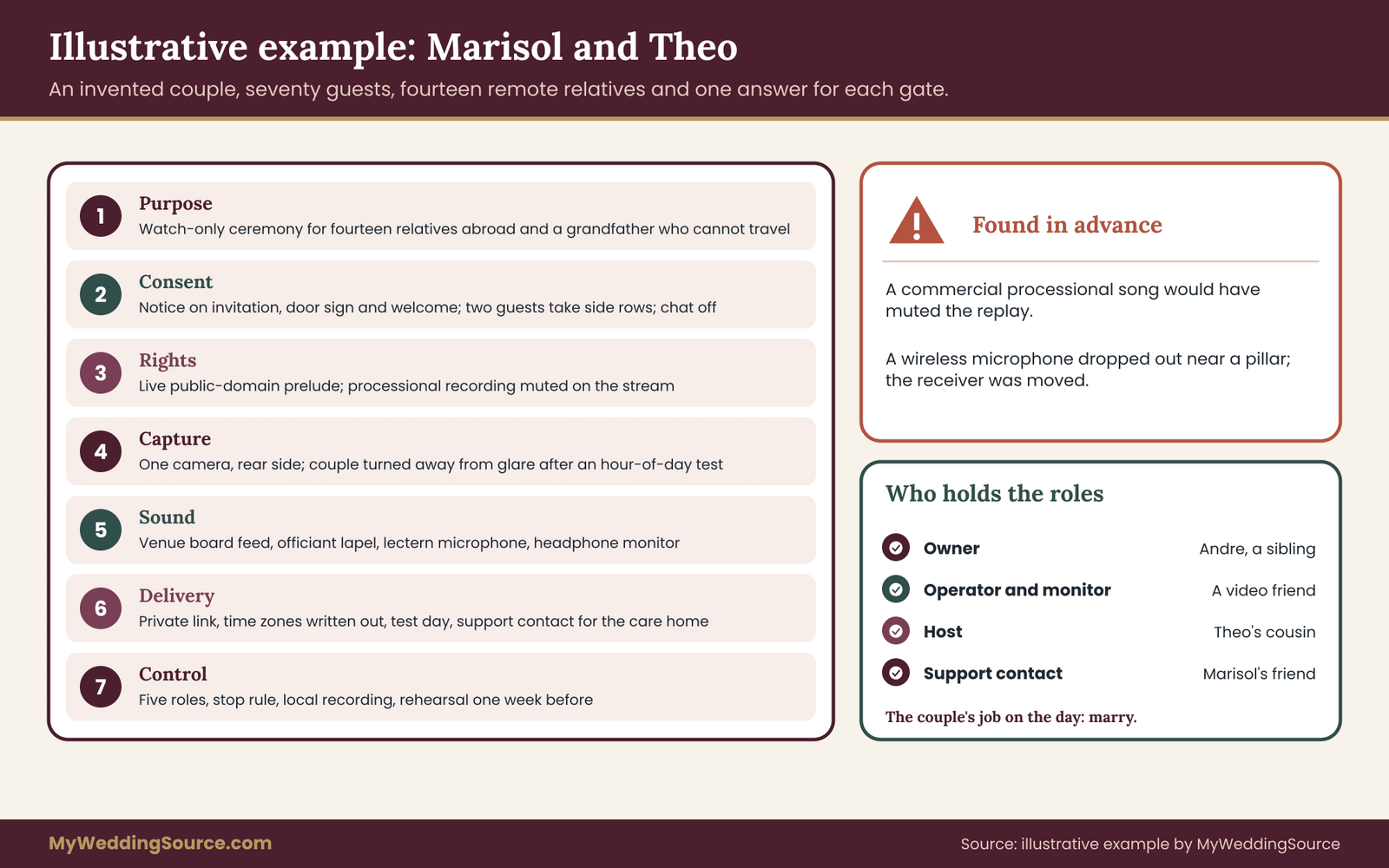
An example helps show how the gates of wedding livestream planning fit together. The following is an invented scenario created for this guide, with invented details, to show the decisions and not to describe any real event or result.
The setting
Marisol and Theo are planning a late-afternoon ceremony for about seventy guests in a restored hall with a stone floor and tall windows. Fourteen relatives live abroad, spread over three time zones, and Theo’s grandfather, who is in his nineties, cannot travel. They will stream the ceremony only.
Gate one
In their wedding livestream planning, the purpose is that the grandfather and the fourteen relatives can watch the vows and hear them clearly. They choose watch-only, with a two-minute greeting before the ceremony. They will record the reception toasts for later. Owner: Marisol’s brother, Andre, who does not appear in the wedding party.
Gate two
They add a line to the invitation and website, post a small sign at the door and ask the officiant to say one sentence. They mention that the camera is at the back and offer the side rows to anyone who prefers not to appear. Two guests ask for the side rows, and the ushers have the list. Chat is off, and Theo’s cousin, who will act as host, watches a message channel instead. The link is private and sent with a request not to share it.
Gate three
The prelude and recessional are played live by a friend of the couple on a piece in the public domain. The processional uses a commercial recording, so the operator will mute the stream for that song and give remote guests a short, quiet title card. The reading is a short passage from an old text and a family member’s own words.
Gate four
One camera sits in the rear-side position, on a tripod near the door, so the aisle stays free. The tall windows create glare, so the couple will stand with their backs to the stone wall, away from the windows, after a test at the ceremony hour showed faces too dark in the first position. The operator is a friend who works with video. A backup operator is named.
Gate five
The hall’s own system has a mixer, so the venue technician will give a feed. The officiant wears a lapel microphone, and a lectern microphone catches the couple’s vows. The audio monitor listens on headphones. The stone room echoes, so the officiant wears the microphone close to the mouth, and the monitor tests it with a clap in the rehearsal.
Gate six
They choose a private broadcast link. The start time is written for each time zone. The host sends the link a week ahead and the day before. Theo’s aunt in the grandfather’s care home receives a call from the support contact, who walks her through opening it on a tablet the day before. A holding screen with the couple’s names runs for fifteen minutes. Captions are available, and the team tests them.
Gate seven
The roles are Andre as owner, a friend as operator and monitor, Theo’s cousin as host and Marisol’s friend as support. The stop rule is written: lower the quality at once, switch to the backup within two minutes and stop only on the owner’s word. The camera records locally. A rehearsal is held at the ceremony hour a week before. In the rehearsal, a wireless microphone drops out near a pillar, so they move the receiver.
What the example shows
Nothing in this wedding livestream planning example is expensive or unusual. Its strength is that every gate has an answer, every answer has an owner, and the two risks that would have hurt most, a muted processional and a microphone drop-out, were found in advance. The couple’s own role on the day is to marry, not to manage a broadcast.
Where the same wedding livestream planning would change
If the hall had no wired internet, the plan would give more room to the backup path in the contingency article. If a guest in the front row had asked to stay off camera and no side seat was possible, the camera would move to a position that frames only the couple and officiant. If the grandfather’s tablet failed, the support contact would arrange a phone call with the host holding the line open. The gates stay the same while the answers change.
Who runs it: vendor, friend or your own team
Every wedding livestream planning conversation eventually reaches the same question: who actually presses the button? There are three honest answers, and each has a cost that is not always in money.
A professional video crew for wedding livestream planning
In wedding livestream planning, a hired live-event or wedding video producer brings equipment, experience and a calm manner under pressure. They have run streams in difficult rooms, they know what a venue technician will say and they usually have their own connection backup. The cost is higher, and the booking must be made early, since good crews fill their calendars. The trade-off is that a crew also adds people to the room, and the consent and contract questions above apply in full.
Ask a crew these questions in writing. Have you streamed from this kind of venue? Which platform and settings do you use, and who owns the account? Do you record locally while streaming? What happens if the connection fails, and who decides? How do you handle audio, and will you connect to the venue’s system? Who owns the recording, for how long do you keep it and may you use it in your own marketing? What is included, and what costs extra?
Do not treat a confident answer as proof. Ask for a reference from a client who had a similar event, and speak to them. The site’s guide on a wedding vendor contract explains how to turn the answers into written terms, and the due-diligence checklist in the guide on vetting vendors can help you spot weak answers.
A friend or relative
Many couples rely on a friend who is comfortable with technology. This can work well when the friend understands that the role is a job, not a favor squeezed between toasts. It fails when the friend is also a guest who wants to enjoy the day.
If you go this route, protect the friend. Give them a written runbook, a rehearsal, a clear stop rule and a limit on duties. Provide a replacement for any moment they need to step away. Offer to cover their costs, and say thank you in a way that matches the work. Do not ask the same person to run the stream and give a reading.
A mixed team
A common and sensible arrangement for wedding livestream planning is a hired videographer for the camera and audio, with a friend as host and support contact. The professional handles the equipment, the friend handles the guests, and the couple handles nothing. This split also matches the strengths of each: technical skill where it matters, and family knowledge where it matters.
Doing it yourselves
The couple should not run their own stream. A bride or groom cannot operate a camera, watch a monitor and say their vows. If budget is the constraint, reduce the scope before you reduce the staffing: stream the ceremony only, use one camera and one microphone, keep the platform free and ask one reliable friend to take charge.
A simple decision rule
Use this rule to choose. If the audience includes people who truly cannot travel and the ceremony matters to them, hire at least the capture and the audio, or borrow from someone who does this work. If the audience is curious rather than dependent, a friend with a rehearsed runbook is reasonable. If neither is true, consider a recording instead of a stream.
Cost logic without invented numbers
Costs are best compared in three columns in your head: money, time and risk. A professional crew costs more money, less of your time and less risk. A friend costs less money, more of your time as the planner, and more risk. A recording costs the least in all three. Get written quotes for the crew, price the rental of any extra equipment, and compare with the value of what the remote guests will see. Do not rely on a figure from the internet, since prices vary by region and change from year to year.
Alternatives to a livestream, and the failure conditions that decide
A livestream is not the only way to include people far away, and wedding livestream planning should compare the alternatives. Reading the alternatives before you commit makes the choice more honest.
A recorded ceremony shared later
In wedding livestream planning, a recording delivered within a day or two gives remote guests nearly everything a livestream does, without the timing pressure. It can be edited, captioned and shared with a restricted audience. For older relatives, a recording they can watch at a convenient hour is often better than a live link at an inconvenient one. This option removes most of the risk of the technical gates.
A short live segment
Instead of streaming the whole ceremony, stream only the vows and the kiss, with a host introducing the segment. This shortens the exposure, reduces the pressure on the connection and respects guests who prefer not to be broadcast.
Audio-only or a phone call
For a person who cannot manage a video link, a telephone call that carries the ceremony audio can be a kind option. A helper at the other end holds the phone, or a speakerphone is placed at the care home. The sound matters more than the picture for the person who is listening.
A private link for a small group
If only a handful of people need to watch, a private video call with a helper managing the device can work. It brings back the risks of two-way audio, so mute everyone except the host.
No stream at all
Sometimes the best answer is none. A very small ceremony, a sensitive family situation or a venue without any reliable connection can all point that way. A recording and a thoughtful message afterward can be just as warm, and it removes the stress from the day.
Failure conditions that should change your plan
Before the day, write the conditions under which wedding livestream planning will change. These are not signs of failure but of good judgment.
If the venue cannot confirm a usable connection in writing by a set date, move to a recorded ceremony and a short delayed upload. If the rehearsal shows audio too poor to understand, add a microphone or reduce the stream to a recording. If a platform account cannot be verified in time, switch platforms or use a private link on another service. If a large number of guests ask not to be on camera, change the camera position or the scope. If no reliable operator can commit, reduce to a recording.
Each of these is a simple rule, set in advance. The benefit is that the decision to change is calm, taken a week before, not an emergency at the ceremony.
Edge cases that catch couples out
A few situations deserve a line each in wedding livestream planning. An outdoor ceremony in a remote location may have no signal, so confirm the carrier coverage and plan for a recording. A religious ceremony may have rules about recording or streaming, so ask the officiant and the community before announcing a stream. A venue may prohibit external streaming equipment or charge a fee, so read the contract. A destination wedding adds time differences and local equipment rules. A ceremony with a long procession may require a second angle.
Weather changes everything outdoors: rain on a camera, wind on a microphone, glare on a screen. A covered position for the operator, a rain cover for the camera and a wind cover for the microphone are inexpensive and useful.
An accessibility need in the room, such as a wheelchair user in the aisle, affects where the camera and cables can go. Cables should never cross a path someone has to use. The site’s guide to the wedding venue technical walkthrough is the place to find these issues before the day.
Common mistakes to avoid
The usual mistakes in wedding livestream planning are few and repetitive. Planning equipment before purpose. Treating consent as a line on the website nobody reads. Leaving audio to the camera. Using a commercial recording in the ceremony without a plan for the platform. Sending a link without a time zone. Having nobody with the power to stop the stream. Forgetting to test the local recording. Assigning the stream to a guest who wants to enjoy the wedding. Skipping the rehearsal because the equipment worked at home.
Each is cheap to prevent at the planning stage and expensive to fix on the day.
After the stream: the recording, the thank-yous and the deletion
When the last guest signs off, wedding livestream planning is not finished. Three small jobs remain, and each protects someone: the remote guests who want to see the day again, the people who appeared on camera, and the couple, who now hold a file they will want to keep safe.
Secure the recording first
Before anything else, copy the local recording off the camera or encoder to two places. The operator should not leave the venue without confirming the file opens and plays with sound. If the platform also kept a replay, download it as a second copy, and check that the platform did not mute any part of it.
Name the file plainly, with the date and the word ceremony, and note who holds each copy. If a vendor made the recording, confirm in writing when it will be delivered and in what form.
Decide the replay rule
You set expectations before the wedding; now follow them. If you told guests that the recording would be shared privately, send a private link or a download to the people who asked, with a note not to repost it. If you said it would not be shared, do not share it. Keep the replay unlisted or private on the platform, or remove it once everyone has watched.
A public post is a different decision. It brings back the music and consent questions in a bigger way, and children and guests who opted out of the stream did not agree to a public one. Ask the people involved before posting, and edit out any moment that someone asked you to leave out.
Retention and deletion
Wedding livestream planning creates copies in several places: the camera card, the encoder, the platform, a laptop and perhaps a vendor’s drive. List them, and decide how long each stays. A reasonable pattern is to keep the master recording yourselves, ask the vendor to delete theirs after a set period once you confirm delivery, and delete the platform replay when guests have had enough time to watch. Put the dates in the calendar.
If the stream captured sensitive moments, such as a guest asking to leave, a family argument or a medical event, review and trim the recording before sharing it.
Thank the people who made it work
The operator, the audio monitor, the host and the support contact gave their time. A short, specific thank-you is welcome, and a gift if the work was large. Also thank the remote guests. A message that says they were seen and missed is worth more than a formal note, and a sentence about what they added, such as a message from the chat, makes it personal.
Learn once, then write it down
If you have friends who will marry later, or if you are hosting more than one event, take ten minutes to write what worked and what did not. Note the microphone that dropped out, the song that needed a mute, the question that confused remote guests. A short note is more useful than a long one, and it turns this wedding’s experience into a plan for the next event.
A one-page summary of the runbook
If all the wedding livestream planning in this guide had to fit on one page, it would read like this in sentences. Decide why you are streaming and for whom. Tell everyone and give an easy way to opt out, then protect the link. Check every piece of music and every reading before it goes out.
Put one camera in a good position and light it properly. Put the microphone near the voice and have someone listen. Choose a platform, send clear times and test with guests. Name the five roles and the person who can stop it. Record locally. Write the stop conditions and three messages. Rehearse once in the room. After the wedding, secure, share privately and delete on schedule.
For what to do if the connection itself fails, use your wedding day digital contingency plan, and give the stop conditions in this runbook to the person who will invoke it.
FAQ
How far ahead should wedding livestream planning start?
Start as soon as you know remote guests will need to watch, ideally three to four months before the wedding. Consent wording, venue internet answers, platform account verification and crew bookings all take time. If the wedding is closer, reduce the scope: stream the ceremony only, with one camera, one microphone near the officiant and a recording as the main deliverable.
Do I need guests’ permission for wedding livestream planning?
There is no single rule that fits every state, venue or situation, so ask your venue and, if needed, a local attorney. In practice, tell guests in advance on the invitation or website, put a sign at the entrance, mention it at the start and give people an easy way to sit out of frame. Honor opt-outs without asking for a reason.
What matters more for a wedding livestream, video or audio?
Audio. Remote guests forgive a soft picture but not silence. Put a microphone near the officiant and the couple instead of relying on the camera, listen to the feed with headphones and test it in the room. A basic camera with clean sound is a better stream than an excellent camera with a distant, echoing microphone.
Can I play any song during a streamed ceremony?
Not safely. Platforms often scan audio, and a commercial recording can mute the stream or restrict the replay. Use live music, public-domain pieces or music licensed for livestream use, or plan to mute the broadcast audio during a recorded song. Read your platform’s current music policy and the U.S. Copyright Office’s general information for the basics.
Should I hire a professional or ask a friend to run the stream?
Hire at least the camera and audio if people who cannot travel depend on the stream. A friend can work if they have a written runbook, a rehearsal and a replacement, and are not asked to enjoy the wedding at the same time. Never ask the couple to run it. Reduce the scope before you reduce the staffing.
How do I keep the link private?
Use the platform’s private mode, a password or an approved-viewer list when available, and read what each option really means, since “unlisted” often lets anyone with the address watch. Send the link only to invited guests, ask them not to share it, turn off or moderate chat and delete or restrict the replay after guests have watched.
What if a guest does not want to be on camera?
Give them a seat outside the frame, usually a side row or a rear corner, and make sure the ushers know. If the room does not allow it, move the camera or tighten the frame on the couple and officiant. Do not ask the guest to explain, and tell them before the wedding if the venue limits the options.
Is a recording enough instead of a livestream?
Often, yes. A recording shared within a day or two includes remote guests, lets them watch at a convenient hour, and avoids live timing pressure and most technical risk. Choose a live stream when the shared moment matters, for example for a relative who wants to be present as it happens. In either case, record locally.
Your next steps
This week, begin wedding livestream planning by writing the purpose of the stream and the level of production on one page, and name the owner of the plan. Draft the guest notice and decide where it will appear. Ask the venue, in writing, about the connection in the ceremony space and about any rules on outside equipment.
Next, list every piece of music and every reading with its label and plan. Choose the camera position by visiting the room at the ceremony hour. Decide who will run sound, and ask them the audio questions in this guide. Choose the platform, check its current rules and set the link’s privacy mode.
In the last weeks, write the five roles, the stop conditions and the three messages. Send the link with time zones, give remote guests a test day and book a rehearsal in the room. On the day, run the countdown, trust the cue sheet and let the people you named do their jobs. Good wedding livestream planning is mostly invisible, and the best sign of success is that the couple remembered the wedding and not the equipment.
Sources
- U.S. Copyright Office
- Federal Communications Commission, Consumers
- Federal Trade Commission, Consumer Advice
- Cybersecurity and Infrastructure Security Agency
- National Institute of Standards and Technology
- W3C Web Accessibility Initiative
- ADA.gov, U.S. Department of Justice
- YouTube Help, Google
- Zoom Support
- Vimeo Help Center