

A wedding livestream puts your ceremony in front of people who cannot be there, but it also records everyone who can, so wedding livestream recording consent is really a plan for telling guests what the camera sees and hears, who can watch, how long the recording lives, and how anyone can opt out.
Quick answer
For wedding livestream recording consent, tell guests three times and in plain words: before the wedding (invitation line, wedding website, RSVP question), at the entrance (a sign and a program line), and at the start of the ceremony (one sentence from your officiant). Say what is captured (video, audio, or both), who can watch, and what happens to the recording afterward. Offer a seating area outside the camera’s view. Send the link only to people who RSVP, never post it publicly, and decide in advance when the recording will be deleted. U.S. recording rules vary by state, so treat this as planning guidance and not legal advice, and ask your venue and, if you want certainty, an attorney in your state.
Plenty of couples add a livestream late in planning, usually because a grandparent cannot travel or a few friends live overseas. The technical side is easy to find: pick a platform, set up a camera, test the internet. The human side is harder to find, and it is where problems start. A guest who did not expect to be filmed, a cousin who forwards the link, a recording that sits on a public channel for three years: none of these are technical failures. They are decisions that nobody made on purpose.
This guide is built around one deliverable you can copy and adapt for wedding livestream recording consent, a consent notice kit and a storage and deletion schedule. The kit gives you wording for each moment guests meet the livestream. The schedule tells you what exists after the wedding, where it lives, who holds it, and when it goes away. Around those two pieces we explain the general U.S. legal picture in plain language, how to control the link, what to ask a venue or videographer, and how to handle the awkward cases.
Why wedding livestream recording consent needs more than a photographer’s permission
A photographer captures a moment and hands you files. A livestream broadcasts the moment as it happens, usually with sound, often to a platform that keeps a copy by default. That difference changes what you owe your guests in the way of notice, and it changes what you owe yourselves in the way of planning.
What you are actually asking guests to accept
When someone walks into your ceremony with a camera pointed at the seating, they are being asked to accept several different things at once. It helps to separate them, because a guest may be comfortable with one and not another.
Being seen
The most visible part is the image. Guests in the camera’s view will appear on screens in other homes, and possibly in a recording. A grandmother watching from another state is a good reason for this, and most guests are happy to wave at her. Others, for reasons that are theirs to keep, would rather not appear at all.
Being heard
Audio is a separate matter. A microphone near the officiant or on the lectern picks up the vows and readings, but a room microphone or a camera’s built-in microphone also picks up quiet side conversations, a whispered comment to a child, and the sounds of people crying. Recording rules in the United States often treat audio differently from silent video, which we cover below, so it deserves its own sentence in any notice you write.
Being kept
A live broadcast ends, but a recording can remain. Many platforms create an archive automatically when a stream finishes. For example, YouTube’s mobile help page says an archive is created on your channel when you tap Finish, and that you can change its privacy or delete it at any time. Guests deserve to know whether you intend to keep the recording, and for how long.
Being shared
Finally, there is the question of who can pass it on. A private link can still be forwarded, and anyone with a phone can record a screen. You cannot make this risk zero. You can lower it, and you can be honest about what remains.
Wedding livestream recording consent is more than a legal minimum
It is tempting to ask, “What do we have to do?” That is a fair question, and the next section gives a general answer. But consent in the everyday sense is about trust. People attend a wedding as guests, not as extras in a production, and a short, kind notice treats them that way.
The legal floor for wedding livestream recording consent
Legal rules set a minimum, and they vary by state. In many places, filming a public-facing event with a visible camera raises few issues, while recording private conversations without agreement can raise serious ones. We explain that distinction below. The point here is that meeting the minimum is not the same as having a happy guest list.
The courtesy ceiling
Courtesy goes further. It means telling people early enough to decide whether to attend, offering an alternative seat, and keeping your word about who watches and for how long. None of this costs money. It costs a few sentences, written once and reused.
Why a notice is not a contract
A sign at the door is a good-faith notice, not a magic shield. Do not assume that “by entering you consent” settles every question, and do not use that wording to pressure anyone. Consent that is clear, early, and easy to decline is the goal. If someone objects, the plan should let them without a scene.
Decide what the livestream is for before you write any wording of your wedding livestream recording consent notice
Notices about wedding livestream recording consent are easier to write once you know your purpose. A vague plan produces vague wording, and vague wording invites the very questions you were trying to avoid.
Name the audience
Is the stream for a handful of relatives who cannot travel, or for a wide circle of friends and coworkers? The smaller the audience, the simpler everything becomes: a short invite list, a password, and an easy deletion plan. If you cannot name the viewers, you cannot honestly tell guests who will see them.
Name the scope
Decide whether the stream covers only the ceremony, or also toasts, the first dance, and the reception. Many couples stream only the ceremony. That keeps guests comfortable at the reception, where people are more relaxed and more likely to say things they would not say on camera.
Name the afterlife of the recording
Decide whether a recording will exist at all. Some couples stream live and keep nothing. Others keep one master file for themselves and delete everything else. Either is fine. What matters is that the answer exists before the wedding, so your wedding livestream recording consent notices can state it.
What U.S. recording law says about wedding livestream recording consent, and where this guide stops
Rules about recording people in the United States come from federal law and from fifty state laws, and they do not all agree. This section summarizes how a reputable legal-reference source describes the landscape. We are not lawyers, laws change, and nothing here applies your facts to your state. It is a way to understand why the notice kit asks what it asks about wedding livestream recording consent.
The federal baseline and the state patchwork for wedding livestream recording consent
The Reporters Committee for Freedom of the Press maintains a state-by-state guide to recording laws. According to its introduction, federal law requires the consent of at least one party to record in-person, phone, or electronic conversations, and states may impose stricter rules.
One-party consent
The federal wiretap statute, 18 U.S.C. § 2511, makes it generally unlawful to intentionally intercept wire, oral, or electronic communications, with an exception for a person who is a participant in the conversation or who has the prior agreement of a participant, as long as the recording is not made to commit a crime or a tort. In plain terms, a person who is part of a conversation can usually record it under federal law. Whether a livestream operator counts as a participant in the guests’ conversations around the room is exactly the kind of question for a lawyer, so we do not assume the answer, and that uncertainty is one more reason a clear notice matters.
All-party consent states
The Reporters Committee guide says that about 11 states generally require every party’s consent, naming California, Florida, Illinois, Maryland, Massachusetts, Pennsylvania, and Washington among them. It adds that some states treat in-person conversations and phone calls differently, and that Hawaii and Maine require all-party consent only in particularly private places. If you are marrying in or streaming from one of those states, or guests are joining from one, a clear notice is more than good manners. Check your state’s page directly, because this paragraph is a summary and the guide is updated over time.
Audio versus video
The same guide explains that many hidden-camera laws are aimed at video, and some also cover audio. If a hidden-camera law does not cover audio, the audio portion can fall under the state’s recording law, and a camera that records no audio generally is not subject to wiretap laws. For a wedding, this is why we suggest a deliberate decision about audio: a camera with no microphone, a feed with only an officiant’s microphone, or a full room mix are different things, and your notice should say which one you have.
Public ceremonies, private homes, and reasonable expectations
Where the wedding happens matters. A courthouse lobby, a rented hall, a church, and a backyard are not the same in the eyes of the law or of your guests.
Venue type and privacy expectations
The Reporters Committee guide says in-person recording usually requires consent only where people reasonably expect privacy, and that courts weigh the location, the topic, and how loudly people speak. It says a home carries the strongest expectation of privacy, and a loud conversation in a public place generally carries none, though not every state draws this distinction. A wedding in a private home or a closed venue may sit closer to the first end than a parade does, which is a reason to be more careful, not less.
Plain view and warnings
The guide notes that consent may be implied when a recording device is in plain view, or when people are warned and continue talking, while treating clear, verbal consent as the best practice. That is the logic behind a three-layer notice: a visible camera, a sign, and a spoken reminder. Implied consent is a legal idea that varies by state, and it should not replace simply asking.
California as an example of strict rules
California’s page in the same guide shows how detailed state rules can be. It describes an all-party consent rule for confidential in-person communications, says the law does not apply to conversations in public places or where people could reasonably expect to be overheard or recorded, and notes civil damages and criminal penalties for violations. We mention California only as an example of why a one-size answer does not exist. Whatever state you are in, read its page or ask a local attorney.
What this guide cannot decide for you
Good planning guides are honest about their limits, and this topic has some real ones.
This is not legal advice
We summarize public references and offer planning ideas about wedding livestream recording consent. We do not know your state, your venue, your guests, or your facts. If you have a specific worry, such as a guest who has asked not to be recorded, or a venue contract with unusual language, a licensed attorney in your state is the right person to ask.
When to ask an attorney
Consider a short consultation if your wedding is in an all-party consent state, if a guest has raised a safety or custody-related concern, if you plan to sell or publicly publish the recording, or if your vendor contract includes broad rights to use your footage. You do not need a lawyer to write a friendly sign, but you may want one for anything that could become a dispute.
The venue’s rules come first
Many venues have their own rules that touch wedding livestream recording consent, such as rules for filming, for outside videographers, and for streaming from their property. WedSites, a wedding-website vendor, advises checking your venue’s recording policies in advance. Treat the venue’s rules as a separate layer that sits on top of everything else, and get answers in writing. Our wedding venue questions guide has more to ask.
The wedding livestream recording consent notice kit: what to say, where, and when
This is the first half of the deliverable. The idea is simple: guests meet the livestream at three moments, and each moment gets a short, specific message. Repeating the same facts in the same words each time keeps things consistent, and it means a guest who misses one layer still gets the others.
The sample wording below is ours, written for you to adapt. It is not legal language and has not been reviewed by an attorney. Replace anything in brackets, delete anything that does not apply, and keep sentences short, since a wedding livestream recording consent notice is read in seconds.
Layer one: before the wedding
The earliest layer matters most because it gives people time to decide. A guest who learns on the wedding morning has little choice. A guest who learns three months ahead can ask a question, request a seat, or politely decline to appear.
A line for the invitation or save-the-date
Invitations have little room, so keep the line short and point to the website for details. For example: “Our ceremony will be livestreamed for family who cannot travel. Details and options are on our wedding website.” If you are working out wording, our wedding invitation wording guide covers tone and placement.
A wedding livestream recording consent page on the wedding website
Give the livestream its own page so guests can find it. Say what is streamed (ceremony only, or more), whether it includes audio, who can watch, whether a recording will be kept, and when it will be deleted. Add a contact address for questions. Because this page describes how you handle guest information, review our wedding planning website privacy and security guide while you set it up.
An RSVP question that is easy to answer
Add one optional question to your RSVP: “Would you prefer a seat outside the camera’s view?” with yes, no, and “not sure yet.” This gives people a private way to opt out, without asking them to explain. If you export RSVP data afterward, see our guide to exporting RSVP data so that answer does not spread further than it should.
Layer two: at the door
Even with a good website, some guests will not have read it. A visible sign and a printed line catch them on arrival, when they can still choose a seat.
The sign at the entrance
Place a sign where guests will see it before they sit. Suggested wording: “Today’s ceremony is being livestreamed and may be recorded. The camera is at [location]. Seats on the [left/right] side are outside the camera’s view. Please ask an usher if you would like one.” Keep the font large and the message short. Put it at the guest book table or on an easel at the ceremony entrance.
A line in the printed program
If you print programs, add a note near the top: “This ceremony is livestreamed to family and friends who could not attend. Please ask an usher about seating outside the camera’s view.” For guests who read programs, this is a second, quiet reminder. See our guide to wedding programs for layout ideas.
A script for ushers
Ushers are the human version of the sign. Give them two sentences to say, and a place to send questions. For example: “We are livestreaming the ceremony. If you would rather not be on camera, I can seat you on the [side].” Make sure they know the answer to “Is it being recorded?” so they do not improvise.
Layer three: at the moment the ceremony begins
The last layer is spoken. It is the one that works for the late arrival, the guest who ignored every sign, and the child who asks out loud what the camera is for.
The officiant’s sentence
Ask your officiant to say, before the processional or right after welcoming everyone: “Some of our loved ones are watching by livestream, and the camera is at the back. If you would prefer not to be on camera, please feel free to take a seat on the [side] now.” It takes about ten seconds. The same moment is a natural time for an unplugged reminder, which we cover in our unplugged wedding ceremony guide.
The camera in plain view
A camera that is easy to see is part of the notice. The Reporters Committee guide notes that consent may be implied when a recording device is in plain view, though that is a legal idea and not a replacement for asking. Avoid hiding the camera behind flowers or inside decor. A visible tripod at a stated location lets guests make their own choice.
A quiet way to opt out in the moment
Someone may decide at the last minute. Reserve a few seats outside the camera view and tell ushers they are available. Nobody should have to announce a reason, and nobody should be embarrassed for choosing them.
A table that puts the kit on one page
Use this table as a wedding livestream recording consent worksheet. Copy it into a shared document and assign an owner to each row, so the notices do not rely on one person’s memory.
How to use the worksheet
Read down the Owner column first. A notice without a named person tends not to happen, so fill every row before the invitations go out. Then reread the wording column aloud, and change anything you would not say to a guest’s face.
| Layer | Where | Who owns it | What it says |
|---|---|---|---|
| Before | Invitation or save-the-date | Couple | The ceremony is livestreamed; details are online |
| Before | Wedding website page | Couple | What is captured, who can watch, retention, contact |
| Before | RSVP | Couple | Optional question about a seat outside the camera view |
| Door | Entrance sign | Coordinator | Camera location, camera-free seating, ask an usher |
| Door | Printed program | Couple | One-line reminder and where to ask |
| Door | Ushers | Lead usher | Two-sentence script and the retention answer |
| Moment | Officiant | Officiant | Spoken notice and invitation to move |
| Moment | Camera | Streaming operator | Visible location, no hidden placement |
Keeping it current
Revisit your wedding livestream recording consent worksheet after the rehearsal and again a week before the wedding. If the camera moved, the seating changed, or the platform’s settings changed, update the wording to match what is true now.
Guests who may not want to be on camera: wedding livestream recording consent in practice
Most guests will not mind. A few will, and they will have reasons you may never hear. The goal is not to argue anyone into comfort. It is to make declining easy.
Declining without drama when consent is part of the plan
The most common request is simple: “I would rather not be on camera.” The best response to a wedding livestream recording consent question is a yes, an alternative seat, and a thank you for asking.
A camera-free seating area
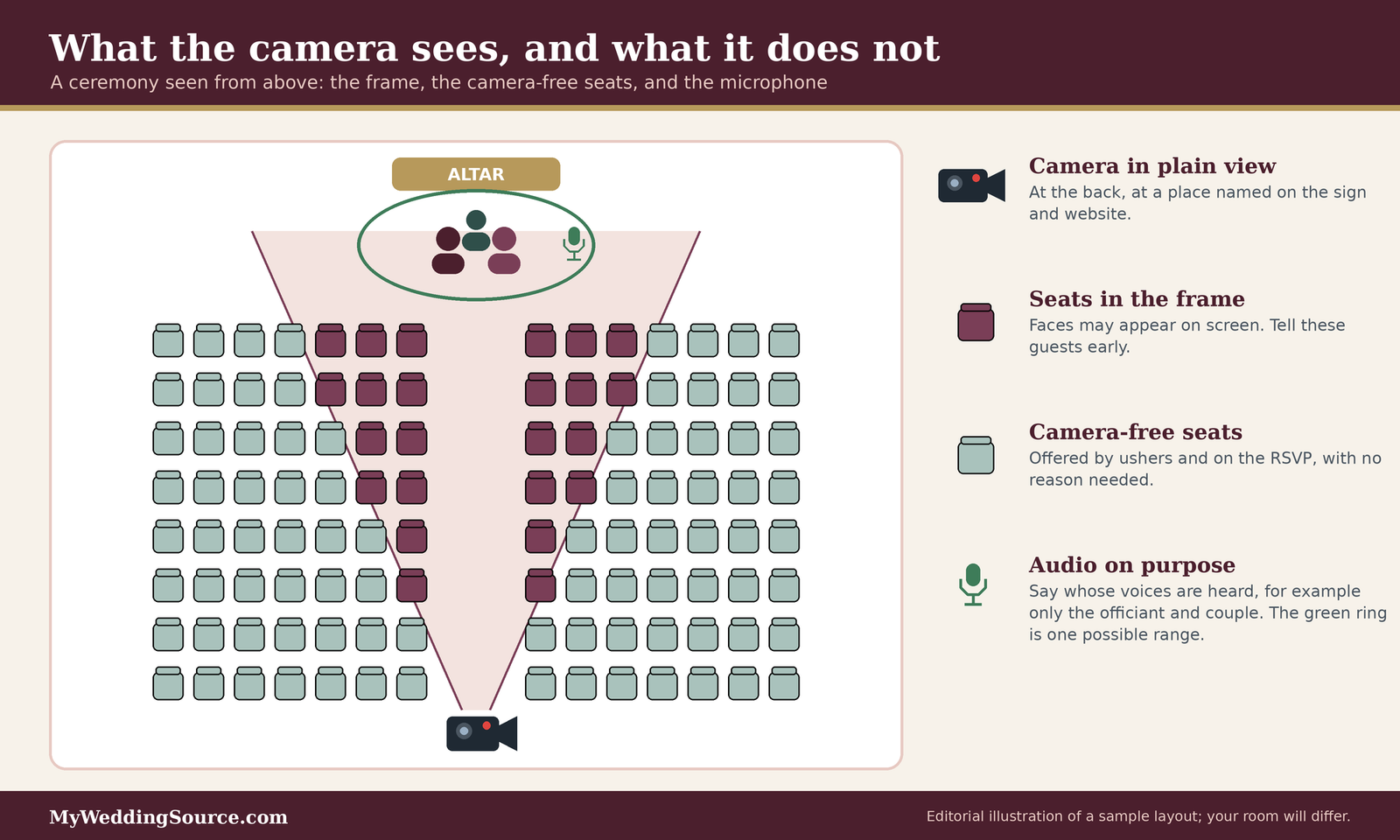
Choose a section where the camera angle does not reach, such as the side rows closest to the wall, and mark it with a small discreet card on the chairs or an usher’s invitation. It should be a normal, comfortable seat with a good view of the ceremony, not a penalty box at the back.
Remote or later options
If a guest wants to be at the wedding but is uncomfortable with the stream at all, they might prefer to skip the livestream segment and join for photos and the reception. Offer that gently, and make clear the invitation stands either way.
No explanation required
Do not ask guests to justify the preference. A person may be avoiding a former colleague, may have privacy concerns tied to work, or may simply dislike cameras. None of that is yours to evaluate. If a guest does choose to share a concern that sounds serious, treat it carefully and consider whether a professional, such as an attorney, should help.
Children, elders, and families with particular needs
Some situations call for a conversation with the person who makes decisions for the guest.
Parents and caregivers
Children are guests too, and their parents may have views about their appearance online. Tell parents in advance that the stream exists and who can watch, and offer a camera-free seat for the family. We do not give legal advice about minors, and our sources do not address it, so ask an attorney if you have specific questions. Our child-free wedding etiquette guide is a good companion if children are part of your invitation decisions.
Older relatives who might be confused
Some older guests have not seen a livestream and may wonder who is watching. A short, friendly explanation from a family member usually helps more than a sign does. If someone has memory loss or confusion, ask their caregiver about the best seat and whether any cameras should be avoided.
Guests with religious or professional reasons
Some faith communities and workplaces may have their own expectations about photography or recording, and some guests hold roles, such as clergy or public officials, where appearing on a recording has consequences. Respect those without debate. A line on your website like “Tell us if you would like a seat outside the camera view” covers many such cases without anyone having to explain.
The wedding party and your vendors
The people closest to the camera need clear notice too.
The wedding party
Your wedding party will be on screen longer than anyone. Tell them the camera plan early, including whether it records audio and whether the stream will include the processional and the first look. If someone is uncomfortable, solve it before the wedding day.
Vendors who appear on camera
Photographers, florists, and musicians may appear in the frame. Some performers may have their own policies about being recorded or streamed. Ask each vendor whether they have one, and mention the stream in their contract notes. Our wedding vendor contract guide has questions that fit.
The officiant
Officiants sometimes have their own rules about recording a ceremony, especially in houses of worship. Ask early, in writing, and get a yes before you build the plan around the answer.
Planning what the camera and microphone capture for wedding livestream recording consent
Wedding livestream recording consent gets easier when the camera has a defined job. A camera that sees only the altar and aisle makes a different promise than one that sweeps the whole room. Deciding the frame and the audio before you write your notices lets you describe them truthfully.
Mapping the frame
Think of the camera’s view as a cone that starts at the lens and widens as it reaches the seats. Everything inside the cone appears on screen, and everything outside does not.
Choose the angle on purpose
A camera at the back of the room, aimed at the front, shows the backs of heads in the middle rows and the couple at the altar. A camera at the side shows faces in profile. A camera at the front, pointed at the seats, shows every face. For most couples the first or second option fits, because the remote viewers care about the couple, and guests are less exposed.
Mark the first rows
The first rows are often the most visible and the most emotional: parents, grandparents, wedding party members. If you want to protect them, tell them where the frame ends, and ask if they are comfortable. If anyone is not, shift the camera or the seats.
Walk the aisle with a stand-in
At the rehearsal, have someone stand where each family member will sit while the operator checks the view. This takes ten minutes and tells you exactly who will appear on camera, so your notice can be accurate. Our wedding rehearsal guide has more on using that time well.
Audio is the sensitive part of wedding livestream recording consent
A silent picture of a ceremony reveals less than one with sound. Audio is where private moments sit, and in the legal reference we cited, it is also where recording rules can differ.
Decide what the microphone hears for wedding livestream recording consent
There are three common choices. The first is a feed with sound only from the officiant’s and the couple’s microphones. The second is a room microphone that picks up the whole space. The third is the camera’s built-in microphone, which is usually the least controlled. Our wireless wedding ceremony audio guide explains the equipment side. For wedding livestream recording consent purposes, choose the narrowest option that still lets remote guests hear the vows.
Say what the audio includes
Your notice should say whether the stream includes sound and whose. “The livestream includes audio from the officiant and the couple only” is a clear, honest promise, and it reassures guests who worry about being overheard.
Keep guests’ side conversations out
Guests whisper, comment, and cry. None of that is meant for the internet. A directional or lapel-only audio plan keeps those sounds off the stream. If a vendor suggests a room microphone for atmosphere, ask what it will pick up and where the recording goes.
Moments to leave off the stream
You may decide that some parts of the day are not for broadcast, even if the ceremony is.
Private vows and quiet moments
Some couples exchange private vows before the ceremony, or share a quiet moment during a first look, and keep both off the stream. If the stream starts when the officiant begins, there is nothing to cut.
Toasts and speeches
Toasts are personal, and the people giving them did not necessarily agree to be broadcast. If you stream a reception, ask each speaker beforehand. Our wedding speeches guide covers asking speakers, and our guide to ASL interpretation for wedding toasts covers access for deaf guests.
Places with a strong expectation of privacy
Do not point a camera into dressing rooms, restrooms, or similar spaces. The Reporters Committee’s California page notes that secretly recording in a restroom, dressing room, or similar place with a reasonable expectation of privacy is illegal in that state, and the same common-sense rule applies everywhere. Keep getting-ready footage out of a live stream, and ask people before filming them in any private space.
Controlling who can watch, the technical half of wedding livestream recording consent
A good wedding livestream recording consent notice means little if the link is posted publicly. This part covers the technical side in plain terms.
Choosing a privacy setting
Most platforms let you choose who can find and watch a stream. The names differ, but the idea is the same.
Public, unlisted, and private settings
For wedding livestream recording consent, the privacy setting is your first control. YouTube’s mobile help page says live streams can be set to public, private, or unlisted, chosen under visibility and audience settings. In general terms, public means anyone can find the stream, unlisted means only people with the link can watch, and private means only people you specifically invite. For a wedding, unlisted is the minimum, and private is better when you can use it. Remember that an unlisted link can be forwarded by anyone who has it.
Passwords, waiting rooms, and token links
Some platforms add a password or a waiting room that lets a host admit each viewer. CISA’s video conferencing tips, dated 2020, advise using a waiting room, requiring a password for private meetings, and sending the password in a separate message from the link. Dacast, a streaming vendor, describes token-based links that are unique to each viewer and expire, which help if you worry about forwarding. These features vary by platform and plan, so ask before you commit.
Archive and replay settings
Check what happens when the stream ends. YouTube’s page says that when you finish, an archive is created, and you can change its privacy or delete it at any time. It also says channels with fewer than 1,000 subscribers may have archives set to private by default, which may change. Do not rely on defaults. Look at the setting before the wedding and again after.
Sending the link to the right people, with consent in mind
The link is the key. Handle it like one.
Send only after RSVP
Guests who gave wedding livestream recording consent by RSVPing are the guests who should get the link. McAfee, a security vendor, suggests using the RSVP process to control access: collect guests’ email addresses first, and send the link and password only to those people. That keeps the viewer list tied to your invite list. If you track RSVPs in a spreadsheet, review our guest spreadsheet permissions guide so that the list itself does not leak.
Keep it off social media
McAfee also advises against posting the link on social media. A public post turns a private stream into a public one. If someone asks for the link in a comment, reply privately and check that they are on the list.
Share passwords the careful way
CISA suggests sending the password in a different message from the link and avoiding reuse. For a wedding, that can be as simple as an email with the link and a text message with the passcode. If you manage several shared accounts across planning, our wedding planning password sharing guide covers safe habits.
Spotting fake links and scam messages
Livestream links are a gift to scammers, because guests expect an unfamiliar link to arrive. A fake “your wedding stream link” message can steal a login or install something unwanted.
Tell guests how you will contact them
In your wedding livestream recording consent notice, say how and when the link will come: “We will email the link from [address] two days before the wedding.” Then guests have a way to check whether a message is real. Dacast suggests sending access details at least 48 hours ahead, which gives time for questions.
What the FTC says to watch for
The FTC’s phishing guidance explains that scam messages often create urgency, claim a problem with an account, or ask you to click a link to confirm details, and it advises people not to click links from senders they do not know. It also says to contact a company through a phone number or website you already trust. Remind guests of this in one line on your website. Our wedding website scam messages guide goes deeper.
If a guest clicked something wrong
The FTC advises updating security software, running a scan, and visiting IdentityTheft.gov if sensitive information was entered, and it suggests reporting phishing at ReportFraud.ftc.gov. Put those pointers somewhere you can find them if a guest writes to you with a worry.

Storing and deleting the recording after wedding livestream recording consent is given
This is the second half of the deliverable. Most couples plan the stream and forget the recording, and that gap undermines wedding livestream recording consent, which is how a private ceremony ends up on a public channel for years. A short schedule fixes that.
What exists after the stream
Before you can delete anything, you need to know what there is. Taking stock is the first step in the FTC’s small-business guidance on protecting personal information, which says to find out where personal data lives and how it moves.
The platform archive
Many platforms keep a recording automatically. It lives in your account, with the privacy setting you chose, until you change or delete it. This is usually the first copy to review.
Local files and backups
Cameras, laptops, capture cards, and phones can hold files too. A videographer may hold the master recording, and an operator’s laptop may hold clips. Ask where each copy is, since a copy you forgot about is a copy you cannot delete.
Everything around the recording
The recording is not the only item. Chat logs, viewer lists, RSVP answers about camera-free seating, and the email list used to send the link all contain guest information. Treat them as part of the same schedule.
A storage and deletion schedule you can copy for wedding livestream recording consent
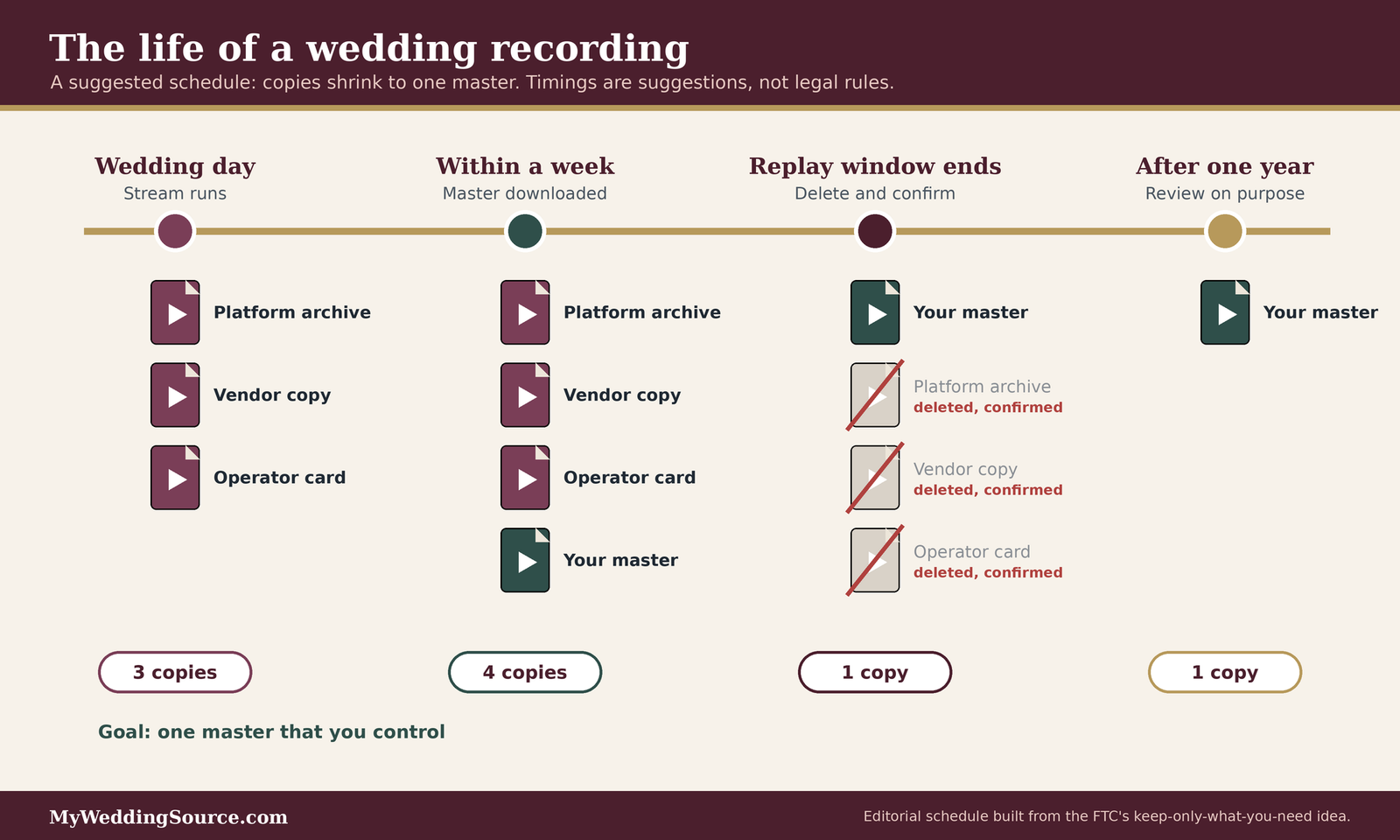
The FTC guide describes “scaling down”: keep only what you need, and do not hold onto personal data longer than necessary, ideally with a written policy that says what you keep, how it is protected, how long you keep it, and how it is disposed of. The schedule below applies that idea to a wedding. The timings are our suggestions, not legal requirements, and you can change them.
| When | What to do | Who | Notes |
|---|---|---|---|
| Wedding day | Stream; confirm archive setting is private | Operator | Check before the stream, not after |
| Within a week | Download one master copy; confirm it plays | Couple | Name the file plainly, with no guest names |
| Within a month | Share a private replay with invited guests, if you want to | Couple | Same access rules as the live link |
| After the replay window | Delete the platform archive; confirm it is gone | Couple | Check the account’s content list |
| After the replay window | Ask vendors to delete their copies; get it in writing | Couple | Keep the confirmation |
| After one year | Review: keep, move, or delete the master | Couple | Decide on purpose |
| Always | Delete viewer lists, chat logs, and link emails you no longer need | Couple | Shred or wipe, do not just drop in the trash |
Pick a window and tell guests
Storage is half of wedding livestream recording consent, so choose a replay window that fits your purpose, such as a few weeks, and put it on your website page. Guests who miss the stream can watch the replay, and everyone knows when it will disappear.
Keep one master, and keep it safely
If you want a permanent copy, keep one master in a place you control, with a backup somewhere else. Our wedding keepsake storage guide covers physical keepsakes, and the same two-copies habit applies to files.
Treat deletion as a task with a date
Put the deletion date on your calendar the day you finalize the plan. The FTC guide stresses that disposal matters as much as protection, so it deserves an owner and a date.
Deleting properly
“Delete” can mean several things, and some are weaker than others.
Deleting from the platform
On YouTube, the help page says you can delete the archive at any time. After deleting, look at your content list to confirm it is gone, and check whether the platform offers any other copy, such as a clip or highlight. YouTube’s page notes that a highlight saved from a stream recap is private by default, which is still a copy.
Wiping drives and devices
The FTC guide warns that simply deleting files often leaves them recoverable, and suggests wipe software that overwrites drives. If a recording sat on a laptop or a memory card, consider wiping the space or the card, especially before selling or giving the device away.
Getting vendor confirmation
If a videographer or streaming service held copies, ask for a short written confirmation that they have been deleted or returned. Our wedding vendor subcontractors guide matters here, because a copy can sit with someone you never met.
What storage and delay can cost
Prices for streaming services, videographers, and cloud storage change often and vary by provider, and we did not verify any, so ask for written quotes. File size is easier to estimate. Dacast, a streaming vendor, recommends at least 10 Mbps of upload for a 1080p stream. At that rate, our own rough arithmetic is about 4.5 gigabytes for each hour of video (10 megabits per second, times 3,600 seconds, divided by 8 bits per byte, gives about 4,500 megabytes). A ceremony of 30 to 45 minutes is therefore a file in the low single-digit gigabytes, and a full reception stream is several times that. This is an estimate: real bitrates differ by platform and settings. The larger point is that a recording is cheap to keep and costly to unsay, so the real cost to plan for is your time to review and delete.
Working with the venue, the videographer, and the platform on wedding livestream recording consent
Most of the decisions in this guide are yours, but some depend on others. These conversations are easier early, and they are best held in writing.
The venue
Some venues welcome livestreaming and others restrict it. Ask before you build anything around it.
Recording and streaming policy
Ask whether the venue permits streaming, whether it charges a fee, and whether it restricts outside videographers. WedSites advises checking your venue’s recording policies in advance. Put the answer in your wedding livestream recording consent notes, along with the name of the person who gave it.
Internet and power
Streaming depends on connectivity. Dacast advises a wired connection where possible, a test about 48 hours before the event, and a backup such as a bonded cellular connection, and it notes that shared venue Wi-Fi without a backup is not a professional plan. If your venue is outdoors or rural, our outdoor wedding infrastructure checklist and wedding generator rental guides cover the practical side.
Other people’s cameras
A venue may have its own security cameras. Ask where they are and what they record, because guests might reasonably assume they are part of your stream.
The videographer or streaming service
If you hire someone to stream, the contract is where wedding livestream recording consent and storage become real.
Who owns and keeps the recording
Ask who owns the footage, where it is stored, how long, and whether the vendor may use it in their own marketing. Our wedding photography deliverables guide and wedding photo raw files guide explain the same ownership questions for photos, and the logic carries over to video.
Deletion and return clauses
To keep wedding livestream recording consent honest after the day, add a line that the vendor will delete or return all copies by a date and confirm in writing. Many vendors already have a retention policy, and asking for it is easy. If they have none, ask what they will agree to.
Subcontractors and platforms they use
A streaming vendor may route your video through a platform or a freelance operator. Ask who else will touch it, and what their policies are. McAfee suggests vetting vendors by checking testimonials from other couples and guests, and a short reference call is cheap.
Questions to ask a venue or streaming vendor
- Is livestreaming allowed at this venue, and is there a fee or approval process?
- Where will the camera be, and what will it capture, including audio?
- Which platform will carry the stream, and what is its default privacy setting?
- Who owns the recording, and where is it stored?
- How long do you keep copies, and will you confirm deletion in writing?
- Who else, including subcontractors, can access the footage?
- Can you stream with no audio from the room, only from the officiant’s microphone?
- What is the backup plan if the internet fails?
- Will you use any of our footage in your own promotion, and can we say no?
Music and copyright
Music can cause practical trouble for a livestream, apart from consent.
What can happen to a stream
YouTube’s help page on live stream copyright says that when third-party content appears in a stream, the stream may be replaced by a placeholder image and the streamer warned, and that if the content remains, the stream can be temporarily interrupted or terminated. It also notes that even licensed content can cause interruption unless the owner has allowlisted the channel. That is not what you want during a processional.
Archives and claims
The same page says claims on archived videos are made after the stream ends, and only if you choose to archive. So an archive can be claimed even when the live stream went smoothly. This is another reason to decide whether you want an archive at all.
What to ask your musicians and DJ
Ask whether recorded or live music will be on the stream, and discuss alternatives, such as music from a source the platform permits, or muting the stream during certain pieces. This is a platform rule, not legal advice, and a vendor’s licensing questions belong with them.
Making the stream accessible to remote viewers without weakening wedding livestream recording consent
Remote guests are often the people who most need a livestream: older relatives, people with health limits, guests who cannot afford to travel, and deaf or hard-of-hearing family. An accessible stream is also a more respectful one, and it is part of wedding livestream recording consent because viewers should know what to expect.
Captions and interpretation
A stream that only works with sound leaves some guests out.
What the W3C says about live captions
The W3C’s guidance for WCAG success criterion 1.2.4 says captions should be provided for live audio content in synchronized media, and explains that the purpose is to let people who are deaf or hard of hearing follow real-time presentations. WCAG is a standard for web content, and it does not impose rules on a private wedding. We cite it as a clear statement of what good access looks like.
Practical options
Some platforms offer automatic captions, which vary in accuracy, and some vendors provide human captioners for events. Ask what is available, test it with the actual audio in the room, and tell viewers whether captions will appear. Automatic captions can misspell names, so give your captioner a list of names and places.
Sign language interpretation
If a guest uses American Sign Language, ask them what they would like, and plan camera framing so the interpreter is visible on the stream. Our guide to ASL interpretation for wedding toasts covers hiring and placement, and our accessible wedding guest experience guide covers in-person needs.
Instructions viewers can follow
A stream that needs a technical degree to open is not a gift.
The access page
Put the wedding livestream recording consent summary, the link, the start time with a time zone, the password, the devices that work, and a contact person on one page. Dacast suggests sending access instructions at least 48 hours ahead with compatible devices, login steps, and a technical contact, and WedSites advises including the time zone for overseas guests. Check that the page itself is readable and navigable using our wedding website accessibility audit.
A countdown and a landing screen
Dacast suggests starting a countdown graphic 20 to 30 minutes before the ceremony so early viewers know they are in the right place. Add a line on that screen about the plan: “This stream is private. Please do not share the link or record the screen.” It is a gentle reminder at the moment people are watching.
A person to ask
Name one person remote guests can message if the link does not work. This should be someone who is not also giving a reading or walking down the aisle.
Respecting remote viewers’ privacy
Remote guests have privacy interests too, and they are easy to forget.
Chat and comments
If the platform has live chat, decide whether to keep it on. YouTube’s safety tips say to block chat users who make you or others uncomfortable and to be careful about sharing personal information in live chat. A chat can be a joyful place for relatives, but it is also a place where names, addresses, and phone numbers can appear. Consider turning chat off, or assigning a trusted moderator.
Viewer lists
Some platforms show who is watching, or record who joined. A viewer list is guest data, and it belongs in your deletion schedule. Keep only what you need, and delete it when you are done.
No screenshots in the group chat
Ask viewers not to capture or share screenshots, the same way you would ask in-person guests to stay unplugged. It is a request, and people may or may not follow it, but a clear request sets the tone.
Rehearsing the stream and planning for problems with wedding livestream recording consent
A calm day is mostly a rehearsed one. A short test run reveals most issues, and a plan for problems means you will not improvise under pressure.
The test run
The best moment to find out the link does not work is a week before the wedding.
Practice with real viewers
WedSites advises assigning a trusted person to run the stream and holding a practice run. Invite two or three relatives to watch a short test with the real link and password. Ask them what they saw, what they heard, and whether the instructions made sense.
Test the internet where it will be used
Dacast suggests testing the connection continuously for about 30 minutes, about 48 hours before the event, and using a wired connection where possible. If you cannot test at the venue ahead of time, ask the venue’s coordinator about bandwidth, and bring a backup.
Test the privacy settings from outside
Open the link in a private browser window, signed out of every account, and see what a guest would see. Try a wrong password. Try searching for the stream by name. If it shows up in a search, tighten the setting.
A person in charge
A livestream needs an owner who is not you.
Choose an operator and a backup
Pick a trusted person to run the camera and the platform, and a second person who knows the login in case the first is unavailable. If your vendor provides an operator, confirm their name and phone number. McAfee suggests a producer or coordinator acting as a digital usher, which can include admitting guests and managing microphones.
Protect the account
CISA’s tips advise having a plan for ending a meeting if it is disrupted, including who decides and how. For a wedding, that means knowing who can end the stream and where the button is. YouTube’s help page also describes resetting a compromised stream key in the Live Control Room, which only channel owners or managers can do. Keep admin access limited to people you trust, as YouTube’s safety tips advise.
Share a one-page runbook
Write a single page with the stream times, the link, the passcode, the operator’s number, the backup plan, and the privacy checklist. Give it to your coordinator, operator, and a family contact, and note on it that the wedding livestream recording consent plan is attached.
If something goes wrong
Most problems are small, and a plan makes them smaller.
A guest objects on the day
If a guest asks not to be filmed, offer a camera-free seat, and if none is available, ask the operator to adjust the framing. Do not debate it. If the person is distressed, put their comfort first and talk later.
The stream drops or someone intrudes
If the internet fails, switch to the backup connection or pause the stream and tell viewers by a message on the access page. If someone unexpected appears in the viewer list or the chat, remove them, and change the link and password afterward. CISA’s tips suggest monitoring who joins and locking access once everyone expected has arrived.
You change your mind
You can decide, even at the last minute, to skip the stream. A short message to remote guests, and a promise of photos later, is enough. Nobody is owed a livestream, and a calm no is better than a stressed yes.
Edge cases in wedding livestream recording consent and how to think about them
Plans are tested by the unusual cases. These are the ones couples most often ask about, along with a way to reason through each. We cannot give legal answers, so where the law matters, we say so.
Guests who record on their own
You can control your stream, but not what guests do with their phones.
When guests post their own video
Even with a stream, some guests will record and post. The Easy Weddings guide on wedding social media etiquette suggests explaining the no-phones request in advance, using signage at the ceremony entrance, and having the celebrant remind guests before the processional. See our unplugged wedding ceremony guide for wording.
Offering an alternative
Easy Weddings also suggests shared digital albums or a QR code so guests can send photos privately first, and it describes hiring a content creator so guests can keep phones away. Our guide to content creators versus photographers can help you decide.
When posting is already done
If someone posts something you did not want shared, ask them directly and kindly to remove it. Most people will. If a post includes someone’s private information or seems unlawful, a lawyer is the right next step.
Requests after the wedding
Wedding livestream recording consent can change. Someone may ask to be removed from the replay a month later.
A removal request
Under your wedding livestream recording consent plan, decide in advance how you will handle one. A good default is to say yes where possible: remove the replay, or share a version with a person cropped out if your vendor can do it. Keep a record of what you changed.
Replays that are already shared
If you gave guests access to a replay, a removal request becomes harder, because people may have saved it. Say so honestly. You can remove your copy and ask guests to delete theirs, but you cannot guarantee it.
The couple changes their minds
Sometimes the couple decides to delete a recording sooner than planned. Do it, update your website page if it mentioned a date, and tell guests if they were expecting a replay.
When the stream is not entirely yours
Some wedding streams involve other parties, and they change the picture.
Religious or institutional venues
A house of worship or similar institution may have its own recording and streaming rules, and it may run its own cameras. Ask who controls the stream, who holds the recording, and what the institution’s policy is. Get answers in writing.
A shared stream with another family
Weddings often combine two families, and the families may disagree about the stream. Agree on one set of rules, written down, before announcing anything. If one family wants a public stream and the other wants a private one, choose the more private option.
Drone footage and wider shots
A drone or a wide outdoor shot can capture people beyond your guest list, including neighbors and passersby. Our wedding drone photography guide covers the extra rules. For a livestream, keep the frame tight enough that you can honestly describe who is in it.
Frequently asked questions
Notice and consent
Do I need a signed release for wedding livestream recording consent?
A signed release is not the usual approach for a private wedding, and whether one is needed depends on your state and facts, which this guide cannot assess. Most couples handle wedding livestream recording consent with layered notices and a camera-free seating option. If you plan to publish or sell the footage, or a guest raises a concern, ask a licensed attorney.
Is a sign at the door enough wedding livestream recording consent?
A sign is a good notice, but it works best alongside others. The Reporters Committee guide says consent may be implied when a device is in plain view or people are warned, yet it treats clear verbal consent as best practice. Combine a website note, a sign, and an officiant’s sentence, and offer an opt-out seat.
What should the notice say about audio?
Say plainly whether the stream includes sound, and whose. For example, state that only the officiant and couple are heard. Audio can fall under different rules than silent video, according to the Reporters Committee guide, and guests may worry about being overheard, so a specific sentence reassures them.
Can a guest ask me not to record them?
Yes, and you should make it easy. Offer a seat outside the camera view, ask no questions, and thank them. If a guest cannot be accommodated, consider adjusting the frame or skipping their section. If the situation seems serious, such as a safety concern, consider speaking with an attorney.
Link and storage
Is an unlisted link private enough?
Unlisted means people with the link can watch, so anyone who receives it can forward it. YouTube describes public, unlisted, and private options. For a wedding, use unlisted as the minimum, add a password or invitation-only access if available, send the link only after RSVP, and keep it off social media.
How long should I keep the recording?
There is no single right answer. Our suggestion is to keep one master copy you control, delete platform archives and vendor copies after a short replay window, and review the master after a year. The FTC’s guidance on personal data advises keeping only what you need and disposing of it securely.
Do I need to delete the chat and viewer list?
Treat them as guest information. A chat log or viewer list can contain names and other personal details. Apply the same principle as the recording: keep only what you need, store it safely, and delete it when the purpose ends, noting the date in your schedule.
What if my videographer keeps a copy after wedding livestream recording consent?
Ask for it in the contract: who owns the footage, how long they keep it, whether they may use it for marketing, and when they will delete it. Request written confirmation after deletion. If their terms are vague, ask for specific language before you sign.
Your next steps
Decide and write it down
Settle the three wedding livestream recording consent decisions
Choose what is streamed (ceremony only or more), what is captured (video, audio, or both), and whether a recording will exist. Write one sentence for each. Everything else in your plan comes from those three sentences.
Check the venue and vendors
Bring your wedding livestream recording consent plan to both conversations. Ask the venue about its recording policy, and ask your videographer or streaming service the questions in the box above. Our wedding planning checklist is a place to log the answers, and the wedding vendor due diligence checklist helps you compare vendors.
Tell people
Publish the wedding livestream recording consent notice kit
Add the website page and the RSVP question, order the sign, and brief the officiant and ushers. Give each task an owner and a date.
Send the link the careful way
Send the link and passcode only to people who RSVP, in separate messages, a couple of days ahead, from an address you named on the website. If you use a spreadsheet, keep it locked down.
Close the loop
Test, then run
Test the wedding livestream recording consent steps too: hold a practice stream, test from outside your accounts, and write the one-page runbook. Our wedding week checklist can hold the last tasks.
Put deletion on the calendar
Add the dates from your wedding livestream recording consent storage schedule to your calendar now, and name who will do each one. Afterward, confirm the deletions and keep any written confirmations from vendors.
Sources & methodology
How we built this guide
What we relied on
This guide combines federal and state recording-law summaries from the Reporters Committee for Freedom of the Press and the text of the federal wiretap statute, public help pages from YouTube and Zoom, CISA and FTC security and privacy guidance, the NIST Privacy Framework, the W3C’s guidance on live captions, and advice from wedding and streaming vendors. Where a statement comes from a vendor, we name the vendor, because vendor advice reflects what the vendor sells. The file-size figure is our own arithmetic and is an estimate. The retention timings are our own suggestions, not legal requirements. We checked these pages in November 2026, and platform settings and defaults change, so confirm them in your own account before the wedding. The Zoom page we read was an archived 2021 copy, so treat Zoom details as indicative only.
What we did not do
We did not test any streaming platform, evaluate any vendor, or give legal advice. We did not verify prices. Recording and privacy laws differ by state and can change, and this guide does not apply them to your situation. For a specific question, ask a licensed attorney in your state, and check your venue’s written rules.
Source list
Law and government sources
- Reporters Committee for Freedom of the Press, Introduction to the Reporter’s Recording Guide: https://www.rcfp.org/introduction-to-reporters-recording-guide/
- Reporters Committee for Freedom of the Press, Reporter’s Recording Guide (California): https://www.rcfp.org/reporters-recording-guide/california/
- Legal Information Institute, 18 U.S.C. 2511, Interception and disclosure of wire, oral, or electronic communications prohibited: https://www.law.cornell.edu/uscode/text/18/2511
- Federal Trade Commission, Protecting Personal Information: A Guide for Business: https://www.ftc.gov/business-guidance/resources/protecting-personal-information-guide-business-0
- Federal Trade Commission, How to Recognize and Avoid Phishing Scams: https://consumer.ftc.gov/articles/how-recognize-and-avoid-phishing-scams
- Cybersecurity and Infrastructure Security Agency, Video Conferencing Tips (April 2020): https://www.cisa.gov/sites/default/files/publications/CISA_Video_Conferencing_Tips_S508C.pdf
- National Institute of Standards and Technology, Privacy Framework: https://www.nist.gov/privacy-framework
Platform and standards sources
- YouTube Help, Create a live stream on mobile: https://support.google.com/youtube/answer/9228390
- YouTube Help, Streaming tips: https://support.google.com/youtube/answer/2853856
- YouTube Help, Manage live stream settings: https://support.google.com/youtube/answer/9854503
- YouTube Help, Copyright issues with live streams: https://support.google.com/youtube/answer/3367684
- Zoom Support, Providing consent to be recorded (archived 2021 copy): https://webcf.waybackmachine.org/web/20211019183816/https://support.zoom.us/hc/en-us/articles/360061691631-Providing-consent-to-be-recorded
- W3C, Understanding SC 1.2.4 Captions (Live): https://w3c.github.io/wcag/understanding/captions-live.html
Wedding and streaming vendor sources
- WedSites, Everything You Need to Know About Live Streaming Your Wedding: https://blog.wedsites.com/everything-you-need-to-know-about-live-streaming-your-wedding/
- McAfee, Digital Marriage: Making Sure Your Online Wedding Is Safe and Secure: https://www.mcafee.com/blogs/family-safety/digital-marriage-making-sure-your-online-wedding-is-safe-and-secure/
- Dacast, How to Live Stream Weddings and Private Events: https://www.dacast.com/blog/live-stream-weddings/
- Easy Weddings, Wedding social media etiquette: https://www.easyweddings.com.au/articles/wedding-social-media-etiquette-how-to-set-clear-expectations-for-your-big-day/