
Wedding video captions are the on-screen text that lets someone follow your vows, toasts, and ceremony without hearing them, and the decisions that matter most (open or closed, which file, who makes it, and who pays) are far cheaper to settle in the contract than after the film is delivered.
Quick answer
Ask your videographer three things before you sign: whether they will deliver wedding video captions at all, in which form (a separate caption file that viewers can switch on, text burned permanently into the picture, or both), and what each version costs. For online viewing, a separate file in SRT or WebVTT format is the common standard. For Instagram and other feeds, a burned-in version is usually the practical one. Do not rely on automatic captions without a human proofread, because one wrong word can reverse the meaning of a vow.
What wedding video captions are, and what the word means on a film
The phrase causes confusion because it has two meanings in the wedding trade. In accessibility work, captions are a timed text version of the speech and the important sounds in a video. In a videographer’s price list, a “caption” can just as easily mean a small name label that appears under a speaker during a toast. Both are legitimate, but they are different deliverables with different prices, and mixing them up is the most common reason a couple expects one thing and receives another.
Four things people call captions
Before you compare quotes for wedding video captions, sort the words into the four things that actually get delivered. Each has its own purpose, and a package can include one without including the others.
Accessibility captions
The W3C’s accessibility initiative describes captions as a text version of the speech and the non-speech sounds needed to understand a video, timed to the audio and normally switched on by the viewer. They exist mainly for Deaf and hard-of-hearing viewers, though other people use them too. When this guide says wedding video captions, this is the main meaning: spoken words, who is speaking, and sounds that matter, synchronized to the picture.
Lower-third labels and titles
Videographers also use the word for short text overlays. One wedding-film software company’s help page, for example, describes captions as small text at the bottom of the frame that labels moments or people, such as naming a speaker during a toast, and says its packages include up to ten per video. That is a design feature, not an accessibility feature, and it does not transcribe anything. If a package says “captions included,” ask which of the two it means. The answer changes what you should budget for.
Captions, subtitles, and transcripts
Two more words show up in quotes and in platform menus. Knowing the difference keeps you from paying for the wrong thing.
Captions versus subtitles
According to the W3C, wedding video captions, like any captions, are in the same language as the audio, while subtitles in the narrow sense are translations for viewers who can hear the audio but do not understand the language. Some regions use “subtitles” for both. In the United States, “closed captions” is the usual term for the switchable kind, so a quote that says “subtitles” may still mean same-language text. Ask, and write the answer down.
Transcripts
A transcript is the same words without timing, and it is a useful companion to wedding video captions. The W3C notes that captions and transcripts contain the same text, so one can be built from the other, and a caption file can power an interactive transcript on a web page. For a wedding, a transcript is a useful by-product: a typed copy of the vows and toasts that a family member can read, print, or keep with the film. Ask whether the captioner will hand over a plain-text transcript along with the timed file, since it is usually a trivial export.
Who uses wedding video captions, and why they come up at a wedding
A wedding film is unusual among videos because its audience spans several generations, several languages, and several kinds of listening. Wedding video captions are not a niche request in that setting. They are a way of making sure the people who care most about the day can follow it.
Guests and relatives who benefit
The people most often named are Deaf and hard-of-hearing relatives, but the group is wider than it first appears. Thinking through who will actually watch your film makes the case for wedding video captions concrete and helps you decide how much to spend.
Deaf and hard-of-hearing viewers
The National Institute on Deafness and Other Communication Disorders publishes figures on how common hearing loss is. Its page, last updated in September 2024, reports disabling hearing loss, defined as 35 decibels or more in the better ear, in about 10 percent of adults aged 55 to 64, 22 percent of those aged 65 to 74, and 55 percent of those aged 75 and older, based on 2015 to 2020 survey data. If grandparents or great-aunts are on your guest list, some of them will probably struggle to follow a speech on a laptop speaker. These percentages are national figures, not a prediction for your family, but they show why the request is ordinary rather than exceptional.
Viewers who watch without sound
Plenty of people watch short videos on a phone with the sound off, in a waiting room, on a train, or in a shared house. 3Play Media, a captioning vendor, points out that social feeds often autoplay silently, which is one reason it says open captions help there. That is a vendor view, but the behavior it describes is familiar to anyone who has scrolled a feed in public. For a highlight clip that you hope will be shared, captions help it make sense in the first seconds.
Guests who speak another language
If part of the ceremony is in a language your family does not share, captions in that language, or subtitles that translate it, can bridge the gap. That is a separate and more expensive job, covered in the edge cases later in this guide. For the reception itself, one inclusive-wedding guide from Equally Wed suggests adding captions to any videos shown at the reception, alongside microphones for speeches and front-row seating for guests who are deaf or hard of hearing.
Why automatic captions are not enough on their own
Every major video platform now offers automatic speech recognition, and it is tempting to treat that as the answer. For a wedding, it is a draft, not a finished product.
What the sources say about accuracy
The W3C’s guidance on making captions warns that automatically generated text often misses or changes words, sometimes in ways that reverse the meaning, and that dropping a single word such as “not” can make a caption contradict what was said. Its advice is to budget time for review. 3Play Media, which has an interest in the topic, says automatic recognition typically reaches about 80 percent accuracy and that even 95 percent may be inadequate for complex material, and it describes 99 percent as the industry standard for professional captioning. Treat those numbers as the vendor’s claims, not measurements of any one tool. The practical point does not depend on them: vows are short, personal, and unforgiving of mistakes.
Why weddings are hard for software
A wedding mixes soft voices, wind noise, music under speech, laughter over the punchline of a toast, and names that no dictionary contains. Nothing in the sources we read tests speech recognition at weddings, so we cannot put a figure on how often it fails. What we can say is that a proofreader who knows the family catches errors that software cannot, such as a nickname, a surname, or the name of the town where the couple met. Our guide to wireless ceremony audio explains why clean audio at the source is the best caption investment you can make.
Is captioning required for a wedding film?
Couples often ask whether the law requires captions. This guide is not legal advice, and the honest answer depends on who is doing what.
What the ADA page actually covers
The Department of Justice’s page on effective communication explains that the Americans with Disabilities Act requires state and local governments (title II) and businesses and nonprofits that serve the public (title III) to communicate effectively with people who have hearing, vision, or speech disabilities. It lists captioning, including real-time captioning, open and closed captioning, and caption decoders, among the auxiliary aids those entities may need to provide, and says the right aid depends on the situation and the person’s usual way of communicating. A private couple sharing their own film with relatives is not described anywhere on that page, and we are not able to tell you how it applies to a particular vendor or venue.
What we cannot tell you
The W3C’s web accessibility criterion for prerecorded video, at its basic level A, expects captions for the audio in such media, and it counts speaker identity and meaningful sounds as part of them. That is a web-content standard, not a rule for private wedding films. Whether a given videographer, venue, or streaming service has obligations in your situation is a question for a lawyer or for the entity’s own accessibility policy. For most couples the useful framing is simpler: captions are a courtesy and a convenience that you can request, price, and put in writing, and an obligation only if someone with legal knowledge says otherwise. If a guest has told you they need captions or a live captioner at the ceremony, treat that as an access request and talk to them about what works, as our guide to accessible wedding guest experience suggests.
Open or closed: the choice that shapes every other decision
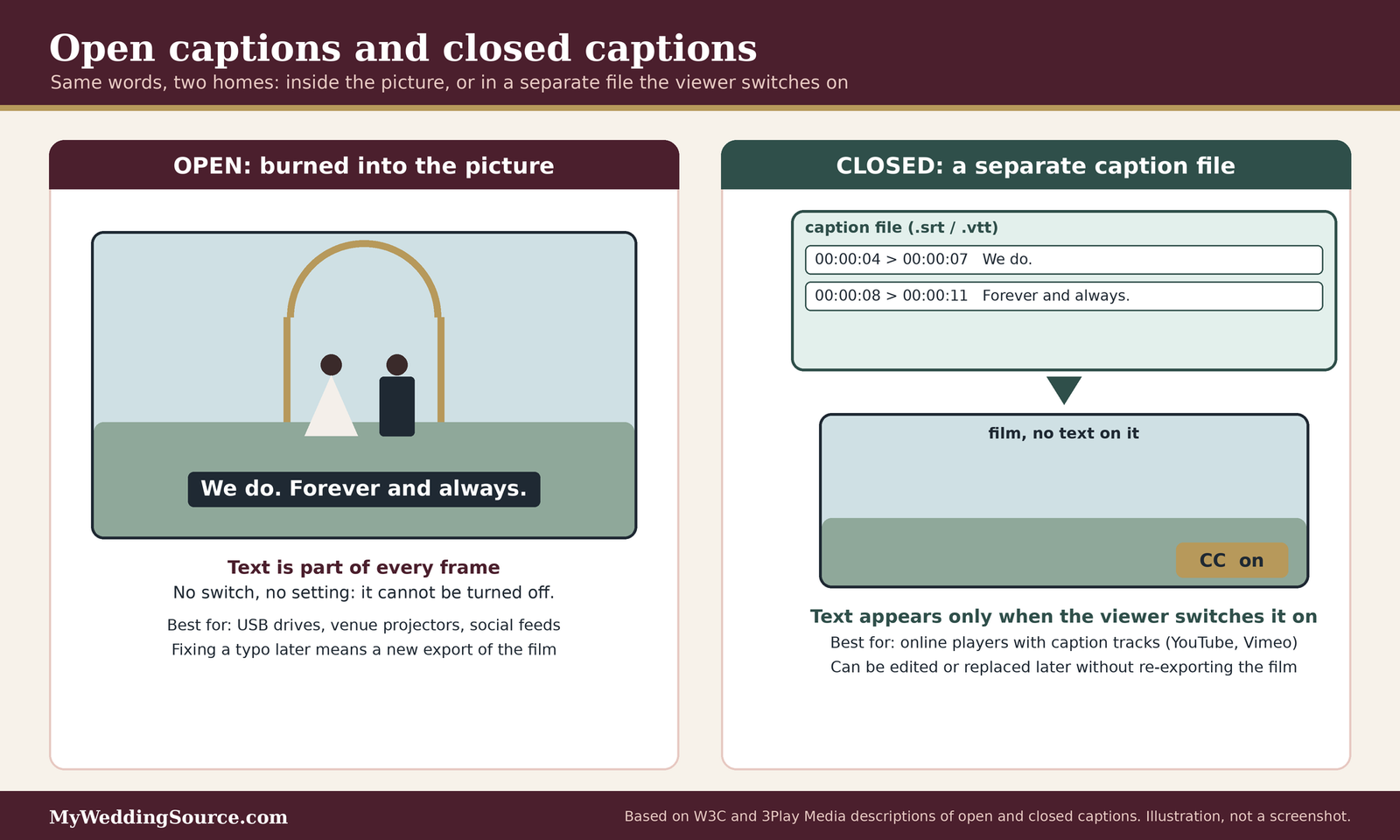
Nearly every cost, file, and platform question in this guide follows from one choice: whether the text lives inside the picture or beside it. Settle that first, then the rest becomes a matter of details.
Closed captions: a separate file the viewer controls
Closed captions are stored apart from the video and appear only when a viewer turns them on. They are the standard for online players, and they are the form most accessibility guidance has in mind.
What you receive
According to 3Play Media, closed captions are a sidecar file used with online video, and simple sidecar formats such as SRT and WebVTT are easy to create by hand. In practice you receive the film as usual, plus one text file per language. The film itself is unchanged, which means the same master can be used with or without text.
Where closed captions work
They work where the player supports a caption track. YouTube’s help pages describe uploading a caption file, with or without timing, through the Studio subtitles tool. Vimeo’s help pages say the platform accepts SRT and WebVTT files, recommends WebVTT, and lets the owner choose whether a track is marked as a subtitle or a caption. A caption track is also the format that lets a viewer change the size or color of the text in players that allow it, a flexibility that burned-in text cannot offer.
Open captions: text burned into the picture
Open captions are permanent. They are rendered onto the video frames during export, so they appear for everyone, on every device, with no setting to find.
What you receive
The W3C describes open captions as always displayed and impossible to hide. For the couple this means a second export of the film, with the text baked in. It is a separate file, often a separate fee, and it cannot be edited later without returning to the editor’s project.
Where open captions are the practical choice
3Play Media says Instagram, Twitter, Snapchat, and LinkedIn do not let users upload a separate caption file, so burned-in text is needed there, while Facebook and YouTube accept caption uploads. Platform rules change, so check the current upload screen before you rely on any list, including ours. Open captions are also what you need for a USB drive that will be played on an unknown television, and for a clip that will be sent as a direct file in a messaging app. A 2015 videographer forum thread makes a related point from the production side: one poster noted that on/off captions on a DVD are technically open rather than closed, so confirm what “optional captions” means on the format you are buying. That is one person’s forum comment, not a standard.
Why many couples end up wanting both
The two forms solve different problems, which is why a careful package of wedding video captions often includes both.
Two exports from one transcript
A single proofread transcript can produce a caption file for the full-length film and a burned-in cut of the highlight. Doing the proofreading once and exporting twice is the efficient way to buy, and it is a good question to ask a vendor: is the second version a re-export of the same approved text, or a separate job?
Keeping versions straight
When you have two versions, name them plainly, for example “highlight-closed-captions” and “highlight-open-captions,” and tell family which is which. A relative who opens the wrong one and sees no text may assume captions were never made.
Delivery formats for wedding video captions, file by file
Most of the extra-fee surprises with wedding video captions come from format questions that nobody asked at the consultation. A caption file is small and simple, but the many names for it are confusing. This section explains the ones you are likely to meet and which situations they suit.
Sidecar files: SRT and WebVTT
For online viewing, two plain-text formats cover nearly every case. If a vendor offers only one format for wedding video captions, ask which, because the choice affects where you can upload.
SRT
SubRip, saved with the .srt extension, is a basic timing format. YouTube’s supported-files page lists it among its basic formats, with timing only and no styling, and says it must be plain UTF-8 text. That makes it forgiving and widely compatible, and it is the file many human captioners and software tools export by default. The limit is that it carries no positioning or formatting, so it cannot, for example, move text away from a lower-third name label.
WebVTT
Web Video Text Tracks, with the .vtt extension, is the format the W3C calls the most common caption format on the web. YouTube’s page says it supports positioning and limited styling, with the caveat that support was still at an early stage when we read it. Vimeo’s help page recommends WebVTT over SRT. The W3C adds a warning worth remembering: authors can position and style captions, but support across players is inconsistent and sometimes unreliable, and most web video simply uses the player’s default style, usually white text in a dark box. In other words, design choices in the file may not survive on every device.
Broadcast-style and disc formats
You are unlikely to need these, but they appear in vendor price sheets and are worth recognizing so that a line item does not alarm you.
SCC, TTML, and similar
YouTube lists Scenarist Closed Caption (.scc) as the preferred format for broadcast-style display, TTML and DFXP as formats that carry styling and positioning, and several older binary formats. 3Play Media describes these as intermediate and advanced formats used for broadcast, DVDs, and specialized placement needs, and notes that each player accepts different ones. A wedding film destined for online sharing does not need any of them. If a quote lists one, ask what device or platform it is for.
DVD, Blu-ray, and USB drives
WeddingWire’s cost guide says the final product is usually a DVD, a Blu-ray, or a USB drive, sometimes with a highlight reel shared online. A drive or disc plays on whatever device the recipient owns, and you cannot count on that device offering a caption menu. For a physical copy, ask for a version with open captions, or a caption-ready file in a format your relatives can open. It is easier to test this at the delivery stage than to explain it by phone to a grandparent at the holidays.
Where each file goes
The same text can be needed in several places, and each platform behaves differently. The list below reflects the sources we read on the date we checked, and platform screens change, so look at the current upload page before you promise anything to a relative.
Video-hosting platforms
On YouTube, you can add a file with or without timing, and you can also use auto-sync, where you paste or upload the words and the platform times them to the audio. YouTube says transcripts are not recommended for videos that are over an hour long or have poor audio. It also generates automatic captions in the video’s default language when they are available. On Vimeo, the owner uploads an SRT or WebVTT file through the Languages panel, marks it as a caption or subtitle, and toggles it on. Vimeo says free and paid accounts can generate automatic subtitles that can be switched on or off in settings, and it sells human captions from a partner, Rev, through the same tab.
Social feeds and messaging
Here the picture is less settled. 3Play Media says Instagram, Twitter, Snapchat, and LinkedIn do not allow a separate caption file, which is why burned-in text is common there. Instagram’s own help page did not load for us, so we could not verify its current caption tools, and we are not going to guess. If your plan is a vertical clip for a feed, the safest assumption is to ask your editor for a burned-in version sized for the app and to test it on a phone before you send it to anyone.

Text details that cause problems
A file of wedding video captions is only as good as its text. These are the small details that make a file fail on upload or look wrong on screen.
Line length and breaks
The W3C’s guidance suggests keeping captions to one or two lines, ideally under 32 characters per line, starting each new sentence on a new line, and breaking a long sentence at a logical phrase. Short lines are easier to read quickly, and they stay inside the frame on a phone. If a vendor’s wedding video captions run in long, wide lines of small text, ask for a sample frame before the full export.
Encoding and names
Both YouTube and Vimeo ask for plain UTF-8 text, and Vimeo notes that it matters so special characters display correctly. That matters for names with accents or characters outside the English alphabet. Send the captioner a written list of names with spellings, and open the finished file in a basic text editor to confirm that no characters turned into question marks.
The wedding video captions decision matrix
This is the planning tool this guide is built around. A wedding does not produce one video; it produces several, each with a different audience, length, and caption need. The matrix below walks through each common piece and lets you decide what to ask for. Treat the “typical” columns as planning assumptions that we have reasoned out from the sources above, not as industry standards, and replace them with your vendor’s actual deliverables.
| Deliverable | Where it is usually watched | Caption form worth asking for | Who usually produces it | Ask for it by |
|---|---|---|---|---|
| Same-night teaser or social clip | Phones, social feeds, messaging | Open (burned in), short and large | Videographer’s editor | Contract stage |
| Highlight film | Online player, family devices | Closed file, plus an open version if shared on social | Videographer, or an outside captioner | Contract stage |
| Ceremony edit with vows | Online player, TV, USB drive | Closed file; open on a drive that may be played on unknown devices | Outside captioner is common | Before the edit is locked |
| Toasts and speeches edit | Online player | Closed file with speaker labels | Outside captioner | Before the edit is locked |
| Full-length documentary edit | Online player, drive | Closed file, since reading an hour of burned-in text is tiring | Outside captioner | Contract stage |
| Reception slideshow or tribute video | Projector at the venue | Open captions burned into the file, or a live caption screen | Whoever makes the video | One month out |
| Guest-shot clips collected by a friend | Shared folder | Usually none; caption only what you will re-share | Friend or couple | Optional |
How to read the matrix
The table is organized by what people watch, not by what the videographer sells, because that is how you decide whether captions matter. Start with the rows that will be watched by the guests you worry about most, then decide how much of the budget each row deserves.
Match caption form to the viewing situation
A slideshow shown on a venue projector cannot have an on/off menu, so it needs text that is part of the picture, or a live caption display from a person. Our guides to projection screens and the rehearsal dinner slideshow cover the practical setup. The documentary edit is the reverse: reading an hour of permanent text is tiring, so a switchable file is almost always the better choice there.
Decide which rows you can skip
You do not need wedding video captions on everything. A common, sensible approach is to caption what a hard-of-hearing relative will actually watch and what you plan to share widely, and to leave casual clips alone. If a row is not worth the cost to you, say so in writing so that nobody assumes it is included.
Who holds the work, by time of day and stage
A problem with wedding video captions is rarely a technology problem. It is usually a handoff problem: the names were never written down, the audio was never checked, or nobody owned the approval. The second table shows who tends to hold each task and when. The timing column is our own planning suggestion.
| Stage | Task | Usually held by | Why it needs a named owner |
|---|---|---|---|
| Contract (months before) | Decide whether captions are included, in what form, and at what price | Couple and videographer | Prevents the “we thought you meant labels” surprise |
| Contract | Confirm who may send footage to an outside captioner | Couple and videographer | Footage rights usually sit with the videographer |
| Month before | Write the names list and pronunciation notes | Couple, or a trusted relative | The editor cannot guess spellings |
| Month before | Share the order of readings, songs, and any second-language passages | Couple and officiant | Lets the captioner prepare |
| Ceremony | Check that vows and readings are on the audio track | Videographer and audio vendor | Captions cannot recover words that were never recorded |
| Reception | Confirm microphones for toasts | DJ or band, and videographer | Toasts are the speech most likely to be off-mic |
| Edit review | Approve spelling, speaker labels, and sound notes | Couple, or the relative who knows the names | Software errors are discovered here, not later |
| Delivery | Test each file on a phone, a laptop, and the intended TV | Couple | Finding a format problem in the first week is cheaper |
Name one person per task
Where a task has two owners, it often has none. Write one name in the margin of the table, even if it is a friend. Our guide to vendor communication deadlines shows how to turn these handoffs into dates that every vendor sees.
Fit it into the day’s schedule
Wedding video captions need almost no time on the day itself, but the day determines whether they are possible. The ceremony has to be recorded with clear speech, and the toasts need microphones that the videographer can tap. Add those items to the timeline in our wedding vendor timeline guide so that the audio plan and the caption plan agree.
Choosing an owner for the finished files
When the film arrives, someone has to keep every file of wedding video captions with it. That is easy to forget.
Keep caption files beside the film
Store each caption file in the same folder as the film it belongs to, and name the pair so that the match is obvious. Cloud links to a film often break the match when only the video is shared. If you pass the film to relatives, send the file with it.
Keep the transcript and names list
Save the proofread transcript and the names list in the same place. They are useful if you later cut a new version, post a clip, or add a language. Our guide to the wedding photography deliverables describes the same habit for photographs: knowing exactly what you were promised, and where it is stored, saves time later.
What wedding video captions cost, and who pays
Prices for wedding video captions vary more than almost any other line, because the work can be done by the videographer, by an outside captioner, by software, or by the couple. This section separates the sources of cost and then works through estimates from the one public price list we could verify.
What this actually costs
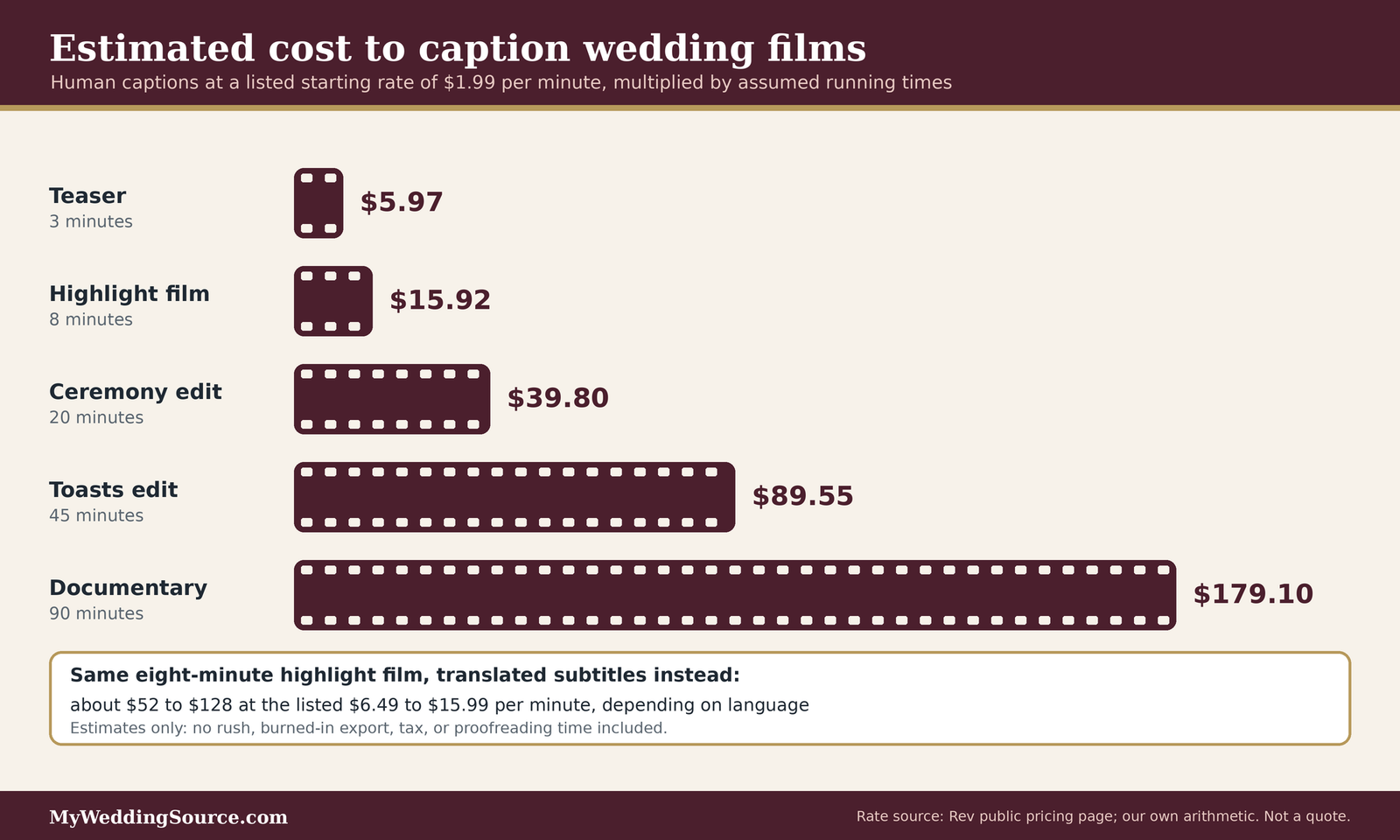
Captioning is priced by running minutes of finished video, plus any rush, revision, or special-format fees. On Rev’s public price page when we checked, human-made captions start at $1.99 per minute. That is the vendor’s list price, not an industry average, and a videographer who captions in-house may charge a flat fee instead. We found no reliable published average for wedding captions in particular, so ask for a line-item quote.
Where the cost comes from
Three things drive a quote: who does the work, how long the film is, and how many versions you want. Understanding each lets you compare a flat fee against a per-minute rate sensibly.
In-house work by the videographer
If your videographer produces the captions, the cost is usually their editing time, and it may be folded into a package or priced as an add-on. WeddingWire’s cost guide says additional rounds of edits can cost extra, and caption passes are often treated like another round. Ask whether wedding video captions are included, how many revisions are covered, and whether a second export for social media counts as a new job.
An outside captioning service
A third party prices by the minute and returns a file. Rev’s page lists human captions starting at $1.99 per minute, says they are delivered in 12 hours or less, and says they are available in English and Spanish. It lists translated subtitles at $6.49 to $15.99 per minute depending on the language. It does not name SRT or WebVTT, saying only that all major file formats are supported, so confirm the format before ordering. The page does not offer burned-in captions as a named service, which means open captions may still need an editor.
Worked estimates
The arithmetic below multiplies Rev’s listed starting rate by assumed lengths. The lengths are illustrations, and the results are our own estimates of the list price, not quotes. They exclude taxes, rush options, and any fee for an outside editor to burn the text in.
Estimates by film length
A three-minute teaser comes to about $6. An eight-minute highlight film comes to about $16. A twenty-minute ceremony edit comes to about $40, a forty-five-minute toasts-and-reception edit about $90, and a ninety-minute documentary about $179. Even the longest of these stays small next to the rest of a videography package. WeddingWire’s guide reports a U.S. average of $1,799 for a wedding videographer, with most couples spending $1,000 to $2,500, though it does not state when that data was collected.
What the estimates leave out
They leave out the time you spend preparing the names list and proofreading, any fee your videographer charges to pass files to an outside captioner, and the cost of an editor to burn captions into a second version. They also assume the audio is clear. A captioner who must guess at muffled speech may charge more, take longer, or return a draft that needs heavy correction. The estimate gives you a floor, not a ceiling.
Doing it yourself
Some couples caption their own films. It is possible, and it is mostly a question of time.
The time cost
A videographer on the 2015 DVinfo forum estimated six to twelve hours of work for an hour of video, covering typing, timing, and checking, and described the transcription as the slowest part. That is one person’s experience with older tools, so treat it as a rough indication. Modern editors and platforms can start from an automatic draft, which the W3C says is faster but needs heavy correction.
Free and low-cost routes
The same thread describes simple routes such as typing captions into a text editor and saving them as an SRT file, or correcting YouTube’s automatic captions. YouTube’s auto-sync can time a transcript you upload, which helps when you already have a script. For wedding video captions made at home, whatever route you choose, plan for a proofreading pass by someone other than the person who typed it.
Extra fees to look for in a quote
Extra fees seldom appear under a heading that says captions. They hide in the surrounding terms.
Re-exports and extra versions
Each new version of the film, such as a vertical cut, a shorter cut, or a version with open captions, may count as a new export. Ask for the price of each, and ask whether text corrections after approval are charged. Our guide to wedding contract change orders explains how to handle changes without a dispute.
Rush delivery and storage
If you want captions in time for a family event, ask for a rush price and a date. Ask also how long the vendor stores the project files, since a caption fix a year later is only possible if the editor still has the project. Our guide to vendor overtime rates covers the general habit of asking about extra charges before they apply.
Preparing the material for wedding video captions
Good wedding video captions begin before the wedding. The captioner works from the audio track, and the audio track works from the microphones, the order of events, and the spellings you provide. A little preparation turns a draft that needs heavy correction into one that needs a light proofread.
The names and words only you know
Software and hired captioners do not know your family, and wedding video captions are full of family names. Anything you can write down in advance is an error that will not need fixing later.
A names list with spellings
Make a one-page list of every name likely to be spoken: the couple, parents, grandparents, wedding party, officiant, hometowns, the venue, and nicknames with their meaning. Add pronunciation notes where a name is unusual. Share the list with both the videographer and any outside captioner, and keep a copy yourself.
Words in another language
If a reading, a blessing, or a toast uses another language, note the language and, if possible, supply the text. The W3C advises that speech you cannot make out be marked as unintelligible rather than guessed at, which is the honest default for a captioner who does not speak the language. A supplied text is far better than a guess.
Audio that captions can work from
A caption is built on what was recorded, so wedding video captions can only be as good as the recording. If the audio is poor, the captions will be poor, and no editing fixes words that were never captured.
Microphones for vows and toasts
The Knot’s guide to wedding videography notes that professional videographers use microphones to capture clear audio of vows and speeches. Ask your videographer how vows and toasts will be recorded, whether through a lavalier on the officiant or the couple, a feed from the sound system, or a recorder placed near the speaker. Our guides to wireless ceremony audio and the wedding audio and lighting checklist cover how to make sure the audio plan reaches the person who is filming.
Music, lyrics, and sounds
The W3C’s captioning guidance says to include background music only when it affects understanding, and to describe it objectively. For a wedding that might mean a short note when a song change signals the entrance, or when applause follows the kiss. Captioning the lyrics of a song is a different matter. We found nothing in the sources we read that tells a couple whether lyric text raises a rights question, so it belongs in the conversation with your videographer rather than in a guess here.
Proofreading before the files are final
A proofread is the step that converts a draft into wedding video captions you can trust. It takes an afternoon, and it is the part nobody else can do for you.
Who should review
Choose someone who knows the guests and can hear the voices. The couple sometimes avoid reviewing their own vows because it is emotional, which is understandable. A parent, sibling, or close friend with a good ear is a fine choice. Give them the names list and the film, and ask them to mark every spot where the text and the voice disagree.
What to check
Check each line against the audio, paying special attention to negatives, names, dates, and numbers. The W3C’s example of a dropped “not” is the kind of error to hunt for. Check that speaker labels are right, that important sounds are noted, and that the text keeps to short lines. Check that the first and last captions line up with the picture, since a drift of a second or two is easy to miss on a short film and annoying on a long one.
Contracts, rights, and permissions for wedding video captions
Wedding video captions look like a small technical detail, but they touch the footage and the files, which are the videographer’s work. This section explains the basics and the questions to put in writing. It is general information, not legal advice, and your contract controls.
Who owns the footage and the caption work
The U.S. Copyright Office’s basic circular explains how ownership works, and it is worth reading once before you negotiate.
What the Copyright Office says
The circular says the creators of a work usually own its copyright, and that a hired creator’s work belongs to the hiring party only where it is made for hire, either through employment or through a signed written agreement for certain listed uses. It also says an owner can transfer all or part of the exclusive rights, that a transfer generally must be in writing and signed, and that the owner alone may copy a work, make new works based on it, distribute copies, and display audiovisual works publicly, including individual frames. It adds that the owner may authorize others to do these things. We read this as general background only. It does not decide what your contract says.
Why that matters for captions
If a videographer owns the footage and licenses it to you, adding captions or burning text into the picture may involve copying and altering it, and sending files to an outside captioner may involve sharing them. Many videographers are glad to allow it. The point is to ask and to have the answer in writing, so that a friendly reply by text does not become a dispute later. Our upcoming guide on photography usage rights for vendors and social media covers the related questions for photographs and sharing.
Contract clauses worth asking about
You do not need legal language, only clear statements. The following are questions to ask the vendor, and then write into the agreement in your own words.
Whether captions are a deliverable
State whether wedding video captions are included, which films they cover, in what form, and in which language. If they are an add-on, state the price. A vague phrase such as “captions available” does not tell you whether anyone has promised to deliver them.
What happens to the files
State who keeps the caption files, whether the couple receives the plain-text transcript, and whether the couple may use the caption files elsewhere, such as on another host. Also ask how long the vendor stores the editing project, and whether a fee applies if you ask for a change later. Our guide to wedding vendor contract guide shows how to read the rest of a vendor agreement around these points.
Permission for an outside captioner
Many videographers do not produce wedding video captions in-house and do not mind if you use someone else. A short permission note keeps everything friendly.
What to ask the videographer
Ask whether you may send a copy of the finished film, or only the audio, to a third-party captioner, and in what format. A captioner needs the audio and the timing, not the full-resolution master, so a small preview file may be enough. Ask whether the videographer will take the finished caption file and burn it in, and at what price.
What to ask the captioner
Ask how the captioner handles your files, whether they keep copies, how long, and who can see them. A wedding film contains the faces and voices of guests, including children. Rev’s page, the only vendor price list we could verify, does not describe its data handling in the part we read, so we cannot say what any particular service does. Ask for the privacy policy in writing before you upload.
Edge cases for wedding video captions
A few situations do not fit the standard plan. They come up often enough to be worth thinking through before the wedding.
Multilingual ceremonies and translated subtitles
When a ceremony mixes languages, the caption plan has to answer a second question: do viewers need a transcription, a translation, or both?
Transcription versus translation
The W3C separates captions, in the same language as the audio, from subtitles, which translate. A ceremony with a blessing in one language and vows in English could carry captions in each language as spoken, a translated line under the blessing, or a full translated track. Rev’s page lists translated subtitles at $6.49 to $15.99 per minute depending on the language, which makes translation a meaningfully larger cost than same-language captions at the same vendor. Decide which passages truly need it.
Who checks the translation
A machine translation of a blessing can change its meaning. Ask a fluent relative to review any translated text, and ask the vendor how translations are checked. If a passage is sacred or formal, the officiant or a family elder may be the right reviewer. This is a matter of care, not just of accuracy.
Live ceremonies and live streams
Wedding video captions for a film made after the wedding are different from access during the wedding itself.
Real-time captioning for guests
The Department of Justice page describes real-time captioning, sometimes called CART, as a transcriber who types speech onto a screen as it happens, and notes it is especially useful for people who are deaf or hard of hearing but do not use sign language. If a guest needs this, it is arranged with a live captioner, not with the film. Our guide to arranging ASL interpretation for wedding toasts explains a related option, and the two approaches can be combined.
Captions on a streamed ceremony
If the ceremony is streamed for relatives far away, ask the streaming platform or the videographer what caption options exist, including automatic captions and a live captioner who feeds text into the stream. YouTube’s page says automatic captions are generated in the video’s default language when available, which means a mixed-language ceremony may caption poorly. Test a short rehearsal clip. Afterward, the recording can be given a proofread caption file like any other film.
Privacy and sensitive moments
Wedding video captions turn speech into searchable, copyable text. That is useful, and it is also a privacy question.
Names, children, and private remarks
A caption file that labels every speaker by full name is easy to copy and post. If a toast includes an embarrassing story or a guest’s private information, consider whether it should be captioned at all, or whether the film should be shared only privately. Our guide to the unplugged ceremony discusses sharing norms that families may already have set.
Public versus private sharing
A highlight clip meant for a public feed deserves a tighter edit and a conservative caption pass than a full film shared with relatives through a private link. Decide which films are public before you add wedding video captions to them, so you do not publish text you meant to keep private.
Questions to ask about wedding video captions
Put these in an email so that the answers are in writing. Plain questions get plain answers, and a vendor who answers clearly is a vendor who has done this before.
Questions worth asking before you sign
- Do you deliver wedding video captions, and does “captions” mean accessibility captions, name labels, or both?
- Which films can be captioned, and in what form: closed file, burned-in, or both?
- Which file formats do you export, and can you supply SRT or WebVTT with UTF-8 text?
- Who proofreads, and can we review and correct the text before it is final?
- What does each version cost, and is a second export for social media a new charge?
- May we send the audio or film to an outside captioner, and will you burn in the result?
- How long do you keep the project files, and what is the fee for a later correction?
Questions for the videographer
These questions are about what the vendor can and will do, and they belong in the first conversation.
Scope and format
Ask which films come with captions and which do not, and ask to see a sample, ideally from a real wedding with the couple’s permission. Ask what the vendor does when audio is weak. A vendor who says it depends and then explains how is more trustworthy than one who promises perfect text.
Timing and approval
Ask when captions are delivered relative to the film, and whether you get a review round. Ask how long a correction takes. If your film is due for a family event, state the date.
Questions for an outside captioner
If you use a service, these are the questions that matter beyond the price.
Accuracy and turnaround
Ask how accuracy is measured and what happens if the wedding video captions contain errors. 3Play Media warns that some vendors claim 99 percent without meeting it, and recommends asking how accuracy is measured. Ask for the turnaround in writing, including what rush costs.
Formats and handling
Ask which file formats the captioner delivers, whether it will mark speakers and sounds, and how it handles names you provide. Ask what it does with your files after delivery.
FAQ: wedding video captions questions
The basics
What are wedding video captions?
They are timed text on a wedding film that shows the speech and important sounds, such as vows, toasts, and music cues, so viewers can follow without hearing. The W3C describes captions this way. In a videographer’s quote, the word can also mean name labels, so ask which one is meant.
Are wedding video captions the same as subtitles?
Not quite. The W3C describes captions as same-language text that includes important sounds, and subtitles as translations. In the United States, people often say subtitles and mean captions, so check the wording on your quote. If you need a translation for guests, that is a separate and usually pricier service.
Do I need wedding video captions?
Needing them depends on your guests. NIDCD figures show disabling hearing loss rises with age, affecting about 22 percent of adults aged 65 to 74 and 55 percent of those 75 and older. If older relatives will watch the film, captions are a thoughtful addition. We cannot say whether any law requires them in your case.
Formats and platforms
What file format should I ask for?
For online viewing, ask for SRT or WebVTT. YouTube lists SRT as a basic timing format and Vimeo accepts both, recommending WebVTT. Request UTF-8 text so names with accents display correctly. For a USB drive or a social clip, ask for a version with the text burned in.
What is the difference between open and closed captions?
Closed captions are a separate file that viewers turn on or off, while open captions are burned into the picture and always visible, according to the W3C. Closed captions suit online players. Open captions suit drives and social feeds, where a separate file may not be accepted, as 3Play Media notes.
Can I upload captions to Instagram?
3Play Media says Instagram does not allow a separate caption file, so burned-in text is the usual approach there. We could not load Instagram’s own help page to confirm the current tools. Check the app when you post, and ask your editor for an open-caption version sized for a phone.
Cost and responsibility
How much do wedding video captions cost?
It varies. Rev’s public price page lists human captions from $1.99 per minute, so an eight-minute highlight film would be roughly $16 by our estimate. A videographer who captions in-house may charge a flat fee instead. Ask for a line-item quote, including revisions and any second export.
Can I caption my wedding video myself?
Yes, with time and care. One videographer on a 2015 forum estimated six to twelve hours of work per hour of video, and the W3C says automatic drafts need heavy correction. YouTube’s auto-sync can time a transcript you provide. Have someone else proofread, and confirm your videographer allows edits to the film.
Your next steps
Decide what you need
List the films and the viewers
Write down which films you will have, who will watch each one, and where wedding video captions would help. Mark the ones that a hard-of-hearing relative will watch and the ones you plan to post publicly. Use our wedding photography deliverables guide as a model for listing what you are promised and when.
Choose the caption form for each
Use the matrix above to choose the form of wedding video captions for each film: closed, open, or both, and write the choice beside it. If a slideshow will be shown at the reception, plan its text with the reception team and your venue.
Put it in writing
Ask the questions and get answers
Send the questions above about wedding video captions to your videographer, and keep the reply with your contract. If you are comparing vendors, our wedding vendor due diligence checklist helps you check the rest of the record.
Prepare the names list and a review plan
Write the names list, pick the reviewer, and add a date to your calendar for the review. Share the list with every vendor who will hear a name on the day, including the DJ, who may be reading introductions. Our wedding DJ questions guide can help you brief that vendor.
Sources & methodology
How we built this guide
What we relied on
This guide combines accessibility guidance from the W3C, the supported-file pages of YouTube and Vimeo, statistics from the National Institute on Deafness and Other Communication Disorders, the Department of Justice’s page on effective communication, the U.S. Copyright Office’s basic circular, and public price and package information from Rev, WeddingWire, The Knot, and a wedding-film software company. Where a claim comes from a vendor, such as Rev’s prices or 3Play Media’s accuracy statements, we attribute it to that vendor. A 2015 videographer forum thread supplies two practical estimates and is labeled as one person’s experience. The cost examples are our own arithmetic from Rev’s listed starting rate of $1.99 per minute and are estimates, not quotes. We checked each source on November 12, 2026, and platform screens, prices, and policies change, so check the current page before you rely on them.
What we did not do
We did not test captioning services, upload files to any platform, or interview videographers. Instagram’s help page did not load for us, so we could not verify its current caption tools and rely on 3Play Media’s statement about platform behavior. The FCC’s closed captioning page also failed to load, so we do not describe broadcast rules. We did not find a reliable published average cost for wedding captions. Nothing here is legal advice, and your contract controls. We do not assert who owns any footage or whether any law requires captions in your situation.
Source list
Government and standards sources
- World Wide Web Consortium, Web Accessibility Initiative, Captions and subtitles: https://www.w3.org/WAI/media/av/captions/
- World Wide Web Consortium, Web Accessibility Initiative, Transcribing audio to text and making captions: https://www.w3.org/WAI/media/av/transcribing/
- W3C, Understanding Success Criterion 1.2.2, Captions (Prerecorded): https://www.w3.org/WAI/WCAG22/Understanding/captions-prerecorded.html
- U.S. Copyright Office, Copyright Basics (Circular 1): https://www.copyright.gov/circs/circ01.pdf
- U.S. Department of Justice, ADA.gov, Effective communication: https://www.ada.gov/resources/effective-communication/
- National Institute on Deafness and Other Communication Disorders, Quick statistics about hearing: https://www.nidcd.nih.gov/health/statistics/quick-statistics-hearing
Platform help pages
- YouTube Help, Add subtitles and captions: https://support.google.com/youtube/answer/2734796
- YouTube Help, Supported subtitle and closed caption files: https://support.google.com/youtube/answer/2734698
- Vimeo Help, How to add captions or subtitles to your video: https://help.vimeo.com/hc/en-us/articles/21956884955537-How-to-add-captions-or-subtitles-to-your-video
Vendor, industry, and consumer sources
- Rev, Pricing: https://www.rev.com/pricing
- 3Play Media, The ultimate guide to closed captioning: https://www.3playmedia.com/?p=14079
- WeddingWire, Wedding videographer cost guide: https://www.weddingwire.com/cost/wedding-videographer
- The Knot, Breaking down wedding videography packages: https://www.theknot.com/content/wedding-video-must-or-maybe
- Storymix, What are titles and captions, and what is the difference: https://storymix.freshdesk.com/support/solutions/articles/1000192689-what-are-trans-titles-and-captions-whats-the-difference-
- Equally Wed, How to create an inclusive wedding for hearing-impaired and deaf guests: https://equallywed.com/how-to-create-an-inclusive-wedding-for-hearing-impaired-and-deaf-guests/
- DVinfo.net forum, Closed captioning (2015 thread): https://dvinfo.net/forum/wedding-event-videography-techniques/527993-closed-captioning.html