
Wedding speech transcripts turn a few minutes of spoken words into text that a guest can read, keep, or look back on, and the work is mostly about choosing a source for the words, checking them, and deciding who gets to see them, not about expensive tools.
Quick answer
For wedding speech transcripts, the simplest path is to get the words from one of three places (the speaker’s script, a recording, or a live captioner), correct them against what was actually said, ask each speaker before you share, and then give the text to guests through the lightest channel that works: a printed card, a password-protected page, or a direct message to named guests. The W3C says automatic speech tools need careful correction, so plan for a human check. This guide does not give legal advice, and it cannot say what duties apply to your event.
What wedding speech transcripts are, and who they help
A wedding speech transcript is a written record of what someone said into a microphone: the toast, the welcome, the reading, the thank-you. It sounds simple, but couples run into three different things that all get called by similar names, and mixing them up leads to the wrong request to the wrong vendor. This section sets out the vocabulary and the reasons people ask for wedding speech transcripts in the first place.
Transcript, script, and captions are different things
Before you ask anyone for anything, it helps to know which of the three you want. A transcript records speech after it happens. A script exists before it happens. Captions are timed text that appears on a video. Wedding speech transcripts can be built from any of them, but each has quirks.
A transcript records what was said
The World Wide Web Consortium (W3C) describes a transcript as a text version of the speech and the important non-speech sounds in audio or video. In a wedding setting, that means the words of the toast, plus notes such as laughter or applause where they help a reader understand the moment. Of all the forms wedding speech transcripts can take, the transcript made from a recording is the closest thing to a faithful record of what guests heard in the room.
A script records what someone planned to say
Many people write toasts in advance, and some read from a page. That page is a script. The W3C notes that existing scripts can be a starting point for a transcript but usually need small edits to match the final audio. A best man who ad-libs a joke or skips a paragraph because he is nervous will produce a recording that differs from his notes, so a script alone is not a reliable transcript.
Captions are timed text on a video
Captions are lines of text synchronized to a video, usually one or two lines at a time. If your videographer delivers a wedding film, captions might be part of it. Captions and transcripts are related, and the W3C says most caption tools can export plain text, but a caption file is built for reading while watching, not for reading on its own. We cover that side in our guide to wedding video captions.
Who tends to benefit from wedding speech transcripts
Needs are personal, and you cannot tell from looking at a guest whether they follow a toast easily. The groups below are examples of why wedding speech transcripts help, not a checklist for sorting people. A good rule is to offer the text to everyone and let guests decide whether to use it.
Guests who are deaf or hard of hearing
The National Institute on Deafness and Other Communication Disorders (NIDCD) reports that about 15 percent of American adults say they have some trouble hearing, and that disabling hearing loss affects about 22 percent of adults aged 65 to 74 and about 55 percent of those aged 75 and older. Wedding guest lists often include several generations, so there is a fair chance that some guests will struggle with a toast in a loud room. Some of those guests will sign, some will read lips, and some will not use either. Wedding speech transcripts are one more way in, not a replacement for the others.
Guests who process spoken language differently
The W3C lists people who have trouble processing auditory information among those who benefit from transcripts. Others in this group include guests who are learning English, guests sitting far from the speaker, and anyone who simply catches text better than speech. You do not need to ask guests to explain why they want the text. Offering it plainly avoids making anyone prove a need.
Family and friends who could not be there
Wedding speech transcripts also work as a keepsake. A grandparent who could not travel, a friend who left early, and the couple themselves a year later may all want to reread a toast that went by in a blur. This use is lower stakes than access, but it shapes decisions about format and privacy, because a keepsake may be shared more widely than an access aid.
Do you owe guests a transcript? What the rules do and do not say
People often ask whether wedding speech transcripts are “required.” The honest answer is that it depends on facts we cannot see: who is hosting, which businesses are involved, and what a particular guest needs. We are not lawyers, and nothing here is legal advice. What we can do is show what the official guidance says in general terms, so that your questions to vendors and venues are better informed.
What the ADA says in general terms
The U.S. Department of Justice’s ADA pages describe Title III as covering businesses and nonprofits that serve the public, which it calls public accommodations. The page lists examples such as restaurants, hotels, and shops, says size and building age do not create an exemption, and says religious organizations are not covered. It also notes that private clubs are not automatically exempt.
Venues and vendors are the likelier covered parties
A hotel ballroom, a restaurant, or a rental hall that is open to the public may be a public accommodation. A couple hosting a private wedding is a different situation, and we will not guess how the rules apply to your event. The practical takeaway is that a venue or vendor may have its own obligations and its own policies about access, and asking them is the quickest way to learn what they already provide.
Your event may be private, but guests are still people
Even where no rule clearly applies to the hosts, courtesy does the same work. The U.S. Department of Justice’s effective-communication page states the goal for covered entities: communication that is as effective for a person with a disability as for everyone else. That is a sensible target for a host as well, and it is why wedding speech transcripts are a thoughtful, low-cost step.
What effective communication looks like in practice
The Department of Justice’s page on effective communication lists many aids and services. It is written for covered entities, but its examples make a useful menu for hosts who are choosing how to share speeches.
The aids it lists
For people who are deaf or hard of hearing, the page lists qualified sign language interpreters, notetakers, written materials, printed scripts of stock speeches, assistive listening devices, and captioning, including real-time captioning, which it describes as computer-assisted real-time transcription. For people who are blind or have low vision, it lists qualified readers, large print, braille, accessible electronic text for screen readers, and audio recordings. Notice how many of these can be combined with wedding speech transcripts: large print, accessible electronic text, and printed scripts are all, at heart, ways of delivering text.
Who picks the aid
For Title III entities, the page says the business is encouraged to consult the person to find an effective aid, taking into account the content and how that person communicates. It also says a covered business may ask for reasonable advance notice but not excessive notice. For a wedding host, the lesson is practical: ask the guest what would work, and ask early, instead of choosing for them.
Treat it as hospitality, not paperwork
Whether or not a rule applies, how you offer wedding speech transcripts matters as much as whether you do.
Ask early and ask everyone
A line on the invitation website or the RSVP form, such as “Tell us if you would like a written copy of the toasts or other access arrangements,” lets guests opt in privately. Our guide to the accessible wedding guest experience goes through the wider set of questions to ask and how to word them without assumptions.
Do not single guests out
Avoid handing wedding speech transcripts to one guest in front of others or announcing who asked. Put copies at every table, or place a discreet card at each seat that tells people how to get the text. That approach reduces awkwardness and also covers guests who need the text but did not tell you.
There is no single right channel. The best way to share wedding speech transcripts depends on how many guests want the text, how private the speeches are, and how much work you want to do. The options below move from low effort to higher effort, and from in-room to online. You can combine them.
Printed and in-room options
Paper is the oldest approach to wedding speech transcripts, and it still has a lot going for it: no battery, no sign-in, and no risk of a link being forwarded.
A printed insert or card at each place setting
The simplest version is a folded card placed at each seat, with the words of the scheduled toasts. It works best when speeches are scripted and short. Its weakness is timing: the text has to be finished before the reception, which means it is closer to the speakers’ scripts than to a true transcript. If you go this way, label the card as “the toasts as written” so no one assumes it is a word-for-word record. Our guide to wedding programs covers where such an insert can sit alongside the rest of your printed pieces.
Large-print and alternate-format copies
The Department of Justice lists large print and accessible electronic text among its examples of aids. If a guest asks for large print, you can enlarge the same text and print a handful of copies. Keep a few spare copies of that version at the host table so someone can hand one over without fuss. A larger point size and generous spacing do most of the work, and a plain sans-serif font tends to read well.
A seat-side QR code that opens the text
A small printed card with a QR code can point to a private page that holds the text, which lets you publish wedding speech transcripts after the reception without reprinting. Test the code on several phones before you print anything. Our walkthrough on testing a wedding QR code before printing invitations applies equally to a table card.
Digital options after the event
Once you have corrected wedding speech transcripts, a few simple digital routes are available.
A private web page
A page on your wedding website, set to require a password, keeps the text away from casual visitors. WordPress’s own support notes explain the limits, and we describe them in the privacy section below. A web page is also the easiest format for screen readers, because it is plain text with headings. Our wedding website accessibility audit explains how to check that the page is readable by assistive technology.
A PDF attachment
A PDF is easy to email and to print, but it is also easy to forward. If you choose a PDF, make it from text, not from a photo of a printed page, and use headings and a title so it can be navigated. We say more about this in the accessible formats section.
A direct message to named guests
If only a handful of guests want the text, sending it to them directly, by email or message, may be the most private route. The FTC’s guide to protecting personal information advises businesses not to send sensitive identifiers over plain email, and while a toast is not a Social Security number, the same instinct applies: send it only to the people who asked, and think before you paste a speech into a group chat.
Live options on the day
Sometimes the need is immediate, and wedding speech transcripts that arrive next week do not help someone follow the toasts as they happen.
Real-time captioning by a professional
The Department of Justice describes real-time captioning as a transcriber typing the speech onto a screen as it happens, useful for deaf or hard-of-hearing people who do not use sign language. It is a service you book, and we cover it in a later section.
A phone app for live captions
Free tools exist, such as Google’s Live Transcribe for Android, which converts speech to on-screen text. They are quick to start and cost nothing, but they depend on a phone, a microphone, and often an internet connection, and they make errors. They suit a single guest at a table more than a whole room.
Interpreters, which are a different service
A sign language interpreter conveys meaning in a different language, which is not the same as text. Many deaf guests prefer an interpreter, and a transcript does not replace one. If that is likely at your wedding, see our guide to arranging ASL interpretation for wedding toasts.
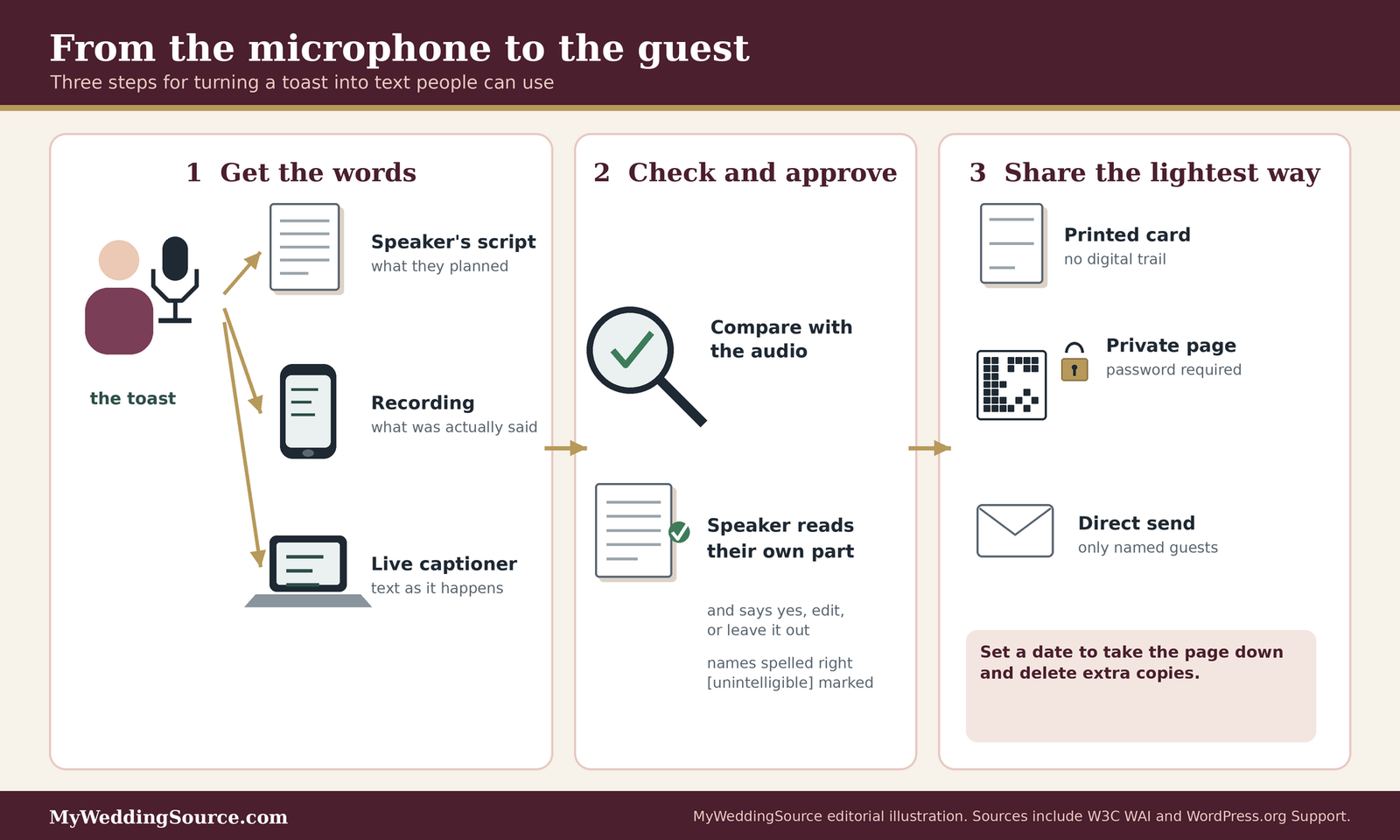
Where the words come from: script, recording, or live capture
Every set of wedding speech transcripts begins with a source. Picking one early determines your workload, your cost, and how faithful the final text will be.
Start from the speaker’s own script
If a speaker has written their toast, you already have most of the words for wedding speech transcripts. That is the cheapest source and often a good one for formal speeches.
Ask early and ask politely
Message speakers a few weeks ahead and ask whether they are willing to share their final text. Some will be glad to; others will feel exposed, especially if they plan to improvise. Making it a request, not an expectation, keeps the relationship comfortable. Our guides to the best man’s duties and the maid of honor’s duties are useful when you are deciding how to phrase that request to each speaker.
Treat the script as a draft of the transcript
A script is a plan, and people deviate. The W3C advice is to start from an existing script but expect to edit it to match the final audio. If you have both a script and a recording, compare them and fix the text wherever the speaker departed from the page. If you only have the script, call the result “the toast as prepared,” which is honest about what it is.
Record the speeches
A recording is the most faithful source for wedding speech transcripts, because it captures exactly what was said. It also brings consent and sound-quality questions.
Decide who records, and tell people
A videographer or DJ may already be recording the room, or a friend may hold a phone. Decide who is responsible for audio, and tell the speakers they are being recorded. If a livestream is planned, our guide to wedding livestream recording consent covers the additional questions about guests and remote viewers.
Capture clean audio
Automatic tools and human transcribers both struggle with muffled sound. A phone across the room will pick up clinking glasses and chatter. If possible, ask the DJ or audio vendor for a direct feed from the microphone, or a separate recorder placed near the speaker. Our guides to wedding audio and lighting and to wireless ceremony audio describe how to ask for this.
Turn audio into text
Once you have a recording, there are three broad ways to get words from it, and they differ in speed, cost, and accuracy.
Automatic speech recognition
Automatic tools produce a draft quickly. Microsoft says Word’s Transcribe feature accepts .wav, .mp4, .m4a, and .mp3 files and labels speakers as Speaker 1, Speaker 2, and so on, and that Microsoft 365 subscribers can transcribe up to 300 minutes of uploaded audio per month. YouTube warns that its automatic captions might misrepresent speech because of accents, mispronunciations, dialects, or background noise. Treat any automatic result as a first draft, never as the finished text.
Human transcription services
Professional services employ people to listen and type. Rev’s public pricing page lists human transcription at $1.99 per minute and states, in its own words, that its human transcripts are 99 percent or more accurate and delivered within 12 hours or less. Those are the company’s claims, not an independent finding, and prices change, so check the current page before you rely on the figure.
Doing it yourself, or asking a volunteer
You can type the text yourself. The W3C calls manual transcription tedious, because you stop and restart the audio constantly, and suggests software that slows playback and makes pausing easy. A detail-minded friend can take this on, but give them the recording early and ask for a proofreader to check names and places afterward. ## Editing wedding speech transcripts so they are accurate and easy to read
A draft is not one of your finished wedding speech transcripts until a person has checked it against the audio. This step is where most of the quality comes from, and it is also where couples are tempted to skip ahead.
Accuracy comes first
The aim is a text that matches what was said, in the speaker’s words, with errors fixed and nothing important invented.
Check every line against the audio
The W3C gives a pointed example of why: automatic transcription turned “4 to 5 minutes” into “45 minutes” and dropped the word “not” from a sentence, changing its meaning. Wedding speeches contain names, places, and in-jokes that software has never heard, so errors there are likely. Plan a full listen-through at the recording’s normal speed, with the text on screen.
Mark what you cannot make out
When a phrase is muffled, the W3C recommends writing “[unintelligible]” instead of guessing. In wedding speech transcripts, a guess can put the wrong name in a toast or the wrong detail in a story, and the speaker may not notice until the text has gone to everyone. If the speaker is willing, send them the unclear lines and let them fill in what they said.
Spell names and places the way the family does
Ask the couple for a short list of names, nicknames, and places, and have whoever edits the text check each against it. A misspelled grandmother’s name is a small error that feels large. A shared note with correct spellings, kept alongside your wedding guest spreadsheet permissions, prevents repeat mistakes.
Format for reading, not for display
Wedding speech transcripts read on a phone at a family gathering need a different layout from a printed program. Keep it plain.
Label each speaker
The W3C advises naming each speaker, using the full name the first time and a shorter form afterward. For printed or web text, a hanging indent, where the name sits to the left and the words are indented, helps readers find a particular speaker. In a wedding, a heading for each toast with the speaker’s name and relationship, such as “Maya Chen, sister of the bride,” also helps guests who do not know everyone.
Describe sounds sparingly
Non-speech sounds can matter in a toast: laughter, a glass clinking, a long pause for emotion. The W3C suggests putting such sounds in parentheses. Keep these notes short and objective, for example “(laughter)” or “(guests applaud),” and avoid commentary such as “(everyone cries)” that tells the reader how to feel.
Use headings, short paragraphs, and few timestamps
The W3C says a transcript should be grouped into logical paragraphs and that timestamps are only needed where they are useful. For wedding speech transcripts, a heading per speaker and a short paragraph per thought is enough. Add a timestamp at the start of each toast if you also share the video, so readers can jump to it.
Handle sensitive lines with care
A toast delivered to a room of friends may not be something the speaker wants written down. Written words travel differently from spoken ones.
Inside jokes and stories about other people
A story that landed in the room may read differently in print. Stories about exes, health, money, or family disputes, and anything that names someone who is not present, deserve a second look. Ask the speaker whether they want the line kept, softened, or removed from the shared version, and give them the final say about their own words.
Verbatim or edited, and say which
The W3C notes that verbatim transcription includes every “um” and “ah,” while for most web content non-substantive filler can be left out. Either approach is reasonable for wedding speech transcripts, as long as the text does not change what the speaker meant. If you trim, label the document honestly, for example “Edited for readability,” so that no one thinks it is a word-for-word record.
Let speakers approve before anything is shared
Send each speaker only their own section, with the changes marked, and ask for a reply by a set date. If a speaker does not reply, decide in advance what the default is: either share the text as transcribed, or leave that speech out. A default that favors privacy is the safer choice, and it is worth writing down before you send the request.
A privacy and permission workflow for wedding speech transcripts
This is the heart of the guide on wedding speech transcripts. Once a speech is in text form as one of your wedding speech transcripts, it can be copied, forwarded, searched, and stored in ways a spoken toast cannot. A short workflow keeps the choices deliberate. It has five steps: decide the audience, ask the speakers, pick the lock, publish, and tidy up.
Step one: decide who may see the text
Start by naming the audience, because every other decision follows from it.
Match the audience to a tier
Think in tiers. The narrowest tier is the guests who asked for the text. The next is everyone who attended. The widest is friends and relatives who were not there. Many couples choose “attendees plus the family members who could not come.” Write down the tier before you publish, since it tells you whether a password page, a direct send, or a printed card is enough.
Remember people who are mentioned but absent
A toast may name children, former partners, or people who did not agree to be talked about. Children deserve particular care: do not put a child’s full name, school, or location in a text that others may share. If a story is about someone who might object, consider trimming the shared version.
Think about vendors who hold the audio
If a videographer, DJ, or transcription service handled the recording, ask what they do with it afterward. Our guide to wedding vendor contracts and the one on photography deliverables show how to ask about delivery formats, retention, and reuse before you sign.
Step two: ask the speakers
Consent is easiest to get when it is specific and low-pressure.
Say what you are asking for
A good request names the use: “We would like to share a written copy of your toast with guests who ask for one, through a password-protected page, and we will send you the text first.” That is clearer than “Can we share your speech?” and gives the speaker something concrete to accept or decline.
Offer choices
Offer three options: share the full text, share an edited version, or do not share. Let speakers choose per speech. Some people will be fine with guests reading their toast but not with it staying online for a year, so ask about duration as well.
Keep a simple record
Save the replies in one place, such as a note in your planning folder. Our guide to wedding planning password sharing explains how to keep such shared notes from spreading to people who should not have them.
Step three: pick the lightest lock that works
Match the protection to the audience. Heavier locks cost more effort and can shut out the guests you meant to include.
A password-protected page
WordPress’s support documentation describes how password protection works. Anyone with the password can view the page. The title remains visible, with the word “Protected” added in front, and the excerpt is replaced with a notice. WordPress tracks only one password at a time per browser and limits passwords to 20 characters. Those details come from the WordPress.org support article, which we checked in November 2026, and they may differ on your hosting platform. A password is shared knowledge, so assume it can be passed along.
A direct send to named guests
If the group is small, a direct message is the tightest option. You decide who receives it, and you can see what you sent. The cost is that you must send it yourself, and the recipient can still forward it. For this reason, keep sensitive material out of the version you send.
A printed copy with no digital trail
For a very private toast, a printed copy handed out in person leaves no link to forward. This is also the lowest-tech option for older guests who prefer paper. Keep the number of copies small and note who received one.
Step four: publish with a clear label
How you present the text affects how it is read and shared.
Put a short note at the top
Add a two-line note: who made the text, whether it is verbatim or edited, and any request about sharing, such as “Please do not repost.” This sets expectations without being heavy-handed, and it helps if the text is ever excerpted.
Give the link a sensible life
Decide in advance when the page will come down, whether in one month, six months, or a year, and tell guests. Add a reminder to your calendar to remove it. A set of wedding speech transcripts left online indefinitely, on a page nobody remembers, is the kind of leftover that causes regret later.
Do not post it publicly by default
A public page can be found by anyone. Unless every speaker has agreed to public sharing, a private route is the better default. Our overview of wedding planning website privacy and security explains why guest-facing pages are worth treating carefully.
Step five: tidy up afterward
The FTC’s guide for businesses on protecting personal information offers principles that translate neatly to a couple’s files: know what you hold, keep only what you need, protect it, and dispose of it when you are done. It is written for businesses and does not govern a private wedding, but the habits are sound.
Take stock of where the text lives
List every place a copy might sit: the recording on a phone, the draft in a cloud folder, the transcript in an email thread, the page on your website. Microsoft notes that audio uploaded to Word’s Transcribe feature is saved to a Transcribed Files folder in OneDrive until you delete it there. A copy you forgot is still a copy.
Keep only what you need
Decide what you want to keep long term. Many couples keep the final wedding speech transcripts and the original recording and delete the rest, such as intermediate drafts and duplicate audio files. Delete from every location, not just one.
Set a date for removal
Put a date on your calendar to remove the web page, to ask the transcription vendor to delete any files they hold, and to clear shared folders. If you collected email addresses for guests who asked for the text, delete that list when you no longer need it. Our guide to wedding RSVP data export covers keeping guest information tidy.

Copyright and ownership in plain terms
People sometimes worry that sharing a toast could raise a copyright issue. We are not lawyers, so treat this section as orientation, not an answer for your situation. The official pages are short and worth a look.
Who owns the words of a toast
The U.S. Copyright Office explains that copyright protects original works of authorship once they are fixed in a tangible form and that protection begins automatically, without registration. Its Circular 1 specifically says an improvised speech that has never been written down or recorded is not protected because it is not fixed, while a speech that is written down or recorded can be.
The speaker is usually the author
The Copyright Office says copyright initially belongs to the author who creates the work. A toast is a short work written by the person who gave it, so that person, not the couple, is ordinarily the author of the words. Owning a copy of a recording or text is not the same as owning the copyright. We cannot say how this plays out in any specific case, such as a speech written by a professional speechwriter.
Ideas and facts are different from wording
The Copyright Office FAQ says copyright does not protect facts, ideas, systems, or methods, although it may protect how they are expressed. For a toast, the stories and facts about the couple are not locked up, but the speaker’s particular wording may be. In practice, this is why asking is better than assuming.
A practical permission line
The simplest approach is to ask and to record the answer.
Ask for permission in the same message as the review
When you send a speaker their text for review, add one sentence granting permission: “May we share this text with the guests and family members we listed, for the period we described?” A reply by email or message is a written record, and it is enough for a family event. If your situation is more complicated, such as a speech by a professional or a commissioned reading, check with an attorney.
Quoted material inside a toast
Toasts often contain a poem, a song lyric, or a quotation. Those words may belong to someone else. If your wedding speech transcripts will be shared beyond the room, consider quoting only a short phrase and naming the source, or replacing a long quoted passage with a note such as “(reads a short poem).” That keeps the speaker’s own words complete without republishing someone else’s work.
Accessible formats: web pages, PDFs, and large print
Wedding speech transcripts that a screen reader cannot read, or a PDF that is a photograph of a page, undermines the point. Access to wedding speech transcripts depends on the format as much as on the words.
Make the web page the primary version
If you publish wedding speech transcripts online, a web page is usually the best base format.
Use real headings and plain text
The W3C notes that most transcripts are provided in HTML and that headings and links improve usability, which suits wedding speech transcripts well. Use a heading for each speaker, short paragraphs, and ordinary text. Avoid putting wedding speech transcripts in an image, because screen readers cannot read the words in a picture.
Keep the layout simple on phones
Guests will open the text on phones at the reception. Keep the page to a single column, use a readable text size, and avoid decorative fonts. Check it on a small screen before you share the link.
Put it where people will find it
The W3C recommends placing a transcript, or a link to it, directly under the related video. If you share a film and a transcript, link them to each other on the same page.
Produce a PDF that works
A PDF is handy for printing and for guests who like to save a copy.
Build it from text
WebAIM explains that an accessible PDF is usually a tagged PDF and that an untagged PDF would not be considered accessible. Create the PDF directly from your word-processing document, with headings applied, rather than scanning a printout. A scan is an image, and screen readers cannot read it without extra processing.
Check the title and structure
Give the file a clear name and make sure headings are marked as headings. We cannot cover every tool, and WebAIM’s pages go deeper, but a PDF exported from a document with proper heading styles is a good start. Open it on a phone to confirm it is readable.
Offer a plain-text fallback
For guests who use assistive technology, a plain-text or web version is often easier than a PDF. Offering both costs little. The Department of Justice lists accessible electronic text for screen readers among its examples of aids, so a text version fits within that menu.
Large print and braille
Some guests need text in another form altogether.
Large print
The Department of Justice lists large print as an aid. Print a few copies at a larger size, with generous line spacing, and keep them with the host or planner, so a guest can ask for one without announcing a need to the table.
Braille and tactile formats
The W3C’s explanation of its transcript criterion says that text can be presented through braille for deaf-blind users. Braille production is a specialty service. If a guest uses braille, ask them what they prefer, and ask whether a screen-reader-friendly file they can open on their own device would serve better.
Audio versions
For guests who are blind or have low vision, the Department of Justice lists audio recordings among its examples. If you have a clean recording of a toast, sharing the audio with permission is simple, and it complements the written text.
Live options on the day: captions and real-time transcription
Some guests need access during the toast, not after it. Live options alongside wedding speech transcripts cost more effort and sometimes money, and they work best when planned.
Real-time captioning (CART)
Communication access real-time translation is the professional version of live text.
What it is
The Department of Justice describes real-time captioning as a transcriber typing speech onto a screen as it happens, noting it is helpful for people who are deaf or hard of hearing and do not use sign language. The same pages call it computer-assisted real-time transcription. The captioner can work in the room or remotely, depending on the audio feed and the service.
How to arrange it
Ask your venue and audio team whether they can supply a clean audio feed, a screen or tablet that suits the guest, and a power source. Request a quote early, because trained captioners are booked ahead for busy dates. Some captioning services can supply a text file afterward, which could become the basis for your wedding speech transcripts, so ask whether that file is included, in what format, and who may use it.
Where to put the screen
A screen at the back of the room is no help to a guest at the front. Ask the guest where they would like to sit, and place the screen or tablet within easy sight of that seat as well as the speaker. Our guides to wedding projection screens and reception floor plans show how to plan sightlines.
Phone-based live captions
For a single guest, a phone app may be enough.
What Live Transcribe does
Google’s help page says Live Transcribe converts speech and nearby sounds to on-screen text on Android devices, and that you can use it with an internet connection, with offline use only for languages you downloaded in advance. Transcription history is kept for up to three days, or about 24 hours if you turn history off, according to Google. It is a free option that a guest may already use.
Why it has limits
Apps depend on the phone hearing the speaker clearly. In a loud room, or with a speaker who turns away from the microphone, errors increase. YouTube’s own help page warns that automatic captions can misrepresent speech because of noise, accents, and mispronunciations. Treat any live app as a supplement, and let the guest decide whether it works for them.
Do not make guests do the work
Do not expect a guest to set up their own captioning app at a wedding. If you know someone intends to use one, offer to place them near the speaker, and offer a quiet word with the DJ about speaking toward the microphone.
Pair text with sound, seating, and sign
Live text is one part of a larger picture.
Microphones for every speaker
Equally Wed’s guidance for deaf and hard-of-hearing guests suggests providing microphones for vows, toasts, and speeches because not every speaker can project. That article does not discuss transcripts, so we use it only for the microphone and seating points. Good amplification helps every guest, with or without text.
Front-row seating
The same article recommends reserving a front-row seat for guests who are deaf or hard of hearing and for their plus-ones. Seating near the speaker helps with lip reading and with seeing a screen. Our guide to the wedding seating chart covers how to hold seats without making a fuss.
Interpreters and text together
Guests who sign may prefer an interpreter, and some guests will want both an interpreter and text. These are complementary, not competing. Ask each guest what they would like, and do not assume that one aid replaces another. ## What wedding speech transcripts may cost, in money and time
Most of the cost of wedding speech transcripts is attention, not cash. Still, it is worth pricing the options so that nothing surprises you after the reception.
Cost check
Prices below are from public pages checked in November 2026 and from our own arithmetic, which is an estimate. Rev lists human transcription at $1.99 per minute. At that rate, a five-minute toast comes to about $10, and a full block of speeches of 20 to 30 minutes, the range one wedding site gives for the whole speech segment, would run about $40 to $60. Word’s Transcribe feature is included for Microsoft 365 subscribers, up to 300 minutes of uploaded audio a month. Live captioning by a professional is priced differently, so request a quote.
Estimating the money
Think of three price tiers for wedding speech transcripts: free, low, and professional.
Free and already-owned tools
If someone in your circle has a Microsoft 365 subscription, Word’s Transcribe feature can produce a draft from an uploaded recording at no extra cost, within the monthly limit that Microsoft states. YouTube also generates automatic captions on uploaded videos. Both produce drafts that need correction, so the cost shows up as time instead of money.
Pay-per-minute services
A service that charges per minute is easy to estimate: multiply the minutes of audio by the rate. Using Rev’s listed price and the speech lengths suggested by Bridebook (about five minutes for a best man, four to six for a maid of honor, six to eight for a groom, and seven to nine for the father of the bride), a handful of toasts adds up to a modest amount. The figure in our chart is an estimate for planning, and any quote you receive will differ.
Live captioning and interpreters
Professional live captioning and sign language interpretation are priced by the hour, often with minimum bookings and travel time. We do not have a reliable public figure to quote, and we would rather say so than invent one. Ask for a written quote that says what is included, such as an after-event text file.
Estimating the time
Time is the larger cost of wedding speech transcripts for most couples.
Review time is the hidden part
The W3C says to plan to spend time correcting automatically generated text and to check every line against the audio. We do not have a trustworthy figure for how long this takes, because it depends on audio quality and on how much you edit. A safer approach is to allocate review time to a specific person with a specific deadline.
Who has the time
The couple will likely be busy after the wedding, on a honeymoon or catching up on sleep. Consider asking a friend or relative who is not part of the main party, or a planner or coordinator, to own the wedding speech transcripts. Our comparison of a wedding planner and coordinator can help you decide whether this fits into a vendor’s scope.
Build in buffers
Allow time for speaker review as well. If three speakers each take a week to reply, the schedule slips. Set a gentle deadline in your request and a default for what happens if a speaker does not respond.

Edge cases for wedding speech transcripts
Real weddings do not follow neat scripts, and wedding speech transcripts reflect that. These situations come up often enough to be worth planning for.
Languages and accents
Many families speak more than one language, and a toast may move between them.
Toasts in another language
If a speaker toasts in a language other than English, a transcript in that language is the faithful version of your wedding speech transcripts. A translation is a separate piece of work, and a service that transcribes English may not handle other languages. Microsoft says its Transcribe feature supports more than 80 locales, but accuracy varies, and we have not tested any of them. Ask a fluent relative to review the result.
Mixed-language speeches
When a speaker switches languages mid-sentence, automatic tools often stumble. YouTube’s help page notes that videos with multiple languages at once may not get automatic captions. A fluent human reviewer is the safer option. Present the text in the language spoken, and add a bracketed note, such as “[in Spanish],” only if it helps the reader.
Strong accents and soft voices
Speech tools can misread accents, a point YouTube’s help page makes directly. Do not read errors as a sign that the speaker was unclear. The tool, not the speaker, is usually the weak link. Fix the text, and keep the tone respectful.
Unplanned and emotional moments
Open-mic toasts and surprise speeches are part of many receptions, and they are the hardest to handle.
Open-mic toasts
If guests will speak spontaneously, the toast is not scripted, so only a recording will capture it. Tell the room, through the host or the DJ, that speeches are being recorded for wedding speech transcripts, and let people decline. If someone speaks and later objects, you will want to be able to leave their words out.
Speakers who say no
A speaker may decline to have their words shared, and that is a reasonable choice. Leave that toast out, and note nothing about the omission, or add a neutral line such as “This toast is not included at the speaker’s request.” Do not press for a reason.
Moments you would rather not publish
Emotional moments, such as a tearful pause or an unplanned disclosure, can be part of the day, but they are not always something to preserve in text. Consider keeping a full private version for the couple and a lighter shared version for guests, with the speaker’s agreement.
Remote guests and recorded toasts
Not everyone attends in person.
Livestream viewers
If your reception is livestreamed, viewers hear the toasts as they happen, with the same sound problems as guests in the room. YouTube’s help page notes that automatic captions for live streams are English-only, must be turned on for each stream, and do not stay on the video after the stream ends, with new captions generated afterward that may differ. If remote guests matter, tell them that a corrected text will follow.
Pre-recorded video toasts
A friend overseas may send a video toast to play at the reception. Ask that person for a script or a captioned version in advance. It is easier to get a clean text from the speaker than to extract it later from a video played through a speaker in a loud room. Our guide to wedding video captions explains the file types.
Guests who join afterward
Some guests will ask for the text a year later. That is a good reason to keep a clean, corrected copy and note who may receive it, and a reason to have a removal date for any public-facing page.
Sensitive family situations
Weddings bring families together, and families have histories that wedding speech transcripts can touch.
Divorced or estranged relatives
A toast may mention a parent or sibling in a way that is touching to some and painful to others. If you plan to share the text widely, consider whether any lines would cause distress to someone who might read them. A private, tiered release can protect relationships without hiding the speech from those who attended.
Minors in the audience
If children speak, ask their parents for permission before sharing their words, and keep identifying details out of any shared text. A password-protected page or a direct send is better than a public page.
Speeches that include health or financial details
If a toast mentions someone’s illness, a loss, or money, check with the person involved before sharing. A moving toast can contain details that the subject would not choose to share with a wider circle.
Questions to ask before you commit
Good questions protect you from vague promises and unclear deliverables on wedding speech transcripts. Ask for answers in writing and keep them with your contracts.
Questions worth asking vendors and speakers
- Will the toasts be recorded, by whom, and on what device?
- Can we get a direct audio feed from the microphones, and in what file format?
- Who will transcribe, how is accuracy checked, and what is the turnaround?
- What happens to the audio and the text after delivery, and how long do you keep them?
- Are live captioning, an interpreter, or an after-event text file available, and at what price?
- Will each speaker review their own text, and who has the final say on what is shared?
- Where will the text be published, who can open it, and when will it come down?
Questions for the venue and sound team
These questions confirm what the room can support.
Audio, power, and screens
Ask whether the venue has a house sound system, whether a clean audio output is available, and where a captioner or a screen could be placed with power nearby. Our wedding venue questions guide has a longer list. Also ask whether the venue has its own access documentation or policies, since some publish them.
Feedback and sound quality
Poor sound spoils both live captions and recordings. If your event is outdoors, read our guide on preventing feedback at an outdoor ceremony and ask the audio team how they handle wind and handheld microphones.
Questions for videographers, DJs, and transcription vendors
These questions confirm who holds the recording and what you may do with it.
Recording rights and file delivery
Ask whether the audio from toasts is included in your package, in what format, and whether you receive the raw files. Raw audio is more useful for transcription than a mixed film soundtrack. Our guide to wedding photography deliverables shows how to ask for file formats and delivery windows, and the same logic applies to audio.
Data handling and deletion
If you use an outside transcription service, ask how it stores recordings and when it deletes them. Google notes that Live Transcribe is not intended to meet HIPAA obligations, which is a reminder that tools are built for stated purposes. For a wedding, you are looking for a plain statement of what is kept and for how long.
A sample timeline and ready-to-use wording
A short schedule and a few templates remove most of the guesswork. Adapt them to your own event.
A timeline you can adapt
Working back from the wedding makes the steps manageable.
Several weeks before
Decide whether you will offer wedding speech transcripts at all, and in what form. Add a line to your RSVP or website asking guests to tell you what would help. Ask speakers for scripts and permission to record. Ask vendors about audio feeds and recording rights.
The week of the wedding
Confirm who is recording, which microphones are in use, and where any screen or printed copies will sit. Print large-print copies of any scripted toasts. Tell the DJ or host to announce, briefly, that speeches are being recorded.
After the wedding
Send the recording to whoever is transcribing, within the first week or two. Correct the draft against the audio, send each speaker their section for review, and publish only approved text. Remove the page and delete extra files by the date you set.
Templates for the three messages you will send
Plain wording helps people say yes to wedding speech transcripts.
A request to a speaker
“We would love to share a written copy of your toast with the guests who ask for one. We would send you the text to review first, and we would share it only through a password-protected page until a date we will tell you. Is that all right? Please say if you would prefer we leave it out.”
A line for the invitation website
“Would a written copy of the toasts help you? Let us know on your RSVP, and we will make sure you have one. We are also happy to arrange a seat near the speakers.”
A note on top of the shared text
“These are the toasts from our reception, as transcribed and lightly edited for readability. Please keep them among family and friends and do not repost them. This page will come down on a date we will share.”
FAQ: wedding speech transcripts
The basics
What are wedding speech transcripts?
They are written records of the toasts and speeches given at a wedding. The W3C describes a transcript as text of the speech and important sounds in audio or video. A script is what a speaker planned to say, so it can differ from what was actually said. Transcripts record the spoken version, including laughter or applause where that helps.
Do I have to provide wedding speech transcripts?
We cannot say, because it depends on your facts. The Department of Justice describes duties for businesses and nonprofits that serve the public, and a private wedding may be different. Ask your venue and vendors what they provide, ask guests what would help, and consider an attorney if you need a legal answer.
Is a speaker’s script the same as a transcript?
No. A script is written beforehand, and speakers often change wording or skip lines. The W3C says existing scripts can be a starting point but usually need edits to match the final audio. If you only have scripts, label the text as the toast as prepared, so readers know what they are getting.
Making the text
Can I use free software to transcribe the speeches?
Yes, for a first draft. Microsoft says Word’s Transcribe accepts several audio formats and offers up to 300 minutes of uploaded audio each month to Microsoft 365 subscribers. The W3C warns that automatic output needs careful correction, with errors that can reverse meaning. Check every line against the recording before sharing.
How much do human transcription services cost?
Prices vary by provider. Rev lists human transcription at $1.99 per minute, so a five-minute toast would be about $10 by our estimate, and a thirty-minute block of speeches about $60. Check the current price page, since rates change, and ask any vendor about turnaround, corrections, and how long they keep your audio.
Sharing and privacy
Is it safe to put wedding speech transcripts on my wedding website?
It can be, if you limit who can read it. A password-protected page keeps out casual visitors, though WordPress notes anyone with the password can view it, and the title still shows. Ask speakers first, avoid children’s identifying details, and set a date to take the page down.
Do I need permission to share a toast?
Asking is the safest habit. The Copyright Office says copyright usually belongs to the person who creates a work, and a written or recorded speech can be protected. We cannot give legal advice. A short written yes from each speaker, covering who may read the text and for how long, is a sensible record.
Can wedding speech transcripts replace an interpreter or live captioning?
Not necessarily. A transcript arrives after the toast, while live captioning and interpreters work in the moment, and some guests prefer sign language to text. The Department of Justice lists many aids, and the best choice depends on the person. Ask each guest what they would like, and do not assume one aid fits all.
Your next steps
Decide what you will offer
Choose a source and a channel
Pick where the words will come from (script, recording, or live captions) and how guests will get them (card, private page, or direct send). Write both choices down so every vendor and speaker hears the same plan. Our guides to wedding speeches and rehearsal dinner toasts can help with the speaking side.
Ask guests and speakers
Add a line to your RSVP asking what would help, and send each speaker a short request that explains the use and the date the text will come down. Then you will know early who wants what, and not scramble after the reception.
Put the workflow on your calendar
Assign an owner and a date
Name one person to own your wedding speech transcripts, give them the recording, and set review dates for the draft, for speaker replies, and for removal. For the larger plan, use our wedding planning checklist, and if guests will be sitting for long stretches, see our guide to seating for guests who cannot stand for long periods.
Keep the vows in mind
Vows are often more personal than toasts. If you want a written record of them, ask the officiant and the couple first. Our guide to wedding vows covers how couples handle that choice.
Sources & methodology
How we built this guide
What we relied on
This guide combines U.S. Department of Justice ADA guidance on public accommodations and effective communication, W3C accessibility guidance on transcripts and transcribing, the National Institute on Deafness and Other Communication Disorders, the U.S. Copyright Office, the FTC’s guide to protecting personal information, and help pages from Google, Microsoft, YouTube, WordPress.org, and WebAIM. Statements about Rev’s prices and accuracy are the company’s own. The cost figures in our chart are our own arithmetic and are estimates. We checked these pages on November 12, 2026; pages and prices change.
What we did not do
We did not test any transcription tool, and we did not interview an accessibility consultant, a captioner, or an attorney. We did not verify how any particular venue or vendor handles access, and we cannot say what the law requires of your event. The Equally Wed article we cite does not discuss transcripts. We could not load Apple’s Live Captions page or the Hearing Loss Association of America’s captioning guidance, so we do not rely on them. This guide is not legal advice.
Source list
Government and standards sources
- U.S. Department of Justice, ADA.gov, Title III: Businesses and nonprofits that serve the public: https://www.ada.gov/topics/title-iii/
- U.S. Department of Justice, ADA.gov, Effective communication: https://www.ada.gov/resources/effective-communication/
- National Institute on Deafness and Other Communication Disorders, Quick statistics about hearing: https://www.nidcd.nih.gov/health/statistics/quick-statistics-hearing
- U.S. Copyright Office, Copyright Basics (Circular 1): https://www.copyright.gov/circs/circ01.pdf
- U.S. Copyright Office, What does copyright protect: https://www.copyright.gov/help/faq/faq-protect.html
- Federal Trade Commission, Protecting Personal Information: A Guide for Business: https://www.ftc.gov/business-guidance/resources/protecting-personal-information-guide-business
- W3C Web Accessibility Initiative, Transcripts: https://www.w3.org/WAI/media/av/transcripts/
- W3C Web Accessibility Initiative, Transcribing audio to text and making captions: https://www.w3.org/WAI/media/av/transcribing/
- W3C, Understanding Success Criterion 1.2.1, Audio-only and Video-only (Prerecorded): https://www.w3.org/WAI/WCAG22/Understanding/audio-only-and-video-only-prerecorded.html
Tool, platform, and wedding sources
- Microsoft Support, Transcribe your recordings: https://eus.prod.support.services.microsoft.com/en-au/office/transcribe-your-recordings-7fc2efec-245e-45f0-b053-2a97531ecf57
- Google Accessibility Help, Live Transcribe: https://support.google.com/accessibility/android/answer/9158064
- YouTube Help, Automatic captions: https://support.google.com/youtube/answer/6373554
- Rev, Pricing: https://www.rev.com/pricing
- WordPress.org Support, Protect posts with password: https://wordpress.org/support/article/using-password-protection/
- WebAIM, Introduction to PDF accessibility: https://webaim.org/techniques/acrobat/
- Bridebook, How long should a wedding speech be: https://bridebook.com/ca-en/article/how-long-should-a-wedding-speech-be-canada
- Equally Wed, How to create an inclusive wedding for hearing-impaired and deaf guests: https://equallywed.com/how-to-create-an-inclusive-wedding-for-hearing-impaired-and-deaf-guests/