
Wedding planning website privacy and security comes down to one habit: decide who truly needs each piece of guest information, then hand it over in the smallest, shortest-lived form that still gets the job done.
Quick answer
Treat your guest list as a personal-data file, because that is what it is. For sound wedding planning website privacy and security, (1) put a password on the site and keep it out of search results unless you have a reason not to, (2) ask RSVP forms only for what you will act on, (3) share spreadsheets by named person instead of by open link, (4) keep real names, addresses, and allergies out of AI chat tools, and (5) pay every vendor by credit card after a signed contract, using only contact details you verified yourself. Then run the audit in this guide once, and again after the wedding.
This guide is general consumer information, not legal, financial, or cybersecurity-consulting advice. It is built around primary sources: U.S. government consumer-protection pages, the National Institute of Standards and Technology (NIST), the World Wide Web Consortium’s accessibility standard, the FBI’s Internet Crime Complaint Center, and the privacy pages that wedding-website companies publish themselves. Where a claim comes from a company, we say so. Where a number is our own arithmetic, we label it as an estimate.
Why wedding planning website privacy and security is its own planning job
Most wedding advice treats technology as a convenience: build a site, collect RSVPs, share a folder, ask a chatbot for a timeline. Those tools do save effort. They also quietly turn a happy event into a data project, with dozens of other people’s details moving through accounts you did not choose and cannot fully see. Looking at wedding planning website privacy and security as a separate job, instead of a footnote to the checklist, is what keeps the convenience from costing you or your guests something later.
What a wedding quietly collects
You are not collecting data on purpose. It piles up as a side effect of inviting people, feeding them, seating them, and thanking them. The pile is bigger than most couples realize until they list it.
The guest list is a personal-data file
A finished guest list usually holds full names, how each person relates to you, mailing addresses, email addresses, and phone numbers, often for hundreds of people. Some entries also carry judgment calls you would never publish, such as who sits near whom or who was invited as a plus-one. Each of those fields is ordinary on its own. Together, in one file, they are exactly what a stranger would want. Good wedding planning website privacy and security starts with admitting the file exists and deciding where its copies are allowed to live.
RSVPs add more sensitive details
An RSVP form can start with a name and a yes or no, then grow: meal choice, dietary restrictions, mobility or access needs, song requests, hotel booking details, and sometimes a note about a child or a partner. Dietary and access information can reveal health conditions, even when no one meant it to. Guests share it because they want to be fed and seated safely, not because they agreed to have it stored indefinitely. That trust is the reason to collect less and delete sooner.
Vendors and tools multiply the copies
Your list does not stay in one place. A printer receives addresses for the invitations. A caterer gets counts and allergies. A photographer may get names for a shot list. A planner holds a master spreadsheet. A registry company holds addresses for gift shipping. A wedding website platform holds RSVPs. Every one of those is another copy, governed by someone else’s habits. You cannot make the number of copies zero, but you can make it a number you can name, which is the first step in the audit later in this guide.
Who could misuse what you collect
Most weddings never meet a bad actor. The goal here is not to make you anxious. Sensible wedding planning website privacy and security does not require paranoia. It is to match your effort to realistic risks, which fall into three groups: people looking for money, people with personal motives, and plain accidents.
People looking for money
Scammers do not need to hack anything if the information is public. A site that lists your names, your date, your venue, and the names of your vendors gives a convincing impersonator everything needed to write an email that reads like it came from your florist. The FTC’s phishing guidance describes messages that borrow a trusted name and create urgency, such as a payment problem or an unfamiliar invoice. A wedding supplies unusually good raw material for exactly that pattern, because many strangers, for good reasons, are expecting to send you payment details.
People with personal motives
Some couples have a relative, former partner, or acquaintance they would prefer not to have at the wedding or know the address of. For them, a public site with a venue, a date, and a schedule is a risk that no password manager fixes. We cover this in the edge cases section, and the practical answer is usually the same: limit who can see the details, and release the address only to people who have accepted the invitation.
Plain accidents
Many privacy failures are not attacks at all. A spreadsheet shared by “anyone with the link” gets forwarded to a cousin who forwards it onward. A planner’s laptop is left in a rental car. A bridesmaid creates a shared folder, leaves the group chat, and still owns it. Google’s own help page explains that “anyone with the link” access means no sign-in is required, so the link itself becomes the key. Accidents are the most common risk in this guide and the cheapest to prevent. They are also the quiet failure point in wedding planning website privacy and security.
A decision framework: five questions before you use any tool
Rules of thumb break down when a new app or vendor shows up, and in wedding planning one shows up every week. A short set of questions works better than a long list of rules, because you can ask the same questions of a website builder, a seating-chart tool, a photo-sharing app, or a chatbot. We call this the five-question filter. It is our own editorial method, not a standard, and it is meant to be quick enough that you will actually use it.
The five questions
Ask these in order. If you get stuck on one, that is usually the question where the tool or vendor needs a closer look.
What exact information will this tool hold?
Be specific. “Guest information” is too vague to evaluate. Write the actual fields: names, emails, addresses, phone numbers, meal choices, allergy notes, photos, payment details. Then mark the sensitive ones. A seating-chart app that needs first names and table numbers is a different decision from one that wants full addresses and dietary restrictions. If the tool asks for more than the job requires, either leave those fields empty or choose a different tool. Every unneeded field is a small hole in your wedding planning website privacy and security.
Who needs to see it, and for how long?
Name the audience: you two, your planner, the caterer, all guests, the public. Then name the duration: until the invitations go out, until the final headcount, until the wedding, or forever. Most wedding data has a natural expiry. Meal counts matter until the caterer’s deadline. Mailing addresses matter until the thank-you notes are mailed. Writing the end date down is what lets you delete it, and wedding planning website privacy and security depends on actually deleting things.
Can I undo it if I get it wrong?
Some choices are easy to reverse and some are not. You can change a site password tomorrow. You cannot recall an email once it has gone to the whole guest list, and you cannot un-publish a spreadsheet that strangers already copied. Spend your caution on the irreversible choices, such as emailing the master list, posting a public link, or sending a payment, and move quickly on the reversible ones. Reversibility quietly organizes wedding planning website privacy and security: slow down where you cannot take it back.
What does the company say it does with the data?
Read the privacy page for the one or two facts that matter here: whether you can export your data, whether you can delete it, and whether it is shared with third parties. You do not need to read legalese end to end. Search the page for words like “delete,” “share,” “retain,” and “partners,” and note what you find. If the answer is unclear, ask the company in writing and save the reply. Statements from the company belong in your records as the company’s claims, not as facts you verified. Save the answer alongside your other wedding planning website privacy and security notes.
What would the worst realistic outcome be?
Finish with a calm worst case. If the seating-chart tool leaked, the damage is that strangers learn who sat at table nine. If the guest spreadsheet leaked, strangers have a verified list of names and addresses. If a payment went to a fake vendor, you may lose a deposit. Rank them and spend your attention in that order. The answer to this question tells you where to be careful and where to relax.
Turning answers into three tiers
The answers sort naturally into three tiers, which you can use as a labeling system for every file, form, and account in your planning.
Tier one: share freely
Tier one is information that is already meant to be public or is harmless if it is: the ceremony time, the general dress code, the first names of the couple, a registry link you are happy for anyone to find. Putting this on an open page is fine. It is also the information a password-protected site can safely repeat in an invitation. Not everything in wedding planning website privacy and security needs a lock.
Tier two: share with a gate
Tier two is information guests need but strangers should not have: the full venue address and arrival instructions, the schedule, travel and lodging details, the photo gallery, and your RSVP form. This is where a password, a hidden-from-search setting, and named sharing belong. Most of the website decisions in this guide are decisions about where the line between tier one and tier two sits. Drawing that line well is most of wedding planning website privacy and security on the site itself.
Tier three: keep off the site and out of the tools
Tier three is the information with real downside if exposed: guests’ home addresses and phone numbers in bulk, dietary and access needs tied to names, ID or passport numbers, financial account details, and anything about someone’s health. Tier three should live in a small number of places you control, shared with as few people as possible, and should stay out of AI chat tools and public forms. That conservative default is the core of wedding planning website privacy and security for the data that matters most. If a vendor asks for tier-three data, ask why before you answer.
Map where your guest data actually travels
You cannot protect a file you cannot find. The most valuable twenty minutes in this whole guide is the one you spend drawing a map of where guest information goes. The illustration below shows the typical flow: the guest list sits in the middle, and the spokes show the places copies tend to appear.

Build your own data map
Our diagram is generic. Yours will differ, and the differences are where the surprises are.
List every place a guest’s name is stored
Open your email, your cloud drive, your phone’s notes, your wedding website dashboard, your registry account, and your planner’s shared folder, and look for anything containing guest names. Include text-message threads where someone sent you an updated address. Write down each location and who else can open it. People are usually surprised by two things: how many copies there are, and how many of them are visible to more people than intended. A complete inventory is the foundation of wedding planning website privacy and security.
Mark who can open each copy
For every location, write one of four labels: only me, me and my partner, named helpers, or anyone with a link. The last label is the one to eliminate or justify. A shared folder with fifteen bridesmaids and cousins in it is not private even if it is “not public,” because the more people hold a key, the likelier it is to travel.
Decide which copy is the master
Choose one location as the master list and treat every other copy as a temporary extract. The master should be in a personal account protected by a unique password and multi-factor authentication, which the FTC describes as requiring two or more kinds of proof. When someone needs a subset, such as the caterer needing meal counts, send only that subset, not a copy of everything.
Collect less, on purpose
Data minimization sounds technical, but it is the simplest of all privacy practices: do not collect what you will not use. For wedding planning website privacy and security, it is also the most effective.
Ask for the field only if you will act on it
Before adding a field to a form, say what action it triggers. Meal choice triggers an order. A phone number for each guest rarely triggers anything unless you plan to text. A street address for each guest triggers a mailing, so ask for it once, when you are ready to send, and not months earlier. If a field has no action, delete it from the form.
Collect it as late as you can
Timing matters as much as content. Asking for mailing addresses during the save-the-date stage means the data sits for months before it is used. Asking when you are ready to mail shortens the exposure. Shorter storage is a built-in benefit for wedding planning website privacy and security. Similarly, ask for dietary needs when the caterer’s deadline approaches, not at the first announcement. The Knot, a wedding-site company, recommends sharing a site password on the save-the-date so guests can RSVP early, which is a reasonable approach for the site and a reminder to keep that early form short.
Separate the sensitive from the routine
If you must collect sensitive items such as allergies or access needs, consider a short separate question that says why you are asking and who will see the answer. Guests are more comfortable when they know the caterer sees allergies and nobody else does. A line of explanation costs nothing and prevents the form from feeling like a survey of people’s health. Small touches like this make wedding planning website privacy and security visible to your guests.
| Information | Suggested tier | Who actually needs it | Collect it | Delete or archive it |
|---|---|---|---|---|
| Names and party size | Two | You, the caterer (counts), the venue | At RSVP | After thank-you notes are sent |
| Email address | Two | You, your planner if you have one | At RSVP | After the final update message |
| Mailing address | Three | You, the printer or mailing service | When you are ready to mail | After thank-you notes are sent |
| Phone number | Three | Only wedding-party members and transport contacts | When a day-of need exists | Right after the wedding |
| Meal choice | Two | The caterer | By the caterer’s deadline | After the event |
| Allergies and dietary needs | Three | The caterer, plus you | By the caterer’s deadline | After the event |
| Access or mobility needs | Three | You, and the venue if relevant | When the venue needs them | After the event |
| Passport or ID numbers | Three | Almost no one on your side | Not through your site or form | Not applicable |
| Payment card or bank details | Three | The vendor’s secure payment page only | At checkout, never by form or text | Not applicable |
Your wedding website: the privacy settings that matter
A wedding website is the most public thing most couples will ever publish about their private life. It usually combines names, a date, a place, a schedule, photos, a story, and a registry on one page. The good news is that the major wedding-website companies offer simple controls over who sees it. The less good news is that the controls are easy to misunderstand, and they differ between companies. This section is about the settings that change your wedding planning website privacy and security the most, using what The Knot and Zola publish on their own help pages.
The four ways to control who sees your site
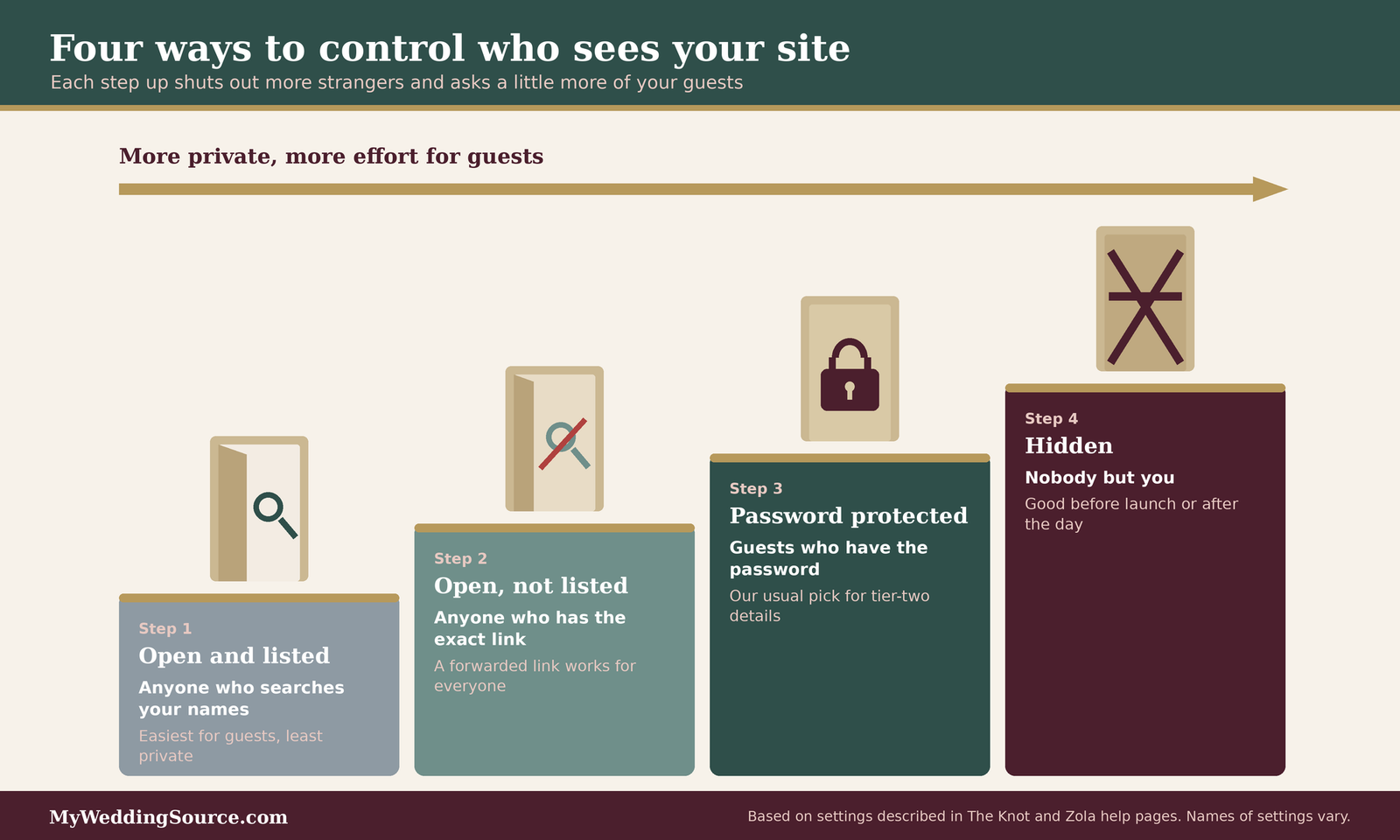
Think of access as a ladder with four rungs. Each rung up shuts out more strangers and asks a little more of your guests.
Open and listed in search
At the open end, anyone can find the site by searching your names. That helps guests who lost the link, and it helps everyone else too. The Knot says its sites are not shown in search results by default and that checking the search option lets people find the site by searching your names, which it notes is convenient for guests who have lost the URL. Listed sites trade a little wedding planning website privacy and security for convenience. Zola lets couples choose whether a free site appears in Google or in Zola search. Check the toggle in your own account instead of assuming, because company defaults can change.
Open but hidden from search
One rung up, the site is not listed in search engines, but anyone with the exact address can open it. This is not security in a strict sense. It is the privacy equivalent of an unlisted phone number. It keeps casual searches from finding you, but a forwarded link works for anyone. Both companies say that turning off search visibility is a separate setting from deleting the site, and The Knot’s help center notes the site stays live and reachable through its direct link. Search engines also decide when to drop old results, so expect a delay of days to about thirty days, according to both companies’ guidance.
Password protected
Next is a password. The Knot says that when the password toggle is on, visitors must enter it before they see anything, including the design. Zola describes a password under its privacy settings that only people who have it can use, and it suggests a password guests can remember but strangers would find hard to guess. A password is the most useful single control for most couples, because it protects tier-two details without taking the site offline. One caution from The Knot’s help center: a password limits who can view your details, but it does not on its own stop search engines from listing the page, so use the search setting too if you want to be invisible. Together, the two settings do most of the work in wedding planning website privacy and security for a typical site.
Hidden entirely
Zola also offers a setting that hides the site so that no one can visit it. That is the right choice during the early planning stage if you have not yet decided what to share, or after the wedding if you want the site offline. Pausing the site entirely is a legitimate wedding planning website privacy and security choice, not an admission of failure. It is a useful reminder that “private” has levels, and that you can move between them as the wedding gets closer.
What belongs on the site, and what does not
Even a well-protected site is a copy of your information on someone else’s server. A simple rule: put on it what guests will use, and leave off anything that only helps a stranger.
Safe for most couples
First names, the date, the general location, the schedule at a high level, dress-code hints, hotel and travel suggestions, and your registry links are what guests came for. These are the tier-one and tier-two items described earlier. For the registry, our guide on wedding registries covers how those links work. If you take cash gifts, read our cash wedding registry guide for the payment-safety side.
Think twice about
The full street address of a private home, the names and ages of children, a detailed day-of schedule with exact times of when you will be somewhere unattended, photos that show your house number or license plate, and your own phone numbers. None of these is forbidden, and each is a trade-off. If your site is password protected and hidden, the risk is lower. If it is open, treat each item as published to the whole internet.
Leave off entirely
Passport or ID numbers, dates of birth, financial account details, and any health information. Neither The Knot’s nor Zola’s privacy pages that we reviewed provide a list of what to leave off, so this is our judgment, not a company rule. There is no guest-experience reason to put these on a wedding site, and plenty of reasons not to. Leaving data off is the strongest form of wedding planning website privacy and security, because nothing stored can leak.
Choosing a password people can actually use
A wedding-site password is unusual because you must share it with everyone you invite. That changes the usual advice, and it is worth being honest about what the password can and cannot do.
What a shared gate password is for
It is a gate, not a vault. Its job is to keep out casual visitors and search engines, not to stop a determined person who is handed the password by a guest. Treat it as protection against the wrong people stumbling onto the site, which is the most likely problem, not against a targeted attack. That is a realistic goal for wedding planning website privacy and security on a site meant to be shared with a crowd. If you need protection against a particular person, a password alone is not enough, and the edge cases section covers other steps.
How to pick one that works
The Knot’s advice is to avoid reusing a password from any other site or social account, to keep it easy for guests to type, and to avoid obvious choices such as your names or your wedding hashtag. We agree with all three. We would add one more: do not build it from details that appear on the invitation, since anyone holding the invitation could guess it. NIST’s current digital identity guidelines, written for services that verify identity, tell those services to reject passwords built from obvious context such as the service name or the user’s own username. By analogy, your names and hashtag are the obvious context for your site. A short phrase unrelated to the wedding, shared on the invitation, is usually a good fit.
Never reuse the site password anywhere
The gate password will be seen by hundreds of people and may be forwarded. If it is also your email password or your registry password, you have handed it out. This is the single most important point in this subsection. The site password and your account passwords must be different, with the account passwords stored in a password manager. The account password is the part of wedding planning website privacy and security you control completely.
Securing the account behind the site
The site itself is only as safe as the account that edits it. This is where wedding planning website privacy and security is often weakest, because the account was created in a hurry during the excitement of engagement.
A unique password and a password manager
NIST’s current guidelines on password verification say services should not force arbitrary character-type mixes, should not force periodic changes unless there is evidence of compromise, should check new passwords against lists of breached and common ones, and should allow password managers and pasting. In plain terms, length and uniqueness matter more than clever symbols, and a manager is expected to be part of the picture. NIST sets a minimum of fifteen characters when a password is the only factor, and eight when it is used alongside another factor. CISA’s four basic habits include strong passwords with a password manager, so this is mainstream guidance, not a niche view.
Multi-factor authentication on the account
Turn on multi-factor authentication for the email account tied to the wedding and for the website account. The FTC explains that it requires two or more kinds of proof, such as a password plus a one-time code or a security key, and that it helps even if a scammer gets your password. Your email account matters most, because anyone who controls it can reset every other password. Few steps in wedding planning website privacy and security give more protection for less effort.
Who else has editor access
Many platforms let a partner, parent, or planner co-edit. List everyone with editor access and remove people who no longer need it. A relative who helped build the site in January does not need access in August. When an editor leaves the project, change the shared credentials the same day.
What this actually costs
Nearly everything in this section costs time, not money: changing a toggle, setting a password, turning on multi-factor authentication, and removing old editors. Money enters in three places, and prices change, so check current numbers before you decide: a paid tier on a website platform, a custom domain, and a password-manager subscription if you want one beyond a free option. Paying every vendor by credit card instead of a bank transfer or payment app costs nothing extra and is one of the strongest protections for the money you spend.
RSVP forms and guest data: ask for less, keep it for less time
RSVPs are where your site collects information from other people, which makes them the point where your responsibility is clearest. Guests type their details into your form, and they assume you will treat it with care. Our guides on RSVP etiquette and RSVP wording cover the social side. This section covers the data side.
Designing a form that collects only what you use
A short form respects guests’ time and your risk. Each extra question is a data point you must store, protect, and eventually delete.
The minimum viable RSVP
For most weddings, the working core is each guest’s name, whether they are attending, and a meal choice if you are serving more than one entrée. Add an email address only if you will send updates by email and have no other way to reach them. This is a design principle, not a rule, and your catering contract may require more, such as allergy details by a deadline. Ask your caterer what they need before you decide. A short form is the simplest wedding planning website privacy and security upgrade available.
Free-text boxes invite oversharing
A free-text “anything we should know?” box is friendly, and it is also where guests write about medical conditions, family conflicts, and other things you did not ask for. Structured questions are safer: a checkbox for common dietary needs, plus a short note field with a line that says what it is used for. If someone writes something sensitive, treat it as tier three automatically. Structured fields keep your wedding planning website privacy and security promises easier to keep.
Plus-ones and children
Collecting names of children and plus-ones is necessary for seating and headcount, but it is also information about people who did not fill in the form. Ask the minimum, such as a first name and age range if the caterer prices by age. We cover how to word these requests politely in our guide to plus-one etiquette. The FTC publishes a children’s privacy page, but what we found describes duties for operators of websites aimed at children, not for private individuals planning a wedding. Treat children’s information carefully anyway, as a matter of good practice.
Mailing addresses without the mess
Addresses are the most useful and the most sensitive part of the list. They are also the part you must collect for invitations and thank-you notes.
Collect addresses once, at the right moment
Ask for mailing addresses when you are about to print and mail, not months earlier. Tell guests what the address is for, and let them know it will not be shared. Our invitation timing and wedding invitations guides can help you set the date by which you need the final list.
Be careful with address-collection tools
Some couples collect addresses through a separate form or a registry platform. That is fine, but it adds a copy. Before using one, apply the five-question filter: what does it store, who can see it, can you export and delete it, and what does the company say it does with it? If you cannot answer the last two, use a simpler method, such as asking guests to reply by email to you directly.
Give guests a no-form option
Some guests will not want to type their address into a website, and some older relatives will prefer a phone call or a paper card. Offering an alternative is both courteous and safer. It also reduces the pressure to share information they would prefer not to put online.
Exports, spreadsheets, and the shared list
At some point the RSVP data leaves the platform and lands in a spreadsheet. This is where accidents happen.
Treat the export as the master
When you export responses, choose one place to store the file, preferably in a personal account with multi-factor authentication. Delete the downloaded copy from your computer’s downloads folder and from any email you sent to yourself. Fewer copies means fewer chances to leak. Exports are where wedding planning website privacy and security most often leaks, since a file is easier to forward than a login.
Share by name, not by link
Google’s help page describes three levels of general access: restricted to people you add, anyone with the link, and public. In its words, “anyone with the link” means no sign-in is needed. For a guest spreadsheet, restricted is the right setting. Add each helper by email address, choose viewer or commenter instead of editor when possible, and use the advanced settings to stop viewers and commenters from downloading or copying. Google notes that expiration dates for shared access are available only on eligible work or school accounts, so on a personal account you will need to remove access by hand.
Remove access when the job ends
When the caterer has the final count and the seating chart is done, remove the helpers. Google’s page explains that you remove access by changing the person’s sharing permissions. Put a reminder on your calendar for the week after the headcount deadline, and another for the week after the wedding. Ending access on schedule is routine maintenance for wedding planning website privacy and security.
Accessibility and safety are the same project
It can seem odd to put accessibility in a privacy guide. The reason is practical: a site or form that is hard to use pushes people toward workarounds, and workarounds are where privacy slips. A guest who cannot type the password on a phone will ask you to text it. A relative who cannot read small buttons will call you and read out their address on a speaker. Making the site easy to use is part of making it safe. Accessible design and wedding planning website privacy and security point in the same direction.
What the standard says, in plain terms
The Web Content Accessibility Guidelines are an international standard from the W3C. The current version, WCAG 2.2, was first published in October 2023 and updated in December 2024, according to the W3C. Its four principles say content should be perceivable, operable, understandable, and robust. It sets three levels of conformance: A, AA, and AAA. Wedding-site builders are responsible for most of the code, but couples control what goes on the page and how it is written.
Login and passwords
WCAG 2.2 includes a criterion at level AA called Accessible Authentication, which says login steps should not rely on memorizing, solving puzzles, or retyping codes unless an alternative or help is available, with password managers and pasting given as examples. For a couple, the takeaway is to choose a short, typeable, pasteable password and to avoid anything that depends on a guest remembering a long string. This matches The Knot’s advice to keep the password easy to type.
Small buttons and repeated typing
Two other new criteria are relevant to RSVP forms. Target Size (Minimum), at level AA, asks that clickable targets be at least 24 by 24 CSS pixels or spaced far enough apart. Redundant Entry, at level A, says users should not have to re-enter information they already gave in the same process. When you choose a form builder, try it on a phone with one thumb. If a guest must type the same address twice, the form is working against them.
Help that stays in the same place
Consistent Help, also level A, asks that help options that repeat across pages appear in the same place. For a wedding site, that means one visible contact method, such as an email address or a phone number, that is the same on every page, so a guest who cannot get in knows where to ask.
A short accessibility check for your own content
You do not need to audit code. You need to look at what you wrote. We cover a longer routine in our guide to a wedding website accessibility audit.
Put key details in text, not only in images
If your schedule, address, or password instructions appear only in a picture or a PDF, some guests will not be able to use them, and others will ask you to resend the details by text. Put the essentials in plain page text. The “perceivable” principle in the W3C’s standard is about people being able to sense the information, and text is the most reliable way to deliver it.
Offer a second way to RSVP and to get in
Add a line such as “If the form gives you trouble, email us and we will add your reply.” It costs nothing, and it removes the pressure on a guest to share details through channels you did not plan. It also gives you a safe, expected channel, so a guest is less likely to be fooled by someone pretending to be you. A fallback channel strengthens wedding planning website privacy and security because guests are less likely to improvise.
Test as a guest would
Open the site on your phone, on a slow connection, and with the text enlarged. Try entering the password by pasting it. Ask one older relative and one tech-impatient friend to try. What they trip over is your list of fixes. Testing like a guest shows where usability and wedding planning website privacy and security collide.
Sharing files and passwords with your partner, party, and planner
A wedding is a team project, and teams share. The question is not whether to share, but how, with whom, and how to stop. This section pulls together the sharing habits that protect your wedding planning website privacy and security without slowing the team down. We keep a deeper routine in our guide on wedding planning password sharing.
Choosing a sharing method
Different jobs call for different methods, and the wrong one is how most leaks happen.
For documents: named people, not open links
Use your cloud drive’s restricted setting and add each person by email. As Google’s help explains, restricted means only people you have given access to can open the file. Give each person the lowest role that works: viewer if they only need to read, commenter if they need to leave notes, editor only for the one or two people who maintain the file. Editors can share the file further, by default, so every editor is also a potential distributor. Naming each person is the most dependable habit in wedding planning website privacy and security for shared files.
For small subsets: send only the subset
If the caterer needs counts and allergies, send counts and allergies. If the printer needs addresses, send addresses and nothing else. Make the extract a separate file and share that file, so the master never leaves your account. When the job is done, delete the extract from the shared space.
For group chats: keep sensitive details out
Group chats are fast and feel private, but they have no clear owner and no clear end. Anyone can screenshot, forward, or leave the chat with a full history. Use them for logistics and jokes. Keep addresses, passwords, and payment details out.
Passwords among the people who help
Sooner or later someone will ask for a login: a planner who needs the vendor portal, a parent who wants to update the registry, a bridesmaid who is tracking gifts. Plan for it.
Do not text or email passwords in plain view
A password sent in a text or email sits in that thread indefinitely, and anyone who later gets into that account can read it. If you must share a credential, use the sharing feature of a password manager when one is available, or send the account name by one channel and the password by another, and change it afterward. Give vendors their own accounts when the platform allows, rather than handing over yours. Credential handling is where wedding planning website privacy and security often breaks down among helpers.
Give each helper their own login where possible
Many platforms allow separate users or invited editors. That is better than a single shared login because you can remove one person without changing everything. It also leaves a clearer record of who did what. NIST’s guidance says changes to a password are required when there is evidence of compromise, which is a good trigger for you as well: if a helper’s phone is lost or their account is hacked, change what they could reach.
Offboarding: the step everyone forgets
When someone finishes a role, such as the maid of honor after the shower or the planner after the wedding, spend ten minutes removing them: shared folders, website editor access, vendor portals, calendar invitations. It is not personal. It is the same housekeeping that keeps your list from sitting in accounts you can no longer see. Offboarding is an underrated part of wedding planning website privacy and security.
AI tools and guest information
Chatbots and AI assistants are now part of wedding planning for many couples, and they are genuinely useful for drafting emails, building timelines, and comparing quotes. We cover the full question in our guide to AI wedding planning. This section stays narrowly on privacy: what to keep out of the tool, how to ask without exposing anyone, and what to check before you act on an answer.
What NIST says about the risks
NIST’s Generative AI Profile, a companion to its AI Risk Management Framework, names several risks that matter here. We use it as a reference for naming risks, not as a rulebook for consumers.
Data privacy
NIST describes a data privacy risk where information used to train or run a generative model can be exposed, with models sometimes reproducing training data or inferring personal details that were never provided. For a couple, the practical reading is cautious: you cannot always know where text you paste will end up, and your guests never agreed to have their details included.
Confabulation
NIST uses the word confabulation for confident but false or inconsistent output, including invented reasoning and citations. For wedding planning, that means a made-up venue policy, a wrong marriage-license rule, or a nonexistent vendor review can read as perfectly authoritative. Anything involving money, deadlines, law, or safety needs a second source.
Information security
NIST also notes that generative AI creates new attack surfaces, including prompt injection, where text inside a document or webpage manipulates the model. If you paste a vendor’s PDF or an email into a chatbot, hidden instructions in that text could in principle steer the response. That is one more reason to treat AI summaries of unfamiliar documents as leads, not facts.
Practical habits for AI and guest data
These habits keep most of the usefulness and drop most of the exposure.
Replace real details with labels
Instead of pasting a spreadsheet, describe it: “a list of 140 guests, 12 with dietary restrictions, 3 tables of 10 for the wedding party.” Use initials or labels such as Guest A. Ask for a structure, a formula, or a template, and fill in the real names yourself afterward. You lose nothing by doing so, because the tool never needed the names to build the layout. Labels let you use AI without weakening wedding planning website privacy and security.
Check the tool’s data controls
Look for settings that control whether your conversations are used to improve the product, and for options to delete history. Policies differ between providers and change over time, so read the current page, and treat what you read as the provider’s statement. If you cannot find a setting, assume the text may be retained and paste less.
Verify before you act
Treat every factual claim as unverified until an official or written source confirms it. Recompute any arithmetic. Open the source the tool cites, and confirm that it exists and says what the tool claims. Our guide to wedding vendor contracts explains why a summary is not a substitute for reading the agreement.
Vendor chatbots and vendors that use AI
AI is not only something you use. Vendors use it too, on their sites and in their workflows.
A chatbot’s promise is not a contract
If a venue’s chat assistant says a deposit is refundable or a date is free, ask for it in an email or in the written agreement. A promise made in a chat window is hard to prove later. Screenshot it, then get it written down by a person at the business.
Ask vendors how they handle your information
Photographers, planners, and printers may use AI tools to edit, caption, sort, or draft. Ask whether guest names, photos, or details are put into third-party AI tools, and whether you can opt out. You are not accusing anyone by asking, and a professional vendor will have an answer. Keep a record of the reply. The answer shows whether their practices match what you promised your guests.
Scams that use the wedding as cover
Planning a wedding means expecting messages from people you have not met, about money, with deadlines. That is the ideal setting for impersonation, and it is the reason scam awareness is a core part of wedding planning website privacy and security. We keep a dedicated guide on wedding website scam messages; this section gives you the framework and the evidence.
How common, how costly
Honest numbers help here, with the caveat that none of them is specific to weddings.
What the FBI’s figures show
The FBI’s Internet Crime Complaint Center reported 859,532 complaints in 2024 with reported losses of 16.6 billion dollars, a 33 percent rise from 2023. Phishing and spoofing was the most-reported crime type, with 193,407 complaints. Business email compromise, which includes messages that impersonate a vendor and ask for changed payment details, had 21,442 complaints but 2.77 billion dollars in losses. Those are national, all-purpose figures. They tell you which patterns are common and which are costly, not how likely a couple is to be targeted.

Common is not the same as costly
Dividing losses by complaints gives a rough average per complaint. That is our own arithmetic, an estimate that hides huge variation. Roughly, business email compromise comes out near 129,000 dollars per complaint, while phishing and spoofing comes out near 360 dollars. The lesson is that the scam most likely to reach your inbox, a fake link, is not the one that does the most damage. The costly pattern is the quiet one: a believable message that changes where a large payment goes. Your wedding planning website privacy and security priorities should follow cost as well as frequency.
Cryptocurrency and unusual payment requests
The FBI report names cryptocurrency as the most-cited payment medium in fraud complaints. The FTC adds that requests to pay only by bank transfer, wire, cryptocurrency, payment app, or gift card are a signal of a scam. No honest wedding vendor needs to be paid in gift cards, and a request to switch to one of these methods after you have signed is worth a phone call.
The patterns to recognize
Most wedding-related scams fit a short list. Learn the shape and you will recognize new variants.
| What arrives | Why it works | What to check | Safer channel |
|---|---|---|---|
| “Updated payment instructions” from a vendor | The vendor is real and you expect invoices | Call the number from your contract, not the email | Phone number you already had |
| “Your wedding website payment failed” or “site expiring” | Urgency and a link to update payment | Sign in by typing the address yourself | The company’s own app or site |
| Unfamiliar vendor or planner with a polished portfolio and a low price | Looks established | Reverse image search the photos, ask for recent references | Contract and credit card |
| A text or email from “the venue” asking for a final payment by app | Matches an expected step | Compare with your contract’s payment terms | Call the venue’s main line |
| A QR code on an unexpected flyer, card, or message | Looks convenient | Do not scan codes you did not expect | Type the known address |
| A guest or relative “locked out” asking for money or a code | Plays on trust | Call them directly | Phone call to a saved number |
Fake vendors and stolen portfolios
The Better Business Bureau’s wedding guide, published in November 2026, warns about fake rental companies and planners who take deposits and stop responding, about businesses that close after collecting deposits, and about stolen portfolios, which it says a reverse image search can help detect. It describes one couple who reportedly lost 7,000 dollars to a fake planner whose portfolio used copied photos. That is a single anecdote, not a rate, but it shows the mechanism. Our guide on wedding photographer portfolios explains what to look for in real portfolios.
Payment-change emails
If a vendor you already know emails new bank details, treat it as a red flag no matter how familiar the logo or tone. Verify by phone using a number from your signed contract. The FTC’s phishing guidance says legitimate companies do not send email or text links to update payment information, which is the same principle applied to messages that arrive in your inbox.
QR codes and links you did not expect
The FTC’s scams page lists fake QR codes among the ways people end up on fraudulent pages. For a wedding, that matters in both directions: be careful scanning codes that show up unprompted, and be careful about printing a QR code on your own invitations without testing it. Our save-the-date cards guide covers the design side. A code on a printed card that points to the wrong place is a problem you cannot fix after mailing.
Paying so you can fix mistakes
How you pay decides how recoverable a mistake is.
Credit card and a signed contract first
BBB advises paying a deposit only after both parties sign, never paying the full amount up front, and paying by credit card, which makes disputes easier. It cautions against cash, wire transfers, gift cards, and payment apps. The FTC notes that federal law limits your liability for unauthorized credit card charges. Our guides to how to pay for a wedding and to wedding insurance cover the financial side, and this is general information, not financial or legal advice. Payment choices are a quiet part of wedding planning website privacy and security, because they decide what you can recover.
If you already paid
The FTC’s recovery guidance varies by method. For a credit card, call the issuer using the number on the card and ask for a refund. For a debit card or bank transfer, contact your bank right away. For a payment app, report it to the app and ask for a reversal. For a gift card, call the issuer and keep the card and receipt. For cryptocurrency, contact the exchange or ATM operator and report the transaction as fraud, and the FTC notes that crypto has fewer legal protections. The sooner you act, the better your options.
If you shared a password or let someone into a device
The FTC says that if you gave a scammer a login that still works, change the password, change it anywhere you reused it, and turn on two-factor authentication. If you let someone into your computer or phone, update your security software, run a full scan, and change your passwords. If a Social Security number was involved, report at IdentityTheft.gov. Reports to the FTC go to ReportFraud.ftc.gov. Phishing texts can be forwarded to 7726, and phishing emails to reportphishing@apwg.org, per the FTC.
Protecting guests from scams in your name
Your guests can be targeted too, using your wedding as the hook.
A short warning in your own channel
Tell guests, in an email or on the site, how you will and will not contact them: for example, “We will never ask for payment or account details by text.” Add where official updates live. This costs a sentence and gives guests something to check against. This small notice extends wedding planning website privacy and security to the people on your list.
The gift table and the day itself
BBB’s guide also mentions gift theft at receptions and advises assigning someone to watch the gift table. Cards with cash or checks are a real target. A locked box, a named helper, and a plan for taking gifts home at the end of the night are worth more than any app. See our guide on gift tracking for ways to log gifts without exposing guest details.
What to do if a guest reports a suspicious message
Thank them, ask for a screenshot, and tell the other guests through your normal channel. The FTC encourages reporting scam attempts at ReportFraud.ftc.gov. A quick public correction protects the people who have not yet seen the message.
Vendor and source questions that protect your data
Every vendor who touches your guest information becomes part of your wedding planning website privacy and security, whether or not they think of themselves as a data business. A florist who needs a delivery address and a photographer who hosts an online gallery sit at opposite ends of the spectrum. You do not need a legal team. You need a handful of plain questions asked in writing, and a habit of saving the answers with your contract.
Questions to ask any vendor or platform that will hold guest information
- What guest information do you need from us, and what do you do if we provide less?
- Where is it stored, and who at your company or outside it can see it?
- Do you share it with third parties, including advertising or AI tools?
- Can we export it, and can we ask you to delete it after the wedding? How long does deletion take?
- How do you contact us about payments, and how will we know a message is really from you?
- Is the gallery or portal private by default, and can we set a password or expiration?
- If your systems were compromised, how and when would you tell us?
Platforms and websites
Your wedding website, registry, and RSVP tools are the vendors that hold the most data. Treat them as such.
Read two pages: privacy and help
Start with the privacy policy and the help center. Search the policy for “delete,” “share,” “retain,” and “partners.” In the help center, look for the privacy settings pages that The Knot and Zola publish, and note which settings are on by default. Write down what you find and the date you checked, because settings and policies change. This is the fastest way to size up a platform’s wedding planning website privacy and security.
Ask what happens to the site after the wedding
The Knot’s help pages say that making the site private does not delete it. That is a useful reminder to ask any platform what happens to your data once the wedding is over, and whether hiding, deactivating, and deleting are different actions. Decide in advance which one you want, and put it on your calendar.
Check how they handle account recovery
If your email is compromised, anyone could use it to reset your site password. Ask what proof the platform requires for account recovery, and set up multi-factor authentication. This is the quiet weak point in many accounts. Recovery rules are an overlooked piece of wedding planning website privacy and security.
Photographers, planners, and venues
These vendors hold different data and need different questions.
Photographers and online galleries
A gallery is a place where guests’ faces are stored and often shared with a link. Ask whether the gallery is private by default, whether it can be password protected, how long it stays online, and whether the photographer posts images publicly. If you want a specific policy about posting, put it in the contract. Our guides on wedding photography and the photographer shot list can help you decide what to ask for, and our guide to an unplugged ceremony covers how to set expectations about guests posting photos.
Planners and coordinators
A planner often holds the master guest list, vendor contacts, and payment schedules. Ask how they store them, who on their team has access, and what they do with your files when the contract ends. Our guide to planner versus coordinator explains who does what. A good planner will have an answer and will not take offense.
Venues, caterers, and printers
These vendors need narrow slices: counts, allergies, addresses for a mailing house. Send them the slice, not the whole list. Our venue questions guide has more on what to ask venues. If a printer or mail-house offers to store your list for reorders, ask for deletion after the job is done.
Verifying that a vendor is real
Some of the most useful privacy habits are about verifying identity before you share anything.
Check the business independently
BBB suggests checking the vendor’s BBB Business Profile, including rating, complaint history, and responses, and getting references from recent clients, because vendor-supplied reviews may be selective or fake. Look up the business’s address and phone number on your own, and compare them to what the vendor gave you.
Test the portfolio
A reverse image search of a few portfolio photos can show whether they appear under other names, which BBB lists as a way to detect stolen portfolios. If the photos belong to someone else, you will want to know before you pay a deposit. Ask for a recent full gallery from a real wedding.
Save the contact details you verified
Once you have confirmed a phone number and email address for a vendor, write them in your planning file. When later messages arrive, compare the sender to what you saved. That one habit defeats the most costly pattern in this guide, the payment-change email. Saved contacts are a small, practical anchor for wedding planning website privacy and security.
The wedding website and guest-data privacy audit
This is the working tool in this guide. It is a checklist you can finish in roughly an hour, organized in six areas. The time is our estimate and depends on how many accounts you have. Do it once when the site first goes live, again before invitations go out, and a third time after the wedding. For each line, you are looking for a pass; if you cannot honestly say yes, apply the fix. Keep a short note of the date and the changes, so the audit also becomes your record. Nothing here is a legal compliance test. It is a practical way to strengthen your wedding planning website privacy and security.
Area one: the website itself
Start with the public face, since it is the part strangers can see. This is the area where wedding planning website privacy and security is easiest to inspect.
What to check
| Check | A pass looks like | If it fails |
|---|---|---|
| Open the site in a private browsing window | You see a password prompt, not your content | Turn on the password setting |
| Search your names plus “wedding” in a search engine | The site does not appear, or you chose that | Turn off search visibility and wait for search engines to catch up |
| Read every page as a stranger | Nothing reveals a private home address, children’s details, or exact unattended times | Remove or move those items behind the gate |
| Check photos for house numbers, plates, and documents | None visible | Replace the photo |
| Check who can edit | Only you, your partner, and named helpers | Remove everyone else |
| Check the contact method | One email or phone number, shown consistently | Add it to every page |
How to fix what you find
Most fixes are toggles in the privacy settings. The Knot and Zola both document where those are. If you turned off search visibility, remember that removal from search results can take days to about thirty days according to both companies, so retest after a few weeks instead of checking once. If a page contains something sensitive, remove it first and worry about search caches later. Fixing the website first is the quickest visible win in wedding planning website privacy and security.
Area two: accounts and passwords
This is where one weak link affects everything else.
What to check
| Check | A pass looks like | If it fails |
|---|---|---|
| The email account tied to the wedding | Unique password plus multi-factor authentication | Change the password, turn on multi-factor authentication |
| The website account | Unique password plus multi-factor authentication if offered | Do the same, and check the recovery email |
| The registry and RSVP accounts | Same standard | Same fix |
| The site gate password | Not used anywhere else, not made from names or hashtag | Change it and announce the new one |
| Password storage | A password manager, not a note on a phone or a shared doc | Move credentials into a manager |
| Shared logins | Each helper has their own login where possible | Create individual users, retire the shared one |
How to fix what you find
Begin with the email account because it can reset everything else. NIST’s guidance favors length, unique passwords, checking against breached lists, and allowing password managers. CISA lists strong passwords and multi-factor authentication among its four basic habits. If you suspect that a credential was exposed, change it right away, which matches the NIST principle that a change is warranted when there is evidence of compromise. The account layer is the foundation of wedding planning website privacy and security.
Area three: RSVP and form data
This is the data guests handed to you.
What to check
| Check | A pass looks like | If it fails |
|---|---|---|
| Every field on the form | Each has an action attached | Delete fields you will not use |
| Free-text boxes | A short note with a stated purpose | Replace with structured options |
| Sensitive answers (allergies, access needs) | Labeled with who will see them | Add a one-line explanation |
| A second way to reply | Offered by email or phone | Add the line |
| Export and deletion | You know how to export and delete | Ask the platform in writing |
| Child and plus-one data | Only what seating and catering need | Remove extra details |
How to fix what you find
Edit the form now, even if some responses are already in. Future responses will carry less data. For responses already stored, plan the deletion date. Our guide to the wedding guest list explains how list decisions affect headcounts and costs. Trimming the form is the cleanest long-term gain in wedding planning website privacy and security.
Area four: files, folders, and sharing
This is where accidents live.
What to check
| Check | A pass looks like | If it fails |
|---|---|---|
| General access on the master spreadsheet | Restricted | Change from “anyone with the link” |
| Who is listed | Only people who need it, with the lowest role | Remove people, lower roles |
| Download and copy settings | Disabled for viewers and commenters where possible | Use advanced sharing settings |
| Old extracts | Deleted after each job | Delete them |
| Published or public files | None | Stop publishing |
| Downloads folder and email attachments | No stray copies | Delete them |
How to fix what you find
Google’s help page describes the restricted, anyone-with-the-link, and public levels, the viewer, commenter, and editor roles, and the difference between sharing and publishing. Use the settings in the order of the table. If your account type does not offer expiration dates, set a calendar reminder to remove access yourself. Sharing settings reward a careful look, since a single open link can undo the rest of your wedding planning website privacy and security.
Area five: vendors, payments, and messages
This is where money and trust meet.
What to check
| Check | A pass looks like | If it fails |
|---|---|---|
| Contract status | Signed before any deposit | Pause the payment until it is signed |
| Payment method | Credit card for deposits and balances | Ask to use a card, or note the risk |
| Verified contacts | Phone and email saved from your contract | Verify and save them now |
| Recent messages about payments | Each one matches the contract | Call the vendor to confirm |
| Vendor data questions | Asked and answered in writing | Send the questions |
| QR codes on your printed materials | Tested on more than one phone | Test, fix, reprint if needed |
How to fix what you find
Where a payment instruction looks wrong, verify by phone before you do anything else. If you already paid and something is off, follow the FTC’s recovery steps for your payment method and contact the issuer at once. For the broader contract picture, see our guide to vendor contract red flags. Verification habits protect the money side of wedding planning website privacy and security.
Area six: AI tools and messages
This is the newest area and the one most people have not thought about.
What to check
| Check | A pass looks like | If it fails |
|---|---|---|
| Past chats | No real guest names, addresses, or allergies | Delete the conversations, and use labels from now on |
| Tool settings | You know whether chats are used for training and can delete history | Review the settings page |
| Documents pasted for summaries | Only your own, non-sensitive text | Stop pasting vendor files and private lists |
| Facts taken from AI | Confirmed from an official or written source | Verify before acting |
| Vendor AI use | You asked and recorded the answer | Ask |
| Group chats | No passwords or addresses | Delete the messages and move the content |
How to fix what you find
Most fixes are deletions and a change of habit. Chat history deletion options vary by provider, so look at the current settings page. If you pasted something sensitive, treat it as exposed to the extent you cannot verify otherwise, and consider whether anyone affected needs to be told, such as a guest whose allergy details you shared. Habits matter more than tools in this part of wedding planning website privacy and security.
Running the audit in a sensible order
Not every failure matters equally. A short order of operations keeps you from spending an afternoon on trivia while a serious gap stays open.
Fix the high-consequence gaps first
Work in this order: accounts and multi-factor authentication, payment verification, open links on the master list, website access, then everything else. These are the items where one failure causes the most harm. The ordering is our judgment, not a published scoring system. Doing the audit in order is itself part of wedding planning website privacy and security.
Write down what you changed
Keep a short note of each change and the date. If something goes wrong later, you will know what you did and when. If a planner or family member takes over, the note is also a handoff. A change log doubles as proof of your wedding planning website privacy and security work if a vendor or relative ever asks.
Set the next audit date
Choose two future dates now: the week before invitations go out and the week after the wedding. Add both to your calendar. An audit you do not repeat protects you only on the day you did it. Repeating is what makes wedding planning website privacy and security a habit instead of an event.
Edge cases that change the advice
General advice about wedding planning website privacy and security has limits. These are the situations where the standard settings may not be enough, or where the standard advice needs adjusting. The suggestions here are practical options, not professional safety advice, and they do not replace the judgment of someone who knows your situation.
When privacy is a safety issue
For some couples and guests, privacy is not a preference. It is protection.
An estranged relative or former partner
If you want to keep someone away, treat the site as hidden or password-protected, turn off search visibility, and think twice about posting the full venue address or the exact schedule. Release those details only to confirmed guests by email or a personal message. Ask your venue and vendors not to share details, and put that request in writing. Talk with someone you trust about your plan. A password is a speed bump, not a wall, so combine it with limited information.
Guests with their own reasons for privacy
Some guests, including public figures, people in sensitive jobs, and people who have left difficult situations, may not want to appear in photos, group lists, or tagged posts. Give guests an easy way to say so privately, and respect it. Do not post a guest list or tag people without asking. An unplugged-ceremony request in your invitation, as described in our guide, also helps.
Names of guests on the site
A guest list on a public page tells strangers who will be away from home on a specific date. If you want to list the wedding party, use first names and roles. Leave full guest lists off the public site entirely.
Travel, destination, and international weddings
Moving guests across borders creates data you may not usually handle.
Passport and ID information
Some guests will need to share travel details with airlines or hotels. Do not collect passport numbers or dates of birth through your website or a form unless a specific vendor requires it and explains how it is protected. If a group booking requires them, have guests give them directly to the airline, hotel, or booking agent through their secure channel. You do not need to hold them. Not holding the data is the safest answer in wedding planning website privacy and security.
Group travel and booking links
Hotel room blocks and travel links are common phishing lures. Share the booking link on your protected page, and tell guests exactly how it will look and what it will and will not ask for. Warn them that nobody connected to the wedding will ask for card details by text. Our guides on destination wedding etiquette and destination wedding guest costs cover the planning side.
Livestreams, photos, and guest posts
Video and photos create data that is hard to retract.
Livestream links
A livestream link posted on a public page can be shared to anyone. Send it only to the guests who need it, with a password if the service offers one, and decide in advance whether it will be recorded.
Photo-sharing galleries and booths
Shared galleries and photo-booth apps may collect email addresses and phone numbers. Check what the booth company asks guests for, and tell guests what happens with their photos. Our guide to wedding photo booths lists questions to ask.
Guest posts on social media
You cannot control what guests post, but you can set expectations. A line on the invitation or a sign at the ceremony can ask for guests to wait until after the ceremony or to avoid posting images of children. Make the request kindly and keep it short.
After the wedding: close the doors you opened
The wedding ends, but the data does not. This is the most neglected stage of wedding planning website privacy and security, and also the easiest to finish, because the urgency is gone and the tasks are small.
Decide what to keep
You do not need to keep everything. Most of what you collected has a job that ended.
Keep what you need for thank-you notes
Hold on to names and mailing addresses until the thank-you notes are written and mailed. Our guides on thank-you cards and gift etiquette have timing guidance. Once they are sent, archive the list in one protected place or delete it.
Keep what the record requires
Contracts, receipts, and insurance paperwork are worth keeping in a secure place for as long as you may need them. Guest dietary notes, access needs, and phone numbers are not. Delete them promptly.
Shut down the extras
The rest is cleanup.
The site, the forms, and the galleries
Decide whether to hide, deactivate, or delete your wedding website. The Knot’s help pages say that making a site private does not delete it, so the three actions are different. If you want to keep photos for family, move to a private gallery with a password. Ask the platform about export and deletion in writing. Closing the site on purpose is the last chapter of wedding planning website privacy and security.
Shared access and accounts
Remove helpers from folders, vendor portals, and site editors. Close accounts you will not use again, such as a seating-chart tool or a photo-booth gallery. Update the passwords for anything you keep.
Watch for after-wedding scams
After the wedding, messages appear about photo albums, orders, and thank-you gifts. Treat them as you did the earlier ones: verify before clicking, and use payment methods you can dispute. If a message pushes you to act within hours, slow down. Scam awareness belongs in wedding planning website privacy and security long after the cake is gone.
A privacy calendar from engagement to thank-you notes
A calendar turns good intentions into dates. Scheduling is how wedding planning website privacy and security survives a busy year. The dates below are our suggested sequence, not a standard, and they sit alongside our wedding planning checklist and vendor timeline.
Before you publish anything
The early months are when habits form.
First weeks after engagement
Create a wedding-only email address with a unique password and multi-factor authentication. Choose a password manager and move your wedding accounts into it. Decide where the master guest list will live. These steps take an afternoon and affect everything that follows.
Before the website goes live
Set the privacy settings first, before adding content. Choose password protection and the search setting, then build the pages. It is easier to start private and open up than to publish and then try to take back. Starting private is the cleanest wedding planning website privacy and security habit.
Between invitations and the wedding
This is the busy middle, and the stage with the most messages, payments, and forms.
When invitations go out
Share the site password with the invitation, as The Knot suggests, and tell guests what the site does and does not ask for. Run the audit again. Check QR codes on more than one phone before you print.
In the final weeks
Verify each vendor’s final payment instructions by phone. Send vendors only the data they need. Prepare the day-of contact list with the minimum phone numbers required, and plan to delete it afterward.
After the wedding
The last stage is the one people skip.
The week after
Run the audit a third time, remove helpers, and delete extracts. Move photos to a private location. Begin thank-you notes from your master list.
Within a few months
Decide what to keep, hide or delete the website, and close accounts you will not use again. Put the final deletion on your calendar so it actually happens.
FAQ: wedding planning website privacy and security questions
Website and guest-data questions
Do I really need a password on my wedding website?
Not always, but a password is the simplest control for wedding planning website privacy and security. The Knot says it is optional and helps keep details private, since a site is easy to find online. Zola describes it as a way to limit access to personal details. Choose one if you list a venue or schedule.
Will turning off search visibility remove my site from Google right away?
No. The Knot’s help center says removal depends on when search engines recrawl the page and expects anywhere from several days to about thirty days. Zola gives a similar window. The site also stays reachable by its direct link, so add a password if you want to limit who can open it.
What guest information should I avoid collecting through RSVP forms?
Skip passport or ID numbers, dates of birth, and financial details, which no wedding form needs. Ask for mailing addresses only when you are ready to mail, and collect allergy information only by the caterer’s deadline. This is our editorial advice for wedding planning website privacy and security, not a legal standard.
Passwords, accounts, and AI questions
How should I choose and share a wedding website password?
Use a password you have never used elsewhere, keep it easy for guests to type, and avoid your names or hashtag, as The Knot advises. It is a gate for casual visitors, not a vault, so never reuse it for email or banking. Share it on the invitation along with the address.
Is it safe to put my guest list into an AI chatbot?
We would not paste real names, addresses, or allergies. NIST’s Generative AI Profile lists data privacy as a risk, including exposure and inference of personal details. Use labels or initials, ask for a template or formula, and fill in real details yourself. Check the provider’s current settings for chat history and training use.
Scams and payment questions
How can I tell if a vendor’s payment email is fake?
Do not trust the logo or the tone. If an email changes bank details or asks for payment by an unusual method, call the vendor on a number from your signed contract before paying. The FTC notes that legitimate companies do not send links to update payment information, and wire, app, crypto, or gift-card requests are warning signs.
What should I do if I already paid a scammer?
Act quickly and contact the payment provider. The FTC advises calling a card issuer using the number on the card, contacting your bank for a debit card or transfer, and reporting a payment-app payment to the app. Then report it at ReportFraud.ftc.gov, and visit IdentityTheft.gov if personal information was exposed.
Do I need to keep guest data after the wedding?
Keep names and addresses only until thank-you notes are mailed, then archive the list in one protected place or delete it. Delete allergy notes, access needs, and phone numbers soon after the event. Keep contracts and receipts as long as you may need them. Ask platforms in writing how deletion works.
Your next steps
Do these in the first hour
Lock the accounts
Create or secure the email account you use for the wedding with a unique password and multi-factor authentication, and move your wedding logins into a password manager. Then do the same for your website, registry, and RSVP accounts. Our wedding planning checklist can show where this fits in your timeline. Locking accounts first is the best opening move in wedding planning website privacy and security.
Set the website gate
Open the privacy settings, turn on a password you have never used elsewhere, and decide whether the site should appear in search. Test it in a private browsing window as a stranger would see it. Our wedding planning guide shows how site decisions connect to the rest of your plan.
Do these before invitations go out
Trim the form and the sharing
Remove RSVP fields you will not use, add a second way to reply, and change your master guest list to restricted sharing with named people. Review the wording of your reply requests in our guide to RSVP wording.
Verify the money
Confirm each vendor’s phone number and email from your signed contract, and pay by credit card where you can. Save those details in your planning file so later messages can be checked against them. Our vendor contract guide explains what to look for in the agreement.
Do these after the wedding
Run the audit again
Repeat the six-area audit, remove helper access, and delete extracts, allergy notes, and phone numbers. Move photos to a private place. Pair this with our thank-you card timing.
Close the site on purpose
Choose between hiding, deactivating, and deleting the website, and ask the platform in writing how deletion works. Put the date on your calendar so it happens.
Sources & methodology
How we built this guide
What we relied on
This guide combines U.S. government consumer-protection pages (the FTC), the FBI’s Internet Crime Complaint Center annual report, NIST publications on digital identity and generative AI, CISA’s basic online safety habits, the W3C’s accessibility standard, a Better Business Bureau wedding guide, and the privacy and help pages published by The Knot and Zola. Statements from The Knot, Zola, and Google describe what those companies say their settings do, and we did not test their products. Figures from the FBI are national, all-purpose numbers, not wedding-specific. The per-complaint averages in the third illustration are our own estimate, calculated by dividing reported losses by complaints, and they hide wide variation. We checked each source page on November 12, 2026, and company settings and policies can change.
What we did not do
We did not test any wedding-website, RSVP, or AI product, audit any company’s security, or review state privacy laws. We did not give legal, financial, or cybersecurity-consulting advice, and nothing here replaces advice from a licensed professional. The five-question filter, the three data tiers, the audit order, and the privacy calendar are our own editorial methods, not published standards. NIST’s password guidance is written for systems that verify identity and is used here only as a reference for current expert thinking.
Source list
Government and regulatory sources
- Federal Trade Commission, Scams: https://consumer.ftc.gov/scams
- Federal Trade Commission, How to Recognize and Avoid Phishing Scams: https://consumer.ftc.gov/articles/how-recognize-and-avoid-phishing-scams
- Federal Trade Commission, What To Do if You Were Scammed: https://consumer.ftc.gov/articles/what-do-if-you-were-scammed
- Federal Trade Commission, Children’s Privacy: https://www.ftc.gov/business-guidance/privacy-security/childrens-privacy
- FBI Internet Crime Complaint Center, 2024 Internet Crime Report: https://www.ic3.gov/AnnualReport/Reports/2024_IC3Report.pdf
- CISA, Secure Our World: https://www.cisa.gov/secure-our-world
Standards and technical guidance
- NIST, Digital Identity Guidelines, SP 800-63B-4, Authentication and Authenticator Management: https://pages.nist.gov/800-63-4/sp800-63b.html
- NIST, Artificial Intelligence Risk Management Framework: Generative AI Profile (NIST AI 600-1): https://nvlpubs.nist.gov/nistpubs/ai/NIST.AI.600-1.pdf
- W3C Web Accessibility Initiative, WCAG Overview: https://www.w3.org/WAI/standards-guidelines/wcag/
- W3C Web Accessibility Initiative, What’s New in WCAG 2.2: https://www.w3.org/WAI/standards-guidelines/wcag/new-in-22/
Consumer, company, and help-center sources
- Better Business Bureau, Wedding planning guide and key dates (published November 6, 2026): https://www.bbb.org/article/news-releases/19283-weddings-key-dates
- The Knot, Wedding Website Privacy: https://www.theknot.com/content/wedding-website-privacy
- The Knot, Everything You Need to Know About Setting a Wedding Website Password: https://theknot.com/content/wedding-website-passwords
- The Knot Help Center, How do I remove my Wedding Website or Registry from Google results: https://helpcenter.theknot.com/hc/en-us/articles/360042740192-How-do-I-remove-my-Wedding-Website-or-Registry-from-Google-results
- Zola, How to Make Your Wedding Website Private: https://zola.com/expert-advice/how-to-make-your-wedding-website-private
- Google Docs Editors Help, Share files from Google Drive: https://support.google.com/docs/answer/2494822