
A livestream outage is any moment when remote guests stop seeing or hearing your wedding, and the fastest way through one is a decision tree you wrote before the day. This guide gives you that tree: how to sort the failure in under a minute, who decides what, how long the ceremony waits, what to tell guests, and when to move to another link.
When a livestream outage starts, do four things in order. First, confirm the local recording is still running, because that protects the ceremony itself. Second, sort the failure by location: camera and audio, encoder, venue network, the streaming platform, or the viewer’s own link. Third, apply the time box you agreed in advance, so nobody debates how long to wait. Fourth, tell remote guests one calm sentence and follow it with a recording or replay. Write the tree, name one decider, and rehearse it once.
Most advice about streaming a wedding stops at equipment and internet speed. That advice matters, and the site has separate guides on it. This one starts at the moment those preparations are tested by reality: the picture freezes, the audio drops, or a remote aunt texts the group chat that the screen says “stream offline.” What happens in the next ninety seconds depends almost entirely on what was decided weeks earlier.
A livestream outage during a ceremony is a stressful kind of problem because it has an audience at both ends. In the room, a few hundred people are watching two people get married. On the screens, a smaller group, often the grandparents who could not travel, are watching the same thing and feel every second of silence.
The person who knows the stream has failed is usually standing at the back with a laptop, and that person is not the one who gets to decide whether the ceremony pauses.
That split is the heart of this article. A good plan separates the people who diagnose from the people who decide, and it replaces improvisation with a short list of questions that have yes or no answers.
A note on scope. This is general planning information, not legal, technical or financial advice. Platform features, terms and outage behavior change, so confirm current rules with the platform, your video producer and your venue, and treat every number in this guide as a starting default to adjust.
What a livestream outage is, and why it needs its own tree
People use “the stream went down” to describe very different events, and each one has a different fix. A livestream outage is not the same as a weak connection that makes the picture soft. A soft picture is a quality problem. A livestream outage is a continuity problem: the stream stops, freezes, or becomes unreachable for some or all viewers.
It also helps to separate a livestream outage from a planning gap. If nobody sent the link, the stream was never up, and the fix is a message rather than a diagnosis. If the link was sent but a guest cannot open it on a work computer with a blocked network, the stream is working and the problem is local to that viewer. A tree that treats all of these as one event wastes the minutes that matter.
Why a tree rather than a checklist? A checklist assumes you will do every item. A tree assumes that the answer to the first question changes which questions come next. If the local recording has stopped, nothing else matters until it is restarted. If the recording is fine and the stream is down for everyone, the platform or the network is the likely cause.
If the stream is up for most people and down for one household, you are done in the room and the rest is a text message.
The site’s guide to wedding day digital operations covers backup communication, shared files and permissions across the whole day. This article takes one slice of that and goes deep: what to do, in what order, when the live video itself fails.
What this guide does not repeat
Other guides on the site already explain how to choose cameras, how to size an internet connection and how to test venue speed. Here you will find none of that arithmetic. The assumption is that you have a stream, a producer or a trusted friend running it, and a venue with some form of connection. The question is only what happens when that setup fails.
If you have not yet thought about the recording that sits underneath every stream, do that first. A recording made on a camera card or a local encoder drive does not depend on the internet at all. It is the reason a livestream outage is a disappointment and not a loss. Any plan for a livestream outage should start there. The rest of this guide leans on that fact repeatedly.
Who this tree is for
It is written for three readers. The first is a couple planning a stream for a ceremony, perhaps with a hired video producer and perhaps with a cousin who volunteered. The second is that producer or volunteer, who needs a way to talk to the couple about outage decisions without sounding alarmist. The third is the planner or day-of coordinator, who often ends up being the person standing between the stream captain and the officiant.
You do not need technical skill to use the tree. You need to be able to answer plain questions: Is the recording running? Can anyone watching confirm that the picture is stuck? Is the platform’s own status page reporting a problem? Those answers take seconds when someone has been told to look for them, and a livestream outage becomes a sequence of small checks rather than one large worry.
The shape of the tree in one paragraph
Here is the whole structure before the detail. A trigger fires when remote viewers report a problem or the stream dashboard shows trouble. The stream captain protects the recording, sorts the failure into one of five places, and applies a time box. At the end of the time box, a named decider chooses one of four moves: keep waiting, switch to a backup path, pause for a short and pre-agreed interval, or carry on and rely on the recording.
A relay person tells remote guests what is happening in plain words. Everything else in this guide supports one of those steps.
Where a livestream outage starts: the five failure zones
Every livestream outage begins in one of five places. Naming the zone matters because the person who can fix it, the time it takes and the cost of waiting are all different. Think of the signal as a chain with five links, and picture the break in one of them. Every livestream outage is a break in exactly one link at a time, even when it feels like everything failed together.
The first link is capture: the camera, the microphone, the cables and the power that feed the encoder. A battery that dies, a cable knocked loose by a guest, or a wireless microphone that drops out all happen here. These failures are usually local, loud and fixable in seconds by someone standing next to the gear.
The second link is the encoder: the laptop, hardware box or phone that turns the camera feed into a stream. Software crashes, overheating, a laptop that goes to sleep, a notification that takes over the screen, or a full disk can all stop the stream here. The recording may or may not continue, depending on how it was set up.
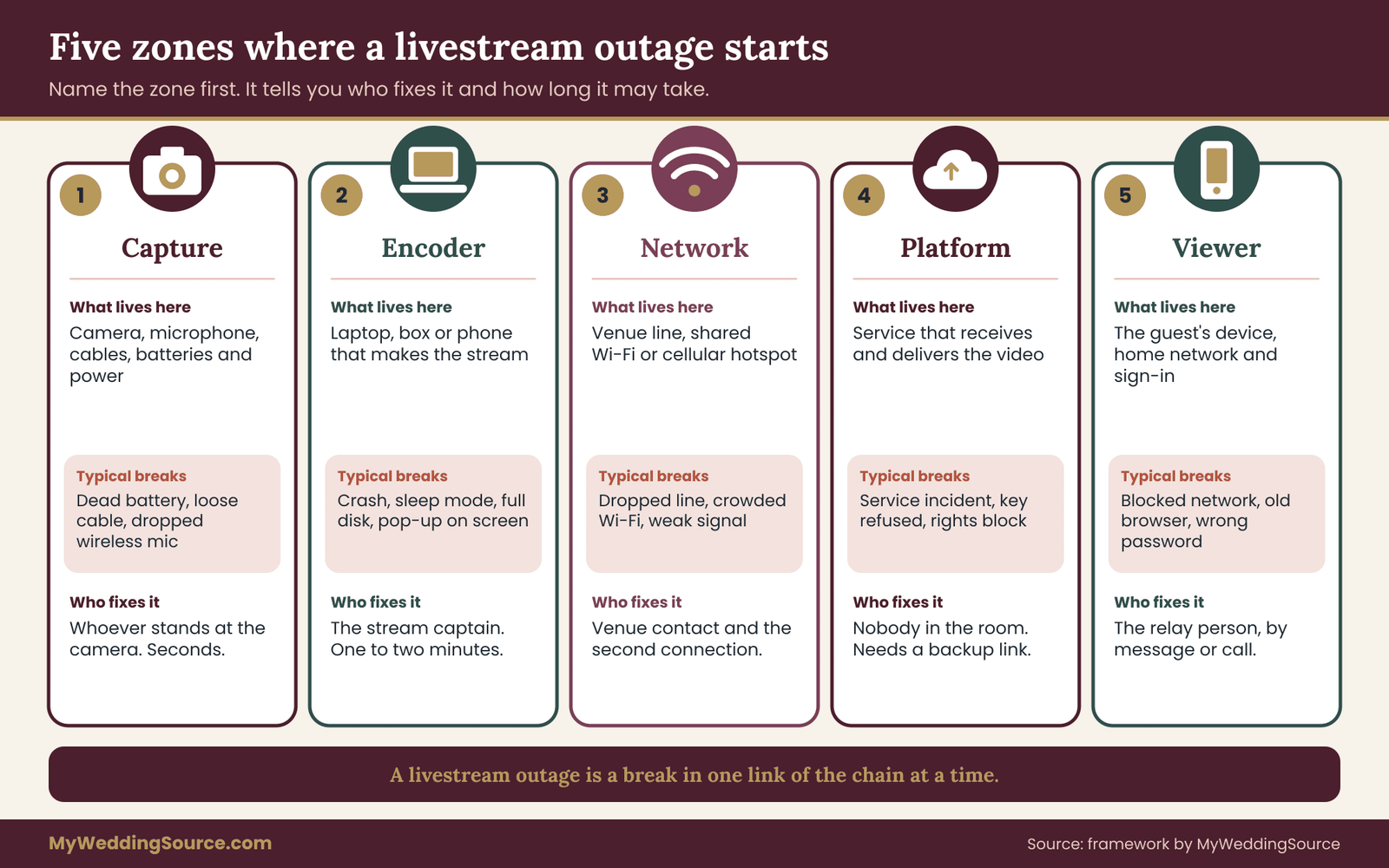
The third link is the network between the venue and the internet. This is where a hotel ballroom’s shared Wi-Fi, a cellular hotspot or a wired line lives. Failures here are the ones most people picture, and the sibling guides on venue speed testing cover how to prepare for them.
The fourth link is the platform: the service that receives your stream and sends it to viewers. When the platform has a service problem, a stream key is rejected, an account is limited, or a rights check blocks content, your side can be perfect and viewers still see nothing. Most couples never think about this link until it fails.
The fifth link is the viewer side: the guest’s own device, home network, browser, password entry and patience. Plenty of reported outages are really one guest’s problem.
Why zone matters more than cause
You will not always know the exact cause, and you do not need to. What you need is the zone, because the zone tells you whose job it is and how long a fix is likely to take. A capture problem belongs to whoever is at the camera and is measured in seconds. An encoder problem belongs to the stream captain and is measured in a minute or two.
A network problem belongs to the venue contact and the backup path. A platform problem belongs to nobody in the room, which is exactly why it needs a plan. A viewer problem belongs to the relay person who answers guests.
A useful habit is to ask, for every reported failure, “Is this one person or everyone?” If one viewer is stuck, the zone is almost certainly the fifth. If every viewer is stuck, the zone is one of the first four, and a second question narrows it: “Is the dashboard still showing a healthy outgoing stream?”
Why couples underestimate the platform link
There is a natural tendency to picture a streaming service as a utility that always works. In practice it is a large system with its own maintenance, its own account rules and its own automated checks. Platforms generally publish guidance for broadcasters on stream health and offer status pages for service problems, and the encoder guidance on the platform’s help site is worth reading with your producer before the day.
The practical consequence is simple. If the platform is the problem, no amount of work on your side will fix it, so the plan must include an alternative destination and a rule for when to use it. Later sections cover exactly that.
Setting the ground rules before the tree
A decision tree only works if the people holding it know their roles and the rules were agreed before emotion arrived. Spend one conversation, ideally at the final planning meeting with the producer, settling five things.
First, what is the ceremony’s priority order? Almost every couple says the same thing when asked directly: the ceremony in the room comes first, the recording second, the live stream third. Write it down. It sounds obvious, but it settles a surprising number of arguments in the moment, including whether anyone should ever ask the officiant to wait.
Second, who is the decider? One person, named, with a backup. Not “the couple,” who will be busy being married, and not a committee. Often the best choice is the planner or coordinator, and when there is none, a trusted family member who is not in the wedding party and not a remote-guest relative.
Third, who is the stream captain, meaning the person with eyes on the encoder and the authority to restart it? That might be the hired producer or a volunteer. Fourth, who is the relay person who talks to remote guests? Fifth, what is the hold line, meaning the longest the in-room program will wait for the stream before moving on? Later sections turn that into a number.
Write all five answers on a single card, so that a livestream outage never begins with a debate about who is in charge. The card goes into the producer’s bag, the coordinator’s folder and a photo on three phones.
The first sixty seconds of a livestream outage
The most useful thing a stream captain can have in the first minute is a fixed order of questions. Under pressure, people check whatever they think of first, and that is rarely the thing that matters most. The order below is built around one idea: protect what cannot be redone, then find out who is affected, then locate the break.
Step one, ten seconds: the recording. Before anything else, look at the local recording. Is it still running? Is there free space on the card or drive? On a camera, glance at the record light and the time counter. On an encoder, look at the recording indicator. If the recording has stopped, restart it now and say so aloud to whoever is next to you. A stopped recording is the only failure in this whole tree that cannot be recovered afterward, so it earns the first ten seconds even if the stream is also dead.
Step two, twenty seconds: one viewer or many. The relay person checks with the canary viewers. Before the wedding, pick two remote guests who are comfortable with technology and who watch on different devices and networks, ideally one on a phone using cellular data and one on a home computer. Ask them to watch the whole ceremony, and ask them to text one word only if something looks wrong. If both canaries report a problem, the livestream outage is probably not a single household’s issue. If neither does, the report that started this was likely local to one viewer.
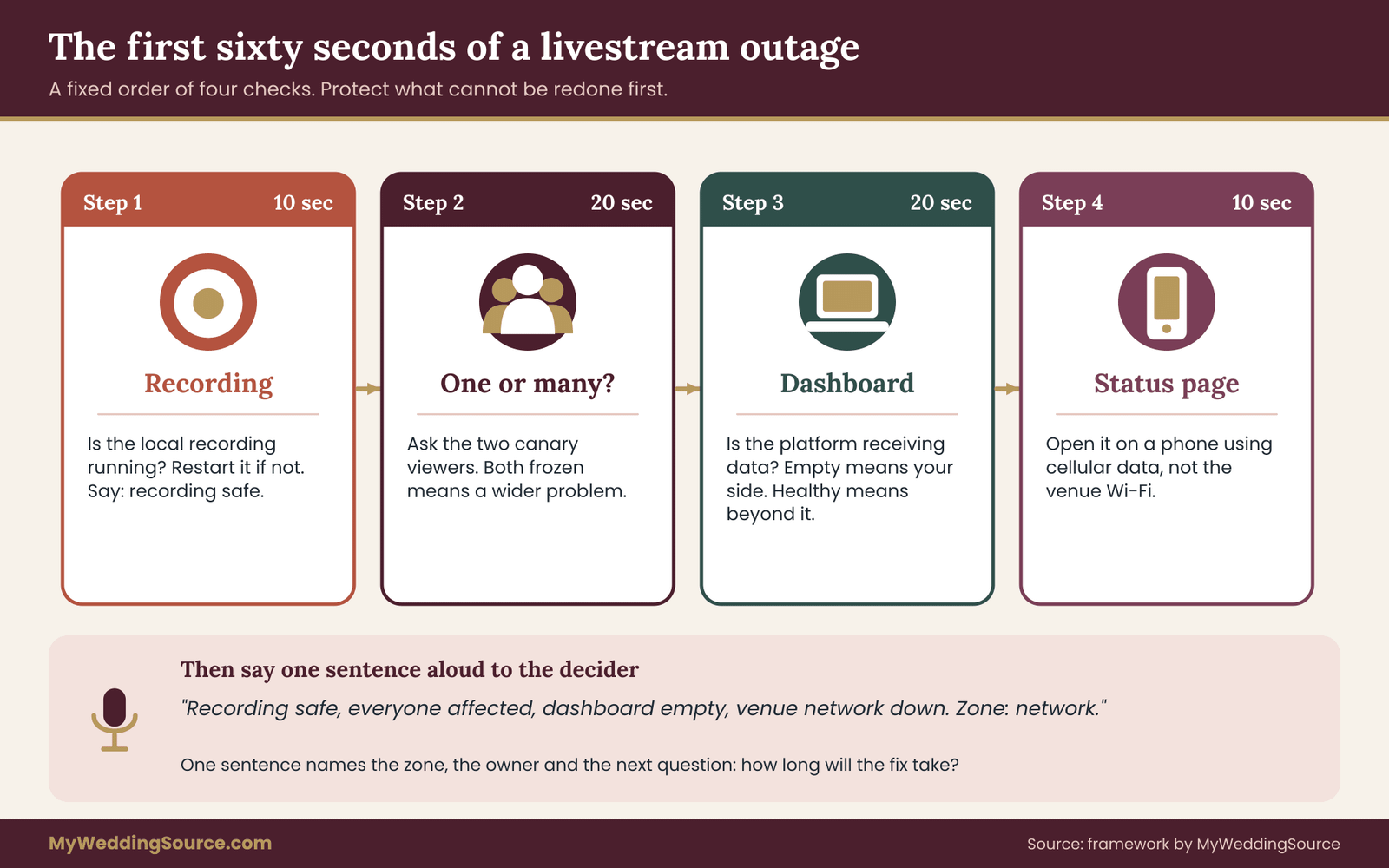
Step three, twenty seconds: the dashboard. The stream captain looks at what the platform says it is receiving. Most platforms show a stream health indicator in the broadcaster’s control page. If the dashboard says the platform is receiving a healthy stream while viewers see nothing, the break is downstream of your encoder, which points to the platform or to a viewer-side issue. If the dashboard says no data is arriving, the break is on your side: capture, encoder or network.
Step four, ten seconds: the status page and the venue network. A second person, using a phone on cellular data rather than the venue’s Wi-Fi, opens the platform’s public status page and checks the venue network by loading any ordinary website. The point of the cellular phone is independence. If you check the platform’s status through the same Wi-Fi that may be failing, you learn nothing reliable.
A livestream outage feels long in the first minute, and this sequence gives the minute a shape. At the end of sixty seconds, the stream captain says one sentence aloud: “Recording is running, both canaries report a freeze, the dashboard shows no data, and the venue network is down.” That sentence names the zone. It is also the sentence the decider needs to hear.
Why a fixed order beats instinct
Think about how a failure usually feels from the back of the room. The screen on the laptop is frozen, and the person behind it wants to restart the stream immediately. That is understandable, and it is sometimes right, but restarting before checking the recording can end a recording that was working. Restarting before checking the platform’s status page can burn two minutes on a problem that a restart cannot fix.
The fixed order also helps when there are two people at the table. Each person can take half the steps in parallel, and neither has to guess what the other has already checked. The relay person owns step two, the captain owns steps one and three, and a helper owns step four. Nothing here requires technical training, only practice reading a screen aloud.
What to say aloud, and to whom
Silence is the worst companion of a livestream outage, for the room and for the remote guests. Agree on a few short phrases, and use them. “Recording confirmed” means the first step is done. “Everyone affected” or “one viewer” reports step two. “Dashboard healthy” or “dashboard empty” reports step three. “Zone: network” or “zone: platform” closes the sequence.
These phrases have a second use. They give the decider a clear picture without a technical conversation. A decider who hears “recording confirmed, everyone affected, dashboard empty, zone: network” can ask a single question, which is how long the fix is likely to take, and the answer feeds straight into the time box that follows.
Two false alarms to learn in advance
Two situations send people into a panic that was not needed, and neither is a true livestream outage. The first is the stuck viewer: one person reports a frozen picture, and the captain starts restarting things while the other viewers watch happily. Step two prevents this, because the canaries and the relay person confirm how widespread the problem is before anything is touched.
The second is the lag illusion. Live streams almost always run some seconds behind the room, and the delay differs by platform and settings. A guest who sees the couple a little late may text that the stream is behind, or even that it has stopped, when it is only catching up. Your relay person should know the delay is normal and should reply with a calm note, not a technical alarm.
Time boxes and the hold line
Knowing the zone tells you who should fix the problem. A time box tells you how long to wait before something changes. Without one, groups drift: everyone hopes the next ten seconds will fix it, five minutes pass, and the in-room ceremony either stalls awkwardly or moves on without anyone having chosen to.
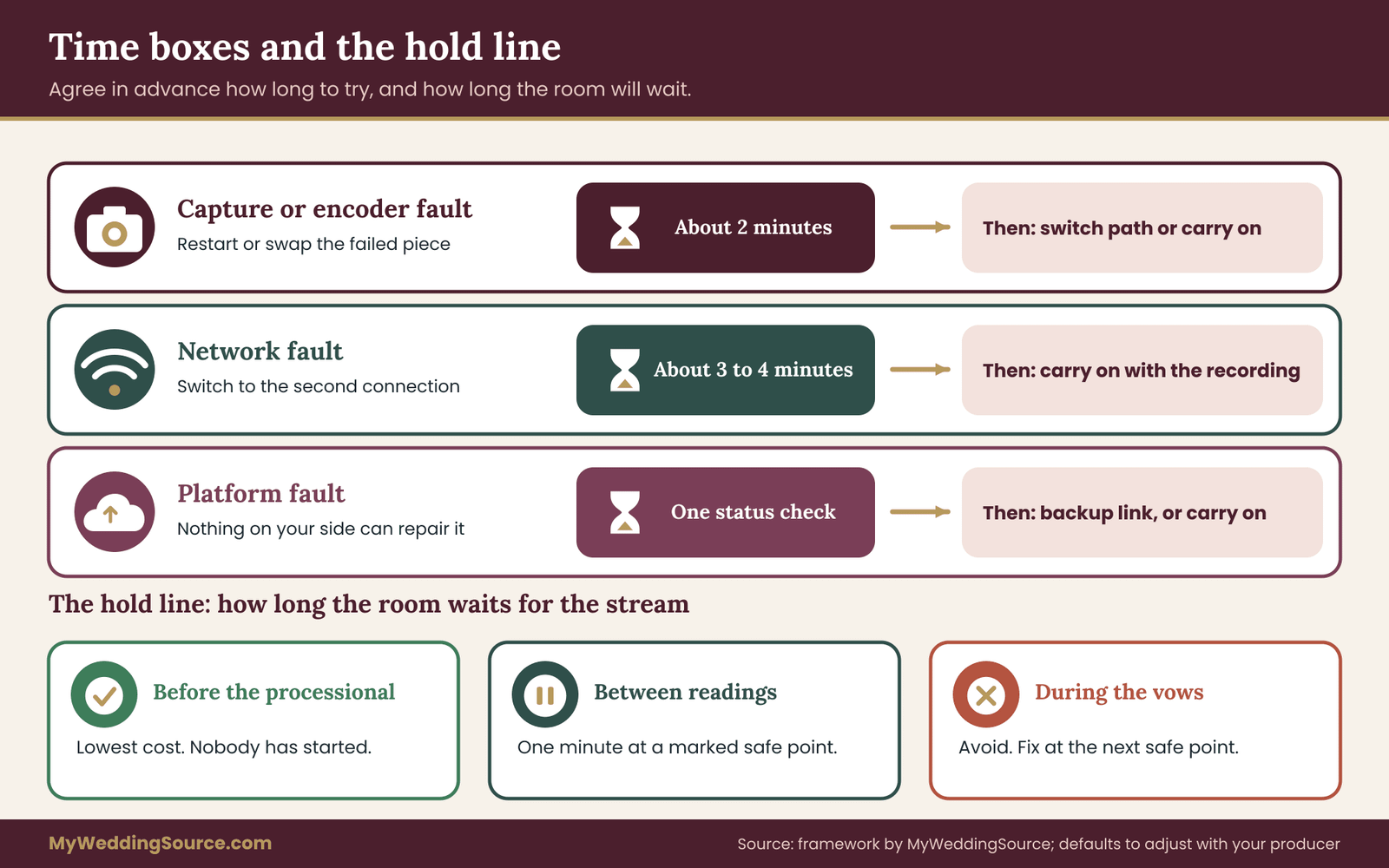
For any livestream outage, a time box is a short, pre-agreed period during which the stream captain tries the fix for the zone. When the box runs out, the decider chooses the next move. The numbers below are starting defaults, not rules. Set your own with your producer, and write them on the card.
For a capture or encoder failure, a reasonable default is two minutes to restart or swap the failed piece. These are local problems with local fixes, and if two minutes pass without success, the cost of continuing to fiddle is higher than the cost of switching to the backup path.
For a network failure, a default of three to four minutes to switch to the cellular or secondary connection is reasonable, because the switch itself takes a minute or two even when it is rehearsed. For a platform failure, the time box is shorter in effort and longer in wall-clock time, because nothing you do will repair the platform. Give the platform status page one check, then move to the alternative destination if you have one.
The hold line: how long the room waits for the stream
The hold line is the most personal number on the card, and it belongs to the couple. It answers one question: how long, if at all, will the in-room program pause for the stream?
Many couples say, when asked plainly, that the ceremony does not wait for the stream at all, even during a livestream outage. That is a legitimate choice, and it is often the right one, because a ceremony that pauses for a technical fix can leave two hundred people sitting in silence. If that is your answer, the hold line is zero, and the tree reduces to “keep the recording going, fix what can be fixed without interrupting, and tell remote guests what to expect.”
Other couples have a specific reason to care. A remote parent may be watching the vows, or a grandparent may have been promised the whole ceremony. A short, graceful pause at a natural break, such as before the readings, can cost the room very little. In that case choose a small, bounded hold line, such as a minute or two at one agreed point, and give the officiant a simple signal and a sentence to say.
Where a pause costs the least
If you decide to allow any pause, the cost depends on where it falls. A pause during a reading or musical interlude is cheaper than a pause in the middle of the vows. A pause before the processional is cheaper still, because nobody has started anything yet. The ceremony cue sheet is a good place to mark these moments in advance; the guide to wedding ceremony cue sheets shows how to lay out cues so the officiant and the stream captain can both read them.
A practical rule is to choose one or two “safe pause points” in advance and mark them on the cue sheet. If the livestream outage is fixed within the time box, no one needs to know. If it is not, the decider can choose to use a safe pause point or move on.
Time boxes as protection for the people in the room
There is a gentler reason to set time boxes: they protect the stream captain. A person who is told “you have two minutes, and then the decider will choose” can concentrate. A person with no limit tends to carry the whole day on their shoulders, and that pressure makes mistakes more likely.
The same rule protects the couple when a livestream outage arrives at an inconvenient moment. If the time box ends and the decision is to carry on, nobody has to feel they gave up on remote guests; they followed a plan that everyone, including the remote guests’ representative, understood in advance. That sense of having chosen calmly is worth more than most people expect.
Resetting the clock
One more rule belongs on the card: what resets the clock. If the stream comes back and then drops again within a few minutes, the second drop should not start a fresh time box with a fresh set of hopes. Agree that a repeat drop within a short window moves directly to the next step in the tree.
This prevents a flapping connection from consuming the whole ceremony in a series of near-recoveries, which is a common shape for a livestream outage on a shared network.
The livestream outage decision tree, branch by branch
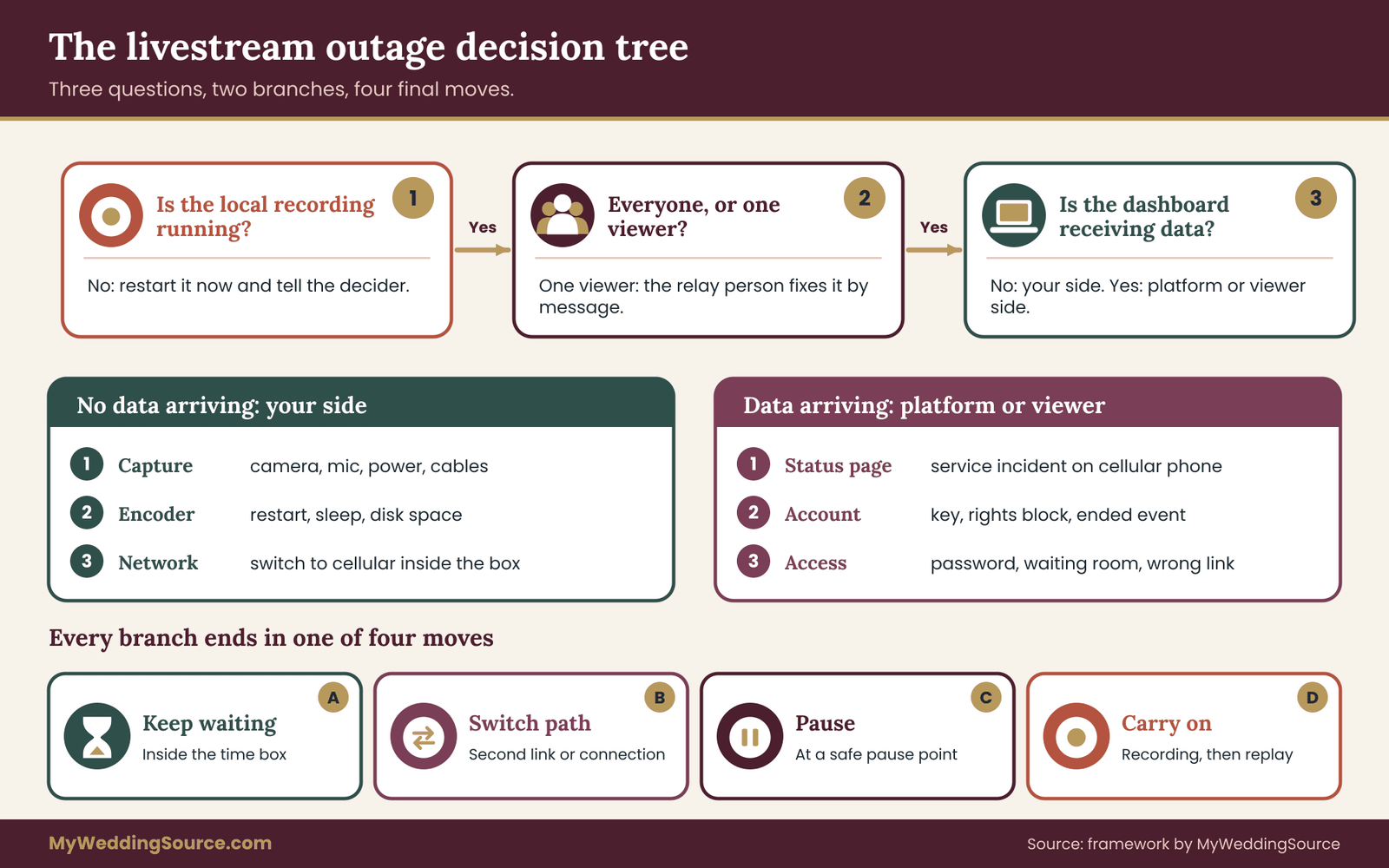
Here is the tree itself, written as a sequence of questions. Each question about a livestream outage has two answers, and each answer leads either to a fix, to another question, or to one of four final moves. The illustration further down shows the whole thing at a glance; this section explains why each branch exists and what to do on it.
The four final moves are worth naming first, because every branch ends in one of them. Move A is to keep waiting inside the time box. Move B is to switch to the backup path, meaning a second connection or a second destination.
Move C is to pause the in-room program at a safe pause point. Move D is to carry on and rely on the recording, with a message to remote guests. A tree that ends in anything vaguer than these four will produce arguments.
Question one: is the local recording running?
If the answer is no, restart it immediately and tell the decider. Do not let the answer to any later question stop this step. If a restart fails because the card is full or the drive is missing, swap the media if you can do so within seconds, and note the time of the gap so the editor knows where the ceremony footage has a hole.
If the answer is yes, move on. The recording being safe changes the mood of everything that follows, and the captain should say so aloud: “Recording is safe.” That sentence lowers the temperature for everybody nearby.
Question two: is it everyone, or one viewer?
If it is one viewer or one household, the in-room team stops. The relay person handles it: resend the link, suggest a different browser or device, and offer the recording afterward. Nothing about the stream itself needs to change. This branch resolves a large share of reports, and the relay person should feel free to deal with it quietly.
If it is many viewers, or both canaries, go on to question three. If the answer is unclear, a quick message to a handful of remote guests with a plain question such as “Are you seeing the ceremony right now?” settles it within a minute or so.
Question three: does the dashboard show data arriving?
This question divides the livestream outage into your side and everything else. If the platform’s control page reports no incoming data, the break is in capture, encoder or network, and you continue on the left branch. If it reports healthy incoming data, the break is at or beyond the platform, and you continue on the right branch.
Dashboards differ and some lag by several seconds during a livestream outage, so give the indicator a moment before drawing a conclusion. If your producer uses a bonded or hardware encoder with its own status screen, read that as well; it often tells you which connection has dropped.
The left branch: your side of the platform
First, check capture. Is the camera showing a picture on its own screen? Is the audio meter moving? If not, fix the feed: replace a battery, reseat a cable, restore power. This is the fastest repair, and it is why the capture check comes before the network check.
A wireless microphone that has dropped can look exactly like a stream outage to a viewer, because the picture continues while the sound stops. In that case, the failure is audio only, and the fix is a spare microphone rather than a new connection.
Second, check the encoder. Is the software responding? Has the laptop gone to sleep, shown an update prompt or run out of disk? A restart of the stream from the encoder, with the same settings, often works within the two-minute time box. The captain should do this only after confirming the recording is safe, as the first step above makes clear.
Third, check the network. If the encoder is healthy and the picture is fine but nothing leaves the building, the connection is the failure. Switch to the second connection, usually cellular, and restart the stream. A switch that was rehearsed takes a minute or two; one that was not can take ten. If the second connection also fails, the left branch ends at Move D.
The right branch: the platform or the viewer
If data is arriving and viewers still see nothing, open the platform’s status page on the independent cellular phone. If it reports a service problem, this is a platform livestream outage and you cannot repair it. Go to Move B if you have a second destination ready, and Move D if you do not.
If the status page reports no problem, look at your own account and stream. Is the stream marked live? Did the platform end the event on its own, which can happen after a long disconnection? Has a rights check muted the audio or blocked the video? Has a password changed or a waiting room been turned on? Each of these has a different remedy, and the section on platform-side failures covers them.
Audio only: a branch worth planning
Some failures take the picture but leave the sound, or the reverse, and a partial livestream outage like this needs its own rule. A frozen picture with intact audio is often the better outcome for remote guests, because the vows can still be heard. If your platform or encoder allows an audio-only fallback, or if a phone line can carry the sound, consider whether that is worth switching to when video fails.
Ask your producer in advance whether the platform supports it and how long the change would take.
A rule of thumb: when the picture is frozen and the audio is fine, do not touch the stream during the vows. Make the repair at the next safe pause point, and tell the relay person to message guests that the picture may be stuck but the audio is live.
Reading the whole tree as a set of sentences
For people who do not like diagrams, the tree can be read as a handful of sentences. If the recording is not running, restart it first. If one viewer is affected, handle it by message. If many are affected and no data reaches the platform, fix capture, then the encoder, then switch the network.
If data reaches the platform and viewers see nothing, check the status page and the account; if the platform is down, use the backup destination or carry on with the recording. At every step, the time box decides when to stop trying.
Who owns each branch
A tree is only useful if each branch has an owner. The stream captain owns questions one and three and the entire left branch. The relay person owns question two and every message to remote guests. The helper with the cellular phone owns the status page check on the right branch. The decider owns only the final move, and should resist the pull to join the diagnosis, because a decider who is also debugging cannot hear the whole picture.
When the same person fills two roles, as happens at small weddings, say so in advance and name who covers the gap. A livestream outage that finds one person holding the camera, the laptop and the guest messages at the same moment is the one that goes wrong. If you cannot staff the roles separately, shorten the tree: keep the recording, set a single time box, and let the relay messages be pre-written.
A word on switching mid-stream
Switching connections or destinations in the middle of a ceremony has a cost, and every livestream outage tempts people to switch too soon. Remote guests see the picture drop, and when it returns it may come on a different link, with a new URL to open. That is one more reason the time boxes exist: they stop an unlucky ten seconds from turning into a series of untested switches. If a switch is going to happen, it should happen once, early, and be announced.
Edge cases that bend the tree
A few situations do not fit neatly. A partial livestream outage, where some viewers see a good picture and others do not, usually means a regional or device-specific platform problem. Treat it as a platform issue, tell the affected guests to try another device, and do not tear down a stream that most people are watching.
A recovering livestream outage, where the stream returns after a pause, may leave a gap in the replay. Make a note of the timestamps so the replay can be trimmed or annotated later. A double failure, where the network and the platform fail together in one livestream outage, is rare but real, and it lands on Move D. The recording is the plan for that case, which is why it comes first in everything above.
Platform-side failures and when to move to a backup link
The platform is the one link in the chain that nobody at the wedding can repair, so it deserves its own plan. Platform-side trouble comes in several forms, and they look similar from a guest’s chair: a black screen, a spinning wheel, “this event has ended,” a request to sign in, or a message that the video is unavailable. Each has a different cause and a different remedy, and the right response to a platform-side livestream outage starts with telling them apart.
A real service problem
Large platforms occasionally have incidents that affect many broadcasters at once. Most publish a status page where they report these, and some broadcasters follow an official social account. In a platform-side livestream outage, waiting is least useful, because nothing you do on your side changes the outcome. The plan for a livestream outage should not depend on the platform recovering within a ceremony’s length.
Treat the status page as one input, not an oracle. A platform can have a regional or partial problem long before the status page says so, and it can say “operational” while a particular feature is failing. That is why the canary viewers exist. If both canaries report a failure, the dashboard shows data arriving and the status page is quiet, give it a minute or two, then act as though the platform is the problem anyway.
Stream key and account problems
If the encoder reports that the connection was refused, suspect the stream key or the account. A stream key can be reset by the platform, replaced by a new event, or entered wrongly after a quick edit. Some platforms require account verification before live streaming is available and may take a period of time to enable it. Check this weeks ahead, and check it again the day before. Do not discover the requirement on the morning of the wedding.
Also check whether the scheduled event is still valid. Events created long in advance can expire or be superseded, and a stream that was tested on a different event than the one you sent to guests will fail in a way that looks mysterious. Test with the real event link, using a private test stream, at least a few days before the wedding.
Rights checks, muted audio and blocked video
Music is the most common cause of a platform acting on its own. If the ceremony includes recorded music, a live band or a song sung by a guest, automated matching on some platforms can mute the audio, block the stream or end it. The U.S. Copyright Office explains the basics of how copyright applies to music and video, and its general pages are a sensible starting point before you talk to your producer.
For a wedding, the practical rules are simple. Prefer live performance of music that is in the public domain or performed by people who have agreed to it being streamed, ask your producer what the chosen platform does with recorded music, and decide in advance what to do if the audio is muted.
The reception music guide at wedding reception music planning covers the music side of the day; here the point is only that a rights block is a platform-side event and belongs on the tree.
If the audio is muted but the picture continues, tell remote guests quickly, because a silent ceremony feels like a bigger failure than a frozen one. If the platform ends the stream outright, move to the backup destination and tell guests which link to use.
Login walls, waiting rooms and capacity
Some outages are really access problems. A password that was changed, a waiting room that nobody admits guests from, a video call that has reached its participant limit, or a link that was set to the wrong privacy level can all look like a dead stream to the guest. If many guests report the same message about access, check these settings first, because they are fast to fix and they do not require restarting the stream.
A short practical test belongs in the rehearsal: open the guest link from a device that is not signed in to any account. If you cannot get in, neither can a grandmother who has never signed in to anything.
What a backup link is
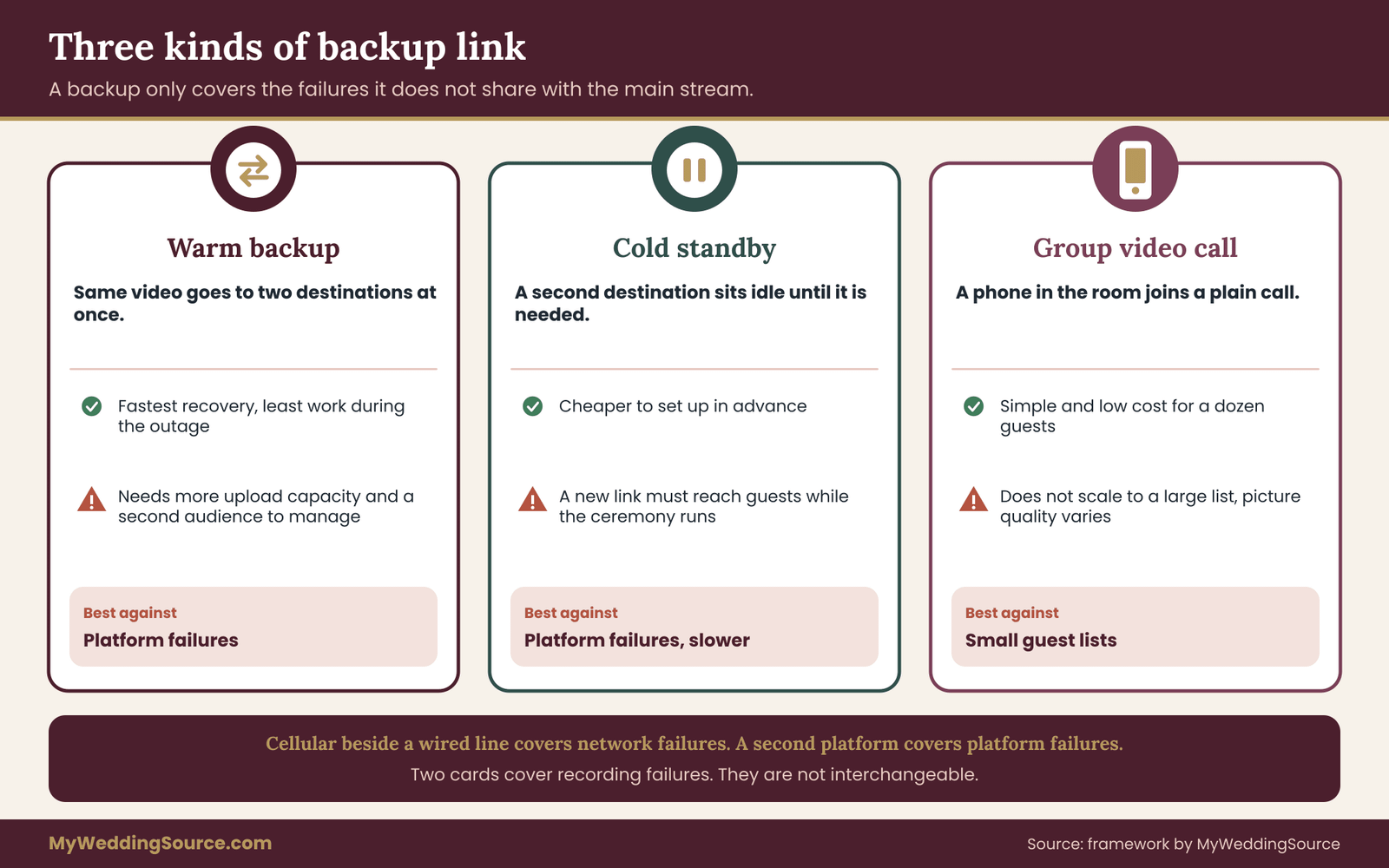
A backup link is the main defense against a platform livestream outage: a second way for remote guests to reach the ceremony, different enough from the first that a failure of one does not necessarily take down the other. It can take three forms. The first is a second destination on a different platform, with the same video sent to both at once.
The second is a standby destination that stays idle until needed, with a new link sent only when the first fails. The third, for small guest lists, is a plain group video call opened on a phone in the room.
Sending the same stream to two platforms at once, often called simulcasting, requires an encoder or service that supports it, more upload bandwidth, and a relay person who can handle two audiences. A standby destination is cheaper and simpler but costs time, because you must send guests a new link while the ceremony is under way. A group call on a phone is the lowest-tech choice and works for a dozen guests but not for a hundred.
Choosing between warm and cold backups
A warm backup, one already running, gives the fastest recovery and the least work during the livestream outage, but it costs more setup, more bandwidth and more complexity before the wedding. A cold backup, one that waits until needed, costs less in advance and more under pressure. The choice depends on how important the stream is to the people watching it.
If a few remote guests would be sad to miss part of the ceremony but would receive the recording within a day, a cold backup or no second destination may be enough. If a grandparent or a parent in another country is relying entirely on the stream, a warm backup is closer to a promise you can keep.
That is a values question for the couple, not a technical one, and the cost of a livestream outage to those guests is worth discussing in an honest conversation.
When to move, and when not to
Move to the backup link when all three of these hold: the failure is on the platform side, the time box has run out, and the backup is ready to carry the ceremony. Do not move when the problem is capture or the encoder, because the same fault will follow you to the new destination.
Do not move when the livestream outage is a single viewer’s issue. And do not move during the vows if the picture is merely frozen and the audio is live, unless the audio is lost too.
Switching after a livestream outage has an audience cost. Every remote guest has to notice the problem, read a message and open a new link, and some will not. If you expect to move, send the backup link to remote guests ahead of the wedding with the explanation: “If the main link stops working, use this one.” Guests who already hold both links can switch without waiting for a message, and your relay person can focus on the stragglers.
Keeping the backup honest
A backup that was never tested is a hope. The rehearsal should include opening the backup link from a guest’s point of view and confirming that the same video reaches it, with sound. Check that the backup has the same privacy setting as the main link, because a backup left public by mistake can expose a private ceremony to strangers.
Be careful, too, with consent and storage, since a livestream outage can push you to share links quickly. A second platform means a second place where the video exists. The guide to wedding photography consent explains how to set guest expectations about images, and the same thinking applies to a stream: decide who may watch, whether it is recorded by the platform, and when the backup copy will be deleted.
Telling remote guests during a livestream outage
Remote guests experience a livestream outage with no context. In the room, people can see the ceremony continuing, hear the officiant, and understand that something technical is happening somewhere else. At home, a frozen screen offers no explanation, and every extra minute of silence invites worry. A short, accurate message is the single most valuable thing the relay person can send.
During a livestream outage the relay person needs three things: a channel, a set of pre-written messages and permission to send them without asking. Pick one channel in advance, such as a group text thread, an email list or a pinned message in a messaging app, and tell remote guests ahead of the wedding that this is where updates will appear.
Do not make guests hunt through the video platform’s chat, because during a livestream outage the chat may be the very thing that is down.
A ladder of four messages
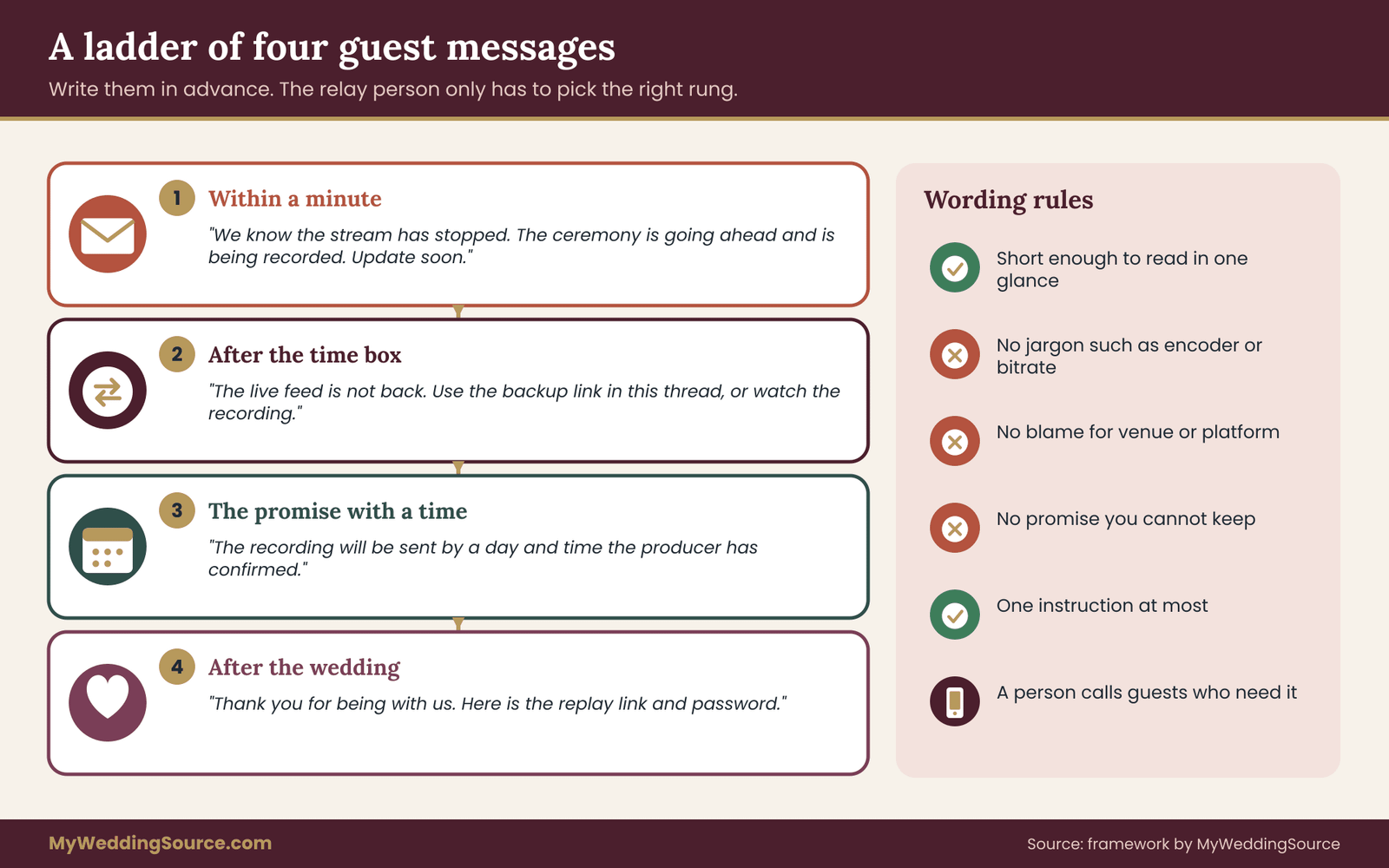
Write four messages ahead of time for a livestream outage and keep them on the relay person’s phone. They match the stages of the tree, so the relay person only has to pick the right rung.
The first message goes out within about a minute of a confirmed livestream outage. It says that the team knows, that the ceremony is continuing in the room, and that the recording is safe. A plain version might read: “We know the stream has stopped. The ceremony is going ahead and it is being recorded. We are working on it and will update you shortly.”
The second message goes out when the time box ends and a move has been chosen. It says what is happening next and what the guest should do. If you are switching, it names the new link or says it is already in the thread. If you are not, it says the live feed is not coming back for now and that the recording will be shared.
The third message is the one many couples forget: the follow-up promise with a time. “The recording will be sent by Sunday evening” is better than “soon,” because it gives a grandparent something to wait for. Only name a time your producer has confirmed they can meet.
The fourth message arrives after the wedding. It thanks guests, includes the replay link and password, and, if the livestream outage affected the ceremony, offers a short, sincere acknowledgement. That message turns a disappointment into a small piece of care.
Rules for the wording
Keep every message short enough to read on a phone in one glance. Avoid jargon such as “encoder,” “bitrate” and “ingest,” which mean nothing to most guests and can sound like excuses. Avoid blame: nobody needs to hear that the venue’s Wi-Fi failed or that the platform had an issue. Avoid promises you cannot keep, such as “we’ll be back in two minutes.” Say what is true and what will happen next.
Include one instruction at most. “Refresh once” is reasonable. “Try another browser” is reasonable for one guest. A list of five troubleshooting steps is a burden on someone who is already anxious and perhaps unfamiliar with technology.
Guests who need extra care
Not all remote guests have the same needs, and a livestream outage affects them unevenly. An older relative may not use a messaging app at all, and the update may need to be a phone call from a family member who is not in the ceremony.
A guest watching from a hospital or care setting may depend on a single device and limited data. A guest who is deaf or hard of hearing may be relying on captions that the platform generates automatically, and a livestream outage can break those too.
Make a short list before the day of the remote guests who should be reached by a person, not by a message, and give that list to a named volunteer. This is a small act of planning that makes the difference between a stream that serves everyone who was meant to benefit from it and one that serves only the most comfortable users of technology.
Telling the room
The same discipline applies in the room, though the stakes are different. In most cases the room does not need to know about a livestream outage. If the hold line is zero and the ceremony is moving on, there is nothing to announce, and an announcement would only draw attention to a problem the guests cannot fix.
If the plan includes a pause at a safe point, the officiant needs one agreed sentence, delivered calmly and briefly. Something like “We’ll take a moment while the team looks after the livestream for family who couldn’t be here” is warm and lets the room relax. It also gives the guests a reason to smile rather than worry. Keep it short, and have the officiant read it from the cue sheet so that nobody invents wording on the spot.
Phones in the room
Guests in the room sometimes take over the problem. A cousin who works in technology may offer to help, a guest may begin streaming on social media to fill the gap, or a group may start sharing the ceremony on their phones. Decide in advance what is welcome.
The guide to guest boundaries on images covers this in more detail, but for the stream the rule of thumb is that a guest broadcasting the ceremony live without agreement can create a privacy problem for others in the room.
If an unplugged ceremony is part of the plan, the same wording that asks guests to put phones away should say what happens if the stream fails: the recording will be shared, and nobody needs to start their own.
Questions to settle with the producer and the venue
Many decisions about a livestream outage depend on answers you can only get from the people who run the equipment and the building. Ask them early, ask in writing, and keep the replies with the contract. The point is not to catch anyone out; it is to make sure that the tree you have drawn matches the setup that will exist on the day.
For the producer, ask these questions in your own words. Does the recording run independently of the stream, on its own storage? Who is on site, and is there a second person who can take over if the captain is busy? Which platform and settings do you plan to use, and what happens on that platform if music is detected?
Is a backup destination or second connection included, and what does it cost? What is your usual process if the stream fails, and have you written it down? What happens to the fee if the stream fails but the recording succeeds? The guide to questions to ask wedding vendors offers a broader framework for these conversations.
Writing outage terms into the contract
If the stream matters to you, say so in the agreement. A clear contract names the deliverables: a live stream, a recording, a replay link and the date by which each will be delivered. It says whether a stream failure caused by the producer’s equipment is treated differently from one caused by the platform or the venue, and it says what the couple receives in each case, whether a partial credit, a re-edited recording or nothing.
The site’s guide to the wedding vendor contract explains how to read these clauses.
You do not need legal language, only a plain line on what a livestream outage means for the fee. You need a sentence that says what you will receive if the stream fails, so that nobody is surprised afterward. If a producer will not commit to anything, that is information about how seriously they take continuity.
What to ask the venue
The venue’s answers depend on its building. Ask who controls the network and who answers the phone for the network on the day. Ask whether a wired connection is available at the camera position, whether other events share the connection, whether cellular signal is reliable in the ceremony space, and whether you may bring an extra router or signal booster. Ask where power outlets are, and whether the circuits that feed the camera position are shared with lighting or catering.
Ask also about the plan for a power interruption, which can turn into a livestream outage and a recording failure at once. A power loss will stop the stream, and possibly the recording, and a battery backup for the encoder and camera can turn a long livestream outage into a short one. The guide to a venue technical walkthrough shows how to collect these answers on site.
Putting the answers on one page
The final step is to put the answers where the team will see them. A single page for the stream captain should list the decider and relay person with phone numbers, the venue network contact, the platform status page, the backup link, the time boxes and the safe pause points.
Keep it printed and in the producer’s bag, and as a photo on the phones of the decider, relay person and coordinator. If a screen is the only place the plan lives, a dead battery or a dead network takes the plan with it.
A worked case: a platform livestream outage during the readings
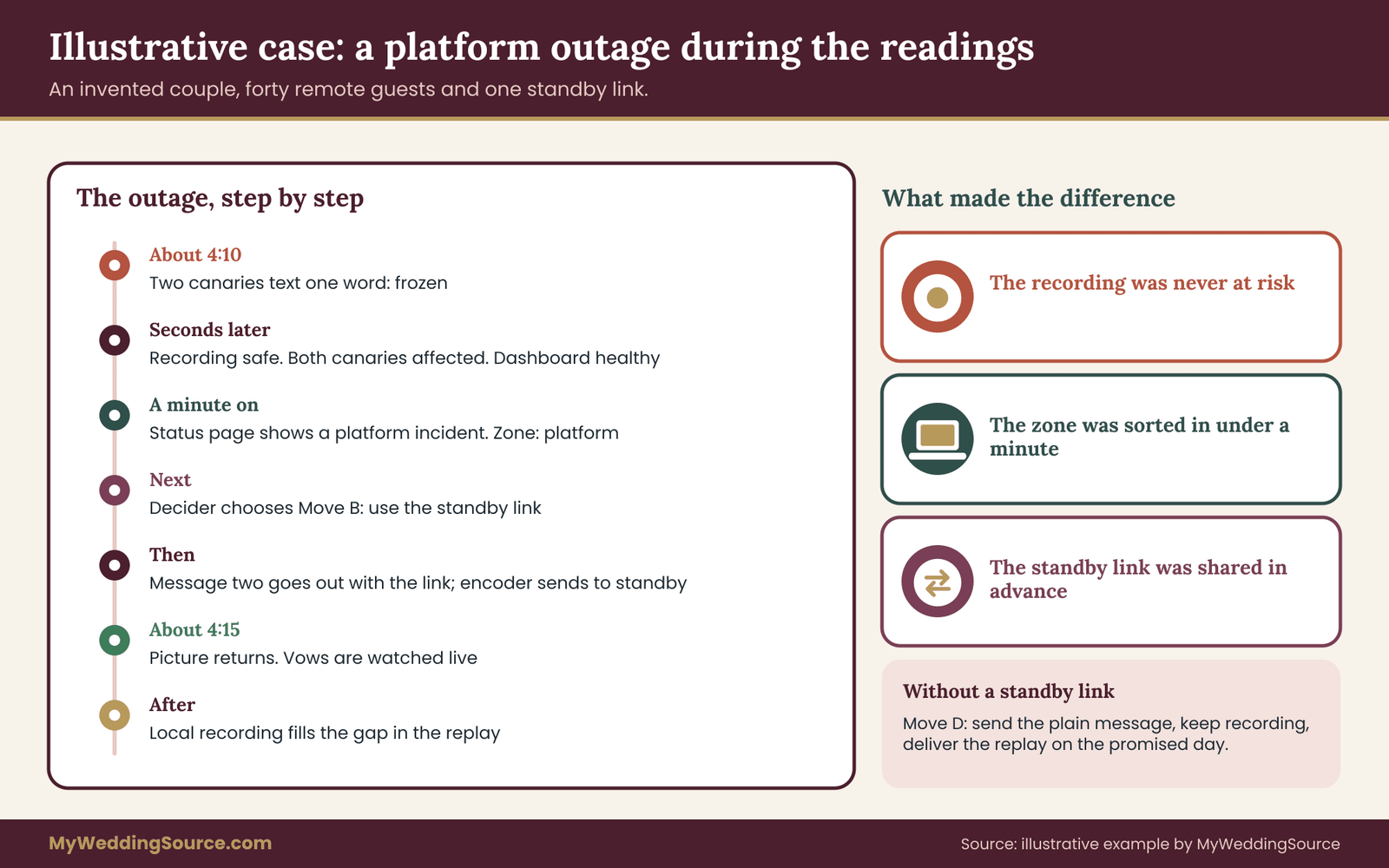
The example below is an illustration invented for this guide. The people, times and settings are made up to show how the tree behaves, not to report a real event or to suggest that your own wedding will look like it.
Nora and Elliot are marrying at four in the afternoon in a rented hall. About forty guests are watching remotely, and the livestream outage will reach all of them, including two grandparents in another country. They have hired a video producer who will run the stream from a table at the back with a laptop and a hardware encoder, and the venue has a wired connection plus decent cellular signal.
Their coordinator is the decider. Elliot’s cousin is the relay person, and two remote guests, an aunt on a phone and a friend on a home computer, are the canaries.
What was decided in advance
At the final planning meeting they agreed on a short card. The recording runs on its own card in the camera. The hold line is zero for the vows and one minute at a single safe pause point, between the second and third readings. The time boxes are two minutes for capture and encoder faults, four minutes for a network switch, and one status check for a platform fault.
A standby destination on a second platform was created, with its link sent to remote guests earlier in the week under the heading “If the main link stops.”
They also wrote four relay messages for any livestream outage, and gave the cousin permission to send the first without asking. The coordinator carries the card, and a photo of it is on the producer’s phone.
The outage, minute by minute
At about ten past four, during the first reading, the cousin’s phone buzzes with a one-word text from the aunt: “Frozen.” Eleven seconds later the friend sends the same. The cousin tells the producer, who runs the sequence aloud.
First, the recording: running, with plenty of space on the card. “Recording safe.” Second, both canaries affected, so this is not one household. Third, the dashboard on the producer’s laptop shows data arriving normally. That points past the encoder and the network. Fourth, a helper opens the platform’s status page on a phone using cellular data and sees a notice of a service incident affecting live video. The producer says it aloud: “Recording safe, everyone affected, dashboard healthy, platform incident. Zone: platform.”
The coordinator asks a single question: does the standby destination work? The producer says it is ready and that the switch will take about two minutes. The platform time box is one status check, which has been used, so the coordinator chooses Move B and tells the cousin to send the second message.
What the guests saw
The cousin sends the first message within a minute of the canaries’ texts, before the decision is made: the stream has stopped, the ceremony is going ahead and being recorded, an update will follow. A few minutes later the second message goes out with the standby link, and the producer starts sending the video to the second platform.
At about quarter past four the picture returns on the standby link. Most remote guests switch within a couple of minutes, with the canaries confirming that sound and picture are working. A few guests do not open the message in time. The cousin sends them the recording note later and calls one grandparent on the phone.
The vows come after the readings, and because the switch was complete by then, remote guests see and hear them live. The in-room program never paused, so the hold line was never used. The gap in the live view lasted several minutes during one reading, which the replay will fill from the local recording.
What this case shows, and what it does not
Three things made the difference in this livestream outage. The recording was never at risk, so the livestream outage was a disappointment rather than a loss. The sort by zone was fast, so no time was wasted restarting an encoder that was working fine. The standby link had been shared in advance, so the relay person was reminding guests rather than teaching them.
Now change one fact. Suppose no standby existed. The tree would have ended at Move D: the cousin sends the second message saying that the live feed is not returning and that the recording will follow by a stated time, the producer keeps recording, and the producer uploads the finished video after the wedding.
Remote guests would miss the live vows, which is a real loss, but they would not have been confused or left to wonder. That is the value of the plan even when the plan has no backup.
Change a different fact. Suppose the dashboard had shown no data arriving and the venue’s wired line had dropped. The producer would have moved to the cellular connection inside the four-minute network box. The decider would not have been involved beyond hearing “network switch in progress,” and the platform’s status page would not have mattered at all.
What the example leaves out
A real wedding has distractions this example of a livestream outage removes. The coordinator is also managing the officiant, a late reader and a flower girl who has changed her mind. The producer’s table may be crowded with guests who want to help. The aunt may reply to the group text with questions instead of a one-word report. The tree does not make these go away; it gives the team something to hold onto while they happen.
Failure conditions: when the tree itself breaks
No plan for a livestream outage works in every circumstance, and an honest one says where it stops working. These are the conditions under which this decision tree fails, and what to do about each one.
The recording fails too. If the stream and the local recording both stop, there is no safety net, and the tree has nothing left to offer for that stretch of the ceremony. The best defense is redundancy in the recording itself: record to two cards, or have a second camera or a phone running as an independent record. A guest’s phone is not a substitute, but a designated friend with a phone on a small tripod is better than nothing.
The decider is unavailable. If the coordinator is pulled away, the tree stalls. Name a backup decider and make sure that person knows. In small weddings, the backup may be the producer, but a producer who is both diagnosing and deciding is working with a conflict of interest, which is better than no decision at all.
The canaries share a failure. Two canaries on the same home network or the same device type tell you less than two on different ones. Pick them to be as unlike each other as possible. If both are in the same house, a household network problem can mimic a livestream outage.
The backup shares the point of failure. A second destination fed by the same laptop and the same venue connection protects against a platform livestream outage but not against a network or encoder outage. Know which failures your backup actually covers, and say so on the card. Cellular alongside the wired line covers network failures; a second platform covers platform failures; two cards cover recording failures. They are not interchangeable.
The time boxes collide with the venue’s schedule. If the venue has a strict curfew, a long livestream outage can cut into the next stage of the day. The time boxes should be short enough that a switch does not eat into the reception or the photographs.
The tree is too heavy for the team. A tree that requires four people when you have two will not be followed. If staffing is thin, cut it down to its core: keep the recording, set one time box, pre-write the messages, and accept that the livestream outage plan is a short one. A simple plan that people follow is better than a thorough one that they forget.
The facts change. Platform features, status pages, verification rules and terms change over time. Anything on the card that depends on a platform needs to be rechecked in the weeks before the wedding, and again in the last few days, by someone who opens the real pages rather than relying on memory.
When to downgrade the stream
There is a final failure condition for any livestream outage plan that is not technical. If the planning for a livestream outage is consuming more attention than the wedding itself, or if the venue cannot offer any usable connection and cellular signal is poor, the honest move may be to downgrade the plan. A professionally recorded ceremony with a replay delivered that evening serves remote guests nearly as well, with far less to go wrong, and it leaves the couple free to be present.
That is not a defeat. It is a decision, made in advance and for stated reasons, and it is often the kindest one for the people who matter most on the day.
Rehearsing the tree and closing out after a livestream outage
A tree that has never been used is a document, not a plan. The goal of a livestream outage rehearsal is not to prove that nothing will fail but to make sure that when something does, each person knows which sentence to say and which button to press. A short rehearsal does more good than a long meeting about what might go wrong.
A thirty-minute rehearsal
Schedule the rehearsal at the venue, ideally during the technical visit or a setup window, with the people who will be there on the day: the stream captain, the relay person, the decider and one canary on the phone. The venue visit is also a good moment to collect the network answers described in the venue walkthrough guide, and the wedding vendor timeline shows when to book these conversations.
Start a private test stream with the same equipment, the same event and the same settings as the wedding. Confirm that the canary can see and hear it. Then simulate a livestream outage by breaking something on purpose, one failure at a time, and walk the tree.
Unplug the wired line and time how long the switch to cellular takes. Stop the recording on purpose and see how quickly someone notices. Cover the camera lens and see who reports the problem. Ask the relay person to send the first message to a test group, and check how long that takes with real thumbs. Open the backup link from a device that is not signed in and confirm it plays with sound.
Write down the times. If the cellular switch takes five minutes instead of two, the time box for network failures is wrong, and it is better to learn that in an empty room.
The week before
In the last week, confirm every account and link. Log in to the platform with the account that will broadcast, check that live streaming is enabled, and make sure the event is the one guests have been sent. Check the stream key against the encoder. Check that the platform’s guidance on encoder settings has not changed since your last test.
Update the card with current phone numbers, and send the backup link to remote guests with its short explanation. Charge every battery and test every spare. Check the status page address and bookmark it on the phone that will use cellular data.
Confirm who is the canary, and ask them to be ready fifteen minutes before the start and to keep a phone nearby. Tell them what you will ask: watch, and text one word if anything looks wrong.
The morning of
On the day, the stream captain arrives early and runs the checks in order: power, capture, encoder, recording, network, platform. The relay person confirms the message thread and the four pre-written messages. The decider confirms the card is on paper and on phones.
Ten minutes before the ceremony, start the stream and ask the canaries to confirm. This is the moment to notice a problem while there is still time to solve it quietly. If the stream is weak or unstable at that point, use the time box while the room is still arriving, not while the processional starts.
During the ceremony
During the ceremony, before any livestream outage, the team’s job is to stay quiet and watch. The captain watches the dashboard and the recording indicator, the relay person watches the phone, and the decider watches the room. If nothing happens, nothing happens, and the card stays in the pocket. That is the best outcome, and it is the most likely one.
If something does happen, the order is the same as the rehearsal: recording first, then the canaries, then the dashboard, then the status page, then the zone, then the time box, then the decision. Say the phrases aloud. Resist the urge to improvise, because the card was written by people who were calm.
A one-page card, described in sentences
For readers who like to build the card themselves, here is what belongs on it. At the top, the order of priority: the room, then the recording, then the stream. Below that, the names and numbers of the decider, the stream captain, the relay person, the backup decider and the venue network contact. Then the four moves and the time box for each zone, followed by the hold line and the safe pause point.
After that, the first two relay messages in full, the backup link, the status page address and the account to use. At the bottom, a single line on what to do if the recording fails: tell the decider and the couple’s designated friend with the backup phone.
That is one page. If the card needs two pages, the plan is probably too complicated for the day.
After a livestream outage: recording, replay and a short review
Once the ceremony is over, the work of repairing the experience begins. The first job is to protect the recording. Copy it to at least two places before anyone leaves the venue if you can, and confirm that the files open and that they contain the full ceremony. If there is a gap, ask the producer to mark where it falls and why.
Delivering the replay
For remote guests who missed part of the live view because of a livestream outage, the replay is the apology that matters. Ask the producer when a replay link can be ready and what the privacy settings are. A private link with a password, shared only with the people who were invited to watch, is usually the right choice for a ceremony, and the policy for storage and deletion should be stated before the link goes out.
Send the fourth message from the ladder with the link and a plain thank-you. If the livestream outage hit the vows, consider a personal note to the guests who were most affected, such as a grandparent who was watching alone. A short, warm call from a family member can mean more than a perfect video.
Talking to the producer afterward
If a livestream outage hit your ceremony, have a calm conversation with the producer once the wedding weekend is over. Ask what the logs or the dashboard show about when and why it failed, and compare that with your contract. If the failure was within the producer’s control, such as an encoder that overheated or a missing backup that was promised, ask for the remedy the agreement describes. If it was the platform or the venue, ask what could have been done differently.
Keep the tone factual. The aim is to understand what happened, to receive what was promised and to record lessons, not to assign blame in the emotional days after a wedding. Written notes and timestamps help, which is why the relay person should note the times of each message sent.
A short review for the next event
Whether or not you ever plan another event, a livestream outage review teaches something, and a ten-minute review is worth doing while the details are fresh. Which questions on the tree were answered quickly? Which took too long? Did the time boxes match reality? Was the hold line right?
Did the messages say what guests needed to hear? Was the backup used, and did it work? Write down the answers in a short note; they are useful for the next family wedding, a vow renewal, a milestone anniversary or a friend who asks you for advice.
Closing the loop on privacy and storage
Finally, close the streaming account tidily. Delete or archive the event on the platform according to the policy you agreed, remove the backup destination, and change any passwords you shared. If a recording or replay is stored by a vendor, confirm when it will be deleted or how long it will be kept. After a livestream outage especially, a stream has a way of outliving its purpose if nobody decides when it ends.
The site’s guide to wedding day digital operations continues from here with backup communication and the handling of files and permissions, and it is a good companion if you want a plan that covers the whole day, not just the stream.
Your next steps
Work through these in order, and stop when you have what you need.
- Decide the order of priority: the room first, then the recording, then the stream. Write it on a card.
- Name the decider, the stream captain, the relay person and the backup decider. Confirm each person has agreed.
- Ask your producer how the recording runs independently of the stream, and who is on site beside the captain.
- Set your hold line: zero, or one short pause at a marked safe point on the cue sheet.
- Set time boxes for capture and encoder faults, network switches and platform faults, and test them in a rehearsal.
- Choose your backup: none, a standby destination, a warm second destination or a group call, and send the link to guests in advance.
- Pick two canary viewers on different devices and networks, and write the four relay messages.
- Rehearse once at the venue with a private test stream, then update the card with the times you measured.
FAQ
What should we do first when the wedding stream stops?
Check that the local recording is still running, and restart it if it is not. The recording does not depend on the internet and is the only part that cannot be redone. After that, ask your canary viewers whether the problem is widespread, read the dashboard, and sort the livestream outage by zone. Then apply the time box you agreed beforehand rather than waiting open-endedly.
Should the ceremony pause if the livestream fails?
That is the couple’s decision, made in advance. Many couples choose a hold line of zero, so the ceremony never waits and the recording becomes the plan. Others allow one short pause at a marked safe point, such as between readings. Avoid pausing during the vows, and give the officiant one agreed sentence if a pause is part of the plan.
How do I know whether the platform is the problem?
If your dashboard shows data arriving and several viewers still see nothing, the platform or a rights or account setting is the likely cause. Open the platform’s public status page on a phone using cellular data, not the venue Wi-Fi. A quiet status page does not prove everything is fine, so trust what your canary viewers report as well.
Do we need a backup link for a wedding livestream outage?
Not always. If remote guests would receive a recording within a day and the stream is a bonus, a backup destination may be more than you need. If a grandparent or parent is relying on the live feed, a standby or warm backup is worth the setup. Test it and send the link to guests beforehand.
Can music cause a livestream outage?
Yes. Some platforms use automated matching that can mute audio, block video or end a stream when recorded music is detected. The U.S. Copyright Office explains how copyright applies to music and video. Ask your producer what the platform does with recorded music, prefer live or properly cleared music for the ceremony, and put a muted-audio response on your card.
Who should decide what happens during a livestream outage?
One named person, with a backup, who is not busy being married. A coordinator or trusted relative often works best. Keep the decider separate from the person diagnosing the problem, because a decider who is also debugging cannot hear the whole picture. The stream captain reports facts, and the decider chooses one of four moves.
What should we tell remote guests?
Send a short, calm message within about a minute: the stream has stopped, the ceremony is going ahead and being recorded, and an update will follow. Later, say what happens next and promise a recording by a time your producer has confirmed. Avoid technical terms, avoid blame, and ask guests to do one simple thing at most, such as refresh once.
What if both the stream and the recording fail?
Then there is no safety net for that stretch, which is why the recording deserves redundancy: two cards, a second camera, or a designated friend with a phone on a tripod. Tell the couple honestly afterward, ask the producer to document what happened, and review your contract for what was promised. Planning two independent recordings is cheaper than regretting one.
Sources
- U.S. Copyright Office, copyright basics for music and video
- U.S. Federal Communications Commission, consumer broadband information
- Federal Trade Commission, consumer guidance on online services
- Cybersecurity and Infrastructure Security Agency, home and small-network security guidance
- YouTube Help, live streaming encoder and stream health guidance
- Zoom Support, bandwidth and network requirements
- Measurement Lab, open internet measurement platform
- Internet Engineering Task Force, standards for latency and packet loss
- National Institute of Standards and Technology, networking and measurement resources