
A multi-location livestream is a wedding stream that starts in one place and continues in another, or draws on several places at once. This guide explains what changes when the ceremony, the reception or a family ritual happen at different addresses, and gives you a cross-location responsibility matrix so that every duty at every site has a named person.
A multi-location livestream is not one stream repeated; it is one stream plus the handoffs between sites. Before the day, write a location sheet for each site, choose between one continuous link and one link per site, and fill in a responsibility matrix with an owner, a backup and a checker for every duty at every location. Plan the travel gap as its own segment with a holding slide and a message to remote guests. If you cannot staff two sites properly, stream one and record the other.
Most advice about streaming a wedding assumes one room. A camera goes on a tripod, a laptop sits on a table, a link goes out to the family, and everyone watches the ceremony from the same spot where it happens. That setup is hard enough. A multi-location livestream is a different job, and it begins the moment the day has a second address: a church and then a hall, a courthouse and then a backyard, a tea ceremony at a family home followed by a ceremony across town.
The extra address is not just extra distance for a multi-location livestream. It is a second internet connection nobody has tested, a second power situation, a second set of rules about cameras, a second sound environment, and a gap in the middle when the people who run the stream are in cars. A multi-location livestream fails in the seams between sites far more often than inside any single one, because the seams are where everyone assumes somebody else is paying attention.
This article is about those seams. It does not teach you how to choose a camera, how to size an internet connection or how to write a stream invitation. Those topics belong to a single-site stream and are covered elsewhere on the site. Here the question is narrower: once you accept that you are running a multi-location livestream, what has to be decided, who owns each decision, and what do you do when the plan meets a real day?
A note on scope. This is general planning information, not legal, technical or financial advice. Platform features, venue policies and music licensing rules differ and change, so confirm current terms with the platform, the venue, the faith community and your video producer before you rely on anything here.
What a multi-location livestream actually is
The phrase covers more situations than most couples expect, so it helps to define it by what the viewer experiences rather than by what the crew carries. A multi-location livestream exists whenever a remote guest is meant to follow the wedding across more than one physical place, whether that happens one after another or at the same time.
That definition includes the obvious case of a ceremony venue and a separate reception venue. It also includes a getting-ready scene filmed at a hotel, a family blessing at a parent’s home, a ceremony outdoors and a toast session indoors, or a second ceremony in a different city a few days later. It includes a person joining from far away, such as a grandparent reading a passage by video, although that case has its own details and is only touched on here.
It does not include a single venue with several rooms, even if the rooms are far apart on the property. One building shares one network, one power system and one set of house rules, and a producer can cable between rooms. Once the stream crosses a property line, a parking lot or a highway, you are running a multi-location livestream and the nature of the problem changes.
A useful test is this: could one person walk the whole route in a few minutes carrying nothing but a laptop? If not, you are planning a multi-location livestream.
Why the seams matter more than the sites
Think about where problems tend to appear in a multi-location livestream. Inside a site, the people responsible are present and can see what is going on. The producer is standing next to the camera. The venue manager is down the hall. If the microphone cuts out, someone nearby can say so.
In the seam, nobody is present. The equipment is packed, moving or half-unpacked. The people who understand the stream are driving. Remote guests are watching a screen that shows either nothing or a frozen frame, and no one is telling them what is happening. Decisions that would take ten seconds in the room, such as whether to restart the stream or leave it paused, become stalled because the person who could make them is in traffic.
That is why the central tool for a multi-location livestream is a responsibility matrix rather than an equipment list. Equipment tells you what exists. A matrix tells you who is accountable for each duty at each place and who takes over when the owner is somewhere else.
What this guide does not repeat
The site already has a broader guide to wedding day digital contingency planning, which covers backup communication, shared files and what to do when technology fails across the whole day. This article assumes that thinking exists and goes deeper on one slice: the structure of a multi-location livestream. If you are brand new to streaming, read that guide first, then return here once you know you have more than one address.
You do not need technical skill to plan a multi-location livestream with what follows. A couple planning with a hired producer, a producer planning with a couple and a coordinator holding the schedule can all use the same framework. The language is plain on purpose, because the people who most need to agree on it are not always the people who understand the gear.
Four shapes of a multi-location livestream
Not every two-address wedding has the same problem. Before you plan anything, decide which shape you have, because each one pushes the risk to a different place. There are four common shapes, and some weddings combine two of them.
Sequential sites. The wedding happens in one place and then moves to another. The classic example is a ceremony at a place of worship followed by a reception at a hall, with a drive in between. The stream is meant to be watched in order, and the central question is what the remote viewer sees during the move.
Parallel sites. Two things happen at once in different places. A tea ceremony at one home while the other family hosts a gathering, or a formal ceremony in a courtroom while a family celebration waits in a restaurant. The central question is which place the stream follows, because one crew cannot be in two places at the same time.
Hub and spoke. The main event happens at one site, and people at other places join it. A parent who cannot travel might watch the ceremony and then appear on a screen at the reception to give a toast. The central question is how the remote contributions enter the main event and who controls the switch.
Linked series. Two events on different days or in different cities are streamed as one story. A civil ceremony at city hall on Friday and a larger celebration back home on Sunday is one example. The central question is whether the two events share a link, an audience and a recording archive, or are treated as separate productions.
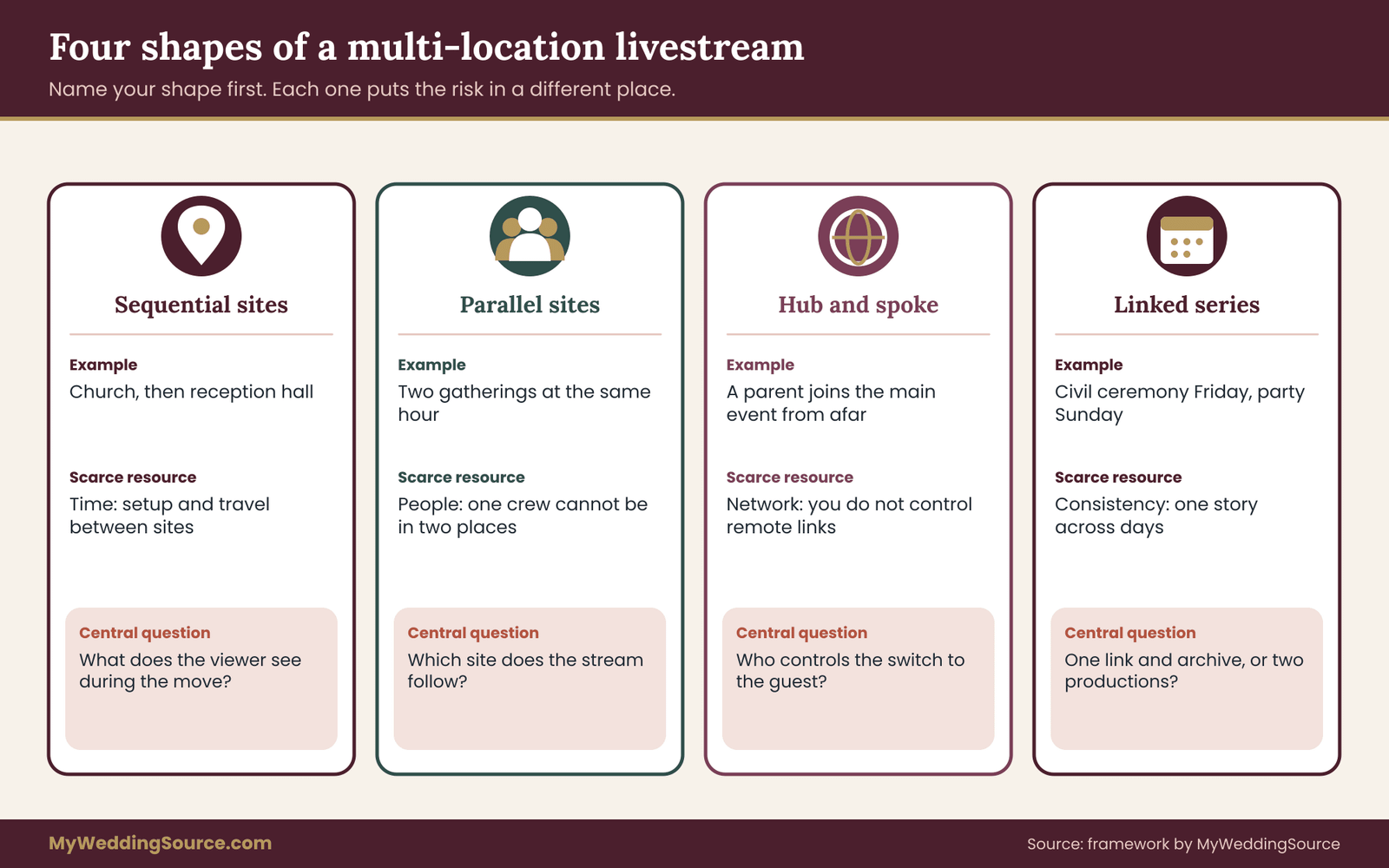
Each shape of a multi-location livestream raises a different version of the same issue. In sequential sites, time is the scarce resource, since a crew has to pack, drive, unpack and test. In parallel sites, people are scarce, because a second crew costs money and a volunteer is not a producer. In hub and spoke, the network is the scarce resource, because remote contributions depend on connections you do not control. In a linked series, consistency is the scarce resource, because guests expect the second event to feel like part of the first.
Naming the shape of your multi-location livestream also keeps you from borrowing advice that does not fit. Guidance written for a single venue often says “arrive early and test everything.” For sequential sites that is only half an answer, because there is a second arrival, and it happens with less time, more fatigue and guests already asking where the couple is. For parallel sites it is the wrong answer entirely, because the early arrival has to be duplicated.
Most real weddings are sequential, so the rest of this guide leans on that case when it gives examples of a multi-location livestream. Where another shape changes the advice, the text says so.
Ten things that change in a multi-location livestream
A single-site stream has a short list of dependencies: a camera, a sound source, a way to encode, a connection and a link. A multi-location livestream has the same list, repeated for each site, plus a set of dependencies that exist only because there is more than one place. Going through them one at a time makes the added workload of a multi-location livestream visible, and it explains why a plan that works for one room often breaks at two.
The network stops being one problem. In a single room you test one connection. With two sites you have two connections with different owners, different congestion patterns and different rules. A place of worship may have no guest network at all. A rented hall may have a connection that is fine for the office and poor for a continuous upload. A venue technical walkthrough is how you gather the answers at one site; in a multi-location livestream you do it twice and write the answers down separately, because the second site rarely resembles the first.
Power is no longer a given. Outlets near the camera position, circuits shared with lighting and sound, and the risk of a tripped breaker all vary by site. A producer who plugged into a wall at the ceremony may find the reception hall’s only convenient outlet sits behind the buffet. Batteries solve some of this, but a battery that was charged for one site has to be topped up before the next, and that needs a place and a time.
Setup time doubles, and the second setup is shorter. The first site usually gets a generous load-in window, often hours before guests arrive. The second site gets whatever time is left between the ceremony ending and the reception starting, and some of that time is taken up by travel. A second setup done in a hurry is the single most common cause of a late or missing second half of a stream.
The crew has to be in two places. One producer cannot run a camera at the ceremony and also be at the reception hall testing the connection. Either a second person goes ahead, or the producer packs up while the ceremony is still happening and leaves the camera unattended. In a multi-location livestream this is a staffing decision, and it has a cost. It is covered in the responsibility matrix later in this guide.
Continuity is no longer automatic in a multi-location livestream. In one room, the stream simply continues. Across sites, someone decides whether the same link stays alive through the move, whether a new link starts, or whether the first stream ends with a message. Each choice sends remote guests down a different path, and a guest who closes the tab at the end of the ceremony may not return.
Latency and sync show up differently. Streams run a little behind real time. If remote guests are also joining the reception by video call, or if a toast from one site is shown on a screen at another, delays stack up. A joke that lands in the room arrives seconds later on the screen. This matters less for passive viewers and more for anything interactive.
Rights and permissions repeat. The permission to film at the first site says nothing about the second. A place of worship may restrict cameras during parts of a service. A reception venue may have rules about music, lighting or the position of equipment. Music that plays at the reception may need licensing considerations that did not exist during the ceremony, a point returned to in the section on rules.
Consent becomes layered. Guests at the ceremony may have been told about the stream on the invitation. Guests who only attend the reception may not have been told at all. Staff at the venue, other parties using the same building and passers-by in a public place raise separate questions. The wedding photography consent guide covers the general principles; a multi-location livestream means applying them to each place and each audience.
Recording becomes several files. A single-site stream usually produces one recording. A two-site day often produces several: a recording per camera, a recording per site, perhaps a platform copy of each live session. Naming, storing and merging them is a small project of its own. If nobody owns it, the couple receives a folder of files named by timestamp and a vague promise that the edit will follow.
Communication has to travel with the people. In one room, a remote guest’s question goes to one family member’s phone. Across sites, there is a moment when the person who watches the guest chat is the person in the car. Someone needs the job of telling remote guests what is happening, and that job must not be tied to a location.
Why a checklist built for one site fails at two
Many couples start with a single-site equipment checklist and try to stretch it into a multi-location livestream plan. That approach produces a very long list with no owners, and it usually breaks in a predictable way. The list says “test the connection” once, and everybody assumes it was done at both sites. It says “bring a spare battery,” and nobody asks whether the spare is at the first site or the second. It says “send the link,” and the link goes out before anyone decides whether it will survive the move.
The failure is not carelessness. It is that a single-site list contains no concept of place or time. Every line looks the same, and a line that must happen at site A before 2 p.m. looks identical to a line that must happen at site B before 5:30. A better structure keeps three things separate: what must happen, where it happens and who does it. That is exactly what a matrix is for, and the next sections build one.
The three questions behind every duty
For each task in a multi-location livestream, ask three questions in order.
First, is this duty tied to a place or to the stream as a whole? Connection testing is tied to a place, because each site has its own network. Messaging remote guests is tied to the stream, because the audience is the same wherever the camera is. Keeping the two kinds apart prevents the common mistake of giving a stream-wide duty to a person who is leaving the room.
Second, can the duty be done in advance, or only at the moment? A permission check can happen weeks ahead. A last-minute battery swap cannot. Duties that can be done in advance should be, because the day itself has little spare attention.
Third, what happens if the person responsible is unavailable? That question produces the backup. A duty with no backup is a single point of failure, and in a multi-location livestream the person most likely to be unavailable is the one who is travelling between sites.
Which duties usually exist
The matrix later in this guide uses ten duties. They are worth listing now because they match the ten changes above. They are: connection, power, capture, sound, encoding and switching, the link and the audience, recording and files, permissions and consent, remote-guest messaging, and teardown and handoff. Every multi-location livestream has these ten, whether or not anyone has written them down.
What differs from one multi-location livestream to the next is who does them. A couple with a full video team may have a lead producer, a second operator and an audio engineer. A couple with a single videographer and a cousin has fewer people and therefore needs more discipline about who owns what. The matrix works at either scale; it simply has fewer names in it.
The cost logic of a second site
It helps to think about the cost of a multi-location livestream in terms of people-hours rather than equipment. Cameras and encoders are often reusable between sites. What cannot be reused is attention. A second site adds travel time, a second setup, a second test and a second teardown, and every one of those is paid for either in a producer’s hours or in a second person’s fee.
If a producer quotes a single-site stream and the couple turns it into a multi-location livestream by adding a second address, the honest question is what the quote assumed about time. Some producers include a move between sites in a package, others charge for it separately, and some simply do not cover it. Ask for the answer in writing, in the terms of the wedding vendor contract, so that a second site does not become a surprise line item or an unstated exclusion.
Do not assume that a multi-location livestream costs exactly twice as much. It usually costs less than double, because some equipment and planning are shared, and more than a single site, because the handoff is real work. The useful question is not “what is the total?” but “what exactly changes between the one-site quote and the two-site quote, and which of those changes are time, people or gear?” That framing lets you compare options fairly without relying on any invented figure.
One link or several: designing the audience path
The first design decision in a multi-location livestream is not about equipment. It is about what a remote guest clicks on and what they see afterward. Everything else follows from it, so settle it early and write it down.
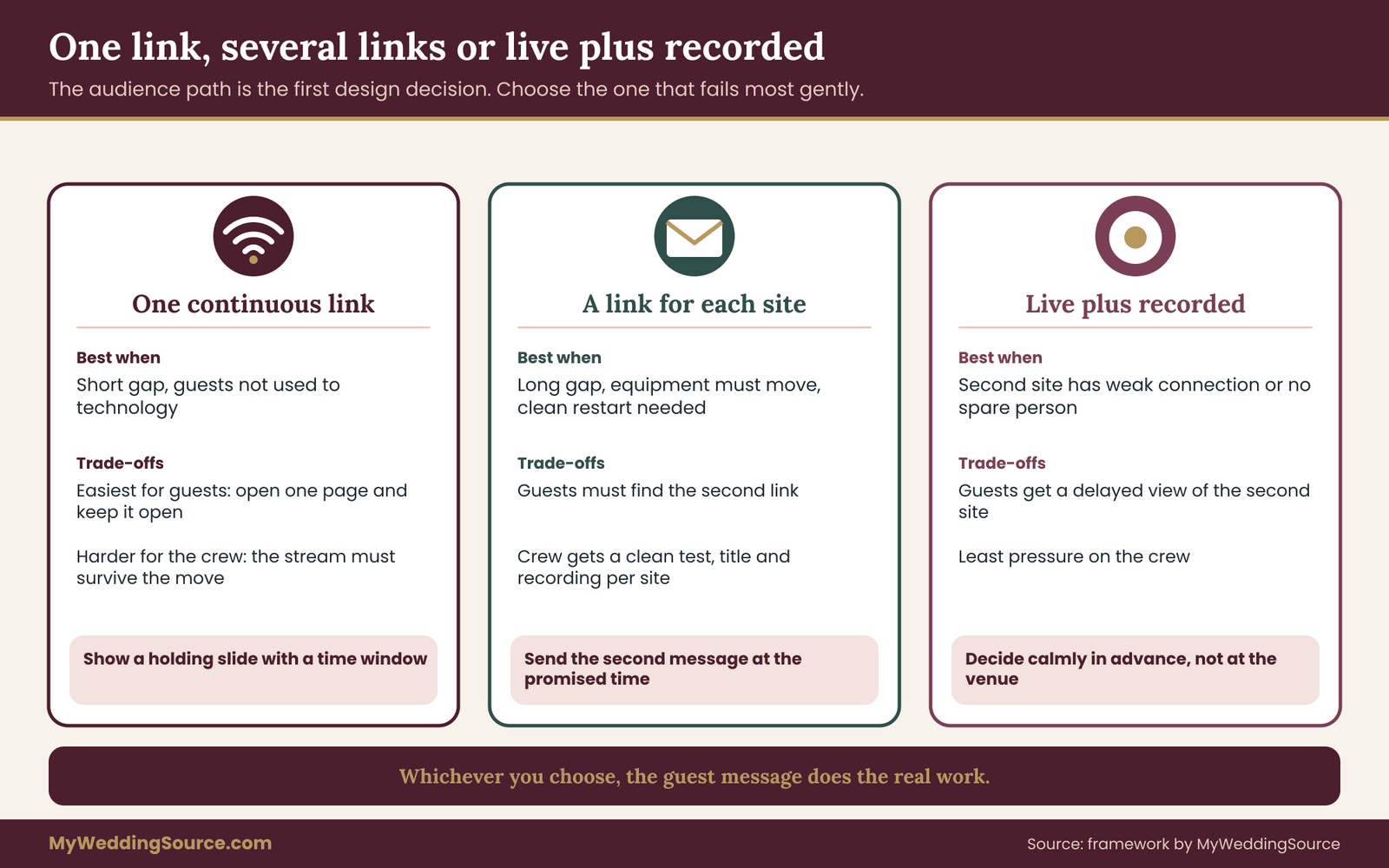
There are three workable patterns for a multi-location livestream. In the first, one continuous link carries the whole day, with a holding slide during gaps. In the second, each site gets its own link, and guests receive a second message when the next segment begins. In the third, only some sites are streamed live, and the rest are recorded and shared later.
The continuous link is the easiest for guests. They open one page and leave it open. It is harder for the crew, because the stream has to stay alive, or restart under the same address, while the equipment moves. Some platforms let you keep a scheduled event and reconnect an encoder to it; others end the event when the encoder disconnects. Read the platform’s own help pages before you promise anything, because behavior differs and changes.
The separate links are easier for the crew. Each segment starts clean, with its own test, its own title and its own recording. The cost is paid by guests, who must find the second link. A grandparent who finishes watching the ceremony and sees “stream ended” may not know there is more. Separate links work well when you are confident the audience is comfortable with email or text, and when someone is assigned to send the second link at a promised time.
The live-plus-recorded pattern is the most honest about limits. If the reception site has poor connectivity or no spare person, you stream the ceremony and record the reception for a short highlight or full upload afterward. The decision is made calmly in advance rather than forced at the venue.
A decision rule for choosing
Use these questions in order to shape your multi-location livestream, and stop at the first answer that settles it.
Is there a person who can set up and test the second site while the first is still running? If not, do not plan a live second segment. Choose the recorded pattern for the second site, or hire the help.
Did the second site produce a written, tested answer about its connection? If the only information is a venue’s statement that “the Wi-Fi is fine,” treat the connection as unproven and plan a backup path, as the digital contingency plan explains for the whole day.
Is the gap between sites short enough to hold a stream open? A gap of a few minutes can be covered by a holding slide on one link. A gap of an hour, with a meal at a restaurant in the middle, is better handled with two links and a clear message. Remote guests rarely want to stare at a still image for an hour, and a stream left running with no activity can behave unpredictably.
Are your remote guests mostly older, mostly unfamiliar with the platform, or mostly connecting from phones? If yes, lean toward one link. Every extra step is a place for someone to get lost.
If the answers point to different patterns, choose the one that makes your multi-location livestream fail most gently. A single link that drops at the move is worse than two links with a clear message, and two links with no message is worse than either.
What remote guests need to be told
Whatever pattern your multi-location livestream takes, the guest message does the real work. It should be short, sent through more than one route, and written before the day. It needs to say what the guest will see, when it begins, whether the link changes and where to find the next one.
A good message for a multi-location livestream has four sentences. The first tells the guest which part of the day this link covers. The second tells them what happens during the break and for roughly how long. The third says whether they should keep the page open or expect a new link. The fourth names a place to ask for help that is not the couple. Tell guests that the pauses are planned, because a blank screen that has been explained feels calm and an unexplained one feels like a failure.
“This link covers the ceremony. After the recess we will move to the reception hall, and the stream will pause for about forty minutes. Keep this page open, or watch for a text with the next link at five o’clock.”
Do not promise a precise restart time. Promise a window, and update it if the day runs late.
The cross-location production responsibility matrix
This is the core tool for planning a multi-location livestream. A responsibility matrix answers a single question for each duty at each location: who owns it, who covers for them and who checks that it was done. It sounds formal. In practice it fits on one page and turns vague assumptions into names.
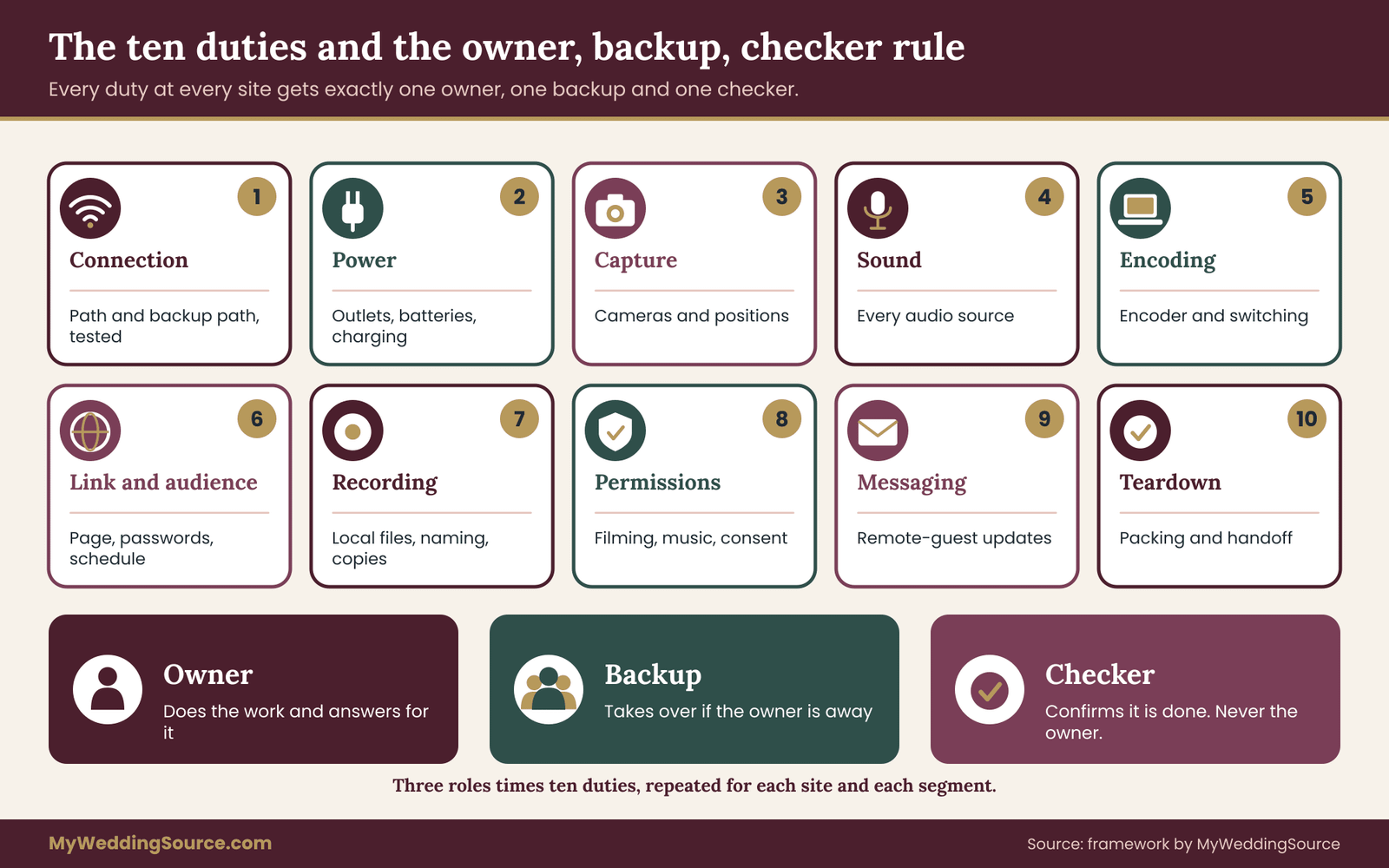
The matrix for a multi-location livestream has three ingredients. The first is a list of duties, which this guide fixes at ten so that nothing important is forgotten. The second is a list of locations and segments: the first site, the gap, the second site, and any remote contribution. The third is a list of three roles for each cell: the owner, the backup and the checker.
The owner does the work and answers for it. There is exactly one owner per duty per location. Two owners is the same as none, because each assumes the other is handling it.
The backup takes over if the owner is not available, and does not need to be present at the same time. The backup might be someone at the other site, or a person on the phone. What matters is that they know the duty exists and know where the details are written.
The checker confirms that the duty was done, using a simple observable test. The checker is not the owner. The point is a second pair of eyes: someone who looks at the connection test result, the battery level or the permission email and says “done” or “not yet.”
The ten duties, defined
Because the matrix for a multi-location livestream is only as good as its rows, each duty needs a one-line definition that everyone shares.
Connection is the network path from the site to the internet, including a backup path such as a second carrier or hotspot, and the test that proves it works with the encoder running.
Power covers outlets, extension cords, batteries and chargers, including where spare batteries are charged between sites.
Capture is the camera or cameras, their positions, framing and the permission to place them.
Sound is every audio source: the room microphones, the officiant’s microphone, any feed from the venue’s system, and the check that the stream hears what the room hears.
Encoding and switching is the laptop or device that turns the pictures and sound into a stream, and any switching between cameras or sources.
The link and the audience includes the stream page, passwords, the schedule of when each segment begins and the title and description guests see.
Recording and files means local recordings that do not depend on the internet, plus naming, copying and storage of everything produced.
Permissions and consent covers filming permission at the site, music rules, and notices to guests and staff.
Remote-guest messaging is communication with viewers before, during and after: the pre-day message, the break message and any support requests.
Teardown and handoff is packing, counting equipment, loading, and the explicit transfer of responsibilities to the next site.
Rules for filling in the matrix
A matrix full of names is not automatically a good one for a multi-location livestream. Five rules catch most of the weak spots.
The traveler rule. Nobody owns a stream-wide duty if they are scheduled to be in a car during the segment where it matters most. The remote-guest messaging duty is the usual victim. If the producer owns it and the producer drives between sites, guests hear nothing for the whole gap. Give it to someone who stays put or who is not driving, such as a coordinator, a relative at home or an assistant with a phone.
The overlap rule. No person owns the same duty at two sites during overlapping times. This sounds obvious, but it is easy to violate on paper. If the producer owns the connection at both locations, and the reception setup begins while the ceremony is still on, the matrix has quietly assigned one person to two places.
The independence rule. The checker is never the owner. When a team is small, this is the rule most often broken, and it is worth the awkwardness. A checker can be a guest with a clipboard, as long as they know what a pass looks like.
The written-down rule. Every cell gets a name, and every name gets a phone number that works on the day. A cell that says “producer” is better than a blank, but a cell that says “Priya, producer, text first” is better still. The matrix lives in a shared document, and each person holds a printed or offline copy, because a site with poor connectivity is exactly where you cannot open a shared file.
The couple-out rule. The couple should own as little as possible on the day. Their role is to approve decisions in advance and to be the final authority on one question only: do we carry on or pause? Everything else belongs to someone who is not getting married.
Three staffing sizes
The right matrix for a multi-location livestream depends on how many people you actually have. Here are three common cases, written as realistic patterns rather than recommendations.
With one hired producer and one volunteer, the producer owns capture, sound, encoding and recording at both sites, and the volunteer owns messaging and teardown support. This setup has no real overlap protection. It works when the second site is simple and the gap is generous, and it should include the live-plus-recorded fallback for the second site if anything looks tight.
With a producer and a second operator, the producer runs the first site, and the second operator goes ahead to the next site to handle connection, power and a first test. The producer then arrives, takes over encoding and capture, and the second operator stays on connection and troubleshooting. This is the most common sensible pattern for a sequential multi-location livestream with a drive between sites.
With a full crew and a coordinator, each site has its own lead, there is a stream captain who controls the link and the platform page, and a coordinator holds the schedule and the guest message. Here the matrix is mainly a communication tool. Its job is to make sure the handoff between leads is explicit.
None of these staffing sizes is better for a multi-location livestream in itself. The mistake is to adopt the third pattern’s expectations with the first pattern’s people.
Filling one cell well
An example shows the difference between a vague entry and a usable one. Consider the connection duty at the second site, a reception hall.
A vague entry reads: “Connection, hall, Sam.” That tells you who to blame, and little else.
A usable entry reads: “Connection, hall. Owner: Sam, arrives at the hall at 4:15. Backup: Dev, brings a spare hotspot, by phone until 4:45. Checker: Ana, reads the test result off the encoder screen before the ceremony ends and texts a single word, ‘green’ or ‘red.’ Test: encoder running for ten minutes with the sound on. If red, switch to the backup path and tell the stream captain.”
The second version names a time, a backup, a separate checker, a test and a next step. It takes less than a minute to write, and it is the difference between a plan and a hope.
Location sheets: what to learn about each site
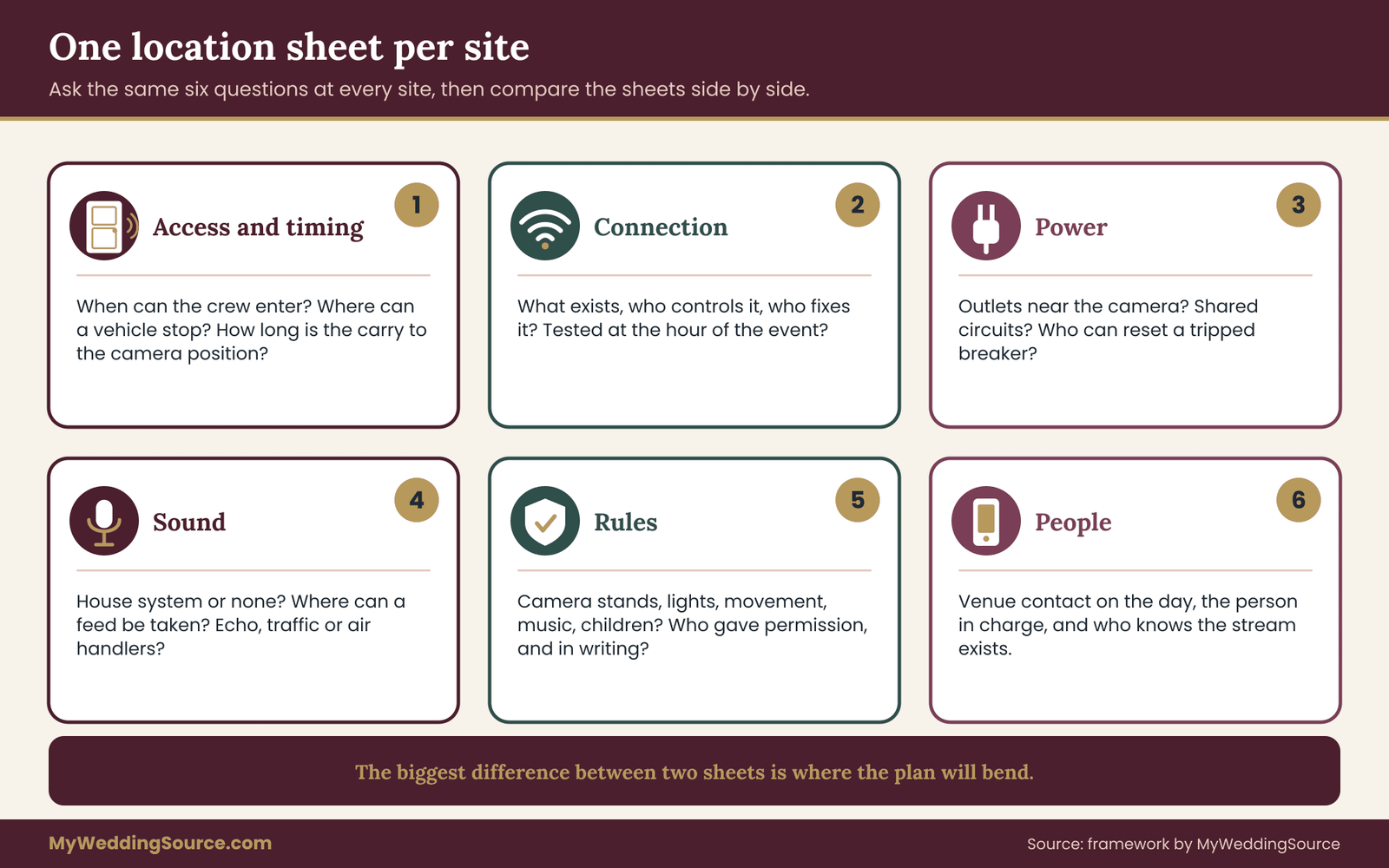
A matrix says who. A location sheet says what, for one place. Every site that will carry or receive a multi-location livestream deserves a one-page sheet, filled in before the event, ideally after a visit or a call with the venue contact. The sheet is not a technical specification. It is a record of facts you will want at the moment something goes wrong.
The headings are the same for each site so that you can compare them. That is the reason to use a fixed format: the differences between sites jump out when the same questions get asked of both.
Access and timing. When can the crew enter? Where can a vehicle stop? Is there a loading area, an elevator or a staircase? How long does it take to carry equipment from the car to the camera position? These answers set the real length of the second setup in a multi-location livestream, which is usually longer than anyone guesses.
Connection. What is available, who controls it and who is the contact if it fails? Is there a guest network, a wired port or nothing? Has anyone run a test at the hour of day the event will happen, with other people using the network? A quiet network at noon on a weekday can behave differently on a Saturday evening.
Power. Where are outlets relative to the camera and encoder positions? Which circuits are shared with sound, lighting or catering? Is there a person who can restore a tripped breaker?
Sound. Does the site have its own system? Can the stream take a feed from it, and from what point? Is the room echoing, noisy or subject to outside sound such as traffic or an air handler? The wedding ceremony cue sheet guide is useful here, because the stream should hear the same cues the room does.
Rules. What does the site allow? Cameras on stands, a camera in an aisle, flash, lights, a person moving during a service? Does the site restrict recording of music, of specific rituals or of children? Who gave permission, and is it in writing?
People. Who is the venue contact on the day, and what is their phone number? Who is the person in charge of the building if that is a different person? Who at the site knows the stream exists?
Using the sheet before the day
The sheet earns its keep long before the multi-location livestream begins. A conversation with the venue, guided by the sheet, tends to surface problems when they are cheap to fix. A request to move a camera position is simple a month ahead and awkward ten minutes before the ceremony. The same goes for a request to change an outlet, to relax a rule, or to bring a second person into the building.
Compare the two sheets of your multi-location livestream side by side once both are complete.
Look for the largest differences, because those are where the plan will bend. If the first site has a wired connection and the second has none, the second needs a backup path before anything else. If the first allows lighting and the second does not, the picture will look different, and the couple should expect that. If the first has a house sound system and the second does not, the producer needs a portable audio solution that does not depend on the room.
Bring the sheets to the walkthrough of each site. The planning in the venue technical walkthrough guide shows what to measure and who to meet; the sheet is where you record what you learned in a form that someone else could use if you were not there.
When a site cannot be visited
Sometimes you cannot visit a site in advance, for example when the second location is a family home in another city or a rented space that is not open for visits.
In that case, replace the visit with a structured call or video tour. Ask the host to walk to the likely camera position and show the nearest outlet. Ask them to run a speed test on their own network at the hour of the event and send a screenshot. Ask what is in the room and what the room sounds like when a few people talk.
These steps are not as good as a visit, but they convert an unknown into a documented risk. A documented risk can be managed, and an unknown risk cannot. If the answers raise concerns, the matrix should compensate by placing the strongest operator at that site and by preparing the recorded-only fallback.
The handoff: moving a multi-location livestream between sites
The handoff is the part of a multi-location livestream that has no equivalent in a single-site stream, so it deserves its own plan. A handoff is the period from the end of the last scene at one site to a verified first picture at the next. It has stages, and each stage has an owner.
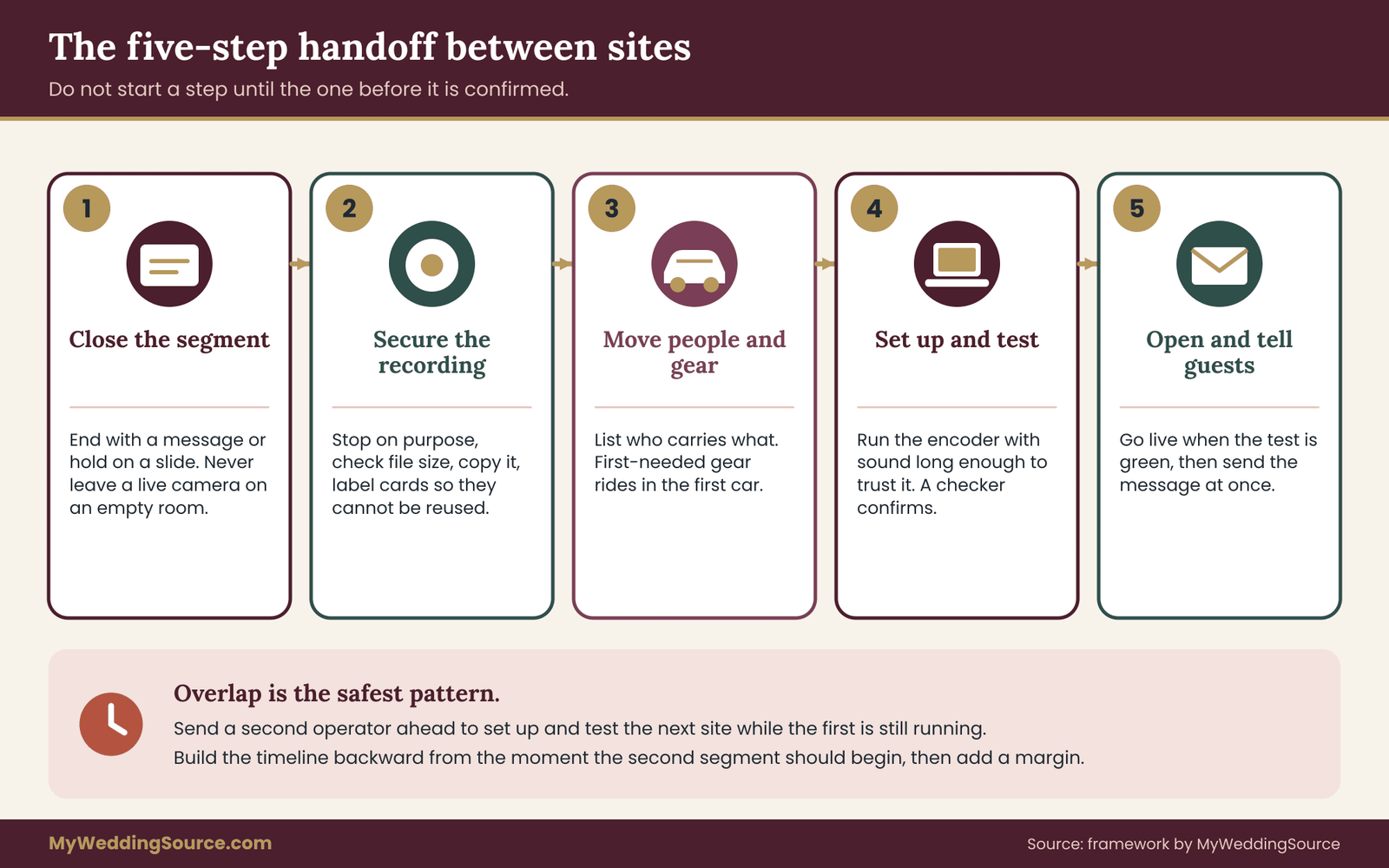
Think of it as five steps. Close the first segment cleanly. Secure the recording. Move people and gear. Set up and test at the second site. Open the next segment and tell guests. Treat each step as a separate checkpoint, and do not let the next one begin until the last is confirmed.
Close the first segment cleanly. Decide whether the stream ends with a message or stays live on a holding slide. If it ends, post the next-step note where guests will see it. If it stays live, make sure the slide says what is happening and when it will resume. Do not leave a live camera pointed at an empty room, which tends to look like a mistake and sometimes captures things nobody wants broadcast.
Secure the recording. Stop each local recording on purpose, check that the file exists and has a sensible size, and copy it before anything is packed. A recording that was never closed properly can be damaged, and a memory card that gets reused at the second site can be overwritten. Label the first site’s cards or drives so they cannot be mixed with the second site’s.
Move people and gear. This is where the traveler rule applies. List what travels, who carries it and which vehicle it rides in. Put the items needed first at the second site, such as the encoder, the connection gear and the spare batteries, in the first car. Nothing important should be stored in a vehicle that will arrive after the guests.
Set up and test at the second site. The person who went ahead has already done much of this. When the main crew arrives, the job is to attach the camera, check the picture and sound and run the encoder long enough to trust it. A short test is not a real test. Run the stream for a while with sound before you call it ready, and have the checker confirm a visible and audible result.
Open the next segment and tell guests. Start the stream only when the test is green and the room is ready, and send the guest message as soon as it is live. If the stream is late, say so, and give a new window rather than silence.
Overlap is your friend
The safest pattern for a sequential multi-location livestream is overlap: the second site is prepared before the first site ends. A second operator who arrives early, sets up, tests the connection and records a short clip is worth more than any amount of speed afterward. When the main crew arrives, the second site is already close to ready, and the gap shrinks to the travel time itself.
Overlap in a multi-location livestream costs a person. If there is no second person, you cannot have overlap, and the gap has to be longer. That is not a failure; it is information. Share it with the couple and the planner so the reception schedule includes the real gap. A plan that expects the stream to resume twenty minutes after the ceremony ends, when the crew needs an hour, is a plan that fails on the first day.
Build the timeline of the multi-location livestream backward from the moment you want the second segment to begin. If the reception is scheduled for 5:30, and the stream should be live a few minutes earlier, the test must be finished before that, the setup before the test, and the drive before the setup. Write each time on the matrix next to the person responsible. Then add a margin, because traffic, parking and a slow elevator will take it.
The holding slide
A holding slide is a still image that remote guests see during a pause. It sounds minor, and it has an outsized effect on how a multi-location livestream feels. On a multi-location livestream, a good slide says what is happening, gives a time window and promises that the stream will return. It does not show the couple’s names in a way that looks like a title card for a film that has already begun.
Keep the wording plain. “We are moving to the reception. The stream will resume at about five thirty. Please keep this page open.” That is enough. If the platform supports it, a countdown can help, though it can also create false precision. If the gap runs late, update the slide rather than letting the countdown reach zero and stall.
Do not play music over a holding slide unless you have confirmed the music is properly licensed for the stream. Silence is safer than a copyright notice, and a calm slide with no sound is perfectly acceptable.
What to do about the first-site camera when the second begins
If you have two cameras, you may be tempted to keep one at the first site running while the second begins. Avoid this unless it is intentional. A live camera pointed at an empty room invites confusion and can capture private moments. Either stop it or plan the audience path deliberately, for example a live cutaway to a family gathering that remains at the first place.
When the second site is a family home and the first is a ceremony hall, a short return shot might be used for a final thanks from relatives who stayed behind. That is a hub-and-spoke arrangement and needs its own owner. If nobody owns it, leave it out.
Rights, privacy and venue rules that change from site to site
A multi-location livestream multiplies rules as well as equipment. Each site has its own policies, and each audience has its own expectations. Handling these calmly before the event protects the day and the people in it. This section is general information; confirm specifics with the venue, the platform and the rights holders.
Permission to film
Do not assume that permission at one place carries to another in a multi-location livestream. Ask each venue in writing what is allowed: cameras on stands, cameras on the move, lights, microphones, and the position of equipment during different parts of the event. Places of worship and government buildings, in particular, often have rules about what may be recorded and when. Some allow filming of a ceremony but not of a particular ritual, and some require that equipment stay in a fixed position.
Ask who gives permission and whether they will confirm by message. Save that message with the location sheet. If the answer is conditional, such as “only from the back,” plan the picture around the condition rather than hoping it will be forgotten on the day. The venue’s rule wins, and it is easier to design a shot around a rule than to argue with it at the door.
Music and rights
Music is the area where a second site most often introduces a surprise into a multi-location livestream. A ceremony with live music from a friend or a house organist raises different questions from a reception with a playlist or a DJ. When a stream carries music, rights questions can come up for the performance, the recording and the platform. The U.S. Copyright Office explains the basics of copyright and the rights involved, and performing rights organizations such as ASCAP, BMI and SESAC explain how public performance licensing works in the United States.
Streaming platforms have their own policies about copyrighted music, and automated systems can mute or block content. Their behavior differs from platform to platform and changes over time, so read the current help pages. A practical approach is to decide what the stream will carry. Many couples choose to stream the ceremony with its sound and to mute or reduce licensed recorded music during the reception segment, using the live room sound for speeches instead. The wedding reception music planning guide covers how to plan the music itself.
If recorded music matters to remote guests, ask the platform and the DJ what is possible, and consider sharing a short recorded clip later rather than relying on a live stream that might be interrupted. This is a point where a quick, honest conversation with the producer is worth more than assumptions.
Consent and notice
The wedding photography consent guide explains the general approach to telling guests that they may be filmed. In a multi-location livestream, notice needs to reach everyone who will be in front of a camera at either place. Guests who attend only the reception may not have seen a ceremony notice. Venue staff, musicians and other people in shared spaces also deserve to know.
Practical measures include a line on the invitation or wedding website, a small sign near the entrance of each site and a brief announcement at the start of each segment. Offer a seat out of frame to guests who prefer not to appear, and honor requests about children. These measures cost little and prevent awkward moments.
Remember that a stream can be watched by more people than the couple intends if the link spreads. Use a private or unlisted link where the platform allows, and consider a password sent separately. Turn on the platform’s account security options, including two-step verification, and limit the number of people who can control the stream page. The Cybersecurity and Infrastructure Security Agency publishes plain-language advice on account security that applies directly to a stream account.
Radio and other shared resources
In a multi-location livestream, wireless microphones and other radio equipment share airspace, and what works at one site may not at another. A venue in a dense downtown area may have more interference than a quiet rural hall. The Federal Communications Commission publishes information about wireless microphone operation in the United States, and a professional audio person will know the practical issues. Ask the producer to test wireless gear at each site rather than assuming that a setup that worked once will work again.
A worked case: a church ceremony and a rented hall
The following example is invented for illustration. The couple, the crew and the times are made up, and nothing in it describes a real event or a measured result. Its purpose is to show how the decisions in a multi-location livestream connect.
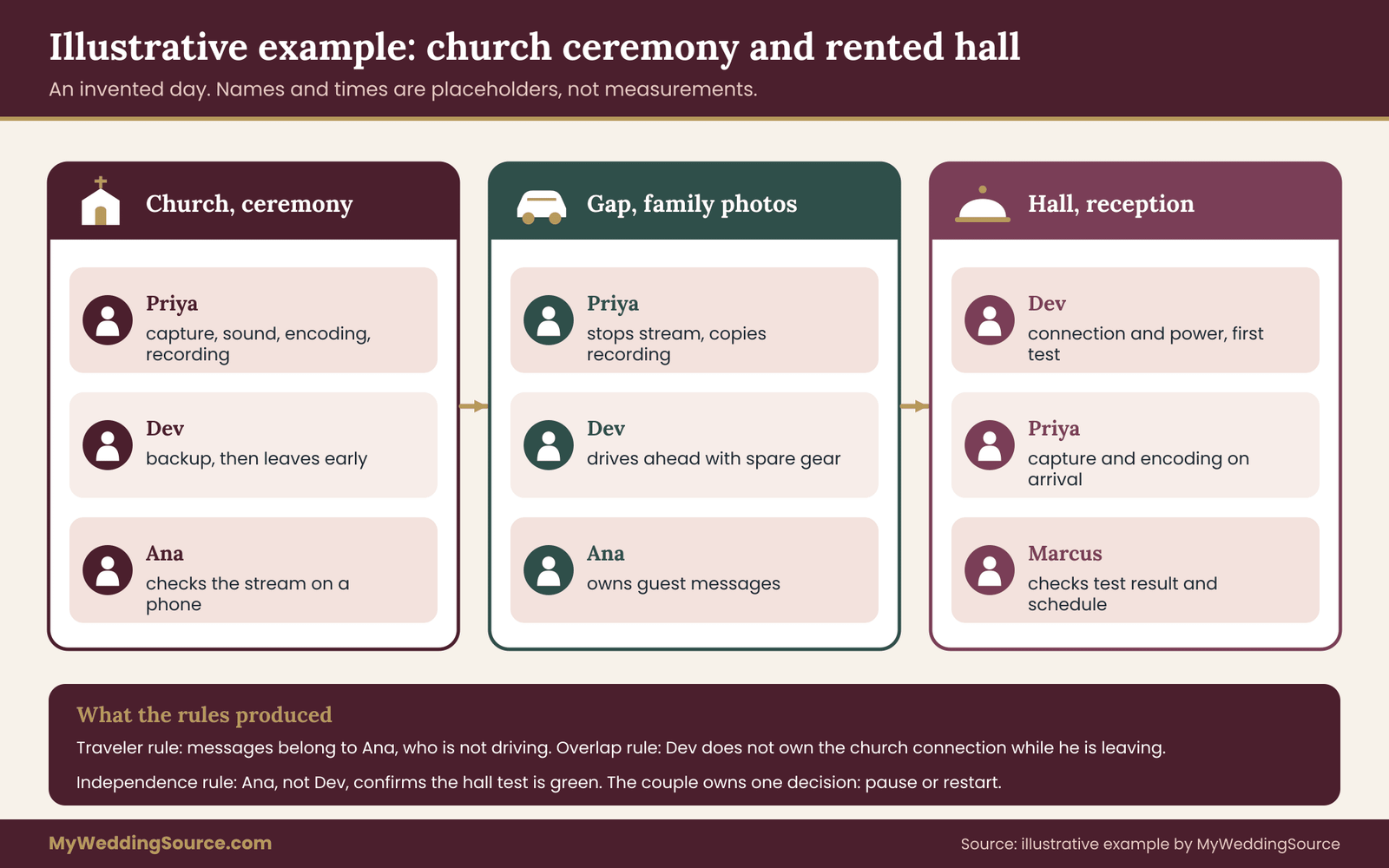
Imani and Daniel are planning a multi-location livestream around a ceremony at a community church at 2:00 p.m. The reception is at a rented hall, a thirty-five minute drive away, and it begins at 5:00 p.m. About thirty relatives and friends will watch remotely, most from phones, and several are older and not used to streaming. The couple has hired a producer named Priya. A second operator, Dev, is available for part of the day, a cousin named Ana can handle messages, and a day-of coordinator named Marcus holds the schedule.
Step one: pick the shape and the pattern
The shape of this multi-location livestream is sequential. The gap between the ceremony and the reception is long, because there are family photographs at the church after the ceremony and a pause before the guests arrive at the hall. A long gap points toward two links rather than one continuous stream, since a still slide for two and a half hours serves nobody.
The couple chooses two links. The first covers the ceremony. The second covers the reception from the entrance through the toasts. Remote guests receive one message before the day with both start times and a promise that a second message will arrive with the second link.
Step two: write the location sheets
The church sheet records that the building has no guest network, that the rector allows a camera on a stand at the back and one on the side aisle but no movement during the service, and that a wired audio feed from the church system is available at the sound desk. The hall sheet records that the venue has a guest network of unknown quality, one outlet near the likely camera position and a rule against stands on the dance floor.
Comparing the sheets, the biggest difference is the connection. The church needs a cellular hotspot, since there is no network. The hall has a network that nobody has tested. The producer decides that both sites will carry a second path, a hotspot on a different carrier from the primary one.
Step three: fill the matrix
The matrix puts the lead roles in the following way. At the church, Priya owns capture, sound, encoding and recording, with Dev as backup and Ana checking that the stream is visible on a phone. At the hall, Dev owns connection and power, Priya owns capture and encoding once she arrives, and Marcus checks the test result and the schedule. Ana owns remote-guest messaging across both sites, because she is not travelling with the equipment. The couple owns one thing only: approving a pause or a restart.
Look at what the rules produce. The traveler rule keeps messaging away from Priya, who will drive. The overlap rule keeps Dev from owning connection at the church during the ceremony, since he leaves early for the hall. The independence rule means Ana, not Dev, confirms that the test result is green at the hall, because Dev did the test.
Step four: run the day
At 1:45 the first stream goes live with a holding slide. The ceremony runs from 2:00. At 2:40, as family photographs begin, Priya stops the stream with an end message and copies the recording to a second drive. Dev leaves for the hall with the spare batteries, the second hotspot and the connection gear.
At the hall, Dev finds the outlet behind the DJ table. He asks the hall contact whether a power strip can run along the wall, and the answer is yes. He runs the connection test at four o’clock and sees a result that looks good for a moment but wobbles when he plays sound through the encoder. Because the plan includes a second path, he switches to the hotspot, runs the test again and reports green to Ana.
Priya arrives at 4:30, sets up the main camera at the side of the dance floor to respect the stand rule, and records a sample clip. Marcus confirms the schedule. At 5:10 the second stream goes live with a holding slide, and Ana sends the second message with the link.
What the example shows
Notice what did not happen in this multi-location livestream. Nobody had to decide in the moment who was responsible for the connection, because the matrix said so. The hall’s unproven network did not become a disaster, because a backup path was prepared and the test happened early enough to use it. Remote guests were not left with a blank screen, because the messaging belonged to someone who stayed put.
Also notice what the example does not claim. It does not claim that the second stream was flawless, and it does not promise that the hotspot would have been enough if the hall’s walls blocked the signal. It shows a process for finding problems when they are still cheap, and for knowing who acts when they appear. If the hotspot had also failed, the matrix would point to the next step: the recorded-only fallback for the second segment, announced to remote guests by the person who owns messaging.
Swapping the example into your own day
To use this case as a pattern for your own multi-location livestream, replace the facts with your own and keep the structure. The structure is: pick the shape, choose the audience path, write a sheet per site, assign ten duties to named people with backups and checkers, and rehearse the handoff. The facts, including times, crew size and venues, will differ, and so will the answers.
One caution on numbers. The times above are placeholders chosen to make the example readable. Do not copy a drive time, a setup time or a test length from an example. Measure your own, with the real route at the real hour, and add a margin that fits your crew.
Alternatives when a multi-location livestream is more than you need
Not every wedding with two addresses needs a multi-location livestream with a live second segment. Sometimes the honest answer is that a simpler plan serves remote guests better, with fewer ways to fail. Consider these alternatives before committing, and treat them as real options rather than consolation prizes.
Stream one site, record the other. This is the most common sensible simplification of a multi-location livestream. The ceremony is the part remote guests most want to see live, so stream it well and record the reception for a short edit or a full upload later. The recording still needs an owner and a backup, but the live pressure is gone.
Stream the main event and add live toasts by call. If a parent cannot attend, a video call that joins the reception for a toast can do more than a full second stream. It needs a stable connection and a person to manage the screen, and the delay issues mentioned earlier apply. Decide in advance whether the toast also appears in the livestream or only in the room.
Use a pre-recorded segment for the second site. A short video of the venue, the family gathering or a message from the couple can stand in for a live second segment. It is predictable and can be checked in advance. It is also less immediate, so use it where immediacy matters less.
Choose one camera that moves. A single operator with a compact setup and a mobile connection can follow the couple from one place to another. This can work for a short move with a good cellular signal. It is demanding for the operator, and it gives up most of the control a fixed setup offers, so treat it as a specialist option and ask the producer directly whether they do it.
Share a recording the same evening. Some couples skip live streaming for the second site and send a short clip to remote guests that night. It keeps remote guests involved without staking the day on a connection.
Comparing the options in plain terms
Each alternative trades something. A fully live multi-location livestream gives remote guests the most, and it asks the most of the crew and the network. A recorded second segment gives remote guests a delayed view, and it asks far less. A call-in toast gives a single moment of presence, and it asks for careful screen management.
A useful way to decide is to ask what remote guests actually want. Many care most about the vows and the first moments as a married couple, then about the toasts, and least about hours of dancing. If that matches your guest list, a live ceremony, a live toast and a recorded remainder may satisfy everyone at lower risk than a full live reception. If a grandparent will go to bed early, a live reception may matter less than a good ceremony stream and a prompt recording.
The point is not to avoid a multi-location livestream. It is to choose it when it is the right tool, and to choose a lighter option when it is not, so that the effort goes where remote guests will feel it.
Failure conditions: when the plan should change
A plan for a multi-location livestream is only useful if it says when to stop following it. Failure conditions are the specific signals that tell the team running a multi-location livestream to switch to a lighter option, and they should be agreed before the day so that no one has to argue in the moment. Each condition below is paired with a pre-agreed response.
The connection test at a site is not green by the agreed time. Set a deadline, such as thirty minutes before the segment begins. If the test is still red, switch to the second path. If that is also red, move that segment to recorded-only, and have the messaging owner tell remote guests plainly.
The setup crew is late for the second site. Decide the latest arrival time that still allows setup and testing. Past that time, the second segment starts late or becomes recorded-only. The couple should know the threshold ahead of the day, so the decision is theirs and not a surprise.
A site withdraws or limits permission. If a venue or a faith community restricts cameras on the day, follow the restriction, adjust the shot or move to audio only. Do not argue at the door. The person who owns permissions documents what changed and tells the messaging owner.
The platform rejects or interrupts the stream. A music or rights notice, an account limit or a platform problem can end a stream. Check the platform’s status information, move to the backup link if one exists and keep recording locally. The recording is what protects the event.
The person who owns a duty is unavailable. The backup takes over. If there is no backup, the owner of the next duty on the list covers it, and the matrix gets corrected after the day.
Remote guests report that they cannot find the second link. Send the message again by a second route, put the link on the wedding website and ask one family member to relay it to older guests by phone. Do this once and calmly, because a multi-location livestream already asks a lot of guests, and do not flood them with messages.

The rule that protects everything else
Across all these conditions, one rule holds for a multi-location livestream. The local recording keeps running regardless of what the stream does. The stream is a convenience for people who cannot be there, and the recording is the record of the day. A multi-location livestream that fails but leaves a good recording is a disappointment; one that fails and leaves nothing is a loss. Make the owner of recording at each site a person whose only urgent job is to keep it running.
If you want a fuller decision process for a stream that drops mid-event, the broader digital contingency planning guide is the place to extend what is here, and this guide’s matrix can slot into it as the cross-site layer.
Rehearsing across sites and asking the right questions
You do not need a full dress rehearsal, but a few targeted tests will find most problems. Treat them as checks of the seams in a multi-location livestream, not of each site separately.
Test the second site at the right hour. Network quality can change with the time of day and with how many people are in the building. If possible, visit the second site on a day and hour that match the event, run the encoder for several minutes with sound, and write down what you saw. A venue may allow this during a walkthrough or a vendor visit.
Time the handoff. Do a real run of the move, even without equipment: leave the first site, drive the route, park, carry a case from the car to the camera position and look at the clock. Add what the route teaches you, such as a locked door or a long walk from the lot. That time becomes the foundation of the schedule.
Practice the messages. Send the pre-day message and a sample break message to a few friends and ask whether they understood what to do. Choose people who are not technical. A message that a cousin misreads is a message to rewrite.
Run the matrix as a read-through. Sit with the producer, the coordinator and anyone with a role and read each cell aloud. Ask each person whether they know where to be, what to carry and who to call. Gaps appear quickly when the plan is spoken.
Questions for your producer
Producers differ in what they include in a multi-location livestream, so ask for specifics in writing. Useful questions include these. Does your package cover a move between two locations, and how is travel time handled? Who is on the crew at each site, and who is the backup for each person? What connection do you bring to each site, and do you carry a second path? Do you record locally in addition to streaming? What happens to the stream if one site is unavailable? How are files named and delivered when there are several sites?
Put the answers in the contract, and add the arrival times and the location sheets as attachments. The wedding vendor timeline is a good companion, since the second site’s arrival and test times should appear in each vendor’s schedule, not just in the producer’s.
What to do with the matrix afterward
After the wedding, keep the matrix and sheets from your multi-location livestream with your other records. They help if a dispute arises about what a vendor agreed to do, and they give a head start to anyone who streams another event in your family. A short note on what you would change is more useful than a long review.
Your next steps
Start with the decisions that cost nothing and shape the rest of your multi-location livestream. Write down which of the four shapes your day has, and which audience pattern you prefer. Then work in this order:
- Ask each venue for permission to film and stream, in writing, and ask about connection and power.
- Write a location sheet for each site, and visit or hold a video call where you can.
- Choose one link, several links or a live-plus-recorded pattern, using the decision rule.
- Fill in the matrix with an owner, a backup and a checker for each of the ten duties at each site.
- Time the handoff by driving the route, and add a margin.
- Write the pre-day and break messages and test them on a non-technical friend.
- Agree on failure conditions with your producer and your coordinator.
- Put arrival times, crew names and fallback plans into the vendor contracts.
FAQ
Do we need a second camera crew for a multi-location livestream?
Not always. Two people are enough for a sequential multi-location livestream if one goes ahead to prepare the second site while the other finishes the first. A single person can cover two sites only when the gap is long and the second setup is simple. If the sites run in parallel, one crew cannot be in both places, so the second site needs its own operator or a recorded plan.
Should we use one stream link or a separate link for each location?
For a multi-location livestream, use one link when the gap is short and your remote guests are not comfortable with technology. Use separate links when the gap is long, the equipment must move and a clean restart is safer. In both cases, send a short message that says what the guest will see, whether the link changes and where to find the next one.
What if the second venue has no usable internet?
Plan a second path before the day, such as a cellular hotspot on a different carrier, and test it at the site at the hour of the event. If it fails, record the second segment and share it later. Tell remote guests early, in plain words, so they know what to expect and do not wait for a stream that will not start.
Do we need separate permission to film at each location?
Yes. Permission at one place does not carry to another. Ask each venue, including places of worship and public buildings, what is allowed and who confirms it, and keep the answer in writing. If a site limits camera positions or recording of certain moments, design the shot around the rule instead of asking for an exception on the day.
Can we play music in a multi-location livestream?
It depends on the platform, the music and the rights involved. Platforms have their own policies and may mute or block content, and licensing for public performance is a separate matter. Many couples stream the ceremony with its sound and reduce recorded music at the reception. Check the platform’s current policy and the guidance from the U.S. Copyright Office or a licensing organization.
Who should tell remote guests about a delay in a multi-location livestream?
Someone who is not travelling with the equipment and is not getting married. A coordinator, a relative at home or an assistant with a phone works well. Write the message in advance and assign the duty in the matrix. Guests who hear something calm and specific stay patient; guests who hear nothing assume the stream has failed.
How much extra time does the second site need?
Measure it rather than borrowing a figure. Walk or drive the real route, time the carry from the vehicle to the camera position and allow for setup and a real test with sound. Then add a margin for traffic, parking and surprises. A second operator who arrives early shortens the gap more than any amount of speed.
Is it worth streaming only the ceremony and recording the rest?
For many couples, yes. The ceremony is often what remote guests most want to see live, and a well-run single stream is better than a shaky one that tries to cover everything. A recording of the reception can be shared that evening or after an edit. Choose the lighter option over a full multi-location livestream when staffing or connection at the second site is uncertain.
Sources
- Copyright basics and music-related guidance, U.S. Copyright Office
- Licensing for public performance of music, ASCAP
- Music licensing information, BMI
- Music licensing information, SESAC
- Wireless microphone and consumer guidance, Federal Communications Commission
- Account security and online safety guidance, Cybersecurity and Infrastructure Security Agency
- YouTube Help, live streaming policies and features, Google
- Zoom Support, meetings and webinars, Zoom
- ADA information and technical assistance, U.S. Department of Justice