

Deciding to delete wedding website accounts is easy; doing it without losing the photos, guest answers and gift records stored inside them is the hard part. This guide gives you a three-gate method (inventory and export, staged removal, written confirmation) so that every account is backed up first, closed on purpose and proven closed.
Do not press the delete button first. List every service that holds wedding data, export or download what you want to keep, check the registry and any cash fund for open items, then take the site down in stages: unpublish, wait a set period, delete. Ask each service for written confirmation that the account is closed, save it, and keep a short log. A calm, staged way to delete wedding website accounts takes a few evenings spread over a few weeks.
Most couples build a wedding website in a burst of enthusiasm, somewhere between choosing a venue and ordering invitations. It collects a surprising amount along the way: a guest list with addresses, RSVP answers with meal choices and allergy notes, a photo gallery, a registry link, a travel page, perhaps a guestbook full of kind messages and an upload feature that guests used on the day. A few months after the wedding the site is still online, still collecting traffic from old links, and nobody is quite sure whose login it was.
That is the moment people start to think about closing it. They have good reasons. A live page with names and a venue address does not need to stay public forever. A paid plan or a domain renewal is coming due. A guest photo folder is taking up space. Or the couple simply wants to stop seeing the countdown timer. The wish to delete wedding website content is sensible. The risk is in the order of operations, because many services remove everything at once and give you little chance to change your mind.
This article treats the decision to delete wedding website accounts as a small project with three gates. It explains what each kind of account usually holds, how to export it, which items should never be deleted until a deadline has passed, how to remove guest information responsibly, and how to prove afterward that the job is done.
It is written for couples who used a template builder, a general website builder, a self-hosted site or a mix of several tools, so it avoids instructions that apply to only one brand and tells you what to look for in the settings instead.
A note on scope. This is general information, not legal, tax or financial advice. Policies, fees and data-retention rules differ by company and by state, and they change, so confirm the current terms with each service and the details of any money matter with the organization or adviser who handles it.
Why couples delete wedding website accounts, and why waiting a few weeks helps
There is no single right moment to take a wedding site down, but there are common reasons, and each one points to a slightly different schedule.
Privacy. A wedding site often lists a venue, a date, a schedule and the names of family members. After the event that information has no further use for guests, and a public page can stay indexed by search engines long after it stops being relevant. Couples who want to delete wedding website pages for privacy reasons usually want speed.
Cost. Some builders charge for premium features, a custom domain, an ad-free experience or a longer storage period. When a renewal date approaches, the cost of keeping the site becomes visible. Couples who want to delete wedding website plans to avoid a renewal need to know the exact date and the cancellation rules, which is a different task from deleting the content.
Clutter and closure. Some people simply want the work finished. The site was a project, the project is over, and one fewer login to remember feels good.
Data hygiene. The site holds personal information about other people: guests who trusted you with an address, a phone number, a dietary need or a plus-one name. Closing the account is part of handling that information respectfully.
Why the first month is a poor time to delete wedding website pages
Speed is not always an advantage. In the weeks right after the wedding, the site still does real jobs.
Guests who could not attend may still be looking at the photos or the livestream replay. Relatives who were told about a gallery will click an old link. Vendors who were given the site address to confirm a schedule may refer to it in a final invoice question. If you used the site for thank-you notes, the guest list and addresses are the working data for that task. And if the registry link lives on the site, friends and family who are late with a gift will use it.
A short waiting period before you delete wedding website pages costs almost nothing and protects against a surprising number of small problems. For most couples, a window of about thirty to ninety days after the wedding is a comfortable time to keep the site live but quiet, with a simple thank-you banner, while the real closure work happens behind the scenes. You do not have to wait that long to start the inventory and the backup, which are the safe parts. You only have to wait to run the irreversible step.
What this guide to delete wedding website accounts does not cover
It does not cover how to build or maintain a site during planning, how to run a site outage on the wedding day, or how to organize every contract and receipt after the event. Those topics have their own guides. If the site went down at a bad moment, the wedding website outage plan covers backup communication. If you want to organize the rest of your paperwork, the complete guide to wedding records after the event explains retention periods and certified copies. Here the focus stays narrow: how to delete wedding website accounts without losing what matters.
The three-gate method to delete wedding website accounts safely
The method has three gates. You do not pass to the next gate until the current one is finished, and each gate produces one thing you can point to.
Gate one: inventory and export. You find every account and every place where wedding data lives, decide what to keep, and download it. The thing you can point to is a folder of exports and a one-page inventory.
Gate two: staged removal. You take the content down in steps that can be reversed until the last one, check the registry and money items, and only then delete. The thing you can point to is a dated sequence of changes.
Gate three: confirmation and record. You ask each service to confirm closure, test that old links no longer reveal anything, and write the result in a log. The thing you can point to is a saved confirmation for each account.
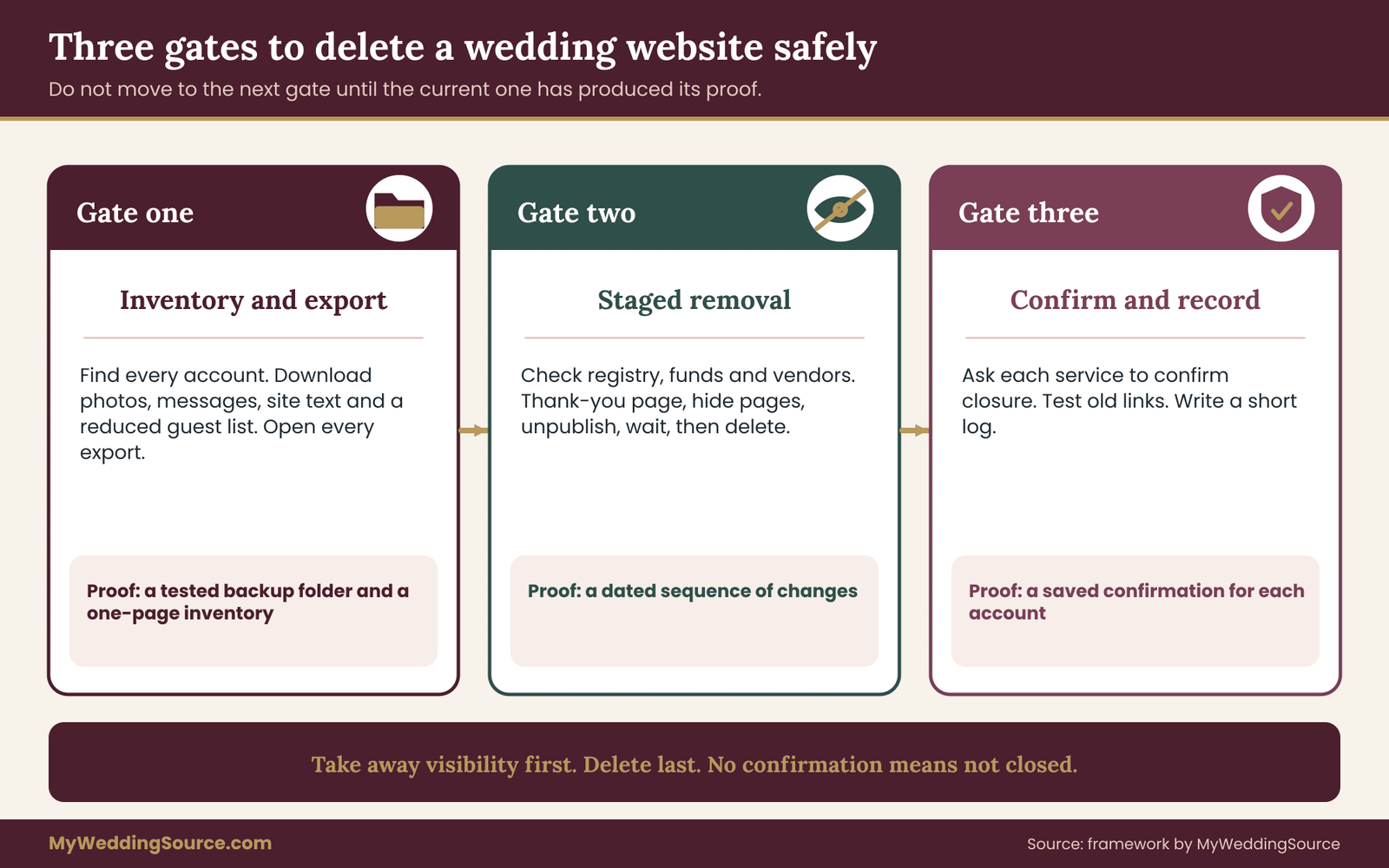
The reason for three gates, rather than a general instruction to be careful, is that each gate catches a different kind of mistake. Gate one catches the mistake of deleting something you wanted. Gate two catches the mistake of deleting something that was still doing a job, such as a registry link or a payout. Gate three catches the mistake of believing something was deleted when it was only hidden, and the opposite mistake of paying for an account you thought was closed.
A simple rule for each gate when you delete wedding website accounts
Each gate has one rule that settles most doubts.
For gate one, the rule is: if you would be sad to lose it or would be stuck without it, export it, and then open the export to prove it works. A file you never opened is not a backup.
For gate two, the rule is: take away visibility before you take away data. Unpublishing or password-protecting a site hides it from the public while leaving every file intact, and most platforms allow you to reverse that with one click. To delete wedding website content is the only step you cannot undo, so it goes last.
For gate three, the rule is: no confirmation, no closure. If a service does not tell you in writing that an account is closed, treat it as open until you can prove otherwise.
How long it takes to delete wedding website accounts
For a couple with one template-builder site, a photo gallery and an RSVP tool, the work is usually a few evenings. For a couple with a self-hosted site, a custom domain, a guest photo app and a separate registry, it can take longer because there are more separate relationships to close. The calendar in the last part of this article spreads the work over about three months so that nothing is rushed, but each gate can be done sooner if you have a reason, such as a renewal date.
The next section starts gate one, because nobody can delete wedding website accounts they have not found. It is the part people underestimate, because the main site is only one of several places where wedding data tends to hide.
Gate one: inventory every account before you delete wedding website pages
An inventory sounds dull, and it is the step that prevents most regret when you delete wedding website accounts. The main reason is that a wedding website is rarely one thing. It is a front page connected to several services, some of which you chose and some of which were switched on by default. If you delete wedding website pages without a list, the leftover pieces keep running quietly: an RSVP form that still accepts answers, a mailing list that still sends reminders, a domain that renews every year, a photo app that still holds guest uploads.
Where wedding data lives before you delete wedding website pages
Work through these places one at a time. Not every couple uses all of them, but most use at least five.
The main site or builder account. This is the obvious one. Note the service name, the login email, whether the site is free or paid, the renewal date if there is one, and whether the account is in one partner’s name or both.
A custom domain. If your site lived at an address with your names in it, you probably bought the name from a registrar, either directly or through the builder. The domain is a separate purchase with its own renewal date and its own login. Deleting the site does not cancel the domain.
An RSVP or guest-list tool. Some builders include RSVP forms. Others use a separate service, a spreadsheet form, or an invitation platform. Each stores names, answers and often meal choices, and each may keep sending reminder emails until you stop it.
A photo gallery or guest upload app. The professional gallery from your photographer is one thing; the shared album where guests dropped phone pictures is another. Guest-contributed photos are often the ones couples forget to download, partly because they arrive in small batches over time.
A registry and any cash or honeymoon fund. The registry may be attached to the website, or the website may only link to a registry hosted elsewhere. A cash fund may involve a payment processor with its own account and payout rules.
An email list or messaging tool. Update emails, save-the-date reminders and text blasts sometimes run through a separate service with a subscriber list.
A livestream or video link. If a ceremony was streamed, the replay lives on a video platform, not on your site. The site only holds a link.
A shared drive or form. Dietary spreadsheets, seating drafts, transport lists and vendor contact sheets often live in shared documents. They are not part of the website, but they were created for the same event and contain the same guest information.
Old email threads and text groups. These are not accounts to close, but they contain addresses and phone numbers and belong in the inventory under “where else this data lives”.
How to find accounts you forgot before you delete wedding website pages
People are often certain they have listed everything, and then discover an account in the next step. Three quick searches usually catch the strays.
Search each partner’s email inbox for the words “welcome”, “confirm your email” and “your account” with a date range that covers the engagement year. Look at who sent them. Wedding services almost always send a confirmation message on sign-up.
Search for the words “receipt”, “invoice” and “renewal” in the same range. A paid plan, a domain purchase or a printed-guest-book service will show up here.
Open the password manager or saved-logins list in your browser and sort by site name. Look for anything you do not recognize from the planning year.
Between these three searches, most forgotten accounts appear, and each one is another place you may need to delete wedding website data from. Add each one to the inventory with the same fields as the main site.
The inventory page for a plan to delete wedding website accounts
You do not need software for this. A single page, on paper or in a note, with one block per account is enough. For each account record:
- the service name and what it is used for;
- the login email and which partner holds the login;
- whether it is paid, and the renewal or billing date;
- what data it holds (guest names, addresses, answers, photos, messages, payments);
- what you plan to keep, and where the copy will live;
- the planned closure date and the confirmation you will ask for.
The last two lines matter most. They are the part that turns a list of accounts into a plan.
Decide what to keep before you delete wedding website content
Before exporting, spend ten minutes deciding what has lasting value. It prevents two opposite problems: deleting something you wished you had, and saving huge piles of data you will never use.
Most couples want to keep the following.
Photos and video. Anything guests uploaded, plus the gallery from your photographer if it is hosted on a platform that will expire. Photos are covered in detail in the next part.
Messages and guestbook entries. Kind words from guests are the one thing on a wedding site that you cannot recreate. Even a screenshot is better than nothing.
A reduced guest record. For thank-you notes and for later events such as an anniversary party, a name and a mailing address is useful. Meal choices, allergy notes and phone numbers are usually not needed after the wedding and can be dropped from the copy you keep.
The text of the site itself. The story page, the schedule and the travel information are part of your wedding memory. A saved copy of the pages lets you reread them later, even though the live site is gone.
Registry and gift records. Who gave what, when, and whether a thank-you note was sent. If the registry platform holds this information, export it. If you keep your own gift log, the guide to documenting wedding contributions shows a structure for it.
Receipts and billing records. For any paid service, the receipts and the cancellation confirmation belong with your wedding records, not on the platform.
Most couples do not need to keep the following: duplicate exports, old drafts, internal analytics, template styling, the full list of every guest’s phone number, and anything the platform generated automatically.
What the guest data rules mean when you delete wedding website records
The guest list on your site is personal information about other people. You asked guests for it for one purpose, the wedding, and that purpose has ended. Good practice, and in some places legal expectation, is to keep personal information only as long as it is needed and to remove it when it is not. Rules differ by state and by country, and a private couple’s guest list is not the same as a business’s customer database, so this article does not tell you what the law requires of you.
It does suggest a sensible habit: keep the smallest record that serves a real purpose, store it somewhere private, and delete the rest on a date you set in advance. The part on guest data later in this guide explains how.
Choosing who will delete wedding website accounts
A project to delete wedding website accounts fails most often because nobody owns it. Pick one person to be the closer. That person holds the inventory, sets the dates and checks off confirmations. The other partner agrees to the plan and keeps a copy of the exports. If one partner set up most of the accounts, that partner is the natural closer, but the other partner should know where the list is and should have their own copy of the backup, so that the project does not depend on one phone.
If a parent, a planner or a friend built part of the site, ask them now for any logins and for the date their involvement ended. Some of the oldest wedding accounts sit in someone else’s name, and closing them requires that person’s help.
A worked inventory entry
Here is how one block of the inventory might look for an invented couple, so you can see the level of detail that works.
“Guest photo album. Used by guests to upload pictures during the reception. Login is Priya’s email. Free plan, no renewal date, but uploads are removed after a set period under the plan, which Priya will confirm in the account settings. Holds roughly the reception photos and the rehearsal dinner photos from about sixty guests. Plan: download all originals in one batch, copy to the home drive and the cloud folder, post a thank-you note to the album, then delete the album after thirty days. Confirmation: screenshot of the account closure page and the confirmation email.”
Notice that the entry says “which Priya will confirm”. An inventory does not have to be complete on the first pass. Where you do not know a rule, write who will find out. The point is that no account is left without an owner and a next action.
When the inventory is finished and you know what you will delete wedding website data from, you have passed the first half of gate one. The second half is exporting, which the next part covers in detail, starting with the part nobody wants to lose: the photos.
Back up photos, messages and guest data before you delete wedding website content
Gate one’s second half is the export. This is the stage where patience pays off, because exports are often slower, messier and less complete than people expect. When you delete wedding website content, plan for the possibility that a file arrives as a compressed archive, that photos come back at a smaller size than the originals, or that a download link expires after a day.
Photos and video: get the originals before you delete wedding website albums
Start with images, because they are the least replaceable.
Photographer galleries. If your photographer delivered through an online gallery, check the contract and the gallery settings for the expiry date and for the download options. Many galleries offer a full-resolution download of the whole set and a smaller web-size set. Take the full-resolution set. If the platform limits downloads, ask the photographer for a drive or a link to files. The guide on wedding photography consent explains how image use and sharing permissions are usually set, which matters if you plan to repost anything.
Guest uploads. Open the guest album and look for a “download all” option. If there is none, look for a settings page that lets you export in batches. If neither exists, note the number of photos and download in groups, then compare the count in your folder with the count shown in the album. Guest photos are frequently stored in a reduced size by the app, so check the dimensions of a few files. If they look small, ask the person who took the best ones to send you the original from their phone.
Photo booth files. A photo booth company usually hosts a gallery or emails a link. The guide to photo booth email retention covers what happens to the addresses collected at the booth, which is worth reading before you decide what to do with that list.
Livestream and video replays. If the ceremony was streamed, save the video file, not only the link. A link depends on the platform keeping the file, and a platform can change its storage rules.
For each of these, the same four steps apply.
- Download the full set to a folder named for the source, for example “guest-album-original”.
- Count the files and compare the count with the source.
- Open at least ten files, spread across the set, and confirm they display properly.
- Copy the folder to a second place, and then a third, as described below.
The copy rule for photos before you delete wedding website albums
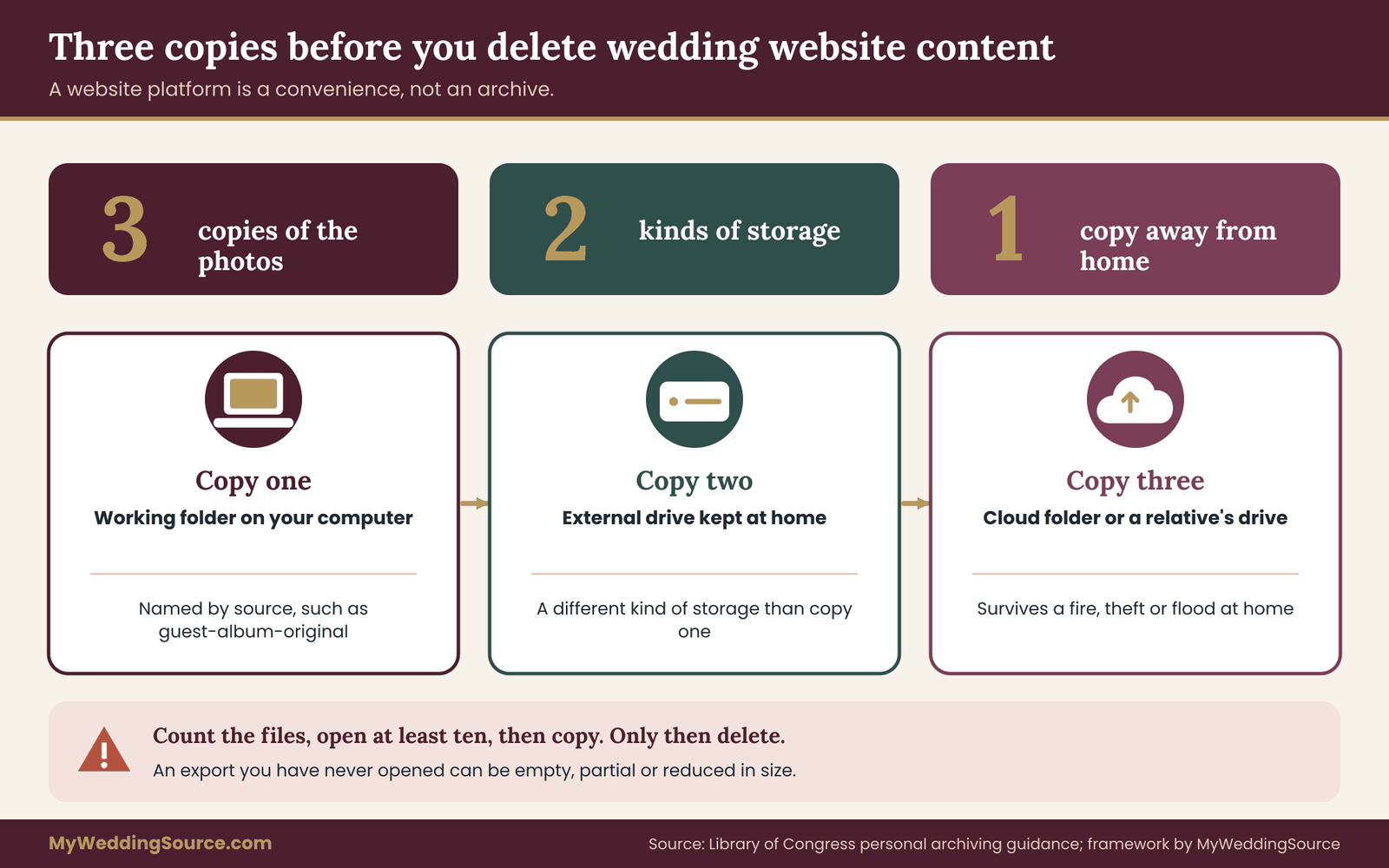
A common guideline in personal archiving is to keep several copies on different kinds of storage, with at least one away from your home. A simple version for a wedding is three copies: the working folder on your computer, an external drive, and a cloud folder or a drive kept at a relative’s home. The Library of Congress publishes plain-language guidance on personal digital archiving that covers the same idea, including naming files clearly and checking them occasionally.
The important point for this project is timing. Complete the copies before you delete wedding website content of any kind, and do not rely on the website platform as one of the three. A platform is a convenience, not an archive, and its storage rules can change.
Messages and site text to save before you delete wedding website pages
Photos are easy to picture. Words are easier to lose. Many platforms have a guestbook, a message wall or a comment feature, and few of them have a friendly export button.
If there is an export option, use it, and then open the file to see whether it contains the actual messages or only a count. If there is no export, use a screenshot approach: scroll through the page and capture it in sections, or print it to a document file using the browser’s print dialog. Save the result in a folder named “messages”. Capture the names that go with the messages, because a kind note is worth more when you remember who wrote it.
For the site text, the simplest method is to save each page as a document or a PDF using the print dialog. Give each file a plain name, such as “our-story”, “schedule” and “travel”. This will not reproduce the design, but it will preserve the words, the schedule and the details you may want to look up years later. If your builder offers a full site export or a template copy, use it as well, but treat the print-to-file copy as the reliable fallback because it does not depend on the platform.
RSVP and guest data: export once, then reduce, then delete wedding website records
The RSVP tool or guest list holds the most sensitive material, so handle it in two steps.
Step one: export the full record once. Use the export option to produce a spreadsheet or a comma-separated file. Open it and check that the columns match what you expect: names, answers, number of guests, meal choices, notes and any contact details. If the platform does not offer an export, copy the data by hand into a spreadsheet. It is slow for a large guest list, but guest records are the thing you most need for thank-you notes and for any later event.
Step two: create a reduced version for long-term keeping. Make a copy of the spreadsheet and remove what you will not need. For most couples the reduced version is a name, a household and a mailing address, which is the same information in the household address spreadsheet many couples already keep. Delete meal choices, allergy notes, phone numbers and comments. Store the full export in a private place for a limited period, then delete it on a planned date.
The reason for two steps is that the full record may be useful for a few weeks, for example if a vendor asks about a dietary note or if you need to check who responded late, and not useful after that. Keeping a reduced copy for the long run is a good compromise.
Where to store exports once you delete wedding website accounts
Choose storage that is private and that both partners can reach. A good arrangement is a single parent folder called something like “Wedding website closure” with sub-folders for photos, messages, site text, guest data, receipts and confirmations. Keep it on your computer and copy it to a second location.
Some practical rules help.
Use plain file names. “guest-album-original” is better than “download (3)”. Names tell you six months from now what a folder is.
Protect the guest data folder. If it is stored in the cloud, use a strong password and two-step sign-in on the account. The Cybersecurity and Infrastructure Security Agency publishes simple guidance on strong passwords and multi-factor authentication. Do not email the guest spreadsheet to yourself as an attachment, because attachments linger in mailboxes.
Separate public and private. Photos you might share with family can live in a shared folder. Guest addresses and notes should not.
Write a short note in the folder. A text file called “read me” with the date of the export, the source of each folder and the planned deletion date for the full guest export takes two minutes and helps whoever opens it later, which may be you.
Test the exports before you delete wedding website accounts
This is the step most people skip. Take twenty minutes, open every export, and write down what you find. Does the photo folder contain the right count? Does the spreadsheet open and show the right columns? Do the saved pages show the dates and the schedule? Are the messages complete?
Mark any gap on the inventory. A gap does not mean you cannot continue. It means you decide on purpose: either you go back and fix the export, or you accept the loss and note it. What you want to avoid is discovering the gap after the account is gone.
When an export is not offered and you still need to delete wedding website data
Some services give you a way to view data but no way to download it. If that happens, you have three choices, in this order.
- Ask the service. Support teams can often provide a data file on request. Many companies publish a process for requesting a copy of your own data, and some are required to do so by law in certain places. Ask in writing and keep the reply.
- Capture manually, with screenshots, print-to-file or copy and paste, as described above.
- Decide the data is not worth the effort. Not everything needs to be kept, and it is fine to let a low-value item go if you have written down that you chose to.
Once the exports are tested and the gaps are decided, gate one is finished. You have copies, you have an inventory, and you have a plan for each account. Nothing has been deleted yet, which is the point: you only delete wedding website accounts after the copies exist. Gate two, the next part, deals with the things that can still be doing a job: the registry, the money and the links that other people use.
What to check before you delete wedding website links to a registry or fund
Gate two begins with a review of anything that still has a job to do, because a careless attempt to delete wedding website pages can break it. The wedding site often serves as the front door to money and gifts, and a careless closure can break that door while people are still walking through it.
The registry link when you delete wedding website pages
If your registry was built into the website, deleting the site may remove or detach the registry, and that could affect open items, purchases in transit or credit you have not used. If your registry is hosted separately and the site only linked to it, closing the site changes nothing about the registry itself, but guests who relied on the link may no longer find it.
Check these points on the registry platform before you delete wedding website pages that link to it.
Open and partly filled items. Group gifts, partly funded items and backordered items may still be waiting for money or stock. Closing an account in the middle of a payment can leave a gift in limbo.
Return and exchange windows. Registry stores and retailers set their own return periods, and some offer a completion discount or a store credit that expires. The guide to wedding registry ideas explains how registries are structured, and the return rules for your own registry are in its terms. Look them up now and put the dates on your calendar.
Gift records. Export the list of who purchased what, with dates. This is your thank-you note record and your protection if a gift arrives damaged or a store asks for order details later.
Shipping addresses. If gifts are still being delivered, the address on the registry must stay correct. Do not delete an account that holds a delivery address until packages have stopped arriving.
Warranties and receipts. Gift warranties often depend on a receipt or a registration. The registry platform may be the only place that has the order information. Export it.
If you are unsure what happens to the registry when the site is closed, ask the platform before you act. The question is simple: “If we delete the website, what happens to the registry, open orders and our purchase history?”
Cash funds and payment links before you delete wedding website pages
A fund that accepts money is a different kind of object from a photo gallery. Money has to go somewhere, and the rules for payouts, fees and account closure belong to the payment provider and the platform, not to this article.
Before closing, look for the following, and confirm each one with the organization that issues it.
- Whether any contributions are still pending or in a hold period before payout.
- Whether the fund pays out to a bank account you control, and whether that bank account is still open and correctly linked.
- Whether any fees are charged at payout or on closure, and when they are taken.
- Whether you will receive a final statement of contributions, and in what format.
- Whether the platform issues tax forms for the amounts, which depends on the platform and your situation. Ask a qualified tax professional how gifts and fund proceeds are treated for you.
Ask for the final statement in writing, and add it to the money folder in your archive. If something looks wrong, the documentation is your starting point for a billing dispute, and the Consumer Financial Protection Bureau explains how to dispute a charge on a card statement and the time limits that apply.
Paid guest features to check before you delete wedding website pages
Some sites sold or collected payment for something: a charity donation page, a shuttle fee, a tour add-on, a mailed print. If any such payment was taken, note the amount, who it was for, and whether anything is still owed or refundable. Do not delete a page that was the only record of a transaction until you have a receipt outside the platform.
Vendors who still point to the site you plan to delete wedding website pages from
Some vendors received the site address to read the schedule, the dress code or the map. After the wedding, those vendors mostly do not need it, but a few may still be completing work. The photographer who is editing and the planner who is closing out the final invoice may refer to the site for names or timings. A quick message such as the following is enough.
“We plan to take our wedding website offline on a date in the coming weeks. If you need anything from the site for the final delivery or the invoice, please tell us this week and we will send you a copy.”
It is a courtesy, and it avoids a late scramble.
Old links that survive after you delete wedding website pages
Your site’s address is probably in more places than you remember: invitation inserts, save-the-date emails, social posts, a friend’s group chat, a venue’s event page, the printed programs and a QR code on a sign. After the wedding most of these links fade in relevance, but a dead link looks careless and can confuse a guest who is trying to find a gallery.
If you plan to replace the full site with a short thank-you page, you can leave the address working and change what it shows. If you plan to delete the account, consider whether you want a redirect, a one-line “thank you” page, or an honest error. The next part explains the stages that make each of these possible.
Decision rule: should this item wait before you delete wedding website pages?
Use this simple rule for every item that touches the registry, money or other people.
If the item involves a payment that has not settled, a delivery that has not arrived, or a return window that has not closed, it waits. Mark the date it will be finished, and put that date on the calendar.
If the item is only a page or an account that duplicates data you have already exported and tested, it can go.
If you cannot tell which it is, ask the service one clear question in writing and treat the answer as the deciding fact.

How to handle guest data when you delete wedding website records
Guest data deserves its own section when you delete wedding website records, because it is the one part of the closure that affects people other than you. When a guest filled in a form on your site, they trusted you with details, and a calm closure respects that trust.
What counts as guest data when you delete wedding website records
On a typical wedding site, guest data includes names, email addresses, mailing addresses, phone numbers, RSVP answers, meal choices, allergy and accessibility notes, plus-one names, song requests and the contents of any message to you. Photos of guests are also personal data in a broad sense, particularly images of children.
Not all of it carries the same weight. A name and a note saying “chicken, please” is low risk. An allergy note, an accessibility need or a child’s photo is more sensitive, and it deserves more care in how long it is kept and who can see it.
The three questions for each kind of data
For each category, ask three questions.
- Do we still have a reason to hold this? Thank-you notes are a reason to keep names and addresses for a few weeks. Nothing is a reason to keep allergy notes after the vendors have used them.
- Where does it live, and who can see it? A private spreadsheet is different from a public gallery or a shared link that anyone can open.
- When will we delete it? Set a date now. If the answer is “never”, write down why.
A simple retention schedule for guest data
The schedule below is a sensible default for a private couple. It is not a legal standard, and you can adjust it.
Meal choices, allergy notes and accessibility notes. Delete from your working copy once the final vendor invoices are settled. These details served the event, and a couple does not need them afterward.
Phone numbers. Delete from the long-term copy after the thank-you messages are done, unless a guest is also a close friend whose number you already have.
Names and mailing addresses. Keep in the reduced household list for as long as you send holiday cards, anniversary invitations or other mail, and review it once a year.
Messages and guestbook entries. Keep, because they are written to you and have lasting sentimental value. Store them privately.
Guest photos. Keep the ones you want, and review any that include children or private moments before you share them again. The guide on moderating wedding photos shows how to review guest images before posting.
Removing data from the platform as you delete wedding website records
Once the exports are done and the retention rules are set, remove the data from the platform in a way that you can verify.
First, delete individual guest records or clear the guest list inside the account, if the platform allows it. This is useful because some services keep account data for a period after closure, and clearing records first reduces what remains.
Second, close the account, and ask the service in writing to delete the associated data and to tell you when it has done so. Name the account by its login email. Many companies publish a data-request or account-deletion process; follow it and keep a copy of what you sent.
Third, check what the service says about backups. Some services keep copies of deleted data for a limited period in their own backups. That is normal and is usually explained in their privacy policy. If the policy gives a period, write it in your log so that you know when the data should be fully gone.
A short message for a deletion request
If the service has no self-service closure button, a plain message works.
“Please close the account registered to this email address and delete the personal data associated with it, including guest records, uploaded photos and messages. Please confirm in writing when this is done and tell us how long your backups retain deleted data.”
This message does not claim a legal right, and it does not need to. It asks for a specific action and a written reply, which is all you need for the log.
If guests ask you to remove their information after you delete wedding website pages
Sometimes a guest writes after the wedding and asks you to remove a photo or to stop emailing them. Treat it as an ordinary courtesy request. Remove the photo from any public place, stop the emails, and confirm by reply. If the request is about a photo that others have already copied, explain what you can and cannot do, and ask the guest which copies matter most. The guide to wedding photo posting requests offers wording that keeps these conversations gentle.
With the registry, money and guest data reviewed, you can begin the staged removal itself. The next part sets out the order.
Gate two: the staged way to delete wedding website pages
Everything so far was preparation. Gate two is the removal itself, and the safest way to delete wedding website accounts is a sequence of small steps, each one reversible until the last. The sequence gives you time to notice a mistake, such as a guest who cannot find the gallery or a link you forgot, while undoing it is still easy.
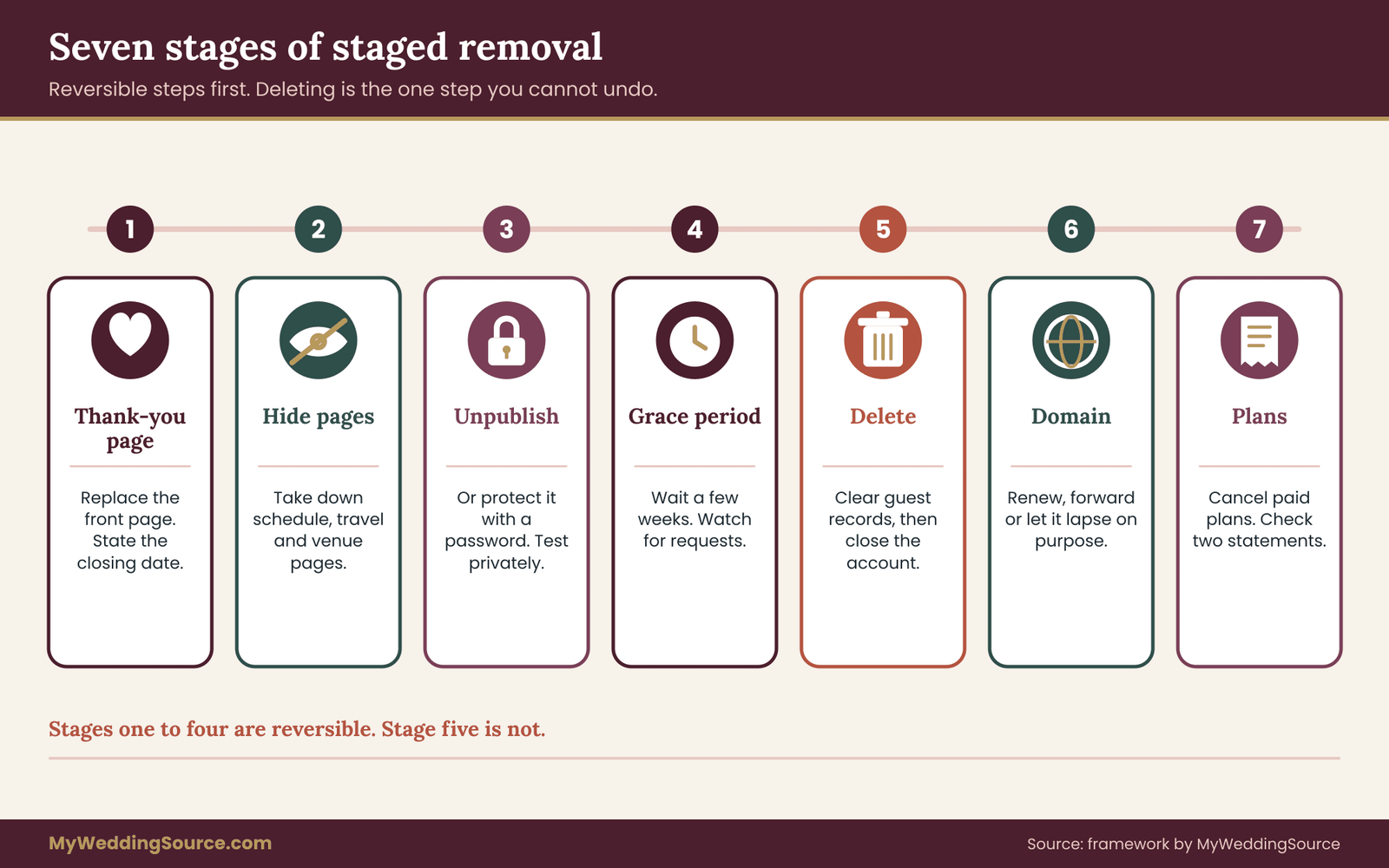
Stage one: change what the site says before you delete wedding website pages
Before you hide anything, replace the front page with a short thank-you message. Two or three sentences are enough: a thank-you, a note on where photos will be shared, and a line saying the site will close on a stated date. For example:
“Thank you for celebrating with us. Photos have been shared with everyone who uploaded or asked, and this site will close on the date below. If you need anything from it before then, please reach out directly.”
This does three jobs. It tells late visitors what is happening, it gives people a final chance to download anything they wanted, and it makes the later closure feel planned rather than abrupt. Keep the registry link and the photo gallery link visible during this stage if they are still in use.
Leave this stage in place for a period you choose. Two to four weeks is a comfortable range for most couples, and it can be shorter if a renewal date forces the issue.
Stage two: remove what you no longer want public
Next, take down the pages that carry the most personal information and the least ongoing value. The schedule, the travel details, the hotel block information, the venue address and the day-of timeline have no use now, and they are the pages most worth removing from public view first. The story page and the photo gallery can stay a little longer if you want them to.
Many platforms let you hide individual pages without deleting them. Use that option rather than deleting. It reverses easily if you realize you need a page back.
Stage three: unpublish or protect the site before you delete wedding website content
Once the thank-you period has ended, take the whole site out of public view. Most builders give you one or both of these options.
Unpublish. The site goes offline, but the account and the content are still there. Visitors usually see an error or a placeholder.
Password-protect. The site stays online but asks for a password. This is useful if you want to share the photos with close family without leaving them open to everyone.
Unpublishing or protecting is the best place to pause, because it removes the privacy risk without losing anything. If you are unsure about the next step, you can stay here for months at little or no cost, depending on the plan. Keep in mind that the registry link and any payment pages may stop working when the site goes offline, which is why gate two began with the money checks.
After you unpublish, test it. Open the site address in a private browser window and from a phone that is not signed in. Check that the main address and a couple of inner page addresses no longer display the content. Then search for your names plus the word “wedding” and see what appears. Search engines may still show a cached or old listing for a while after a page goes down.
Most search engines provide a way to request removal of outdated results, and the site-owner tools of the search engine are the place to start. Ask your builder if they offer a setting to discourage indexing, which is useful if you keep the site live behind a password.
Stage four: hold for a grace period
Now wait. This is the step that feels unnecessary and often saves the day. Hold the unpublished site for a grace period of a few weeks. During this time:
- watch for messages from guests who cannot find something;
- confirm the registry has stopped receiving traffic or that deliveries are complete;
- re-open your exports and check them one more time;
- confirm that no vendor is waiting for information from the site.
The length of the grace period depends on what you found in gate one. If you have a payment that settles in two weeks, make the grace period at least that long. If the site is free and has no deadline, thirty days is a comfortable default. If there is a renewal date before the end of the period, either cancel the renewal now, which most platforms allow without deleting the site, or accept one more billing cycle on purpose.
Stage five: delete wedding website content and the account
At the end of the grace period, the irreversible step arrives, and now you delete wedding website content for good. Before you do it, run this short pre-flight check, and say each answer out loud to the other partner.
- Have the exports been tested, and are they copied to at least two places?
- Are the registry, any fund and any shipping addresses settled?
- Is the grace period over, and did anyone ask for the site?
- Do we know whether the platform keeps data after deletion, and for how long?
- Do we have the exact account name and login email we will use to ask for confirmation?
If every answer is yes, proceed. Clear any guest records inside the account first, then use the platform’s delete-account or close-site function. Many platforms hide this deep in account or billing settings, and some require an email confirmation or a waiting period. Follow the steps, and save the confirmation message as soon as it arrives.
Stage six: the domain and the renewal
If you bought a custom domain, closing the site does not close the domain. You have four sensible options.
Let it expire on purpose. Turn off auto-renewal, note the expiry date and let it lapse. The address becomes available for anyone to register. That is fine for most couples, but think about whether you are comfortable with a stranger holding an address with your names in it. A lapsed domain can be re-registered by anyone, and old links to it could lead somewhere unexpected.
Keep it for a while. Some couples keep the domain for a year or more to use for email or for an anniversary page. If so, keep the auto-renewal on and move the date into your calendar.
Point it somewhere useful. You can forward the address to a single page, such as a private photo album or a simple note. Check the registrar’s forwarding options.
Transfer or sell it. Uncommon for wedding domains, but possible. If you do this, follow the registrar’s transfer process and keep the confirmation.
Whichever you choose, record the registrar name, the login and the date in your inventory. Domains are a common reason for unexpected renewal charges that arrive a year after the wedding, when nobody remembers the account.
Stage seven: cancel paid plans and subscriptions
Deleting a site does not always cancel the plan that paid for it. Open the billing section of each paid service, and confirm the plan is cancelled and not merely paused. Check the next billing date. Then check your card or bank statement over the next two billing cycles for any charge from that service. If something appears after you closed the account, you have the confirmation message to show the company, and the dispute process described by the Consumer Financial Protection Bureau explains the time limits for challenging a card charge.
Some services offer a free tier after a paid plan ends. Check what the free tier does with your content, because a downgrade can sometimes remove extra storage or features without telling you in advance. If you want to keep a small free version for a while, read the terms on storage and inactivity first.
A note on switching rather than choosing to delete wedding website accounts
Not every couple needs to delete wedding website content outright. A third path is to convert the site into something quieter and lower-risk: a private family page, a password-protected album, a short page that thanks guests and links to the photos. The three-gate method still applies, because you are still deciding what to keep, what to remove and what to confirm. The difference is the ending: the account stays open, with fewer pages and tighter access.
Choose conversion if you want to keep sharing photos with relatives, if the plan is free and stable, or if you expect to use the same account for an anniversary page. Choose to delete wedding website accounts if privacy is the priority, if a bill is attached, or if you simply want the project finished. Either choice is legitimate. What matters is that you make it on purpose, with copies in hand.
With the account removed or converted, gate two is finished. The last gate is the one that proves the job is done, and it is the one most couples skip.
Gate three: confirm that you did delete wedding website accounts, and keep proof
A deleted account is only deleted if you can show it. Gate three takes the least time of the steps to delete wedding website accounts, and has the highest value, because it turns a belief into a record. It also protects you in two situations that are surprisingly common: a charge appears for a service you thought was closed, or an old page turns up in search results and you need to show what you did and when.
Ask for written confirmation after you delete wedding website accounts
For each account on the inventory, look for a closure confirmation. It can take several forms: an on-screen message that the account was deleted, an email from the service, a support ticket reply or a final billing statement showing a zero balance.
If the service sends nothing, ask. A short message works.
“We closed the account registered to this email address on the date below. Could you confirm that the account, its content and its stored personal data have been deleted, and that no further charges will be made?”
Keep the reply in the confirmations folder, with a clear file name that includes the service and the date, for example “photo-album-closure-confirmation”. If you receive no reply after a week or two, send a second message, and note both in the log. Persistence is not rude here. Companies handle many requests, and a second note is routine.
Test that the content is gone once you delete wedding website pages
A confirmation email says what the company claims. A test says what a visitor sees. Do both.
Visit the old address. Open the site address in a private window. You want to see an error page, a “site not found” message or a deliberate redirect, not your old content.
Try a few inner links. Pages deep in a site sometimes remain reachable by direct address even after the home page is down. Test the gallery link, the RSVP link and any link you gave to guests.
Check photo links. Open a few photo links that guests were given. If a guest album was closed, the link should no longer show images.
Search for yourselves. Search for your names and “wedding” and for the site address. Results may take time to update, so check again after two or three weeks. If an old listing persists, the search engine’s own removal tools are the way to request an update. For a quick sense of what remains public, search for a few distinctive phrases from your story page in quotation marks.
Check the domain. If the domain remains active, confirm where it points. If it has lapsed, note the date.
Take a screenshot of each test with the date visible, or note the result in your log. You do not need many; one per account is enough.
Close the loop with other people after you delete wedding website pages
Some closures need a last message to people who relied on the site.
- Send a one-line note to relatives who kept using the photo link, saying where the photos now live.
- Tell any vendor who held the address that it is offline.
- Update any shared calendar event or document that still shows the old link.
- Remove the link from your own email signatures, social profiles and messaging bios.
Taking a few minutes to do this prevents a stream of “your link is broken” messages later.
Keep a closure log of how you delete wedding website accounts
The log is a single page that records what happened. It is the proof for gate three, and it is also the place that feeds your broader wedding records, which the guide on organizing wedding records after the event explains in more detail. For each account, record:
- the service and the login email;
- what was exported, where it is stored and the date it was tested;
- the date the site was unpublished;
- the date the account was deleted or the plan cancelled;
- the confirmation received, with the file name;
- the date any backup retention period should end;
- the follow-up date to check statements and search results.
Keep the log with the exports, in the same private folder, and keep a second copy with the other partner.
The follow-up checks after you delete wedding website accounts
Closure continues after the day you press delete. Put three short checks on the calendar.
Two weeks later: open the confirmations folder and confirm that every account has a reply. Chase any that are missing. Search for your names again.
The next billing cycle: check statements for any charge from a closed service. If one appears, send the confirmation to the company and ask for a refund of the charge, noting the dates.
Three months later: repeat the old-address test, check that the domain behaves as you decided, and delete the full guest export if the plan says so. This is also the moment to review the reduced guest list and remove anything you no longer need.
What to do if something goes wrong after you delete wedding website accounts
Problems after closure are usually small, and a few patterns come up often.
A charge appears after closing. Gather the confirmation, the cancellation date and the statement line. Contact the company in writing first. If the charge stays and the company has not corrected it, the card issuer’s dispute process is available, and the time limits are explained by the Consumer Financial Protection Bureau. Act within the dispute window.
The content is still visible. Some content can remain reachable through an old link, a cached copy or a separate service. Identify which service hosts it, send a closure or removal request and keep the reply. For search results, use the search engine’s removal tools for outdated pages.
You deleted something you needed. Check whether the platform keeps a recycle or recovery period. Ask support immediately and explain the situation calmly. Then check your exports, the shared copies held by relatives and the photographer’s files. Guests who took photos can often resend originals. This is why the backups come first.
A guest asks for removal. Reply promptly, remove the item, and confirm. Keep the exchange in the log.
A worked example: Maya and Daniel delete wedding website accounts in six weeks
The example below is invented to show how the three gates work in practice. The couple, the numbers and the timing are illustrative, and your own situation will differ.
Maya and Daniel married on a Saturday in September. They had a template-builder wedding site with an RSVP form, a guest photo album run by a separate app, a registry hosted by a retailer that the site only linked to, and a custom domain bought through a registrar. Maya had set up most of it, so she became the closer.
Week one: inventory. Maya searched both inboxes and found five accounts: the site builder, the RSVP form inside it, the photo album app, the registrar and the retailer registry. She wrote a block for each. In the process she found a sixth: a free email-reminder tool she had used for a save-the-date message. She added it. She also noted that the domain had a renewal date eleven months away and the builder plan renewed in three months.
Weeks one and two: export. She downloaded the full guest photo album, counted the files, found that the count matched and opened twelve images from different parts of the set. Several were smaller than she hoped, so she asked two cousins to send originals of the best ones. She exported the RSVP data to a spreadsheet and made a reduced copy with names and addresses only.
She printed each site page to a document file, scrolled through the guestbook capturing screenshots with names, and saved everything in one folder. Daniel copied the folder to an external drive, and Maya copied it to her cloud storage. They agreed to delete the full RSVP export after thank-you notes.
Week two: money and registry check. The registry was on the retailer’s own site, so closing the wedding site would not affect it. Maya checked the return window dates on the retailer’s page, and exported the list of purchased items. Two gifts were still on the way, so they decided to keep the registry open and leave it out of the closure. They noted its return deadline on their calendar. There was no cash fund.
Week three: stage one and two. Maya replaced the front page with a thank-you message and a closing date four weeks away. She hid the schedule, travel and hotel pages the same day.
Week five: stage three. At the closing date she unpublished the site and tested the address in a private window and on her phone. She searched for their names and saw the site listed in a search result, so she noted it for a later check.
Weeks five to eight: grace period. One aunt asked where to find the photos; Maya sent her a private album link. Nothing else came up. The thank-you notes were finished by week seven, so Maya deleted the full RSVP export and kept the reduced list.
Week eight: stage five to seven. Maya cleared guest records, chose to delete wedding website content and closed the photo album app. She turned off auto-renewal on the domain and chose to let it expire, after Daniel agreed that he was comfortable with that. She cancelled the builder plan, and noted the next billing date, which would have been three weeks later.
Gate three. Both services sent confirmation emails. The album app did not, so Maya sent a short request and received a reply four days later. She saved each in the confirmations folder. She tested the old address, three inner links and the album link, all of which failed as expected. She wrote the log, with dates, and set a reminder for the next billing cycle and for three months later.
Three months later. The search listing had disappeared. No charge had appeared. Maya deleted the last leftover export and reviewed the reduced guest list. The whole project had taken about six evenings, spread across two months.
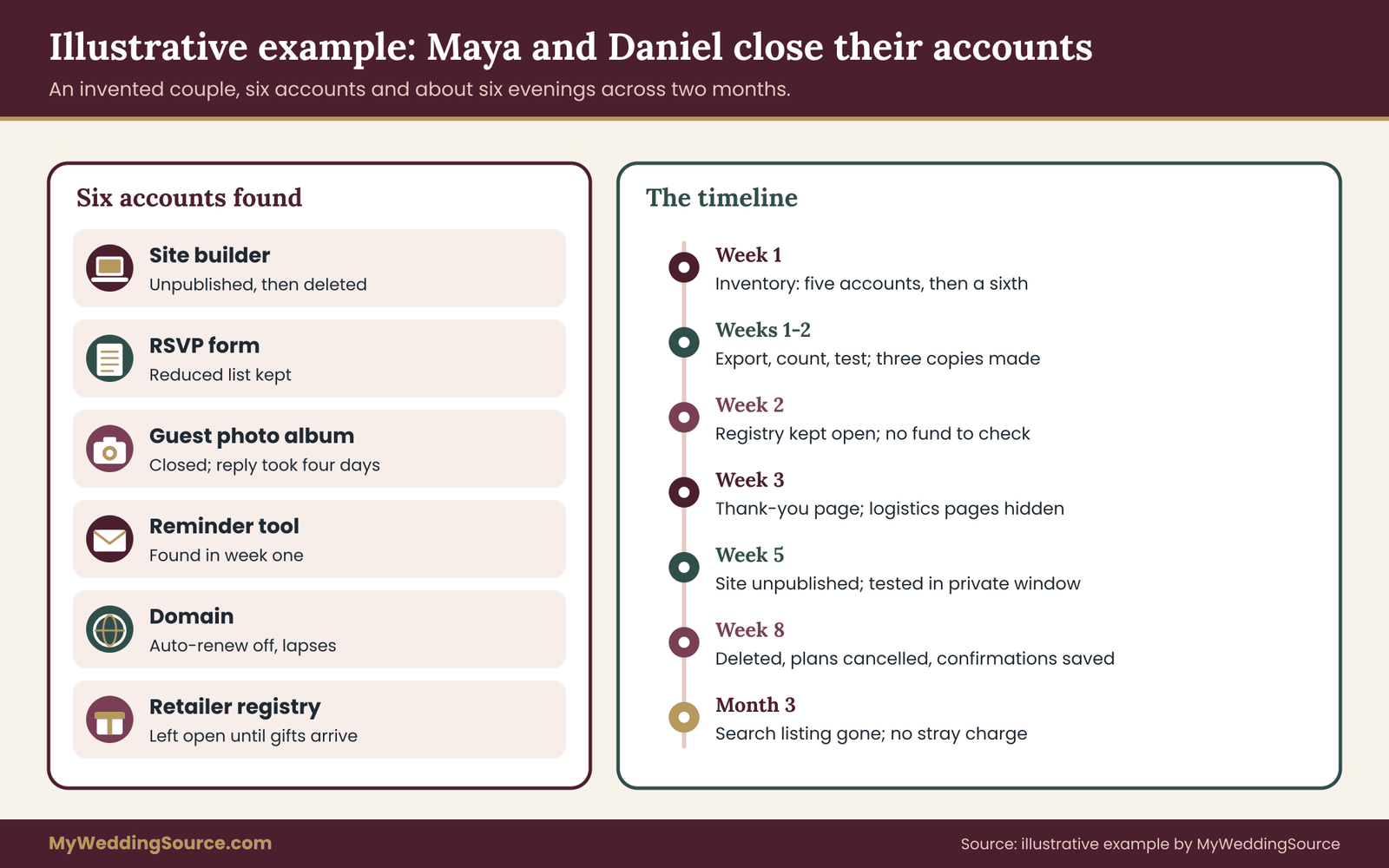
The example shows a pattern worth copying whenever you delete wedding website accounts. Nothing was rushed, nothing was deleted until it had been copied and tested, and every account ended with a piece of paper, or at least a saved email, to show it was closed.
Special situations when you delete wedding website accounts
The method above fits most couples who plan to delete wedding website accounts. A few situations need adjustments, and handling them in advance saves awkward conversations.
Someone else built the site you want to delete wedding website content from
If a friend, a relative, a planner or a paid designer built the site, they may hold the administrator login. Ask them to give you ownership or to run the closure steps with you. Be specific about what you need: an export of the content, the guest data, the domain details and a confirmation that the account is closed.
If you cannot reach the person, contact the platform’s support with whatever proof you have that the site is yours, such as the site address, the names on it and the payment receipts. Policies on transferring ownership differ, so expect to be asked for evidence.
A family member paid, so you delete wedding website plans together
A parent who paid for a premium plan or a domain may be the account holder. Do not cancel their payment method or close their account without asking. Agree on a date, explain the plan, and ask them to forward the cancellation confirmation. It is also a good moment to thank them, since the site was a gift.
A planner or vendor platform that holds your data
Some planners run a client portal that includes a guest list, a timeline and a document folder. That is a separate account governed by your contract, and closing it is a conversation with the planner, not a button. Ask which documents you can take with you, what the planner retains and for how long, and when your access ends. Remember that vendors usually have their own rules about files they produce.
A site you want to keep instead of choosing to delete wedding website pages
Many couples want an anniversary page, a family photo site or a place to hold the story. If you keep the site, still do gate one, because exports protect you against account problems at any time. Then run a partial gate two: remove the schedule and logistics pages, tighten access to the gallery and remove the guest data. Choose a review date a year later, when you decide again.
Children’s photos and names when you delete wedding website pages
Photos and names of children deserve more care than the rest. Review the gallery and the guestbook for images of minors, consider whether the parents would want them public, and remove those images from any shared or open page. If you are unsure, ask the parents. For the saved copy, keep children’s images in the private archive and not in any shared folder.
Guests with safety concerns
Occasionally a guest has a reason to keep their location or identity private. If someone told you so, remove them from the saved guest list sooner than anyone else, and make sure no public page ever listed them. If you are uncertain whether anything remains public, run the search checks from gate three, using their name as well as yours.
A destination or multi-event weekend
Weddings with several events often have more pages, more RSVP forms and more links: a welcome party, a rehearsal dinner, a day-after brunch. Add one inventory block for each form or page, and note whether the events have separate guest lists. Treat the longest-running event as the one that sets your earliest deletion date.
A wedding that did not go as planned
If a wedding was postponed, cancelled or changed to a different date, the site may need a different path. Postponement usually means unpublishing the details but keeping the account. Cancellation means closing with a short message, then following the same three gates. In both cases, vendor and registry deadlines may be firmer than usual, so check refund and return terms with the issuing organizations. Do not assume deposits or credits carry over.
Accounts in a deceased or unavailable person’s name
If a login belonged to someone who has died or cannot be reached, contact the platform’s support and ask about its process for deceased users or inaccessible accounts. Expect to provide documentation. This is a sensitive situation, so allow extra time and avoid sending long messages. A short, factual request is easiest to process.
Common mistakes when couples delete wedding website accounts
Most problems with efforts to delete wedding website accounts come from a small set of repeated patterns.
Choosing to delete wedding website content before exporting. The most expensive mistake. Many deletions are final, and support teams cannot always recover content.
Trusting the platform as the backup. A service is a convenience. It can change, merge, limit storage or close. Keep your own copies.
Skipping the test. An export that was never opened can be empty, partial or reduced in size. A twenty-minute test would have caught it.
Forgetting the domain after you delete wedding website pages. The site goes away and the domain renews next year, with a charge nobody expected. Or the domain lapses and a stranger registers it.
Cancelling the site but not the plan. The content vanishes but the subscription continues. Always check the billing page and the next statement.
Hiding the page but leaving the form. An RSVP or guest-upload page can stay reachable by direct link after the main site is hidden. Test the individual links.
Leaving guest data everywhere. Spreadsheets in email attachments, exports in download folders, copies in shared drives. Make one private folder the home for the data and delete the others.
Deleting the registry along with the site. The registry has its own deadlines for gifts, returns and credits. Close the site and leave the registry alone until its tasks are finished.
Not telling guests. A short thank-you page and a closing date prevent a flurry of “where did the photos go” messages.
Not recording what you did. Without a log, you have to rely on memory a year later, when a charge shows up or someone asks what happened to a page.
How fast to delete wedding website accounts
Couples differ in how much they want to remove. Use these questions to find your own comfort level.
If your site listed a home address, a work location or a child’s name, lean toward fast removal of public pages and slower removal of private archives.
If your site is mainly photos and messages and you have no privacy concerns, lean toward slower closure, perhaps by converting the site to a quiet, protected album.
If a bill is the main driver, work backward from the renewal date: set the date by which the account must be cancelled, then fit the three gates before it.
If you disagree with your partner, resolve it on the first question: what is the worst thing that could happen if the page stayed online another month, and what is the worst thing that could happen if it vanished tomorrow? Usually one answer is clearly worse, and that settles the order.
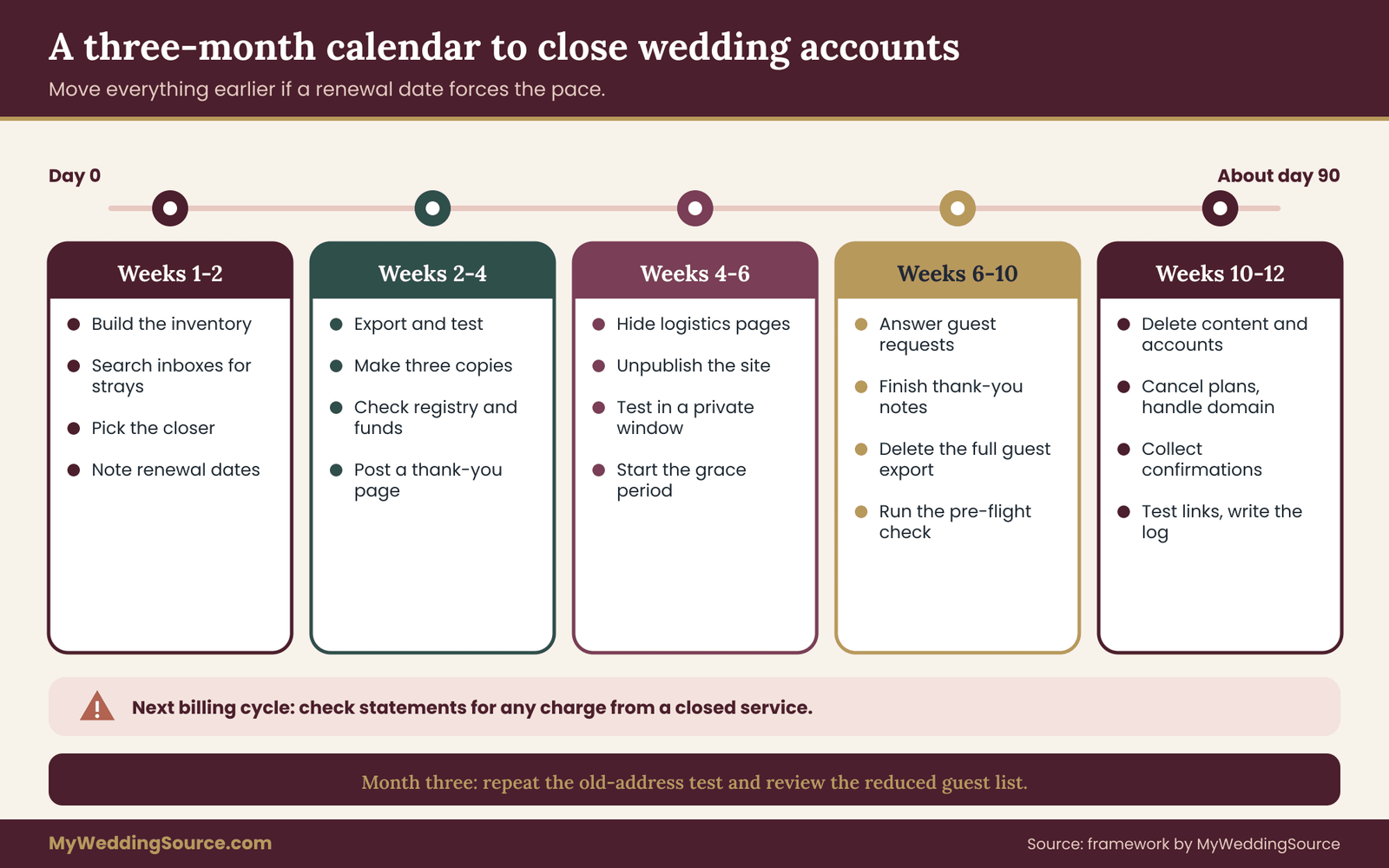
A calendar to delete wedding website accounts over three months
The schedule below turns the stages into a sequence. Adjust it to your own dates, and move the whole thing earlier if a renewal date forces you.
Week one to two: build the inventory, find forgotten accounts, pick the closer, and note renewal dates.
Week two to four: export photos, messages, site text and guest data, test the exports and make three copies. Check the registry, any fund and vendor needs. Replace the front page with a thank-you message.
Week four to six: hide logistics pages, unpublish the site, test it in a private window, and begin the grace period.
Week six to ten: answer any guest requests, finish thank-you notes, delete the full guest export, and run the pre-flight check.
Week ten to twelve: delete content and accounts, cancel plans, handle the domain, collect confirmations, test old links and write the log.
Next billing cycle and month three: check statements, search results and the domain, and review the reduced guest list.
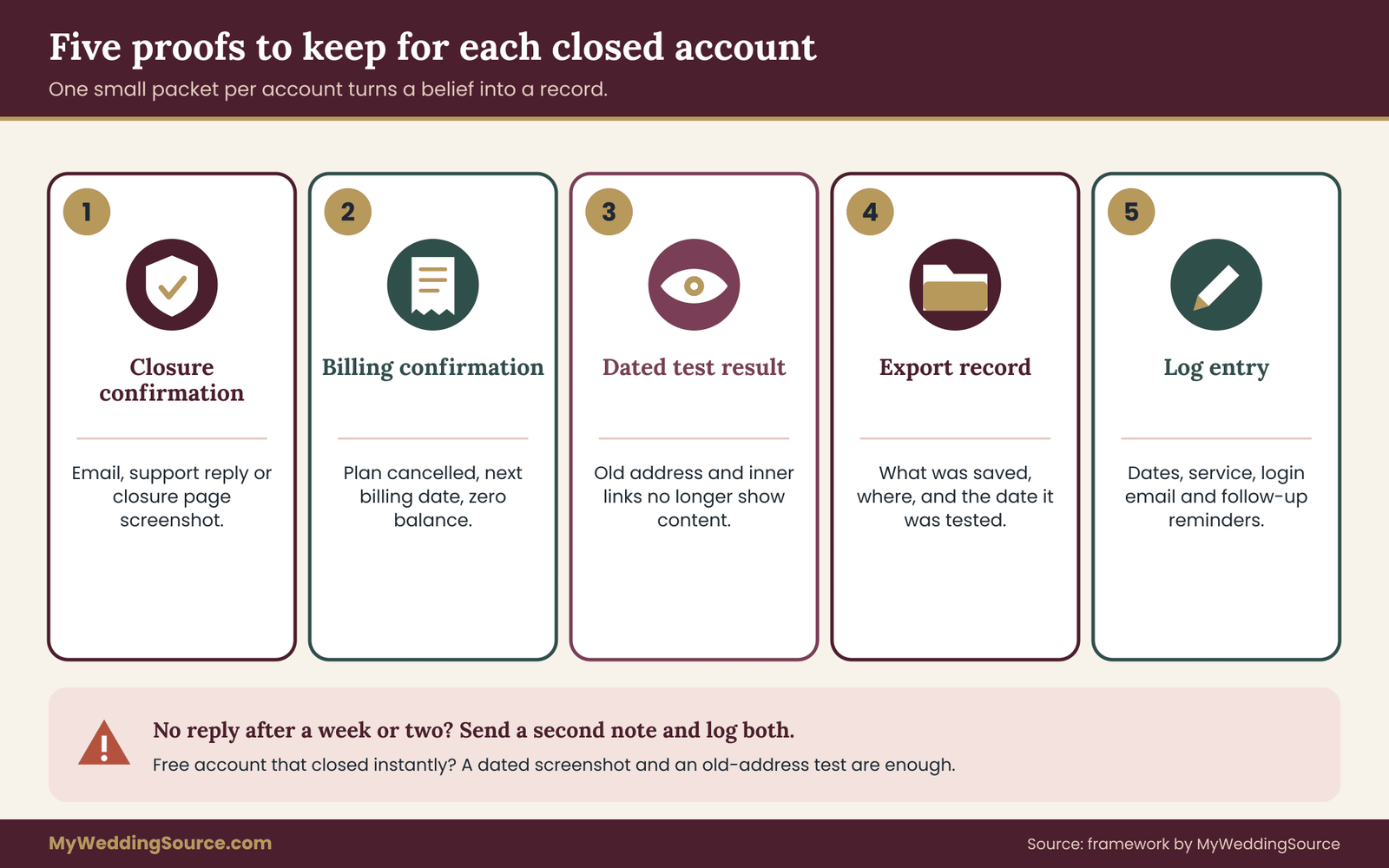
Proof to keep when you delete wedding website accounts
By the end, each account should leave a small packet of proof. Five items cover nearly every case: the closure confirmation, the cancellation or billing confirmation, a dated test result, the export record and the log entry. If an account was free and closed instantly with no email, a dated screenshot of the closure page and a test of the old address are enough.
Your next steps
Choose one evening this week. Write the list of every account that holds wedding data, using the three searches described earlier, and name who will be the closer. That alone turns a vague plan into a project with an owner.
Over the next two weeks, export and test: photos, messages, site text and guest data, with three copies of the photos. Check the registry, any fund and the vendors who still use the site, and put the return and payout dates on your calendar.
Then take the site down in stages, wait out the grace period and delete only when the pre-flight check passes. Finally, collect your confirmations, test the old links and write the log. When you delete wedding website accounts this way, you keep the photos, the kind words and the records you want, and you close everything else on purpose.
FAQ
Should we delete the wedding website right after the wedding?
Usually not. Guests may still view photos, vendors may refer to the schedule and the registry link may still be in use. Start the inventory and backup straight away, replace the front page with a thank-you message, and unpublish after a few weeks. Delete only when exports are tested and no payment, delivery or return window is open.
What should we save before we delete a wedding website?
Save the photos at full size, guestbook messages, the text of your pages, a reduced guest list with names and addresses, gift and registry records, and receipts for any paid plan. Open each export to check it. Then keep three copies, with at least one away from your home.
Will deleting the site also cancel our domain and paid plan?
Not necessarily. A custom domain is usually a separate purchase with its own renewal date, and a plan may continue billing after content is removed. Check the registrar and billing pages, turn off auto-renewal if you want the domain to lapse, and look for charges on the next two statements.
What happens to our registry if we delete the site?
It depends on how the registry was set up. If it is hosted by a retailer and the site only links to it, the registry usually continues. If it is built into the site, closing it may affect open items. Ask the platform in writing, export your purchase history and check return deadlines first.
How do we make sure guest information is really gone?
Export what you need, clear guest records inside the account, then close it and ask the service in writing to delete the associated personal data. Ask how long its backups keep deleted data, save the reply and test old links. Delete your own full guest export on a date you set.
Is it better to unpublish or delete?
Unpublishing hides the site and keeps the content, so you can reverse it. Deleting is permanent. Unpublish first, test the result and wait a few weeks. Delete when you have copies, confirmed that no one needs the site and know what the platform keeps afterward.
Can search results still show our site after it is deleted?
Yes, for a while. Search engines update on their own schedule, so an old listing can linger after a page goes down. Check again after a few weeks. If it stays, use the search engine’s removal tool for outdated pages, and ask the platform whether pages were fully removed.
What if the site was built by someone else or the login is lost?
Contact the builder and ask them to export content and close the account with you. If you cannot reach them, ask the platform’s support, with the site address and proof of purchase, how it handles ownership or access requests. Expect to provide evidence, and keep every reply for your records.
Sources
- How to get a copy of a marriage certificate or a marriage license, USAGov
- Personal archiving: preserving your digital memories, Library of Congress
- Secure Our World, Cybersecurity and Infrastructure Security Agency
- Privacy and security guidance for businesses, Federal Trade Commission
- Identity theft and online security, Federal Trade Commission
- How do I dispute a charge on my credit card bill?, Consumer Financial Protection Bureau
- How long should I keep records?, Internal Revenue Service
- Frequently asked questions on gift taxes, Internal Revenue Service
- California Consumer Privacy Act, California Attorney General
- Download your data, Google Account Help