
A wedding website outage is the moment guests reach for your site to find the address, the start time or the parking instructions and get an error page instead. This guide gives you a calm way to respond: a short decision tree, an alternate guest message channel that does not depend on the site, and a worked example you can copy before the first guest arrives.
When the site fails, do not start by fixing it. Start by asking what guests need from it before they arrive, then work out whether the repair can finish before the first guest needs that information. If it cannot, put the arrival facts (where, when, how to get in, who to call) on a one-page sheet and send that sheet by text, by email, on a printed card at the hotel desk or through a person with a phone. Repair the website second. A wedding website outage is usually a delivery problem before it is a technical problem.
Most wedding sites go quiet for ordinary reasons. A domain renewal fails because the card on file expired. A free plan hits a limit. A template platform has a bad afternoon. An account gets locked after a login from a new country on a honeymoon scouting trip. None of these is a disaster for the marriage, and none of them takes long to fix once someone with the right login is looking at the right screen.
The trouble is timing. A wedding website outage that lasts four hours is a footnote in March and a real problem on the Friday afternoon when sixty guests are driving toward a venue they have never seen.
So this article treats the wedding website outage as a scheduling question. It walks through what a site actually does for guests, how to confirm the wedding website outage is real, how to decide between waiting, repairing and replacing, how to reach people another way, and how to build a stopgap page and a quiet routine that makes the next outage boring.
If you want the wider picture of backup communication, files and permissions for the whole wedding day, our guide to a wedding day digital contingency plan covers it. This article stays narrow: one failure, one set of guests, one window of time.
A note on scope. This is general planning information, not legal, tax, financial or professional security advice, and where a rule or a fee matters you should confirm it with the company or agency that sets it. Terms for domain registrars, website builders and messaging services differ and change, so the article points you to the issuing source instead of quoting numbers that might be stale in November 2026.
What a wedding website outage actually is
The words “the site is down” cover at least four different situations, and they call for different first moves. Sorting the wedding website outage into the right kind is the first useful thing you can do, and it takes only a few minutes.
The platform is down. The company that hosts your site, whether that is a wedding website builder, a general site builder or a hosting provider, is having a problem on its end. Many sites at once are affected. You cannot fix this. You can confirm it on the provider’s status page, watch for an estimate, and decide whether to wait.
The address is broken. The site itself may be fine, but guests cannot reach it because something between the address bar and the server has failed. The domain may have expired or been suspended, the domain’s settings may have been changed or lost, or the security certificate may have lapsed so that browsers show a warning in place of your page. This kind is the one most often caused by the couple and most often repaired by the couple, because the fix lives in an account you control.
The account is blocked. The site is fine, but the plan behind it has been paused. A payment failed, a free trial ended, a plan was downgraded, or the provider flagged the account and locked it. The page may show a message such as “this site is unavailable” or may simply not load. Again the repair sits with you, and again the clock depends on how fast the provider’s support responds.
The content or the site has been compromised. Someone changed the page, a plugin broke it, an edit removed pages, or a bad actor took over a login. The site may load but show something wrong, or may be taken offline by the provider to protect other customers. This kind is the least common and the one that needs the most care, because it can involve guest information. A later section covers it on its own.

What a wedding website outage is not
It helps to separate the wedding website outage from three look-alike problems, because the fix is different.
First, a page that loads slowly, or only on one person’s phone, is usually a local network problem, not a wedding website outage. Check the page on a second device and a second network before you conclude anything. Second, a guest who says “your link doesn’t work” may be using an old link, a mistyped address or a QR code that points to a draft page. Third, a site that works but has the wrong information is a content problem, not a wedding website outage, and a correction message is the right response.
Why the timing matters more than the cause
Notice that none of the four kinds has an automatic duration. A platform incident might clear in twenty minutes or take most of a day. A domain problem can be fixed in minutes if your registrar’s support picks up, and in days if it needs a verification step that arrives by email at an address you no longer check. An account lock can lift the moment you answer one question.
Because the duration is unknown at the start, the sensible plan is not to guess how long it will take. The sensible plan is to compare what you know about the repair with what you know about the guests: how many hours until the first of them needs the information, and who is likely to need it earliest.
That comparison is the core of the method in this guide, and we will call it the arrival clock. We come back to it in the decision tree section. For now, hold on to one idea: the website is a delivery channel for facts, and the facts matter more than the channel.
What guests rely on the wedding website for before they arrive
Before you can decide how serious a wedding website outage is, you need to know what your site actually does. Most couples remember the photos and the story page. Guests mostly remember something else. They open a wedding website to answer a handful of practical questions, and they tend to open it at the last minute, on a phone, often while traveling.
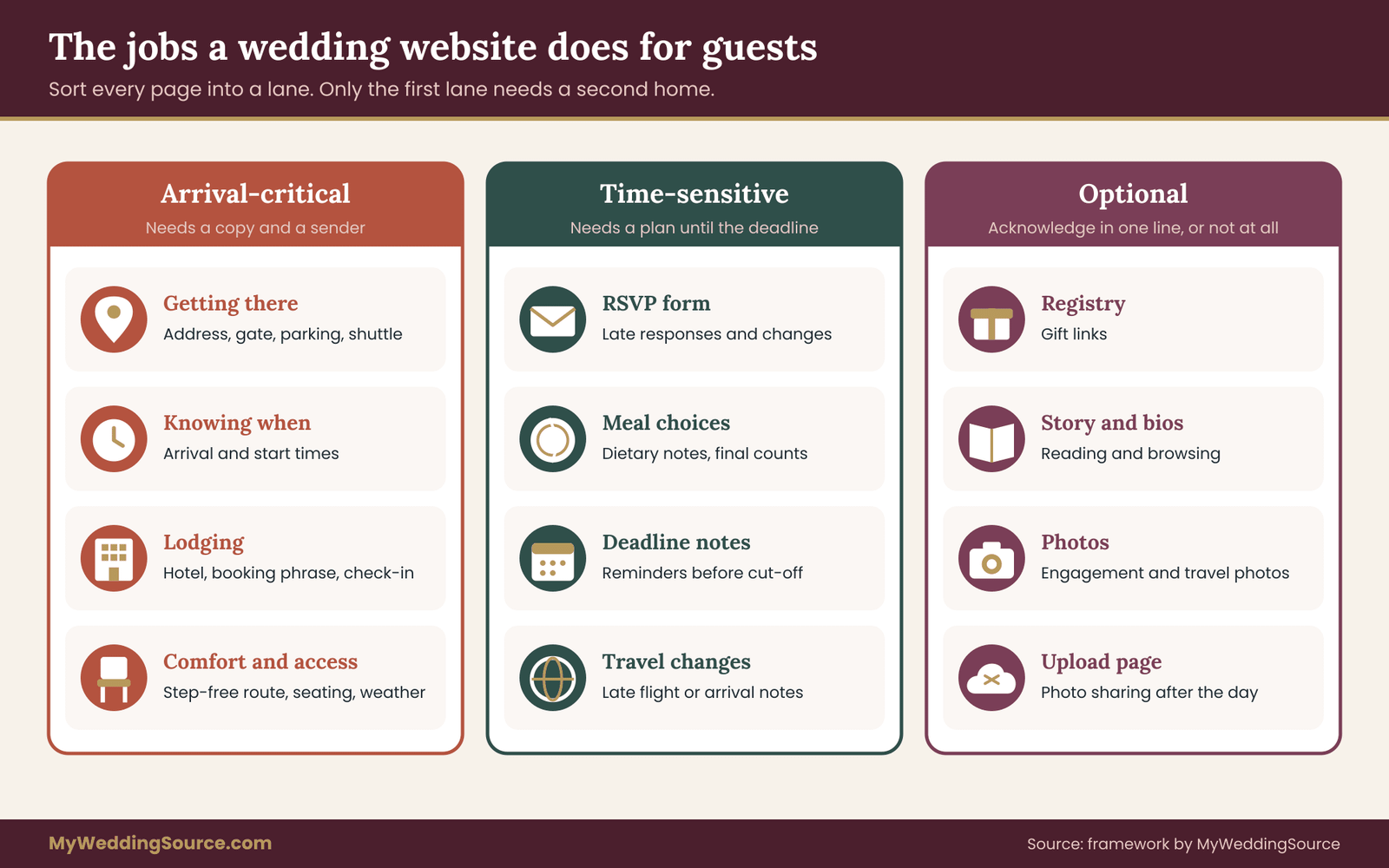
Think of each part of the site as a job it does for a guest. Here are the jobs that show up most often.
Getting there. The address of the ceremony and reception, driving directions, a map link, parking instructions, a shuttle schedule, and a note about the last turn that the navigation app gets wrong. This is the job guests need most, and the one with the least slack. A guest who cannot find the venue cannot attend.
Knowing when. The date, the start time, whether there is a gap between the ceremony and the reception, and how early guests should arrive. A wrong or missing start time causes the most visible kind of awkwardness.
Knowing where to stay. Hotel names, booking codes, check-in details and transport between the hotel and the venue. Guests who arrive the day before often check this at the hotel desk, on a phone, in a hurry.
Knowing what to wear and what to expect. Dress code, weather, whether the ceremony is outdoors, whether there are stairs or a long walk. This matters most for guests with mobility needs or small children.
Responding. The RSVP form, meal choices and dietary notes. Late in the process this job is mostly finished, but a few guests will still try to respond or change an answer in the last week.
Giving and sharing. The registry link, the photo upload page, the hashtag. Useful, but never urgent on arrival day.
Reading and browsing. The story, the photos, the wedding party bios. Pleasant, and entirely optional.
Notice the pattern. The first four jobs are arrival-critical: if guests cannot get them, something goes wrong that day. The fifth is time-sensitive only until the RSVP deadline. The last two are never an emergency. A wedding website outage that takes down only the registry page is an inconvenience. A wedding website outage that takes down directions and start times is a problem that needs an answer within hours.
Guests do not all use the site the same way
Not every guest relies on the site equally, and the difference shapes the response. It is worth picturing a few groups, because later you will choose different channels for them.
Some guests bookmark the site months ahead and will notice a wedding website outage on their own. Others never open it and rely on the printed invitation and a family member. Older relatives often ask a younger relative to look things up, which means one person’s phone is the real path to the information for several people.
Guests traveling internationally may not have a data plan until they land. Guests in the wedding party usually get information from the couple directly, so they are the least affected. And out-of-town guests who arrive the day before are the ones who hit the site first.
If you have a sense of who is traveling when, you already have the beginnings of a response plan. The guests with the earliest arrivals and the least local knowledge are the ones to protect first, and they are also the ones whose phone numbers and email addresses you most need to have in a place that does not depend on the site. Your RSVP list is a good source. Our guide to wedding RSVP etiquette covers how to collect responses cleanly, and the same cleanly collected list becomes the base for any outage message.
A quick test: the stranger test
Here is a simple check you can run today, long before any wedding website outage. Hand your phone to a friend who has not seen the site and ask them to find, in under a minute, the venue address, the start time and where to park. Watch what they tap. If they cannot do it, or they have to scroll through three pages, your site is hiding the arrival-critical facts, and a wedding website outage would be worse than it needs to be.
Fixing that now, by putting the arrival facts on one clear page, makes every later step easier. It also gives you the content for the stopgap page described later in this guide.
Build job cards before a wedding website outage happens
The best moment to prepare for a wedding website outage is a calm evening a month or two before the wedding. The preparation is small: turn each arrival-critical job into a card, and give each card a second home that does not depend on the site.
A job card is a short note with four lines. It names the job, lists the exact facts guests need, says where a second copy of those facts lives, and names the person who can send them. You can keep the cards in a notes app, a shared document or on paper. What matters is that they are written down before you are stressed.
Here is how the four arrival-critical cards might look for a couple with a ceremony at a garden venue and a reception at a restaurant across town.
Card one, getting there. Facts: ceremony address, the gate that is actually open, where to park, a note that the navigation app sends drivers to the service entrance, and the shuttle pickup times from the hotel. Second copy: a printed half-page at the hotel front desk and a text-ready paragraph saved in the coordinator’s phone. Sender: the coordinator or a named relative.
Card two, knowing when. Facts: guest arrival time, ceremony start, a line saying “doors close to latecomers at the start of the processional if the venue requires it,” the reception start and the approximate end. Second copy: the printed invitation suite or enclosure card, and a text-ready sentence. Sender: the same person.
Card three, lodging. Facts: hotel name and address, the booking code or the phrase to use at the desk, check-in time, and the way to reach the venue from the hotel. Second copy: a note on the hotel’s own reservation page or desk, plus a short email. Sender: whoever handled the room block. If you did not book a block, the same facts still belong on a card; our guide to coordinating guest hotels across budgets and mobility needs covers how to point guests to lodging in either case.
Card four, comfort and access. Facts: expected weather plan, whether the ceremony is outdoors, how far the walk is, where the step-free route runs, whether there are seats for guests who cannot stand, and the plan if it rains. Second copy: a short printed note and a text-ready paragraph. Sender: the person who knows the venue best.
Those four cards add up to a single page. Call it the arrival sheet. The arrival sheet is the document you will send, post, print and read aloud if the site is down. If you build it now, the first twenty minutes of a wedding website outage become a matter of copying and sending, not writing under pressure.
Sort every page of the site into three lanes
Next, take twenty minutes and go through the site page by page. Put each page in one of three lanes.
The first lane is arrival-critical: directions, schedule, lodging, access details. These pages need a second copy and a sender.
The second lane is time-sensitive: the RSVP form, meal choices, deadline reminders. These pages need a plan only until the response deadline passes. After that, a short note saying “we have everything we need, thank you” can replace them in a message.
The third lane is everything else: story, photos, registry, bios, FAQs. If these go dark, nothing happens on the wedding day. You can acknowledge the problem in one line or not at all.
This sorting exercise also shows you something useful about the site itself. If your arrival-critical facts are scattered across four pages, consider collapsing them into one page with a plain title such as “Getting here.” One page is easier to copy, easier to print, easier for a stranger to find, and easier to mirror somewhere else.
Decide who holds the logins and the sheet
Every wedding website outage plan depends on at least one person who can act when you cannot. On the wedding weekend you may be unreachable for hours at a time, and your phone may be in a bag. Decide in advance who else can open the site account, the domain registrar account and the email address linked to both. Do not share your own password in a text. Most providers let you add a second user or a delegate with limited rights.
Use that feature where it exists, and if it does not exist, ask your coordinator to be the person you call so you can walk through a reset together. The general principle, which security agencies repeat in their small-business and consumer guidance, is to give each person only the access they need and to turn that access off afterward. The permissions section of our digital contingency guide goes through who should hold what.
Write down, on the same page as the arrival sheet, the name of the website platform, the name of the domain registrar if it is a different company, the email address on each account, and where the recovery codes are stored. That page should live on paper in a place a trusted person can reach, and in a password manager or a locked notes entry if you use one. Do not paste passwords into the arrival sheet; a sheet that you plan to send widely should never contain a secret.
The first thirty minutes of a wedding website outage
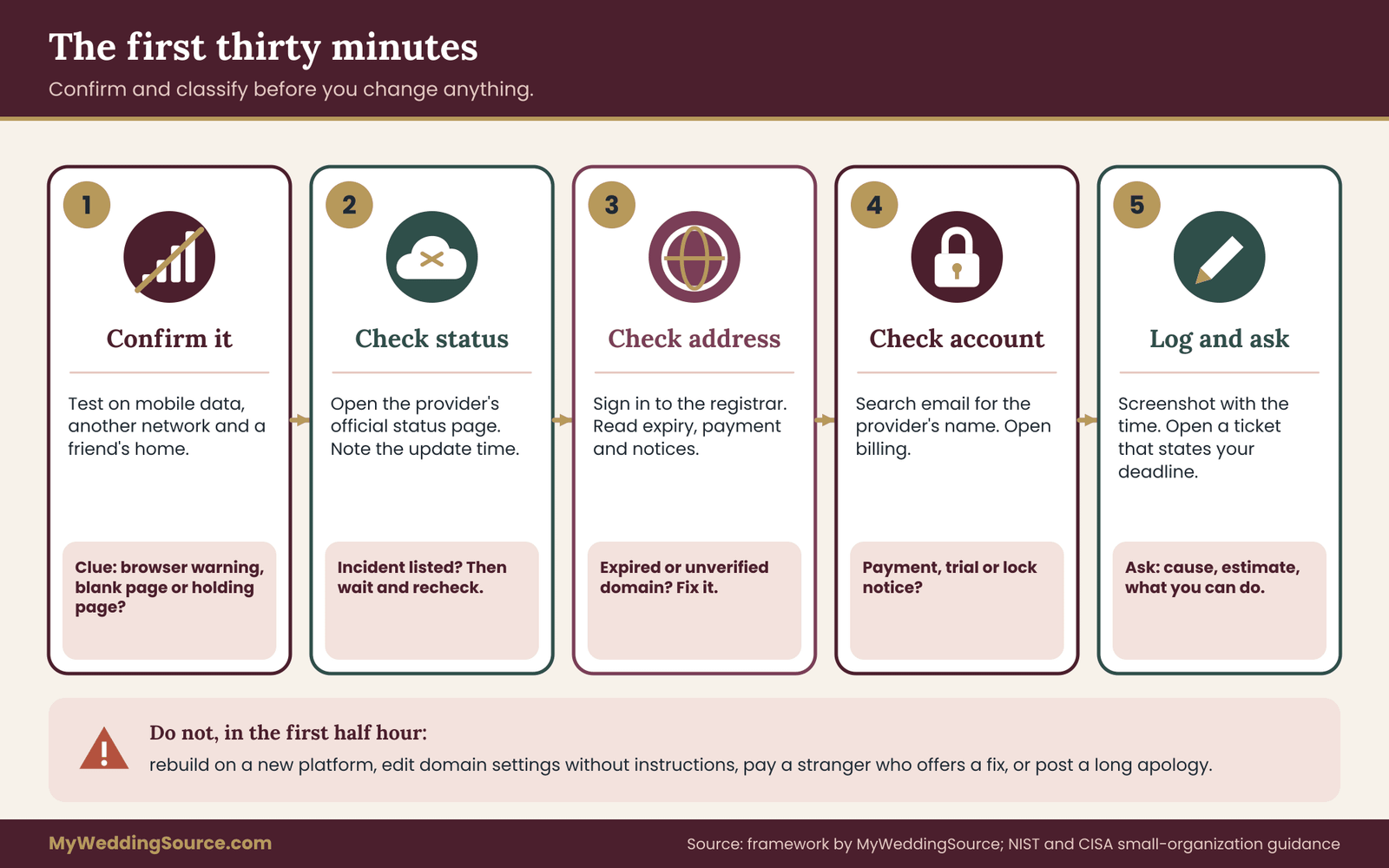
When the first sign of a wedding website outage arrives, from a guest message or from your own check, resist two urges. The first is to start changing settings. The second is to start announcing. Spend thirty minutes confirming and classifying. It is the cheapest half hour in the whole process, because a wrong guess costs far more.
Step one: confirm it from outside your own bubble
Open the site on your phone with Wi-Fi turned off, so it uses mobile data. Open it on a laptop on a different network if you have one. Ask a friend in another house to try. Note what each device shows: a blank page, a browser warning about security, a “site not found” message, a provider’s holding page, or the real site with something wrong.
Those messages are clues. A browser warning that mentions a certificate suggests the address is the problem. A holding page from the provider suggests the account. A blank page across all networks suggests the platform. A page that loads for some people and not others often means a local or regional issue, and it will usually resolve on its own.
Step two: check the provider’s status page
Most website builders and hosting companies publish a status page that lists current incidents. Search for the company name plus “status,” and prefer the official page linked from the provider’s own help site. Many also post on a social account. If the provider acknowledges an incident, you have your answer to the “who can fix it” question: they can, and you cannot. Note the time and the wording of the update. Come back to it every thirty minutes, not every thirty seconds.
Step three: check the address
If the platform looks healthy, check the domain. Sign in to the registrar, which is the company where you bought the domain, and look at three things: the expiration date, the status of the last payment, and any notice about a required verification. Domains that lapse or are suspended for verification issues can cause a wedding website outage even though the site itself is untouched.
Registrars generally send reminders to the contact email on the account, which is why that email address matters so much; if it is an old address, the warning may have gone unseen for weeks.
The Internet Corporation for Assigned Names and Numbers, known as ICANN, publishes rules and guidance on registrant rights, including what registrars must communicate about expiring names, and it is a reasonable place to start if you are unsure what to ask.
If the page shows a certificate or security warning, the usual cause is a lapsed or misconfigured certificate. Many site builders renew certificates automatically, and the failure often traces back to a changed domain setting. Ask the provider’s support to confirm the certificate status rather than clicking through the warning. Guests who see a security warning will mostly turn back, and they will be right to.
Step four: check the account
Search your inbox for the provider’s name and for words such as “suspended,” “locked,” “payment failed,” “renewal,” “verify” and “action required.” Check the spam folder too. Open the billing page. A failed payment, a plan that expired at the end of a trial and a flagged login are all common and all fixable with a short conversation.
Step five: write it down and open a ticket
Take a screenshot of what you saw, with the time visible if you can. Open a support ticket or chat, and say what you need in plain terms. A useful message sounds like this:
“Our wedding website is unreachable and our event starts on Saturday at 4 p.m. Please confirm whether the cause is the platform, the domain or the account, tell us the earliest realistic restoration time, and tell us what we can do on our side.”
Notice what that message does. It states the deadline, asks for a cause, asks for a time estimate and invites instructions. Support teams respond to specific, time-bound requests faster than to “help, site down.”
Ask for a ticket number and keep it. It will be useful later if you want a credit, a refund or a record of when you reported the problem.
What not to do in the first half hour
Do not move the whole site to a new platform on impulse. A rebuild takes longer than most people expect, and you will still have to tell guests the new address. Do not change DNS records, which are the settings that tell the internet where your domain points, unless a support agent has told you exactly what to change. A wrong edit can turn a short wedding website outage into a long one, and changes to these records take time to spread, so you cannot know how soon a fix will show up.
Do not reply to messages that offer to restore the site for a fee. Scammers watch for couples in the middle of a wedding website outage, and the genuine route runs through the provider you already pay. And do not post a long apology on social media before you know what you are apologizing for.
When the thirty minutes are up you should know four things: what kind of wedding website outage it is, whether the provider can fix it, what the provider’s estimate is, and how long until the first guest needs the information. That fourth fact leads straight to the decision tree.
The wedding website outage decision tree: five questions, four outcomes
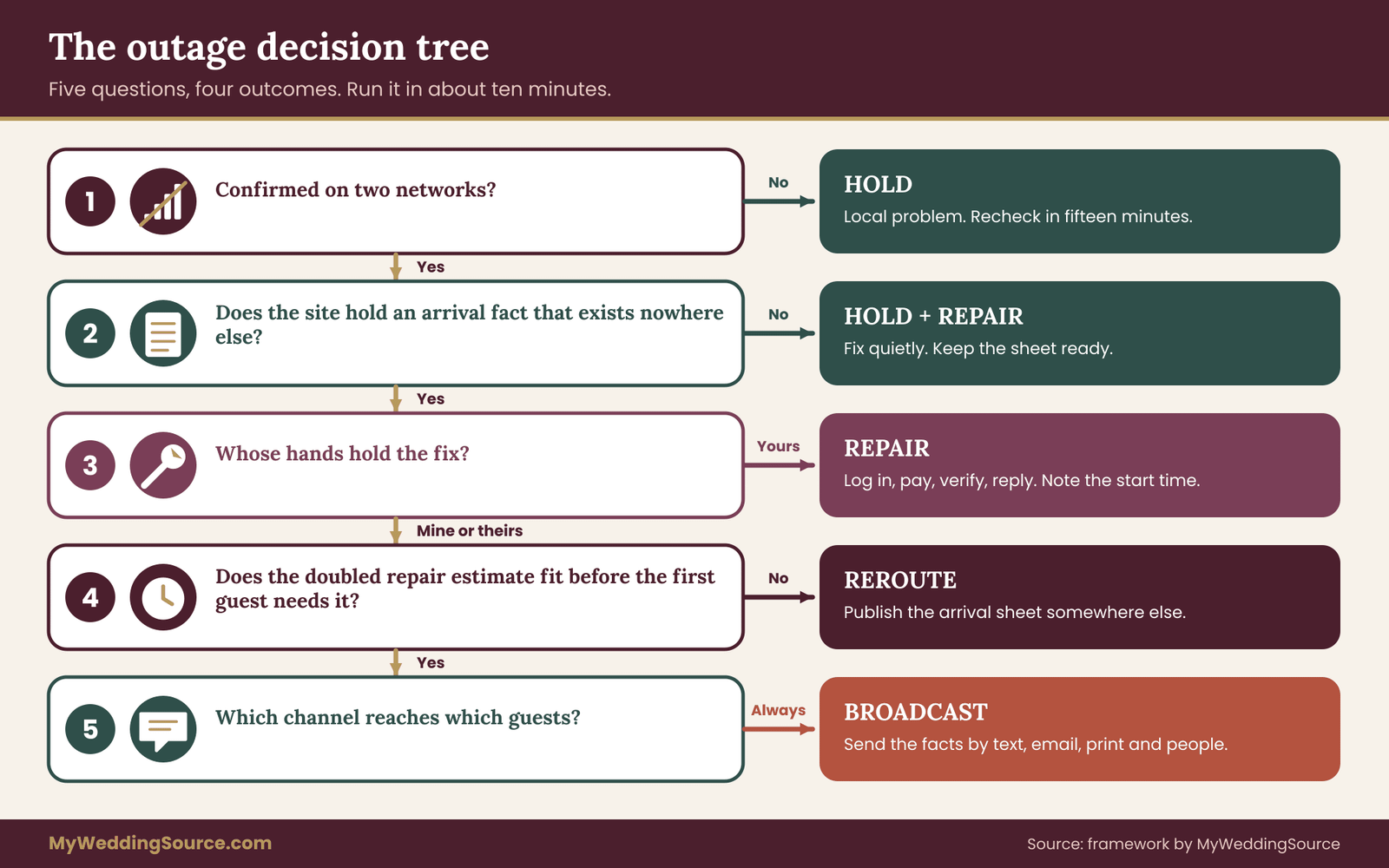
Once you have a classification and an estimate, you need a decision. The decision tree below is deliberately short, because a tree you cannot remember will not be used. It has five questions and four possible outcomes, and you can run it in about ten minutes. Write the questions on the back of the arrival sheet if that helps.
The four outcomes are these.
Hold. Do nothing visible. Recheck the site at a set interval, and keep the arrival sheet ready. This is the right outcome when the wedding website outage is real but harmless.
Repair. Act on your side of the problem: pay the invoice, renew the domain, answer the verification email, reset the login. Then recheck. This outcome often runs alongside the others.
Reroute. Publish the arrival sheet somewhere that does not depend on the broken site, and point guests to it. The stopgap page section later in this article covers how.
Broadcast. Send the arrival facts themselves, not a link, through a channel that reaches guests without using the site. This is the alternate guest message channel, and it is the outcome that protects guests who would otherwise be left guessing.
Now the questions.
Question one: is the wedding website outage confirmed on two networks?
If the site fails on your phone but loads on your laptop and on a friend’s connection, you do not have a wedding website outage. You have a local problem. The outcome is Hold: wait fifteen minutes, try again, and clear the question before taking any other step. If it fails everywhere you tested, move on.
Question two: does the site hold any arrival-critical fact that exists nowhere else?
This is where your job cards pay off. If directions, times, lodging and access notes also exist on the printed invitation, in the hotel’s guest message and in a text you already sent, a wedding website outage is mostly an annoyance, and the outcome is Hold plus Repair. If any of those facts live only on the site, because you added a late shuttle time or changed the parking plan after the invitations were printed, then the site is carrying weight, and you move on.
Be honest here. Couples often assume the printed invitation covers everything, then discover that the invitation says “directions at our website” and carries no address detail beyond a venue name. In that case the answer to question two is yes.
Question three: whose hands hold the fix?
If the platform is down, only the provider can repair it. Your job is to get an estimate and to keep the repair moving by watching for updates. If the problem is the domain, the payment or the account, the fix is in your hands, and Repair becomes the first action: log in, pay, verify, reply. Many a wedding website outage that looks alarming takes ten minutes once the right person is looking at the right screen. Write down the time you started the repair, because that note helps you judge how long it is really taking.
Question four: can the repair finish before the arrival clock runs out?
This is the question that decides between waiting and acting, so it deserves its own section.
The arrival clock for a wedding website outage
The arrival clock is the time left before the first guest needs the information the site holds. It is not the time until the wedding. A guest flying in two days early may need the hotel details on Thursday. A guest driving from three states away may need directions on Friday afternoon. A local guest may need nothing until Saturday morning. The first moment anyone in your guest list needs a fact is the moment your clock reaches zero.
To read the clock, compare two numbers. The first is the realistic repair time, which is the provider’s estimate if you have one. The second is the hours until the first guest needs the fact. Then apply a margin. Providers’ estimates are often optimistic, and a repair can reveal a second problem, so a good working rule is to double the estimate. If the doubled estimate fits inside the time you have, Hold or Repair is reasonable. If it does not, move to Reroute and Broadcast now, not later.
If the provider gives no estimate at all, treat the repair time as longer than your clock. That sounds pessimistic, and it is on purpose. Sending an unnecessary message costs you a few minutes and a little guest attention. Failing to send a necessary one costs a guest the ceremony.
Here is how the clock usually breaks down, as a rule of thumb you can adjust to your own guest list.
More than seventy-two hours before the first arrival. The urgency is low. Hold or Repair, and recheck at set times. Prepare the arrival sheet and the guest message list but do not send anything unless the wedding website outage lasts into the next band.
Between seventy-two and twenty-four hours. Set a decision time. Agree with your partner or coordinator that if the site is not back by, say, six in the evening, you send the arrival sheet to all guests who are traveling. Make the decision once and keep it.
Between twenty-four and six hours. Send the arrival sheet to everyone who is arriving from out of town, and to anyone who has asked a question. Repair continues in the background. The site coming back is a bonus, not a precondition.
Under six hours. Broadcast to every guest, and also use the human layers: hosts at the venue entrance, a sign at the hotel desk, a phone call to any guest who cannot be reached by text. At this point, the site is irrelevant for planning, and you should not wait for it.
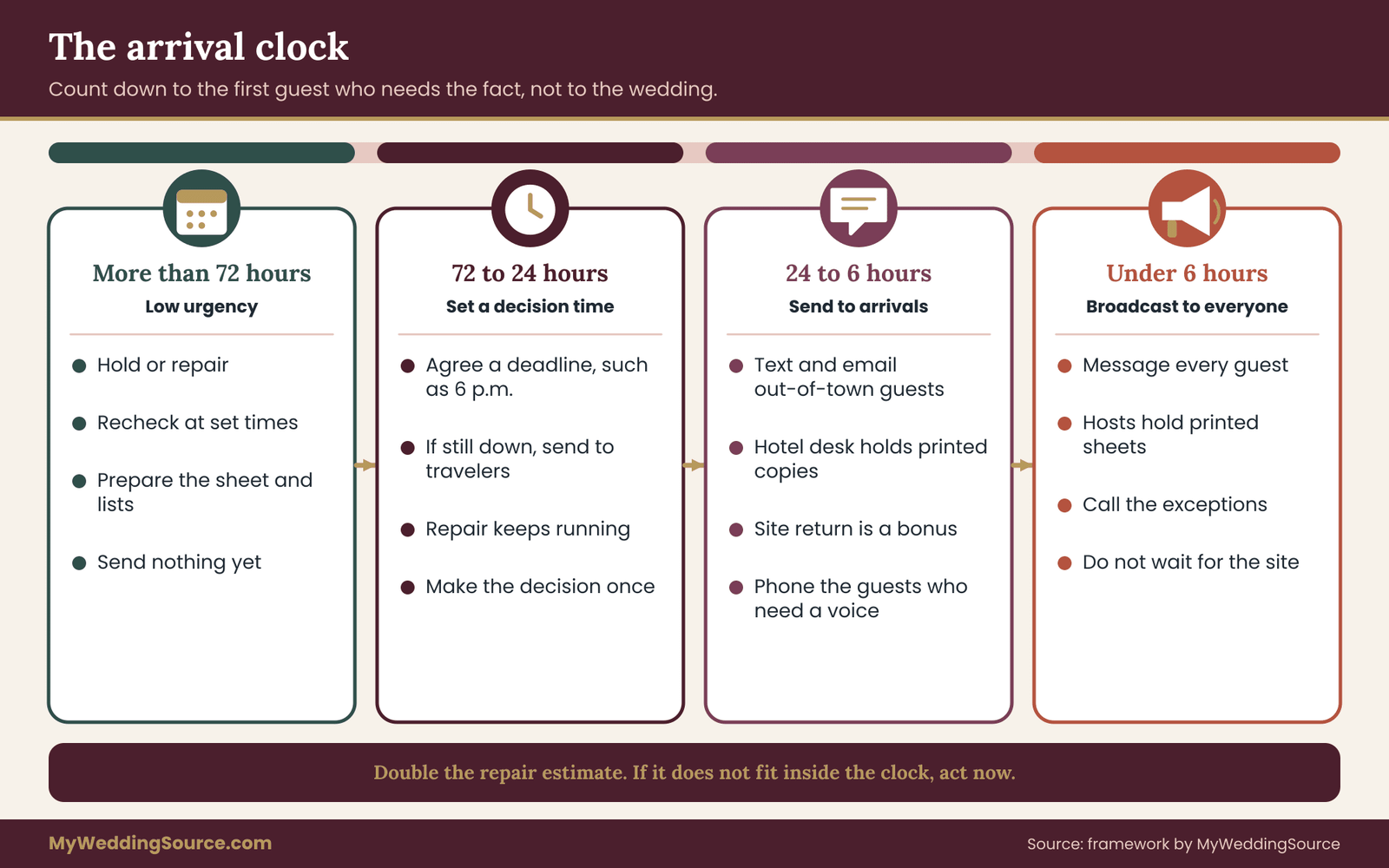
These bands are a framework, not a law. A destination wedding shifts them earlier, because guests are already traveling. A small backyard wedding with ten guests who all live nearby shifts them later. What matters is that you pick the bands before the wedding website outage, so that nobody has to invent them while the phone is buzzing.
Question five: which channel reaches which guests?
The last question turns the decision into a message. Every guest segment has a channel that is likeliest to reach them, and the next major section goes through that match in detail. For now, the working rule is to send the arrival sheet by the fastest channel and repeat it by one slower, more reliable channel. A text and a printed card is a better pair than two texts.
Three decisions, worked through
It is easier to see the tree in motion. Here are three short scenarios, each invented for illustration.
Scenario one: a platform incident on Thursday morning. The wedding is Saturday at 4 p.m. The site is down on all networks. The provider’s status page lists an incident and says it is investigating. Question two: the site holds a late shuttle schedule that is not printed anywhere. Question three: only the provider can fix it. Question four: no estimate, and the first guests arrive Thursday night.
The doubled estimate is unknown, so the clock is treated as shorter than needed. The outcome is Reroute plus Broadcast: put the shuttle schedule and the address into a text to the out-of-town guests that morning, and post a printed copy at the hotel desk. The site coming back on Thursday afternoon changes nothing about that decision.
Scenario two: a domain lapse on Friday afternoon. The registrar account shows the domain expired three days ago because a card was replaced. Question three: the fix is in the couple’s hands. They pay and renew in ten minutes. The registrar warns that the site may take some hours to come back as settings spread.
Question four: the first guests are driving in tonight. The doubled estimate of the unknown “some hours” does not clearly fit. The outcome is Repair and Broadcast. They send the one-page arrival sheet by text to everyone arriving that evening, and send a short “the site is back” note only if it matters.
Scenario three: an account lock on Saturday morning. The site is down. The couple is getting ready, and the coordinator has the logins. Question two: the facts all appear on the printed program and on the signs at the venue. Question four: the first guests are already on the way. The outcome is Hold with a single message from the coordinator to the few people who ask. Nobody needs a broadcast, because the facts are already in guests’ hands.
The three outcomes differ because the facts and the time differ, not because the problem differs. That is the point of the tree.
Decide who decides, and when
One small piece of governance saves a lot of friction. Name one person who runs the tree and has authority to send the broadcast. That person is not usually the couple, because the couple will be busy with hair, family and nerves. It is often a coordinator, a planner or a trusted friend. Agree on the decision times in advance, write them on the arrival sheet, and give that person the text-ready messages and the guest contact list.
If the couple is unreachable, the tree keeps running. If you are the one who runs the tree during a wedding website outage, keep a short log of the time you checked, what you saw and what you sent. The log is useful if a guest says they never got the message, and it is useful later if you ask a provider for a credit.
Choose an alternate guest message channel for a wedding website outage
If the decision tree says Broadcast, the next job is to reach people without the site. The alternate guest message channel is the most important piece of a wedding website outage plan, because it is the one part guests actually experience. Nobody will remember that the platform had an incident. They will remember whether they knew where to go.
Send the facts, not a link
The first rule is simple: the message carries the arrival facts itself. A message that says “our site is down, please check back later” tells guests nothing useful. A message that says “Ceremony Saturday at 4 p.m. at 12 Orchard Lane, park in the lower lot, shuttle leaves the hotel at 3:15” solves the problem even if the site never returns.
In a wedding website outage, a link can still be included as a bonus, but nothing important should sit behind it. A link also looks suspicious in an unexpected text, which matters more than it used to, and a later section returns to that.
Match the channel to the guest
Different guests are reached by different channels, and there is no single best one. For a wedding website outage, think in terms of a ladder: a fast first channel, a reliable second channel, and a human third layer for the people the first two miss.
Text message. This is the fastest channel and reaches most guests within minutes. It works well for short facts, and most people read texts more quickly than emails. Its weaknesses are limited length, group threads that expose everyone’s numbers, and the way people mute noisy threads. Send individual messages or use a broadcast feature that does not show recipients to one another, rather than one big group text where a single reply-all reaches fifty phones.
Email. Email suits longer information, such as lodging details, a shuttle schedule or a map attachment, and it leaves a record guests can search later. It is slower to be read, it can land in spam, and some guests use addresses they rarely check. Send it in addition to a text, not instead of one. Use the blind copy field or a mailing tool so addresses stay private.
A messaging app group. If many of your guests use the same messaging app, particularly international guests who avoid text charges, a group can be efficient. It works only for guests who are already members, and joining a new group in a crisis is a poor ask. If a group exists already, use it. If not, do not create one in the middle of a wedding website outage.
A printed card at the hotel desk or in welcome bags. A printed sheet reaches guests who have no signal, a dead phone or no interest in their phone. It takes lead time, so it suits the early bands of the arrival clock. Ask the front desk to keep a stack at the counter and to hand one to each guest from your block. If you are printing, our guide to wedding signage as a system explains how to make a sheet readable from a distance and how to check venue rules on posting.
A person with a phone. Hosts, ushers, family captains and the coordinator can pass the facts along in person. This is the best channel for older guests and for guests who ask a person before they ask a phone. The weakness is drift: after three retellings the shuttle time becomes a different time. Give each person the printed sheet and ask them to read from it.
A phone call. A call is slow, and it is the right tool for the few guests the other channels miss: a grandparent without a smartphone, a guest with a vision impairment who relies on a screen reader and had not yet set it up, or the one cousin who never answers texts. Keep a short list of people to call.
A social media post. This is the weakest channel for a wedding website outage. Not everyone follows you, platforms decide what people see, and a public post may expose details you would rather keep to guests. If you use it at all, use it as a last echo, with no private details.

Build a segment list before you need it
Take your guest list and sort it into five or six segments. You do not need a spreadsheet with dozens of columns. A paper list works. Typical segments include local guests, guests driving from out of town, guests flying in, guests with access needs, older guests who rely on relatives, and the wedding party and immediate family.
For each segment, write the first channel and the second channel. Local guests might get a text first and a printed program second. Fly-in guests might get an email first, because they check mail while traveling, and a text second for the last mile. Older guests might get a call from a family captain and a printed card in the hotel.
Guests with access needs deserve the most careful message, because the step-free route, the drop-off point and the seating plan are often the very facts that live on a single page of the site. A short call from a named person, plus the printed sheet, is better than hoping they find a text.
This list also reveals gaps. If you have no phone number for a set of guests, you now know that email is the only channel and that the hotel desk becomes more important. You can fix that gap weeks in advance with a single reminder, instead of discovering it during the wedding website outage.
Write the wedding website outage message so people act on it
The wording matters more than most people think. A message sent during a problem is read quickly, often while someone is driving or checking in at a counter. Put the most useful fact first, keep it short, and avoid dramatic language. Here is a text message that follows those rules.
“Quick update for Saturday: ceremony starts at 4:00 p.m. at the Orchard House, 12 Orchard Lane. Please arrive by 3:30 and park in the lower lot. Shuttle leaves the Maple Inn at 3:15. Our website is having trouble, so please use this message. Questions: call Dana at the number on your invitation card.”
Notice several choices. The facts come first. The reason for the message comes after them. The message points guests to a named person, and it refers to a number they already have, which avoids typing a phone number into a message that guests might not trust. It does not apologize at length or explain the cause, because guests do not need that.
For email, you can use the same facts with a clearer subject, such as “Saturday details: address, times and parking.” For the hotel desk, a half-page with the same facts, plus the name and number of the person to call, is enough. For a spoken script a host can use, keep it to three sentences: where the ceremony is, when to arrive, and who to ask.
“Hi, welcome. The ceremony is in the garden, starting at four. If you need the step-free route, I can walk you there, or ask Sam by the gate.”
Say that you will never ask for money or passwords
When a wedding website is down and guests are getting texts from a number they do not recognize, a scammer can slip in an imitation. A few lines at the end of the message protect guests: say that you will only send updates from this number or address, and that you will never ask guests to pay anything or to enter a password.
Government consumer-protection agencies, including the Federal Trade Commission, publish guidance on recognizing imposter messages, and the same habits apply here. Do not include a shortened link in the message unless you control it. If you do include a link, spell out the destination in words as well, so a guest can type it.
Respect how you got the contact details
Guests gave you their phone numbers and addresses so they could RSVP and receive event information. Use the list only for event updates, send individual or hidden-recipient messages, and let anyone who asks to be left off the list go. If you use a bulk text service or a mailing tool, read its terms, and be aware that rules about automated text messages and commercial email exist; the Federal Communications Commission and the Federal Trade Commission both publish plain-language material on them.
A short, one-off update from a couple to their own guests is a different situation from marketing, but the service’s own rules still apply. Delete the list from tools you do not need once the wedding is over.
Test the channel before the wedding website outage
A channel you have never used is a theory. A week or two before the wedding, send a harmless test: a short note to your wedding party and a few relatives, such as “Testing our guest update channel. No reply needed.” Check that it arrived, that the sender name looks right and that numbers are not exposed.
If anything is odd, you have time to change the plan. This test also gives you permission to say, in later messages, “this is the number we texted you from last week,” which is a small but real comfort to guests.
Build a stopgap page that outlasts a wedding website outage
A message reaches guests once. A page they can return to answers the follow-up questions, like “what was the parking lot again?” The stopgap page is the Reroute outcome of the decision tree: a plain, durable home for the arrival sheet that lives outside the broken site. You do not need design skill for it. You need a place, a layout and ten minutes.
Pick a home that does not share the failure
The whole point of a wedding website outage stopgap is independence. If your wedding site runs on a builder, the stopgap should not run on the same builder, and if the domain is the problem, the stopgap should not use that domain. A few options work well.
A shared document with a view-only link. Any word processor or cloud document tool can publish a page that guests open on a phone without signing in. Set it to view only, and check the sharing setting twice. A link that anyone can open is unlisted, not private, so treat anything on it as public. That means no guest phone numbers, no room numbers and no private addresses.
A file attached to an email or text. A one-page PDF is readable offline once it has been downloaded. That is useful at a venue with weak signal. Save the PDF with a clear name such as “Saturday arrival details,” keep it small, and make sure the text can be selected and the address can be tapped.
A page on a different free site builder. This takes more time and tempts you into design. If you already have a second account from earlier planning, it can work. If not, a shared document is quicker.
A printed sheet. Paper is the most reliable stopgap of all, and it should always exist alongside the digital ones. It needs no signal, no battery and no account.
Choose two of these. A shared document plus a printed sheet covers most weddings.
Lay the page out for a phone and a worried reader
Guests will open the stopgap page on a phone, standing somewhere, with partial attention. Design for that. The layout can be the same as the arrival sheet, in this order.
First, a plain title: “Saturday, June 5: where and when.” Use the actual date and your own details. Second, the two or three facts that matter most: the ceremony address, the arrival time and the start time. Third, how to get in: the correct gate, the parking location and a note about any known navigation error. Fourth, lodging and shuttle times. Fifth, access details: the step-free route, seating, restroom location and drop-off point. Sixth, the weather plan. Seventh, a named person and a phone number to call, ideally the coordinator’s, not a couple’s.
Keep the sentences short. Use large text if you can, high contrast between text and background, and real headings in place of bold paragraphs that merely look like headings. The Web Accessibility Initiative of the World Wide Web Consortium publishes guidelines on readable, understandable pages, and the basic ideas are plain: clear structure, enough contrast, text that can be resized and links that say what they lead to. Those ideas matter most when readers are stressed, tired or older.
Add a short line at the bottom: “Our website is temporarily unavailable. This page has everything you need for the weekend.” That is enough of an explanation.
Keep private details off the stopgap page
A stopgap page is easy to share, which is useful, and easy to forward, which is a risk. Leave out anything you would not put on a flyer: guests’ phone numbers, home addresses, dietary or medical notes, and the names of guests who need particular access. If you need to tell a guest about a specific arrangement, such as a seat near an aisle, send that in a direct message.
The venue’s address and times are not private, but the schedule of a small private ceremony might be, so decide whether the page should be open to anyone with the link or restricted to people you invite by email.
Fix the printed QR codes that point to the broken site
If you printed a QR code on invitations, programs, signs or menus, a wedding website outage leaves a code that leads nowhere. You cannot change ink, but you can often change where the code points. If the code points to a short link you created through a link tool, you can usually edit the destination to the stopgap page. If it points straight to the site, it is stuck until the site returns.
In that case, handle the printed pieces in layers. For signs and menus at the venue, put a printed card next to the code that says “If this code does not open, please ask any host.” For programs, the host layer is the answer. For invitations that were already mailed, the message channel does the work. When you plan your next print job, our guide to wedding invitation printing is a good place to build in a text-only fallback and to ask the printer what a reprint of an insert would involve.
Plan to retire the stopgap quietly
When the original site comes back after the wedding website outage, check it on two networks and a second device, then put a short line at the top of the stopgap page that says the main site is working again. Leave the stopgap in place for a few days in case a guest has it bookmarked.
Send an all-clear message only if you told guests the site was down. A single line, such as “Our website is working again, if you would like the full schedule,” is enough. Messages that arrive in bursts teach guests to ignore you.
When a wedding website outage reaches guests who are already on the road
The hardest kind of wedding website outage begins after guests have left home. They are on highways, in airports, in rideshares and in hotel lobbies. A few people are lost and have nobody to ask. For this stage, the plan changes from sending information to being reachable.
Split the work into four roles
If the wedding website outage starts within a day of arrival, one person cannot do everything. Assign four jobs, to four different people if possible, and keep the couple out of all of them.
The sender runs the decision tree and sends the broadcast, the follow-ups and the all-clear. The caller phones the short list of guests who need a voice, especially older relatives and guests with access needs. The desk contact liaises with the hotel front desk, the shuttle company and the venue, making sure each has the sheet and the name of someone to call.
The fixer deals with the provider: support tickets, payments, verification. The sender and the fixer should not be the same person, because one is writing to guests while the other is on hold with a help line.
On a small wedding these four jobs may fall to two people. That is fine, as long as the work is named and the couple is not secretly doing it.
Give the hotel and the shuttle the sheet
Hotel front desks and shuttle drivers are the two places where lost guests reach a human being. During a wedding website outage, call or email the front desk the moment the decision tree says Broadcast. Ask them to hold a stack of the printed sheet at the counter, to give one to anyone checking in under your group, and to give the driver a copy as well.
Desk staff often know the venue address and local roads well. If they are given the right facts, they become the most efficient part of the alternate guest message channel.
The same applies to the venue. The venue’s own coordinator will usually hold the address and gate details, and may be glad to answer a guest’s call. Ask what number they will answer, and put it on the sheet only if they agree. If the venue has signal problems, ask for the Wi-Fi network name that guests can use and note it on the page.
Remember the last mile
Navigation apps are confident and sometimes wrong. Rural venues, parks, farms and large estates often have more than one entrance, and the app may choose a service road. The facts that save guests are specific: the name on the gate, a landmark, the distance from the main road, and what the last turn looks like. If you do not already know these, ask the venue today. Put the last-mile instructions in the sheet in plain words, such as “turn left at the red barn; the gate is open from 3 p.m.”
For guests who may arrive after the start, decide in advance where they should go and who will meet them. A host at the end of the lane with a printed sheet and a phone number is worth more than any website.
Keep the couple out of the loop, on purpose
A wedding website outage is a good example of a problem that is easier to solve when the couple is not solving it. Tell them what happened in two sentences, tell them what has been decided, and tell them when the next update will come. Then let them dress, eat and breathe. If the couple wants to contribute, give them the one job that actually requires them: approving the arrival sheet before it goes out. Everything else belongs to the sender, the caller, the desk contact and the fixer.
When a wedding website outage is a security problem
Most wedding website outage events are dull. A small number are not, and those deserve different handling because they can involve guest information. Think of this section as the exception to the calm approach: slow down, and protect people first.
Signs that a wedding website outage may involve a security problem
A security problem is more likely when the site loads but looks wrong, with pages you did not write, strange links, advertisements or redirects to other sites. It is also more likely when you receive messages about a password change you did not request, a login alert from a place you have never been, or a message from the provider saying the account was disabled to protect it.
Guests who report receiving a message that appears to come from you, asking them to pay or to confirm details on a link, are another sign. In any of those cases, treat the event as a possible compromise until the provider says otherwise.
First moves when a wedding website outage may be a compromise
Work from a device you trust, preferably one that is not the device you used when the problem began. Change the password on the website account and the domain registrar account, and on the email address connected to both, in that order of importance. Email comes first in practice, because an attacker with your email can reset everything else.
Use a long, unique password for each. If you do not use a password manager, write the new passwords on paper and keep that paper somewhere safe, which is a better answer than reusing an old one.
Turn on multi-factor authentication on every account that offers it. The Cybersecurity and Infrastructure Security Agency recommends it as one of a small set of basic protections for consumers and small organizations, and the National Institute of Standards and Technology publishes guidance and resources for small organizations on the same themes. Where the provider offers an authenticator app or a hardware key, those are generally a stronger choice than codes sent by text, though any second step is better than none. Save recovery codes in a place a trusted person can find.
Then contact the provider through the official help page, not through a link in a message you received. Report that you believe the account was accessed without your permission, ask them to review recent logins and ask them to confirm what was changed.
Work out what guest information was on the site
A wedding website can hold more personal data than couples realize. The RSVP form may include names, email addresses, phone numbers, meal choices and dietary notes, which sometimes reveal health information. A private page may list guests’ mailing addresses for thank-you cards. Gift pages may link to payment services. Before you decide what to tell guests, write down what the site actually held.
If the provider tells you that data may have been exposed, or you cannot rule it out, tell affected guests in plain language: what happened, what information may be involved, what you have done and what they can do, such as being cautious about unexpected messages. Rules about notifying people after a data incident vary by state and by circumstance, and a wedding site run by a couple is a less common case than a business, so check the official guidance from your state attorney general or consumer protection office if you are unsure.
The Federal Trade Commission also publishes plain-language steps for people whose personal information may have been exposed. The issuing agency is the right place to confirm current rules.
Watch for look-alike addresses and fake gift links
A wedding website outage creates a window for imitation. A scammer may register an address that differs from yours by one letter and send guests a “new link” for gifts, RSVPs or travel details. The guests do not know which version is real, because your own site is not available to tell them.
The defense is simple and has to be put in place before it is needed. In every wedding website outage message, say that you will only send updates from the number or email address guests already know, and that you will never ask for payment or a password. Name the real address of the site in words. If the registry or gift page has a different address, say so.
If a guest reports a suspicious message, ask for a screenshot, ask them not to click anything, and pass the report on to the provider and, if money was involved, to the guest’s bank. The FTC’s consumer guidance on recognizing and reporting scams is a good reference to share.
An expired domain is not just an inconvenience
One quiet point deserves a warning. A domain that lapses and is not renewed in time can eventually be released for others to register. At that point someone else could own your address, and a site you do not control could appear there, with advertising or worse. This is rare for a wedding, and it is entirely avoidable. Renew early, renew for a longer term if your registrar allows it, keep the payment method current and keep the account email address one you check.
If your domain has already lapsed, contact the registrar the same day and ask what recovery options and fees apply; rules and timelines vary by registrar and by domain type, and ICANN’s registrant guidance explains the general framework.
Check every fact before you send it
The urge to move fast leads to errors in the arrival sheet, and an error in an address is worse than the wedding website outage. Before the sheet goes out, have a second person read it against the venue’s written confirmation or your signed contract. Check the address letter by letter, the start time, the date, the time zone if guests are traveling across zones, and the phone number digit by digit.
If you use a writing assistant, including an AI tool, to tidy the wording, treat what it produces as a draft and not as a source of facts. It can reorder your text, but it can also change a number, drop a word or invent a detail without telling you. Compare the final message against the original facts every time, and never publish an address, a time or a rule that you have not checked against the venue’s own confirmation.
A worked example of a wedding website outage
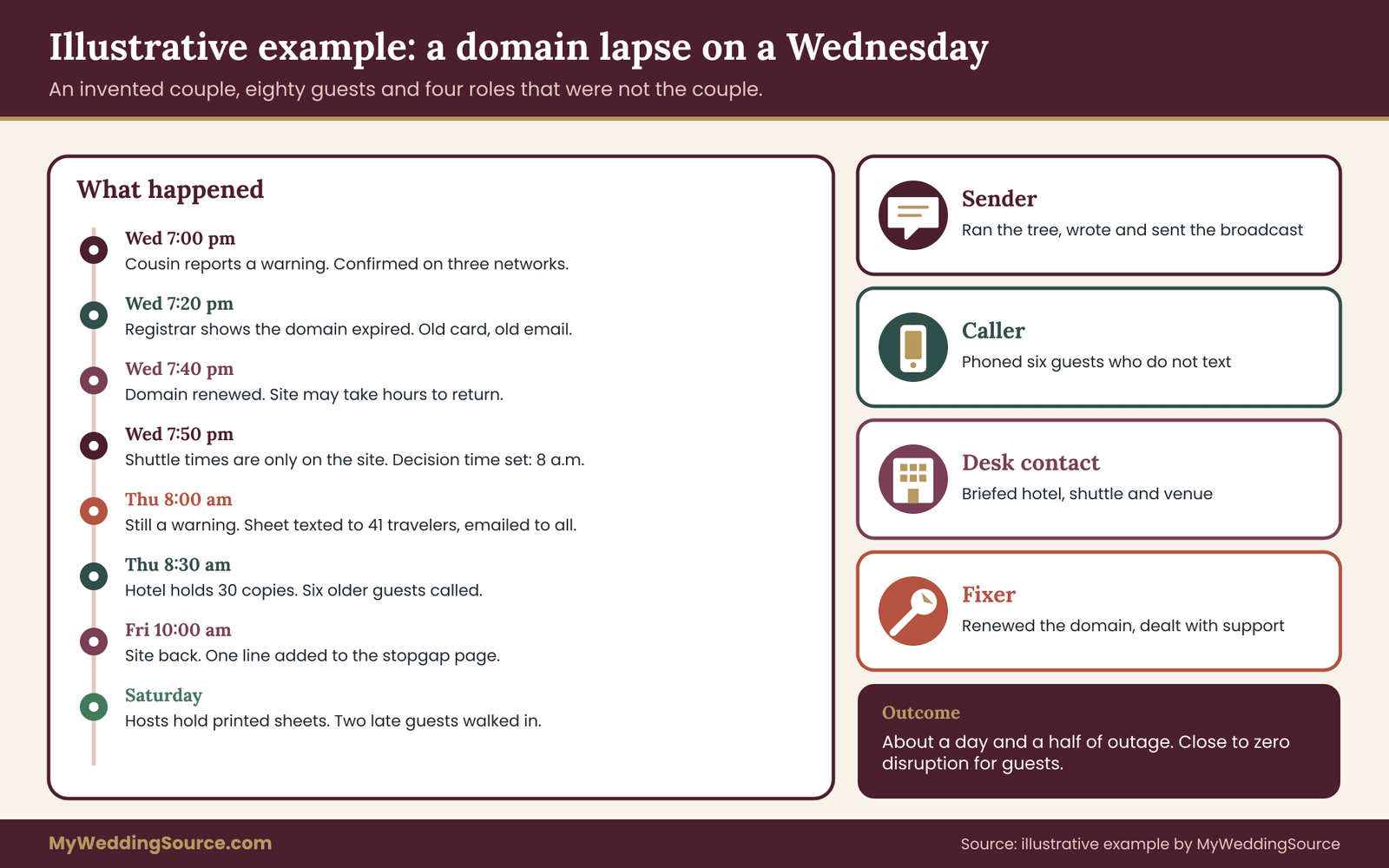
The following example is invented to show the tree in motion. The couple, the venue and the numbers are not real, and your own timing will differ.
Marisol and Theo are getting married on a Saturday at 4 p.m. at a lakeside lodge two hours from the city. They have eighty guests, and forty-one are traveling from out of town. They built their site on a general site builder and attached a custom domain they bought through a registrar. Eight days before the wedding they changed the shuttle schedule, and they updated it on the site only. They also gave their coordinator, Priya, a delegated login to the site and the registrar’s contact email.
Wednesday, 7:00 p.m. A cousin texts: “Your link shows a scary warning.” Priya opens the site on her phone using mobile data, then on her laptop at home. Both show a browser warning about the address. A friend in another city sees the same. Question one is answered: confirmed on three networks.
7:20 p.m. Priya checks the builder’s status page. No incident is reported. She signs in to the registrar and finds the domain has expired, because the card on file was replaced two months earlier. The renewal reminders went to an old email address that the couple no longer checks. The kind of wedding website outage is now clear: the address is broken, and the fix is in the couple’s hands.
7:40 p.m. Marisol approves a payment from her phone, and Priya renews the domain. The registrar’s page says the site may take some hours to return as settings update. Priya writes down the time and takes a screenshot of the confirmation. That is question three and the start of Repair.
7:50 p.m. Question two: the shuttle schedule exists only on the site, so the site is carrying weight. Question four: the first guests, a group of twelve flying in, land Thursday evening, about twenty-four hours away. The repair estimate is “some hours,” which is no estimate. The couple’s earlier rule applies: if the site is not working normally by 8 a.m. on Thursday, the sender broadcasts. Priya prepares the arrival sheet that night, and a second person, Theo’s brother, checks it against the lodge’s written confirmation.
Thursday, 8:00 a.m. The site still shows a warning, because the certificate has not yet caught up with the renewal. The decision time has arrived, so the tree says Reroute plus Broadcast. The sender, Theo’s brother, texts the arrival sheet individually to the forty-one out-of-town guests, and sends an email with a PDF to all eighty.
The message carries the address, the shuttle times, the gate, the parking and Priya’s number, and it states that the couple will only send updates from this number and will never ask for payment. The stopgap page, a view-only shared document, goes up at the same time.
8:30 a.m. The desk contact calls the hotel front desk, which agrees to hold thirty printed copies and to give one to the shuttle driver. The caller phones six older guests who do not text. One of them mentions she had no idea the site had a shuttle page, and thanks the caller for the specifics.
Friday, 10:00 a.m. The site loads normally on three networks. The sender sends nothing new to the full list, because the stopgap is working and most guests already have what they need. A single line is added to the stopgap page, saying the main site is working again.
Saturday. The hosts at the lodge gate hold printed copies. Two guests arrive after the processional starts; a host walks each to the garden using the printed sheet.
The following week. Marisol and Theo write a short log of times and actions, update the registrar’s contact email, switch on automatic renewal, add a second payment method and extend the registration term. They also ask the site builder to explain how it handled the certificate. In their closing notes, they list two things that worked: the second reader on the arrival sheet, and the habit of sending facts, not links.
What the example shows about a wedding website outage
Three features of this example are worth copying. First, the tree turned a vague worry into a small number of dated decisions, and one decision time was agreed before anyone was stressed. Second, the people who did the work were not the couple. Third, the message went out through three separate channels that did not rely on the site, and the guests who most needed a voice, the older relatives, got one. The wedding website outage itself lasted about a day and a half. The disruption to guests was close to zero.
Prevent the next wedding website outage with a quiet check calendar
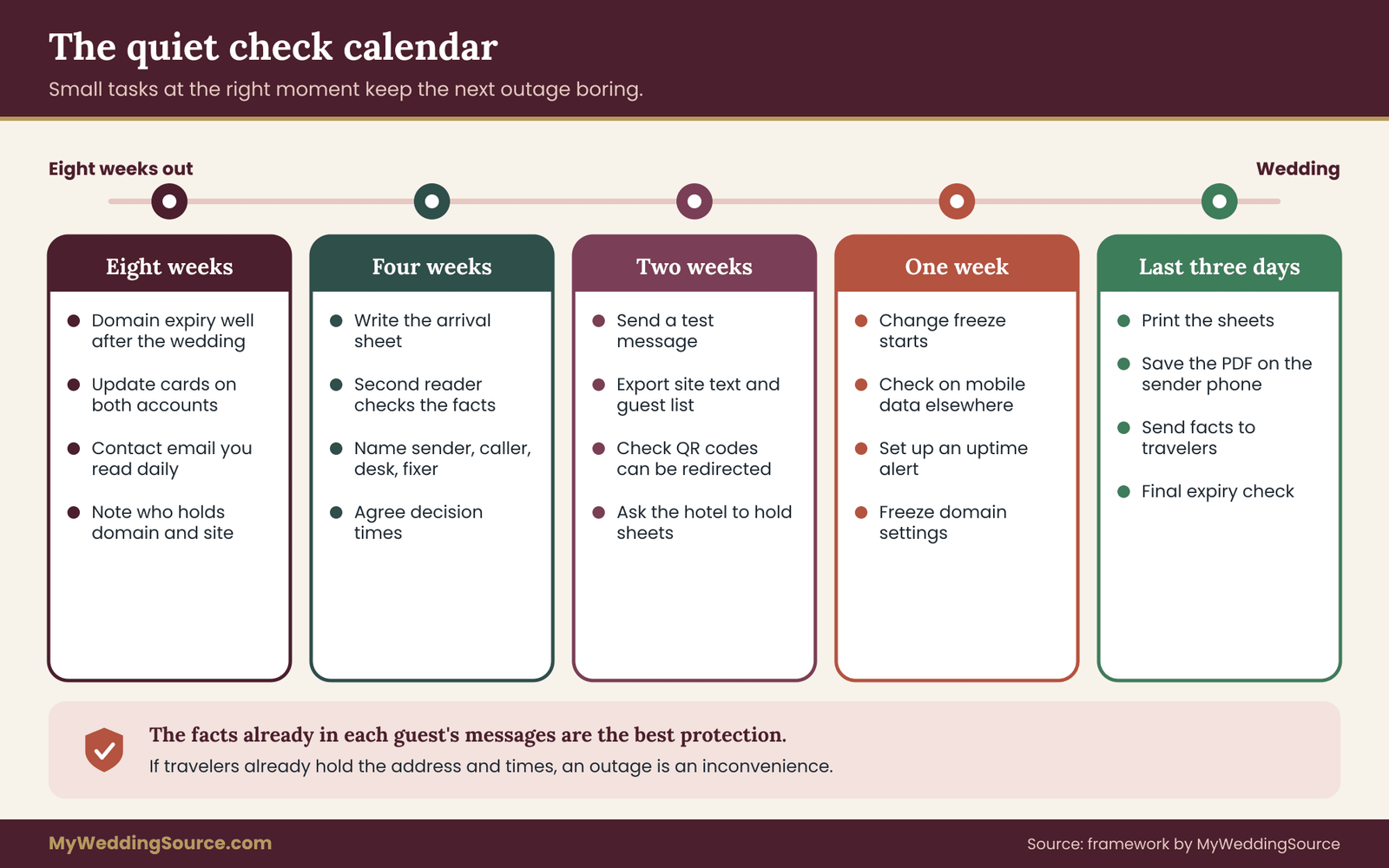
The best response to a wedding website outage is the one you never need. Prevention here is not exciting, and it takes less than two hours in total, spread over the last two months. The calendar below puts each small task at the point where it still has time to matter.
Eight weeks before
Look up the domain’s expiry date and make sure it falls well after the wedding, ideally by many months. If it does not, renew now for a longer term. Check the payment method on both the site builder and the registrar, and replace any card that will expire before the wedding. Update the contact email on each account to an address you read daily, and add a second contact if the account allows one. Write down which company holds the domain and which holds the site, since they are often different.
Four weeks before
Build and check the arrival sheet, using the four job cards. Have a second person read it against the venue’s written confirmation. Decide who the sender, caller, desk contact and fixer are, and tell them. Give the delegate access to the accounts, or agree the reset procedure. Agree the decision times for the arrival clock and write them on the sheet.
Two weeks before
Send the test message to a handful of people and confirm that it arrives and that numbers are hidden. Export a copy of the site’s text, schedule and guest list in a form you can open without the site, and keep it on a device that is not a phone. Make sure any printed QR code points to something you can redirect, or plan the host layer described earlier. Ask the hotel front desk if they will hold printed sheets, and confirm the shuttle company’s contact.
One week before: the change freeze
Make the last significant edits to the site now, and then stop. A change freeze is the single most effective habit for avoiding a self-inflicted wedding website outage. People break things when they tinker late at night, and a layout tweak or a plugin update two days before the wedding has little upside and a real downside.
Allow only changes to arrival facts, and when you make one, change the arrival sheet at the same time so the two always match. Do not touch domain settings, and do not move the site to a new plan or platform.
Check the site on mobile data from a different location, and ask a friend in another place to do the same. If you use a free monitoring service that checks your address at intervals and messages you when it fails, set it up now and send the alerts to the sender, not only to the couple. Monitoring does not prevent a wedding website outage, but it shortens the time before anyone notices one, which is often the largest part of the delay.
Three days to one day before
Print the arrival sheet, with enough copies for the hotel desk, the shuttle driver, the hosts and the coordinator. Put one copy in the coordinator’s folder, one with the hosts and one with the couple’s trusted family member. Charge devices, and save the PDF on the sender’s phone so it can be sent without a connection to the site.
Do a last check that the site loads and the expiry date has not changed. Send a short, friendly arrival message to out-of-town guests that includes the facts, so that most guests already have them in their own messages and need not use the site at all.
That last point is a quiet form of prevention. If the facts are already in each guest’s inbox and message history before the day, a wedding website outage becomes much less important. The site stays a convenience, which is what it should be.
Questions worth asking your providers
Most providers answer these questions in their help pages, and the answers are worth a few minutes of reading before you need them. For the site builder: where is the status page, how quickly does support respond, are there different support channels for weekends, what happens to the site if a payment fails, how long does it stay online before it is paused, and can you export the content.
For the registrar: what is the renewal process, are there automatic renewals, what reminders are sent and to which addresses, what is the grace period if a renewal is missed, what recovery fees apply, and is a domain lock available. For the hotel and venue: will they hold printed sheets, and which number do they want guests to use.
Whenever a provider promises something specific, ask for it in writing, even a one-line email. Our guide to wedding vendor contracts explains how to read the terms that matter and how to record a promise. A site builder’s terms of service will usually describe availability and any remedies, and those terms differ widely; read yours, and do not assume a credit or refund is owed. The company’s own policy decides.
Edge cases that change the plan
Some situations need small adjustments to the same method.
A livestream or virtual guests. If remote guests rely on a stream link on the site, the link is an arrival-critical fact for them. Give it its own job card, and send it by email to remote guests ahead of time, with the start time in their own time zone.
A destination or multi-day wedding. Arrival clocks start earlier and are staggered, guests may lack local data plans, and the lodging and transport information matters more. Move every band of the clock earlier, and send the arrival sheet before guests leave home.
A planner-run site or a wedding platform that includes RSVP and registry. Ask who holds the account. If the planner holds it, agree who contacts the provider. If the RSVP form is part of the platform, a wedding website outage may also stop late responses, so keep a plain email address or phone number for last-minute changes. Never put that address on a public page where it can be harvested; share it directly with guests who ask.
A wedding website outage on the wedding day itself. The tree still applies, but the clock is nearly zero. The hosts and the printed sheet carry the load. Do not interrupt the couple.
Guests who cannot get in. Sometimes the site is up, but a password-protected page rejects guests who forgot the password. Treat that as a content problem: send the facts in a message, and consider whether a password is worth the friction for the arrival page.
A couple with no website at all. The method still works. Your invitation, your messaging channel and your arrival sheet are doing the website’s job, and the same checks apply to whichever digital tool carries your RSVP or schedule.
After a wedding website outage: record it and close it
When it is over, take ten minutes to write the log: when it began, what kind it was, what you decided at each question, what you sent, to whom, what worked and what you would change. Keep the ticket numbers and the provider’s replies. If you want to ask for a credit or a refund, you will have the dates and the language of the provider’s own policy at hand. Update your contact lists, remove the delegated logins once the wedding is over, and delete guest lists from tools you no longer need.
If your records are scattered, our guide to organizing wedding records after the event shows a calm way to file them. For the broader view of backup communication, files and permissions, return to our guide on backup communication, files and permissions, and if you are still early in your planning, the wedding planning checklist can show where this check calendar fits among your other tasks.
Your next steps
Pick one evening this week and do three things. First, run the stranger test: ask a friend to find the address, the start time and the parking instructions on your site in under a minute, and fix whatever makes that hard. Second, write the arrival sheet from your four job cards, have a second person check it against the venue’s confirmation, and print a few copies. Third, look up the domain’s expiry date and the payment method on each account, and renew or update them now.
Then fill in the calendar: name the sender, caller, desk contact and fixer, agree the decision times, send a test message and begin the change freeze a week before the wedding. With that in place, a wedding website outage becomes a short list of decisions rather than a crisis, and your guests will find their way to the ceremony with or without the site.
FAQ
How quickly should we tell guests when the wedding website goes down?
Tell them as soon as the repair cannot finish before the first guest needs the information. Compare the provider’s estimate, doubled, with the hours until the earliest arrival. If you have no estimate, send the facts early. A short message with the address, times and a contact person costs little and prevents confusion. If the facts are already printed or in guests’ hands, you may not need to send anything for this wedding website outage.
What should the first message to guests say?
Put the facts first: ceremony address, arrival and start time, parking, shuttle times and a named person to call. Add one line that the website is having trouble and that the message has what they need. Include a sentence that you will only send updates from this number and will never ask for money or passwords. Skip long explanations and apologies.
Is it safe to use a group text for a wedding website outage message?
A single group thread can expose everyone’s phone numbers and invite reply-all chatter, so it is usually a poor choice. Send individual messages, or use a feature that hides recipients from one another. If a group already exists and guests are members, using it is reasonable. Do not start a new group during a wedding website outage, and delete contact lists you no longer need after the wedding.
Should we move the site to another platform during a wedding website outage?
Usually not. A rebuild takes longer than expected, and guests would need a new address. A short-term stopgap page, such as a view-only shared document with the arrival facts, is faster and does not depend on the broken service. Move platforms only after the wedding, when there is time to plan the change, redirect the old address and check everything calmly.
What if the domain has expired?
Contact the registrar the same day, pay any renewal due and ask what happens next, because recovery steps, timelines and fees vary by registrar and domain type. While you wait, send the arrival sheet through another channel. Then update the account email, add a backup payment method, switch on automatic renewal and renew for a longer term so it does not recur.
Do we need to tell guests if their information may have been exposed?
If a security problem may have exposed names, emails, phone numbers or dietary notes, honest, plain communication is the right approach. Say what happened, what information may be involved and what you have done. Notification rules depend on your state and circumstances, so check your state attorney general or consumer protection office. The issuing agency is the source for current rules.
How can we help guests who do not use smartphones?
Give them a person and a paper sheet. Ask a family member or host to call each of them, read the facts aloud and note any questions. Put printed copies at the hotel desk and in the hands of the hosts at the venue. Make sure the printed sheet has large type, a single clear address and a phone number someone will answer on the day.
Can a wedding website outage be prevented entirely?
No, because outages often start with a provider and not with you. You can reduce the odds and the damage. Renew the domain early, keep payment methods current, use a contact email you check, freeze changes a week before the wedding and send the arrival facts to guests ahead of time. When the facts are already in guests’ hands, a wedding website outage is only an inconvenience.
Sources
- Cybersecurity resources for small organizations, National Institute of Standards and Technology
- Secure Our World: multi-factor authentication and strong passwords, Cybersecurity and Infrastructure Security Agency
- Consumer scams and how to report them, Federal Trade Commission
- Consumer guidance on text messages and robocalls, Federal Communications Commission
- Registrant resources and domain name expiration, Internet Corporation for Assigned Names and Numbers
- Documentation on certificates and expiration, Let’s Encrypt
- Make a plan for communicating in an emergency, Ready.gov
- Web Content Accessibility Guidelines overview, W3C Web Accessibility Initiative
- Information and services for consumers, USAGov