

A household address spreadsheet is a guest list built in two linked sheets: one row for every mailing address, and one row for every named person who belongs to it. This guide shows how to build one, how to turn it into envelope names without guessing, and how to audit the merge before a single envelope is printed.
Keep two sheets. The first lists households, one row per envelope, with a permanent household ID, the address split into separate fields, and the name lines that will print. The second lists every invited person, one row each, tagged with the ID of the household that receives their invitation. Never use a name as the link between the two. Before printing, run seven checks: headcount, orphans, empty households, duplicate addresses, address completeness, name-line length and a ten-envelope test run.
Most couples start their invitation list in the same place they started their guest list: one long column of names. It works for a while. Then someone asks how many envelopes the printer needs, and the honest answer is “somewhere around sixty, depending on how we group people.” Then a cousin’s boyfriend becomes a fiancé, a friend’s address changes, and the parents want to add six names from their own address book. The list that was easy to sort by name is now hard to turn into mail.
The fix is not a fancier app. It is a different shape for the data, and that shape is the household address spreadsheet this guide describes. Invitations are mailed to households, but weddings are attended by individuals, and one flat list cannot honor both facts at once. A household address spreadsheet keeps them apart on purpose and links them with a simple ID, so you can count envelopes and count seats from the same source without either number drifting.
A note on scope. This is general information, not legal, tax or financial advice. Postal rules, printer requirements and privacy expectations vary, and they change, so the guide points you to the issuing source wherever a rule matters. Anything about postage or envelope sizes should be confirmed with the United States Postal Service and your printer before you buy.
This article covers one job only: the data that sits behind your invitations.
If you have not settled who is invited yet, the guest list guide covers who to invite and how to cut a list that has grown too large, and it makes sense to settle those decisions before you spend an evening typing addresses. Paper, wording, proofing and quantities belong to the wedding invitation print production guide, and what the invitation should say is covered in the invitation etiquette guide linked later on. Here the question is narrower and more mechanical. How do you store who lives where, and who is invited, so that every envelope, every reply card and every seat count comes out right?
Why a household address spreadsheet beats a single guest list
Consider a plain list with one row per person. It has a name, an address, perhaps a phone number. To produce envelopes you need one row per household, so you delete the duplicates, and now the spreadsheet no longer knows that the Okoye family has four people in it. Or you keep one row per household and type “Chidi, Amara, Ife and Zara” into a single name cell, and now you cannot count adults, filter by dietary need, or track who has replied.
Each shape fails at a different moment. The person-per-row list fails at the printer, because the printer wants envelopes. The household-per-row list fails at the caterer, because the caterer wants people. Couples usually discover this at the worst time: after invitations are addressed, when the RSVP tally disagrees with the envelope count and nobody can say which is right.
A two-sheet household address spreadsheet avoids the problem by never asking one sheet to do both jobs. The household sheet answers questions about mail: how many envelopes, which addresses are incomplete, what each envelope says. The guest sheet answers questions about attendance: how many seats, who is invited to which event, who has replied. A single ID connects them, and every count you need is a filter or a sum on one sheet or the other.
The three questions the data must answer
Before designing any columns, write down the questions your household address spreadsheet has to answer. For invitations there are three that matter most.
What goes on each envelope? That means the exact name line, the exact address, and which named people the invitation is meant for. A line that reads “The Okoye Family” on the outer envelope and lists four names on the inner envelope is a decision, and the data should record it.
Who is actually invited? An invitation addressed to “Mr. Samir Voss and Guest” invites a person who has no name yet. An invitation addressed to a household invites everyone listed in that household and no one else. The sheet has to hold those facts so that a relative cannot be counted by accident.
What changes after the envelope goes out? Replies come back. Addresses bounce. A guest adds a plus-one’s name. Whatever you build now will be edited for months, so it needs to survive being edited by two people on two phones.
If a household address spreadsheet cannot answer all three, it is not finished. Most of the problems couples report with invitation lists, such as the duplicated envelope, the forgotten family or the child who was never invited but whose name was on a card, are one of these three questions going unanswered.
Where a flat list breaks: five small failures
None of these is dramatic. All of them are common.
A guest appears twice because two relatives each submitted the same friend. A couple who share an address appears as two envelopes and the printer charges for both. A family is invited as “The Alvarez Family” and shows up with the extended in-laws. A plus-one is promised in conversation but never recorded, so the seat count is one short. A ZIP code beginning with zero loses its zero when a program treats it as a number, and the envelope is addressed to a ZIP code that does not exist.
Every one of these can be caught by design rather than by vigilance. The ID prevents duplication. The guest sheet prevents surprise headcounts. The text format on the ZIP column prevents the lost zero. The rest of this guide shows how, in the order you would build it.
How the household address spreadsheet is built: two sheets and one key
The structure of a household address spreadsheet is simple enough to describe in a few sentences, which is part of its value. There is a Households sheet. There is a Guests sheet. Each household has a unique ID that never changes, and each guest carries the ID of the household that receives their invitation. That is the whole model. Everything else in this guide is detail about what to put in each sheet and what to check before you trust it.

Spreadsheet and database people call this a one-to-many relationship: one household, many guests. You do not need the vocabulary to use it. You need three habits.
Habit one: one row per envelope in Households. If two envelopes will go to the same address, for example to two adult siblings who share an apartment, they are two households. The test is simple. If the invitation will be a separate piece of paper in a separate envelope, it is a separate row.
Habit two: one row per person in Guests. Each named person gets a row, including children, and including a plus-one once the name is known. People who are invited but not yet named, such as an unknown guest of a single friend, get a placeholder row so the headcount stays honest. The placeholder is described in detail later.
Habit three: the ID is the only link. The Guests sheet does not store addresses. It stores a household ID. When an address changes, you edit one row in Households and every guest in that household is updated automatically, because they point at it rather than copy it. That is the main design rule of a household address spreadsheet: store each fact once.
Why the ID should be boring
Choose household IDs that carry no meaning. A good ID is a short code such as H001, H002, H003, assigned in the order you create the households and never reused. A bad ID is one built from the family name, such as OKOYE, because family names change, repeat and get misspelled, and the whole point of the ID is to survive those changes.
Do not renumber when you delete a household from the household address spreadsheet. If H014 is removed because the guest declined to be invited or the couple cut the list, leave a gap. A gap costs nothing. Reusing H014 for a new family means any old note, reply card or printer file that mentions H014 now points at the wrong people.
Give guests IDs too, such as G001 onward, for the same reasons. IDs are the one part of a household address spreadsheet that guests never see and never need to. Guest IDs matter less on day one and more in month four, when two guests share a first and last name and you need to be sure which one is vegetarian.
How the sheets stay in step
Two people editing one household address spreadsheet is where most corruption happens. Agree on a few rules at the start. New households are added at the bottom of the Households sheet, never inserted in the middle. Sorting is done on a copy or on a filtered view, never by dragging the original. Any change to a household ID is forbidden. Anyone who wants to add a guest asks the keeper of the list or adds a row at the bottom marked “new” in a status column, so someone can review it.
These rules look strict on paper and feel light in practice. They are the same discipline that keeps any shared document readable, and they cost you a few seconds per edit. What they buy is the ability to answer the question “how many envelopes?” at any time with a count of rows, and the question “how many seats?” with a count of confirmed attendees.
Laying out the household address spreadsheet, column by column
The Households sheet is the half of the household address spreadsheet that your printer, your calligrapher and your mail merge will read. Every column on it should earn its place by answering a question someone will ask later. Columns that only seemed useful at the time turn into clutter, and clutter in a shared sheet is where wrong versions of a name survive.
Below is the full set of fields for the household address spreadsheet, grouped by job. You do not have to use all of them. A small wedding with a short list can skip several. The decisions about each field, though, are worth reading even if you skip the column, because they show the mistakes the column prevents.

Identity fields
Household ID. The permanent code described earlier, such as H001. It is never reused, never edited and never displayed to guests.
Envelope name, outer. The line or lines that print on the outside of the envelope, written exactly as they should appear. “Mr. Chidi Okoye and Mrs. Amara Okoye” or “The Okoye Family” or “Dr. Elena Voss and Mr. Samir Voss”. Store the finished text. Do not try to generate it on the fly from the guest rows until you have settled the style rules in the next part of this guide.
Envelope name, inner. If you use inner envelopes, this field lists the people the invitation is for, often by first name only. “Chidi, Amara, Ife and Zara.” This is the line that tells a family which children are invited, so it carries more weight than it looks like it does.
Formal salutation, informal salutation. Optional, but useful if you also plan to send save-the-dates, thank-you notes or a wedding website invitation that opens with a greeting. Typing “Dear Aunt Beatriz” once is easier than inferring it later.
Address fields
Split the address into separate cells. This is the single most useful structural decision in the household address spreadsheet, and it is also the one people most often skip because a single “Address” cell is faster to type.
Address line one holds the street number and street name, or a post office box.
Address line two holds the apartment, suite, unit or floor, and nothing else. The Postal Service’s addressing standards, described in its Publication 28, generally put the secondary unit on the same line as the street address or on the line directly above it. Keeping it in its own cell lets you decide how to place it when the envelope is composed, and lets a merge omit the line cleanly when it is empty.
City, State and ZIP code, each in its own cell. Use the two-letter state abbreviation. Store the ZIP code as text, not as a number. A ZIP code is an identifier, not a quantity, and a spreadsheet that treats it as a number will quietly remove a leading zero. Many addresses in the Northeast begin with a zero, and an envelope with a four-digit ZIP code will be delayed or returned.
ZIP+4, optional. If a guest gives you the nine-digit code, store the extra four digits in their own column. Do not paste a hyphenated code into the ZIP cell, which breaks sorting and filters by ZIP prefix.
Country, for any address outside the United States. Leave it blank for domestic addresses, so the merge can print a country line only when needed. International formatting has its own rules, covered a little further on.
Status and tracking fields
These are the fields that turn a list of addresses into a working household address spreadsheet.
Address status. A short controlled vocabulary works better than free text. Four values are enough: “Needed” when you have no address yet, “Unconfirmed” when someone gave you an address second-hand, “Confirmed” when the household has verified it, and “Returned” when mail has bounced. Filtering on this column tells you at a glance how many addresses still need a message.
Source of address. Who gave it to you: the guest, a parent, an old holiday card, a mutual friend. When an address turns out to be wrong, this is how you know who to ask.
Date confirmed. Write a date when the household verifies the address. An address confirmed last week is a different thing from an address copied from a card three years ago.
Invitation wave. If you mail in batches, such as the first group, second group and last-minute additions, record it. The people who were on the original list and the people added after a decline are often mailed on different days, and the printer may need to run them separately.
Mailed. A yes or a date. A column you update on the day you drop envelopes at the post office is the only reliable answer to “did we send one to the Santos family?”
Notes. One free-text field, kept short. If a note is important enough to affect printing, move it into a real column.
Fields that are worth adding for specific cases
Several optional columns pay for themselves in particular situations.
If some guests receive their mail through a relative, such as an elderly guest at a care home or a student whose mail goes to a parent’s house, add Mail in care of. It holds the name that appears on the “c/o” line, and it keeps the guest’s name on the envelope as the invited person, which is what the guest will recognize.
If you are inviting guests to separate events, such as a rehearsal dinner, a welcome gathering or a day-after brunch, add Event invitations to the Guests sheet, not to Households. The household may receive a single envelope, but the people inside it may be invited to different things, and that belongs to the person.
If you will send a physical reply card with a response code, add RSVP code. Many couples simply use the household ID from the household address spreadsheet. A few prefer a separate code that cannot be guessed, so that someone replying through a wedding website cannot RSVP for the wrong family. Either approach is fine, but decide before the cards are printed.
Splitting addresses the way the post office reads them
The Postal Service reads addresses from the bottom up. It looks first at the last line, which holds the city, state and ZIP code, then at the line above it, which is the delivery address. The recipient name sits above that. A household address spreadsheet that keeps the fields separate can always rebuild that order, even if your calligrapher or printer needs a different layout.
Publication 28, the Postal Addressing Standards, is the official reference, and the Domestic Mail Manual contains the Postal Service’s mailpiece standards. Both are published by the Postal Service, and the sources list at the end of this guide links to them. You do not need to read either cover to cover. Two practical points from them are worth knowing. Automated sorting works best when the address is complete and consistent, and the Postal Service offers a free address lookup tool that returns a standardized version of a street address and ZIP code.
That lookup tool is the quickest way to test an address you are unsure of. Type the address in as the guest gave it, and compare the result to what you stored. If the result differs, ask the guest which is correct. Do not overwrite their address with the standardized one without checking, since the tool standardizes and does not know who lives there.
International and unusual addresses
Addresses outside the United States follow the format of the destination country, with the country name on the last line. The Postal Service’s International Mail Manual is the place to check requirements, and the Universal Postal Union publishes general information on postal addressing worldwide. A household address spreadsheet needs only a few flexible cells to cope with these. If you have only a handful of international guests, the simplest path is to ask each one to type their address exactly as they want it printed, and paste it into three cells: line one, line two and a free-text “postal code and city” field.
Do not force a foreign address into US-style fields. A Canadian postal code, a British postcode and a Japanese prefecture-first address all have shapes that a “State” cell cannot hold. Leave the State cell empty, use the Country cell, and let the merge output whatever the guest supplied.
Military addresses (APO, FPO and DPO) and post office boxes are domestic in terms of postage, but they behave differently in the fields. A military address has a unit line and a two-letter “state” code that is really a mail region. Store it as the guest gives it and mark it with a note so it is not “corrected” by an automated check that expects a regular state.
Naming the sheet and its columns
A household address spreadsheet is read by software as much as by people, so use plain, stable column headings with no punctuation or line breaks: HouseholdID, EnvelopeOuter, EnvelopeInner, Line1, Line2, City, State, ZIP, Country, Status. Mail merge tools and printer files read column headings as field names, and a heading with an ampersand, a slash or a trailing space can fail in ways that are annoying to diagnose.
Freeze the top row of the household address spreadsheet so the headings stay visible. Turn on filters. Lock the HouseholdID column if your software allows it. These three steps take under a minute and they prevent a surprising share of the damage that happens when a second editor scrolls to row eighty and starts typing.
One firm rule about the household address spreadsheet
Keep the Households sheet of the household address spreadsheet free of anything that is not about mail. Dietary notes, meal choices, relationship labels and seating ideas belong on the Guests sheet, where they attach to a person. A household has an address and a way of being addressed. It does not eat, and it does not sit at a table. That separation is what lets you hand a clean, limited file to a printer or a calligrapher without handing over private details about your guests, a point that comes back in the data-handling section.
Building the Guests sheet so every seat has a name
If the Households sheet answers “where does the mail go,” the Guests sheet answers “who is coming and what do they need.” It is the sheet your caterer, your seating chart and your RSVP tally will read. Its first column after the guest ID is the household ID, and that single column is what turns two lists into one household address spreadsheet.
The core columns
GuestID and HouseholdID. Every guest has their own ID and points to exactly one household. A guest never belongs to two households. If a person seems to belong to two, such as a child who splits time between divorced parents, choose which household receives the invitation and use the notes field to record the arrangement.
Title, first name, last name. Keep them in separate cells. A merge can combine them in any order, but it cannot reliably split “Mary Ann Smith-Jones” back into parts. Include a preferred name column for guests who go by something other than their legal first name. The envelope may say “Elizabeth” while the seating card says “Libby,” and the sheet should know about both.
Age group. Three values cover almost every case: adult, child and infant. You are not recording a precise age. You are recording the category that drives catering counts, kids’ meals and the question of who receives an invitation in their own name. If your event has a specific age line, such as no guests under a certain age, write that rule in your own notes and apply it consistently. The spreadsheet records the outcome, not the policy.
Name status. This is the field most couples do not have and then wish they had. It takes three values: “Named” when you know the person’s full name, “Placeholder” when the person is invited but you do not yet know who they will be, and “Pending” when you know who the person is but are still waiting for a spelling. A placeholder row might read “Guest of Dana Whitfield” with a name status of Placeholder. It holds a seat in the count and it prevents the surprise of finding that your caterer’s number and your envelope number differ by exactly the number of unknown plus-ones.
Invited to. The events this person is invited to. If you only have a ceremony and a reception, this may be a simple yes for each. If you have a rehearsal dinner, a welcome drinks evening and a farewell brunch, use one column per event with a yes or blank, so you can filter by any of them. The same household may receive one envelope while its members are invited to different things.
RSVP status and attending. Leave these blank until replies arrive. “Replied” and “Attending” are separate facts: a guest can reply that they are not coming. Use one value for the reply (yes, no, none yet) and, if you have multiple events, one column per event.
Meal and dietary notes. These fields are sensitive. They can reveal health conditions or religious practice, so treat them with more care than an address. Collect them only after a guest has accepted, record only what the caterer needs, and keep them out of any file that goes to the printer. The data-handling section returns to this.
Group. A short label for how you know the person, such as “bride’s family,” “work” or “college friends.” This is for your own planning and for the seating chart, and it should never be printed or shared with guests.
A guest row is a promise about a seat
It is useful to think of each row on the Guests sheet of a household address spreadsheet as a promise. A named adult row promises one seat to a known person. A placeholder row promises one seat to a person to be identified. A child row promises one seat, usually with a different meal count. A household with no guest rows promises nothing, and that is a bug.
When you view a household address spreadsheet that way, a lot of conversations become easier. “Can my sister bring a friend?” becomes “Do we want to add a placeholder row to her household?” The answer is yes or no, and either way the sheet reflects it. “How many people are we inviting?” becomes the count of rows. There is no negotiating with the number, because the number is what the sheet holds.
Hard cases: where to put unusual households
Real guest lists are full of arrangements that do not fit a tidy family unit, and a household address spreadsheet has to cope with them. The rule for all of them is the same: the household is whatever will receive one envelope at one address, and the guests are the named people that envelope invites. The cases below show how that rule resolves common situations.
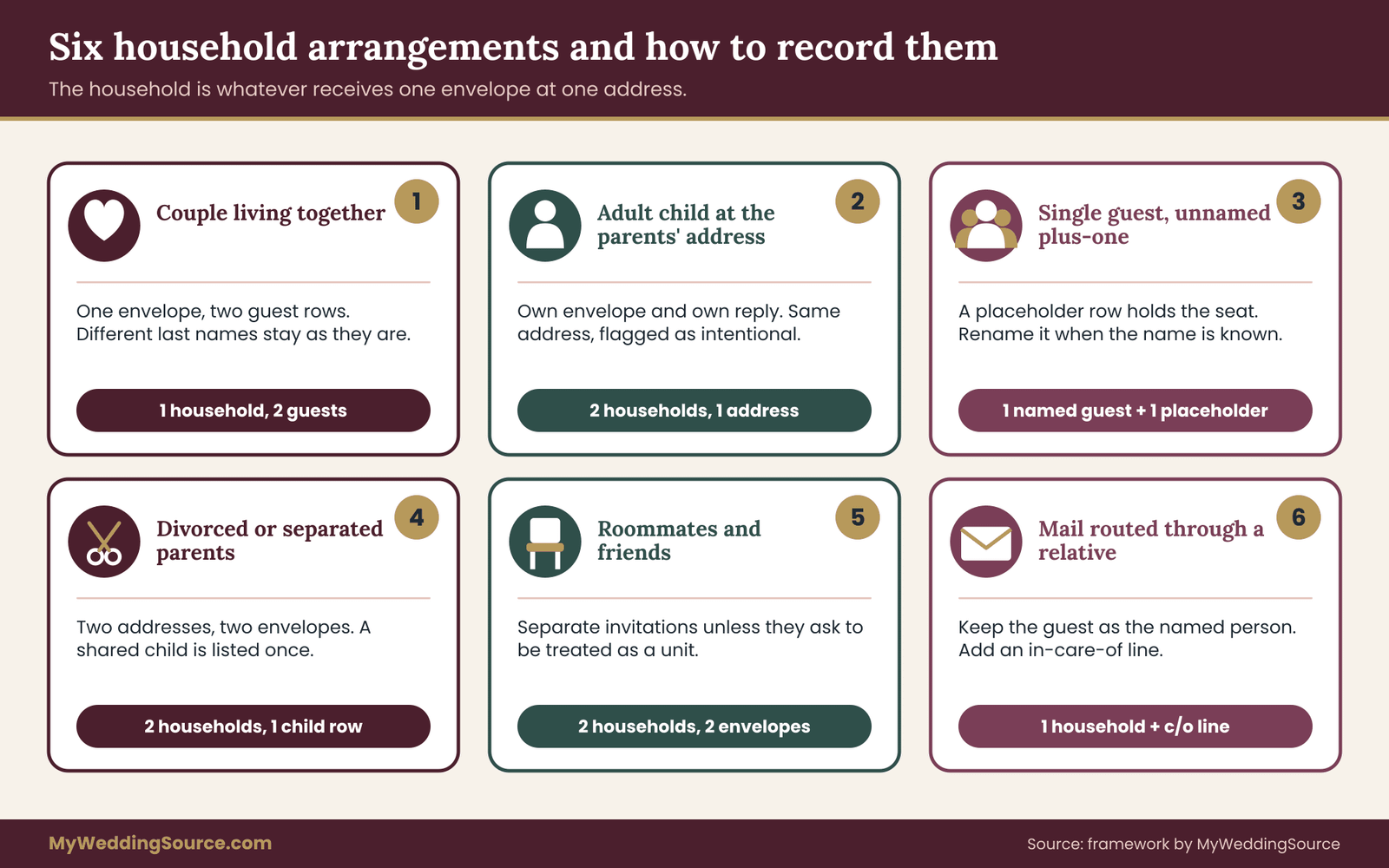
A couple who live together. One household, two guest rows. The outer envelope can carry both names. If they have different last names, each row keeps its own last name and the envelope line is typed once in the household row.
A family with children. One household. Each child gets a guest row with their own name and an age group. If the invitation should include the children, name them on the inner envelope and record the invitation in their guest rows. If the invitation should not include them, do not list them on the guest sheet at all, so the count stays true. Writing “adults only” on the card is a wording decision for the invitation etiquette guide. The household address spreadsheet’s job is to make sure the children named on the envelope match the children who are counted.
Adult children living at the parents’ address. A guest who is an adult and a separate person from their parents usually deserves their own envelope, even when the address is identical. Create a second household with the same address. The duplicate-address check in the audit will flag the pair, and you will mark it as intentional. The adult child then replies for themselves and is not lost inside a parents’ reply card.
A single guest with an unnamed plus-one. One household, one named guest row and one placeholder row. The envelope reads “and Guest” if that is your style, and the placeholder holds the seat. When the guest tells you the name, update the placeholder row’s name and change its name status to Named. The household and the address do not change.
A guest with a named partner who lives elsewhere. If the partner should be invited by name, put both on the invitation. Make one household at the address of whoever you are mailing to, and include both guest rows. Record the partner’s own address in the notes field in case you later send them anything directly. Do not create two households unless you actually intend to send two invitations.
Divorced or separated parents. Two households, because they are two addresses and probably two envelopes. A guest who belongs to both, such as a teenager, appears on the household that holds the invitation you want them to receive, and you note the arrangement. If both parents should know the child is invited, mention it on both envelopes’ inner lines only if that is how you want it to read, and keep one guest row, not two.
Roommates and friends who share an address. Separate households by default. They are separate invitations unless the two people ask to be treated as a unit. Two people on one envelope who did not ask to be together is a common source of mild irritation.
Students and people with two addresses. Ask which address should receive the invitation, and record the other address in notes. A college student whose mail goes to a dormitory in spring and to a parent’s house over the summer is the classic case. Choose one and write the date you chose it.
Guests who prefer a particular title or form of address. Store exactly what they ask for. Whether it is “Dr.,” “Mx.,” “Ms.,” “Rev.” or no title at all, a short title column lets you honor it without retyping. If the guest has not stated a preference, default to the style you have chosen for the whole list and stay consistent.
Guests whose mail goes through a relative. Keep the guest as the invited person and use the “in care of” field to route the envelope. The guest’s name remains the first line, which is the line they will recognize as theirs.
Decide the rule once, then apply it
Most arguments about the guest list are not about people. They are about inconsistent rules. If “plus-ones for guests in relationships longer than a year” applies to your college friends, it applies to your cousins, and the sheet should reflect that. The easiest place to hold the rule is a short note at the top of the Guests sheet or on a notes tab of the household address spreadsheet. Then every placeholder row can be traced to a rule rather than to an exception.
When a family member asks for an exception, you have a clear choice. Either the rule changes for everyone or the exception is added with a note that says who approved it and why. The household address spreadsheet cannot make social decisions for you, but it makes inconsistency visible, which is most of what a couple needs.
Keeping the guest sheet lean
It is tempting to add columns to the household address spreadsheet for everything: favorite song, hotel booked, shuttle needed, gift received. Resist most of it. Each added column is another thing to keep current and another thing to protect. Hotels and shuttles belong in a logistics sheet, gifts in a gift log, songs in a music plan. The guest sheet should hold what is needed to count, address and seat a person, and what is needed to feed them safely. A lean household address spreadsheet is faster to audit, and it is easier to share a safe copy of it.
Turning rows into envelope names without guesswork
Once both sheets of the household address spreadsheet exist, the next job is to produce the words that will be printed or written on each envelope. This is where couples often work backward, typing a name line by hand for each household and hoping it matches the guest rows. The better method is to settle a short set of style rules first, apply them to the guest rows, and let the result define the envelope.
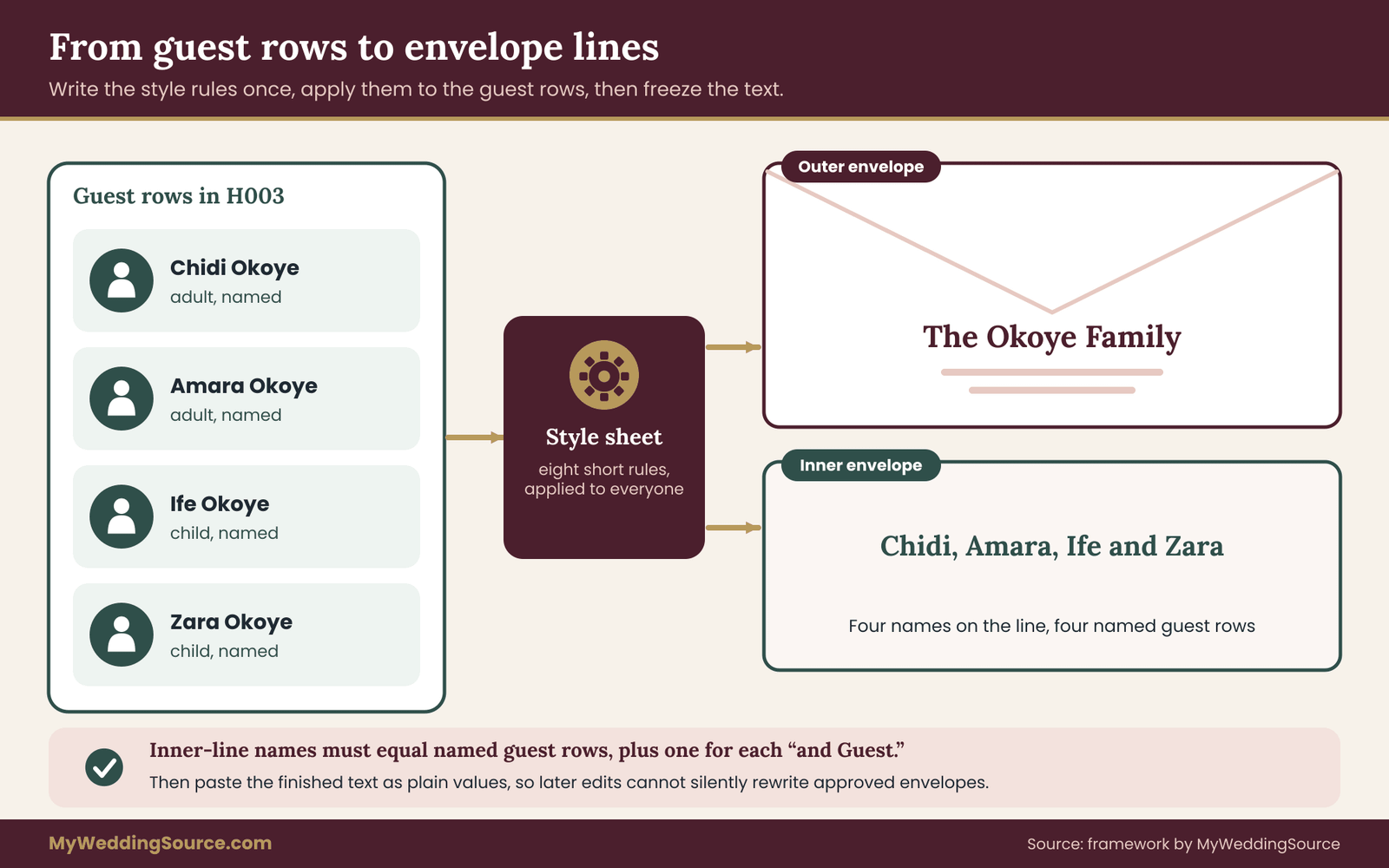
Write a one-page name style sheet
A style sheet is a list of rules you decide once. It does not have to be long. Eight rules cover most lists.
- Formal or relaxed. Decide whether titles appear: “Mr. Chidi Okoye and Mrs. Amara Okoye” or “Chidi and Amara Okoye.” Both are acceptable, and the right choice depends on your invitation’s tone, which the invitation etiquette guide discusses. Pick one and apply it to everyone.
- Order of names in a couple. Alphabetical by first name, the person you know better first, or the order the guests prefer. Whichever you pick, use it consistently.
- Different last names. Write both full names joined by “and,” with the same order rule. Do not collapse them into a shared last name.
- Children. Name them on the inner envelope, or on the outer one if you have no inner envelope. Never imply a child is invited by using a family surname when the child is not a guest row.
- Titles that are earned or requested. Keep “Dr.,” “Rev.,” “Judge” and any requested title in the title field. Spell out or abbreviate by a single rule.
- Single guests with a plus-one. Decide between “and Guest,” “and a guest,” or leaving the second name line blank until you know it. Choose one phrase.
- Households of more than two adults. Decide how many names fit on the outer envelope before you switch to a family line. Many couples allow two adults, then use “The” plus the surname for larger groups, with names listed on the inner envelope.
- Abbreviations. Spell out “Street,” or use “St.” everywhere. Spell out titles, or abbreviate them everywhere. The rule matters less than the consistency.
Write the rules in a text box at the top of the Households sheet or on a separate tab of the household address spreadsheet. When a question comes up three months later, you will not be reconstructing your own reasoning.
The outer line and the inner line do different jobs
The outer envelope is for the mail carrier and for the guest to recognize the invitation. It names the household. The inner envelope, when you use one, is for the guest alone. It names the people who are invited, and that is where a family learns which children are included.
This is why storing both fields matters. A household of four may show “The Okoye Family” outside and four first names inside, and a different household of four may show “Mr. Samir Voss and Dr. Elena Voss” outside with two names inside because the children were not invited. If you stored only the outer text, you would have no way to audit the inner one against the guest rows.
The audit rule is that the number of names on the inner line must equal the number of Named guest rows in the household, plus one placeholder if the line says “and Guest.” If that equation fails for any household, something is out of sync, and it is far cheaper to learn that before printing.
Generating names from the guest rows
If your household address spreadsheet has more than about thirty households, it is worth generating the name lines from the guest sheet, and then reviewing them, rather than typing each one. The idea is simple. For each household ID, gather the matching guest rows, join their names with commas and “and,” and write the result into the household row.
Most spreadsheet programs have a function that joins text from several cells with a separator. Combined with a filter on the household ID, it can build the inner line automatically. Some programs need a slightly different formula or an add-on, so check your program’s help for a “join text with a condition” example. What matters is the process, not the formula: build a draft from the guest rows, read every line against your style sheet, correct exceptions by hand, and then copy the finished text as plain values so later changes to the guest sheet do not silently rewrite envelopes you have already approved.
That last step is the one people forget, and it turns the household address spreadsheet from a draft into a record of what was approved. A formula that rebuilds names every time a guest row changes is useful while you are drafting and dangerous once the printer has your file. Freeze the final text, and note the date you froze it. If a guest row changes afterward, you update the envelope line deliberately.
Placeholder names on envelopes
In a household address spreadsheet, a placeholder row exists so the count is right. It does not mean the envelope should display a ghost. If your style is “and Guest,” the placeholder produces that phrase on the envelope. If your style is to leave the line off and write the name by hand once it is known, the placeholder still counts but does not print. Decide how placeholders appear and apply it to every single-guest household, or a guest whose envelope says “and Guest” will compare notes with one whose envelope does not.
A short example helps. Dana Whitfield is single and has a plus-one. Her household has two guest rows: Dana, Named, and “Guest of Dana,” Placeholder. The envelope line reads “Ms. Dana Whitfield and Guest.” The headcount for that household is two. If Dana later gives you her partner’s name, you edit the placeholder’s name and the envelope text only if the invitation has not yet gone out.
Collecting and confirming addresses without chasing people
The most tedious part of building a household address spreadsheet is not the design. It is getting accurate addresses from people who each have their own idea of how much of their personal information they want to hand over. A calm, repeatable process makes this faster and also leaves a record of who confirmed what.
Choose one way to ask
Feed the household address spreadsheet through a single collection method rather than five. Options include an online form that feeds your household address spreadsheet, a short message to each guest, a family member who collects addresses for one side, or a printed card at a shower or gathering. A form is usually the least work for you, since each reply arrives in a consistent shape. A message works well for a small list. A relative who gathers addresses for a branch of the family is useful when you do not have contact details for those guests, but it adds a step, because you should still verify.
Whichever method you use, ask for the same fields you store: the full name or names as they wish them printed, the mailing address in separate lines, and a way to reach them if the address bounces. Do not ask for more than you need. A guest who is asked for a birth date, a full set of dietary details and a phone number just to receive an invitation may reasonably wonder why.
Say what you will do with the information
A sentence on the form or in the message is enough: the address will be used to mail invitations and related wedding mail, will be shared only with the printer or calligrapher you hire, and will be deleted afterward if you choose to do so. The Federal Trade Commission publishes general guidance on protecting personal information for businesses, and the same principles apply on a small scale: collect only what you need, keep it only as long as you need it, and limit who can see it.
Do not promise things you will not do. If you plan to keep addresses for thank-you notes and holiday cards, say that. Writing it down at the start saves a conversation later.
Move addresses through four statuses
Each household travels through a short sequence, and the Address status column of the household address spreadsheet tracks it.

Needed. The household is on the list and you have no address. This is where most of the list starts.
Unconfirmed. You have an address, but from a second-hand source: a parent’s address book, an old holiday card or an earlier invitation. Treat it as a draft.
Confirmed. The household has seen the address as you will print it and agreed. A one-line message such as “We have your address as the street and city shown, is that still right?” is enough. Record the date.
Returned. Mail bounced or came back marked as undeliverable. The status stays until a new address is confirmed.
Filter on “Needed” and “Unconfirmed” once a week. Those two groups are your to-do list, and they shrink steadily if you work them in batches rather than one at a time.
Verify before you print, not after you mail
A wrong address is cheap to fix in a household address spreadsheet and expensive to fix on an envelope. Before the file goes to a printer, run every address through the Postal Service’s free address lookup, or compare it with a recent piece of mail from the guest. Look especially for missing apartment numbers, transposed digits in ZIP codes, and addresses copied from older sources where a street was renamed or a suite changed.
Flag mismatches rather than overwriting them. The lookup tool standardizes addresses, and it does not know whether a guest moved. If the tool and the household disagree, the household decides. Send a short message, wait for the reply, and update the status to Confirmed with the date.
Keep one master and one writer per change
During collection, many hands touch the sheet. Give each helper a narrow role. A parent who collects addresses for their side of the family may add rows with status “Unconfirmed” and fill the source field. They should not edit confirmed rows or the name lines. You, or one designated keeper, review new rows each week, assign the household ID, and promote statuses. A single reviewer is what keeps the household address spreadsheet consistent when five people are contributing.
The envelope merge audit: seven checks before anything prints
A mail merge is a machine for copying mistakes quickly. If the household address spreadsheet has an error, the merge reproduces it perfectly on every envelope that touches it. That is why the audit comes before the merge and not after. The audit is a short, repeatable set of checks that compare the two sheets against each other and against the real world. Each check has a clear pass condition, and each takes minutes once you know what to look for.

Run the audit on the household address spreadsheet three times: once when the list is first complete, once after the last round of address confirmations, and once more on the exact file you hand to the printer. Any edit after the last run means running the affected checks again. Keep a simple log on a third tab of the household address spreadsheet. For each run, write the date, who ran it, which checks passed and which exceptions you accepted and why.
Check one: the headcount has to agree three ways
Three numbers describe your household address spreadsheet, and they should match. The first is the number of people you decided to invite, which comes from your budget, your venue capacity and the guest list decisions you made earlier. The second is the number of rows on the Guests sheet, counting Named and Placeholder rows but excluding anyone you removed. The third is the number of people implied by the envelopes: the names on each inner line, plus one for every “and Guest.”
If the three agree, move on. If they do not, the difference is the most informative thing the audit will tell you. A guest sheet that is one higher than the plan usually means a plus-one was promised in conversation and added without anyone updating the plan. An envelope count that is one lower than the guest sheet usually means a child was added to the household but not to the inner line.
To find the household responsible, sort the Households sheet by the number of Named guests, and compare each household’s inner line, one by one, with its guest rows. It is tedious for a few minutes and then it is done. Never close the difference by adjusting a total. Close it by finding the household.
Check two: no guest without a household
An orphan is a guest row whose household ID does not match any household, and it is the most common structural fault in a household address spreadsheet. It usually happens through a typo, such as H021 where H012 was meant, or through a household that was deleted while its guests remained. Orphans are dangerous because they are invisible to the envelope merge. The guest counts toward the seat total, but no envelope will carry their name.
Test by looking up each guest’s household ID on the Households sheet. Most programs have a lookup or match function that returns an error when the value is missing. Filter the result for errors. Every error is an orphan. Fix it by correcting the ID, or by deleting the guest row if the person is no longer invited.
Check three: no household without guests
The mirror image is a household with no guests. It happens when a family was cut from the list and the guests were deleted but the address row was left behind, or when a household was created and the names were never entered. A merge would print an envelope with an address and no names, or with a name line from an older version.
Count the guest rows for each household ID. Any household with a count of zero is either to be deleted or to be completed. If you want to keep the row because you may add the family back, change its status to something like “On hold” and exclude it from the merge by filter. Never leave it ambiguous.
Check four: duplicates, intended and accidental
Look for two kinds of duplicates in the household address spreadsheet. The first is the same address under two household IDs. The second is the same person under two guest IDs.
For addresses, build a comparison key by joining the first address line, the second address line and the ZIP code, converted to lowercase with extra spaces removed. Then sort or count by that key. Two households with the same key are either an intended pair, such as an adult child at a parents’ address who deserves a separate envelope, or an accident, such as two relatives who each submitted the same friend. Write the decision in the notes field of both rows, so the next audit does not raise the same question.
For people, compare first and last names across the Guests sheet of the household address spreadsheet. Real duplicates exist: two guests named James Carter happen more often than you would think. But more often the duplicate is the same person entered twice, by two helpers, with different spellings. A match is not an error, it is a question, and a quick look at the household ID and group resolves it.
Check five: every printed address is complete
Define what “complete” means for every row of the household address spreadsheet, and test for it. For a domestic envelope, that means a name line, a first address line, a city, a two-letter state, and a five-digit ZIP code stored as text. For an international envelope, it means the country is filled and the guest’s own formatting is preserved. For every household you intend to mail, the address status should read Confirmed.
Three common gaps are worth testing specifically. A ZIP code that has fewer than five characters has probably lost a leading zero. A street address in a building with multiple units, with an empty second line, is probably missing an apartment number. This is hard to detect from the sheet alone, so use the address lookup tool on any address that looks like an apartment building or a house split into units, and compare the result. A state cell with a full state name, or with two spellings of the same state, will make sorting unreliable and may confuse printing software.
Then check the Status column. If a household is marked Unconfirmed or Needed, either confirm it, or deliberately move it to a later mailing wave. Do not let a draft address slide into the print file because the deadline is close.
Check six: name lines and characters fit the envelope
The merge prints exactly what the cells of the household address spreadsheet contain. It does not shorten, wrap politely or fix odd characters. Read the longest lines first. Sort the outer envelope name by length and look at the top ten. A line that fits comfortably on a screen may run off the edge of a printed envelope at the font size and style your printer or calligrapher has chosen, and a long line may need to be split onto two lines. Decide where the break goes in the cell, rather than letting software decide at print time.
Then look for characters that cause trouble. Accented letters, such as in names with an acute accent or a tilde, must survive the trip from your spreadsheet to the printer’s software and to the font you chose. Curly and straight quotation marks and apostrophes can arrive as different characters. A pasted web address or email signature can leave a hidden character. Double spaces, trailing spaces and line breaks inside cells are all invisible and all capable of misaligning a line.
If you have non-English names, ask your printer or calligrapher which character encoding they require, and whether the font you chose includes the characters you need. This is also the place to confirm the correct spelling with the guest, since a diacritic is part of a person’s name, and a missing one is noticed.
Check seven: the ten-envelope test run
The last check leaves the household address spreadsheet and goes onto paper. Choose ten households that include the edge cases in your list, and run a merge for only those. Print them on plain paper at the same size as the envelope, or on a sample envelope if your printer provides one, and compare each result with the sheet.
Which ten? Choose on purpose. Pick the household with the longest outer name, the longest address, an address with a second line, a household with a placeholder guest, a household with a title such as Dr., a household using “in care of,” a household with an accented character, an international address if you have one, the largest family on the list, and a single guest. If one household satisfies two of these criteria, choose another for the tenth slot, until the ten cover as many different risks as possible.
Look for line breaks in the wrong place, missing second lines, a stray comma or a strange character, the placeholder printing as an empty line, and any household whose result differs from what you typed. Fix the data or the merge template, rerun the ten, and only then merge the full list. If you are working with a printer or a calligrapher, send the ten and ask them to confirm what they will receive before they begin the full run.
What passing looks like
A clean audit changes how a household address spreadsheet feels to use. For a household address spreadsheet, a pass is not “no problems found.” A pass is that every problem found has been fixed or explained in writing. At the end of a clean audit you should be able to state, in plain sentences, how many households you are mailing, how many named guests and placeholders those households contain, how many addresses are confirmed, and how many exceptions you accepted and why. If you cannot say those four things, run the checks again.
The audit has a second benefit that is easy to overlook. It gives you a defensible position when a relative asks why their cousin did not receive an invitation. You can open the log and see exactly which household it was, what was decided and when. That is not about winning arguments. It is about replacing “I think we sent that one” with a record.
When to repeat the audit
Re-run the relevant checks whenever the data changes after the freeze. A late address correction means checks five and six for that household and the ten-envelope test if it is an unusual case. A guest added or removed means the headcount check and the orphan and empty-household checks. A change to the name style in the household address spreadsheet, such as switching from formal to relaxed, means check six and a new test run, since every line has changed.
Most of this is mechanical, and most of it can be done in a quarter of an hour once the household address spreadsheet is in good shape. The point is not to be fussy. The point is that an invitation, once mailed, cannot be recalled, and the checks are cheap compared with a correction card.
Running the merge from your household address spreadsheet
With the audit passed, you can produce the file that other people and other programs will use. The goal of this step is to hand over exactly what is needed and nothing else. The household address spreadsheet already contains the right fields. The work is exporting it cleanly and testing the template once more.
Make a separate export, not a shared master
The export is the only part of the household address spreadsheet that should ever leave your hands. Never send your master household address spreadsheet to a printer, a calligrapher or a helper. Make a copy of the Households sheet in a new file, delete every column that is not needed for the job, and save the result. For envelopes, the columns are usually the outer name line, the address lines, the city, the state, the ZIP code and the country. If the job includes inner envelopes, add the inner line. Everything else, such as status, source, notes and especially anything from the Guests sheet, stays in the master.
Name the export with a date, for example “envelopes_export_wave1” with the date, so you can tell which version a printer holds. Keep a copy of every export you send. If a question comes up about what was printed, you will have the answer.
Ask the printer for the file specification first
Printers and calligraphers differ in what they accept. Some want a spreadsheet file. Some want a plain comma-separated file. Some want the names in a single cell and some in separate ones. Ask early, and ask in writing, for the exact column headings, the file format, whether a header row is required, the character set for accented names and whether they want addresses split or combined. The print production guide covers how to hand your files to a printer, including proofs, quantities and what to confirm before approving a run, and it is worth reading before you send your export.
If the printer’s requirements differ from your layout, do not change the master household address spreadsheet. Change the export. Rename the columns in the copy, join the address lines in the copy, and keep the master unchanged. That way, the next time a different vendor asks for a different shape, you repeat the export and do not rebuild the sheet.
A calligrapher or a handwriter needs a different file
When envelopes are written by hand, the useful file is a clean list of name and address blocks, one household per block, in the order the writer will work. Sort by the invitation wave so the writer can batch. Put each block exactly as it should appear, including line breaks, since a person is copying it, not a template. Ask whether they want the inner line and, if so, whether it goes on the inner envelope or on a separate list.
Handwriters also benefit from a short note on any unusual names, with pronunciation or spelling hints for names in other languages. The best insurance against a misspelling on a handwritten envelope is a typed list that has already been checked with the guest.
If you merge the envelopes yourself
Word processors and desktop publishing programs can merge a spreadsheet into an envelope template. The exact menus differ by program and version, and each vendor publishes its own instructions, so use your program’s help or the vendor’s support pages. A few principles apply everywhere.
Use the actual envelope size in the template, not a guess. Place the return address and the recipient block with margins that leave room for the postal barcode area and any markings the Postal Service applies. The Domestic Mail Manual contains the Postal Service’s mailpiece standards, and your printer or a post office counter can tell you which areas of the envelope to keep clear.
Insert fields in the order the address reads. If Line two is empty for a household, make sure the template drops the line and does not leave a blank gap. Most programs have a rule for skipping empty lines, and the ten-envelope test run should include a household without a second line to prove it works.
Print on plain paper first, hold the page against a real envelope to check alignment, and only then print on envelope stock. Printers feed envelopes differently from sheets, and the first envelope in a batch often reveals a skew you would not see on a test page.
Weigh a finished sample before you buy postage
A household address spreadsheet cannot tell you what postage a finished invitation needs, because the answer depends on the thickness, weight, shape and size of the finished piece. A suite with a belly band, a vellum layer, a pocket or an unusual shape can change the amount. Assemble one complete sample, with every insert, and take it to a post office counter or ask the Postal Service for its current requirements before you buy stamps in bulk.
Square envelopes, rigid pieces and anything with a clasp or button are the kinds of detail that deserve a check at the counter. The rules and prices change over time, so rely on the issuing source and not on an older article. Your budget line for postage belongs in the wedding budget alongside printing, and it is best set after the sample has been weighed.
Add the return envelope and reply card to the weighed sample if you are enclosing them. Many couples forget that the reply envelope needs its own postage, and that it needs to be weighed too.
Record the mailing as it happens
On the day the invitations go to the post office, update the Mailed column of the household address spreadsheet for every household in the batch with the date. If you mail in waves, mark each wave. Keep the receipt if the post office provides one. If you later need to ask a guest whether the invitation arrived, you will know exactly when it left, which is useful if mail is slow in their area.
When mail is returned, record it right away. Change the address status to Returned, note the date, and move the household back to your follow-up list. A returned invitation is common and not alarming. It usually means a changed apartment number or a mistyped ZIP code.
Using the same sheets for RSVPs, seating and thank-yous
The household address spreadsheet is not a one-off for the envelope run. Because it knows who belongs to which household and who is invited to what, the household address spreadsheet supports the next three jobs with almost no new data entry.
RSVP tracking by household and by person
When reply cards come back, record each reply on the Guests sheet of the household address spreadsheet, per person, and tick the household as “replied.” The household reply is a convenient shortcut, since a card often comes back for the whole family. The person-level record is the one that matters for catering and seating. A household where three of four are attending needs three seats, three meals, and a note.
The code printed on the reply card should point back to the household. Using the household ID is simplest. If you also run an online reply form, give it a way to look up a household by name or code and show only the people on that household’s invitation. That prevents a guest from replying for people who were not invited, and it prevents extra names from appearing on your sheet. How to word a response deadline, what to do about late replies and how to follow up with non-responders is covered in the RSVP etiquette guide.
A useful extra column is “Reply source,” with values such as card, website, text or phone. When a guest says they replied and you cannot find it, this column tells you where to look.
Feeding the seating chart
Seating is a separate job with its own tools, but the data comes from the Guests sheet. Add a Table column once seating is underway, and use the Group column to cluster people. Because every attending guest has their own row, you can filter for “attending” and sort by group or by household, and you will not leave a family member off the chart because they were only mentioned inside a household label.
Households are also a useful seating unit. Members of one household almost always sit together, which means you can seat by household ID and expand to individuals only at the end. The seating chart guide covers how to build the chart itself. The spreadsheet’s contribution is to guarantee that the list the chart is built from is the list of people who are actually coming.
Thank-you notes and later mail
After the wedding, the household address spreadsheet supports thank-you notes with the same structure. Add a column on the Households sheet for “Thank-you sent,” and one on the Guests sheet for gifts if you keep that record. Because the household sheet already holds a confirmed address and the preferred salutation, there is no new collection step. Your list of who gave what lives in a gift log, and the household ID is the link.
When you are done with the data, decide what happens to it. The wedding records guide covers how to organize and retain the paperwork that follows a wedding, and the same retention thinking applies to a guest address file: keep what you will use, archive what you may need, and delete what you do not.
Keeping the household address spreadsheet private, current and tidy
A household address spreadsheet is a list of other people’s personal information. It holds home addresses, family relationships, children’s names and, once replies arrive, dietary needs that can reveal health or religious practice. None of that is exotic, and a wedding is not a data-protection project, but a little care is both courteous and sensible.
Limit who can see and who can edit
The privacy of a household address spreadsheet depends mostly on sharing settings, not on cleverness. Share the household address spreadsheet with the fewest people who need it. Give the keeper edit access, give a trusted helper limited access if needed, and give everyone else nothing. Online spreadsheet tools usually allow view-only and comment-only sharing, so you can let a parent check a list without letting them change it. Avoid link sharing that works for anyone who has the address, and review the sharing settings after the wedding.
Use a strong, unique password and two-step verification on the account that holds the sheet. These are the ordinary measures the Federal Trade Commission and the Cybersecurity and Infrastructure Security Agency recommend for protecting any account, and they cost a few minutes.
Share the least possible
Give vendors the export, not the master. Give your wedding planner the Guests sheet only if the planner needs it. Do not send addresses by email as a plain attachment when a shared, access-controlled file is available. Never include health or dietary details in a file that goes to the printer.
Ask each vendor what they will do with your data once the job is done. A reputable printer or calligrapher will have a plain answer, such as deleting the file after a stated number of days. If the answer is vague, send less.
Consent and guests’ expectations
Guests give you their address so you can mail them an invitation. They did not necessarily agree to be added to a mailing list for your future announcements, to have their address given to the person organizing a shower, or to have their children’s names shared outside the family. Use the data for the purpose you stated when you collected it. If you want to use it for something else, ask.
If you plan a wedding website with a guest lookup, show only what is needed to find the right household, and do not display other guests’ addresses. The same minimal approach applies to any shared online document.
Names in more than one language or script
If you have guests whose names are written in a script other than the Latin alphabet, or whose names have a preferred transliteration, store both versions in separate columns and ask the guest which to print. A translated or transliterated name on an envelope is not a translation of the person’s name. It is a different spelling, and the guest should choose. If you are producing bilingual invitations, keep the guest’s name in the form they use, and translate only the text of the invitation.
Keep it current until the day
A household address spreadsheet that stays current is far easier to trust. Addresses change between the invitation and the thank-you note, and guest lists change between the first draft and the last. Set a short weekly routine for the household address spreadsheet during the busy weeks: review new rows, apply statuses, run the quick checks on any household that changed, and log the date. A fifteen-minute habit is easier than an evening of cleanup, and it keeps the final audit short.
A worked example of a household address spreadsheet
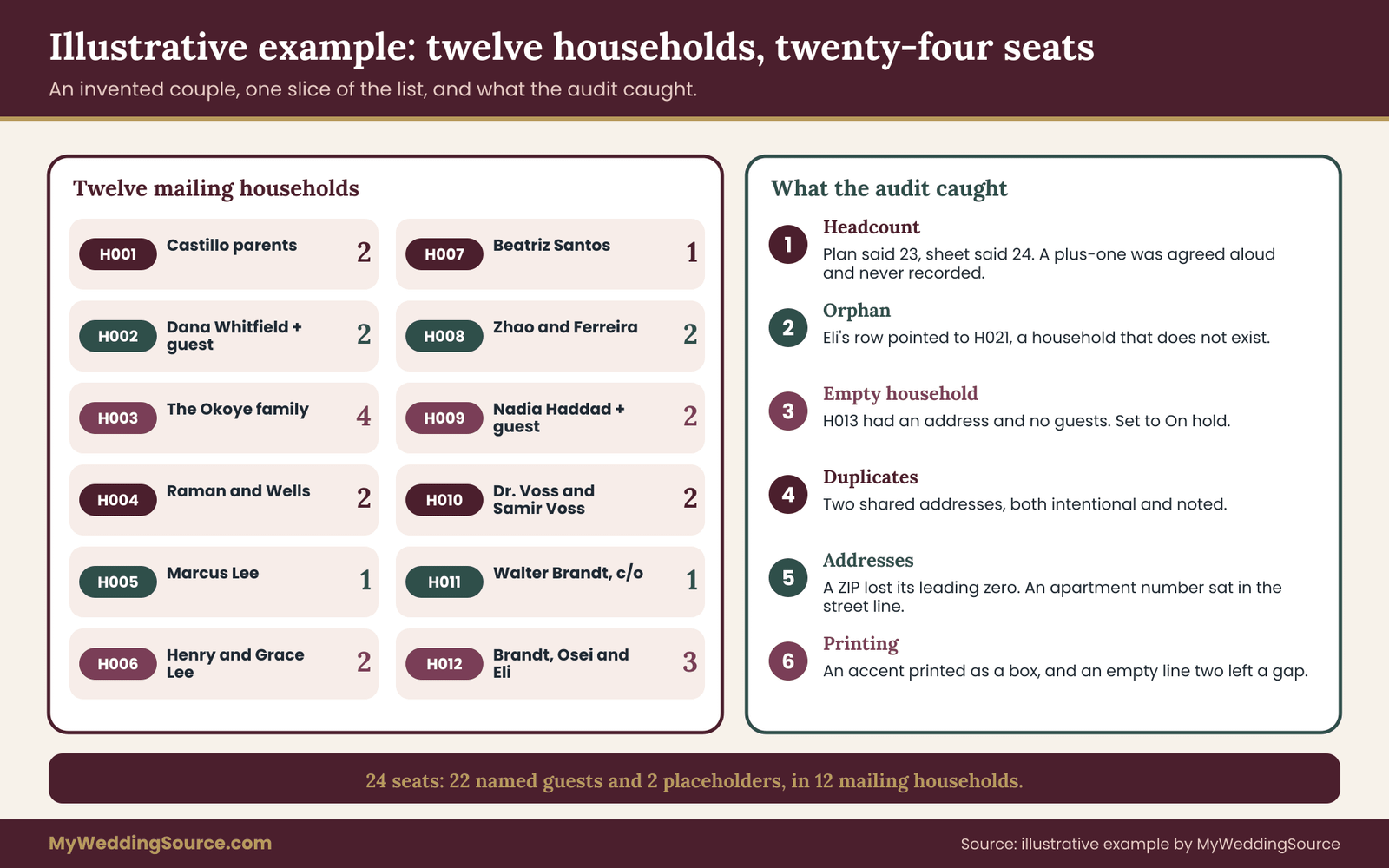
The following example is invented, and it is meant to show a household address spreadsheet in motion. Mina Castillo and Theo Brandt are planning a wedding. Their full list is long, so the example follows one slice of it: twelve households that contain twenty-four seats. Names, relationships and addresses are made up for illustration, and the streets are left out on purpose.
The slice
In the household address spreadsheet, each household below is one row, and each person is one row on the second sheet. Household H001 is Mina’s parents, Ramon and Lucia Castillo, two adults. H002 is Dana Whitfield, a friend who is single and has been given a plus-one. H003 is the Okoye family: Chidi, Amara and their children Ife and Zara, four people. H004 is Priya Raman and Jonah Wells, who live together and have different last names. H005 is Marcus Lee, an adult who lives at his parents’ address and will receive his own envelope, while H006 is his parents, Henry and Grace Lee, at that same address.
H007 is Aunt Beatriz Santos, who lives in an apartment. H008 is Wen Zhao and Paulo Ferreira. H009 is Nadia Haddad, a coworker of Theo’s who has been given a plus-one. H010 is Dr. Elena Voss and Samir Voss. H011 is Walter Brandt, Theo’s great-uncle, whose mail is handled by his niece Karen. H012 is Karen Brandt, her partner Kwame Osei and her young son Eli.
Count the people. Two, two, four, two, one, two, one, two, two, two, one and three add up to twenty-four, of which twenty-two are named and two are placeholders for unknown guests.
There is also a thirteenth row in the Households sheet, H013, for a friend of Mina’s whose names were never entered. It will matter in a moment.
Setting the style sheet
The first decision in this household address spreadsheet is the naming style. Mina and Theo chose a relaxed style: no titles except “Dr.” for people who use it, first names before last names, couples in the order each pair prefers, and “and Guest” for placeholders. Households with more than two adults, or with children, use a family line on the outer envelope and first names on the inner one. They write those four rules at the top of the Households sheet.
What the audit found
They ran the seven checks on the slice. The results are the useful part.
Headcount. Their planning notes said twenty-three seats for this group. The Guests sheet and the inner lines both said twenty-four. Tracing it, they found that Nadia’s plus-one had been agreed in a conversation weeks earlier and never written into the plan. They confirmed the plus-one was intended, updated the plan to twenty-four and logged the reason. Without a household address spreadsheet built on two sheets, that seat would have shown up as a surprise at the caterer’s final count.
Orphans. Eli’s guest row carried the household ID H021, not H012. No household H021 existed, so Eli would have been counted for seating but absent from every envelope. They fixed the ID.
Empty households. H013 had an address and no guests. It was a friend whose invitation had been discussed and then postponed. They set it to “On hold,” which removed it from the merge without deleting it.
Duplicates. Two pairs of households shared an address. Marcus and his parents were the first pair. Walter and Karen were the second, because Walter’s mail goes to Karen’s address. Both were intentional, and both were written into the notes fields so the next audit would not raise them again.
Completeness. Beatriz’s ZIP code, which begins with a zero, appeared with four digits because the cell had been formatted as a number. They changed the column to text and retyped the code. They also found that her apartment number, “Apt 4B,” had been typed at the end of the street line, so they moved it to Line two. Dana’s address was still marked Unconfirmed. They messaged her, received a reply, and changed the status to Confirmed with the date.
Name lines. Sorting by length showed nothing too long, but one of the guest names contained an accented letter, and the decorative font they had chosen printed a blank box in its place. They asked the printer for a font with full coverage of the letters in their list and reran the sample.
Ten-envelope test. With only twelve mailing households, they printed all twelve on plain paper. The household without a second line, H001, printed an empty line between the street and the city. The template did not skip empty lines. They fixed the template and reran it. The placeholders printed “and Guest” as expected.
Nothing in that list was dramatic. Taken together, though, the audit caught a seat-count gap, a missing envelope, a ZIP code that would have been wrong, an address in the wrong field, a character that would not print and a template flaw. Each was a few minutes to fix on a screen and would have been a nuisance, or a cost, on paper.
Changing the list after invitations go out
A household address spreadsheet that was clean on the day of the print run will change. Someone declines early and a friend is added from the waiting list. A guest gets engaged and wants the fiancé’s name on the reply card. A family moves. The household structure makes these changes small, if you handle them with a few consistent rules.
A late addition. Add a new household at the bottom with a new ID, add the guest rows, confirm the address and put the household in a new invitation wave. Run checks one through five for that household, and run the ten-envelope test again if it uses a feature you have not tested. Print the new envelope from the same template so it matches the rest.
A removal. Do not delete the household. Change its status to “On hold” or “Removed,” note the date and the reason, and leave the ID in place. Deleting leaves old reply cards, printer files and notes pointing at nothing. Update the headcount.
A name correction. If the invitation has not been mailed, correct the guest row and the envelope line and rerun the check. If it has been mailed, decide whether the error is worth a replacement. Often it is not. A misspelling can be handled by a warm note and a corrected name on the place card, and sending a second invitation can create more confusion than it solves.
An address change. Edit the Households row only. The guests follow automatically. If the invitation is already in the mail, record the new address and arrange a re-send or a hand delivery. If it has been returned, update the status and the date.
A new plus-one name. Change the placeholder row to Named and fill in the name. Nothing else moves. If the reply card has already been mailed, the household’s reply and your guest row should match, and a short check against the card will confirm it.
Keep a short change log on a separate tab: date, household ID, what changed, who asked. It takes seconds per entry, and it will save a bad evening when two people remember a decision differently.
When a household address spreadsheet is more than you need
A household address spreadsheet is deliberately simple, but it is still a method, and not every wedding needs all of it. A wedding of thirty guests, mostly couples and individuals, may do well with a single sheet that has one row per household and a column for the names. The second sheet earns its place when households contain several people, when plus-ones are unnamed, when children are invited to some events and not others, or when more than one person edits the list.
There are also limits to what a household address spreadsheet can do. It cannot decide who to invite, and it cannot settle a family disagreement about plus-ones. It records decisions and makes inconsistencies visible, and that is all.
It does not verify that an address can receive mail. Only the Postal Service, a guest, or a returned envelope can tell you that, and even the lookup tool confirms the format of an address more than who lives at it. It does not fix postage, size or shape problems, which depend on the finished invitation and current postal rules. And it does not replace judgment: a sheet that says a guest is a placeholder does not tell you whether the guest would be offended to be one.
Software behaves differently from program to program. The exact function for joining text, the exact menus for a merge and the exact controls for sharing all vary, and they change with updates. Treat the formulas and steps in this guide as descriptions of what to accomplish, and look up the current instructions for the program you use.
Rules from the Postal Service, privacy expectations and printer requirements all change over time, and local circumstances differ. Before you print, verify mailing specifications with the Postal Service, confirm file requirements with your printer, and check that your plans for collecting and keeping guest information match what you told your guests.
Your next steps
The household address spreadsheet is a small project, and it goes best in short sessions. Start with the smallest version of the household address spreadsheet. This week, create the two sheets with the twelve basic fields, assign household IDs and enter the households you already know. Next, settle your name style sheet in eight short rules and write it at the top of the Households sheet. Then begin collecting addresses with a single method, tracking each household’s status.
When the household address spreadsheet is nearly complete, run the seven-check audit, and run it again on the exact file you will hand to the printer. Make a clean export, ask your printer for its file requirements, print ten test envelopes and weigh a finished sample at the post office. After the invitations are mailed, keep the household address spreadsheet alive for replies, seating and thank-you notes, and decide in advance when you will delete the data. If you want to revisit the physical side of the invitation, such as proofs, quantities and handoffs, the invitation proofing and printer handoff guide picks up where this one stops.
FAQ
Do I really need two sheets, or can one sheet do the job?
For a small list of mostly couples and individuals, a household address spreadsheet with a single sheet and a row per household can work. Two sheets become worthwhile when households have several members, when plus-ones are unnamed, or when children are invited to some events and not others. The second sheet lets you count envelopes and seats separately, filter by person, and track replies without retyping names. If you are unsure, start with two. It is easier to merge sheets later than to split them.
How do I record a plus-one whose name I do not know yet?
Add a row on the Guests sheet in the same household as the invited guest, label it something like “Guest of” followed by the guest’s name, and set its name status to Placeholder. The row holds a seat in the headcount and prints “and Guest” on the envelope if that is your style. When the guest tells you the name, edit the row and change its status to Named. Nothing else needs to move.
Should an adult child who lives with their parents get a separate envelope?
That is a hosting decision, but many couples send a separate invitation to an adult who is invited as an individual, since it lets them reply for themselves. In the spreadsheet, create a second household with the same address and mark the duplicate as intentional in the notes. The duplicate-address check will flag it every time, and the note tells you and your helpers that it is expected.
How many envelopes should I order?
Count the households you will mail, including every wave, and add the envelopes you need for reply cards and any inner envelopes. Then ask your printer how many extra it recommends for addressing mistakes and late additions. Printers usually have a sensible rule of thumb, and they know their own spoilage. Do not rely on the number of guests, which is higher than the number of envelopes whenever a household has more than one person.
How do I stop ZIP codes from losing their leading zero?
Format the ZIP column of your household address spreadsheet as text before you enter or paste any codes. If a code has already lost its zero, change the column to text and retype the affected entries, since reformatting alone will not restore the missing digit. Then check that every ZIP has five characters, either with a length test or by sorting the column. This single setting prevents one of the most common errors in a mailing list.
Can I start from my phone contacts or an old holiday card list?
Yes, as a draft. Copy the names and addresses in, but mark every household “Unconfirmed” and note the source. Contact entries are often outdated, and holiday card lists are often written by hand with abbreviations. Confirm each address with the guest or check it against the Postal Service’s address lookup before it reaches the print file, and move the status to Confirmed only after you hear back or verify it.
Is it safe to send my spreadsheet to a printer or calligrapher?
Send an export, not the master household address spreadsheet. Make a copy with only the columns the job needs, usually the name lines and the address, and leave out replies, meal choices, dietary notes and any private comments. Ask the vendor how long it keeps files and whether it deletes them after the job. If the answer is unclear, send the minimum, and use access-controlled sharing and not an open link.
What if a guest changes their address after the envelopes are printed?
Update the household row, set the status to Returned or Confirmed as appropriate and record the date. If the invitation has not been mailed, you may need to reprint that envelope. If it has been mailed, you can arrange a hand delivery, a re-send or a digital copy. The guests on that household do not need editing, because they point to the household and will follow the new address.
Sources
- Postal Addressing Standards (Publication 28), U.S. Postal Service
- Domestic Mail Manual, U.S. Postal Service
- International Mail Manual, U.S. Postal Service
- ZIP Code Lookup and address verification, U.S. Postal Service
- Customer help and FAQs, U.S. Postal Service
- Postal addressing information, Universal Postal Union
- Privacy and security guidance for businesses, Federal Trade Commission
- Secure Our World: strong passwords and multifactor authentication, Cybersecurity and Infrastructure Security Agency
- Mail merge and spreadsheet help, Microsoft Support
- Google Docs Editors Help, Google Sheets