
Wedding photo moderation is the set of rules that decides which guest photos reach your shared folder, who reviews them, and how a photo gets removed when someone asks. This guide gives you a four-lane queue, a plain consent notice and a deletion routine you can run on the wedding weekend without turning a party into a compliance project.
Make the shared folder private by default and let guests upload, but not see each other’s uploads, until a named reviewer releases them. Tell guests what they are agreeing to on a sign and in the invitation to the album. Sort every upload into one of four lanes: hold, release, retire or escalate. Promise guests one simple thing, that any person pictured can ask for removal and the request gets an answer within a day. Write the photo moderation rules down before the wedding, because nobody wants to invent them at midnight.
A shared folder is one of the nicest ideas to come out of the phone era. Every guest is a photographer, and you end up with the angle nobody hired a professional to capture: your grandmother laughing at the cake table, the flower girl asleep under a chair, the dance floor from the back. The same folder is also a public-ish room full of people who did not all agree to be in each other’s pictures.
A guest posts a photo of a friend holding a drink at a time that friend would rather forget. A cousin uploads a clip with a child who is not hers. A vendor finds their logo in a post you did not clear. Nothing here is a disaster, but all of it is easier to handle when a plan exists.
This article is about the unglamorous middle part of guest photo sharing: the review step and the removal step. It assumes you have already decided that guests will take photos. If you are still working out what your wedding allows, the guide on wedding photography consent covers guest boundaries and image use at the ceremony itself. Here the question is narrower. Once the files land in a folder you own, what do you do with them?
A note on scope. This is general information, not legal advice, and privacy rules vary by state and by country. Where a rule matters, the article points you to the agency or platform that publishes it so you can read the current version yourself.
What wedding photo moderation covers
People use the word moderation for several different jobs, and mixing them up is how couples end up either doing far too much or nothing at all. For a private wedding album, photo moderation is four jobs.
Intake. Who is allowed to upload, how they get the link, and what they are told when they do.
Review. Someone looks at new uploads, or at least at a sample, before or soon after other guests can see them.
Release. A photo moves from “received” to “visible to guests” or “kept for the couple only.”
Removal. A photo is hidden or deleted because someone asked, because it breaks a rule, or because it should never have been there.
That is the whole system. It is not content policing in the way a social network does it, with thousands of strangers and automated filters. You have perhaps a hundred and fifty people who mostly know you, uploading for a few days. The right amount of photo moderation is the smallest amount that protects the people pictured and still lets the pictures flow.
The infographic below shows the four photo moderation lanes that the rest of the guide builds on. Keep it in mind, because every later rule is an answer to the question “which lane does this photo go in?”

The shared folder is not the same thing as social media
It helps to be clear about what a private album is and is not. When a guest posts a photo to a public social account, the guest decides, the platform’s terms apply and the audience is whoever follows them. When a guest uploads to your private folder, you have become the host of that collection. You chose the platform, you set who can view, and you are the person guests will write to when something looks wrong.
That does not make you legally responsible for every file in a way a lawyer could define for you, and nothing here claims it does. It does mean that practically, the question “who do I ask to take this down?” has one answer, and the answer is you.
That is a good reason to want photo moderation rules even for a small, friendly wedding. The rules protect guests, but they also protect you from being the person who has to improvise when a distressed relative calls.
Who a wedding photo moderation plan is for
Not every couple needs a heavy system. A rough way to decide is to look at three things.
First, guest count and mix. A guest list of thirty close friends who have all been photographed together for ten years needs a light touch. A list of two hundred that includes coworkers, parents’ friends, children and former partners of someone needs more care.
Second, how the album will be used. If you only plan to keep the pictures in your own archive, moderation is mostly about quality and about removing the odd mistake. If you plan to let all guests browse, download and share, you need release rules, because a photo that goes visible to a hundred and fifty people is hard to bring back.
Third, how sensitive your circle is. Some families include people who keep their location private for good reason, such as someone who has been harassed or who has a custody arrangement. Some guests work in jobs where a photo with alcohol is a problem. You do not have to know every detail. You do need a rule that lets anyone say “please take that down” without explaining why.
Photo moderation scales up or down with the guest list. If you land on the light end, use the short version of the photo moderation system: private folder, one reviewer, a one-line notice and a removal promise. If you land on the heavy end, use the full queue described in the later sections. The guide gives both.
Why guest uploads need photo moderation before the wedding day
Most couples do nothing until something goes wrong, and then try to build a policy while they are tired and a little embarrassed. Doing the thinking earlier has three practical payoffs.
The first is speed. A removal request that arrives on Sunday morning is easy to handle when the photo moderation reviewer already knows the steps. It is awkward when two partners and a maid of honor are each unsure who has admin rights to the folder. The folder’s owner account and the reviewer account may not even be the same person, and you do not want to discover that on the honeymoon.
The second is tone. When rules exist in writing, a removal request stops being a personal negotiation. You are not saying no to your aunt. You are following the rule that anyone can ask. Guests tend to accept a clear rule far more easily than a one-off decision.
The third is limits. Without rules, moderation expands to fill all the time you have. With rules, the job has edges. The reviewer checks new uploads twice a day for the first week, then once a week for a month, then closes the photo moderation queue. That is it.
There is also a quieter reason. The pictures a guest takes of other guests are personal information about those guests. The National Institute of Standards and Technology publishes a privacy framework that treats people’s data as something an organization manages deliberately, with identified owners and routines for handling requests. You are not an organization, but the habit transfers neatly to a wedding album: know what you hold, know who can see it, and know how it gets removed. The sources at the end of this article list that framework and the other primary documents used here.
What can actually go wrong
It is worth naming the realistic problems, because a good rule is usually a direct answer to one of them. None of these is common at a given wedding, but each is plausible across a few hundred weddings.
A guest is pictured in a way they did not expect, such as mid-sneeze, mid-argument or visibly drunk, and wants it gone. A child appears in a photo and the parents have not agreed to online images of the child. A photo reveals something private, like a name tag with a full name and employer, a house number in the background, a boarding pass, or the screen of an open phone. A photo shows a guest with someone they are not supposed to be with, as when an estranged parent or an ex-partner appears in a family shot.
Someone uploads a professional-quality image that belongs to the hired photographer, and the vendor contract restricts sharing. A guest uploads a clip with copyrighted music loud in the background, and you later want to share the clip more widely. And occasionally, content comes in that should not exist at all, which the hard-cases section handles.
Each of those has a lane. Some belong in hold for a quick look, some in retire, and a very small number in escalate. A photo moderation plan is mostly a way of making sure the right photo ends up in the right lane without anyone having to argue about it.
A fair word about effort
Photo moderation sounds like a chore, and it is smaller than it sounds.
Couples sometimes worry that moderation means reading through every photo. It does not. A folder with six hundred uploads looks daunting until you see that review is fast: most photos are plainly fine, and your eye sorts the rest within a second. The queue described later is built so the reviewer spends almost all their time on the small group of photos that need a thought. In the worked example near the end, a photo moderation reviewer handles roughly six hundred uploads in a few short sittings, and only a handful take more than a minute.
Effort is also shared. You can name a friend or relative as reviewer, and you can name a second as backup. The couple does not need to be the reviewers. In fact it is usually better if you are not, since you will be busy on the day and sentimental afterward.
Before any rule makes sense, you need a folder that can enforce it. Platforms differ in what they let an owner control, and the differences matter more than the brand names. Rather than recommend a product, this section lists the questions to put to whatever you are considering. Check the platform’s own help pages for the current answers, since features change. The vendor help centers for Google Photos, Apple iCloud and Dropbox are listed in the sources for exactly that purpose.
Can guests upload without seeing other guests’ uploads? This is the single most useful setting. Some tools offer an upload-only link, sometimes called a file request or a drop box, where a guest can send files but cannot browse the collection. That gives you a natural hold lane, because uploads are invisible to everyone except you until you move them.
Other tools only offer a fully shared album, where everything is visible the moment it is added. If the tool you prefer has no upload-only mode, you can still create a hold lane by asking guests to upload to a staging album that only the reviewer and couple can open, then moving approved files to a guest-visible album.
Who can delete? Find out whether an uploader can delete their own files, whether other members can delete files, and whether the owner can delete anything. You want the owner and one reviewer to be able to remove any file. You do not want every guest to be able to remove anyone’s photos.
Can the owner see who uploaded what? Attribution helps with removal requests, because the reviewer can ask the uploader directly. Some platforms record the uploader name, some do not.
What happens to a file when it is deleted? Many services keep deleted items in a trash or recovery area for a set time. Others keep backups for a period. Read the help page so you can tell a guest accurately what removal means, and so you know when the final copy is actually gone.
Does the link expire or can it be turned off? A link you can disable is a safety valve. If someone forwards the link beyond your intended circle, you want to shut it off and issue a new one.
Is there a download option for everyone? Decide whether guests can download full-size originals. Once a guest downloads a photo, you cannot delete it from their phone. That is one reason release rules matter, and it is explained further in the section on what deletion really means.
If you work through those six questions you will already have excluded most of the platforms that cannot support a decent photo moderation routine. A tool that fails two or three of them will make photo moderation harder than it needs to be.
Setting up roles and settings for photo moderation
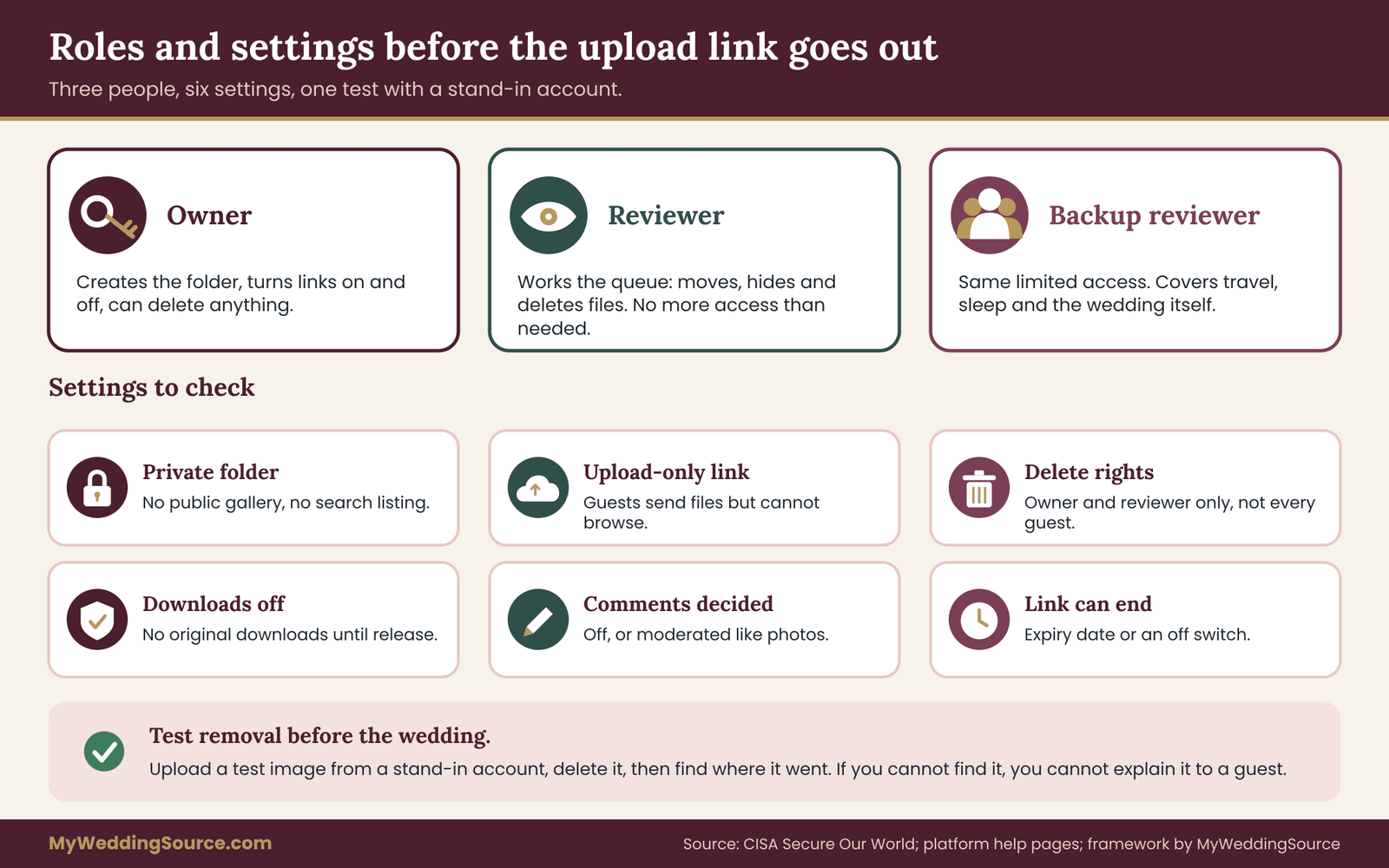
With a platform that can support the photo moderation plan, the next step is deciding who holds which key. Three roles are enough for nearly every wedding.
Owner. The account that created the folder. The owner can change settings, turn links on and off, and delete anything. This should be one of the couple, or a parent if the couple would rather not carry the login, and the login should be protected with a strong, unique password and two-step verification. The Cybersecurity and Infrastructure Security Agency publishes plain guidance on exactly that under its Secure Our World program, and it is worth ten minutes.
Reviewer. The person who works the photo moderation queue. The reviewer needs enough access to move, hide and delete files, and no more. If the platform lets you give a delegate limited rights, use that. If it does not, the owner may have to share the account, and in that case you should use a dedicated account for the album rather than your personal one, so the reviewer cannot wander through your family’s other photos by accident.
Backup reviewer. A second trusted person with the same limited access, used when the first is traveling, asleep or at the wedding itself. Most removal requests arrive at inconvenient times, and a backup keeps the one-day promise believable.
Clear roles are the backbone of photo moderation, and the three-role setup keeps it simple. Write the three names in one place, along with how to reach each of them, and put that note somewhere the couple can find it without a login that depends on the album.
The settings checklist
The checklist below applies to almost any tool. Go through it before the invitation to upload is sent, then test it with a friend who is not on the guest list as a stand-in for a guest.
Make the folder private. Turn off any option that lets anyone with the link find it through a search engine. Turn off any public gallery or public profile feature. Choose whether the link is for upload only or for upload and view, and set it to upload only if you can. Disable guest downloads of originals until release if the platform lets you separate that. Disable comments if the platform offers comments, or decide who may comment, because a comment thread is a second place where personal remarks can appear and each remark needs moderating too.
Turn on notifications for new uploads to the photo moderation reviewer, if that does not flood their inbox, and consider a daily digest instead. Set an expiry or a review date on the link, so access does not drift on forever.
Finally, test removal. Upload a harmless test image from the stand-in account, then remove it with the reviewer account and see where it goes. Then check the trash. If you cannot find where a deleted file went, you cannot tell a guest where it went either.
Name the folder so it explains itself
Small things reduce photo moderation work. Name the staging area something plain, like “Guest uploads to review,” and the guest-visible album something like “Shared with guests.” When a reviewer is tired, the names carry meaning. Add a short description at the top of the folder that repeats the three rules guests should follow, so even someone who skipped the invitation sees them.
If you are also running a hired photographer, remember that the professional gallery belongs in a different place with different access. Mixing the two causes confusion about who may share what. The post-wedding guide on organizing wedding records explains how to keep the professional gallery, guest uploads and the rest of the archive in separate folders with their own retention rules.
Uploader consent: what guests agree to when they upload
Consent is the part couples most often skip, because it feels awkward to ask guests to agree to anything at a party. The trick is to keep it small, plain and tied to a real action. You are not asking for a legal release. You are telling people, honestly, what will happen to what they send, and giving them a way to say no.
Uploader consent is the first half of photo moderation, and the removal promise is the second. Two different people need to understand the arrangement.
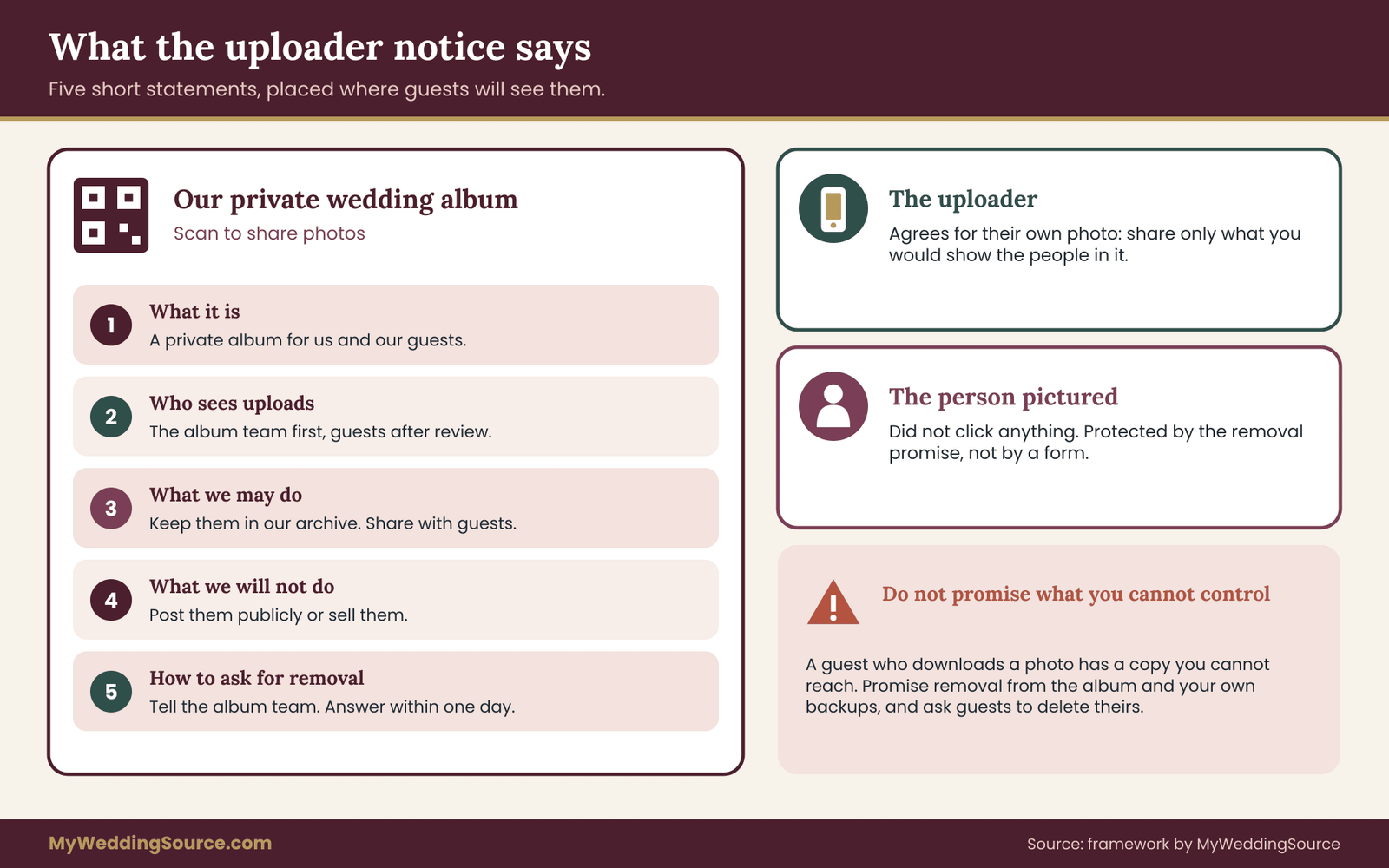
The uploader is the guest who takes a photo and sends it to the folder. They need to know who will see the photo, what you may do with it, and how to retract it.
The person pictured may or may not be the uploader. They did not click anything. Their interests are protected by the removal promise, not by a form.
That split is the heart of uploader consent. An uploader can agree to terms for their own work, but cannot give consent on behalf of everyone in the frame. So the photo moderation notice should do two things. It should ask the uploader to share only photos they are comfortable sharing and to respect the people in them, and it should tell everyone that any person pictured can ask for removal.
What the notice should say
Keep it to five short statements. A guest should be able to read the entire thing in the time it takes to find the QR code.
First, what the folder is: a private album for the couple and their guests. Second, who can see uploads, and whether that is only the couple and reviewers at first or all guests after review. Third, what the couple may do with the photos, such as keep them in their archive, share them with guests and perhaps use a few in a private keepsake. Fourth, what the couple will not do, such as post them publicly or sell them. Fifth, how to ask for removal, and how fast to expect an answer.
An honest notice avoids promising what you cannot control. Do not write that photos will never be copied. A guest who downloads a photo has a copy, and you cannot reach it. Write what you can actually do: you will remove a photo from the album and your own backups on request.
Here is a sample that you can adapt, in plain words.
This is a private album for our wedding guests. Photos you upload are seen by us and a small review team first, then shared with guests. We will keep them in our own archive. We will not post them publicly. If you or anyone in a photo would like one removed, write to the album team at the address on this card, and we will take it down within one day.
Notice that the sample contains no legal jargon and no email address in this article, since your own card will carry the contact you want to use. The contact should be a role-based mailbox or a phone number the reviewer can monitor, not a personal inbox that would force you to hand out your own address to every guest.
Where guests meet the notice
Consent that nobody reads is not much use, so put the notice where it will be seen. Three places work. The first is the upload page itself, above the button, in two or three lines. The second is the physical sign with the QR code, which can carry a shorter version and point to the full notice on the upload page. The third is the invitation or the wedding website, where you tell guests in advance that an album exists and when it opens.
Do not hide the photo moderation notice behind a link on the signage. Short text near the code is better than a perfect text one tap away. If you also run a wedding website, the page about the album should repeat the five statements so that guests who plan ahead can see them. The guide on wedding day digital operations discusses how to keep guest-facing information consistent across signs, messages and web pages so that no two versions contradict each other.
Ask for opt-in on the upload, not opt-out afterward
It is tempting to say “by uploading you agree to these terms” and leave it at that. That is better than nothing, but a small extra step improves it. If the platform lets you add a required checkbox, such as “I have read the guidelines,” use it. If it does not, make the first line of the upload page a direct instruction: “Please share only photos you would be comfortable showing the people in them.” That sentence does more for photo moderation than any filter, because it sets the norm.
Children, and guests who asked not to be photographed
Two groups deserve a special mention in the consent step, because the cost of an error is highest.
Children. Parents decide what images of their children appear online. If your wedding has children, the notice should say that photos of children are held for a parent’s okay before release. In practice the reviewer can keep any photo featuring a child in the hold lane until the child’s parent has seen it, or release only those where the parent uploaded it.
It is a small rule, and parents tend to appreciate it. The Federal Trade Commission’s guidance on children’s online privacy is aimed at businesses, but it shows how seriously agencies treat children’s data, and it is a useful reference for the attitude to take.
Guests who asked not to be photographed. Some of your guests may have told you, directly or through a relative, that they do not want to appear in photos. Give the reviewer a short, discreet list of names, and have the reviewer hold any upload that shows them. The list should live with the reviewer only. It should not be pinned on a sign or visible to guests, because a list of people who opted out is itself private information.
The photo moderation queue: four lanes for every upload
Now to the photo moderation system itself. Every upload lands somewhere and gets one of four labels. The labels are plain, and each carries one rule of thumb.
Release. Show the photo to guests. This is the default for a photo that is clearly fine: people smiling, a table of food, the venue, a toast, a dance. If you would be comfortable with every person in the frame seeing it displayed at the reception, release it.
Hold. Keep the photo out of guest view until a second look. Hold is for photos where the answer is probably yes but something needs checking: a child in the frame, someone caught mid-gesture, a person on the opted-out list, a name tag, an unfamiliar person, a blurry shot of someone’s drink.
Retire. Take the photo out of the album. This is for photos that are not wanted: duplicates, near-duplicates, test shots, accidental pocket photos, and anything someone asked to remove. Retire is not an insult to the uploader, and the uploader does not need to be told unless the reason matters.
Escalate. The rare lane. A photo goes here when it may involve something illegal, a safety risk, or an unusually sensitive situation. It leaves the normal queue, and the photo moderation reviewer takes the specific steps in the hard-cases section. Most weddings will use this lane zero times.
Photo moderation works because the decision tree is shallow. The reviewer asks the same few questions in the same order for every photo, and the answers decide the lane. The next part of the guide lays those questions out and shows how to apply them.
Five questions for photo moderation decisions
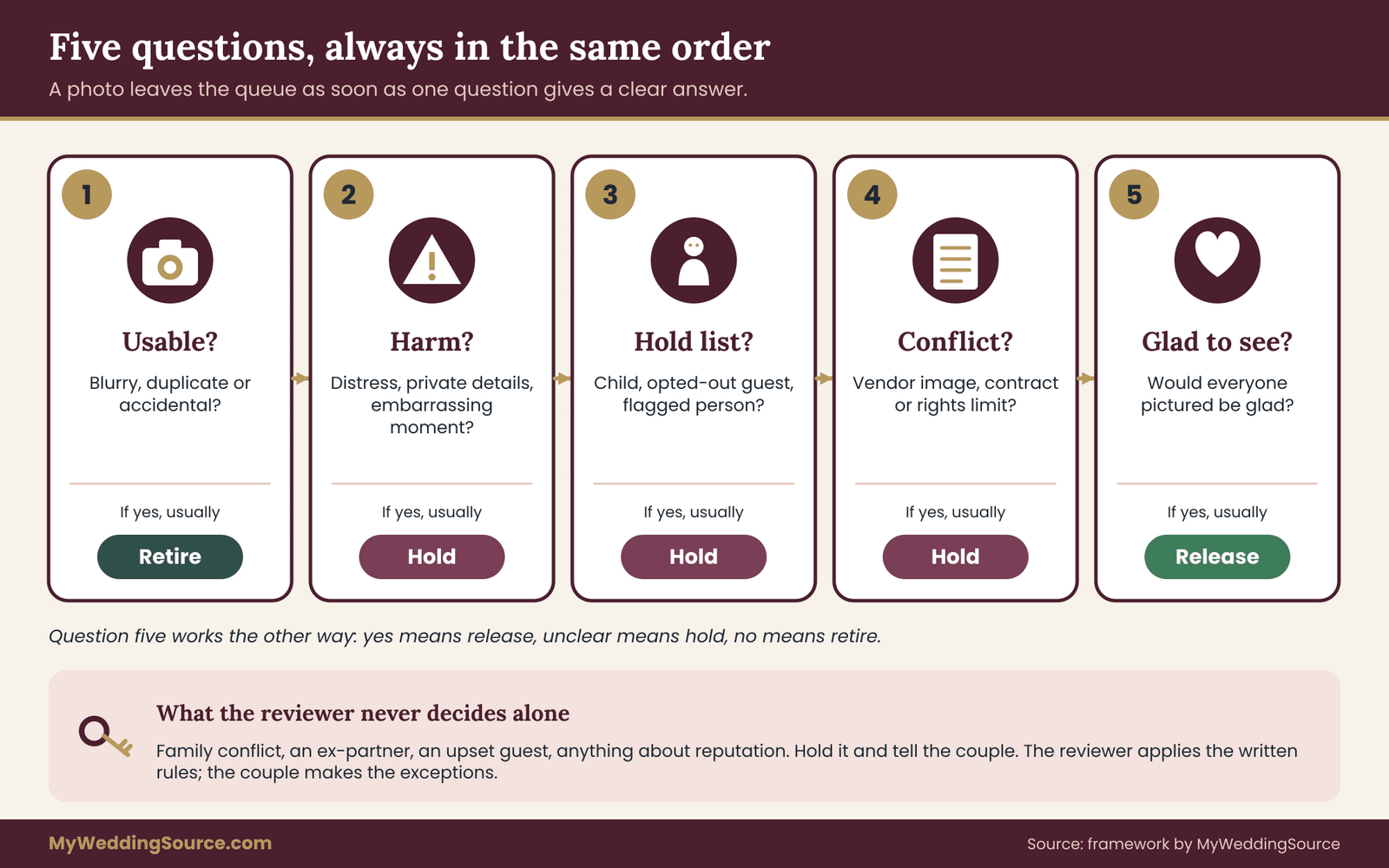
A reviewer needs a fixed order of questions. Without one, two reviewers will decide the same photo differently, and one reviewer will decide the same photo differently at nine in the evening and at nine the next morning. The order below goes from the cheapest check to the most thoughtful one, and a photo leaves the photo moderation queue the moment it gets a clear answer.
Question one: is this a usable photo at all? Blurry pocket shots, accidental floor photos, screenshots of unrelated things and test images go to retire. Exact duplicates go to retire as well, keeping the better one. This single question removes a surprising share of a typical folder before any judgment about people is needed.
Question two: could this photo cause harm to someone in it? Look at faces first, then at what else the frame reveals. A person visibly unwell, undressed, extremely intoxicated or in an embarrassing moment belongs in hold at least. A photo that shows a document, a screen, a house number, a license plate or a name tag with a full name belongs in hold until the detail is dealt with. If a person is in distress or in danger, the photo is not a moderation problem at all, and the reviewer should contact someone at the wedding.
Question three: is anyone in it on a hold list? The hold list is short and private: children whose parents have not yet agreed, guests who asked not to be photographed, and anyone the couple flagged for a family reason. A match goes to hold.
Question four: does the photo conflict with a rule or a contract? The hired photographer’s work, a vendor’s product shown in a way that the contract limits, a performance covered by venue or performer rules: any of these goes to hold, pending the couple’s call. The guide to vendor contracts explains how photography and publicity clauses are usually structured, which helps you know what to look for.
Question five: would the people in it be glad to see it displayed? This is a gut test, and it is last on purpose. If the answer is plainly yes, release. If it is unclear, hold. If the honest answer is no, retire.
Five questions, always in the same order, are the heart of wedding photo moderation. The reviewer does not need to write down the answers. They need to apply them the same way each time.
A worked pass through six photos
Here is how the questions play out on six invented uploads. Nothing here is real data. It is only to show the thinking.
Photo A is a sharp shot of six guests at a table with glasses raised, everyone smiling. It is usable, no one looks harmed, no one is on the hold list, no conflict, and everyone would be glad to see it. Release.
Photo B is the same table a second later, with one guest mid-blink. It is a near-duplicate of photo A. Retire the weaker one, keep the better frame. If the uploader sent both, nobody needs a message.
Photo C shows a toddler dancing on a bench. It is a charming photo, and it is usable. It triggers question three because the toddler’s parents have not yet agreed to online images of the child. Hold. The reviewer checks with the parents the next morning, and the photo is released once they say yes.
Photo D is a group photo in which a guest’s phone, held at the edge, shows a boarding pass with a legible name and confirmation code. The photo itself is lovely. Question two catches the detail. The reviewer can crop out the corner, or hold the photo and ask the uploader to resend a version without the pass. Crop first if the platform allows editing a copy, and keep the original in the hold lane or retire it.
Photo E is a candid of a guest holding a drink and gesturing at the bar with an expression that looks like an argument. It is not harmful on its face. Question five gives an unclear answer, so hold. The reviewer shows it to the couple, who decide whether it adds anything. Often the right call is to retire it quietly, because nothing is gained by keeping a photo that might embarrass someone.
Photo F is a short clip with a lively band in the background and a loud sing-along. It is fine as a memory, and the clip may stay in the private album. Question four reminds the reviewer that if the couple later wants to share the clip beyond guests, performers’ and music rights may apply, so the clip stays release-to-guests only and is tagged accordingly. The U.S. Copyright Office explains in general terms how ownership and permission work for creative material, and its home page is listed in the sources.
Each of those six took less than a minute. A good routine feels almost boring, and that is the goal.
What the reviewer never decides alone
Some decisions belong to the couple, not the reviewer. If a photo involves family conflict, an ex-partner, a guest who was upset, or any question of reputation, the reviewer holds it and tells the couple. The reviewer’s authority is to apply the written rules. The couple’s authority is to make exceptions.
Write that boundary into the reviewer’s brief. It protects the photo moderation reviewer from guessing at family politics, and it keeps the couple in control of the parts that really are theirs.
When to check the photo moderation queue
A moderation queue that is reviewed only once, at the very end, defeats the purpose. A photo that sits visible for three days before anyone looks at it has already been seen. A queue that is reviewed every ten minutes during the reception eats a person’s whole evening. The right rhythm sits between these.
The rhythm depends on whether you chose upload-only or a fully shared album.
With upload-only and a hold lane, nothing is visible to guests until released, so review can lag. A sensible pattern is a quick check at the end of the reception night, a longer pass the next morning, then a daily check for the first week, then weekly for a month. Release in batches. Guests receive a message that the album is open, which makes the release feel like an event and reduces the number of people who open the folder before it has anything in it.
With a fully shared album, every upload is visible at once, so review has to be faster and more reactive. The reviewer checks at set points during the reception, perhaps after cocktail hour, after dinner and at the end of the night. Anything questionable is moved to hold the moment it is seen. This pattern has more exposure, which is why many couples prefer the upload-only approach for any wedding with children, mixed audiences or sensitive guests.
Whichever pattern you pick, decide the closing date in advance. A shared folder with no end tends to collect old photos, strangers’ uploads and forgotten links. A closing date gives the reviewer a finish line, and it gives guests a clear expectation: the album is open for uploads for, say, three weeks, and after that it becomes view-only or is archived.
Who staffs the first night
The first night is the stretch where photo moderation is most likely to be missed, because everyone is busy. Treat it as a short shift, not a casual favor. Name one person for the evening, give them the photo moderation brief, and agree on what they are allowed to do from their phone. Pick someone who is not also the best man, a parent or a key vendor contact. A friend who loves to organize and does not mind missing a dance or two will do well.
If nobody can take the shift, do not leave the folder open and unwatched. Switch to the upload-only mode and let the review wait until morning. That is a perfectly good decision. It is better than a half-watched shared album.
Sampling versus full review
Photo moderation can be complete or sampled. Full review of every photo is the default for small to medium weddings. For a big wedding with a very large number of uploads, the reviewer may use sampling. Sampling means that obvious categories are released without individual inspection, such as photos uploaded by the couple’s immediate circle, while uploads from anyone else go through the questions.
If you use sampling, set the rule beforehand and keep it simple. A rule like “photos with children are always checked” survives sampling. A rule like “check about one in four” does not, because it makes it impossible to say afterward whether a given photo was ever looked at. When the stakes are people’s images, completeness is more honest than efficiency. Most couples find that full review is not as bad as they feared, because most photos can be passed with a glance.
Telling uploaders what happened
Good photo moderation includes courtesy to the people who sent the pictures. A reviewer who moves a photo without a word can leave an uploader wondering whether their file arrived. A few short messages prevent that. They can be sent by the reviewer, in the couple’s voice, in a friendly and brief way.
For a held photo that needs a parent’s okay: “Thanks for the great photo. A child appears in it, so we are holding it until a parent has seen it. It will be released soon.”
For a retired duplicate: nothing needs to be said, since the uploader still has their phone copy.
For a request to resend: “We love this one. Could you send a version without the phone screen in the corner? We want to keep everyone’s details private.”
For a removed photo after a request: “We have taken the photo down at someone’s request. Thank you for understanding. Your other photos are still in the album.”
Keep the tone warm and plain. The goal of every message is to leave the uploader feeling thanked, not policed.
Deletion rules that work for photo moderation requests
Release is the easy half of a photo moderation system. The harder half is removal, because it touches feelings, memory and a technical reality that most guests do not think about: a deleted photo can still exist in several places. The rules below are meant to be simple enough to say out loud and honest enough to keep.
The promise
Photo moderation rules for removal begin with a single promise. Start with one sentence you can stand behind: “Anyone pictured can ask for a photo to be removed, and we will answer within a day.” Everything else in the deletion rules is a way of keeping that sentence true.
Notice what the promise leaves out. It does not promise that every request will end in deletion, though in practice nearly all do. It does not promise to chase copies on guests’ phones. It does not require the requester to explain why. A person who says “please take that down” has given enough reason. Asking them to justify the request turns a small kindness into an interview, and it makes the next person less likely to ask.
The promise also has a built-in limit that you should state openly: the couple’s own archive. If a photo was taken at your wedding by a guest and you have it, the couple may want to keep a version privately. A requester who wants the photo gone from the album but is fine with the couple holding it has made a different request from one who wants it gone entirely.
Ask which they mean, and honor the answer. In most cases, the safest default for a request from a person pictured is full removal from everything the couple controls, including backups, unless the person says they do not mind.
Who may ask
Photo moderation is simpler when the list of people who can request removal is short and clear. Three kinds of people can make a removal request, and each is handled a little differently.
A person pictured. Their request is honored. If the reviewer cannot be sure the requester is the person in the photo, there is no need to demand proof. Weddings are small communities, and a mistaken removal costs very little.
The uploader. Anyone can take back their own photo. If the platform lets uploaders delete their own files, great. If not, the reviewer removes it on request.
A parent or guardian of a child pictured. Their request is honored in the same way as a request from the person pictured.
Requests from people who are not pictured and are not parents of someone pictured, such as a friend who thinks a photo is unflattering to someone else, go to the couple. Usually the couple will agree, and the reviewer then proceeds as if the pictured person had asked.
A removal routine in five steps
The reviewer follows the same five steps every time.
Step one: log it. Write down the date and time of the request, who asked, which photo, and what they want. A single line in a shared note is enough. The log is not for show. It lets the backup reviewer pick up a case without starting over, and it lets the couple answer the question “did we take care of that?” a month later.
Step two: hide first. The moment a request arrives, move the photo out of guest view. Hiding takes seconds, costs nothing and ends the exposure while the details are worked out. If the platform has a “move to staging” or “remove from album” option that keeps the file, use that first.
Step three: confirm what is wanted. Reply to the requester, briefly, with what you did and what happens next. Ask only what you need: do they want it removed from the album only, or from the couple’s archive as well? This is also the moment to mention what the couple cannot do, covered below.
Step four: delete everywhere the couple controls. Remove the file from the album, from the staging folder, from the trash or recovery area if the platform allows emptying it, and from any copies the couple made on a laptop, an external drive or another cloud account. Delete derived files too, such as cropped versions, album proofs, slideshow exports, and thumbnails you saved for a printed guest book.
Step five: close and record. Reply once more to say the photo is gone and when. Mark the log line as finished. If the uploader’s other photos are unaffected, there is no need to say anything further.
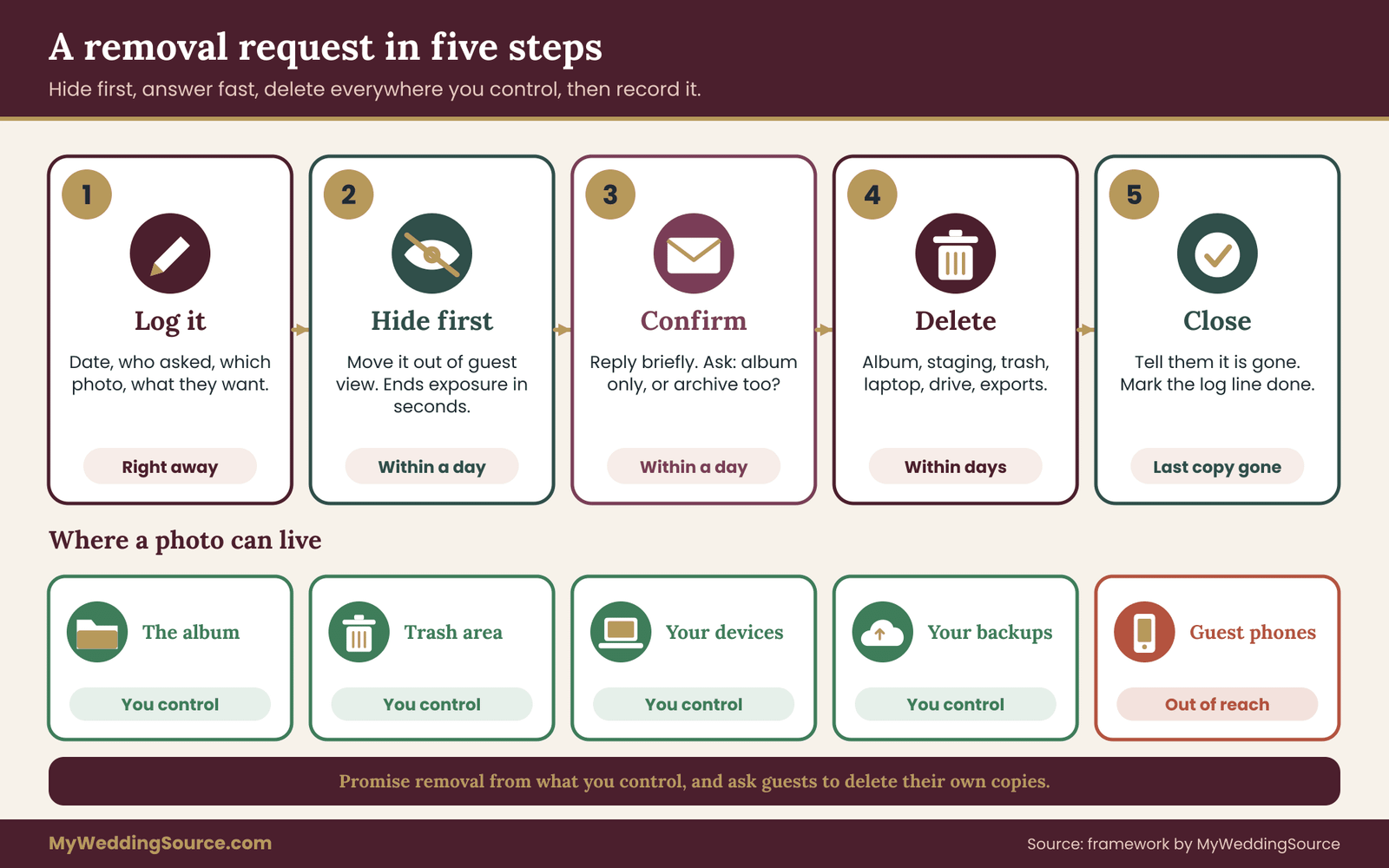
The one-day promise applies to step two and step three, hiding and answering. Full deletion, which can involve emptying trash areas and checking backups, may take a little longer. Say so honestly, and do not promise a final deletion within a day if the backups only refresh weekly.
What deletion really means
Guests picture deletion as a single button. It is more like a chain, and the couple should know every link.
The first link is the album itself. Deleting a file here is usually immediate for viewers. But many services retain deleted items for a period in a trash or recovery area, and some keep backup copies for longer. The platform’s help page tells you how long. The help centers for Google Photos, Apple iCloud and Dropbox, listed in the sources, each describe how deletion and recovery work for their product, and they differ.
The second link is the couple’s own devices. If a photo moderation reviewer downloaded the photo to check it, or the couple saved it to a phone, the file is still there. A phone that backs up automatically may have uploaded it to a separate account. Delete from the device and from the device’s backup service.
The third link is guests’ devices. Any guest who downloaded the photo or received it by message has a copy, and no rule of yours can reach it. This is why the notice should be honest. State that the couple will remove the photo from the album and from their own backups, and ask guests, kindly, to delete copies of any photo someone has asked to have removed. Do not claim control you do not have.
The fourth link is any other place the photo was shared. If the couple posted the photo in a group chat, a private page, a slideshow or a printed item, those need handling too. The reviewer’s log should note every place the couple moved the photo, so removal can follow it.
Photo moderation therefore has to include record-keeping about where each approved photo went. If you are releasing photos to guests, keep a very short list of what was released and when, and where else the couple used any. That list is the thing that makes a removal complete rather than partial.
Short deadlines for different situations
A fixed photo moderation schedule helps the reviewer plan. A fixed schedule helps the photo moderation reviewer plan. These are suggestions, not rules from any agency, and you can adjust them.
Hiding on request: as soon as the reviewer sees it, and in any case within a day. Reply within a day. Delete from the album and staging within three days. Delete from the couple’s devices and backups within a week, longer if a backup cycle makes that impossible, in which case say so. Close the log entry once the last copy the couple controls is gone.
A request that arrives long after the wedding is still honored. The closing date for uploads does not end the removal promise. Keep one contact route alive for as long as the album exists, and when the album is archived, note in the archive who to contact for removal.
When the requester and the uploader disagree
Sometimes the uploader loves a photo that the pictured person wants removed. The rule is plain: the pictured person’s request wins for the shared album, since that photo is in the couple’s space. The uploader may keep their own copy on their own phone, and the reviewer need not argue about that. Tell the uploader kindly that the photo came down at someone’s request, without naming the person if the person prefers not to be named.
The opposite case is rarer: the pictured person is fine, the couple dislikes the photo, and the uploader wants it kept. The couple decides what stays in their own album. Again, say so kindly.
Why a retire lane is better than a delete-everything habit
Some reviewers, wanting to be safe, delete anything doubtful on sight. That feels responsible, but it causes two small problems. It destroys photos that might have been fine after a second look, and it leaves no trail if a guest asks where their upload went.
A retire lane solves both. Retired photos move to a place only the reviewer and couple can open, and they stay there until the closing date. At that point the reviewer permanently deletes the retired folder, or the couple reviews it once more and keeps a handful. The retire lane makes photo moderation reversible during the album’s active life and final at the close. Reversible decisions are much easier to make quickly, and quick decisions are what a short-staffed wedding weekend needs.
Retention logic comes up in a related way in the guide on organizing wedding records: decide in advance how long each kind of material stays, so that retention is a plan and not an accident. The same habit applies here. Write the date when retired files are deleted into the reviewer’s brief, and then keep it.
Hard cases for wedding photo moderation
Most photos pass through photo moderation without a thought. A few do not, and these are worth walking through ahead of time, because the reviewer will be tired when they show up. Each case below gives the lane, the reasoning and the words to use.

Children in guest photos
For wedding photo moderation, children are the first case to settle. Children are in more guest photos than any other sensitive group, and they are the group least able to speak for themselves. The default is hold until a parent has seen the photo. For a photo uploaded by the child’s own parent, release is fine, since the parent has already decided.
A practical shortcut is a parent’s blanket okay. At the welcome desk or in the invitation, a short question such as “Is it all right if photos with your child appear in the guest album?” lets the photo moderation reviewer release or hold without chasing each photo. Record the answer on the private hold list. If a parent says no, every photo with that child goes to hold, and the reviewer can retire them quietly on the closing date or send them to the parent.
If you are planning how children will be supervised during the day, the guide on wedding guest care planning for babies, children and older relatives covers that side. Here, the only point is that a child’s presence in a frame triggers a pause.
Embarrassing or unflattering moments
Not every awkward photo is a harm, but some are. The test is the person’s likely reaction, not the reviewer’s own sense of humor. A photo of a groomsman mid-dance move is funny to everyone including him. A photo of a guest asleep in a chair with their mouth open may or may not be. When in doubt, hold, and decide with the couple.
If a person later asks for removal, remove. There is no need to decide whether the photo was objectively embarrassing. The request itself answers the question.
Photos showing heavy drinking deserve special care. A guest may be fine with a glass raised in a toast and uncomfortable with a photo that implies something worse. A guest whose workplace has a conduct policy may have a particular reason for caution. The reviewer does not need to know the reason. A rule such as “photos where someone appears visibly intoxicated go to hold and usually to retire” is easy to follow and defensible.
Private details in the frame
A surprising number of photos reveal more than the photographer intended. Name tags with full names and workplaces, phone screens showing messages or travel documents, a house number behind the couple, a license plate, an open laptop, a stack of mail on a table, a signed card. The reviewer should glance at the edges of each photo, not only the faces.
If the detail can be cropped, crop a copy and release the copy. If it cannot, hold or retire. Keep the original in the hold lane until the closing date, then delete it, unless the uploader wants it back.
The Federal Trade Commission’s consumer guidance on protecting personal information is a general-purpose reminder of the same idea: small details add up, and people usually want a say in where theirs appear. It is listed in the sources.
Family conflict and sensitive relationships
A photo can be perfectly pleasant and still be unwelcome. A parent who is estranged from a sibling, an ex-spouse who attended for a child’s sake, or a relative who left a family event on bad terms: the frame may include people who do not want to be shown together. The reviewer cannot know these histories and should not try to guess.
The rule is to route, not judge. Any photo that includes a person on the couple’s sensitive list, or any photo that might read as taking sides, goes to the couple. The couple decides. For the guest-visible album, the safest approach is to release only photos that plainly show people at ease and leave the rest in the couple’s private archive.
If a guest appears upset in a photo, such as crying or arguing, retire it unless the couple knows the context and wants it kept. Something that looks like a conflict may be a happy moment captured at an awkward instant, and the pictured person gets to decide how it is remembered.
The hired photographer’s images and vendor material
Sometimes a guest uploads an image that is not theirs. A photo that came from the hired photographer’s preview, a promotional image from the venue, a screenshot of a vendor’s feed. The contract with each vendor may restrict how their images can be shared. If the contract says the photographer retains copyright and grants the couple a personal-use license, then posting the images to a guest album may or may not be allowed.
When a reviewer sees what looks like professional work in a guest folder, they hold it and ask the couple to check the vendor contract. The guide on wedding vendor contracts helps with the wording to look for. If the contract is silent, ask the vendor in writing before releasing.
Guests photographing vendor setups, such as a florist’s installation or a cake, is usually fine and often welcomed, but vendors sometimes do have rules about their own work being posted before they have photographed it. A light touch is enough: if a vendor asks for something to come down, it comes down.
Strangers and gatecrashers in the folder
Photo moderation also has to handle uploads from people who were never invited. If the link has traveled beyond your guests, you may see uploads from people you do not recognize, or photos of places and people that were not at your wedding. A stray upload is not necessarily malicious. A link in a family group chat can reach dozens of extra people.
Retire the photos, and disable or replace the link. Send the new link only to the guests who need it. If a stranger’s photos include other people’s personal information, handle them as you would any private detail, and do not release them.
Automatic tagging and face grouping
Some photo platforms group faces or suggest names automatically. These features are machine guesses. They can be wrong, and they can reveal who is in a photo to people who would not otherwise know. If a tool offers tagging or face grouping on a shared album, turn it off for guest-facing views, or do not rely on it. Treat any suggested name as unverified until a person confirms it. For photo moderation, never let an automatic label stand in for a human check, and never publish a guess about someone’s identity as if it were fact.
Content that should never have been uploaded
This is the rarest case, and it needs a clear, calm routine. If an upload shows sexual content, nudity, a serious injury, or anything that suggests a child is being harmed, the reviewer stops. They do not forward the file, do not copy it and do not discuss it in a group chat. They tell the couple privately, and report it to the proper authority.
In the United States, the National Center for Missing and Exploited Children runs the CyberTipline for reports involving the sexual exploitation of children, and local law enforcement handles emergencies. Both are listed in the sources. The reviewer follows the instructions the authority gives about preserving or removing the material.
Writing this into the reviewer’s brief takes two sentences. Having it there means that, if the day ever comes, nobody is deciding in a panic.
Handling an upset guest or relative
Photo moderation sometimes ends in a difficult conversation. A removal request is straightforward. An upset conversation is something else. Sometimes the person writing is hurt by a photo and wants more than a deletion. They may want an apology, an explanation or reassurance about other photos.
Keep it short. Thank them for telling you. Confirm that the photo is down. Offer to answer any question about where else it appeared. Do not defend the uploader, do not explain why the photo was released, and do not offer opinions on the person’s reaction.
A script that fits most situations: “Thank you for telling us. We have taken the photo down and will remove it from our own copies as well. If you would like us to check for others of you, we are glad to.” The last sentence matters. It offers action rather than words, and it lets the person decide how far to go.
If the person asks for the whole album to be taken down, treat it as a request from the pictured person about their own images, and honor it for those images. It does not obligate the couple to dismantle the album, but it may be a sign that the whole upload approach deserves another look for the next time. If the reviewer can search by person, they can offer to review every photo that includes the guest.
What the couple does and does not owe
There is a sensible middle ground between ignoring requests and rebuilding your wedding album around one person’s worry. The couple owes guests a sincere effort to remove what they ask to have removed from the spaces the couple controls. The couple does not owe the removal of photos from other people’s phones, public posts by others or a vendor’s own archives. The couple can ask vendors and guests to respect the request, and can tell the guest honestly where their reach ends.
Where a photo has been posted publicly by a guest, the platform where it was posted is the proper place to ask for removal. The platform’s help pages explain how. Pointing the requester to those pages is a kind response. The wedding album is still the couple’s responsibility, and the public post is the poster’s.
Writing the reviewer’s brief for photo moderation
A photo moderation reviewer can only follow rules they have been given. The brief is a single page, written in plain language, handed over a week before the wedding and talked through once. It is short enough that a tired person can reread it at midnight.
A good brief has seven parts.
The job in one sentence. For example: “You decide which guest photos become visible to other guests, and you remove any photo someone asks to have removed.”
Access and tools. Which account to use, where the staging folder and the guest album are, and which actions the photo moderation reviewer may take. Include a plain note on what not to do, such as sharing the login or downloading photos to a personal phone.
The four lanes. Release, hold, retire and escalate, each with one example. The reviewer should be able to explain them to the backup in thirty seconds.
The five questions. The same order every time, printed on the page.
The hold list. A short private note of children whose parents have not yet agreed, guests who asked not to appear and anyone the couple flagged. The list is delivered separately, in person or by a private message, and not pasted into a shared document that many people can open.
Schedule and limits. When to check the photo moderation queue, when the album closes, when retired photos are permanently deleted, and what time of day the reviewer does not need to respond. The reviewer should know they are not on call at three in the morning.
Who to ask. The couple’s contact for decisions the reviewer should not make alone, and the backup reviewer’s name. A reviewer who knows where the line is feels free to act inside it.
Treat the photo moderation brief as a living document for the weekend. If the reviewer hits a case it does not cover, they note it, make the safest choice, and tell the couple. After the wedding, a quick look at those notes shows what to add next time.
Matching the person to the job
Photo moderation is a quiet job that suits a particular kind of person. A reviewer needs three qualities: discretion, patience and reliability. Discretion matters because they will see private moments. Patience matters because most of the work is repetitive. Reliability matters because a promise of an answer within a day only works if someone is checking.
A relative with a good eye for people is often well suited, as is a friend who works in a field where confidentiality is routine. Avoid choosing someone who is deeply involved in a family dispute that might show up in the photos, and avoid anyone who would feel obliged to keep the couple happy at the cost of a guest’s request. The reviewer should be comfortable saying “that one is coming down.”
Thank them properly. Reviewing photos for a few hours across a couple of weeks is real work, and it is not usually a role the person asked for.
Keeping the couple out of the middle
The couple should not be the first line of review. There are three reasons. First, they will be at their own wedding. Second, they will see photos with a particular emotional charge and may keep or release things a neutral reviewer would not. Third, guests may hesitate to send a removal request to the couple directly, but will happily send it to a named album contact.
That is why the contact on the sign and the invitation should be the album team, not the couple. The couple steps in only for the decisions that belong to them.
Live slideshows and photo walls need a stricter lane
Live display raises the stakes of photo moderation, because nothing can be taken back once it is on the screen. Some couples want guest uploads displayed during the reception, on a screen or projector. It is a lovely idea, and it changes the stakes. A photo that appears on a projector is shown to every guest at once, with no chance to prevent it after the fact.
For a live display, the rule is simple: nothing goes on the screen without being released first. That means the display should draw from the released album, not from the raw upload stream. If the tool you use connects the display directly to incoming uploads, find out whether it has an approval step, and use it. If it does not, do not use it for a live display. A hold lane that the screen bypasses is not a hold lane.
The reviewer for a live display is a different job from the reviewer of the album. They work in real time and need a clear view of the photo moderation queue and a quick way to approve or reject. Give this role to a dedicated person with a laptop or tablet near the audiovisual setup, and make sure they have a way to talk to the DJ or the person running the screen. The venue’s technical contact and your audiovisual vendor can tell you how the display is wired in and what happens if the network drops.
Run a test before the wedding. Send ten photos from a stand-in account, approve some, reject some, and see what appears. Include one photo that should be rejected to confirm that rejection works. Then test what the screen shows when no approved photos are available, so you do not end up displaying a loading error or an old test image.
Plan a default. If the approval tool fails or the reviewer is delayed, the screen should show a fixed slideshow of photos the couple chose in advance, or a plain title card. Never let the failure mode be “show whatever comes in.”
Offline fallbacks and venue signal
Photo moderation depends on uploads actually arriving, so test the signal first. An upload system depends on a working network. Many wedding venues have poor mobile reception, crowded Wi-Fi or no guest Wi-Fi at all. A plan that works only with a strong signal will fail at the moment guests try to use it.
Test the signal at the venue, in the rooms where guests will be, during a similar time of day if possible. Ask the venue whether guest Wi-Fi exists, whether it handles uploads of large files, and whether there is a limit on the number of devices. Then decide on fallbacks.
The simplest fallback is a delay. Tell guests that if the upload fails at the venue, they can send their photos after the wedding, and keep the link open for the first weeks. It requires nothing from anyone.
A second fallback is a handoff table. A friend with a laptop and a card reader at the welcome desk or near the dance floor can take a memory card or a cable from a guest and copy files into the staging folder. This is more work and is only worth it for the couple’s closest circle or for a camera that holds a particularly important sequence.
A third fallback, for a long reception, is a scheduled upload window. Suggest that guests upload from their hotel the next morning, when signal is stronger and the reviewer is fresh.
Whatever you choose, write it on the sign. “If the upload will not load here, try again tomorrow, the link stays open for three weeks” removes most of the frustration. The broader guide to a wedding day digital contingency plan goes through backup channels for communication and files if the network or an account fails, which is the same thinking applied to the whole day.
Protect the staging area from the open link
One caution about the upload link. A link that lets anyone upload may attract spam, especially if it is posted on a public page. Share it only with guests, through the invitation, the wedding website behind a password if you have one, or the printed sign. Do not post it on a public social account. If spam appears, disable the link, issue a new one and tell guests.
Closing the album and archiving what stays
Photo moderation ends on a date, not by fading away. An album should have an end. Without one, the folder gradually becomes a dumping ground for old links, new strangers and abandoned logins. A closing routine takes an hour and puts the final shape on the whole project.
On the closing date, the photo moderation reviewer does five things.
First, a last pass through the photo moderation queue. Resolve every hold. Release or retire everything that remains.
Second, switch the link. Turn off uploads. Decide whether guests keep view access for a longer period or the link closes entirely.
Third, empty the retire lane. Permanently delete retired files, and empty the platform’s trash if that is possible and appropriate. Make a note of the date.
Fourth, hand over the final set to the couple. The couple downloads the released album and the photos they want to keep, and files them with the rest of their archive. Doing this before the platform’s retention window ends is important, since services differ in how long they keep files after an account is closed or an album is removed.
Fifth, finish the log. Close any open removal requests, and write a short note on what the album team learned.
Where the final set lives
The released photos, with their uploader names if the platform provides them, become part of the couple’s wedding archive. The guide on wedding records after the event describes a folder structure and a backup rule for that archive. Photos from guests are not the same as the professional gallery, and they deserve their own subfolder with a note on what the couple may do with them.
Write down any promises made to guests in the notice, and make sure the archive reflects them. If the photo moderation notice said that the couple would not post photos publicly, then the archive needs a short reminder about that. A promise made at the wedding should still be known to the couple in five years.
After the album: a standing removal route
Even after the album is closed, someone may still ask for a photo to be removed. Keep the contact route alive in the archive’s notes. Include who to contact, where the photos live, and the steps in the five-step removal routine. Then a request that comes two years later can be handled by the couple, without a search for the original reviewer.
A worked example of photo moderation, start to finish
The example below is invented, with made-up numbers, to show the pieces working together. It is not a benchmark and it is not a claim about what typical weddings produce.
The couple here use photo moderation in its full form. Dana and Marcus are marrying in a rented hall with a hundred and forty guests, including about a dozen children. They want guests to share photos but want to keep the album private. Dana’s sister Priya agrees to be the reviewer. Marcus’s college roommate Theo is the backup. Dana owns the folder account, which she created for the wedding with two-step verification.
Two weeks before. The couple chooses a platform that offers an upload-only link and a separate view-only album. They test it with a friend who is not on the guest list. The friend uploads a harmless test photo, Priya removes it, and the group finds it in the trash area, which the help page says is emptied after a set period. They write the closing date, three weeks after the wedding, on the photo moderation brief.
One week before. Priya receives the one-page brief. It includes the four photo moderation lanes, the five questions, the schedule and the private hold list. The list has four children whose parents have not yet answered, two guests who asked not to be photographed, and one name Dana flagged for a family reason. At the welcome desk, a card asks parents whether photos of their child may appear in the guest album. The card carries the album team’s contact, a role-based mailbox the couple set up, so nobody’s personal address is printed.
Wedding day. A small sign near the guestbook shows the QR code, three lines of the notice and the fallback: “If it will not load, try tomorrow. The link stays open for three weeks.” Guests upload to the staging area. Nothing is visible to other guests. Priya checks the photo moderation queue after dinner, taking about ten minutes, and releases nothing yet. The end-of-night check turns up forty-odd photos, most of them plainly fine.
The next morning. Priya does a longer pass. Of roughly six hundred uploads in total over the weekend, she retires a few dozen near-duplicates and pocket shots, holds around thirty for a second look, and releases the rest in two batches. Among the held photos are a toddler on a bench, a group shot with a boarding pass visible in a phone, and an exchange at the bar that looks tense.
She crops the boarding pass out of a copy and releases the copy, and checks with a parent about the toddler. The bar photo goes to Dana, who decides it adds nothing and tells Priya to retire it.
Day three. A guest writes that she is in a photo with her eyes half closed and would like it gone. Priya hides the photo within the hour, replies to confirm, and asks whether the guest wants it removed from the couple’s archive as well. The guest says yes. Priya deletes from the album, staging and trash. Dana deletes the copy she had saved on her laptop. Priya closes the log line with the date.
Week three. On the closing date, Priya resolves the last holds, turns off uploads and deletes the retire lane. Dana downloads the released album into the couple’s archive under a subfolder for guest photos, with a note about the promises in the notice. The link switches to view-only for another month, then closes. The log shows two removal requests in total, both handled within a day.
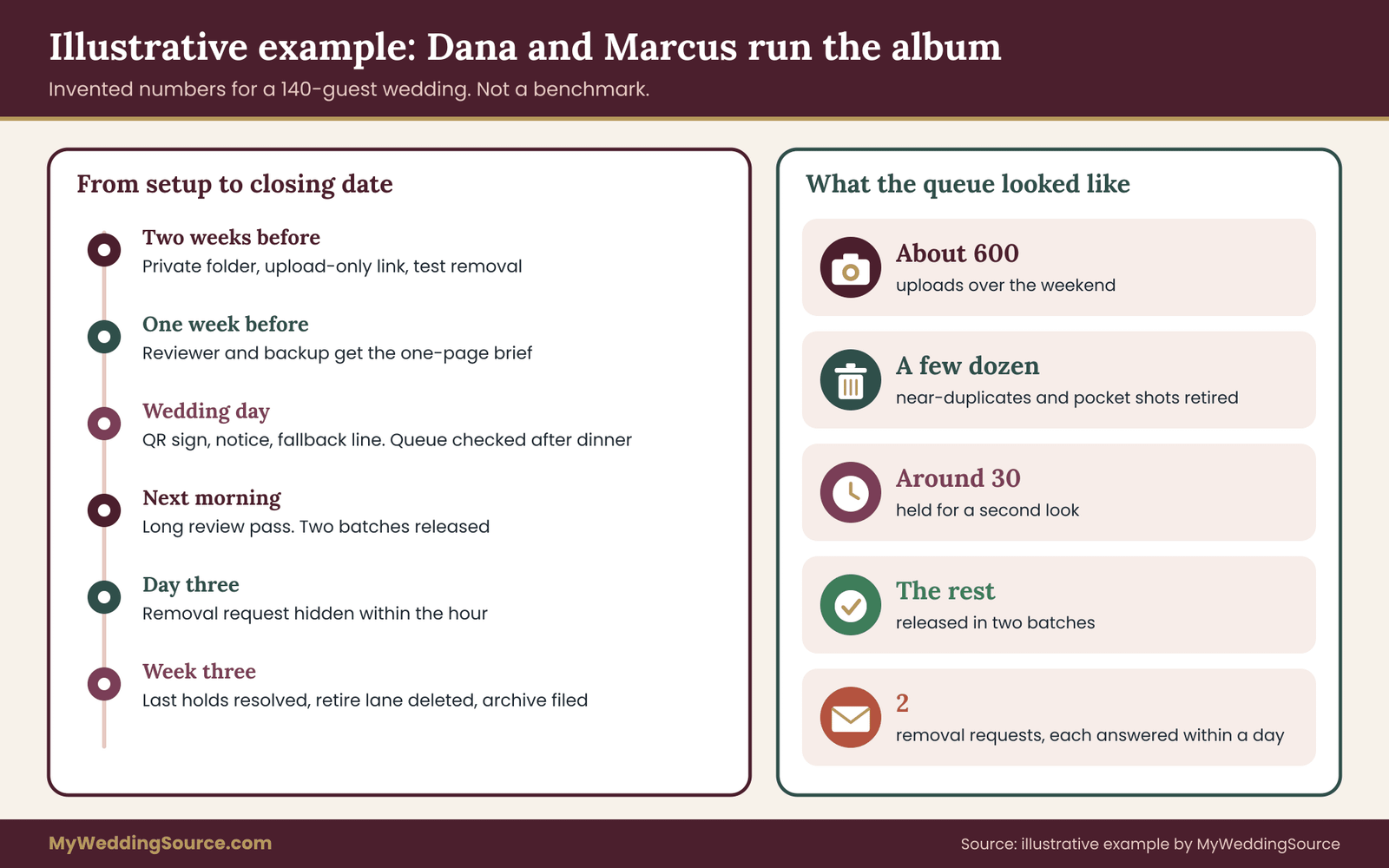
What this example shows is proportion. The whole routine consumed a few short sittings, and the hard decisions numbered around a dozen. The system did most of its work by existing: guests trusted the album because it was clear who ran it.
Choosing the light version or the full version
Not every wedding needs every part of this photo moderation guide. A simple rule for choosing:
Use the light version if you have fewer than about fifty guests who all know one another, no children or a few whose parents are close friends, and no particular sensitivities. The light version is a private folder, one reviewer who glances through uploads within a few days, a two-line notice and the removal promise.
Use the full version if the guest list is large, mixed or includes people with special concerns, if children attend in numbers, if you plan a live display, or if you want guests to browse and download. The full version adds the staging lane, the hold list, the written brief, the log and the closing routine.
If you are unsure, start with the full version and let the reviewer loosen it. It is easier to relax a rule that exists than to add one after something happened.
Cost logic
Most of this costs time rather than money. A private folder may be free or inexpensive on a platform you already use, while a dedicated guest photo service charges a fee. Compare that fee against what you would otherwise pay in the form of a photo moderation reviewer’s hours and your own peace of mind, and do not pay for features the photo moderation plan does not use, such as public galleries or face grouping.
A moderation tool that comes with a hired photo booth or a live display package is worth asking about in the contract, but verify its approval controls before relying on it. If a vendor supplies the tool, the guide to planning your wedding offers a general checklist for where this sort of task fits in your timeline.
Limits, verification and keeping the photo moderation plan current
Photo moderation has limits, and a plan that admits them is more trustworthy than one that does not.
It cannot reach guests’ phones. It cannot undo a public post by someone else. It cannot make every guest happy with every photo. It does not replace a conversation with a guest who has a real concern, and it does not substitute for advice from a qualified professional on a legal question.
It also depends on features that change. Platform settings, retention periods and sharing options differ and are updated often. Before the wedding, read the current help pages of the platform you chose, and test the settings with a stand-in account rather than trusting an old description. This applies to anything in this article that names a product’s behavior: check the vendor’s own page. A sensible habit is to review the photo moderation plan again each time you reuse it, and to check the vendor’s terms when they change.
Privacy rules vary by state and country, and some places have specific laws about images of people, especially intimate images and images of minors. If something unusual arises, such as a guest threatening to pursue a complaint, ask a qualified attorney in your state. The Federal Trade Commission and NIST pages in the sources are general references. They are not a legal opinion about your wedding.
Finally, keep the human side in view. The aim of photo moderation is to make the album a place guests are glad to be in. A plan that is kind, short and clearly owned does that better than a long policy that nobody reads. For etiquette questions that come up around guests and photos, such as whether to ask a relative to stop filming, the guide on wedding etiquette covers the courtesy side.
For the family photo list that the professional photographer works from, see the family photo list, which is a separate list from the guest album and does not need moderation in the same way.
Your next steps
Start with three decisions this week. Pick the platform and confirm it can keep uploads private. Name a reviewer and a backup. Write the one-sentence removal promise.
Then fill in the rest in order. Set up the staging area and the guest album, and test with a stand-in account. Draft the five-statement notice and the sign. Write the one-page brief with the four photo moderation lanes and the five questions. Prepare the private hold list, and decide what to do when the venue signal fails. Set the closing date, and put the retire-lane deletion date on the calendar.
After the wedding, work the photo moderation queue on schedule, answer every request within a day, close the album on the date you chose, and file the final set with your wedding records. A tidy photo moderation routine is a small kindness to your guests, and it will quietly protect you from most of the problems it was built for.
FAQ
What is wedding photo moderation?
Wedding photo moderation is the review of guest photos before or soon after they become visible to other guests, plus a clear way to remove a photo on request. For a private album it usually means a staging area, a named reviewer, a few written rules and a promise that anyone pictured can ask for a photo to come down.
Do we really need photo moderation for a small wedding?
Probably a light version. With a few dozen close guests, one reviewer who glances through uploads, a two-line notice and a removal promise are usually enough. Add the fuller routine when children, mixed audiences, a live display or guests with specific privacy concerns are involved. It is easier to relax a rule later than to add one after a problem.
Can guests upload photos without seeing each other’s pictures?
It depends on the platform. Some offer an upload-only link or a file-request feature where guests can send files but cannot browse the collection. If yours does not, create a staging album that only the reviewer and couple can open, then move approved photos to a guest-visible album. Check the platform’s current help pages and test with a stand-in account.
How fast should we answer a removal request?
Aim to hide the photo and reply within a day, then delete from the album, staging area, trash and your own copies within a few days. Say honestly if backups take longer. The one-day answer matters most, because it shows the person you took the request seriously while the details are worked out.
Can we delete a photo from guests’ phones?
No. Once a guest downloads or receives a photo, the copy is theirs, and your rules cannot reach it. You can remove the photo from the album and from copies you control, and you can ask guests kindly to delete theirs. Write the notice to promise only what you can actually do.
What should we do about photos of children?
Hold them until a parent has seen the photo, or release only photos a parent uploaded. A short question at the welcome desk, asking whether photos with a child may appear in the guest album, lets the reviewer decide quickly. Keep the answers on a private list. If a parent says no, hold or retire every photo showing that child.
What if someone uploads something that should never have been shared?
Stop reviewing it, do not forward or copy it, and tell the couple privately. If it involves sexual content or any sign of harm to a child, report it to the National Center for Missing and Exploited Children through its CyberTipline, and call local emergency services if someone is in danger. Follow the authority’s instructions about the file.
When should the shared album close?
Pick a date before the wedding, commonly a few weeks afterward, and tell guests. On that date resolve every held photo, turn off uploads, permanently delete the retired lane, and download the final set into your archive. Keep one contact route for removal requests alive afterward, since a request can arrive years later.
Sources
- NIST Privacy Framework, National Institute of Standards and Technology
- Secure Our World, Cybersecurity and Infrastructure Security Agency
- Privacy and security business guidance, Federal Trade Commission
- Protecting personal information, Federal Trade Commission
- Children’s privacy, Federal Trade Commission
- U.S. Copyright Office
- CyberTipline, National Center for Missing and Exploited Children
- Google Photos Help, Google
- iCloud support, Apple
- Dropbox Help Center, Dropbox