
Wedding photo posting is where a private guest’s boundary usually fails: the photographer is briefed, the phones are everywhere, and a picture is public before anyone has asked whether the person in it agreed. This guide shows how to receive a guest’s “please keep me off social media” request, record it, pass it to everyone who needs to know, and follow through after the wedding, without turning your reception into a rulebook.
Treat every wedding photo posting request as a small piece of work with five steps: receive it kindly, record exactly what was asked, route that scope to the photographer, videographer, wedding party and family, confirm back to the guest in two sentences, and close the loop after the gallery is delivered. Ask for the scope (photographed, posted, tagged, named, located) and never ask for the reason. Use one blanket rule for all guests so nobody is singled out, and keep a short script ready for the day someone posts anyway.
Imagine a guest who answered your RSVP with one line at the bottom: “Please no photos of me online.” Nothing about this wedding photo posting request is unusual. She might work in a school, she might share custody of a child with someone she no longer speaks to, she might simply dislike having her face attached to her name. You do not need to know which. What you need is a way to turn that single line into something that still holds at nine o’clock on a Saturday night, when a cousin is filming a toast and the photographer is shooting a group portrait that includes her.
That gap, between a sincere request and an actual outcome, is the subject of this article on wedding photo posting. Most couples who plan well for the ceremony and the cake never decide who is responsible for honoring a guest’s wishes about wedding photo posting. So the request goes into a text thread, a few people see it, and the information disappears before the day begins.
Wedding photo posting requests are different from the broader question of who owns your pictures or whether your photographer may use them. Those topics matter, and our guide to wedding photography consent covers them in depth, along with the guest privacy form and the photographer brief. This guide to wedding photo posting is narrower on purpose. It follows one kind of request, the guest who wants to stay off social media, from the moment it arrives until the last gallery link goes out. Think of it as the operating procedure that sits beside the larger consent plan.
A note on scope. This is general information, not legal advice, and rules about images, privacy and publicity differ by state and by situation.
What wedding photo posting requests actually ask for
The phrase “no social media” sounds like a single instruction. In practice it covers at least five different requests, and each one asks something different of you, your vendors and your guests. If you treat them as one, you will either do too little for the guest who needs more, or promise too much to the guest who asked for less.
Do not photograph me at all. This is the strongest version. The guest does not want to appear in any frame, whether it ends up public, private or in a drawer. It is also the hardest to honor fully at a wedding, because group shots, wide ceremony photos and candid moments catch people at the edges. You can reduce it considerably, but you should be honest that it cannot be absolute.
Photograph me, but do not post me publicly. The guest is comfortable being in the pictures that go to the couple, perhaps even in the album, but not on a public feed, a public gallery or a vendor’s website. Most requests fall here.
Post me, but do not tag or name me. Some people accept being visible in a wide shot but not being linked to their name, their employer or their profile. A tag attaches an identity to the picture, and it also sends the picture into the guest’s own network, which may include people they never meant to see it.
Do not show my children. A parent may be happy to appear but not want a child’s face online. This is a separate request with a separate owner, because the parent speaks for the child.
Do not show where I am, or when. The guest does not object to the image so much as the information around it: a location tag, a live story, a post that reveals the date and venue while the guest is still there. The picture is fine tomorrow. It is a problem tonight.
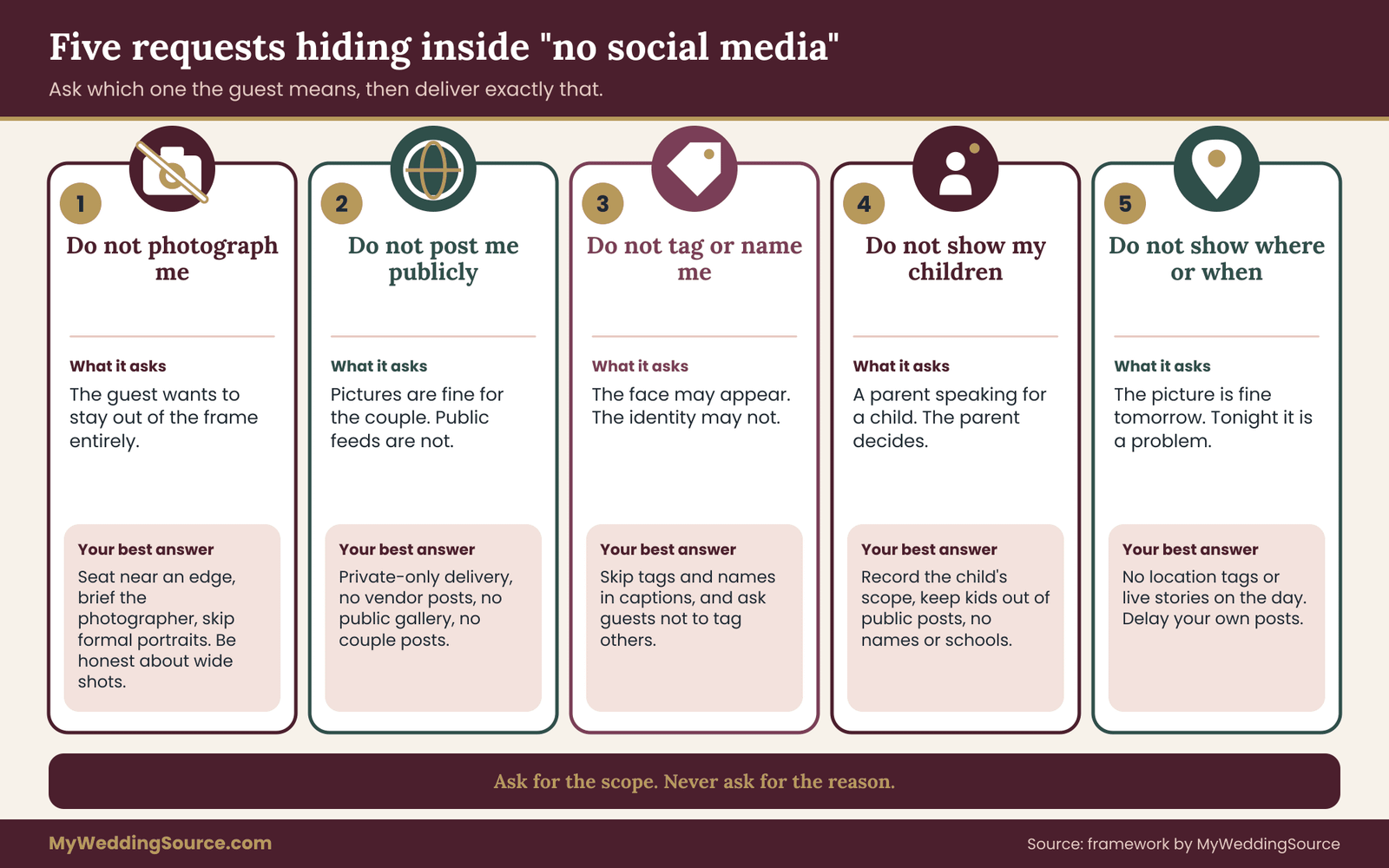
Separating these five kinds of wedding photo posting request makes your replies more accurate. If a guest writes “no social media,” a good first reply is a short question that sorts the request into one or two of these buckets. That question respects the guest, because you are trying to deliver what they asked rather than a vague approximation.
The couple’s side of the request
Requests also run the other way. You may have your own limits: no posts until you have shared your own photo, no pictures of the cake before the cutting, no live stream of the vows.
Those are wedding photo posting rules from the couple to the guests. They work best when they are built on the same machinery as guest requests, since in both cases you are asking people to hold back an image for a reason they may not fully see. We return to that in the section on guest phones. For now, notice that a couple who asks everyone to wait before posting has already opened the door to a general norm of asking first, which makes any single private guest easier to protect.
Why people make wedding photo posting requests, and why you do not need to know
People ask for different reasons, and many of the reasons are private. A guest may be a teacher, a healthcare worker or someone in a job where a public photo with alcohol or a late night creates trouble. A guest may be avoiding a former partner. A guest may have a legal reason connected to a custody arrangement or a protective order. A guest may belong to a community where being photographed carries a religious or cultural meaning. A guest may be in the middle of a career change and not ready to be findable. A guest may just feel strongly about it.
You will not be able to tell these apart from the outside, and you should not try. The most useful rule you can adopt for wedding photo posting is to separate the scope of a request from the story behind it. The scope is what your vendors and family need to act. The story belongs to the guest, and asking for it can feel like asking them to prove they deserve to be protected. A guest who volunteers a reason is trusting you with it, so treat it as private and do not repeat it to the photographer, the wedding party or your parents. Only the scope travels.
There is an exception that deserves care. If a guest says there is a safety concern, move them from the ordinary track to a more careful one: fewer people informed, a single point of contact, and a conversation about specifics such as the guest list, the seating plan and location sharing. The hard cases section later in this guide covers it. Most requests are not safety matters, and treating them all like emergencies makes the process heavy enough that couples stop using it.
Why wedding photo posting is harder than a simple rule suggests
A wedding has more people with cameras than almost any other event a person attends. The couple, the photographer, a second shooter, a videographer, a few dozen guests with phones, perhaps a photo booth, perhaps a shared album that guests upload to. Each of these is a separate door through which an image can leave. A single rule, “please do not post pictures of the guest,” governs none of them on its own, because the people holding the cameras are different, they heard the rule at different times, and some of them never heard it.
A photographer who has been briefed will avoid a flagged guest in candid shots. A guest who was not briefed will post a group photo from the ceremony with five tagged faces before dinner. A vendor who has not been asked may publish a sneak peek the same night. And you, the couple, may post an album with the best picture of the whole table, forgetting the one person at it who asked you not to.
So wedding photo posting is about doors, not just about rules. The next section maps the doors so you can see which ones a particular request touches. The section after that gives you the workflow that makes sure someone is responsible for each.
The upside is that wedding photo posting is manageable. A typical wedding will have only a handful of private-guest requests, often fewer than you fear, and each one takes a few minutes to record and route once you have a structure. The expensive part is not the effort. It is the cost of discovering, after the fact, that a promise was made and nobody carried it out.
The five doors that decide wedding photo posting
In wedding photo posting, a picture leaves a wedding through a small number of doors. Each door has a different person standing at it, a different speed, and a different way to close it. Once you know the doors, a vague request like “keep me off social media” turns into a short list of specific wedding photo posting tasks.
Door one: guest phones, watches and cameras
This is the fastest door and the one you control least. Guests take pictures within minutes of arriving, and they post to a story, a group chat or a feed within the hour. They often do it without bad intent, as a way of sharing the evening with friends who could not come. A guest who asked to stay off social media is exposed here more than anywhere else, because a wide photo of a dance floor or a table does not need to be a portrait to include a recognizable face.
The levers at this door of wedding photo posting are words, not tools. You can ask guests to wait before posting, to avoid posting pictures with other people in them unless those people agree, and to leave off location tags and live streams. You can say it in the program, on a sign, from the officiant or the emcee. What you cannot do is inspect phones, and you should not try. The goal at this door is a shared habit of asking first, which protects every guest at once.
Door two: the photographer and videographer
Professionals are easier to brief on wedding photo posting, but their reach is larger. A photographer may post a preview the same night or the next morning. They may add pictures to a portfolio, a blog, an advertisement, a vendor directory or an entry for a competition. A second shooter and an assistant have their own cards and their own habits. A videographer may cut a short highlight reel for social media long before the full film is ready.
Because these are paid, contracted people, the lever for wedding photo posting is a written brief and, where needed, a contract clause. A photographer who has a flagged guest on a list can leave that person out of any picture that will be posted, and can still photograph the guest for the private gallery if the guest agrees. The decision is whether the guest is flagged “do not post” or “do not photograph,” and that choice should come from the guest.
Door three: other vendors and the venue
Florists, bakers, planners, rental companies, hair and makeup artists, the DJ and the venue all like to show their work. Most of the time they photograph the flowers, the cake or the room, not the guests. But a phone picture of a finished table with people at it, or a venue’s social post of a dance floor, can include faces nobody approved.
Photo booths deserve a mention of their own. A booth company may keep the pictures, offer on-the-spot sharing by text or email, or post a gallery to a page. A guest who stepped in for one silly picture has no idea where it goes. Ask the company what happens to the images and whether the sharing features can be turned off.
The lever for wedding photo posting here is a polite sentence in each vendor’s confirmation: no guests in promotional pictures unless you approve them first. Most vendors agree without argument, because they are trying to protect their own relationship with you. Where the venue’s contract has its own language about photography, read that language and ask for changes in writing, since the venue’s terms can limit what you are able to promise.
Door four: galleries, albums and shared uploads
After the wedding, pictures sit in places that can be forwarded. A private online gallery with a password sounds contained, but a link can be sent to anyone, and download buttons let anyone with access save a copy to post. Shared albums, where guests upload their own phone pictures through a QR code, are even more open, because every guest can see everyone’s uploads and can usually save them.
This door of wedding photo posting is slow, which is a mercy. Pictures arrive days or weeks after the event, so you have time to set things up properly: choose which pictures go into a shared gallery, turn off public listing, limit downloads where the platform allows it, and share a smaller set of pictures with the wider group. A private guest’s request can be honored here by simple culling, which means removing the pictures that show the guest from any gallery that goes beyond you and your immediate family.
Door five: your own posts and your family’s
The last door is the one people forget because it belongs to them. You will post pictures. Your parents, siblings and friends will post pictures too, often within a day. A couple’s own post with a tagged guest is public, and it is also the one that is hardest to defend when a guest asked in writing not to appear.
There is also a cascade. You post a carousel, a relative reposts it to their story, a coworker screenshots one frame, and a group chat circulates it. Each step moves the picture further from the person who agreed to it, and each step is out of your hands after the first.
The lever for wedding photo posting is your own discipline and a short message to close relatives: here are the few people who asked to stay off public posts, please check with us before posting any picture they are in. This is the one place where you may need to tell family about the existence of a request, though not the reason. If the guest would rather not have even that mentioned, honor it, and limit your own posts to pictures you have checked yourself.

Matching a wedding photo posting request to the doors
Not every request touches every door. Reading a wedding photo posting request against the five doors tells you where to put effort.
A guest who asks “no tags and no name” is mainly a door one, door two and door five issue. The pictures can exist and can even be shared, but nobody should attach the guest’s identity. Your brief to the photographer should say so, your general guest message should discourage tagging people without asking, and your own captions should avoid names.
A guest who asks “do not post me publicly” touches all five doors. The photographer should not publish the guest, the vendors should not show the guest, the public gallery should not contain the guest, and your posts should skip the guest. Guest phones remain the weak point, which is why the blanket rule matters.
A guest who asks for “no photographs at all” is a door one, door two and door three problem for the day itself, and a door four problem for what happens afterward.
This is the request where you should be most honest about what is possible. A guest in the room at a wedding can reasonably be kept out of formal portraits and out of most candid frames the photographer takes on purpose. They cannot be kept out of every wide shot that happens to include a row of chairs. If the request is that strict, ask the guest whether a seat near the edge and a quiet word with the photographer would work, or whether there is some part of the day they would prefer to skip.
A guest who asks about location or timing is concerned with door one and door five, mostly during the event. A line in the program asking guests not to tag the venue or share live locations is a general rule that happens to protect this person. Your own posting can then wait a few days.
A parent who asks about children is touching door one, door two and door five, with door four coming later. The children section later in this guide covers it, but the structure is the same: the parent decides, the scope is recorded, and the brief tells the photographer.
Why speed changes the order of work
The doors open at different speeds. Door one can open before the ceremony begins. Door two can open the same night. Door three can open the next day. Door five opens whenever you or your family decide. Door four opens last, weeks later.
That gives your wedding photo posting a sensible order. Close door one and door two first, because they are the fastest and the least reversible. Brief vendors before the wedding, not after. Put the general rule in front of guests before the ceremony, not at the reception. Then, in the weeks afterward, handle door four and door five with care, because by then you hold the pictures and the choices are yours.
What you cannot close in wedding photo posting
Some doors never fully shut, and an honest process says so. A guest with a phone can still post something you did not see. A friend of a friend can screenshot a picture from a story. A stranger at a public venue may photograph the wedding party in the park. And a platform may reshare a post in ways that outlast the original.
This is not a reason to abandon the effort. It is a reason to word your promises to the guest carefully. “We will ask our photographer not to publish you, we will not post you ourselves, and we will ask guests to check before posting group pictures” is a promise you can keep. “Nobody will ever post a picture of you” is not, and a guest who relies on it may end up worse off than one who knew the limits and planned around them. We come back to limits at the end of the repair section, where the same honesty applies after something goes wrong.
A short wedding photo posting test before the wedding
A few days before the wedding, check each door with one question per request. Who is holding a camera that does not know about this? Has the photographer’s brief been confirmed in writing? Have the vendors who photograph guests been told? Does the program or sign mention the general rule? Do your parents and closest relatives know to check with you before posting group pictures? If the honest answer to any of these is “not yet,” that is the item to finish this week. It takes a few messages, and it is the difference between a request that was heard and a request that was honored.
A five-step workflow for wedding photo posting requests
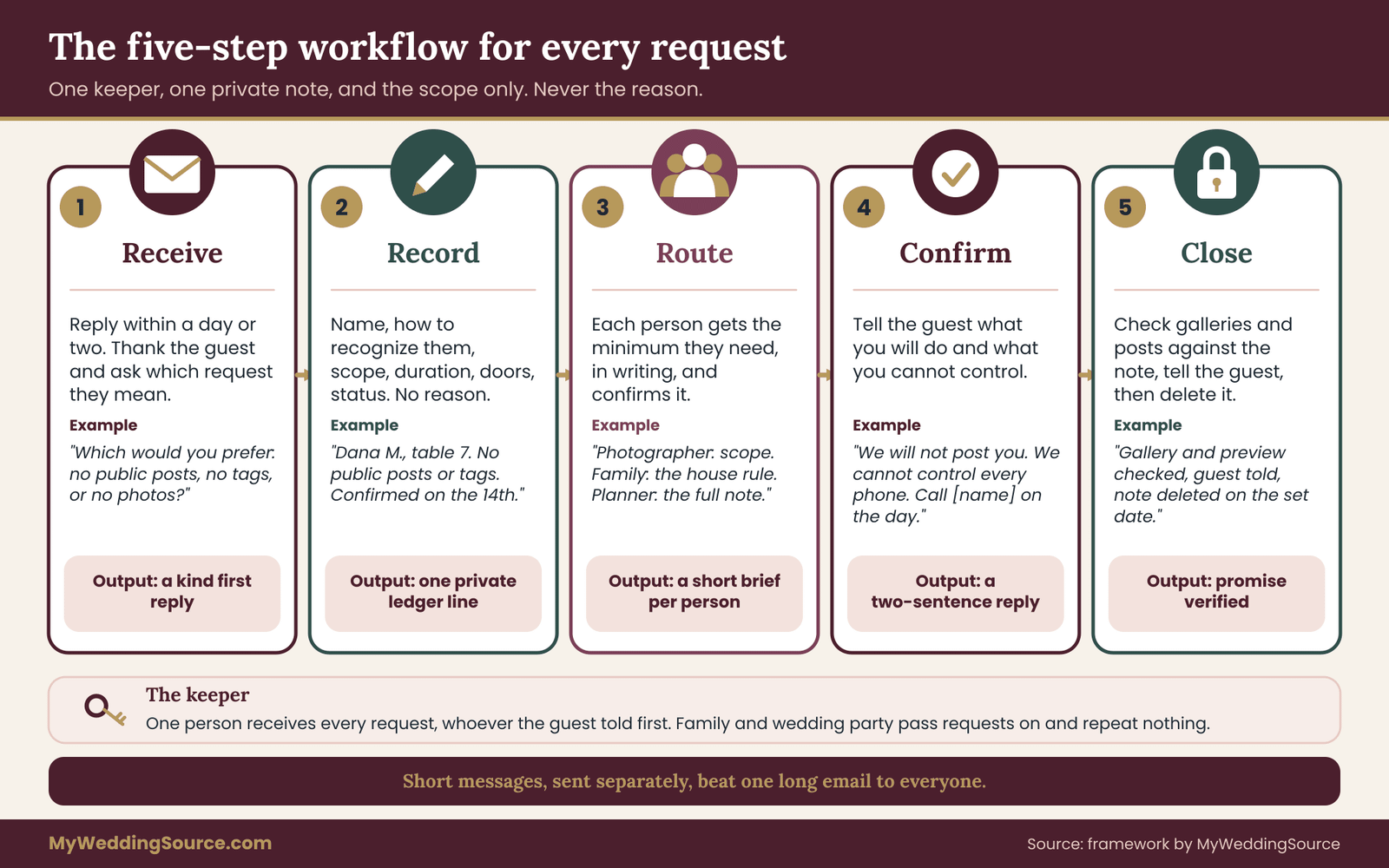
A wedding photo posting request that lives only in someone’s memory is a request that will be forgotten, usually by the person who most needed to remember it. The fix does not need software or a long document. It needs five steps, one named person, and a single private note. The steps are receive, record, route, confirm and close.
The workflow is the part of this guide on wedding photo posting that belongs to this topic and no other. It is meant to be run once per request, and once you have run it a couple of times it takes about as long as answering an email.
Name one keeper before the requests arrive
Decide who will receive and track every wedding photo posting request. In many weddings it is one partner, a planner or day-of coordinator, or a trusted sibling or friend. What matters is that it is one person, so that a guest who writes to the couple, a guest who tells a bridesmaid at the shower and a guest who mentions it to the mother of the groom all end up in the same place.
Tell your close family and wedding party the rule in a sentence: if anyone mentions a photo request, please pass it to the keeper and do not repeat it to anyone else. People mean well, and the most common leak in this process is a kind relative who says to the photographer, “Oh, my friend doesn’t want to be online, you know,” in front of three other people.
Step one: receive the wedding photo posting request kindly and ask for the scope
The first reply sets the tone, and it should arrive within a day or two. Thank the guest for telling you. Say that you will make sure it is handled. Then ask one short question about scope, because “no social media” could mean any of the five requests described earlier.
“Thank you for letting us know, and of course. So we get it right, would you like to be left out of public posts, left off tags and names, or kept out of photos entirely? Any combination is fine.”
Notice what the message does not do. It does not ask why. It does not offer a lecture on how photography works. It does not suggest that the guest is being difficult, and it does not make a promise that cannot be kept. A guest who feels interrogated will tell you less next time, and the next guest, hearing about it, may not tell you at all.
If a request arrives indirectly, through a parent, a partner or a friend, reply to the guest themselves if you can. A request relayed by someone else may have changed on the way. If it concerns a child, confirm with the parent, since the parent is the person who decides.
If the guest gives you a reason without being asked, thank them for trusting you and leave it there. Do not ask for details, and do not repeat it. The reason is theirs.
Step two: record exactly what the wedding photo posting request asked
Write the request down in a private place that only the keeper and, if you choose, one partner can see. Not the shared planning spreadsheet that your parents can open, and not the group chat. A note on your phone with a passcode works. So does a single page in a private folder.
The record has a small set of fields, and each one has a job.
- Guest name and how to recognize them. Add a table number, a plus-one’s name or a description a photographer could use. A name alone is not enough for someone who has to find a face in a crowd.
- Scope. Which of the five requests applies: not photographed, not posted, not tagged or named, children excluded, location or timing hidden. Use the guest’s own words where you can.
- Duration. For this event only, or as a general preference. A guest might be fine with you sharing the album privately in a year but not with a post this week.
- Doors affected. The doors from the previous section that the request touches, so the routing step is quick.
- Who may know. A short line stating which people are allowed to hear the scope, and which are not.
- Confirmed with the guest. The date you replied and the version of the scope the guest agreed to.
- Status. Open, routed, confirmed, closed.
Notice what is missing: the reason. If the guest volunteered a reason, add a single line that says “reason shared in confidence, do not repeat,” and nothing more. Keeping less is safer than keeping more. A note that does not contain a sensitive detail cannot leak it.
A sample wedding photo posting entry, in plain words, looks like this. “Guest: Dana M., table 7, plus-one Ravi. Scope: do not post or tag Dana publicly. Photos for the couple’s private album are fine. Duration: general. Doors: phones, photographer, our posts, family posts. Who may know: photographer, planner, our parents as a name only. Confirmed with Dana on the 14th. Status: routed to photographer.” That entry is short enough to read at a glance and complete enough to act on.
Step three: route the wedding photo posting scope, and only what each person needs
Routing is the step where most wedding photo posting promises quietly fail. The principle is simple: each person receives the minimum they need to act, in writing, and acknowledges it.
The photographer and videographer need the guest’s name, how to recognize them, and the scope. They do not need the story. A line such as “do not publish; private gallery only” is enough. Ask them to reply to confirm they have read it. If there is a second shooter, ask the lead to pass it on, and confirm that as well.
The planner or day-of coordinator needs the complete record, because they are the person who will answer questions on the day and who will see the situation as it unfolds.
The wedding party, ushers and close family usually do not need individual names at all. What they need is the general rule: guests will be asked to check before posting pictures that include other people, and to hold off on tags and locations. If you do need to name someone, for example because a relative will be posting from the family portraits, name only that person and give only the scope.
Other vendors who photograph guests, such as a photo booth company or the venue’s social team, need a one-line instruction: no guests in promotional pictures without approval.
The master of ceremonies or officiant needs the wording of the general announcement. They do not need a list.
Send each message separately and keep it short. A common failure is a long email to everyone that includes the full ledger. A short, targeted message is more likely to be read, and the privacy of the guest is better protected.
Step four: confirm back to the guest
Once the request is routed, go back to the guest. Say what you will do and what you cannot control, in about two sentences.
“We’ve told our photographer not to publish you, we won’t post you or tag you, and we’ll ask guests to check before they post group pictures. We can’t control every phone in the room, so if anything comes up, tell [name of the keeper] and we’ll sort it out.”
This message has three jobs. It tells the guest that the request landed. It gives them a realistic picture of what is covered. And it gives them a person to contact on the day, which matters more than it seems, because a guest who feels they have no one to go to will either say nothing or confront a stranger.
If the guest’s request cannot be met as written, this is the moment to say so, and to offer something nearby. A guest who asked not to appear in any picture, for example, may be offered a seat at the edge of the room, a quiet word with the photographer, and an exclusion from formal group portraits, with the honest note that a wide shot of the room might still include them in the background. Most guests accept an honest partial promise more readily than a perfect one they suspect is not real.
Step five: close the loop on wedding photo posting after the wedding
The last step is the one people skip, because the wedding is over and everyone is tired. It matters because it is where you verify that the promise was kept.
Before any gallery goes beyond the two of you, check it against the ledger. Look for flagged guests in the pictures that will be shared more widely, and remove or replace them. Ask the photographer to confirm that anything posted or planned for posting follows the brief. Review your own posts before they go up, with the ledger open beside you.
Then tell the guest that you have followed through. A two-line message is enough: “All finished. You are not in anything we or our photographer have shared.” If something slipped, say that too, and fix it as described in the repair section later in this guide.
Finally, decide when the ledger goes away. It exists to do a job, and the job ends after the galleries are delivered and the posting period has passed. Delete it on a date you choose in advance, for example a few weeks after the final gallery. Keeping a private list of guests’ requests longer than you need it is a small risk, but it is a risk you can simply avoid.
How long it takes, and what it costs
The effort for wedding photo posting is modest. Receiving and confirming each request is two short messages. Recording is a few lines. Routing is perhaps three short emails, written once and reused. The follow-up check is a read-through of a gallery you were going to review anyway. For a wedding with a few requests, the whole process is a handful of small tasks spread over several months.
The cost in money is usually nothing, with one exception to ask about early. A photographer who has to cull a gallery more carefully, or edit people out of group pictures, may consider it extra work, and some contracts address it. Ask at the consultation, not after the wedding, whether flagging guests for private-only delivery is included. We look at that in the vendor section.
When two wishes collide
Occasionally the wedding photo posting ledger holds a conflict. A guest wants to stay off posts, and your mother wants to post the family portrait that includes them. Or you would like to share one specific picture publicly, and a guest in it has asked not to be shown.
The wedding photo posting rule that works is simple. A person’s image is theirs first. Where the request is specific, it wins over convenience, and the way to honor both wishes is usually to choose a different picture, crop carefully with the guest’s agreement, or share the picture privately with the people who want it. A relative who feels strongly can be told, kindly and without details, that you made a promise to a guest and you are keeping it. That is a sentence people tend to respect, because they would want the same from you.
Collecting wedding photo posting requests before the day
Some guests will tell you without being asked. Many more will say nothing, either because they assume the answer is no or because they do not want to make a fuss. If you want to hear about wedding photo posting limits before the wedding, you have to make asking easy and make the reply feel safe. A little structure in the invitation process does most of the work.
Where to ask about wedding photo posting
The easiest place is wherever guests already reply. If you collect RSVPs online, add one optional question near the end. If your website has a page of practical information, add a short section about photos and phones. And keep a personal channel open, because some of the people who most need to ask will not use a form.
On an online RSVP, a single optional line works well. For example: “Is there anything we should know about photos? Optional.” You can leave it as a free-text box, or you can add a few check boxes that map to the five requests from earlier in this guide: please do not post me publicly, please do not tag or name me, please keep me out of photos where possible, please do not show my children, and “I will tell you separately.” The check boxes make scope clear from the start, and the last option lets a guest signal a more private matter without typing it into a form.
Our guide to wedding RSVP etiquette covers the wording and timing of replies in general. For a wedding photo posting question the main point is tone: it should read as an ordinary courtesy, as normal as asking about food allergies, so that nobody feels the question is aimed at them.
A printed invitation is a poor place for the question, since there is no room and no reply path. A short line pointing to the website is plenty.
A photos and phones page for wedding photo posting
If you publish a practical-information page, a short note on photos does double duty. It tells guests what to expect, and it invites requests without singling anyone out. Here is wording you can adapt.
“We will have a photographer with us all day, and we would love for you to enjoy your own pictures too. If you would rather not be posted online, tagged or photographed, please tell us when you RSVP or write to us directly. We will keep it private and make sure it is respected. We also ask all guests to check with the people in a picture before posting it, and to leave off location tags until the next day.”
That version of a wedding photo posting note asks for requests, sets a general norm of asking first, and does not specify a reason for anyone to feel judged. It also carries two practical rules, check before posting and hold the location until the next day, that protect everyone, including guests who never said a word.
You can make the wording warmer or more formal. Keep the three parts: here is how to tell us, here is what we will do, and here is what we ask of everyone.
Keep a personal route open for wedding photo posting
Some people will not fill in a form, and some will not put a sensitive request in writing. Give a name and a way to reach them in the practical section: “Questions about photos? Contact [the keeper].” Then actually answer. A guest who writes a nervous message and gets a warm reply within a day will relax. A guest who hears nothing will assume the worst.
If the keeper is a planner or coordinator, tell them how you want these messages handled. A short instruction such as “reply kindly, ask the scope question, record it, and tell us only that a request came in” keeps you from learning details you do not need.
The late wedding photo posting request and the day-of request
Requests will arrive late, and a few will arrive on the day. A guest may realize at the welcome party that they would rather not be in pictures. A plus-one you have never met may mention it at the door. A relative may whisper it during cocktail hour.
Have a day-of path ready. The keeper carries the ledger on a phone or a card. The photographer has a way to receive an update quickly, such as a text to the lead or a word with their assistant. The emcee knows the general announcement. A late request is routed the same way as an early one, only faster: receive it, note the scope in two lines, tell the lead photographer, confirm with the guest. You will not be able to run every step perfectly in the middle of a reception. Run the two that matter, which are telling the photographer and telling the guest.
Triage for wedding photo posting: let the guest choose the level of care
Not every request needs the same amount of care. A guest who would rather not appear on a public feed is in a different situation from a guest who has a protective arrangement in place. If you treat them the same, you either under-protect the second or burden the first with measures they did not ask for.
A simple way to sort requests is to give the guest a choice and let them decide. The question can be gentle: “Is this more of a preference, or is there something we should handle more carefully?” The guest does not have to say why. They only have to point to a level. There are three.
Level one: a preference. The guest would simply rather not be posted or tagged. The standard five-step workflow applies. Record the scope, route it to the photographer and the general rule to guests, confirm, and close. Few people need to know, and nothing unusual is required.
Level two: a professional or legal reason. The guest has a job, a licensing body, a court order or an agreement that limits where their image can appear. The workflow is the same, with three additions. Ask whether the restriction applies to private galleries as well as public ones, because some do. Ask whether group photos that include them can be shared with others in the group. And agree on a timeline, since some restrictions are about posting while an arrangement is active, and others are permanent. Put “private gallery only, no sharing links” in the photographer’s brief if the guest asks for it.
Level three: protective. The guest has a safety concern. Here the circle of people who know gets smaller, not larger. Offer a phone call rather than a text thread. Ask what would help: a seat position, an entrance, someone who knows to check on them, a guest-list review, or a delay on all public posts until after the event.
Share the scope with the photographer in person or in a short message without any explanation. Ask the venue about their own procedures if the guest wants that, but only with the guest’s agreement. And hold off on every public post from you, the vendors and the wedding party until you have confirmed with the guest that it is safe.
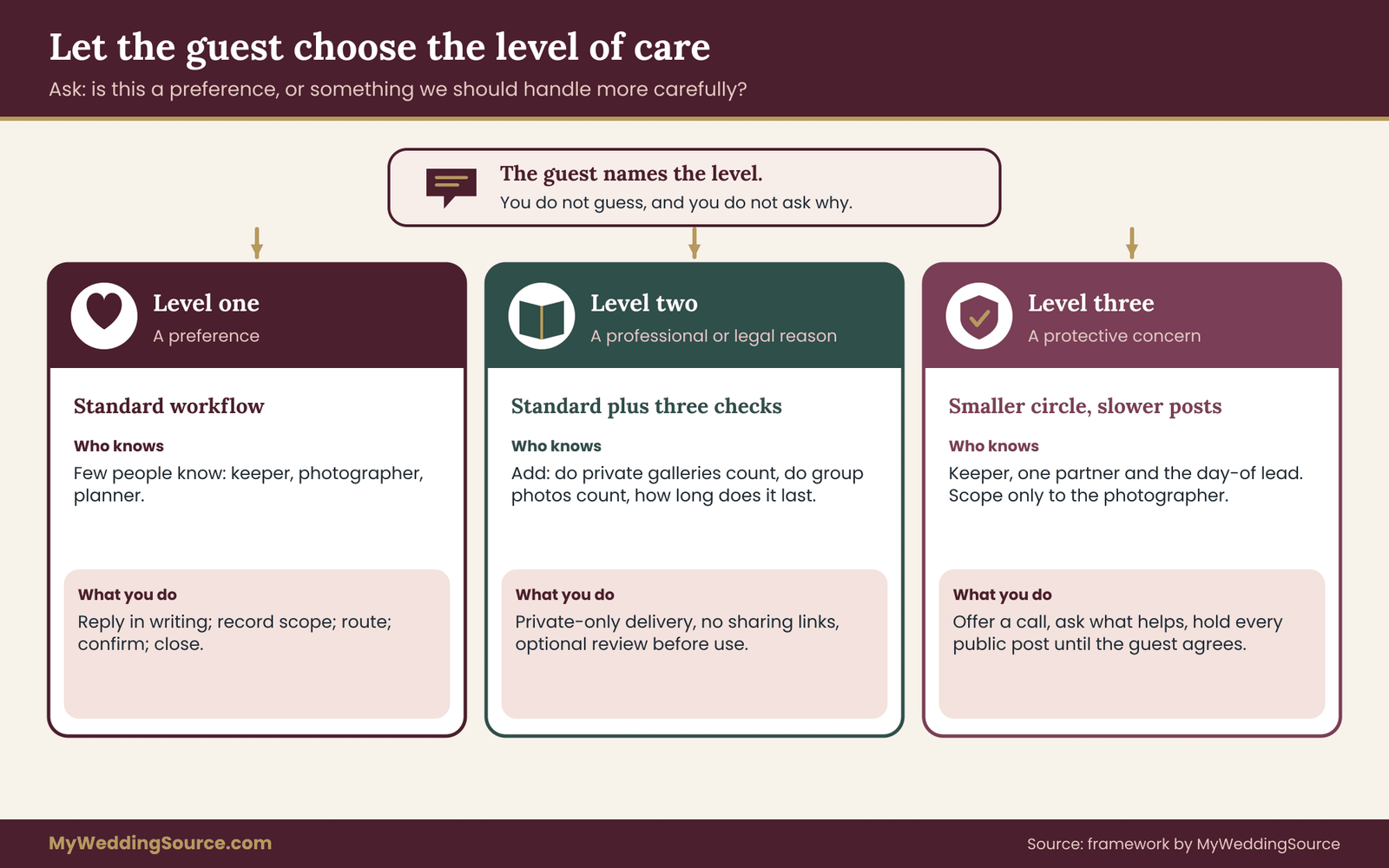
The key move in triage is that the guest sets the level, not you. If you assume a request is trivial, you may miss a real concern. If you assume it is serious, you may overstep. Asking the guest to choose respects both possibilities.
You should also be ready for guests to move between levels. Someone who began with “a preference” may tell you more later. Someone who began at level three may find that the arrangement has changed. Let them adjust the scope without needing to explain, and update the ledger quietly.
When your own wedding photo posting plans pull the other way
There are a few situations where your plans push against a request. The most common are a live stream for relatives who cannot attend, a photo booth that shares automatically, a guest upload album, and a plan to post a gallery publicly.
For a live stream, tell the guest early, describe the camera position and the moments when it will run, and offer options: sit out of frame, step out during the vows, or skip the stream’s public link by making it password-protected so only invited relatives can watch. Do not assume that a private link is permanent, since people share links, and say so plainly.
For a photo booth, ask the company to turn off automatic sharing and public galleries, or choose a booth that prints only. A guest who wants no online presence can still enjoy a printed strip.
For a guest upload album, think about whether you need one at all. If you use one, make sure the sharing settings do not make every upload visible to every guest by default, and tell guests to avoid uploading pictures that show people who asked to stay private.
For a public gallery, the choice is between making a smaller public set and a larger private one. Almost every couple who thinks about it finds that the public set can be quite small.
These choices show why it helps to run wedding photo posting intake early. The earlier you know about a guest’s request, the more of these decisions can be made in a way that costs you nothing. A stream with a password costs a few minutes. A booth set to print only costs nothing at all. A late request that arrives after you have promised a public gallery is the situation that forces awkward conversations.
Reading the room on etiquette
Guests who make wedding photo posting requests are often worried about how it will be received. Some expect to be treated as difficult. Your replies are the first sign that they will not be. If you want a wider view of the courtesies on both sides, our wedding etiquette guide covers the general manners of hosting and attending.
A few reminders from that territory apply here. Do not ask guests to justify a boundary. Do not announce a guest’s request to a table or a group. Do not tease a guest who asked, and ask your wedding party not to either. And do not treat a request as a favor that must be repaid by compliance with something else. A guest’s boundary about their own image is not a trade.
Briefing photographers and vendors on wedding photo posting limits
In wedding photo posting, the photographer is the easiest door to close and the one with the largest consequences if left open. A good photographer will not mind a clear brief. Most already work with lists of “do not photograph” or “do not publish” people at weddings, because the situation is common. What they cannot do is read a request nobody sent them.
What the written wedding photo posting brief should say
Keep the brief short and specific. A page is plenty. For each flagged guest it needs the name, a way to recognize them, and the scope in plain words. For the photographer’s general guidance it needs a few wedding photo posting rules about publishing.
The scope is best given in two categories, since the two are handled differently by a working photographer.
Do not photograph. The photographer avoids the guest in candid pictures, leaves them out of formal group portraits unless the guest agrees, and crops or leaves out the wide shots where the guest is the subject. It is not a promise that the guest will never be visible in a crowd scene, and the brief should say that this is a best effort.
Photograph, but private only. The guest can appear in pictures delivered to you, and the photographer will not publish them. This covers social media, the photographer’s website, blog, portfolio, advertising, competition entries and any submission to a publication or vendor directory.
Beyond the individual entries, the brief should state your general wedding photo posting terms. Ask the photographer to confirm, in writing, each of these points.
- Whether they plan a same-night or next-day preview, and which pictures go into it. Ask that the preview exclude flagged guests and any picture of children unless you approve it.
- Whether they publish to a portfolio or blog, and when. Ask for a review window before anything goes up, even a short one.
- Whether a second shooter or assistant also publishes, and whether the brief reaches them.
- Whether the videographer cuts a short social media teaser, and whether flagged guests are excluded from it.
- Whether pictures can be submitted to magazines, blogs, contests or vendor directories, and whether you approve each submission.
- How the delivered gallery handles flagged guests, which is covered under the gallery step below.
Ask for a reply that says “received and agreed” or lists anything they cannot do. A confirmation in an email thread is enough.
Wedding photo posting questions to ask at the consultation
If you are still choosing a photographer, ask these questions before you sign. The answers tell you how the photographer handles a situation you have not yet had.
How do you handle guests who ask not to be photographed or published? What does the contract say about your use of pictures that show guests? Do you offer a private-only delivery for specific guests, and is it included in the price? How do you handle same-night previews, and can flagged guests be excluded? Do you publish a gallery on your own website by default, and can we turn that off? Who else on your team has access to the files?
A photographer who answers confidently and in practical terms is usually experienced. One who is surprised by the questions is not necessarily bad, but you will want to put more in writing. Our guide to wedding vendor contracts explains the clauses that govern usage rights and approvals, and it is worth reading before you sign, because a photographer’s contract often grants a broad license to use images for marketing.
What wedding photo posting costs
Most of what is described here costs nothing. Giving a photographer a list is free. Asking for a review window before posting is usually free.
Where cost appears is in extra editing or culling. A photographer who must remove a flagged guest from every group shot, or edit out a person from a frame, may charge for the time. Others treat it as part of normal delivery. There is no way to guess which is true, so ask during the consultation, and get the answer in writing. If an hourly charge applies, you can decide whether a different approach, such as asking the guest to step out of formal portraits, solves the problem more cheaply.
Group portraits, the family list and wedding photo posting
Formal group portraits are where flagged guests are most often caught, because the photographer’s job at that moment is to collect specific people into specific frames. If your list of family combinations includes the flagged guest, the photographer will naturally try to include them.
Review your shot list with the ledger beside it. For each flagged guest who appears on the list, decide with the guest which of three paths applies: they are in the portrait and it stays private; they step out of that portrait; or they are in the portrait and the picture is flagged “do not publish” in the delivered gallery. The guest picks.
Our guide to the wedding family photo list walks through how to build the list of formal combinations, which makes it easy to spot where a flagged guest appears and to rearrange so nobody is surprised. A good habit is to give the photographer the list with flagged guests marked in a way that only the photographer and the coordinator can read, such as a small symbol next to the name.
Introductions and the day itself
On the day, the photographer works best with one point of contact. Name the keeper or the coordinator and give the photographer that person’s number. If a flagged guest is comfortable with it, the keeper can introduce them to the photographer before the ceremony, so the photographer has a face to match to the entry. Some guests prefer not to be introduced. In that case, a description in the brief plus a table number usually works.
Ask the photographer to avoid calling out flagged guests by name or pointing them out, and to treat any question from a guest about their preferences as a signal to check with the keeper. A guest who says “I would rather not be in this one” to a photographer has just made a request, and the photographer should honor it on the spot.
The gallery step in wedding photo posting
After the wedding, ask how the gallery handles flagged guests. Three options are common. The photographer can remove flagged-guest pictures from the delivered set. They can keep them, marked as private. Or they can deliver everything to you and leave the culling to you.
Whichever you choose, make sure the pictures that show a flagged guest never go into a shared or public gallery. A private album of just the two of you is a different thing from a gallery sent to eighty guests. We return to this in the repair section.
Other vendors and wedding photo posting
Planners, florists, bakers, hair and makeup artists, rental companies and the venue often photograph their work for their own marketing. Most of the time that means a picture of a bouquet or an empty table. Sometimes it means a picture that includes people.
Send a one-line note to each in your final confirmation: “We would appreciate it if you did not include guests in any photos or videos you post, unless we approve them first.” Most vendors will agree. For a venue with its own photography policy, read that policy and ask for the same line in writing.
One related point. If a vendor offers you a discount, a free upgrade or a trade in exchange for tagging them or posting about their work, the Federal Trade Commission’s endorsement guidance expects the connection to be disclosed clearly. That is a matter between you and the vendor, and it is worth knowing before you agree, since it also affects what you will be posting.
You cannot brief a hundred guests the way you brief a photographer. What you can do is establish a norm that protects the private guests without naming them. The norm is the same for everyone, and it works because it is simple.
Why a blanket rule protects a named guest
If you tell guests “please do not post pictures of Dana,” you have announced who Dana is and why you are concerned. If you tell guests “please check with the people in a picture before you post it,” you have protected Dana and every other person at the event, and nobody has been identified. A general rule asks for the same behavior without singling anyone out. This is the most important idea in this part of the guide, and it is the reason the blanket rule belongs alongside individual requests rather than replacing them.
A good blanket rule for wedding photo posting is short. Five points cover most of what private guests need.
- Ask before posting a picture that includes someone else. The norm is a quick check, not a signed release.
- Do not tag or name people without asking. A tag moves a picture into someone’s own network.
- Hold location tags and live stories until tomorrow. The picture can wait; the venue and time can be shared later.
- Leave children out of public posts unless the parents say yes. This respects families that have asked.
- Post pictures of the couple, the decorations and yourself freely. Giving guests a clear list of what they can post makes the restrictions feel light.
The fifth point matters more than it looks. People accept limits more easily when they are also told what is welcome. If you only describe what is forbidden, the rule sounds like a warning. If you say “post your own pictures, pictures of us and the decor, and just check before posting anyone else,” it sounds like a reasonable house rule.
Where to say your wedding photo posting rule, and how many times
Say the rule in several places, briefly each time. Repetition is how it reaches people who skip the website and glance at the program.
On the website, include the text from the practical page. On a sign at the entrance or near the guest book, put two lines. In the program, add a single sentence. At the start of the ceremony or the reception, have the officiant or emcee say it in one breath. On the table, a small card can repeat it, which is especially useful for guests who arrived late.
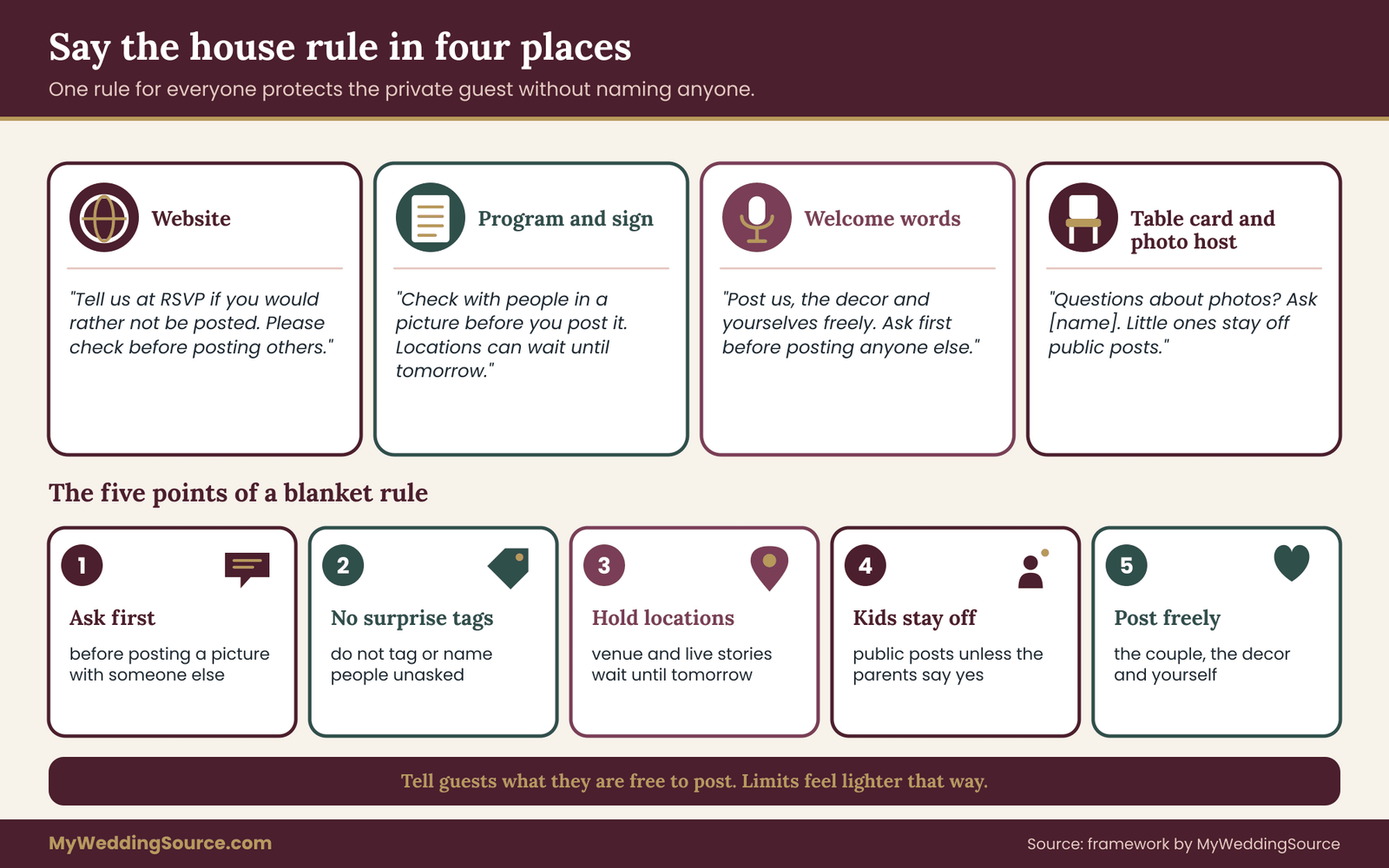
Keep the wording friendly and short. A longer script tends to make guests feel supervised.
“We want you to enjoy the day and to feel free with your phones. One favor: please check with anyone in a picture before you post it, skip location tags until tomorrow, and leave the little ones out of public posts. Thank you.”
Wedding hashtags and wedding photo posting
A wedding hashtag is an invitation to post publicly. If you use one, it is worth thinking about what you are inviting. A hashtag encourages guests to post group pictures with the hashtag attached, which gathers them in one searchable place. For a private guest, that is the opposite of what they asked.
If you want the fun of a hashtag, pair it with the rule: “Use the hashtag for pictures of the day, and check with people before posting them.” Or skip the hashtag and offer a private shared album where guests can add pictures that you control. If you do use an album, review the settings so uploads are not public and so guests cannot download everyone else’s pictures if you would rather they could not.
Unplugged ceremonies and delayed wedding photo posting
Some couples ask guests to put phones away during the ceremony and to wait before posting anything. Both are legitimate choices, and both help private guests. An unplugged ceremony reduces the number of cameras during the most photographed moment. A request to wait until the couple has posted or until the next day gives you time to deal with anything that needs attention.
They work best when the reason is simple and warm. “We would like you to see us, not your screens” is easier to accept than a rule that sounds like a ban. And a delay on posting has another benefit: guests who post later tend to post fewer, better pictures.
Neither choice is necessary for protecting a private guest. A blanket ask-first rule does the work on its own. Choose the firmness that fits your event and your guests.
Group chats and wedding photo posting in the wedding party
Group chats deserve a mention because they feel private and are not. A picture sent to a chat of thirty people has left your control, since any member can save and share it. The wedding party chat, the bridesmaids’ chat and the family chat all hold pictures from the day.
Tell your wedding party the rule directly, and ask them to apply it in chats too. A simple version: “Please don’t forward or post pictures of guests who asked to stay private. We will tell you who they are if it comes up.” Hold the names back unless someone needs them to act. If a wedding party member will be handling pictures at a specific moment, for example collecting phones for the ceremony, give them only what they need.
A photo host for the day
Consider appointing a friend or relative as the photo host. Their job is modest: be the person guests can ask about photo questions, quietly remind people of the house rule, and pass any request to the keeper. A photo host takes pressure off you, and gives guests someone to talk to if they feel uncomfortable. Our guide to wedding day digital operations covers backup communication and file permissions on the day, and the photo host role fits naturally with those arrangements.
Enforcing wedding photo posting rules without policing
You will not be able to stop every post, and you should not turn the reception into a checkpoint. What works is a combination of a clear rule, a warm reminder and a quick fix when something goes wrong. If a guest posts a picture of a private guest, the keeper or photo host can ask them quietly to take it down or remove the tag. Most people comply gladly once they realize what happened. The repair section later in this guide gives the exact words.
Hard cases in wedding photo posting: children, safety, work and family pressure
The five-step workflow handles most wedding photo posting requests. A few situations need extra thought, either because someone other than the guest is affected, because the stakes are higher, or because family dynamics push against the request.
Children and wedding photo posting
A parent’s request about a child is the most common variation, and it has one clear rule: the parent decides. A grandparent, aunt or family friend may have strong opinions about the child’s picture, but the person who speaks for the child is the parent or legal guardian.
When a parent asks you to keep their child off social media, record it the same way as any other request, with the child’s name or description added. Ask whether the request applies to the child alone, to the child in group pictures with the parent, and to private galleries. Many parents are fine with a picture in a private family album and want only the public feed handled carefully.
Think about the children who are not on your ledger, too. A flower girl or ring bearer will be in many photographs. If you plan to post pictures of children, get the parents’ agreement first, even if they did not ask. A quick message works: “We would love to share a few pictures from the ceremony. Are you comfortable with us posting ones that include your daughter?”
At the reception, children appear in the background of many pictures, running on the dance floor or asleep on a chair. This is where the general rule helps. “Please leave children out of public posts unless the parents say yes” covers every child at once. And ask your photographer to avoid publishing any picture where a child is the focus without a parent’s approval.
If you are also thinking about childcare, quiet spaces and seating for babies and older relatives, our guide to wedding guest care covers that side of the day. The photo question and the care question often arrive together, since a parent with a baby may be the same guest who asked for privacy.
Keep one limit in mind. Do not share children’s full names, school names or locations in captions, even when the parents agree to a picture. The less a post says about a child, the less it can be used for.
Wedding photo posting and guests who have a safety concern
If a guest tells you they have a safety concern, such as a former partner, a stalker or a protective order, move the request into the careful track described earlier. A few practical steps help.
Reduce the circle of people who know. The keeper, one partner and the person who will act on the day, which may be the planner, are usually enough. The photographer needs the scope and a way to recognize the guest, not the reason.
Ask the guest what they need, instead of deciding for them. They may want a seat near an exit, an entrance that avoids the main doors, a friend who stays near, or reassurance that no post will include them or the venue until after the event. Some guests will want to tell the venue’s staff and some will not. Let them lead.
Hold all public posts from you and your vendors until the guest confirms that it is safe, which may mean waiting days or weeks. Check the pictures you plan to post for details that reveal where someone was: a table number, a street sign, a venue’s name in the background.
For a broader look at the policy side, including how to word the request on your guest form and in the photographer’s brief, our guide to guest boundaries and image use covers safety situations in more detail.
You are not expected to manage someone’s safety alone. National and local organizations that support people in these situations can advise the guest on their own plan, and the U.S. Department of Justice’s Office on Violence Against Women lists resources through its website. Your role is narrower: to keep the guest’s image out of public view and to follow their lead on what else would help.
Wedding photo posting for guests with a job or a legal reason
Some guests are limited by their work. A teacher, a counselor, a clinician, a person with a security role or a public-facing employee may be restricted by an employer’s policy, a licensing board or a court. The guest knows the rule and you do not, so ask the scope questions from the triage step: does the limit apply to private galleries, do group photos matter, and is the restriction permanent or temporary?
Agree on what the guest needs and record it. If a guest would like to see any picture that includes them before you share it beyond the two of you, add that to the ledger and put a review step in your closing check.
Religious or cultural reasons for wedding photo posting limits
For some guests, being photographed carries a meaning in their religious practice or community. Others come from families where a public picture of a woman, of a child or of a ceremony is not something to share. The request may be stated plainly or very quietly.
Take it as given. You do not need to understand the details, and you should not ask for an explanation. You do need to be clear about what will happen. If the ceremony itself is the sensitive part, talk to the guest and to your officiant about where photographers can stand, which moments are off limits, and whether the guest would prefer to be seated out of frame.
The guest who simply prefers no wedding photo posting
Some guests have no dramatic reason. They find it uncomfortable to see themselves online, or they want to keep their social presence small. This is a perfectly valid request, and it is the most common one. Treat it with the same courtesy as any other. If you find yourself treating a preference as less important because it has no story, remember that the story is not what you are honoring.
The wedding party member who asked
A bridesmaid, groomsman or parent in the wedding party presents a particular challenge, because they appear in many pictures. If a member of your wedding party asks to stay off public posts, handle it early and with them directly. Agree which pictures can be shared, perhaps those from a distance or with their back to the camera, and agree that you will check each public picture before posting. A private gallery for the wedding party can include everything.
Family pressure around wedding photo posting
Sometimes the difficulty is not a vendor or a guest but a relative. A parent wants to post the family portrait. An uncle posts everything on principle. A cousin says a guest’s request is silly. These are not technical problems, and a technical answer will not help.
What helps is a short, steady sentence. “We made a promise to a guest, and we are keeping it.” You do not need to say who or why. If the relative insists, offer something in return: a private link to the family pictures, a different picture to post, or a time after the wedding to share the pictures that are fine. Most people will accept an alternative that lets them share something.
If the relative is a parent who is paying for the wedding or who strongly shapes decisions, it can help to handle it in advance. Tell them the house rule before the day and ask for their help in following it. People enforce rules more willingly when they have been asked to help.
Wedding photo posting requests that seem unreasonable
Occasionally a request does not fit the event. A guest may ask that nobody in the room use a phone, or that you cancel the photographer’s plan, or that a specific other guest be kept off all pictures. You are allowed to say that something cannot be done, and you should say it kindly and early. Offer what you can do: a seat away from the photo areas, a heads-up before group pictures, a private-only gallery. If the gap is large, a short call usually resolves it better than a long message.
A request about someone else’s image is different. A guest who asks you not to post a picture of another person has no standing to speak for that person. You can listen and then handle it as a general rule: you check with people before posting them. If the other person has asked for something, you honor it. If not, you use your judgment.
When wedding photo posting goes wrong: repairs, removals and limits
Despite a good wedding photo posting process, something will occasionally slip. A guest posts a group picture with a tag. A vendor publishes a preview that includes a flagged guest. You post an album and later notice a face you should have left out. What matters then is speed and tone.
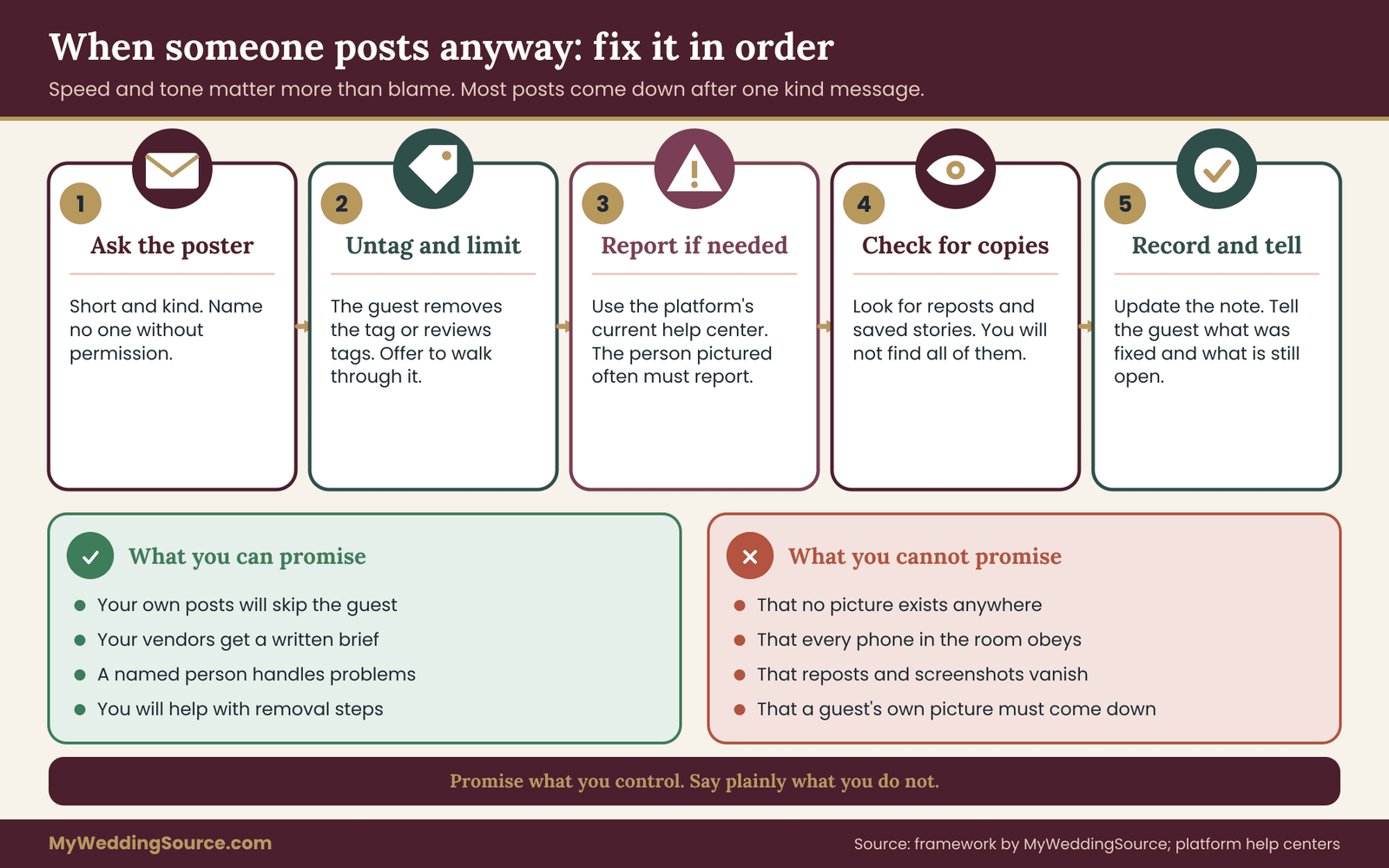
The first 48 hours
Work in order. Each step is small.
Ask the person who posted. Send a short, kind, specific message. Most people take the picture down right away when they understand.
“Hi, thank you for sharing pictures from the wedding. Could I ask you to take down the group photo from the ceremony, or at least remove the tags? One of the people in it asked to stay off social media, and we would like to honor that. Thank you so much.”
Do not name the guest unless you have their permission. Do not scold. And do not add a long explanation. A short ask is more likely to produce a quick yes.
Untag and limit the audience. If the poster will not delete the picture, or if they take a while to respond, the guest can usually remove their own tag, and many platforms let people review tags before they appear on their profile. This can be done by the guest themselves in a few moments. Offer to walk through it with them if they are not sure.
Report through the platform if needed. The major platforms publish ways to report a picture that shows you without your permission, and some have specific routes for children and for privacy concerns. The steps and the outcomes vary by platform, by country and by the facts, so use the current help center and not a screenshot from a forum. In many cases the person pictured has to make the report themselves. Tell the guest this, and offer to help with the steps.
Check for copies. Look for reposts, saved stories and screenshots in the places you can see, and ask the original poster whether they shared it elsewhere. You will not find everything, and the next section is honest about that.
Record and tell the guest. Update the ledger with what happened and when it was fixed, and message the guest. Be plain about what you did and what is still open. A guest who is told the truth, quickly, tends to be forgiving. A guest who learns about the post from a friend is not.
If the photographer or a vendor posted
When a vendor publishes something that violates the brief, contact them the same day. Quote the written instruction and ask them to remove or replace the picture. A professional will normally do this at once. If the contract gives you approval rights over use of images, cite the clause. If it does not, ask as a favor and make a note to ask for a clause next time.
Copyright often comes up here, so a short explanation helps. The U.S. Copyright Office explains that copyright generally belongs to the person who creates a work, which for wedding photographs usually means the photographer, unless an agreement says otherwise. That is why your contract matters, and why a removal request to a photographer rests on the contract and on courtesy. It is also why a guest’s own phone picture is the guest’s to share, so a request to remove it is a request for a kindness, not a demand you can enforce.
Where a picture is used to advertise a business, rules about a person’s name or likeness in commercial use may apply, and those rules vary by state. The National Conference of State Legislatures is one place to start learning how states approach such questions. For a serious or persistent situation, a local attorney is the right person to ask.
If you posted it yourself
Take it down the same day and tell the guest without drama. “I am sorry, we posted a picture that included you and have removed it. We have also checked the rest of the album.” A short apology followed by a complete fix is better than a long explanation. Then check your process: was the guest on the ledger, did you compare the album to it, and who approved the post? Fix the step that failed.
The honest limits of wedding photo posting repairs
A removal request can fix what is in front of you. It cannot guarantee that every copy is gone. A picture that was public for a few hours may have been saved. A repost may exist under another account. A platform’s cache may keep an image for a while after deletion, and a search engine may show a thumbnail until it refreshes.
For this reason, your promise to a private guest should be framed around what you control: your own posts, your vendors’ posts, the policies you set, the speed of your response and your willingness to help the guest use the platforms’ reporting tools. A promise of “never anywhere” is not one you can keep, and a guest who trusts it may skip precautions they would otherwise take.
You also cannot control strangers, a venue’s public cameras or what a guest does with a picture they hold privately. And the law varies. What is a matter for a polite request in one situation may be a legal question in another. For anything beyond a courtesy request, such as a threat, harassment or the use of a picture in advertising, treat it as a matter for a qualified lawyer and, where there is a safety concern, the relevant authorities.
Learning from a wedding photo posting slip
After any slip, write two lines: what happened and which step would have prevented it. If a guest forwarded a picture, perhaps the rule needs to appear on the table card as well as the program. If a vendor published, perhaps the confirmation message needs to be shorter and sent a week earlier. The aim is not blame. It is a process that fails less often each time you use it.
Worked example: wedding photo posting requests from first message to final gallery
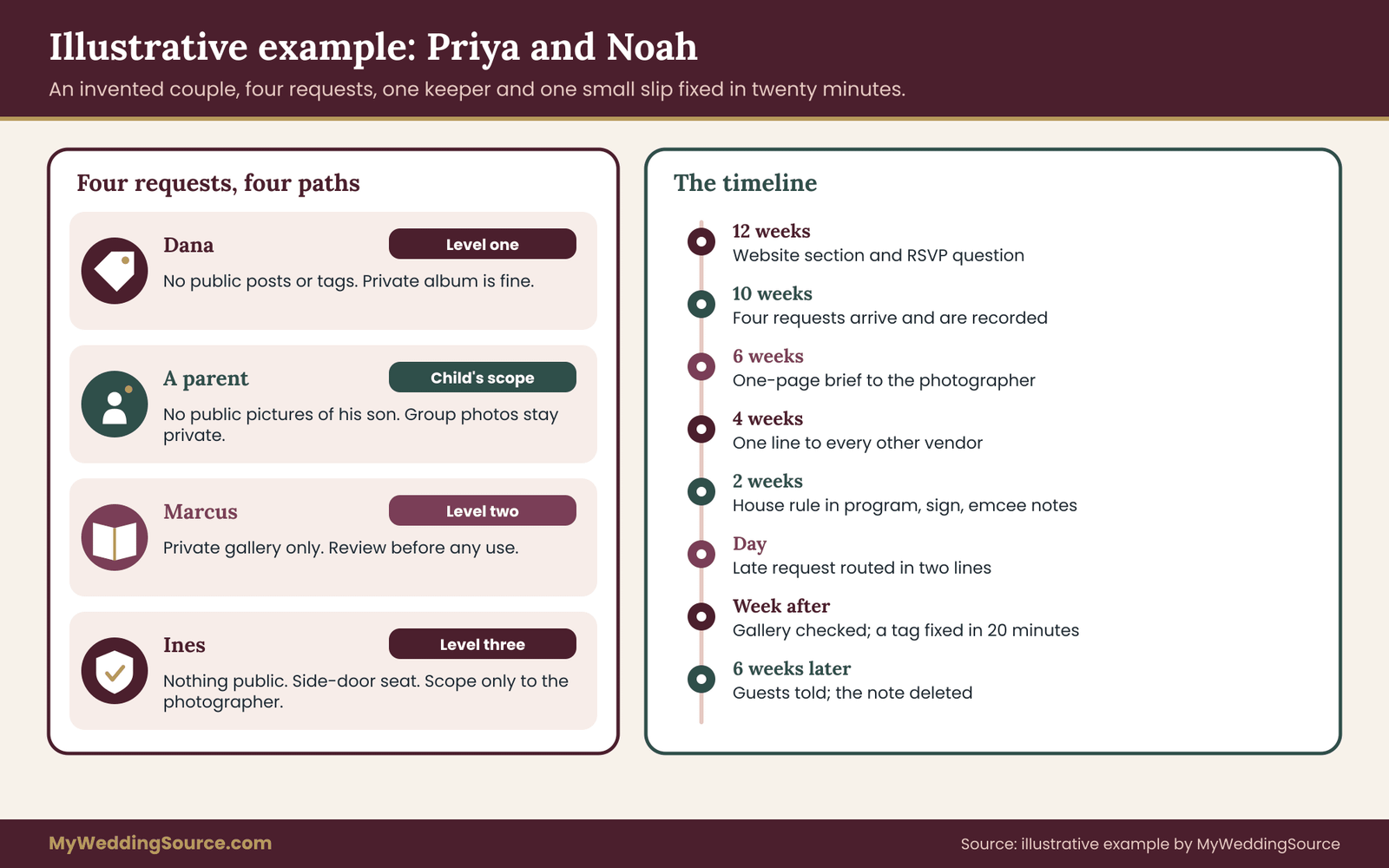
The example below is invented to show how the pieces of wedding photo posting fit together. The couple, the guests and the events are made up, and the timing is only one reasonable way to do it. Priya and Noah are planning a wedding for about ninety-six guests. Priya’s sister Rosa has agreed to be the keeper, and the couple has hired a planner for the day itself.
Twelve weeks out: asking
Priya adds a short photos and phones section to the wedding website and a single optional question to the online RSVP, with the five check boxes from earlier. She also lists Rosa as the contact for photo questions. The RSVP closes five weeks later with four guests asking for something.
Ten weeks out: four requests, four paths
Dana ticks “please do not post or tag me publicly.” This is a level one preference. Rosa replies with the scope question and Dana says that public posts and tags are the issue, and that private pictures are fine. Rosa records it: scope public posts and tags, duration general, doors phones, photographer, couple’s posts, family posts.
A guest writes by text that he does not want his son on social media. The parent decides, so Rosa asks whether the request covers the boy in group pictures with his father and in private galleries. The answer is that group pictures are fine privately and nothing public. Rosa records the scope under the son’s name and adds a note for the photographer to avoid publishing any picture where he is the focus.
Marcus, a teacher, mentions that his school has a rule about staff appearing in public posts with alcohol. This is level two. Rosa asks whether private galleries and shared links are a problem. Marcus says he would rather not be in any picture that goes to a shared gallery, and would like to see anything the couple wants to post that includes him. Rosa records private-only plus review before use.
Ines asks for a phone call. She tells Rosa she has a safety concern and prefers to stay off all public posts for the time being, and she would like a seat near the side door. This is level three. Rosa tells only Priya, and nobody else, that a request has come in. She records the scope without the reason, confirms the seat, and promises that nothing public will go up without Ines’s approval. Rosa also asks Ines whether she wants the photographer told, and Ines says yes, scope only.
Six weeks out: the brief
Rosa sends the photographer a one-page brief. It lists four entries, each with a name, a table number and the scope. It repeats the general terms: no same-night preview that includes flagged guests, no pictures of children as the focus without approval, a review window before any portfolio post, and a request that the second shooter and the videographer receive the brief as well. The photographer replies the same day to confirm and mentions that private-only delivery is included in the package, which saves any worry about extra cost.
Four weeks out: the other vendors
Priya adds one line to confirmation messages for the venue, the florist, the photo booth company and the DJ: no guests in promotional photos or videos without approval. The booth company turns off online sharing and agrees to deliver prints only. The venue’s policy allows its own social posts, so Priya asks them in writing to leave out guests and receives a short agreement.
Two weeks out: the rule for everyone
The program carries one sentence and a sign at the entrance carries two lines. The emcee gets the short script. The wedding party and parents receive the house rule in a message: check before posting anyone else, hold locations until tomorrow, and keep children out of public posts unless the parents say yes. No names are included. Noah’s mother asks about a family portrait and is told that the photographer will check the list before posting anything.
The day
The planner holds the ledger on her phone. At cocktail hour, a plus-one named Elena mentions to the planner that she would rather not be in pictures. The planner asks the scope question, learns it means no public posts, and sends the lead photographer a two-line text. Rosa confirms with Elena a few minutes later. During the family portraits, the planner reminds the photographer that the portrait with Marcus is private only, and the photographer marks it.
Late in the evening, a cousin begins filming the dance floor for a story. The photo host, a friend of Noah’s, remembers the house rule and asks the cousin to hold off on location tags. The cousin agrees and apologizes.
The week after: the gallery and a slip
The photographer delivers the full gallery to Priya and Noah, with flagged pictures marked. Before sharing a smaller gallery with guests, Rosa checks it against the ledger and removes eleven pictures that include Dana, Marcus or Ines. The photographer’s preview, sent two days after the wedding, is checked before it goes out, and one picture with Ines in the background is replaced.
Then a slip. A cousin who was not at the planning stage posts a group picture from the ceremony with Dana tagged. Dana messages Rosa. Rosa sends the cousin the short request from the repair section, and the picture is untagged within twenty minutes. Rosa tells Dana what happened and what was fixed, and writes two lines in the ledger: the rule was in the program but not on the table cards, which is why this cousin missed it.
Six weeks later: closing
Rosa sends each of the four guests a two-line note saying their requests were followed and what was fixed. The ledger is deleted on the date set in advance. Priya and Noah post a small public set of pictures they have checked themselves.
What the example shows about wedding photo posting
Three things are worth noticing. Each request was handled by the same person with the same steps, so nothing depended on memory. The reasons stayed with the guests: the photographer saw scope only, and the safety case reached only two people besides the guest. And the slip was small because there was a person to contact, a short message ready to send, and a record of the rule.
Also notice what the example does not claim. Nobody promised that no photo of Dana would ever exist anywhere. The promise was about what the couple and their vendors would do, and what they would do if a guest posted. That is a promise a couple can keep.
Your next steps
Start with the smallest version of a wedding photo posting routine. This week, choose your keeper and write the one-line photo question for your RSVP. Add a short photos and phones section to your website, using the wording in this guide as a starting point. Then add a line about guest images to your photographer’s brief and to your vendors’ confirmation messages.
Over the following weeks, run the five steps of wedding photo posting for each request that arrives: receive, record, route, confirm, close. Put the house rule in your program, on a sign and in the emcee’s notes. Appoint a photo host. Before any gallery or post goes beyond the two of you, check it against the ledger.
If you want the broader picture, our guide to wedding photography consent covers ownership, children and the full privacy preference form. A calm process for wedding photo posting, followed once for each request, is usually all a private guest needs.
FAQ
Can I ask wedding guests to limit wedding photo posting on social media?
Yes. Wedding photo posting rules are yours to set, and guests generally follow a clear, friendly request. You can ask for a full pause on posting, a delay until the next day, or a simple ask-first rule. A softer rule that tells guests what they are free to post tends to work better than a ban. Say it in more than one place, such as the website, the program and the emcee’s welcome.
How do I handle a guest who asks not to be photographed at all?
Ask what they mean by it, then tell them honestly what you can do. You can brief the photographer to avoid them in candid shots and formal portraits, seat them away from photo areas, and give them a contact for the day. You cannot promise they will never appear in the background of a wide shot. Most guests prefer an honest partial promise to a perfect one.
Do I have to explain to my photographer why a guest wants privacy?
No. The photographer needs the guest’s name, a way to recognize them and the scope, such as “do not publish” or “do not photograph.” The reason belongs to the guest. If a guest shared it with you in confidence, keep it that way. A short written brief with the scope, plus a request to confirm in writing, is enough for any professional.
What should I say if wedding photo posting breaks the rule I set?
Keep it short and kind. Ask them to take the picture down or remove the tag, say that someone in it asked to stay private, and thank them. Do not name the person unless they agree. Most guests fix it quickly. If they refuse, remember that a guest owns their own phone picture, so it is a request, not an order. The guest pictured can also report it through the platform.
Can my photographer post pictures of my wedding guests?
It depends on the contract. Many photographers keep the copyright and reserve the right to use pictures for their own marketing, and that can include guests. Read the usage clause before you sign, and ask for a brief that excludes flagged guests and children from previews and portfolio posts. Get the agreement in writing, and ask the photographer to confirm that any second shooter has seen it.
Is it rude to ask guests to delay wedding photo posting?
Not if you explain it warmly and keep it short. Many couples want to share their own pictures first, or to give guests a moment away from screens, and guests tend to understand that. A line such as “please check with the people in a picture and hold location tags until tomorrow” feels like a courtesy rather than a restriction, and it protects private guests without naming anyone.
What if a guest asks me to keep their child off social media?
The parent decides, so follow their request and record it. Ask whether it covers group pictures and private galleries, then tell the photographer not to publish pictures where the child is the focus. Add a general rule asking all guests to leave children out of public posts unless the parents agree. Avoid full names, schools or locations in any caption that shows a child.
How long should I keep a record of wedding photo posting requests?
Keep it only as long as it is doing a job. That usually means until your galleries are delivered, your own posts are checked and any follow-up with guests is finished, perhaps a few weeks after the final gallery. Choose the deletion date in advance and store the note privately. Never record the reason a guest gave, unless they asked you to.