A photo booth asks every guest for an email address or phone number, and most couples never ask what happens to those details afterward. This guide gives you a clear way to decide how long a photo booth should keep guest contact data, a vendor privacy questionnaire to ask before you book, and a deletion notice you can send afterward.
Ask the photo booth vendor to use guest emails and phone numbers only to deliver the photos, then delete them. A practical request is deletion within 30 days after the last delivery, deletion from backups within another 30 days, no marketing use unless a guest ticks a separate box, and a written confirmation. Put that in the contract, tell guests on the photo booth screen what will happen, and send a dated deletion notice if the vendor does not confirm. A vendor can refuse these terms, and a refusal is useful information about the vendor.
A photo booth is one of the few wedding vendors that collects personal details from your guests directly. The photographer takes pictures, the caterer serves food, and the band plays. The photo booth, though, puts a screen in front of eighty or a hundred and fifty people and asks them to type an email address so the strip, GIF or digital copy can reach them. Those addresses belong to your friends, your coworkers, your grandmother’s neighbor, and a plus-one you met an hour ago. Nobody typed them in expecting a marketing list.
The photo booth vendor is a small business, and small businesses vary a great deal. Some use a photo booth platform that deletes everything on a timer. Some keep every email in a cloud dashboard for years and send promotional messages to it. Some have no written policy at all because the “policy” is whatever the owner’s software does by default. Guests cannot tell which kind of vendor you hired, and you probably cannot either until you ask.
A note on scope. This is general information about planning, not legal, tax or financial advice. Privacy rules differ by state and country, and they depend on the size and location of the vendor, so this guide points you to the agencies that publish the current rules and leaves the final answer to them and to a qualified professional if you need one.
Here is what this article covers. First, what photo booth data actually includes, and who is responsible for it. Then a framework of three “clocks” for deciding how long each kind of data should stay.
After that, a vendor privacy questionnaire, a guide to reading the contract, notes on children and other special cases, a booth-day setup, a drafted deletion notice, a worked example, and a list of the mistakes that cause trouble. If you want the broader picture of guest comfort with cameras, the guide to wedding photography consent and guest boundaries covers the whole day. This article stays on one narrow question: how long a photo booth keeps the contact details guests type into it.
What photo booth data retention actually covers
Photo booth data retention is the length of time a photo booth vendor, or the software it uses, keeps information about your guests after the event. People tend to think only of the email address. In practice a photo booth produces several different kinds of data, and each one deserves its own answer.
Contact details. The email addresses and phone numbers guests type to receive their photos. This is the category most guests worry about, and the one this guide focuses on, because it is the easiest to delete and the most tempting for a vendor to keep.
The photos and videos themselves. Strips, GIFs, boomerangs, and short clips. These are images of identifiable people. They may be stored in a vendor gallery, on the booth itself, in a cloud account, or in all three.
Attached details. A photo booth platform often records the time of each session, which template the guest picked, whether the guest shared the result on social media, and sometimes the guest’s name or a typed message. The record that links “this email” to “this photo” is data in its own right.
Technical data. Device identifiers, IP addresses from the download page, delivery logs from the email or text service, and analytics from tracking pixels in the delivery message. Guests never see these, but they exist.
Face-related data. Some booths use face detection to apply filters, crop a frame, or group photos by person. In a few states, laws on biometric information are stricter than the general privacy rules. A photo booth that does not use face detection avoids that question entirely, so ask.
Seeing these separately matters because a vendor who answers “we delete everything after thirty days” may mean only the photos on the photo booth itself. The email list may live in a different system with a different timer, or no timer at all.

Retention is not the same as ownership
Two questions get mixed up constantly. One is who owns the photos, which is a copyright and contract question. The other is how long personal data may be kept, which is a privacy and trust question. They are related but separate.
A vendor can own the copyright in a photo booth image and still have no reason to keep the guest’s email address once the image is delivered. A couple can receive a license to every strip and still want the contact details of strangers wiped. The U.S. Copyright Office explains the basics of who holds copyright in a creative work, and the general rule is that the creator holds it unless a written agreement says otherwise. That is why your contract matters on both questions.
When you ask “how long should the vendor keep guest emails,” you are asking about the second question. When you ask “can the vendor use the photos in advertising,” you are asking about the first. Keep the two requests in separate clauses so one cannot swallow the other.
Why the length of time matters
A guest email address does its job in about a day. The photo is delivered, the guest looks at it, and the transaction is finished. Every week the address stays in a vendor system after that moment adds risk and no benefit to the guest. A few concrete reasons follow.
First, breaches. A small vendor’s cloud account can be compromised like any other. A list of names, emails and photos from a wedding is exactly what an attacker or a spammer might want, and the guests did not choose to take that risk.
Second, secondary use. Contact lists tend to get used. A vendor who built a list for delivery may add it to a newsletter, a promotion, or a handoff to a partner company. Under the federal CAN-SPAM Act, a commercial email must include a way to opt out, but a guest who never agreed to a list in the first place has to find out it exists before opting out.
Third, accidents. Emails get mistyped. A guest typing quickly on a touchscreen can send a private photo to a stranger. A shorter retention window limits how long a wrong address sits in the system and how many reminders go to it.
Fourth, goodwill. Guests remember what happened with their details. If a month after the wedding half your table starts getting promotional email from a booth company, the complaint lands on you, not on the vendor.
Who is responsible for photo booth guest data
The honest answer is that the vendor carries the legal and technical responsibility for the systems it runs, and you carry a social and contractual responsibility for the vendor you chose and the way the photo booth is presented to your guests. Neither side can fully hand the question to the other.
What the vendor is responsible for
The vendor decides which software to use, where data is stored, who at the company can see it, how long it is kept, and whether it is used for anything beyond delivery. The Federal Trade Commission has long said that a business that makes privacy promises must keep them, and that collecting information from consumers while saying one thing and doing another can be treated as a deceptive practice.
The FTC also publishes plain-language guidance for businesses on protecting personal information, which includes keeping only what you need and disposing of it securely when you no longer need it. A photo booth vendor is a business, so that advice applies to it.
If the vendor is based in California, or serves enough California residents to meet the thresholds in that state’s law, the California Consumer Privacy Act may give your guests rights to know what a business collects and to ask it to delete personal information. The California Attorney General’s office publishes an overview. Whether a given small vendor is covered depends on its size and revenue, and many very small vendors are not. So treat the law as a floor that may or may not apply, and the contract as the tool you control.
What you are responsible for
You are not a data processor in the formal sense that big companies are. But you are the reason the photo booth is in the room, and your guests will treat the booth as part of your hospitality. Three things fall to you in practice.
You choose the vendor and ask the questions. A vendor who has never been asked about deletion may not have a ready answer, but a vendor who has a good answer will give it in one email.
You decide what the photo booth asks guests to do. A photo booth that requires an email before it will take a photo creates much more data than one that offers a QR code to download the strip. You can specify which delivery method to use.
You set the tone. A short sign beside the booth and a line on the screen (“your email is used only to send your photos and is deleted afterward”) is a courtesy that costs nothing and tells guests you thought about them.
Where the responsibility gets blurry
There are three common situations where it is unclear who is responsible, and it helps to settle them in advance.
The couple wants the emails. Some couples want the photo booth to double as a way to collect guest addresses for thank-you notes or a future announcement. That is a separate purpose, and it needs a separate opt-in. A guest who wants a photo strip has not agreed to join your mailing list. If you do want the addresses, ask for them in a clearly labeled field and tell the vendor to deliver that list to you and then delete its own copy.
The photo booth is provided by the venue or the photographer. Then there are two businesses, and the contract with the booth company may sit under another company’s contract. Ask who the photo booth operator is, which software they use, and who holds the data. The answers affect where your deletion request has to go.
A friend runs the photo booth. A relative or friend with an iPad app and a printer is common and often wonderful. It is also the case with the least written policy. Free apps may keep data in ways the operator has never looked at. If a friend is running the booth, read the app’s own privacy terms and decide whether to use delivery by QR code rather than by email.
A fair way to split the work
A simple division works well for most weddings. The vendor writes down what it collects, where it keeps it, and when it deletes it. You read that answer, decide whether it is acceptable, and put the agreed terms into the contract. On the day, the photo booth tells guests what happens to their information. Afterward, you check that deletion happened and keep the confirmation with your other records. The guide on organizing wedding records after the event shows where a deletion confirmation belongs in the files you keep.
Three clocks for photo booth data retention
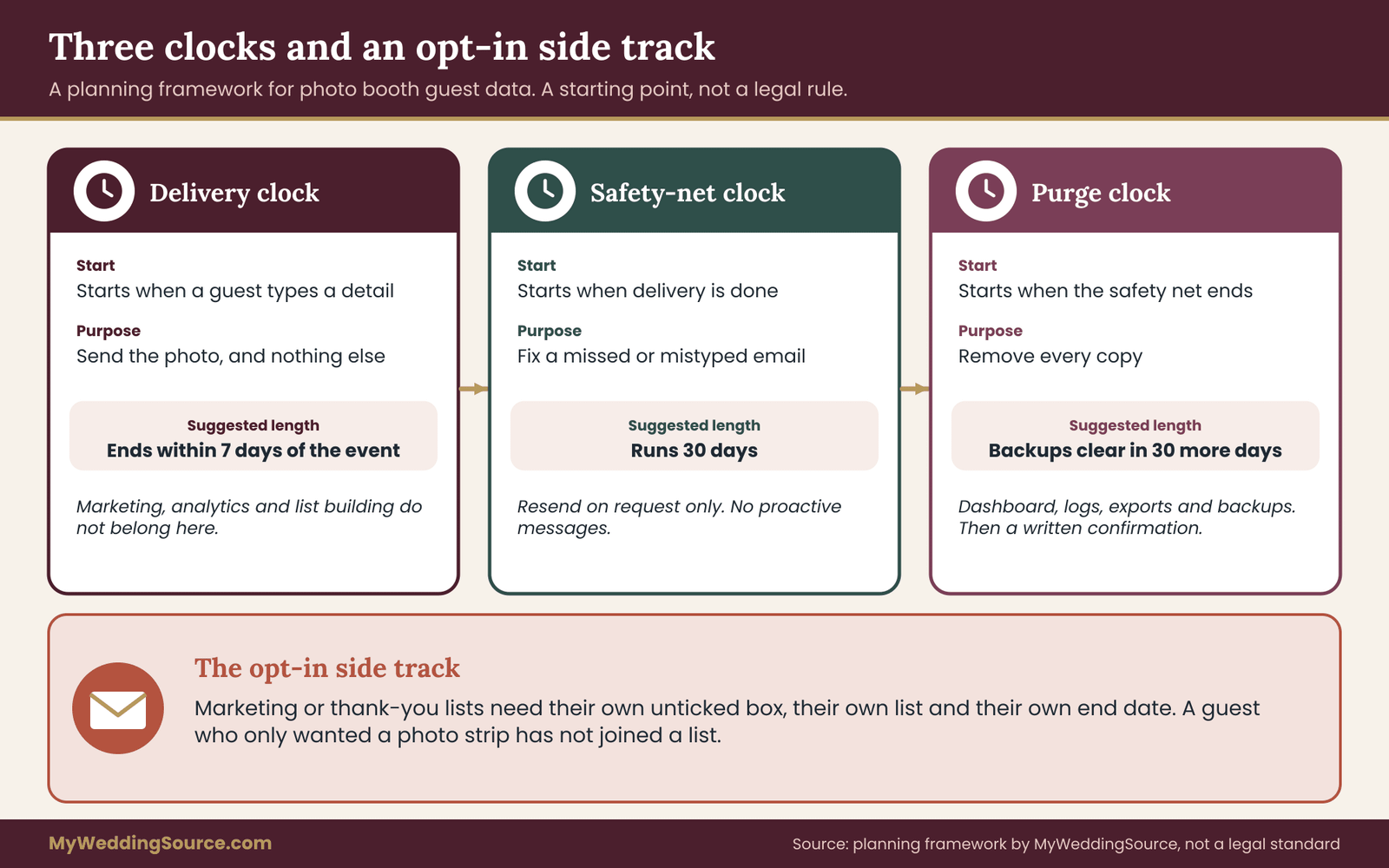
Asking “how long” in the abstract gets vague answers. A better approach is to break the question into three clocks that start at different moments and answer to different needs. Each clock has a reasonable default you can ask for, and each one can be adjusted for your situation. This is an original working framework for planning, not a legal standard, and a vendor may propose different numbers.
Clock one: the delivery clock
The delivery clock starts when a guest enters a contact detail and stops when the photo has actually reached that guest. For an emailed strip this is often a matter of seconds. For a text message it is similar. For a batch of photos sent after the event, for example when the vendor sends a gallery link to everyone who used the photo booth, it can take a day or a week.
The only legitimate purpose of the contact detail during this clock is delivery. The vendor needs the address to send the photo and may need to retry if the first attempt bounces. Nothing else on the vendor’s wish list belongs here: no marketing, no analytics sold to partners, no list-building.
A sensible request is that the delivery clock ends no later than seven days after the event, and sooner if the booth sends photos instantly. If the vendor intends to send a “your photos are ready” batch later, ask for the date in advance and put it in the contract. A delivery clock without an end date is how a convenience turns into an archive.
Clock two: the safety-net clock
Some time after delivery, things go wrong in small ways. A guest says the email never arrived. The spam filter swallowed it. A guest mistyped one letter of the address. A guest asks for a second copy. A short safety-net period after delivery lets the vendor fix those problems without keeping addresses forever.
A reasonable length for this clock is two to four weeks after delivery. Thirty days is a common round number and easy to write into a contract. In practice, most delivery problems appear in the first few days, since guests notice when a photo they just took does not arrive. If your guest list skews older or includes many people who check email rarely, a longer period within the thirty days can make sense. If your guests are mostly young and checking their phones constantly, two weeks is plenty.
During this clock the vendor may keep the address for one purpose only: resending a photo on request. It should not be used for anything proactive.
Clock three: the purge clock
The purge clock starts when the safety-net period ends and measures how long it takes the vendor to remove every copy. People forget this clock. Deleting an address from the visible dashboard is not the same as deleting it from the system. The same email may also sit in an email service provider’s logs, in a backup, in a spreadsheet export the owner made for a client, or in the photo booth’s local storage.
Ask for the vendor to remove the data from active systems within the safety-net deadline and from backups within a further period, often thirty days, because backups usually rotate on a schedule. The vendor does not need to destroy an entire backup if it cannot edit one; it only needs to let the backup age out and not restore from it. Ask the vendor to tell you the schedule in plain words. A good answer sounds like “backups are overwritten every month, so everything is gone sixty days after the event at the latest.”
The opt-in side track
One more arrangement sits alongside the three clocks. Guests sometimes want to hear from a vendor, ask about their own events, or join your list for photos and updates. That is possible, but it is a separate purpose that needs a separate choice.
The rule is simple. A guest who ticks a clearly labeled, unticked-by-default box saying “send me news from this vendor” has made a choice, and the vendor may use the address for that purpose until the guest unsubscribes. A guest who does not tick the box has not. The vendor’s marketing list and the delivery list should be two different lists, and the delivery list should be deleted on the schedule above regardless of what happens to the marketing list.
If you want the photo booth to collect addresses for your own thank-you notes, treat it the same way: a separate field, a separate label, a separate delivery to you, and a deletion of the vendor’s copy afterward.
Putting numbers on the clocks
Here is the default set, in the order it would appear in a contract. Adjust it to your wedding.
Delivery ends within seven days after the event, or at the moment the photo is sent for instant delivery. The safety-net period runs thirty days from the last delivery. Active systems are cleared at the end of that period. Backups age out within another thirty days. Marketing use is off unless a guest opts in on a separate, unticked box. A written confirmation arrives within forty-five days of the event, naming the date of deletion.
None of these numbers is a legal requirement. They are a reasonable opening position that is easy for a vendor to meet if it already deletes on a timer, and easy for you to explain to guests.
How the clocks apply to each kind of data
The clocks do not all apply to every type of data in the same way. A short guide to each kind follows.
Email addresses and phone numbers follow all three clocks. These are the main target of the request.
Photos and videos have their own logic. Guests want their pictures for as long as they like, and you may want the whole set as part of your wedding memories. Ask the vendor to keep the full gallery available for a stated period, often a few months, so you and your guests can download it, then to delete it or to ask your permission before keeping anything. If the vendor wants to use images in a portfolio, that is a separate license that belongs in a separate clause. A simple line in the contract covers it.
Session records that link an address to a specific photo should be deleted along with the address. If the vendor needs statistics for its own records, ask for counts only, for example “forty-two sessions,” with no names or addresses.
Delivery logs and technical data are harder to control, because they may sit in a third-party email or text service. Ask the vendor to tell you which services it uses and to confirm that it has set the retention period in them to the shortest option available. Many email services keep logs for a limited time on their own schedule.
Face data should not be created at all unless there is a clear reason. If a booth uses face detection to produce a feature, ask whether that feature can be switched off for your event.
Choosing between five retention options
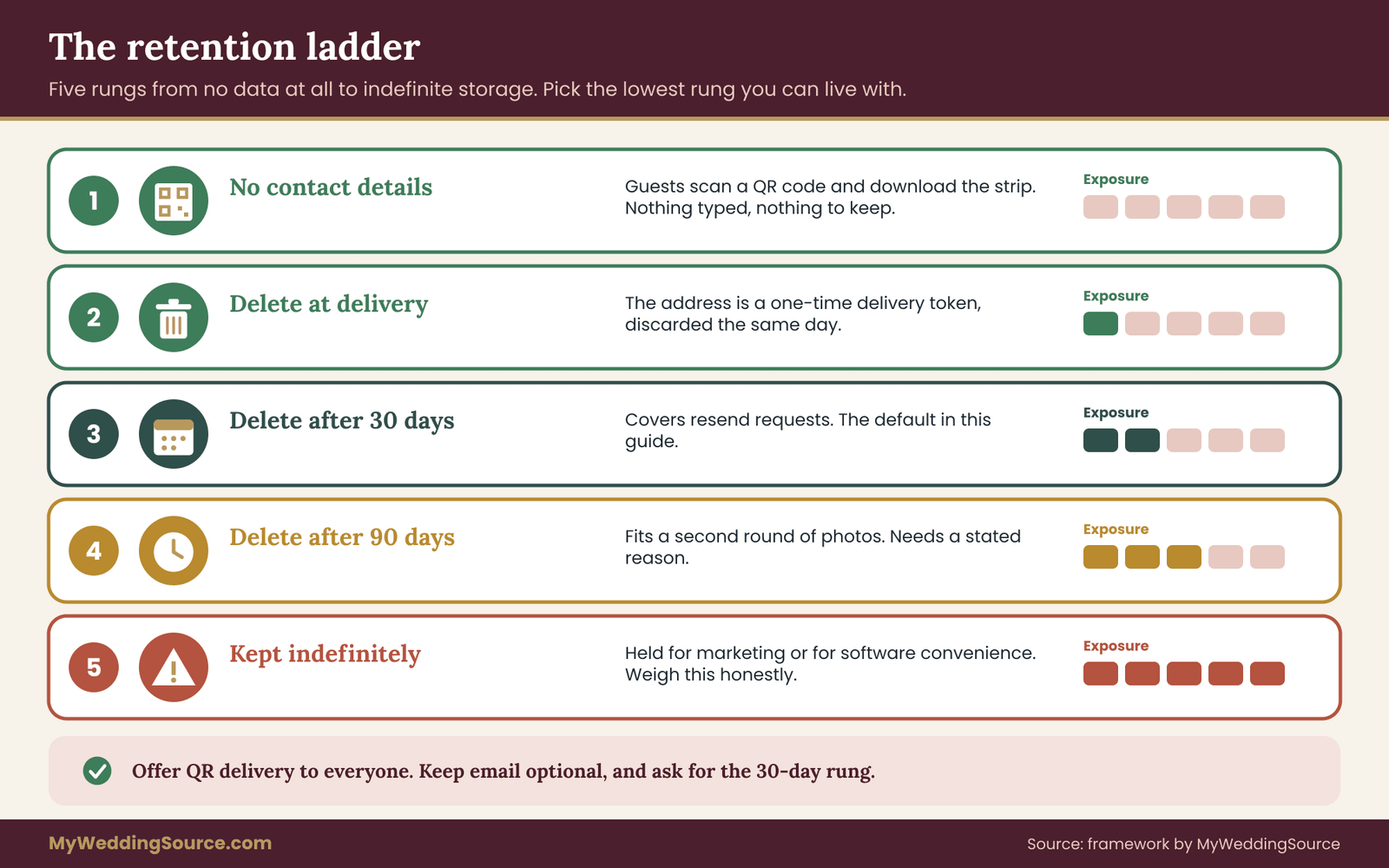
Most vendors will fall somewhere on this ladder. Each rung is a different trade between convenience and exposure.
The first rung is no contact details at all. Guests scan a QR code on the photo booth screen and download their strip on their own phone. No address is typed, so there is nothing to keep. The cost is a little friction for guests who do not want to scan, and a requirement that the download page itself does not track visitors in intrusive ways.
The second rung is delete at delivery. The photo booth uses the address to send the photo and discards it the same day. This is possible with some booth platforms that treat the address as a one-time delivery token.
The third rung is thirty days after delivery, which is the default in this guide. It covers resend requests and is simple to verify.
The fourth rung is ninety days. It suits a vendor who sends a second round of photos or who uploads a larger gallery weeks later. It is acceptable when the reason is real and the vendor says so up front.
The fifth rung is “we keep it.” This is the vendor who retains contact details indefinitely for marketing or for the convenience of the software. You are free to accept it, but weigh it honestly: it is the only rung where the guests’ addresses leave the purpose they were given for.
Which rung to pick
Choose the lowest rung that your wedding can live with. If the booth can deliver by QR code, use it. If guests prefer email, choose thirty days. If your vendor needs ninety days for a stated reason, accept it and ask for the written reason. If a vendor will only work on the fifth rung, ask whether the platform can be configured differently for your event, and be ready to consider another vendor.
Cost is rarely the deciding factor, since short retention usually costs the vendor nothing. Some vendors charge a small administrative fee for custom contract terms. If so, ask what the fee is and compare it to the other quotes, rather than assuming it is large or small.
The photo booth vendor privacy questionnaire
A questionnaire turns a vague worry into a short email with clear answers. It also shows you how the vendor behaves when asked a direct question. Some vendors reply within an hour with a paragraph of specifics. Some reply with “we take privacy seriously,” which is not an answer. Both responses tell you something.
Send the questions in writing, not on a call, so the answers become part of your record. If you only talk by phone, follow up the same day with an email that summarizes what was said and asks the vendor to confirm. The general approach to checking any vendor before you sign is covered in the wedding vendor due diligence checklist. This questionnaire is the privacy section of that process, written for a photo booth.
Twelve questions, in four groups
What is collected.
- Which details does the photo booth collect from guests: email, phone number, name, typed messages, anything else? Can any of them be left out for our event?
- Does the photo booth use face detection, face matching, or any feature that analyzes a guest’s face? Can it be switched off?
- Does delivery work without an address, for example with a QR code or a shared link?
The first group tells you how much data exists. The ideal answer lists each item and says which are required and which are optional. If the booth requires a name, ask why. A required field with no purpose is a sign of default software settings rather than a design decision.
Where it goes.
- Which software or platform does the photo booth use, and where is guest data stored? Which outside services receive it, such as email or text delivery providers?
- Who at your company can see guest contact details, and are accounts protected with unique passwords and a second login step?
- Are guest details used for anything besides delivery, including marketing, newsletters, sharing with partners, or analytics?
The second group shows the path. You are not trying to audit the vendor’s security. You are checking that the vendor knows its own path and can describe it in a few sentences. The Federal Trade Commission’s guidance for business on securing personal information highlights basics like limiting who has access and using strong authentication. A vendor who cannot say who has access probably has not thought about it.
How long it stays.
- How long do you keep guest emails and phone numbers after the event, and is the period automatic or manual?
- How long do the photos stay in the gallery, and what happens to them afterward?
- How long do backups last, and how does deleted data leave them?
The third group is the heart of the matter. “Automatic” is a better answer than “manual,” because a manual process depends on the owner remembering after a busy season. If the answer is “until you ask us to delete it,” the retention period is infinite by default, and your deletion notice becomes the only safeguard.
What happens when something changes.
- If a guest asks you to delete their details or photos, how do they contact you, and how fast do you respond?
- What do you do if there is a data incident, and would you tell us?
- If your business closes or the photo booth platform changes ownership, what happens to stored guest data?
The fourth group covers the rare but real events. A vendor who has thought about a guest’s deletion request has a process. A vendor who has not will improvise. The last question is uncomfortable, and it matters, because small businesses do close and platforms are sold. The data usually goes with the assets unless the contract says otherwise.
How to read the answers
You do not need a scoring system, but a rough traffic-light approach keeps your decision honest.
Green answers are specific and short. They name the platform, give a number of days, say the deletion is automatic, and agree to put it in writing. A green answer to the retention question sounds like “email addresses are deleted thirty days after the event and backups roll off within the next thirty.” You can move forward.
Amber answers are partly specific. The vendor explains what it does but cannot offer a timer, or says “we usually delete after a few months.” Amber is workable if the vendor is willing to commit to a number. Ask whether the contract can say it. If the answer is yes, amber turns green.
Red answers are vague, evasive, or contradictory. “We keep it for our records.” “It depends.” “Don’t worry about it.” A vendor who says that you do not need to worry is not answering the question. A vendor who tells you the data is kept and sold to partners gives you the answer clearly, and you can decide to walk away.
If more than one answer in the retention group is red, consider switching to a vendor who handles it better, or to a booth that delivers by QR code without collecting addresses at all. There are plenty of booth providers, and privacy is a reasonable thing to compare them on alongside price and style.

What good answers look like in writing
Here is a pair of examples to calibrate your expectations. These are invented for illustration and do not describe any real vendor.
A strong reply to question seven might read: “Guest emails are used only to send photos. Our platform deletes them automatically thirty days after the event date. Photos stay in the online gallery for ninety days and then we remove them unless you ask us to extend. Backups rotate monthly.” That reply gives numbers, says the process is automatic, and covers photos separately.
A weak reply might read: “We store everything securely and don’t share your information with anyone.” This sounds reassuring and answers none of the questions. It says nothing about duration, backups, marketing use by the vendor itself, or deletion. When you receive a reply like this, do not argue. Reply with one clear follow-up: “Thank you. Could you tell us how many days after the event guest emails are deleted?” One specific follow-up is fair and the vendor’s response is data.
Questions to adapt for different booth types
Not every photo booth works the same way, and some questions matter more for some types.
An open-air or “mirror” booth with an attendant often runs a custom platform. Ask who the attendant is, whether the attendant sees guest details, and whether the attendant is an employee or a contractor.
A 360-degree video platform produces video of guests from every angle. Ask where the videos are processed and whether guest content is posted by the vendor to its own social media accounts by default.
A phone-based or iPad-based booth from a hobbyist may use a consumer app. Ask which app and read its privacy terms yourself. Apps that are free often make money from data.
A photo booth included in a larger package from a venue, planner or photographer may be run by a subcontractor. Ask the package seller for the name of the operator and send the questionnaire to both.
A GIF or “digital sharing” kiosk often has an online gallery that is public by default. Ask whether the gallery requires a password or a private link, and whether search engines can index it.
Timing and tone of the questionnaire
Send it before you sign, ideally when you compare quotes. At that stage the vendor wants your business and tends to respond quickly. After signing, the same questions can feel like a reopening of terms, though they are still reasonable. Keep the tone friendly and practical. A line like “We are asking all our vendors the same questions because we want our guests to feel comfortable” works better than a legal-sounding demand.
Do not send the questionnaire to a vendor you have no intention of hiring just to collect answers, and do not ask for confidential company information. You are asking about practices that affect your guests, which is fair and routine. The contract terms that follow from the answers are the subject of the next section.
Reading the photo booth contract and privacy policy
The questionnaire gives you the vendor’s answers. The contract is where those answers become promises. A vendor’s answer in an email is helpful evidence, but a clause in the signed agreement is the thing you can point to later. The broader guide to the wedding vendor contract explains the standard parts of an agreement. Here the focus is on the clauses that touch guest data.
Where the relevant language hides
Photo booth agreements are often short. Privacy terms may not appear in the main agreement at all. Look in four places.
The first is the data or privacy section of the contract, if there is one. Many small-vendor templates have none, which is itself a finding.
The second is the usage or license section, which covers how the vendor may use the photos. Language like “client grants vendor a perpetual license to use all images for promotional purposes” often sits here and sometimes extends to guest content and data.
The third is a linked privacy policy on the vendor’s website or booth software. A contract that says “by signing you agree to our privacy policy” has incorporated a document that can change. Save a copy, with the date, as a PDF or screenshot.
The fourth is the photo booth screen itself. The terms a guest accepts when tapping “Start” or entering an email are often drawn from the software’s default terms, not from your contract. Ask the vendor to show you the screens in advance, or to send a photo of them.
Clauses worth asking for
You do not need legal drafting skill to ask for the right things. Describe the outcome in plain words, ask the vendor to put it in the contract, and let the vendor’s own form of words stand where it says the same thing. The following clauses cover most of what matters.
Purpose limitation. “Vendor will use guest contact details solely to deliver photos to the guests who provided them.” This single sentence blocks most unwanted uses.
Retention period. “Vendor will delete guest email addresses and phone numbers within thirty days after the last delivery, and will remove them from backups within a further thirty days.” Adapt the numbers to your agreement from the clocks section.
No marketing without opt-in. “Vendor will not add guest contact details to any marketing list unless the guest opts in separately on the booth screen.” The word “separately” matters, because a bundled checkbox that says “I agree to the terms and to receive news” is not a separate choice.
No sharing or sale. “Vendor will not sell guest details or share them with third parties except service providers needed to deliver the photos.” This permits the email service while forbidding the list broker.
Written confirmation. “Vendor will confirm deletion in writing within forty-five days after the event.” Without this, you have to chase.
Guest requests. “If a guest asks the vendor to delete their details or photos, vendor will do so within ten days and tell the client if asked.” This covers guests who contact the vendor directly.
Incident notice. “Vendor will tell the client promptly if guest details are accessed by someone who should not have them.” Many states have their own breach notification laws that apply to certain businesses, so this clause is a courtesy and a backstop.
Closure or sale. “If vendor sells or closes the business, guest details will be deleted rather than transferred.” Vendors may balk at this. A fallback is that the buyer must honor the same retention terms.
The photo license, kept separate
Photos are a different matter from addresses, and they deserve separate treatment. Most booth vendors want permission to use sample images in a portfolio or on social media. That is a reasonable request in many cases, and you may be glad to agree.
Keep three points straight. A license to use images is not a license to use guest contact details. A license that covers the couple’s own images does not automatically cover guests, who did not sign anything. And you can limit a portfolio license in ways that fit your wedding, for example by excluding images of children, by asking for your approval before any image is posted, or by limiting use to a stated period.
The U.S. Copyright Office explains that copyright generally belongs to the creator and can be transferred or licensed in writing. If the vendor operates the photo booth and the camera, the vendor may hold copyright in the strips unless the contract says otherwise. You can ask for a license that lets you and your guests share the images without restriction, and that is a normal request.
Red-flag language
A few phrases deserve a second look.
“Perpetual,” “irrevocable,” and “worldwide” attached to guest information. A license that never ends and cannot be taken back is a poor match for a guest who only wanted a photo strip.
“Affiliates and partners” with no definition. This language can allow the vendor to share data with companies you have never heard of.
“As permitted by law.” Almost everything is permitted by law in some form. The phrase says nothing about what the vendor will actually do.
“We may change this policy at any time.” This is standard in privacy policies, but make sure the version attached to your contract is the one that applies to your event.
A vendor who removes these phrases when asked is not doing you a special favor. Many vendors have simply never examined their templates. A polite request with a specific replacement sentence works better than a general objection.
When the vendor will not change the contract
Some vendors work from a fixed agreement, particularly larger booth companies and platforms. They may say “we cannot change our terms for individual clients.” In that case there are three choices.
You can accept the terms and reduce the data. Choose QR-code delivery, skip the optional name field, and tell the vendor in writing that guest contact details must not be added to any list. Even without a contract change, the written instruction creates a record.
You can accept the terms and plan to send the deletion notice afterward. This depends on the vendor honoring requests, so ask whether it does.
You can choose a different vendor. Compare it fairly with the others. A company whose terms are fixed but whose defaults are privacy-friendly may be better than a flexible one whose defaults are not.
Guests, children and special cases at the photo booth
Most guests will use the photo booth in the ordinary way. A few situations call for extra thought, and the decisions are easier to make before the day than during the party.
Children and teens
Photo booths are popular with children. Young guests type in a parent’s email, or their own, or a made-up one. The Children’s Online Privacy Protection Act and its rule, enforced by the Federal Trade Commission, restrict how online services collect personal information from children under thirteen. The rule applies to operators of websites and online services directed to children and to services with actual knowledge that they are collecting from children. A wedding photo booth is not a children’s service, but the principle is a good guide, and the FTC’s plain-language FAQ explains the details for businesses.
The practical approach for a wedding is simple. Ask the vendor to avoid collecting emails or phone numbers from children, and set up the booth so a child can use it without entering any contact detail. A QR code can be scanned by a parent. A sign that says “Children: ask a grown-up to scan the code” works. If you have many children at the wedding, you can also arrange for a staffed handoff of the strips.
For teenagers the legal rules differ and so do the families’ comfort levels. A parent may not want a fifteen-year-old’s address on a vendor list. A neutral default of QR delivery for everyone removes the question.
Guests who want no photo at all
Some guests do not want to be photographed, and the photo booth should never be the one place where they feel pressured. Make sure the photo booth is optional in every way: no required passes, no host standing next to it urging everyone to take a turn. If your wedding already uses a photo preference system, the approach in the wedding photography consent guide applies equally to the booth. A guest who declines the photo booth should not have to explain.
Guests who type something wrong
Mistyped addresses are among the most common privacy errors in booth settings. A photo sent to the wrong address can reach a stranger. Ask whether the photo booth asks the guest to confirm the address on screen before sending. Ask what the vendor does when an email bounces or when a guest reports a wrong send, and whether the vendor can recall or delete a gallery link. A short sign that says “Check your email address before you tap Send” helps more than it seems.
Guests from other countries
If you have guests who live in the European Union or the United Kingdom, their data may fall under rules such as the EU General Data Protection Regulation or the UK version. One principle in those rules is storage limitation: personal data should be kept only as long as needed for its purpose. The UK Information Commissioner’s Office publishes plain explanations.
Whether those rules legally apply to a small U.S. vendor serving a wedding in the United States depends on facts that a lawyer would need to assess. For planning purposes the principle matches the request in this guide, so a short retention period suits everyone.
Guests with limited tech comfort
An older guest may not know what the booth does with an email address, or may not have one. Offer a printed strip as the default if the photo booth prints, and treat digital delivery as an extra. This avoids pressuring anyone into typing a contact detail they would rather not share. If the photo booth prints, the printed strip is already a full souvenir.
Guests who use someone else’s details
Some guests type in a spouse’s or friend’s email to forward photos. That is fine, but it means the address owner never saw the privacy notice. A short, clear line on the confirmation message saying how to ask for deletion helps those recipients too, which is a reason to ask the vendor to include one in every delivery email.
Wedding party and family members
Your own family and friends will use the booth more than anyone. They may be photographed in costumes or props, in poses they would not want on a public gallery, or after a few drinks. A private gallery link rather than a public one protects them. Ask for galleries that are not searchable and that need either a password or an unguessable link.
Running the photo booth: screens, signs and a timeline
Good terms in a contract do little if the photo booth itself tells guests nothing. The photo booth screen and a small sign are your two chances to explain what happens to a guest’s details in a sentence or two. Both cost almost nothing and are easy to change before the event.
What the booth screen should say
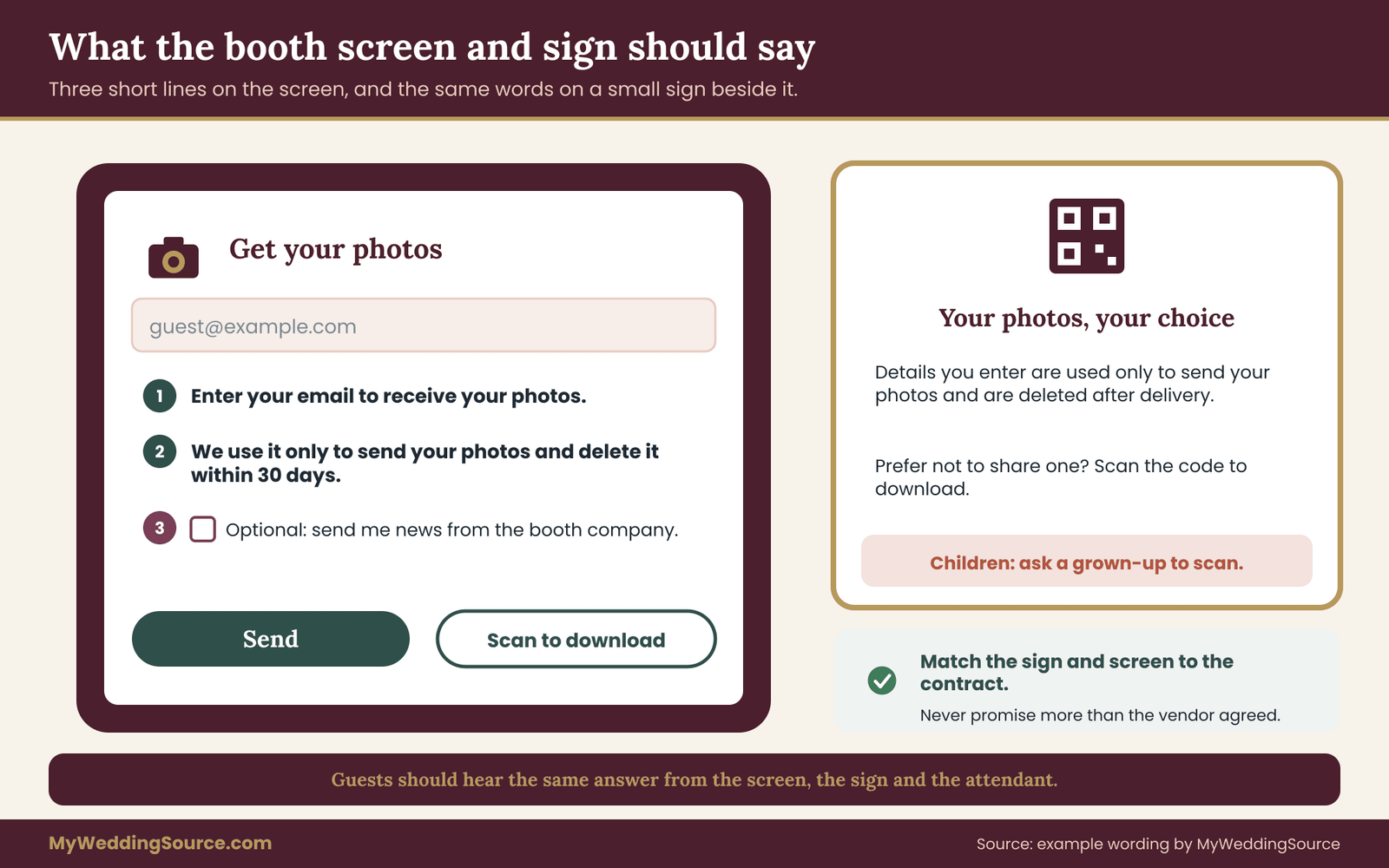
A guest standing in front of a touchscreen with a friend waiting behind them will not read a paragraph. Aim for three short lines, placed on the screen where the contact detail is entered.
The first line says why the detail is needed: “Enter your email to receive your photos.”
The second line says what happens next: “We use it only to send your photos, and delete it within thirty days.”
The third line presents any optional choice separately, with an unticked box: “Optional: send me news from the photo booth company.”
If your vendor’s software allows custom text, send the wording in advance and ask for a screenshot. If it does not, ask whether the default wording says something different from your contract. A photo booth that says “we may share your information with partners” on screen while the contract says no sharing creates a conflict that your guests will see before you do.
Avoid wording that makes the choice feel mandatory. “Email required” with no alternative pushes guests toward giving a detail they may not want to give. A second option such as “Scan to download” or “Skip” respects the guest.
The sign beside the booth
A small sign, readable from an arm’s length away, adds a human touch. It can be a printed card on a stand. Keep it short, in plain words, and in the same style as the rest of your wedding signage.
A workable version reads: “Photos are sent to the email or phone number you enter, and that detail is deleted after delivery. Prefer not to share one? Scan the code to download your strip instead. Children: please ask a grown-up to scan.” You can change the details to match your agreement. If the vendor will keep the details for thirty days, say thirty days.
Do not promise more than the contract does. If the vendor will delete in thirty days, a sign that says “deleted immediately” misleads guests and puts you on the wrong side of your own promise. Write the sign last, after the terms are settled.
For accessibility, use large type with high contrast, and read the sign aloud to the vendor’s attendant so the attendant can answer questions in the same words. A guest who asks “what happens to my email?” should hear the same answer from the sign, the screen and the attendant.
The attendant’s role
If the photo booth has an attendant, that person is your most direct line to guests. A short briefing helps. Tell the attendant to offer QR delivery to anyone who hesitates, never to type a guest’s address for them, never to take a guest’s phone to enter details, and never to post photos from the photo booth online without your approval. Ask the attendant to tell you if a guest raises a concern, so you can follow up with the vendor afterward.
If you have a day-of coordinator, hand them the sign wording and the vendor’s contact. A guest who wants something deleted a week later may reach out to you first.
A timeline from booking to purge
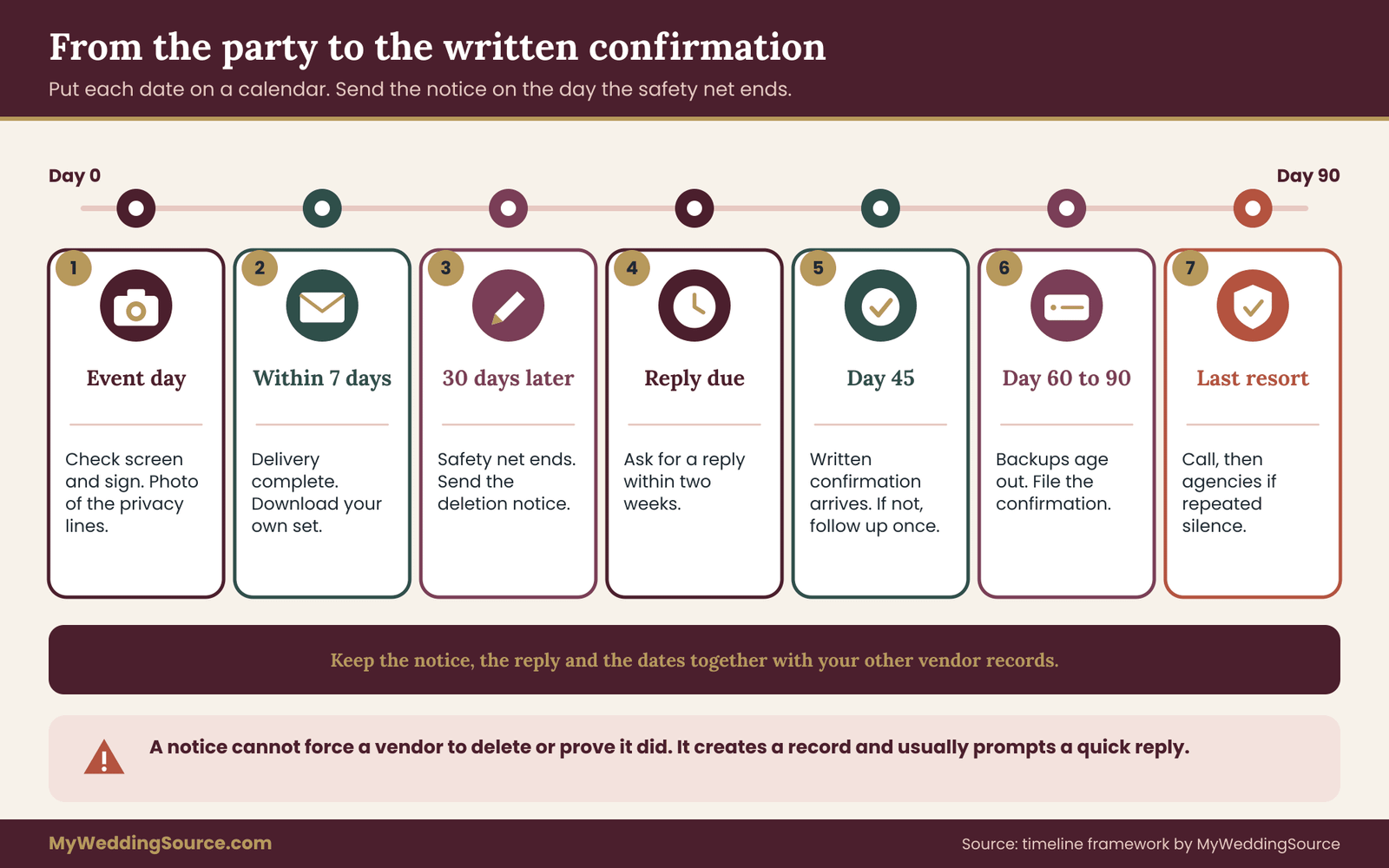
Dates drive everything in this process, so a timeline helps. The following sequence runs from booking to the end of the purge clock, with approximate timing. Adjust it to the date of your wedding.
At booking, ideally two to six months out. Send the questionnaire. Compare answers across vendors. Choose the delivery method: QR code, email, text, or a mix. Ask for the contract terms from the contract section.
At signing. Confirm the clauses are in the contract or in an addendum. Save a dated copy of the privacy policy. Ask for the name of the operator and the software platform.
Four weeks before. Send the booth screen and sign wording for approval. Confirm that the “optional news” box is off by default. Ask whether the gallery link will be private.
One week before. Confirm with the vendor the dates for delivery, the end of the safety-net period, and the date of written confirmation. Put those dates on your calendar. Ask the vendor to send a test email so you see what guests will receive.
Event day. Check the photo booth screen and sign at setup. Take a quick photo of the screen showing the privacy lines, for your records. Brief the attendant.
The week after. Confirm that delivery is complete. Ask the vendor how many sessions had a delivery problem, if it tracks that. Download your own set of photos.
Thirty days after delivery. The safety-net period ends. Remind the vendor, or send the deletion notice if you have not received a confirmation.
Forty-five days after the event. The written confirmation should have arrived. If it has not, send the follow-up message from the next section.
Sixty to ninety days after the event. Backups should have aged out. File the confirmation with your other wedding records, and note the dates of deletion.
Pay attention to the first week
Most problems appear in the first week, when guests are still thinking about the party. A guest who did not receive a strip, a gallery that is public when it should be private, or a promotional email that arrives early are all easy to fix when caught early, and harder when they linger. Keep a simple note of anything unexpected and send it to the vendor right away rather than saving it for the deletion notice.
A photo booth deletion notice draft
A deletion notice is a short written request telling the vendor that the purpose for the guest data has ended and asking it to delete the data and confirm. It has to be polite, specific and dated. It does not need legal language. You are not threatening anyone; you are closing a file.
The drafts below are templates. Replace the bracketed parts with your own details, adjust the numbers to match your contract, and send them from the email account you used to book. Keep a copy of each message you send and each reply.
Draft one: a pre-event confirmation
Send this a week or two before the wedding to turn conversations into a written record.
Subject: Guest data terms for our photo booth on [date]
Hello [Vendor name],
We are looking forward to having the photo booth at our wedding on [date]. To make sure we are on the same page, here is how we understand the handling of guest contact details. Please reply to confirm or tell us where it differs.
Guest emails and phone numbers will be used only to deliver photos. They will be deleted from your active systems within [thirty] days after the last delivery and from backups within a further [thirty] days. They will not be added to any marketing list unless a guest opts in on a separate box. You will send us a written confirmation of deletion within [forty-five] days after the event.
Thank you, [Names]
Draft two: the post-event deletion notice
Send this after delivery is complete, or on the date the safety-net period ends.
Subject: Deletion request for guest contact details, event on [date]
Hello [Vendor name],
Thank you for the photo booth at our wedding on [date]. All photos have now been delivered, and we have our own copies. Under our agreement, guest email addresses and phone numbers collected at the booth were to be used only for delivery.
Please delete all guest email addresses and phone numbers from your active systems, including any session records that link a contact detail to a photo, and confirm when they will be removed from backups. Please also tell us whether any guest details were used for marketing or shared with anyone other than your delivery service providers.
Could you reply in writing by [date, about two weeks later] with the date deletion was completed? We will keep your reply with our records.
Thank you, [Names]
Draft three: a follow-up when there is no reply
Wait the stated time, then send a shorter reminder. Keep the same email thread so the dates are visible.
Hello [Vendor name],
Following up on our request of [date] about deleting guest contact details from our photo booth event on [date]. We have not yet received written confirmation. Could you please let us know the date of deletion, or when you expect to complete it? If it would help to speak by phone, we can do that and then confirm in writing.
Thank you, [Names]
If a second reminder goes unanswered, you have choices. You can call. You can write to the company’s listed contact address with the whole thread attached. You can contact a business directory or review platform where the vendor appears, noting calmly that you asked for a deletion confirmation and have not received one. For repeated non-response, the Federal Trade Commission accepts consumer reports at its official site, and your state attorney general’s consumer office may also help. These are last resorts, and most vendors respond to the first or second message.
Draft four: a reply to a guest who asks
A guest might write to you a few weeks later and say they started getting promotional email from the photo booth company. The reply can be short.
Hi [Guest name], thank you for telling us, and I am sorry about that. I have asked the vendor to remove your address from all lists and to confirm. Their unsubscribe link in the message should also work. If you do not see the emails stop within [two weeks], please tell me.
Then forward the message to the vendor with a clear request, and attach the clause from your contract that restricts marketing use. If the vendor sent marketing in breach of the contract, the contract is your best leverage. The federal CAN-SPAM Act also requires commercial email to include an opt-out method that the sender honors promptly, so the guest’s unsubscribe request should be respected independently of your own contract.
What the vendor’s confirmation should say
A good confirmation is short. It states the date of deletion from active systems, the schedule for backups, the kinds of data deleted (emails, phone numbers, session records), and the name and role of the person confirming. It does not need to be formal. A reply email saying “we deleted all guest emails and phone numbers for your event on [date], backups roll off by [date]” meets the purpose.
If the reply is vague, ask for the missing piece. “Thank you. Could you tell us the date, and confirm that session records linking guests to photos were included?” You are not asking for proof beyond the vendor’s word. You are asking for a specific statement you can rely on, with a date attached.
What the notice cannot do
A deletion request cannot force a vendor to do something its systems cannot do, and it cannot verify that the vendor has actually done it. Some vendors, especially larger platforms, delete automatically and cannot respond to individual notices. Others will say yes and forget. The notice creates a record, shows the vendor you are paying attention, and often triggers a quick action. It does not replace choosing a vendor who handles guest data well in the first place.
Worked example: one couple, one photo booth, one deletion notice
The following example is invented to show how the framework works from start to finish. The couple, the vendor and the numbers do not describe real people or companies. Marisol and Dev are planning a wedding with about one hundred and twenty guests. They want a photo booth at the reception. Marisol’s aunt will be there, and her aunt does not like giving her email address to anything.
Step one: shortlisting by questionnaire
Marisol collects quotes from three booth companies and sends the same twelve questions to each. Two answer within a day. One does not answer for a week.
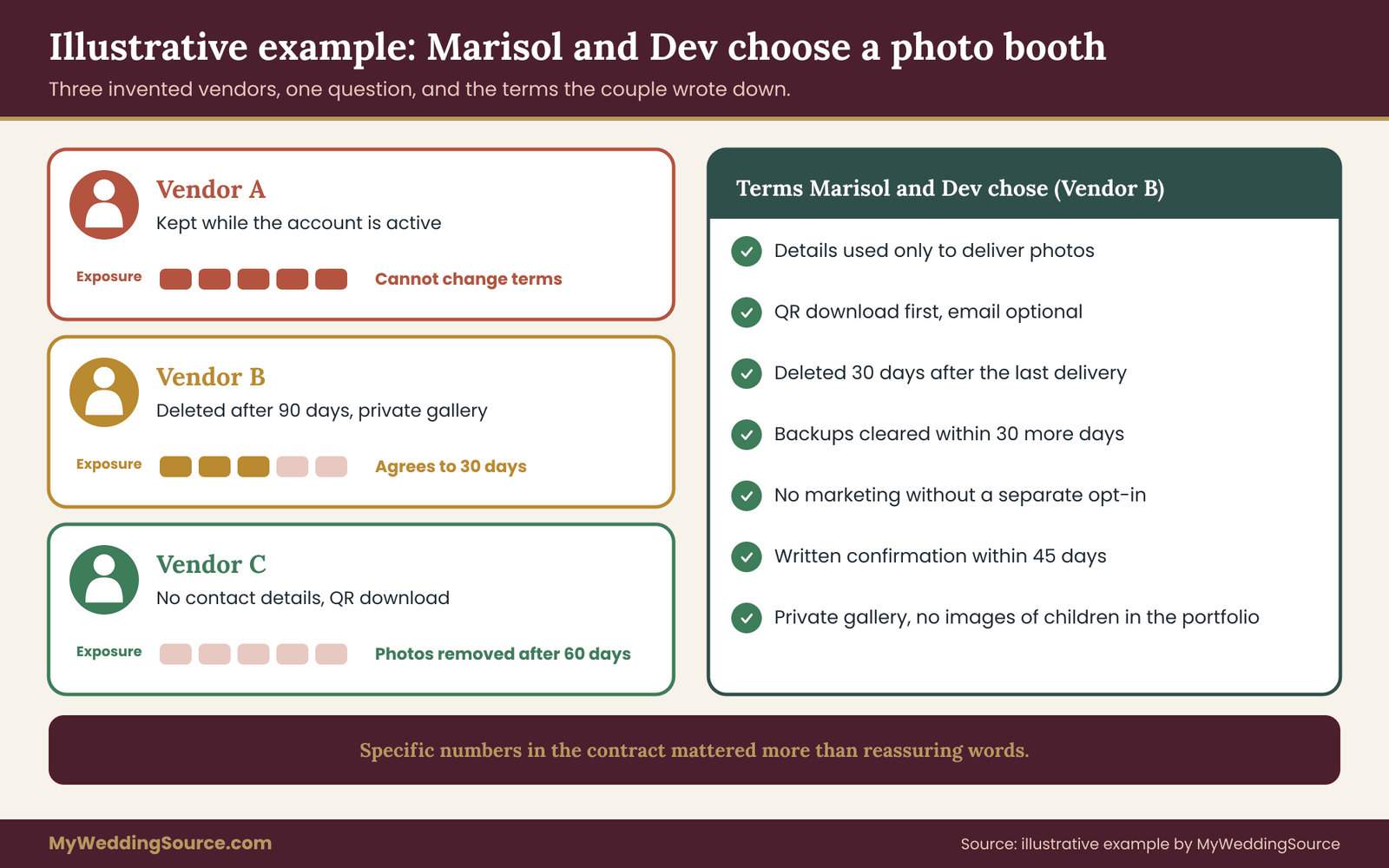
The first vendor, which the couple will call Vendor A, is a larger company with a polished website. It replies that guest emails are “stored securely” and that its software “may use guest details to provide additional services.” The reply says nothing about deletion. Marisol’s follow-up asks for a number of days. The answer is that details are kept “for as long as the account is active.”
The second vendor, Vendor B, is a two-person local business. It replies with a short paragraph: the photo booth runs on a named platform, emails are deleted automatically ninety days after the event, the gallery is private with a link, and the attendant never types in guest details. The couple likes the specificity. Ninety days is longer than they want, though.
The third vendor, Vendor C, replies after a week with a polite note that its software does not collect contact details at all. Guests scan a QR code and download their strip from a page that does not ask for a name or email. The page deletes photos after sixty days.
Step two: weighing the options
Marisol and Dev line the answers up against the retention ladder. Vendor A sits on the fifth rung. Vendor B sits on the fourth rung, and might move to the third if they ask. Vendor C sits on the first rung.
Price matters, too. Vendor C is a little more expensive than B, and A is the cheapest. They do not treat cost as the only factor. They ask Vendor B whether ninety days can be shortened to thirty. Vendor B says it can, because the platform has a setting for it. They ask Vendor A whether it can turn off its additional services and delete on request. Vendor A says that it cannot change its terms for individual events. That answer settles it.
They choose between B and C. Dev prefers B because the strips can be emailed to guests who are not comfortable scanning a code. Marisol prefers C because it creates no list. They compromise: Vendor B, with delivery by QR code as the headline option, optional email as a second option, and thirty-day deletion written into the contract.
Step three: the contract
Vendor B agrees to add a short addendum. It says guest contact details will be used only for delivery, deleted from active systems thirty days after the last delivery, removed from backups within a further thirty days, never added to a marketing list without a separate opt-in, and confirmed in writing within forty-five days after the event. The addendum also says galleries are private and that the vendor will not use images of children in its portfolio.
The portfolio clause is separate. Marisol and Dev agree that Vendor B may use up to ten images in its portfolio, subject to their approval of each one, and not images of anyone under eighteen. They write that into the license section rather than the data section.
Step four: screens and sign
A month before the wedding, Vendor B sends a photo of the booth screen. The default wording says “we may use your email to send offers.” Marisol asks for it to be replaced. Vendor B changes it to the three-line version: why the email is needed, that it is deleted within thirty days, and an unticked optional box for vendor news. Marisol prints a small sign with the same wording, adds the line for children, and gives a copy to the day-of coordinator.
Marisol’s aunt reads the sign at the wedding, scans the code, and downloads her strip without typing anything. Nobody asks her to explain.
Step five: the notice
Delivery by email finishes on the day after the wedding, since the photo booth sends strips instantly. Two weeks later a guest named Priya tells Marisol that she mistyped her address and never got her strip. Because the safety-net period is still running, Vendor B resends it to the corrected address within a day, which is exactly what that period is for. The period ends thirty days after the wedding.
A week before that date, Marisol sends the second draft from the deletion notice section. Vendor B replies two days later: all guest emails and the session records that link them to photos were deleted, backups roll off within thirty days, and no marketing list was created.
Marisol saves the reply as a PDF, names it with the date and the vendor, and puts it in the vendor folder along with the contract addendum and the screenshot of the photo booth screen.
What the example shows
Three things stand out. The questionnaire did the real work. Without it, the couple would have chosen based on price and style, and probably chosen the vendor with the longest retention. Specific numbers in the contract mattered more than reassuring language. And the notice cost five minutes and produced a record.
The example also shows a good place to stop. The couple did not audit the vendor’s servers, demand proof of deletion, or hire a lawyer. They asked clear questions, got clear terms, and followed up once. For a wedding, that is a proportionate response.
Common photo booth data mistakes and edge cases
Most problems in this area come from a short list of repeated errors. Knowing them lets you avoid them cheaply.
Mistakes couples make
Assuming the vendor’s defaults are fine. Default settings are chosen by the software company for the software company’s convenience. A default that keeps emails indefinitely and adds them to a newsletter is common in consumer-grade tools. Ask for what you want rather than trusting the default.
Treating “secure” as an answer to “how long.” Security and retention are different things. A vendor can store data very securely for ten years. The question is why it needs to.
Using the booth to build a guest list. Collecting emails for your own purposes without telling guests is a trust problem. If you want addresses for a thank-you mailing, the wedding guest list guide explains how to gather them directly through invitations and RSVPs, where guests expect to be asked.
Waiting until after the event to ask. Once the contract is signed and the event is done, you have much less leverage. Ask early.
Leaving the confirmation unfiled. A deletion confirmation matters only if you can find it later. File it with the other vendor paperwork and include the date.
Forgetting about the venue or planner. If the photo booth is part of a package, the party who sold you the package may be the party with the contract. Send your requests to both.
Overpromising on signage. A sign that promises more than the vendor does is a trap for you. Match the wording to the contract.
Edge cases
The photo booth vendor will not respond after the event. Send the follow-up. If it still goes unanswered, remember that your leverage is the contract and the vendor’s reputation, not the law alone. Keep a short written record of what you sent and when. If you believe guests have been harmed, for example through unsolicited messages, the Federal Trade Commission and your state attorney general both take consumer reports.
Guests report spam. Ask the vendor to confirm in writing which lists the guest is on, and to remove them. Remind the vendor of the marketing clause. A guest can also use the unsubscribe link in any commercial message. The FTC’s CAN-SPAM guide for business describes what senders must do, including honoring opt-out requests within a stated time.
Text-message delivery. Some booths send photos by text. Unsolicited marketing text messages are regulated by federal rules the Federal Communications Commission explains, and consent matters. A text sent once to deliver a photo a guest asked for is different from a later promotional text. Ask the vendor how it handles a guest who replies “stop.”
A booth that posts to social media. Some booths offer instant sharing to social platforms from the photo booth screen. A guest who chooses this has made a public posting choice. A photo booth that posts on its own to the vendor’s accounts without asking is a different matter. Ask that it never post without approval. The wedding family photo list approach of agreeing which photos matter most before the day also helps you decide what goes online.
The booth fails on the day. A photo booth can crash, lose network, or run out of paper. In those cases the vendor may collect details on paper or on a spare device. Ask in advance how backup collection works, and make sure the same retention terms cover it. The wedding day digital contingency plan covers wider backup thinking for devices and connections.
A vendor that uses an outside service for delivery. Many booths use a third-party email or text service. Ask which one, and ask the vendor to set that service’s retention to the shortest setting available. You cannot control a third party directly, but your vendor can.
You change your mind. If you decide after signing that you want shorter retention, ask. A vendor might agree to an addendum, especially if the request costs nothing. If it declines, you can still switch to QR delivery for the day.
Someone asks for the whole guest list of emails. Occasionally a relative or a vendor’s sales rep will ask the couple for the photo booth’s email list for follow-up. Decline and explain that the details were given for photo delivery only.
A last practical check
Before the event, read your booth paperwork in one sitting, in this order: the contract, the addendum, the privacy policy, the booth screen photo, and the sign text. If any two disagree, fix the disagreement now. It is easier to correct a sentence before anyone has typed an address than after eighty guests have.
Your next steps
You can finish the essential work in one evening and two short emails. Start with the questionnaire. Copy the twelve questions into an email and send it to every photo booth vendor you are comparing, or to the one you have already booked. Ask for answers in writing, and note the date.
Next, decide your delivery method. If the photo booth can deliver by QR code with no contact details, choose that. If you want email as an option, make it optional and ask for thirty-day deletion. Write the three-line screen wording and the sign text so they match the contract exactly.
Then put the dates on your calendar: the end of delivery, the end of the thirty-day safety-net period, the date the written confirmation is due, and the date backups should have aged out. Set one reminder a week before the first of them.
After the wedding, send the deletion notice if you have not already received a confirmation, file the reply with your other paperwork, and move on. If a vendor refuses reasonable terms, you have learned something before the event, when it is still easy to change course. Most couples who ask these questions find that a good vendor answers in a few lines, and that the photo booth is the same fun it always was, with one more reason for guests to trust the evening.
FAQ
How long should a photo booth keep guest email addresses?
A practical request is deletion within thirty days after the last delivery, plus another thirty days for backups to age out. The address is only needed to send the photo and handle a resend request. Some booths can delete at delivery, and QR code delivery avoids collecting addresses at all. These numbers are a planning suggestion, not a legal rule, so put the agreed period in your contract.
Is a photo booth vendor legally required to delete guest emails?
It depends on the vendor, the state, and the promises the vendor made. A business that promises one thing and does another can face scrutiny from the Federal Trade Commission. Some state laws, such as California’s, give residents deletion rights from covered businesses, and small vendors may fall below the thresholds. Because the law varies, a written contract term is the most reliable tool you control.
Can a photo booth company add my guests to its marketing list?
Only if the guests agree in a way the company can show. A separate, unticked opt-in box on the booth screen is the clearest approach. A vendor that quietly adds delivery addresses to a newsletter works against the purpose the guests were told. Ask for a clause that bars marketing use without a separate opt-in. The federal CAN-SPAM rules also require every commercial email to offer an opt-out.
What should a deletion notice to a photo booth vendor say?
Keep it brief and dated. Name the event and date, say all photos were delivered, ask the vendor to delete guest contact details and any records linking them to photos, ask when backups will clear, and ask for written confirmation by a set date. Mention your contract terms if they exist. Do not threaten. A calm, specific request gets the fastest reply.
What if the photo booth vendor ignores the deletion request?
Send one short follow-up in the same email thread, and offer a phone call. If there is still no reply, write to the company’s listed contact address with the thread attached, and keep a record of every message. You can also file a report with the Federal Trade Commission or your state attorney general’s consumer office. Most vendors respond after the first or second message, so escalation is rarely needed.
Should children enter their email address at a photo booth?
It is better to avoid it. Federal rules restrict how online services collect information from children under thirteen, and parents often do not want a child’s details stored by a vendor. Use QR code delivery so a parent can scan, put a sign beside the photo booth, and tell the attendant not to take contact details from children. A neutral default for everyone is the simplest approach.
Is it better to use a photo booth that does not collect emails?
Often yes. A photo booth that delivers by QR code or a private download link creates no contact list, so there is nothing to delete and nothing to leak. The trade-off is a little more effort for guests who prefer email, and you should still check that the download page does not track visitors. Offering both options lets each guest choose what feels comfortable.
What if a guest says the photo booth emailed them something unwanted?
Thank them, apologize, and ask the vendor to remove the address and confirm in writing. Point to the marketing clause in your contract, and remind the guest that any commercial email should include an unsubscribe link. Keep the thread with your records. If it happens more than once, tell the vendor that you expect it to review its lists, and consider mentioning it in your review.
Sources
- Protecting Personal Information: A Guide for Business, Federal Trade Commission
- Start with Security: A Guide for Business, Federal Trade Commission
- CAN-SPAM Act: A Compliance Guide for Business, Federal Trade Commission
- Complying with COPPA: Frequently Asked Questions, Federal Trade Commission
- California Consumer Privacy Act, California Attorney General
- Stop unwanted robocalls and texts, Federal Communications Commission
- NIST Privacy Framework, National Institute of Standards and Technology
- U.S. Copyright Office
- Information Commissioner’s Office, United Kingdom
- Illinois General Assembly, Biometric Information Privacy Act