
An AI guest list is any guest list that a chatbot, a spreadsheet assistant or a planning app’s “smart import” has helped you build, clean, merge or group into households. The tool saves hours, and it also makes quiet mistakes: it merges two real people into one, splits one person into two, and puts people in the wrong household. This guide gives you a way to catch those errors before they reach an invitation, a seating chart or a catering count.
Never trust an AI guest list on the first pass. Test the tool on an invented list first, with duplicates and look-alike names you planted yourself, so you know what it gets wrong. Then run your real AI guest list through it and review every proposed merge and every household on a manual review sheet, with a human decision beside each one. Finally, reconcile the numbers: invitations, households and headcount before and after must differ only by changes you can explain. Keep the original list untouched so you can always go back.
A guest list looks like simple data. It is a column of names, a column of addresses and a few notes. That simplicity is why people hand it to an AI tool without a second thought, and why the mistakes are so easy to miss. The tool returns a tidy, confident, alphabetized list. It looks finished. Nothing on the screen tells you that “Sam Okafor” and “Samuel Okafor” were two different cousins, or that three people who share a street address were turned into one household that now receives a single invitation.
This article is about that gap between a list that looks clean and a list that is correct, and about how to review an AI guest list so the gap closes before anything is printed. It is written for couples and for the friends or family members who end up managing the spreadsheet. You do not need technical skills. You need a method, a little patience and a willingness to check the machine’s work with your own eyes.
A note on scope. This is general information, not legal, tax or financial advice, and it is not a substitute for the privacy terms of the tools you use. Where a rule or a policy matters, the article points you to the organization that publishes it so you can read the current version yourself.
What an AI guest list is, and why it needs its own checks
The phrase “AI guest list” covers more situations than it first seems to. You might paste a messy spreadsheet into a chatbot and ask it to remove duplicates. You might use the “clean up” or “suggest” feature in a spreadsheet program. You might import contacts into a wedding website or planning app that matches names automatically and groups people into households.
You might ask an assistant to turn a pile of text messages and email replies into a list. In every case the same thing happens: software makes a judgment about which records refer to the same person and which people belong together, and then presents the result as a list.
That judgment is the problem. A person who knows your families would never confuse your uncle Robert with your cousin Bob, because they know Bob is a different human being. The tool does not know that. It sees two strings of letters that look related and decides, based on patterns, whether to treat them as one. Sometimes it is right. Sometimes it is wrong in a way that looks equally confident.
An AI guest list therefore needs two kinds of attention that a hand-typed list does not. First, you need to know in advance how the tool behaves on your type of data, which is what the synthetic test in this guide is for. Second, you need a record of every change the tool made, with a human decision on each, which is what the review sheet is for. A hand-typed list has typos. An AI guest list has typos and judgments, and the judgments are the part you cannot see.
An AI guest list is also one small part of the wider digital side of the day, which the wedding day digital operations guide covers, including backups and who can open which file. If you are still building the list itself, the wedding guest list guide covers who to invite and how to set the numbers. This guide starts after the names exist and asks only one question: is the data correct?
The three gates in this guide
The method has three gates, and a list has to pass each one before it moves on.
Gate one is the synthetic test. You build a small invented list that contains the exact kinds of traps your real AI guest list is likely to contain, run it through the tool, and see what the tool does. No real guest data is involved at this stage. The result tells you which mistakes to expect.
Gate two is the manual merge review. You run your real AI guest list, but you do not accept the output. Instead, every proposed merge, every deletion and every household grouping goes onto a review sheet with the evidence, your decision and who decided. Nothing is final until a person has signed off.
Gate three is the reconciliation. You compare counts before and after, and you confirm that every difference is explained by a reviewed row. Then you lock the list and note which version is the source of truth.
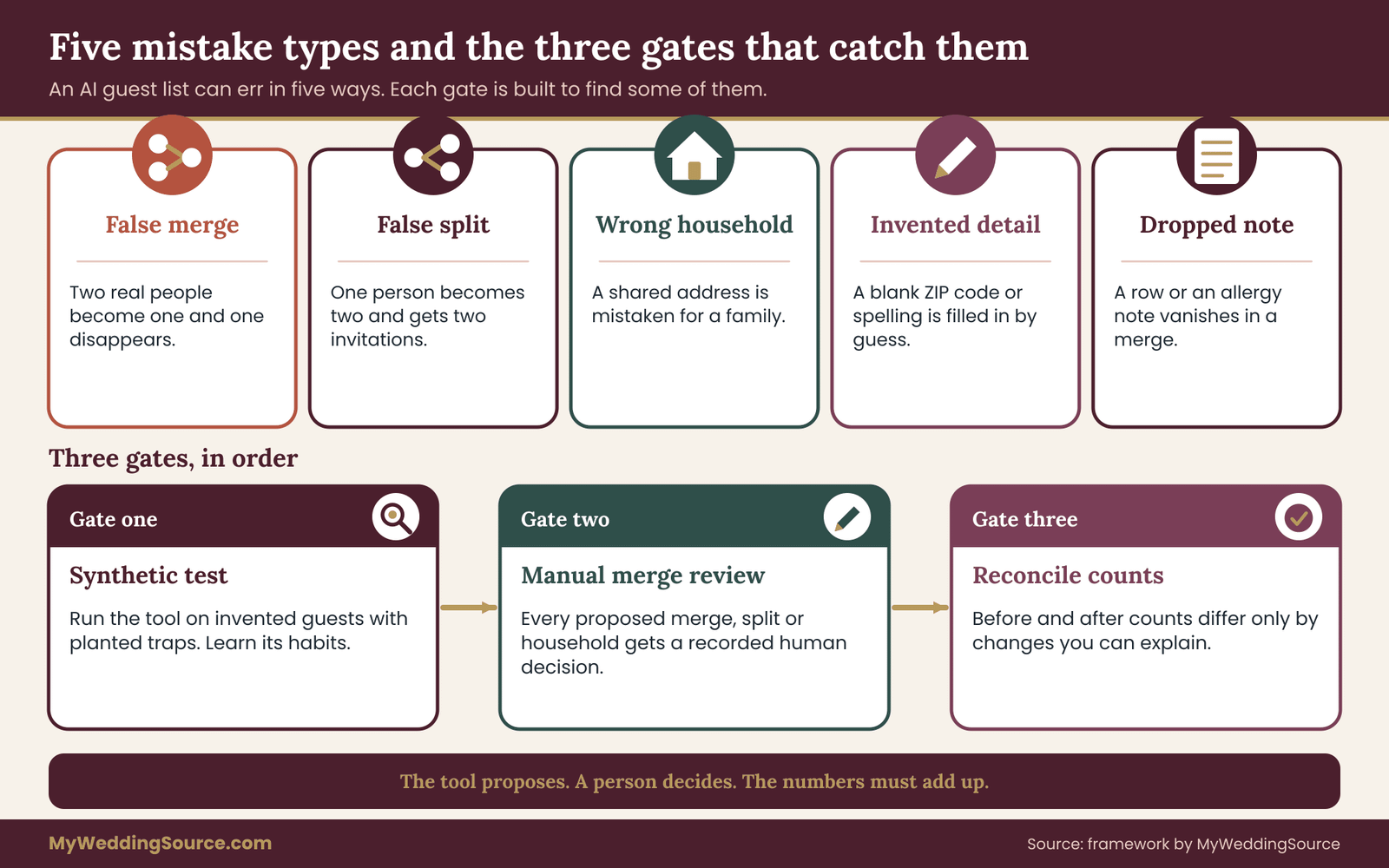
The picture above shows how an AI guest list moves through the gates, in order, and the kind of mistake each one is built to catch. The rest of the article takes them one at a time, with scripts, examples and decision rules.
What this method does not do
It is worth being plain about limits. The method does not make an AI tool accurate. It makes the errors visible, so a person can fix them. It does not replace asking your family who is actually in which household, because no tool can read that from a spreadsheet. And it does not remove the privacy question: the moment you paste real names and addresses into an online tool, you have shared personal information with a company, and you should know what that company says it does with it. The privacy section later in this guide covers that.
The mistakes an AI guest list makes, and where they come from
Most errors fall into a small number of types. Knowing the types is what makes review fast, because you stop reading line by line and start looking for specific patterns.
False merge. Two different people are treated as one. This is the most damaging error, because one of the two disappears from your list. Typical triggers are a shared surname, a shared first name, a shared address, a shared phone number, or a nickname that resembles another person’s full name. A father and son with the same name, “Michael Reyes” and “Michael Reyes Jr.”, are a classic case. An AI guest list tool that ignores suffixes will merge them.
False split. One person is treated as two. This one inflates your count and can send two invitations to one person. Typical triggers are a nickname, a maiden name and a married name, a middle initial present in one record and not the other, a typo, or a name written in a different order. “Liz Tran” and “Elizabeth Tran-Brooks” may be one person or two, and a tool is unlikely to know.
Wrong household. People are grouped together who should not be, or separated when they should be together. A shared address is not proof of a household. Two roommates share an address. A grandmother and her adult grandson at the same address might be one invitation or two. Adult children living at home might be separate guests. Divorced parents with the same last name at different addresses might need separate invitations even though a tool sees them as a family.
Changed or invented details. A language tool sometimes “helps” by correcting something that was right. It might change an unusual spelling to a common one, drop an accent mark, reorder a two-part surname, or fill in a missing apartment number or ZIP code from a guess. Generative tools in particular can produce plausible values that appear nowhere in your source data. A plausible value that is wrong is worse than a blank, because a blank gets noticed.
Dropped records. Rows quietly disappear. A long list pasted into a chatbot may be truncated, or the AI guest list tool may skip rows it could not parse. The output looks complete because it is neatly formatted, but it holds fewer people than you gave it.
Broken structure. Notes, dietary needs, plus-one details or RSVP status end up attached to the wrong person, because a merge combined two rows and kept the wrong note. A guest with a severe allergy can lose that note this way.
Why these errors happen
Understanding the reason helps you predict the mistake. Software that matches names generally works by scoring similarity. Two records with similar spelling, the same address or the same phone number receive a higher score, and above some threshold the tool treats them as one. Generative AI tools work differently, by predicting a plausible answer from patterns, but the effect is similar: they favor answers that look neat. Neither approach has any knowledge of your actual relatives.
This has a predictable consequence. The tool will be strongest on simple cases: an exact repeat, a clear typo, a capitalization difference. It will be weakest where human knowledge is required: family naming conventions, nicknames that belong to different people, blended families, households that changed since the address was written down, and names from cultures where the order of names or the use of surnames differs from the default the AI guest list tool assumes.
The National Institute of Standards and Technology publishes a risk management framework for AI that makes a related point in general terms: AI outputs can be wrong in ways that are hard to see, so people need to measure, test and keep humans responsible for decisions that matter. A guest list is a low-stakes case compared with most of what that framework was written for, but the habit scales down well. Test first, review the output, and keep a person accountable. The framework is listed in the sources at the end.
What a mistake actually costs
It helps to ground this in consequences, because the consequences are what justify the effort. A false merge means a person never gets an invitation, and a relative who was left out is not a spreadsheet problem for long. A false split means a duplicate invitation, a wasted printing and postage cost, and a count that is too high by one, which flows into the caterer’s guarantee.
A wrong household means a single invitation addressed to people who are not a unit, or two invitations to people who are. Dropped notes mean a dietary requirement the kitchen never sees. Each is small. None is catastrophic. Together, on a list of a hundred and fifty names, they create the kind of last-minute scrambling that careful data work is meant to prevent.
The invitation printing guide explains why a wrong name on a printed piece is expensive to fix after the printer has the file. That is the strongest practical reason to do the review before the list goes anywhere, not after.
Why names and households are harder than they look
Before building any test, it helps to know the specific features of guest data that trip up software. These are the features you will plant in your synthetic list, so they are worth understanding in some detail. Each one is a real pattern in ordinary families, not an exotic edge case.
Nicknames and formal names. Bob and Robert, Liz and Elizabeth, Peggy and Margaret, Chuck and Charles, Kate and Katherine. A tool with a nickname table will merge these. That is helpful when it is one person and harmful when the two are different people, such as a father named Robert and a son who goes by Bob. Your list almost certainly contains at least one pair like this.
Shared names across generations. Suffixes such as Jr., Sr., II and III are often dropped when data is typed quickly. Grandfather, father and son can share a first and last name and sometimes an address. An AI guest list tool that strips punctuation and suffixes will see one person.
Maiden names, married names and hyphenated names. The same woman may appear under her birth name in your mother’s address book and under her married name in yours. A tool cannot tell whether “Priya Shah” and “Priya Shah-Mehta” are one person or two. It can only guess.
Name order and compound surnames. Many cultures write the family name first, or use two surnames, or use a particle such as “de”, “van”, “bin” or “al-”. A tool trained mostly on one convention may split “Maria de la Cruz Santos” into a first name, a middle name and a last name incorrectly, then fail to match it against “Maria Santos”. Conversely, it may treat the second surname as a middle name and merge two siblings. Respecting how a guest writes their own name is part of hospitality, and the tool does not know it.
Accents and spellings. “José” and “Jose”, “Zoë” and “Zoe”, “Müller” and “Mueller”. A tool may normalize these away. If the guest cares about the spelling on an invitation, the original should win.
Shared addresses. The most common source of wrong households. People who share an address may be a couple, a family, roommates, a landlord and tenant, a grandparent and a grandchild, or two separate families in one building with a missing unit number. People who do not share an address may still belong together, for example a couple who live apart, or children who split time between two parents.
Shared contact details. A family may share one phone number or one email address. An AI guest list tool that treats a phone number as an identifier will merge everyone who uses it. Conversely, one person with two phone numbers and an old email may look like three people.
Plus-ones and unnamed guests. “Dana Whitfield and guest” is not a duplicate of anyone, but a tool may try to fill in the guest’s name from a similar record. “The Hendersons” is a household label that stands for a number of people the tool cannot count.
Different sources, different formats. Lists usually come from several places: one partner’s contacts, the other partner’s contacts, parents’ lists, a spreadsheet of work friends, a wedding website sign-up form. Every source has its own habits, and each habit becomes a possible error in the AI guest list. That is why merges happen at all, and why a clean-looking AI guest list can hide the fact that it was assembled from five inconsistent inputs.
The rule behind every example
The same idea runs through all of these. Looking similar is not the same as being the same. A tool measures similarity. You know identity. The job of the review process is to put your knowledge of identity in the one place where a decision is made. Software proposes, a human disposes. That is the working rule for every AI guest list.
This is also why you should resist the temptation to write one clever instruction that tells the tool to “only merge exact duplicates.” Instructions to a chat-based tool reduce errors but do not remove them, and you have no way to see whether the instruction was followed on row 87. Testing the behavior, not the instruction, is what gives you evidence.
Before you upload anything: protect your guests’ information
A guest list is personal data. It holds names, home addresses, often phone numbers and email addresses, and sometimes dietary or accessibility notes, which can be sensitive. Your guests gave you that information, or someone gave it to you on their behalf, for the purpose of a wedding. Pasting it into a web tool is a decision to share it with a company, and it deserves a moment of thought before you do it, not after.
None of this requires alarm. It requires a few clear choices.
Find out where the data goes. Before using any AI tool with real guest data, read what the provider says about how it handles what you enter. Look for whether your inputs may be stored, whether they may be used to improve the provider’s models, whether you can turn that off, how long data is kept and whether you can delete it.
Providers publish this in their privacy policies and in their data controls or settings pages. Consumer accounts and business or workspace accounts often differ, so read the terms that apply to the account you actually use. The sources at the end of this guide point to the Federal Trade Commission’s guidance for protecting personal information and to NIST’s privacy framework.
Use the least data that does the job. For the synthetic test in the next section, no real data is used at all. For the real run, ask yourself which columns the task needs. Deduplicating names and grouping households does not require dietary notes, phone numbers or RSVP details. Remove columns you do not need before you upload, and add them back afterward by matching on a row number you control. If the task can be done with first name, last name and a street address, do not send more.
Use a local feature where you can. A spreadsheet program’s built-in functions for finding duplicate rows, sorting and filtering work on your own machine. For a pure duplicate scan on exact matches, you may not need an AI tool at all. An AI guest list workflow is most useful for the fuzzy cases, and those are exactly the cases where review matters most. Using the simplest tool that works is a privacy decision as well as a quality one, and an AI guest list is never required.
Keep a private copy of the original. Before any tool touches the data, save a read-only copy and note the date. Everything downstream is compared with that copy. It is your protection against an AI guest list tool dropped rows or altered values, and it is the only version that cannot have been changed by the process you are checking.
Decide who may see the working file. If a friend or relative is helping, think about what they need. A person checking duplicates may not need to see everyone’s home address. The access levels idea in the wedding records guide uses the same principle for post-wedding papers: share what a person needs, and no more.
Do not paste what you would not hand to a stranger at a copy shop. That is a fair rough test. A name and a mailing address are what an invitation carries anyway, so they are lower risk than, say, a birth date or a government number. Never include identity numbers, dates of birth, medical details or financial details in a guest list file, and if any such thing is already in a spreadsheet column, delete it before the file goes anywhere.
What to document before you start an AI guest list project
Write down, in a single note kept with the file, four facts: which tool you used, which account type, what privacy setting you chose, and the date. If a guest ever asks what happened to their address, you will be able to answer in one sentence. It also helps the next person who works on the AI guest list, because the same choices will not have to be remembered or reinvented.
A short statement you can give guests who ask is easy to prepare. Something like: “We used a software tool to tidy the list, we removed everything except names and addresses first, and we’ve kept the original.” You do not have to publish it. Having it ready is part of treating guest information with care.
When to skip the AI tool entirely
There are cases where the right answer is not to use one. If your list is under about fifty names and you know almost all of the people personally, sorting it by last name and reading it yourself will take less time than testing a tool and reviewing its output. If a family elder has asked you not to put their details online, honor that.
If your venue or a vendor has a stated rule about handling guest data, follow it. And if you cannot find clear terms about how a tool handles the data you would enter, that alone is a reason to leave it out. The goal is a correct list, and a tool is only one way to get there.
The wedding household address spreadsheet guide covers how to structure the list so that the data is clean at the source, which reduces what any tool has to guess. A well-built spreadsheet makes an AI guest list easier to verify, because every column has one clear meaning.
Gate one: test an AI guest list on synthetic data first
The most useful habit in this whole guide is also the simplest: test the tool on invented people before you give it real ones. A synthetic test costs about an hour, uses no personal information, and tells you more about how the tool behaves than any amount of reading about it. It also works as a rehearsal for the review sheet in the next section.
The idea comes from how engineers check software. You build an input where you already know the right answer, run the tool, and compare. If the tool gets a planted case wrong on your invented list, it will get the same kind of case wrong on your real one. If it gets all of them right, you have earned a little confidence, though never certainty.
Build the synthetic AI guest list test
Create a spreadsheet with around thirty to forty invented guests. Use made-up names that belong to no one you know, and fake street addresses that do not correspond to real people. Mirror the structure of your real AI guest list exactly: the same column names, the same formatting habits, the same mixture of tidy and messy rows. The closer it resembles your real data, the more the test tells you.
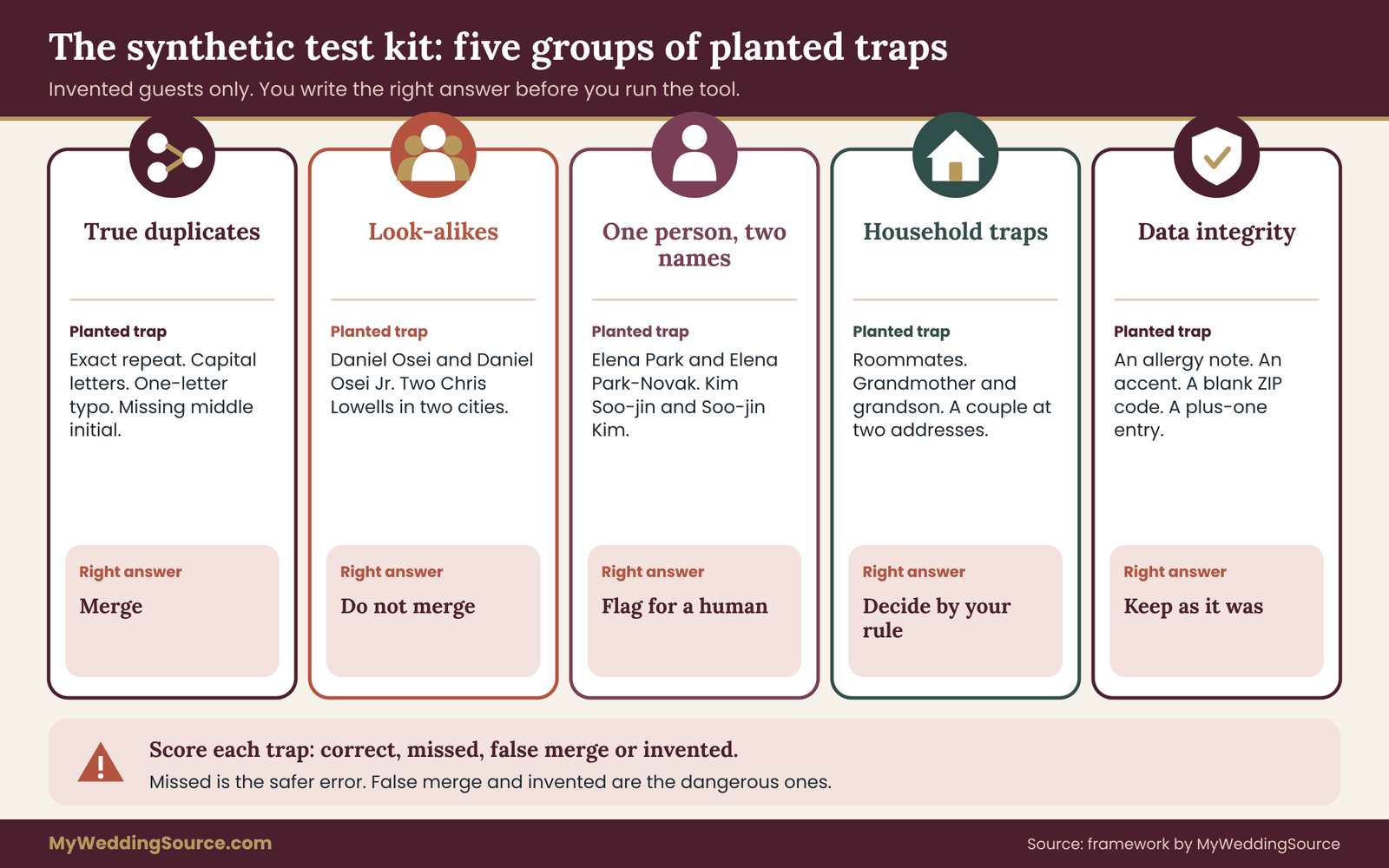
Then plant traps. Each trap is a case where you know the correct answer in advance. Aim for about a dozen, covering the following types.
True duplicates (the tool should merge). – An exact repeat of a row. – The same person with a capitalization difference (“dana whitfield” and “Dana Whitfield”). – The same person with a trailing space or a typo in one letter (“Whitfeld”). – The same person with a middle initial in one row and none in the other.
Look-alikes that are different people (the tool should not merge). – A father and son, “Daniel Osei” and “Daniel Osei Jr.”, at the same address. – Two unrelated people with the same name at different addresses, “Chris Lowell” in two cities. – A nickname pair that are two people: “Robert Mendez” and “Bob Mendez”, described in a notes column as uncle and nephew. – Siblings who share a surname and a mailing address but are adults with separate invitations.
One person under two names (the tool should flag, not decide). – A maiden name and a married name: “Elena Park” and “Elena Park-Novak”, with a note that she changed her name. – A name written in two orders: “Kim Soo-jin” and “Soo-jin Kim”.
Household traps. – Two roommates at one address who are not a couple. – A grandmother and adult grandson at one address who should stay two invitations. – A couple who live at two addresses and should be one household. – A divorced pair at different addresses with the same surname who should stay separate. – An address with a missing unit number shared by two unrelated people.
Data-integrity traps. – A row with a dietary note, such as a severe allergy, attached to a person who also appears as a near-duplicate. After a merge, the note must survive. – A name with an accent, such as “Zoë Marchetti”. The accent should survive. – A guest with a blank ZIP code. The tool should leave it blank, not invent one. – A plus-one entry, “Dana Whitfield and guest”, which should not be merged into a real person.
Keep a separate answer key that you do not give to the AI guest list tool. For every trap, write the correct outcome in one line: merge, do not merge, flag for a human, keep accent, keep blank. This answer key is your yardstick.
Run the tool and score it
Give the synthetic list to the tool using the same instructions you intend to use on the real data. Write those instructions down. Something as plain as “Find possible duplicate guests and list them with the reason; do not delete anything” is a good start, and the wording matters, so record the exact words.
Then compare the output with your answer key, trap by trap, and mark each as one of four results.
Correct. The tool did what the answer key says.
Missed. A true duplicate was left alone, or a household problem was not noticed. This is a false negative. It is the safer kind of error, because the problem stays visible in the data.
False merge. The tool merged or grouped people who should be separate. This is the dangerous kind. Count these carefully.
Invented. The tool changed a value or filled in a blank. This is the second dangerous kind.
You do not need a percentage or a pass mark. What matters is the pattern. An AI guest list tool that missed a typo duplicate is mildly inconvenient. An AI guest list tool that merged the father and the son, or silently dropped an allergy note, has told you something important: on your real AI guest list, every row that looks like that pair needs a human decision, and nothing about the AI guest list output should be accepted without review.
Try the instruction variations
Run the test twice more with small changes. First, tell the tool explicitly to flag uncertain cases and never to merge on its own. Second, ask it to return only a list of suggested pairs with the reasons, rather than a cleaned list. Compare the three runs. Often the best approach is the third: let the tool propose pairs and write the reasons, and make every decision yourself on the review sheet. An AI guest list tool that only suggests cannot delete anything, and its mistakes are limited to a wrong suggestion, which you will review anyway.
You may also notice that the tool gives different answers when you run the same test twice. That is normal for generative tools, and it is useful information. It means a single run on your real AI guest list is one sample of its behavior, not a fixed result. It is a good reason to treat its output as a suggestion.
What you learn from the synthetic test
The test gives you four things that you carry into the real run.
A list of this tool’s habits. For example, “it merges nicknames,” “it drops suffixes,” “it fills in ZIP codes,” or “it skips rows after about a hundred.” These become the first lines on your review checklist for your real AI guest list.
A tested instruction. You now know which wording produced the fewest harmful errors on data like yours.
A sense of the right amount of trust. If the tool handled every trap, you can review your real AI guest list a little faster. If it failed several, you review every row of your real AI guest list that has any similarity to another.
A reusable file. Keep the synthetic list and the answer key. When a tool updates or you switch tools, rerun the test. The behavior of an AI guest list tool can change with an update, and a saved test shows you whether it did.
Why synthetic data and not a small real sample
It is tempting to test on “just ten real guests.” Resist it. A small real sample exposes real people’s information, and ten random guests rarely contain the hard cases you care about. A planted trap is certain to be present, and you know its right answer. A real sample is a gamble on both counts. Invented data lets you test on the hardest cases from the start while keeping everyone’s details out of the tool.
If you cannot build a convincing synthetic list because your real data has features you cannot imitate, strip a real sample of identifying details. Replace names with codes and addresses with a street type and a number, so that the structure remains and the identity does not. Only do this if you are confident that the codes could not be traced back, and discard the sample file afterward. For most couples, building the invented list from scratch is faster and cleaner.
How long the test takes
Expect about an hour the first time: twenty minutes to invent the list and answer key, ten to run it, and thirty to score it and write down what you learned. The second run, with variations, takes less. That hour is the cheapest insurance in the process. A false merge found on the synthetic list costs nothing. The same false merge found after invitations are mailed costs a person’s goodwill, a reprint and an awkward phone call, so the AI guest list test pays for itself the first time it catches one.
A quick checklist for gate one
Before you move on, confirm each of the following in your own notes: – The synthetic list uses only invented names and addresses. – The answer key was written before the run, not after. – The exact instruction wording is recorded. – Every trap type is marked correct, missed, false merge or invented. – You can name the top three habits of the AI guest list tool in a sentence each. – Your instruction asks for suggestions with reasons, not an automatic cleanup.
When all six are true, gate one is passed and your real AI guest list can go through, with a clear idea of what to watch for in an AI guest list output.
Gate two: the manual merge review sheet for an AI guest list
Gate two is where your real AI guest list goes through the tool, and where most of the actual protection happens. The principle is short: the AI guest list tool is allowed to propose changes, and a person is the only one allowed to make them. The review sheet is how you enforce that.
Set up the review sheet
Create a new file, separate from the guest list, with one row for every change the AI guest list tool proposes. A “change” is any of the following: merging two or more records, deleting a record, splitting one record into two, grouping people into a household, separating people from a household, or altering any value such as a name spelling, an address or a ZIP code. If the tool touched it, it gets a row.
Each row carries these fields, in this order.
- Source record IDs. The IDs of the original rows from your untouched copy. Give every guest in the original a plain ID number before you start, so you can always find them.
- What the tool proposed. In one line: “merge IDs 41 and 77”, “move ID 90 into household 12”, “change spelling of ID 52”.
- Why the tool said so. The reason it gave, or “no reason given” if it gave none. A missing reason is information.
- Your evidence. What you checked. For example, “Uncle Robert is the father; Bob is the cousin, per Mom,” or “same street address, different unit numbers.”
- Decision. One of four words: accept, reject, change, or ask.
- Decided by. Initials of the person who made the call, and the date.
- Carry over. Any note, allergy, accessibility need or RSVP detail that must survive a merge.
- Note for the final list. What the final record should say if the answer was “change.”
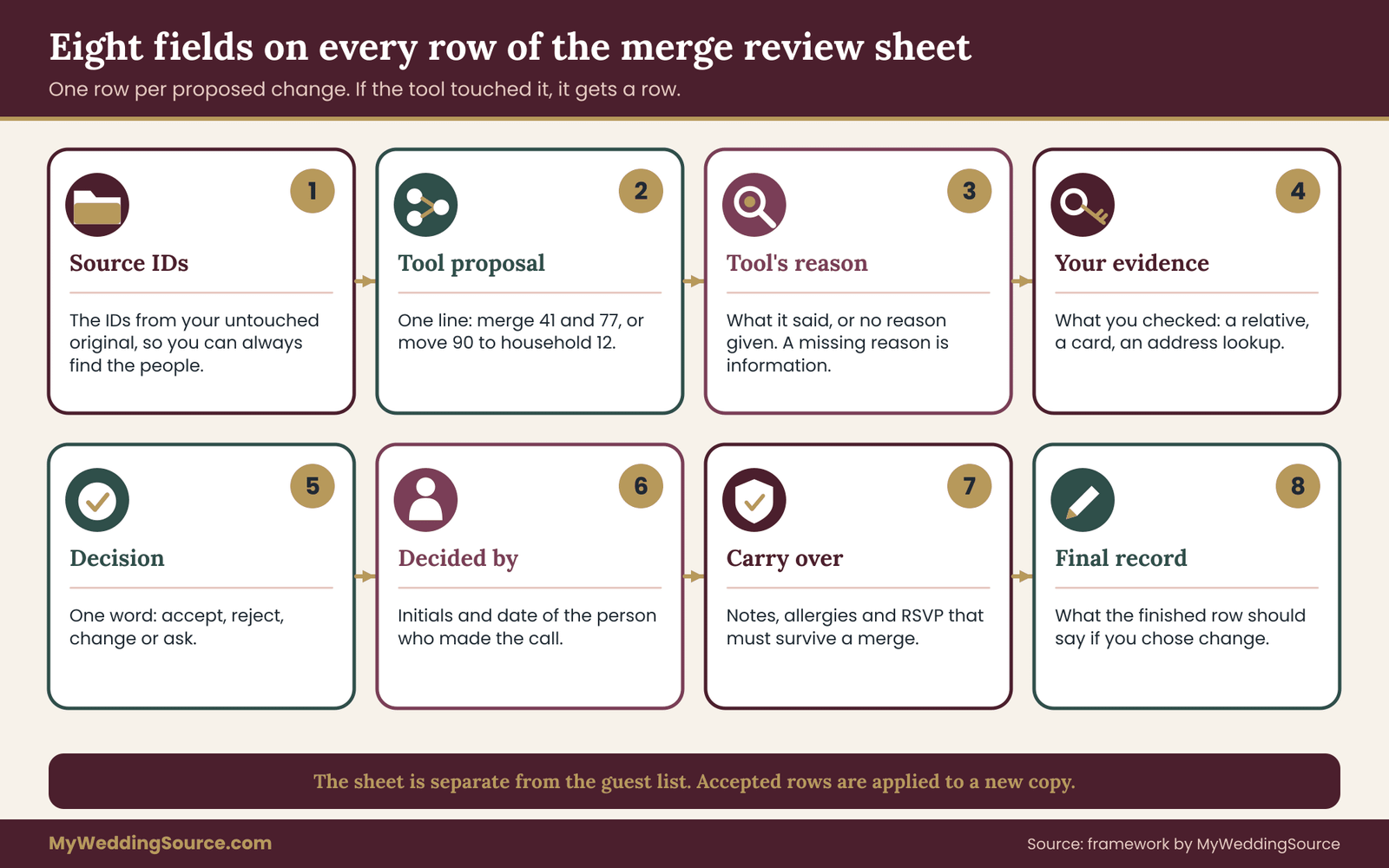
This is the only sheet where you will need to be careful about layout, since a long sheet quickly becomes unreadable. Keep one row per proposal and keep your evidence short. If a row needs a long story, write “ask” and move on to the next one.
Sort the proposals by risk
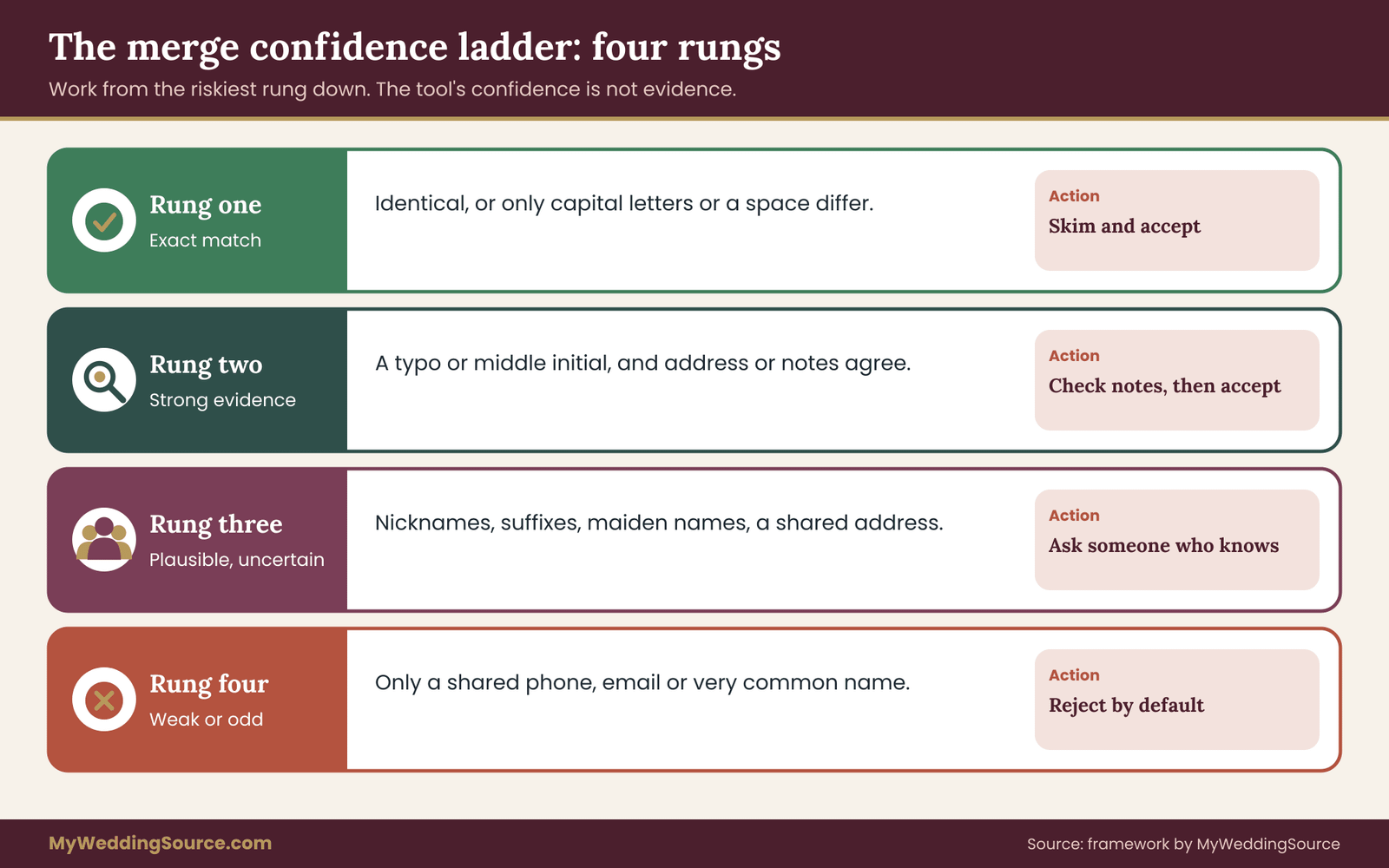
You will probably get dozens of proposals, and they do not all deserve the same attention. Sort them into a confidence ladder and work from the riskiest rung down. A small time investment here saves the most time overall.
Rung one: exact matches. Two rows are identical in every field, or differ only in capital letters or an extra space. These are almost always true duplicates. Skim them quickly and accept. If they are not exactly identical, they do not belong on this rung.
Rung two: strong evidence. The names match except for a typo or a middle initial, and an address or a note agrees. You can usually accept these after a quick look, but check that the later fields agree too: if the allergy note is on only one of the two rows, the merged record must keep it.
Rung three: plausible but uncertain. The names are similar but different in a way a tool might misread: a nickname, a suffix, a maiden name, a name in a different order, or two people at one address. Do not accept these on the tool’s word. Ask someone who knows, or leave both records and mark them as “ask.”
Rung four: weak or odd. The proposal rests only on a shared phone number, a shared email, or a name that is common. Reject by default. Accept only with a specific reason that you can write down.
A good rule of thumb is that the lower the rung, the more evidence a person must supply before an accept. The tool’s confidence, however high it sounds, is not evidence. Evidence is something you or a family member actually know.
What counts as evidence
Evidence is information from a source other than the AI guest list tool. The best sources, roughly in order, are the guest themselves, a close family member, a past invitation or card you have in front of you, and an address from an official source such as the postal service’s address lookup. The weakest are a hunch and the tool’s own explanation. A tool explaining why it merged two rows is describing its reasoning, not confirming the facts.
When you ask a family member, make the question easy to answer. A message like this works:
“Quick check for the guest list: is Bob Mendez the same person as Robert Mendez, or are they two people? Just a one-word answer is fine.”
Short, specific and answerable in a word. Avoid sending a family member a long spreadsheet to review, since people skim and agree.
Handle every deletion separately
Merges are risky. Deletions are riskier, because the record is gone from the output and nothing reminds you it existed. Treat any record the AI guest list tool wants to remove as a separate category and review each one individually, even if the reason sounds harmless. A common pattern is the tool “removing a duplicate” that was in fact the only copy of a plus-one’s name, or the only record holding a dietary note. The rule: no record is removed from the final list until it has been compared, field by field, with the record that survives, and anything unique has been carried over.
Keep the AI guest list output out of the master list
Do not paste the tool’s result over your working list. Instead, keep three files: the untouched original, the review sheet, and a new “reviewed” list that you build by applying only the accepted changes. It takes a little longer. It also means that at every moment you can answer the question “what did the tool change, and who agreed?” That question is the entire reason to build the sheet.
If your list is large, apply the accepted changes in batches by rung. Do the exact matches first, which are mechanical, then the strong evidence cases, and finish with the decisions that came back from family members. After each batch, write the new row count in your notes. You will use those numbers at gate three.
A worked AI guest list row, start to finish
Suppose the AI guest list tool proposes merging two rows: “Robert Mendez, 14 Alder Court” and “Bob Mendez, 14 Alder Court.” The tool’s reason is “nickname match and same address.” Your first thought is that this is rung three: a nickname, which a tool is likely to misread.
You ask the couple’s mother, who replies that Robert is her brother and Bob is his son, and that they live in the same house. These are two people. The decision is “reject.” The sheet shows that you checked, the date and who decided. If the same pair is proposed again after a later run, the sheet answers the question in seconds. Without it, you would need to remember that you looked into it, and a month from now you will not.
Now suppose the AI guest list tool proposes merging “Dana Whitfield” and “dana whitfield.” Same address, same phone, a capitalization difference. Rung one: accept. The row takes seconds.
The point is not that each row takes long. Most take seconds. The point is that every row ends with a recorded decision, and that the few that are hard get the extra attention they need, rather than being waved through in a block.
Who should review
Ideally two people look at rung three and rung four rows: the person running the list and someone who knows the families. A couple can split the work along family lines. Each partner reviews the proposals that involve their own relatives, since each knows who is who. A partner reviewing the other’s family is where false merges slip through, for the same reason the tool makes them: the names look alike and the reviewer lacks the knowledge to tell.
When the tool finds nothing
An empty or very short proposal list is not automatically good news. If the AI guest list tool suggests almost no changes on a list you know came from several sources, be suspicious. It may have skipped rows, stopped early, or been too cautious. Compare the number of rows it returned with the number you gave it. If they differ, that is the first thing to resolve. Gate three covers the counts in detail, and a quick count check before the review begins is worth doing every time an AI guest list tool returns a result.
Catching incorrect households in an AI guest list
In any AI guest list, duplicates get most of the attention, but incorrect households cause more real-world trouble. A duplicate is a visible oddity: two rows that look alike. A wrong household is invisible. It looks like a perfectly reasonable grouping, and it quietly decides who is addressed on an envelope, how many seats are reserved together and how many meals are counted.
A household, for invitation purposes, is a group of people who will receive one invitation and be addressed together. That is a social decision, not a data fact. The tool can see that people share an address. It cannot see how you intend to invite them.
Five questions to ask about every household
Run each household the tool created or changed through the same five questions. They take under a minute per household once you are used to them.
1. Is this one invitation or more? Adult children living with parents are often invited separately, with their own names on their own envelopes. A teenager usually goes on the parents’ invitation. A couple with a toddler might be one invitation. Decide the rule for your wedding and apply it consistently. The decision belongs to the couple, not the AI guest list tool.
2. Is a shared address proof of a household? Only when other evidence agrees. Roommates, a landlord and a tenant, or a building with a missing apartment number all share an address without sharing a household. Check unit numbers. A real mailing address lookup from the postal service can confirm whether the address is valid and whether it needs a unit, and the postal service’s addressing standards are listed in the sources.
3. Is anyone missing? A household built from a shared address can leave out a person who lives elsewhere but belongs with the family: a college student away at school, a grandparent in a care facility, a partner who lives in another city. Ask whether anyone should be added, and where their invitation should be mailed.
4. Is anyone included who should not be? In an AI guest list, a shared address, phone or email can pull in people who do not belong. A former spouse, a stepchild with a different household of their own, or a long-term tenant can be swept into a family grouping. Remove them and give them their own record.
5. Who is the named guest and who is a plus-one? The tool may turn “Dana Whitfield and guest” into a household of one or two without understanding that the guest is unnamed. Confirm the count of named guests and the count of unnamed guests separately. Unnamed guests will still need a seat and a meal, so they matter for the final number.

The most common household errors
Here are patterns that recur, with the response to each. The names are invented.
The grandmother and the grandson. The tool groups “Margaret Hale” and “Theo Hale” at one address as a household. Margaret is eighty-one. Theo is twenty-six, has his own friends, and should receive his own invitation, with an optional plus-one. Merging them removes his plus-one, because a household of two on one invitation would not suggest it. Response: split into two households, and decide the plus-one question for each.
The couple at two addresses. “Amara Eze” and “Kwame Boateng” appear at different addresses, so the tool makes two households. They are a couple who are engaged and live apart during a work posting. They should receive one invitation. Response: merge into one household, choose the mailing address deliberately, and note the second address for reference.
The divorced parents. “Gerald Pruitt” and “Helen Pruitt” appear at different addresses with the same surname, and the AI guest list tool groups them as a family. They have been divorced for years and should be separate invitations, perhaps with attention to seating. Response: keep two households. This one is also a good example of when the review sheet’s “ask” decision matters, because only the guests’ relatives know the history, and it may be a delicate topic. Ask kindly and privately.
The blended family. Children with a different surname from their parent, or with two parents at two addresses. The tool cannot link them correctly. Response: build the household by hand, and consider which address the invitation goes to and whether each parent needs their own copy.
The building with no unit. Two unrelated guests live at “220 Harbor Lane” with no apartment number, because both entries were typed from memory. The tool merges them into a household. Response: look up the full address, add the unit numbers, and split them.
The shared phone number. A family of five uses one phone number, so the tool treats all five as one entity and merges them into a single record with one name. Response: reject the merge, and keep five separate people in one household.
Check the household label itself
Many lists include a household label, the way a guest should be addressed: “Mr. and Mrs. Alvarez,” “The Nakamura Family,” “Dr. Patel and Guest.” The tool might generate or alter these labels, and it may do so with assumptions that are not right. It may assume a married couple share a surname, assign titles that the guests do not use, or write “The Smith Family” for a group that includes people who are not Smiths.
Check each label against how the guests actually style themselves. Names and titles matter to people, and a wrong label on an envelope is noticeable. The name correction guide for printed invitations covers what to do when a mistake reaches the printed piece, which is a good reason to settle the labels at the list stage.
Preserve what matters across merges
When two records are merged, the surviving record should keep everything unique from both. The tool tends to keep the first record it saw and discard the second, along with any notes on it. After every accepted merge, compare the two original rows and confirm four things carried over:
- Dietary needs and allergies.
- Accessibility needs, such as step-free access or seating near an exit.
- RSVP status and the number of attendees.
- Any note about travel, lodging or special seating.
An allergy note is the field most worth protecting. A lost seating preference is an inconvenience. A lost allergy note is a safety issue, and it is not a mistake you want to discover at the caterer’s guarantee deadline. If a merge involves any dietary or health note, check the surviving row yourself regardless of the tool’s confidence.
Respecting how people write their own names
Some of the most important corrections are about courtesy. A tool trained on common patterns may “normalize” a name in a way the guest would not choose: removing an accent, shortening a long name, switching the order of a two-part surname, or splitting a name into first and last parts where the guest has only one name. When your review turns up a name the AI guest list tool changed, the guest’s own spelling wins.
If you are unsure, ask the guest or the person who gave you the name. This is a small gesture, and it is one of the places where a hand-checked AI guest list is simply better than a machine-cleaned one.
Households and seating in an AI guest list
A household decision flows into other plans. Seating charts group people by household. Meal counts depend on household sizes. Hotel blocks may be tied to who is traveling together. A single wrong household can therefore appear in three places. If you use a digital tool for seating, the digital seating chart guide explains how the guest list feeds into it, which is one more reason to freeze a reviewed list before downstream work begins.
In an AI guest list, the cost of correcting a household after the seating chart is built is much higher than correcting it in the list, so a finished AI guest list review should happen first.
A worked example: an AI guest list for Alvarez and Nakamura
The following example is invented, including the names, the counts and the outcomes. It is meant to show the method working in order, not to suggest typical results. Any similarity to real people is accidental.
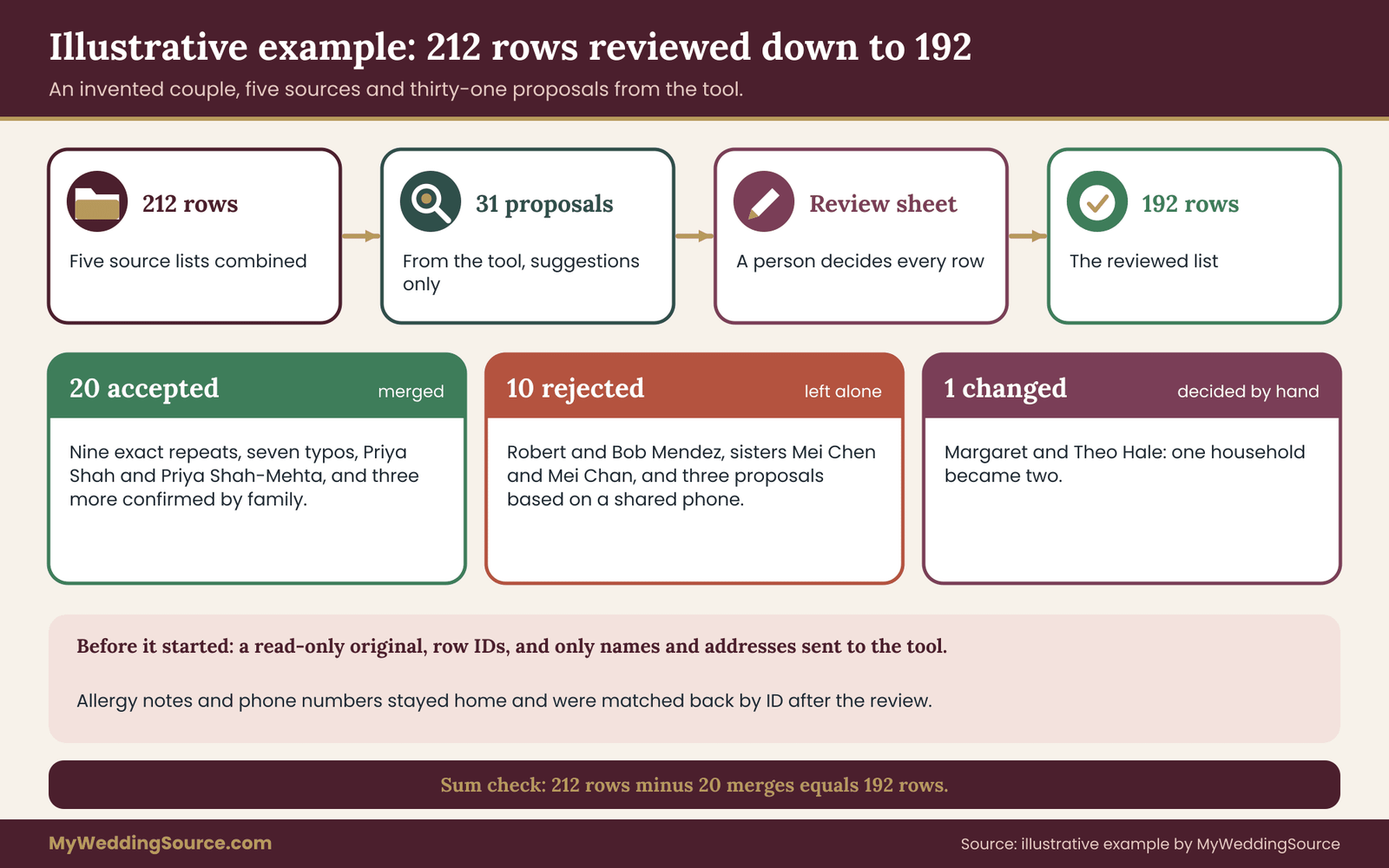
Camila Alvarez and Ken Nakamura are planning a wedding for a list that came from five sources: Camila’s contacts, Ken’s contacts, a list from Camila’s parents, a list from Ken’s mother and a spreadsheet of coworkers. Together the five sources contain 212 rows. Ken’s sister offers to run the combined list through a chatbot to remove duplicates and group households. Camila asks for a test first.
Gate one in the example
Ken’s sister builds a synthetic list of thirty-six invented guests with fourteen traps: four true duplicates, four look-alike pairs that are different people, two cases of one person under two names, three household traps and one data-integrity trap with an allergy note. She writes the answer key and runs the tool with the plain instruction to find possible duplicates and give reasons, without deleting anything.
The results, scored by hand: of the four true duplicates, three were found and one, a typo duplicate, was missed. Of the four look-alike pairs, the tool proposed merging two, the father and son and the nickname pair, so two false merges. It flagged the maiden-name case but decided the two names were one person, without any evidence. It grouped the roommates as a household. And in a “clean list” version of the same run, it removed the allergy note when it merged a near-duplicate.
None of that is surprising, and all of it is useful. Camila and Ken now have a short list of habits: the tool merges nicknames and suffixes, it treats a shared address as a household, and when asked for a cleaned list it can lose a note. Their instruction for the real run changes to “list suggested pairs and reasons only; do not edit, merge or delete,” and they decide that every rung-three proposal gets a human decision.
Preparing the real run
Before anything goes to the AI guest list tool, Ken’s sister saves the 212-row combined file as a read-only original and gives each row an ID. She removes the phone numbers, email addresses and dietary notes from the version that will go to the tool, keeping only ID, first name, last name, street address and city. She writes down the tool name, the account type and the privacy setting she chose. The file the tool sees contains no allergies, no phone numbers and no RSVP data, so none of that can be lost or leaked in the process.
Gate two in the example
The tool proposes thirty-one changes. They go onto the review sheet.
Nine are exact matches or differ only by capital letters. These are rung one, and the couple accepts all nine after a skim.
Eight are strong-evidence typo matches, such as “Whitfeld” and “Whitfield” at the same address. Camila checks each against the original rows and accepts seven. One was a pair, “Mei Chen” and “Mei Chan”, at the same address, who turn out to be sisters. Rejected.
Eleven are rung three. Among them: the uncle-and-nephew pair “Robert” and “Bob” Mendez, which Camila’s mother resolves in one reply as two people, so rejected; a “Priya Shah” and “Priya Shah-Mehta” pair that Ken’s mother confirms is one person under her maiden and married names, so accepted with the married name used going forward, with a note; and a grandmother and grandson proposed as a single household, which Camila splits into two. Four others are marked “ask” and resolved over a weekend through short messages to relatives, and four more Camila settles herself from her own knowledge of her family.
Three are rung four, based only on a shared phone number or email, and all three are rejected without discussion. In one of them the AI guest list tool wanted to merge four members of the Nakamura family because they use the same landline.
The review sheet is complete in about two evenings. Of the thirty-one proposals, twenty are accepted as merges, ten are rejected and one is changed: the grandmother and grandson proposal, which becomes two separate households. Four of the eleven rung-three proposals went through the “ask” route, and of those one was accepted and three were rejected; the other four were settled by Camila alone, two accepted and two rejected.
Applying the changes
Ken’s sister builds the reviewed AI guest list from the original, applying only the accepted changes in batches by rung. Before each merge, she compares the two original rows and carries over everything unique, including the notes that the AI guest list tool never saw because they were removed before the upload. She adds the dietary notes back by matching on the ID. Because the IDs were assigned before the tool ran, no step depends on the tool’s own ordering.
What the example shows
Three features of the example are worth noting. First, the real work was in the roughly dozen proposals that needed a human. Most of the thirty-one were quick. Second, the synthetic test changed the real run: the instruction, the data sent and the review depth were all shaped by what the test revealed. Third, the example never relied on the tool being clever. It relied on the tool being useful for suggestion and on people making decisions, which is the arrangement an AI guest list can safely support.
Gate three: reconcile the counts and lock the list
At this point you have a reviewed list that contains only accepted changes. Gate three confirms that the numbers add up and that nothing was lost. It is the check that catches errors the review missed, because arithmetic does not care how plausible a row looks.
The reconciliation sums
Work through four sums, in order, and write each one down.
Sum one: records. Start with the number of rows in the untouched original. Subtract the number of rows removed by accepted merges. Add the number of rows created by accepted splits. The result must equal the number of rows in the reviewed AI guest list. If it does not, there is an unexplained difference, and you do not move forward until it is explained.
Sum two: people. Rows are not people. Count the named guests on the original and on the reviewed AI guest list, and add unnamed guests separately. The reviewed named-guest count should differ from the original only by the number of true duplicates you merged. Every other difference needs a row on the review sheet.
Sum three: households. Count the households in the reviewed AI guest list. Compare with the count after the tool’s proposal and with the count you would expect from your own rule for who gets a separate invitation. Each change in the number of households must trace back to an accepted or changed row.
Sum four: invitations and mailing addresses. Count the invitations you plan to print and mail, using the reviewed households, then compare that number with the count of distinct mailing addresses. The two can differ for good reasons, such as two invitations to one address. Each difference should be one you can name.
The example’s reconciliation
In the worked example, Camila and Ken’s original had 212 rows. The review accepted twenty merges, each removing one row, and split one household, which changes households and not rows. The reviewed list should therefore have 192 rows: 212 minus 20. It does. Ken’s sister then counts named guests, finds the number she expects, and counts households, where the split of the grandmother and grandson explains an increase of one over the tool’s grouping. Every number traces to a row on the sheet.
If one number had not matched, she would not have rounded it off. She would have gone back to the original and found the row. Most mismatches turn out to be a row dropped during copying or a merge applied twice.

Lock the list and record the version
When the sums match, mark the reviewed AI guest list as the source of truth. Give it a clear name and date, such as “guest list reviewed, final for printing.” Move the original and the working files into an archive folder, and keep them. Tell everyone who works with the list which file is current, because the most common problem after a good cleanup is two people editing two versions.
Write a short change note: the date, the AI guest list tool used, the number of proposals, the number accepted, rejected and changed, and the names of the reviewers. If you have to make a change later, such as an RSVP update or a new address, make it in the locked file and add a line to the note.
Spot checks before printing
Even with a reconciled list, do a spot check before the list goes to a printer, a calligrapher or a mail-merge. Pick ten households at random, and for each one confirm three things against what you know: the spelling of every name, the address, and the way the household will be addressed. If any of the ten fails, widen the check. This takes fifteen minutes and finds the problems that reconciliation cannot, such as a correct count with a wrong spelling.
A returned invitation is the last test of your list, and the returned invitations address fix guide covers what to do when a printed invitation comes back. If your reviewed list is accurate, those are rare, which is the whole point of the effort on the AI guest list.
Limits, fallbacks and what to verify with the vendor
Every method has limits, and being clear about them is part of using an AI guest list responsibly. This section covers what the method cannot promise, what to do when the tool or the connection fails, and what to confirm with the tool’s provider and with official sources.
What an AI guest list review cannot promise
It cannot guarantee a perfect list. A reviewer can approve a wrong merge, because the reviewer’s information was incomplete. A family member can give a confident answer that is mistaken. An address can be valid and still belong to someone who moved. The method reduces errors and makes the remaining ones traceable, which is a smaller promise and an honest one.
It cannot tell you who should be invited together. That is a family decision, and the tool does not know your families. If a household question is really a family question, such as whether divorced parents should share an invitation, the right step is a conversation, not a rule in a spreadsheet.
It does not replace your own judgment about the tool. Terms, features and behavior change when a provider updates a product, so a test that passed in the spring may not describe the tool in the fall. That is why the synthetic list is saved and reused.
And the synthetic test cannot cover every trap. It samples the patterns you thought of. Your real list may contain a pattern you did not imagine, which is why the review sheet exists as a second layer and the reconciliation as a third. No single gate is enough, and the three together are strong because each catches what another misses.
Never present unvalidated AI output as truth
A list that came out of a tool is not verified because it looks finished. Do not hand the AI guest list output to a printer, a caterer, a seating planner or a calligrapher as though it were confirmed. Mark its status clearly in the file name and the change note: “tool suggestion,” “reviewed,” or “locked.” If someone downstream asks whether the list is final, you want the answer to be a documented yes, with a date, and not a guess.
The Federal Trade Commission has warned businesses to keep claims about AI accurate and to avoid overstating what such tools can do. That guidance is aimed at companies, but it applies to a vendor’s marketing when you are choosing a planning app or a list-cleaning service. If a product promises that its AI will “automatically fix” your list with no mistakes, that is a claim to test with your synthetic list before you believe it. The FTC pages are listed in the sources.
Offline fallbacks for an AI guest list
Plan for the tool being unavailable, wrong or retired. A fallback is a way of finishing the job without it.
A plain spreadsheet process. Sort the original list by last name, then by address. Read it from top to bottom, and flag near-duplicates by eye. For a list of a hundred and fifty names this takes about an hour, and it is the method every guest list used before these tools existed. Keep it as your baseline, because it is the one thing that cannot fail on a Saturday night.
An exact-match function. Most spreadsheet programs can highlight rows that match exactly. Use it for rung-one cases only, on your own machine, and handle everything else by review.
A printed copy. Print the reviewed AI guest list and keep a paper copy in a folder. If a cloud service has an outage, or an account is locked at the wrong moment, the list still exists. The wedding day digital contingency plan covers backups, permissions and communication for the days around the wedding, and the same habits apply to a guest list: more than one copy, in more than one place, with a person who knows where each is.
A named human backup. Make sure at least one other trusted person knows where the locked list is and how the file is named. If you are the only person who understands the process, the process is a single point of failure.
What to verify with the tool’s provider
Before you rely on any tool for real guest data, confirm these points from the provider’s own published terms and settings pages, and write down what you found and when:
- Whether your inputs are stored, and for how long.
- Whether inputs may be used to train or improve the provider’s models, and whether you can opt out.
- Whether you can delete your data, and how.
- Whether the terms differ between free, personal and business accounts.
- Whether the AI guest list tool offers a mode where data is not retained.
- Where to find the provider’s contact route for a privacy question.
If you cannot find a clear answer to one of these, treat that as a no for real guest data and keep to the synthetic list or to a local method. Policies change, so check again before each new batch of work, and note the date of the check. Providers publish their terms on their own sites. The sources list includes two of the major ones as examples of where to look, and you should read the page for whichever tool you actually use.
What to verify with official sources
Official sources help in two ways. First, for addresses: the postal service publishes addressing standards and offers an address lookup, which can confirm whether a street address is valid and whether it needs a unit or apartment number. Using it on the reviewed AI guest list, even just for households that were merged or split, catches problems no name check can. Second, for handling personal data: the Federal Trade Commission publishes guidance for protecting personal information, and the National Institute of Standards and Technology publishes frameworks for managing AI risk and privacy risk.
These documents are written for organizations, but their basic habits translate directly to a household project: know what data you hold, keep only what you need, limit who has access and have a plan for when something goes wrong.
None of these sources will tell you whether “Bob” is “Robert.” Only your family can. Keep each source to the question it is good at.
Common AI guest list mistakes to avoid
These are the errors that appear most often when couples use a tool without a process. Each is easy to avoid once you have seen it.
Skipping the test and going straight to your real AI guest list. You lose the chance to learn the tool’s habits on data where a mistake costs nothing.
Asking for a cleaned list instead of a list of suggestions. A cleaned list hides the changes. A suggestion list shows them, and you can review it.
Sending the whole spreadsheet. Phone numbers, dietary notes and RSVP details rarely help with duplicate checks. Send the minimum.
Trusting the tool’s explanation as evidence. A reason like “same address and similar name” describes the tool’s logic. It does not establish that two people are one.
Merging on nickname alone. Bob and Robert, Liz and Elizabeth, Kate and Katherine are often different people in a large family.
Ignoring a lost note. After any merge, check that allergy and access notes survived.
Overwriting the original. Keep an untouched copy and work on a new file.
Skipping the count. A tidy list with unexplained missing rows is worse than a messy list that is complete.
Letting two versions circulate. Name the final file clearly, and tell everyone which one it is.
Reviewing alone. One person reviewing both families’ relatives will approve false merges they cannot recognize.
Treating a plausible detail as a correct one. If the tool filled in a ZIP code, an apartment number or a name part that was blank in your data, remove it or verify it. A guess that looks right is the hardest error to see.
A note on tone for AI guest list work
None of this should make list management feel like an audit. It is a few evenings of careful work that prevents an awkward conversation later. Most of the rows on a review sheet take seconds. The method concentrates your attention on a handful that need it, which is a good use of time on a list where almost everything is routine.
Your next steps
Start with the smallest piece. This week, save an untouched copy of your guest list and assign each row an ID. Then spend an hour building the synthetic list and its answer key, and run your chosen tool on it with an instruction that asks for suggestions only. Write down what it got wrong.
Next, run your real AI guest list, with only the columns the task needs, and build the review sheet. Work from the exact matches down to the hard cases, ask a relative about each uncertain pair, and apply only accepted changes to a new file. Finish with the four reconciliation sums, a ten-household spot check and a clear file name for the locked version.
If you are also managing the wider list, the wedding planning checklist shows where list work sits in the larger sequence. After that, the AI guest list is ready for invitations, seating and counts, and you will know exactly what was changed, by whom, and why.
FAQ
Is it safe to paste my wedding guest list into an AI chatbot?
It depends on the tool and its settings, so check before you paste. Read the provider’s privacy terms for the account you use: whether inputs are stored, whether they are used to improve models, and whether you can delete them. Send only the columns the task needs, such as names and addresses, and leave out phone numbers, dietary notes and anything sensitive. For a first test, use invented names.
What is a synthetic test list, and why use one?
A synthetic list is a spreadsheet of invented guests that mimics the structure of your real one, with deliberate traps such as father-and-son pairs, nickname look-alikes and shared addresses. Because you know the right answer for each trap, you can score the tool without exposing anyone’s details. It shows you which mistakes to expect before real data is involved.
How do I tell whether two similar names are the same person?
Use evidence from outside the tool. Ask the guest or a close relative, check a past card or invitation, and compare addresses and notes. A nickname, a shared surname or a shared address is not proof by itself. If you cannot confirm, keep both records and mark the pair “ask” on your review sheet until someone who knows the family can answer.
Why does the AI guest list tool put the wrong people in the same household?
Software mostly sees shared addresses, phone numbers and surnames, and treats them as signs of a household. Real households are social decisions: roommates, adult children, divorced parents and couples living apart do not fit those patterns. Review every household against your own invitation rule, and look for anyone missing or wrongly included.
Should I let the AI delete duplicates automatically?
No. Ask the tool to list suggested duplicates with reasons, and make each decision yourself. A merge can discard a unique record, an allergy note or a plus-one detail, and nothing on the cleaned output shows that it happened. Keep the original file untouched and apply only accepted changes to a new copy.
How many guests should I use in a test?
Thirty to forty invented guests with about a dozen planted traps is enough for most couples. The number matters less than the variety: include true duplicates, look-alikes that are different people, one person under two names, household traps and a record with a dietary note. Keep an answer key written before the run.
What should I do if the counts do not match after the cleanup?
Do not adjust them to fit. Start from the untouched original and subtract rows removed by accepted merges, then add rows created by splits. Any gap is an unexplained change. Common causes are rows dropped during copying, a merge applied twice, or the tool truncating a long paste. Find the row and resolve it before locking the list.
Can I skip the AI tool and still catch these problems?
Yes. Sorting the list by last name and then by address, and reading it carefully, catches most duplicates in a list of a hundred and fifty names. Spreadsheet functions can highlight exact matches on your own machine. The review sheet, the household questions and the count reconciliation work the same way with or without a tool.
Sources
- Artificial Intelligence Risk Management Framework, National Institute of Standards and Technology
- NIST Privacy Framework, National Institute of Standards and Technology
- Protecting Personal Information: A Guide for Business, Federal Trade Commission
- Keep your AI claims in check, Federal Trade Commission
- Privacy and Security business guidance, Federal Trade Commission
- Back up business data, Cybersecurity and Infrastructure Security Agency
- Postal Addressing Standards, Publication 28, United States Postal Service
- Look up a ZIP Code, United States Postal Service
- Privacy Policy, Google
- Policies and terms, OpenAI