
A digital seating chart is any version of your table assignments that guests look up on a screen instead of reading from a printed board, and it quietly turns your guest list into a small database that strangers can reach. This guide shows how to keep that database private, how to test a paper fallback before the day, and how to seat guests who will not or cannot use a phone.
Treat a digital seating chart as a guest-data system, not a decoration. Decide in writing what a digital seating chart shows (a table number and nothing more), who can reach it, how long it stays live, what happens when the signal fails, and who helps guests on paper. Then run a timed paper fallback test with a volunteer who has never seen the system. If a guest without a phone cannot find a seat in about two minutes, the plan is not finished.
Seating used to be a board or a table of cards by the door. Guests read it, found a name, walked to a table, and nobody thought about it again. Now a QR code on a sign, a text-message lookup, a tablet on a stand or a page on the wedding website can do the same job, and many couples like the idea. It saves printing, it can be updated up to the last hour, and it keeps the entry area from clogging up around a single board.
The trouble is that a digital seating chart behaves differently from a board in three ways that are easy to miss. It collects information about who is searching. It can be reached from outside the room if the link travels. And it fails in ways paper never does: a dead zone in the ballroom, a locked account, a phone at five percent battery, a guest who left the phone in the car.
If you want the wider picture of backup communication, files and permissions for the whole day, our guide to a wedding day digital contingency plan covers it. This article stays narrow on purpose. It deals with one task, getting each guest to the right chair, and with the privacy and access questions that come with doing it on a screen.
A note on scope. This is general planning information, not legal, tax, financial or professional security advice. Terms from software companies, venues and vendors differ and change, so where a rule or a setting matters the article points you to the agency or company that issues it rather than quoting details that might be stale.
What a digital seating chart is and how guests reach it
People use the phrase for at least four different setups, and they carry different risks. Naming yours exactly is the first step toward deciding anything else about it.
A QR code on a sign. A printed code, usually on a poster or an easel at the entrance, opens a web page when a guest scans it with a phone camera. The page may show the whole list, a search box, or a map of the room. This is the most common form of a digital seating chart, and most of the privacy questions in this guide apply to it first.
A text-message or chat lookup. The guest sends a name or a code to a phone number and receives a reply with a table number. This works on any phone that can text, which is useful, but it means the guest’s phone number passes through a messaging service and sits in a log somewhere.
A kiosk or tablet. A screen on a stand or a table, run by the couple, a planner or an AV vendor. Guests tap or type a name. A kiosk does not require a guest to own a smartphone, though it brings its own problems: a queue, a screen that people can read over each other’s shoulders, a battery, and a device that shows one guest’s information to the next person in line.
A page on the wedding website. The seating lookup lives inside the same site you used for RSVPs. Guests may open it days ahead, from home, which is convenient and also means the data is reachable long before the event.
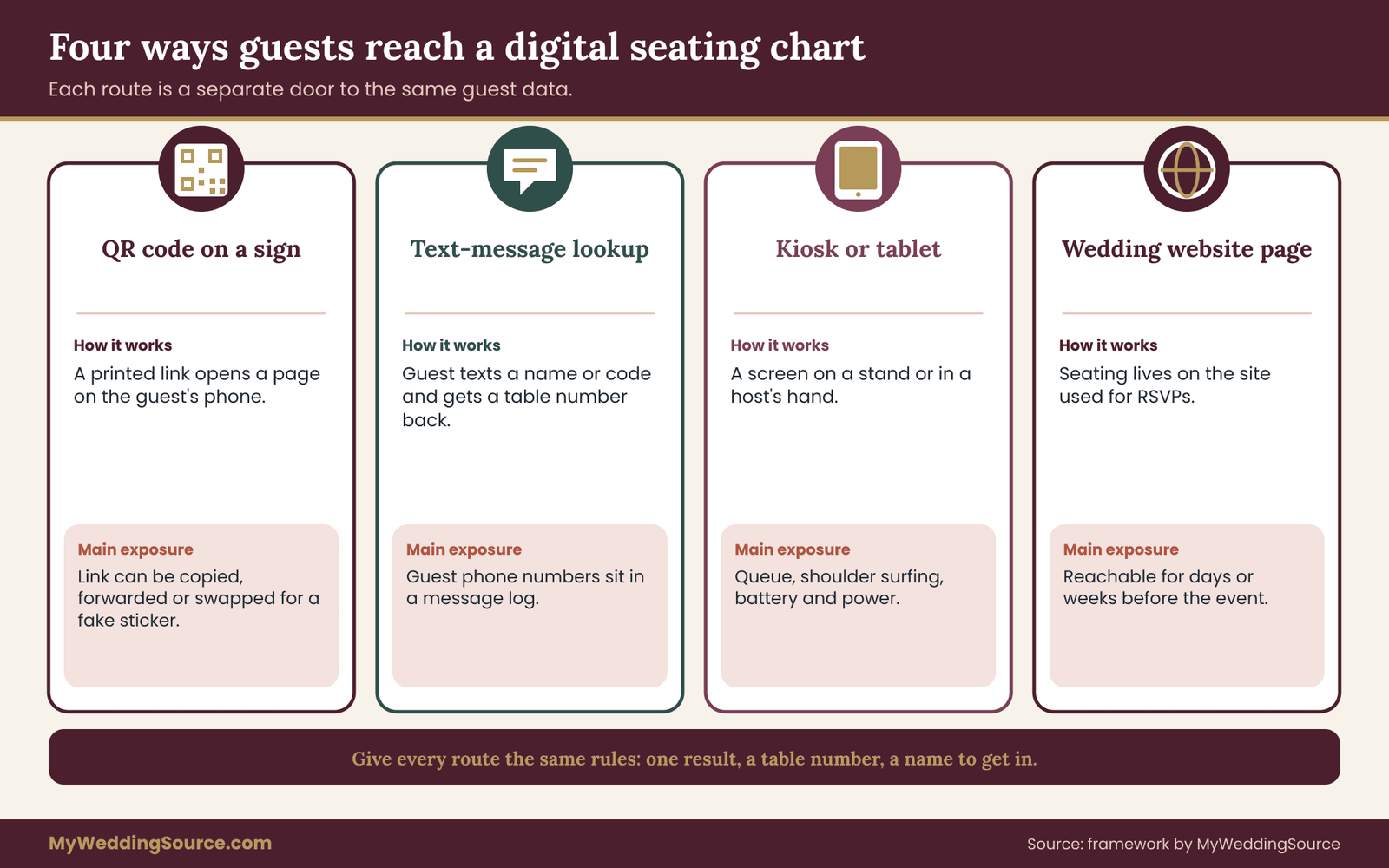
Most real weddings mix two or more of these ways of offering a digital seating chart. A couple might print a QR code for the entrance, send the link to guests the morning of the wedding, and leave a tablet at the host stand. Each path to the same data is a separate door, and each door needs the same rules.
What the guest actually sees
The most useful question to ask about any digital seating chart is simple: what appears on the guest’s screen after a successful search? The answers range widely.
Some tools show a table number only. Some show a table number and a map. Some show a table number, the names of everyone else at the table, the meal choice, and a note about dietary needs. Some show the entire guest list the moment the page loads, with a search box on top that merely filters what is already there. In that last design every guest who opens the page receives every name and every table in the file, even if the screen only displays one row at a time.
That difference matters more than the color of the page. A digital seating chart that returns one result for one search is a different object from a page that ships the full list to the phone. The next sections explain how to tell which kind you have and how to ask a vendor.
Why couples choose it, and what they give up
The reasons couples give for choosing a digital seating chart are practical. Printed boards cost money, take design time, and cannot be fixed once printed. A board with two hundred names is hard to read in a dim room, and a crowd forms at it. A screen can be rearranged until the final hour, which helps when a late cancellation or a surprise plus-one lands on the wedding day.
What couples give up is easy to overlook because it is invisible. A printed board is visible to everyone, so everyone understands what it reveals. A page on a phone feels private, because each guest sees only their own screen, even when it is not. A board does not need power, signal, an account or a working link. A board does not need a person to log in at four in the afternoon when the venue changes the room layout.
None of this is an argument against using a screen. It is an argument for deciding on purpose. The sections that follow give you a way to do that without adding much work: a short written policy, a short list of vendor questions, and a short rehearsal.
A quick check before you read on
Before going deeper, answer these four questions about your own setup, even roughly. Who can open the digital seating chart today if they have the link? What does a single search return? If a guest has no phone, who helps them and with what? If the digital seating chart is down at six o’clock, what is the first thing a host does? If you cannot answer one of these in a sentence, that is where this guide will help most.
Most couples who work through those four questions find that one of them has no answer at all. It is usually the third or the fourth. That is normal, and it is easy to fix a month ahead. It is hard to fix on the day, in a doorway, with sixty guests behind you.
What a digital seating chart exposes about your guests
A seating list looks harmless. It is a name and a number. But a full digital seating chart is a record of who you invited, who came, who sits next to whom, and often a good deal more, because couples tend to keep one master spreadsheet and feed the digital seating chart from it. Before you pick a tool, it helps to take that spreadsheet apart and look at each column as a piece of information with its own risk.
The columns that usually sit in a seating file
Full names. On their own, names are the least sensitive column, though a complete list of attendees is still useful to someone who wants to know who will be in one place at one time. That is a mild concern for most weddings and a real one for a few.
Table numbers. A table number is the point of the whole exercise. Alone it tells a stranger almost nothing. Next to a name, it tells them where that person will be sitting.
Relationships. Seating is a social map. Tables labeled “college friends” or “bride’s family” or “work” tell the reader how each guest connects to the couple. A table of one name and no label can say something too. Guests who read a full seating list sometimes notice who was placed far from the couple, and feelings follow. A digital seating chart that shows the whole room invites that comparison.
Plus-ones and children. Whether a guest was allowed a plus-one, and whether a child is listed by name, is information you may not want broadcast. Children’s names in particular are worth keeping out of any page that is reachable by link.
Meal choices and allergies. A meal selection is mild. A listed food allergy or a medical dietary need is health-related information about a named person. It does not belong on a screen that anyone at the entrance can open.
Accessibility notes. A note such as “wheelchair user, needs aisle seat” is useful to the venue and the host. It should travel on a separate sheet to the people who need it, not through a public lookup.
Contact details. Phone numbers and email addresses are often in the same spreadsheet because they came from the RSVP form. They have no business in a seating lookup, and if a tool asks for them in order to work, that is a reason to look at the tool again.
One result versus the whole list
The structural question is whether the page returns one match or ships the whole list. Here is a plain way to check, without any technical skill. Open the digital seating chart on a phone with the data connection off after the page has loaded. If you can still search names and get results, the whole list was probably downloaded to the phone along with the page. If the search fails, the digital seating chart is likely asking a server one question at a time.
A second check: type a single letter or a very common first name. Does the page return a long list of matches? If so, anyone can type “a,” then “b,” and walk through the whole alphabet. A well-built lookup limits what a partial name can return, asks for more than a first name, or shows only a count and a prompt to keep typing.
Neither design of digital seating chart is automatically wrong for a wedding of fifty close friends in a private house. The point is to know which one you are running and to decide whether it fits the people on the list.
Why neighbors are the sensitive part
When a digital seating chart returns not just “Table 12” but the other names at Table 12, it adds a layer of information that a printed board almost never carries. Printed boards list names by table or by alphabet, rarely both on the same page in a way you can cross-reference quickly. A digital seating chart can do both in one tap.
Think about who ends up at a table. A couple who have put a quiet, anxious relative with two other gentle guests may not want the table to be searchable by anyone who wants to find the “difficult table.” A couple who have separated two families after a falling-out do not want that arrangement visible. A guest who is a friend of the couple’s former partner may not want to be found easily.
The simplest rule is that a guest’s result should answer exactly one question: where do I go? A table number, perhaps a table name or a spot on a map, and a short instruction such as “straight ahead, near the window.” Neighbors, meals and notes stay on the sheets the staff use.
The guests who have real reasons for privacy
A small number of guests on almost any list have a serious reason not to be easy to find. Someone may be avoiding a former partner. Someone may have a legal order that limits contact. Someone may have left a difficult family situation and be attending only one part of it. You will rarely know. Some of these guests will quietly tell you; most will not.
You do not need to ask every guest why. You need a design that does not make these cases worse. That means no list of attendees posted publicly on a link, no search that reveals whether a named person is coming, and a way for any guest to tell a host, “please do not tell anyone where I am sitting,” and have that honored.
A practical step is to include one sentence on the invitation website or the RSVP page: “If you need your seating kept private, tell us and we will seat you and guide you personally.” It costs nothing and lets guests speak up early. Handle the request through a single trusted person, not through a vendor email thread.
A short exposure check for your own file
Take your master spreadsheet and mark each column in one of three ways. Mark it “guest sees it” if the guest needs it to find a seat. Mark it “staff sees it” if a host, caterer, planner or venue manager needs it to do a job. Mark it “nobody outside the couple sees it” for everything else. Then compare the first group to what your chosen tool displays.
Most couples find the first group has two items: the guest’s own name, which they typed, and a table number. If your tool shows more than that, either change the tool settings or change the tool. Anything in the second group should reach staff by a separate route, which the policy section later in this guide covers. Anything in the third group should not be uploaded into a seating tool at all, because the safest data is the data the tool never receives.

Names that collide and spellings that differ
Privacy and usefulness pull in the same direction here. A digital seating chart that depends on an exact spelling fails guests with hyphenated names, names that were changed after marriage, nicknames, and names with accents. A guest on your list as “Katherine Okonkwo-Reyes” will type “Kate Reyes” and conclude that they are not invited.
The usual fix is to let the search be forgiving, and forgiving search is exactly what makes enumeration easy. The balance is to match on the last name plus one more detail the guest knows, such as the first initial, while limiting how many results can ever appear. Where a digital seating chart cannot do that, a short alias column in the spreadsheet, such as “Kate,” “Katie,” “K. Reyes,” helps the correct guest and does not expose anyone new.
Households make this harder. Four guests with the same last name may each need their own result, and the tool should not reveal all four when one searches. If one search shows the whole family, a guest who is attending separately from the rest of the household may be surprised by what appears.
What to take from this section
A digital seating chart can be made quite private with a few decisions: send only a name and a table number to the screen, keep neighbors, meals and notes off the guest-facing page, make the search require more than a first name, and give guests a way to ask for private seating. None of these is expensive. They are choices about settings and spreadsheets, and they are far easier to make in the quiet weeks before the wedding than in the rush of the final week.
QR codes and links: how a digital seating chart gets reached
A QR code is a printed web address that a phone camera can read. That is all it is. The square holds a link, the phone shows a preview of the link, and the guest taps it. Everything that can be true of a web address can be true of a QR code: it can lead somewhere safe, somewhere misleading, or somewhere that quietly records who visited. So the questions to ask about a digital seating chart reached by QR code are the questions you would ask about any link you were about to send to two hundred people.
The link is the lock and the key
A seating page that anyone with the address can open is protected only by the address being hard to guess and hard to share. Both are weaker than they sound. Addresses get copied into group chats. Guests forward the link to a partner who was not invited. A photo of the sign, posted online, contains a working code.
For a small, trusted event that may be fine. For a larger event, ask whether the page can add a second requirement, such as a short code printed on the invitation, a name plus one more detail, or a time window that opens the digital seating chart at a set hour and closes it after. A second requirement does not have to be elaborate. A four-word phrase on the invitation card that guests type before the search box appears is enough to stop casual wandering.
The cost of a second requirement is friction for guests who lose the card. That is a real tradeoff, and the policy section later on shows how to weigh it. The short version is that a digital seating chart is more useful than private only when guests can actually get in, and more private than useful when nobody can.
Fake and swapped codes
The risk people hear about most is a swapped code: someone places a sticker over a printed code so that it sends scanners to a different page. The Federal Trade Commission has published consumer guidance on scams that use QR codes, and the Cybersecurity and Infrastructure Security Agency publishes general advice on staying careful with links and codes. The point for a wedding is modest. A code on a sign in a venue lobby, staffed by your people, is low risk. A code on a poster left unattended in a public hallway for hours is a different case.
Three habits reduce the chance of trouble. Place the sign where a host can see it and can check it hasn’t been tampered with before doors open. Print the plain web address beneath the code so that guests can read it, and so a guest who sees a different address in their phone’s preview knows something is off. Use an address you control, such as a page on your own wedding website, rather than an address from a free tool that looks like a string of random characters.
A code that points to an address people can read is easier to trust. A guest who sees “ourwedding-seating dot example” in the preview will tap more confidently than one who sees a long unfamiliar string with no words in it. That is not only a security gain. It also reduces the number of guests who stop and ask whether the code is real.
What the page may be collecting
When a guest opens a seating page, the tool can often record more than the search. Depending on the service, it may log the time of the visit, the type of phone, the approximate location, and the name typed into the box. Some free tiers add advertising or third-party trackers to the page in exchange for the free service. Some store the name searched, which means the tool holds a list of who showed up and when.
You can learn a lot from a vendor’s privacy policy, and you do not need to read all of it. Look for the sections about what information is collected from visitors, how long it is kept, who it is shared with, and how to delete it. A policy that does not say, or that says information may be used for advertising, tells you something. The section on choosing a tool later in this guide gives a list of questions to send a vendor in writing.
The National Institute of Standards and Technology publishes a Privacy Framework that organizations use to think about this kind of data. You are not a company, and you do not need to apply a framework. Its core idea transfers well, though: collect the least you need, keep it for the least time you need, and know where it goes. That is the same rule this guide applies to a wedding.
Link sharing and search engines
A page that is not protected by anything can, in principle, be found by a search engine or by anyone who has the address. Two simple questions help here. Is the page hidden from search engines? Many website builders have a setting for this, sometimes called “discourage search engines” or “private.” Is the page behind a password or a code? If the answer to both is no, the only thing standing between a stranger and your guest list is that they have not seen the address yet.
A guest who forwards the link is a more common cause of exposure than a stranger. People forward things to a plus-one, to a ride-share partner, to a parent who is not coming. The fix is not to lecture guests. It is to design the digital seating chart so a forwarded link reveals very little: one result at a time, a table number only, and a requirement to know the guest’s name.
Timing the access window
A digital seating chart does not need to be live for months. A good pattern is to open the digital seating chart a few hours before the reception and close it after the last guest is seated, or at the end of the night. If your tool cannot schedule that, set a reminder to switch it off the next morning.
Some couples want the digital seating chart live the week before, so out-of-town guests can see where they sit and make arrangements. That is a reasonable wish, and it is also the period when the data is most exposed, because the link has the longest time to travel. If you do open it early, put a code on the invitation, hold the full list back, and consider showing guests only a message that confirms their name and tells them the table will be shown on arrival.
The invitation itself is another door. A QR code printed on every invitation puts a link into two hundred mailboxes, some of which get thrown away unopened. If you use one, make it lead to the wedding website’s front page, not directly to a seating tool that is live.
Printing and placing the code
The mechanics of the code matter as much as the data behind it. A code that does not scan is a failed digital seating chart, however private it is. Print it large enough that a guest can scan from where they stand in the queue, not from six inches away. Give it a plain, light background with a dark code, not a pale gray on cream. Leave a clear margin around it. Do not let a decorative frame, a floral border or a glossy finish cause glare under venue lights.
A useful rule is to test at the distance where the farthest guest in the line will stand. Do it with at least three different phones, including an older model and a phone with a cracked screen protector. Do it in the room’s real lighting, in the evening, with the venue’s lights set the way they will be on the day. Many wedding rooms are dim, and a code that scans easily at noon in a showroom may not scan at all in a candlelit ballroom.
Put a short instruction beside the code in plain words: “Scan with your phone camera to find your table. Need help? Ask a host at the desk.” The second sentence does the privacy work. It tells guests who do not want to scan, or cannot, that there is a person ready to help, and it keeps the queue from forming around guests who are squinting at a screen.
Phones are not always in pockets
Many couples plan a phone-free ceremony, and some ask guests to keep phones away through cocktail hour. That is a perfectly good choice. It also means the QR code is working against the request for a stretch of the evening, and guests who have followed your instructions have left the phone in a bag or a car.
If your program asks guests to put phones away, make sure the seating plan does not quietly depend on them. A host with a printed list at the point where guests exit the ceremony, or a board at the cocktail area, makes the paper route available at the moment guests have their phones tucked away. The paper fallback test in a later section checks for exactly this.
Reading a result for what it tells a stranger
Do a thought exercise. Imagine a stranger, someone who found the link to your digital seating chart by accident, opens the page. What do they learn in one minute? If the answer is “nothing, they cannot search without a name,” the setup is sound. If the answer is “the whole list of attendees,” then the QR code is simply a convenient way to hand that list to anyone near the sign.
That exercise is worth doing with a friend. Give them the link only, no explanation, and ask them to find out as much as they can in two minutes. Their notes tell you more than any technical review could, and they show you what a curious guest will see.

A short list for the code itself
Before the sign goes to the printer, check these five things. The code opens a page on an address you recognize. The plain address is printed below it. The page shows one result for one search. The sign says where to get help. A named person is responsible for checking the sign before doors open. Together, these cost very little and cover most of the practical risk of a printed code at a wedding.
A lookup access policy for your digital seating chart
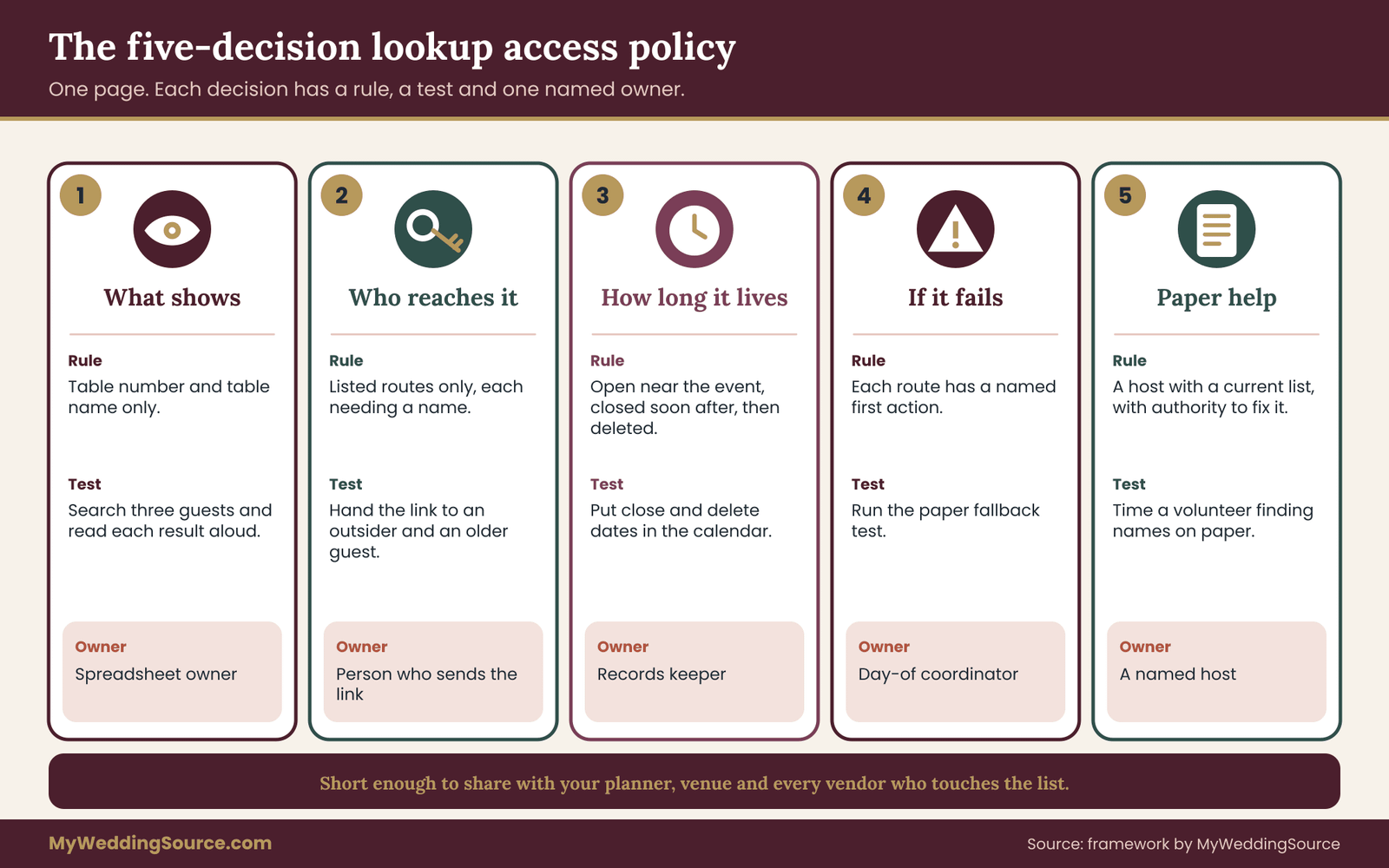
Here is the framework this guide recommends. It is a single page, written before you buy or set up anything, that answers five questions about your digital seating chart. We call it the lookup access policy. It is not a legal document and nobody needs to sign it. Its job is to make you decide the five things that otherwise get decided by default settings.
The five decisions are: what shows, who reaches it, how long it lives, what happens when it fails, and who helps on paper. Each has a short rule, a way to test it and a person who owns it.
Decision one: what shows
The rule: a guest’s result shows the table number and, if useful, a table name and a location cue. Nothing else. No neighbors, no meal, no notes, no contact details, no relationship labels.
How to test it: search for three guests yourself, including one with a hyphenated last name and one who shares a last name with a relative. Read each result aloud. If you hear anything that would make the guest uncomfortable to see on a stranger’s phone, remove it.
Who owns it: whoever manages the spreadsheet, usually one partner or the planner. Decide one person, so the settings are not changed by three people at once on the final night.
A common exception is a table name or theme, such as a place the couple visited. That is fine because it is part of the decor and says nothing about the guest. Another exception is a short accessibility cue, such as “near the entrance.” Use that only when the guest has asked for it, and have a host deliver it rather than the screen.
Decision two: who reaches it
The rule: guests reach the digital seating chart only through the routes you listed, and each route requires a name. Staff reach a fuller version only through a separate, labeled sheet.
Write the routes down. Possibly: QR code at the entrance, a text number, a tablet at the host stand, a page on the wedding website. For each, write what the guest needs to get in: a name, a code from the invitation, a link sent that morning. If a route needs nothing at all, write that down too, and decide whether you are comfortable.
How to test it: give the link to someone outside the guest list and watch what they can do. Then give it to a guest with an older phone and watch whether they can do it. Both results count. A digital seating chart that stops strangers and also stops grandparents is not yet working.
Who owns it: the person who sends the link and prints the sign. If a planner or venue coordinator manages the signs, the couple still owns the decision about who can reach the data.
Decision three: how long it lives
The rule: the guest-facing lookup opens near the event and closes soon after. The data is exported to your own records and deleted from the tool within a stated number of days.
Pick the dates now. A reasonable pattern is to open the digital seating chart the day of the wedding, close it the next morning, export the final list to your own files, and delete the data from the tool within a couple of weeks, after you have checked the export opens. If you keep seating records at all, keep them in your own archive with the rest of your wedding records, not on a vendor’s server.
How to test it: put the dates in your calendar and add the deletion step to your post-wedding task list. Ask the vendor how to delete data and whether deletion covers backups. Save the reply.
Who owns it: the partner who is the records keeper after the wedding. This one is the easiest decision to forget, because everyone is tired and the digital seating chart seems finished.
Decision four: what happens when it fails
The rule: every route has a failure state and a named response. Dead signal, dead link, locked account, dead battery on the tablet, a power outage. Each has a first action and a person who takes it.
Write it as a short list, not a flowchart. “If the QR code does not load for more than three guests in a row, the host at the desk switches to the printed alphabetical list and says so aloud.” The count is your decision; pick what feels right for your room.
How to test it: run the paper fallback test described later in this guide. That is the only reliable way to find out whether the failure plan works. A plan that has not been rehearsed is a guess.
Who owns it: the day-of coordinator, a planner, or a friend you trust. Not the couple. On the wedding day the couple should not be the people troubleshooting a digital seating chart.
Decision five: who helps on paper
The rule: at least one person is stationed with a complete, current paper list, and every host knows where it is. The paper list is the same data as the digital seating chart, in alphabetical order, with the same table numbers, printed with the same restraint about what it shows.
Name the person and the place. “Priya, at the table by the door, with two printed copies and a pen.” Give the person authority to seat guests and to change the list as late arrivals appear. A paper list that cannot be corrected is a trap.
How to test it: the same fallback test. Count how many seconds a volunteer needs to find a guest on paper, and compare it to the digital result.
Who owns it: a named host. Write the name on the policy page.
Putting the five decisions on a single page
The policy for a digital seating chart works best when it is short. Write each decision as one sentence, add the owner’s name and the test date, and stop. A page like this might read: shows table number and table name only; reached by QR code, text number or host tablet, each requiring a last name; opens at four in the afternoon and closes at midnight; if the QR code fails, the host switches to the printed list; paper list kept at the door by Priya; owner of the spreadsheet is one partner; deleted from the tool within fourteen days.
Share it with your planner, your venue coordinator and any vendor who touches the data. Agreeing to it in writing is how you find out whether a vendor can follow it. A vendor who cannot commit to “table number only” is telling you something about the tool.
Sharing a fuller list with staff, safely
Staff do need more than guests do. A caterer needs meal counts and allergy flags by table. A venue coordinator needs the room layout and any accessibility seating. A host needs the full list in alphabetical order. The aim is not to starve them of information but to deliver each person exactly what their job needs.
A sensible approach is one export per role. The caterer gets table numbers, meal codes and allergy flags, with names where the kitchen needs them to serve correctly. The host gets names and table numbers. The venue gets table counts and accessibility positions. Each file is labeled with the role and the date. That way a change to the main spreadsheet does not mean three people working from three versions without knowing it.
Send those files through a channel you trust, not as a screenshot in a group chat. Ask staff to delete their copies after the event and to confirm. A short, friendly message is enough: “Thanks again. Please delete the guest file once you have finished with it and reply to confirm.” Most professionals expect this request, and it costs nothing to make it.
If your vendor contract is silent on guest data, it is worth adding a line. Our wedding vendor contract guide explains what to look for in an agreement, and data handling fits naturally into the clause on deliverables and return of materials.
How the policy changes with the size of the wedding
A wedding of thirty people, all known to the couple, does not need heavy controls on a digital seating chart. The policy can be four sentences long, and the paper fallback can be a printed list in the host’s pocket. A wedding of two hundred and fifty, with several vendors and a venue that hosts events every weekend, deserves the full page.
The principle scales, though. With fewer guests the exposure is smaller but the personal stakes per guest are higher, because everyone knows everyone. With more guests, the digital seating chart is more useful and more of the data belongs to people you barely know. In both cases, the same five questions apply, and answering them takes about an hour.
What not to put in the policy
Do not write promises you cannot keep. A policy that says “no data will ever be stored” is false if your tool keeps logs. Write what you can check: “we asked the vendor how long they keep search logs and they said so in writing.” If a vendor will not answer, write that down too. Your honest record of what you know protects you better than an optimistic one.
Choosing a tool for a digital seating chart and reading its terms
You may not choose a tool at all. The digital seating chart might come bundled with your wedding website, your planner’s software, your venue’s event platform or your AV vendor’s kiosk. Even then, you are choosing, because you are agreeing to their way of handling the data. The questions below work whether you are picking from a list or inheriting a tool.
Questions to send in writing
Send these by message so you have a written answer. Keep the tone friendly; vendors who handle guest data regularly will have answers ready.
First, what does a guest see after a search? Ask for a screenshot of a result page, not a description. Second, can the page show a table number only, with no neighbors, meals or notes? Third, does the page send the whole list to the phone, or does it ask the server for one answer at a time? Fourth, can the digital seating chart be protected by a code, a name plus a second detail, or a time window? Fifth, can the page be hidden from search engines?
Then ask about the data itself. Where is guest data stored, and who at the company can see it? How long are search logs kept? Is any guest data shared with advertisers or other companies? Can you export the list and delete everything, and does deletion cover backups? What happens to the data if the company closes or is sold?
Finally, ask about reliability. Does the digital seating chart work offline in some form? Is there a status page? What is the support route on a Saturday evening, and does it include a person or only a help article? Can you print the full list in alphabetical order from inside the tool?
How to read the answers
A good answer is specific. “Search logs are kept for thirty days and then deleted; you can delete the event sooner from your dashboard” is better than “we take privacy seriously.” A vague answer is not proof of bad intent, but it leaves you with nothing to rely on.
Watch for two patterns. One is a tool that needs more than it should: a guest’s phone number, an email address, an account sign-up or a social media login just to find a table. Another is a free tier that pays for itself with something else, such as advertising on the guest’s screen or the right to use anonymized data. Neither is automatically unacceptable, but you should know which you are accepting.
The Federal Trade Commission publishes guidance for businesses on protecting personal information and for consumers on how companies use it. The agency is the right place to confirm current consumer protection expectations, rather than relying on a vendor’s summary. For the technical side, the National Institute of Standards and Technology maintains frameworks that vendors often cite; if a vendor says a tool follows one, ask which one and what it means in practice.
Cost logic without invented numbers
Price is rarely the deciding factor, and when it is, think in terms of what you are paying for. A free tool is free because someone else is paying, through advertising, data or an upsell. A paid per-event tool charges for storage and support. A flat fee from an AV vendor usually includes a person on site, which is worth a lot if the digital seating chart is a tablet.
The comparison that matters is between the cost of the tool and the cost of the failure you are guarding against. A tool that saves printing a board but needs a host with a printed list anyway has not removed the paper cost; it has added a layer. That can still be a good trade, because it lets you update seating late. Just do the arithmetic honestly and write down what you are buying.
If a vendor quotes you a price, check the current terms on the vendor’s own site and in your contract. Do not rely on a figure from an old article or a forum post, including this one. Prices and plan limits change often.
What belongs in the contract
If the digital seating chart is part of a vendor package, put the essentials in writing. The list of what the guest sees. The setup and teardown time. Who provides the device and the power. What happens if the device fails during the event. Who has access to the guest list and for how long. A deletion commitment after the event.
For a wedding website tool you are subscribing to yourself, the terms are usually a click-through agreement. Read the sections on data, deletion and termination, and save a copy of the page. Terms change, so a dated copy shows what you agreed to at the time.
Verifying a vendor’s claims
Claims like “secure” and “encrypted” appear on every vendor page. They are not meaningless, but they are not specific. Ask what they mean. Is the connection between the guest’s phone and the page encrypted, which a browser shows with a lock symbol? Is stored data encrypted? Who holds the keys? A vendor with a real security practice can answer in a sentence or two.
If a vendor cites an independent report or certification, ask for the name and look it up on the issuing body’s own site. Treat anything you cannot confirm as unconfirmed. That is not cynicism. It is the same attitude you would take to a caterer’s claim that the kitchen is licensed: probably true, easy to check, and worth checking.
Guests who will not use a phone
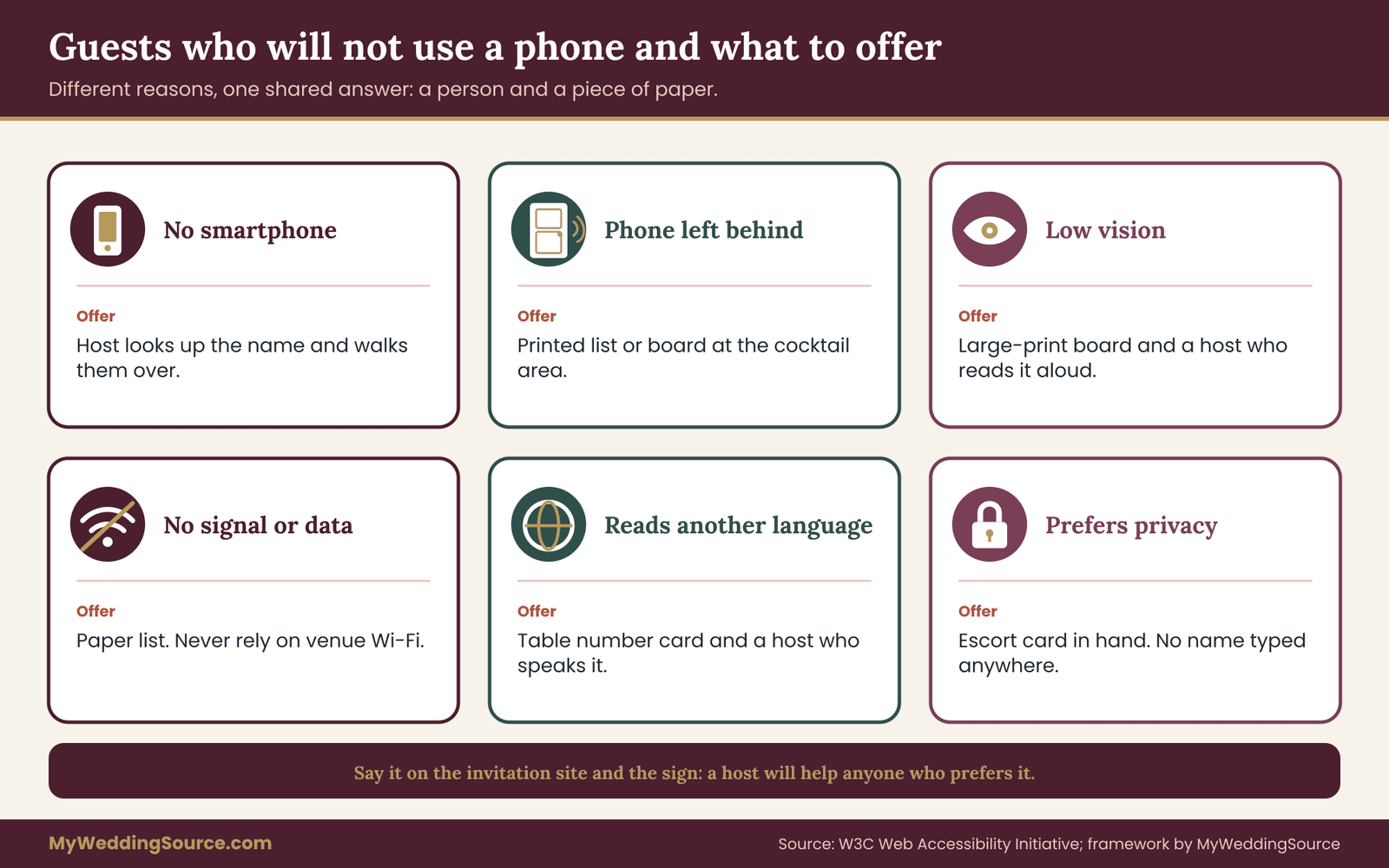
Every wedding has guests for whom a phone-based lookup does not work. The reasons differ, and so do the solutions. A good fallback plan names the groups before the day and matches each to a method.
Who they are
Guests without a smartphone. Some older guests carry a basic phone or none at all. Some younger guests choose not to carry a smartphone. They are not a small afterthought. At many weddings they are several people.
Guests whose phone is not available. Phones are left in the car, in a coat-check bag, in a hotel room, or in a purse in the ceremony space. Phones die. Phones are locked behind a screen that the guest has to unlock with a face that is now covered by a mask, a hat or a hand full of drinks.
Guests with low vision or limited dexterity. A small page, a pale color, a tiny search box or a code that has to be scanned by aiming a phone at a sign can be difficult. The World Wide Web Consortium’s Web Accessibility Initiative publishes guidelines on readable text, contrast and input that apply to any page, including a seating page. A guest using a screen reader needs a page that works with one.
Guests with limited data or no signal. International guests may have no roaming. Guests in a rural venue may have no signal at all. Some venues, such as thick-walled halls, barns, cellars and boats, are famous for dead zones. If a page cannot load, a guest cannot read it, however private it is.
Guests who do not read the language of the page. A digital seating chart in one language may fail guests who read another. If your wedding has guests who read different languages, check that the page can show a table number in a way that does not depend on reading the instruction text.
Children and teens. Children can be seated without a screen at all. Their families need a short, calm way to find them: a table number said aloud, or a card handed over.
Guests who simply prefer not to. Some guests do not want to type their name into a page run by a company they have not heard of. That is a sensible instinct, and a good fallback honors it without comment.
What each group needs
The solutions differ, but they share a feature: a person. A guest without a phone, a guest with low vision and a guest who prefers not to share a name all benefit from a host who looks up the name and says, “You are at Table 9, near the window; I will walk you.” That one habit solves most of these cases at once.
A printed list is the second line of defense. It works for guests who can read print and are happy to look at a list. For guests with low vision, large print helps, and a person helps more. For guests who read another language, numbers are easier to understand than instructions, and a host who speaks that language is ideal.
The third line is the table cards. Escort cards handed out at the door give each guest a table number in their own hand. They are slower to produce than a digital seating chart and cannot be changed late, which is why many couples use them only for guests who ask. We cover escort cards and other paper alternatives in the next section.
An honest note on accessibility and the law
The Americans with Disabilities Act, administered by the U.S. Department of Justice, requires effective communication in many public places, and rules differ depending on who runs a space. A private wedding in a rented venue is not the same as a government office, and nothing here is legal advice. The practical point is the same either way: if a guest cannot read a screen, a person or a paper list should be there to help them without making a fuss. Our guide to accessible wedding venue red flags covers the physical side.
Making the offer visible
A fallback no one knows about does not work. Say it on the invitation website: “Seating will be shown on a screen and on paper. A host will help anyone who prefers it.” Say it on the sign by the QR code. Say it in the order of events so the host team knows to expect it. A sentence like that removes any sense of embarrassment, because guests see the paper route is a normal part of the plan and not a special accommodation for people who are behind the times.
Tell your hosts how to offer help. “Would you like me to find your table?” works better than “Do you need help with the phone?” because it sounds like service, not a judgment. The host can say it to every guest who hesitates at the sign, whatever the reason.
Paper and human alternatives that carry the load
Paper is not a failure of technology. It is the one thing in the room that has no battery, no signal and no login. A good plan for a digital seating chart treats paper as a real part of the system and decides what kind, how much and where.
Escort cards and place cards
Escort cards are small cards, one per guest or per party, handed out or displayed at the entrance. Each tells the guest a table number. Place cards sit at the table and show where in the table to sit. They solve different problems, and some weddings use only one.
Escort cards work as a fallback because they put the answer in the guest’s hand. They are also the most privacy-friendly option, since a guest sees only their own card. The costs are production time and the lack of flexibility: a late change means a handwritten new card. A short run of blank escort cards and a pen at the host desk handles late additions.
If you use escort cards for everyone, you may not need a digital lookup at all. If you use them only for guests who ask, keep a small stack pre-written for guests you know will struggle with a phone. Do not label the stack in a way that singles guests out. A single tray with all cards in alphabetical order, labeled simply “Find your name,” is better than a tray marked “for guests without phones.”
The alphabetical list board
A large printed board, with names listed alphabetically and a table number beside each, is the traditional fallback. Alphabetical by last name is easier to scan than grouped by table, because guests know their own name and not the table.
Readability matters more than style. Use a plain typeface at a size that can be read from arm’s length by an older guest in dim light. Leave generous space between rows. Avoid script fonts for names; they are hard to read at a glance and they punish guests with common but unfamiliar spellings. Our wedding signage guide covers readability, placement and venue permissions in more detail, and it applies directly to a seating board.
A board is public, which is its privacy tradeoff. Anyone in the room can read the names and tables. For most weddings that is acceptable and expected. For a wedding with guests who need privacy, use escort cards or a host with a handheld list, and keep the board off the wall.
The host with a list
A person with a printed list in hand beats every other fallback for flexibility and for tact. The host can find a name quickly, say the table aloud, point the way and walk with a guest who needs it. The host can also correct the list when a guest arrives with an unexpected plus-one.
The list the host uses should be the staff version: alphabetical, table numbers, and perhaps a short marker the host understands, such as a star for “needs to be walked to the table.” Keep markers private by using a symbol, not words. Print two copies and keep one in reserve. Put a pen with each, because the list will be changed.
A host who can see a screen as well as paper has the best of both. A tablet held by the host, not left on a stand, means guests do not touch the device or type their names into it. The guest says a name, the host finds it, and the guest hears the table number. That is a digital seating chart with the privacy of a person and none of the queue at a stand.
Table maps and wayfinding
A guest who knows “Table 14” still has to find it. In a large room with round tables, numbers on tall stands or hung signs help; numbers lying flat on the tabletop do not. A simple map at the entrance, with a mark for “you are here,” helps guests orient.
If your venue has two rooms, a cocktail area and a reception hall, a guest may need the digital seating chart in one place and the table number in another. Check that the number on the digital seating chart matches the number on the stand. A mismatch between the digital page and the physical signs is a more common problem than a technology failure. Our wedding reception guest flow guide covers how entry, seating, food and exit connect, and the seating moment is the part where guests pause.
Reading the room before choosing
How many paper routes do you need? A rough rule: at least one route that needs no device from a guest, and at least one that needs no speech from a host. A host with a list needs speech; a board needs sight; a card needs neither. A mix covers most combinations of guests.
Think about volume. If two hundred guests arrive within twenty minutes, a single host with a list may not be enough. Two hosts with the same list, in two places, double the capacity and cost two friends. A board alongside a host is the pairing many venues use: guests who are confident look at the board, and guests who are not ask the host.
Printing and version control
Paper has its own failure: it goes out of date. The list that was printed on Wednesday does not match the spreadsheet by Friday. Fix this by agreeing on a cutoff for the paper list and the digital seating chart alike. After the cutoff, changes go on the paper list by hand, and the host initials the change. In the same moment, someone updates the digital seating chart so the two stay in step.
Put the date and time of the print at the top of the paper list. A host who sees a list printed Friday morning knows to look for changes made later in the day. A list with no date invites the quiet error of using an old copy.
The paper fallback test for a digital seating chart
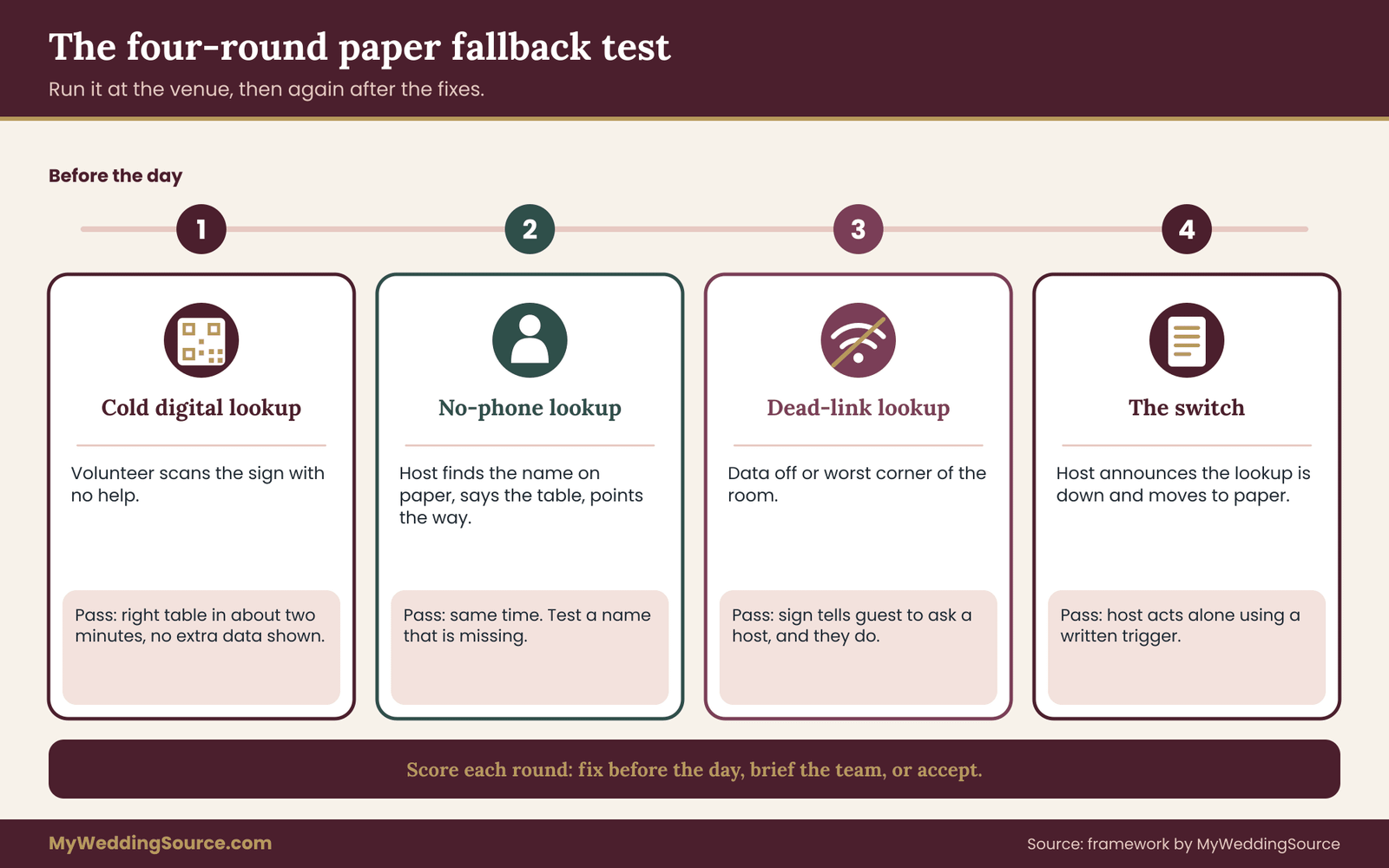
This is the second half of the framework: a rehearsal you can run in under an hour, a few weeks before the wedding and again two days before. It tests whether the paper route works, whether the digital route works, and whether the switch between them works. It needs a volunteer who has never seen your setup.
What you need
A printed copy of the host list. The QR sign, printed at actual size. One tablet or phone with the digital seating chart. A volunteer who does not know the guest list, ideally someone who was not involved in planning. A second volunteer to play a guest. A timer. A notepad.
If you can, run it in the actual venue, or at least in a room of similar size and lighting. A kitchen table test tells you whether the data is right. It does not tell you whether the code scans at distance or whether a host can be heard over the room.
Round one: the cold digital lookup
Ask the guest volunteer to find a table using the QR code, with no help. Start the timer when they stop in front of the sign. Stop it when they say a table number. Note what they tried first, where they hesitated, and what they said. Then ask them to describe what they saw on the screen.
Repeat with three names: a simple one, a hyphenated one, and one that appears twice in the list with different first names. Observe whether the page returned the right guest and nothing more. If the page showed anything beyond a table number, record that as a fault in the policy.
The pass rule is a decision, not a statistic. A reasonable one: the guest finds the right table in under two minutes, without asking for help, on a phone they brought. If they cannot, fix the sign, the page or the instructions.
Round two: the no-phone lookup
Now ask the guest volunteer to pretend they have no phone. They approach the host. Time the host. Does the host find the name on paper, say the table, and point the way within the same two minutes? Try it again with a guest whose name is not on the list, because that happens, and the host needs to know what to say.
A good script for the host is short and calm. “I do not see you on my list. Let me check the second copy. If I cannot find you, I will seat you at the guest table by the door and sort it out with the couple.” The phrase is not an accusation. It names the next step and keeps the line moving.
Round three: the dead-link lookup
Turn off the data connection on the phone, or move to the corner of the room with the worst signal. Ask the guest to try again. Does the page fail with a clear message, or does it spin? What does the sign tell them to do? Does the guest turn to the host without prompting?
This round tests the instruction on the sign more than the technology. A sign that says “Need help? Ask a host” turns a dead link into a short conversation. A sign without that line turns it into a stalled guest and a growing queue.
Round four: the switch
The last round tests the handover from digital to paper. Ask the host to announce, as they would on the day, that the digital seating chart is down and the list is being used. Time how long it takes the host to switch, who tells the other hosts and how guests are told. A switch that depends on the host finding the couple or the planner will not work on the day. The host should have authority to act.
Write down the trigger for switching. “Three guests in a row cannot load the page” is a clear rule. So is “the venue loses power or signal.” A rule like “if it seems slow” is not, because on the day everyone will disagree.
Offline, signal and power
Several of the faults in the test come from the room, not the tool. Check the venue’s signal in the real seating area, not at the front desk. Ask the venue whether guests can use a guest Wi-Fi network and how it behaves with a large crowd. Venues vary in what they offer, so ask the venue directly and note the answer.
If you run a tablet or kiosk, ask what happens when its battery runs low, whether it has a charger and a spare, and whether the page it displays is cached if the connection drops. Ask your AV vendor or planner to confirm in writing. Power is the boring cause of many kiosk failures, and it is the one that a short question answers.
Many guests will not use venue Wi-Fi even if offered, because they have a data plan or because the network requires a sign-in. Do not make the digital seating chart depend on it. If it works on guest Wi-Fi, treat that as a bonus.
Scoring the test
Keep the scoring plain. For each round, record time, what went wrong and who needs to fix it. Then assign three categories: fix before the day, brief the team, accept. A sign with a poor scan distance is a fix. A host who does not know the trigger rule is a briefing. A page that is slow on one old phone may be an accept, if the host route works.
Run the test again after the fixes, with a different volunteer if you can. The second run is shorter and it is where couples find that the first fix created a new issue. The value is not the score. It is finding out in daylight, with a friend, instead of at the door with a hundred guests waiting.
Where this fits in the wider checklist
If you keep a master wedding checklist, the digital seating chart test belongs in the final-two-weeks stage, next to the final headcount and the vendor confirmations. Our wedding planning checklist shows where that stage sits among the other tasks, and the wedding seating chart guide covers the arrangement itself, which this article does not.
A worked example of a digital seating chart done carefully
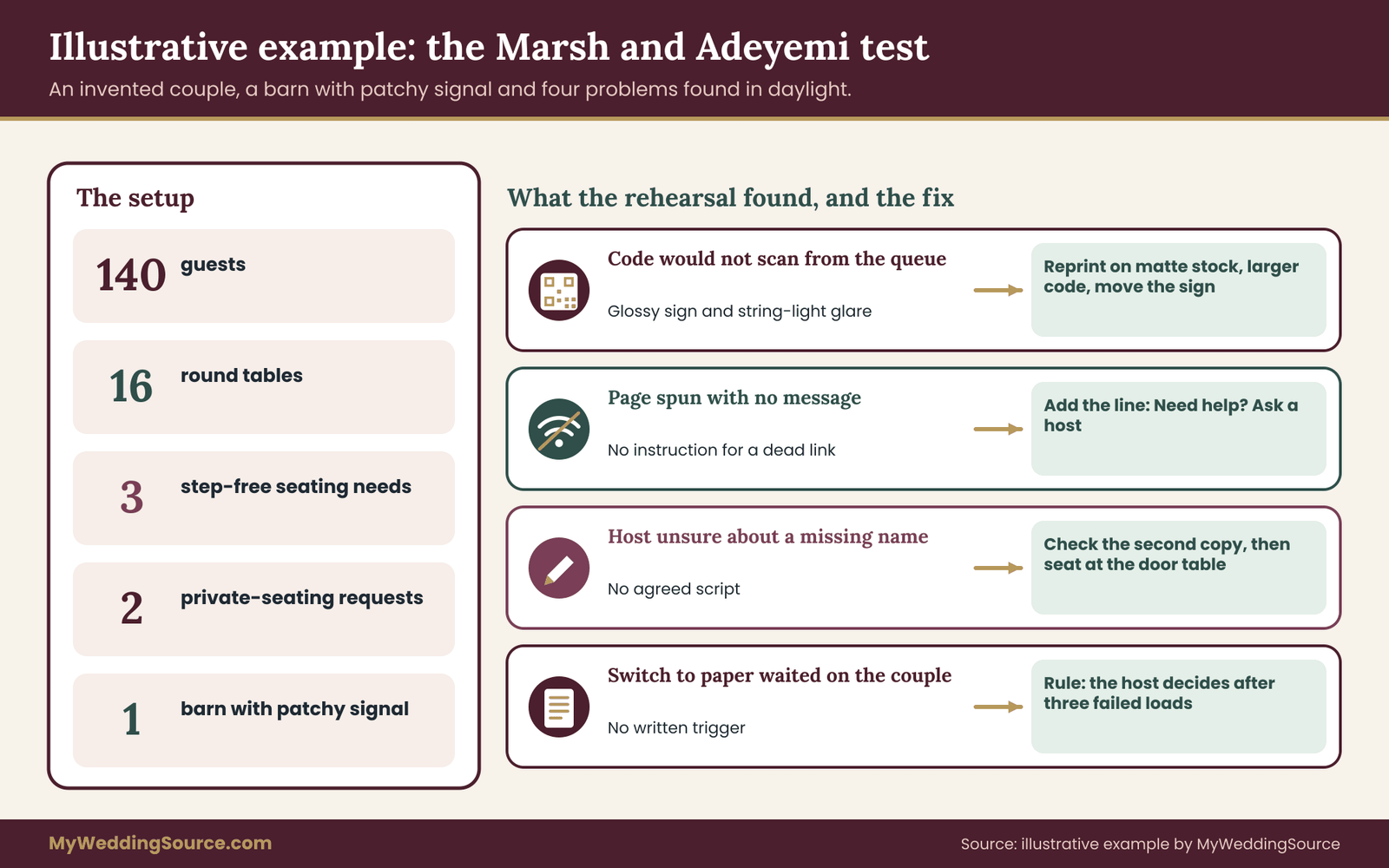
The following is an invented example, built to show how the pieces fit. The couple, the venue and the numbers are illustrative and not drawn from any real wedding. Call them Dana Marsh and Tobi Adeyemi. They are planning a Saturday evening wedding for 140 guests at a converted barn, with sixteen round tables and a ceremony outdoors.
The starting setup
Dana built the guest spreadsheet over several months. It has names, table numbers, meal choices, two allergy flags, notes on three guests who need step-free routes, and the phone numbers collected from the RSVP form. The wedding website host offers a seating lookup that Dana likes. It shows a search box and, on a match, the table number and the names of everyone else at that table.
Tobi’s grandparents, two aunts and three older friends do not carry smartphones. The barn is known locally for patchy signal. The couple plans a phone-free ceremony and a quiet cocktail hour, so phones will be in pockets and bags until dinner.
Step one: take the spreadsheet apart
They sort the columns using the three-group check from earlier. Guest-facing: name and table number. Staff-facing: meals, allergies, accessibility notes. Not shared at all: phone numbers and relationship labels. They remove the phone numbers from the file that goes to the tool and keep a separate private copy.
They also ask the website host two questions by message. Can the page show only the table number? Does it send the whole list to the phone? The host answers that the neighbor names can be turned off and that the page loads results as the guest searches. They switch the neighbors off and test with the data connection off after loading. The search fails, which is what they hoped to see.
Step two: write the lookup access policy
Over one evening they write the five decisions on one page.
What shows: table number and table name. Who reaches it: a QR code at the barn entrance and a link sent by text to guests on the morning of the wedding, each requiring a last name plus first initial. How long it lives: open at three in the afternoon on the wedding day, closed the next morning, exported and deleted from the tool within fourteen days. What happens when it fails: if three guests in a row cannot load the page, the host switches to paper. Who helps on paper: Priya, a cousin, at a table by the door.
They add one sentence to the website: “If you would like your seating kept private or shown to you in person, tell us and we will take care of it.” Two guests reply. One of them has a reason the couple does not ask about. Both are given printed escort cards and are walked to their tables by a host.
Step three: build the paper side
They print an alphabetical host list in plain type, with the date and time at the top, two copies, and a pen for each. They order blank escort cards for late changes. For the three guests who need step-free routes, they write a staff note for the barn manager and the hosts, not for the page. Aunt Rosalind has low vision, so they make a larger-print board for the cocktail area that lists names alphabetically, with table numbers beside them and nothing else.
They decide not to use a kiosk. The barn has limited power in the entry, and a tablet in a host’s hand does the same job. The host with the tablet will also carry the printed list.
Step four: the fallback test
Three weeks before the wedding they run the test at the barn on a Tuesday evening, with Dana’s neighbor as the guest volunteer and Priya as the host. In round one the code does not scan at the distance where the queue would stand. The sign was printed on glossy paper and the barn’s string lights cause glare. They reprint on matte stock, enlarge the code and move the sign off the direct line of the lights.
In round two, Priya finds names quickly, but she hesitates when the guest’s name is not on the list. They agree on the script about the second copy and the seat by the door. In round three, with the connection off, the page spins with no message. They add a line to the sign: “Need help? Ask a host.” In round four, the switch to paper depends on Priya reaching Dana, who will be in the dressing room. They change the rule: Priya decides.
Step five: the day
On the day, the code is checked by Priya at three o’clock, along with the sign’s matte print. The link is sent by text at noon. About two-thirds of guests use the QR code or the link. Some ask Priya or another host. The older guests are given cards by the door and walked to their tables. One guest arrives with an uninvited plus-one, and Priya adds a name to the paper list and tells the couple’s coordinator, who updates the digital seating chart.
Near the end of the evening, the digital seating chart is closed. The next morning, Dana exports the final list, saves it with the wedding records, and sends the deletion request to the website host, with a reminder in her calendar to confirm. The caterer and the barn manager each reply that they have deleted their copies of the guest file.
What the example shows
Nothing about this digital seating chart required special equipment. The couple removed what the page did not need, asked two questions, wrote one page, printed two lists and ran one test. The fixes the test produced, matte paper, a help line on the sign and a switching rule, would not have been found on a kitchen table. That is the reason to rehearse at the venue.
It also shows the limits. The couple never confirmed whether the website host’s servers keep backups after deletion. They wrote that down as an open question and moved on, which is an honest place to stop.
Your next steps
Work through these in order. Each is small.
- Open your seating spreadsheet and mark each column as guest sees it, staff sees it, or nobody outside the couple sees it.
- Ask your tool or vendor the written questions from the tool section, and save the answers.
- Write the lookup access policy on one page: what shows, who reaches it, how long it lives, what happens when it fails, who helps on paper.
- Add a line to your wedding website and your sign that says a host will help anyone who prefers it. If you want to review how guests respond to invitations, the wedding RSVP etiquette guide helps with wording.
- Print a dated host list and a large-print board, and prepare blank escort cards for late changes.
- Run the paper fallback test in the venue with a volunteer, fix what it finds, and run it again.
- Set the closing date, the export step and the deletion request, and put them in your calendar before the wedding.
For the wider set of backups around the day, including messages, files and permissions, see our full guide to wedding day digital operations. For help keeping the guest list itself clean, the wedding guest list guide is a good companion.
FAQ
Is a digital seating chart safe to use at a wedding?
It can be, if you control what it shows and who can reach it. A digital seating chart that returns only a table number for a name and a second detail, sits behind a code or a time window, and is closed after the event carries little risk. A page that shows the whole list or neighbors to anyone with a link carries more. Check what a search returns before you commit to a tool.
What should a digital seating chart show each guest?
A table number is enough. A table name or a short location cue, such as near the windows, is fine because it adds nothing about the guest. Leave out neighbors, meal choices, allergies, accessibility notes, phone numbers and relationship labels. Staff who need those details should receive them on separate sheets for their own jobs, not through a page that guests and strangers can open.
Do I need a paper backup if I use a QR code?
Yes. Phones die, signal fails, guests leave phones in cars, and some guests do not own a smartphone. A printed alphabetical list held by a host, plus blank escort cards for late changes, covers most failures. Keep the paper list as current as the digital one, put the print date at the top, and rehearse the switch before the wedding.
How do I protect guest privacy with a QR code?
Use a code that opens a page on an address you recognize, and print the plain address beneath it. Require a name plus one more detail, limit results to one guest at a time, and ask that the page be hidden from search engines. Open the digital seating chart near the event and close it soon after. Have a host check the sign before guests arrive.
What can I offer guests who do not have a smartphone?
Offer a person and a piece of paper. A host with a printed list can find a name, say the table aloud and walk the guest over. Escort cards put the answer in the guest’s hand. A large-print board helps guests with low vision. Say on the invitation website and the sign that a host will help anyone, so nobody feels singled out.
How should I test the paper fallback before the wedding?
Run a short rehearsal at the venue with a volunteer who has never seen the setup. Test a cold digital lookup, a no-phone lookup with a host, a digital seating chart with the connection off, and the switch from digital to paper. Time each one against a rule you set, such as two minutes. Fix what fails, then run it once more.
Should vendors get a copy of the seating list?
Give each vendor only what their job needs. A caterer needs table numbers, meal counts and allergy flags. A venue needs table counts and accessibility positions. A host needs names and tables. Send each file through a channel you trust, label it by role and date, and ask the vendor to confirm in writing that they deleted their copy after the event.
How long should the seating lookup stay online?
Keep it live for as short a time as works. A common pattern is to open it on the wedding day and close it the next morning. Export the final list to your own records first, then ask the tool to delete the data, and note the date you asked. If you must open it earlier for out-of-town guests, add a code on the invitation.
Sources
Check each agency or company for current rules, terms and guidance before you rely on them.
- National Institute of Standards and Technology: Privacy Framework and cybersecurity guidance on collecting and protecting personal data.
- Federal Trade Commission: guidance on protecting personal information and on how businesses handle consumer data.
- FTC Consumer Advice: consumer guidance on scams, including those that use QR codes.
- Cybersecurity and Infrastructure Security Agency: public guidance on staying careful with links, codes and personal data.
- ADA.gov, U.S. Department of Justice: information on effective communication and accessibility under the Americans with Disabilities Act.
- W3C Web Accessibility Initiative: guidelines for readable, usable web pages, including text size, contrast and screen reader support.
- Section508.gov: federal resources on accessible digital content and design practice.
- U.S. Food and Drug Administration: food allergen information relevant to how allergy details should be handled.
- USA.gov: entry point to federal consumer and privacy resources.