
A wedding change order is a short written record of one change to what a vendor has already agreed to provide: what is being added, removed or swapped, what it costs, what it does to the schedule, and who approved it. This guide gives you an acceptance chain with cost and timing flags, so design changes to rentals, florals and labor get decided on purpose instead of drifting through text messages.
For every design change after you sign, write one wedding change order. Describe the change in one sentence, send it in writing, and ask the vendor to answer with the price, the deadline and anything that moves. Raise a flag for any change that costs money, touches a deadline, or affects another vendor or the venue. Approve it only after the flags are answered, record the new total, and pass the update to everyone who needs it.
Most wedding design changes start small. A florist asks whether you would like garden roses instead of the spray roses on the quote. The rental company mentions that the linen color you picked is sold out in the size you need. Your caterer’s crew lead says the cocktail area would flow better with four more high-top tables. Each question sounds minor, each answer is a quick yes, and by the end of the month your signed paperwork describes a wedding that no longer exists.
A wedding change order fixes that by adding one small step between “can we?” and “yes.” The step is not complicated. You write the change down, the vendor prices it and names the deadline, and both sides confirm the new version before anyone orders anything. The paperwork for a wedding change order takes ten minutes. The problems it prevents usually take weeks to untangle.
A note on scope. This is general information, not legal, tax or financial advice. Contract rules, consumer remedies and insurance terms differ by state and by vendor, and some of them change, so confirm anything that carries real money or risk with the vendor’s own terms and with a licensed professional where it matters.
What a wedding change order is, and why design changes cost more than they look
In professional construction and procurement, a change order is a written amendment to an agreed scope of work. It records the change, the price adjustment and any change to the schedule, and it becomes part of the agreement once both sides accept it. A wedding change order borrows that habit and shrinks it to fit a florist, a rental company or a catering crew.
It helps to be clear about what it is not.
- It is not a new contract. A wedding change order amends the contract you already have. The original terms about cancellation, liability, insurance and payment still apply unless the wedding change order says otherwise.
- It is not a complaint. Sending a wedding change order does not signal distrust. Vendors who work with corporate clients deal with change paperwork all the time, and many appreciate a clear request more than a vague one.
- It is not a quote. A quote is a price for work not yet agreed. A wedding change order records a decision about work that is already agreed, so it has to state what happens to the original line items.
- It is not a text thread. Messages are evidence, but they are a poor record. The decision gets buried between photos, emoji and logistics, and nobody can find the final answer six weeks later.
If you have already read the guide to the wedding vendor purchase order, you will recognize the idea. That guide describes the order sheet that sits inside a vendor relationship and includes a simple change log. This article goes deeper on one part of it: the decision process for a design change after the order sheet exists. For the legal terms that frame all of this, such as cancellation, liability and refund language, the wedding vendor contract guide is the better starting point.
Why a change costs more than the price tag suggests
Couples often assume a change should cost the difference between the old item and the new one. Swap a linen that costs less for one that costs more, pay the gap. Real vendor costs do not work that way, for four reasons.
First, the vendor may have committed money already. A florist who ordered stems for your event has bought them, or reserved them from a wholesaler, and cannot always send them back. A rental company that held 150 chairs for your date turned away other bookings for those chairs. When you release the item, the vendor may keep the cost of the commitment even if the price on paper goes down.
Second, minimums and bundles hide in the pricing. A rental company may price linens by the dozen, a caterer may require a minimum number of staff for a service style, and a floral studio may price a design recipe as a unit. Remove one item and the price may not fall at all, because the unit price was built around the whole package.
Third, labor does not scale smoothly. Adding two more arrangements to a ceremony install may not add time, or it may require another person. Removing a lounge area may not save a crew member’s shift. Labor tends to move in steps, not in straight lines, which is why labor changes need their own attention later in this guide.
Fourth, changes travel. A different table shape changes the linen order, the floor plan, the number of servers, the florals that sit on the table and the timing of the room flip. One small request can turn out to touch four vendors.
Who starts a change
Changes come from more directions than couples expect, and the process should catch all of them.
The couple starts most of them: a new color story, a different guest count, a decision to add or drop an element. A vendor starts others, usually because of supply: a product is discontinued, a flower is not available in the quantity needed, a delivery vehicle cannot fit the venue’s loading rules. The venue starts some, such as a candle ban, a restriction on hanging items from ceilings, or a changed load-in window. A family member starts the ones that cause the most trouble, usually by calling a vendor directly with a request that never reaches the couple.
The acceptance chain in this guide treats all four the same. A request from a vendor, a venue or an aunt does not become an approved wedding change order until the couple, or whoever holds approval authority, signs off on it in writing.
Subtractions are changes too
People remember to write down additions and forget subtractions. If you decide to drop the lounge furniture, the welcome-table florals or one of the three bar stations, that is a change to the agreed scope, and it deserves the same wedding change order. The vendor may owe a credit, may keep a restocking fee, or may tell you the price stays the same because the item was part of a package. You want to know which of those it is before the wedding, not on the final invoice.
The rest of this guide covers the five links of the acceptance chain, the flags that tell you how much attention a change needs, the specific traps in rentals, florals and labor, a worked example, and a wedding change order template you can copy into your own documents.
The wedding change order acceptance chain, link by link
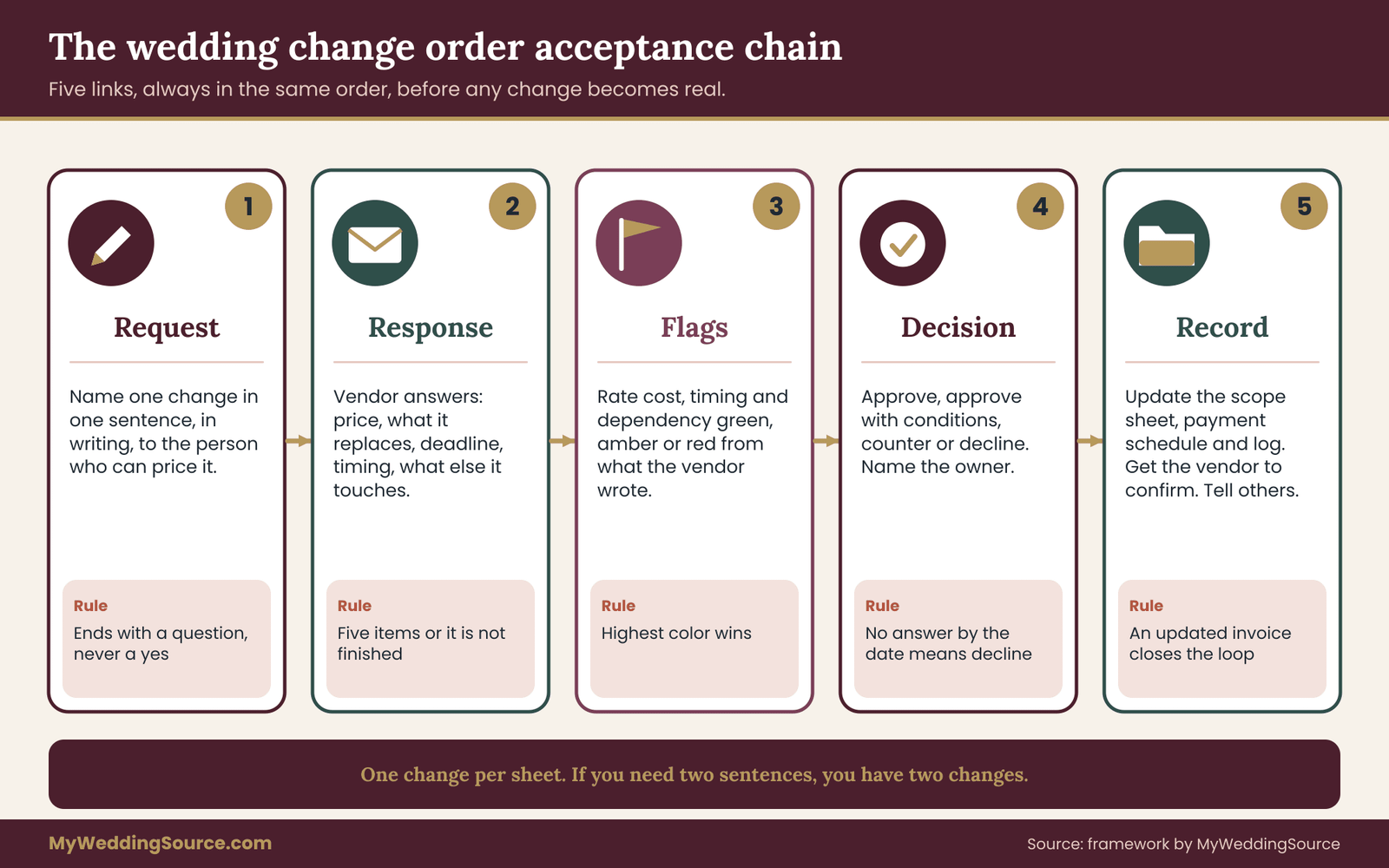
The acceptance chain is a five-step path that every design change walks before it becomes part of your wedding. The steps are Request, Response, Flags, Decision and Record. Nothing about a wedding change order is exotic. The value comes from doing the steps in order and not skipping the dull ones, because the dull ones are where the money goes missing.
Link one: the request
A good wedding change order request is one change, stated in one sentence, sent in writing to the person at the vendor who can actually price it. That last part matters. A message to a salesperson who booked you eight months ago may never reach the designer or the dispatcher who will do the work. Ask the vendor at the start who handles changes, and use that person’s channel every time.
State the change in terms of the result you want, not the method. “We would like to replace the ten round-table centerpieces with eight rounds and two long tables with continuous greenery” is a request. “Can you make the tables look fuller?” is a mood. A vendor can price the first one and can only guess at the second.
Add three small pieces of context. Say why, if the reason helps the vendor suggest alternatives. Say what is flexible, such as “we can keep the same colors but are open to a different flower.” And say when you need an answer, since your own deadline may be earlier than the vendor’s. A complete request fits in five or six lines.
Here is a request in plain language: “We want to add a lounge area near the dance floor: two sofas, two armchairs and one coffee table, to match the linen color we already ordered. Please send the price, the delivery and pickup times, and anything this changes in the current order. We would like to decide by the fifteenth.”
Notice what the request does not do. It does not say yes. Many a wedding change order goes wrong because a hopeful sentence like “let’s do it” gets read by the vendor as approval, and the vendor starts ordering. A request should end with a question or a deadline, never with a commitment.
Link two: the response
The response is the vendor’s written answer to your wedding change order request. You are asking for five things, and a response that leaves any of them out is not finished.
- The price of the change, shown as the amount added or removed and as the new total for that line.
- What it replaces. If the change swaps one thing for another, the old item should be named and marked as removed. This is how you avoid paying for both.
- The deadline. After which date can the vendor no longer make this change, or make it at the quoted price?
- Timing effects. Does the change alter the delivery time, the setup time, the number of people on site or the pickup time?
- Anything else it touches, such as damage deposits, delivery fees, minimums or other vendors.
You can make this easy for the vendor by asking in exactly that format. A vendor who sees five numbered questions will usually answer five numbered answers. If the vendor answers by phone, write down what was said and send it back: “To confirm what we discussed by phone today…” That short message turns a conversation into a record, and it gives the vendor a chance to correct a misunderstanding while it is still cheap to fix.
A response may also say the change is not possible. That is a useful answer. It saves you from planning around something that will not happen, and it often opens the conversation about an alternative.
Link three: the flags
Flags are the part of the chain that makes it a decision tool and not just paperwork. Once you have the response, you read it against three families of flags: cost, timing and dependency. Each gets a color. Green means routine, amber means look closer, red means stop and think before agreeing.
The next section covers the flags in detail. For now, here is the short version of how they work in the chain. You do not rate the change based on how you feel about the idea. You rate it based on what the vendor wrote. A change you love can still carry a red timing flag if the vendor says the order closes tomorrow, and a change you are lukewarm about may be green on every count and worth saying yes to because it costs almost nothing.
This is also where you decide who needs to see the change. A change with only green flags can usually be approved by whoever is handling vendor communication. A change with any amber or red flag goes to the full approval step described in the section on authority.
Link four: the decision
There are only four possible decisions, and naming them helps people stop going in circles.
- Approve. The change goes ahead as written.
- Approve with conditions. The change goes ahead if something is added, such as a confirmed delivery window or a written price cap.
- Counter. You ask for a different version, perhaps fewer items or a different date.
- Decline. The original scope stays as it was.
Each decision should have an owner and a time limit. The owner is the person with authority to say yes for that kind of change. The time limit is the earlier of your own decision window and the vendor’s deadline. If you have not decided by then, the default is decline, and everyone should know that in advance. A default prevents the slow drift where an unanswered request quietly becomes an approved change because the vendor assumed silence meant yes.
When you decide, say it in the same channel the request came in and use the words “approved” or “declined.” Avoid soft language like “sounds good” or “we will probably go with that.” Vendors are busy. They read soft language as permission more often than couples expect.
Link five: record and relay
The last link of a wedding change order is the one most often skipped, and it is the reason a good decision still turns into a bad invoice. Recording means three updates. First, the scope sheet or order sheet: the line items now match the new reality. Second, the payment schedule: the total, the deposit and the balance reflect the change, with any credit or additional payment dated. Third, the change log: a one-line entry with the date, the change, the price effect and who approved it.
Then ask the vendor to confirm in writing that they have the updated version. A reply of “confirmed, updated invoice attached” closes the loop. A reply of “got it” is better than nothing, but an updated invoice is better still, because it forces the vendor’s own system to reflect the change.
Relaying means telling whoever else is affected. If a change moves the delivery time, the venue or coordinator needs to know. If it adds a rental item, the florist who builds around that table needs the new count. If it adds a person to a crew, the venue may need the vendor list updated. A single short note to a coordinator or the venue contact is usually enough. The wedding vendor timeline guide is useful here, because most relay problems are really timeline problems.
What the chain looks like when it works
Picture a wedding change order that takes four messages. You send a request. The vendor replies with the five items. You send back a one-line decision with the word “approved” and a condition. The vendor sends an updated invoice. That is the whole thing, and for a routine change it takes a day.
Picture the same change with no wedding change order. You mention it in a call. The vendor says “sure.” Nothing is written. Three weeks later the vendor’s invoice includes an item you thought was free, and the person who made the verbal agreement has left the company. Nobody did anything dishonest. There was just no record, and the person with the most to lose from that gap is you.
Keep the chain proportional
The chain is meant to protect you from expensive surprises, and a wedding change order should never slow every small adjustment. A change to the color of a single ribbon at no cost does not need a formal sheet; it needs a short message and a note in your log. The flags tell you where the line is. If all three families come back green and the amount is small, a two-line email is enough. If anything is amber or red, use the full form.
A useful habit is to keep the chain short in daily practice. Most weeks you will touch it once or twice. In the final month before the wedding, when design decisions bunch up, you may touch it ten times. That is exactly when a calm, repeatable process earns its keep, because tired people make confident mistakes.
Cost, timing and dependency flags: how to read a vendor’s answer
A flag is a quick judgment about one part of a vendor’s response to a wedding change order request. You raise it by comparing what the vendor wrote against a few fixed rules, not by gut feeling. There are three families, and each has three levels. The idea is to spend your attention on the changes that deserve it and to let the harmless ones pass quickly.

The cost flag
The cost flag asks whether the money works. Before the first wedding change order, decide on a change allowance: a single number you are willing to absorb across all vendors without a long conversation. Pick it from your own budget and reserve, not from a rule of thumb, since only you know how much slack you have. The wedding cash-flow planning guide explains how reserves and payment timing fit together, and the allowance should sit inside that plan.
Green: The net effect of the wedding change order is inside the allowance, the vendor has stated the exact amount in writing, and no new payment falls due earlier than your cash plan expects. A swap that costs a few dollars more or less belongs here.
Amber: The amount is above the allowance but inside your reserve, or the vendor gave a range and not a figure, or the change triggers a payment sooner than planned. Amber means you can afford it, but you should decide on purpose.
Red: The vendor says “to be determined,” “we will bill after,” or “approximately.” Or the amount would need money you have not set aside. Or the change adds a service charge, delivery fee or tax in a way that makes the real cost unclear. A cost you cannot see is a red flag by definition, no matter how small it seems.
Hidden cost items worth asking about by name: delivery and pickup fees, rush fees, restocking or cancellation fees on the original item, service charges and gratuities that apply to the added amount, sales tax on rentals or goods, damage waiver charges that scale with rental value, and any minimum that makes a small removal save nothing. If the vendor’s response does not mention one of these, ask. A short “does this change any fees or taxes?” often brings out the surprise.
The timing flag
The timing flag asks whether the calendar works. Every vendor has at least one cutoff after which a change becomes difficult or impossible. A florist has an order date for stems. A rental company has a date when inventory is allocated to trucks. A caterer has a final count date and a date for equipment. A print shop has a proof deadline. The response should name the relevant one, and if it does not, ask for it.
Green: The request comes well before the vendor’s stated cutoff, and the change does not alter delivery, setup or pickup times.
Amber: The request comes close to the cutoff, or the change shifts a delivery or setup time slightly, or the vendor says “we can probably do it.” Amber timing often comes with a hidden condition, such as “if the supplier has it in stock.”
Red: The cutoff has passed, or the vendor can only do it as a rush, or the change adds setup time that does not fit the venue’s load-in window, or the change requires someone to be on site at an hour that was not planned. Red timing is where a good idea turns into a bad day.
A practical way to track this is to put every vendor’s cutoff dates on one calendar, not in separate emails. When you ask for the cutoff, you are also building that calendar. The venue technical walkthrough guide covers load-in windows and access routes, which are the venue-side limits on how much a timing change can flex.
The dependency flag
The dependency flag asks what else this change touches. It is the one couples forget, and it produces the most expensive surprises, because the cost of a dependency often falls on a different vendor from the one you are talking to.
Green: The change is self-contained. It affects one vendor’s line item and nothing else on the day.
Amber: The change touches one other party. For example, new tables mean the florist needs a new count, or a longer cocktail hour means the caterer needs a revised service plan.
Red: The change touches the venue’s rules, safety limits or insurance conditions, or it affects three or more parties, or it changes something guests rely on, such as seating, accessible routes or signage. Anything involving open flame, hanging items, power draw, structural loads or fire exits belongs here. Venues generally set their own rules on those, and your vendors need to follow them.
Use the dependency flag to decide who must see the wedding change order. An amber dependency means a message to the other party. A red one means a short conversation with the venue or coordinator before you approve, not after.
Combining flags into a rule
Three families of flags produce a lot of combinations, so keep the rule for every wedding change order simple.
- The highest color wins. One red flag makes the whole wedding change order red, even if the other two are green.
- Two ambers make a red. Each amber on its own is manageable. Two together mean the change is both costly and constrained, and that is when people make rushed choices.
- All green means approve quickly. Do not turn a harmless change into a meeting.
- Any red means a one-day pause. Wait one day, unless the vendor’s deadline falls sooner, and use that day to ask for alternatives.
The one-day pause deserves a closer look. It works because red flags tend to appear at emotionally busy moments: you are excited about an idea, the vendor is friendly, and a deadline is looming. A day gives your partner time to weigh in, gives you time to check the budget, and gives the vendor time to send the missing numbers. In most cases the change survives the pause. In some cases it does not, and those are the ones you were glad you slowed down for.
Reversibility, the fourth question
Beyond the three flag families, there is a quick question that sharpens any decision: if this turns out to be a mistake, how hard is it to undo? Some changes are easy to reverse. A linen color swap before the order is placed costs nothing to reverse. Others are not. A custom-built item, a perishable order or a specially cut piece of signage cannot be returned once made.
Treat low reversibility as a reason to move one color up. An amber cost flag on a change that cannot be undone behaves like a red. An amber on a change that can be undone for free is closer to green. The question does not replace the flags. It helps you break ties.
A short example of reading flags
Suppose a rental company replies to your wedding change order request for six more chairs. The reply says the price is a modest amount per chair, delivery is unchanged, the cutoff for adding inventory is two weeks before the event, and the chairs are available. Cost: the amount is stated and falls inside your allowance, so green. Timing: you are three weeks out, so green, with a note that you have one week of margin.
Dependency: the added chairs change the room layout slightly, so the coordinator and caterer need an updated count, so amber. The highest color is amber, so the wedding change order goes through the decision step with a note to relay the count. Nothing here is alarming, and the flags simply told you which message to send next.
Now suppose the reply says “should be fine, we will bill after delivery.” The cost flag is red, because the amount is not stated. You do not need to turn down the chairs. You need to ask for the amount, and the flag tells you that is the next step.
Logging the flags
Each wedding change order should carry its flag colors in the log, one letter each, such as “C-G, T-A, D-A.” Over time, the log shows patterns. If most of your red flags are timing flags with one vendor, you have learned that vendor’s cutoffs are earlier than you thought. If most are dependency flags on florals, you may need to decide the layout before you decide the flowers. The log is not busywork. It is the memory your future self will need in the final two weeks.
Rental changes: counts, sizes, finishes and pull times
Rentals, florals and labor account for most of the design changes couples make, and each behaves differently. Rentals are inventory, so the questions are about counts, availability and logistics. Florals are perishable and often custom, so the questions are about recipes, substitutions and lock dates. Labor is time, so the questions are about hours, crew size and who is responsible for what. The same wedding change order chain applies to all three, but the traps are different.
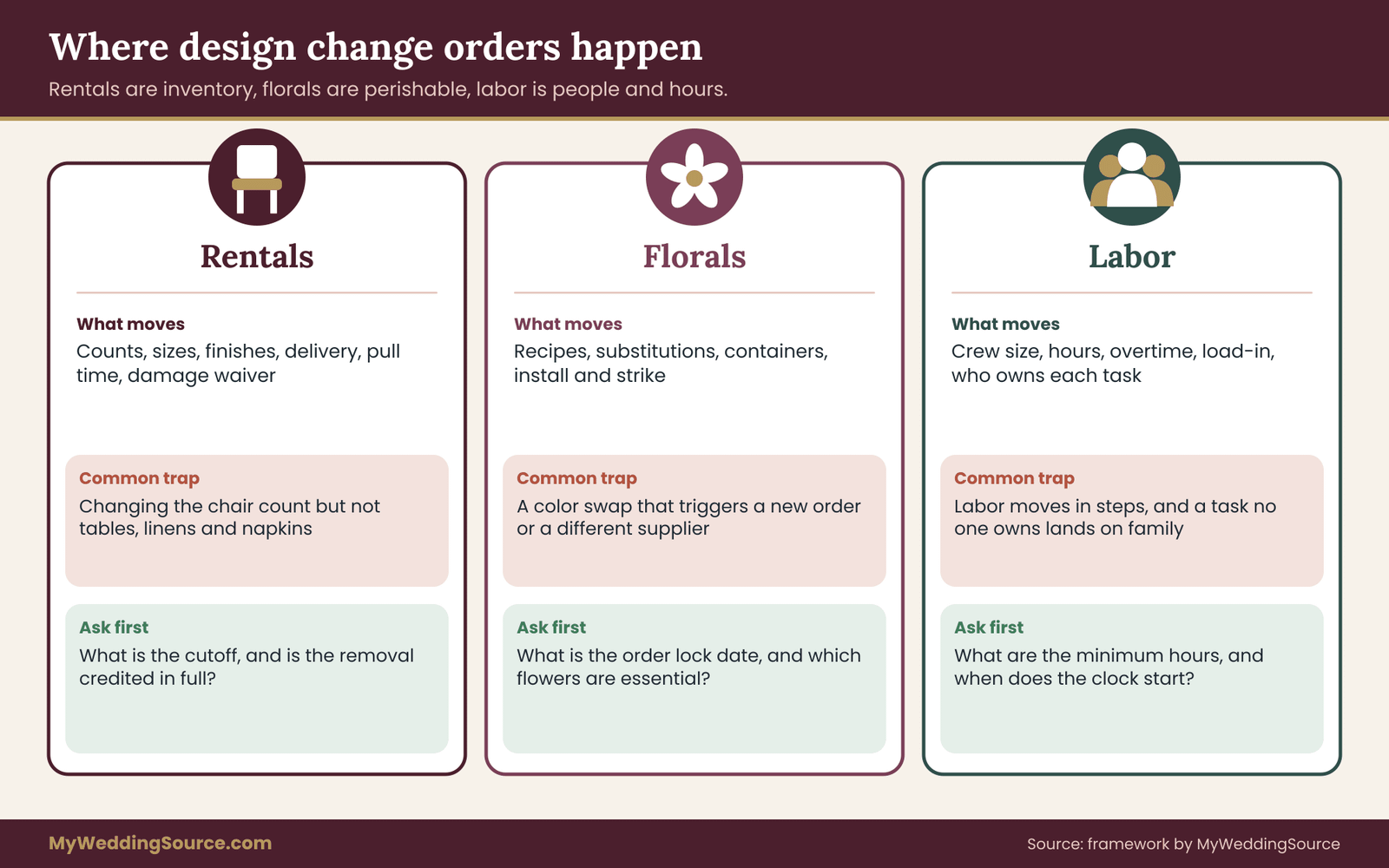
Rentals first, because they are the easiest category to get wrong with confidence. A rental order looks simple on paper: a list of items, a quantity for each, a delivery date and a price. The simplicity hides several places where a small change spreads.
Count changes and the guest count
The most common rental wedding change order starts with the guest count. A final count rises or falls, and chairs, tables, linens, glassware and place settings all have to follow. The mistake is changing the chair count and nothing else. Seat counts connect to table counts, table counts connect to linen counts, and linen counts connect to napkins, runners and sometimes chair covers.
When a guest count changes, write one wedding change order that lists every rental line affected, with the old and new quantity for each. One document covers the whole cascade and keeps you from approving the chairs on Monday and discovering the linens on Friday. If the venue provides some items and a rental company provides others, make sure each side hears the same count, since a mismatch usually shows up as a shortage on the day.
Ask how the vendor handles overage and underage. Some rental companies allow a small reduction until a stated cutoff and charge for the full original quantity after it. Some allow additions only if inventory remains. Others tie their price to a minimum order. None of this is unreasonable, but you need to know it before you decide.
Size and finish changes
A change of shape or size is not a simple swap, and the wedding change order should treat it as two lines. Round tables come in different diameters that seat different numbers of guests, and a switch from one to another changes the floor plan, the linen size and the way centerpieces sit. Long tables and rounds need different linens. A change from a floor-length linen to a shorter drop changes the look of the room and sometimes the quantity of fabric used.
Finishes bring their own trap. Linens, napkins and chair covers come from stock that may be dyed in batches. A request for more of a color you already ordered can come from a different batch and look slightly different under venue lighting. Ask the rental company whether the added items come from the same stock as the original ones, and if you can see both together before the event. If the answer is no and the difference would be visible, that is a dependency flag on the guest experience, not just a cosmetic note.
Substitutions by the vendor
Rental contracts often include language allowing the company to substitute an equivalent item if the original is unavailable. That can be reasonable, since a chair that breaks the week before an event has to be replaced with something. The risk is that “equivalent” is defined by the vendor. A wedding change order is the right tool here, because a vendor-initiated substitution is still a change. Ask the company to tell you in writing when they intend to substitute and to describe the replacement. You can then approve, ask for photos, or decline and ask what else is possible.
If the contract says the company may substitute at its discretion, you cannot stop that by writing a message. But you can ask for notice, and you can ask what remedy applies if the substitute is noticeably different. Remedies vary, so ask before you need one.
Delivery, setup and pull times
A rental wedding change order that adds items can change the delivery timeline in ways that look small and are not. More tables take longer to place. A new lounge area adds furniture that needs a separate path through the venue. An added tent sidewall or a larger dance floor changes the crew needed.
Check three times with the vendor. The delivery time: when will the items arrive and where will they be staged? The setup time: who places them, and does the venue allow it at that hour? The pull time, which is when the company comes to collect the items after the event. If your wedding runs late or the venue requires the room to be cleared early, the pull time can create an overtime or a storage charge. A change that adds items usually adds pull time as well.
Ask also about the route into the venue. Stairs, elevators, loading docks and narrow doors can add charges on a per-floor or per-trip basis. The wedding rental planning checklist covers the logistics questions to settle before you order, which is easier than discovering them in the middle of a change.
Damage, loss and waivers
Rental companies commonly offer or require a damage waiver, a fee that covers normal accidental damage but usually excludes loss, misuse or specific items. When you add rentals, find out whether the waiver amount scales with the new total, whether any added item is excluded from it, and who is responsible if guests take or break items. A lounge sofa near a dance floor has a different risk profile from a stack of napkins.
Keep the original agreement’s language on damage and loss in front of you when you approve a rental wedding change order, and say in the wedding change order whether those terms carry over to the added items. A single line such as “all other terms of the original order apply to these items” prevents a gap that nobody noticed until the return.
Removing rental items
Removing items is where couples expect a refund and sometimes do not get one. The company may have reserved the inventory, may have turned down other customers, or may price items in bundles. Every rental wedding change order that removes items should answer three questions: is the removal credited in full, in part or not at all; does the credit apply to the item, the delivery or both; and does any minimum order still apply.
Then write the answer into the wedding change order. If the answer is that the credit is partial, you can decide whether to remove the item at all. Sometimes the right decision is to keep it and use it.
A rental decision rule for the wedding change order
For rentals, apply a simple order of operations. First, settle the guest count and the floor plan. Second, translate the floor plan into counts by category: seating, tables, linens, tableware, lounge, lighting and other. Third, send one wedding change order for the whole set of changes, not one per item, unless some changes are independent of the others. Fourth, ask for the cutoff for each category, since inventory cutoffs often differ by category. Fifth, relay the new counts to the venue, the caterer and the florist. This sequence cuts the number of messages and the chance of a mismatch.
A rental script
Here is a short message you can adapt for a rental change: “We are changing the reception layout. Please update our order as follows: remove ten 60-inch rounds, add eight 72-inch rounds and two 8-foot banquet tables, and change the linen count to match. Please reply with the new total, the delivery and pickup times, the date after which we cannot change quantities, whether any item is substituted, and whether the damage waiver amount changes. We will approve once we have those answers.”
That message has no pleasantries to speak of, and that is fine. Vendors answer clear requests faster. A friendly opening and a thank-you at the end cost nothing and keep the relationship warm, but the middle should read like a list.
Floral changes: recipes, substitutions and lock dates
Florals are the category where the vendor’s cost is most tied to timing. Flowers are ordered from growers and wholesalers in advance, many are cut to order, and the stems that arrive are what the studio has to work with. A change that looks like a color swap in your head can mean a new order, a new supplier or a different lead time.
What a floral recipe is, and why it matters
Floral designers build each piece from a recipe: a list of the flowers and greenery that go into one arrangement, with quantities. A bouquet recipe might be a handful of focal flowers, a few supporting blooms and some greenery. A centerpiece has its own recipe. The proposal you signed usually describes the design in words and photos, and the studio translates it into recipes and stem counts behind the scenes.
Ask for the recipe language when you write a floral wedding change order. You do not need the full stem count. You need to know what the change does at the recipe level: which flower leaves, which one enters, and whether the change affects every arrangement or only some. A switch of one focal flower in the bridal bouquet is a small change. A switch of the main flower across forty centerpieces is a large one, even if the two flowers cost about the same.
Substitution and seasonality
Florists generally reserve the right to substitute flowers of similar look and quality when a specific variety is unavailable. Many contracts say so plainly. It is a fair term, because the supply chain is outside their control, and flowers are agricultural products. What you can do is define the limits: which items are essential and which are flexible, and how you will be told.
A useful device is a two-column note in your approval, written in sentences, not as a grid. “The garden roses in the bridal bouquet are essential. The type of greenery in the centerpieces is flexible.” That one sentence tells the studio where it may adjust without asking and where it must call you. The note is not a guarantee, and a florist may still be unable to deliver. It sets the expectation and shortens the next conversation.
When you request a change to a flower that is out of season or imported, expect the vendor to raise cost, timing or availability flags of their own. Do not treat that as resistance. It is information. Ask what the closest seasonal alternative would be and see whether it serves the design.
Lock dates and perishable orders
Every floral studio has a date after which the order is placed with suppliers. After that date, a change may require a second order, a rush shipment or a loss on stems already bought. Ask for the lock date when you sign, and ask again when you request a change. Treat the lock date as a timing flag: a request made two days before it is amber at best.
Ask also about the final count deadline for items that scale with the guest list, such as table arrangements and boutonnieres. A change to the number of tables after the lock date can be absorbed in some cases and not in others. The answer depends on how the studio orders and whether it keeps extra stems for the event. The point of asking is to find out in advance.
Rented containers and structures
Florals often include rented or borrowed items: vases, candle holders, arches, stands and hanging frames. When the design changes, the container list changes. A new arrangement may need taller vases, and taller vases change sightlines at the table. A new arch may need a different stand, and a different stand may need a different install time or a different path through the venue.
If the florist rents those items from a third party, the cost of the change includes the rental, which may have its own cutoff. Ask whether containers and structures are included in the price or billed separately, whether they are returned by the florist or by you, and who pays if something is damaged. This is a dependency flag as well, because the venue may restrict what can be hung or placed. Hanging installations are a common source of venue pushback, and it is better to know before the order.
Install, strike and the florist’s labor
Floral labor is a line item that many couples do not see until it appears on the invoice. Delivery, setup, event-day maintenance and teardown may each carry a charge. A design change that adds ceremony pieces, hanging elements or large installations adds labor. A change that moves the ceremony location adds a second delivery.
Ask three questions about labor on any floral change. How many people and how many hours does the new design need? Does setup happen on the event day or the day before, and is the room available? Who removes the florals after the event, and what happens to rented items? A short answer to each belongs in the wedding change order response.
Floral change scripts
A wedding change order request for a swap: “We would like to change the focal flower in the table centerpieces from the spray rose to the garden rose in the same color, and keep the greenery the same. Please tell us the price difference, whether the garden rose is available for our date, your order lock date, and whether this affects the bridal bouquet or ceremony pieces.”
A wedding change order request to reduce: “We are removing the welcome-table arrangement and the two aisle arrangements at the ceremony. Please tell us what credit applies, whether any minimum still applies, and whether the removal changes delivery or labor charges.”
A vendor-initiated wedding change order: “Thank you for letting us know the ranunculus is not available. Please send two alternatives with photos, the price of each, and the date by which you need our decision. We will confirm in writing.”
None of these wedding change order scripts commits the couple. Each asks for what the vendor needs to provide. That is the pattern to repeat.
Labor changes: crew, hours and who does what
Labor changes are the least visible, and a labor wedding change order is often the most expensive, because labor is billed in people and hours, and both move in steps. A vendor who sends two people for four hours cannot send one and a half people for three hours. The nearest option is usually one more person or one more hour.
Where labor hides
Labor sits inside most vendor contracts as a line you did not choose. A rental company’s delivery crew, a caterer’s servers and bartenders, a florist’s install team, a lighting vendor’s technicians, a tent crew and a venue’s own staff all bill time. When you change the design, you may change the work, and the wedding change order should say so.
Examples: a new lounge area adds furniture to place and strike. A longer cocktail hour adds service time. A second bar adds a bartender and a station. A hanging installation adds riggers or a lift. A moved ceremony adds a second setup. A later end time adds teardown hours and may add overtime for crews paid by the hour.
Overtime and minimums
Many labor charges come with minimum hours and overtime rates. A crew may be booked for a minimum block of time, and any time over the block may be billed at a higher rate. Ask for both when you request a change that adds time. Also ask when the clock starts and stops. Does the vendor bill from arrival at the venue or from the start of setup? Does it include travel? If the venue requires the vendor to wait before load-in, who pays for that time?
The wedding vendor contract guide explains how to read the clauses on time-based charges. For a labor wedding change order, the practical step is to put the hours in numbers: “two additional crew for three hours, arrival at two in the afternoon.” Numbers can be checked against the final invoice. Phrases like “a few extra hands” cannot.
Who is responsible for what
A common source of labor disputes is a task that no one owns. Who moves the ceremony chairs to the reception? Who removes the florals from the stage? Who packs the rentals for pickup? If the change adds a task, the wedding change order should say whose it is. Without that line, the task falls to whoever is still standing there, and that is often the couple’s family.
Write the task in plain terms: “Rental company will move 120 ceremony chairs from the lawn to the tent after the ceremony.” Or: “Couple’s helpers will carry the welcome sign to the car after the reception.” Both are fine. The point is that the task has a name next to it.
Safety and venue rules
Labor changes sometimes involve work that venues regulate: ladders, lifts, rigging, power, open flame and heavy loads. Those belong in the red dependency category. Workplace safety is governed by agencies such as the Occupational Safety and Health Administration, and venues and insurers add their own rules on top. Your job is not to judge the work. It is to make sure that the vendor and the venue have spoken to each other and that the vendor’s insurance and the venue’s requirements are in order.
If a change involves hanging items from ceilings, raised platforms, anything that uses significant power, or anything with a flame, ask the vendor to confirm that the venue has approved it in writing. A one-line confirmation from the venue contact, attached to the wedding change order, is worth more than a verbal assurance.
Staffing changes from the vendor side
Vendors also change staffing. A caterer may tell you that the servers needed for your service style will be fewer because the plan changed, or more because the venue layout requires it. A rental company may add a crew member because of stairs. These are vendor-initiated wedding change orders, and they carry the same chain: ask for the reason, the cost, the effect on service and the written confirmation.
A good question for any staffing change is “what happens to the service if the crew is smaller?” A smaller crew can mean slower lines, longer waits for drinks or delayed room turns. Whether that matters depends on the plan. Ask for the answer in terms of the schedule so you can judge it.
A labor decision rule
For a labor wedding change order, decide in this order. First, name the new task or time. Second, convert it to people and hours. Third, ask for minimums, overtime and arrival times. Fourth, assign the task to a named person. Fifth, check the venue’s rules. The sequence turns a vague wish (“more help setting up the lounge”) into a number a vendor can price and an invoice can verify. It also gives you the right to compare: two vendors who quote different hours for the same job are telling you something about their assumptions.
Who approves a wedding change order, and how fast
The chain says “decision,” but it does not yet say whose decision. Approval authority is the quiet weak spot in most wedding planning, and a wedding change order with no named approver is only a suggestion. Everyone has opinions, several people talk to vendors, and nobody is sure who can say yes. Settle it once, early, and write it down.
Set approval levels before the first change
A simple structure has three levels. The numbers are yours to choose, and the logic is the same whatever you pick.
Level one: green changes inside the allowance. One named person can approve a green wedding change order. That might be one partner, a planner or a coordinator. The person is chosen in advance, and the vendor knows who it is.
Level two: amber changes. Both partners approve, in writing, which can be as short as two replies to the same thread. If a planner or coordinator is involved, they present the flags and a recommendation. They do not approve alone unless you have said they can.
Level three: red changes. Both partners approve after the one-day pause, with the missing information in hand. Red changes also go to anyone whose work they affect, such as the venue contact or the coordinator, before the decision.
Notice that family members hold no level. A parent, sibling or friend can suggest, but a vendor should hear from the couple or the named person, and from nobody else. If a family member is paying for part of the wedding, that is a conversation about the budget, not a license to change the order. The wedding decision-making guide covers how to give family real input without handing over approval, and it pairs well with this section.
Tell the vendors who can say yes
Send each vendor a short note: “Please accept change requests only from these two people, and please confirm every change in writing to both.” It sounds formal, and it prevents the situation where a cousin calls the florist to “make the arch bigger” and the studio treats it as an approved wedding change order. Most vendors welcome a clear point of contact. Some have been burned by exactly this.
The reverse also matters. At the vendor’s end, find out who can accept a change. A salesperson or a coordinator may be friendly and helpful but may not have the authority to alter the price or the order. If the person you are talking to says yes, ask whether that is the person who will update the invoice. A change that is approved by someone without authority can still be disputed later.
Decision windows and the default
Every wedding change order should have a decision window, a date by which you will answer. The window is the shorter of your own comfort and the vendor’s deadline. If you do not decide by the end of the window, the default is to decline and keep the original. Say so in the request: “If we have not confirmed by Friday, please leave the order as it is.”
The default protects you from the slow slide in which a request sits unanswered and the vendor, reasonably, acts on the most recent message. It also protects the vendor from a late, rushed approval that cannot be done. Both sides benefit from a clear stop.
How flexibility shrinks
The cost of a wedding change order is not constant. It rises as the date approaches, because more has been ordered, more has been scheduled and fewer alternatives remain.

Early on, after you sign and before design decisions are final, most changes are cheap. Nothing is ordered, the vendor is still sketching, and a change is a conversation. As the design is locked, each vendor places orders, allocates inventory and schedules crews, and changes begin to cost money. Near the final count date, changes depend on what the vendor can still adjust. In the last two weeks, most changes are limited to substitutions and swaps within what is already on order. In the final days, anything new needs rush handling and is often not possible.
The illustration above shows this shape as a general pattern, not as data. Your vendors will have their own dates. The useful step is to ask each one for their stages in writing: when the design is expected to be final, when orders are placed, when counts lock and when the last changes are accepted. Put those dates on a calendar next to your own.
Handling pressure
Pressure shows up in three forms, and each has a calm reply.
Vendor urgency: “We need to know today.” Ask what happens if the answer comes tomorrow. Often the deadline is softer than it sounds. If it is real, ask what the cost of waiting a day is, and decide on that basis.
Excitement: “This would look amazing.” Use the flags. An exciting change with green flags is easy to approve. An exciting change with a red flag deserves the one-day pause, because excitement fades and invoices do not.
The just-this-once request: “Can we skip the paperwork? It is a tiny change.” For a small change, the paperwork is two lines. If the change is truly tiny, writing it down costs almost nothing. If it turns out to be larger than it looked, the two lines are what you will want.
When a red flag fires: ask for three alternatives
A red flag is not a no. It is a signal to look for a different way to reach the goal. When a wedding change order comes back red, ask the vendor for up to three alternatives, framed as a swap, a subtraction or a deferral.

Swap means reaching the same goal with different means. If added tables hit a venue limit, perhaps larger tables do the same job without a new footprint. If a flower is unavailable, perhaps a seasonal one gives the same color and shape.
Subtract means reaching a smaller version of the goal. If the full lounge is too costly, perhaps one sofa and two chairs capture most of the effect. If a hanging installation is not allowed, perhaps floor-standing pieces carry the design.
Defer means moving the decision to a time when it is cheaper or clearer. A change that is red because of a cutoff may be green if you can wait for a count that is not final yet. Deferral is useful for decisions that depend on information you do not have, such as a final headcount or a weather forecast.
Each alternative should come back with the same five items as any response. Compare them in a short note, in prose: what you get, what it costs, what it moves and what you give up. Then decide. In many cases, the alternative you did not expect is the one that works.
Track the running total
There is one more risk the flags do not catch on their own: drift. Ten small changes, each green, can add up to an amount you would never have approved at once. Keep a running total of net changes across all vendors, and set an overall limit at the start, drawn from the reserve you set aside in your plan.
Each time you record a wedding change order, update the total. When the total reaches a stated percentage of your limit, say three quarters of it, treat every further change as amber at least. This gives you an early signal that the budget is thinning, and it gives you time to decide what to cut instead of discovering the overage on the final invoices.
Worked example: three change orders in one planning week
The following is an illustration with invented people and invented numbers. Real prices vary widely by region and vendor, so use the example to see the process, not the amounts.
Two people, whom we will call Priya and Daniel, are five weeks from their wedding. Their change allowance is 250 dollars per change, and their overall change limit, drawn from their reserve, is 600 dollars. Their final guest count has just risen by twelve people.
Wedding change order one: rentals
Priya sends the rental company a request to add two 72-inch round tables, twelve chairs and matching linens. The response comes back the next day. The price is 310 dollars, stated. The company’s inventory cutoff is three weeks before the event. Delivery times do not change.
The flags: cost is amber, since 310 is above the 250 allowance. Timing is green, with two weeks of margin. Dependency is red, because Priya remembers that the venue limits how close tables can sit to the exits. Highest color: red, so the change pauses for one day.
During the pause, Priya sends the venue contact a sketch of the new layout. The venue replies that two more tables would narrow a walkway below its minimum. Priya goes back to the rental company and asks for alternatives. The company suggests a swap: replace six of the existing 60-inch rounds, which seat eight, with six 72-inch rounds, which seat ten, and add twelve chairs. Price: 180 dollars including larger linens, stated in writing.
Flags on the alternative: cost green, timing green, dependency amber, since the caterer and the florist need the new table sizes. Priya and Daniel both approve in writing, with the condition that the rental company confirm the updated invoice. The running total is now 180 dollars.
Wedding change order two: labor
The larger room plan means the caterer will need an additional server. Priya asks the caterer for the price and the details. The response says one additional server for a five-hour minimum at 40 dollars an hour, which is 200 dollars, plus the caterer’s standard 20 percent service charge on additions, which is 40 dollars. Total: 240 dollars. The server would arrive with the rest of the crew, so timing does not change.
The flags: cost is green, since 240 is under the 250 allowance and the amount is stated in full. Timing is green. Dependency is green, as long as the venue allows the larger staff, and the caterer confirms that it already has the vendor access it needs. Priya approves as the level-one person, and notes the added service charge in the log, because it was visible only after she asked whether fees applied. The running total is now 420 dollars.
Wedding change order three: florals
The next day, the florist writes first. The ranunculus in the centerpieces is unavailable for the date, and the larger tables will look sparse with the current recipe. The florist offers two alternatives: lisianthus at the same price, or garden roses at a higher price. The florist also suggests adding a small group of stems to each centerpiece, at 90 dollars across all of them.
Priya asks for the details. The florist states that the order lock date is nine days away. The flags: cost green at 90 dollars with the lisianthus option, timing amber because of the lock date, dependency green. Priya and Daniel approve the lisianthus option and the extra stems, with a condition: the florist will confirm the substitution and the new recipe in writing, and the garden roses in the bridal bouquet remain essential. The running total is now 510 dollars, which is 85 percent of their limit.
What the example shows
Three things stand out. First, the red flag on the first change was not a stop sign. It led to a better solution than the one the couple first asked for. Second, the cost that nobody mentioned, the service charge, appeared only because someone asked. Third, the running total mattered. Each change looked reasonable alone. Together they used most of the limit in a week, and Priya and Daniel now know that any further change needs a trade-off, not just a yes.
The example also shows how a wedding change order can chain into others. One decision, adding twelve guests, produced three separate records, each with its own vendor, flags and approval. Keeping them separate made each easy to read. Linking them by a short note in the log, “caused by guest count change on the fourteenth,” made the reasoning easy to follow later.
A wedding change order template you can copy
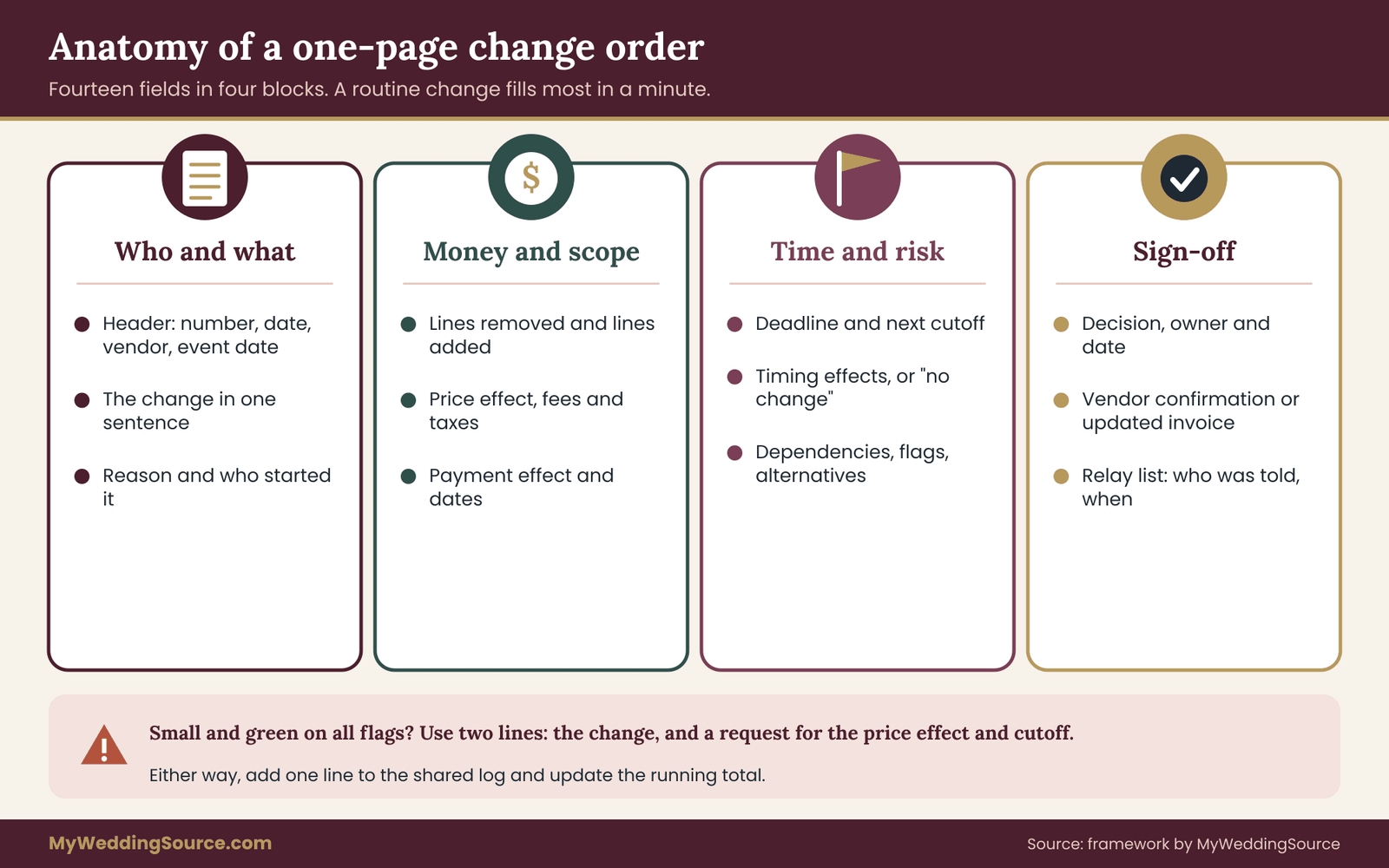
A wedding change order template does not need to be fancy. One page in a shared document or a plain email works. What matters is that it asks for the same things every time, so you stop reinventing the questions under stress. Here is the structure, field by field, with a note on why each one is there.

The fields
Header. Change number, date, vendor name, event date and who is asking. The number is for you: “Florals 2” is enough. It makes the log and the invoice easy to match, because you can say “this line is change two” instead of describing it.
The change in one sentence. What is being added, removed or swapped. If you need two sentences, you probably have two changes, and each deserves its own sheet.
Reason and origin. Who started it, you, the vendor, the venue or someone else, and why. This line settles arguments later. If the vendor started the change because of supply, you may reasonably expect them to absorb part of the cost, and the line shows you asked.
Lines removed and lines added. Name each item with quantity and unit price. Include the old item you are replacing. A swap with only the new item listed is how a couple ends up paying for both.
Price effect. The amount added or removed, any fees and taxes that change, and the new total for the vendor. If a credit applies, state the credit and when it will appear.
Payment effect. Whether the deposit, the balance or the due dates change. If an additional payment is due, give the date.
Deadline. The last day this change can be accepted at this price, and the vendor’s next cutoff after that.
Timing effects. Delivery, setup, event-day service, pickup and teardown. Write “no change” if nothing moves. Do not leave the line blank. A blank line looks the same as an overlooked one.
Dependencies. Which other vendors, the venue or the coordinator are affected, and whether they have been told. Include any venue approval needed.
Flags. Cost, timing and dependency, each green, amber or red, with a short reason for any that are not green.
Alternatives considered. One line for each: swap, subtract, defer. Even “none considered, change is green on all flags” is a useful record.
Decision. Approved, approved with conditions, countered or declined. Who decided, on what date, and any conditions.
Vendor confirmation. The vendor’s written acknowledgment and, ideally, an updated invoice or order sheet.
Relay list. Who was told, and when.
That is fourteen fields, and a routine change fills most of them in a minute. The sheet gets heavy only when the change is heavy, which is when you want it to be.
Short form for small changes
For a change that is green on all three flags and small in dollars, a short form is enough. Send two lines to the vendor: “Please confirm this change: swap the blush napkins for ivory, no change in quantity. Please reply with the price effect, or confirm there is none, and the date after which we cannot change it.” When the vendor replies, add one line to your log. That is a complete wedding change order in miniature.
Keep one log
Whatever form you use, keep one log for all vendors. A shared spreadsheet or a plain document is fine. Each entry carries the change number, vendor, one-sentence description, price effect, flag colors, decision, date and the running total. The log becomes your reference during the last two weeks, and it is what you reconcile against the final invoices. If you use the vendor order sheet template to set up your order sheets, add the log to the same folder.
What to verify with the vendor and the venue
A change order depends on the contract it amends. Before you rely on the process, verify four things in your own paperwork.
- Does the contract say how changes are made? Many contracts say changes must be in writing and signed or acknowledged by both parties. If yours does, your wedding change order should meet that standard, and a text may not be enough. Ask the vendor what form they accept.
- Is there a clause that limits what can be changed or when? Some contracts set a final date for design changes or count changes, or say that the vendor may substitute items. Read them before you plan a change.
- What do the payment and cancellation terms say about changed amounts? A change that raises the total may affect a deposit, a balance or a refund formula. Ask how the vendor treats it.
- What does the venue require? Venues often have their own rules on vendors, load-in, decor and insurance. Ask for a current copy of those rules and check them against any change that touches the room.
The Federal Trade Commission’s consumer pages and your state attorney general’s office explain general consumer protections, and your payment method, such as a credit card, may offer dispute rights with its own deadlines. The Consumer Financial Protection Bureau explains those rights for card payments. Rules and deadlines differ, so confirm the current version with the agency or the card issuer.
Limits of the method
A wedding change order is a record and a discipline. It is not a legal shield, and a few limits are worth stating plainly.
It cannot override a contract term that both of you signed. If a contract says changes are not allowed after a date, a polite request does not change that. It can only ask the vendor for flexibility.
It cannot force a vendor to agree. A vendor may decline a change, or may agree on terms you do not like. The process gives you the information to decide whether to accept or to keep the original.
It cannot recover money by itself. If a dispute arises, a clear paper trail helps, but outcomes depend on the contract, the facts and the law where you live. Questions about remedies, refunds and liability deserve a licensed professional’s review, and a consumer-protection agency or small-claims resources can explain your options.
It does not replace insurance. Wedding insurance, where you have it, has its own terms about changes, cancellations and covered losses, so read the policy rather than assuming the vendor’s change covers it.
Common mistakes
Most failures in wedding change order handling are ordinary.
- Approving by emoji. A thumbs-up on a message is not a decision that a vendor can price or invoice. Use words.
- Changing two things in one message. If the vendor answers one and ignores the other, you will not notice until later. One change, one sheet.
- Forgetting the removed item. A swap should show the old line as removed.
- Skipping the relay. The vendor who is not told is the one who arrives with the wrong count.
- Letting the log lapse. A log kept for three weeks and abandoned is worse than none, because it looks authoritative and is out of date.
- Reconciling too late. Compare the final invoice with the log within days of receiving it, while the vendor still remembers.
After the wedding: reconcile against the log
When the final invoices arrive, line them up against the original agreement and the log of wedding change orders. Each added item should match an approved entry, and each removed item should show a credit or an explanation.
A difference is not necessarily an error, but it is a question, and your records let you ask it politely and specifically. “Change order two removed the lounge sofas and showed a credit of a stated amount. The invoice does not show it. Can you check?” is a better message than “the bill looks wrong.” The wedding records guide explains how to store the final set so it stays findable.
Your next steps
- Choose your approval people and your allowance. Decide who can say yes at each level, and the dollar amount you will absorb without a long conversation. Write both down.
- Ask each vendor for their cutoffs. Request the dates for final design, order placement, final counts and last accepted changes, in writing, and put them on one calendar.
- Send the contact note. Tell each vendor who may request and approve changes, and ask them to confirm every change in writing to both of you.
- Copy the template. Set up the one-page form and the short form, and start a single log with a running total.
- Set an overall change limit. Draw it from your reserve, and decide the level at which every new change counts as amber.
- Check your contracts. Read the sections on changes, substitutions, deadlines and payment, and ask the vendor about anything unclear.
- Use the chain on the next wedding change order. When the next request comes, whether from you, a vendor or the venue, walk it through request, response, flags, decision and record.
FAQ
What is a wedding change order?
A wedding change order is a written record of one change to what a vendor has already agreed to provide. It names what is added, removed or swapped, the price effect, any timing effects, and who approved it. It amends your existing contract, and the original terms still apply unless the wedding change order says otherwise. A short email can serve as one if it covers those points.
Do I need a wedding change order for every small change?
Not a formal sheet. A change that is green on cost, timing and dependency, and small in dollars, can be handled with a two-line email and one line in your log. Use the full form when any flag is amber or red, when money changes hands, or when the change touches another vendor or the venue. The goal is a record, not paperwork for its own sake.
Can a vendor refuse a wedding change order?
Yes. A vendor may decline a change, set a price you do not like, or point to a cutoff in the contract. You can then keep the original scope, ask for an alternative, or decide whether the change is worth the cost. Declining the change does not usually reopen the rest of the agreement, but check your contract for terms about changes and deadlines.
Should a change request be approved by text message?
Text messages are evidence, but they are a poor record. If the vendor accepts texts, use them for quick questions and move the decision into an email or a short form that you can file. Ask the vendor for an updated invoice or order sheet after any approved change. Also check whether your contract says changes must be in writing or signed.
Who should approve changes on the couple’s side?
Decide before changes begin. A common pattern is one named person for small green changes, both partners for amber or red ones, and nobody else. Tell each vendor who those people are. Family members and friends can offer ideas, but vendors should take requests and approvals only from the named people, so the order is not changed by a well-meaning phone call.
What if a vendor changes something without asking me?
Ask for the change in writing, with the reason, the replacement and any price effect. Then approve, counter or decline it as you would your own request. If your contract lets the vendor substitute items, you may not be able to stop the substitution, but you can ask for notice and photos. Keep the messages, and raise any difference in quality before the event, not after.
How do I stop small changes from adding up?
Keep a running total of net changes across all vendors, and set an overall limit from your reserve before you start. Update the total each time you record a change. When it reaches about three quarters of the limit, treat every further change as at least amber. This makes the drift visible while there is still time to trade one change for another.
Is a wedding change order legally binding?
It depends on your contract, your state and the facts, so the answer is not the same everywhere. A written, acknowledged change is strong evidence of what both sides agreed, and many contracts treat signed or acknowledged changes as part of the agreement. For questions about remedies or disputes, ask a licensed professional or a consumer-protection agency.
Sources
- Federal Trade Commission — consumer protection information and the agency’s guidance on contracts and payments.
- FTC Consumer Advice — plain-language consumer guidance, including how to spot and report problems with sellers.
- USA.gov consumer protection — directory of federal, state and local consumer protection offices.
- Consumer Financial Protection Bureau — information on credit card billing errors and payment disputes.
- Uniform Law Commission — official source for uniform state laws, including the Uniform Commercial Code that governs the sale of goods.
- Occupational Safety and Health Administration — workplace safety standards relevant to installation work, ladders, lifts and rigging.
- U.S. Department of Labor, Wage and Hour Division — information on hours, overtime and employer obligations for hourly crews.
- National Fire Protection Association — fire and life-safety codes that venues apply to decor, candles and exits.
- ADA.gov — federal accessibility information relevant to routes, seating layouts and event spaces.