
A wedding livestream backup is the set of arrangements that keeps your ceremony recorded, your remote guests informed and your video recoverable when the hotel Wi-Fi slows down or dies. This guide builds a recording-first plan: record on site no matter what, treat the live stream as a convenience that can fail gracefully, and rehearse the failure before the wedding so nobody is improvising during your vows.
Yes, a wedding livestream can survive hotel Wi-Fi failure, but only if the stream was never the only copy. Record locally on a device that does not need the internet. Put the stream on its own connection, not the hotel’s shared guest network. Add a second path, such as a wired line plus a cellular router on a different carrier. Run a failure drill in the actual room a week early. Agree on three time limits in advance: when to lower the quality, when to switch paths and when to stop streaming and post the recording afterward.
Picture the moment. Your grandmother is watching from another time zone with a cup of tea. The processional music starts, the screen freezes on the back of an usher’s head, and a small wheel begins to spin. Somebody in the family group chat types “is it working?” Somebody else types “no.” And the one person who could fix it is your videographer, who is standing at the back of the room with their hands full of cables, quietly wondering whether the hotel changed the network password again.
This is the ordinary way a livestream fails. It is rarely dramatic. It is a shared network that was fine at noon and crowded at four, a captive portal that logged the encoder out, a router that rebooted itself on a schedule, or a ballroom where the access point sits two walls away from the camera position. The fix is rarely clever either. It is preparation, and a clear order of what matters most.
A wedding livestream backup plan answers a few plain questions, and a good livestream backup answers them before the day. What do we record, and where does the recording live? Which internet connection carries the stream, and what happens when it fails? Who decides, and in how many seconds? What do remote guests see in the meantime? And how do we get the finished video to them afterward? The rest of this guide takes those questions one at a time.
A note on scope. This is general planning information, not legal, tax or financial advice, and it cannot see your venue’s network, your vendor’s equipment or your contracts. Where a fact matters, such as a hotel policy, a carrier’s coverage or a platform’s current limits, the guide points you to the party that controls it so you can confirm the current version yourself.
This article is about one narrow problem: keeping a stream alive, or gracefully ending it, when the internet connection at the venue fails. For the wider picture of backup communication, files and permissions on the day, the guide on wedding day digital operations covers every system you might depend on. Here we go deep on video.
Why a wedding livestream backup starts with the recording
The most useful sentence in this whole guide is short: the stream is not the record. A livestream is a live copy sent through several links you do not control. The record is the file that exists whether or not any of those links work. If you plan the record first and the stream second, almost every failure becomes survivable.
Most couples plan the other way around. They hire a person or buy a service, they get a link, and they assume the video exists because the link exists. Then the connection drops for six minutes and they discover that nothing was saved locally, or that the platform saved only a partial replay with a gap exactly where the rings were exchanged.
Recording first changes the question you ask. Instead of “how do we make sure the stream never stops?”, which has no honest answer, you ask “what do we lose if the stream stops?” With a local recording in place, the answer is small: the remote guests lose a few minutes of live viewing, and they get the full video a few hours or days later. Without it, the answer is the ceremony itself.
Three layers of livestream backup protection
Think of the livestream backup plan as three layers, each cheaper to fix than the one above it.
Layer one: the recording. A local file written by the camera, the encoder or a separate recorder. It needs power and storage, not internet. This layer protects the thing you cannot recreate.
Layer two: the stream. The live signal that remote guests watch. It needs upload bandwidth, a platform and a working path between them. This layer protects the experience of watching together, which is real and valuable but not irreplaceable.
Layer three: the afterward. A way to deliver the recording to remote guests if the stream failed, partly or fully. It needs a place to upload a large file and a list of who should receive it. This layer turns a failed stream into a late one.
When you hold all three layers of the livestream backup, a Wi-Fi failure is an inconvenience. When you hold only the stream, it is a loss.
What a recording-first livestream backup does not mean
It does not mean you give up on live viewing. Plenty of weddings stream without a hitch, and a well-prepared setup raises those odds a great deal. It also does not mean the stream gets sloppy attention. Rather, it means a livestream backup assigns the right amount of worry to each layer. The recording gets redundant power and a second card. The stream gets a tested path, a backup path and a clear stop rule. The afterward gets a one-page script.
Who this guide is for
This livestream backup guide is written for the couple who has decided to stream, or is considering it, and for the family member or friend who got handed the job. It also works as a checklist of questions for a professional videographer, who will have their own methods and should be glad to answer them. If a vendor is handling everything, you do not need to become an engineer. You need to ask the right questions and make sure the answers are written down.
What hotel Wi-Fi failure actually looks like
“The Wi-Fi went down” is rarely a single event. Knowing the usual kinds of failure helps you decide which backup addresses which problem. A second connection helps against some of them and does nothing against others.

The network is up but congested. This is the most common failure and the hardest to notice in advance. Guest Wi-Fi in a hotel is shared among every room and every event. Download speed may look generous on a test while upload speed is thin, and upload is what a stream needs. Once two hundred guests arrive at a reception and a few dozen phones start backing up photos, the same connection that tested well in the afternoon can stall.
The network asks you to sign in again. Many hotels use a captive portal, a web page that appears when you join and asks for a room number, a code or an agreement. Some portals expire sessions after a set period. An encoder has no one to click “accept,” so the stream can drop silently while the laptop still shows that it is “connected.” This is why a long test matters more than a short one.
The network blocks or limits what the stream needs. A hotel may restrict certain traffic, throttle video, or limit devices per login. Streaming software often needs specific outbound connections to reach a platform. If those are blocked, you may be able to browse perfectly and stream not at all. Only the people who run the hotel’s network can tell you what is allowed.
The hardware fails. An access point locks up, a switch reboots, a router has a scheduled restart overnight or a technician changes a setting. Hotels run many events, and the person who knew about your wedding may not be the person on duty at four o’clock.
The coverage does not reach the spot. A ballroom can have a strong signal near the door and a poor one at the altar. A garden, a rooftop terrace or a courtyard may have almost none. Wi-Fi that works for the front desk is not evidence that it works where your camera stands.
Power or outside-line trouble. Sometimes the hotel’s connection to its provider fails, and nothing inside the building fixes that. A cellular backup on a different carrier is the only answer in that case, because it does not travel through the hotel’s line at all.
Which livestream backup answers which failure
This is the practical payoff. A wired Ethernet cable run directly to your encoder helps against congestion on the guest Wi-Fi and against weak wireless coverage, but not against a failed hotel connection to the outside world. A cellular router helps against nearly all of them, provided there is signal in the room and the plan has enough data. Local recording helps against all of them, because it does not care. Keep this mapping in mind, because the next sections build on it.
The mistake of testing only the download
When someone says “I tested the Wi-Fi and it’s fast,” they usually ran a speed test on a phone. Most of those tests report download speed first. A livestream sends video outward, so upload speed and stability are what count. A connection with a great download number and a weak or jittery upload will fail your stream while everyone insists that the Wi-Fi is fine. When you test, record the upload figure, and just as importantly, how much it varies over twenty minutes. A later section returns to this with numbers you can work out for yourself.
Why “the hotel said it would be fine” is not a livestream backup plan
Hotel staff are usually honest and helpful, and they describe what they know. What they often do not know is how the network behaves under your specific load, whether an event two rooms down will use the same connection, or whether the portal will expire your session halfway through dinner. A verbal assurance at a site visit is the start of a conversation. A later section lists the questions that turn it into something you can plan around.
Recording first: the foundation of every wedding livestream backup
A recording that does not depend on the internet is the single best investment in the plan. It is also the part most often skipped, because it feels redundant when the stream is working. That is exactly when you need to have it.
Where the recording lives
There are three common ways to capture the video locally, and they are not equally safe.
In the camera. Most professional and many consumer cameras write video to a memory card while they send a signal out. This is the simplest and most reliable method, because the card does not care whether any network exists. The weakness is the file’s limits: some cameras split long recordings into segments, and a card can fill or fail. Know your camera’s maximum clip length and card capacity before the day.
In the streaming software. Encoder programs and hardware streaming boxes can save a copy of the stream to disk while sending it. This is convenient, but the saved file is only as good as the encoder’s settings, and if the computer freezes or the program crashes, the recording and the stream stop together. A recording made in the same place as the stream shares its fate.
In a separate recorder. A small hardware recorder fed by the same signal writes its own file independently. It adds cost and one more thing to carry, but it is the cleanest way to stop a single laptop from being a single point of failure.
A sensible minimum for a livestream backup of a stream you care about is two recordings made by two different devices. One is the camera’s own card. The other is either the encoder’s local file or a separate recorder. If you can only afford one, make it the camera card and let the stream be a bonus.
Power is part of the livestream backup
A recording needs electricity as much as it needs storage. A camera battery that lasts ninety minutes in a cold ballroom may last less in a warm one with the screen on. Ask how long the ceremony is, add the pre-ceremony and the first-dance windows if they are streamed, and then double the margin. Spare batteries, an outlet near the camera position and a tape-down power cable that guests cannot trip over are boring items that protect everything else.
The wider issue of power on the day gets its own treatment in the broader digital plan, and the same logic applies here: a plan that ignores power is a livestream backup plan with a hidden failure point.
Test the recording by playing it back
A recording you have never opened is a hope. Before the wedding, record ten minutes in the room, copy the file to a second computer and play it start to finish with sound. Look for dropped audio, a mismatch between picture and sound, a file that will not open, and a clip that stopped early. These problems are common and easy to fix, and they are miserable to discover afterward.
Decide who owns the recording in your livestream backup
Write down one name. Whoever it is should be able to answer, at any moment, “is it recording?” The videographer usually owns this if you hired one. If a friend is running a laptop, give them a short, written checklist and, ideally, one person who reads it back to them before the ceremony. Ownership that is shared equally between several people tends to belong to none of them.
Keep the wedding livestream backup separate from the recording
One point trips people up. The recording must not depend on the stream surviving. Do not arrange things so that the only copy is the platform’s replay. Platforms differ in how long they keep replays, in whether a dropped connection leaves a gap, and in how a replay can be downloaded. Check the current policy of the platform you choose on its own help pages, and still keep your own file.
Building the internet ladder for your wedding livestream backup
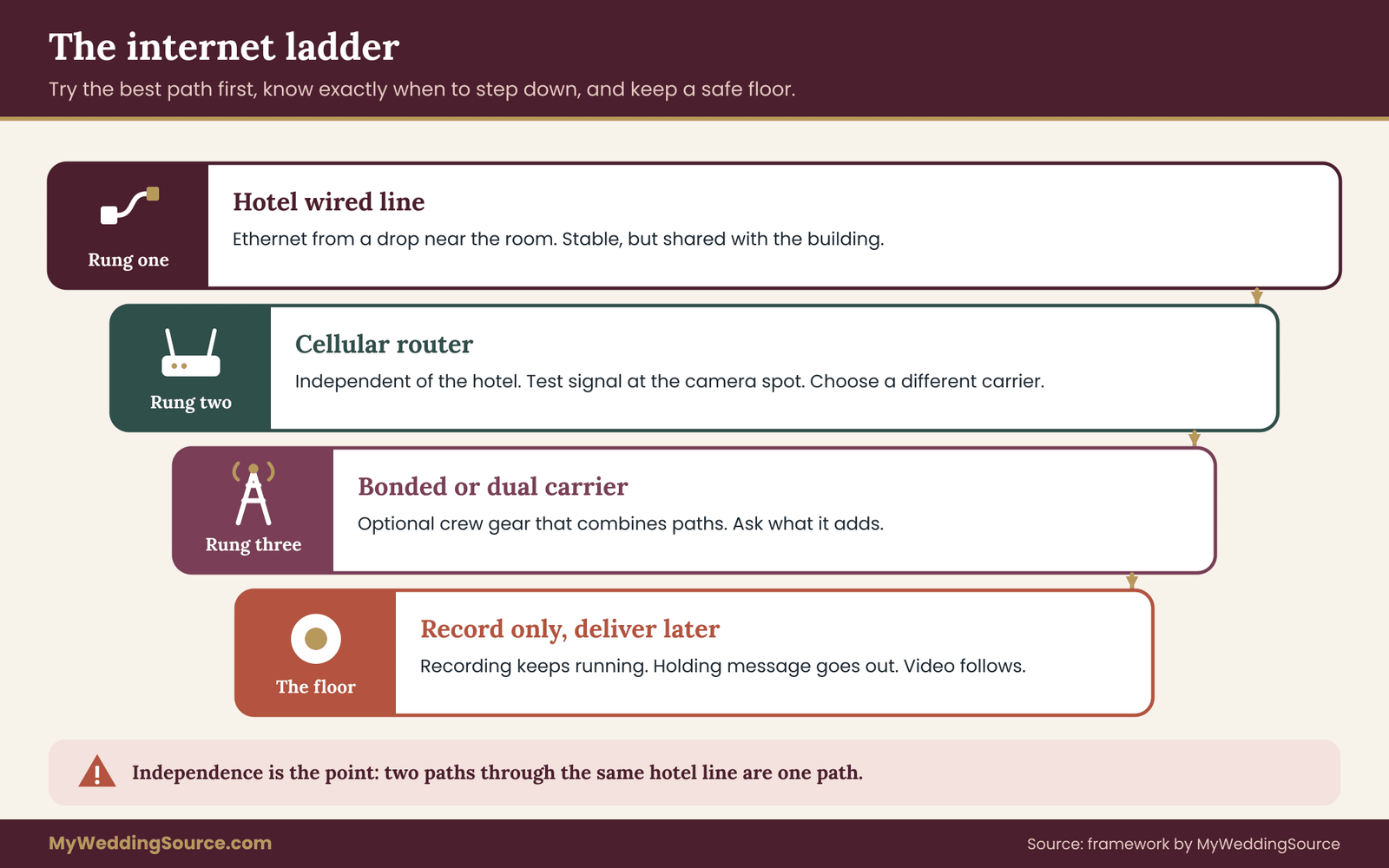
The core of a good livestream backup is an ordered list of connections, tried from the best to the last resort, with a clear rule for moving down the list. We will call it the internet ladder. It replaces the vague hope that “we’ll figure something out” with a sequence everyone can read at a glance.
Rung one: the hotel’s wired connection, not its Wi-Fi
If the encoder can plug into an Ethernet cable, use one. A wired link avoids the radio congestion that makes shared Wi-Fi unpredictable, and it gives you a stable, measurable path. Ask the hotel’s technical contact whether there is a wired drop in or near the room, whether it is a dedicated line or part of the shared network, and whether you may use your own switch.
Some hotels will provision a dedicated connection for an event, usually for a fee, and that is worth pricing against the cost of a failed stream. Others will say no wired access exists, which is also an answer you need early.
A cable also needs a route. If the drop is at the back of the ballroom and the camera is near the altar, the cable has to cross a room that guests will walk through. Plan a covered path, a length that reaches without tension and a person who checks it before the doors open.
Rung two: a second, independent line
The best livestream backup shares nothing with the first path. If the primary is the hotel’s connection, the secondary should not run through the hotel at all. In practice that means a cellular connection. A dedicated cellular router, or a phone set up as a hotspot, reaches the internet through a carrier’s towers rather than the hotel’s line.
Independence is the whole point. Two Wi-Fi networks in the same building may both ride the same hotel connection to the outside world. Two cellular plans on the same carrier may share the same weak tower. When you can, choose the secondary on a different carrier than the one your phones use, so that the failure of one network is not the failure of both.
Rung three: a bonded or dual-carrier setup
Professional streaming crews sometimes use devices that combine several connections into one stream, including more than one cellular carrier and a wired line. These can keep a stream going when one path weakens. They also cost more, take expertise to configure and are not necessary for most weddings. If you hire a production company that offers it, ask what it adds in plain language: how many paths, which carriers, what happens when all of them are weak, and whether the recording continues regardless.
Rung four: record only, upload later
The last rung is not a failure. It is the safe floor. When no path will carry the stream, the recording keeps going and the livestream backup plan shifts to delivery after the event. Many weddings end up here for a short stretch, and nobody except the remote guests ever notices, provided the plan said so ahead of time.
Check cellular coverage before you rely on it
A cellular livestream backup only works if the signal reaches the room. Hotel ballrooms are often interior spaces with thick walls and little outside reception. Three checks help.
First, look at the coverage maps that carriers publish, and note that the Federal Communications Commission publishes a national broadband map you can use to see reported service at an address. Maps describe expected coverage, not what you will get inside a windowless room. Second, stand in the camera position with your own phone, on each carrier you might use, and look at both signal strength and an actual upload test. Third, repeat the test at the time of day the wedding will happen, because networks get busier in the evening.
If one carrier is weak in the room and another is strong, that is exactly the information that decides which plan to buy.
Read the data plan before the livestream backup is needed
Streaming video uses a lot of data, and cellular plans differ. Some limit speed after a certain amount of usage, some give lower priority to heavy users when towers are busy, and some restrict hotspot use. Check the plan’s terms with the carrier. Work out the arithmetic: a ceremony of forty-five minutes at a given bitrate uses a predictable amount of data, which the arithmetic below shows how to calculate. If the livestream backup plan cannot cover the stream plus a margin, buy a larger plan for the weekend or choose a lower quality setting.
Keep guests off the livestream backup network
One of the quietest causes of a livestream backup failing is a hotspot or router that guests find and join. The network name is shared, the password is passed around and suddenly sixty phones are competing for the same cellular line. Use a unique network name, a strong password that you do not announce, and, where your equipment allows it, a limit on connected devices. Better still, connect the encoder to the cellular router by cable so the stream does not depend on the wireless link at all.
Keep the livestream backup ladder on one page
Write the livestream backup ladder as four lines: the primary path, the secondary path, the floor, and the name of the person who may switch between them. Put the exact network names and the physical location of each device on that page. When the stream fails at five minutes before the vows, the person at the back of the room should be able to follow the livestream backup ladder without calling anyone.
What a livestream backup needs from the venue
You cannot build the livestream backup ladder alone. Part of it lives inside the hotel, and the hotel decides what is allowed. The conversation is easier when you ask specific, answerable questions rather than “is the Wi-Fi good?”
Questions for the hotel’s technical contact
Ask for the person who manages the network, not just the event coordinator. If the hotel has an outside technology partner who runs the connections, ask for that company. The questions that matter are these.
Is there a wired connection in or near the ceremony and reception rooms? Is it dedicated to the event, or shared with other rooms and guests? What upload speed can the hotel commit to for the event window, and does the commitment appear in writing? Is there a captive portal, and if so, how long does a session last before it asks again?
Are there limits on devices, on bandwidth per device or on the kind of traffic allowed? May we bring our own router, switch or cellular device, and where may it be placed? Who is on call during the event, and how do we reach them? Is there any planned maintenance or network change on the day?
Write the answers in an email so you have a record. If the hotel will not commit to a number, that is useful to know. It tells you to treat the hotel’s connection as a convenience and put the real weight on your own paths.
Ask about the room for your livestream backup
Ask whether the ceremony space has outlets near the camera position and what the rules are for running cables across floors, including whether covers are required for safety. Ask whether other events overlap with yours and whether any of them is likely to use heavy video or large groups. Ask about the fire marshal’s rules if you plan to place equipment near exits or aisles. A venue walk-through is the right moment for all of this, and the guide to the venue technical walkthrough shows how to measure and document a room so that vendors get accurate information.
Ask what the hotel does when the livestream backup is needed
Ask what the hotel does when its own connection goes down: whether there is a backup line, how quickly staff can respond, and whether they will tell you directly or leave you to find out. A hotel that has a clear answer is a safer place to stream from than one that has never considered the question.
Put the commitments where you can find them
Get commitments in the venue contract or in a written event order where possible, and keep the emails with the rest of your vendor paperwork. Wedding contracts are worth reading closely on exactly this kind of point, and the wedding vendor contract guide explains what to look for. If something matters to the stream and appears only in a conversation, it will be forgotten by the time you need it.
If the venue says no to a livestream backup
Some venues do not allow outside equipment on their network, or restrict what you can place near guests. That is their right, and it is better to learn it now. If the answer is no, your options are to rely on cellular alone, to move the streamed portion to a space where the connection is better, or to decide that live viewing is not worth the friction and instead record and deliver afterward. Any of those is a sound decision, and none is a failure.
How a wedding livestream backup differs by venue type
The livestream backup ladder is the same, but the rungs behave differently depending on where you are. Think of each venue type as changing how much you trust each rung.
A city hotel ballroom. Wired drops often exist and the hotel has experienced event staff, but the network is shared and the building’s walls block cellular signal. Trust the wired line more than Wi-Fi, test cellular carefully, and expect the portal question to matter.
A resort or destination property. The hotel may have a good connection, but the grounds around it, such as a beach, garden or terrace, may have almost nothing. If the ceremony is outdoors, the signal at the altar is the only signal that counts. Test there, not in the lobby.
A rural or remote venue. Cellular may be weak or absent, and the venue’s own internet may be slow or satellite-based, which can carry high delay. In these places, a satellite-based service or a recording-only plan may be the honest answer. Ask the venue what it uses and test before you commit to a stream.
A historic building or place of worship. Thick stone walls can block both cellular and Wi-Fi, and there may be rules about equipment and cables. The officiant or the building’s manager may also have rules about recording and streaming that you must respect, so ask before planning.
A home or private property. You control the network, which is an advantage, but home internet is often tuned for downloading. Check the upload speed and consider the load of other devices in the house.
If you are unsure which category your venue falls into, assume the least favorable one and test accordingly. A plan that works on the hardest assumption will also work on the easier ones.
Sizing the connection: the arithmetic behind a wedding livestream backup
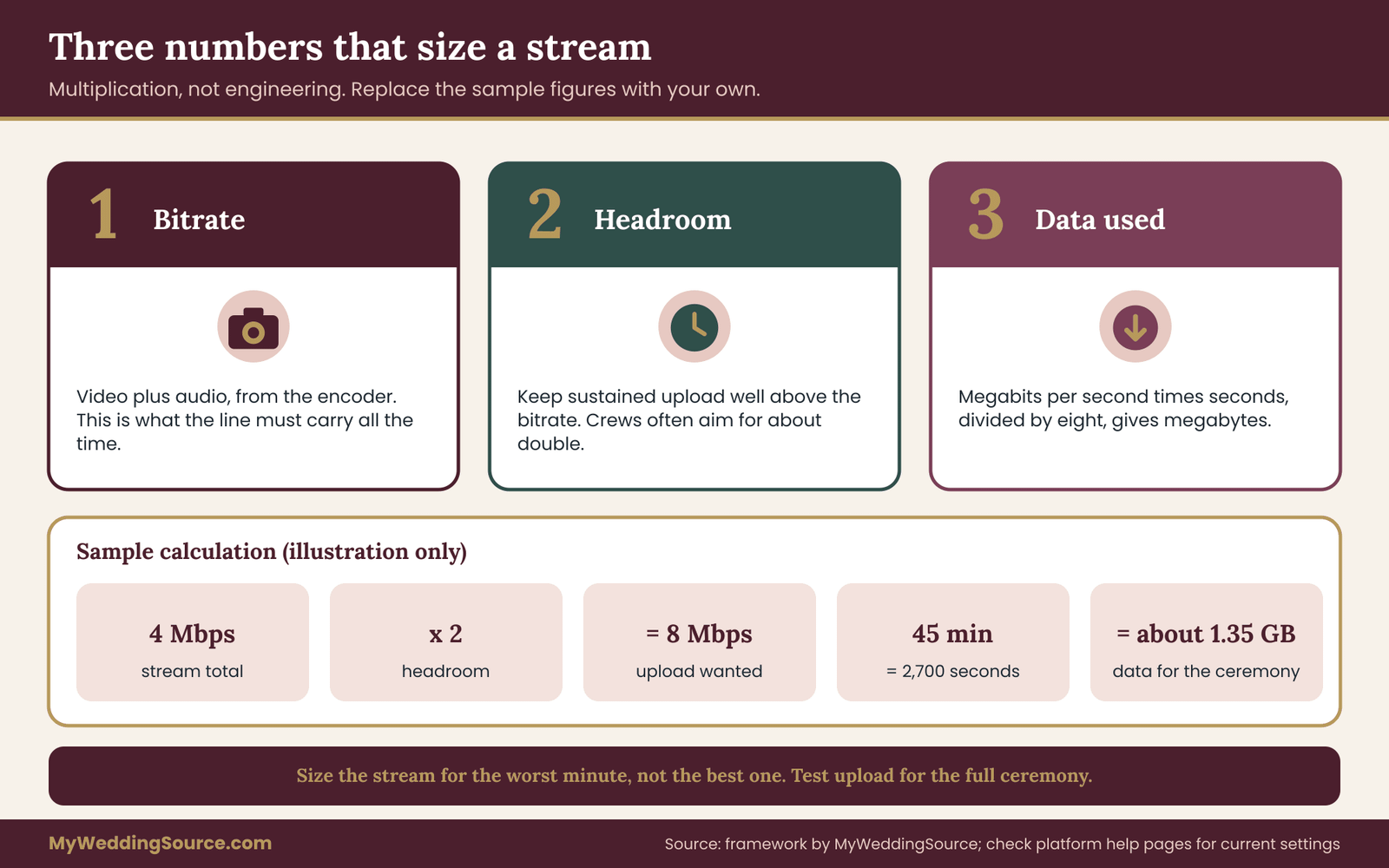
You do not need to be an engineer to size a stream. You need three numbers and a little multiplication. The goal is to know how much upload capacity the stream needs, how much headroom to keep, and how much data a cellular plan will burn.
Number one of the livestream backup: the stream’s bitrate
A stream is sent at a chosen bitrate, usually measured in megabits per second. Higher resolution and higher frame rates generally need a higher bitrate. The video service you use publishes recommended ranges for each resolution on its help pages, and those ranges change over time, so read the current page rather than trusting a number from an old article. For planning, take the encoder’s configured video bitrate and add the audio bitrate, which is small. That total is the minimum your connection must carry continuously.
Number two of the livestream backup: the headroom
A connection rated at a given upload speed does not deliver that figure every second. Speeds rise and fall, and a stream that uses the full rated speed will break the moment the line dips. A common working rule among production crews is to keep sustained upload comfortably above the stream’s total bitrate, often double. Treat that as a rule of thumb, not a law. The point is to leave a gap, and to measure whether the gap is real.
Here is the calculation. If your stream needs a total of four megabits per second, aim for a sustained upload of around eight. If a test shows that the connection offers six on a good minute and two on a bad one, you do not have eight. You have an unreliable connection, and the stream should be configured for the bad minute, not the good one.
Number three: the data used
For cellular, the amount of data matters as much as speed. A stream at four megabits per second sends four megabits every second. Multiply by the number of seconds, divide by eight to convert megabits to megabytes, and you have the data used.
For a forty-five minute ceremony, that is 2,700 seconds times four megabits, or 10,800 megabits, which is 1,350 megabytes, or a little under one and a half gigabytes. A longer streamed program with the first dance and toasts could be several times that. Add a margin and compare the total with what the livestream backup plan allows before speed is reduced. Compute it for your own bitrate, because the figures above are an illustration, not a recommendation.
Choose the quality for the worst case
The instinct is to stream at the highest quality the equipment offers. For a wedding, lower is often wiser. Remote guests are mostly watching on phones and tablets, and many will be older relatives on ordinary home internet. A clean, steady stream at a moderate resolution beats a sharp picture that stalls. Remember too that the recording can be made at higher quality than the stream, so lowering the live quality costs you nothing permanent.
Ask the videographer or whoever is configuring the encoder whether the setup can record at one quality locally while streaming at a lower one. Many can.
Audio first
In a ceremony, the words matter more than the picture. A viewer will forgive a soft or pixelated image if the vows are audible, and will not forgive broken audio at all. Tell whoever sets up the stream to prioritize clean audio, and ask whether the stream can fall back to a lower-resolution picture before the audio degrades. A direct feed from the sound system or a dedicated microphone at the officiant is usually far better than a camera’s built-in microphone from the back of the room.
Test the livestream backup over time, not once
A thirty-second test says very little. Run a test that lasts at least as long as the ceremony, at the time of day of the wedding if you can, with the same equipment and in the same spot. Watch for three things: whether the connection holds, whether the upload speed stays above your target, and whether any sign-in prompt appears. Do the test on the primary path and again on the backup path. A path you have not tested for twenty minutes is a path you have only hoped about.
Count the other devices
Remember everything else on the network. The DJ may use internet for music, the photographer may upload previews, the planner may use a tablet, and guests will use phones. On a shared connection, every one of those takes a bite. If your stream matters, ask other vendors not to use your connection for heavy uploads during the ceremony, and put the stream on its own path where possible. That single arrangement prevents more failures than any equipment upgrade.
Choosing a platform and a delivery method
The service that carries the stream to your guests matters less than the plan around it, but it still shapes what can go wrong. Look at the platform through the lens of failure rather than features.
What to check about any platform
Does it require guests to create an account, or can they watch from a link? Account walls annoy older relatives and add support requests at the worst moment. Does it show a clear message when the stream pauses, or just a spinning wheel? Does it save a replay automatically, for how long, and can you download it? Does it offer a second input, sometimes called a backup stream, so that the platform keeps the same event alive if the first input drops? Not every service offers this, and the details change, so check the platform’s current help pages instead of assuming.
Does it allow a private or unlisted link, and how do you control who can see it? Does it have limits on the length of a single live event? What does it say about privacy and about recording the audience’s comments? You will use the answers in more than one place in this guide.
Meeting-style versus broadcast-style tools
Video meeting tools and broadcast streaming platforms behave differently. Meeting tools are simple for guests, often work in a browser and let the remote family see and talk to each other, but they tend to adapt aggressively to weak connections by lowering quality, and they may not record at the quality you want. Broadcast platforms are built to send one signal to many viewers, tend to need an encoder, and handle large audiences better, but they add steps for the person running them.
For a small remote audience of a dozen relatives, a meeting tool may be enough and is easier to support. For a larger audience, or when you want a higher-quality result, a broadcast platform fed by a dedicated encoder is the more usual choice. Either way, the recording on site should still exist.
Why one platform is not a livestream backup
Some people read “backup” as “use two platforms.” That helps only if the failure was the platform’s. If the venue connection fails, two platforms fail together. Prefer a second internet path over a second platform. Where a service offers a redundant ingest, it protects against an encoder-side drop, not against a dead building.
Decide who gets the link, and when
A stream link is a key to a private event. Decide who receives it, how, and when. Sending it to a group chat means it may be forwarded to people you did not invite. Sending it only in a personal message to each remote guest takes longer but gives you control. Whichever you choose, send it early, with a start time that includes the time zone, and a test link or short test session a few days before so that elderly relatives can find out that their tablet works while there is still time to help.
Practice the viewer’s side of the livestream backup
The most overlooked test is on the viewing end. Ask one remote guest to open the stream on the device they will actually use, on the connection they will actually have, while you run a test from the venue. Many failures that look like venue problems are viewer problems: an old browser, a muted tab, a tablet on a weak signal. A short call with a grandparent a week ahead removes a surprising number of sad messages on the day.
Your wedding livestream backup and the wider plan
The video does not live alone. It shares power, people and time with everything else on the day. Fitting it into the rest of the plan saves arguments.
Do not let the livestream backup steal the day
Assign the stream to someone who is not the couple, not a parent and not the officiant. The best owner is a vendor whose job it is, or a friend who has agreed to watch the screen rather than the ceremony. If a family member is being asked to run it, be honest about the cost: they will miss part of the day, and that is a decision you make with them in advance, not a favor you assume.
Time the stream tightly
Streaming the whole day multiplies the risk and the data. Many couples stream only the ceremony, or the ceremony and the toasts, and share a recording of the rest. Decide the start and end of the streamed portion in writing. A shorter stream is easier to protect, easier to watch, and lighter on the connection.
Coordinate with other digital needs
If the day also depends on a digital seating chart, a music playlist stored online or a shared photo album, ask whether those items will use the same connection. The wedding planning checklist on this site is a useful place to record each digital dependency and its owner, and the wedding planning checklist can hold the streaming tasks alongside everything else. Keeping the stream’s tasks in the same list as the rest of the planning means they get dated and assigned instead of floating.
Put the livestream backup in the vendor timeline
The stream has setup, test, start and stop times. They belong in the master timeline that vendors share. The wedding vendor timeline guide shows how to lay out arrival and load-in times, and a livestream needs early access to the room: usually earlier than a photographer, because the connection must be tested while the room is still quiet.
Budget for the livestream backup honestly
A livestream backup has a cost, and the honest way to think about it is by comparing it to what it protects. A second connection, a cellular plan for the weekend, a separate recorder and extra batteries add up. Weigh them against the value of live viewing for the specific people who cannot attend, and against the cost of a ceremony with no usable video.
There is no fixed answer. For a couple with a few remote relatives who would be content with a recording a day later, a camera card and a hotspot may be plenty. For a couple with a large remote audience and an important live moment, a dedicated line and a professional crew may be worth paying for.
The internet failure drill for a wedding livestream backup
A plan on paper is a theory. A drill turns it into a habit. The drill described here takes about an hour, needs no special skill and finds most of the problems that would otherwise appear during the ceremony. Run it in the real room, about a week before the wedding, with the real equipment and the real people.

Step one: set the scene
Choose a time close to the ceremony’s hour. Bring the encoder or laptop, the cameras, the cellular router, the cables and the one-page ladder. Have the person who will run the stream on the day, and ideally the person who will decide what to do if it fails. If a hotel technician can be present for even ten minutes, invite them.
Step two: start on the primary path
Start the stream to a private test destination, not your guests. Watch it on a second device, such as a phone on a different network, so you see what a viewer would see. Let it run for at least fifteen minutes. During that time, look for dropped frames, warnings in the software, any sign-in prompt and any change in the upload speed. Write down what you see in plain words.
Step three: break the livestream backup on purpose
This is the step most people skip, and it is the whole point. Pull the Ethernet cable, or turn off the Wi-Fi on the encoder. Start a stopwatch. Now watch what happens, and ask five questions.
How quickly did the person running the stream notice? What message did the viewer see? Did the local recording keep going without a gap? How long did it take to switch to the backup path? Did the stream come back by itself, or did someone have to restart it?
Write down each time. The numbers are your real plan. If it took ninety seconds to notice and another ninety to switch, then the three-minute gap you were promising is already a four-minute gap.
Step four: switch paths on the livestream backup
Move the encoder to the second path: the cellular router, by cable if possible. Confirm the stream resumes. Look at the upload speed on this path, and compare it with the stream’s bitrate. If the speed is lower than the stream needs, lower the quality now, while it is calm, and note the setting that worked. That setting becomes your fallback preset.
Step five: break the backup too
Then do the awkward part. Disconnect the second path as well. Confirm that the local recording continues and that the person running the stream knows what to do and whom to tell. This is the moment when the recording-first principle is tested rather than assumed.
Step six: recover and play back
Reconnect the primary path. See whether the stream returns cleanly. Then stop and play back the local recording from the beginning. Look for gaps, audio problems and file errors. Confirm where the file lives and how it will be copied after the event.
Step seven: write the numbers down
At the end, fill in a short log: the date, the room, the paths tested, the speeds, how long each switch took, the fallback quality and anything that surprised you. Keep it with the livestream backup ladder. If something failed, fix it and run the failing step again. If the fix needs the hotel, send the request in writing.
A shorter livestream backup check for the day itself
On the wedding day, you will not run the full drill, but you can run a five-minute version about an hour before the ceremony. Check the recording is running and the card has space. Check the stream is live to the private test destination or a rehearsal view. Check both paths are connected and which one is active. Check the batteries and the cables. Check that the person who owns the decision knows they own it, and that the holding message for remote guests is ready. Then leave it alone and let everyone get ready for the wedding.
What the livestream backup drill often finds
The usual discoveries are mundane. A captive portal logs the device out after a set time. A cellular router that was fine in the lobby has one bar in the ballroom. A cable that was long enough in the livestream backup plan is a meter short. The encoder remembers the old network and reconnects to the wrong one. The person who was supposed to watch the stream does not have the password to the platform. Every one of these is cheap to fix a week early and painful to discover at the altar.
Decision rules for a wedding livestream backup: lower, switch or stop
During the ceremony, there is no time for debate. The most useful thing you can do in advance is agree on rules that turn an anxious moment into a routine. Three time limits do most of the work.

The thirty-second rule: lower the quality
If the stream shows trouble, such as stuttering or warnings from the software, and it does not recover within about thirty seconds, switch to the lower-quality preset you tested in the drill. This is the cheapest response, it takes one action and it often fixes the problem because a smaller stream fits a weaker connection. Do not wait for the stream to die before trying it.
The two-minute rule: switch paths
If the stream is still failing two minutes after the first sign of trouble, or has stopped entirely, move to the secondary path. The person who owns this decision acts without asking. The drill told you how long the switch takes, so you know the actual cost. Make a note of the time on a card or phone, because remote guests will ask later how long they missed.
The ten-minute rule: stop and post
If neither path restores the stream within about ten minutes, or the failure comes during a moment that cannot be repeated, stop trying. Let the recording run, send the holding message to remote guests, and tell them when the recording will arrive. This is not a defeat. It is the plan working as written, and it prevents the worst outcome, which is a person fiddling with cables during a toast and missing the moment they were there to see.
Adjust the times to the moment
These limits are starting points. During the vows, the stakes of a gap are higher, so you might shorten the rules or decide that nobody touches anything during the vows except to read a status. During a long reception segment, you might loosen them. What matters is that you decide before the wedding and write the rule down.
Name the livestream backup decision owner
Choose one person who decides. Give them the authority to act on the rules without checking with the couple, because the couple should not be handling cables or deciding anything on their wedding day. If the owner is a hired videographer, put the rules in the conversation you have with them and ask them to confirm them in writing. If it is a friend, give them a card.
Do not fix during the vows
A useful safeguard: during the exchange of vows and the ring ceremony, no one adjusts network equipment unless the recording itself has failed. Moving cables or restarting routers can disturb audio, cause the camera operator to miss a shot, and draw the room’s attention. Take the loss to the stream, protect the recording, and repair afterward.
Which failures are the stream’s, and which are the recording’s
Learn to tell them apart. If the picture freezes for viewers but the camera display still shows motion and a recording light, the stream failed and the recording is safe. If the camera shows an error or the card icon is red, the recording is the problem, and that is a higher priority than any network trouble. The person watching should know which light means which, and the setup should place those indicators where they can be seen.
Talking to remote guests when the livestream backup kicks in
Technical recovery is half the job. The other half is what the people watching experience. A calm message at the right time can make a six-minute outage feel like a small interruption instead of an abandonment.
Prepare a livestream backup holding message in advance
Write three short messages before the wedding and keep them somewhere the stream owner can reach quickly.
The first is for a brief interruption: “We lost the connection for a moment and we’re working on it. The ceremony is still being recorded. Please stay on this page.”
The second is for a longer problem: “The live connection is not recovering. The ceremony is being recorded, and we will send you the full video this evening. Thank you for being with us.”
The third is for after the event: “Here is the full recording of the ceremony. Parts of the live stream were interrupted, and this version has everything.”
Notice what these do. They state what is known, avoid blame and promise only what the plan can deliver. Do not promise a time unless you control it.
Choose the channel in advance
Where will the message appear? If the platform has a chat or a description field, the message can go there. If not, a family group chat, a text from a named person or an email works. Pick one channel and tell remote guests about it when you send the link, so they know where to look when the picture freezes. A guest who does not know the channel will assume the worst and may send twenty messages to the couple.
Give remote guests a person to ask
If the remote audience is large, name one person who answers questions. It should not be the couple. A cousin with a phone, who has the holding messages, is enough. Tell remote guests that this person exists, and ask everyone else to stay quiet.
Offer something to watch while they wait
A simple holding screen, such as a photograph of the couple with the words “We’ll be right back,” is kinder than a black screen or a frozen frame. Many streaming tools let you switch to a static image with one click. Prepare it, test it and tell the operator where it is.
Plan for the sound of silence
If the audio is also down, remote guests may not know the ceremony is continuing. A message that says so is worth more than a perfect video later. If the audio on the stream returns before the picture, let it continue. People will listen to vows.
Deliver the recording promptly after a livestream backup
If the stream failed in whole or part, the most reassuring thing is a fast, complete recording. Decide who uploads it, to where, and by when. A large file may take hours to upload on a hotel connection, which is one more reason to plan the upload for a time when the wedding team has finished with the network, or to upload from home. Send the link to each remote guest personally, and check that it opens before you announce it.
What to say to the couple afterward
If something went wrong, the couple should hear it briefly and kindly from the person in charge: what happened, what was saved, and what is being done. Skip the technical post-mortem unless they ask. A newly married couple needs to hear that the ceremony was recorded, not an explanation of upload bitrates.
Privacy and security for your wedding livestream backup
A livestream carries faces, names, voices and sometimes children, to an audience you chose and to anyone who gets hold of the link. The backup arrangements add more devices and more passwords. None of this needs to frighten you, but it does need a few deliberate choices.
Treat the stream key and the link as passwords
Streaming software uses a key, a long string that authorizes sending video to a particular destination. Anyone who has it could, in principle, send video to your event. Treat it like a password: do not paste it in a group chat, do not show it on a projected screen, and do not leave it on a sticky note. If the key was shared more widely than intended, most platforms let you generate a new one. The viewing link is a separate item, and it deserves the same care, as discussed above.
Lock down the livestream backup devices
The cellular router and any phone used as a hotspot are small computers on your wedding day. Change the default administrator password, use a unique network name and a strong passphrase, and use the strongest encryption the device offers. The National Institute of Standards and Technology and the Cybersecurity and Infrastructure Security Agency both publish plain-language guidance on securing home and small-office networks, and the same basics apply to a temporary network at a wedding. Keep the firmware updated before the day, not on it. Update during the livestream backup drill week so that any problem shows up while there is time to roll back.
Be careful with public and hotel Wi-Fi
An open or shared network is a place where you should not send sensitive information. The stream itself is intended to be seen by others, but the encoder computer may hold other things: files, accounts, the guest list. Use a dedicated device for streaming if you can, and do not log into personal accounts on it. If you have to use the hotel network, avoid doing anything on that computer that you would not want exposed, and remember that a captive portal is not a security measure for your traffic.
Guest information is personal data
A guest list with names, addresses and dietary needs is personal information, and so is a list of remote guests with email addresses. Keep it where only the people who need it can see it, and do not paste it into the streaming platform’s chat or into a general document. If a vendor handles the sending of links, share only the names and contact details they need, and ask how they store and delete them.
The guide on wedding photography consent explains how to think about guest boundaries and image use, and many of the same questions apply to video: who may be filmed, who may share, and what happens to the footage.
Think about who is on camera
A stream puts everyone in the room on screen. Some guests may not want to appear online: a person who has moved to avoid a relative, a family with privacy concerns, a guest who works in a field where public images are a problem. Consider a short, kind notice in the invitation or on the wedding website saying that the ceremony will be streamed, and offer a seat outside the camera’s view for anyone who asks.
Children deserve extra care, and parents should know in advance. If the officiant or the venue has rules about recording and streaming, follow them, and get the answer in writing.
Decide how long the link stays alive
After the wedding, the stream link and the recording are still out there. Decide how long they remain available and who can see them. Many couples keep a private recording for family for a limited period and then move it to storage they control. Check the platform’s own settings for how to restrict access, set a date for removal and turn off comments or downloads you do not want. Take out any stream keys and passwords once the event is over, and remove vendors’ access to shared folders when their work is done.
Do not trust the first machine-written summary
If you use any automated tool to produce captions, a transcript or a summary of the ceremony, treat the output as a draft. Automatic captions can mishandle names, languages and religious or cultural terms, and a wrong word in the vows is more painful than no caption. Read and correct any caption or transcript before sharing it widely, and do not present an unchecked machine-generated version as accurate.
Keep the livestream backup offline
Some of your protection is simply not needing the internet. Keep the holding messages, the livestream backup ladder, the contact numbers and the instructions as a printed page or a file stored on the device itself, rather than only in a cloud document that you cannot open when the network fails. This is the same offline-first idea that runs through the wider guide on wedding day digital contingency plan, and it is just as relevant to a single stream.
Checking livestream backup facts with the venue, the vendor and the platform
A good plan is built from facts you have checked, not facts you have assumed. Each fact has an owner, and the owner is the one to ask.
What the hotel or venue can confirm
The venue knows its network: whether wired connections exist, what the portal does, which devices are allowed and who is on call. It also knows its rules about cables, equipment placement and outside vendors. Ask for these in writing, as described earlier. The venue is not a good source on how your stream will behave, because it does not know your encoder.
What the videographer or production company can confirm
A professional knows their equipment, their usual bitrates, how they record locally, what they do when a connection drops, and what they have done at similar venues. Ask them to describe their failure plan in their own words. Ask what they record on, whether they record at a different quality from the stream, whether they bring their own internet connection, and whether they test on site beforehand. Do not be shy about asking for the drill; a good vendor expects it. If a vendor is vague, that tells you something.
What the platform can confirm
The streaming platform publishes its own rules on recommended settings, replay retention, privacy controls and limits. These change. Read the current help pages for the exact service you plan to use, and do it close to the wedding, not a year earlier. The platform’s page is the authority on what it supports, not a blog post, including this one.
What the cellular carrier can confirm
The carrier knows its plan terms: hotspot rules, speed reductions and priority. It does not know the coverage in your ballroom, so a test remains necessary. Ask what happens to speed when a data threshold is crossed, and whether the livestream backup plan can be changed for a single month.
What the contract should say about the livestream backup
If you hire a videographer or a production company, the contract should say who is responsible for the recording, what happens if the stream fails and what you receive afterward. Look for the number and type of cameras, the recording format, who owns the files, when you will receive them, how long the vendor stores them and what happens in case of a technical failure. The earlier contract guide explains how to read a contract for gaps, and the vendor due diligence checklist gives questions to ask before you sign. A stream with no written failure plan is a promise with no terms.
Be wary of promises about guarantees
Be cautious of any vendor who promises that the stream will not fail. No one controls every link between a ballroom and a viewer’s tablet. An honest vendor says what they will do to reduce the risk and what they will do if it happens. That is the thing to ask for in writing.
Keep a record of what you were told about the livestream backup
Keep emails, written answers and the livestream backup drill log together. If the hotel’s network fails despite a commitment, or a vendor does not do what the contract says, those records are what you will need. Gather them in the same place as the rest of your vendor paperwork, and note the date of each conversation.
Where to turn when the rules are unclear
For matters of law, such as recording consent in your jurisdiction or contract disputes, a local attorney or a consumer protection office can tell you what applies. This guide cannot. For technical questions you cannot resolve with the vendors, a qualified AV or network professional can review your setup, and some will do a short paid consultation for a nonprofessional.
A worked example: Priya and Daniel plan for a hotel ballroom
This is an invented example, built to show the reasoning rather than to report a real event. Priya and Daniel are marrying in a hotel ballroom in a mid-sized city. About one hundred guests will attend. Twenty-two relatives and friends cannot travel, and most of them live in three other time zones. Priya’s grandmother, who is ninety, will watch on a tablet.

Deciding what to stream
They decide to stream only the thirty-five minute ceremony, and to record the toasts and first dance locally for later sharing. That choice shrinks the risk window and the data. They write the stream’s start and end times in the vendor timeline.
Choosing the recording layer of the livestream backup
They hire a videographer, who records on two cameras with cards and also writes a local file from the encoder. Priya asks, in writing, whether the cameras record at a higher quality than the stream, and the videographer confirms that they do. A card swap is planned before the ceremony. The videographer agrees to deliver the full ceremony within a few days.
Asking the hotel
Daniel emails the hotel’s event coordinator and asks to be put in touch with whoever manages the network. The technical contact replies that a wired drop exists at the back of the ballroom, shared with the other events in the building, that the guest Wi-Fi uses a captive portal that asks guests to re-accept terms after a period, and that outside routers are allowed if they stay out of walkways. The contact cannot commit to an upload speed.
That last answer is decisive. Priya and Daniel decide to treat the hotel’s connection as the first rung and not the only one.
Building the livestream backup ladder
Their ladder has four lines. Primary: the hotel’s wired drop. Secondary: a cellular router, supplied by the videographer, on a carrier different from the one used by most of the guests. Floor: record only, with delivery afterward. Owner: the videographer, who may switch without asking.
At the site visit, the videographer tests the cellular router in the ballroom. One carrier shows a single bar and a poor upload figure. Another shows a usable signal near a window at the side of the room. They decide to run the cable from the router, placed near that window, to the encoder along the wall, under a cover. The cellular test settles which rung is real.
Doing the arithmetic
The videographer configures the stream at a moderate quality and a total bitrate of about four megabits per second. Following the headroom rule, they look for a sustained upload of about eight. The hotel’s wired drop tests at that level on a quiet afternoon but varies widely; the cellular path tests at about six. They choose a lower fallback preset at about two and a half megabits per second for the cellular path, and they check that its data use for the ceremony is well within the weekend plan.
Running the livestream backup drill
Six days before the wedding, they run the drill in the ballroom at the ceremony’s hour. The primary path runs cleanly for fifteen minutes and then drops when the captive portal logs the encoder out. The team had not expected that. They ask the hotel to place the encoder’s device on a list that does not require the portal, and the hotel agrees. They run the livestream backup drill again and the problem disappears.
They then pull the cable on purpose. The operator notices in about twenty seconds, switches to the cellular path in under a minute, and the stream returns at the lower preset. The local recording shows no gap. They disconnect the cellular path too, confirm that the recordings continue, and write the three holding messages.
Setting the rules and the messages
They agree on rules. After about thirty seconds of trouble, drop to the lower preset. After two minutes, switch paths. After ten minutes, stop and post. Nobody touches anything during the vows unless a recording light goes red. They give the grandmother’s cousin, Meera, the holding messages and ask her to field questions for the remote guests. They send the viewing link a week early, with a start time in each time zone, and ask the grandmother’s household to try the link in a short test.
The day
An hour before the ceremony, the videographer runs the five-minute check. The stream runs well until ten minutes into the ceremony, when the primary path stutters because an event elsewhere in the hotel is using the shared connection. The operator waits thirty seconds, drops to the lower preset and the stream steadies. At the exchange of vows, nobody touches the equipment. The ceremony ends. Remote guests received a short interruption of under a minute, and the recording is complete.
In another version of the same day, both paths fail for twelve minutes. The operator posts the holding message at the ten-minute mark. Meera tells the remote guests the full video will come that evening. The full recording is uploaded at the hotel after the reception, when the network is quiet, and the link arrives before midnight. The couple’s remote guests, though disappointed, saw a clear message and received everything.
What the example shows about a livestream backup
Notice what saved the day. It was not special equipment. It was a drill that found the captive portal, a cellular test that decided where the router went, a clear rule that spared the vows, and a message ready to send. Each of those is cheap, and each is available to a couple using a simple setup.
What a wedding livestream backup costs and how to think about it
You will be tempted to ask for a price. A single figure would be wrong, because costs depend on your market, your vendor and your choices. Instead, think about the cost in layers and decide which layers match the value of the stream to you.
The free layers of a livestream backup
Some protection costs only time. A drill, a written ladder, three holding messages, a test link for the remote guests and a clear decision owner are free. They also provide most of the benefit. If your budget is tight, spend your effort here first.
The inexpensive layers
A second memory card, spare batteries and a cable cover are modest. A phone-based hotspot may be included in a livestream backup plan you already own, though you should check the livestream backup plan terms. A short paid consultation with an AV professional, if available, can be good value for a first-timer.
The paid-for layers of a livestream backup
A dedicated cellular router, a plan for the weekend, a separate recorder and a wired connection from the hotel carry real costs, and the hotel’s charge for a dedicated line varies. A professional crew that brings all of this has a cost that reflects the labor and the equipment. Ask for each item to be priced separately so you can decide which are worth it.
A way to decide how much livestream backup to buy
Ask three questions. How many people depend on the live stream, and how much would a delay matter to them? How much would the loss of the recording hurt? How much of the risk can I remove with no money? Typically, the answer to the third is “most of it,” the answer to the second is “a great deal,” and the answer to the first varies by family. Spend on the recording before the stream, and on the second connection before a better camera.
Cheaper does not mean careless
A friend with a laptop and a hotspot can produce a fine stream when the plan is sound, and a high-priced crew can still fail if nobody tested the room. Value follows the plan, not the invoice. If a vendor’s price includes a drill, a local recording and a written failure plan, that is worth more than a higher price that includes none of them.
Limits and edge cases for a wedding livestream backup
No plan covers everything. These are the situations that most often break the neat version of the livestream backup ladder.
An outdoor ceremony and the livestream backup
Wi-Fi may not reach, and cellular signal depends on the site. Test at the altar position, not on the terrace. Consider a cable run to the nearest reliable connection, a mobile cellular setup on a stand, and a recording-first plan in which live viewing is optional. Weather and sun also affect equipment; shade the encoder and keep cables dry.
A very long program
Streaming from the processional to the last dance multiplies data, heat on equipment and the chance of failure. If you must stream longer, schedule a short break when the stream is deliberately paused, use that time to check recordings and batteries and restart the stream cleanly.
A multilingual or multi-ceremony day
Weddings with more than one ceremony, or readings in several languages, raise audio challenges and, sometimes, rules about what may be recorded. Make sure the stream owner has the order of events and a microphone plan, and that the officiants have agreed to the recording.
Guests in many time zones
Remote guests may need to watch at odd hours. Give start times in each of their time zones, or in plain terms such as “9 p.m. your time.” Do not rely on them to convert, and tell them that a recording will be available.
The hotel changes something
Hotels change networks, staff and policies. Confirm key facts the week before and again on arrival. If the person who knew about your event has left, you want to learn that before the ceremony.
A weak link a livestream backup cannot fix
Sometimes the honest finding is that the venue has no good path. Then the livestream backup plan is to record well and deliver quickly, and possibly to move the streamed segment to a better-connected room. Telling remote guests early that the live stream may be limited and the recording will follow is far kinder than a promise that fails.
When the stream is the main event, the livestream backup is the plan
If a large share of the guests are remote, for example in a ceremony for a couple separated by travel restrictions, the stream is not a bonus, it is the event for those guests. In that case, treat it as a production: hire a professional, build both paths and consider dedicated connectivity. Do not rely on a friend’s laptop and the hotel’s Wi-Fi.
What this guide cannot tell you
It cannot measure your venue, test your equipment or tell you the rules in your jurisdiction. It also cannot promise a specific result. A livestream backup lowers the odds of losing the moment and shortens the time to recover, and that is as much as any plan can honestly claim.
Common mistakes in a wedding livestream backup
Most failed streams repeat a short list of errors. Knowing them lets you check your own plan against them.
Testing download instead of upload. A fast download number says nothing about whether the line can carry video outward. Test upload, and watch how it varies.
Testing once, briefly. A thirty-second test misses the portal that expires at twenty minutes and the evening crowd that arrives at five. Test for the length of the ceremony.
Having a single path in the livestream backup. Two networks that share the same building line are one path. A real backup travels a different route.
Having no local recording in the livestream backup. If the platform’s replay is the only copy, a dropped connection becomes a missing ceremony.
Letting guests join the backup network. A shared hotspot name and password invite sixty phones onto a line that was meant for one encoder.
Leaving the decision vague. If nobody owns the choice, everybody waits for somebody else. Name the owner.
Fixing during the vows. Touching cables at the key moment trades a stream problem for a recording problem and a distracted room.
Skipping the viewer test. A tablet that cannot open the link looks, to the grandmother, like a venue failure.
Promising more than the livestream backup plan can deliver. “It will be live” is a promise. “It will be live, and if it is not, you will have the video tonight” is a livestream backup plan.
Assuming the vendor has a plan. Ask them to describe it. A vendor who has handled failures before will have a clear, calm answer.
A one-page livestream backup checklist, in sentences
You can put the whole plan on a single page. Read it aloud at the start of the livestream backup drill and again before the ceremony.
The recording is running on two devices, and both have power and space. The stream is going to a private test view that the owner can see. The primary path is connected and has been tested for as long as the ceremony. The secondary path is connected, powered and tested, with a known fallback preset. The decision owner knows the three time limits: thirty seconds to lower, two minutes to switch, ten minutes to stop and post. The holding messages are ready in the place the owner can reach, and the person answering remote guests has them too.
The remote guests have the link, the start time in their own time zone and the name of the channel where updates will appear. The stream key and the viewing link are known only to the people who need them. After the event, the recording will be copied to two places, delivered to remote guests and the platform’s link settings reviewed.
If every sentence is true, the day belongs to the wedding rather than the equipment.

After the wedding: delivering the recording and closing the livestream backup
The plan ends when the video has reached the people it was meant for, and the temporary arrangements are removed.
Copy before you celebrate
At the end of the event, the recording owner copies the files to a second device before anyone leaves. Do not rely on a single card as the only copy overnight. Check that each file opens and plays with sound.
Deliver the full recording
If the stream was interrupted, send a complete version as soon as the vendor or the owner can. If the stream worked, the recording is still worth sharing, because replay and quality are usually better than live. Send each remote guest a personal link, check that it opens and say how long it will stay available.
Close what your livestream backup opened
Change or delete the stream key, remove access for vendors and helpers, reset the cellular router and delete any spare logins. Decide how long the platform’s replay stays online, and set the access to match. Keep the drill log and the vendor emails with the rest of your records, so that next time, or if a dispute arises, you have them.
Learn from your livestream backup
Within a week, write down what worked and what did not, in a few lines. A friend or relative who is planning their own wedding will find those lines more useful than any guide.
FAQ
Can a wedding livestream really survive hotel Wi-Fi failure?
Yes, if you plan for failure in advance. Record locally on a device that does not need the internet, put the stream on a dedicated wired line, add a cellular backup on a different carrier, and agree on rules for when to lower the quality, switch paths or stop. With those in place, a drop becomes a short interruption and the recording stays safe.
What is the cheapest wedding livestream backup that still works?
Record on the camera’s memory card, run the stream from a phone or laptop with a cellular hotspot as the second path, and test both for the length of the ceremony. Write three holding messages for remote guests. This costs little beyond a data plan and some time, and it protects the part you cannot redo.
Is a cellular hotspot a good backup for hotel Wi-Fi?
Often, yes, because it travels a different route from the hotel’s line. It only helps if signal reaches the camera position, so test on site at the time of the wedding. Check your plan’s hotspot rules and data limits with the carrier, and use a unique network name and strong password so guests do not join it.
How much upload speed do we need to stream a wedding?
Take the stream’s total bitrate, which the encoder or platform shows, and keep sustained upload comfortably above it. Many crews aim for about double. Test upload over the length of the ceremony, not once, and configure the stream for the slow moments rather than the best ones. The platform’s help page lists current recommended settings.
What should remote guests see if the stream drops?
A clear message, ideally on a static holding screen or in the platform’s chat or a family message, that says the ceremony is still being recorded and when the video will arrive. Prepare the wording ahead of time, name one person who answers questions and do not promise a delivery time you do not control.
Who should decide when to stop trying to fix the stream?
One named person, ideally the videographer or a calm friend, never the couple. Give them written rules, such as thirty seconds to lower quality, two minutes to switch paths and ten minutes to stop and post the recording later. Agree that nobody touches equipment during the vows unless a recording light goes red.
What should I ask the hotel about its internet?
Ask who manages the network, whether a wired connection is available near the room, whether it is dedicated or shared, whether a captive portal expires sessions, which devices and traffic are limited, whether you can bring your own equipment, and who is on call. Get the answers in writing and treat any refusal to commit as a reason to rely more on your own connection.
Is it safe to stream a wedding on a hotel network?
The stream is meant to be seen, but the computer sending it should not hold sensitive files or personal accounts. Use a dedicated device, protect the stream key and the viewing link like passwords, and secure any hotspot. Tell guests about the stream in advance, and honor requests to sit off camera. For legal questions about recording, ask a local attorney.
Your next steps
This week, choose the owner of the recording and the owner of the decision, and write both names on one page. Ask the hotel the questions in this guide and ask for the answers in writing. Check that your camera or encoder can record locally, and confirm how the recording will reach you after the event.
Next, book the livestream backup drill. Put it in the calendar about a week before the wedding, in the actual room, at the ceremony’s hour. Test the primary path, the backup path and the failure of both, and keep the log. Write the three holding messages, the livestream backup ladder and the time limits on one page.
In the last days, send the viewing link with time zones, ask one remote guest to try it and check the weather, the batteries and the cables. On the day, run the five-minute check and let the plan do its work. A good livestream backup is not exciting. It is a quiet set of small, ordinary decisions that let the people far away see the ceremony, and let the people in the room stay in it.
Sources
- National Institute of Standards and Technology
- Cybersecurity and Infrastructure Security Agency
- Federal Communications Commission, National Broadband Map
- Federal Communications Commission, Consumers
- Federal Trade Commission, Consumer Advice
- YouTube Help, Google
- Zoom Support
- Vimeo Help Center
- Ready.gov, U.S. Department of Homeland Security