
Guest text updates are the short messages that tell wedding guests where to park, when the shuttle leaves and what changed because of the weather. They only work if guests agreed to receive them, can stop them easily, and can trust that their phone numbers are handled with care. This guide gives you a consent-first system you can set up in an evening and run without drama.
Ask each guest, in plain words, whether they want guest text updates and which kind: essential changes only, or essential changes plus reminders. Record the answer in a consent ledger with the number, the date and where the agreement came from. Send only after a four-question check, from one number, to people who said yes. Honor “stop” the same day, never expose one guest’s number to another, keep a simple message log, and delete the numbers after the wedding. Always have a non-text fallback for guests who did not opt in.
A wedding is one of the few events where a hundred people with different phones, habits and comfort levels all need the same piece of information at the same hour. Text messages are the fastest way to reach most of them, which is why guest text updates deserve some care. They are also the fastest way to irritate the rest, to leak a phone number to forty strangers, or to send an unwanted message to a guest who gave you the number for a different reason entirely.
Good guest text updates are not complicated. They need a clear “yes” from each person, a short list of what you will and will not send, a way out, and a record that you can show a planner, a venue or a curious relative if anyone asks how it works. The rest of this article builds that system step by step, including the exact words to use at each stage.
A note on scope. This is general information, not legal advice. Messaging rules come from federal law, state law, mobile carriers and the platforms you use, and they change, so where a rule matters the article points you to the agency or company that publishes it.
What guest text updates are, and why consent comes first
The phrase guest text updates covers three different activities that people tend to blur together, and the right rules depend on which one you are doing.
Personal texting. You, from your own phone, send a message to one person who knows you. Nothing here needs a system. It is how most couples talk to their own parents and friends.
Group messaging. You or a helper create a group thread with many guests in it, so that everyone sees the same messages and, often, everyone’s phone number. This is the most common way couples run guest text updates, and it is also where most of the avoidable problems start.
Broadcast or platform texting. You use a wedding website feature, a texting service or a business messaging tool to send the same message to a list, with each guest receiving it individually. Replies come back to you, not to the other guests. This is the cleanest setup for privacy, and it is also the one most likely to bring formal rules into play, because messaging platforms and mobile carriers treat bulk texting from a business-style tool differently from a chat between friends.
Most real weddings use more than one way of sending guest text updates. A planner may run a broadcast tool for guests, while the bridal party uses a group chat of their own, and the couple texts a few relatives directly. The system in this guide works for guest text updates in all three setups. What changes is how much structure you need.
Four reasons consent comes first
You could skip the formalities and simply text everyone whose number you have. Plenty of couples do. Here is why it is worth asking first.
First, a phone number is personal information. A guest who typed their number into an RSVP form so you could reach them about a seating problem did not necessarily agree to receive a dozen messages in the week before the wedding. Most guests will not mind, but some will, and you cannot tell which ones in advance. Asking costs one checkbox.
Second, the rules point the same way. In the United States, the Federal Communications Commission enforces the Telephone Consumer Protection Act, which governs many automated calls and texts to mobile phones, and the Federal Trade Commission publishes guidance on text message scams and unwanted messages. Mobile carriers and their industry group, CTIA, publish messaging principles that revolve around people opting in and being able to opt out. A casual group of friends is a long way from the situations those rules were written for, but the principle that people should choose to receive messages and be able to stop them applies cleanly to a wedding.
Third, scammers copy this format. Fake texts about “your invitation,” “a change of venue” or “your gift registry” are common in text scams. If your guests are used to hearing from you only through a number they agreed to, they can spot an impostor quickly. If you text them from three unknown numbers without warning, you have trained them to trust any number that mentions your names.
Fourth, goodwill. Weddings involve family members who disagree about plenty of things. A guest who feels pulled into a group chat they did not choose can become a small source of friction at the exact moment you want none. Consent is a courtesy that also happens to be a practical shield.
What this guide does not cover
This guide is about guest text updates, meaning messages sent to guests. It does not cover how to run the wedding website, which is a separate job, or how to coordinate with vendors by text, which has its own rules about who is authorized to approve changes. If you want the full picture of backup channels, file access and who holds which login on the day, the guide to wedding day digital operations covers it. Here the focus is narrower: how to get guests to say yes to guest text updates, how to keep the list clean, and how to send in a way that respects the answer.
The consent ledger and send gate: a five-step system for guest text updates
The system for guest text updates has five steps, and each one has a single output you can point to. It is deliberately small, because a system that takes a weekend to maintain will be abandoned by week three.

Step one: Ask. Put a clear question in front of each guest, at the time they give you their number. The question names the sender, the purpose, the kinds of messages and the way to stop. The next section gives the wording.
Step two: Record. Write the answer in a consent ledger. The ledger is a simple private list with one row per person: name, mobile number, their choice (none, essential only, or essential plus reminders), the date they agreed, where the agreement came from (RSVP form, paper card, spoken, text confirmation), and a status. It is separate from your main guest list because it holds only what you need for messaging.
Step three: Gate. Before any message goes out, it passes the send gate, which is four quick questions: Does the recipient need this? Is the timing right? Is everyone on the audience list opted in for this kind of message? Can it be understood by itself? If any answer is no, the message waits, changes or goes through another channel.
Step four: Send and log. Send from one agreed number, to a defined audience, and write one line in the message log: date, time, audience, type, and the exact text. The log takes thirty seconds per message and saves hours when something goes wrong.
Step five: Stop and review. Treat every “stop,” “unsubscribe” or “please don’t text me” as final, update the ledger the same day, and confirm the guest still has another way to get the essentials. After the wedding, run a short privacy review and delete the numbers according to a rule you set in advance.
Why five steps instead of one rule
It is tempting to boil guest text updates down to one rule such as “ask before you text.” The reason for five steps is that each fails in a different way. Couples who ask but never record forget who said what. Couples who record but never gate send messages nobody needs. Couples who gate but have no stop process end up texting a guest who asked to be removed. Couples who do everything but never review keep a spreadsheet of a hundred phone numbers on a shared drive for years.
The steps also divide the work naturally. The first two happen months before the wedding, when you are already collecting RSVPs. The third and fourth happen in the final weeks and on the day. The fifth runs from the first complaint to the week after the honeymoon. You are never doing all five at once.
The three message classes
Before the system makes sense, you need a vocabulary for the guest text updates you might send. Every message you might send to guests falls into one of three classes, and the class decides who should receive it.
Class A: essential changes. Anything a guest needs in order to arrive in the right place at the right time. A venue entrance change, a ceremony delay of more than a few minutes, a shuttle that broke down, a weather move from outdoors to indoors, a parking restriction. Almost everyone who opted in at all should get these.
Class B: helpful reminders. The things most guests already know but would appreciate hearing again. Ceremony starts at four, shuttles begin at three, the dress code mentions grass, the last bus leaves at eleven. These go only to guests who chose reminders.
Class C: warm extras. A thank-you the next morning, a link to a photo gallery, a note that the brunch is canceled because everyone is tired. These are optional in every sense and should be sent rarely, only to guests who chose reminders, and only once the useful messages are done.
Keeping these classes separate protects you in two ways. Guests who want only the essentials are never surprised by chatter, and you have an easy test for when a late-night impulse message should not go out. Anything that is not Class A or an agreed Class B reminder can usually wait until morning, or be sent as an email instead.
Who runs the system
Assign one person to own the ledger and the send gate for your guest text updates, ideally someone other than the couple. A planner, a sibling, a close friend or a venue coordinator who agrees to be the “text captain” is the right choice. The couple will be getting dressed, taking photographs and greeting people. A captain with a spare phone, the ledger and the log can handle a delay message calmly in two minutes, and the couple never has to look at their phones during the ceremony.
Name a backup captain too. The point of a system is that it survives one person being unavailable. Both captains should know where the ledger lives and have read the opt-out rules in this guide. The section on privacy review later shows how to limit what each of them can see.
How to ask for consent to guest text updates
The best moment to ask about guest text updates is when the guest is already giving you contact details: on the RSVP form, on the response card, or in the conversation where they say they are coming. At that moment the purpose is obvious and the effort is low. The worst moment is the week of the wedding, when you suddenly need a number and ask a cousin to forward everyone’s contacts.
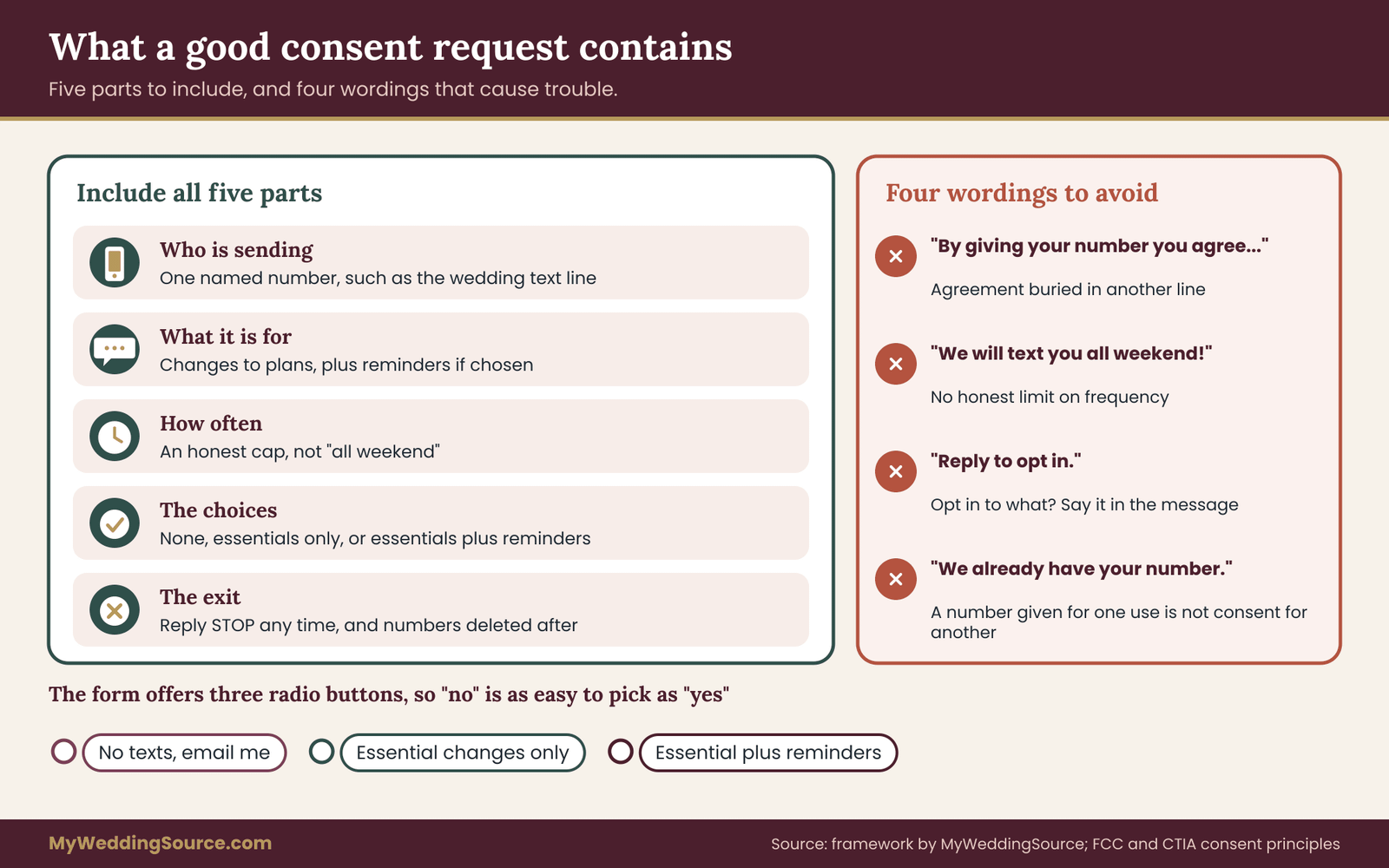
A good consent request for guest text updates has five parts. It says who will text, what the texts are for, how often, which choices exist, and how to stop. All five fit in three or four lines.
The wording that works
On an online RSVP form, a short block like this works well for guest text updates:
Would you like text updates about the wedding weekend? Messages come from one number and are limited to changes that affect your plans, such as parking, shuttle times and weather moves. Reply STOP at any time to end them.
Beneath it, offer three choices as radio buttons rather than a single checkbox, so that “no” is as easy to select as “yes”:
- No text updates, please. Email me instead.
- Essential changes only.
- Essential changes and a few reminders.
Then a field for a mobile number, marked optional, with a line that explains where the number goes: “We will use this number only for wedding weekend updates and delete it after the wedding.” That promise is only worth making if you keep it, and the privacy review section shows how.
On a paper response card, the same structure fits in a few lines with checkboxes. Add the number line and “Best number for text updates (mobile only).” Paper adds one more risk: handwriting. A seven that looks like a one is a wrong-number text waiting to happen, so the person who enters the numbers should confirm any unclear digit with the guest or send a first message that asks them to confirm.
The confirmation text, sometimes called double opt-in
For any number you did not receive directly from the guest, and for any number you are not sure is typed correctly, send one first message and wait for a reply before adding the number to your regular audience. A simple version:
Hi, this is Nadia and Owen’s wedding text line. Are you happy to get a few text updates about the weekend? Reply YES for essential changes plus reminders, ESSENTIAL for changes only, or STOP for none.
This single text does four useful things. It proves the number reaches the right person. It reveals who the sender is, so the guest can recognize the number later. It records a dated, written agreement in the guest’s own words. And it gives the guest a chance to say no at the lowest-stakes moment.
It does add a little friction, since some guests will not reply and you will treat silence as no. That is the right default. A guest who does not answer has not agreed, and you will reach them through the fallback channel described later.
Numbers you did not collect yourself
Couples often get phone numbers from someone else. A parent hands over a list of relatives. A bridesmaid shares a group chat. A plus-one’s host supplies a number for a guest you have never met. These numbers are real and useful, but the person who supplied them could not agree on behalf of the guest.
The practical rule: treat any number you did not get from the guest as unconfirmed for guest text updates until the guest replies to the confirmation text. Do not add it to broadcast audiences or group threads until then. If the supplier is a parent or close relative, it helps to say so plainly:
Thank you for these numbers. Before we add anyone to guest text updates, we will send each person a single message asking if they want updates. Anyone who does not reply will get information the old way, by email or from you.
Parents tend to accept this readily, because they usually become the old way: the relative who phones Aunt Rosa on the morning of the wedding. Giving them that job is a gift, not a demotion.
Households, children and plus-ones
A household with two adults has two phones and may have two different opinions about guest text updates. When one adult fills in the RSVP for the household, ask for each adult’s preference separately if you want to text them both. If you only have one adult’s agreement, text only that one and ask them to pass along any important changes.
Children and teenagers need extra care. Do not add anyone under eighteen to the guest text updates list on their own. If a teenager is a guest, text a parent or guardian about what the teenager needs to know, and let the family decide how it reaches them. This is partly a matter of respect for the family, and partly because messaging platforms and carriers apply stricter expectations to texts directed at minors.
Plus-ones create a different gap. You may know only the name, or not even that. If the plus-one’s number matters, ask the invited guest to share the plus-one’s number with their agreement, or to forward key updates themselves. Do not guess or look the number up. A short line on the RSVP form handles it: “If you are bringing a guest, we will send updates to you and you can pass them on.”
Landlines, work numbers and shared numbers
Some numbers should not be on the guest text updates list at all. A landline cannot receive a text. A work phone belongs to an employer. A number shared between a couple, such as a household’s single cell phone, is a recipe for misdirected messages. Ask your guests for a personal mobile number and, if the household shares one, note that in the ledger so you are not sending a guest-specific message to both.
What to do with guests who say no
A guest who declines guest text updates is a planning input, not a problem. The person who ticks “no text updates, please” has given you useful information. You now need to make sure the essentials reach them another way, because they are the guests most likely to miss a change. Mark them as “fallback only” in the ledger, and decide the fallback now: an email, a phone call from a named relative, or a printed note at the hotel front desk. Guests who prefer email or phone calls are often older, travel less often and need more notice. Treat them as a priority group, not as an afterthought.
Wording to avoid
The wording that causes problems is usually well meant. Here are four patterns to steer clear of.
“By providing your number you agree to receive messages.” Burying agreement inside a line about something else is the opposite of a clear yes. Put the question where the guest can see it and answer it deliberately.
“We will text you all weekend!” Vague promises of frequency invite complaints. Name the kinds of messages and an honest upper limit, such as “no more than a handful of messages in the week before and a few on the day.”
“Reply to opt in.” If you are not clear what they are opting into, the answer means little. State the choice in the message itself.
“Don’t worry, we have your number from the invitation list.” A number provided for one purpose is not an automatic agreement for another. If your RSVP form asked only for a phone number for urgent questions, treat texting as a separate request.
Collecting guest text updates consent at each stage of the invitation
Consent for guest text updates works best when it fits into steps you already take. Here is how it lines up with the usual sequence of wedding paperwork, so that you are never adding a separate project.
Save-the-date or wedding website. If you collect addresses early, you can mention that guest text updates will be offered on the RSVP, without collecting numbers yet. It sets expectations. Keep the wording light: “Closer to the date we will offer text updates for the wedding weekend.”
Invitation and RSVP. This is the main collection point for guest text updates. The RSVP form and response card carry the consent question, the three choices and the number field. If your guest list work already tracks households, the same record can carry the choices. The guide to wedding RSVP etiquette covers the larger questions of how to word a response card, deadlines and follow-up, and the consent question slots into that wording.
Follow-up for non-responders. Guests who have not replied by the deadline need a nudge, and many couples use text for this. A message that asks “Did you receive our invitation?” to a number you have no consent for is a gray area. Send these follow-ups by email or phone, or ask a family member to prompt the guest personally. Keep text for guests who have said yes to guest text updates.
Two to four weeks out. Send the confirmation text to anyone whose number was supplied by someone else. Close the ledger to new numbers about ten days before the wedding, so that the list is stable and checked by the time you need it. Late additions can still be handled by hand, one at a time, with a personal call.
Arrival weekend. At check-in, a hotel front desk or welcome table can offer a QR code or short link to a sign-up page for guests who did not use the form. Sign-ups at this point should still go through a confirmation message. Guests who join late will usually be those who most need real-time help with transportation, so make the process as easy as you can.
A simple consent ledger layout
The ledger behind your guest text updates is a private spreadsheet or table with a row per person. The columns that matter are the guest’s name, their household, a mobile number, the text choice, the date and source of agreement, the confirmation status, the status of any stop request, and a notes cell for details like “uses voice only” or “traveling from outside the country.”
Keep the ledger separate from your master guest list and from your seating chart, and keep it in a place where only the text captain, the backup captain and the couple can open it. Do not email copies of it around, and do not paste it into a group chat for convenience. The extra care is small and it removes the biggest single risk in the whole system, which is a list of phone numbers drifting out of your control.
If you already built a household-based address list for invitations, you can add the ledger as a second tab instead of a second file, as long as access to that tab is limited. The less often you copy phone numbers, the fewer places they can leak from.
One example of a good opening message
When the confirmation text is the first of your guest text updates that a guest sees, the details matter. Say who you are, say what you will send, and give the guest control. A good opening is short enough to read at a glance, says the couple’s names so the guest knows it is real, and avoids links. A link in a first message from an unknown number looks like a scam, even when it is not.
If a guest replies with a question such as “Who is this?”, answer it like a person: “This is the text line for Nadia and Owen’s wedding on June 14. You gave us this number on your RSVP. Would you like updates? Reply YES or STOP.” Patience at this stage pays off later, because a guest who understands where the number came from will trust the messages that follow.
Choosing a channel for guest text updates
“Text” is a loose word. A message that arrives as a green bubble on one phone, a blue bubble on another and a chat notification on a third is three different technologies with three different privacy behaviors. Pick the channel for your guest text updates before you collect numbers, because the channel decides what you can promise guests.

Individual SMS from one number
This is the plainest option for guest text updates: you send a regular text message to each guest, one at a time or through a tool that sends separate copies. Guests see a message from a single number and reply to it privately. It works on every mobile phone and does not require an app, which makes it the best default for a mixed-age guest list.
The weaknesses are practical. Sending to a hundred people by hand takes time. A personal number used for mass sending can be flagged by carriers as spam, and a guest who replies “who is this?” reaches whichever phone you used, which may be in your pocket during the ceremony. For small weddings, a captain texting thirty or forty people by hand is fine. Beyond that, a tool or a platform becomes worth considering.
Group MMS or group SMS
In a group text, everyone in the thread sees the same messages and, in most setups, everyone’s phone number. Replies can go to the whole group. This feels convenient, and it is exactly the setup most likely to cause trouble when guest text updates go to a whole wedding guest list.
Consider what happens with a hundred and twenty people in one thread. Every guest now has every other guest’s number, including the number of the groom’s ex-roommate and the bride’s great-aunt. Someone replies “see you there!” and forty phones buzz. Someone replies “who is this?” and everyone sees. A guest leaves the group in irritation, and depending on their phone and the group type they may not be able to leave at all. Carriers and apps also differ in how many people a group can hold, and some phones quietly split large groups or drop members.
Groups still have a place in guest text updates, but a small one. They work well for the wedding party, for family members who already text each other constantly, and for a shuttle load of eight people who need to find each other at a pickup point. Keep them small, name their purpose, and tell members at the start that everyone will see each other’s numbers.
iMessage and other app-based groups
Group chats inside apps such as iMessage, WhatsApp or Signal behave differently from SMS. They can offer end-to-end encryption, features like leaving a group or muting it, and reactions that reduce the reply-all noise. They also require every participant to use the same app, and phones that do not will either fall out of the group or be dropped into a mixed thread where behavior is unpredictable.
If the entire wedding party uses the same app, a group there is a sensible internal tool. For the full guest list, an app-based group excludes the guests who most need clear information, such as older relatives on basic phones and international guests who use a different messaging app. It also asks guests to join something and agree to terms that they did not choose. As a rule, use app groups for the people who already use that app together, and use plain text or email for everyone else.
Broadcast lists and wedding platforms
A broadcast list sends the same message to many recipients so that each one gets it as a private message and cannot see the others. Some phones and apps offer a basic version of this. Wedding websites and dedicated texting services offer a more complete version, with consent records, scheduling, stop handling and replies that go to a shared inbox.
This is the strongest option for privacy and record keeping in guest text updates. It is also where mobile carriers and messaging providers apply their own registration and content rules. A service that sends text messages to many people from a standard phone number usually has to follow carrier requirements for registered messaging, and some will ask you for details about who you are and what you are sending. That is normal. It is a sign that the service is built to deliver, not to spam.
When you evaluate a platform for guest text updates, ask these questions before you upload a single number:
- Does it record when and how each guest agreed, and let you export the record?
- Does it honor “stop” automatically, and let you see who stopped?
- Where does it store phone numbers, who at the company can see them, and how do you delete them?
- Does it send the same copy to every guest individually, or into a visible group?
- Does it add its own marketing text to your messages, or share your list with partners?
- What happens to your data when your account is closed or the event ends?
If the answers are vague, look at the company’s published privacy policy and terms, which are the documents that count. If they still do not answer your questions, choose a different tool or fall back to the simpler channels.
Email and phone calls as companions
A text is short, and a wedding sometimes needs more. A change of venue entrance with a map, a revised timeline or a note about child care needs the room of an email. Plan to send important guest text updates through two channels: a short text that says “important update, details in your email,” and the email itself. This protects you from a missed text and gives the guest something they can keep.
Phone calls stay vital for a few guests. A call from a named relative the day before the wedding, to confirm that an older guest knows the plan, is worth more than any group of messages. Mark those guests in the ledger and assign the call to someone specific.
Matching the channel to the guest list
No single channel suits every guest, and a layered approach to guest text updates works better than a perfect one. A simple default for most weddings:
Wedding party and immediate family. A small group chat, in the app they already use, for fast coordination on the day.
Out-of-town and local guests who opted in. Individual messages through one number, using a broadcast tool or captain sending by hand, with replies directed to the captain.
Guests who opted out or did not respond. Email, a named phone contact and signage or a front-desk note at the hotel.
Vendors. Their own thread with the planner or day-of coordinator, kept entirely separate from guest messaging. Vendors have different needs and should never be in guest threads.
If you are also coordinating hotels, transportation and arrival times, the guide to coordinating wedding guest hotels across budgets and mobility needs covers the lodging side, and its arrival information is the kind of content that suits a Class B reminder.
Group messaging for guest text updates without exposing phone numbers
Most trouble when guest text updates run through a group chat comes from one fact: the group shows everyone to everyone. If you decide to use any kind of group, make the choice deliberately, and put guards around it.
Decide what the group is for
A group has a purpose, and the purpose decides who is in it. Write one sentence before you create the thread and tell members what it is. “This is the shuttle group for Saturday evening. It is only for pickup times and delays.” A group with a narrow purpose is easy to leave, easy to mute, and easy to close on Sunday. A group called “Wedding fun!” with a hundred people becomes a stream of photos, jokes and logistics tangled together, and nobody knows what to ignore.
Tell members what they are joining
The first message in any group should say who runs it, what it is for, that everyone in it can see each other’s numbers, and how to leave. For example:
This group is for the Friday welcome dinner shuttle only. Everyone here can see each other’s numbers. Please keep messages to pickup times and delays. If you would rather not be in the group, tell us and we will text you directly instead.
That last sentence matters. A guest who can ask to be handled one on one without any awkwardness is a guest who will not quietly leave the whole thing in annoyance.
Keep the numbers out of unrelated hands
Do not add guests to a group by pulling numbers out of the ledger without agreement. If a guest chose “essential changes only” and a group is chatty, adding them breaks the choice. Use the groups only for those who opted in to reminders, and only for a purpose they understand.
Never paste a list of numbers into a group so that people can “just save each other.” It looks harmless, and it can leave a guest’s number in the hands of people who never asked for it. If two guests want to share numbers, let them do it between themselves.
Control reply-all noise
Reply-all is the second source of trouble in a group. Someone posts a photo of the venue, forty replies come back, and the one message about the ceremony delay is buried. Three habits help.
Ask members at the start to reserve the group for logistics and to send other messages one on one. Have the captain, not the couple, post in the group, so that the group has a single voice. And if the thread gets noisy anyway, close it with a calm message and move the essentials to individual messages.
Know the exits
Guests who want to leave a group should be able to do it. How they do it depends on the app and the phone, and in some mixed group texts they cannot leave at all but can mute the thread. Tell members how to mute: “If the notifications are too much, mute the thread. You can still check it any time.” For the guests who cannot leave a thread, the fallback is for the captain to remove them from the next message and send updates individually.
Closing a group
A group that is no longer needed should be closed with a message, not abandoned. “Thanks, everyone. The shuttle group closes tonight. The wedding line will send one last message tomorrow morning, and then we will delete all numbers.” A real closing message tells guests what to expect, ends the thread and builds trust for the next thing you ask them to do. It also gives you a clear point at which to delete the group and its record.
When a group already exists
Sometimes the group exists before you do. A family has had a group chat for years, and it fills with wedding talk on its own. You cannot control it and you should not try.
What you can do is keep your own guest text updates separate: send the essential changes through your own channel, and ask a relative in the family group to remind everyone to check it. Treat the family group as a helpful echo, not as a delivery method. A message that only travels through a family thread has no record, no consent trail and no way to stop it, and any guest who is not in the family thread never receives it.
Opt-outs for guest text updates: honoring a stop request the same day
An opt-out is the most important feature of any system for guest text updates, and the one most couples forget to design. If a guest says stop, you stop. How you make that easy, how quickly you act and how you handle the awkward cases decide whether guest text updates feel like a courtesy or a nuisance.
What counts as a stop request
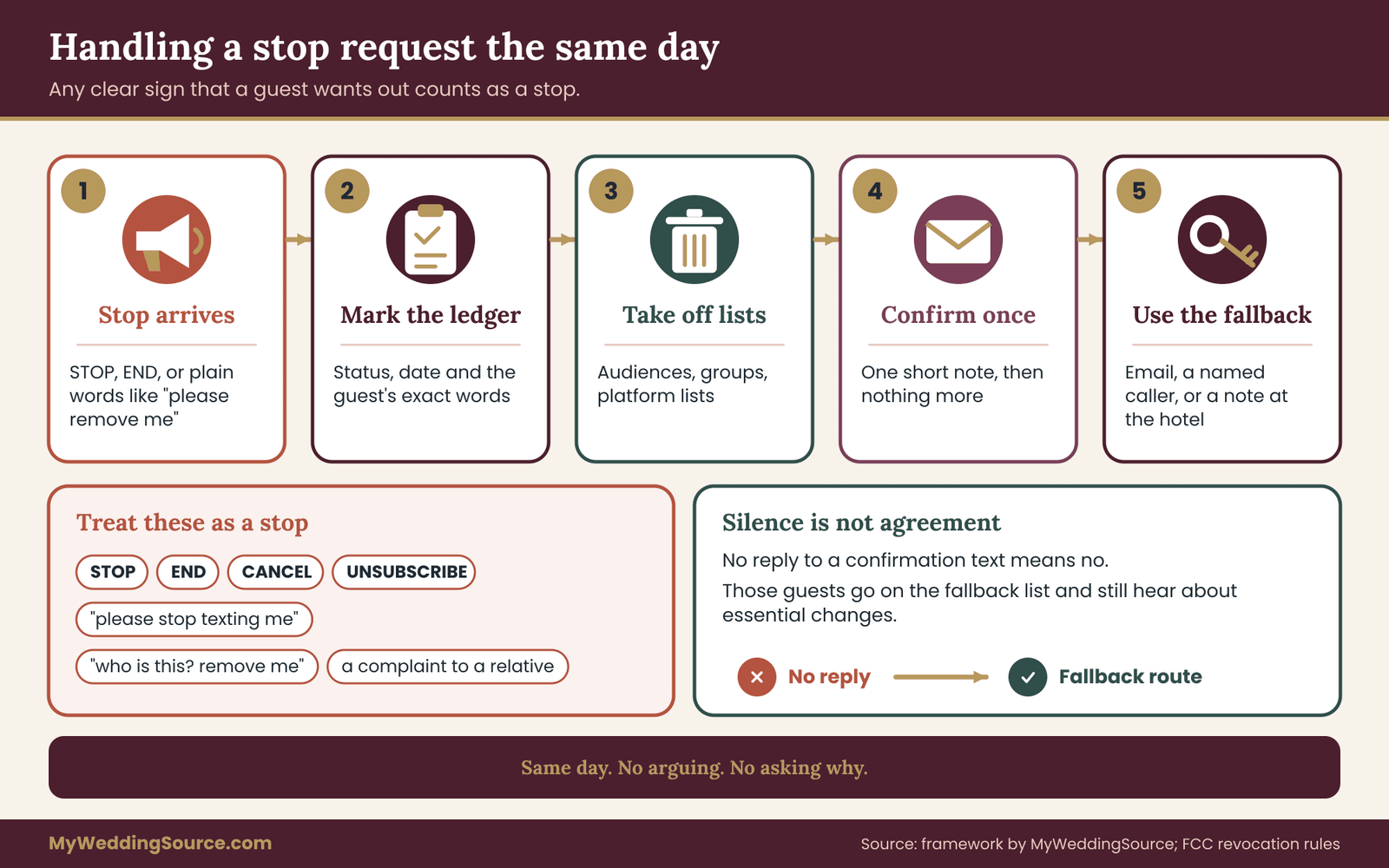
The textbook version is a guest replying STOP. Mobile carriers and messaging platforms treat that word, and a few close relatives such as END, CANCEL and UNSUBSCRIBE, as standard commands. A platform will usually handle them automatically.
Real guests are less tidy. They write “please stop texting me,” “take me off this,” “I didn’t sign up for this,” or “who is this? Remove me.” Some reply with a thumbs-down or a short angry word.
Some call the couple’s mother and complain. Some do nothing and simply start ignoring everything. The Federal Communications Commission has updated its rules about how a person can revoke consent to receive automated texts and calls in recent years, and the current direction is that people can withdraw consent in any reasonable way. Check the commission’s current rule text for the details. For guest text updates at a wedding, the simple standard is easy to meet: treat any clear sign that a guest does not want texts as a stop, however it arrives.
The same-day rule
Set your own deadline, and make it tighter than anything a regulator requires: the same day. When a stop request arrives, the captain does four things.
First, mark the guest “stopped” in the ledger, with the date and the exact words they used. Second, remove the guest from every audience, including any group threads you control and any platform list. Third, send at most one short confirmation, and only if your platform or channel allows it without breaking the stop: “You are unsubscribed from the wedding text line. We will not text you again. If you need anything about the weekend, call or email.” Fourth, check whether this guest relies on texts for anything essential, and if so arrange the fallback right away.
Do not argue, explain at length, or ask why. A guest who stops did not owe you a reason. If the stop came through an awkward channel, such as a complaint to a relative, the captain can reply once with the confirmation above, and then leave it.
Why a guest who stops still needs the essentials
Opting out of guest text updates does not remove the need to know where to be on Saturday. A guest who opted out has made a choice about the channel, not about whether they want to know when the ceremony starts. So the stop process has a second half: the guest stays on the fallback list.
The fallback is whatever you decided in advance. It might be an email, a phone call from a named relative, a note at the hotel or the plain information on the wedding website. The point is that the person who owns the ledger can look at a stopped guest and see, in the same row, how that guest will hear about a Class A change. If the answer is “nobody, they just won’t know,” fix it before the day.
Silence is not agreement
Guests who never reply to the confirmation text are the largest group, and they raise a question that every set of guest text updates must answer: what do you do with them? The answer is simple and consistent. Silence means no. You do not text them again except for one gentle reminder, if you have used a confirmation text at all, and you route them to the fallback.
The reverse also holds. A guest who agreed months ago and has been silent since has not withdrawn consent, and you can keep texting them within the choice they made. If a guest replies to a reminder with a different request, such as “just the important stuff from now on,” change their level and note the date.
Changing levels and moving between groups
Not every change is a full stop. A guest who chose “essential plus reminders” may decide after three messages that they want only essentials. Treat it as a stop for Class B and Class C messages, and a continue for Class A. The ledger should show the level at the moment of each message, so that you can check afterward that a “reminders” message went only to guests who wanted them. A change of level is the best reason to keep the ledger live during the final weeks, rather than exporting it once and sending from a static copy.
Wrong numbers and mistaken recipients
Eventually a message will reach someone who is not a guest. A digit was mistyped, a number belongs to someone new, or a guest changed phones. The recipient may reply “wrong number” or may not reply at all.
When a wrong-number reply arrives, apologize briefly, remove the number from every audience and from the ledger, and do not text it again. If you discover the error yourself, find the guest’s correct number through a trusted route, such as asking a relative who knows them, and run it through the confirmation text.
The risk to watch is a message with private information reaching a stranger. This is a strong reason to keep Class A messages free of sensitive details. A text that says “Ceremony moves indoors, same time” is harmless in the wrong hands. A text with a street address of a private home, a name of a guest’s medical need or a door code is not. The privacy review later in this guide returns to this.
Opt-outs that happen on the wedding day
On the day itself, a guest might say stop in the middle of a delay. The captain handles it exactly as in the days before: ledger, audiences, one confirmation, fallback. Do not hold the stop until after the wedding. A stop on the wedding day is more likely to come from a guest who is stressed or tired, and it is more important to honor.
What the rules say about guest text updates, in plain language
Many couples assume that guest text updates sit outside any regulation, and in the narrow sense of a casual chat that is usually right. The picture changes as the setup gets more structured. This section summarizes the kinds of rules that exist, so that you know which to check. It does not replace reading the sources, and the details change.
Federal consumer rules
The Telephone Consumer Protection Act is a federal law that covers certain calls and text messages to mobile phones, especially those sent with automated systems and those that are marketing. The Federal Communications Commission writes the rules under it. The central ideas for a wedding are consent, honest identification of the sender, and an easy way to stop. A couple sending guest text updates to guests who gave their numbers for that purpose, who can stop at any time, is close to the practice the rules encourage.
A tool that sends large batches automatically adds more formal considerations, and the safest course is to read what the tool’s provider requires of its users.
The Federal Trade Commission publishes consumer guidance about unwanted text messages and text scams. It is useful for a different reason: it describes what guests will be watching for. Your messages should look nothing like the scams it describes.
State rules
States have their own rules about telemarketing and text messaging, including limits on the hours when certain messages can be sent. Some of these target marketing, not personal information, and few apply to a private wedding. You can sidestep most of the question with a courtesy that costs nothing: do not send non-urgent texts early in the morning or late at night. A window from about eight in the morning to nine at night in the guest’s own time zone matches the federal telemarketing calling window and keeps you well on the side of courtesy.
Carrier and industry rules
Mobile carriers decide what travels on their networks. Their industry group, CTIA, publishes messaging principles and best practices that emphasize consent, clear sender identity, honoring opt-outs, and avoiding certain content. Carriers also filter messages they suspect of being spam, which is the usual reason a legitimate batch of texts mysteriously fails to arrive.
For a couple, the practical effects are few. Use one consistent number. Avoid sending the same long message from a personal phone to dozens of people within a few minutes. Avoid shortened links and unusual characters. If you use a texting platform, let it handle registration and delivery rules, and follow its instructions about what it needs from you.
Platform terms
Every app and service you use has its own terms of service. A wedding website’s text feature, a free messaging app or a mass-texting tool all set rules for what you can send and what they do with your data. These are the rules that can actually lock your account in the middle of your wedding weekend, so read them before you are committed. In particular, check whether the service may use phone numbers for its own marketing, how long it keeps them, and how it handles a deletion request.
What this means in practice
You do not need a lawyer to run guest text updates for a wedding. You need a short list of habits: get a clear yes, tell people who is texting and what to expect, make stopping easy and immediate, avoid exposing numbers and keep the numbers no longer than you need them. If your wedding has an unusual feature, such as a large international guest list, a commercial venue that wants to text your guests, or a platform that asks for registration details you do not understand, ask the company for its published compliance guidance and, if you are still unsure, a qualified professional.
Protecting guests from scam texts during your wedding weekend
Anything in guest text updates that tells guests to click, pay or share something is a risk. Scammers watch for events. A public wedding website, a registry or a social media post gives them names and dates, and a convincing text takes minutes to write. Your guest text updates help guests tell real from fake, if you set a few ground rules and tell people about them.
Announce the sending number. In the confirmation text and again in your first reminder, say plainly which number the updates will come from. Guests can save it as a contact, and a message from any other number claiming to be you stands out.
Never ask for money or personal data by text. State on the RSVP page or in your first message that you will never ask guests to pay, send gift cards, give account details or confirm a password by text. If a guest receives such a message, they should treat it as fake.
Say that links are rare. Tell guests that texts will include a link only to your wedding website, and that you will say its address in advance. When a Class A message needs more room, write “details on the wedding website” and leave the link out, so that guests learn to go to the site they already know.
Give guests a way to check. Include a line such as “If you are not sure a message is from us, call [captain name] before you act.” A guest who is wary should have a direct and quick check, and the captain should be glad to receive these calls.
Watch for spoofing in your own thread. If a message appears in a group that you did not send, remove the sender if you can, tell the group calmly and send a clean version of the real message. Do not argue with the impostor.
The Cybersecurity and Infrastructure Security Agency and the Federal Trade Commission both publish short, plain guidance on spotting and reporting text scams. Linking guests to them is unnecessary, but the captain should read one of them before the wedding so that the advice they give is consistent with what official sources say.
A schedule for guest text updates, from six weeks out to the morning after
Knowing when to send guest text updates is as important as knowing what to send. A good schedule is short. Most weddings need between six and ten guest text updates in total, and many need fewer. Each one earns its place by passing the send gate.

Six to four weeks out: the opening message
If you use a confirmation text, this is when it goes out, to numbers that were supplied by someone other than the guest. For everyone else, the first message can be a short welcome that fixes the sender’s number in their minds. Say who the text line belongs to, what kinds of messages to expect and how to stop. Keep it brief and leave out links.
This message is not a Class A or B message. It is the one place where you explain the system itself. After it, guests should be able to recognize and trust the number.
Two weeks out: one practical reminder
Two weeks before the wedding is a good time for a reminder that confirms the basics: the date, the venue’s name and the parking or transportation plan. This is a Class B message, so it goes only to guests who chose reminders. Guests who chose essentials only should still see the same information on the wedding website, which is why that site needs to be accurate before you send anything.
A cautionary point: do not use this message to introduce new information. Reminders repeat. A guest who first learns about the dress code or the shuttle schedule from a text sent two weeks out has not been well served by the invitation, and the fix is to improve the website and the invitation suite, not to add to the texts. The guide to wedding invitation etiquette covers what belongs in the invitation itself, which keeps the text line free to do its job.
The week of the wedding: one weather and arrival note
Send one message about three days out if anything about weather, road work, parking or transportation could affect guests. If nothing has changed, skip it. A “nothing has changed” text feels reassuring to some guests and noisy to others, and the noise usually wins.
For out-of-town guests, a message the day before that confirms the time and place of the first event is helpful. Keep it to two or three lines, and give the number of someone who will answer.
The day of: only what changes plans
On the day, the rule for guest text updates is brutal and simple: send only Class A messages, and send the first one as soon as you know. A ceremony that starts twenty minutes late, a shuttle pickup that moves to a different door, a rain plan that goes into effect, a delay in the cocktail hour that affects the transport schedule. Each of these changes what a guest should do in the next hour.
Do not send “we are so excited!” messages on the day, and do not send photo links before the event is over. Guests are dressing, traveling or standing in a line. The text line is a tool, not a broadcast of your feelings.
The morning after: one warm message
A single message the next morning is a kindness for guests who chose reminders: thanks, the time of the farewell brunch if there is one, and a note about where any lost items are being held. This is Class C, and it is the last message. After it, close the line.
Any later message is a separate decision. A link to the photo gallery, for example, is useful, but it comes weeks later, from the couple, by email or to guests who have said they want it. The guide to wedding photography consent explains how to think about guest boundaries around images, and the same care applies to what you tell guests about where photos will appear.
How many messages is too many
There is no magic number for guest text updates, but a useful test: would a guest who chose essentials only be annoyed by this message, and would a guest who chose reminders be annoyed by the total? If a guest could reasonably count more than eight messages across the whole period and feel overwhelmed, you have probably sent more than you needed.
Put a cap in your own rules and tell the captain. A common structure for guest text updates is two before the wedding week, one in the week, as many as are needed on the day (usually zero to three) and one after. That is a plan, not a limit on safety. A real emergency or major change is always a valid reason to send more.
Time zones and quiet hours
A wedding with guests from across the country, or the world, mixes time zones. A text sent at nine in the evening in your time zone arrives at six in the evening on the west coast and at two in the morning in parts of Europe. Check the ledger’s notes for guests in other zones and schedule non-urgent messages for a reasonable hour in the guest’s own time. Many platforms can do this automatically. A hand-sent message needs the captain to think about it.
For the day itself, urgent messages should send immediately, regardless of the hour. A delay that affects guests who are already traveling cannot wait until morning.
Wording each class of message
The send gate has a fourth question, “Can it be understood by itself?”, and it deserves its own checklist. Good guest text updates share five qualities.
It begins with the news. The first words carry the change: “Ceremony now starts at 4:20.” Guests read the first few words in a notification and may never open the message.
It names the sender. The line has a consistent signature, such as “Nadia and Owen’s wedding text line.” Guests who scroll back need to know who spoke.
It says what to do. “Please use the north entrance” is better than “The entrance has changed.”
It avoids guessing. If you do not know when the shuttle will return, say that you will update by a specific time. “Updating by 3:15” is honest and calming.
It leaves out anything private. No home addresses, no door codes, no names of guests with health needs and no financial details.
Here are templates for guest text updates that can be adapted. Replace the details and keep the shape.
Opening message. “This is the text line for Nadia and Owen’s wedding on June 14. You asked for updates. We will send a few messages about plans that change, plus reminders if you chose them. Reply STOP any time to end.”
Two-week reminder. “Reminder from Nadia and Owen’s wedding text line: ceremony is at 4:00 on Saturday at the Hollis Barn. Parking is on the east lot. Shuttles from the hotel start at 3:00. Details on the wedding website.”
Weather move. “Update: the ceremony is moving indoors to the main hall, same time. Please use the north entrance. Shuttles are running as planned.”
Delay. “Update: ceremony is delayed by about 20 minutes. New start 4:20. Cocktail hour follows as planned. Next update by 4:15 if it changes again.”
Transportation problem. “The 5:30 shuttle is running late. A second vehicle is on the way. Please wait at the hotel entrance. Next update at 5:45.”
Morning after. “Thank you for celebrating with us. Brunch is at 10:00 at the hotel restaurant, no need to reply. This is our last message, and we will delete this list soon.”
Each of these guest text updates is short. None uses an emoji or a link. None asks the guest to reply, which keeps the captain’s inbox clear.
The send gate for guest text updates: four questions before every message
The send gate for guest text updates deserves a closer look, because it is the habit that most often saves a couple from a bad message. The gate is four questions asked in order. If the answer to any is no, the message stops.
Question one: does the recipient need this?
Need is the key word. Guests do not need to know that the florist has arrived. They do not need an emotional update from the bridal suite. They need to know what changes their actions. If the message would not alter what a guest does or where they go, it is a candidate for deletion or for a different channel, such as the wedding website or a post at the venue.
A good practical test is to imagine the guest reading the message while in the car. Would they say “thanks, helpful,” or “why am I being told this?” If you cannot tell, ask the captain.
Question two: is the timing right?
Timing has two parts. The first is whether the information is ready. A message that says “shuttle delay, details soon” and then nothing creates more worry than silence. Send only when you have a fact and a next-update time. The second is whether the hour is reasonable for the recipient. Outside urgent situations, sleeping people do not want a message.
Question three: is the audience right?
This is where the ledger earns its keep. The audience for a Class A message is every guest with an essential or reminder choice. The audience for a Class B message is only the reminder guests. The audience for a shuttle message is only the guests who booked a shuttle. Never send a message to “everyone” if a smaller group needs it. Sending the Sunday brunch plan to guests who are leaving Saturday night is noise, and it trains them to ignore the next message.
Before sending, the captain reads the audience out loud: “This goes to the shuttle group, forty-two people, all opted in.” If the audience cannot be described that simply, the list needs cleaning first.
Question four: can it be understood by itself?
Read the message as if it were the only message the guest will see all day. Does it say what happened, what to do and when the next update comes? A guest who joined a group late, who read it hours later or who has a bad signal should still understand it. A message that depends on an earlier one, such as “same as before,” fails.
A fast version for the day
On the wedding day, the gate for guest text updates must be quick. Print the four questions on a card and keep it next to the captain’s phone. It takes about ten seconds once the habit is in place, and it prevents the panicked “just send it” message that goes to the wrong group with the wrong time. The captain should also know who has authority to approve a message when the couple is unavailable. For most weddings that is the planner or day-of coordinator, and the instruction can be as short as “if a change affects where guests stand or sit, send it.”
The message log for guest text updates
A message log for guest text updates sounds like paperwork, and for a small wedding it can be a note in a phone. It earns its place in three situations: when a guest says “I never got that,” when a vendor says “you told us something different,” and when you are deciding next month what to delete. In each case, a dated record of what was sent, to whom and why settles the matter in a minute.
What each entry holds
One line per message is enough for guest text updates. Include the date and time, who sent it, the message class, the audience, the exact text and any problems. The fields that matter most are these.
Date and time sent. Use the local time of the wedding, and note it if you sent to another time zone.
Sender. The captain or backup who pressed send. If a platform sent it on a schedule, record who scheduled it.
Class. A, B or C. The class is what lets you check afterward that the right people received it.
Audience. The name of the list and the number of recipients. “Shuttle group, 42” is enough.
Exact text. Paste the message as it was sent. Do not summarize. The exact wording is what you will need if there is a dispute.
Replies and stops. Note any replies that required action, and any stop requests, with the time you handled them.
Gate check. A simple tick that the four questions were answered. It takes a second and keeps the habit alive.
Issues. Anything that went wrong: a bounce, a wrong number, a guest who said they did not receive it.

Where the log lives
Keep the log in the same protected place as the ledger, ideally in a second tab. Only the captain, the backup and the couple need to open it. The log contains message text, which may include names and times, and it connects to numbers, so it counts as personal information. Do not forward it to vendors, and do not copy it into a shared channel where a hundred other people could read it.
If your platform keeps its own sent-message history, that is a useful backup, but do not rely on it alone. Platforms change, and accounts are closed. A copy you control survives.
Using the log during the wedding
On the day, the log is a memory aid. When the captain is asked “did we tell people about the north entrance?” the answer is one glance away. When the couple’s parent asks for a message to be sent again, the captain can see that it went out at 3:12 and decide whether to resend. A resent message to the whole list can annoy guests, so look first.
After the wedding, the log has a different use. It lets you check that no guest who stopped was texted afterward, that the right audiences received the right classes and that the count of messages stayed within your cap. If you find a mistake, such as a Class B message sent to an essentials-only guest, note it, apologize if it matters and adjust next time.
How long to keep the log
Keep the log for a short, defined period after the wedding, such as thirty to sixty days, so that you can settle any questions about who got what. Then decide whether to keep a version with the phone numbers removed, such as message text, times and counts, which has no privacy cost. The version with numbers should go when the numbers go.
A privacy review for guest text updates before and after the wedding
A privacy review of guest text updates is a pause to ask what personal information you hold, who can reach it and when it will be deleted. It does not require special skills. It needs one hour twice: about three weeks before the wedding, and about two weeks after it.
The National Institute of Standards and Technology publishes a privacy framework that organizations use to think about this sort of question, and the Federal Trade Commission publishes plain guidance on protecting personal information. You will not need either in full. Their core ideas are the same ones this section uses: collect only what you need, limit who can see it, protect it while you hold it and delete it when it has done its job.
The pre-wedding review: eight questions
Run through these in order, and write down the answers. If an answer is “I don’t know,” that is the thing to fix.
What exactly do we hold? List the fields: name, mobile number, choice, date of agreement and any notes. If the ledger holds anything more, such as dietary needs or health notes, ask whether it belongs there. Data for guest text updates should be as lean as you can make it.
Where does each copy live? Count them. The ledger on a shared drive, an exported copy on a laptop, a platform’s contact list, a screenshot in a group chat. Every copy is a place the numbers could leak from. Aim for one master and, at most, one platform copy.
Who can open each copy? Name the people. The captain, the backup and the couple is a good list. A planner who runs the platform may need access to the platform but not to the master ledger. A hundred relatives in a shared document is not a good list.
Is access protected? Use a strong, unique password and two-step sign-in on any account that holds the ledger. Do not email the ledger as an attachment. Do not keep it on a device that other people use.
What do vendors and helpers see? The shuttle driver needs pickup names and times, not phone numbers for the full guest list. The venue coordinator may need the number of one contact, not every guest. Give each person the least they need. If a vendor insists on the full list, ask why, and ask what they will do with it afterward.
Does anyone else collect numbers on our behalf? If a wedding website, a registry or a planner’s tool gathers numbers, read its policy. Know whether the number you collected there is also used for other purposes by the company.
What would a wrong-number or leaked message expose? Review your templates. If any reveals a home address, a door code, a health detail or a gift amount, rewrite it.
What is our deletion plan? Decide the date and who will do it. The next section covers this in detail.
The post-wedding review: five tasks
About two weeks after the wedding, hold the second review.
First, confirm that every stop request was honored, by comparing the ledger and the log. Second, send the closing message if you have not, and close any group threads. Third, export what you want to keep, such as the log with numbers removed, and store it with your other wedding records. Fourth, delete the numbers: the ledger, the platform lists, group threads, and phone contacts you added only for the wedding. Fifth, write one line in your notes recording the date you deleted, so that if anyone asks you can answer.
If you also keep records of contracts, receipts and photos, this fits naturally into the broader cleanup. The same habit of setting a retention rule in advance works for contracts, receipts and photos too.
A note on guests’ expectations
A line on the RSVP form that says “we will delete this number after the wedding” sets an expectation. Keeping it is a small act of respect, and the privacy review is how you keep it. Guests do not usually ask, but when they do, you can answer in one sentence and mean it.
Vendors, planners and helpers who send guest text updates
Weddings involve many hands, and several of them may want to send guest text updates of their own. A venue may have its own guest-messaging service. A planner may use a platform. A shuttle company may text pickup times. A bridesmaid may offer to start a group. Each of these has benefits and each creates a new list of numbers, so decide who is allowed to send before the invitations go out.
One voice, one number
The first rule of guest text updates is that guests hear from one sender. If three different numbers send messages, guests cannot tell which is real, and your scam protection collapses. Pick the number, tell guests, and ask everyone else to route messages through the captain. A vendor that needs to tell guests something, such as a shuttle company announcing a delay, sends it to the captain, who relays it under the common signature.
Exceptions are possible. A shuttle company that texts only the people who booked seats, with their agreement, may be the better sender for pickup details. If so, tell guests in advance who to expect and what the number will be, and add the number to the “known senders” list on the wedding website.
Asking a vendor’s messaging practices
Before a vendor sends guest text updates, ask a short set of questions. Where did they get the numbers? Were they given or collected by the vendor? Does the vendor keep the numbers after the event, and what for? Will they honor a stop request and tell you about it? Do they send promotional messages to the same list? A vendor who answers clearly and who wants only the minimum is a good partner. A vendor who expects to add your guests to its marketing list is not.
If a vendor’s contract or terms mention messaging, read the clause and ask for changes you need. The guide to reading a wedding vendor contract explains how to check clauses and request amendments.
Planners and day-of coordinators
A planner may be the ideal captain for guest text updates, with a phone dedicated to the event and experience in sending clean messages. Agree in writing what the planner will and will not do: who owns the ledger, who approves messages, what happens to the numbers afterward and whether the planner’s own tools will hold the data. A planner who stores guest numbers in a general client database should say so, and you should decide whether you are comfortable with it.
Bridal party and family helpers
Helpers are enthusiastic and well meaning, and without guidance they will create their own group threads for guest text updates. Give them a one-page note early: who the captain is, what number the guests will see, the three message classes, the fact that guest numbers do not leave the ledger and the stop rule. Ask that any message they want to send to guests come to the captain first. Frame it as a way to protect them from being the person who accidentally texted all forty cousins at midnight.
The hotel and the venue
Hotels and venues often have their own ways of contacting guests, including front-desk calls and in-room messages. These are helpful as fallbacks for guests who opted out of texting. Give the front desk a short written note with the date and the details of any change the guests should hear, and ask them to relay it to anyone who asks. Do not give them the ledger.
Special situations for guest text updates
The system so far covers guest text updates for an ordinary guest list. Real weddings have several groups of guests who do not fit it neatly. Each is manageable if you think about it before the week of the wedding.
Guests outside the country
International guests raise three problems for guest text updates. Their phones may not receive messages from your number at all, since some carriers block or reroute messages from abroad. They may be charged to receive texts, depending on their plan. And they may prefer an app such as WhatsApp or another local service, since that is how people in their country normally reach each other.
Ask them. A line on the RSVP form, “Is there a messaging app you prefer for the weekend?”, gives you what you need. For guests who choose an app, treat that as their channel and record it in the ledger. Do not add them to a group on the app without telling them what it is for, and keep the same classes and the same stop rule. Send email as a backup. If a guest is traveling and will have no local service on arrival, the email with the details should reach them before they leave home.
Guests who do not text
Some guests do not want guest text updates, and a few have no mobile phone. Older relatives, guests with limited vision or hearing and guests who simply dislike texting are all well within their rights. Assign each a named contact who will relay Class A changes by phone, and put the name in the ledger row. The contact should know in advance that they might get a call from the captain, and should have the shuttle and parking details in front of them.
For guests with accessibility needs, ask what works. A guest who is deaf or hard of hearing may find text updates especially helpful, and a guest who is blind or has low vision may use a screen reader that reads texts aloud, so clear short wording helps. Avoid special characters, decorative symbols and long strings of numbers that read badly aloud. If a guest uses a mobility device and a route or entrance changes, the message should say which entrance is step-free, and a person at the venue should confirm.
Minors and guardians
As noted earlier, text a parent or guardian for a minor. Do not collect numbers from children at the event, and do not add children to a group. A family with several children can designate one adult as the contact for the whole family, and the ledger should show who that is. If a teenager asks to be added, send the request to the parent.
Guests with sensitive circumstances
Some guests have reasons to guard their phone numbers: a person avoiding a former partner, a guest with a safety concern, someone with a sensitive job. They may decline guest text updates or want a custom setup. Respect it without questions. This is a strong reason to avoid group chats that reveal numbers, and to make “no” an easy choice on the form. If a guest says a number must not be shared, check that it is not in any group, any export or any vendor list, and note the instruction in the ledger.
Emergencies and sudden changes
Guest text updates can carry bad news: a severe weather warning, a venue problem, an illness in the family that affects the schedule. Decide ahead of time how you would handle the hardest messages.
For an emergency that threatens safety, public alerts and venue staff come first, and your text should point guests to them and not replace them. For a sudden change that shocks guests, such as a postponement or cancellation, a text is the first notice and the start of a conversation, not the whole of it. A short message followed quickly by an email and calls to the guests who need personal care is kinder and more reliable than any single channel.
Keep sensitive details out of texts altogether. A message that says “the ceremony is postponed, please check your email” protects the people involved and gets the news out. The full explanation belongs in a channel where you can choose the audience and the words.
Offline fallbacks
Phones fail. A venue in a canyon, a basement ballroom or a field may have poor coverage. A network outage or a dead battery can silence a captain. The fallback plan should work without any phone. Three layers cover most situations.
The first layer is people. A greeter at the door, an usher at the parking lot and a driver at each shuttle stop can all pass a change by voice.
The second layer is paper. A printed note at the entrance, a sign at the hotel front desk or a card on each table holds the key information. The third layer is the wedding website, which guests can reach if they have any signal at all. For the full picture of backups across communication and files, see the broader guide to backup communication, files and permissions, and keep the text line as one tool among several, not the only way anyone can learn what changed.
When to delete guest text updates data
Deletion is the last step of the system for guest text updates, and the one most often skipped. After the wedding the numbers have done their job, and holding them has risk with no benefit. Decide your rule in advance and write it where the captain can see it.
A sensible default
Delete phone numbers from the ledger, from platform lists, from group threads and from any contacts you saved only for the wedding within two to four weeks of the wedding. Keep the message log with numbers removed for as long as you wish. If you promised guests deletion “after the wedding,” do it by the date you named, or sooner.
There is a reasonable exception. If you plan to send a single follow-up, such as a link to photos or a thank-you, you can keep numbers for guests who agreed, until that message goes out. Say so in your closing message: “We will send one last note when the photos are ready, and then delete this list.” Then do it.
How to delete
Deletion is more than emptying a trash folder. Go through each place numbers live. Delete the ledger or remove the number column. Ask the platform to delete the list, and check its policy for how long deleted data lingers. Delete group threads and remove the contacts you added. Clear exports and screenshots from phones and cloud backups, and ask the planner or venue to delete whatever they hold. Then write down the date.
Ask vendors for written confirmation if they held numbers. A short email is enough: “Please confirm that you have deleted the guest phone numbers you received for the wedding on June 14.”
Keeping what is useful
Not everything has to go. A version of the log without numbers, your templates and a few lines about what worked are worth keeping, for yourselves or for a friend planning their own event. They contain nothing private and give the next planning round a head start.
A worked example: Nadia and Owen set up guest text updates
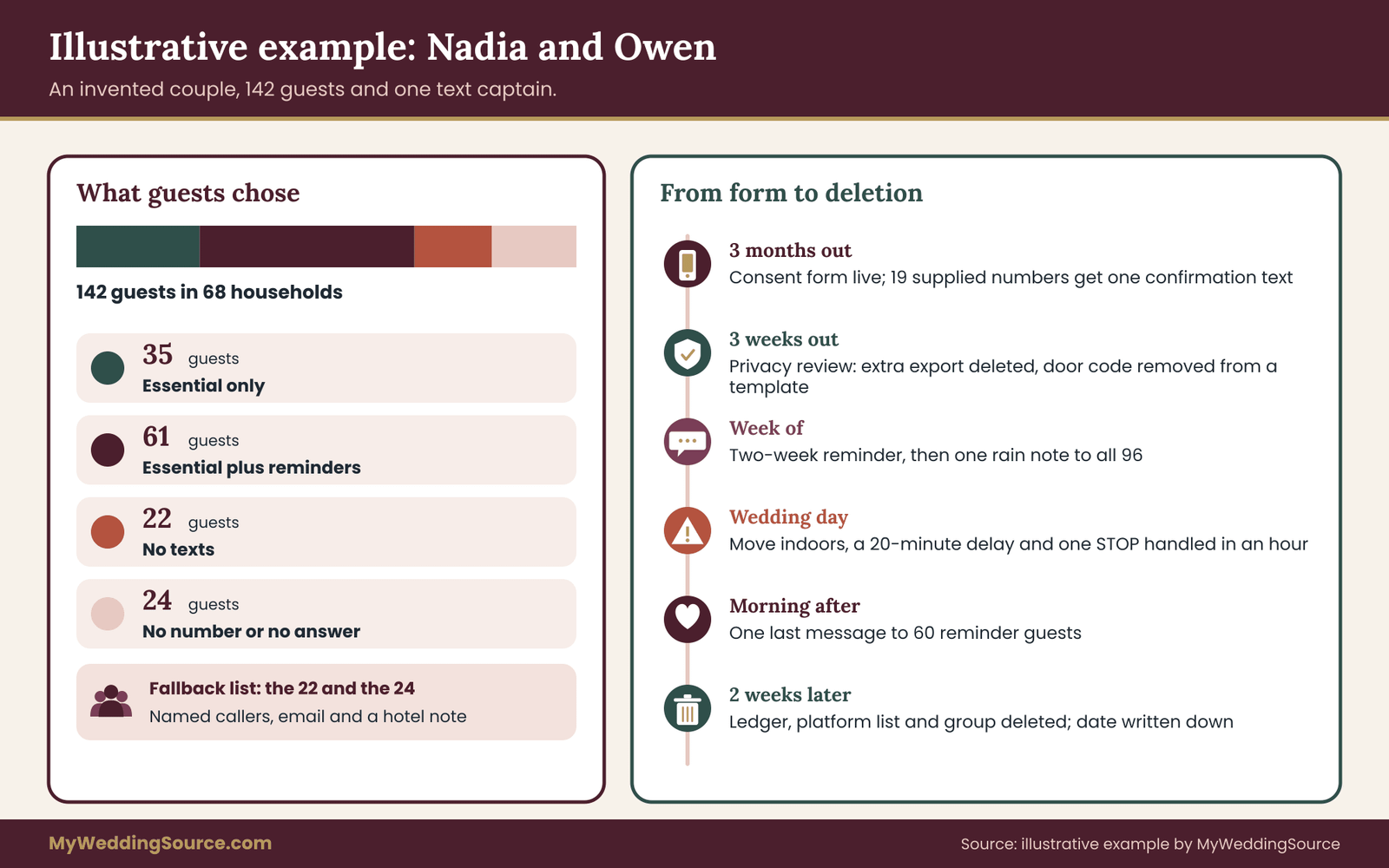
The following example is invented, to show guest text updates at work. Nadia and Owen are marrying on a Saturday in June at a barn venue forty minutes from their hotel block. They have one hundred and forty-two invited guests in sixty-eight households.
Three months out: the ask
Their online RSVP form includes the consent block and the three choices. Of the households that respond, many provide a number. The ledger, built from the form responses, ends up with ninety-six guests who opted in for texts: sixty-one for essentials plus reminders and thirty-five for essentials only. Twenty-two chose no texts, and the remainder gave no number or did not answer.
Nadia’s mother supplied nineteen numbers for relatives who do not use the website. Nadia explains that each will get one confirmation text first. Eleven reply, and eight do not. Those eight go to the fallback list, with Nadia’s mother as the named contact for them.
Three weeks out: the privacy review
Owen’s sister Imani, the text captain, runs the pre-wedding review. She finds three copies of the number list: the master ledger, a platform list and a spreadsheet Owen exported for the shuttle driver. She deletes the export, sends the driver only names and pickup times, and limits the ledger to herself, her backup and the couple. She rewrites one template that included a venue door code, replacing it with “details on the wedding website.”
The week of: two messages
Imani sends the two-week reminder to the sixty-one guests who chose reminders. The text covers the venue, the parking and the shuttle start time. Three days out, a forecast shows rain Saturday afternoon. Imani drafts a message, runs the gate and sends a short note to all ninety-six: “Update from Nadia and Owen’s wedding text line: rain is possible Saturday. The ceremony may move indoors, same time. We will confirm by noon.” She logs it as Class A.
One guest replies “Who is this?” Imani answers within the hour, explaining the number and offering to remove them. The guest says they are fine to stay.
The day: a delay and a stop
At 11:50 Imani confirms the indoor move to all ninety-six. At 3:40 the caterer’s truck is delayed, and the ceremony will start twenty minutes late. She sends the delay message, with a next-update time, and logs it. One guest replies STOP to the delay message. Imani marks the ledger within the hour, sends the single confirmation, and asks the guest’s sister to let them know the new start time. Nobody else needed anything.
The twenty-two guests who opted out and the eight unconfirmed numbers hear about the move indoors from their named contacts and from a sign at the hotel desk. Nadia’s mother phones six of them herself.
After: closing and deleting
The next morning, Imani sends the single Class C message to the sixty guests who chose reminders: thanks, brunch time, and a note that the list will be deleted. Two weeks later she runs the post-wedding review. She confirms that the stopped guest was not texted after the stop, exports the log with numbers removed, deletes the ledger, the platform list and the group thread, and asks the shuttle company to confirm that it deleted the pickup names. She writes the date in her notes.
Running guest text updates took Imani about six hours across three months. Nobody received a message they did not want, nobody’s number reached a stranger and the one guest who wanted out was out within the hour.
Common mistakes with guest text updates
Most problems with guest text updates come from a handful of repeating errors. Each is easy to avoid once you know it.
Starting with the group, not the guest. Creating a group chat before asking anyone is the most common mistake. It adds people without their consent and exposes numbers. Ask first, and add only those who say yes.
Treating a supplied number as consent. A number from a relative or a spreadsheet is a lead, not an agreement. Send the confirmation text, and wait for the reply.
One list for every message. Sending every message to every number ignores the choices guests made. Use the classes and the audience check.
Forgetting the fallback. Guests who opted out, who did not answer or who cannot text still need to know about a change. A fallback with a named person is part of the system.
Putting private details in messages. Door codes, home addresses and health details do not belong in texts. Point to a safer channel.
Letting everyone send. Several senders mean several numbers and confused guests. Keep one voice.
Slow stops. A guest who asked to stop and then received another message will remember it. Act on the same day.
Keeping the numbers. A list of a hundred numbers sitting on a drive six months later is the kind of risk that has no payoff. Delete on the date you chose.
Sending on impulse. The best defense against the late-night “we are so happy!” blast is the send gate. If it fails the four questions, it can wait for morning or go to the wedding website.
Your next steps
Start with the form for guest text updates. Add the consent question and the three choices to your RSVP, along with the promise to delete the numbers after the wedding. Then build the ledger as a private spreadsheet, and name your text captain and a backup. Decide your channel, your sending number and your fallbacks for guests who prefer not to text.
In the weeks before the wedding, run the privacy review, write your templates and print the four gate questions on a card. After the wedding, honor every stop, send the closing message, delete the numbers and write down the date. If you are still working on the larger checklist of tasks, the wedding planning checklist is a good place to slot these steps into your own calendar.
FAQ
Do we need guests’ permission before sending wedding text updates?
Asking is the safest and kindest approach to guest text updates. A guest who gave you a number for the wedding probably expects some contact, but they may not expect repeated texts. A short question on the RSVP form that names the sender, the kinds of messages and how to stop settles it, and it records the agreement in the guest’s own choice. Rules differ by tool and situation, so check the sources listed below.
Is a group text a good way to send guest text updates to all our guests?
Usually not for guest text updates to the whole list. In a group, every member can see every number, and replies can reach everyone. That exposes guests’ numbers and creates noise. Use groups for small, purposeful circles such as the wedding party or one shuttle, tell members what the group is for, and use individual or broadcast messages for the full guest list.
What should we do when a guest replies STOP?
Mark the guest as stopped in your ledger the same day, remove them from every list and group you control, and send at most one short confirmation. Do not ask why. Then check how that guest will learn about essential changes, such as a venue entrance move, and arrange a fallback like an email or a call from a named relative.
Can we text a number a relative gave us?
You can contact it once to ask, but treat it as unconfirmed until the guest replies. The relative could not agree for them. Send a single message that names the sender and offers choices, and add the number to your regular list only after a yes. Silence means no, and those guests get updates by another route.
How many text messages is too many?
There is no fixed limit, but a wedding rarely needs more than six to ten guest text updates in total. A typical pattern is an opening message, one reminder two weeks out, one note in the wedding week, a few on the day only if plans change, and one message the morning after. Guests who chose essentials only should receive far fewer.
What should a wedding text never include?
Keep guest text updates free of private details such as home addresses, door codes, health information and financial amounts, since a text can reach the wrong person. Avoid links other than your wedding website, and never ask guests for money or account information by text. Keep messages short, start with the news, say what to do and name the sender.
How long should we keep guests’ phone numbers?
Keep the numbers behind guest text updates only as long as you need them. A sensible default is to delete the ledger, platform lists, group threads and saved contacts within two to four weeks after the wedding. If you plan one last message, such as a photo link, tell guests and delete after sending. Write down the deletion date and ask any vendor who held numbers to confirm they deleted them too.
What if a guest cannot or will not use text messages?
Respect it and plan another route for guest text updates. Record their preference in the ledger, name a person who will phone or email them about any essential change, and put key information on the wedding website and on paper at the hotel or venue. Guests who avoid texts are often those who need the most notice, so treat them as a priority group.
Sources
- Telephone Consumer Protection Act, Federal Communications Commission
- Text message and robocall guidance for consumers, Federal Communications Commission
- Consumer advice on unwanted texts and text scams, Federal Trade Commission
- Protecting personal information guidance for businesses, Federal Trade Commission
- Messaging principles and best practices, CTIA
- Privacy Framework, National Institute of Standards and Technology
- Securing mobile communications and avoiding scams, Cybersecurity and Infrastructure Security Agency
- Group messages and privacy, Apple Support
- Messages help and privacy settings, Google Support
- Messaging compliance and opt-out handling, Twilio