
Unplugged ceremony wording is the set of words, signs and spoken lines that ask guests to put their phones away while a wedding ceremony happens, without shutting out the guests who rely on a device to hear, read, communicate or stay safe. This guide gives you a four-layer announcement package, a simple sorting rule for exceptions, and ready-to-adapt scripts for invitations, door signs, ushers and your officiant.
Write your unplugged ceremony wording as a device rule, never as a rule about people. Say what you are asking (screens away during the ceremony), why (you want everyone present), and what is still welcome (devices that help a guest hear, see, communicate or stay safe). Say it in four places: before the day, at the door, from the officiant, and in a calm correction if someone slips. Add one line that tells guests who need a device to simply use it, with no explanation owed.
Most unplugged ceremony signs are charming and almost useless. “Please put your phones away and be present” fits on a chalkboard, but it leaves a dozen questions unanswered. What about the guest who reads live captions on a tablet? What about the grandfather whose hearing aids stream through his phone? What about the aunt on call for a medical alert, or the babysitter who must be able to reach a parent? A sign cannot answer these. A thoughtful package of wording can.
This guide is for couples who want a phone-free ceremony and want it to feel kind rather than stern. It covers what to say, where to say it, who says it, and how to handle the awkward moments. It stays on the unplugged announcement itself. If you are still deciding how much photography you want in the room, the guide to wedding photography consent covers guest boundaries and image use in more depth.
A note on scope. This is general information, not legal, medical or accessibility-compliance advice, and your venue, officiant and faith community may have their own rules about devices. Where a rule matters, this guide points you to the person or agency that can confirm it for your situation.
What unplugged ceremony wording has to do
An unplugged request sounds simple, so couples often write it in a minute and move on. It deserves a little more thought, because the unplugged announcement is doing three separate jobs at once, and most versions only do the first.
Job one: tell people what to do. Guests need a clear, specific instruction. “Unplugged ceremony” is a phrase that wedding professionals use constantly and that many guests have never heard. A grandparent may not know whether “unplugged” refers to phones, cameras, or the microphones. A friend may assume it applies to everyone except the photographer. Plain wording removes the guesswork: phones and cameras away, screens off or face down, from the processional until the recessional.
Job two: explain why. People follow a request more willingly when they understand the reason, and the reason is usually gentle. You want guests looking at you instead of at a screen. You want clean photographs without a row of raised phones in the background. You want the quiet to stay quiet. One short sentence of reason turns an order into an invitation, and it lowers the chance that someone feels policed.
Job three: protect the people the rule might hurt. This is the job that most announcements skip. A blanket ban on devices treats every phone as a distraction. For some guests, a phone or tablet is the way they hear the vows, read the program, follow a language they are still learning, or manage a health condition. Good unplugged ceremony wording names that group openly and tells them they are welcome to keep using their tools. When the exception is part of the announcement, nobody has to ask permission, and nobody has to explain a disability or a diagnosis to an usher.
Why the usual one-liner fails
Think about what happens at the door with a sign that says “No phones, please.” A guest who uses a captioning app reads it and feels a flash of worry. Do they have to put the app away? Do they have to find someone and explain? Do they sit in the back and hope nobody notices? Each of those options costs them something, and none of them was your intention.
The failure is not that the sign is rude. It is that the sign is incomplete. It gives an instruction without a boundary, so each guest has to guess where the boundary is. Guests who are confident will assume the rule does not apply to them. Guests who are anxious will assume it applies in the strictest possible way. Neither group gets the outcome you wanted.
A second weakness is timing. If the only announcement is a sign at the door, guests who arrive in a rush will miss it, guests who are reading the program will miss it, and guests who use a screen reader or have low vision may not be able to read it at all. A package of unplugged ceremony wording that repeats the message in several forms and places catches nearly everyone without nagging anyone.
Who is affected, and who is not
It helps to picture your guest list in three groups before you write anything.
The first group is the large majority who can put a phone away without any cost. For them, the wording only needs to be clear and warm.
The second group needs a device for access: to hear, to see, to communicate, to read in a language they are still learning, or to manage a medical condition. For them, the wording needs to say plainly that access devices are welcome.
The third group is on call. A parent whose child is with a sitter, an adult caring for a relative who cannot be left alone for long, or a guest in a job where they must be reachable. They are not using the device for access, but they cannot fully switch it off. For them, the wording needs a middle option, such as silent mode and a seat near the aisle so they can step out without disturbing anyone.
You do not need to know exactly who is in groups two and three. You only need to write the unplugged announcement so that they can recognize themselves in it. Later sections show how.
What this guide does not cover
This guide does not decide whether to have an unplugged ceremony at all, and it does not argue for or against guest photography at the reception. It also does not replace the paperwork conversation with your officiant. Legal requirements for the ceremony itself, such as who may solemnize a marriage and how the license is returned, are covered by the guide to wedding officiant requirements and by the official marriage license information at usa.gov. Here the focus is narrower: the announcement, the exceptions, and the people who deliver them.
The four-layer announcement package
Think of the unplugged announcement as a package of four layers rather than a single sign. Each layer reaches guests at a different moment, in a different format, with a different job. If one layer fails, the next one catches the guest.
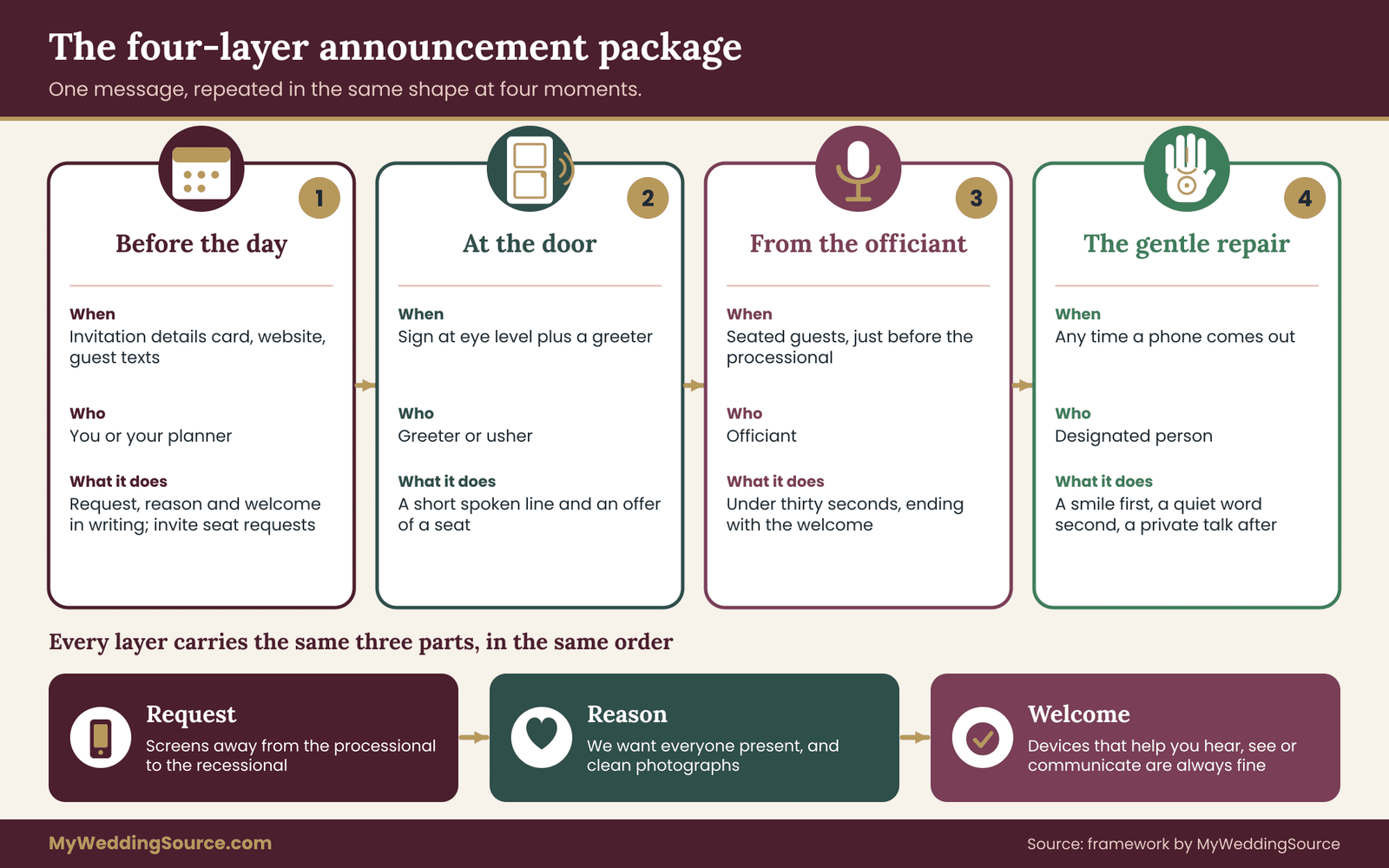
Layer one: before the day. This is the invitation suite, the wedding website and any guest text updates. It is where you introduce the idea early, when guests have time to think about it and to ask questions. A single line on the website is enough for most couples. It should state the request, the reason and the exception. It is also where guests who need a device for access can reach out in advance if they want something specific, such as a seat with a good view of the officiant’s face.
Layer two: at the door. This is the sign, plus the usher or greeter who says a short line as guests arrive. The sign serves guests who read it. The greeter serves everyone else, including guests who cannot read the sign. The door is the most important layer, because it is the last chance before the ceremony begins and the moment when guests are actually holding their phones.
Layer three: the officiant’s line. Just before the processional, your officiant says a brief, warm announcement aloud. This reaches guests who skipped the sign, guests who forgot, and guests who rely on listening. It also sets the tone for the whole ceremony, which is why it should sound like the two of you and not like a flight safety briefing.
Layer four: the gentle repair. Someone will forget. A phone will light up, or a guest will step into the aisle to film. A repair layer means you have decided, in advance, who responds and what they say. Without it, the awkward moment either goes unaddressed, which frustrates the photographer and annoys guests who followed the rule, or it is addressed in a way that embarrasses someone you love.
The rest of this guide takes each layer of your unplugged ceremony wording in turn. Along the way, you will build a short page of wording that you can hand to your officiant, your ushers, your photographer and your wedding coordinator. If your ceremony runs from a written cue sheet, the unplugged announcement belongs on it as its own line, and the guide to ceremony cue sheets for officiants, music and processional timing shows where such a line fits in the run of the ceremony.
The principle behind all four layers
One idea holds the package together: describe the behavior you want, not the guests you are worried about. “Please keep screens put away during the ceremony” is a statement about behavior. “No phones” is a statement that invites an argument about what counts as a phone. “We know some guests use devices to hear or communicate, and those are always welcome” is a statement about welcome. Each layer should combine the same three parts: the request, the reason and the welcome.
If your unplugged ceremony wording keeps those three parts in the same order every time, guests hear the same message in the invitation, at the door and from the officiant. Repetition in the same shape is what makes a rule feel natural instead of stern.
Which devices guests may truly need
Before you write a word of your announcement, it helps to know what you are making room for. This is not a list of conditions to screen for. You are not going to ask anyone about their health or their hearing. It is a way of seeing the range of reasons a guest might keep a screen on, so that your wording does not accidentally rule them out.
Hearing and captioning. Some guests follow speech by reading live captions on a phone or tablet. Others stream the sound from the room directly to hearing aids or cochlear implants through a phone or a small companion device. The major platform makers describe these features on their accessibility pages, and the National Institute on Deafness and Other Communication Disorders offers general information on assistive technology. For these guests, the phone is part of how they hear.
Vision. A guest with low vision may use a phone as a magnifier for the printed program, read signs with a camera, or use a screen reader. A phone held low in the lap is a reading tool, not a camera. A blanket rule that mentions “cameras” can confuse these guests, who may worry that the camera function they use for reading is banned.
Communication. Some guests use a tablet or phone to speak, to write, or to show short messages. A guest who communicates this way may also be the person most likely to be shushed by mistake, because the device is visible and the reason is not.
Language. A guest who is still learning English, or a relative who speaks another language at home, may use a translation app to follow the ceremony, especially if the officiant does not speak that language. If you are planning a bilingual ceremony, a printed program or an interpreter solves the problem more reliably than an app, but a guest who brings one should not be asked to put it away.
Health. Some guests use devices that are linked to a phone to monitor a medical condition, such as a continuous glucose monitor, or to receive alerts. A buzzing alert that is ignored can be a real problem. These guests need to keep the phone within reach and may need to look at it briefly and quietly.
Reachability. This is not access in the strict sense, but it matters. A guest who is a primary caregiver, a parent with a child at home with a sitter, or someone caring for an unwell relative may need to be reachable by phone. They can keep it silent and out of sight, but they may not be able to switch it off.
Mobility and wayfinding. A guest with a mobility impairment might use a phone to message a companion about when to bring a wheelchair, to call a ride, or to find an accessible route. A guest who is autistic or anxious might use a device to stay regulated during a long, quiet event. These uses are quiet and brief, and they are well within the spirit of the request.
What this means for your unplugged ceremony wording
Seven kinds of use, one common thread: in each case the device does something for the guest that the room does not do. If your wording can say that in a sentence, it covers all seven without listing any of them.
That is the idea behind the phrase many professionals use for this kind of exception: a device that helps a guest take part is not the kind of device the request is about. You do not need to define “take part” for each guest. You need only say that those devices are welcome and leave the judgment to the guest, who understands their own needs better than any usher could.
Why you should not list conditions on a sign
It is tempting to be thorough: “Hearing devices, medical monitors and translation apps are exempt.” Resist it. A list invites two problems. It leaves out someone, who then wonders whether their need counts. And it turns the sign into a public sorting exercise, in which a guest has to decide, in front of others, which category they belong to. A short general sentence is both kinder and more complete. Save the specific examples for the website, where guests read at their own pace and in private.
A purpose-sort rule that avoids interrogating guests
Here is the original framework at the center of this guide. It is a three-question sort that you, your officiant and your ushers can all hold in your heads. It is called the purpose sort because it classifies a device by what it is for, never by who is holding it.
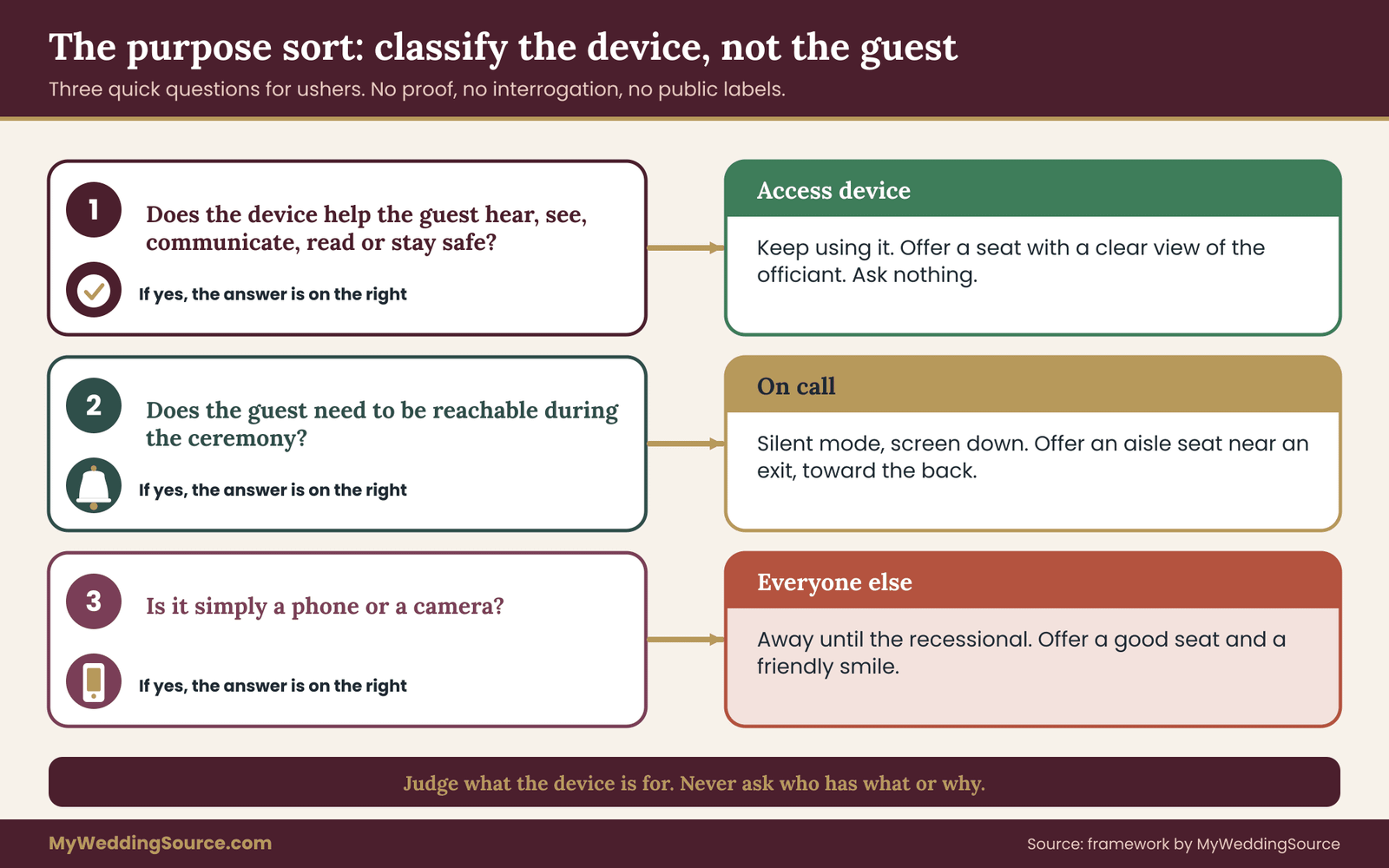
Question one: does this device help the guest hear, see, communicate, read or stay safe? If yes, it is an access device. The answer is always “keep using it.” Nobody asks for a reason, a note or a label. The usher’s job is to point the guest toward a seat that works for them, not to examine the device.
Question two: does the guest need to be reachable during the ceremony? If yes, the guest is on call. The answer is “silent mode, screen down, seat near an exit.” That is a middle path that costs the guest very little and protects the room. Offer an aisle seat toward the back or side, and tell the guest where they can step out and return without crossing in front of anyone.
Question three: is the device simply a phone or a camera? If yes, the answer is “away until the recessional.” This is the group for whom the unplugged request was written. They can have it back as soon as the ceremony ends.
The sort works because it is fast. An usher can run it in a few seconds, and in practice usually does not run it at all, because the guest has already placed themselves in the right group after reading the unplugged announcement. The sort exists for the rare moment of doubt, and for you, as the author of the wording, to check that each group has a place in it.
Rules that keep the sort fair
Three rules make the purpose sort work in practice.
No proof. Nobody is asked to show a diagnosis, a device or a doctor’s note. If a guest says the device is for access, the answer is yes. A person pretending to have an access need in order to film the ceremony is an unlikely scenario, and if it happens, the cost is small and the guest is the one who will have to live with it.
No announcement of the exception. The officiant says that devices for access are welcome. Nobody says “and Maria, you can keep your tablet.” Naming a guest in public turns an accommodation into a spotlight.
No hierarchy of needs. A guest who needs captions is not more deserving than a guest who needs to be reachable. They get different seats and different instructions, but both are treated as ordinary requests from ordinary guests.
A short worked sort
Consider five guests on a ceremony morning. A cousin arrives holding a phone, intending to take video of the vows. An uncle uses a hearing app and keeps his phone in his shirt pocket. A friend is a nurse who may be paged. A guest from out of town uses a translation app to follow the officiant. A teenager is texting a friend about where to sit.
Run the sort. The cousin is question three: away until the recessional. The uncle is question one: keep using it, and offer a seat where the sound is clearest. The nurse is question two: silent, screen down, aisle seat. The guest with the translation app is question one: keep using it, and perhaps hand them a printed program. The teenager is question three, and a friendly usher can make the request lightly.
Five guests, three answers, nobody questioned about anything personal. That is the outcome the rest of the unplugged ceremony wording is built to produce. It also gives you a way to test your sign: read it through the eyes of each of the five. If any of them would leave the door feeling unsure, revise.
Where the line gets blurry
Real ceremonies produce edge cases. A guest uses a phone as a hearing device and also wants to take a quick photo of the kiss. A grandmother holds a tablet as a magnifier and also records the vows without thinking. These are not emergencies. The practical answer is that the purpose sort covers the main purpose of the device, and small overlaps are acceptable when the guest is quiet, seated and not blocking anyone’s view.
If you or your photographer feel strongly about a particular moment, such as the first kiss or the ring exchange, say so in the wording: “We would love for everyone to be fully present for the vows and the kiss.” That sets a specific expectation without changing the access rule. Guests who rely on a device for access will keep doing so, and guests who simply wanted a picture will understand the request.
Keep the sort in your own words
The sort is for you and your team. Do not print it, and do not read it aloud as three questions. In your unplugged ceremony wording, guests should hear only the friendly output: the request, the reason and the welcome. The sort sits behind that output, so that when your ushers are asked a question, they all give the same answer.
Unplugged ceremony wording for invitations and the wedding website
Layer one of your unplugged ceremony wording does the most work for the least effort, because it reaches guests when they can still ask a question and still change their plans. It also has the most room. A website can hold a full paragraph, a short list of questions and an invitation to get in touch. A printed invitation has room for a line at most, and many couples leave it off the invitation entirely and use an insert or the website instead.
Where each version belongs
Print is expensive, permanent and hard to correct, so keep unplugged ceremony wording on the printed invitation short or omit it. The convention many couples follow, which the guide to wedding invitation etiquette discusses, is that the main invitation carries the essentials of who, when and where, and that other details go on an enclosure or on the website. A line about devices fits neatly on a details card or on the website’s ceremony page.
The website is the best home for the full version. It is where guests check the dress code, the parking and the schedule, so they are already in a logistics frame of mind. Put the device note on the ceremony page, near the start time, and repeat a shortened version in any text updates you send in the final week.
The three-part line, in several voices
Every version of unplugged ceremony wording should carry the request, the reason and the welcome. Here are examples in different tones that you can adapt. They are written for you to change, not to copy word for word, because the best wording sounds like the two of you.
Warm and simple. “We are having an unplugged ceremony. Please keep phones and cameras away from the processional through the recessional, so everyone can be fully present. If you use a device to hear, see or communicate, please use it as you need to. You are always welcome.”
Light and playful. “Our ceremony is unplugged. We would love your eyes on us and not on a screen, and our photographer will make sure you get the pictures. If your phone helps you hear or follow along, keep it handy. It is welcome.”
Formal. “The couple requests that guests refrain from using phones and cameras during the ceremony. Devices that assist a guest in hearing, seeing or communicating are welcome and need no explanation.”
Faith-community voice. “In keeping with our wish for a prayerful ceremony, we ask that phones and cameras be put away until the recessional. Guests who use devices for hearing, reading or communication should feel free to do so.”
Direct and short. “Phones and cameras away during the ceremony, please. Devices you need for access are always welcome.”
Notice what the examples avoid. None of them threatens a consequence. None says “any guest caught filming will be asked to leave.” None blames social media or lectures about etiquette. And none uses the word “ban.” Those choices keep the tone inviting, which is the whole point of writing the unplugged announcement yourselves.
Questions worth adding to the website
A short website section called “Ceremony details for guests” can answer the questions your guests will otherwise ask you in the week before the wedding. Consider including these in plain, brief sentences.
First, say what unplugged means in your ceremony. Name phones, tablets, smartwatches that take photos, and cameras, and give the start and end of the request.
Second, say when guests can use devices again. Many couples say “after the recessional” or “once we have walked out.” Guests who know the exact point stop checking the time.
Third, say whether the photographer or videographer will share images, and roughly when. Guests who know they will receive photographs are less anxious about missing the moment. If you have decided how galleries will be shared, a single sentence is enough.
Fourth, invite requests. “If you would like a particular seat, for example near the front so you can see the officiant clearly, or on the aisle so you can step out, email or text us by this date.” Give a real, monitored way to reach you or a trusted contact, and make it easy. This single sentence lets guests who need an accommodation ask for it in private, well before the day, without making a fuss at the door.
Writing for people who read in different ways
A website and a text update will be read on small screens, through screen readers, in browsers translated into other languages, and by older guests who skim. A few habits help every reader.
Use short sentences and common words. The federal plain language guidelines recommend writing that readers can understand on the first pass, and the advice works equally well for a wedding site. Put the request in the first sentence. Avoid abbreviations and in-jokes that only some guests will recognize. Use real text, not an image of text, so screen readers and translation tools can read it. If you add a graphic, include a text equivalent right beside it.
Check the contrast between text and background, and avoid pale gray on white, which many people find hard to read. The Web Accessibility Initiative at the World Wide Web Consortium publishes widely used guidance on this, and you do not need to read it all. Larger type and strong contrast are the two habits worth borrowing.
Wording for door signs that everyone can read
The door sign is the layer most couples spend money on, and the layer with the greatest gap between how it looks and how well it works. A hand-lettered sign on an easel is lovely and photographs beautifully. It is also often small, set low, written in a thin script and printed in pale ink. A guest with low vision may walk straight past it.
What a readable sign says
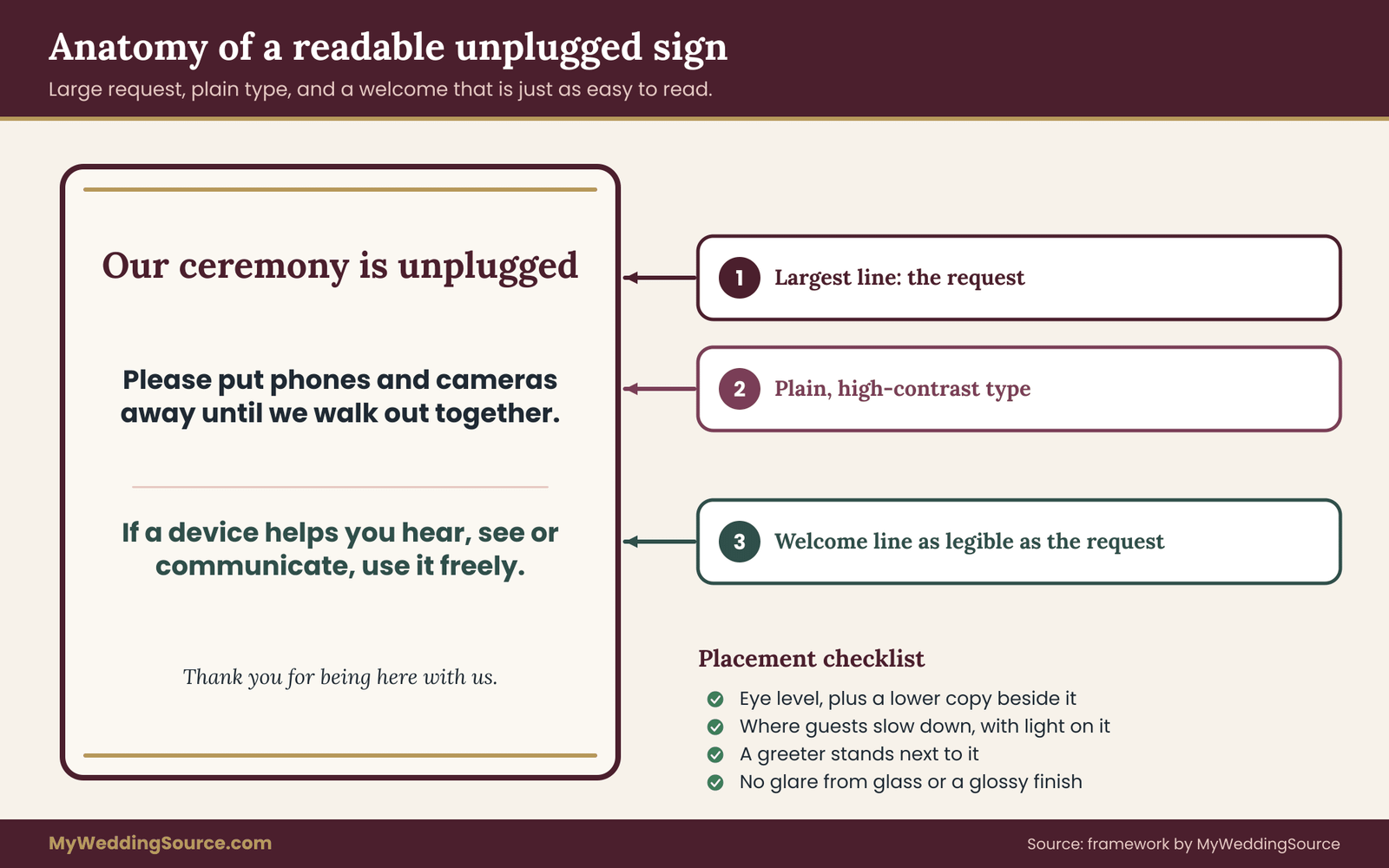
Keep the sign short. Three short lines carry the whole message: the request, the reason and the welcome. For example: “Our ceremony is unplugged. Please put phones and cameras away until we walk out together. If a device helps you hear, see or communicate, use it freely.” That is under thirty words, and a person can read it in under ten seconds.
Lead with the request in the largest type, put the reason in a smaller line and the welcome in a line that is just as easy to read as the request. Many signs shrink the exception into fine print, which defeats its purpose. If the welcome is the line that matters most to the guests who need it, it should be as legible as the rest.
Type, color and placement
Choose a plain, upright typeface with open letter shapes for the main lines. Decorative scripts look elegant, and they are hard to read at a distance and in dim light, especially for guests with low vision. If you love a script, use it for the heading only and set the instructions in a clear sans-serif or a sturdy serif.
Use dark text on a light, matte background, or the reverse, and avoid reflective surfaces such as glass and mirrors that throw glare back at the reader. Mount the sign at about eye level for a standing adult, and consider a second, lower copy beside the first for guests who are seated, using a wheelchair or shorter. Place it where guests naturally slow down, at the entrance to the ceremony space, and not in a corridor where people keep moving. Light it. A sign that cannot be read in the late-afternoon shade is not a sign.
The sign needs a person beside it
No sign reaches everyone. A guest who cannot see it, who reads in another language, or who simply walks past while talking to a friend will miss it. That is why layer two is a sign plus a greeter. The greeter’s line is short and spoken, and it covers the people the sign cannot.
A good greeter line sounds like this: “Welcome. We are keeping the ceremony phone-free, so please tuck phones and cameras away until the couple walks out. If you use a device to hear or follow along, please keep it. May I show you to a seat?” The offer of a seat does double duty. It ends the conversation kindly and it gives the guest who needs a good position a way to ask for one without saying why.
When the venue controls the signage
Some venues limit what you can post and where, and some require approval for easels, stands and anything attached to a wall. Ask early. If the venue permits only certain placements, your greeter becomes more important, not less. The guide to wedding signage systems discusses placement and permissions in more detail, though the principle is simple: get the venue’s approval for the sign’s size and position before you print.
Languages and symbols
If many of your guests read another language, add a translation beneath the English text, in equal type size, and have a fluent speaker check it. Machine translations can sound odd or, in rare cases, say something different from what you meant. A small phone-with-a-line-through-it symbol can reinforce the message for some guests, but never rely on the symbol alone, because a crossed-out phone is exactly the image that makes access users nervous. If you use the symbol, put the welcome line directly beneath it so the two read together.
Sign wording to avoid
A few phrases invite friction and are worth leaving out. “No phones, no exceptions” contradicts your own welcome line. “Phones will be confiscated” is hostile and in practice unenforceable. “Be present” can sound preachy. “Unplugged” alone, with no explanation, is jargon. Phrases that shame, such as “Put it down and live a little,” read as a lecture rather than an invitation. In unplugged ceremony wording, a calm, short, specific message beats a clever one.
Unplugged ceremony wording for ushers and the officiant
In unplugged ceremony wording, layers two and three are spoken, and spoken words are different from written ones. A line that looks fine on a sign can sound stiff, long or oddly commanding when a person says it aloud. This section gives you spoken versions, and it also covers how to brief the people who will say them.
The usher or greeter script
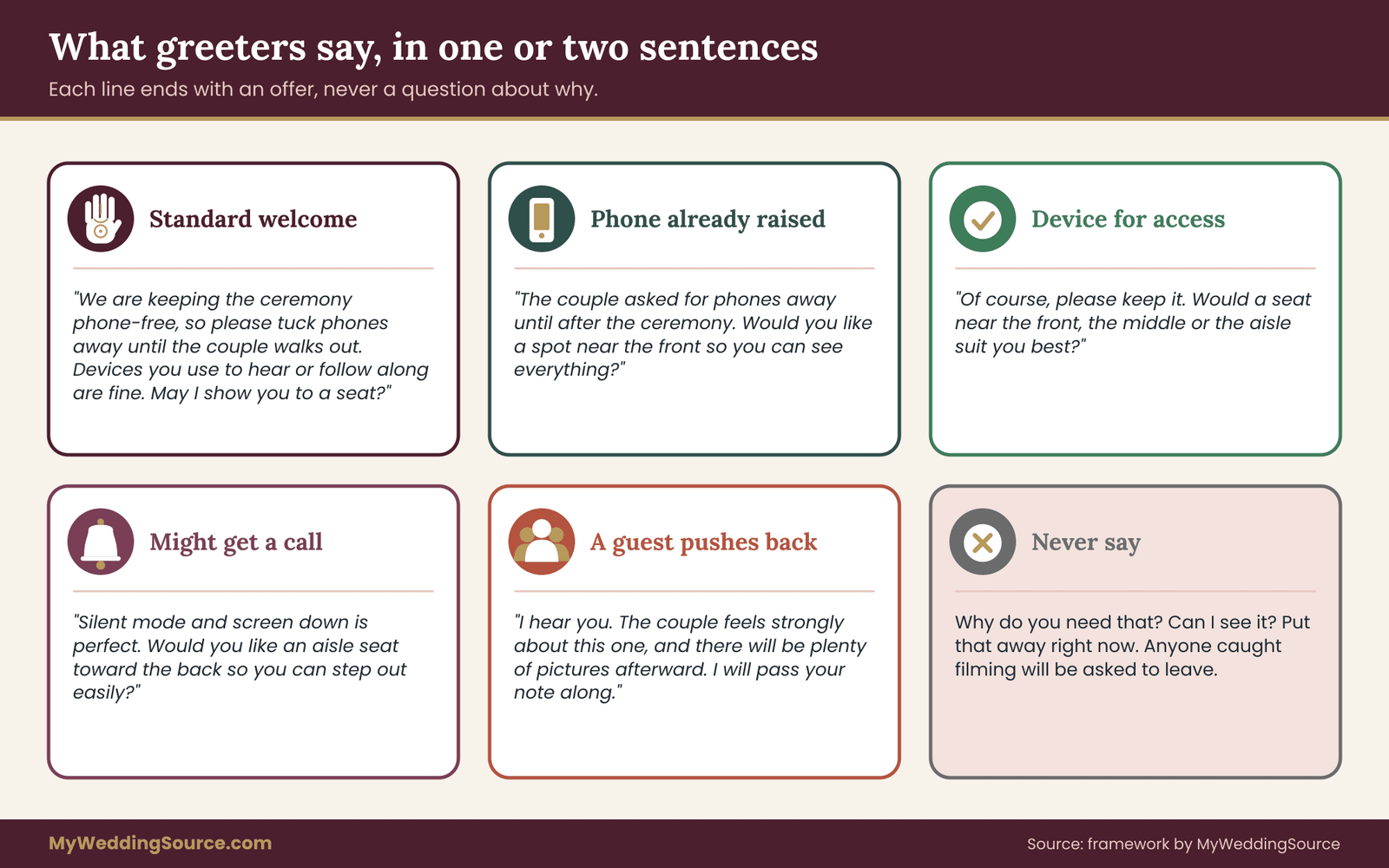
Greeters are usually friends or relatives, chosen because they are warm and reliable, not because they are trained in guest relations. Give them a short script and permission to use their own words. The best scripts for unplugged ceremony wording are one or two sentences, they end with an offer, and they never ask a guest to explain.
The standard greeting. “Welcome, we’re so glad you’re here. We’re keeping the ceremony phone-free, so please tuck phones and cameras away until the couple walks out. Devices you use to hear or follow along are always fine. Can I show you to a seat?”
For a guest who is already holding a phone up. “Hi, quick thing before we start: the couple asked for phones away until after the ceremony. Would you like me to hold on to a spot for you near the front so you can see everything?” The offer of a good seat shifts the moment from a correction to a favor.
For a guest who mentions a device for access. “Of course, please keep it. Would a seat near the front, the middle or the aisle be best for you?” No follow-up questions. No “may I ask why.” If the guest volunteers a reason, listen and thank them. If they do not, leave it.
For a guest who says they might get a call. “No problem. Silent mode and screen down is perfect. Would you like an aisle seat toward the back so you can step out easily?” Point out the nearest door and, if you know it, a quiet place to take a call.
For a guest who pushes back. “I hear you. The couple feels strongly about this one, and I’m sure you’ll get plenty of pictures afterward.” Then stop. A greeter does not need to win an argument. If the guest remains unhappy, a calm “I’ll let the couple know” is enough, and the couple’s designated contact can follow up after the ceremony.
Briefing your greeters in ten minutes
Hold a short huddle before guests arrive. Cover four things. First, the request in one sentence. Second, the purpose sort: access devices stay, on-call guests get silent mode and an aisle seat, everyone else puts phones away. Third, what to say and what not to say. Never ask about a diagnosis, never touch a guest’s phone, never comment on why. Fourth, who to call if something comes up, which should be one named person, such as the coordinator or a trusted family member, and not the couple.
Write the greeter script on a card in large type. Greeters will glance at it, and a card in a pocket removes the pressure of remembering. If you have a wedding coordinator, they often brief greeters as part of the day-of routine, and the unplugged line can slot into what they already do.
The officiant’s line
The officiant’s announcement is the one most guests remember, because it is spoken in the quiet right before the ceremony begins. It should take under thirty seconds. It should sound like the officiant and the couple, and it should end by handing the room back to the ceremony instead of lingering on the rule.
A warm version. “Before we begin, a small request from the couple. They would love for you to be fully here with them today, so please put away phones and cameras until they walk out together. Their photographer is capturing every moment. And if you use a device to hear, see or follow along, please use it freely. You are always welcome. Thank you, and now, let’s begin.”
A light version. “A quick note from the two of them: no phones during the ceremony, please. They want your faces, not your screens. If your phone helps you hear or follow along, keep it handy. That is completely fine. Now, shall we get started?”
A formal version. “The couple asks that all phones and cameras be put away for the duration of the ceremony. Devices that help a guest hear, see or communicate are welcome. Thank you for your cooperation.”
A version for a religious setting. “In keeping with the spirit of this service, we ask that phones and cameras be silenced and put away. Those who use devices to assist with hearing, reading or communicating are welcome to do so. Let us begin.”
A multilingual version. If you have an interpreter or a second officiant, have the line delivered in each language in the same order, with the same three parts. Share the text with the interpreter in advance so that the welcome line is translated carefully and not trimmed for time.
Agree on the line with your officiant ahead of time
Some officiants have a standard announcement, and some have strong views about devices, or rules from their tradition or organization. Ask early. Your officiant may be happy to read your text, may have a version of their own, or may prefer to make no announcement at all. The legal and procedural questions about who may officiate and what the officiant does with the license are separate, and the officiant requirements guide mentioned earlier covers those.
Share your unplugged ceremony wording at least a week before the wedding and ask whether any phrase feels unnatural to say. The most common edit is to the reason: officiants often prefer to explain it in a sentence of their own. That is fine. What you need to protect is the order and the welcome line. If the officiant cuts the reason but keeps the request and the welcome, the unplugged announcement still works.
Where the announcement sits in the ceremony
Place the officiant’s line after guests are seated, music has paused, and before the processional begins, or as the first words after the processional, depending on your officiant’s habits. Avoid placing it in the middle of the ceremony, where it interrupts the mood. If you use a written run of show, add the unplugged announcement as its own cue with a named speaker and a start time. The guide to ceremony cue sheets walks through the order of those cues, and the general order of ceremony elements is laid out in the guide to the wedding ceremony, step by step.
Keep the announcement short and unfussy
Long unplugged ceremony wording defeats itself. Guests who have been waiting for forty minutes in dress shoes are not in the mood for a talk. A short, kind announcement is more likely to be remembered and followed than a long, detailed one. If you find yourself explaining why a phone is distracting or telling a story about a wedding you attended, cut it. The sign and the website have already done that work.
What not to say from the front of the room
Do not single out a guest. Do not mention a specific person’s device, even to praise it. Do not joke about “the guest in the third row” who forgot to turn off their phone. Do not threaten consequences, and do not describe what happens if someone breaks the rule. The mood of the whole ceremony hangs on a few seconds of tone, and a gentle line that ends in a welcome sets the room at ease.
The exception lane: seating, sightlines and vendor briefing
Wording tells guests what is allowed. Seating shows them where. The idea of an exception lane is simple: set aside a few places in the ceremony space where a guest who uses a device can sit comfortably, see well and avoid disturbing anyone, without being labeled.
What an exception lane is, and is not
It is not a section with a sign. Nobody should see a “device users” label, and nobody should have to sit there. It is a handful of seats, scattered, that are well placed for the kinds of device use covered earlier. Think of it as good seating rather than special seating.
For guests who rely on captions or on lip reading, a seat with a clear line of sight to the officiant’s face and the person who will be speaking, with good light on the speaker, helps more than almost anything else. For guests using a magnifier or a screen reader, a seat near the front or on an aisle works. For on-call guests, an aisle seat near an exit works. For guests using mobility aids, a space with room to maneuver and a clear path out is essential.
How to set it up
Walk the ceremony space with your coordinator or venue contact, and mark a few seats at the ends of rows near the front, a few on the aisle toward the back and a clear space for a wheelchair or walker that does not cut off the row. If your venue has a list of accessible features, the guide to accessible wedding venue red flags is a useful companion for checking them. Keep a few reserved cards in your greeter’s pocket, and let guests who ask for a particular seat have it.

The cards should say something plain, such as “Reserved.” A card that says “Reserved for guest with hearing needs” tells everyone near it exactly what they should not know. A plain card protects privacy.
Briefing your photographer and videographer
Your photographer and videographer are also part of the unplugged announcement, because they will notice who is holding a device and may point a lens in that direction. Tell them three things.
First, tell them the rule you have set and the words you used. They should know that guests may use devices for access, so they do not mistake a captioning tablet for a camera and do not photograph it in a way that draws attention.
Second, tell them not to treat a guest’s device as a shot to avoid or to feature. A photographer who quietly frames around a guest with a tablet is doing the right thing. A photographer who stops, walks over and asks the guest to put it away has overstepped.
Third, tell them who to talk to if they have a concern. The right answer is your coordinator or the named point person, not the guest. The guide to the wedding family photo list shows how to give a photographer a clear brief on the people and moments that matter, and the same habit applies here: a short written note beats a hallway conversation.
If your photographer has their own policy about guests with phones, such as asking the officiant to announce it, align the wording so that guests hear one consistent message. Two competing announcements, one from the officiant and another from the photographer, confuse the room.
Lighting, flash and noise
Even a guest who is using a device for access should know the few things that do affect the room. Phone flash, camera shutter sounds and bright screens are the real disruptions. A short, kind sentence on the website can cover them: “If you use a device during the ceremony, please keep the screen dim, the sound off and the flash off.” Guests who rely on devices are used to these courtesies and will nearly always follow them. The reminder is for everyone else.
Handling pushback, slips and phones that come out anyway
You can write the kindest unplugged ceremony wording in the world and still have a phone come out. That is normal, and it does not mean the package failed. It means you need layer four, a repair routine that you decided on before anyone was upset.

Slips are not defiance
Most phone use during a ceremony is a reflex. A guest sees something emotional and lifts a phone before thinking. A relative who has filmed every family event for decades does it without noticing. A child copies an adult. Treat the first slip as a reflex and respond as if it were one.
The repair ladder has four rungs, and you climb them only as far as you need to.
Rung one: a look and a smile. A greeter or a family member seated nearby catches the eye of the guest, smiles and gives a small gesture toward the pocket. No words. Most slips end here.
Rung two: a quiet word. If the phone stays up, the nearest designated person, ideally one who is seated near the back or the side, leans over and says softly, “The couple asked for phones away until they walk out. Thank you.” A brief, polite sentence, delivered without drama.
Rung three: a private conversation after. If a guest continues, or begins to film again after being asked, the matter waits until the ceremony ends. The point person speaks to the guest in private, explains that the couple felt strongly about it, and asks for cooperation at the reception. There is no value in a confrontation in the middle of the vows.
Rung four: the couple’s own call. If something serious happens, such as a guest blocking the photographer or posting images the couple specifically asked not to share, the couple decides what to do after the wedding. That is a decision for days later, not for the ceremony itself.
The designated person
Pick one trusted person to be the point of contact for any device issue. This should not be the couple, the officiant or the photographer. A sibling, a close friend, a coordinator or a parent with a calm temperament works well. Tell the greeters, the photographer and the officiant who it is. Their job is to receive concerns, respond to them and keep the couple out of it.
Give them a short list of lines for different moments. “Thank you for helping us keep the ceremony quiet.” “We’ll have photographs for everyone soon.” “I understand, and I’m happy to pass that along.” Notice that these lines all acknowledge the guest. A guest who feels heard is much less likely to dig in.
When the person is a family member with strong opinions
The hardest conversations are with family. A grandparent who has always filmed weddings, a parent who is proud and wants a recording, or an uncle who thinks the rule is silly can all put you in a bind. The following approach works for devices specifically.
Speak to the person before the wedding, privately and kindly. Say what you are asking, say why it matters to you, and offer something in return, such as a promise of a copy of the photographer’s best images or a time after the ceremony when they can take pictures of you both. The conversation costs a few minutes and removes the biggest risk of a scene on the day.
If a family member insists on filming, you can choose to make a specific arrangement. For example, a designated relative may record the ceremony from a fixed position at the back with a small camera or phone on a stand, shared with everyone afterward. This keeps one device in the room, makes it predictable for the photographer and gives the relative a role. Whether that suits your wedding is your decision, and it may conflict with your photographer’s contract or your venue’s rules, so check both.
Guests who film for social media
Some guests treat a wedding as content. They may not be hostile, only habitual. Your website wording can include a line about posting, such as asking guests to wait until you have shared your own photographs before posting, or to avoid tagging. That is a separate request from the unplugged ceremony and deserves its own sentence, so the two do not blur. The guide to wedding photography consent mentioned earlier explains how to set image-use expectations in detail.
Phones that ring
A ringing phone is a different problem from a raised phone. It is usually an accident, and the guest is often more embarrassed than anyone else. Your officiant’s line can include a light reminder: “Please check that your phone is on silent.” It can also help to place a small basket or a printed note near the door that says “Silent mode, please.” Do not suggest a phone check or a basket where guests must hand over their phones. It creates anxiety, it separates guests from access devices, and it can lead to lost or mixed-up property.
What to do about the camera in a smartwatch
Smartwatches are a quiet gray area. Some take photos, most show notifications, and many guests wear them as a matter of habit. Rather than regulating watches, a short phrase in the wording such as “phones, cameras and any device that takes photos or video” covers the ones that matter, and leaves everyone else free to glance at the time. If your concern is the glow of a screen, say “screens off” and leave the type of device unspecified.
Children and teens
Children are often the most enthusiastic photographers and the least likely to read signs. If children will attend, give parents the information in advance and ask them to talk to their kids. A line on the website, such as “Please let any children in your care know about the phone-free ceremony,” is enough. For the ceremony itself, consider giving older children a small job, so their hands are busy and they feel part of the day. Teens who are asked to help a younger cousin or hold something are less likely to reach for a phone.
Livestreams, remote guests and what happens after
An unplugged ceremony creates a quiet gap for guests who cannot attend. Grandparents who cannot travel, friends abroad and relatives who are unwell may be hoping for a video. A good package of unplugged ceremony wording includes a plan for them, and the plan also reduces the temptation for in-room guests to film.
One stream, one operator
If you decide to livestream, make it a single, official feed run by one person or by your videographer, from a fixed position that does not block anyone. Say so on the website: “The ceremony will be streamed for guests who cannot join us. Please do not stream or film from your seat.” A single feed removes the need for anyone else to film for the people who are absent, which makes the rule easier to follow.
Consider adding captions to the stream. Live captioning services vary in price and quality, and platform tools may be free but imperfect. If any remote guest is deaf or hard of hearing, ask them what works for them before choosing. The same guest may attend in the room and watch the recording later, so a captioned recording also helps. If a video platform fails, a fallback is wise, and the guide to wedding-day digital operations describes backup communication and file plans for exactly this kind of situation.
A short word for guests in the room
When a stream or recording exists, tell the room. Guests are more willing to put a phone away when they know the moment is being captured and that they will receive it. A line from the officiant, “Our videographer is recording the ceremony, and we will share it with you,” does this in one sentence.
After the ceremony
The moment the couple walks out is the natural end of the request. Say so aloud: “Phones are welcome again. Take all the pictures you like.” Guests who have held back for twenty minutes will take them out immediately, and the recessional will be full of lifted phones. That is a good thing. It gives guests the release they have been waiting for.
If you have a post-ceremony photo session, the photographer may want a short window without guest phones. Tell guests at the recessional. “We will have family photographs in the garden. Please give us fifteen minutes, then join us for cocktails.” Giving a time and a destination keeps people from crowding the formal portraits.
Thanking guests
A thank-you for following the request is a small but effective touch. Put it in a toast, a message in the reception program or a note on your website after the wedding. A sentence such as “Thank you for being so present with us” reinforces the value of the request and rewards the guests who followed it. It also quietly tells those who did not that the rule mattered to you, without anyone being named.
A worked example: one ceremony, four guests, one script
The following example is invented for illustration. The couple, the guests and the venue are not real, and nothing here describes a real event. It shows how the four layers of unplugged ceremony wording and the purpose sort fit together on one realistic ceremony.

The setup
Marisol and Dev are marrying on a Saturday afternoon in a garden venue with about one hundred and ten guests. The ceremony is outdoors, on a lawn, with rows of folding chairs and a wide path down the middle. There is no door, only an opening in a hedge where guests arrive. They have hired a photographer and a videographer, and a friend of Marisol’s will act as day-of coordinator. They want an unplugged ceremony and they have read enough to know a blanket ban would cause trouble.
Four guests are on their list of people who may be affected, although none of them has said so. Dev’s grandfather, Arjun, uses hearing aids that connect to his phone. Marisol’s aunt, Lucille, is a nurse on call that week. A college friend, Tomás, is deaf and expects to follow the ceremony with live captions on a tablet, and his partner has already asked if the officiant will face the guests. A cousin, Priya, is a prolific photographer who posts everything.
Layer one: the website and text
On their wedding website, under “Ceremony details,” Marisol and Dev write: “We are having an unplugged ceremony. We would love for you to be fully present with us, so please keep phones and cameras away from the processional until we walk out together. Our photographer will capture the day, and you will see the pictures. If you use a device to hear, see or communicate, please use it. It is always welcome. If you would like a particular seat, tell us by the first of the month and we will save it.”
Below this, in a separate sentence, they add: “If you are on call and need to be reachable, silent mode and an aisle seat toward the back are perfect.”
Tomás’s partner sees the line and replies to the contact address. Marisol writes back that a seat on the front left, with a clear view of the officiant’s face and the tablet on his lap, is reserved. She asks if the officiant should do anything specific. They answer that facing the group while speaking and avoiding covering the mouth is plenty. Without the website line, that exchange would likely have happened awkwardly at the door, or not at all.
Layer two: the garden entrance
Because there is no door, Marisol and Dev place the sign at the opening in the hedge, on an easel at eye level, with a second, lower copy beside it. The sign is large and plain: dark type on a cream card, no script for the instructions. The three lines read: “Our ceremony is unplugged. Please put phones and cameras away until we walk out together. If a device helps you hear, see or communicate, use it freely.”
Two greeters stand beside it. Their cards hold the standard greeting and the four follow-up lines. Lucille arrives, reads the sign, and mentions that she may be paged. The greeter offers an aisle seat on the right side, three rows from the back, and points to a path behind the hedge where she can step out. Arjun walks past the sign and the greeter says the standard line. He nods and settles in his seat, hearing aids already connected. Priya arrives holding her phone and the greeter says the line for a guest holding a phone: she is offered a seat in the third row.
Layer three: the officiant
The officiant uses a version of the warm script, trimmed by one sentence at the officiant’s request. She says it after guests are seated and the music has paused. The line takes about twenty seconds, and the welcome line is included.
Layer four: the repair
Midway through the vows, Priya’s phone rises. The designated person, Marisol’s brother, is seated in the row behind. He catches her eye, smiles and lowers his own hand to his pocket. The phone goes down. No words are needed. Afterward, Marisol’s brother mentions it kindly and Priya laughs. She says she forgot and asks where the best photographs will be posted.
At the recessional, the officiant says, “Phones are welcome again. Take all the pictures you like.” The lawn fills with raised phones.
What the example shows
Four guests with four different needs were handled by one package. Nobody was asked to explain a medical situation or a hearing loss. The only private conversation was between Marisol and Tomás’s partner, and Tomás’s partner started it, in response to an invitation to ask. The photographer did not photograph Tomás’s tablet as a distraction, because they had been told what it was. The ceremony stayed quiet. The cost was a printed sign, a few minutes of greeter briefing and one reserved seat card, all of which Marisol and Dev could handle themselves.
Three approaches, compared in prose
It helps to see why the package outperforms simpler options. Consider three approaches to unplugged ceremony wording for the same ceremony.
The first is a blanket ban: a sign that says “No phones,” no exception, no conversation. It is the cheapest in effort and the weakest in practice. It leaves Tomás uncertain about his tablet, it leaves Lucille with a decision between her job and the couple’s rule, and it tends to produce at least one quarrel at the door.
The second is a soft request: a cheerful sign asking guests to be present, with no mention of exceptions and no spoken announcement. It is gentler, and it works for most guests, but it fails the same guests as the ban, because the silence about exceptions reads as an absence of them.
The third is the package. It costs a little more thought, and almost no more money. It protects the guests who need protection, and in the same stroke it makes the request feel respectful to everyone else. Guests who are told they are trusted tend to behave accordingly.
Where unplugged ceremony wording reaches its limits
No unplugged ceremony wording solves everything. A few limits are worth understanding before you finalize your package, so that you are not surprised on the day.
Edge cases to think through
Very small ceremonies. If you are marrying in front of a handful of guests, a printed sign may feel silly. A spoken request from the officiant and a note in the invitation will do the job. The purpose sort still applies, and the welcome line matters even more when a single guest’s access device is visible to all.
Courthouse and civil ceremonies. Courthouses and registry offices often have their own rules about photography and devices, set by the building or the court. These rules may override your wishes, either by forbidding photography entirely or by allowing it only at certain moments. Ask the office that issues your license, and use the marriage license information at usa.gov as a starting point for finding the right office.
Houses of worship. A church, temple, mosque or other religious venue may have rules about photography, flash, filming and devices that come from the congregation, not from you. Ask the clergy or the venue manager. If the community has a firm rule, follow it, and fit the welcome line for access devices into whatever announcement they allow.
Outdoor and destination ceremonies. With no door, no sign location and no clear start, the greeter and the website carry more weight. For a destination wedding, guests may need the information before they travel, because they are more likely to arrive with devices in hand and less likely to check a website on the day.
Guests who need a service provider. A guest who uses a sign language interpreter or a live captioner needs an agreed place for that person to stand or sit, with good light and a view of the speakers. That is separate from the device announcement, and it is worth settling with the guest well before the day. The Americans with Disabilities Act website describes the idea of effective communication. Whether and how that law applies to a private event at a particular venue depends on the facts, so ask the venue and, if needed, a qualified professional.
Venue rules. Some venues set their own rules about photography, drones, streaming equipment and signs. Read your contract, ask your venue contact, and make sure your wording does not promise something the venue forbids.
What announcements cannot do
A well-worded announcement reduces phone use. It cannot eliminate it. If you need to guarantee no photographs, no recordings and no posts, you need more than wording: contract terms with your vendors, venue rules and a conversation with each person who is likely to be unhappy. Announcements work by cooperation, and cooperation depends on goodwill.
Announcements also cannot replace direct conversations with guests who have particular needs. If a guest has told you about a need, or if you know of one, talk to them privately. The unplugged announcement is for everyone, and the conversation is for the person.
Checking before you print
Before sending anything to the printer or the website, check these four things. Does the welcome line appear every time the request does? Is your unplugged ceremony wording consistent across the website, the sign, the greeter card and the officiant’s script? Have your officiant, venue and photographer read it? And has one person who was not involved in writing it read the sign cold and said what they would do? That last test catches more problems than any checklist.
Keep it current
Venue rules, vendor policies and platform features change. Captioning tools, hearing-aid streaming features and live-stream platforms are updated often. Before the wedding, check with each vendor and with the accessibility pages from device makers and agencies for current information. Nothing in this guide is a substitute for confirming details with the people who control your venue, your license and your vendors.
Your next steps
Start with a single page. Write your unplugged ceremony wording once as a three-part line: the request, the reason and the welcome. Then adapt it for each layer, so the website sentence, the sign, the greeter card and the officiant’s script all use the same words in the same order. Keep the page to one side of paper, and treat it as the source for everything else.
Next, work through a short sequence over the weeks before the wedding.
First, share the wording with your officiant and ask whether any phrase feels awkward to say, and whether their tradition or organization has rules about devices. Second, send the wording to your venue contact and your photographer, and confirm that nothing in it conflicts with their rules or contracts. Third, put the website line live and invite guests to ask for particular seats. Fourth, order or make the sign in plain, high-contrast type, with a second lower copy if you can. Fifth, choose your greeters and your designated person, and give each a card. Sixth, mark a few seats for the exception lane and prepare plain reserved cards.
On the day, hold the ten-minute huddle with the greeters, hand the officiant a printed copy of the line, and ask the photographer to confirm they know what a guest’s access device looks like. After the recessional, say aloud that phones are welcome again. Then enjoy the day. The package is built so that you do not have to think about it once it begins.
FAQ
What exactly does an unplugged ceremony mean?
It means guests are asked to keep phones, cameras and other recording devices away during the ceremony, usually from the processional to the recessional. The photographer and videographer still work. Because the term is jargon, spell it out on the invitation or website, name the devices you mean, and say when guests may use them again.
Should an unplugged ceremony announcement mention exceptions?
Yes. A short line saying that devices guests use to hear, see or communicate are welcome protects guests who depend on them and saves them from having to explain anything. Keep it general instead of listing conditions. A list leaves someone out and turns a private matter into a public sorting exercise at the door.
How do we write the request so it does not sound rude?
State what you want, give one gentle reason, and end with a welcome. For example: please put phones away until we walk out, because we want you present, and devices that help you take part are always welcome. Avoid threats, jokes at guests’ expense and phrases like “no exceptions.” A calm, specific tone is read as kindness.
Who should say the announcement aloud?
Your officiant is the best choice for the main announcement, because guests are seated and quiet and the officiant has natural authority. Ushers or greeters can add a short spoken line at the door. Share your text with the officiant at least a week ahead, since some officiants prefer their own phrasing or follow their tradition’s rules.
What should we do if a guest films anyway?
Keep it low-key. A smile and a small gesture from a nearby friend usually works. If not, a designated person gives a brief, polite word. Anything more serious waits until after the ceremony and is handled privately. Interrupting the vows to correct a guest harms the moment more than a raised phone does.
Do we have to ask guests why they need a device?
No. Asking for a reason or proof puts guests in an uncomfortable position and is unnecessary. If a guest says a device is for access, say yes and offer a seat that works for them. Guests who want to share details may do so, but your wording and your greeters should never require it.
Can we livestream and still have an unplugged ceremony?
Yes, and it often helps. A single official stream run by your videographer or one trusted person lets remote guests watch, and it removes any reason for guests in the room to film for them. Tell guests about the stream, ask them not to film from their seats, and consider live captions for remote guests who need them.
Do the rules differ for courthouses, churches or venues?
Often they do. Courthouses, houses of worship and venues may set their own rules about photography, devices, flash and filming, and those rules can override your wishes. Ask each place before you finalize your wording. For license and officiant questions, the marriage license information at usa.gov points you to the right office in your state.
Sources
- Marriage license information, USAGov
- ADA.gov, U.S. Department of Justice Civil Rights Division
- Federal plain language guidelines, plainlanguage.gov
- Web Accessibility Initiative, World Wide Web Consortium
- National Institute on Deafness and Other Communication Disorders, National Institutes of Health
- National Eye Institute, National Institutes of Health
- Consumer guides on closed captioning, Federal Communications Commission
- Accessibility features, Apple
- Accessibility features, Android