
Registry closeout is the short, easy-to-skip job of shutting down your wedding registry accounts after the gifts have arrived, without losing the order history, receipts, gift-receipt lookups and credit balances you may still need. This guide gives you a return deadline and account export checklist so you can capture what matters first, decide whether to close at all, and finish with a clean record.
Do not close anything on the day the last gift arrives. First list every registry account and note the earliest return or credit deadline on each. Then export or screenshot the order history, gift messages, payout statements and credit balances into one folder. Resolve open returns and cash fund payouts. Only after the export is checked should you close, hide or leave each account open. A registry closeout done in that order costs a few evenings. Done in the wrong order, it can cost you the proof of purchase for a gift you still own.
Most registry advice stops at the moment the guest clicks “buy.” The couple gets a notification, a box shows up, and the registry fades into the background. Months later the registry company sends an email about inactivity, a marketing sequence about “starting your next list,” or a notice that the account will be archived. At that point a lot of couples click the closest button to make the emails stop. Sometimes that button removes the only place a purchase record was kept.
A careful registry closeout is not complicated, but it has an order. You find the dates that can still hurt you. You copy out the records that live only inside the account. You settle anything unfinished. Then you choose between closing, hiding or keeping the account, and you do it on purpose. This guide walks through that order with concrete checks, scripts for questions to ask, a worked example with an invented couple, and a list of awkward edge cases.
A note on scope. This is general information, not legal, tax or financial advice. Registry companies and stores write their own terms, and those terms change, so wherever a rule matters this guide points you to the company or the agency that issues it. Confirm the current version yourself before you act.
What registry closeout actually means
A registry closeout is the process of ending your active use of a wedding registry and deciding what happens to the data attached to it. That sounds like one action, but it usually involves three separate things, and companies do not always label them clearly.
The first is the public list: the page guests visit, the items on it, and the link on your wedding website. Turning that list off stops new purchases. The second is the account: your login, your saved addresses, your order history, your messages and your connection to any payment service. The third is the data the company keeps behind the account, such as guest names, shipping addresses of givers, and records of what each guest bought.
These three can be changed independently. You may be able to hide a list and keep the account. You may be able to close the account but find that order records are kept by the company for a period you do not control. You may be able to ask for deletion of personal data and still need the order confirmation emails sitting in your own inbox.
The difference between closing, hiding and deleting
Registry companies use different words for similar actions, so it helps to translate them into plain meanings before you click anything.
Hide or make private. The list stops appearing to guests and in search, but you still log in and see everything. Nothing is lost. This is the lowest-risk choice for a registry closeout and often all you need.
Archive or deactivate. The list and sometimes the account become inactive. You may keep read-only access, or you may lose it. Whether order history survives depends entirely on the company.
Close the account. Your login ends. Order history, gift messages and credits may no longer be reachable through the account, even though the company may retain them internally.
Delete data. You ask the company to erase personal information it holds about you or your guests. This is a privacy request, not a convenience button, and it can make support conversations about an old order much harder.
Because the labels differ, treat any button you have not tested as the most destructive version until proven otherwise. The questions section later in this guide gives you wording for finding out which version you are dealing with.
Why timing matters more than the button in a registry closeout
The reason to slow down is that deadlines belong to different clocks. A store’s return window starts on a purchase or delivery date. A store credit has an expiration date printed or stored somewhere. A group gift may have a refund period tied to the contributor’s payment. A registry’s completion discount, if one exists, may have an expiry of its own. Closing the account does not stop any of these clocks. It only removes your easiest way of reading them.
That is the core idea behind the deadline ladder later in this guide, and it is the backbone of every careful registry closeout. List the clocks, order them by date, and close only when the earliest one has been dealt with or safely recorded.
Who this guide is for, and who it is not for
This guide is for couples who used one or more online registries or store-based registries and now want to wrap them up. It assumes the wedding is over or nearly over, most gifts have arrived, and there are still a few loose ends: a duplicate to return, a credit to spend, a cash fund to cash out, a thank-you list to finish.
It is not a guide to building a registry. For that, the broader wedding registry ideas article covers how to choose what to list and how to set up the page. It is also not a guide to what to do with unwanted gifts in general. This article stays narrower: the account, the records inside it, and the order in which to close it.
What a registry account holds before closeout
Before any registry closeout, take an inventory. Couples are often surprised by how much a registry account quietly stores, because most of it is created automatically while the wedding is busy.
Here is what accounts commonly hold. Not every company offers every item, and you should check your own account rather than assume.
Order history. A list of purchases made through the registry, with dates, item names, prices, order numbers and sometimes the giver’s name. This is often the best single source of purchase dates, which drive return deadlines.
Gift receipts and return links. Some registries let a recipient start a return or exchange from within the account, using the order record as proof. If the account disappears, the return path may disappear with it.
Guest messages. Notes that guests attached to a purchase, which you may want for thank-you notes.
Shipping and tracking data. Tracking numbers, delivery dates and carrier names. These help if a package is reported delivered but never arrived.
Credit and cash balances. Completion discounts, store credit, gift card balances, and money held in a cash fund or group gift that has not yet been paid out.
Payout records. Statements showing when funds left a cash or group gifting tool and where they went.
Contact and address data. Your addresses, plus guest addresses if the registry kept a mailing list.
Linked accounts. Connections to payment services, bank accounts, wedding websites and other stores.
The three kinds of record to protect in a registry closeout
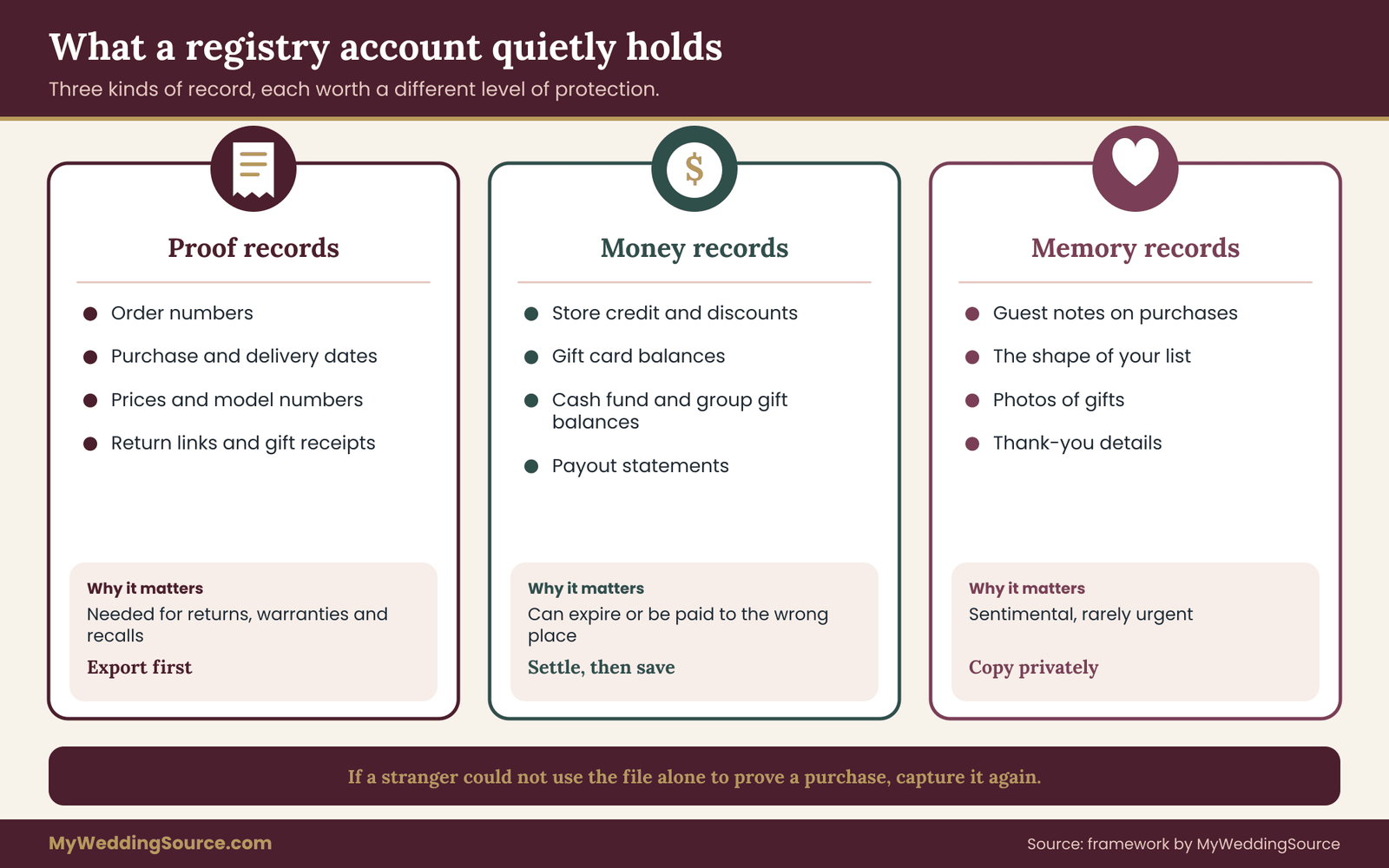
Not everything in the account is equally valuable. Sorting the contents into three groups tells you where to spend your effort.
The first group is proof records: anything that proves you own an item or paid for it, such as order numbers, purchase dates and prices. These matter for returns, warranties, insurance and, in rare cases, taxes. They deserve a verified copy outside the account.
The second group is money records: balances, credits and payouts. They matter because money can expire or can be misrouted, and because you may need a statement to show where a fund went.
The third group is memory records: guest notes, the shape of your list, and photos of gifts. These are sentimental rather than urgent. A copy is worth making, but missing one will not cost you money.
The detailed export checklist later in the guide follows these three groups. Proof records come first because they are the ones most likely to be requested by someone else.
Why a gift you did not buy leaves a thin paper trail
When you buy something yourself, the receipt comes to you. A wedding gift works differently. The giver bought it, the store emailed them, and you received a box with, at best, a gift receipt that omits the price. The registry account is often the only place where the purchase is tied to your name and your address.
That is why a closed registry can create a hole in your records. Imagine a stand mixer that stops working eighteen months after the wedding. The manufacturer wants proof of the purchase date. The giver may have thrown the email away or may not remember which store they used. If you exported the order record at registry closeout, you have a date, an order number and the store’s name. If you did not, you are back to asking a relative to dig through an inbox.
For the warranty side of that problem, the site’s guide to organizing wedding records after the event shows how to file proof of purchase alongside contracts and receipts. The registry closeout is the step that feeds that archive with the gift side of the story.
What you may not be able to get back
Some things cannot be recovered after a closeout, and it is better to know in advance which ones.
Account-held credits that expire when an account is closed are the most common loss. If a company states that credits are forfeited at registry closeout, the credit is gone regardless of its amount. Gift messages stored only in the account are the second most common. Third, a return path that uses the account login may stop working, leaving you to prove the purchase some other way.
Equally, some things you assume are gone may remain. A company may keep order records for its own legal and accounting reasons after you close the account. You may be able to request a copy through a privacy request, though the process is slower and you should not rely on it as your first plan.
A final practical point. Even if a company allows you to reopen a closed account, that promise is rarely written into the terms. Treat registry closeout as permanent, and treat the export as the safety net you build before the permanent step.
Keep open, hide or close: choosing your registry closeout route
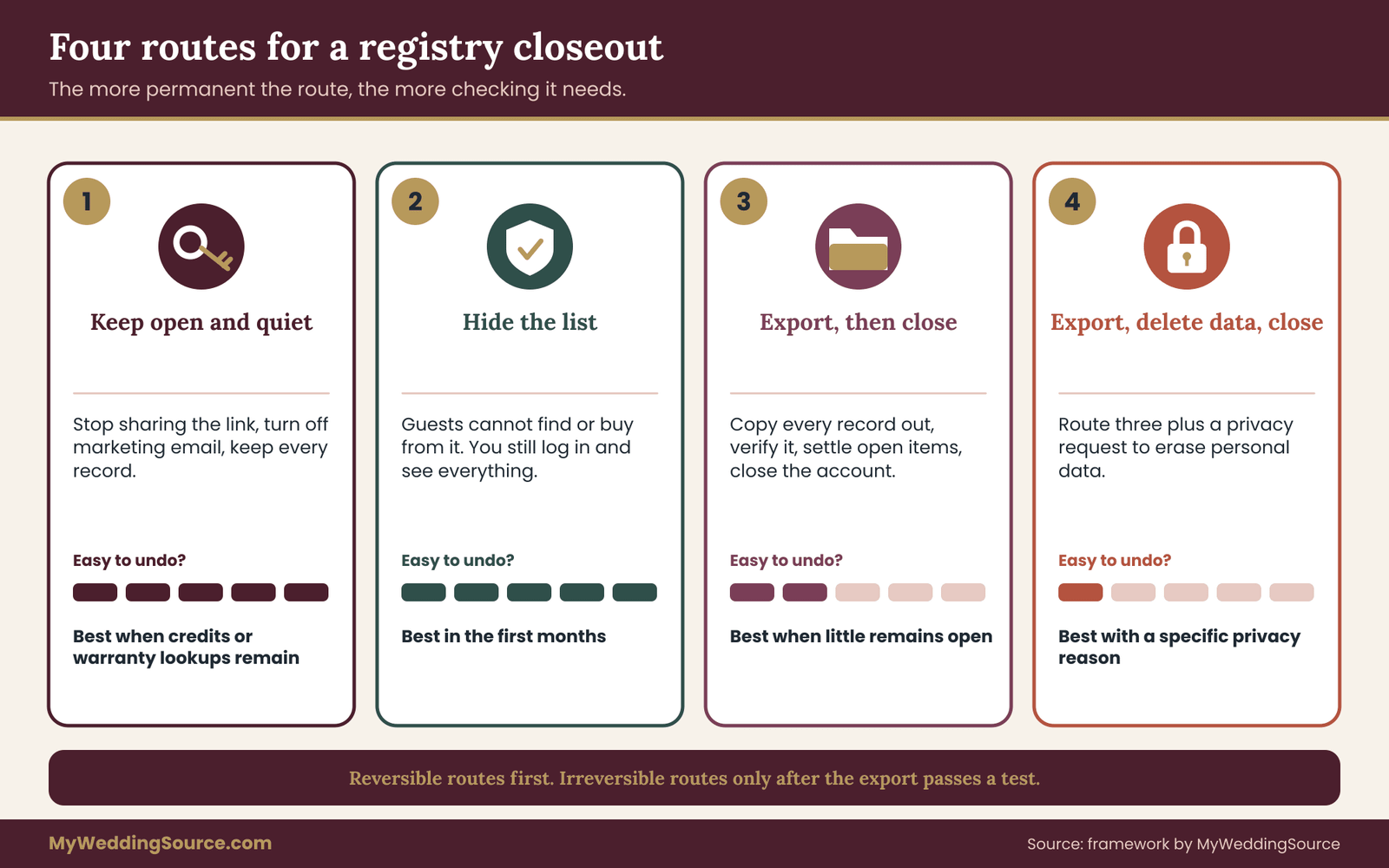
Many couples assume a registry closeout must end with the account gone. It does not. There are four reasonable routes, and the right one depends on how many records live in the account, how many deadlines are still running, and how much you value having a place to look things up.
Route one: keep open and quiet. You leave the account active, stop sharing the link, and switch off marketing emails. Nothing is lost. The cost is a login you have to remember and a small ongoing exposure of your address and order data. This route fits when the account holds a lot of warranty-relevant purchases, or when credits are still unspent and the registry closeout must wait.
Route two: hide the list, keep the account. You turn off the public page so no one can buy more, but you keep order history. This is the most common sensible choice in the first year. It stops late purchases from guests who did not get the message, while preserving everything you may need.
Route three: export, then close. You copy every record out, check the copy, settle open items and then close the account. This fits couples who want a clean break, who have few open deadlines, and who are comfortable that the exported files are complete.
Route four: export, delete data, then close. You do route three and add a privacy request asking the company to erase personal data, including guest information. This fits couples who care about minimizing what third parties hold. It is also the hardest route to reverse.
A quick decision rule for registry closeout
You do not need to agonize. A short rule works for most couples.
If any return window, credit or payout is still open, choose route one or two and revisit in a set number of weeks. If everything is settled and the export is verified, choose route three. Choose route four only if you have a specific privacy reason, and only after route three is complete, because a deletion request can remove the records you just exported from.
The reasoning is about reversibility. Routes one and two can be undone in a minute. Route three can be partly undone by contacting support, and route four usually cannot. When the cost of a mistake rises, the amount of checking should rise with it.
Comparing the routes in practice
Consider what each route does to your day-to-day life. With route one, you get a reminder email a few times a year and a login to protect. With route two, you may also protect against the awkward case of a guest purchasing a gift two months after the wedding for a list that has been closed to them, which can leave a gift arriving with no clear process.
With route three, you give up the convenience of looking something up in the account, and you substitute a folder of exported files. That is fine if the files are good. It is a poor trade if the export is a handful of cropped screenshots missing the order numbers.
With route four, you reduce exposure but also reduce the company’s ability to help you with an old order. A support agent cannot look up a purchase that no longer exists. If you choose it, keep your exported files with extra care, since they become the only record.
A reasonable pattern for many couples is a staged route: hide the list at the wedding, export at about the one-month mark, resolve open items through the return window, and close or delete at about the six-month mark or after the last credit is spent.
When closing early makes sense
There are good reasons to close sooner. An account tied to a shared email address that is about to change, such as an old work email, is a risk in itself. If you may lose access to the login, export now. A registry company that is changing its terms, merging with another or retiring a product may give you a short notice window, and you should export during it. A household that is moving abroad or merging finances may prefer fewer accounts.
None of these reasons skip the export. They only shorten the schedule of the registry closeout.
When you should not close yet
Do not close while a refund, exchange, backordered item or payout is still in progress under that account. Do not close while a gift is in transit and has not been confirmed delivered. Do not close in the same week you discover a billing problem, a duplicate charge or a missing item, because the account is the evidence trail. And do not close while you are still writing thank-you notes if the account is your source for who sent what.
The deadline ladder for registry closeout
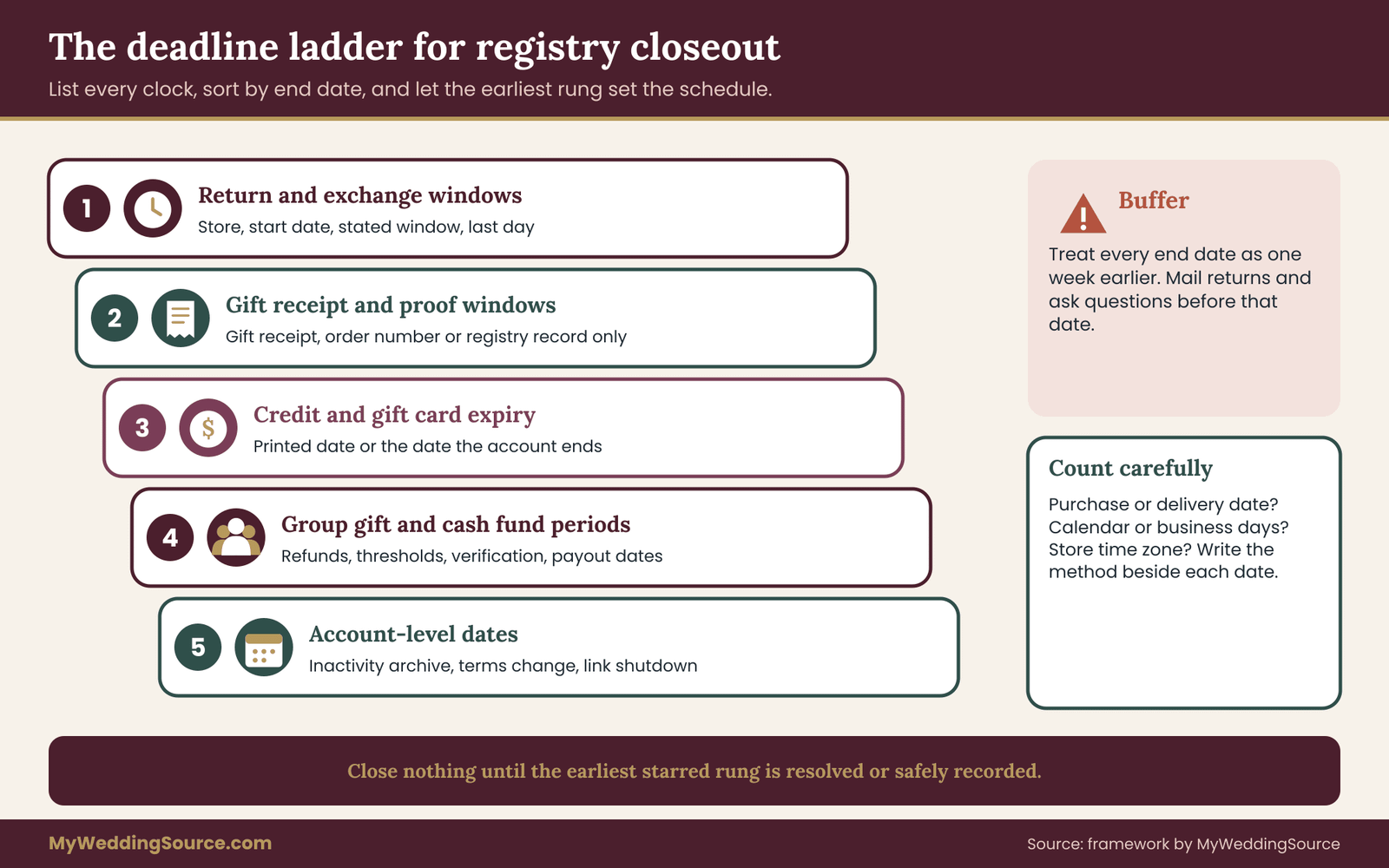
The deadline ladder is the first half of the checklist this guide is built around. The idea is simple: every clock that can affect your money or your proof gets a date, and the dates are sorted from earliest to latest. The earliest rung is the one that sets your schedule.
Registry accounts hide deadlines in several places, which is why a ladder is useful. They do not appear in one list. You have to look for them.
Rung one: return and exchange windows
Each store sets its own return window and its own starting point, usually either the purchase date or the delivery date. Some give a longer window for registry purchases, some treat registry gifts like any other item, and some require a gift receipt or the original order number. These details change, so read the store’s current policy page instead of relying on memory or on a friend’s experience.
For each unwanted item, write the store, the purchase date, the delivery date, the stated window and the resulting last day. If the policy does not say which date starts the clock, assume the earlier one until the store tells you otherwise. The gap between an assumed date and the true date is a free buffer, which is the kind of mistake worth making.
The Federal Trade Commission publishes general guidance for consumers on returns and refunds, but it does not set a single window for retail stores. The store’s own policy and, in some places, state law are what decide the matter. When the policy is unclear, ask the store in writing and keep the answer.
Rung two: gift receipt and proof-of-purchase windows
A gift receipt is often accepted for a shorter or different period than a standard receipt, and some stores will only offer credit rather than money back against one. If the registry account holds the order record, the store may be able to look up the purchase there instead. That is another reason to know whether the lookup survives a closeout.
Write down for each gift whether you have a gift receipt, an order number, or only the registry record. The fewer proof types you hold, the earlier on the ladder that item should sit.
Rung three: credit and gift card expiry
Store credit, merchandise credit, completion discounts and gift cards can carry expiration terms or inactivity terms. Rules for gift cards and credits vary by jurisdiction and by type, and a credit issued for a return is not always treated the same as a purchased gift card. Rather than guess, read the credit’s own terms and look for an expiry date on the document, the email or the account screen.
If a credit sits in the registry account, it is on the ladder at the date the account terms would end it, which may be the account closure date and not the credit’s printed date. Ask which one applies.
Rung four: group gift and cash fund refund periods
If you used a group gifting tool or a cash fund, there may be a refund period for contributors, a minimum payout threshold, a payout schedule and a deadline to claim funds. Treat these as the highest-stakes rungs, because the money may belong to people other than you until it is paid out. The later section on cash funds and group gifts covers them in detail.
Rung five: account-level dates
Finally, list the account’s own dates: an inactivity period after which the account is archived, a notice date for a terms change, a date by which a completion perk must be used, and the date a list’s public link stops working. These are often in the terms or in the footer of a company email.
Building your own registry closeout ladder
Write the ladder on one sheet. Use five columns in a notes app, and keep each entry in a single line: what the clock is, which account or store, the start date, the end date and the action needed. Sort by end date and mark the top three with a star.
The date of your first registry closeout action is then at least a few days before the first starred end date, not the end date itself. Mailing a return takes time, a support response takes time, and a holiday can delay both.
A worked ladder appears in the example section below. For now, notice the structure: the ladder does not tell you what to do with each gift. It only tells you which clock is closest, so that the rest of the checklist runs in the right order.
The one-week buffer rule for a registry closeout
Add a buffer. If a return window ends on the thirtieth, treat the twenty-third as your deadline. The extra week covers a store that processes an exchange slowly, a tracking number that arrives late, and the possibility that you misread the policy by a day.
This buffer is cheap insurance. It costs you nothing but a slightly earlier schedule, and it protects against the failure that happens most often: finding out on the last day that the item needs a form you do not have.
Counting days correctly
Count carefully. Some policies count calendar days, others business days, and some start counting the day after delivery. A policy that says “within thirty days” may mean thirty days from the day a carrier marks the package delivered, or from the day it shipped. Where you can, look at the carrier’s delivery scan date rather than the date a guest guessed. Write the counting method in the ladder, so you do not have to work it out twice.
Also watch for time zones on online deadlines. A return portal that closes at midnight in the store’s time zone may close earlier than you expect where you live. That is another reason the buffer exists.
The account export checklist
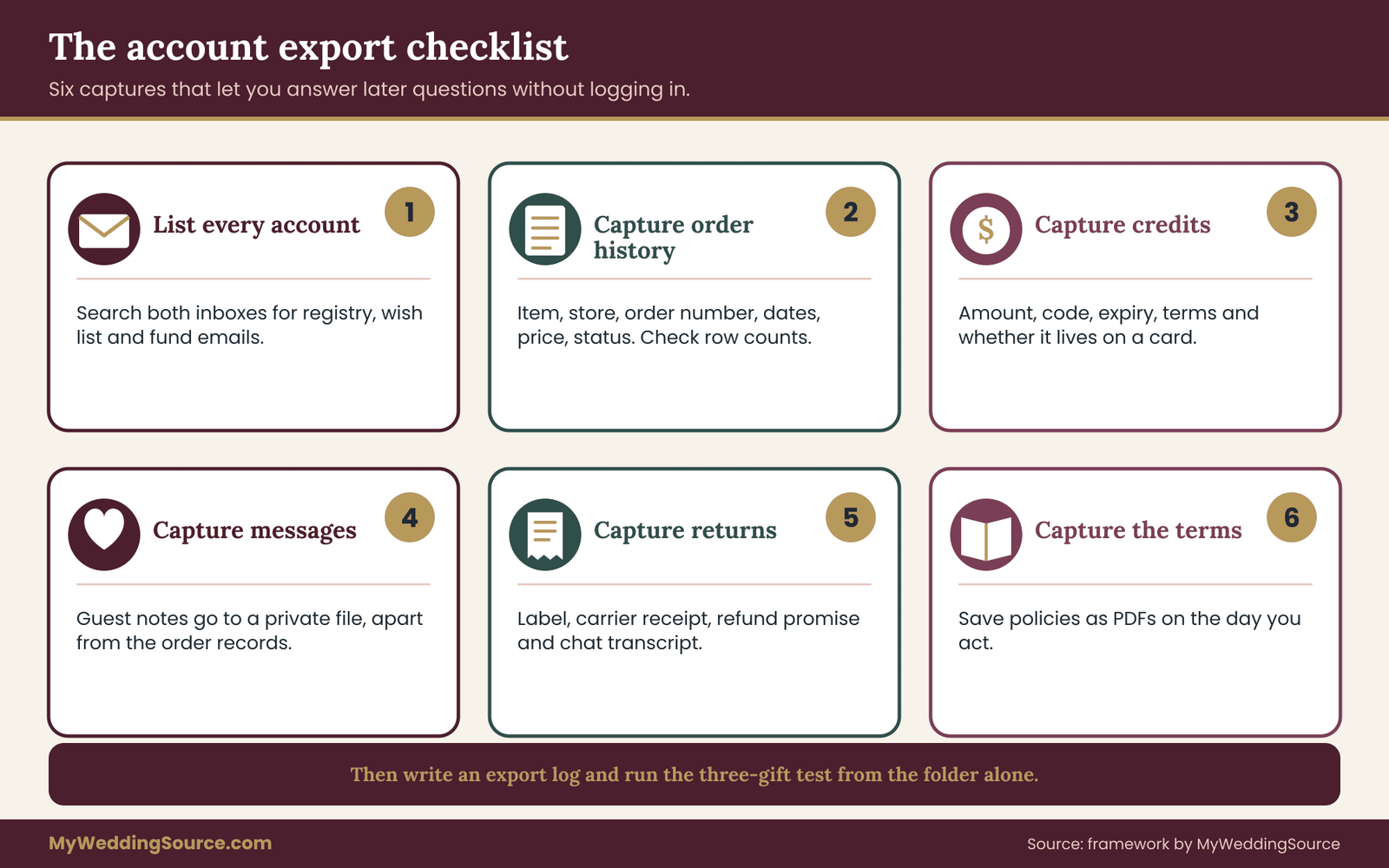
The export is the second half of the checklist. Its job is to produce a folder that would let you answer, without logging in to anything, the questions you are most likely to be asked later: what was bought, when, from where, for how much, who gave it, and what became of it.
Registry companies differ in what they let you download. Some offer a full data export. Some offer only a printable order list. Some offer nothing, and you have to capture records by saving emails and taking screenshots. The checklist below works for all three, because it focuses on what to capture and not on a particular button.
Step one: list every account in the registry closeout
Start with a complete list of every registry and registry-adjacent account. People forget the ones they created in a hurry. Check the following places.
The main registry at one or more retailers. A second registry at a home goods store. A honeymoon or experience fund. A cash fund or group gifting tool. A wedding website that has its own registry links or its own gift tracker. A shared note or spreadsheet where you copied items. A marketplace wish list a relative used instead of the registry.
Search each partner’s email for the words “registry,” “wedding list” and “gift,” and look for account creation messages. The first week of any registry closeout is mostly this search, and it is worth doing slowly, because an account you forgot cannot be exported.
For each account, record the company, the login email, whether a password manager has the password, and whether the account is in one partner’s name or both. This is dull, but it is the list that prevents a locked-out account from ruining the export.
Step two: capture the order history
For every gift received through each account, capture a record with these fields: item name, store, order number, purchase date, delivery date, price shown, giver’s name or code, and status. The status is one of kept, exchanged, returned, credited, donated or open.
Where the account has an export button, use it first and then spot-check. Open the file and confirm it has the right number of rows, readable dates and no missing columns. Where it does not, scroll the order history and take full-page screenshots, then save the order confirmation emails as PDFs.
Do not trust a single screenshot. A cropped image that omits the order number defeats the purpose. After each capture, ask whether a stranger could use this file alone to prove the purchase.
Step three: capture credits, balances and statements
Open the area of the account that shows credits, discounts, gift cards and cash balances. Capture the amount, the code or reference, the expiry date, the terms and the date you took the capture. If the amount is held in a payment tool, download the statement or transaction history for the full life of the fund.
This is also the moment to note whether a credit is tied to the account or to a card or code you can carry out. A code that lives on a physical or digital card can often be used without the account. A balance attached to the login may vanish with it.
Step four: capture messages and notes
Save guest messages that appear with purchases. If your thank-you process depends on them, copy them into the gift ledger described in a private ledger, or into any note you already use. Keep them separate from the shared order history, so that the file you might one day show a store or manufacturer does not also contain a guest’s personal note.
Step five: capture return and exchange information
For each open or recently settled return, save the return confirmation, the label, the carrier receipt, and any message from the store promising a refund or credit. A refund promised by chat but not recorded anywhere else is easy to lose. Screenshot the chat and save the transcript if the platform offers one.
Step six: capture the account’s own terms
Save the registry company’s terms of use and privacy policy as they stand on the day you close. Take the page itself, with its date, as a PDF. If a dispute arises about what the company promised at registry closeout, the version in force on the day you acted is the version that matters.
Do the same with the store’s return policy for any item that is still open when your registry closeout begins. Policies change, and the one you relied on when you decided to keep an item is the one worth having a copy of.
Naming and storing the exported files
A good export that nobody can find is not much better than no export. Spend ten minutes on structure before you start filing.
A folder layout that works
Use one parent folder, named something like “Registry records,” with a small number of subfolders. Four are enough for most couples: one for order history, one for credits and payouts, one for returns and open items, and one for account terms and screenshots of the registry closeout itself.
Within each, use file names that sort. A reliable pattern is the store name, the type of record and a date written in a fixed order, such as year first. A file called “storename-order-history-2026-11” is easier to find in three years than “IMG_4482.” Include the word “export” or “screenshot” if the source matters.
Do not rename files in ways that hide what they are. If the store’s original file name carries an order number, keep it or add it to the new name.
Where the master copy lives
Choose one master location and one backup. The master should be somewhere both partners can reach and that you already back up. The backup should be a different kind of storage or a different place. The site’s guide on wedding records after the event explains the three-copy habit for photos, and the same habit works for these files.
Check that the master folder opens on a second device. A file that exists only in an app on a phone is not an export.
Marking the export as complete
When the export is done, add a single text file to the folder named something like “Export log.” In it, list the date, the accounts covered, the method used for each, and any records you could not capture. The log has two uses. It tells you, months later, what the folder does and does not contain. And it is the checkpoint you read before clicking any closing button: if the log says the credits capture is missing, you do not close.
A short example of a log entry reads: account name, export method (download or screenshots), number of orders captured, number of orders listed in the account, and a note on anything missing. The two order counts should match. If they do not, find out why before proceeding.
Verifying the export by test
Before closing, run a simple test. Pick three gifts at random from the account: one old, one recent, one that you returned. For each, try to answer from the folder alone: the store, the purchase date, the order number and the status. If you can answer all four for all three, the export is good. If you cannot, fix the gap now.
This test takes a few minutes and catches the common failures: cropped screenshots, expired links in saved emails, files that opened only because you were logged in, and spreadsheets with the date column cut off.
What not to put in the folder
Leave out anything that does not belong. Do not store full payment card numbers, bank account numbers, passwords or one-time codes in the export. If a statement shows a full number, crop or redact it before filing. Government guidance on safeguarding personal information, such as the Federal Trade Commission’s consumer pages, treats these items as the ones that cause the most harm if they leak. Your registry records can show that a payment happened without showing the number that made it.
Also leave out the private giver key if you share the folder with anyone. Keep the code-to-name list in a separate private file, so that a relative helping you with a return sees item names and dates, not who gave what.
How long the export takes
For a small registry with a few dozen gifts and one or two accounts, plan on a couple of evenings. For a large registry spread across several stores, plan on a weekend plus a few shorter sessions waiting for support replies. The slowest part is almost always the search for accounts you forgot, and the second slowest is waiting for a company to answer a data request.
If you hit a company that offers no export and a slow support line, start that conversation first. You can capture screenshots while waiting for a reply, but a formal export, if one exists, may take days.
Gifts still in motion: returns, credit and backorders
A registry closeout is rarely clean on the day you want it to be. A few gifts are almost always still moving: a return in transit, an exchange awaiting stock, a backordered item that has not shipped. This section covers how to handle each without losing the thread.
Open returns during registry closeout
A return is open from the moment you decide to send an item back until the refund or credit is posted and recorded. Many people treat it as finished when the box leaves the house. It is not finished until you can see the money or the credit.
For each open return, keep four things in the returns folder: the return authorization or confirmation, the carrier receipt with the tracking number, the store’s stated processing time, and the date you will check back. When that date arrives and nothing has posted, contact the store with the tracking and confirmation in hand.
If the refund goes back to a form of payment you do not control, such as the giver’s card, find out before you ship. Some stores refund registry purchases to a store credit in the recipient’s name, some to the original payment method, and some to a gift card. Your registry closeout should wait until you know which one applies, since a credit issued to the account is the item most exposed to closure.
Exchanges and the price difference
An exchange for a different size, color or model is simpler than a return but has its own trap: the price difference. If the new item costs less, you may receive a credit for the gap. If it costs more, you pay. Either amount should appear in your records, with the new order number.
Make the exchange before the account closes whenever possible, because the original purchase record in the account is what the store will use to authorize it. After the registry closeout, the store may need a gift receipt or the giver’s order number. Neither is easy to obtain after the fact without involving the giver, which many couples understandably prefer to avoid, so finish exchanges before the registry closeout.
Backordered and delayed items before registry closeout
An item that has not shipped is the clearest reason not to close. Backorders can run for weeks, and a registry company may cancel an order or reissue it as a different type of purchase. Note the expected ship date on the ladder, and add a “check by” date a week after it.
If the item is a large one, such as furniture or an appliance, ask whether delivery is scheduled and whether anyone needs to be home. A missed delivery can lead to a restocking fee or a canceled order, and your ability to dispute either depends on having the original record.
If the wait is open-ended, decide how long you are willing to hold the account open for it. Some couples set a firm cut-off, say a set number of weeks after the wedding, and ask the store to cancel and refund after that. Write the cut-off in the ladder, so the registry closeout has a date and not just a hope.
Items that arrive after you close
Late arrivals happen. A guest buys something after the public list is hidden, or a package takes weeks. This is why route two, hiding the list but keeping the account, exists. If you have already closed, a late gift may arrive with no record on your side. Ask the giver for the store and order information, or, if they prefer not to share, simply log it as an unmatched item and add what you can: the date it arrived and the sender on the label.
The question of a duplicate in the box
When two copies of an item arrive, resist returning both to the same place without checking which purchase record belongs to which. The order history will show which copy came from the registry and which from an outside store. Return the one that matches the more flexible policy, and use the other as the keeper. The ladder helps here: the item whose window closes first usually goes back first.
For handling the larger question of duplicates and unwanted gifts across the whole wedding, the site’s wedding planning checklist places the post-wedding tasks in sequence. This guide covers only the account side of that work.
Recalls and safety notices
A gift can be recalled after you receive it. Product safety agencies such as the Consumer Product Safety Commission publish recall notices, and a recall remedy often requires proof of ownership or the product’s model and date code. If you have kept the order record, the model number and the purchase date are at hand. If you closed the account without exporting, you may need to find the information from the product label instead.
This is a small but real reason to capture model numbers for appliances, baby-adjacent items, heaters, small kitchen electrics and anything that plugs in. It takes seconds during the export and can matter years later.
Cash funds, group gifts and payouts at registry closeout
Money held in a registry tool deserves its own treatment. A cash fund, a honeymoon fund, a house fund or a group gift for a single expensive item behaves less like a shopping list and more like a payment account. At registry closeout it needs a stricter order of operations.
Know what is held, and by whom
Start by finding out where the money actually sits. Some tools hold funds themselves until you request a payout. Some pass the money to a linked payment service as it arrives. Some hold it until a threshold is met. The terms say which, and the terms are what you should read.
Write down the total contributed, the total fees taken, the net amount payable to you and the amount already paid out. The four numbers should reconcile. If they do not, ask the company to explain the difference in writing before you do anything else.
Payout timing and thresholds
Payouts may arrive after a delay, may require identity verification, and may be limited to certain methods. A fund that you assume will pay out in a couple of days may take much longer if verification is incomplete. Start the payout request early, and do not close the account until the funds have landed and the statement shows them as paid.
If a minimum threshold applies, check whether the balance is under it. A small leftover may be stuck. Ask whether it can be paid out, rolled into a final payment or donated, and get the answer in writing.
Contributor refunds
For group gifts, the contributors, not you, may be the ones with refund rights. If the item was canceled, discontinued or priced differently from the target, there may be a process for returning money to contributors. That process can depend on the account staying open. Check the group gift terms and, if refunds could still be needed, delay the closure.
The site’s guide on group gifting for expensive registry items covers fee and refund rules in depth, and it is a better place to go for the question of how those funds should be designed in the first place. At registry closeout you only need to know whether any contributor money is still unresolved.
Payout statements and the paper trail
Download the final statement. It should show contributions, fees, payouts and the date and destination of each payout. Save it with the credits and payouts records in your folder, together with any confirmation email from the payment service.
If a fund paid out to one partner’s account, say so in the export log. That note will matter when the money is used, since a clear trail from contribution to deposit helps if anyone asks later where a large amount came from.
Money and taxes
Whether gifts of money have any tax effect depends on the amount, the giver and the jurisdiction, and this guide does not give tax advice. The Internal Revenue Service publishes information on gifts and on reporting for payment platforms on its website, and a tax professional can say how your own situation applies. For registry closeout purposes, the useful habit is to keep the statements that show who sent how much and when, in a place you can reach in the future.
Closing the cash fund separately
If the registry and the cash fund are separate products, close them separately. A registry closeout should not hide a fund that still holds money, and a fund can be fully paid out and closed while the main registry stays open for returns. Do the fund first. It is the part of the registry closeout with the clearest end condition: the balance is zero, the payout is confirmed, the statement is saved.
Fees you should not forget
Fees appear at several points: a fee at the moment of contribution, a fee at payout, a fee for a faster payout, and sometimes a fee for inactivity or registry closeout. Read the schedule before you request the final payout and write down the amount. A small fee that you expected is not a problem. A fee you discovered after the account was closed is a different story, because there is no one left to ask.
Why unpaid funds are the top priority
If you have to choose which open item to resolve first, choose the money that belongs to other people or could be lost. It is the item with the greatest downside and the least flexibility, and the one most likely to disappear in a registry closeout. Everything else on the ladder can wait a day or two. A balance in a fund that is about to be closed usually cannot.
A worked registry closeout, step by step
The following example is invented, and the numbers are illustrative, not data from any real couple or store. It exists to show the order of operations and the kind of decisions the checklist produces.
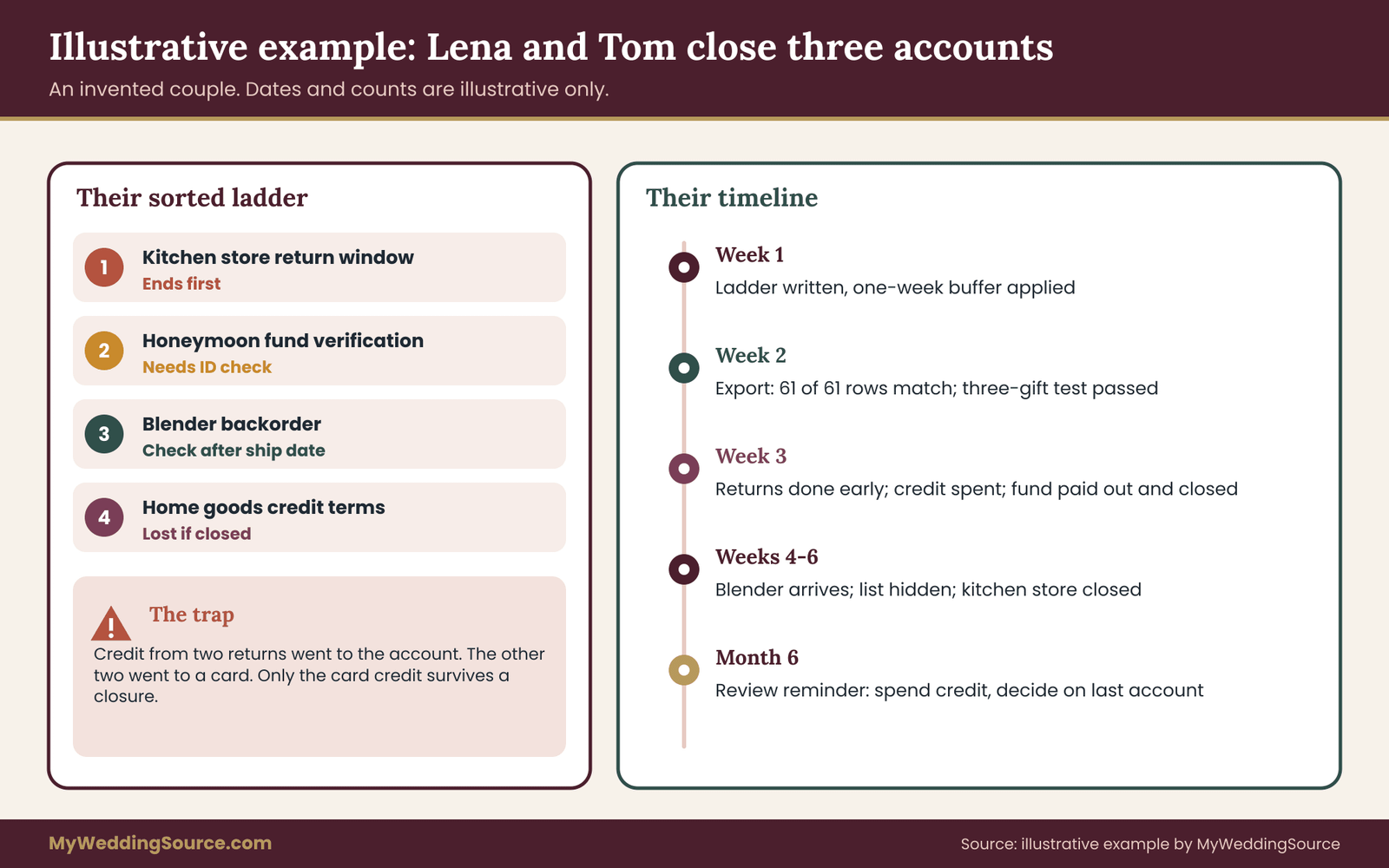
Lena and Tom were married on a Saturday in early October. They had three accounts: a main registry at a large home goods retailer, a smaller registry at a kitchen store, and a honeymoon fund on a separate gifting tool. By the first Sunday in November, most gifts had arrived. Four were unwanted, one was backordered, and the honeymoon fund still held a balance.
Week one of the registry closeout: the ladder
On that Sunday they wrote the deadline ladder. The kitchen store’s return policy gave a set number of days from delivery, and the earliest delivery among the four unwanted items put that window’s end about three weeks away. The home goods retailer had a longer window, but its credit terms said credits expired if the account were closed. The honeymoon fund had a payout request that needed identity verification. The backordered blender had a stated ship date two weeks out.
Sorted by date, the ladder read: kitchen store return window first, honeymoon fund verification second, backorder check third, home goods credit terms fourth. Tom applied the one-week buffer and treated the kitchen store window as ending a week sooner than it did.
Week two: the export
Lena took the export. The home goods retailer offered an order list she could download, which she opened to confirm sixty-one rows matched sixty-one gifts in the account. The kitchen store offered only printable pages, so she saved confirmation emails as PDFs and took full-page screenshots of the order history. She captured the credit balances and the terms on the day.
She then ran the three-gift test. One of the three, a returned toaster, had no order number in her folder. She went back and found it in a confirmation email, added it to the file name and tried again. The second pass worked.
The export log recorded two accounts exported, the method for each, the row counts and one missing item: a gift message that the kitchen store did not display after delivery. She noted it as “not available” and moved on.
Week three: the open items
Tom returned the four unwanted gifts at the kitchen store before the buffered date, keeping each receipt and recording each refund as a store credit. The store issued credit to the registry account for two items and to a separate card for the other two. That split mattered: the account credit was exposed to the registry closeout, the card credit was not. Tom spent the account credit on a baking sheet and a thermometer the couple actually wanted, and recorded the new order.
The honeymoon fund payout cleared after verification. Lena saved the final statement. Because the fund tool was separate, she closed it that week, after confirming the balance was zero and the statement showed the payout destination.
Weeks four to six: the backorder and the decision
The blender shipped late. The couple extended their hold on the account by a couple of weeks and added a note. It arrived intact, and the store’s record showed it as delivered, which Lena saved.
With everything settled, they chose route three for the kitchen store, which held little of value after the export, and route two for the home goods account, which still carried warranty-relevant purchases they wanted to look up for a while. They hid the home goods list, turned off marketing email and set a calendar reminder to review the account at the six-month mark.
What the example shows
The example is small, but a few lessons carry over. The ladder made the order obvious without any clever analysis. The buffer cost nothing. The split between account credit and card credit was invisible until they read the details. And the registry closeout did not end on one day. It ended in stages, each with its own condition.
The same example with a mistake
It is worth seeing how the same couple could have gone wrong. Suppose they had closed the kitchen store account on the first Sunday, because the emails were annoying. The return window would still have been running, but the order record they needed would have been out of reach. The account credit from the returns would have been issued to an account that no longer existed. The blender’s backorder might have been canceled without notice.
None of this would have been dramatic. It would have meant a few phone calls, a few forms and perhaps a lost credit. That is the realistic cost of a hasty registry closeout: an avoidable hassle, not a disaster. The checklist exists to keep a registry closeout that way.
Questions to ask the registry company before you close
If your own account does not make the effects of closure clear, ask. Support teams answer these questions routinely, and a written answer is worth more than a verbal one. Use the chat transcript, an email reply or a saved help page.
A short script for registry closeout
Keep the message plain and specific. A version that works with most companies:
“I am planning to close my wedding registry account. Before I do, could you confirm what happens to my order history, any store credit, and any open returns? Can I download my order records first?”
Wait for a reply before acting on the registry closeout. If the reply is vague, ask one follow-up question rather than five at once.
Questions grouped by what they protect
The following questions are worth having ready, grouped by the record they protect.
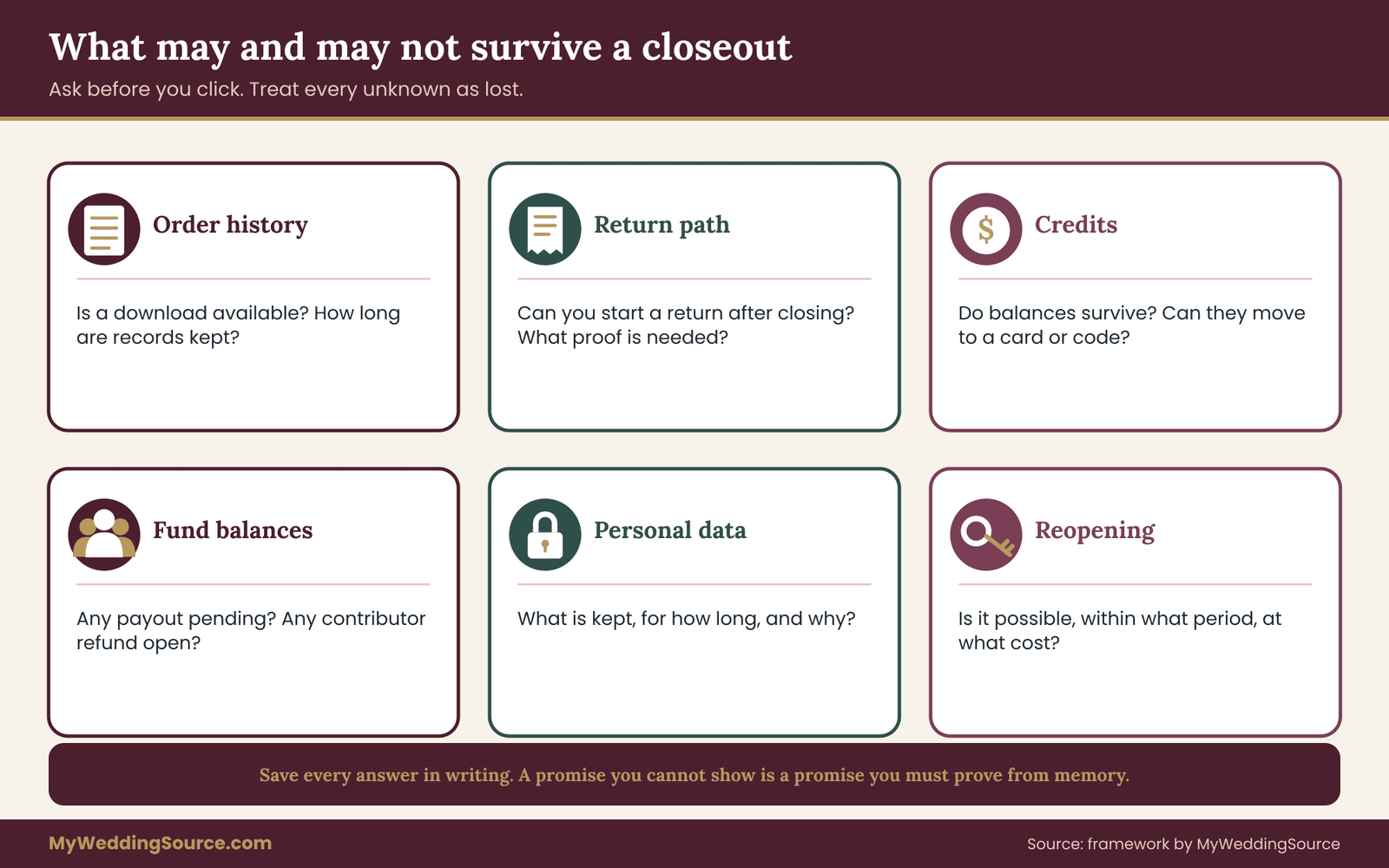
About order history. Will I still be able to view or download my order history after the registry closeout? For how long does the company keep purchase records, and can I request a copy later? Is there a data export, and in what format?
About returns. Can I still start a return or exchange for a registry purchase after the account is closed? If so, what proof does the store need? Does the return window run from the purchase date or the delivery date?
About credits. Do credits, completion discounts or gift card balances survive a registry closeout? If they expire, when? Can the balance be moved to a card or code I can keep?
About funds. If a cash fund or group gift is involved, has everything been paid out? Are any contributor refunds pending? What fees apply to the final payout?
About data. What does closure do to my personal data and my guests’ data? Can I ask for deletion separately, and does deletion remove order records the company needs for its own reasons?
About reversal. Can a closed account be reopened? Within what period? Is there any cost?
Recording the answers
Save every answer in the terms and screenshots folder, with the date. If a support agent promises something that is not in the written terms, ask for it in writing. A promise you cannot show later is a promise you will have to prove from memory.
If the company’s answer contradicts the posted terms, trust the stricter one until you have a written clarification. Reasoning from the worse case is cheap during a registry closeout, since each step is easy to delay by a day.
When the company does not answer your registry closeout questions
If a company is slow, set a date and keep the registry closeout moving independently. Complete the export by screenshots and emails. Leave the account open. Follow up once by a different channel, such as email if chat failed. The consumer protection pages of the Federal Trade Commission explain how to complain about a company that does not respond, but for most registry matters a calm second message is enough.
Do not rush the registry closeout in frustration. A slow answer is a reason to keep the safe options open, not a reason to take the irreversible one.
Questions for a store, as opposed to the registry company
Remember that the registry company and the store may be different organizations. A registry hosted on one site may list items sold by several stores. Return and credit rules then come from the store that sold the item, while registry closeout rules come from the registry host. Ask each about its own piece of the registry closeout, and record which answer came from whom.
For vendor-style purchases such as custom or large items, the same discipline that applies to wedding vendors helps. The site’s guide to wedding vendor purchase orders shows how to tie an order, a delivery and a final acceptance together, and the same three-part habit works for a large registry item that arrives in pieces.
Privacy and deletion after the registry closeout
A registry holds more personal information than most couples realize. It can include your home address, your phone number, your partner’s name, your wedding date, and the names and addresses of the people who bought you gifts. After the wedding, that information has little ongoing purpose, and many couples reasonably want it gone.
The key is sequence. Privacy cleanup comes after the export, not instead of it, and it belongs inside the registry closeout, not outside it. Once you have your own copy of what you need, you can reduce what other organizations hold.
What you can usually control
You can usually turn off the public page, remove the registry from search results, delete saved payment methods, turn off marketing email and remove your wedding date and location from the profile. These steps do not delete order records but they reduce exposure, and they are almost always safe to do early.
Next come saved payment methods. A card stored in a closed or neglected account is a small, constant risk. Remove stored cards and linked bank accounts as part of the registry closeout, and confirm the removal on screen.
Asking for deletion
A deletion request is a separate step. Some companies provide a form or a settings page. Others handle it by email or through support. Depending on where you live, privacy laws may give you rights to ask a company to delete or correct personal data, and the Federal Trade Commission and your state attorney general’s office publish guidance on privacy rights and how to complain. This guide does not interpret those laws. It only suggests this order.
First, finish the export and verify it. Second, resolve open returns, credits and payouts. Third, send the deletion request, and keep the confirmation. Fourth, check a few weeks later whether the account and the public page are gone.
A company may keep some records for its own legal or accounting reasons, such as tax and fraud prevention. If so, ask the company to say plainly which records it keeps and for how long, so that you know what you are leaving behind.
Your guests’ information
Your guests did not sign up for a long-lived record of their purchases. Handle what the registry shows about them with the same care you would give a private ledger. Keep the code-to-name list in a separate file, avoid forwarding screenshots that show a guest’s full name and address, and do not paste order details into group chats.
When you ask a relative or friend to help with a return or a warranty claim, share only the item and the date. They do not need to see who else gave what.
Email clean-up
Registry companies send confirmation and tracking emails that you may now want to save, then clear out. Save the ones you need into the export folder as PDFs, then archive or delete the rest. Unsubscribe from marketing messages, using the company’s own link or settings, and be careful with unsubscribe pages that ask for more personal information than your email address.
Be wary of messages that claim your registry account is about to be closed unless you click a link. Registry companies are a common subject of phishing messages, because many people have accounts and many accounts hold stored cards. If a message seems urgent, go to the company’s site by typing the address yourself, and log in there. The Cybersecurity and Infrastructure Security Agency publishes plain guidance on recognizing phishing.
Passwords and shared logins
If you and your partner shared a login, decide which of you owns it, and change the password after registry closeout steps are complete. If you used the same password on other sites, change those too. A registry closeout is a natural moment to retire a reused password.
If a family member or a wedding planner helped you manage a registry, remove their access. A shared login that nobody remembers is the kind of account that creates trouble years later.
What to delete from your own devices after registry closeout
After the export is verified and backed up, delete the registry apps from your phone, clear saved logins in your browser for those sites, and remove temporary download folders. Keep the export. The goal is for the only copy of registry data on your devices to be the one you chose to keep.
Edge cases that complicate registry closeout
Real situations rarely follow a clean script. These cases come up often enough to plan for.
Two partners, two accounts, one registry closeout
If each partner created a separate registry, you have two ladders. Merge them into one before doing anything else, and note which partner owns which account. A duplicate item may sit on both lists. Return the one with the better terms, and record the other as the keeper in the registry closeout log.
An account under a changed name or email
If you changed your name or your email after the wedding, the registry account may still carry the old details. Support teams may ask you to verify with the original email, and a closed account tied to an email you no longer control cannot be recovered. Export before the old address is retired, and update the account details only after the export is done.
The site’s wedding records guide covers the order for updating names with agencies and banks. For registries, the simple rule is that old email addresses stay alive until every account that uses them has been exported.
A registry that merged or was acquired
Registry services sometimes merge, rebrand or move accounts to a new platform. If you get a notice, read it for dates. Export during the notice period. A migrated account may keep your list but drop order history, or keep order history for a shorter time.
A gift that came from outside the registry
Some gifts are bought off-list and have no order record in your account. They do not need a registry closeout step, but they may need records of their own. A gift receipt, a photo and a line in your gift log are enough. If you plan to keep it, note the item, the date it arrived and any model number.
Gifts shipped to a different address
If a guest sent a gift to a parent’s home or to a former address, the order record may show that address and the carrier’s delivery scan. If anything is missing, you will need that information. Capture it in the export and add a note in the log if the item was forwarded to you.
Disputes about delivery
If a package is marked delivered and was never received, the clock for a claim usually starts at the delivery scan. Contact the store promptly and keep the evidence: tracking history, photos of the doorstep, any neighbor confirmation. Do not close the account while a claim is open.
Gifts that turn out to be damaged or defective
Photograph the item and the packaging, save the photos in the returns folder, and contact the seller before throwing anything away. If the defect appears later, the purchase date in your export is what lets the seller or manufacturer help.
A registry used for an anniversary or a later event
Some couples keep a registry alive for an anniversary, a house purchase or a later celebration. If you do, treat the wedding portion as complete: export the wedding orders, and then let the account serve its new purpose. You do not have to close an account to finish the wedding side of the records.
When one partner handled everything
If one partner ran the registry and the other is not familiar with it, hold a brief handoff. Show the second partner where the export folder is, which accounts exist, and where credits are. If the keeper becomes unavailable, the other person should be able to find what they need.
Money that was not meant for the couple
Sometimes a contributor sends funds in error, or a gift is addressed to a family member who shared the account. Return it or route it properly, and note it in the records. A registry closeout that leaves a small mess in a fund is easy to avoid if you check balances before closing.
Very large registries and registry closeout
A registry with hundreds of items across many stores can overwhelm a manual export. Break it into stages by store or by month, finish each stage, and log it. Treat each store as its own mini registry closeout, and use the ladder to decide the order.
Cancelling during an ongoing dispute
If you are in a dispute with a store, a registry host or a payment provider, keep every account involved open until it is resolved, and keep the dispute file in its own folder. Consumer agencies such as the Consumer Financial Protection Bureau explain how to dispute payment problems, and their guidance relies on records and dates, which is what your export gives you.
Final sign-off: a registry closeout review and retention plan
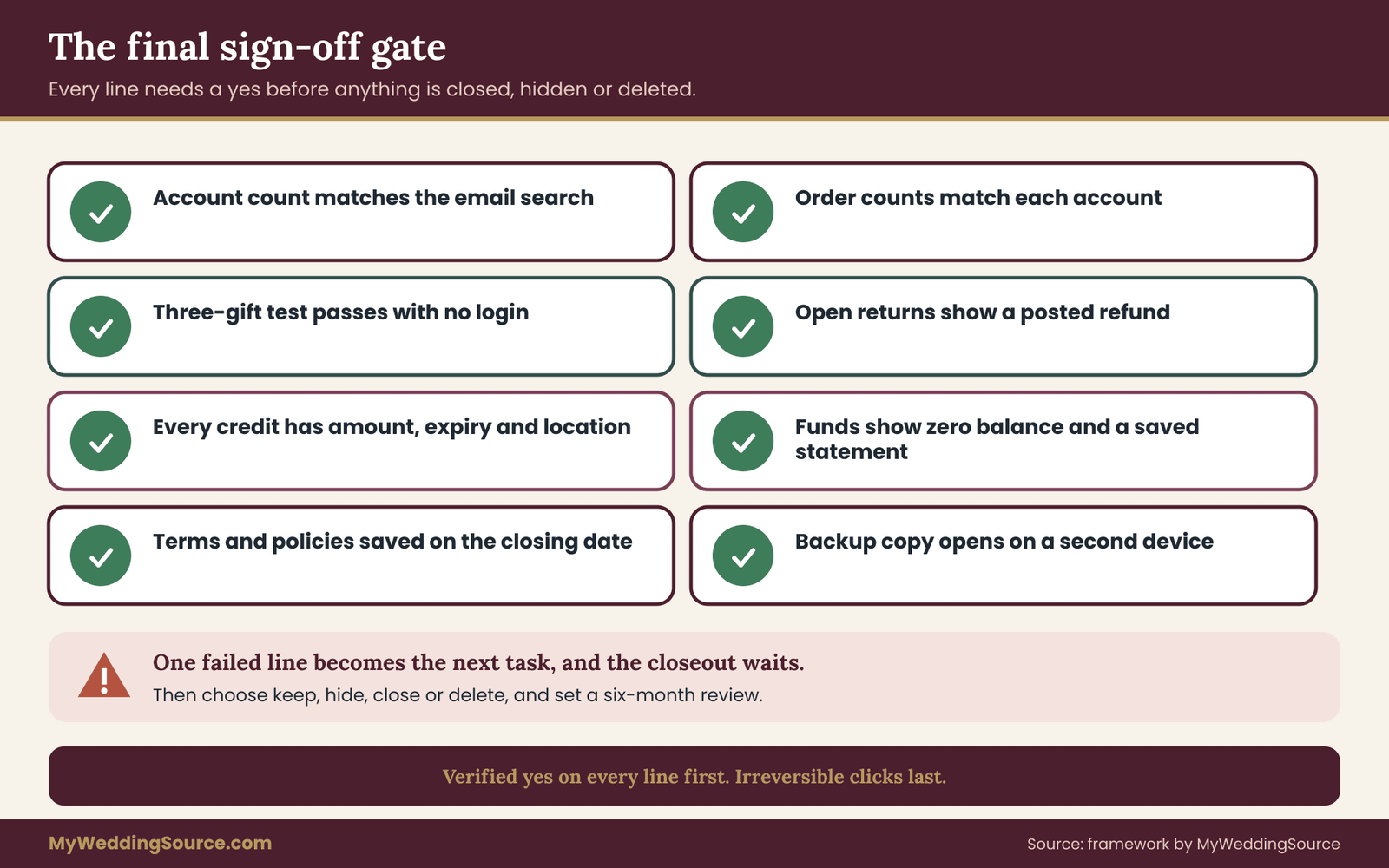
The last stage of registry closeout is a short review that turns a feeling of “I think we are done” into a set of checks you can verify. Treat it as a gate. Nothing gets closed, hidden or deleted until every line passes.
The measurable checks for registry closeout
Each check below has a yes or no answer, which is the point. Vague confidence is how records get lost.
The account count in your export log matches the number of accounts you found in the email search. The order count in each export matches the count shown in the account. The three-gift test passes from the folder alone, with no login.
Every open return shows a posted refund or credit, with the amount recorded. Every credit has an amount, an expiry date and a note on whether it lives in the account or on a card or code. Every cash fund or group gift shows a zero balance and a saved final statement. The terms and the return policies in force on the closing date are saved. The backup copy of the folder opens on a second device. A calendar reminder exists for the one review that remains.
If one line fails, that line becomes the next task, and the registry closeout waits. If all pass, you can choose a route with a clear head.
What you choose to keep, and for how long
Retention is a judgment, not a rule, and this guide gives no legal retention periods. Some principles help.
Keep proof records for as long as you own the item and for the length of any warranty you might use. A kitchen appliance record belongs in the folder until the appliance is gone. Keep money records, such as fund statements and payout confirmations, for as long as you would want to show where a large sum came from. The Internal Revenue Service publishes general record-keeping guidance, and a tax professional can tell you how long your own papers should stay. Keep memory records, such as guest notes, as long as they mean something to you.
For registry closeout files, review and discard what is left: duplicate screenshots, drafts, expired promotional emails and saved pages that no longer matter. A smaller, cleaner folder is easier to trust.
The six-month registry closeout review
Set one reminder for about six months after the wedding. At that point, open the folder and do five things.
Check that every file opens. Look at the ladder for any credit that is close to expiring and spend it or move it. Confirm that any hidden account is still hidden. Decide whether to close or delete the remaining accounts, using the routes described earlier. And add any new purchase records, for instance a repair or a warranty claim, to the folder.
At the one-year mark, repeat a lighter version. By then most couples can close what remains, since credits have been spent and warranty questions have mostly surfaced.
Handing the folder to the future
Tell your partner and one other trusted person where the folder lives and how to open it. Do not share passwords in the message. Say where the password manager is and how emergency access works. A well-built archive helps no one if the only person who knows where it is cannot be reached.
Where this fits in the larger picture
The registry closeout is one small part of the post-wedding paperwork. The broader job of keeping contracts, receipts, certificates and photos in order is covered in the guide to organizing wedding records, and the money side of the aftermath, including balances and reserves, is covered in the wedding cash-flow planning guide. If you are still shaping the gift side of your plans, the original registry ideas article is the right starting point, and the wedding budget guide helps you decide what to do with any funds you received.
No part of this is mandatory. No guest owes you a gift, and you owe no one a perfect archive. The aim is only to leave yourself in a position to answer a question later: what did we get, where did it come from, and what became of it?
Your next steps
- This week: List every registry, wish list and gift fund you created, with the login email for each.
- This week: Build the deadline ladder, add the one-week buffer and star the three earliest dates.
- Within two weeks: Export or capture order history, credits, payouts, messages and terms into one folder, and write the export log.
- Within two weeks: Run the three-gift test from the folder alone and fix any gap.
- Before any deadline: Finish returns, exchanges and payouts, and save proof of each result.
- After sign-off: Choose keep, hide, close or delete for each account, and set a six-month reminder.
FAQ
Should I close my wedding registry right after the wedding?
Usually not. Hide the public list if you like, but keep the account until returns, credits, backorders and payouts are settled and your export is checked. Closing early can remove the order history that proves a purchase date and can put credits at risk. Most couples are better served by a staged registry closeout over a few weeks than by a same-day click.
What records should I save before I close a registry account?
Save the order history with order numbers, purchase and delivery dates, item names and prices, plus credit balances, payout statements, return confirmations and the account’s terms. Add guest messages if you need them for thank-you notes. Keep these in one folder, name the files clearly, and write a short export log listing what you captured and what you could not.
Will store credit disappear if I close my registry account?
It might. Some companies tie credits to the account, so a registry closeout can end them, while others issue credit to a card or code that you can carry out. Read the terms, ask the company in writing, and spend or move any balance before you act. Do not guess, because a forfeited credit usually cannot be recovered afterward.
How long do I have to return wedding gifts?
It depends on the store. Each sets its own window and decides whether the clock starts at purchase or delivery. Some treat registry gifts differently from ordinary purchases. Read the current policy page, assume the earlier start date, and apply a one-week buffer. The Federal Trade Commission offers general consumer guidance, but it does not set one return window for all retailers.
What happens to a cash fund or group gift when I close the registry?
That depends on the tool. Some hold funds until you request a payout, some apply fees, and some allow contributor refunds only while the account is active. Request the final payout early, confirm that the balance is zero, and save the final statement before closing. If you are unsure, ask the company for the rules in writing first.
Is hiding a registry the same as closing it?
No. Hiding stops guests from finding the list and buying more, but you keep your login, order history and credits. Closing ends the account, and what survives depends on the company. Hiding is the safer first step because you can undo it quickly, which closing and deleting usually do not allow.
Can I ask a registry company to delete my data?
In many places you can ask, and companies often have a process for it. Finish your export first, resolve open items, then send the request and keep the confirmation. The company may retain some records for legal or accounting reasons, so ask what it keeps. For rights where you live, check the Federal Trade Commission and your state attorney general.
What if I already closed the account before saving anything?
Do not panic. Search your email for order confirmations, tracking notices and receipts, and check the product labels for model numbers. Contact the registry company and ask whether it can provide your order history or whether a privacy request would return a copy. Where a gift is involved, the giver may still hold the store and order details, if you are comfortable asking.
Sources
- Federal Trade Commission: consumer guidance on returns, refunds and online purchases
- FTC Consumer Advice: scams, phishing and protecting personal information
- Consumer Financial Protection Bureau: how to dispute billing and payment problems
- Internal Revenue Service: general record-keeping and gift information
- Consumer Product Safety Commission: product recalls and safety notices
- Cybersecurity and Infrastructure Security Agency: recognizing phishing and securing accounts
- USA.gov: government consumer complaint and state contact directories
- National Archives: general guidance on organizing and preserving records
- Library of Congress: personal digital archiving guidance
- U.S. Postal Service: package tracking and delivery claims