
A QR code on an invitation either works for every guest or fails for the guests who matter most, so how to test a wedding QR code before printing 200 invitations comes down to a short, repeatable routine: scan it from a screen, scan a proof at actual size, scan it on different phones, scan the finished pieces, and then complete the reply form the way a guest would.
Quick answer
Treat the code as a small piece of printed equipment, not as decoration. Before the print order goes in, scan it from another device, print a proof at the real size on the real paper, scan that proof on at least three phones (one of them older), and finish the whole reply from the guest’s side. Print the web address in plain text beside the code, and add a person to call or text. Check that the link still works on the day of the deadline. Everything here is free except the proof print, and we did not verify any printer’s prices.
What a test of a wedding QR code has to prove
People often test a code once, on the screen where they made it, see the link open, and call it done. That test proves almost nothing. The phone and the page are the same ones you used a minute ago, the code is glowing and perfectly sharp, and nothing has been printed, folded, trimmed, or mailed. A useful test has to prove four different things, and each one fails in its own way.
The four failures that cost a print run
Think of the guest’s journey as a chain with four links. A weak link in any one of them gives the same result: a guest who cannot reply and who may not tell you why.
The code does not scan
The pattern is too small, too dense, too faint, too close to the edge of the card, or printed on a surface that fights the camera. This is the failure most people think of, and it is the one you can catch earliest, because it shows up on a proof. Our own software test later in this guide shows how quickly a code that scans perfectly on screen can stop scanning when it is shrunk or crowded.
The code scans and lands on the wrong page
A typo in the link, an old draft of the site, a staging page, or a link that opens a login screen all produce a code that scans without trouble and still fails. The camera cannot tell you the destination is wrong. Only a person reading the address and looking at the page can. This is why the test routine starts with reading the address, not just seeing that something opened.
The page works but the guest cannot finish
The page loads on your computer and is awkward on a phone: a form that needs pinching and zooming, a menu that hides the reply button, a date field that rejects a typed answer, or a confirmation that never arrives. The code did its job. The invitation still failed. Testing has to continue past the scan, all the way to a submitted reply.
The code works today and fails later
A link can break after printing. A free trial of a code service can end, a plan can reach a scan limit, a domain can lapse, or a page can be renamed during a redesign. QR Code Generator, a company that sells these services, says the black and white pattern itself does not wear out, and what stops working is the destination behind it. The fourth failure is the one that most needs a plan, because no proof can show it.
Why a run of 200 changes the stakes
Knowing how to test a wedding QR code before printing 200 invitations is a different job from testing a code for a flyer you can reprint tomorrow, because the stack of wedding invitations will be addressed, stamped, and mailed to people who live in several states.
Printing is the point of no return
Once the suites are printed, assembled, and in envelopes, a change to the code means reprinting or applying stickers. A sticker over a code on an invitation is a sticker over something that guests have been taught, correctly, to distrust, which we return to in the section on tampering. The sensible place to spend effort is before the order, when a mistake costs minutes.
Guests do not report problems politely
Most guests who cannot scan a code do not email to say so. They put the card aside, mean to deal with it later, and sometimes forget. You find out when the reply count is low and you start chasing people. A wedding is also a social event where the couple would rather not make a relative feel foolish about technology, so the code and its backup have to work the first time without help.
What this actually costs
The test itself is close to free: your own phones, a few volunteers, a proof, and about an hour of attention. The real cost is a reprint. As an illustration, if a printed suite cost $4 each (a figure we made up for the arithmetic, not a price we found), a run of 200 would be $800, plus the time to re-address and remail. A single proof is far cheaper than that. We did not verify any printer’s proof pricing or turnaround, so ask what a proof costs before you commit, and ask whether a proof is printed on the same press and stock as the final run.
Decide what the code opens before you generate it
The most important choices happen before any image exists. They decide how dense the code will be, how much can go wrong later, and how much of your guests’ information the code might touch.
Static or dynamic
Most code generators offer two kinds. The difference matters more on a wedding invitation than on almost any other printed item, because you cannot recall the paper.
What a static code stores
A static code holds the web address directly in the pattern. According to QR Code Generator and Uniqode, two companies that sell code services, a static code does not depend on a third party, so it keeps working as long as the print is readable and the page still exists. The weakness both describe is that you cannot change where it points. A typo or a deleted page means a reprint.
What a dynamic code adds, and what it risks
A dynamic code holds a short link that belongs to the service, and the service forwards each scan to your page. Those companies say this lets you change the destination later and count scans. The same companies also say the arrangement depends on the provider. If a subscription lapses or a payment fails, a free trial ends, a plan reaches a monthly scan cap, or the platform changes or closes, the forwarding can stop even though the printed code looks fine. Uniqode adds that an inactive code looks identical to a working one, so scanning is the only way to find out.
A rule of thumb for invitations
This is our judgment, not a rule from any source. For a one-time print run of invitations, we lean toward a static code that points to a page on a site you control, because the site can change while the code stays put. If you choose a dynamic code, treat the account like a vendor contract: know who owns it, when it renews, what the scan cap is, what happens at the end of a trial, and keep that account alive well past the wedding. Neither choice removes the need to test.
One shared code or two hundred unique ones
Some stationers and websites can print a different code on every invitation, usually so that each guest lands on a reply form that already knows who they are. That is convenient and it changes your test plan.
The shared code
One code on every card is the simpler path. You test one pattern, you print it once, and any card is a fair sample of all the others. The cost is that the guest must tell the form who they are, which is a small extra step. Our guide to wedding RSVP wording covers the words that go with the reply request.
Unique codes and personal data
A unique code means the printer receives a list that ties a name or an address to a code. That list is guest personal information, and sending it to a printer is a data handoff worth thinking about. Send only the columns the job needs, through a named invitation, and ask when it will be deleted. Our guide to wedding guest spreadsheet permissions explains how to trim a file before it leaves your hands, and our wedding RSVP data export guide covers what your site collects in the first place.
Keep names out of the link
If you use unique codes, put a random, meaningless token in the link, never a name, an email address, or a household description. A link like a guest’s full name is readable by anyone who sees the card or the scan history, and it can be edited by a curious guest to look at someone else’s reply. A random token carries no information on its own. This is our judgment, and it fits the idea in the Federal Trade Commission’s business guidance that you should collect and keep only the personal data you truly need. Your website’s reply form should still confirm a reply and not reveal other guests’ answers.
Choose the destination link
The link you encode decides how dense the code is, and density is the quiet cause of many failed scans.
Short beats long, for a reason you can measure
A QR code is a grid of small squares called modules. A longer link needs more of them, and a higher error-correction level needs still more. When we generated codes in the same print size for a short link and a long tracking link, the modules shrank by more than half. Our arithmetic below shows the effect, and the illustration compares four real codes for the same long link at the same printed size.
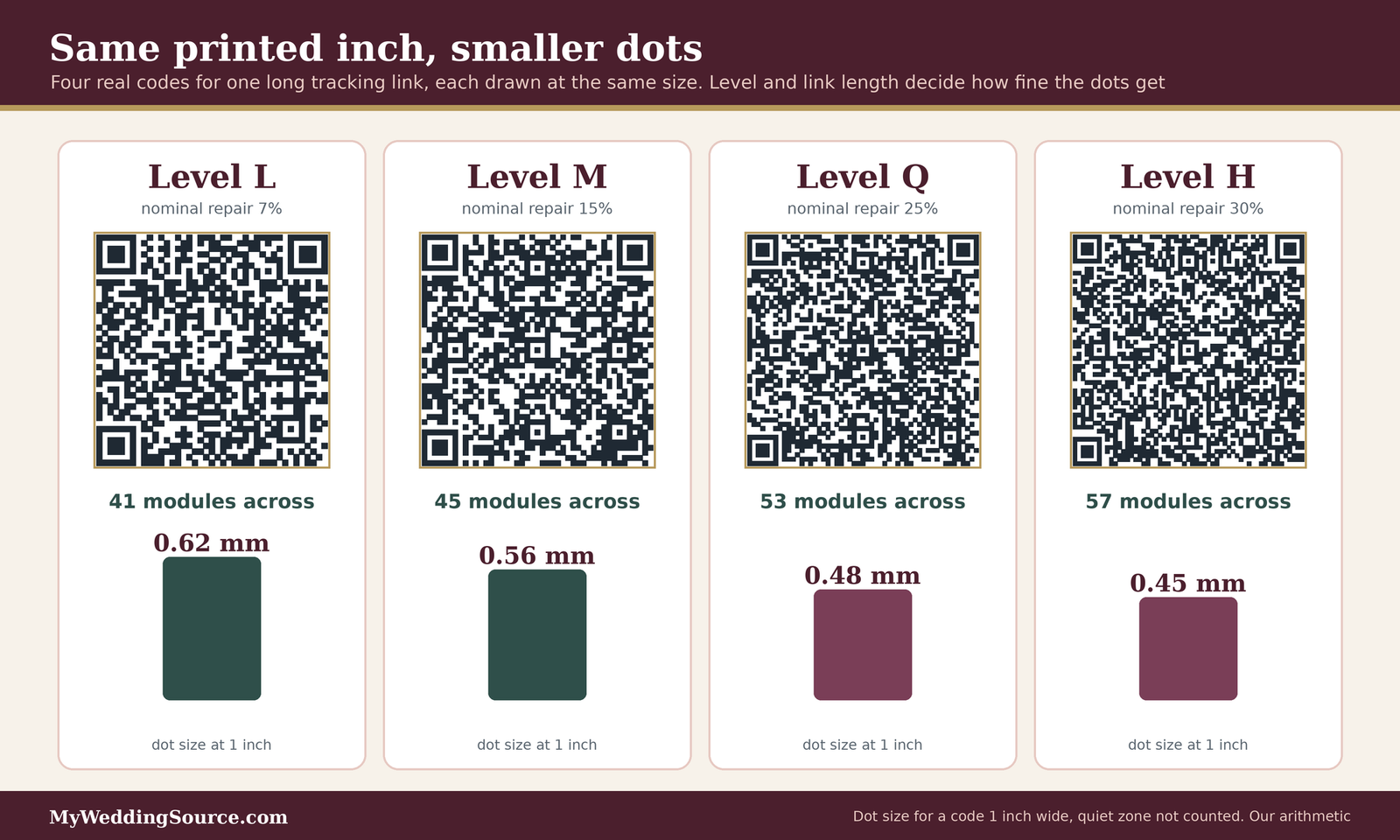
For the long link in our example, a code printed one inch wide had dots between about 0.45 mm and 0.62 mm, depending on the level. For a short link of about 25 characters, the dots were between about 0.77 mm and 1.02 mm. The practical lesson is simple. Remove tracking parameters, avoid long paths, and use a short, readable address.
Use a page you control
Point the code at an address on your own site or on the wedding website you already publish, not at a deep link inside a third-party form with a long, machine-made address. If you later move the form, you change a forwarding rule on your own page and the printed code keeps working. Our guides on a custom domain for your wedding website and on wedding planning website privacy and security cover related ground. Whatever you choose, type the exact address you will encode into a plain note and keep it: it will go into the proof check, onto the card as plain text, and into your run sheet.
Build the code so it can survive printing
A code that passes on screen can still fail on paper, because paper adds ink spread, trimming, folding, glare, and shadows from a hand holding the card. Four choices decide how much margin you give the camera: size, the empty border around the code, contrast, and the error-correction level.
Size and the quiet zone
Printed size is the first thing a vendor will ask about, and the quiet zone is the thing most designers forget.
How big the code should be
Sources written for printing give a few anchors, and they come from companies that sell code services or stationery, so treat them as practical advice and not as a standard. Scanova, a code-service company, gives a baseline of about one inch (2.5 cm) square and a 10-to-1 rule: the code should be at least one tenth of the distance from which it will be scanned. By that arithmetic, a card held about ten inches from the eyes needs a code about one inch wide, and a table sign read from three feet away needs one about 3.6 inches wide, which is our calculation from their rule. Paperlust, a stationery company, suggests a floor of about 0.8 inch (20 mm) on a card and says that around one inch works well on invitation and reply cards, with signs at two inches or larger.
The quiet zone
The quiet zone is the blank margin around the code. Scanova says it should be at least four modules wide on every side, and gives the example that with 2 mm modules the margin should be at least 8 mm. In our arithmetic, for a code one inch wide made of 45 modules, one module is about 0.56 mm, so four modules is about 2.3 mm. That is not a lot of space, but it has to be empty. Borders, flourishes, a scalloped edge of the card, or a printed ribbon that touches the code will break it. We also tested this; see the software test below.
What the size table shows
The table lists the dot size for each of our example codes at two printed widths. These are our own calculations from the number of modules in each code, using exact inch and millimeter conversions, and they are estimates of the ink target, not what a press will deliver.
| Link and level | Modules across | Dot size at 1 inch wide | Dot size at 0.8 inch wide |
|---|---|---|---|
| Short link, level L | 25 | 1.02 mm | 0.81 mm |
| Short link, level M | 29 | 0.88 mm | 0.70 mm |
| Short link, level H | 33 | 0.77 mm | 0.62 mm |
| Long link, level L | 41 | 0.62 mm | 0.50 mm |
| Long link, level M | 45 | 0.56 mm | 0.45 mm |
| Long link, level Q | 53 | 0.48 mm | 0.38 mm |
| Long link, level H | 57 | 0.45 mm | 0.36 mm |
The densest example in the table has dots about 2.3 times smaller than the lightest one, at the same printed width. When you read the table, remember that a fine printing method that holds a crisp edge at 0.45 mm may blur at that scale on soft paper. That question belongs to your printer, and we list it below.
Contrast and color
Cameras read contrast, not color names. A code with a pretty palette still has to give the camera a clear difference between the dark modules and the paper.
Dark on light, with a flat background
The common advice is dark modules on a light background. Scanova says black on white is the standard, says white on black can be acceptable, and warns that gradients or blended colors that obscure the modules and light-on-light designs are hard to scan. In our own software test, a dark-on-white code was read at every darkness we tried, down to a light gray, while a white-on-black version of the same code was not read at all by our decoder. A phone app might behave differently in either direction, which is exactly why you test the design you plan to print on the phones your guests own.
Do not let color carry the instruction
A line such as “scan the gold square” works only for guests who can distinguish the color and who can find it. The Web Content Accessibility Guidelines, published by the World Wide Web Consortium, say color should not be the only visual cue for information or for prompting a response, and recommend pairing it with text or shape. Those guidelines are written for web content, not paper, so we borrow the principle and do not claim the rule applies to a printed card. Put the instruction in words: “Scan with your phone camera to reply.”
Error correction level
A QR code carries extra data so that it can still be read if part of it is dirty or damaged. You pick how much extra when you generate it.
What the levels promise
Deloitte’s QR code help pages and GoToTags both describe four levels, with approximate repair capacity: L about 7 percent, M about 15, Q about 25, and H about 30. GoToTags calls M the most commonly used. Deloitte notes that a higher level makes the code bigger, using an example where the same link took 25 by 25 modules at level L and 29 by 29 at level H, and recommends level H for designer codes with a logo, and says to test on different devices and reader apps. These are the generator’s claims about how much of a code can be missing in ideal conditions.
What our software test showed
We wanted to see how those numbers behave. We generated one example link at each level, covered the middle of the code with a gray square of growing size, and tried to decode each one with OpenCV’s QR detector, version 5.0.0. The result was consistent in order and well below the printed claims.

In that test, level L passed with 3 percent of the symbol covered and failed at 6; level M passed at 6 and failed at 10; level Q passed at 10 and failed at 15; and level H passed at 20 and failed at 25. We then scattered gray over individual modules, avoiding the three corner squares. At 5 percent of modules scuffed, 6 of 40 random trials decoded at level L, 20 of 40 at M, 32 of 40 at Q, and 37 of 40 at H. At 8 percent, level H dropped to 20 of 40, level Q to 3 of 40, M to 2 of 40, and L to none.
Treat this as a rough demonstration, not a laboratory result. It used one decoder, one short example link, and a crude damage model, and a phone camera app may be more or less forgiving. What it supports is a modest conclusion: the repair numbers are ceilings under ideal conditions, higher levels do help, and the margin shrinks quickly once the code is also small, shaded, or smudged.
Logos and decoration
A custom center image is tempting on a wedding invitation, because a monogram feels personal. Every bit of the code you cover uses up the repair margin, and in our test even level H stopped working somewhere between one fifth and one quarter of the area covered by a plain square. If you want a monogram, keep it small, keep the level high, accept that the code will be denser, print it larger to compensate, and test the printed proof harder than you would a plain code. The easier path is to put the monogram next to the code, with a quiet zone between them.
How to test a wedding QR code before printing 200 invitations: the ladder
Think of the test as four rungs. You climb to the next one only when the one below passes, and you write each result down. Skipping a rung is where most reprints come from. The whole ladder is our own editorial routine, assembled from the practices the printing and stationery sources describe, and you can shorten it for a smaller run but should not reorder it.
Rung one: the screen
The first test is the cheapest and the easiest to get wrong, because it tends to be done on the device that made the code.
Scan from a different device
Put the code on one screen and scan it with a phone that did not create it. Hold the phone at normal reading distance, not two inches from the glass. Both Scanova and Paperlust say to scan on more than one device, and Paperlust specifically recommends including an older phone. At this rung, a failure usually means the code is too dense, the image is blurry, or the file has been resized by a design program.
Read the address before you open it
Check what your own phone shows before it opens the page; many phones display the address first, but we did not verify that for every model. Read it character by character against the address you wrote down. The Federal Trade Commission advises checking the address that a code opens and looking for misspellings or swapped letters, because a look-alike address is how scammers use codes. Your own typo would look just like that. Then open it, and make sure it is the live site and not a staging copy, a preview link, or a page that asks you to sign in.
Rung two: the proof at actual size
A screen test shows you the idea of the code. A proof shows you the object.
Print at actual size on the real stock
Paperlust says a screen test does not prove the printed code works, and recommends printing a proof at actual size. We would go one step further: ask the printer for a proof on the paper, ink, and finishing that the final run will use, or as close as they can manage. A code printed on a home inkjet on plain paper tells you about home inkjets. If the printer cannot proof the code, ask whether they will let you test a single finished piece before the rest is run, which gives you the same information.
Scan under real conditions
Take the proof where the invitation will be read: a kitchen with warm light, a dim hallway, a car passenger seat, a window with a glare. Scanova advises testing at various distances and in different lighting, and testing after packaging for physical products. Hold the card at a slight angle. Hold it a little too close and a little too far. A code that only scans when held perfectly flat under a bright light will frustrate a guest holding a coffee.
Rung three: phones, apps, and people
A code is read by software on a phone, and phones differ.
Build a small device list
You do not need a lab. You need variety. The table below is a sensible minimum for a wedding, and you can borrow devices from friends and family. We left out version numbers on purpose, because they change, and a guest’s phone may be several years old.
| Device | Why it is on the list | What to record |
|---|---|---|
| A recent iPhone | Common among guests; we did not verify market share | Time to recognize, what appears on screen |
| An older iPhone | Older cameras focus slower and see less detail | Whether it scans at normal distance |
| A recent Android phone | Different cameras and scanning apps | Whether the built-in camera reads it |
| An older or budget Android phone | Some older versions need an extra app | Whether it scans without installing anything |
| A tablet | Some guests use one | Whether the camera can hold focus |
| A phone with a case, cracked screen, or glasses | Real use, not ideal use | Whether the guest can still scan |
The Android row is not hypothetical. A guide from QR Code Generator says that Android 7 and below, with the exception of 6.0, cannot scan QR codes without a third-party app, that the built-in camera has to have scanning turned on in settings on some phones, and that menu names vary by manufacturer. That is one company’s description, so check your own phone, but it is a good reason to put an older Android phone on your list and to print the web address in plain text.
Use volunteers who do not know the plan
You know where the code is and what it should do, so you scan it kindly. Hand the proof to three people who have never seen it, with no instructions beyond what is printed on the card, and watch what they do. Do they find the code? Do they know what to do? Do they hesitate at the web address? Ask a person in the older half of your guest list as well as the younger half. Paperlust notes that QR-only replies suit younger guest lists best and that a traditional reply card helps others, so a volunteer in that second group will show you things you cannot see yourself. Say thank you and move on without defending the card.
Rung four: the finished pieces
The proof is not the product. The run will have its own variations: trimming, cutting, folding, and assembly.
Scan every unique code, and sample a shared one
If each invitation has its own code, scan all of them before mailing. At about ten seconds each, our estimate, that is a little over half an hour for 200 pieces, and it catches a printing glitch, a misaligned sheet, or a code swapped with a different guest’s. Check also that each one opens the page that matches the right household, with the data you sent. If every card carries the same code, you do not need to scan every one. We suggest the first piece, the last piece, and every twentieth in between, which is about a dozen pieces for a run of 200, and any failure sends you back to scan the whole stack. That sampling plan is our judgment, not a standard.
Scan through the real envelope and inserts
Assemble a complete suite the way it will be mailed, with the envelope, liner, inserts, and any tissue or vellum overlay, and scan the code as a guest would, after opening it. Look at where the code sits when the reply card is tucked behind another piece, and whether a fold, a crease, or a pocket crosses the code. A fold through a code is a failure on its own, because a crease casts a shadow and breaks modules. If you can, mail one complete suite to a friend, and ask them to scan it after it arrives.
Test what happens after the scan
The scan is the beginning of the guest’s task. A reply form is where you find out whether the invitation works.
The page
The page behind the code is read on a small screen, often one-handed, and often with a weak signal in a hallway or a car.
Look at the page the way a guest does
Open it on a phone, with your computer closed. Can you see the reply button without scrolling or zooming? Is the text readable? Does it load promptly on a cellular connection with Wi-Fi turned off? Does it work in the phone’s browser without an app? We did not measure site speed, so we cannot tell you a number. The question is whether a guest waits and wonders if anything is happening, and one test on mobile data answers it.
Keep one clear action
The page a code opens should do one thing: let the guest reply. Welcome messages, a long story, and a menu of other pages belong a tap further in. Our guide to wedding invitation wording and the guide to wedding invitations cover what the card should say, and the wedding invitation etiquette guide covers the social side of asking guests to reply online.
The reply form
A reply form is the last link in the chain, and it is the one most often tested only by its author.
Submit a real test reply
Fill in the form on a phone and submit it. Then check where the answer went. Did you receive a notification? Did the entry appear in the sheet or dashboard you will actually use? Did the guest see a confirmation? A reply that disappears is worse than no form, because the guest believes the job is done. Make a note of the test entry so you can delete it, and see the data-handling section below, because a test row left in your guest data can later be mistaken for a real guest.
Try awkward but ordinary replies
Use names with apostrophes and hyphens, a long household name, a plus-one, a guest who declines, a guest who wants to add a dietary note, a reply with a very long comment, and a reply typed on a phone keyboard with autocorrect. Try submitting with a field left empty and see whether the error message is clear. These are the cases real guests produce, and a form that breaks on an apostrophe will break on real names.
Accessibility and plain language
A printed code is a picture, and a picture needs a text equivalent. The Web Content Accessibility Guidelines state the principle for the web: non-text content should have a text alternative that serves the same purpose, so that people can reach the information through sight, sound, or touch. A printed invitation is not a web page, so the standard does not govern it, but the logic carries over cleanly.
Give the code a words-only twin
The plain web address under the code is the text equivalent. A guest who uses a screen reader cannot see the pattern, a guest with low vision may not frame it well, and a guest with a shaky hand may not hold it steady. Each of them can type or ask someone to type an address. Put the address in a readable size and type it in a simple, clear font, and include a phone number or a text number for a person.
The illustration below puts the pieces together on one example reply card: the code with its quiet zone, a plain instruction, the typed address, and a human backup.

Check the destination, too
A reply page has to be usable by the same people. The W3C’s contrast guidance for interface components asks for at least a 3-to-1 ratio between a control or meaningful graphic and the color next to it, so a pale button on a pale background fails. That 3-to-1 figure applies to web controls and graphics, not to QR modules, so do not use it to judge your code. Our wedding website accessibility audit guide goes deeper on the page, and the guide to an accessible wedding guest experience covers the day itself.
A least-privilege access grid for the QR project
Least privilege means each person gets the smallest access that lets them do the job, and nothing more. The idea is old and plain, and the Federal Trade Commission’s business guidance on protecting personal information puts it as limiting access to what each role needs. A wedding QR project touches more systems than it seems to: the code service, the page it opens, the replies, the guest list, the printer’s file, and the domain. The grid below sorts them by person. It is our own editorial tool, not a requirement from any standard, and you should adjust it to the people and tools you actually have.
Who needs what
Read across a row to see who touches an item and at what level. A blank column means that person should not touch it at all.
The grid
| Item | Couple (owners) | Planner or trusted helper | Printer or stationer | Test volunteer |
|---|---|---|---|---|
| Code service account, if you use a dynamic code | Own, with two-step sign-in | None, or one named user who needs it | None | None |
| Wedding website admin and the reply form’s settings | Own | Edit only if they run the site | None | None |
| Reply responses | Own | View, only the columns the job needs | None | Their own test entry only |
| Guest spreadsheet with names and addresses | Own | View, trimmed to the job | Trimmed copy, only what addressing or printing needs | None |
| Guest-to-code list, if codes are unique | Own | View | Only token and mailing address, if the printer inserts codes | None |
| Print proof file | Own and approve | Comment | Edit, and send final | View the printed proof only |
| Test log | Own | Edit | None | Add their own line |
| Domain and hosting account | Own | None | None | None |
How to read the grid
Three patterns matter more than any single cell. First, the couple owns every account, and nobody else holds the keys that can change where a code leads. Second, the printer needs the least. A printer rarely needs reply data, never needs the site’s admin access, and needs a guest list only if the printer is addressing envelopes or inserting unique codes. Third, a test volunteer needs a printed proof and a phone. A volunteer who is handed a spreadsheet link to help has been given far more than the job needed.
Setting it up
A grid is only useful if the settings match it.
Protect the account behind the code
A hijacked code service account can redirect a code you printed. The Cybersecurity and Infrastructure Security Agency says that multifactor authentication adds a second check at sign-in so a stolen password alone is not enough, and describes text or email codes, authenticator apps, biometrics, and phishing-resistant keys as options, with the last being the strongest. Turn it on for the code service, the website host, the domain account, and the email address that can reset any of them. Our guide to wedding planning password sharing explains why inviting a named user beats handing out a login.
Keep test data out of real data
Every test reply you submit lands somewhere real. Name your test entries something obvious, such as a prefix that no guest would have, record them in the test log, and delete them before the first real invitation goes out. Check the notification emails, the sheet, and any export, because a test row in a shared sheet can be mistaken for a guest. If you gave a volunteer a link to try the form, make sure that the link did not also let them see other replies.
Vendor and source questions
A printer, a stationer, or a code service will make decisions that affect your test results, and they will usually answer clear questions clearly. The questions below come from our editorial judgment, not from any regulation.
Questions for the printer or stationer
Printers know their equipment better than you do, and many have seen codes fail before. Asking early shows them you will notice.
Questions to ask a printer or stationer
- Can you print a proof of the code at actual size on the same paper and with the same ink or process as the final run?
- What is the smallest code you recommend on this stock, and what quiet zone do you require around it?
- Will you change, crop, recolor, or resample the code file, and can you print it exactly as supplied?
- Does any finish, such as foil, emboss, letterpress, or gloss, touch the code area?
- If each invitation has its own code, how do you check that the right code is on the right card, and will you give me a list to scan against?
- What guest information do you need from me, in which columns, and when will you delete it?
- If the code fails on the finished pieces, what is your reprint or correction policy, in writing?
- Who will see my guest list, and will any of it go to another company?
Ask for the proof to be treated as a test
Say clearly that you intend to scan the proof on several phones and that you will approve it only after you have. A printer who understands the purpose may print the proof on the final press, trim it to size, and fold it the way the final piece will be folded. A printer who is unwilling to proof a code should make you cautious about a large run.
Be clear about who made the code
Sometimes you generate the code and send it as an image. Sometimes the stationer generates it from your link. Know which it is, because the second path means someone else owns an account, and with a dynamic code that someone controls what a scan does. Ask for the address that the code contains, in writing, and ask who can change it. Our wedding vendor due diligence checklist walks through broader vendor checks.
Questions for the code service or site host
If you use a dynamic code, the provider is part of your guest experience for as long as the code is live.
What happens when a plan ends
Ask what happens to your codes if a trial ends, a payment fails, a scan limit is reached, or you cancel. Uniqode lists those as ways a dynamic code can stop forwarding. Ask whether you can export the destination list, whether you can point a code to a new address, and what the provider’s policy is if it shuts down. Record the answers in your run sheet, with the renewal date on your calendar.
Who can change the destination
A dynamic code is a door whose destination can be changed by anyone with the account. Confirm who has that power, and that the account sits behind multifactor authentication. If you hand a stationer the account, ask for a named user and not your password. If you cannot get clear answers, prefer a static code that points to your own page.
Edge cases that break a good test
Some problems appear only for particular materials, guests, or timing. Think through the ones that apply to your invitation.
Materials and layouts
Paper is not a neutral surface. Anything that changes how light behaves on the card changes how a phone sees the code.
Foil, letterpress, vellum, and dark paper
Scanova lists reflective materials among the cases to test under different lighting, and says light codes on light backgrounds are hard to scan. Beyond those two points, we have no source on specific finishes, so we treat each one as a reason for a proof and not as a claim. Foil or metallic ink can glare from some angles. A letterpress or embossed code has a surface that may cast tiny shadows. A translucent overlay can soften the modules. A dark stock changes the contrast, and a code that needs light-on-dark is a design the camera may not read, as our test suggested. Print the real thing and scan it from several angles.
Folds, envelope liners, and inserts
A code placed near a fold may be creased, a code under a pocket may be partly hidden, and a code on the front of a card is a design choice that Paperlust advises against in the center of the front face. Paperlust prefers the back of the invitation or a separate reply card, where guests expect reply information. We agree with the reasoning. A separate reply card is also easier to hold at the right distance and to hand to a family member for help.
Guests and situations
A good test checks the code. A good plan also checks the guests who will not use it.
Guests who cannot or will not scan
Some guests have no smartphone, no data plan, a visual or motor difference that makes scanning hard, or a plain preference for paper. Paperlust suggests pairing the code with a traditional reply card and a stamped return envelope, and adding a phone or text contact with a short line such as “Unable to scan? Please call or text.” We would add the plain web address and a named person who will take a reply by phone. Treat the paper path as part of the design and not as an apology. Our guide to wedding RSVP etiquette has more on how to handle replies that arrive by different routes.
Older phones and slow connections
Older phones may focus slowly, may need a setting turned on, and may not support the camera’s built-in scanning at all, as the Android caveat above describes. A guest with a slow connection may scan successfully and then wait. A short address, a light page, and a plain-text backup are the best defenses, and all three are things you can test before the print order.
Look-alike codes and tampering
The Federal Trade Commission says scammers cover legitimate codes with their own and send codes with invented reasons to scan, and the Federal Bureau of Investigation warns that criminals alter printed and digital codes, adding that codes themselves are not dangerous and that people should check the address after scanning and look for stickers or overlays. NIST adds that phishing is not limited to email and can arrive by text, phone, social media, or postal mail. For a mailed invitation, that points to simple habits: use a plain address that guests can compare with your wedding website, never ask a guest to sign in or pay through the code, and tell guests through a separate channel, such as a text from you, what the official address is. Our guide on wedding website scam messages covers the wider problem of messages that pose as wedding communications.
After the print run
The test does not end when the stamps go on.
Keep the page and the account alive
Decide how long the code has to work. At minimum, it has to work through your reply deadline and a few weeks past it, because late replies and forgotten cards are normal. Put a date on your calendar to rescan one finished piece after the invitations have been mailed, and again on the day before the reply deadline. If you used a dynamic code, add the renewal date, and if you used a custom domain, add its renewal too. Do not redesign or rename the page while invitations are out, or if you must, set a forwarding rule from the old address.
Reuse the code with care
Couples often want to reuse the same code on programs, signs, or thank-you cards. Each of those has its own size and distance. A code scanned from a table sign three feet away needs to be much larger than one on a reply card, by the 10-to-1 rule from Scanova’s guide, and each reuse needs its own proof. Our guides to wedding signage and wedding programs cover those pieces, and the save the date cards guide covers an earlier mailing that might carry a link as well.
Your run sheet and test log
Everything about how to test a wedding QR code before printing 200 invitations fits on one page. Print it, check each row, and keep the filled sheet with your wedding records.
The run sheet
This table lists each stage in order. Do not move a row to done until its pass condition is true.
The stages
| Stage | What to do | Pass condition | Time, our estimate |
|---|---|---|---|
| Decide | Choose static or dynamic, shared or unique, and write down the exact address | Address is short, on your own page, and contains no guest names | 20 minutes |
| Generate | Make the code at a high enough level and with a four-module quiet zone | Code is dark on light, with nothing inside the margin | 10 minutes |
| Screen scan | Scan from a different device and read the address aloud | Opens the right live page | 10 minutes |
| Page and form | Open on a phone with Wi-Fi off, submit a test reply | Reply received where you expect, confirmation shown | 20 minutes |
| Proof | Print at actual size on the real stock | Scans on every phone on your list, at normal distance and in dim light | 20 minutes plus the printer’s turnaround |
| Volunteers | Hand the proof to three people with no instructions | They find it and finish without help | 30 minutes |
| Access | Check the grid against real settings | Only owners can change the code or its destination | 20 minutes |
| Finished pieces | Scan every unique code or the sample set, through the envelope | No failures, right guest on right card | About 35 minutes for 200 |
| After mailing | Rescan one mailed piece, then again before the deadline | Still opens the right page | 5 minutes each |
The test log
Keep one line for each scan test: date, who tested, the device and its software, the distance, the light, the result, and the fix. A log sounds fussy until a printer asks what, exactly, failed. It also lets you say with confidence that you scanned the proof on a recent iPhone, an older iPhone, a recent Android, and an older Android at normal distance on the stated day. Store it where only the couple and the planner can edit it, as in the grid above.
When a test fails
A failure on the proof is good news, because it happened before the run. Fix one thing at a time, so you know what worked.
Match the symptom to the fix
If the code does not scan at all, enlarge it, shorten the link, check the quiet zone, and check the contrast. If it scans on some phones and not others, the dots are likely too fine for the weakest camera, so shorten the link or print larger. If it scans slowly, check glare and lighting and the finish. If it scans and opens an error, check the address and whether the page is live and public. If it opens the right page and the form fails, fix the form before anything is printed. Write down the cause so you do not repeat it on the next piece.
Decide whether to proceed
If a fix requires a change that the printer must approve, such as a bigger code, ask for a new proof and run the rungs again from the top. A third round of proofs is cheaper than a reprint. If you cannot get the code to scan reliably on the older phone, consider whether the code is worth including at all. A plain web address and a phone number may serve some guest lists better than a code that works for most.
FAQ: testing a wedding QR code
Before you print
How many phones should I test with?
At least three, and include an older one. A recent iPhone, an older iPhone or Android, and a current Android give you a spread of cameras and software. Paperlust, a stationery company, recommends scanning with several phones, including an older model. If a code fails on the oldest phone you can find, shorten the link or print the code larger.
Is a screen test enough?
No. A screen test shows that the pattern is valid, not that it survives paper, ink, trimming, folding, and room light. Paperlust says a screen test does not prove the printed code works and recommends printing a proof at actual size. Scan the proof on the real stock, in dim and bright light, before you approve the run.
What size should the code be?
Sources vary, and they come from companies that sell codes or stationery. Paperlust gives about 0.8 inch as a floor and about one inch as comfortable on invitation and reply cards. Scanova gives a one-inch baseline and a 10-to-1 distance rule. Denser codes need more room, so test the exact size you plan to print.
The code and the link
Should I use a static or dynamic code?
For a one-time print run, we lean toward a static code that points to a page you control, because it does not depend on a code service staying active. QR Code Generator says dynamic codes can stop if a subscription lapses or a scan limit is reached. If you choose dynamic, keep the account paid and protected until well after the wedding.
Can I put a logo or monogram in the middle?
You can, but it uses up the code’s built-in repair margin. In our software test, a plain gray square covering about one fifth of a level H code still scanned and one quarter did not, and lower levels failed far sooner. Keep any image small, use a high level, print larger, and test the printed proof more strictly.
Guests, privacy, and safety
Should the link include each guest’s name?
No. If every invitation has its own code, put a random token in the link and keep names out of it. A readable name in a link can be seen by anyone who handles the card and can be edited to peek at someone else’s reply. This is our judgment. Send printers only the columns they need.
What about guests who cannot or will not scan?
Give them another route. Print the web address in plain text, add a phone or text number for a person, and consider a paper reply card with a stamped envelope, as Paperlust suggests for guests less comfortable with technology. Treat these options as part of the design, and tell the person answering the phone what to expect.
How do I keep a mailed code from looking like a scam?
Print the plain address, match it to your wedding website, never ask guests to sign in or pay through the code, and tell guests the official address by text or in person. The FTC and the FBI both warn about codes that are covered by stickers or altered, and advise checking the address after scanning.
Your next steps
Before you order
Settle the link and the code type
Write down the exact address you will encode, make it short, put it on a page you control, and decide whether the code is static or dynamic and shared or unique. Keep guest names out of the link. Add the task to your broader plan with our wedding planning checklist and the wedding planning guide.
Review the access grid
Open the accounts the project touches and compare them with the grid. Turn on multifactor authentication for the code service, the site host, the domain, and the email behind them. If you share anything, share by named invitation and trim files to what the job needs.
Between proof and print
Run the ladder
Follow the four rungs for your wedding QR code. Scan the screen version from a second device, print a proof at actual size on the real stock, scan it on your device list, and hand it to three people who have not seen it. Complete a reply on a phone and check where it landed. Fill in the test log as you go, and ask the printer to hold the run until you approve.
Finish the card
Add a plain web address, a short instruction in words, a person to call or text, and a paper option for guests who want one. Check the final wording against our guide to wedding invitations.
After the invitations are mailed
Rescan a mailed piece
Ask a friend to scan one finished suite when it arrives, and rescan one yourself before the reply deadline. Check that the dynamic account, the domain, and the page are all still live, and delete any test entries from your reply data.
Close the loop
After the wedding, keep the page up as long as you promised, then retire the code service and the test data on purpose. Keep a short note of what you tested and what you changed, because the same routine works for programs, signs, and thank-you cards.
Sources & methodology
How we built this guide
What we relied on
This guide draws on U.S. federal consumer and security guidance from the Federal Trade Commission, the Federal Bureau of Investigation’s Internet Crime Complaint Center, the Cybersecurity and Infrastructure Security Agency, and the National Institute of Standards and Technology; on the World Wide Web Consortium’s accessibility guidelines; and on help pages and guides from companies that sell QR code services or wedding stationery. Statements about size, quiet zone, and what a service does come from those companies and are their own descriptions, which reflect what they sell, and not independent testing. The static versus dynamic discussion comes from two code-service companies. The ladder, the access grid, the run sheet, the sampling plan, and the time estimates are our own editorial constructions. The dot-size table is our arithmetic. The software test is ours, too: we generated codes for an example link at each error-correction level and tried to decode them with OpenCV’s QR detector, version 5.0.0, using a gray square over the center, scattered gray modules, a busy background with and without a margin, and different shades of dark. In that test, a code on a busy background with no margin was read in none of 40 trials, while 40 of 40 trials with a margin of at least one module were read, a much smaller margin than the four modules the guides recommend. A software decoder is not a phone, and one example link is not your link, so treat our results as an illustration. We read the sources listed below on November 12, 2026. Some pages we tried to read did not load, and we state only what the pages we read said.
What we did not do
We did not test phones, printers, paper stocks, or any code service, and we did not verify any prices, market shares, or product settings. We did not give legal, privacy-compliance, or security advice, and nothing here says what the law requires for your situation. Privacy rules differ by state. Menus and plan details change, so confirm what you see in your own accounts.
Source list
Government and standards sources
- Federal Trade Commission, Scammers hide harmful links in QR codes to steal your information (Consumer Alert, December 2023): https://consumer.ftc.gov/consumer-alerts/2023/12/scammers-hide-harmful-links-qr-codes-steal-your-information
- Federal Bureau of Investigation, Internet Crime Complaint Center, Public Service Announcement on malicious QR codes: https://www.ic3.gov/PSA/2022/PSA220118
- Federal Trade Commission, Protecting Personal Information: A Guide for Business: https://www.ftc.gov/business-guidance/resources/protecting-personal-information-guide-business
- Cybersecurity and Infrastructure Security Agency, Secure Our World: Recognize and report phishing: https://www.cisa.gov/secure-our-world/recognize-and-report-phishing
- Cybersecurity and Infrastructure Security Agency, Secure Our World: Turn on MFA: https://www.cisa.gov/secure-our-world/turn-mfa
- National Institute of Standards and Technology, Small Business Cybersecurity Corner, Phishing: https://www.nist.gov/itl/smallbusinesscyber/guidance-topic/phishing
- World Wide Web Consortium, Understanding Success Criterion 1.1.1: Non-text Content: https://www.w3.org/WAI/WCAG22/Understanding/non-text-content.html
- World Wide Web Consortium, Understanding Success Criterion 1.4.1: Use of Color: https://www.w3.org/WAI/WCAG22/Understanding/use-of-color.html
- World Wide Web Consortium, Understanding Success Criterion 1.4.11: Non-text Contrast: https://www.w3.org/WAI/WCAG22/Understanding/non-text-contrast.html
News reporting
- CNBC, QR codes may be a gateway to identity theft, FTC warns (December 7, 2023): https://www.cnbc.com/2023/12/07/qr-codes-may-be-a-gateway-to-identity-theft-ftc-warns.html
Code-service and stationery company sources
- Deloitte, QR code help: QR Code Error Correction: https://myqr.deloitte.com/help/en/article/qr-code-error-correction
- GoToTags, Barcode: QR Code: https://gototags.com/help/barcodes/formats/qr-code
- Scanova, QR Code Guidelines for best results: https://scanova.io/blog/qr-code-guidelines-for-best-results/
- QR Code Generator, Do QR codes expire?: https://www.qr-code-generator.com/blog/do-qr-codes-expire/
- Uniqode, QR codes expiry: https://uniqode.com/blog/qr-code-basics/qr-codes-expiry
- QR Code Generator, How to scan QR codes with an Android phone: https://www.qr-code-generator.com/guides/scan-qr-code-android/
- Paperlust, QR Code Wedding Invitations: Complete Guide: https://paperlust.co/blog/qr-code-wedding-invitations-guide/