
Design approval is the point where a wedding design stops being a draft and becomes an instruction that someone will print, cut, engrave or build. This guide gives you a design approval checklist and an original signoff and version freeze form, so every sign, program, menu card and invitation is checked, signed by the right people and locked before any vendor starts production.
Treat design approval as three separate moves. First, run six passes over the design (facts, words, look, fit, rights, release) and write down the result of each. Second, collect a signature from every person who has a stake, using a one-page signoff form that names the exact version. Third, freeze that version: nothing changes without a written change request that states the cost and the date it moves. Only a frozen, signed version goes to a vendor.
Most wedding design mistakes are not design mistakes. The monogram is lovely, the palette is right, the typeface suits the venue. What goes wrong is smaller and more embarrassing: a guest’s name spelled two ways, a ceremony time that changed after the programs were drafted, a sign that fits on screen and not on the easel, a revision that a parent approved by text while the printer worked from the version before. Each of these is a failure of design approval, not of taste.
A reliable design approval process is not corporate overhead. It is a short habit with a paper trail, and it protects the relationships around the wedding as much as the budget. When a disagreement comes up later, you are not arguing about who remembers what. You are pointing at a signed page with a date and a version label on it.
A note on scope. This is general information, not legal, tax or financial advice. Copyright, font licenses, postage rules and vendor terms vary, so confirm anything that affects a contract with the vendor or the person who made the artwork, and check current rules with the agencies listed in the sources at the end.
What design approval means before production
In everyday talk, “approval” is a vague word. Someone says “looks good” in a text thread and the designer treats it as a green light. For a wedding, design approval needs a tighter meaning: a recorded decision, made by named people, about one specific version of a design, that releases that version to be produced.
Each part of that definition does work. “Recorded” means it exists somewhere other people can find it. “Named people” means you know who had the authority to say yes. “One specific version” means the approval attaches to a file with a label, not to “the invitation” in general. “Releases” means the approval has a consequence: after it, the work moves to a vendor and changes become expensive.
Seen this way, the design approval step sits between creative work and production work. Before it, changes are cheap and welcome. After it, changes cost money, time, or goodwill. The purpose of a design approval checklist is to make that boundary visible, so nobody crosses it by accident.

What counts as a design
The word covers more than invitations. Anything with a layout, a color or words on it belongs inside a design approval routine. That includes the invitation suite, save-the-dates, response cards, ceremony programs, menu cards, place cards, escort cards, table numbers, the welcome sign, directional signs, the bar menu, favor tags, a monogram or crest, and any printed item in a welcome bag. It also includes things that are not paper: a neon sign, an engraved cake knife, a custom backdrop, a banner, a dance floor decal, napkins with a printed motif, and a floral installation built to a drawing.
If a vendor will make something to match a picture or a file that you supplied, it is a design for the purposes of this guide, and it should pass through the same gate.
What this guide does not cover
Several neighbors of this topic have their own guides, and this one is deliberately narrower. If you want the details of print production, such as quantities, paper, timelines and printer handoffs, see the wedding invitation printing guide. If you are still choosing colors and want the palette itself, start with the wedding color palette guide. Signs have their own readability and venue rules in the wedding signage system guide.
This article covers the layer above all of those: who checks, who signs, what exactly gets locked, and what happens when someone wants a change after the lock. The design approval routine works for any of the design items above and for any number of them at once.
Why design approval goes wrong late
Design approval problems cluster near the deadline, and the reasons are predictable. Understanding them is the fastest way to see why each part of the design approval checklist exists.
The design approval owner is unclear. A design is made by one person, usually a partner, a designer or a stationer, and then shown to several others. Everyone assumes someone else is the real approver. The couple thinks the planner will catch errors. The planner thinks the couple already read it. The stationer thinks anything sent to the couple has been read. Three careful people can produce a proof that nobody actually checked.
The version is unclear. Files with names like “final”, “final2” and “final-REAL” are a familiar joke because they are a familiar problem. When approval is attached to a vague name, the printer can honestly produce a version that nobody signed.
The review is a glance. A person who has looked at a design twenty times stops seeing it. They read what they expect to see. Errors in names, dates and addresses survive many reviews for exactly this reason, and they are the errors that cost the most to reprint.
Changes arrive after the gate. A venue changes the ceremony location, a relative asks for a name to be added, a parent wants a different phrase. If there is no rule for how changes are handled once a design is approved, each one is negotiated from scratch, under time pressure, with a vendor who has already started work.
The cost curve in plain terms
You do not need numbers to see the shape of the problem. A change made while the design is a draft costs a few minutes. A change made after a proof is approved may cost a proof fee. A change made after production starts may cost the production run itself, a rush charge for a second run, or both. A change made after delivery cannot be fixed with a file at all; it can only be fixed with stickers, corrections, a reprint or an apology.
This is why the design approval checklist front-loads effort. Spending an extra hour on checks before signing is cheap relative to any later step. The exact fees depend on the vendor and the contract, so read the proof and change terms in your agreements. The wedding vendor contract guide explains which clauses to look for.
What design approval cannot fix
Be realistic about the limit of design approval. A signed design approval does not make a bad design good, and it does not make a vendor’s error your error. If a printer ignores the signed proof and produces something different, the signed proof is your evidence that they should correct it. If you signed a proof that contained your own typo, the printer generally did what you asked, and the correction is your cost. Knowing which situation you are in depends on the paper trail, which is the whole reason to build one.
Who belongs in the design approval circle
Not everyone with an opinion should sign. A design approval circle is the short list of people whose yes is required before release, and each person has a defined job. Keeping the circle small and the jobs distinct is how you avoid both the “nobody checked” problem and the “twelve people edited it” problem.
Four roles that cover most weddings
The owner. This is the person or couple with final authority over the look and wording. The owner approves the overall design and accepts responsibility for the signed version. In most weddings the owner is the couple together, and the form should carry both signatures, or a note that one partner holds authority for that item.
The fact checker. This person compares every name, date, time, address and number on the design against a source document, such as the guest list, the venue contract or the run of show. The fact checker does not judge style. Their only question is whether each fact is correct. It helps to choose someone who did not write the text.
The fresh reader. This is a person who has not seen the design before and has no emotional investment in it. Their job is to read it cold, aloud if possible, and report anything confusing. A fresh reader catches the missing word, the unclear instruction and the sentence that sounds fine to the author but means something else to a stranger.
The production contact. This is whoever speaks for the maker: the printer’s proof desk, the sign shop, the florist’s designer, the rental company’s coordinator. They confirm that the design can be produced as drawn, in the quantity and size ordered, within the stated timeline. Their approval is technical, not aesthetic.
Optional roles worth adding
Some designs need one more person. A family elder or officiant may need to confirm wording that carries religious or cultural weight, such as a blessing, a title or a transliteration. A venue contact may need to approve anything that will be hung, mounted, lit or placed in a walkway. A parent who is contributing to the cost may have a reasonable expectation to see what is being paid for. Add these roles only when the design requires them, and write down what each one is being asked to approve so their signature does not become a general veto.
For the wider question of how much say each family member should have, the wedding decision rights guide lays out a method for sharing input without losing control. The short version for design approval is to separate “being consulted” from “being required to sign”. Many people can be consulted. Very few need to sign.
One person can hold two roles, but not all of them
In a small wedding, the couple may serve as owner and fact checker. That works if they use a reference list instead of memory. What should not happen is the same person acting as author, fact checker and fresh reader for one design. Those roles exist because each catches errors the others miss, and one mind cannot be fresh to its own work.
A useful minimum: the author is never the only checker, and at least one person who did not touch the design reads the final proof from beginning to end.
Writing down who has authority
Put the circle on the signoff form before the first draft goes out. A line such as “Owner: both partners. Fact check: maid of honor. Fresh reader: a cousin who has not seen drafts. Production contact: printer proof desk” is enough. When someone outside the circle sends a late opinion, you can thank them and treat it as input to the next version rather than a reason to reopen the signed one.

The design approval signoff and version freeze form
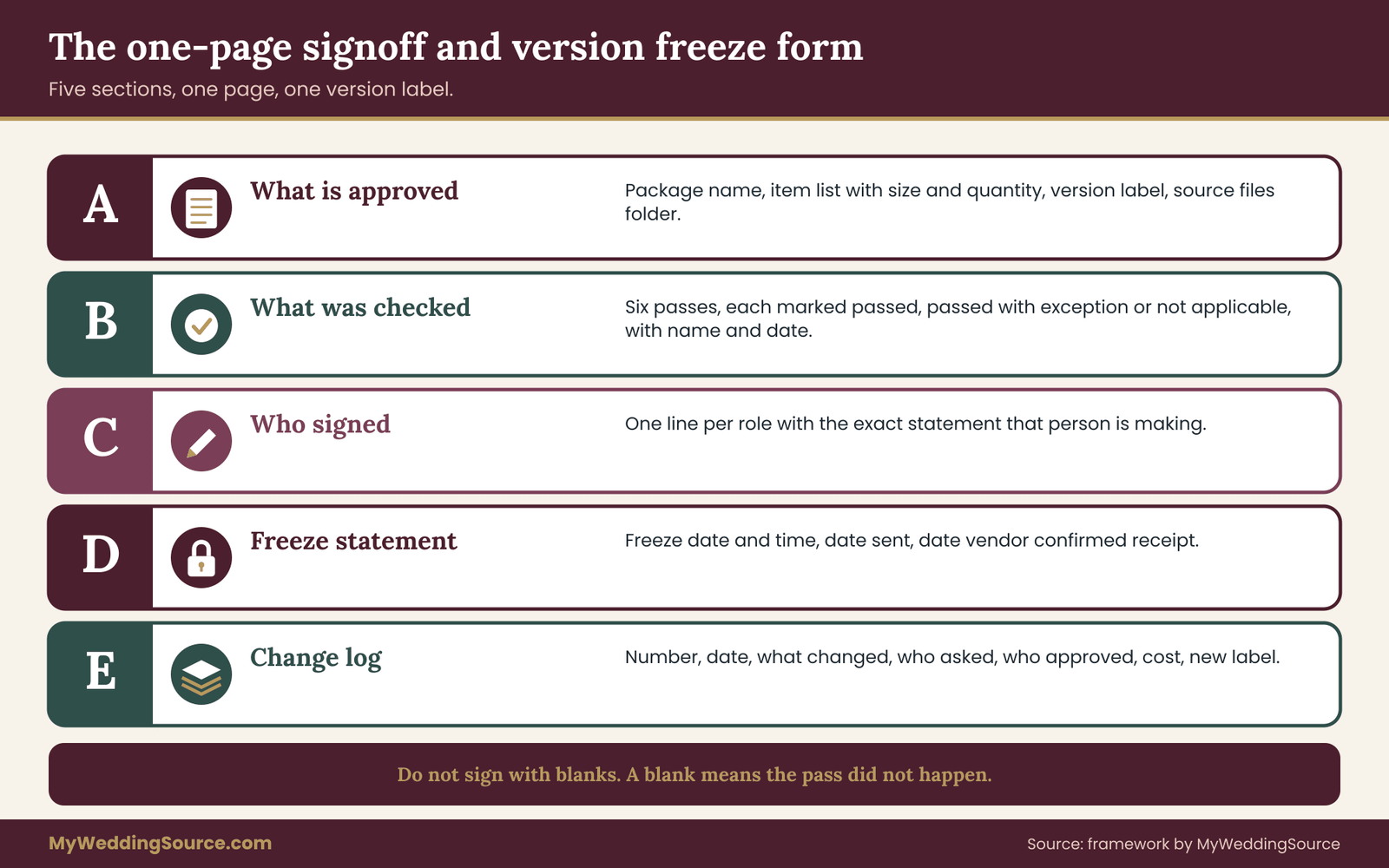
Everything in this design approval guide funnels into one page. The design approval signoff and version freeze form is the record that turns a design from “looks good” into “released”. Keep one design approval form per design package, not per file, so related items such as the invitation, the response card and the envelope liner are approved together and cannot drift apart.
The design approval form below is written out in prose so you can copy it into any document or spreadsheet. A printed copy with real signatures is best for the final step, but a scanned page or an email confirmation that repeats the same fields is acceptable.
Section A: what is being approved
Package name. A plain label, such as “Ceremony and reception paper goods” or “Welcome area signs”.
Items in the package. One line per item with its size and quantity: for example, “Programs, folded, quantity as ordered” or “Welcome sign, one piece, as sized by the sign shop”. Quantities matter because a design can be right and the order wrong.
Version label. A single identifier that appears in the file name, on the proof and on the form. A good pattern is the package name, the date and a letter: “ceremony-paper-2026-03-14-C”. The date helps you sort, and the letter tells you this is the third proof of the day or week.
Source files. Where the master files live, so the signed version can be found again. A shared folder path is enough.
Section B: what was checked
List the six passes with a result beside each. The next two sections of this guide explain what each pass contains. On the form, each pass gets one of three marks: passed, passed with a noted exception, or not applicable. A blank means the pass did not happen, and the form should not be signed with blanks in it.
Add the name of the person who ran each design approval pass and the date. This turns the checklist from a feeling into a record. If a mistake later slips through, you can see which pass should have caught it, and tighten that pass for the next package.
Section C: who signed
One line per role in the design approval circle, with name, role, date and signature. Beside each signature, write the statement that person is making. The wording matters, because it keeps each signature honest and limited.
The owner signs “I approve the look and wording of this version for production.” The fact checker signs “I compared every name, date, time, address and number against the source list.” The fresh reader signs “I read this version from start to finish and noted anything unclear.” The production contact signs “This version can be produced as specified, in this quantity, by this date.”
If any statement cannot truthfully be made, the version is not ready. Resist the urge to sign “mostly”.
Section D: the freeze statement
This is the part most couples skip, and it is the part that makes the form protective. The freeze statement reads roughly as follows: “From the date and time below, this version is frozen. Changes require a written change request stating what changes, why, the cost, and the new delivery date. No change is made until the owner approves the request in writing.”
Add the freeze date and time, the date the files are sent to the vendor, and the date the vendor confirms receipt. Those three timestamps are what you would show a printer, or a card company’s customer service, if a dispute arose.
Section E: change log
A short table-free list below the freeze statement: change number, date, what changed, who requested it, who approved it, cost, and the new version label. In most weddings this section stays empty. When it is not empty, it is the best evidence you will have of why the final version differs from the signed one.
How long the design approval form should be
One page. If the design approval form grows to three pages, people stop reading it. The authority of a design approval form comes from being short enough to be read in two minutes and specific enough that nobody can claim they did not know what they were signing.
Design approval passes one to three: facts, words and look
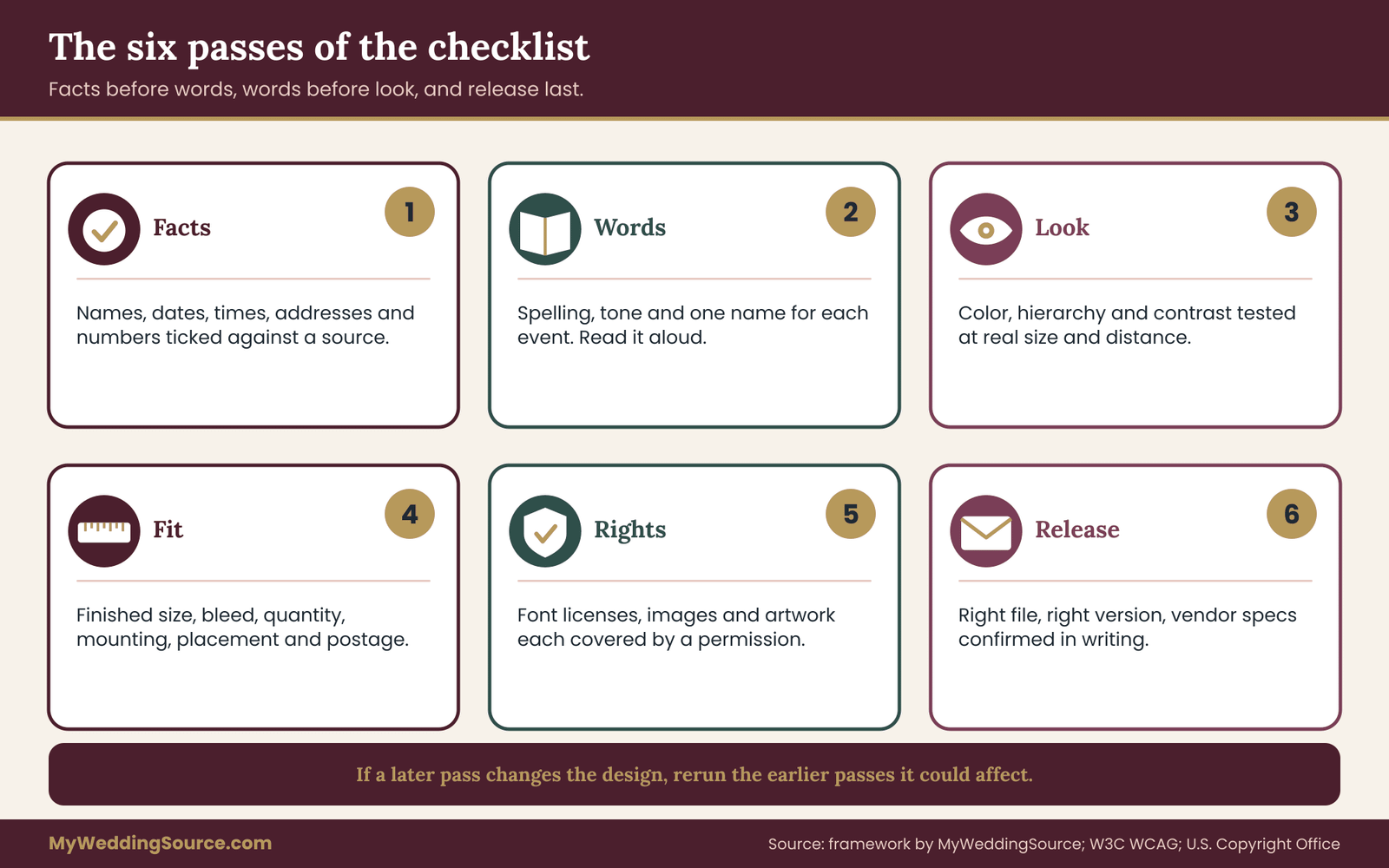
The six passes are the working core of a design approval checklist. They are ordered on purpose: checking facts before wording, and wording before look, because a fix at one stage can disturb the next. Fix a wrong name after you have polished the layout, and the new name may wrap onto a second line and break the spacing you just approved.
Run each pass separately, on the same version, and write the result on the design approval form. Do not try to check everything in one read. Human attention does not work that way, and the errors that survive are almost always in whichever category you were not looking for.
Pass one: facts
Facts are anything that is true or false regardless of taste. Names, titles, dates, days of the week, times, street addresses, venue names, room names, phone numbers, website addresses, dress codes, meal choices and quantities.
The fact method in design approval is simple and slightly tedious. Take the design and a source document side by side. Move through the design one fact at a time and tick it against the source, not against memory or against another design. Typical sources are the guest list for names, the venue contract for the address and times, the run of show for ceremony and reception times, and the caterer’s menu for dish names.
Three habits improve this pass considerably. First, read names letter by letter, not word by word, because a transposed letter looks right at normal reading speed. Second, check dates by reading the day of the week and the calendar date together; a “Saturday the 14th” that is really a Sunday is a classic slip. Third, check numbers digit by digit, including phone numbers and street numbers.
Do not trust a source that was itself copied from another design. If the guest list was built by copying the invitation envelope file, errors can pass in a circle. Where possible, verify names against the person’s own preference, which is a topic the wedding invitation etiquette guide addresses for titles and forms of address.
Pass two: words
Words covers spelling, grammar, punctuation, tone, consistency and clarity. It is different from facts because a sentence can be factually correct and still unclear, unkind or wrongly styled.
Read every design aloud, slowly. Reading aloud forces the eye to see each word, and it exposes awkward phrasing that silent reading skips. A fresh reader is best for this pass.
Consistency is the item people miss. Check that the same thing is called the same name everywhere: if one sign says “Reception” and another says “Dinner and Dancing”, guests may wonder whether those are two events. Check that capitalization, abbreviations and time formats follow one style. If you write “6:30 p.m.” on the invitation, do not write “6.30pm” on the program. Check that titles and honorifics are applied to every person alike.
Tone deserves a short, honest question: would this sentence be comfortable if the person it describes read it? Programs that describe families, in-memoriam notes and thank-you pages are the usual places where a well-meant phrase lands badly.
Pass three: look
Look is the visual pass. It asks whether the design does what it should visually, at the size and distance where it will actually be used. It covers color, typeface, spacing, hierarchy, contrast and legibility.
Check color against the palette you chose, and remember that a screen and a printed page rarely match exactly. If color accuracy matters, ask the vendor for a physical proof or a sample. The wedding color palette guide explains how a palette is built and why the same color can look different in a venue than in a file.
Check hierarchy by squinting. If you look at the design with half-closed eyes, the most important item should still be the most visible one. On a welcome sign, that is the couple’s names or the message. On a menu, it is the course names. On a direction sign, it is the arrow and the destination.
Check contrast and size with a simple test: hold or display the design at the distance a guest will stand, and read it. Text on a sign needs to be readable in the light of the venue, not the light of your desk. The Web Content Accessibility Guidelines set a contrast ratio of 4.5 to 1 for normal text and 3 to 1 for large text on screens, and while they are written for the web, many designers use them as a quick benchmark for printed text too.
Finally, check the design for restraint. A design with six typefaces and four competing colors is more likely to be misread than one with two typefaces and a calm palette. Approval is the moment to remove, not to add.
Design approval passes four to six: fit, rights and release
The first three passes ask whether the design is correct and clear. The last three ask whether it can actually be made, whether you are allowed to make it, and whether the vendor has exactly what they need. These are the passes that couples skip most often, because the design looks finished long before it is production-ready. A thorough design approval checklist treats them as equal partners to the first three.
Pass four: fit
Fit asks whether the design works as a physical or built object in the place where it will live. It is the pass where a lovely screen image meets a tape measure.
Start with dimensions. Every item on the form should have a stated finished size, and the design file should match it. A sign drawn at one proportion and printed at another will stretch or crop. Ask the maker to confirm the finished size in writing, not just the file size. For folded items, confirm the folded size and the flat size separately.
Next, check the margins and the safe area. Printers usually ask for the artwork to extend slightly past the trim edge, called a bleed, and to keep important text a small distance inside the trim, called a safe margin. Required amounts vary by printer and product, so use the numbers on the vendor’s own template or specification sheet instead of a number from a general article.
Check quantities against the guest list and the schedule. Count the programs against the number of ceremony seats, the menu cards against tables, and the place cards against confirmed guests plus a sensible spare count that you decide in advance. If a late RSVP changes the count, the design is still approved, but the order may need a small change, which belongs in the change log.
Check placement. A welcome sign that is approved without a plan for where it stands can end up behind a door, in direct sun, or somewhere a venue does not allow. Walk the room, or look at the venue’s own floor plan, and confirm that each item has a position, a mounting method and a person who sets it out. The wedding signage system guide covers readability, placement and venue permissions for signs in more depth.
Finally, check the postage and mailing fit for anything that will travel by mail. Size, thickness, weight and shape can change the price and the handling. The United States Postal Service publishes its mailpiece standards, and it is much cheaper to check a mock-up before printing than a finished suite after.
Pass five: rights
Rights asks whether you are allowed to use every element in the design for the way you plan to use it. It is a short pass, and it prevents a long headache.
A wedding design usually contains several elements with different origins: a typeface, a monogram, illustrations, a map, a photograph, a pattern, and sometimes artwork made by a designer or a friend. Each element carries its own terms.
For typefaces, read the license that came with the font. Some licenses allow personal print use and not commercial reproduction by a printer, and some limit use on signs, web pages or embedded files. A printer who receives your file may need the font embedded in the PDF or converted to outlines, and the license has to allow that. Open-source licenses such as the SIL Open Font License generally permit this, and the license text states it. The details are in the license itself, so read yours.
For images and illustrations, confirm where each came from and what the source allows. A picture found by searching the web is not free to use just because it was easy to find. The U.S. Copyright Office explains that copyright protection applies to original works from the moment they are fixed, and that using someone else’s work generally requires permission. Stock images and templates come with their own license terms, which often distinguish between personal, small-print and large-run use.
For artwork made for you by a designer, check what the agreement says about your right to reproduce it, to hand it to a printer, and to reuse it afterward, for instance on a wedding website or in a framed print. The wedding vendor contract guide covers the usual license and ownership clauses to look for.
For maps and logos, avoid reproducing a venue’s or business’s logo without permission, and be careful with maps built from commercial map services, since their terms often restrict printed reuse.
On the form, the rights pass is a simple list: each element, its source, and the license or permission that covers it. If you cannot name the permission, the element is flagged for replacement before approval, not after the print run.
Pass six: release
Release is the final pass, and it checks the handoff itself. It asks whether the vendor will receive exactly the approved version, in a form they can use, with the information they need.
Confirm the file format against the vendor’s own specification. Confirm that the file name carries the version label. Confirm that fonts are embedded or outlined as the vendor requires, that images are at the resolution the vendor states, and that color mode matches their request. Confirm quantities, finished sizes, paper or material, finish, and the delivery date, all in a short order confirmation that the vendor can reply to.
Then confirm one more thing that is easy to forget: that you are sending the frozen version and nothing else. It is common for a folder to contain earlier drafts. Send only the single approved file or set, and consider replying to the vendor with a sentence such as “Please produce version C of the ceremony paper goods only; earlier versions are withdrawn.”
Ask for a written acknowledgement. The vendor’s reply, saying that they received the file labeled with that version and will produce it as specified, is the third timestamp on the freeze statement.
Why the order of passes matters
Rights and fit can force changes to the design, which is why they come before release. If the font license does not allow commercial printing, the typeface changes, the text reflows, and the earlier look pass needs a quick second glance. A practical rule: whenever a later pass changes the design, rerun the passes before it that the change could affect, then restart the signature round on a new version label. It sounds strict, and it is much cheaper than finding the conflict on a delivered box.
Measurable checks for design approval
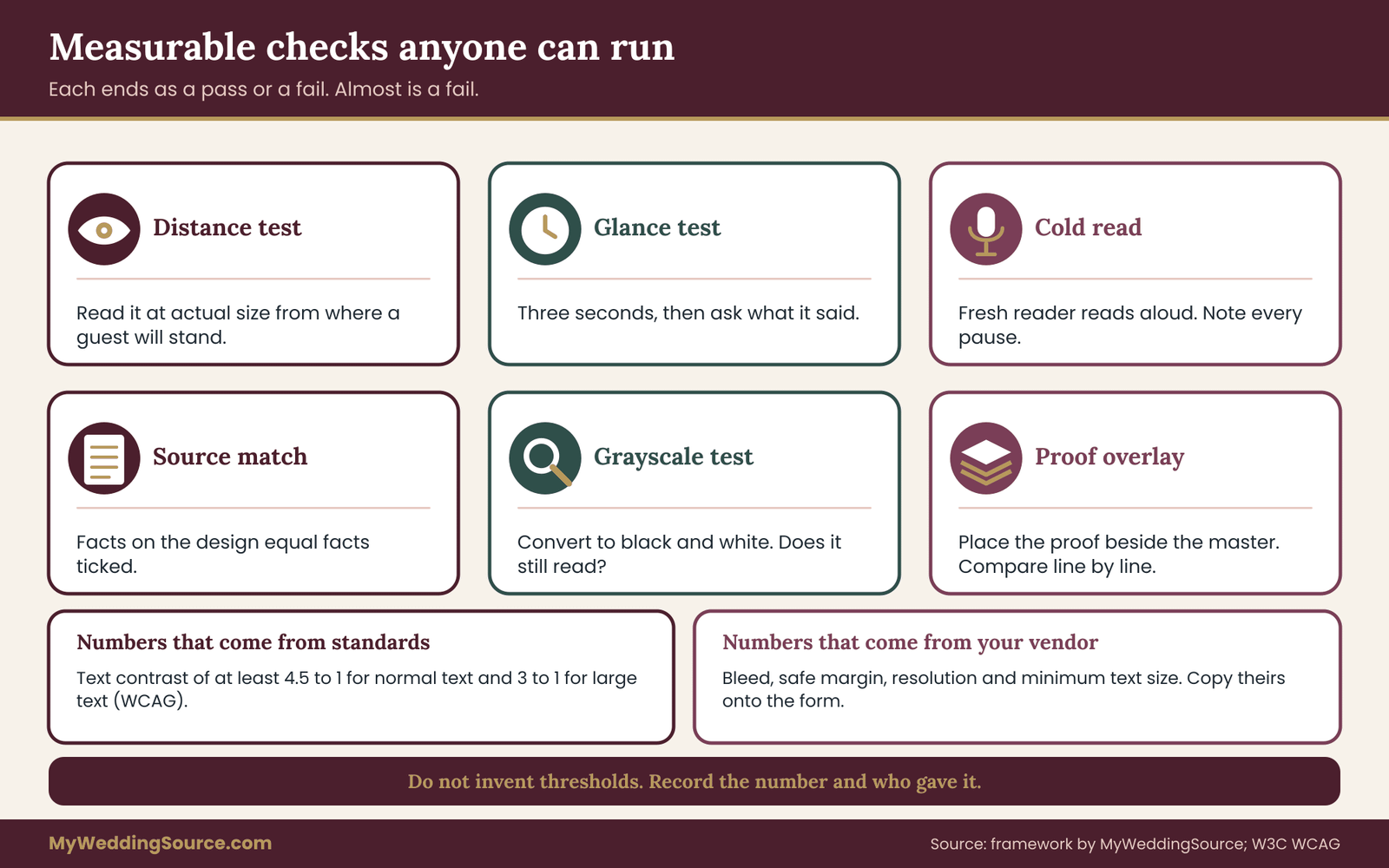
Opinions fade, measurements do not, so design approval works best when it leans on numbers. Wherever a check can be stated as a number, a distance or a yes-or-no test, state it that way on the form. This section collects design approval checks that do not rely on taste, so any person in the circle can run them and get the same answer.
Checks you can run without special software
The distance test. Display or print the design at actual size. Stand at the distance where a guest will read it. For a welcome sign, that may be several steps away at the entrance. For a table number, it is the length of an arm and a chair. Read all the text. If you have to lean in, the type is too small for the use.
The glance test. Show the design for three seconds to someone who has not seen it, then hide it and ask what it said. They should be able to name the main message. If they cannot, the hierarchy needs work.
The cold read. Ask the fresh reader to read the text aloud once without stopping. Note every place they pause or reread. Each stumble is a spot where wording or layout is unclear.
The source match. Count the facts on the design and count the facts ticked against the source. The two numbers must be the same. If a design has twenty-two facts and the fact checker ticked twenty-one, one fact is unchecked.
The grayscale test. Convert the design to black and white on screen. If important elements disappear, the design relies on color differences alone. That matters for printing on tinted paper and for guests with color vision differences.
The proof overlay. When a vendor sends a proof, place it beside the master file and compare section by section. Look at line breaks, hyphenation, font substitutions, spacing and anything that moved.
Numbers worth writing on the form
Some measurements are standardized or commonly specified. Contrast ratios of at least 4.5 to 1 for ordinary text come from the accessibility guidelines mentioned earlier. Many commercial printers ask for images at around 300 pixels per inch at final size, and a small bleed beyond the trim, but those are typical figures, not universal ones, so replace them with your vendor’s stated values. Write the vendor’s number on the form, with the source, such as “bleed per printer template, version dated on the template”.
Do not invent thresholds. If a sign shop tells you that text should be a certain minimum height for a viewing distance, record their number and the distance. A measurable check is only useful if its number comes from someone who will produce the work.
Pass or fail, not almost
Each measurable check should end as a pass or a fail. “Almost readable” is a fail. When a design approval check fails, the fix creates a new version, and the pass runs again. This feels slower than adjusting by eye, and it is faster than discovering the failure at the venue.
Freezing the version after design approval: what locks and what stays open
A signature without a freeze is only a compliment, and design approval without a freeze is only a hope. The freeze is what gives design approval force, because it says what happens next: nothing moves unless the owner agrees in writing. This section explains what a freeze covers, how to set it, and how to handle the changes that will inevitably arrive.
What exactly gets frozen
Freeze the things the vendor will use to produce the item. That means the artwork files, the text, the quantities, the finished sizes, the materials and the delivery date. A change to any of those is a change to the frozen version.
Leave open the things that do not affect production. Your internal notes, the layout of a seating spreadsheet, a spare copy of the file in another format, and the order in which you will set out signs on the day are all outside the freeze. Drawing the line clearly prevents the freeze from becoming a barrier to harmless adjustments.
A good rule of thumb: if the vendor would need to touch a file, remake a proof or change an invoice because of the change, it is a frozen item. If they would not, it is not.
Choosing the freeze date
Work backwards from the date you need the finished items in hand, not forwards from today. Take the delivery date. Subtract the vendor’s production time. Subtract the proof turnaround, including one round of corrections. Subtract the time your circle needs to sign. Add a buffer for the unexpected, such as a delayed reply or a shipping slip. The result is the latest sensible freeze date.
Then set your own freeze earlier than that, because freezes slip. A vendor’s stated turnaround is a promise about their working days, which may not include holidays, a busy season or a rush order ahead of yours. Ask the vendor for the production schedule in writing and write both dates, theirs and yours, on the form.
The wedding vendor timeline guide is a useful companion here, since it places design, proofing and delivery inside the wider planning calendar. If you already use a shared calendar with your vendors, add the freeze date and the signature deadline as separate entries so people see them early.
Tiered change rules
Not every change after design approval deserves the same response. A simple three-tier rule keeps small things small and big things visible.
Tier one: correction of a vendor error. If the produced item or proof differs from the signed version, the vendor corrects it. This is not a change request; it is a defect. Document it with the signed form and photographs, and ask for the correction in writing.
Tier two: owner-initiated change before production starts. The owner wants to change something, and the vendor confirms production has not begun. Make a written change request, accept any proof fee, give the new version a new label, and run the affected passes again. The circle signs the new version, or at least the people whose roles are touched by the change.
Tier three: change after production starts. The cost and timing can be significant, so the request must state the price and date in writing before the owner decides. Ask whether the work already done can be reused, whether the new run replaces or adds to it, and what happens to the first batch. Many couples choose not to change at this stage, and the form makes that choice a calm one rather than a panicked one.
The change request, in four lines
A change request does not need a template, but it should contain four items: what changes, why, what it costs, and what date moves. A sentence for each is enough. The owner replies in writing with approval or a decline, and the change log records the decision. If the same change comes from someone else in the circle, it goes to the owner first, never directly to the vendor.
This last point deserves emphasis. Many freezes fail because a well-meaning relative or bridesmaid sends a correction directly to the vendor. The vendor, trying to help, applies it. Tell your vendors in the first message that only the named owner or one named contact can approve changes, and ask them to ignore changes from anyone else.
When a freeze must be broken
Sometimes a freeze should break. A fact changes, such as a venue switching rooms, a ceremony time moving, or a guest asking for a name to be corrected. Do not treat the freeze as holy. Treat it as a gate that requires a conscious decision. Break it with a written request, new version label, fresh circle signatures for affected roles, and a note on the change log. The goal of design approval is to make every change deliberate, not to prevent change.
For changes that affect guests directly, such as a time or place on an invitation already mailed, the question is not only how to reprint but how to tell people. The wedding invitation etiquette guide covers how to word corrections and updates so guests understand them.

Design approval methods compared
There are several practical ways to run a design approval, and the right one depends on how many people are involved, how complex the design is and how much risk you are willing to carry. None of them is wrong. They differ in how much evidence they leave and how easily they can go astray.
The thread approval
This is the most common method of design approval. A designer or stationer sends a proof by email or message, and people reply “looks good”. It is fast and familiar, and it works for a small, simple item with two or three people involved.
Its weakness is evidence. Replies are scattered, some are on different threads, and a “looks good” does not say which version it meant. When several people are involved, you cannot see at a glance whether everyone required has answered. Use this method only for a single low-stakes item, and still write the version label in every message.
The shared document with comments
A shared document, such as a proof in a cloud folder with comment tools, keeps feedback attached to the design itself. It is good for the words pass, because comments appear exactly where the issue is, and the author can mark each comment as resolved.
The weakness is that documents change. Unless the file is locked or exported, the version a person approved may not be the version that exists later. If you use this method, export a final copy at the freeze moment, label it, and store that copy with the form.
The printed signoff sheet
Print the proof on paper, at actual size where possible, and attach the form. Each person marks corrections by hand and signs. This is the old-fashioned method, and it is also the strongest for evidence, because a signature on paper is hard to dispute and it forces people to read slowly.
Its weakness is logistics. People live in different places, and the paper has to travel. A good compromise is a scanned or photographed signed page, sent back by message, with the version label visible.
The vendor proof portal
Many printers and sign shops provide an online proof portal. You see the proof, approve it by clicking a button, and the system records the timestamp. It is convenient and creates a record.
Read what the click means. Some portals treat approval as acceptance of every detail, including spelling, and as a waiver of later claims over errors visible on the proof. That is usually fair, but it makes your own checking before the click more important, not less. Also check whether the portal approval is for the whole order or only one item.
A design approval hybrid that works for most weddings
For a typical wedding with several people and several printed items, a hybrid approach tends to hold up. Use the shared document for the words pass, run the fact check against source documents, and then print the final proof for the owner, fact checker and fresh reader to sign together. Finish with the vendor portal approval or an email that quotes the version label and the signed form. The method adds an hour, and it replaces a large amount of uncertainty.

Vendor questions before design approval
A vendor can make design approval easy or hard, and you learn which before you sign anything if you ask the right questions. Put these questions in writing, ideally in the first conversation, and keep the answers with the form. Their replies tell you what the vendor’s own approval step actually means.
Questions about the proof and design approval
Ask what kind of proof you will receive. A digital proof on screen shows layout and wording but not color or texture. A printed proof on the real material shows more, and may cost more. A physical sample of the paper, fabric or finish shows the material itself. Ask which of these are included, which cost extra, and how long each takes.
Ask how many rounds of corrections are included, and what a further round costs. Ask whether corrections to your own typos are treated differently from corrections to their errors. Many vendors include one round and charge for more, and knowing this in advance changes how carefully you prepare the first proof.
Ask what your design approval releases. Does a signed or clicked proof mean the order is final, or can a late correction still be made? Ask for the cut-off in days or hours before production, not in general terms.
Ask who checks the proof on the vendor’s side. Some shops have a proofreader, and some simply place your text into a template. Knowing this tells you how much checking is yours to do.
Questions about production
Ask how the vendor handles files you supplied. Do they open them as sent, or rebuild them? Rebuilt files may change fonts, spacing and line breaks, so the proof is the only place you see the result.
Ask whether any elements will be substituted without notice if something is unavailable, such as paper stock, ribbon color, or a material. The right answer is that substitutions need your written approval. If the answer is different, add a line to the form describing the acceptable substitution.
Ask how color is controlled. For print, ask whether they match to a specified color reference and what tolerance they consider normal. Colors in print vary slightly from run to run and from screen to paper, and a vendor who is clear about that is a vendor who has thought about it. International standards bodies, including ISO, publish standards for printing processes, and a vendor who mentions them is signaling that they follow a recognized process. You do not need to read the standards; it is enough to ask what the vendor uses.
Ask how long they keep your files and proofs, and what they do with them afterward. This matters for reorders, for any later dispute and for privacy, since guest names and addresses may be inside the file.
Questions about changes after design approval
Ask what counts as a change after approval and how it is priced. Ask what the latest date is to change quantities. Ask whether they will accept change requests only from the named owner. Ask what happens to a partly finished run if the design changes.
Ask about rush options. If a late correction does come, a vendor who states a rush fee and a rush limit ahead of time is easier to work with than one who invents terms on the day.
Questions about problems
Ask what happens if the produced item does not match the signed proof. A reasonable answer is that the vendor reprints at their cost. Ask for it in writing, and ask what evidence they need, such as photographs, within what time window after delivery.
Ask who is responsible if shipping damages the item. Ask what insurance or guarantee applies. Ask where the item will be delivered and who signs for it, since a lost delivery after a perfect approval is still a failure.
The vendor questions overlap with the questions you ask any vendor before signing a contract, and the wedding vendor purchase order checklist lays out scope agreement and acceptance from the order side. The two work well together: a purchase order states what you are buying, and the signed design approval form states exactly what it will look like.
What to do with the answers
Copy the vendor’s answers onto a half page and keep it clipped to the form. If an answer worries you, such as unclear proof terms or a refusal to confirm substitutions in writing, treat that as information. You may still hire the vendor, and you will approve their work with extra care. If the vendor will not commit to anything in writing, consider whether the item is worth the risk.
A script that works in many cases: “Before we approve, could you confirm in writing what the proof shows, how many correction rounds are included, what the cut-off to change is, and what you do if the finished item differs from the approved proof?” Most vendors answer that in a few lines, and those lines become part of your design approval record.
Checklists by item type
The six design approval passes apply to every design, but each kind of item has particular traps. Use these short lists as additions to the design approval form, not replacements for it. Each is written as a prose checklist so you can copy it into your own document.
Invitations, save-the-dates and response cards
Check every name and title on the main invitation against the guest list. Check the day of the week against the date. Check the time against the venue contract and the run of show. Check the address of every venue and any parking or arrival instruction. Check the RSVP date, the return address and any website address letter by letter. Check that the response card matches the envelope and that the return method works.
Check that wording about guests, plus-ones and children matches your actual decisions. For anything mailed, check weight, size and thickness before printing, using the postal service’s published standards.
Programs and ceremony papers
Check the order of events against the ceremony script and the cue sheet. Check spellings of every participant, including readers, musicians and family members named in a tribute. Check titles, relationships and pronunciation notes. Check that readings are quoted accurately and that any credited poems or songs have the right attribution and, where required, permission. The wedding ceremony cue sheet guide is the right source of truth for sequence and timing.
Menus, place cards and escort cards
Check dish names against the caterer’s final menu, not an early draft. Check allergen or dietary markings against what the caterer actually confirmed. Check that every guest appears on exactly one card, and that names match their stated preferences. Check that table numbers on place cards match the seating chart and the signs. A single transposed table number is difficult to notice and easy to produce.
Signs
Check text size against the viewing distance, contrast in the real light, and the sign’s physical size against its stand, easel or mounting point. Check that the venue allows the mounting method and the placement. Check that arrows point the right way from the position where the sign will stand, since a sign read from the opposite side is a common mistake. Check that the sign will not block exits or walkways.
Custom objects and installations
For engraved, cut, neon, painted or built items, a flat proof is not enough. Ask for a technical drawing with dimensions and materials, and where possible a photograph or sample of a similar finish. Check power requirements, weight, mounting and removal. Check who delivers, who installs, and who takes it away. Fix the spelling and the facts before the object is made, since these items often cannot be reprinted at all.
Digital items
Wedding websites, digital programs, livestream graphics and slideshows need a different freeze, because they can change after the event begins. Decide the moment after which only the owner can publish an edit. Check on a phone and on a computer, in a normal browser, with a slow connection and a bright screen. Check that every link works and that the contact details point to a person who will answer.
Floral and decor designs
For designs that someone will build, the approval document may be a sketch, a mood board or a recipe list. Ask the florist or decorator to state what is fixed and what may vary, for example flower types dependent on seasonal supply. The wedding color palette guide helps you describe color intentions in words a maker can follow. Agree in writing which substitutions are acceptable, and what happens if a key element is unavailable.
A worked example of design approval
The following is an invented, illustrative example, not a real couple or a real result. It shows how the form and the passes fit together for a typical paper-goods package, including one change that arrives late.
The setup
Imagine a couple, Nadia and Owen, planning a Saturday evening wedding for about eighty guests at a rented hall. They have a designer friend, Priya, who makes the artwork, and a local print shop that will produce programs, menu cards, table numbers and a welcome sign. The couple’s mothers have each asked to see the programs. The wedding is on a fixed date, and the print shop quotes a production time that the couple writes on the form with the date of the quote.
They decide the package is “Ceremony and reception papers”, with four items: folded programs, menu cards, table numbers and a welcome sign. They set up one signoff and version freeze form for the whole package.
The design approval circle
Owner: Nadia and Owen together. Fact checker: Owen’s sister, who did not write any of the text. Fresh reader: a coworker of Nadia’s who has never seen the drafts. Production contact: the print shop’s proof desk. Because both mothers want to see the programs, the couple lists them as “consulted”, with a deadline for comments, not as signers. This is the single decision that keeps the process from stalling.
The design approval passes
Facts. The sister compares each name in the program against the guest list and the ceremony script. She finds that the officiant’s title is wrong, and that one grandparent’s name is spelled with a different letter than the one on the guest list. She also finds that the ceremony time on the program is fifteen minutes earlier than on the venue contract. All three are corrected before anything else happens, and the version label moves from A to B.
Words. The coworker reads the program aloud. She pauses twice: once at a sentence that could be read two ways, and once at a line saying “Cocktails to follow” when the menu card says “Reception”. The couple settles on one word for the event across all four items.
Look. They place the welcome sign proof at its real size and stand across the room. The thin script that looked elegant on the monitor is hard to read, and the contrast of pale gray on cream is too low. Priya changes to a heavier weight and a darker color. They run the grayscale test and everything still reads. Version C.
Fit. The print shop’s template asks for a specific bleed and safe margin. Priya adjusts the artwork to match. The couple counts programs against the number of ceremony seats and adds a small spare count. The sign shop confirms the board size and the stand. A call to the hall confirms where the sign will stand and that the stand’s feet are allowed on the floor.
Rights. Priya confirms the typeface license allows commercial printing and embedding. A decorative border came from a stock pack, and the license states that it is allowed for printed goods in limited runs. She writes both on the form. A small map of the venue, built from an online map service, is replaced by a simple drawn sketch, since the service’s terms are unclear about printed reuse.
Release. Priya exports a single file per item, named with the package name, the date and the letter C, and writes the specifications in an email: finished sizes, quantities, paper, finish and delivery date. She asks the print shop to confirm the specifications and the proof they will send.
Signatures and the design approval freeze
The print shop sends a proof. The sister, the coworker and the couple each read the printed proof, compare it to the master file, and sign the printed form. The proof desk confirms in writing that the version label matches and that production will start the next morning. The freeze is stamped with a date and time on the form, and the file is sent, with a note that older versions are withdrawn.
The late change
Four days into production, Owen’s grandmother’s name is found to be spelled one way on the program and another way on a handwritten family tree sent by his aunt. Owen is unsure which is right. He follows the change rule: he asks the aunt to confirm, and she says the tree is correct.
Owen writes a change request: what changes (one name in the program), why (the spelling was wrong), what it costs (he asks the print shop), and what date moves (he asks that too).
The shop replies that the programs have been printed but not folded, that a reprint of that item will cost a stated amount, and that the delivery date moves by two days. Owen and Nadia decide that is acceptable. Nothing moves until Owen approves in writing. The change log records the change, the cost and the new version label D, and the sister and the owner sign the new proof for the program only.
What the design approval example shows
Three features of the example generalize. The mothers’ role as “consulted” prevented a stalled process without excluding them. The fact check found errors that two earlier casual reviews had missed. And the late change was a calm decision about money and time, because a rule existed before the pressure did. The design approval form did not stop the change. It made it visible and deliberate.

Edge cases and how to handle them
No process survives every situation. These edge cases come up often enough to be worth planning for.
The approver who will not answer
One person in the circle simply does not reply. Set a deadline on the form, and say plainly what happens when it passes. For a role that is required, such as the fact checker, name a backup in advance. For a consulted person, state that silence by the date means no comments. Send one polite reminder with a clear time, then proceed. A design approval process that can be held hostage by one inbox is a poor one.
The approver who changes their mind after design approval
Someone signs and later asks for a change. Treat them as any other change request. Their earlier signature remains true for the version they signed. Be kind in tone and firm on process: “Thank you, we have your note. The version is frozen, and a change now costs a reprint. Would you like us to price it?” That gives them the information to decide, and it does not make them feel dismissed.
Two owners who disagree
If the couple disagrees about a design, the form cannot decide for them. Agree beforehand which partner holds the final say on which items, or use a simple rule such as one partner decides wording and the other decides look. If a real stalemate occurs, pause the freeze and resolve it before the vendor’s deadline, with a fixed time to decide. The wedding decision rights guide offers methods for these standoffs.
A parent who is paying and wants a veto
Money can create expectations. A parent who funds an item may reasonably want to see and comment on it. Decide, early and kindly, whether they are consulted or a signer. If they sign, list exactly what they are approving, such as the wording of the program tribute, and not the whole design. If they are consulted, give them a date and a way to comment. Avoid vague promises like “you will see everything”, which turn into a standing veto.
A name or fact you cannot verify
Sometimes you cannot confirm a spelling, a title or a relationship before the freeze. Ask the person directly, and if they are unavailable, ask another family member who knows. If doubt remains, choose the safest wording. For example, use “and family” in place of an uncertain list of names, or omit a title you cannot verify. Do not print a guess.
A vendor who works only by email or a portal with no form
Some vendors will not use your form. That is fine. Your form is an internal record, and you can still use it. Send the vendor an email that quotes the version label, lists the specifications and asks them to confirm in a reply. Save the reply with the form. The email is the vendor-side record, and the form is yours.
A design that cannot be proofed ahead
Some items, such as live-painted pieces, a hand-lettered sign made on site, or flowers built the morning of, cannot have a pixel-perfect proof. Approval then covers the brief and the examples: the style, the words, the size, the colors and the placement. Write down the words the maker will paint or letter, spell them out, and ask the maker to confirm them in writing before they begin. For flowers, approve a photo or sketch of similar work and the list of acceptable substitutions.
A very small wedding
A courthouse or backyard wedding with two printed items may not need a full circle. The form can shrink to one fact checker and one fresh reader, with the owner signing. The passes still apply, and they take less time. Do not skip the fact pass of your design approval because the guest list is short; it is when you have only a few names that a single error is most visible.
A last-minute design
If a design is created within days of the event, such as an in-memoriam card or a sign for a surprise, apply a compressed version of design approval: one fact check against a source, one cold read by a person who did not write it, and one look at the real size. Write the version label on the file and keep a copy. A shortened check is better than none.
When the proof and the master file differ
If the vendor’s proof does not match your master file, do not guess which is right. Ask the vendor to explain the difference in writing. If they changed something, such as a font or a line break, ask them to correct it or to explain why. Do not sign a proof that you cannot match to the master. The signed proof is the document you will rely on if the finished item differs.
Your next steps
For design approval, start with what is most likely to be printed or built soonest, and work outward. You do not need to rebuild your whole process today. Four actions are enough to change how the next package goes.
First, make the design approval form. Copy the five sections, namely what is being approved, what was checked, who signed, the freeze statement and the change log, into a single page. Fill in the package name, the item list and the version label for whatever is closest to production. Second, name the circle: an owner, a fact checker, a fresh reader and the production contact. Tell each person in one sentence what their signature will mean.
Third, set two dates, the freeze date and the signature deadline, and put them on the shared calendar you use with your vendors.
Fourth, send each vendor the four questions about proofs, substitutions, changes and problems, and keep the answers with the form.
Then run the six design approval passes in order on the current version: facts, words, look, fit, rights and release. Fix, relabel, and run again where needed. When the circle has signed and the freeze is stamped, send the single frozen version to the vendor and ask them to confirm it in writing.
If you only have an hour, spend it on the fact pass and the cold read. Those two catch most of the errors that survive to the printed page. Everything else in this design approval guide reduces risk further, and none of it needs special tools.
When the work is done, keep the signed form, the frozen files and the vendor confirmation with your other wedding documents. They are useful for reorders, for a dispute you hope never to have, and for anyone who later wants to know how a particular piece came to look the way it did. A calm design approval is not a barrier between you and the design you imagined. It is the step that lets that design arrive intact.
FAQ
What is a wedding design approval checklist?
A wedding design approval checklist is a written list of checks that a design must pass before a vendor produces it. It usually covers facts, wording, look, fit, rights and release, and it ends with named people signing a specific version. The point is to make the decision to produce deliberate, recorded and easy to defend later.
Who should sign off on wedding designs?
Design approval sign-off belongs to a small group: the owner, usually the couple, a fact checker who compares details to source documents, a fresh reader who has not seen the drafts, and the vendor’s production contact. Other people, such as parents or the officiant, can be consulted or asked to sign only the part they are responsible for, such as wording they must confirm.
What is a version freeze, and why use one?
In design approval, a version freeze is a stated moment after which a design cannot change without a written request. It gives the vendor one clear file to produce and gives you a record of what was approved. It does not forbid changes. It makes each change visible, priced and approved by the owner, so late opinions do not quietly alter the work.
How many proofs does design approval involve?
It varies by vendor and product. Many include one round of corrections and charge for more, so ask in writing before you start. Plan to review a digital proof for facts and wording, and where color or material matters, ask about a printed proof or a physical sample. The cost and the turnaround of each should be on your form.
What do people miss in a design approval?
People most often miss facts that look right: the day of the week against the date, a transposed letter in a name, a table number that does not match the seating chart, and a time that changed after the text was drafted. Also easy to miss are font licenses and the mounting rules at the venue. Check each against a source, not memory.
Can a vendor print something other than the approved proof?
A vendor is generally expected to produce what the approved proof shows. If the finished item differs, a signed proof and the version label are your evidence, and most vendors will correct a genuine production error. What is covered depends on the contract and the vendor’s terms, so read those and ask the vendor to confirm their policy in writing.
What if someone asks for a change after we have approved?
Treat it as a change request under your design approval form. Ask what changes and why, ask the vendor for the cost and the date impact, and let the owner decide in writing. If production has not started, the change is often modest. If it has, it can be costly. Record the decision and the new version label on the change log so the paper trail stays accurate.
Do I need design approval for a small wedding?
You can shrink design approval. For a small wedding, use a one-page form, one fact checker and one fresh reader, with the owner signing. Keep the six passes, since they take less time with fewer items. The freeze is still worth keeping, because even a single misspelled name on a few printed pieces is easier to prevent than to fix.
Sources
- U.S. Copyright Office, home page and public guidance
- U.S. Copyright Office, frequently asked questions
- Web Content Accessibility Guidelines quick reference, W3C Web Accessibility Initiative
- SIL Open Font License, official site
- Creative Commons, about the licenses
- Postal Explorer, mailing standards, United States Postal Service
- Federal Trade Commission, business guidance
- International Organization for Standardization
- ADA.gov, U.S. Department of Justice Civil Rights Division
- USA.gov, consumer protection and complaints