

Gallery access is the set of choices about who can see, download, share and keep your wedding photos once the photographer delivers them. This guide shows how to give each person the right level of gallery access, from parents who want every frame to distant cousins who only need a few highlights, without handing a full-resolution archive to everyone you know.
Do not send one link to everyone. Sort your relatives and guests into five rings, from you at the center to the wider guest list at the edge. Give the inner rings more gallery access (full downloads, the complete set) and the outer rings less (a curated album, smaller files, an expiry date). Check your photographer’s contract first, because it may limit how a gallery can be shared. Keep a short written list of who has which link, so you can switch any of them off later.
The photographer’s email arrives, the gallery is ready, and within an hour somebody in your family asks for “the link.” The easy move is to forward it to the group chat. It is also the move most couples regret, because a single shared link usually grants the same gallery access to a grandmother, a coworker of your uncle’s and a friend of a friend who happens to be in the chat.
That is not a disaster for every couple. Some families are relaxed, and some galleries contain nothing sensitive. But many couples have at least one reason to be careful: a relative who posts everything publicly, a guest who asked not to be photographed, children whose parents have strict rules, an estranged family member, or simply a preference that the full set of images stay between a small group of people.
Wedding photos are personal, and once a full-resolution file leaves your control it is very hard to pull back. Good gallery access planning answers those worries before they turn into arguments.
A note on scope. This is general information, not legal advice. Copyright, privacy and contract rules differ by place and by agreement, and platforms change their settings often. Where a rule matters, this guide points you to the issuing agency or the vendor’s own terms so you can confirm the current version.
What gallery access really covers
People talk about “sharing the gallery” as if it were one action. It is at least five separate permissions, and you can grant them independently on most platforms. Understanding the pieces is what lets you be generous with some people and careful with others without feeling rude. Each of them is a separate piece of gallery access, and each can be set on its own.
Seeing. The ability to open the gallery and look at images. This is the lowest level of gallery access and the one most relatives actually want.
Favoriting and commenting. Many gallery platforms let a viewer mark favorites or leave a note. This is useful when you want a parent to help choose album pages, and unnecessary for everyone else.
Downloading. Saving files to a phone or computer. Downloads can be web-size (good for screens and social posts) or full-resolution (good for large prints and for editing). The difference matters, and the next sections come back to it. Decide this one first, because download size is the biggest lever you have over gallery access.
Sharing onward. Forwarding the link, adding guests, or posting images. Some platforms let a viewer invite others, and some do not. This is the permission that quietly turns a private gallery into a public one. Of all the pieces of gallery access, this is the one that most often gets left on by accident.
Ordering prints. Some galleries include a store. Prints ordered by relatives can be a convenience for you, or a source of confusion about who is paying and which edits are being printed.
Think of these five as dials, not switches. A grandmother might get seeing and web-size downloading. Your parents might get everything except onward sharing. You and your partner keep all five. That graduated approach is the center of this guide, and the wedding photography consent guide covers the earlier question of what your guests agreed to before the photos were even taken.

Why this is a separate decision from taking the photos
Consent to be photographed and permission to distribute the photos are different things. A guest who happily posed for a portrait may still not want that portrait sent to forty people they have never met. Likewise, you might be comfortable with your cousin keeping the images, and not with the cousin’s employer seeing them on a public page.
So gallery access is a second round of decisions, made after the wedding, with real images in front of you. You now know what the photographer captured: the candid of an uncle who was visibly unwell, the blurry dance floor shot that includes a child, the emotional moment you would rather keep private. Planning ahead lets you set the rules before the pressure begins. Setting gallery access now, with the images in front of you, is far easier than undoing it after links have spread.
Who this guide is for
It is written for couples delivering photos to family, and it also helps parents and wedding-party members who are asked to hold a gallery link. It is not a technical manual for any one platform. Screens and options change, and your photographer’s platform may differ from the common ones. Instead, it gives you a method that works on any system, along with questions to ask when you are unsure what a setting does.
You will also not need special equipment. A shared note or spreadsheet, the contract, your photographer’s delivery email, and about two evenings are enough. The goal is a short list of people and rings, a few settings chosen on purpose, and a calm script for the awkward requests. Two evenings of work give you gallery access rules you can explain in one sentence.
Why one link for everyone goes wrong
Before building a better system, it helps to see exactly how the default fails. The failures are ordinary, which is why they are easy to miss. Each failure below comes from granting the same gallery access to everyone.
The link travels. A gallery link is usually a web address. Anyone who has it can open it, and anyone they forward it to can open it too, unless the platform requires a password or an email sign-in. A link sent to twenty relatives is, in practice, a link held by an unknown number of people.
Full-resolution files travel too. If downloads are enabled at full size, every viewer can keep a print-quality copy. Those files get posted, edited, cropped, put into group albums and uploaded to cloud services that scan them. You cannot recall a file once it has been copied.
Context disappears. A candid photo has a context: the room, the mood, the people who were there. Stripped of that, it can be misread. A guest who was tired, tearful or unwell on camera did not expect to be a permanent image in a stranger’s feed.
Different people want different things. Your mother wants every shot. Your great-aunt wants six pictures of the grandchildren. Your college friend wants the dance floor. A single gallery handed to all of them satisfies none of them well, and it overwhelms the ones who just wanted a few images. Tiered gallery access lets you hand each of them what they actually want.
Nobody remembers who has what. Six months later, when you want to shut a link, you do not know who received it. There is no list, no expiry and no way to tell whether the link was passed along.
None of these problems requires a dramatic event to hurt you. They accumulate quietly, and the fix is a small amount of planning now. In the sections that follow you will check what the contract allows, build five rings, match each ring to a delivery method, and write down the choices so they can be changed later. The fix is not stricter rules for everyone but better-matched gallery access for each person.
The cost of getting it wrong is mostly social
There is rarely a legal catastrophe here. What goes wrong is usually relational: a relative feels excluded because they got a smaller gallery, a guest is upset to find their photo online, a parent insists on sharing a link that you wanted to keep small. Clear rules, set early and explained kindly, prevent most of that. The scripts later in this guide give you wording for the hardest conversations. Clear gallery access rules, set early and explained kindly, prevent most of that.
There is also a practical cost. Full-resolution files are large, and handing them to dozens of people means dozens of copies of your most valuable images in places you will never see. A tiered plan keeps the high-quality files in a small number of safe hands, which is also better for long-term preservation, a topic covered in the wedding records after the event guide.
Read the contract before you decide on gallery access
Your photographer, not you, may control some parts of how images are delivered. Before you make a single promise to a relative, open the photography contract and the delivery email and look for the clauses below. Ten minutes here can save an awkward reversal later. The wedding vendor contract guide explains how to read a contract in general; here the focus is narrow. Each clause below can widen or narrow the gallery access you are able to offer.
License and usage. Copyright in a photograph usually belongs to the person who took it unless a written agreement says otherwise. Many photographers grant the couple a personal-use license, which allows printing and sharing with family but may limit commercial use. The U.S. Copyright Office publishes plain-language information on how copyright works, and it is the right place to confirm the basics rather than relying on a forum post.
Delivery format. Find out what you receive: an online gallery, downloadable files, a USB drive, or a combination. Note whether the files are web-size, full-resolution, or both. This single detail decides how much gallery access you can safely offer. A set of web-size files supports generous gallery access with little risk, while full-resolution files call for more care.
Gallery duration. Online galleries often expire after a set period. If your contract says the gallery stays live for a limited time, every relative with a link loses access on that date unless they have downloaded the images. Ask whether the photographer will extend the gallery for a fee, and whether files can be re-delivered later. When the gallery expires, so does every relative’s gallery access, so tell people the date.
Sharing and guest features. Some photographers include a feature that lets you invite guests with their own sign-in, set downloads per person, or generate separate links for separate albums. Others offer one link and nothing else. Ask the photographer exactly what controls exist before you build a plan that depends on them. Those features decide how finely you can tune gallery access without extra work on your side.
Privacy and portfolio rights. Many contracts let the photographer display images in a portfolio or on social media. That is a separate matter from your gallery access, but it affects how private your photos really are. If you want certain images kept out of public use, say so in writing.
Print and reproduction rules. Photographers often include a release that lets you print the photos anywhere. If your family will order prints from a general print service, confirm that the release covers it.
Questions worth asking your photographer
Can I create separate galleries or albums for different groups? Can I turn downloads on or off per album, and choose web size or full size? Can I add a password or an expiry date to each link? Can the link be shut off later without deleting the gallery? Will you keep the files, and for how long, if the online gallery expires?
Photographers hear these questions often, and most appreciate being asked early. A reply such as “I can make a family gallery and a smaller highlights gallery” gives you the building blocks of a good plan. A reply such as “there is one link and it cannot be changed” tells you that you will need to control distribution yourselves by downloading the files and sending them through your own tools.
When the contract is silent
Many contracts say nothing about how you may share the gallery with family. That is common, and it usually means ordinary personal sharing is fine. It does not mean there are no limits. If the contract is silent, write a short message to the photographer asking what is permitted, and keep the answer with your records. A written reply protects both sides and takes two minutes. A short written answer settles what gallery access you may extend and keeps the matter out of memory.
The same applies when a relative asks to use your photos in a way the contract does not cover, such as printing them on products to sell or posting them with a business logo. Those uses can raise copyright questions that are separate from ordinary family sharing. You do not have to solve them; you only have to avoid promising something you do not control.
Build your five rings of gallery access
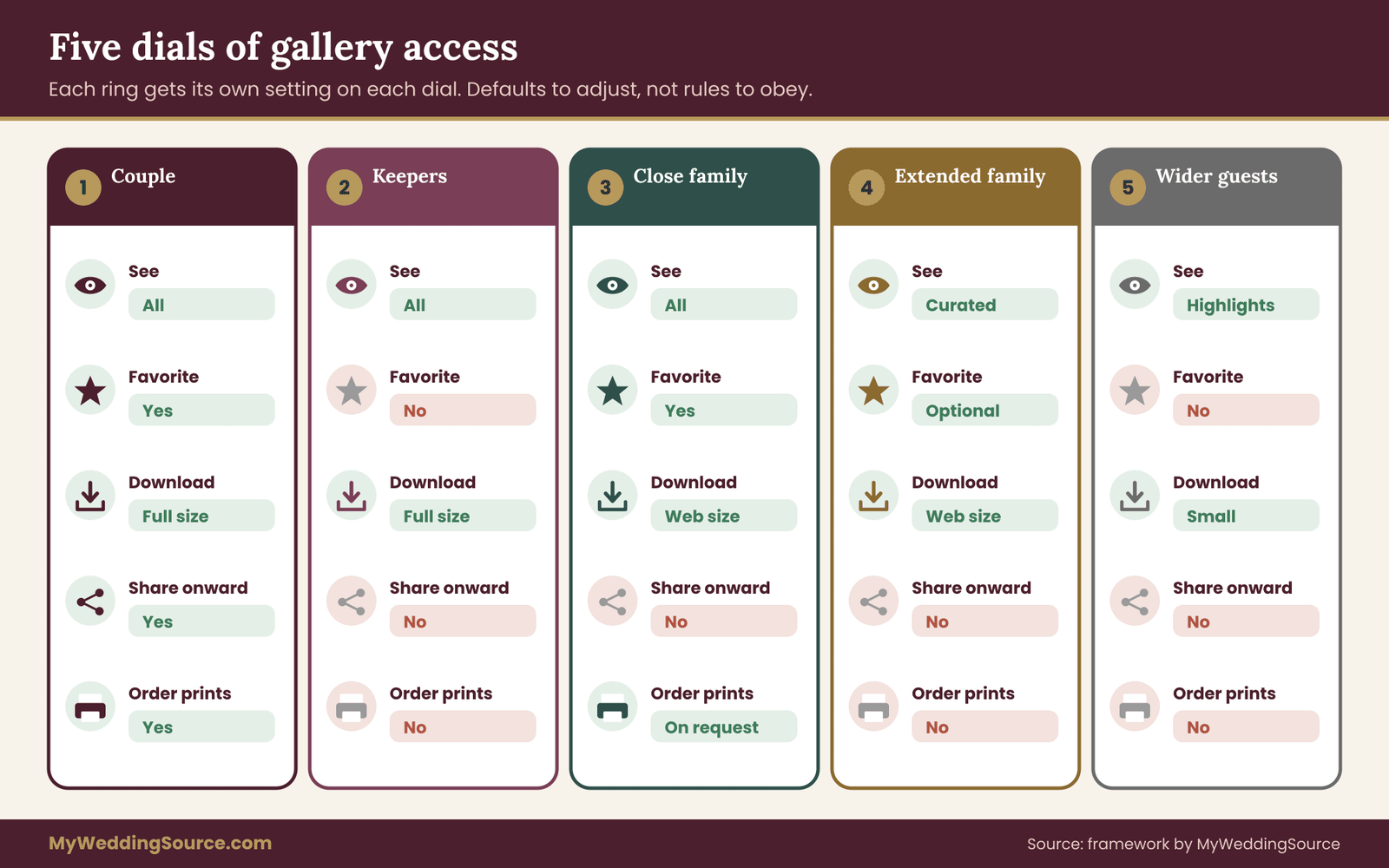
Here is the framework at the heart of this article. Instead of listing every person you know and deciding one at a time, sort people into five rings, from the center outward. Each ring has a default level of gallery access, and you adjust from the default only when you have a reason. Treat the rings as a map of gallery access, not as a ranking of who matters more to you.
Ring one: the couple. You and your partner hold the master copy and every control. Both of you should have the full-resolution files, the account login or the photographer’s contact details, and the ability to change settings. Nothing about this ring is generous or stingy; it is simply the owner of the archive.
Ring two: the keepers. One or two trusted people, often parents, a sibling or a close friend, who hold a complete second copy for safekeeping. They receive the full set, but their job is storage, not distribution. Ask them in plain words not to forward or post the files. This ring exists because losing the master copy is a larger risk than leaking a single photo.
Ring three: close family. Parents, grandparents, siblings and children who will want to see everything and keep some of it. They receive the complete gallery to view, favorite and download at web size, plus full-resolution files for a chosen set of images such as the family portraits. They do not receive the option to invite others. Their gallery access is wide enough for browsing and keeping, and narrow enough to keep the best files close.
Ring four: extended family and the wedding party. Aunts, uncles, cousins, close friends and your attendants. They receive a curated album: a selection that includes them, the ceremony, and the best group photos. Downloads are web-size, with no full-resolution files, and the link has an expiry date. Gallery access at this level is a gift with a start and an end.
Ring five: the wider guest list. Everyone else who attended, plus relatives who could not. They receive a small highlights set, often a handful of images, through a link that expires or through an email that attaches or links a few pictures. This ring gets the lightest gallery access, and it is often enough. This ring gets the lightest gallery access, and a few good images are often more welcome than a full archive.
Why five rings and not three or ten
Three tiers tend to collapse: people argue their way up a tier, and the middle one fills with everyone. Ten tiers are too complicated to maintain, and you will forget what distinguishes the sixth from the seventh. Five is the smallest number that separates the roles that actually differ. Owners, storage keepers, people who want everything, people who want a selection and people who want a memento. Five rings give each role its own gallery access without making the system hard to remember.
The rings are also a conversation tool. When someone asks for more, you do not have to argue about fairness. You can say that grandparents are in the third ring because they wanted the full set, and that your cousins get a curated album because the full set is more than most people want to scroll through. The rings describe roles, not affection. That keeps every conversation about gallery access on the topic of roles instead of feelings.
Moving people between rings
Rings are defaults, not verdicts. A close friend who is also a professional designer may need full-resolution files to help you with an album layout, and that is a reason to give them temporary access to a particular folder. A grandparent who only wants a few pictures can sit in ring four without offense. A guest who asked not to be photographed, or who appears in sensitive photos, may need to be handled separately; a later section covers that.
Keep one rule in mind. Moving someone inward should be a decision you make, for a reason, and write down. Moving someone outward should be rare. If you find yourself pulling back a gallery link you already gave, it usually means the first assignment was too generous. Widening gallery access is easy to do and hard to take back, so go slowly in that direction.
Decide what each ring can do
Once you have the rings, you assign the permissions. The aim is to match gallery access to what each person actually needs, not to the most they could possibly want. Think in terms of the five dials: seeing, favoriting, downloading, sharing onward and ordering prints. The aim is to match gallery access to what each person actually needs, not to the most they could want.
Ring one has everything, including the ability to change the settings and to receive the full-resolution originals.
Ring two can see everything and download full-resolution files, but should not share them onward. Their purpose is a safe duplicate, and the best way to make that clear is to say so.
Ring three can see everything, favorite, and download at web size. A selected set of full-resolution files, perhaps twenty or thirty, can be provided for printing and framing. Onward sharing is off.
Ring four can see a curated album and download web-size copies. Favoriting is optional. No onward sharing, and an expiry date on the link.
Ring five can see a highlights selection. Downloads, if offered, are small files. The link expires, and there is no way to invite others.
A good test for any permission is to ask what the worst realistic outcome would be if the person used it fully. If a ring-five guest downloads a web-size highlight and posts it, the harm is small. If the same person had a full-resolution archive of the entire wedding, the harm is larger. Adjust the permission until the worst realistic outcome is something you can live with.
A note on web size versus full size
Web-size images are reduced copies, fine for phone screens, texting and small prints, and poor for enlargement. Full-size files carry the detail needed for big prints and heavy editing. For most relatives, web size is plenty, and offering it by default is the simplest way to keep your best files closer to home without refusing anyone anything. If someone does want a large print of a specific photo, you can send that one file when asked.
Choose a delivery method that fits each level of gallery access
The ring tells you how much to share. The delivery method tells you how. Most couples have four practical options, and each suits different rings. You do not need all four; most families settle on two or three. Think of delivery as the physical form of gallery access.
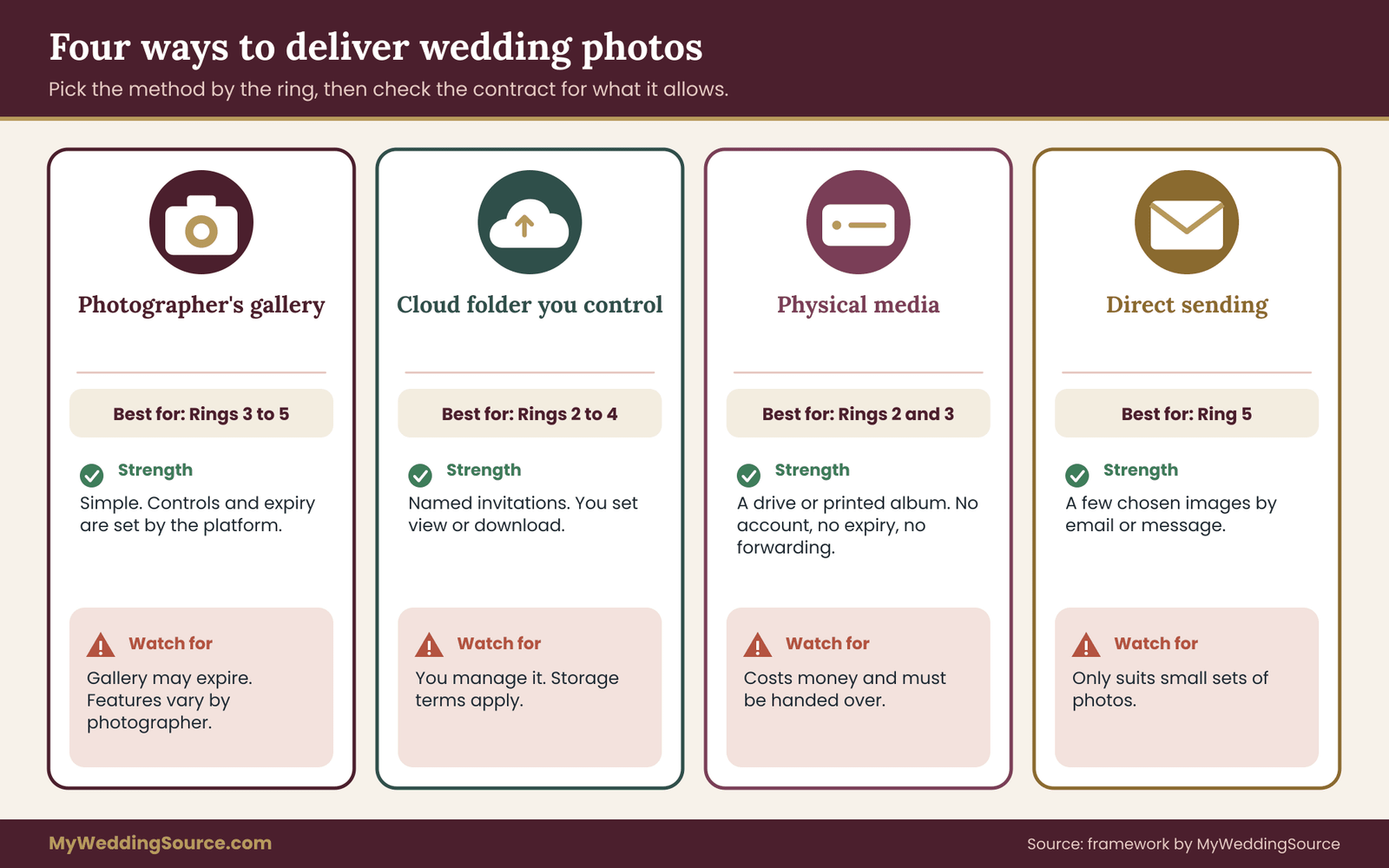
The photographer’s own gallery. Many photographers deliver through a hosted gallery with a link, sometimes with a password and sometimes with options for downloads. This is convenient and keeps the files on the photographer’s platform, but you are bound by what that platform allows and by how long the gallery stays up.
A cloud folder you control. Shared folders on common cloud services let you choose who can view or edit and whether people can download. You can add specific email addresses rather than relying on an open link, which gives much finer gallery access control. The cost is that you manage it, and that files live on a service with its own terms. Named invitations are the most precise way to control gallery access without buying special software.
Physical media. A USB drive or a set of prints is the most private way to deliver a full set. It cannot be forwarded with a click, it does not expire, and it does not depend on any account. For grandparents who dislike apps, it is often the kindest option too. It is gallery access you can hand over in person, with no account and no expiry date.
Direct sending. Emailing or messaging a few chosen images. This is the right level for ring five. The images are small, the recipients are few, and no gallery is involved.
Matching methods to rings
Ring one and ring two receive the full-resolution set, and the most sensible path is a hard drive or a private cloud folder shared to named accounts. Because ring two is about safekeeping, a drive handed over in person is a good choice. It is a copy that does not depend on anyone’s internet connection.
Ring three works well with a private gallery or a shared folder with web-size downloads on. If the photographer’s platform lets you set downloads per album, create one album with web-size downloads for the family. For the twenty or thirty favorites at full size, a short cloud folder or a USB drive does the job.
Ring four fits a separate curated gallery with an expiry date, or a shared folder limited to a selection. The key is that it is a different link from ring three’s. If one link serves two rings, you cannot change one without changing the other. Sharing one link across two rings makes it impossible to change one ring’s gallery access alone.
Ring five fits direct sending or a very small highlights link. A few images attached to an email, or a short link, is plenty for friends who only want a keepsake.
Link access versus named gallery access
There is one distinction worth understanding because it changes everything about control. An open link works for anyone who has the address. Named gallery access requires the viewer to sign in with a specific email or account that you have approved. Named gallery access ties each viewer to an approved email, while open links depend on the address staying private.
Open links are easier. They need no accounts and suit older relatives. Named gallery access is safer. It makes forwarding pointless, because a forwarded link will not open for someone who is not on the list, and it gives you a record of who has been invited. For ring two and ring three, named gallery access is usually worth the small extra effort. For rings four and five, an open link with an expiry date is usually enough. For those groups, open-link gallery access with an expiry date is usually the sensible balance.
If a platform offers a password on top of an open link, that is a middle path. It takes effort for a person to forward the link and the password together, though it does not stop a determined person. Treat it as a speed bump, not a lock. Treat a password as a speed bump on gallery access, never as a lock.
Do not make relatives download an app
A small, practical point: whichever method you choose, test it with the least technical person in the ring. If a grandparent cannot open the link on their phone, they will call you, and you will end up emailing the photos anyway. If a method requires an account, consider offering a printed set or a drive instead. Good gallery access is access people can actually use. Good gallery access is access people can actually use, and the least technical recipient is your best test.
Curate the albums before you share anything
The best protection for a private gallery is a gallery that only contains what you are comfortable sharing. This step is the one most couples skip, and it makes everything else easier. A smaller, deliberate album is also more enjoyable for the people who receive it. Curating first keeps gallery access simple, because you are only ever sharing what you already approved.
Start by going through the full set yourselves, before anyone else sees it. Mark images in three groups: keep for everyone, keep for the inner rings, and keep private. The third group is often small, but it matters. It may include photos where someone looks unwell, an image of a guest who asked not to be shown, a candid taken during a hard family moment, or a shot you simply do not want circulated.
The everyone set. Ceremony moments, formal portraits, group photos, details like the cake and flowers, and the happiest dance floor images. This set is what you would be glad for any guest to have. Ring four and ring five receive a selection from it.
The inner set. The rest of the gallery: the getting-ready photos, the quiet candids, the family portraits at full size. Rings two and three receive this in addition to the everyone set.
The private set. Anything you want to keep for yourselves. It stays in ring one only, in a folder that is never shared.
How many images belong in each album
There is no fixed number, but proportion helps. A complete wedding gallery might hold several hundred to a couple of thousand images. A curated ring-four album that holds a few dozen to a hundred or so is easier to enjoy. A ring-five highlights set of ten to twenty images is a gift rather than a task. When an album is too large, people stop looking; when it is too small, they feel shortchanged. Aim for the amount a person would actually scroll through in one sitting.
A practical way to build the curated album is to select by person. For each ring-four guest, there should be a handful of images in which they appear. For a large wedding you will not do this one by one, but you can build by group: the aunts and uncles on your side, the college friends, the cousins. A guest who finds themselves in the album feels included; one who sees only strangers loses interest.
Mind the faces and the background
As you curate, look at the backgrounds as well as the subjects. Name tags, place cards, phone screens, license plates, house numbers on a getting-ready location, and children in the background are all details that can matter once an image is posted. For most photos none of this is a concern. For a few, a quick crop or a decision to leave the image out is easier than a conversation later.
If you want to understand how the photographers and guests think about photographs taken at the venue, the wedding family photo list guide covers the portrait shots themselves, which are the ones relatives most often request.
Handle permissions in practice: view, download, share, order
This section turns the rings into settings. The exact names differ between platforms, so use the concepts and look for the closest control. When you cannot find a setting, ask the photographer or the service’s help pages instead of guessing. The goal is for each ring to end up with gallery access that matches its role and nothing broader.
Viewing. Almost always on. The question is whether the link is open, password-protected or tied to named accounts. Choose by ring as described above.
Downloading. Look for options labeled by size, such as web, standard or high resolution, and for settings that apply to a whole gallery or to individual photos. Enable the smallest size that serves the ring. For ring three, web-size is usually enough, with a separate delivery for chosen full-size files.
Sharing. Some platforms let viewers share the gallery by email or social buttons. If you can turn those buttons off, do so for rings three, four and five. Remember that turning off a button does not stop a person from sending the link by hand, so it is a signal of intent more than a barrier.
Favoriting. A favorites feature lets a viewer build a short list. It can help you collect which photos a parent wants printed. It also reveals which images someone loved, which can be a pleasant surprise. For people who might choose a lot, set expectations about how many you can supply.
Ordering. If a store is attached, decide whether relatives may order prints and who pays. Some couples turn the store off for everyone but ring three, and some leave it on for all and let relatives pay. Whichever you pick, say so in the message that carries the link so nobody is confused.
Write the settings down
Create a simple list with one line per ring: who is in it, which link or folder they received, which size of download is on, when the link expires, and when you sent it. A shared note works. You will refer to it when someone says they lost the link, when the expiry date approaches, and when you decide to close the galleries. The list is also what makes it possible to change gallery access later, because you will know who to tell. Treat this list as the record of who holds which level of gallery access.
Set stricter gallery access for children, private guests and sensitive images
The rings handle most people. A few situations need extra care, because the people in the photographs are not the people receiving them. Photos of private guests and minors raise the stakes, and a general rule of thumb is that consent depends on context: what a person agreed to when the photo was taken does not automatically cover wide distribution afterward. Gallery access for these groups should be decided one photo at a time, not by ring alone.
Children. Parents often have firm preferences about where their children’s images appear and who holds them. A parent who was relaxed about a photographer taking pictures at the reception may not be relaxed about a cousin’s public social account. If you know a family has strict rules, ask before including their children in anything beyond ring two or three. The U.S. Federal Trade Commission publishes guidance on children’s privacy online, which is useful background for why careful families are cautious.
Guests who asked not to be photographed. Some guests, for safety, privacy or personal reasons, ask to stay out of images. If you promised that, honor it in every ring. Check the full gallery for them before curating, and remove or crop the images, or keep them in the private set.
Guests in sensitive moments. A relative crying at the ceremony, a guest who had too much to drink, a person in a wheelchair being helped, or an elderly relative caught in an unflattering moment. These may be tender to you and painful to them. When in doubt, leave the image out of the wider rings.
Vendors and staff. Photos may include caterers, bartenders and venue staff. They are generally incidental, but you would not want to make their faces the focus of widely shared images without a reason.
Former partners, estranged relatives and family conflicts. If someone in the photos is estranged from part of the family, think about who will see the images and what they might do with them. This is a case for the smaller rings and the curated album. Those images deserve narrower gallery access than the rest of the gallery.
A simple rule for sensitive photos
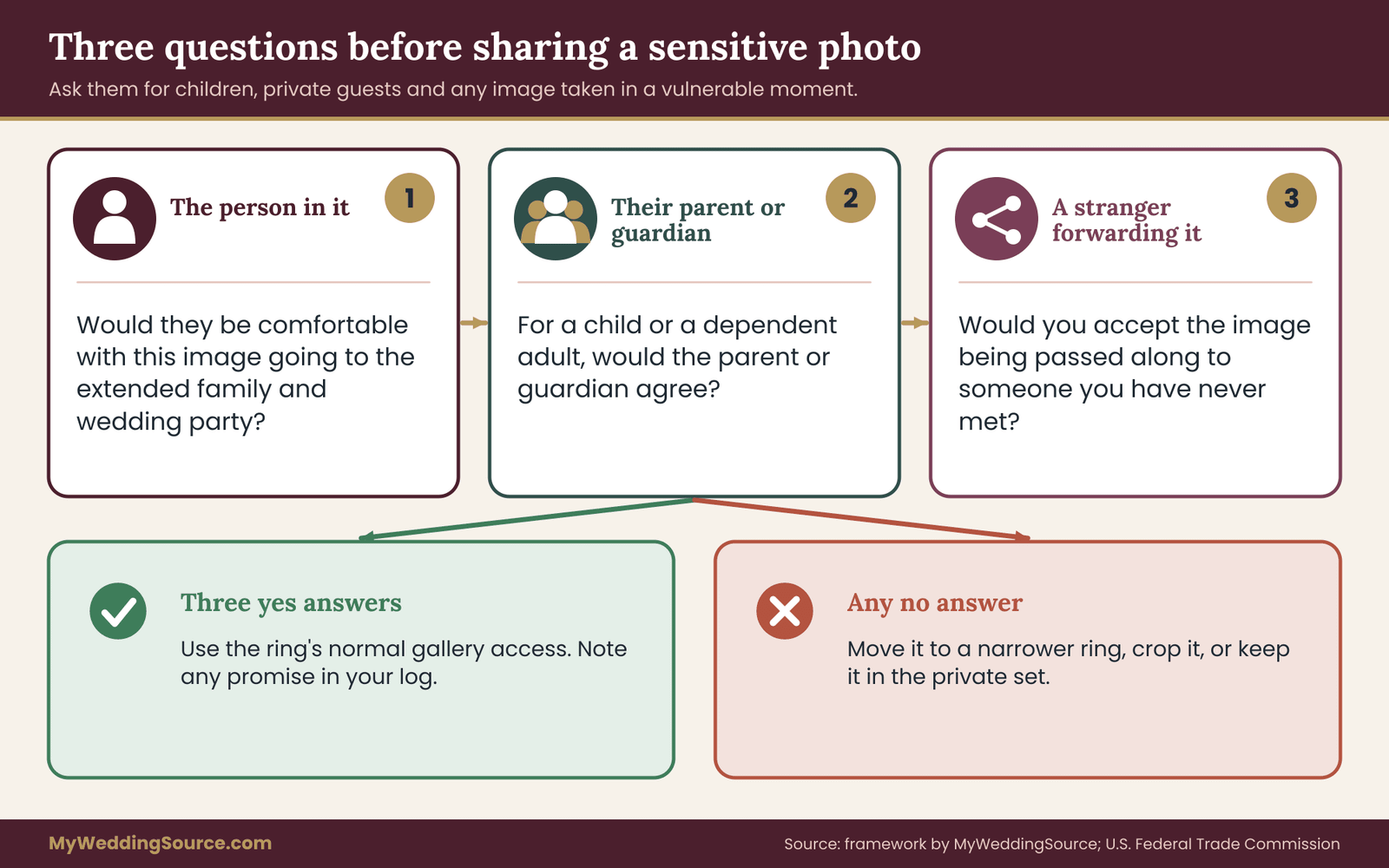
For each photograph that falls into one of these groups, ask three questions. Would the person in it be comfortable with this image going to ring four? Would their parent or guardian be comfortable? Would I be comfortable if it were forwarded to someone I do not know? If the answer to any is no, the image belongs in a narrower ring or in the private set. This takes a few minutes per hundred images when you move quickly, and it removes the worst risks. The answers tell you how much gallery access that image should get.
Asking before you share
When you are unsure, ask. A short message works: “We are putting together a family album and your daughter appears in a few photos. Would you like her in the version your cousins will see, or only in the version for close family?” Most parents answer in a minute, and the question itself is received as thoughtful. The answer becomes part of your list of settings. Write the answer into your log, because it sets the limit of gallery access for that child or guest.
For the related question of what guests post themselves, the guest boundaries and image use guide and the wedding etiquette guide offer the courtesy-side view. The key point is that the same attention you give to who can enter your wedding applies to who can enter your gallery.
Make links safer: passwords, expiry and shutting them off
The mechanics of a link matter as much as the policy. A well-chosen ring paired with a careless link is only as private as the link. These steps are small and work on nearly every platform. Strong gallery access policy still depends on careful link handling.
Use a unique link per ring. If rings three and four share one link, you cannot revoke one without breaking the other. Separate links also let you see which group an unexpected visitor came from, if the platform shows any statistics.
Set an expiry date. An expiry date limits the long tail of access. Choose a date that gives people a fair chance to look and download, perhaps a few weeks for outer rings and longer for inner ones. Tell recipients the date in the message that carries the link, and repeat it a week beforehand.
Add a password where it is easy. A password adds a step to forwarding. Send it in a separate message, not in the same text as the link. Use a password you do not use elsewhere, because it will be shared. Federal guidance on password hygiene, such as material from the Cybersecurity and Infrastructure Security Agency, explains why reusing passwords is risky.
Prefer named gallery access for the inner rings. Inviting specific email addresses means the link will not work for anyone else. For ring two this is worth doing, since the files are full-resolution. Named gallery access also leaves a record of who was invited.
Protect your own account. The account that holds the master gallery is the most valuable one. Turn on two-step sign-in where the platform offers it, and use a long, unique password. A strong plan for relatives means little if the owner’s account can be taken over.
Know how to turn it off. Before you send a link, find where it can be disabled. If the platform does not make this easy, treat that link as permanent and share less through it.
What to do when a link spreads anyway
Sooner or later a link ends up in the wrong hands, usually through a kind relative who forwards it to be helpful. Do not panic, and do not blame. First, check whether the platform shows a visitor count or list; second, disable that link and issue a new one to the people who still need it; third, send a short, friendly message explaining that you refreshed the link and why. Calm, quick action keeps a leaked link from becoming a lasting gallery access problem.
If an image has been posted publicly, start with a polite request to the person who posted it. Most people take a post down when asked kindly. If the image appeared on a platform, most major platforms have a process for reporting privacy concerns. If the image is of a minor, or the situation involves harassment, the platform’s reporting tools and, where appropriate, local authorities are the next step.
Expiry is a feature, not a punishment
Some couples worry that an expiry date feels stingy. In practice it protects everyone. It signals that the gallery is a gift for a limited period, it ends the long tail of forwarded links, and it nudges busy relatives to download the images they want. Pair every expiry with an offer: “If you miss the date, ask me and I will send the pictures you need.” That keeps the door open without leaving the whole gallery open forever. A time limit is part of responsible gallery access, not a sign of distrust.
Think about backups and what the photographer keeps
Everything above is about sharing. The other half of responsible gallery access is making sure you do not lose the originals while you are busy sharing them. A private gallery is not a backup. It is a window onto files that sit on someone else’s server and may disappear on a schedule. Backups and gallery access belong together, because the same master files feed both.
Download the full-resolution set as soon as it arrives, and store it in more than one place. The Library of Congress publishes personal digital archiving guidance that recommends keeping multiple copies in different locations, and the same idea appears in most preservation advice. The wedding records after the event guide covers a retention map and a calendar for exactly this, so this section keeps to the points that affect sharing.
Master first, then share. Always build the family albums from your own downloaded master, not by pointing relatives at the photographer’s gallery as the only copy. If the gallery expires, your plan still works.
Keep an untouched original folder. When you crop, remove or edit images for a curated album, do it on copies. The original set stays unchanged in ring one.
Label the folders by ring. Use names such as “ring three, web size” and “ring four, curated”. Plain labels prevent the classic mistake of sharing the wrong folder with the wrong people.
Confirm what the photographer retains. Ask how long the photographer keeps your files after delivery. Some keep them for a year or more, some for a shorter period. Do not treat that as your archive, but it is a useful safety net if a drive fails.
Re-delivery and late requests
A cousin will ask for the photos two years from now. If your gallery has expired and your master is safe, you can send what they want. If you rely on the photographer’s gallery alone, you may be asking for a paid re-delivery. This is the quiet advantage of building the family albums yourself: it keeps you able to answer a late request in an afternoon.
A worked example of gallery access: the Delgado and Whitfield families
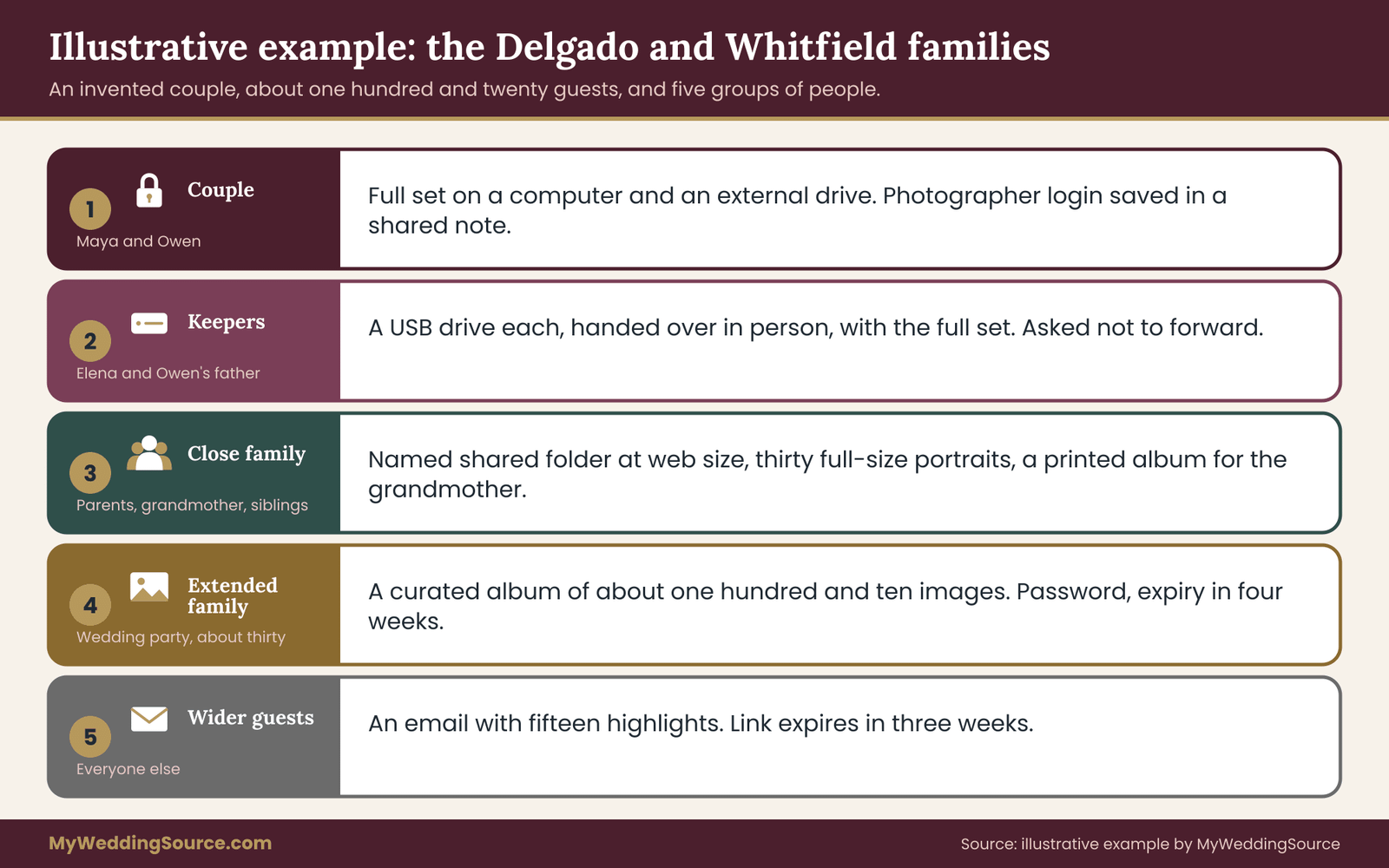
The following couple is invented, and the numbers are illustrative, not a benchmark. It shows how the rings, delivery methods and settings fit together on a real list of people. Maya Delgado and Owen Whitfield married with about one hundred and twenty guests. Their photographer delivered an online gallery of roughly nine hundred images, valid for a limited period, with options for album-level download sizes. Their story shows how gallery access works on a real guest list.
Maya and Owen sat down for two evenings. The first was for sorting people into rings. The second was for curating images and setting up links. By the end, every person had a ring and a clear level of gallery access.
Ring one. Maya and Owen. They downloaded the full-resolution set the day it arrived, onto a computer and an external drive, and kept the photographer’s login details in a shared note.
Ring two. Maya’s sister Elena and Owen’s father. Each received a USB drive in person with the full set, and a request not to forward the files. Elena also holds the paper marriage certificate copies, which is why she was chosen.
Ring three. Both sets of parents, Owen’s grandmother and Maya’s two siblings. They received a named-access shared folder with web-size downloads, and a drive with thirty full-size family portraits. Owen’s grandmother, who dislikes apps, received a printed album of forty images instead.
Ring four. Aunts, uncles, cousins and the wedding party, about thirty people. They received a curated album of one hundred and ten images through an open link with a password and an expiry date four weeks out.
Ring five. The remaining guests and a few relatives abroad. Each received an email with a short highlights link of fifteen images, expiring in three weeks.
The two judgment calls
Two decisions took thought. First, Owen’s niece, age six, appears in a number of images, and her parents had mentioned that they keep her photos off public accounts. Maya and Owen asked them directly. The parents were happy for the niece to appear in rings two and three, and asked that she be left out of rings four and five except in two group portraits. Maya and Owen removed her from the curated and highlights sets and listed the two exceptions.
Second, a candid of Maya’s uncle, who had been unwell at the reception and was leaning on a chair, was lovely to Maya because it showed him dancing anyway. Maya asked her uncle before including it anywhere. He said he liked it but preferred it stay with the family. It went into ring three and stayed out of the wider albums.
What the example teaches
Neither decision required a long argument. Each took a short message and a few minutes. The rings gave Maya and Owen a default, and the exceptions were small and recorded. When Owen’s mother asked whether she could post a wedding portrait on her social page, they had a clear answer: she could post the two group portraits that were already in the everyone set, with a note that the rest stayed in the family. The rings gave them a default level of gallery access, and the exceptions were small and written down.
The list also saved time later. When a cousin lost her link, Maya looked up the ring four link, reissued the password, and sent it in two minutes. When the highlights link expired, she knew exactly who had received it and who might ask for a longer option.
Notice what they did not do. They did not forward the photographer’s link to a group chat. They did not hand full-resolution files to thirty people. They did not refuse anyone a memory of the day. Everyone received something suited to their role, and the families stayed on good terms. Everyone received gallery access suited to their role, and the families stayed on good terms.
Scripts for saying yes, no and not yet
The hardest part of any gallery plan is the conversation. Most people are not asking for much, and a short, warm reply usually lands well. Use your own wording, but these templates show the tone: friendly, specific and unapologetic. These scripts keep the talk about gallery access short, warm and specific.
Announcing the plan to family. “The photos are in. We are sending them out in a few groups, so everyone gets something that suits them. Parents and grandparents will get the full set, and everyone else will get a link to a favorites album. Watch for your message this weekend.”
When someone asks for the full gallery and is in an outer ring. “We are keeping the full set with a few close family members, but we would love for you to have the favorites album. If there is a particular photo you want to print, tell us and we will send that one in full size.”
When someone asks to post photos publicly. “Thank you for asking. We would prefer that the full gallery not be posted. You are welcome to share the group photo from the album, and we would be glad if you tagged us. If you are not sure about a particular photo, ask us first.”
When a parent wants to forward the link. “We set the links up so that each group has its own, which lets us change one without disturbing the others. If someone you would like to include wants to see the photos, send us their name and we will add them to the right group.”
When someone is hurt about being in an outer ring. “We built the albums by what people asked for, not by how much we love them. If you would like more than the album, tell us what you have in mind and we will see what we can do.”
When a guest asks to be removed from photos. “Of course. We will go through the gallery and take you out of anything we share. Thank you for telling us, and tell us if there is anything you would rather we change.”
Keep the tone matter-of-fact
Resist the urge to over-explain or to apologize for having a plan. A plain statement of how the photos will be shared reads as organized, not controlling. Most relatives never think twice about it, and the few who push back usually accept a brief, friendly boundary. If the conversation escalates, you can pause it: “Let us get back to you after we have talked it through.” Time is a legitimate answer. Calm wording about gallery access reads as organized rather than controlling.
When family members disagree about who gets what
Occasionally the disagreement is not with you but between relatives. One parent wants the full set shared with the whole family, and the other does not. A sibling believes the wedding party should have equal access to the family. You do not have to settle these, and you should not try to settle them by compromise on privacy. The couple’s decision about their own photos is the deciding factor. Offer to explain the rings, thank people for their views, and keep the settings you chose.
If a parent has paid for part of the wedding, they may feel entitled to more control. A gentle, direct answer helps: the parent is welcome to full gallery access in ring three and to a printed album, and the couple controls onward distribution. Pair the boundary with something they can say yes to, so the conversation ends with a gift as well as a limit. Offer the parent generous gallery access inside ring three and keep onward sharing with the couple.
Gallery access when guests and relatives are far away
Distance changes the plan in a few ways. Relatives abroad, relatives with limited internet access and relatives who prefer paper all need a path that works for them.
Time zones and expiry dates. A link that expires on a Friday evening where you live may expire on a Saturday morning for someone overseas. Choose expiry dates with some slack and say the date plainly.
Bandwidth. Full galleries load slowly on weak connections. A web-size album or a small highlights set works better than a heavy gallery, and a prepared set of files by email may work better still.
Paper. An album or a small set of prints mailed to a grandparent is a lasting form of access. It requires no password, no app and no expiry. For older relatives, it is often the best gift.
Language and instructions. If a relative reads another language, a short note in their language explaining how to open the link and when it expires avoids a phone call at midnight. The same applies to the password message.
Review gallery access on a schedule, not in a panic
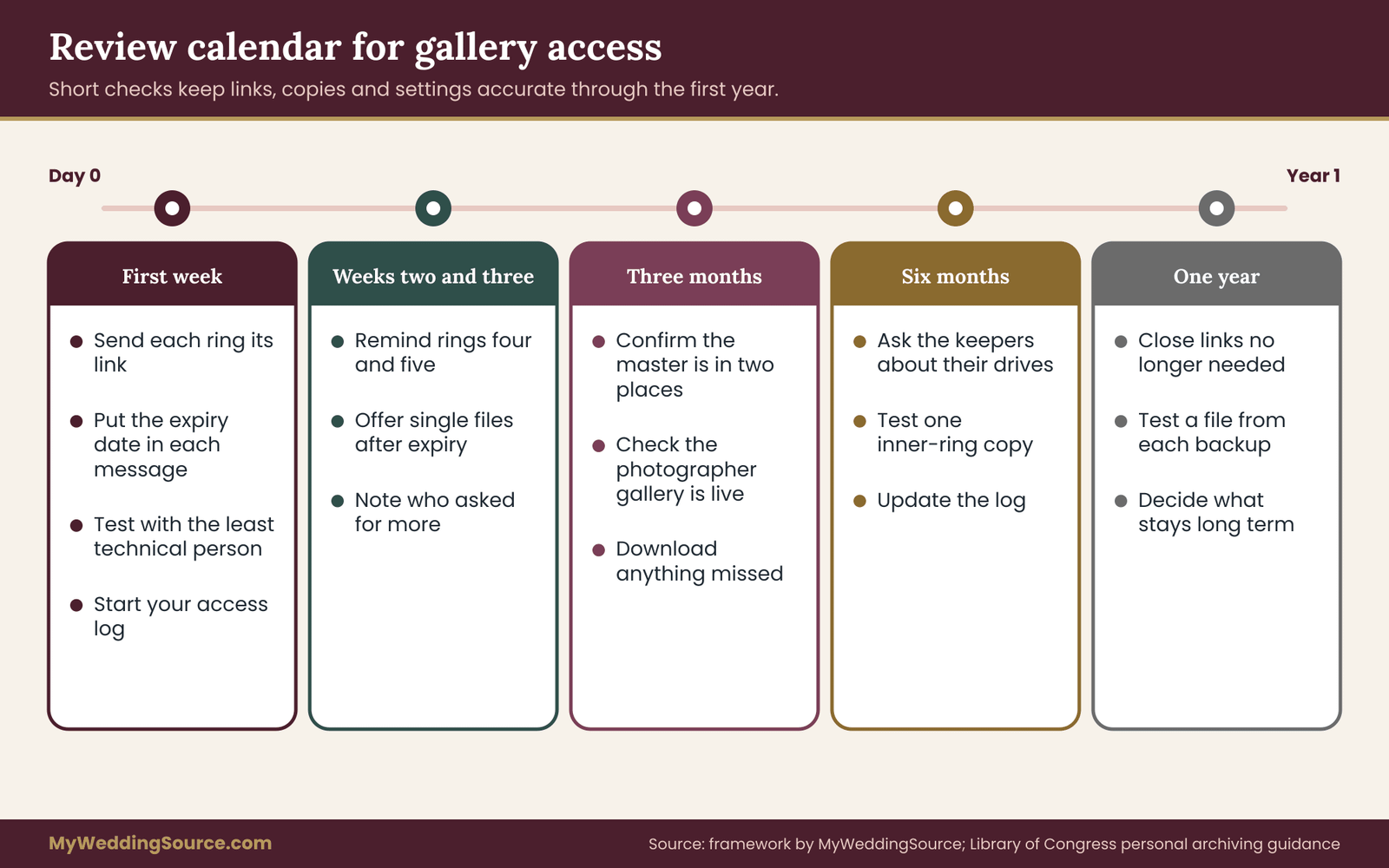
A sharing plan is not finished the day you send the links. People change, links expire and relatives lose emails. A short routine keeps your gallery access settings accurate, and it turns later requests into five-minute jobs. The routine below follows the first year, and it fits alongside the calendar in a broader records plan. A short routine keeps gallery access accurate and turns later requests into five-minute jobs.
The first week. Send the links, with the expiry date in each message. Record who received what, on which day, in your list. Check that the two least technical recipients can open their links.
The second and third weeks. Send a gentle reminder to ring four and ring five a few days before their links expire, and say what to do if they miss the date. Many people will download the images the day of the reminder, and that is the goal.
The first month. When the outer links expire, confirm that they are off and note it in your list. Review who asked for more, and decide whether any of those requests justify moving someone inward.
Three months. Confirm that your master files are in at least two places, and that the inner-ring copies still open. Check that the photographer’s gallery is still live, and download anything you have not yet saved. The broader records plan on this site suggests a similar checkpoint for the wider archive.
Six months. Review ring two. Ask your keepers whether their drive still works and whether they have moved it. A drive in a drawer is an easy thing to lose track of.
One year. Decide what stays long term. Close any link that is still open, unless there is a reason to keep it. Test one file from each backup copy. Update the list of who holds what, and keep it with your other wedding records.
Shutting a gallery down cleanly
When it is time to close a link, tell the people who have it. A short note saves confusion: “The photo link will stop working on this date. If you want anything else, tell us this week.” Then disable the link, and mark the closure in your list. If a relative asks later, you can send individual files from your master, and that is a better experience than a broken link. Closing a link is the end of that group’s gallery access, so say so plainly before you do it.
Some couples keep one very small, unlisted highlights link open for a longer period, as a place to point late askers. That can be a reasonable compromise, provided the highlights set contains nothing you would mind seeing forwarded.
When the photographer’s platform changes
Online services alter features, pricing and storage rules. A setting you relied on may move or vanish, and a gallery may be retired. If you hear from your photographer that the platform is changing, download your files at once and check the new terms.
This is one more reason to keep a master copy in ring one and to build family albums from it. The wedding vendor due diligence checklist is aimed at choosing vendors, but its questions about what happens to your data if the vendor closes are worth asking of a photographer too. A platform change can alter your gallery access settings without warning.
Mistakes and edge cases that catch careful couples
Even a thoughtful plan runs into the following situations. Each has a plain answer.
Mistake: sharing the photographer’s link first and planning second. The moment the link is out, you have lost the chance to set rings. If you have already sent it, do not worry. Create the new links, send them, and disable the old one with a short explanation. Most relatives will not mind.
Mistake: using one folder for every ring and hoping people behave. Folder-level trust is fragile. If different groups need different things, separate folders are cheap and a single leak affects only one group.
Mistake: forgetting that a favorite feature is not private. In some galleries favorites can be visible to others who use the same link. Check before you invite a group to build a shared list, especially if the images are sensitive.
Mistake: sending the password with the link. If both travel together, the password adds nothing. Send them separately and keep the password out of the subject line.
Mistake: promising full access to the wedding party. Attendants often hope for everything. It is more realistic, and more generous in the end, to give them a curated album plus the images they appear in at full size.
Mistake: leaving an old link open forever. A forgotten link is one of the quietest risks. The yearly review exists to catch it. The yearly check on gallery access exists to catch exactly this.
Edge case: two households, divorced parents
If your parents are divorced, or your families live in separate households, avoid making one parent the distributor for the other side. Give each household its own link or folder, and let each set of parents decide whom to add in ring three. State clearly that onward sharing stays with the couple. If tension exists, the curated ring-four album is a safe, neutral thing to share with everyone. Separate links keep gallery access for each household independent.
Edge case: guest-contributed photos
Guests took photos too. Those are not in your photographer’s gallery, and they raise their own questions about who owns and shares them. Treat guest photos as a separate pool: ask the contributors whether you may include a selection in family albums, and credit them. If you set up a shared upload folder, decide in advance who can see it and whether uploaders can see each other’s pictures. The wedding guest list guide helps you keep one accurate list of who attended, which makes sending a thank-you with a photo link straightforward.
Edge case: a guest who objects after the fact
Occasionally a guest sees a photo of themselves and asks you to remove it. Respond quickly and kindly. Remove it from every ring you control, tell the people you shared it with that you have been asked to take it down, and ask them to delete their copies. You cannot force that, but most people comply. Keep a note of the request so the image is not accidentally restored from the master later.
Edge case: you and your partner disagree
One of you may want a very open sharing policy, and the other a very closed one. Resolve it before sending links, not after. A useful compromise is to agree on the ring structure and then let each person decide ring placement for their own relatives, with the private set decided jointly. That keeps the framework consistent while respecting each person’s family.
Edge case: your photographer wants to use the photos
Photographers often ask to feature images in a portfolio or on social channels. If you agreed, that is a form of gallery access you have granted to the public. You can ask for specific images to be excluded, such as those involving children or private moments, and you can ask for an end date. Put any exclusions in writing and keep the reply with your contract. A portfolio feature is a form of public gallery access, so decide on exclusions before you agree.
Edge case: a relative wants prints at a store
Most families do this with web-size files and are happy. If a relative wants a large print, send the single image at full size. Confirm that the contract’s print release applies to that use, and ask the relative to use a reputable print service rather than a free upload site that may keep rights to the image. Terms of service on photo services vary, so a quick look at the service’s terms is worthwhile before uploading a family portrait.
Time, cost and record-keeping for gallery access
Gallery access sounds like a technical topic, and it is mostly an organizing one. The honest question is how much effort each level costs, so you can match your effort to what your family actually needs. This section gives decision rules rather than prices, since platform fees and photographer policies vary. Plan the gallery access system in proportion to your family and the sensitivity of the images.
The effort ladder
Lowest effort: one gallery, one link. About fifteen minutes. It gives the least control and the most exposure. It suits a very small wedding where everyone knows everyone and there is nothing sensitive in the photos.
Moderate effort: two links. About an hour. One link for the inner family with downloads on, and one curated link for everyone else with an expiry date. This is the best return for most couples, because it removes the largest risks, the full set in too many hands and open-ended forwarding, with very little work. This level of gallery access control is the best return for most couples.
Higher effort: the full five rings. Two evenings, as in the worked example. It makes sense when you have a large or complicated family, minors whose parents have strict rules, or images you want to keep private. It also makes sense if you like the feeling of a finished system.
If you are unsure, begin with the two-link version and add rings only when a real need appears, such as a request you cannot meet or a guest who asks to be left out. The rings are a toolkit, not an obligation.
Where money can enter
Several items can carry costs, and none is required. A photographer may charge to extend an expired gallery or to re-deliver files. A cloud service may charge for storage above a free allowance. Printed albums, USB drives and prints cost money by the piece. Check the photographer’s price list and the cloud service’s terms before promising anything, and never assume a feature is free. If a relative offers to pay for prints, agree on who orders and which files are used before any money moves.
A useful rule of thumb is to spend on the things that cannot be recovered. A second drive and a safe place for it cost little compared with the loss of the only copy of your wedding. Extra gallery time is usually cheaper than re-delivery, so ask the price of an extension before the gallery expires, not after.
What to record in your access log
Your log is the document that turns a plan into a system. It can be a note, a spreadsheet or a page in a binder. Keep it simple, with one entry per recipient or per group.
Who. The name of the person or the group, and which ring they belong to.
What. The link, folder, drive or printed item they received. Note the size of downloads and whether the link is open, password-protected or tied to named accounts.
When. The date you sent it, and the date it expires.
Rules. Any special agreement, such as a family that asked for their children to be left out of the wider albums, or a guest who asked to be removed from all images.
Follow-up. Whether you sent a reminder, whether the link was shut off, and any later requests.
Do not store passwords in the same note as the links they protect, and do not put the log in a place that many people can open. The log itself is private information about who holds your photos. The log itself records private gallery access decisions and deserves the same care as the photos.
Keep the log with your other records
The access log belongs with the rest of your wedding paperwork, in the same folder as the photographer’s contract and delivery email. Those documents show what you were permitted to do, and the log shows what you did. If a dispute or a question arises about a photo, the pair of them answer it quickly. For the contract side, keep the signed agreement and every written reply from the photographer. A good log makes later questions about gallery access easy to answer.
Video and albums follow the same rings
Everything here applies to wedding video, slideshows and printed albums. A highlight film is a natural ring-four and ring-five item: short, shareable and less sensitive than a full ceremony recording. The full-length video, like the full photo set, belongs in rings one to three. When you have both, set the rules for each and keep the log in one place, so you do not have a careful photo plan and an open video link. Apply the same level of gallery access to video that you apply to photos.
Your next steps
Work through these in order. Most couples finish them in two evenings. Most couples find that these eight steps settle gallery access for the whole family.
- Read the contract and the delivery email. Note the license, the file sizes, the gallery duration and any sharing features. Write to the photographer with any open questions.
- Download the full-resolution set. Store it in two places the week it arrives, and plan a third copy in a different location.
- Decide your rings. Put every family member and close friend into a ring, then adjust for exceptions such as children or guests who asked for privacy.
- Curate the albums. Mark every image as everyone, inner or private, and build the curated and highlights sets from copies.
- Choose the delivery method for each ring. Use named gallery access for the inner rings and expiring links for the outer ones. Test with your least technical recipient.
- Send the links with a clear message. Include the expiry date, what the link contains, and what to do if they miss the date.
- Start your log. Record who, what, when, the rules and the follow-up.
- Schedule your reviews. Put reminders on the calendar for expiry dates, three months, six months and one year.
If you also want a picture of the portraits your relatives will ask about, plan them in advance, and revisit the guest-boundary questions that come before any of this.
FAQ
What is the simplest way to give family wedding photos without sharing everything?
Make two links instead of one. Give close family a private gallery or shared folder with the complete set at web size, and give everyone else a smaller curated album with an expiry date. Keep the full-resolution files yourselves. This removes the biggest risks, wide distribution of your best files and open-ended forwarding, with only about an hour of extra work. This approach keeps gallery access generous where it matters and limited everywhere else.
Can I limit what each relative can do in an online gallery?
Often yes, but it depends on the platform. Many galleries let you set download sizes, add a password, set an expiry date or limit sharing. Some offer only one link with a single set of rules. Ask your photographer which controls exist before you promise anything, and if the controls are limited, deliver from your own downloaded copy instead. Ask the photographer exactly which gallery access controls exist before you promise anything.
Should I give relatives full-resolution files?
Usually only a few people need them. Full-size files are useful for large prints and editing, and they are also the files most easily reposted. A sensible default is full-resolution for you, your partner and one or two keepers, web-size for close family, and single full-size files on request for specific prints.
How do I protect photos of children in a family gallery?
Ask the parents what they prefer before you include their children in wider albums. Many families are comfortable with close relatives holding the images and not with public posting. Keep children in the inner rings by default, use named gallery access where possible, and record each family’s wishes in your access log so you do not forget them later.
Does my photographer allow me to share the gallery with family?
Most photographers expect personal sharing with family, and many contracts grant a personal-use license. Terms vary, so read your contract and delivery email, and ask in writing if anything is unclear. Copyright belongs to the creator unless an agreement says otherwise, and the U.S. Copyright Office explains the basics. Keep the photographer’s answer with your records.
What should I do if someone posts a photo I did not want shared?
Ask the person kindly to take it down, and explain which photo and why. Most people comply right away. If not, use the platform’s privacy reporting tools. Then review your links, close any that spread too widely, and issue a new one to the people who still need access. For images of minors or harassment, report promptly.
How long should a family gallery link stay active?
Long enough for people to look and download, short enough to limit long-term exposure. Many couples choose a few weeks for outer rings and a longer window for inner ones. Always state the date in the message with the link, send a reminder a few days before, and offer to send individual files afterward on request. Pair every expiry date with an offer to send single files, so gallery access ends gracefully.
Is a password enough to keep a gallery private?
A password helps, but it is a speed bump rather than a lock, because people can share a link and password together. It is stronger when each ring has its own link, the password goes in a separate message, and inner rings use named gallery access tied to specific email addresses. Protect your own account with a strong, unique password and two-step sign-in. Strong gallery access also depends on protecting the owner’s own account.
Sources
Check each agency or vendor page for the current rules and terms. The links below point to the issuing organizations, not to summaries.
- U.S. Copyright Office for plain-language information on copyright and licensing of photographs.
- Federal Trade Commission for guidance on children’s privacy and online safety.
- Consumer advice from the FTC for practical consumer guidance on privacy and online accounts.
- Cybersecurity and Infrastructure Security Agency for guidance on passwords, two-step sign-in and securing accounts.
- National Institute of Standards and Technology for password and digital identity guidance.
- Library of Congress, Preservation for personal digital archiving guidance on keeping multiple copies.
- USA.gov for starting points to federal consumer and privacy resources.
- Google Help Center for current sharing and permission settings in Google services.
- Apple Support for current sharing and permission settings in Apple services.