

A wedding menu reprint is the moment a printed dinner menu has to change after it was already approved, usually because a guest’s dietary needs changed or the caterer swapped a dish. This guide gives you a version log with firm cutoffs, so every late change gets caught, proofed and matched to what the kitchen actually serves.
Treat every printed menu as a numbered version, not a file. Keep one log with a version number, what changed, who approved it and which copies exist. Set three cutoffs: the printer cutoff, the kitchen lock and a day-of patch line. Before each cutoff, choose the lightest fix that is accurate: announce, patch with a sticker or card, or run a full menu reprint. Never let a printed menu be the only place a dietary change lives, because the caterer’s written order is the source of truth.
Most couples send the menu to the printer feeling finished. Then a guest announces a tree nut allergy, the caterer replaces the fish because a supplier fell through, or an aunt turns out to be vegetarian after all. Suddenly there are two truths: the menu on the table cards and the menu in the kitchen. A menu reprint fixes one of them. A version log makes sure it is the right one, and that nobody ends up holding a stale copy.
This article is about the late stage only, and it pairs with the broader guide to wedding signage as a system, which covers how menus, signs and directions work together. If you are still choosing dishes, the guide to building a wedding menu that works across ages and dietary preferences is the better starting point. Here we assume the menu exists, the printing is done or nearly done, and something has changed. The job is to change it once, correctly, with a record of what happened.
A note on scope. This is general information, not legal, tax or financial advice, and it is not a substitute for the caterer’s own food safety and allergen procedures. Where a rule or fee matters, the article points you to the vendor or the official agency, so you can confirm the current terms yourself.
People hear “menu reprint” and picture a single card going back to the printer. In practice a wedding menu appears in several places, and each place has its own print job, its own deadline and its own way of going stale. A dietary change touches some of them and not others.
Table menus or menu cards. The one most people mean. One per guest or one per table, often printed on heavier stock with a finish that takes days to produce.
Buffet and station signs. Small signs naming each dish, sometimes with allergen or diet symbols. These are the most dangerous to leave stale, because guests make choices standing in front of them.
Bar and drink signs. A cocktail description may list ingredients that matter to a guest with an allergy. The guide to wedding bar service planning covers what the bar offers and how it is described; this guide covers the revision side.
Place cards and escort cards. Many couples print a meal choice, a symbol or a color dot on each card. A changed meal for one guest means a changed card for one guest.
Invitation inserts and the wedding website. Early menu choices sometimes appear here. These are usually not reprinted, but they can contradict the final menu, which matters more than people expect.
Server and kitchen sheets. Not decorative at all. These are the lists the catering staff actually work from, and they are the real target of every change.

Seeing the menu as seven surfaces changes how you respond to a late change. A new vegan guest might require one place card and one line on the server sheet, and no menu reprint at all. A swapped main course might require every table menu and every buffet sign. The first step is always to find which surfaces are affected before you phone anyone.
Why version control belongs in a wedding
Version control sounds like software, but the idea is older than software: every copy of a document says which edition it is, and there is one list of editions. Print shops, hospitals and construction crews work this way because late changes are normal and stale copies cause harm.
Weddings have the same problem on a smaller scale. A menu goes through the couple, a parent, the caterer, the planner, the printer and sometimes a calligrapher. Each of them may hold a different file, and each file may be named “final”. Without a log, “final” is a mood, not a fact.
What the log is not
The log is not a design document and not a replacement for the catering contract. It does not decide what food is served. It records which printed text describes the food, which text is current, and which physical copies exist. The contract and the caterer’s banquet event order decide the food. The log keeps the paper honest about them.
A printed menu is a promise made in ink. Guests read it, plan around it and, for people with allergies or religious and ethical restrictions, trust it. When the food changes and the paper does not, the paper becomes a false statement. When the paper changes and the kitchen does not, the same thing happens in reverse.
Late dietary changes arrive in a handful of predictable ways, and it helps to name them, because each one has a different fix.
A guest adds a new restriction after RSVPs. A guest was fine in March and has a new diagnosis in September, or a guest simply never mentioned a celiac diagnosis until the week of the wedding. The menu may not need to change at all; the meal assignment does. The risk is that someone reaches for a menu reprint when the real fix is a line on the kitchen list and a conversation with the guest.
The caterer changes an ingredient or a dish. A supplier runs out, a seasonal item is unavailable, or the chef recommends a better option. This is the classic trigger for a real menu reprint, because the printed description is now wrong for everyone.
The couple changes the menu. A parent persuades them to add a dish, or a dietary count rises so far that a vegetarian main course deserves its own line. This is a deliberate edit and the one you control best, so it should be the first to hit a cutoff, not the last.
A label or allergen detail is corrected. The menu said “gluten-free” about a dish that contains soy sauce, or described a sauce as dairy-free without checking. Corrections like this are urgent in a different way, because the printed word is potentially unsafe, not merely outdated.
Accuracy is the whole point
The final category deserves a plain statement. A menu that lists allergens or diet labels is making a claim guests may rely on. The U.S. Food and Drug Administration describes the major food allergens that packaged foods must declare, and the Centers for Disease Control and Prevention explains that food allergy reactions can be serious. Those pages are about food labeling and health in general, not about wedding menus, but they show why an inaccurate allergen line is not a typo-level problem.
Your caterer is responsible for allergen handling in the kitchen. Your printed menu should never be the only place allergen information lives, and it should never claim more than the caterer has confirmed in writing. If the caterer will not confirm a label, leave the label off the print and say so on the menu: “Please tell your server about any allergy.”
The cost of getting it wrong in either direction
There are two ways to fail. One is to under-react: no menu reprint when one was needed: the menu goes out stale, a guest relies on it, and the kitchen serves something else. The other is to over-react: a full menu reprint when a sticker would do, which spends money and a printer’s rush window on a change that a sticker, a card or an announcement would have handled equally well.
The framework in the next sections is built to avoid both. It gives you a log that shows what has changed, cutoffs that tell you which fix is still available, and a ladder that picks the lightest accurate fix.
What “menu reprint” means in this guide
In this guide, a menu reprint means any new print run of menu text that replaces copies already approved, whether that is all table menus, a handful of buffet signs or a single place card. The size of the job varies, but the questions do not. Which version is current, who confirmed it, and which copies are still out there? A small menu reprint deserves the same log row as a large one, because a small menu reprint is exactly the kind that gets forgotten and leaves one stale card on one table.
A few honest limits
No log can make a late change free. Rush printing usually costs more and some print finishes cannot be hurried at any price. Venues and caterers have their own deadlines for guest counts and meal selections, and those do not move because a card was misprinted. What a log does is make each decision deliberate, early and documented, so the late change stops being a panic and becomes a small, ordinary task.
Keep your first reaction simple. When a change comes in, do three things before you contact the printer: write it in the log, confirm it with the caterer in writing, and decide which of the seven surfaces it touches. Only then decide whether it needs a menu reprint.
The log is a single page, kept in a shared place both partners and the planner can open. A shared document or a spreadsheet works. A notebook works if only one person ever writes in it. What matters is that there is exactly one log and that it is updated before, not after, anyone calls the printer.
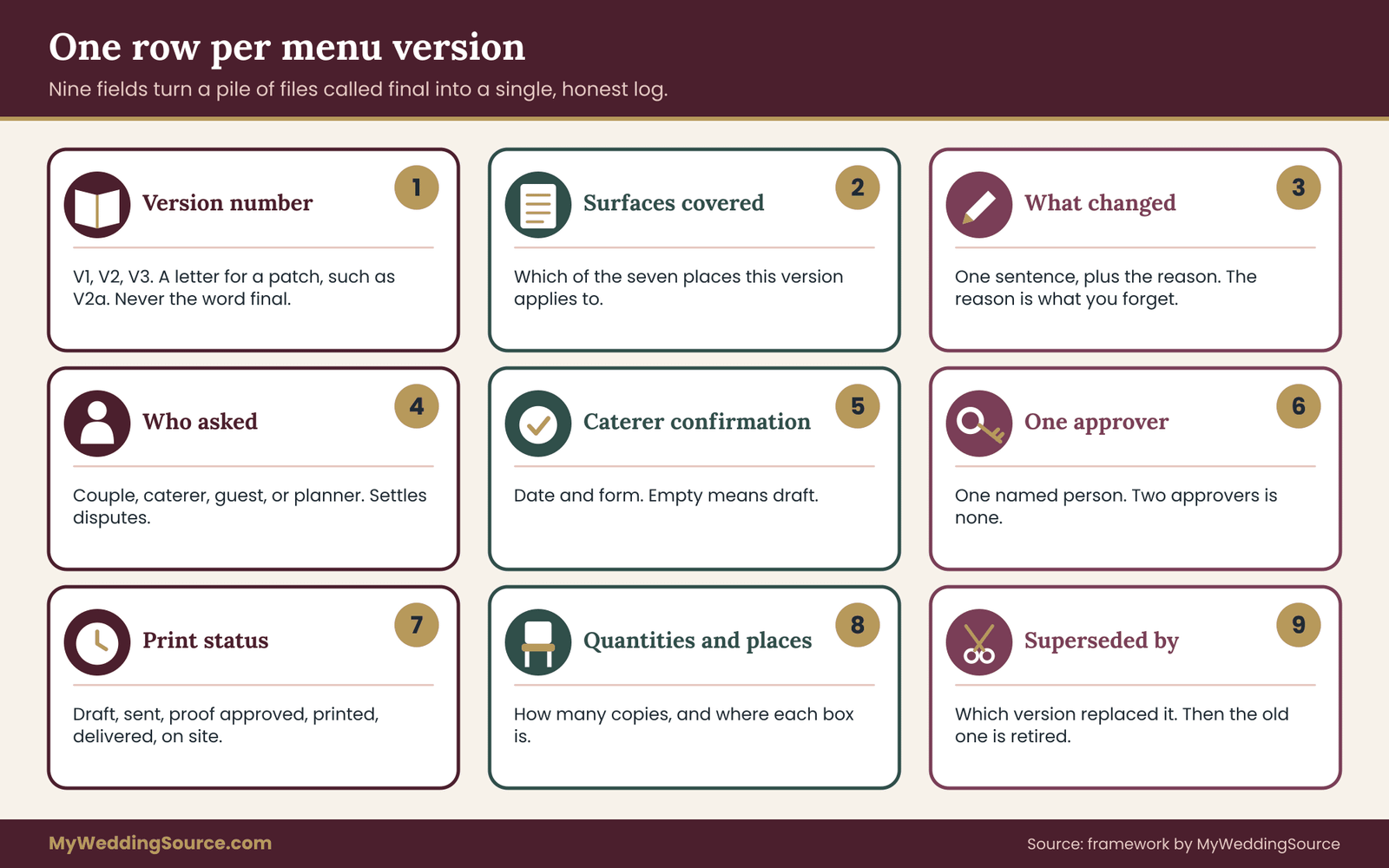
Each entry is a row, and each row describes one version of the menu. Here are the fields, in the order you should fill them in.
Version number. Use plain, boring numbering: V1, V2, V3. Add a letter for partial fixes, such as V2a for a patch sticker applied to V2. Do not use “final”, “final2” or dates alone. A date tells you when a file was saved, not which one the kitchen has.
Surfaces covered. List which of the seven surfaces this version applies to: table menus, buffet signs, bar signs, place cards, server sheet, website, insert. One version might cover all of them. A patch might cover one.
What changed and why. One sentence each. “Dish three changed from halibut to cod; supplier shortage.” “Added a nut-free note to dessert; confirmed with the chef.” Write the reason, because in a month nobody remembers it.
Who asked for it. The couple, the caterer, a guest through the couple, or the planner. This matters when two people disagree.
Caterer confirmation. The date and the form: an email, a signed banquet event order, a revised menu. If this cell is empty, the version is a draft, however good it looks.
Approver. One named person who gave the final yes on the text. Two approvers is none.
Print status. Move each row through a short ladder: Draft, Held, Approved, Sent to printer, Proof received, Proof approved, Printed, Delivered, On site. Only one status at a time.
Quantities and locations. How many copies of this version exist and where they are: boxed at home, with the planner, at the venue. The numbers need not be perfect, but they should be honest.
Superseded by. When a new version replaces this one, write which. Then the old version has a clear status: retired. Retired copies are the thing you are trying to keep off tables.
Rules that make the log work
The fields are easy. The rules are what stop the log from becoming one more neglected file.
One writer, many readers. Pick one person to edit the log. Everyone else sends them changes by message. Five editors produce five opinions about what V3 was.
Nothing goes to a printer without a version number on the file. Put the version number in the file name and in tiny type on a back edge or in the printer’s job reference. The printer’s proof should carry it too. When a box of menus arrives, the number should be findable without opening a laptop.
The caterer confirms before the printer receives. The order matters. Printing a menu the kitchen has not yet agreed to creates a new problem faster than it solves the old one.
Retire, never delete. When V3 replaces V2, do not erase V2. Mark it retired and note where the physical copies went. The old rows show what changed and when, which is often exactly what a printer or caterer asks when a dispute comes up.
One line for every conversation that changes text. A phone call that alters a dish description is a change. Write it in the log within the hour, with a time, and send the other party a short written summary.
A sample row, written the way you would actually write it
Version: V3. Surfaces: table menus, buffet signs. Change: main course changed from beef short rib to braised chicken thigh; vegetarian option unchanged. Reason: caterer supplier shortage. Requested by: caterer. Caterer confirmation: revised menu emailed, reply received. Approver: partner A. Status: Sent to printer. Quantity: 18 table menus, six buffet signs. Superseded by: none yet. Replaces: V2, status Retired, 150 copies at the planner’s office to be recycled after the event.
That row takes about a minute to write and answers most questions a stressed person will ask at nine o’clock the night before.
Naming files so they cannot be confused
File names carry more weight than people expect, because printers pick up whatever file arrives last. A workable pattern is: event, item, version, status, for example “reception-table-menu-V3-approved”. Do not put the word “final” in any file name. Do not overwrite an old file with the same name when you save a new version; save a new file and retire the old one in the log.
Keep a short list of who holds which file. A printer, a calligrapher and a stationery designer may each have their own working files. If a late change goes to only one of them, the others will quietly produce V2 copies. Sending every change to everyone who holds a file is tedious, but it is the cheapest insurance in the process.
What the log does for the people around you
A planner or a coordinator gets clarity: they can see which version is current without reading a thread. A printer gets one clear instruction per job. A caterer sees which printed claims match their order. A family member who offers to “just fix a typo” can be pointed to the log instead of editing a file. When everyone works from one page, a menu reprint stops being a negotiation and starts being an update.
When the log shows a problem early
Sometimes filling in the log reveals a gap rather than recording a change. You may find the caterer’s confirmation cell is empty for a version that is already printed. You may find two approved versions that disagree. These are the cheapest problems you will ever discover, because they are found on paper. Resolve them first, then decide about a menu reprint.
Keeping the log small
If the log runs past one page, you are logging noise. Typo fixes that do not change meaning still deserve an entry, but one line is enough. Group very small changes into one version when you can, and avoid sending the printer five versions in five days. Batch edits are cheaper and easier to proof, which is why the cutoffs in the next section exist.
A menu reprint is not simply a yes or no. It is a question of time. Three cutoffs, set in advance and written at the top of the log, tell you which fixes remain available on any given day. Set them backward from the wedding date, alongside the dates in your wedding vendor timeline, using real numbers from your printer and caterer, not hopeful ones.
Cutoff one: the printer cutoff
This is the last day the printer can produce and deliver a new run in time for the event. It is not the printer’s quoted turnaround time. It is the quoted time plus a buffer for proofing, correction, shipping and a missed delivery.
To set it, ask the printer three questions in writing. How many business days from final approved proof to delivery? Does that include shipping, and by which method? What happens to the schedule if the first proof needs a correction? Then add a margin. A common mistake is to treat the printer’s best-case estimate as a promise.
Different products have different cutoffs. Plain text on flat card stock is fast. Foil, letterpress, embossing, custom shapes, vellum overlays and hand-lettered pieces take longer, and a late change to them can be effectively impossible. Write one printer cutoff per product, not one for the whole menu.
For help with the print side of the process in general, see the guide to wedding invitation print production, proofing and printer handoffs, which covers proof types and handoff files in more detail.
Cutoff two: the kitchen lock
The kitchen lock is the date after which the caterer will not change dishes, counts or meal assignments without a penalty or a refusal. It is set by the caterer, usually somewhere between several days and two weeks before the event, and it is usually written in the contract or the banquet event order. Ask for the exact date and the exact form of the final count.
The kitchen lock matters to a menu reprint for a reason that is easy to miss. After the lock, the food is effectively fixed. Any change to the printed menu after that date is either a correction to match the food or a patch to explain a substitution. You are no longer deciding what to serve; you are deciding how to describe what will be served. That is a different job, and it should be recorded as one.
Dietary changes sit across this line in an awkward way. A new guest allergy may arrive after the lock. Ask the caterer plainly whether they can accommodate it and in what form, and get the answer in writing. Do not promise a guest anything the caterer has not agreed to. The guest’s meal is a kitchen matter. The printed card is only the messenger.
If your caterer enforces minimum spend or guest-count rules, a late dietary change can interact with them. The guide to a wedding vendor contract explains how terms like these are written, which helps you ask the right question when a vegan or gluten-free meal has to be added late.
Cutoff three: the day-of patch line
The patch line is the point after which no printing is possible at all, even a quick local job, and every fix must be physical or spoken. In practice this is roughly the day before the event, and it moves earlier if your wedding is on a holiday weekend or in a place without a nearby print shop.
After the patch line, your tools are: a hand-lettered card, a small printed sticker made at home or at an office supply store, a handwritten line on a table card, a sign in a stand, a verbal announcement from the servers, a note on the server sheet and a quick word with the guests affected. These are not poor substitutes. For a one-dish change they are often more accurate than a full run, because the person making the patch is standing in the venue and looking at the real tables.
Putting the three cutoffs on one line
Write the cutoffs in date order at the top of the log, with the wedding date as the final entry. A typical shape looks like this, though your own dates will differ: printer cutoff first, then the date the printer must receive a final approved proof, then the kitchen lock, then the patch line, then the event. Next to each, write what is still possible after it passes.
Written in plain sentences, the order runs like this. Before the printer cutoff, any change can be a full menu reprint. Between the printer cutoff and the kitchen lock, changes still reach the kitchen but not a new print run, so you patch. After the kitchen lock, the food is fixed and you only correct the paper to match. After the patch line, you speak and handwrite.
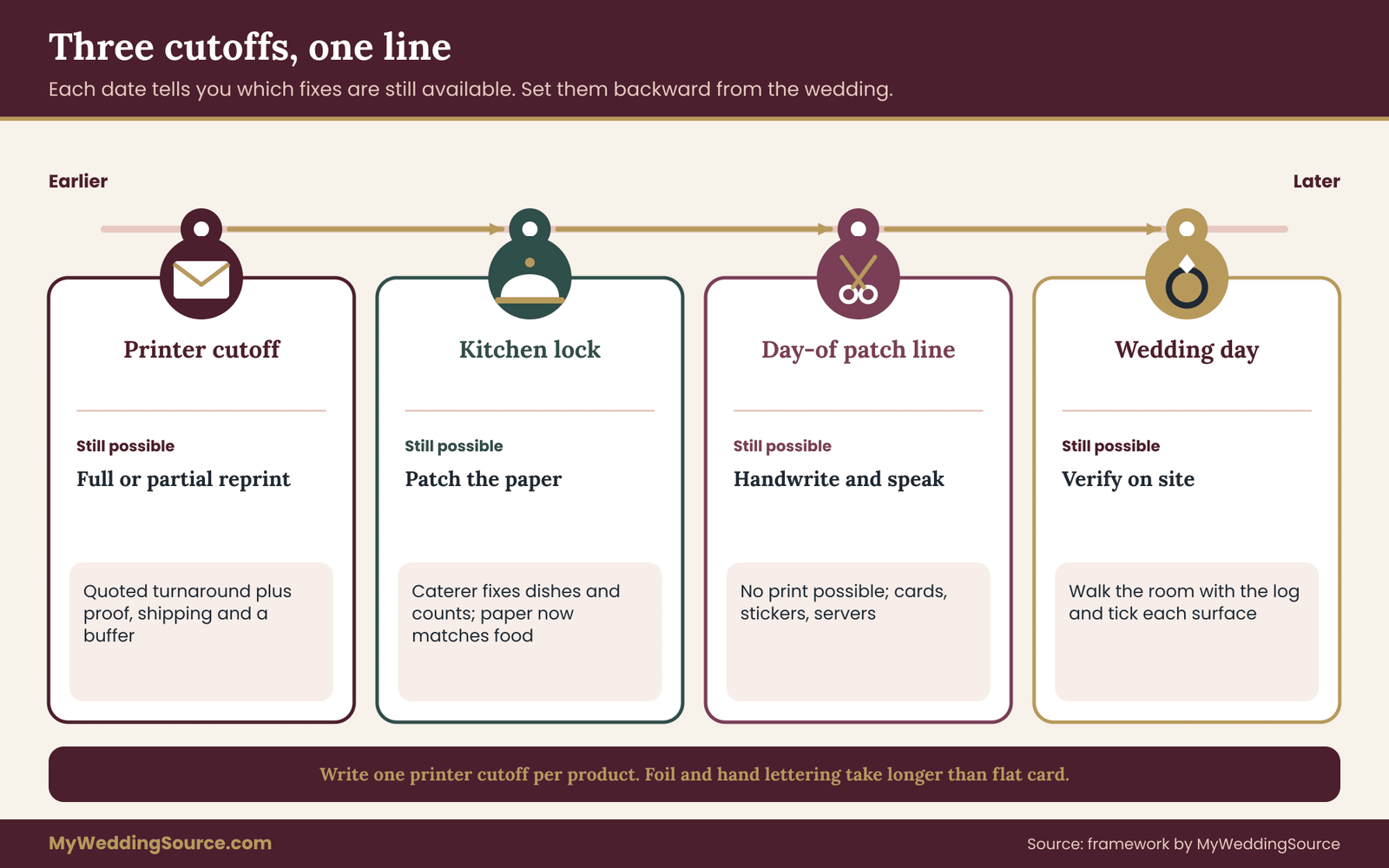
This sequence is the reason to start the log early. If the printer cutoff is eighteen days out and a guest’s allergy arrives on day twenty, you still have a clean menu reprint. If it arrives on day twelve, the cleanest option has already gone.
Questions that fix your three dates
Before you finalize the cutoffs, ask these. To the printer: what is the latest date to receive final files for each product, how long does a corrected proof take, and what do rush options cost and cover? To the caterer: when is the final guest count and meal selection due, when is the menu locked, and what is the process for a late dietary request after that date? To the venue: when can items be delivered, who accepts the delivery, and where do menus and signs get stored? Each answer goes in the log as a date, not as a vague “a couple of weeks”.
What if the dates collide
Sometimes the printer cutoff falls after the kitchen lock, or the two are only a few days apart. That is fine; it simply means you have little room to print something the kitchen might still change. In that case, delay printing the dish descriptions that are not settled, or print the menu with a clear structure that leaves one line patchable, and agree the final wording with the caterer before sending the file.
Menu reprint, patch or announce: choosing the lightest accurate fix
When a change arrives, you have three families of responses. A full menu reprint replaces every copy. A patch fixes only the lines or copies that are wrong. An announcement or verbal handling does not change paper at all. The best response is the lightest one that keeps every guest’s information accurate.
Three questions decide which. They are in order, and the first one that says no stops the list.
Question one: is the printed text now false for any guest? If the menu says “beef” and the kitchen is serving chicken, it is false for everyone. If the menu says nothing about the dish a single guest is getting, it is not false; it is merely incomplete for that guest. A false statement that affects many guests leans toward a menu reprint or a patch. An incomplete statement for one guest leans toward a personal fix.
Question two: how many surfaces and copies are affected? One buffet sign out of eight is a patch. Every table menu, every sign and every place card is a menu reprint. Count copies, not feelings.
Question three: how much time is left before the cutoffs? Before the printer cutoff, a menu reprint is available and may be the cleanest. After it, a menu reprint is gone and the answer is a patch or an announcement.
The ladder in plain language
Rung one, announce only: the change affects one guest or one small group, and no printed line is false. Example: a new vegetarian guest. Update the server sheet and the place card, speak to the caterer, and leave the menu alone.
Rung two, patch: a line is false or incomplete, but only a few surfaces carry it. Example: dessert changes. Print or handwrite a small correction card or sticker for the table menus and replace the one station sign.
Rung three, partial menu reprint: one product type needs a new run, but not all of them. Example: the buffet signs change and the table menus do not. A menu reprint of only the signs.
Rung four, full menu reprint: the main content has changed and most surfaces or copies are wrong. Example: the main course has changed and the table menus list it. Run the menu reprint for everything affected before the printer cutoff.
Rung five, remove and replace with a simpler format: after the patch line, with no print possible and a large change, remove the stale copies and use a single large sign or a spoken description instead of half-corrected paper.

Why not always reprint
A full menu reprint feels like the responsible choice, but it carries its own risks. It sends new files through a rushed process, which is exactly when typos creep in. It creates a second batch of paper, and old copies may stay in a box or on a table. It uses money that might be better spent elsewhere. A calm patch with one proofed correction is often safer than a rushed run.
Why not always patch
Patches have their own failure modes. Stickers can peel and cards can be missed. A table menu with a sticker covering one line may look careless to some couples, even if it is accurate. If more than a handful of copies need patching, the time to apply them can exceed the cost of reprinting. A rough rule: when patching would take more than one person-hour, or the patch changes more than two lines, price a menu reprint.
A short script for the call to the caterer
Be direct. “We would like to confirm the current dish list for the reception and the allergens in each dish. Please confirm in an email what is final, and tell us the date after which no further changes are possible.” Then ask: “If a guest tells us about a new allergy this week, how should we pass it to you, and what is the last day you can accommodate it?”
A short script for the call to the printer
“We have a menu already approved at version two. A dish has changed. Can we still make a corrected run for delivery by this date, and what would a partial run of only the buffet signs cost? We will send a revised file with the version number in the name. Could you confirm in writing when you would need the file and the proof approval?”
Dietary changes rarely arrive in a tidy form. They come as a text from a cousin, a line on a returned RSVP, a comment passed through a parent, or a quick word at the rehearsal. The intake routine below turns each of them into the same five steps, so none gets lost and none triggers a menu reprint by reflex.
Step one: capture the exact words
Write down what the guest or the source actually said, not your summary. “Allergic to tree nuts” and “avoids nuts” are different statements. “Vegetarian” can mean several things, including whether fish, eggs or dairy are acceptable. “Gluten-free” might mean a medical need or a preference. Ask a short follow-up question, in the guest’s own terms: “Could you tell us what you need us to ask the kitchen to avoid, and whether a trace matters?” The couple is not diagnosing anyone; they are gathering words to pass along accurately.
Step two: send it to the caterer in writing, with the guest’s name
The caterer needs the guest’s name, the restriction in the guest’s own words, the table number if assigned, and the meal currently chosen. Ask the caterer to reply with what they can do, what they cannot do, and whether the guest’s dish will differ from the printed menu. Do not guess what the kitchen can handle.
Keep the guest’s private health information to what the kitchen needs. A seating chart, a place card or a menu does not need to say why a guest eats a certain way. The guide to a wedding seating chart explains how to place guests so servers can reach them without exposing sensitive details, which pairs well with this step.
Step three: decide which surfaces the change touches
Return to the seven surfaces. A new allergy for one guest typically touches the server sheet and perhaps a discreet place card marker. It may touch the buffet if guests serve themselves, in which case a sign near the affected dish may help everyone. It does not usually touch the table menus, unless a dish description has become false.

Step four: run the three questions
Apply the false-text, copy-count and time questions from the previous section and choose a rung. Write the choice in the log, with the reason. If the answer is announce-only, the log entry may be the only record, and that is fine.
Step five: close the loop with the guest
A guest who raised a dietary need should be told, in plain words, what to expect. “The kitchen has confirmed a nut-free plate for you; your server will bring it and will know your name.” Do not promise a specific dish unless the caterer has named it. Do not promise that every dish on the buffet is safe unless the caterer has said so in writing.
What to do when you cannot reach the caterer
Sometimes a change arrives on a weekend or on the eve of the event and the account manager is unreachable. Do not make a decision for the kitchen. Send the message anyway, so there is a written record with a time on it. Ask the venue coordinator or planner to pass it on in person. If a printed claim cannot be verified, remove the claim rather than rely on a guess.
Once you have chosen a rung that involves new paper, two businesses have to agree on text. The caterer owns the facts and the printer owns the paper. You are the person standing between them, which is the least comfortable seat. A few habits make that seat much easier.
Send one clean file, and one change list
A printer needs a corrected file and a list of what changed. The list saves everyone from comparing two files by eye. Write it in the email: “Version three. Change one: dish two, ‘halibut’ replaced by ‘cod’. Change two: footnote about nuts removed. Everything else is unchanged from version two.” The printer can then check exactly those lines on the proof.
Do not send the change list in a separate message from the file, and do not send a corrected file by itself with “see attached”. When a proof comes back wrong, the change list is your evidence of what you asked for.
How a menu reprint request should read
When you ask a printer for a menu reprint, put the version number, the quantity, the delivery date and the change list in the first lines of the message. A good request for a menu reprint can be read in thirty seconds. It names the product, such as table menus on cream card, states what is different from the last approved proof, and asks for a written quote and a delivery date. If the printer responds with questions, answer them in the same thread so the log has one place to look. A menu reprint request that lives in three channels is one that will be misread.
Ask for a proof even when you are rushed
Rush jobs tempt people to skip the proof. Do not. A proof can be a PDF emailed within hours, and it is the single best defense against a misprinted allergen note. Ask the printer to confirm the quantity, the stock and the finish alongside the text, and to hold the run until you reply with a written approval. If the printer will not provide a proof for a rush job, treat that as part of the price of the rush.
Be honest with the printer about what is at stake
A printer who knows a menu contains allergen or diet information can take extra care. You do not need to be dramatic. “This menu lists allergens, so I would like every line proofed twice” is enough. Printers are used to wedding timelines and late changes; most prefer a clear instruction to a vague apology.
Ask what a partial run costs
If only some pieces change, ask whether the printer will charge a minimum per job, a setup fee or a per-piece price. Some small runs cost almost as much as large ones because the setup is the same. That cost belongs in the decision. A patch card printed locally can be far cheaper than a short, rushed run at a specialist shop, and sometimes the cost difference is the entire reason for choosing rung two over rung four.
Make the caterer sign off on the proof
Before the printer receives final approval, send the proof to the caterer and ask them to confirm the dish names, descriptions and any diet or allergen labels. This takes the caterer a few minutes and removes the single most common source of mismatch: the printed menu says something the kitchen never agreed to. In the log, record the date and form of this confirmation.
Decide who pays for what before it happens
Print errors, caterer substitutions and guest changes can each have a different cost owner. If the printer misprints a corrected line that you approved in the proof, the error is yours. If the printer ignores a correction you clearly requested, the contract usually favors you. If the caterer substitutes a dish on their own after the menu was approved, ask whether the contract provides any remedy, and reread your vendor contract before you bring it up. Do not argue about it in the days before the wedding; record it, and resolve it afterward.
When a calligrapher or designer is involved
Hand-lettered menus and designed menus involve a third person who has their own schedule. Ask the designer, at the first sign of a dietary change, whether they can revise the file in time and whether they charge for revisions after approval. A designer’s revision fee is common and is often stated in their contract. Ask before the change is needed, not after.
If a hand-lettered original cannot be revised in time, use a simpler format for the corrected parts: a small printed card in a matching typeface, tucked into the table setting or leaning against the menu. A mismatch in style is better than a mismatch in facts.
A word on shipping and delivery risk
Late menu reprints often fail in transit, not in the print shop. A box can be held at a depot, misdelivered or sent to the wrong address. When time is short, ask the printer about pickup, courier options and delivery windows. Have the box addressed to a person who will be present, not a venue’s general mailbox. Record the tracking number in the log under the version it belongs to. Keep the proof PDF on a phone so that, in the worst case, a local print shop can reproduce it from a file you trust.
The most common new error in a rushed menu reprint is one nobody was looking for. The corrected dish is right, but a price, a date, a name or a different line has been altered by accident. A late proof needs a short, structured read, not a quick glance.
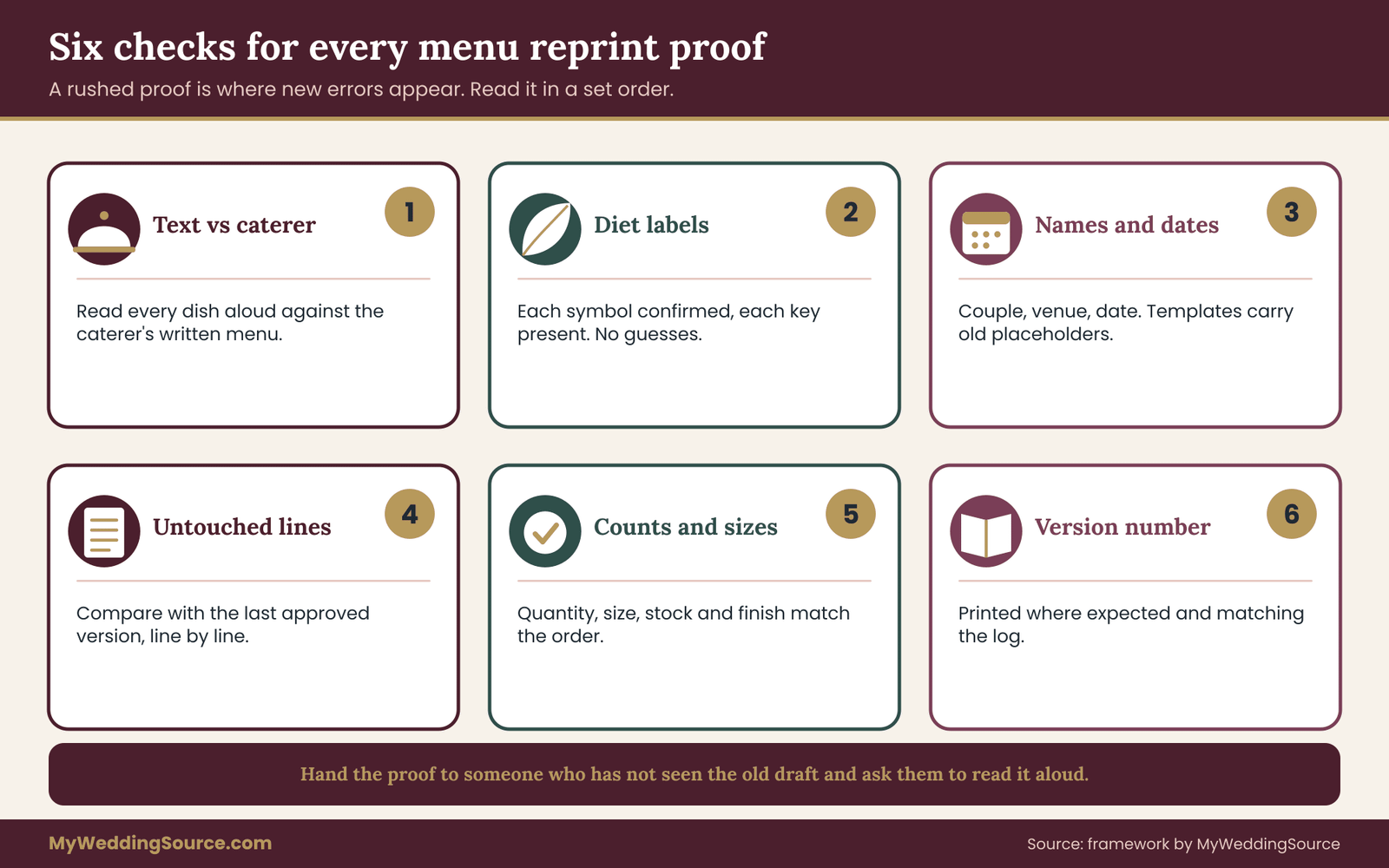
Six checks for every proof
One: text against the caterer’s confirmation. Read each dish name and description aloud against the caterer’s written menu. Do not rely on memory. If the caterer wrote “braised chicken thigh with herbs” and the proof says “herb chicken”, resolve the difference, because the caterer’s words are what the kitchen will cook.
Two: diet and allergen labels. If the menu uses symbols or abbreviations, confirm each one with the caterer and check the key. A symbol without a key is a guess. If you cannot confirm a label, take it off and use a sentence guiding guests to ask a server.
Three: names and spellings. Couple’s names, venue name, date, and any dedication line. A rushed menu reprint often reuses a template, and the template may carry placeholder text from an earlier draft.
Four: untouched lines. Compare the proof with the previous approved version, line by line, outside the lines you changed. Place the two side by side on a screen, or print both and hold them to a window. Unplanned changes in untouched areas are exactly what a stressed printer or designer can introduce.
Five: counts and sizes. Confirm quantity, size, stock and finish against the order. A correct text on the wrong size can still ruin a table setting.
Six: version number. Confirm the version number is where you expect it and matches the log.
Ask a second person to read it
The person who made the change is the worst proofreader of it. They see what they meant. Hand the proof to someone who has not seen the earlier draft and ask them to read every word aloud, slowly. A parent, a friend or a planner will catch a missing word that you will not. The second reader does not need to know the menu. They need only to read what is on the page.
Readability matters as much as accuracy
Menus are read in dim light, by older guests, by guests who forgot their glasses and by guests who use assistive technology or have low vision. A rushed menu reprint is the place where readability gets sacrificed: the designer shrinks the text to fit a new line, and the menu becomes harder to read. Resist that.
The Web Accessibility Initiative at the World Wide Web Consortium publishes guidance on contrast and text size for digital content. Wedding menus are printed, not websites, so those rules are not legal requirements here, but the underlying principles transfer well. Choose dark text on a light, plain background. Avoid thin script fonts for body text. Keep a comfortable type size, and keep it consistent across versions so that a menu reprint does not quietly shrink it. The guide to low vision wedding signs covers type size, contrast and glare in more detail.
Fit the new text without shrinking the old
A longer dish name or an added note can break a layout. Before accepting a smaller font, try these in order: shorten the wording, cut a line of non-essential description, widen the text area slightly, or move a secondary note to the back. Keep allergen or diet notes at the same size as the dish names, not as fine print. A footnote at half size is the wrong place for information a guest may depend on.
Digital copies need the same treatment
If the menu also lives on the wedding website, in an email or as a PDF sent to guests, update those copies at the same time and give them the same version number. A guest who looks at the website at the table should see the same dishes as the card in front of them. If the digital copy cannot be updated before the event, replace it with a short line, such as “Menu details will be provided at the reception,” rather than leave a stale version online.
Check for downloads and cached copies. A PDF link you replaced may still be saved in a guest’s email. If an earlier menu went out by message and the dishes have changed, send a brief note with the corrected version and the date. The guide on a wedding website outage plan is a useful companion for keeping online and printed details in agreement.
A pre-reprint checklist in plain sentences
Before you authorize any menu reprint, confirm five things. The caterer has confirmed the text in writing. The log has a new version number and an approver. The printer has quoted a delivery date that beats the printer cutoff. A second reader has agreed to check the proof. And you know what you will do with the retired copies once the new ones arrive. If any of the five is missing, pause the menu reprint for an hour and fill the gap. An hour spent here is cheaper than a second menu reprint, and a second menu reprint is exactly what a skipped check tends to produce.
Proof the physical copy when it arrives
A good proof does not guarantee a good delivery. Open the box as soon as it arrives. Check the top, middle and bottom of the stack for the right version number, correct text and no print defects. If something is wrong, you will want to know on the day the box arrives, not at the venue. Photograph the label and the first few copies and attach them to the log row.
If a stack contains mixed versions, which can happen when a printer reruns only part of an order, separate them at once. Put retired copies in a marked bag and take it out of the room. Stale menus mixed into fresh ones are the reason many couples end up with the wrong version on exactly one table.
The quick-proof routine for the night before
If you are checking menus at the venue the night before, bring the log, a pen and the caterer’s latest written menu. Walk the room with the log in hand: for each surface, confirm the version number, the count and the location. Mark each row “on site, verified”. It takes about twenty minutes and it settles a surprising number of arguments in advance.
A worked example: the Alvarez and Brennan dinner
The following example is invented to show how the log, the cutoffs and the ladder work together. The couple, the dishes and the dates are fictional, and the costs are illustrative round numbers that you should replace with your own vendor quotes.
Mara Alvarez and Theo Brennan are marrying on a Saturday. Their dinner is plated for one hundred and ten guests, with a buffet-style dessert station and a signature cocktail. They approved the menu as version two, printed on heavy cream card, one menu per table of eight plus a few spares, and six small signs for the dessert station and bar.
The dates
They set their cutoffs early. The printer needs twelve days from approved proof to delivery for the cards, including shipping, and they add a three-day buffer, so the printer cutoff is fifteen days before the wedding. The caterer locks the menu and final counts ten days before. The patch line is the Thursday before the Saturday event, when their local copy shop is still open.
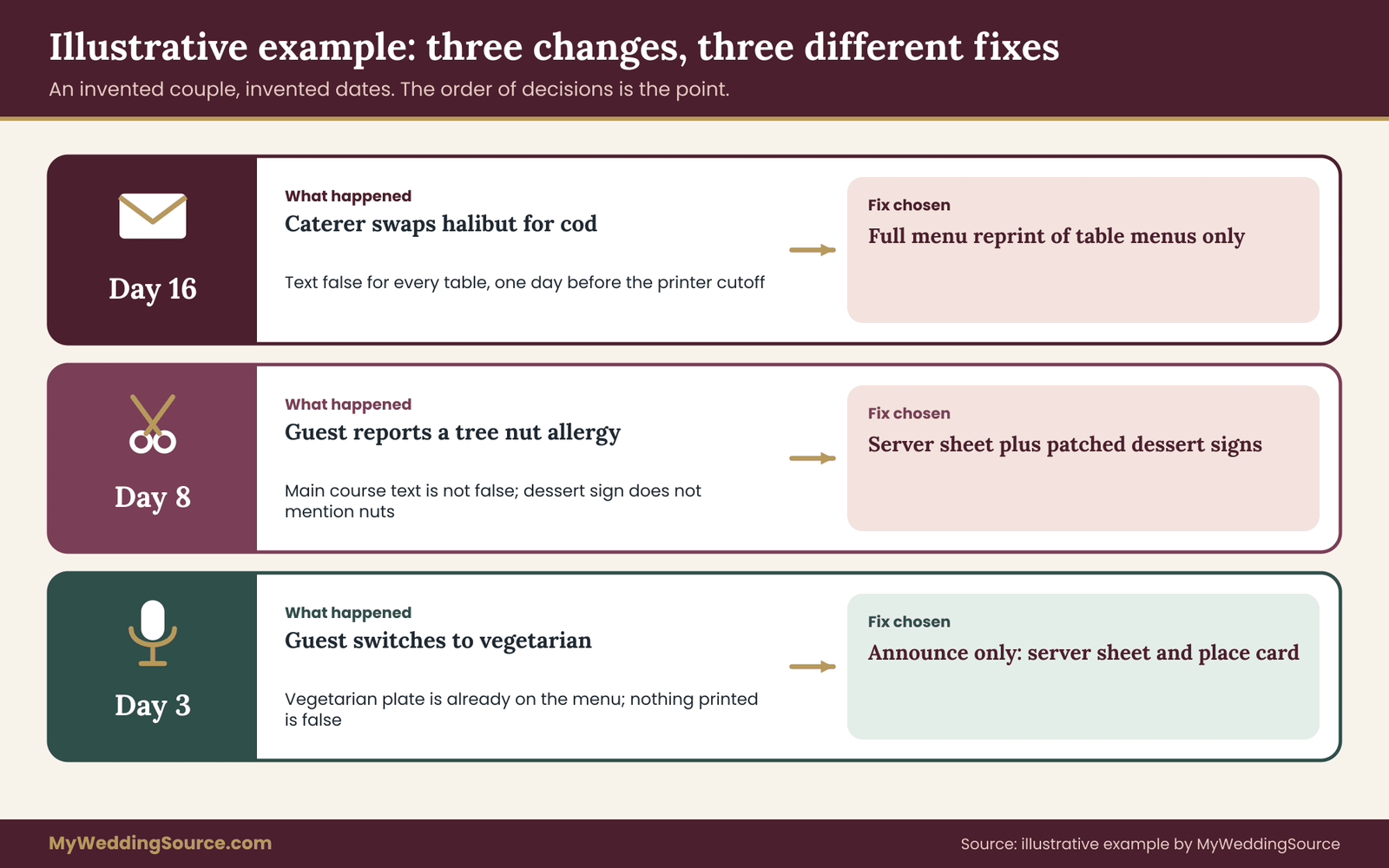
Change one: a supplier shortage, sixteen days out
On day sixteen, the caterer emails that the halibut is unavailable and recommends cod. This is the caterer’s change, and it makes the printed main course false for every table. The printer cutoff is one day away.
The couple apply the three questions. The text is false for everyone. All table menus carry the dish. There is exactly one day before the printer cutoff. The ladder points to a full menu reprint of the table menus, and nothing else, because the dessert signs are unaffected. They write the change into the log as version three, covering table menus only, with the reason and the caterer’s email as confirmation.
Mara sends the printer one corrected file and one change list. The proof comes back the same afternoon. Theo, who did not make the edit, reads it aloud and notices that the date on the proof has become a different weekend because the designer reused an earlier template. They reject the proof, the designer fixes it, and the second proof is approved with the caterer’s written confirmation of dish names. Without the second reader and the change list, the menus would have printed with the wrong date.
Change two: a late nut allergy, eight days out
Eight days before the wedding, after the printer cutoff and inside the caterer’s lock window, a guest tells Theo’s mother that he has a tree nut allergy. The message reaches Theo through a family chain.
Theo does not go to the printer. He writes the exact words in the log, then emails the caterer with the guest’s name, the table number, the restriction in the guest’s words and the meal he had chosen. The caterer replies within a day: they will prepare a separate plate, the dessert has nuts in the crust, and they can supply a nut-free alternative. They ask that the guest’s name go on the server sheet.
The ladder says announce-only for the main course, since no printed line is false for that guest, and patch for the dessert signs, because the dessert description does not mention nuts and a guest reading the sign could assume it is safe. The couple add a short line to the dessert station sign, “Contains tree nuts. Ask a server for a nut-free option.” They print two replacement signs at home on the same cream stock, mark them version three a in the log and keep the older signs in a labeled bag.
Theo then calls the guest, repeats what the caterer confirmed and tells him whom to speak to at the table. He does not promise that every dish is safe, only what the caterer has agreed to.
Change three: a new vegetarian guest, three days out
Three days before the wedding, a guest asks to switch to vegetarian. The caterer’s vegetarian plate exists, and it is already listed on the menu, so no printed line is false. The log records the change as announce-only. The server sheet, the place card marker and the count of vegetarian meals are updated. The caterer is told in writing the same day, and since this is before the patch line, nothing is printed.
What the log showed at the end
By the Thursday patch line, the log contained five rows. Version two was retired and its remaining copies bagged. Version three was delivered and verified on site. Version three a, the dessert sign patch, was on site. The vegetarian change was recorded with no print. The night before the wedding, Mara and Theo walked the room with the log and ticked each surface. Nothing was left to guess.
What this example does and does not show
It shows the order of decisions, not the prices. A full menu reprint, a pair of home-printed signs and a note to the server sheet cost very different amounts, and in your case the prices and cutoffs will differ. It also shows that the lightest accurate fix changed with each event. The same couple used a full menu reprint, a patch and a plain announcement within two weeks, and that was the system working as intended.
After the patch line, paper has done what it can. The remaining work is people: servers, a coordinator, a few trusted friends and a clear, short briefing. Many guests with dietary needs have more confidence in a server who says their name than in any printed card, so make that easy.
The server sheet is your real final version
The server sheet lists each guest or table with any dietary notes, the meal chosen and any substitution. It is the document that matters most after the kitchen lock. Update it last, from the log, and have the caterer confirm it. Print a copy for the lead server and one for the coordinator. Write the version number in the corner and the time it was produced.
If your caterer uses their own format, ask to see it before the event and compare it against your log. Mismatches between your list and theirs are common and are almost always honest mistakes: a nickname, a table renumbered at the last minute, a guest’s meal changed in one document and not the other.
A five-minute briefing
Ask the caterer or the coordinator to brief servers before service on three things: which guests have allergies or restrictions, which dishes changed from the printed menu, and what to say to a guest who asks about an ingredient. The last one matters most. Servers should say “I will check with the kitchen” and then do it, rather than answer from memory.
You can supply a one-line script for servers if the caterer has no objection: “Please check with the chef before confirming any ingredient. If you are not sure, say so.” It is simple and it prevents the most dangerous kind of helpfulness, the confident guess.
Pairing the log with the day-of timeline
If a coordinator is running the event, give them a one-page extract of the log: the current version of each surface, where the copies are and who may authorize a last patch. A coordinator who knows a menu reprint is complete and delivered will not hunt for it, and one who knows a patch is pending can chase it. Without the extract, the coordinator learns about a menu reprint when a guest points at a card, which is too late to help.
Remove stale copies, do not hide them
At the venue, walk every surface and take out any copy of a retired version. Put them in a labeled bag and remove it from the room. Do not stash old menus under a tablecloth or in a drawer on the head table. A stale card has a way of surfacing at exactly the wrong moment, and it is much easier to remove than to explain.
If a few old menus must stay because there is no time to replace them, mark them clearly. A handwritten line across the stale dish, plus a printed or handwritten correction, is honest and readable. It is also better than leaving guests to compare two conflicting statements.
Handwritten corrections that look intentional
A correction does not need to look like an emergency. A small card in matching ink and a plain hand, placed beside each table menu, reads as a thoughtful touch if it is neat. Use a single line: “Main course update: braised chicken thigh replaces halibut.” Date it with the day, not the version number, and keep it short. Guests will read it. They will not read a paragraph of apology.
Whoever writes the cards should use the same pen for all of them and write them in one sitting. A tired person writing twenty cards at midnight is a poor proofreader, so have someone else check the first and last card.
Announcements and what to say
A spoken announcement works for a change that affects everyone, such as a replaced dish or an added station, but never as the only notice for an allergy. For allergies, tell the affected guest privately and make sure their server is informed. For a general change, the emcee or coordinator can say one sentence before dinner: “A quick note: tonight’s main course is cod rather than halibut. Your servers will answer any questions.” Avoid giving ingredient details from memory; leave those to the kitchen.
Buffets and stations need extra care
Self-serve stations are where a stale sign does the most harm. Guests move quickly, read little and serve themselves. Use a sign for each dish, check the labels against the caterer’s list on the day, and keep serving utensils separate for each dish. If a dish changed, the sign should change at the station, not just on the table menu. Ask the caterer whether a staff member will stand at the station during service; for guests with allergies, a person who can answer questions is worth more than another sign.
A menu reprint is rarely about the price of the cards themselves. It is about rush fees, shipping, designer time, the time you spend and the risk you take on. Weigh those against the cheaper options before you commit.
Four kinds of cost
Direct print cost. The per-piece price for the run, plus any setup fee, rush fee or finish surcharge. Short runs can cost more per piece than the original order. Ask for a total, not a unit price.
Design and revision cost. Many designers and stationers charge for changes after approval. This is a contract matter, so check what yours says about revisions and the timing of them.
Delivery cost. Expedited shipping, courier fees or a pickup trip. It is easy to forget these until the quote arrives.
Time and risk cost. Your hours, a second proofreader’s hours and the risk that a hurried job introduces a new error. This cost is the hardest to see and often the largest.
A simple comparison in words
A full menu reprint usually costs the most in money and in risk, and it produces the cleanest result if it goes well. A patch costs little in money, some time to produce and apply, and has the risk of looking uneven. An announcement costs almost nothing, and works only when no printed line is false. The right choice is the cheapest one that leaves every guest with accurate information. If two options are equally accurate, choose the cheaper and calmer one.
A rule of thumb for patches
If the patch involves more than two lines or more than about a dozen copies, price a menu reprint of just those pieces before deciding. At that point the time you would spend cutting, sticking and checking can exceed the cost of a short run, and a printed correction usually looks tidier than a stack of stickers. If the patch involves a single sign or a small card at each table, patching is almost always sensible.
Why a menu reprint should be the exception, not the habit
Couples sometimes use a menu reprint as a way to feel in control when everything else is moving. That is understandable, but a wedding needing three menu reprints usually approved its menu too early or asked its caterer too late. If you find yourself planning a second menu reprint, look upstream. Ask the caterer for the most likely remaining changes, hold the final print until the kitchen lock where you can, and keep one line of the design flexible. Fewer versions mean fewer chances for a stale card, and that is the real purpose of version control: not more menu reprint cycles, but fewer of them.
Who bears the cost
Decide this calmly, and early. If the change came from the caterer, ask whether they will contribute to the cost of reprinting, and check your contract for substitution language. If the change came from the couple, the couple bears it. If a printer introduced an error that you proofed and approved, the cost is yours; if you did not approve it and the error was theirs, they should correct it. Keep the proof emails, because they show who approved what.
Budget a small reserve
Because menus often change late, it is wise to set aside a small amount for corrections in your stationery budget, however modest. Treat such costs as planned reserve spending rather than a surprise, and see the guide to wedding cash-flow planning for how reserves fit with deposits and final balances. Do not link a reserve to a number you cannot justify; a short run, a courier fee and a designer’s revision fee give you a reasonable starting estimate once you have quotes.
Even a good log meets awkward situations. These are the ones that come up most, with a plain way to handle each.
Two people approve different versions. A parent approves one file by email and the partner approves another. The log’s single approver rule prevents this, but if it has already happened, stop and confirm with the caterer which text matches the food. Then assign the approver in writing and send nothing to print until the question is resolved.
The printer used the wrong file. The proof was right and the delivery was not. Compare the version number on the box with the log. If it is a retired version, ask the printer for a menu reprint at their cost, quote their own proof, and meanwhile use the patch route for the venue.
A translated menu. If the menu appears in two languages, every change must be made in both, and the second language needs its own proofreader. A change checked in one language and assumed in the other is a common source of mismatch. The guide to bilingual ceremony program review describes a review pattern that works equally for menus.
Children’s meals and other special menus. Children’s meals, vendor meals and meals for the band or photographer often live on a separate list. A late dietary change for one of these people still goes in the log and to the caterer. See the guide to kids’ meals by age band for how to keep those lists consistent.
A late guest arrival with a new meal. A guest arriving late may need a plate set aside. It is a kitchen matter, but the log should note it. The guide to late-arrival meals covers the handling in more detail.
Menus used as keepsakes. Many couples save menus. A patched or retired menu is not a problem if you want it for a scrapbook, but keep one clean copy of the final approved version and label it in the log. It becomes part of your records.
A vendor says “final” when it is not. Ask what “final” means in practice: the last date they will accept changes and the form the change must take. Write both in the log. A vendor’s idea of final and yours often differ by several days.
The couple disagree about a change. Use the log’s requester and approver fields. If one partner wants a change and the other does not, the log shows who owns the final yes, and the discussion can happen on a calm evening instead of at a print deadline.
Menus printed for rehearsal dinner or morning-after brunch. Treat each event as its own set of versions, with its own log rows. A change for the rehearsal dinner does not touch the wedding menu, and a shared file name causes errors.
The limits of this method
A version log cannot guarantee accuracy. It improves your odds by making each change visible and by forcing a confirmation step. It does not replace the caterer’s procedures for handling allergens, and it does not turn a printed card into a medical document. If a guest has a serious allergy, the guest and the caterer should speak directly, and the guest should be told they are welcome to ask a server about any dish.
If you are unsure whether a menu reprint is needed, send the caterer a one-line message with your three questions and ask what they would do. Caterers see more late changes than almost anyone, and the answer is usually quick and practical.
Your next steps
Start with an hour, not a weekend. Open a blank page and create the log with the nine fields from this guide. Enter the current menu as the first version, mark it with its real status, and note which of the seven surfaces carry it. If a version already exists in three places, decide which one is true by asking the caterer for their written menu.
Next, set the three cutoffs. Ask the printer for the latest date to receive final files for each product, ask the caterer for the menu lock and the final count date, and choose a patch line you can defend. Write all three dates at the top of the log with what is still possible after each. If a date has already passed, write that too, and move the decision down the ladder.
Then agree the rules with whoever helps you: one writer, one approver, caterer confirmation before print, and no file called final. Tell the printer and the caterer how you will send changes. A short email is enough. After that, a menu reprint becomes a routine request instead of a crisis, and you will know in about a minute whether any new dietary change deserves one.
If you want the wider context, the guide to wedding signage as a system shows how menus, directions and signs fit together, and it is a good place to check placement and venue permissions before you print anything else.
FAQ
When is a wedding menu reprint worth the cost?
A wedding menu reprint is worth it when a printed dish description is now false for most guests and a printer cutoff is still ahead of you. If only one guest is affected, or only one line, a patch or a spoken update is usually cheaper and just as accurate. Count the affected surfaces and copies first, then price the options.
How late can we still order a wedding menu reprint?
It depends on the product. Plain text on flat card can sometimes be done in a few business days, while foil, letterpress or hand-lettered pieces take longer. Ask the printer for the last date to receive a final file for each product, add a buffer for proofs and shipping, and write that date at the top of your log.
Does a late allergy always require a menu reprint?
No, usually not. Write the guest’s exact words down, send them to the caterer in writing with the guest’s name and table, and ask what the kitchen can do. Usually this changes the server sheet, not the printed menu. Order a menu reprint or patch only if a printed line is now false or misleading, such as a dessert description that omits nuts.
Should the printed menu list allergens at all?
Only if the caterer has confirmed each label in writing. A wrong allergen claim is worse than none. If the kitchen cannot confirm labels, leave them off and print a plain line asking guests to tell a server about any allergy. The caterer’s own procedures, not the card, should be what protects a guest with a serious allergy.
How do we stop old menus from reaching the tables after a menu reprint?
Number every version, record where each batch of copies is, and bag retired copies on the day they are replaced. Before guests arrive, walk each table with the log and check the version number on every card. Take the retired bag out of the room. Mixed stacks from partial reruns are the most common cause of stale menus.
Is a sticker acceptable instead of a full wedding menu reprint?
Yes, when the change is small and accurate. A neat printed card or handwritten line in matching ink reads as careful, not sloppy. Keep it to one or two lines and place it where guests will see it. If the patch needs more than two lines or many dozens of copies, price a short menu reprint, since tidy printing may beat an hour of sticking.
Who pays for a last-minute menu reprint?
The cost follows the cause. If you changed the menu, you pay. If the caterer substituted a dish, check your contract for substitution language and ask whether they will contribute. If the printer made an error you did not approve, they should correct it. Keep the proof emails, because they show who approved which text.
Does a menu reprint mean the website needs updating too?
Yes. A guest may check the website at the table, so it should match the card. Update the copy at the same time, give it the same version number in your log, and if you cannot update it in time, replace the menu details with a short note. Remember that earlier PDFs may remain in guests’ inboxes.
Sources
- Web Accessibility Initiative, World Wide Web Consortium
- Food allergies, U.S. Food and Drug Administration
- Food allergies, Centers for Disease Control and Prevention
- Food safety information, U.S. Department of Health and Human Services
- Americans with Disabilities Act, U.S. Department of Justice
- Section508.gov, U.S. General Services Administration
- Food allergy, National Institute of Allergy and Infectious Diseases
- Consumer advice, Federal Trade Commission
- Shipping and mailing, United States Postal Service