
Speech keepsakes are the lasting versions of what people say at a wedding: the recording, the written transcript, the captions, and the folder where they live. This guide gives you a five-gate workflow for making wedding speech keepsakes that are accurate, accessible, private where they should be, and shared only with permission from the people who spoke and the people they spoke about.
Treat every toast as a small piece of authored work. Ask each speaker before the day, record on two devices, produce a transcript and captions, let the speaker and anyone named in the speech review them, then choose a sharing tier (private, family, guests, public) in writing. File the finished speech keepsakes in an archive with a short permissions note beside each file. If any gate fails, the speech stays private until it is fixed.
Most couples hear their wedding speeches once, through a haze of nerves, music and cake. A year later they want the words back. The maid of honor’s story about the road trip, a father’s two quiet sentences, a grandmother’s blessing in her first language: all of it is gone unless someone captured it, and gone in a worse way if someone captured it badly.
Capturing is the easy part. A phone on a tripod will record a toast. The harder questions come afterward. Who is allowed to post the clip? Does the speaker know it exists? Is the transcript accurate, or did software turn a relative’s name into something unrecognizable? Can a deaf grandparent or a guest who watches on mute follow along? Did the speech mention someone who never agreed to appear online?
This article answers those questions with a workflow you can run in a few evenings: captioning, privacy and archive permissions in one sequence. It focuses on spoken guest speeches and toasts, not on private vows, which have their own considerations, and it does not tell anyone what to say in a speech.
For the planning side of who speaks and for how long, see the site’s guide to the wedding vendor timeline and ask your emcee or coordinator to confirm the speech slots.
A note on scope. This is general information, not legal advice. Copyright, recording and privacy rules differ by state and by situation, so where a rule matters the article points to the agency or organization that issues it and asks you to confirm the current version.
What wedding speech keepsakes include
The phrase covers more than a video file. In practice, speech keepsakes are five separate things, and each one can be done well or badly without affecting the others.
The recording. Audio, video, or both, captured live. This is the original evidence of what was said and how it sounded.
The transcript. A written version of the words, usually made from the recording. It is the easiest format to search, print, translate and preserve.
The captions. Time-stamped text that appears on screen with the video. Captions serve guests who are deaf or hard of hearing, guests who watch in noisy places, and anyone who simply prefers reading.
The permissions record. A short note saying who agreed to what: recording, keeping, sharing, printing, posting. Without it, a perfectly good recording becomes a problem the moment someone asks, “Wait, who said that could go online?”
The archive copy. The version you keep for years, stored in a stable format with a readable file name and more than one backup.
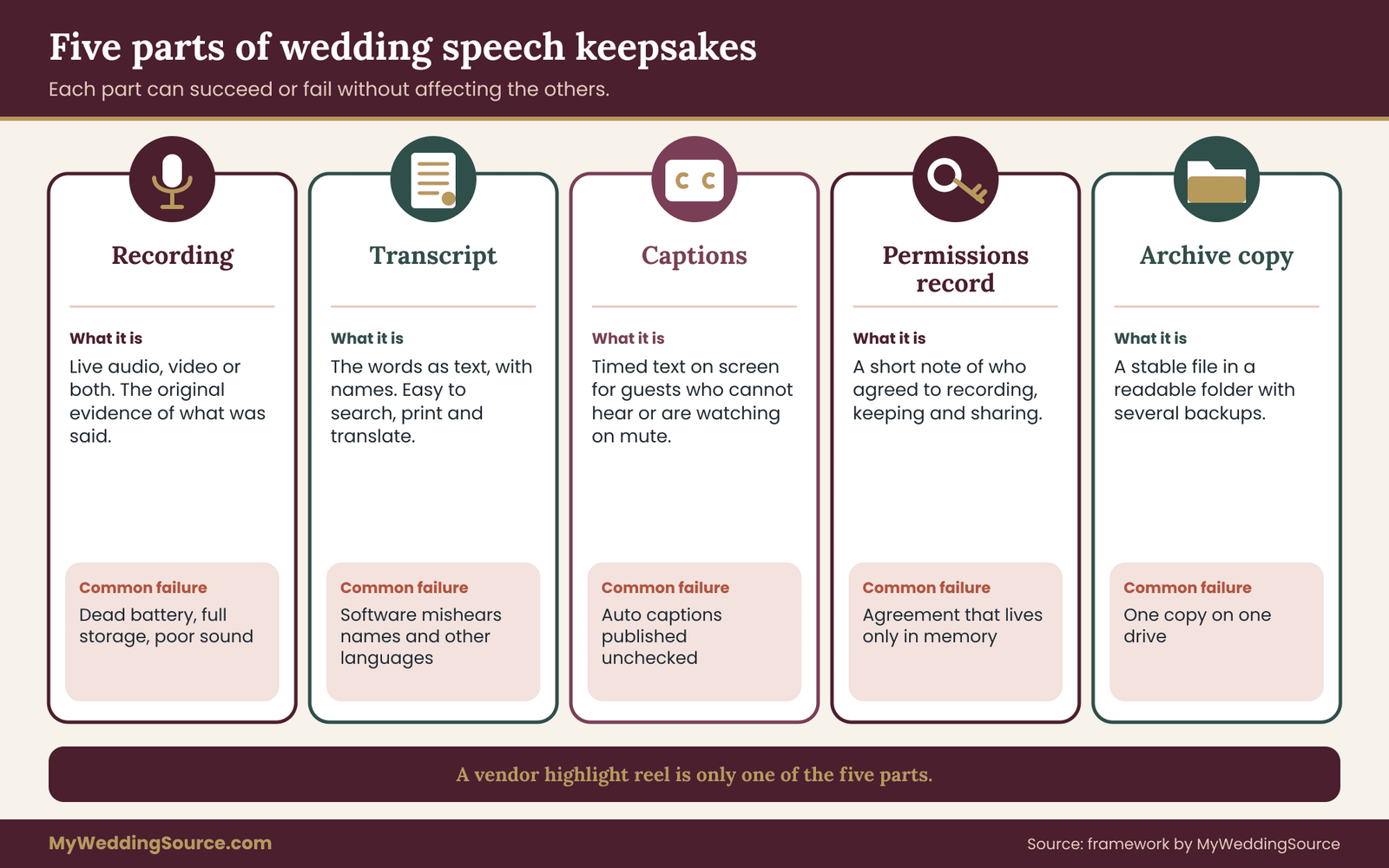
Seeing the five parts separately explains why so many keepsakes disappoint. A vendor delivers a nicely edited highlight reel, which is a recording and nothing else. A cousin posts a toast clip with automatic captions that mangle three names, which is a recording and a bad caption. A parent asks for a copy of what they said, and nobody can find the raw file. Each gap is small, and each is avoidable.
Why a speech is different from other wedding media
A photo of a cake involves one decision: do we keep it. A speech involves at least four parties, and they do not always want the same thing.
The speaker wrote or improvised the words. In United States copyright law, original expression is generally protected as soon as it is fixed in a form that can be perceived, such as a written text or a recording. The U.S. Copyright Office explains this on its site, and the general effect is that a speaker has a real claim over their own wording.
You do not need a lawyer to behave sensibly about this. You need to ask before you publish.
The people mentioned appear in the speech without having been asked. A best man’s story about a bachelor trip involves the groom, three friends and possibly a person who has since changed jobs, married, divorced or become sensitive about that period of life.
The people recorded in the room are guests laughing, a grandmother nodding, a child dancing in the background of the video. Their image and voice are in the file even though they never spoke.
The couple wants the keepsake and usually assumes they own it. Often they own the occasion and the copy they received, while the speaker still holds the wording.
These roles overlap, and the overlap is where trouble begins. The couple commissions the video, so the vendor delivers it to the couple. The speaker is the best man, so the words are his. The story involves the groom’s former roommate, so his privacy matters too. A decent workflow gives each party a say at the right moment, and it does so quietly, without turning the wedding into a legal meeting.
Common mistakes with speech keepsakes
Five mistakes account for most of the disappointment with speech keepsakes, and all of them are easy to prevent once you know them.
The first is relying on one recording. A single phone, a single battery and a single person watching it make speech keepsakes fragile. The second is treating a vendor’s highlight reel as the full record, when it is only one edited view. The third is posting before asking, because a clip that feels harmless to the couple may matter a great deal to the speaker or to someone named in it.
The fourth is skipping the transcript. Without text, speech keepsakes depend entirely on a video format staying playable and on someone having the patience to watch an hour of footage. The fifth is losing track of what was agreed. A month after the wedding, nobody remembers which speaker said family only, and the safest guess is a guess about other people’s words.
None of these mistakes is dramatic, and none requires special equipment to avoid. Careful speech keepsakes come from a handful of small habits, repeated for each speaker.
The five-gate workflow at a glance
Everything that follows hangs from one sequence. Think of it as five gates that a speech must pass through before it becomes a shared keepsake. A speech can stop at any gate and still be a perfectly good private memory.
Gate one, Ask. Before the wedding, each speaker agrees to be recorded, to have a transcript made, and to a stated range of sharing.
Gate two, Capture. The speech is recorded on two independent devices, with a backup plan if one fails.
Gate three, Caption. The recording becomes a transcript and a captioned file, checked by a human against the audio.
Gate four, Clear. The speaker reviews the transcript. Anyone named in a sensitive way is considered. Quoted material, such as poems or song lyrics, is checked.
Gate five, Circulate and file. The couple chooses a sharing tier, records the permissions, and files the keepsake in the archive.
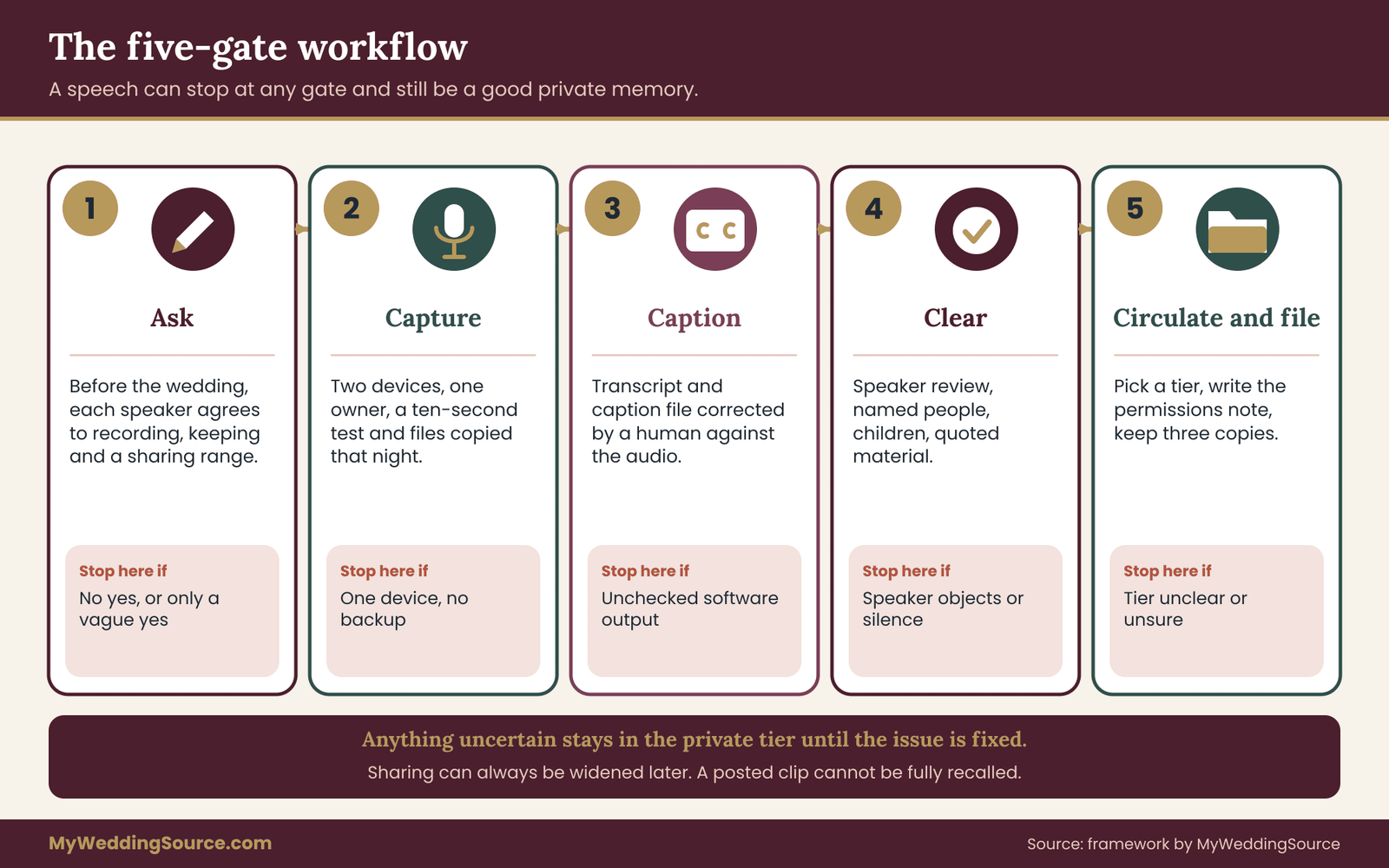
The order matters. Asking is easiest before a speech exists, because nobody has anything to protect yet. Capturing comes next because the moment cannot be repeated. Captions and clearance come after the event, when the material is calm to work with. Sharing and filing come last, because they are the only gates that cannot be undone gracefully: once a clip is posted publicly, taking it back is slow and imperfect.
A quick rule makes this memorable. Nothing moves to the next tier of sharing until the person who owns the wording and the person most affected by it have both said yes. Everything else in this article is detail about how to ask, how to record, how to caption, and how to write down the answer.
Gate one: ask every speaker before the wedding
The best moment to ask a speaker for permission is weeks before the event, when the request is a courtesy rather than a complication. Asking after the toast, with a tipsy relative holding a champagne flute, produces a polite yes that means very little.
Keep the request short, friendly and specific. Vague permission (“Is it okay if we film?”) leaves the important questions open. Specific permission names the three things that matter: recording, keeping and sharing. A speaker can say yes to the first two and no to the third, and that is a perfectly reasonable answer.
Here is a message that works for most speakers. Adapt the tone to the person.
We would love to record the toasts so we can keep them. Would you be comfortable with us recording yours? We would make a transcript and show you both before anyone else sees them. You can choose whether it stays just with us, goes to close family, or can be shared with all our guests. You can change your mind afterward, and nothing is posted online without a clear yes from you.
That message does four things. It states the purpose. It promises a review. It offers three sharing levels in plain words. And it gives the speaker an exit, which usually makes people more willing to say yes.
What to ask for, in order
Good speech keepsakes begin with a clear request. Think of the request as three questions, asked in this order.
- May we record you? This covers audio and video at the reception, rehearsal dinner or wherever the speech happens.
- May we keep a transcript and a copy? This covers the archive and a printed version if the couple wants one.
- How far may it travel? The speaker picks private, family, wedding guests, or public.
Record the answers in one place, such as a simple shared note with a line per speaker. You do not need a signed form for a toast between friends, although some couples like a one-line email reply as a record. What you need is something you can find later and that shows the speaker agreed to what you actually did.
Speakers who hesitate
Some people prefer to stay out of your speech keepsakes entirely, and that is fine. Some people dislike being recorded. A shy brother, a grandfather who distrusts cameras, or a friend who gives an emotional speech and would rather it stay in the room can all be good reasons to hold back. Respect that without negotiation. The alternative is to offer something smaller:
- audio only, with no video, so no one sees the speaker’s face
- a written copy that the speaker writes or approves, shared only with the couple
- a short recorded message made privately another day, in a calm setting
- a promise that nothing leaves the couple’s private archive
A speaker who declines recording has not insulted anyone. They have told you where their comfort ends, and a couple who honors it earns trust that carries through the rest of the weekend.
Spontaneous speakers and open microphones
Open microphones are the hardest part of speech keepsakes to plan. Open-mic toasts break the plan, because nobody is asked in advance. There are two practical fixes. The first is a courtesy line from the emcee before the open microphone: “We are recording toasts for the couple’s private keepsake.
If you would rather not be recorded, please tell us before you begin.” The second is a simple standing rule that anything from an open microphone stays in the private archive until the person has been contacted afterward. Both are easy and neither spoils the mood.
Ask the emcee or coordinator to deliver that line, and confirm where the speech slots sit in the day’s schedule using your vendor timeline, so that recording equipment is running when the first speaker stands.
Children, elders and speakers who need support
Younger and older speakers deserve a gentler approach to speech keepsakes. A child who gives a toast is a speaker too, and a parent or guardian should say yes on their behalf. Keep the request light: “We would love to keep Maya’s toast. May we record it and share it with family?” For older speakers who may find forms or messages confusing, ask by phone or in person and write down the answer yourself.
If a speaker needs an interpreter or reads from notes in another language, mention that the transcript will include a translation and ask whether they want to approve it.
Gate two: capture the speech on two devices
A recording is only as good as its weakest minute. The most common failures are mundane: a phone that runs out of storage halfway through the father’s toast, a camera that records only the back of a head, a microphone that picked up the DJ’s soundcheck instead of the speaker. The fix is redundancy, applied without fuss.
The two-device rule
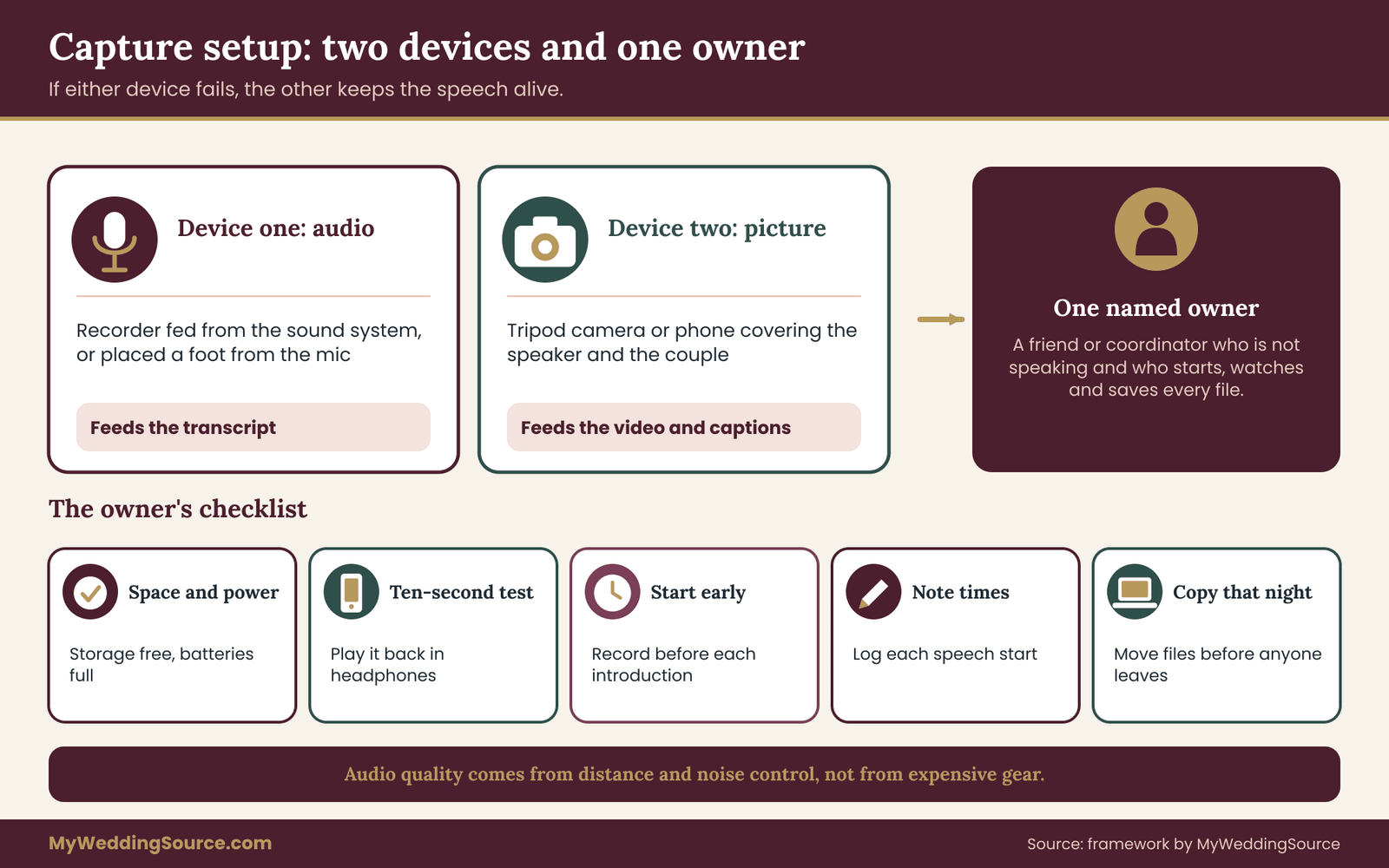
Redundancy protects speech keepsakes better than any single expensive device. Record every speech with two independent devices. One should capture good audio, because audio is what the transcript depends on. The other can capture the picture. If either fails, the other keeps the keepsake alive.
A practical setup uses a dedicated audio recorder, or a phone placed close to the speaker’s microphone feed, plus a camera on a tripod covering the speaker and the couple. A professional videographer, if you hired one, counts as one device. A guest filming from a seat is useful as a backup, but not as the main recording, because guests move, stand up and stop filming when a toast gets long.
Where the audio comes from
Clean audio decides whether speech keepsakes can be transcribed at all. Audio quality has little to do with expensive gear and a lot to do with distance and noise. A recorder one foot from a speaker’s mouth beats a camera thirty feet away. The best source is usually a feed from the venue’s sound system, taken by the DJ, band or audio technician through a line output.
Ask the venue or the DJ whether they can provide that feed, and what they charge, before the day. Your vendor contract should say whether the DJ or videographer will record speeches, who owns the raw files, and when you receive them. If the contract is silent, ask for the answer in an email.
If no feed is available, place a small recorder on the head table near the microphone stand, not in the middle of the room where clinking glasses and conversation drown it.
Alternatives and when each one fits
Different weddings call for different capture methods. This comparison, in plain prose, shows where each fits.
A professional videographer gives the best picture and usually the best audio, but costs money and limits who owns the raw files. This fits a wedding with a full video package already booked.
A sound-system feed to a recorder gives clean audio with no picture. It fits couples who want transcripts and audio keepsakes without a camera in anyone’s face, and it is the easiest way to get a clean transcript.
A phone or small camera on a tripod is the budget option. It works if someone is responsible for starting, stopping and checking it. It fails when nobody is.
A guest recording plus a request to share the file is the weakest option. Treat it as a bonus rather than a plan.
A livestream archive is a special case. If the wedding was streamed for remote guests, the platform may have saved a replay. That file is useful, but streaming platforms compress audio, and the replay may disappear after a set period. Download it and treat it as one copy among several.
Assign one person to own the recording
Speech keepsakes need an owner on the day. Do not leave capture to whoever is nearby. Name one person, preferably a friend, coordinator or family member who is not giving a speech, to start the recordings, watch battery and storage, and confirm each file saved. Give that person a short checklist:
- Check each device has storage space and a full battery or a power source.
- Do a ten-second test and play it back through headphones.
- Start recording before the first speaker is announced and stop after applause fades.
- Note the time each speech begins, so editing is easier later.
- Copy the files to a laptop or card reader that night, before anyone leaves.
If your day has a wider digital plan, the guide to a wedding day digital contingency plan shows how to prepare for dead batteries, lost cards and dropped connections without turning the day into an IT project.
A running sheet for the recorder
The person who owns capture benefits from a one-page running sheet. It lists each speaker in order, the planned start time, the sharing answer the speaker gave, and a box to tick when the file is safely saved. Treat the sheet as part of your speech keepsakes system, because it ties each recording to the permission behind it from the first minute.
Add two columns that people often forget. One records the device and file name for each speech, so that you can find the right file later. The other marks any speaker who asked for no video, so the camera operator knows to lower the camera or switch to audio only for that speech. A sheet like this takes ten minutes to prepare, and it saves hours of searching through unlabeled files when the speech keepsakes are assembled afterward.
Consent at the moment of recording
Consent is not only a question for the speaker. A recording of a toast also contains the sounds of the room: guest laughter, a child calling out, a whispered comment at table five. In ordinary wedding settings this raises few concerns, but a few practices keep it reasonable. Put a small sign or line in the program saying that toasts and speeches may be recorded.
Point cameras at the speaker and the couple, not at tables of guests. And if a guest asks not to be filmed, seat them outside the camera’s view. The site’s guide to consent rules for wedding photos covers wording for signs and for guests who prefer not to appear.
Audio laws about recording conversations vary by state, and most concern private conversations rather than a speech given to a room with a microphone. If you plan to record anything beyond the toasts, such as table conversation, ask your venue and check the rule for your state before you do.
Gate three: transcripts and captions that guests can rely on
A transcript and a caption file are related but not identical, and the difference matters for keepsakes.
A transcript is a document: the words, with speaker names, and perhaps notes about laughter or applause. It reads like a script and is easy to print, search and translate. A caption file is timing data: the same words broken into short lines tied to moments in the video, so they appear on screen as the speaker talks.
The W3C Web Accessibility Initiative explains the difference and what good captions include, and it is worth reading once before you commission or edit anything.
For wedding speech keepsakes, make both. The transcript becomes the archive copy and the printed keepsake. The captions make the video usable by guests who are deaf or hard of hearing, by relatives watching in a noisy kitchen, and by anyone who will open the file in thirty years when the audio quality has aged.
Automatic, human or hybrid
Every route to a transcript has a cost, and the route you choose shapes your speech keepsakes. There are three honest ways to produce a transcript. None is wrong. They differ in cost, accuracy and effort.
Automatic transcription is fast and inexpensive, and often adequate for plain speech in a quiet room. It struggles with names, accents, other languages, background music, laughter and fast storytelling. A wedding toast has all of these. Treat any automatic draft as a first pass that needs correction.
Human transcription is slower and costs more, but handles names and context. It still needs a read-through by someone who knows the family, because a transcriber cannot know that “Uncle Bo” is a nickname and not a typo.
Hybrid means automatic first, then a human corrects it against the audio. For most couples this is the sensible middle path, and it can be done by a patient friend over a weekend.
Whichever route you take, do not publish or print an uncorrected automatic transcript. Check vendor terms and privacy statements before uploading a recording to any transcription service, since you are sending the speakers’ voices and words to a third party. Look for how long files are kept, whether they are used to train software, and whether you can delete them.
The Federal Trade Commission publishes general consumer guidance on privacy and online services, and it is a useful starting point for what to look for.
A correction pass that actually works
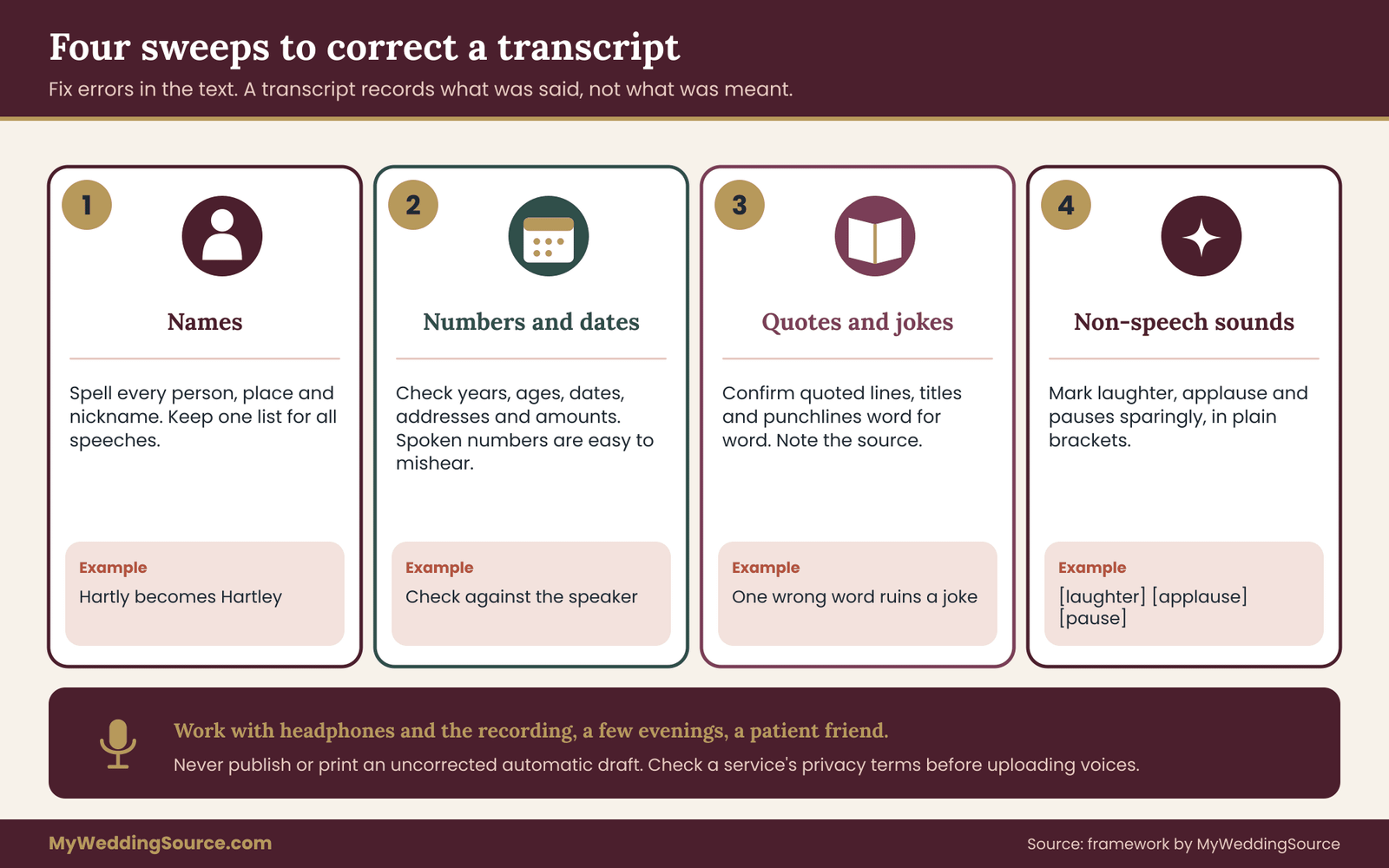
Correction is where speech keepsakes become trustworthy. Sit down with the recording and the draft transcript together, with headphones. Do the pass in four short sweeps rather than one long read.
- Names. Fix every personal name, place name and nickname. Create a one-page list of correct spellings and use it for every speech.
- Numbers and dates. Check years, ages, dates, addresses, amounts of money. Spoken numbers are easy to mishear.
- Quotes and jokes. Make sure quoted lines, song titles and punchlines are right. A joke with one wrong word is not a joke.
- Non-speech sounds. Decide how to mark laughter, applause, pauses, interruptions and a break in the voice. Use plain brackets, kept sparse: [laughter], [applause], [pause].
Fix mistakes in the text, not in your memory. It is tempting to correct a line because you remember what the speaker meant. A transcript records what was said. If the speaker misspoke, either leave it or add a short bracketed note, and let the speaker decide at review.
Captions that read well
Captions make speech keepsakes usable by more of your guests. Captions have different rules from transcripts, because viewers read them quickly while watching.
- Keep each caption to one or two short lines.
- Break lines at natural phrases, not in the middle of a name or an idea.
- Show who is speaking when it is not obvious, for example when a guest answers from the audience.
- Include meaningful sounds in brackets, such as [laughter] or [music playing].
- Match the timing to the audio so the text appears as the words are spoken, and stays long enough to read.
Most video platforms accept a standard caption file, and many video editors can embed captions directly. Ask your videographer whether they will supply a caption file, and if not, whether they will accept one you produce. If the finished video will be posted publicly or shared widely, the Americans with Disabilities Act guidance at ADA.gov is a useful reference on communication access, though it applies mainly to public entities and businesses rather than private couples.
For a private family video, the reason to caption is courtesy and usefulness, not legal compliance.
Other languages and interpreters
Multilingual families often want speech keepsakes in more than one language. If a speech is given in another language, decide what the keepsake should preserve. There are three common approaches. The first keeps the original language in the transcript with no translation, for families who read it. The second pairs it with a translation, line by line, which suits mixed-language families. The third provides captions in both languages, which is the most generous option and the most work.
Translation changes the speech. A translator chooses words, softens or sharpens idioms, and sometimes cannot convey a joke. Label the translation clearly as a translation, name who produced it, and offer the speaker the chance to check it, or ask a bilingual relative to do so. For a speech delivered through an interpreter at the event, the keepsake can include both voices, but note which is the original.
Music and other audio in the background
Background music is a quiet enemy of speech keepsakes. If music plays under a toast, it can ruin the transcript and complicate sharing. Songs carry their own copyright. A video posted publicly with music playing can be flagged or muted by a platform, and a private file shared with family raises fewer concerns but still contains someone else’s recording.
Ask the DJ to lower or stop music during speeches, which also helps everyone hear. The guide to wedding reception music planning covers how to work this into the schedule.
How much work to expect
Plan for the transcript and caption work to take longer than the speeches themselves. A rough rule is that a careful correction pass takes a few times the length of the recording, because you stop, rewind and check names. That is the reason to spread the work across a few evenings and to share it among patient friends.
The time is well spent. Accurate speech keepsakes are what relatives will reread for years, and a transcript with the right names is a gift to anyone who researches the family later.
If the volume looks daunting, prioritize. Do the speeches from parents, grandparents and the couple’s closest people first, since those are the ones most likely to be treasured and requested. Open-microphone speeches can wait, and short toasts can be transcribed by software with a lighter review for the private archive, as long as they are not shared until they have been checked.
Clearance is the step most couples skip, and it is the step that prevents most regrets. It has three parts, and each takes only a few minutes per speech.
Part one: let the speaker review
Review is the step that makes speech keepsakes a shared project rather than a private decision. Send each speaker the corrected transcript and, if they wish, the recording. Keep the message plain: “Here is the transcript of your toast. Please tell us if anything is wrong, if you would like anything removed, and how widely you are comfortable with us sharing it.”
Give a reasonable deadline, such as two weeks, and say what happens if there is no reply: the speech stays in the private archive and is not shared further. That line is important. Silence should never be read as permission.
Speakers may ask for changes, and the right response depends on the request. Correcting a misheard word is simple. Removing a sentence they regret is also reasonable for the shared version, and the couple can keep the original in the private archive if the speaker agrees. A request to delete everything is harder, and it deserves a direct conversation rather than a quiet refusal. Remember that the words are theirs.
Part two: check who is named
Naming is where speech keepsakes most often cause hurt. Read each transcript once with one question: who is mentioned, and would they be comfortable? Look for:
- former partners, former roommates, and anyone from a period the person may not want revisited
- health, money, fertility, immigration, legal or family-conflict details
- stories about deceased relatives that other family members may not share the same view of
- children’s names, school names and anything that identifies where a child lives or goes
- addresses, workplaces, phone numbers or other details that should not travel online
If a speech mentions a person in a way that could embarrass or expose them, you have three options. Ask the person. Share only a trimmed version that leaves out the passage. Or keep that speech private. None of these is censorship. They are what a thoughtful host would do with any story told at a dinner.
Part three: check quoted material
Quotations raise rights questions that speech keepsakes can inherit. Speeches often quote poems, song lyrics, film lines, scripture, famous writers and other speeches. Most of these quotes are brief and incidental, and a private family keepsake carries little risk. The risk grows when the speech is posted publicly or printed in a book, particularly if a quoted poem or lyric appears at length.
Short factual attribution is a good habit. In the transcript, note the source of a quoted line: “reading from a poem by (poet)” or “quoting a song lyric.” If the quoted text is long, or if you plan to publish it widely, check the rights status. The U.S. Copyright Office explains how protection and duration work, and for specific permission you would contact the rights holder or publisher.
For rights questions, use the copyright office pages and the publisher’s own permissions contact. For the everyday courtesy side of sharing what guests said, the site’s wedding etiquette guide is a good companion.
Do not assume that because the couple has a copy, the couple has the right to republish all of it. The speaker’s wording is the speaker’s, and a quoted poem may belong to someone else entirely.
Record the outcome in one line
Your speech keepsakes are only as reliable as the notes behind them. After the clearance pass, write one line per speech in your permissions note:
- speaker name, date reviewed, who approved
- changes requested and made
- sharing tier approved
- anything held back, and why
That note is the thing you will be glad to have in a year, when a cousin asks for a copy or a relative wants a clip removed.
Family permission for speech keepsakes: who can say yes
Family permission sounds simple until a real family is involved. The speaker says yes, the groom says yes, and then the groom’s mother says the toast about her late husband should never be online. Whose decision is it?
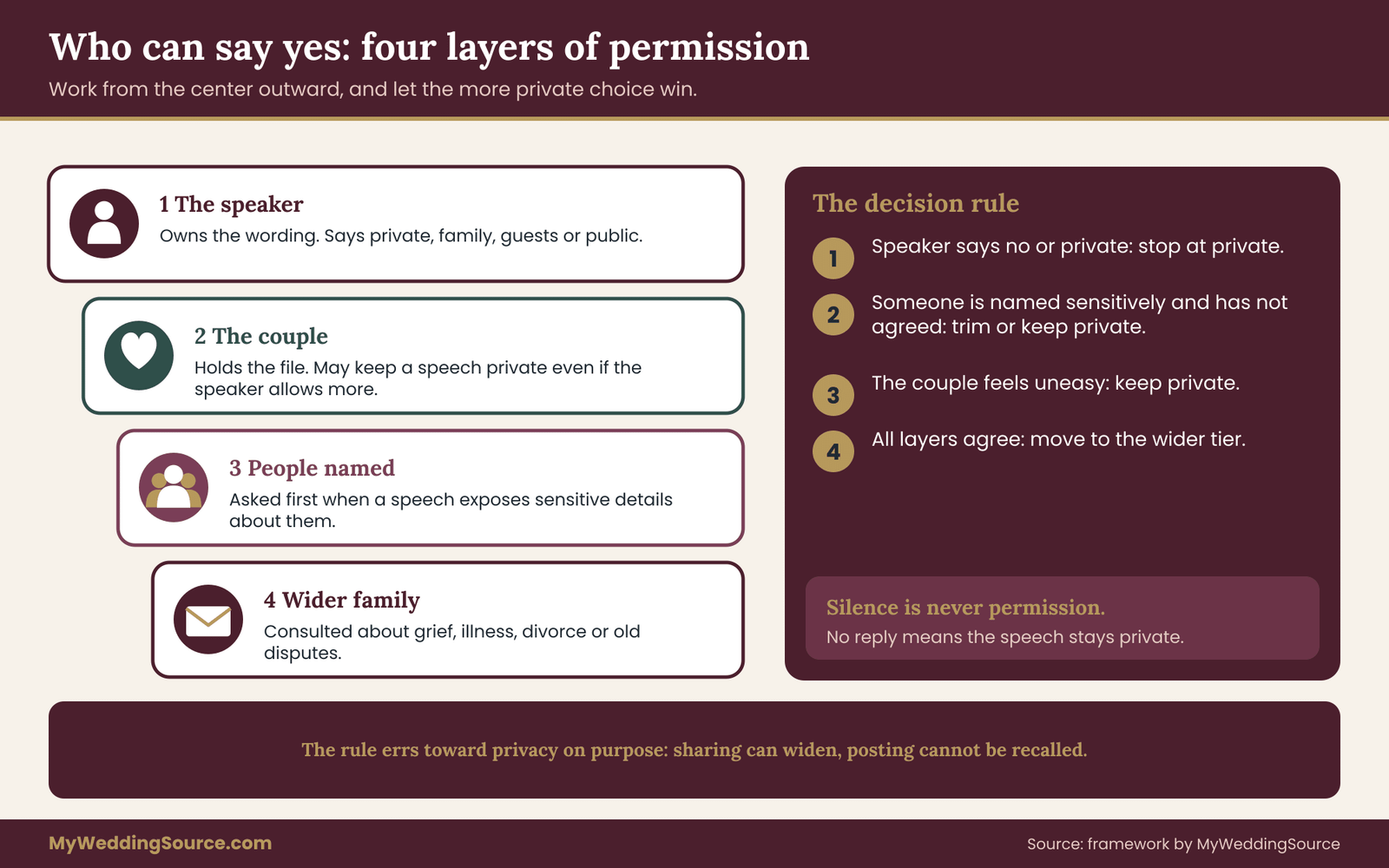
There is no single legal answer that fits every case, and this article cannot give one. What a couple can do is build a fair decision order and apply it consistently. Think of the decision as layers, from the center outward.
Layer one: the speaker
The speaker comes first in any decision about speech keepsakes. The speaker decides how their own words are shared, within reason. If they say private, it stays private. If they say family only, it goes to family only. A speaker’s wishes come first because they are the author, and because overriding them damages the relationship the keepsake is meant to celebrate.
Layer two: the couple
The couple decides how speech keepsakes are kept. The couple decides what happens to the file they commissioned, hold, and live with. They cannot override a speaker’s request for privacy, but they can decide to keep a speech private even when the speaker would allow wider sharing. That is their prerogative. A couple may decide that a roast-style toast belongs in the private archive no matter who approved it.
Layer three: people the speech names
People who are mentioned have a stake in speech keepsakes too. A person mentioned in a speech does not own the words, but their comfort deserves weight. Where a speech discloses sensitive information about them, ask before sharing beyond the room. For ordinary affectionate mentions, a heads-up is usually enough. If the person objects, the couple should trim the shared version or keep it private, as discussed in the clearance pass.
Layer four: the wider family
The wider family often cares about speech keepsakes more than anyone expects. Family members who were not speakers and are not named may still care, especially when a speech touches a death, an illness, a divorce or a family dispute. This is where tact matters more than rules. A simple, kind question to the closest relative, such as “We would like to share Dad’s toast with the extended family. Is that okay with you?”, prevents hurt.
A short decision rule
A plain rule keeps speech keepsakes consistent across speakers. Use this plain rule to turn the layers into action:
- If the speaker says no or private, stop at private.
- If the speech names someone sensitively and that person has not agreed, trim or keep private.
- If the couple is uneasy, keep private. Unease is information.
- Only when all three layers agree, move to the wider tier.
The rule errs on the side of privacy, on purpose. Sharing can always be expanded later, after a conversation. A clip that has been posted, saved and forwarded cannot be fully recalled.
Special situations
Some situations call for extra care with speech keepsakes. Speeches that mention someone who has died. Grief belongs to many people, and each may want a different level of exposure. Ask the closest relatives first, and consider a family-only tier rather than a public one. The site’s guide to consent rules for wedding photos explains a similar approach for images of relatives who prefer not to appear.
Estranged or distant relatives. If a speaker or a person named is no longer in contact with part of the family, do not assume the family would welcome them seeing the toast. Ask the speaker, and remember that a family-only tier may include people the speaker would rather exclude.
Minors. A child’s speech and any speech that names a child should be shared more narrowly than adult speeches. Avoid posting children’s full names, schools or locations. Ask a parent or guardian, and let a teenager have a say about how they appear.
Speakers who have since fallen out. Friendships change. If the speaker and the couple are no longer on good terms, the couple still holds the copy they received, but sharing that speech widely or publicly without the speaker’s approval is likely to cause conflict. In doubt, keep it in the private archive and revisit later.
Vendor-recorded speeches. If a hired videographer recorded the toasts, the vendor may have rights to use clips in a portfolio or promotion, depending on the contract. Check that clause before the wedding, and ask for speeches to be excluded from marketing use unless the speaker agrees. The records guide on organizing wedding records after the event shows how to file contract terms next to the deliverables they govern.
Written permission without paperwork
Permission for speech keepsakes does not need a formal contract. You do not need a form. A reply to an email or text can serve as written permission if it states what was agreed. Save it. A permission that exists only in your memory is a permission nobody else can check.
If a speaker wants more formality, a one-paragraph note is plenty:
I agree that (couple) may record my toast at their wedding on (date), keep a transcript and recording for their private archive, and share it with (private / family / guests / public) as marked. I may ask to change or withdraw this permission later.
Keep it that simple. A long legal document at a wedding makes people nervous and does not improve the outcome.
Gate five: choosing a sharing tier for each speech
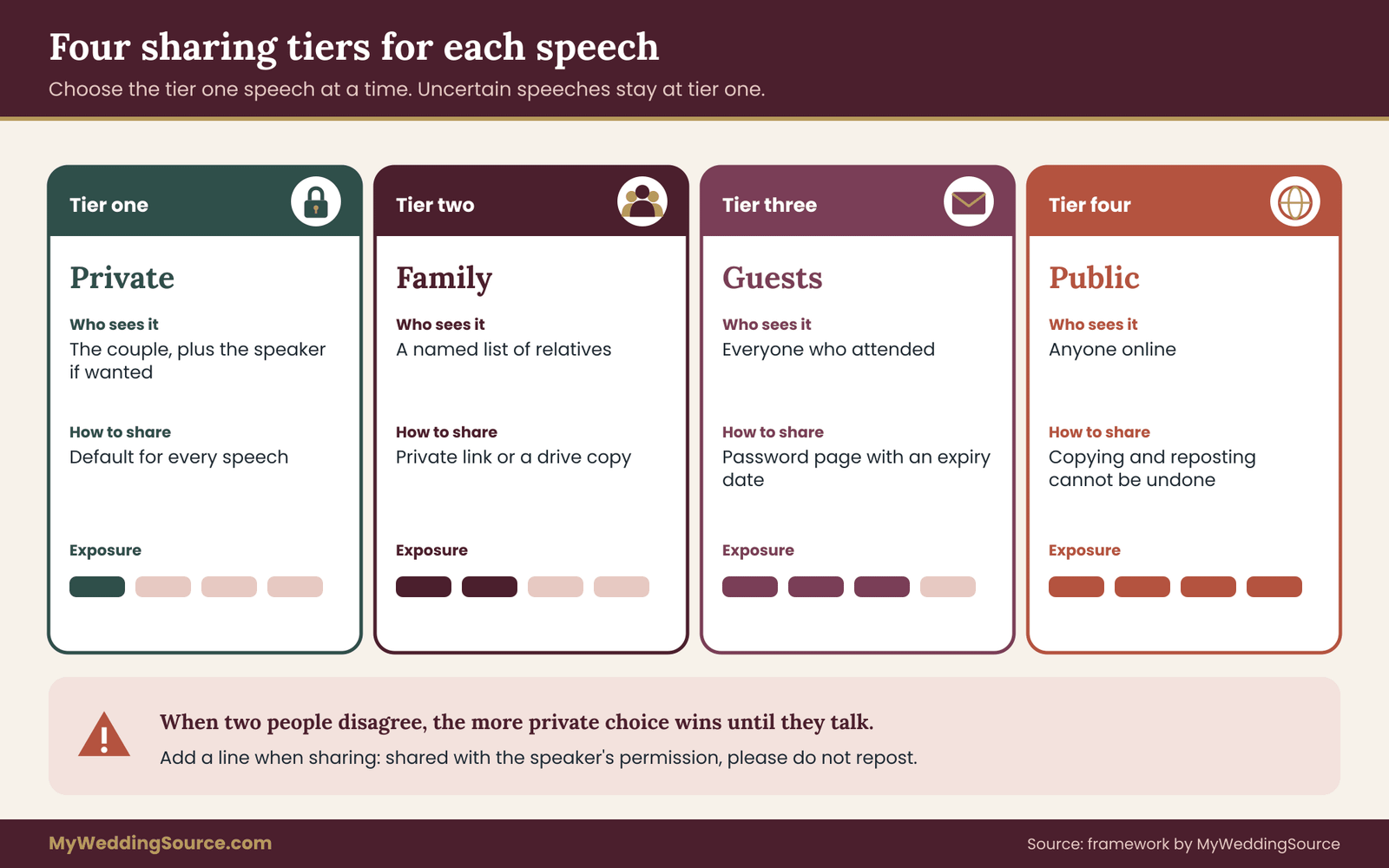
Once a speech has been captured, captioned and cleared, it is time to choose how far it travels. Rather than a yes-or-no decision, think in four tiers, each with its own audience and its own risks.
Tier one, Private. The couple only, and the speaker if they want a copy. This is the default for every speech, and it is where anything uncertain should remain.
Tier two, Family. A defined list of close relatives, shared through a private link, an invitation-only folder or a physical copy. This suits emotional speeches and anything about family history.
Tier three, Guests. Everyone who attended or was invited. Shared through a password-protected gallery or a private page. This suits lighthearted speeches and general highlights.
Tier four, Public. Posted openly on social media or a website. This tier is rarely necessary, and it is the one that causes most regret. If you use it, post only cleared, trimmed and fully approved speeches, and expect that the clip may be copied, reposted and indexed.
Matching the tier to the speech
Each of your speech keepsakes can sit in a different tier. There is no formula, but some patterns hold. A short, funny, general toast with no sensitive material can move to guests with the speaker’s approval. A long personal speech about a parent’s illness is probably family-only or private. A speech with a quoted poem or a roast of the groom’s friends is probably private. A speech that names children should stay out of public posts.
When two people disagree, for example the couple wants to share and the speaker prefers private, the more restrictive choice wins until they talk. The reverse situation is rare, but if the speaker wants wider sharing than the couple is comfortable with, the couple decides.
How to share without losing control
Sharing method matters as much as audience for speech keepsakes. The method matters as much as the tier. Some ways to keep control:
- Use private links with a password, and share the password separately.
- Prefer view-only access over downloadable files, when downloads are not needed.
- Set an expiry date for guest links, and review them yearly.
- Send family copies on a drive or card instead of a public link, when the relative is not comfortable online.
- Avoid group chats for sensitive speeches, since forwarding is instant and invisible.
Be honest with yourself about the limits. Once a file is in someone’s hands, you cannot fully control where it goes. That is the reason to share narrowly, and to ask recipients plainly not to repost.
What to say when you share
A short note travels with speech keepsakes and protects them. Add a short line to any shared speech: “This toast is shared with (speaker)’s permission for family only. Please do not repost it.” It costs nothing, sets expectations and reminds people that the words belong to a person.
If a recipient posts it anyway, ask them calmly to remove it, explain why, and thank them if they do. Most people comply once they understand. Platforms also offer ways to report content posted without permission, which you can use if a polite request fails.
Building an archive for wedding speech keepsakes
An archive is not a folder full of files. It is a folder where each file can be understood, found and opened by someone who was not at the wedding. The test is simple: could your child, or a cousin you trust, open the folder in twenty years and understand what is in it and what they may do with it?
Choose formats that last
Format choices decide whether speech keepsakes still open in twenty years. Software changes, and the file that plays today may not play in a decade. Library of Congress personal archiving guidance recommends favoring common, well-documented formats and keeping more than one copy. In practice, for speech keepsakes this means keeping three layers.
The original. The unedited file straight from the device or vendor, with its original name and format. Never overwrite it.
A working copy. A version in a widely supported format such as a standard video file or a standard audio file, trimmed and ready to play. This is what you open and share from.
The text. The corrected transcript saved as a plain text file or a simple document, plus the caption file. Text is the most durable format of all, and it survives when video players change.
If an original is in an unusual format, such as a camera’s own format, keep it anyway and make a standard working copy. Do not rely on a vendor’s online gallery as your only home for files. Galleries expire, platforms close accounts and links break.
Name files so they explain themselves
Clear names turn a pile of files into speech keepsakes someone else can understand. Good names save arguments. Use a pattern that sorts by date and says what the file is. For example: date of the wedding, speaker, short label, version. A name like “best-man-toast-reception-cleared-v2” tells the reader more than “IMG_4471”. Avoid spaces and special characters, which cause trouble across systems, and avoid putting sensitive details in file names, since names are visible in sharing menus and backup logs.
Keep the same pattern for every speech so that sorting brings related files together: the original, the working copy, the transcript, the caption file and the permissions note.
Add a permissions note beside every speech
A permissions note is the habit that makes speech keepsakes safe to inherit. This is the habit that separates a real archive from a pile. Beside each speech, store a short text file with:
- who spoke, when and where
- who recorded it and with what device
- who reviewed the transcript, and when
- the sharing tier approved
- any trimmed passages and why
- the date each permission was given and how it can be changed
Two minutes of writing prevents the situation where a relative asks, years later, whether a toast was ever cleared, and nobody can say.
The simplest folder layout
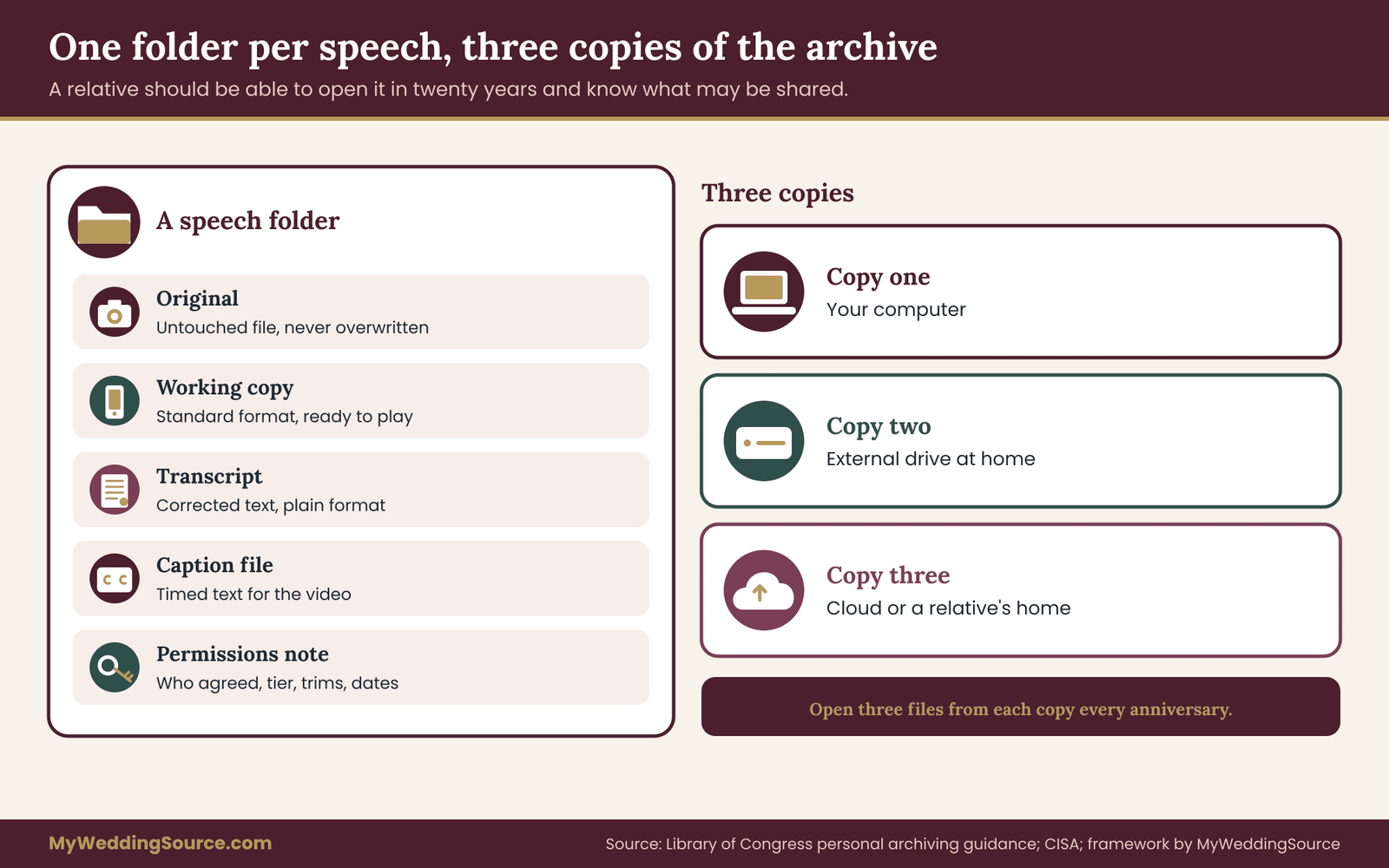
Simple structure keeps speech keepsakes findable. You do not need a complex structure. One folder per speech inside one parent folder is enough. Each speech folder holds five items: the original, the working copy, the transcript, the caption file and the permissions note. A short index file at the top lists each speech with a single line. A beginner can build this in an afternoon, and a relative can understand it in a minute.
The three-copy rule, applied
Backups matter more for speech keepsakes than for most wedding files, because the moment cannot be recreated. Keep at least three copies of the speech keepsakes archive: one on your computer, one on an external drive at home, and one somewhere else, such as a cloud account or a drive at a trusted relative’s home.
The reasoning is the same one used for any irreplaceable files. A fire, a theft or a failed drive should not erase a father’s last toast. CISA publishes plain-language guidance on backing up data, which is a helpful reference.
Two details are specific to speeches. First, back up the original and the transcript separately from the working copy, because the working copy can always be remade, while the original cannot. Second, if any copy lives online, check who can see it. A private archive stored in a shared link is not private.
Digital, physical or both
Some families prefer a paper trail, and some prefer everything on a drive. For speech keepsakes the best answer is both. Digital files hold the sound and the picture. A printed transcript, kept with the marriage papers or in a keepsake box, holds the words in a form that needs no software. If a drive fails or a format becomes obsolete, the printed pages still tell the story.
Keep the printed transcripts out of sunlight and damp, and use archival paper and sleeves if you want them to last. Label each page with the speaker, the date and the sharing tier, so a relative who finds the pages years later knows what may be shared. Treat printed speech keepsakes with the same permissions as digital ones, because paper is easy to photocopy and photograph.
Test the archive once a year
A yearly check keeps speech keepsakes alive. On your anniversary, open three random files from each copy. Check that they play, that the transcript matches, and that the permissions note is still there. This takes ten minutes, and it is the only way to find a silent failure before it matters.
Update the permissions notes if anyone has asked for a change. If a format has become hard to open, convert the working copy now, not when the old player is gone.
Who inherits the archive
Someone should know where your speech keepsakes live. Think once about who else should be able to find it. Name a trusted person, tell them where the speech keepsakes archive lives and how to open it, and leave short written instructions. Do not share passwords in a message that sits in an inbox forever.
A sealed envelope or a password manager’s emergency access feature is safer. Include a line in the instructions about sharing rules: “Speeches marked private stay private. Ask the speaker’s family before sharing any speech beyond the folder.”
Printed and made keepsakes from wedding speech keepsakes
Many couples want something to hold: a framed card, a small book of toasts, an audio card in a keepsake box, a few lines printed on a program for the one-year anniversary. These are lovely, and they bring their own checks.
Printed transcripts and toast books
Print is the most familiar format for speech keepsakes. A printed collection of toasts is the most natural format. Each speech becomes a page or two, with the speaker’s name and the occasion. Because print is permanent and easily copied, it calls for the same clearance as sharing, plus a few extras.
Use the cleared transcript, not the raw one, and let each speaker see their page before printing. Trim passages that were approved only for the private archive. Do not print children’s full names or sensitive details. Keep the number of copies small, and know who receives them. A printed book handed to the whole family is closer to tier three or four than to tier one.
Many photo-book and print services require you to confirm that you have the rights to what you upload. Read the terms. Some allow the service to use content for limited purposes, and the rules differ between companies. The Federal Trade Commission and the Copyright Office offer general information, and the company’s own terms are the final word.
Audio cards and QR links
Gadgets add novelty to speech keepsakes and new points of failure. Some keepsake products attach a recording to a printed card through a chip, button or QR code. They are charming and convenient, but they have two weak points. The product may depend on a company’s website staying online, and a QR link to a public page makes the speech public.
If you use a QR code, point it to a private, password-protected page, or better, to a file stored in your own archive. Always keep the original recording separately, so the card is a convenience and not the only copy.
Framed excerpts and quotes
Display pieces turn a single line from your speech keepsakes into decor. A framed line from a toast is a sweet gift. Ask the speaker first, since you are turning their words into a display. Choose a short excerpt, credit the speaker by name, and avoid lines that could embarrass anyone who sees the frame on a wall. A line is also easier to approve than a whole speech.
Gifts for the speaker
Speakers appreciate receiving their own part of the speech keepsakes. A copy of their own toast, in text or on a small drive, is a thoughtful thank-you for a speaker. It also gives them a tangible reminder that you took their words seriously, which often makes them more relaxed about sharing.
Offer the copy with a note: “Here is your toast, exactly as you gave it. It is yours to keep, and we will keep ours private unless you tell us otherwise.”
Video keepsakes and edited highlights
Highlight reels reshape speech keepsakes, so they need their own permission. A highlight reel cuts speeches into short clips, set to music. That is a new work, with new questions. The editor chooses what to keep, and a clip pulled out of a speech may change its tone. Ask each speaker before their clip appears in a highlight, and avoid putting a sensitive passage into a fast-cut montage.
The music licensing question also returns: a video with a commercial song may be fine privately and a problem when posted. Ask your videographer how they license music, and prefer files with the original sound for any archive copy.
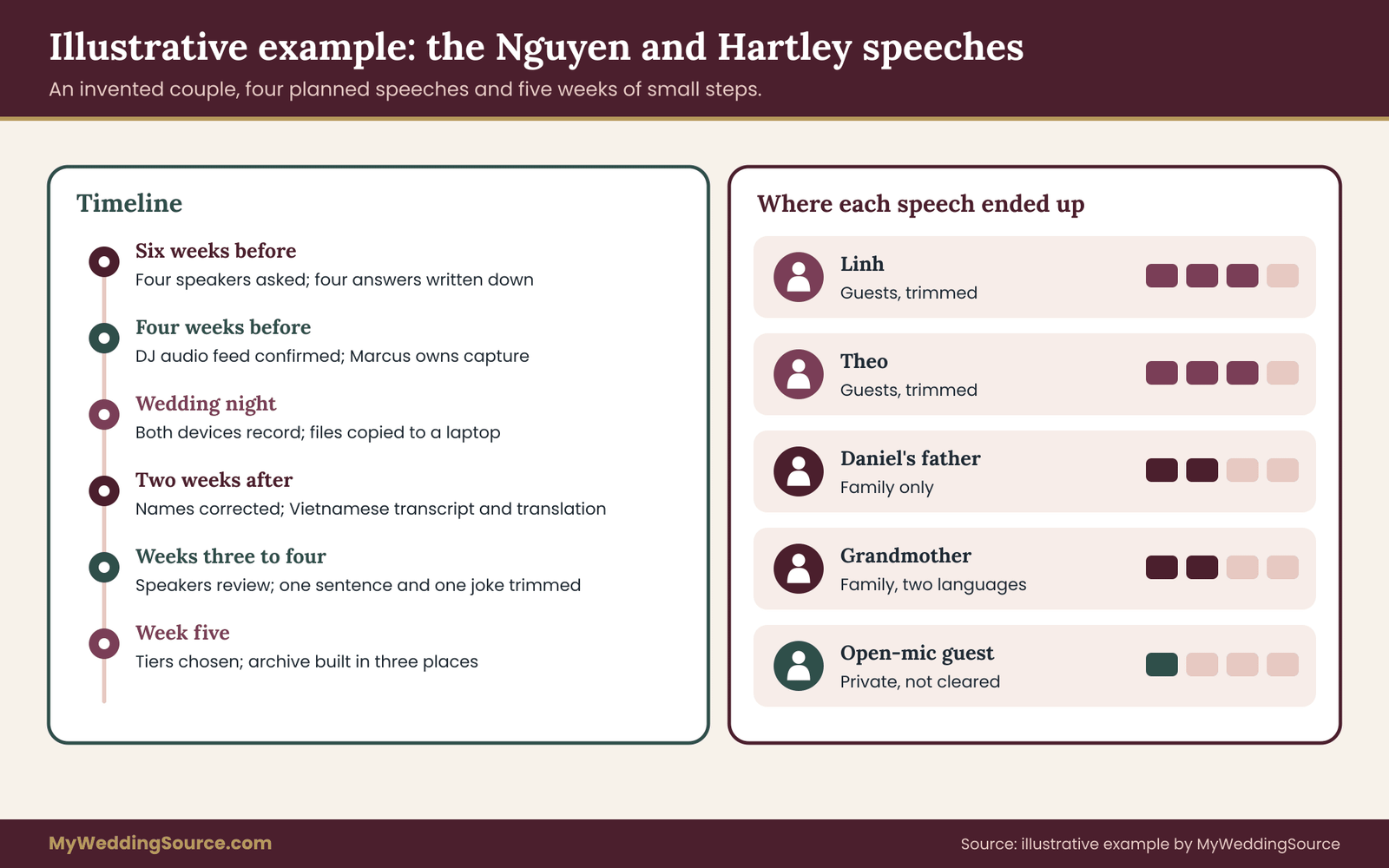
A worked case: the Nguyen and Hartley speech keepsakes
The following example is invented, to show the workflow with real friction. The couple, speakers and details are illustrative and not drawn from any actual wedding.
Priya Nguyen and Daniel Hartley plan a one-hundred-guest wedding with four planned speeches and an open microphone after dinner. They have no video package, but a friend named Marcus has offered to help. The speeches are by Daniel’s father, Priya’s sister Linh, Daniel’s best man Theo, and Priya’s grandmother, who will speak mostly in Vietnamese.
Six weeks before: Gate one
The couple starts their speech keepsakes early. Priya sends each speaker the short request from earlier in this guide. Linh says yes to everything, including public posting. Theo says yes to recording and keeping, family and guests, but not public, because his story mentions a former coworker. Daniel’s father says yes to recording and a transcript but asks that the speech stay with family. Priya’s grandmother agrees to be recorded and asks that her granddaughter check any translation.
Priya writes four lines in a shared note, one per speaker, with the date and the tier each chose. That is the whole permissions record at this stage.
Four weeks before: the capture plan
Capture planning for their speech keepsakes takes one afternoon. Marcus will run capture. The DJ agrees to give an audio feed to a small recorder for a fee that Priya confirms in an email. A second phone on a tripod covers the head table. Marcus makes a one-page checklist and tests both devices at the venue walkthrough. The emcee will read the recording line before the open microphone, and the program mentions that toasts may be recorded.
Priya also checks the final vendor timeline to be sure speeches start after dinner service, when the room is quiet, and that the DJ will lower music during each toast.
Wedding night: Gate two
On the night, the couple’s speech keepsakes depend on two devices and one careful friend. All four planned speeches are captured on both devices. The phone ran out of storage during the grandmother’s speech, but the audio recorder caught it. Marcus copies both devices to a laptop that night and sends the file list to Priya. Two open-mic speakers also spoke, and Marcus marks those files “uncleared.”
The first two weeks: Gate three
The transcripts decide the quality of the finished speech keepsakes. Priya runs automatic transcription on the audio recorder files and gets four rough drafts. Linh, who is patient with details, does the correction pass. The names were wrong in every draft: “Hartley” appeared as “Hartly,” and a nickname, “Bear,” was heard as “bare.” The grandmother’s speech came out as garbled English, so that draft is discarded.
Priya’s mother produces a Vietnamese transcript by hand, and a cousin writes an English translation, clearly labeled.
Captions are produced from the corrected text and attached to the video from the phone. The phone’s video has a gap where storage ran out, so the captioned file for the grandmother uses the audio with a still photograph.
Weeks three and four: Gate four
Review turns their draft speech keepsakes into approved ones. Each speaker receives the transcript with the message from earlier and a two-week deadline. Theo reads his and asks to remove one sentence about the coworker. Priya trims it from the shared version and keeps the original in the private archive, with Theo’s agreement. Daniel’s father makes no changes. Linh asks for a correction to a date. The grandmother’s family checks the translation and changes two phrases.
Priya reads each transcript for names. Linh’s toast mentions Priya’s cousin’s divorce in a passing joke. Priya asks the cousin, who says she would rather not have it shared beyond family. Priya trims the line from the guest version.
One open-mic speaker cannot be reached. His speech stays private and is marked “not cleared.”
Week five: Gate five
Tiers are chosen speech by speech, never for the whole set of speech keepsakes at once. Priya and Daniel choose tiers:
- Linh’s toast: guests, trimmed version, with Linh’s approval. Linh allowed public posting, but the couple declines, since the toast names the cousin’s family.
- Theo’s toast: guests, trimmed version.
- Daniel’s father’s toast: family only.
- The grandmother’s speech: family only, with the Vietnamese transcript and English translation.
- The open-mic speech: private.
They create a private, password-protected gallery for guests and a smaller family folder. They set the guest link to expire in a year, and put a reminder on the calendar.
Month two: the archive
Filing completes the speech keepsakes. Each speech gets its own folder with five items: original, working copy, transcript, captions and permissions note. They store the speech keepsakes archive on the laptop, an external drive and a cloud account. A cousin who lives in another state holds a second drive. On the first anniversary they plan to open three files from each copy.
What the example shows
The example shows how ordinary speech keepsakes work when the steps are small. Four points stand out. The permission record took four lines. The transcript needed a human, because automatic drafts failed on names and on another language. The clearance pass found two issues that nobody would have noticed otherwise. And every decision that was uncertain ended up in the more private tier, which cost nothing and avoided conflict.
A quick audit of your own speech keepsakes
If the wedding has already happened and you are not sure where things stand, run this short audit. Answer each question with yes, no or not sure, and treat every “no” and “not sure” as a task.
- Does every speech have a recording that plays from start to finish?
- Does every recording have a corrected transcript?
- Do the videos that will be shared have captions?
- Do you know which speakers agreed to which sharing tier, and can you show it?
- Has each speaker seen their transcript?
- Have you checked every speech for named people, children and sensitive details?
- Do three copies of your speech keepsakes exist, in two kinds of storage and two places?
- Does a permissions note sit beside each speech?
A couple who answers yes to all eight has a finished set of speech keepsakes. A couple who answers yes to five has a good start and a short list. Nobody needs perfection, and nobody needs to fix everything in a weekend. Work from the top of the list, since the early items support the later ones.
Failure conditions: when to stop, fix or keep a speech private
A workflow is useful when it tells you what to do when something goes wrong. These are the failure conditions worth recognizing, with the response for each.
The speaker never replied
Silence is the most common obstacle for speech keepsakes. Treat silence as a no for sharing. Keep the speech in the private archive, send one gentle reminder, and try a different channel, such as a phone call or a message through a relative. If you still hear nothing after a reasonable period, leave the speech private. It can be revisited later.
The speaker said yes, then changed their mind
Permission can be withdrawn. Remove the speech from shared tiers as soon as you are asked, tell the people who received it, and ask them to delete their copies. You cannot erase copies you do not control, so say so honestly. Keep the private copy only if the speaker agrees, and otherwise follow their wishes about it.
The recording failed
A failed recording does not have to end the speech keepsakes. Sometimes both devices fail, or the audio is unusable. Do not reconstruct a speech from memory and present it as a transcript. Ask the speaker for their notes or written text, label it as “written version, not a recording,” and let the speaker approve it.
If a speaker has no notes, a short note from the couple about what they remember, clearly labeled as memory, is honest and still meaningful.
The transcript is wrong in ways you cannot fix
If the audio is too poor to transcribe accurately, say so in the file. A partial transcript with marked gaps, such as [unclear], is more trustworthy than a smooth one that invents words. A human transcriber may succeed where software fails, but still expect gaps.
The speech turns out to be hurtful
Not every toast belongs among the speech keepsakes. Sometimes a toast goes badly. A joke lands wrong, a story reveals something, a speaker has had too much to drink. The couple does not owe anyone a recording of that moment. Keep it private, or do not keep it at all if the speaker and the couple agree. The privacy-first default exists for exactly this situation.
A named person objects
If someone mentioned in a speech asks you to remove a passage, take the request seriously and ask what exactly bothers them. Often a trim solves it. If the passage is central to the speech, tell the speaker, since it is their wording, and look for an agreement that respects both.
A vendor holds the files or uses the clips
Vendor terms can quietly override your plans for speech keepsakes. If a videographer delivers only a highlight reel, or posts clips of the speeches in their marketing without asking, the problem lies in the contract. Ask for the raw files in writing, ask for the speeches to be removed from marketing, and keep the email trail. It is far simpler to settle these points before the event than after.
Hard stop signs
Some signals mean that speech keepsakes should wait. Some situations should pause the sharing process for that speech, at least for now:
- The speaker has said no, or private.
- A named person has objected and the speech has not been trimmed.
- The recording or transcript contains information that could harm someone if public, such as an address or a medical detail.
- You cannot tell whether a quoted work is protected and you plan to publish it widely.
- Any uncertainty about a minor’s appearance or name.
Whenever a stop sign appears, the speech goes back to tier one. Nothing is lost, and the workflow can resume when the issue is solved.
Edge cases that come up often
Unusual situations still follow the same logic for speech keepsakes. Rehearsal dinner toasts. They are usually looser, more personal and recorded less carefully. Apply the same gates, and expect a higher chance that the content is private by nature.
Speeches that are performances. A rap, a song or a skit written for the couple is creative work, and the performer may care a great deal about how it travels. Ask about it directly.
Professional speakers. If a guest is an actor, writer or public speaker, they may have a firm view about their words. Do not assume casual consent.
Speakers who later fall out of touch or pass away. Both are sensitive, and both argue for the private tier unless family members have been consulted.
A speaker who asks for a copy and then posts it. Share with a clear note, as described earlier, and accept that you cannot control what a person does with their own words. They own them.
Your next steps
You do not need to do everything at once. The work spreads across the engagement, the wedding and the year after, and each stage takes only a short sitting. Use this sequence as a checklist.
Before the wedding, in one evening.
- List every planned speaker, and note which speakers may speak without notice.
- Send the short request message to each planned speaker and write their answers in one shared note.
- Decide who owns capture on the day, and give that person the checklist from the capture section.
- Ask the DJ or venue about a sound feed, and ask your videographer, if you have one, what the contract says about speeches and raw files.
- Add a recording line to the program and ask the emcee to read a short notice before any open microphone.
On the wedding day, in a few minutes.
- Test both devices and play back ten seconds through headphones.
- Start recording before each speaker is announced.
- Copy every file to a laptop before the night ends, and note the order of the speeches.
In the first two weeks.
- Produce a transcript, by software or by a person, and correct it against the audio in four sweeps: names, numbers, quotes, non-speech sounds.
- Make the caption file and attach it to the working video.
- Build a one-page list of correct name spellings and keep it with the archive.
In weeks three to five.
- Send each speaker their transcript and ask for changes within a stated period.
- Read each speech once for named people, children and sensitive details.
- Choose a sharing tier for each speech, and write one line in the permissions note.
- Share with a clear note and a limited link, never with an open one by default.
In the first two months and the first year.
- Build the folder for each speech with the five items, and keep three copies of the archive.
- Give each speaker a copy of their own toast, with a thank-you.
- On your first anniversary, open a few files from each copy, update the permissions notes and check that guest links have expired as planned.
If you are reading this after the wedding and have only a recording and no permissions, start at gate four: ask the speakers now, share nothing in the meantime, and build the permissions record from there. It is never too late to ask, and a late request still shows respect.
FAQ
Do I need a speaker’s permission to keep a recording of their wedding toast?
Keeping a private copy for your own archive is a lower-risk choice than posting it, but asking is still the right habit. A short yes covering recording, keeping and sharing prevents most disagreements. Copyright and recording rules vary by state and situation, so check the U.S. Copyright Office pages and your state’s rules, and keep the speaker’s answer in writing.
Who owns the copyright in a wedding speech?
In general, the speaker holds copyright in their original wording once it is written or recorded, and a recording may involve other rights too, such as the videographer’s. The couple often owns the copy they received, not the wording. The U.S. Copyright Office explains how protection works. For a definite answer in a specific case, ask a qualified attorney.
Can I post a wedding toast on social media?
Only with the speaker’s clear yes to public posting, and with anyone named sensitively consulted first. Public posts can be copied and reshared, and children, addresses and health details deserve extra care. If you are unsure, share through a private, password-protected link to a defined group, and ask recipients not to repost.
Are automatic captions good enough for wedding speech keepsakes?
They are a useful first draft, not a finished product. Names, accents, other languages, laughter and background music often confuse software. Correct the draft against the audio, fix names first, and have someone who knows the family read it. For anything printed or shared widely, a human check is worth the time.
How do I handle a speech given in another language?
Keep the original-language transcript and add a clearly labeled translation, ideally checked by the speaker or a bilingual relative. Translation changes tone, so do not present it as the speaker’s own words. For video, bilingual captions are the most generous option, and a single-language caption with a separate translated document is a practical alternative.
What if a guest speaks at the open microphone and I never got consent?
Keep that recording private and uncleared. Contact the speaker afterward, share the transcript, and ask what they are comfortable with. Without a reply, leave it private. An emcee line before the open microphone telling guests that toasts may be recorded reduces this problem at future events.
How long should I keep wedding speech recordings?
Many couples keep them indefinitely, since the value grows with time. Keep the original, a standard working copy and the corrected transcript, in at least three places, and test a few files each year. Review sharing permissions annually and remove expired guest links. If a speaker asks to withdraw permission, follow their request.
Can a videographer use my wedding speeches in their marketing?
Only if your contract allows it, so check the usage clause before signing. Ask in writing for speeches to be excluded from portfolio or advertising use unless each speaker agrees. If a clip has already been used without permission, ask the vendor to remove it, and keep the email trail.
Sources
- U.S. Copyright Office
- U.S. Copyright Office, frequently asked questions
- ADA.gov, U.S. Department of Justice
- W3C Web Accessibility Initiative, captions and transcripts
- Library of Congress, personal digital archiving
- Cybersecurity and Infrastructure Security Agency (CISA)
- Federal Trade Commission, consumer privacy guidance
- USA.gov
- National Archives, family archives preservation