
A Zoom wedding and a private streaming link both bring far-away guests into your ceremony, but they are different formats. A Zoom wedding is a video meeting where remote guests can be seen and heard. A private stream is a one-way broadcast behind a protected link. This guide compares the two on moderated interaction and privacy, so you can pick one before you buy anything.
Choose a Zoom wedding when a few remote guests must speak, be seen, or take part in a moment such as a reading, a blessing or a toast, and when someone can moderate the room. Choose a private streaming link when remote guests mainly watch, the audience is large or mixed, or you want the in-room guests to stay off a shared screen. For many couples the best answer is a stream for the ceremony and a small meeting room afterward.
Most couples who think about remote guests begin with a simple wish: “Grandma should be able to see us.” That wish is easy to meet. What comes next is where the choices split. Do you want Grandma to wave back? Should she be able to say a few words? Do you mind if her neighbor, who was never invited, watches with her? Does anyone in the room object to appearing on a screen in someone else’s living room?
The two formats answer those questions in opposite ways. A Zoom wedding is built around people appearing on each other’s screens. A private streaming link is built around a single picture and sound going out to many viewers, with no way back in. Neither is better in general. Each is better for a particular kind of wedding, and each fails in a particular way.
This guide stays on that one comparison. It does not walk through cameras, microphones or full production. The broader digital operations of the day, including backup communication and file permissions, sit in the guide on wedding day digital contingency planning. What you will find below is a way to decide, a way to moderate, and a way to know when to stop.
A note on scope. This is general information, not legal, tax or financial advice. Platform settings, fees and policies change often, so confirm current details with the provider and with your venue before you commit.
What a Zoom wedding and a private streaming link actually are
The word “Zoom” has become shorthand for any video meeting. In this guide, a Zoom wedding means a ceremony in which remote guests join a live video meeting. The meeting could run on Zoom, Google Meet, Microsoft Teams or a similar tool. What matters is the shape of the format, not the logo.
In a Zoom wedding, each person who joins can turn on a camera and a microphone, if the host allows it. The host controls who is let in, who can speak, who can share a screen and whether the session is recorded. Everyone in the call can usually see a gallery of faces. A Zoom wedding therefore feels like a gathering with a window in the wall.
A private streaming link is closer to television. A camera in the room sends one picture and one sound mix to a service, and the service sends it to viewers who hold the link. Viewers watch. They may be able to type in a chat box, depending on the service and your settings, but they do not appear on screen and they are not heard in the room.
The word “private” deserves care. Many platforms offer an unlisted or password-protected setting. That keeps the stream out of search and off public pages, but it does not make it secret. Anyone who has the link can usually forward it. A private link is a door with a lock that the guests can hand to someone else.
The same event, two different pictures
Picture a ceremony of ninety people with eight remote guests. In a stream, the eight see the ceremony as a viewer sees a film. They are not part of the room’s sound and they do not appear in it.
In a Zoom wedding, the eight appear as small faces on a laptop or a tablet near the front, or on a screen the officiant can see. The room can see them. They can see the room. When the officiant asks for a blessing from an aunt in another city, the aunt can give it, live.
That difference is the entire reason the formats exist. One lets the far-away guest be present. The other lets the far-away guest be informed. The first costs more attention and carries more risk. The second costs less attention and carries less closeness.
Where hybrid formats fit
Some platforms blur the line. A Zoom wedding tool can broadcast to a large audience in view-only mode, and some streaming services include a chat or a limited Q and A. Those are middle options, and a later section covers them. For now, hold on to the clean distinction: meeting means two-way, stream means one-way.
The real question: who needs to be heard
The choice between a Zoom wedding and a stream starts with people, not products.
Before comparing features, ask a smaller question. For each remote guest, what do you want them to do during the ceremony? Write the answer next to each name. The answers usually fall into four groups.
Watchers. They want to see and hear the ceremony and will be quiet. This is most remote guests at most weddings. Elderly relatives, coworkers, friends who could not afford the trip, and guests who are unwell on the day all belong here.
Responders. They would like to be acknowledged. A wave, a smile on screen, a few words before the ceremony or after it. They do not need a role in the ceremony itself.
Participants. They have a part: a reading, a blessing, a witness signature, a vow response, or a role in a ritual. Their words must be heard in the room, on time.
Guests of guests. These are people who may watch alongside an invited guest: a spouse, a caregiver, a child, a neighbor who helps an older relative with the computer. They are the privacy wild card in every format.
Count each group. If nearly everyone is a watcher, a private stream will serve you well and carry less risk. If there are one or two participants, you may not need a full meeting. A short recorded clip or a phone call into the room for one reading can be cheaper than running a full meeting for the whole ceremony. If there are several responders and participants, a Zoom wedding earns its extra work.
A quick sorting exercise
Take ten minutes and sort the remote list into the four groups. Do it with your partner, because you will disagree about at least two names, and that disagreement is useful. One of you imagines a cousin as a watcher. The other imagines the same cousin giving a toast.
When the list is sorted, note two numbers: how many people need to speak, and how many people in total will be watching. Those two numbers drive most of the decision. A small total with several speakers points to a meeting. A large total with no speakers points to a stream. A large total with a few speakers points to a stream plus a small meeting, which is the hybrid design in the last third of this guide.
What the sorting does not tell you
The list will not tell you about privacy. A watcher may be perfectly quiet and still be a problem, if that person forwards the link, records the screen or joins from a coffee shop. It also will not tell you about the in-room guests, who did not choose to appear on any screen. Those two questions, privacy and room consent, get their own sections next.
Moderated interaction: what a Zoom wedding adds, and what it costs
Moderation is the quiet cost of a Zoom wedding. In a stream, nobody has to manage the remote audience. In a Zoom wedding, someone does, and that someone cannot be the person getting married, the officiant or the photographer.
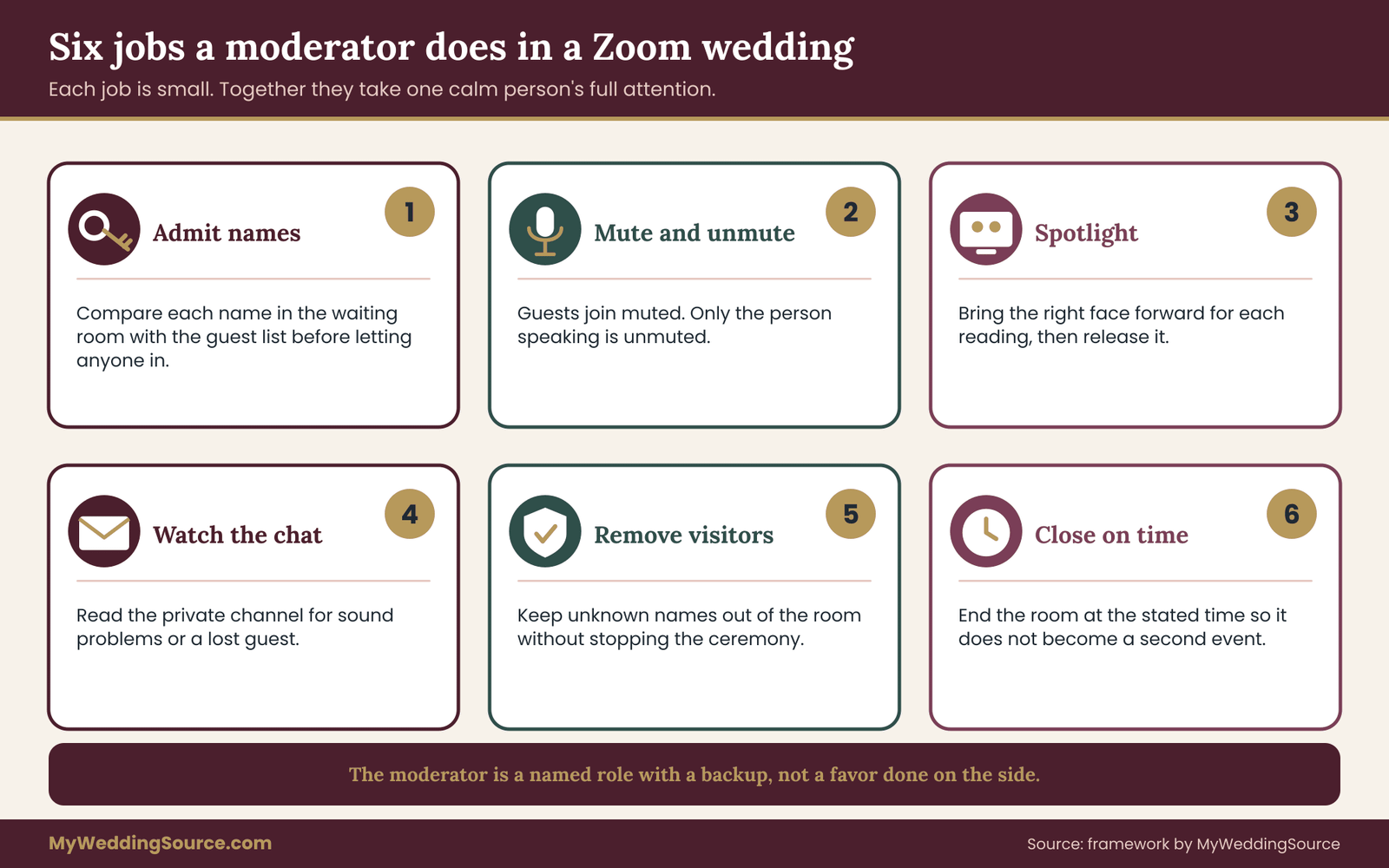
Moderation means a short list of jobs. Admit people from a waiting room. Mute and unmute. Spotlight the right face at the right time. Remove an unexpected visitor. Answer a text from a guest whose sound has failed. Watch the chat for a message that says “we cannot hear.” Pause the recording if the plan says so. Each job is small. Together they fill a person’s attention for the whole ceremony.
The moderator is a role, not a favor
Name one moderator and one backup. Choose someone calm who is comfortable with the meeting tool and who will not be needed for anything else, such as a reading or a procession. A bridesmaid who is also running the guest book is a poor choice. A friend who was not in the wedding party, a cousin who enjoys tech, or a hired producer is a better one.
Give the moderator a written cue sheet that lists when remote guests are admitted, when they are muted, when the participants are spotlighted, and when the call ends. The format of a cue sheet is covered in the guide to wedding ceremony cue sheets on this site, and the same discipline applies here.
What interaction buys you
The benefit of a Zoom wedding is real. A remote guest who can be seen feels counted. A reading from a sibling abroad lands differently when the room can see her face. Responses such as a spoken blessing, applause and the sound of laughter cross the gap in both directions. For a small wedding with a few essential absent people, that two-way presence can matter more than polished video.
What interaction costs
Interaction brings delay, noise and exposure. A small delay between the room and a remote guest is normal in meetings, and it makes spoken call-and-response awkward. Remote guests may have a barking dog, a television or a child in the background. A guest who forgets to mute can disrupt a vow. And every remote guest who turns on a camera is now visible to every other remote guest, and possibly to a recording.
None of this is a reason to avoid a Zoom wedding. It is a reason to decide, early, how much interaction you actually want, and to limit it to the parts of the day where it earns its keep. A stricter version, in which remote guests are admitted muted with cameras off except for named participants, keeps most of the closeness and removes most of the noise.
Privacy comparison: who sees what in a Zoom wedding and in a stream
Privacy is where the two formats differ most, and it is the part couples think about last. Both formats send images of your guests to strangers’ devices. The question is which guests, which devices, and who can pass it on.
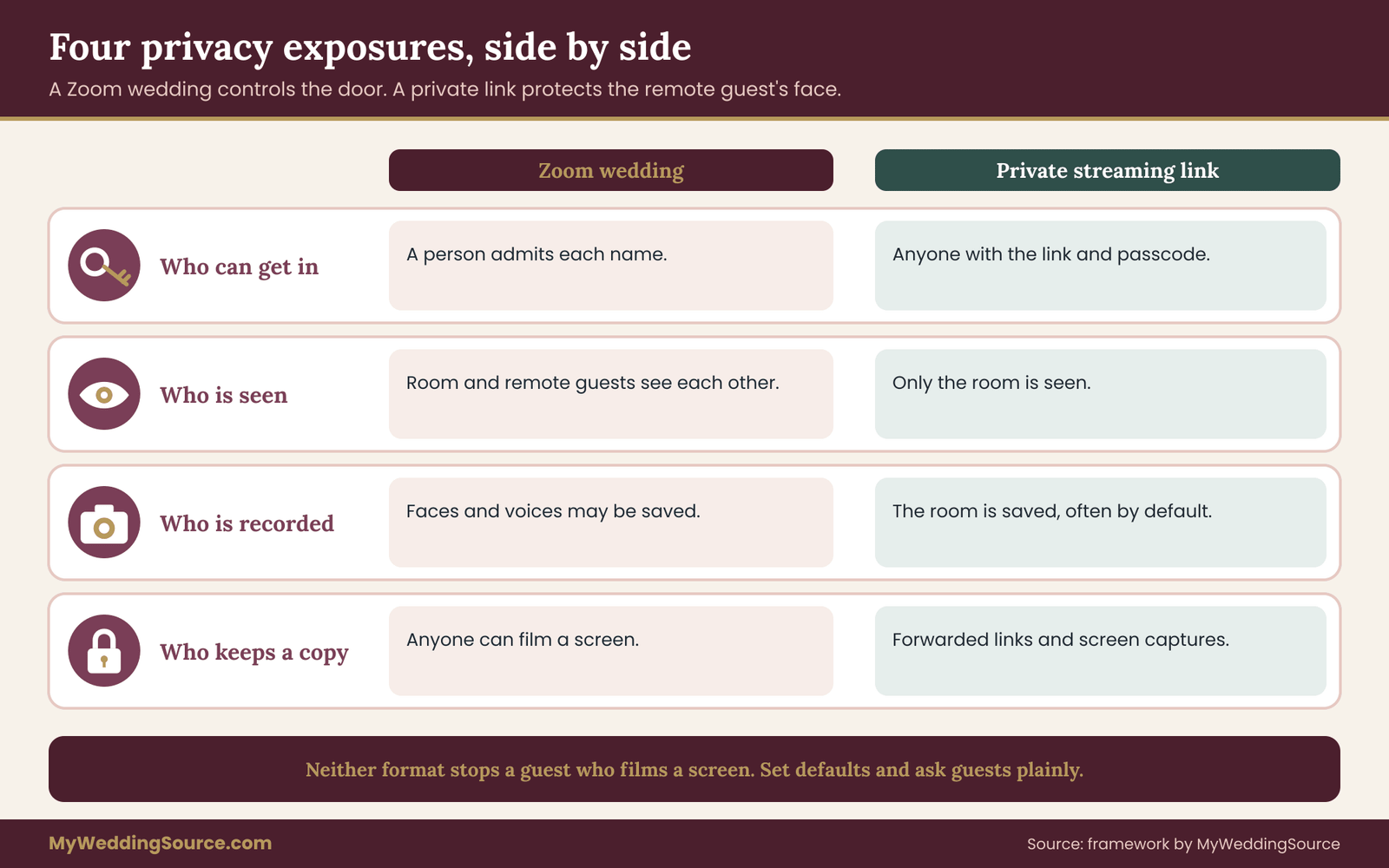
Think of privacy as four separate exposures. Each one behaves differently in a Zoom wedding and in a stream.
Exposure one: who can get in
A Zoom wedding has a natural gatekeeping tool, the waiting room. The host sees a name and admits it or not. That is strong control for a small list, because the moderator can compare each name against the guest list. The weak point is the link itself. If a meeting link is posted in a group chat or a public social page, anyone can ask to enter, and a distracted moderator may admit a name that looks familiar.
A private streaming link has no one at the door. Whoever holds the link, or the password, can watch. That is simpler for the guests and weaker for control. If the link is forwarded, you will not know, and you cannot remove one viewer without changing the link for everyone.
Exposure two: who is seen
In a stream, only the room is seen. Remote guests are invisible to the room and to each other. That protects the remote guests, who may be in pajamas, in a hospital waiting room or in a workplace where they should not be watching.
In a Zoom wedding, both sides are seen. The room sees the remote guests, and the remote guests see each other. That is warm, and for some people it is uncomfortable. An older relative may not realize that the camera is on. A coworker may not want colleagues from the groom’s side to see her home. Setting cameras off by default, and turning them on only for named participants, solves most of this.
Exposure three: who is recorded
Recording is a separate decision from format. A Zoom wedding host can usually record the session, and the recording may include remote guests’ faces and voices. A stream can usually be saved as well, often automatically on the platform, and some platforms make the recording public by default unless you change the setting.
For a Zoom wedding, tell remote guests in the invitation whether the session will be recorded, and tell them again at the start of the call. For a stream, tell in-room guests that the ceremony is filmed and that a recording may exist. The guide on wedding photography consent explains how to set guest boundaries for images, and the same logic applies to video that leaves the room.
Exposure four: who keeps a copy
Any viewer can record a screen. No setting prevents a determined person from pointing a phone at a laptop. What you can control is the default: a link that expires, a recording that is private, a platform that does not let viewers download, and a clear request that guests not share or post the ceremony.
What the comparison says in plain terms
On privacy alone, a Zoom wedding is the more exposed format for remote guests, and a stream is the more exposed format for the link.
A Zoom wedding gives you control at the door, at the cost of exposing remote guests to each other. A private streaming link gives remote guests anonymity, at the cost of control at the door. Neither format protects you from a guest who shares the link or films a screen. Both are acceptable for most weddings, provided that you make the choice on purpose and tell people what to expect.
The in-room privacy question that gets skipped
Remote guests are not the only guests with privacy interests. The people sitting in the room are on camera. In a stream, a fixed camera shows the room for the length of the ceremony, and a guest who attends without telling an ex, an employer or a family member may not want to appear. In a Zoom wedding, the camera may show the room and also show faces of the remote group on a screen visible to the room.
Offer a simple, quiet option. Tell in-room guests where the camera is pointed, and set aside a few seats outside the frame for anyone who prefers not to appear. Print one line in the program or on a small sign at the entrance. The guest list guidance in the wedding guest list guide is a useful companion when you work out who needs a heads-up before the day.
Platform privacy basics that apply to both formats
Whatever you choose, a few platform habits protect everyone. These are not exotic. They are the settings that most services offer and that most people leave at the default.
Use a unique link. Create a link for the wedding only. Do not reuse a recurring personal meeting room, because it may have been shared before and may be known to people you did not invite.
Add a passcode. Both meeting tools and streaming services commonly allow a passcode or a password. Send it in a separate message from the link, which means a forwarded link alone does not get a person in.
Turn off what you do not need. Disable file sharing, private chat between guests, and screen sharing for everyone except the host. In a Zoom wedding, require a host to admit people. In a stream, turn off public listing and comments, or switch comments to moderated.
Decide the recording default. If you want a recording, turn it on deliberately and store it somewhere private. If you do not, turn recording off for the host and for participants, and say so.
Check the platform’s own rules. Every service has terms about recordings, music and minors. Read the current help pages for the service you use, because those rules can change, and the provider’s page is the source that counts.
Children and vulnerable guests
If any remote or in-room guest is a minor, a person with a protective order, or someone who has asked for privacy, treat that as a hard constraint. Ask the parent or the person directly. Either skip the stream for that part of the day, seat the person outside the frame, or leave them off the remote list. A protective arrangement is not a place for a workaround.
A simple wording for the invitation
Keep the notice short and plain. Say that remote viewing is available, whether it is a meeting or a stream, whether it will be recorded, that the link and the passcode are for the invited person only, and that you ask guests not to share or post the ceremony. The guide on wedding invitation etiquette covers the tone of invitation wording, and a line about remote viewing fits on an enclosure card or a wedding website page.
“Our ceremony will be available to watch online. The link is private and the passcode is for you alone. Please do not share or post it. We may keep a recording for the family.”
The Seat, Door and Window scorecard
Features lists do not decide this question. A framework does. This one uses three words, because three words are easy to remember in the middle of a stressful planning week: the Seat, the Door and the Window.
The Seat is what a remote guest can do. Can they speak, appear on camera, take part? Or can they only watch?
The Door is who can get in. Is there a person at the door who admits each name, or does the link do all the work?
The Window is what the room shows. How much of the room appears, to whom, and for how long?
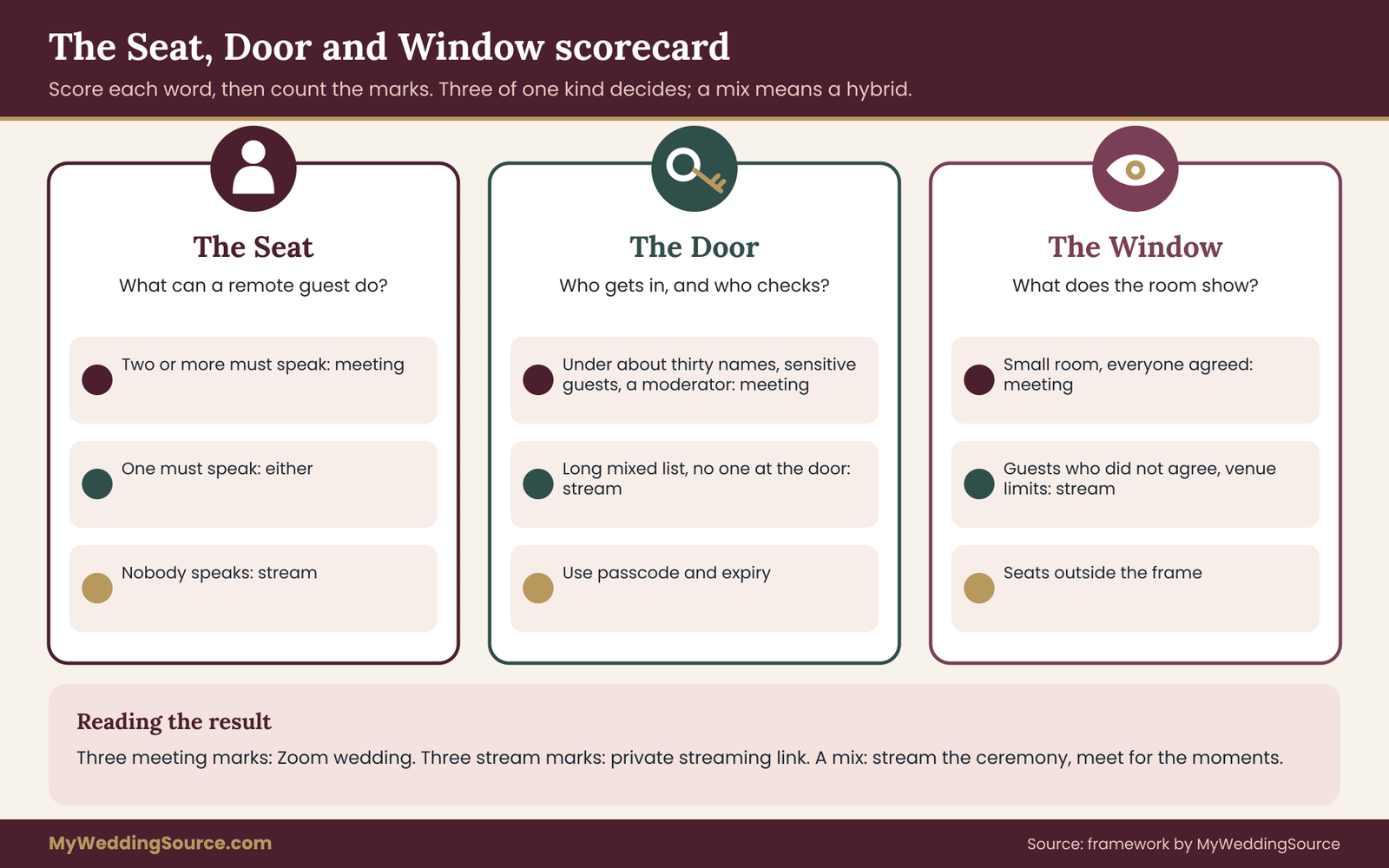
Score each of the three on a simple scale, then read the result. The scoring rules are below, and the infographic that follows shows the whole decision at a glance.
Scoring the Seat
Look at your sorted list from earlier. If two or more remote guests need to speak or be seen, mark the Seat as meeting. If one remote guest needs to speak, mark it as either, because one reading can be handled with a phone call or a short recording. If nobody needs to speak, mark it as stream.
Scoring the Door
Ask how tightly you need to control entry. If the remote list is under about thirty names, includes anyone whose attendance is sensitive, or includes a minor, and you can assign a moderator, mark the Door as meeting. If the list is long, mixed, or spread across time zones with no one to watch the door, mark it as stream and use a passcode and an expiry date for control instead.
Scoring the Window
Ask what the room will show. If the room has guests who have not agreed to appear in a shared video, or the venue has tight rules on filming, mark the Window as stream, because a single fixed camera with seats outside the frame is easier to manage than a shared gallery. If the room is small, everyone has agreed and a screen near the front is part of the ceremony, mark it as meeting.
Reading the result
Count the marks. Three meeting marks mean a Zoom wedding is the right shape. Three stream marks mean a private link is the right shape. A mixed result, which is the most common one, means a hybrid: a stream for the ceremony, and a small meeting for the moments where interaction matters. A single “either” never decides anything. It means you have room to choose on budget and comfort.
A worked case: an illustrative couple choosing between a Zoom wedding and a stream
The following case is invented to show the scorecard at work. The names, numbers and outcome are illustrative, not a report of a real wedding or a test of any product.
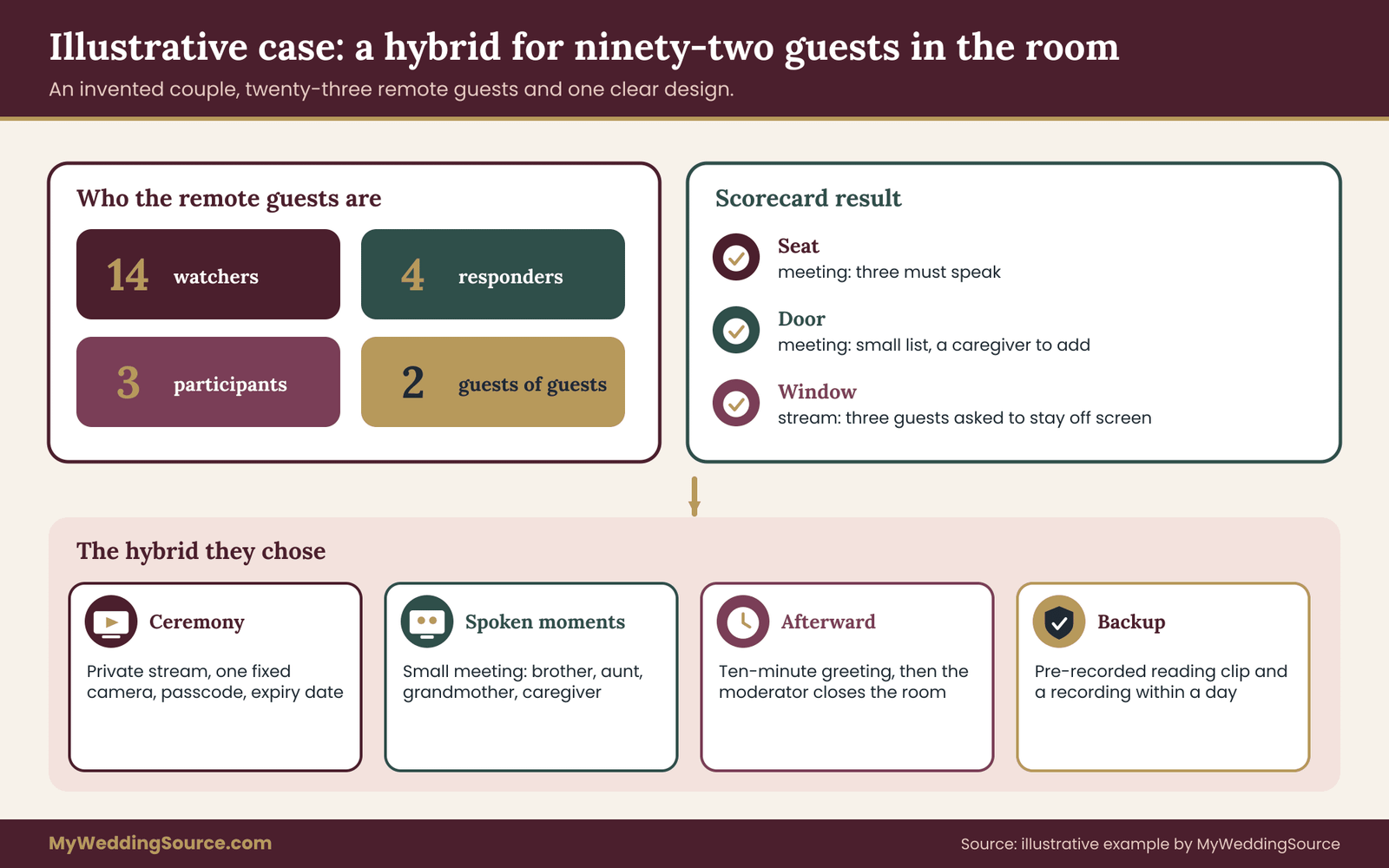
Imagine a couple, Noor and Daniel. They are marrying in a rented garden pavilion with ninety-two guests in the room. Twenty-three people cannot travel. Sorting the remote list gives this picture.
Fourteen are watchers: great-aunts and uncles, two coworkers, and several friends living overseas. Four are responders: Daniel’s grandmother and her caregiver, and two college friends who want to see everyone’s faces. Three are participants: Noor’s brother abroad has a reading, an aunt has a blessing, and a cousin is a legal witness who cannot attend. Two are guests of guests: the grandmother’s caregiver and the brother’s partner.
Step one: score the Seat
Three people must speak, and the legal witness question raises the stakes, because the couple has to confirm with the officiant and the issuing office whether a remote witness is allowed at all. In most places the answer is not simple, so the couple treats the witness as a separate check, not a feature of the format. The two readers still need to be heard live. The Seat is marked meeting.
Step two: score the Door
Twenty-three people is a small list, but it includes a grandmother who may not manage a passcode alone and a caregiver who is not on the guest list. A moderator who knows the names could admit them at once. The Door is marked meeting, with a note to add the caregiver to the list by name.
Step three: score the Window
The pavilion has a stone wall behind the officiant and a slow, unreliable cell signal. Ten in-room guests are from Noor’s workplace, and three said they would rather not be streamed. The couple would need a gallery screen near the front for a meeting, which would fill the sight line. The Window is marked stream.
Reading the result
Two meeting marks and one stream mark, a mixed result. The couple does not pick one side. They design a hybrid, described below, and they write down why.
The hybrid they choose
The ceremony itself, about twenty-five minutes, goes out as a private stream from one fixed camera, with a passcode and an expiry date. Seats outside the frame are marked for the three guests who asked. Remote watchers get a single link and a short note.
For the two spoken moments, the couple uses a small meeting room with only the participants and the two responders who want to be seen: the brother, the aunt, the grandmother and her caregiver. A moderator, a friend who is not in the wedding party, admits them from a waiting room ten minutes early and spotlights each speaker on a laptop that sits on a small table near the officiant. The laptop’s sound goes through a small speaker, and a microphone near the laptop returns the room to the Zoom wedding.
Right after the ceremony, the meeting room stays open for ten minutes so the responders can wave and greet the couple. Then the moderator ends it. The stream continues to the end of the recession, and then stops.
What the couple wrote down
They wrote four lines on a card for the moderator. Admit only the listed names. Keep everyone muted except the person being spotlighted. If sound fails, the moderator texts the brother’s number and the reading is played from a pre-recorded clip held on a phone. If the stream fails, the couple’s friend posts the recording within a day.
Notice what they did not do. They did not turn the whole ceremony into a meeting with twenty-three faces on a screen. They did not rely on a single tool for everything. And they did not leave failure to chance.
What the case teaches
The case also shows that a Zoom wedding can be small and still worth it. Three faces on one laptop gave the couple most of what a full Zoom wedding would have given, at a fraction of the effort.
Most weddings land in the middle. The case shows how a single mixed result can be turned into a design, and how the decision for each moment of the ceremony can be different. It also shows why moderation is a staffed job and not a feature.
Moderation roles and settings for a Zoom wedding
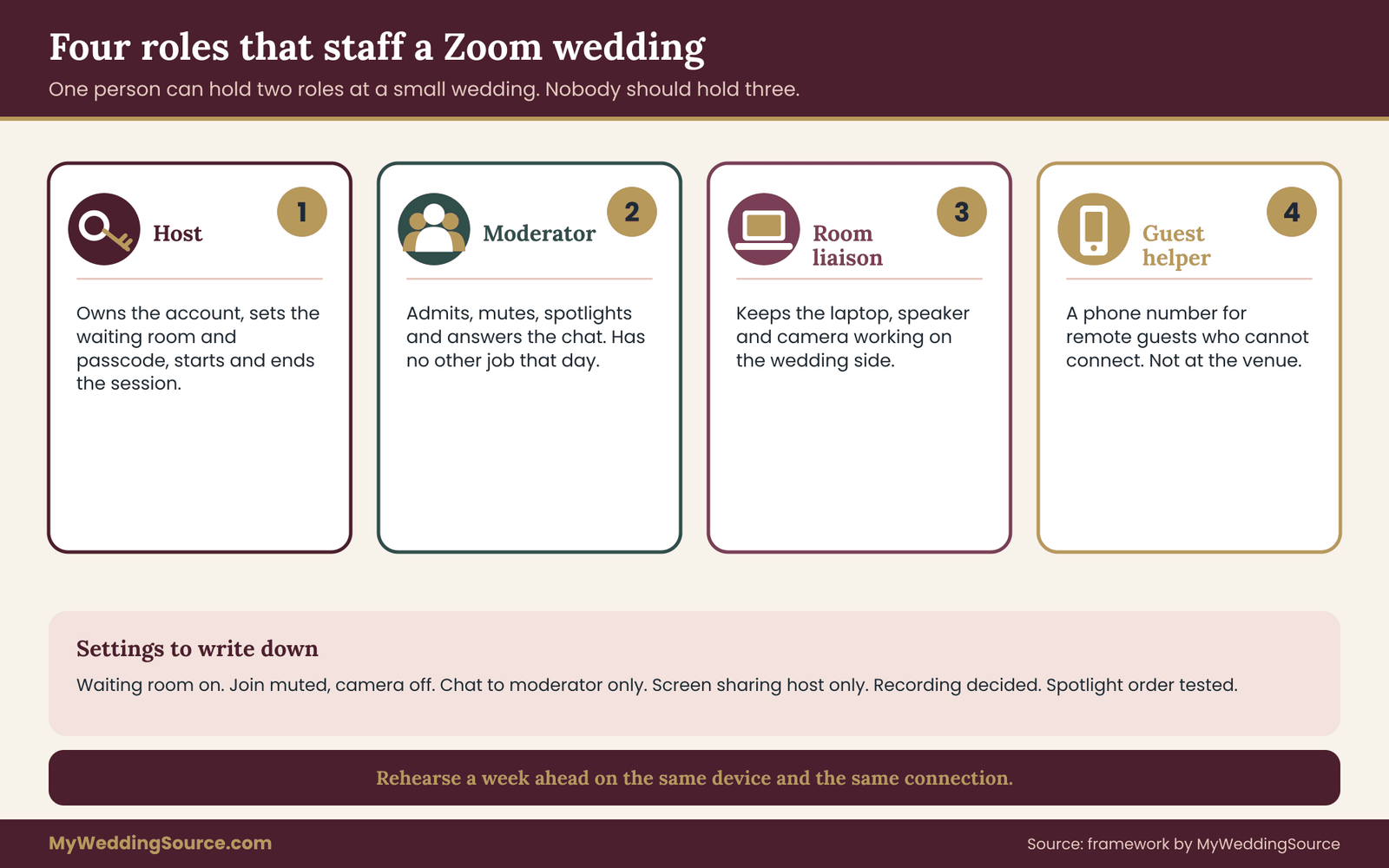
If your result points to a meeting, or to a hybrid, the next step is to staff it. A Zoom wedding needs people more than it needs gear. Four roles cover almost every case. One person can hold two roles at a small wedding, but nobody should hold three.
The host
The host owns the meeting account and its settings. This person creates the Zoom wedding, sets the waiting room and passcode, decides on recording and starts and ends the session. The host should be someone who can be reached the week before and who will open the Zoom wedding early on the day.
The moderator
The moderator does the live work: admitting names, muting, spotlighting, answering the chat. In a larger meeting, the host and moderator are two people, because the host often needs to speak or to be on the couple’s side of the room. Give the moderator a co-host role so the controls are available.
The room liaison
The room liaison sits with the in-room screen and speaker and handles what happens on the wedding side: confirming that the laptop is on, the camera is pointed at the officiant, and the sound goes both ways. This person is the human link between the Zoom wedding and the ceremony. Often it is the same person as the hired video producer, if there is one.
The guest helper
A guest helper is a phone number, not a person in the room. Remote guests who cannot connect call or text this number. Without it, the moderator ends up answering technical questions in the middle of a vow. Choose someone who is not at the venue and who can talk a nervous relative through a camera permission prompt.
Settings to decide before the day
Write these decisions down. They are the ones that most often turn into confusion on the day.
Waiting room on. Every name is admitted by hand. Pre-register or pre-list names where the tool allows it.
Join muted, camera off. Turn cameras on only for named participants. This reduces noise and protects remote guests who are not ready to be seen.
Chat limited. Allow chat to the moderator only, so a guest can report a sound problem without writing to the whole group.
Screen sharing host only. This prevents a stray share of a personal screen.
Recording decision. Decide on and announce it, and keep the file private.
Spotlight list. Write the order of speakers and test the spotlight function with each one before the day.
Rehearsal beats configuration
A test session fixes more than settings do. Hold a short rehearsal about a week before with the host, the moderator, the room liaison and each participant. Ten minutes is enough for each speaker to be admitted, unmuted, heard in the room and muted again. Rehearse on the same connection and the same device that will be used, because many problems come from a different laptop or a different network, not from the plan.
Etiquette for remote guests
Send remote guests a short note with three requests. Join five to ten minutes early. Stay muted and keep the camera off unless asked. Dress as they would for a ceremony, or not, as the couple prefers. If a guest has a child or a pet nearby, no one needs an apology. They can simply leave the camera off.
This note does not need to be formal. A paragraph on the wedding website or an email works. What matters is that guests do not discover the rules in the middle of the ceremony.
A moderator’s script for a Zoom wedding
Give the moderator exact words, so no one improvises. Ten minutes before the start, the moderator admits the listed names and says, “Welcome. Please stay muted and keep your camera off until we ask. Your host will bring you on at the right moment.” Five minutes before, the moderator posts the same line in the chat, for anyone who joined late.
When the first reader is due, the moderator spotlights that person and unmutes them, then says nothing. When the reading ends, the moderator mutes and removes the spotlight. If something goes wrong, the moderator sends one private message, not a public one. A Zoom wedding runs well when the moderator is nearly invisible.
After the ceremony, the moderator says, “Thank you all for joining. We will keep this room open for a few minutes so you can greet the couple,” and closes it at the stated time. Keeping to the stated time matters, because an open-ended room after a Zoom wedding drifts into a second event nobody planned.
Rehearsal checklist for a Zoom wedding
Run the rehearsal as if it were the ceremony. Open the room early, admit each participant from the waiting room, test the sound in both directions and spotlight each speaker. Walk the cue sheet from the first admission to the closing line. Record nothing unless you want to review the rehearsal, and delete the file afterward.
Check the room liaison’s equipment: the laptop battery and charger, the speaker volume, the camera angle and the microphone placement. Ask each participant to join from the device and place they will use on the day. A rehearsal that succeeds on a different laptop proves little about the real Zoom wedding. Write down every problem and who fixes it, then run the short parts again until each one works twice.
The private streaming link: access, expiry and a calmer one-way experience
Where a Zoom wedding asks for staff, a private streaming link asks for settings. The work is front-loaded. Once the stream is configured and tested, it runs with little attention, which is exactly why many couples prefer it. It is also why the failures are quiet: nobody is watching the door, so mistakes in setup stay hidden until the day.
What a stream gives the remote guest
A viewer opens a link, sees one picture and hears one sound mix. They do not have to learn a tool, grant camera permission or find the mute button. For an older relative, this simplicity is the main benefit. A stream usually works in an ordinary browser, on a phone, or on a smart television, and the guest does nothing except press play.
A stream also scales without extra effort. Twenty viewers and two hundred viewers need the same moderator, which is none. If your remote list is long, mixed in age and spread across time zones, that scaling matters more than any feature.
Access controls worth setting
Most services offer a version of these controls. Names differ, so check the current help pages of the service you use.
Unlisted or private visibility. The stream does not appear in search or on a channel page. Only people with the link find it.
Passcode or sign-in. Some services let you require a password. Others require viewers to sign in with an account. A passcode is easier for older guests, an invited-account list is stricter.
Expiry. Set the link to stop working after a stated period, such as a week. A link that lives forever is a privacy debt.
Comments and chat. Turn them off, or limit them to a moderated channel. A free chat can fill with jokes, or with a stranger’s comment, in the middle of a vow.
Embed and download. Switch off embedding on other sites and downloading by viewers where the option exists.
The one-way experience, honestly described
A stream is not a conversation. Remote guests cannot react in a way the room can notice. For some guests, that is fine. For others, it feels like watching a film of their own family. If a remote guest would want to say something, a stream alone will leave them quiet. The fix is simple and does not need a meeting: send the guest a short, private way to respond. A shared message page, a phone call after the ceremony, or a short video message that you play at the reception can carry the response.
Delay and sync
Streams run behind real time, often by several seconds to half a minute. A remote guest who is also texting a person in the room will hear the news late. Warn guests that the stream is slightly behind, and ask them not to text spoilers or reactions to the room during the ceremony.
Who is responsible for the stream
Somebody must press start, watch the feed, and press stop. At small weddings it is a friend with a phone on a stand. At larger ones it may be a vendor. If a vendor is involved, check the contract for what is promised: how many cameras, how audio is captured, who owns the recording, and what happens if the stream fails. The guide on the wedding vendor contract walks through the clauses worth reading, and the wedding vendor due diligence checklist lists the questions to ask before you sign.
When a stream is the wrong tool
If your answers keep pointing back to speaking, a Zoom wedding is the honest choice, even if a stream looks simpler.
A stream is the wrong tool when someone must speak. It is also the wrong tool if you need to know exactly who is watching. A passcode tells you that viewers have the code, not who they are. And it is a poor fit if you need a two-way link for a legal formality such as a remote witness, in which case the issuing office decides, not the format.
Rights, music and recording: the rules that follow the format
Both formats raise questions about recorded material, music and what happens to the file afterward. These questions are easy to skip and expensive to ignore.
Music in a Zoom wedding
Meeting tools are built for speech. Music played in a room and picked up by a laptop microphone can sound thin, or be suppressed by noise-reduction features that treat it as background noise. A processional song may reach the remote guests as a murmur. If music matters, ask the room liaison to test it, and consider sending the musical moments as a separate audio feed where the tool allows it.
Remote guests who hear music in a Zoom wedding are hearing a performance or a recording on a laptop. If the Zoom wedding is also recorded, the music is in the recording. That can raise rights questions that the format alone does not solve.
Music in a stream
Streaming services often check for protected music in live and recorded streams. A well-known song in the processional may cause the platform to mute part of the stream, flag it or remove a replay. The treatment depends on the service and its agreements, and it changes. Read the current policy of the platform, and ask your vendor how they handle it.
What the Copyright Office says, in plain terms
The U.S. Copyright Office publishes general information on copyright, licensing and fair use. A private wedding does not usually involve the same issues as a commercial broadcast, but a public stream, a replay posted online or a recording shared widely can be treated differently from a closed-circuit view for family. The safest course is to use music you have the right to use, to choose live music or licensed material where possible, and to keep any replay private and short-lived. Check the Copyright Office website for general guidance, and the platform’s policy for what it actually allows.
Readings, poems and text
Readings in the ceremony may be published works. Reading a poem aloud in a private ceremony is a different thing from posting a recording of that reading publicly. If you plan to keep a replay private for family, the question is small. If you plan to publish it, check the rights for each text first.
Recording consent
Consent follows the image. In-room guests have agreed to attend a wedding, not necessarily to appear on a recording that goes to strangers. In a Zoom wedding, remote guests should know whether they will be recorded and should be able to say no by staying off camera. State laws about recording audio and video differ, and some require the consent of everyone being recorded. A short, plain notice in the invitation and a reminder at the start of the session are a sensible baseline, and the details of setting limits are covered in the guide to guest boundaries for images.
What to do with the recording afterward
Decide at the start where the file will live, who may see it and for how long. Keep it in a private folder. Share it by a link that expires. Delete any extra copies on the host’s account, the platform’s cloud and any device that stored it, once the couple has what they need. A recording that lives on in a host’s account for years is a risk nobody chose.
Minors and music licensing for venues
Some venues hold music licenses that cover live performance in the room and not the transmission of that performance elsewhere. If your venue provides music or an in-house sound system, ask whether the license covers transmission. A short question to the venue manager now prevents a muted stream later.
Venue, connection and equipment: how the two formats load a room differently
A Zoom wedding and a private stream ask different things of a venue. The difference shows up in bandwidth, in sound and in floor space. Check these before you commit to a format, not after.
Upload speed, not download speed
Remote viewing depends on the venue’s upload capacity, the speed at which the room can send data out. Many venue networks are built for guests who download. An upload that looks fine on a speed test in the lobby may drop in the ceremony space, where many phones compete for the same access point.
A stream sends one outgoing feed. A Zoom wedding sends one outgoing feed from the room, plus it receives several incoming video feeds from remote guests, which means both directions matter. A Zoom wedding with a few small faces is usually lighter than a high-quality stream, but it is more sensitive to unsteady connections, because an interruption is felt immediately by everyone.
Test where the ceremony happens
Run the connection test in the exact spot, at the same hour, with similar crowds if possible. A wired connection to a laptop is more stable than wireless. If the venue has a wired port near the ceremony space, ask to use it. If it does not, a cellular hotspot or a bonded cellular device is a common backup. The guide to the venue technical walkthrough includes the questions to ask about access routes, power and network, and it is worth reading before the site visit.
What a venue may refuse
Some venues restrict outside equipment, forbid streaming from certain rooms or charge a technology fee. Some have rules about filming that involves other bookings or neighboring spaces. Ask early, in writing, and keep the answer with your contract. A late surprise at load-in is hard to fix.
Sound is the real difference
Sound is also where a Zoom wedding most often disappoints, so budget rehearsal time for it.
In a stream, one microphone or one mixed feed goes to viewers, and the quality of that feed decides everything. In a Zoom wedding, you need a feed from the room and a way to hear remote participants in the room. That adds a speaker, a laptop microphone or a small audio interface, and a person to manage feedback.
Feedback is the classic meeting problem. If the room’s speaker plays a remote guest’s voice and the laptop microphone picks it up, a loop can form. The fixes are placement and discipline: keep the speaker away from the microphone, lower the volume, mute remote guests when they are not speaking, and test with the real participants.
Floor space and sight lines
A stream needs one camera position, often at the back or side. A Zoom wedding needs a screen the room can see for remote participants, plus a camera for the remote guests to see. The screen takes space, and it changes the picture. A large screen at the front of an outdoor ceremony may be hard to read in sunlight, and it competes with the couple for attention. A small screen on a side table is less distracting and may be enough if participants are few.
Cost logic without invented numbers
Prices change, vary by region and depend on the vendor. You can still compare the formats by what they require.
A stream tends to require a camera, a stable upload, a person to run it and a platform, which may be free or paid. A Zoom wedding tends to require the same camera and upload, plus a second person for moderation, a screen and speaker for the room, and rehearsal time. The meeting adds people and hardware; the stream adds fewer of both.
Request quotes in writing, ask what each line item covers and compare the same scope. A friend with a phone may handle a stream for a very small wedding. A larger or more formal wedding may need a producer. Compare the cost of a producer with the cost of a failed stream, which is a ceremony that a grandmother could not see.
Accessibility
Remote guests may be deaf or hard of hearing, may have low vision or may use assistive tools. Meeting tools and streaming platforms differ in captions, in screen-reader support and in controls. Ask guests what they need, and check the platform’s current accessibility pages. If captions matter, ask whether the service provides automatic captions, and whether a human captioner can be added. The W3C Web Accessibility Initiative and the ADA site publish general guidance, and a quiet question to the guest is better than a guess.
Time zones and the invitation
Both formats need a clear start time with the time zone written out. A guest in another time zone may need to be told what hour it is for them. For a ceremony at a late afternoon hour, a guest in Asia may be watching in the middle of the night. State the time in the guest’s own zone when you can.
The device the guest uses
Ask remote guests what device they will use. A phone, a tablet, a laptop and a television behave differently. A Zoom wedding on a phone may show only one face at a time. A stream on an old television may need a casting device or a mirrored cable. A short test call a few days ahead solves most of this.
Failure conditions: when each format breaks and what to do
A decision framework is incomplete without failure conditions, the points at which you stop trusting the plan and switch to something else. Decide them before the day, write them down and give one person the authority to call them.
Failure conditions for a Zoom wedding
The Zoom wedding format fails in ways that are loud. The most common are these.
Unmuted noise. A remote guest forgets to mute and the room hears a television. The fix is to mute everyone on entry and to unmute only the speaker. If the problem continues, the moderator removes the person from the audio, and does not interrupt the ceremony.
Feedback loop. The room’s speaker and the laptop microphone create a howl. The fix is to mute the laptop microphone or lower the speaker. A stop condition: if feedback cannot be fixed in a minute, mute the room feed and let the remote participants speak into a phone held near the officiant.
Uninvited visitor. An unknown name asks to enter. The moderator keeps them in the waiting room, or removes them. If a guest has posted the link publicly, change the link and send the new one by text.
Frozen participant. A remote reader freezes. The moderator waits for a few seconds, then moves to the backup, a pre-recorded clip or a printed reading read by someone in the room.
Delay too long. If the delay makes spoken response unworkable, drop interaction for that moment. Have the participant record a short clip in advance.
Failure conditions for a private stream
Stream failures are quieter, and viewers may not tell you.
Silent audio. The picture works but the sound does not. A remote guest may not know whether the problem is their device. Ask the guest helper to check the first minute and message viewers if sound is missing.
Frozen picture or loop. The stream stalls. The operator restarts the encoder or switches to a backup connection. Decide in advance how long to wait, for example about thirty seconds, before switching.
Wrong link or expired link. A guest has an old link. Send the link twice, a day ahead and an hour ahead, and keep a short list of guests who have confirmed a test.
Platform muted for music. The service mutes a segment. Use music you have the right to use, or accept that a replay may have gaps.
Total outage. The venue network drops. Have a second path, such as a phone hotspot, and a plan to post a recording later.

The stop rule
For both formats, write one sentence: who may stop the remote feed, and under what condition. A good rule says that if the remote feed disrupts the ceremony for more than a short time, the moderator or operator ends it, and the ceremony continues for the room. The couple does not make that decision in the moment. They made it in advance.
The fallback ladder
Design a ladder of fallbacks, from least to most disruptive. First, restart the feed. Second, switch to a backup connection. Third, move remote guests to a phone call or an audio-only link. Fourth, stop the live feed and promise a recording within a day. Each rung should have an owner and a time limit. The backup communication and file permissions guide covers backup communication and files in more depth, and it pairs well with the ladder here.
What the couple says to remote guests
Prepare three short messages in advance, so nobody writes under pressure. One tells guests that the feed has a problem and is being fixed. One tells them to switch to the backup link. One tells them that the live feed has ended and the recording will follow. Send them by text or email from the guest helper’s number, not from the couple.
Comparing the load on people
Another way to compare a Zoom wedding with a stream is to count the people each one occupies on the day. A stream needs an operator and perhaps a helper for guests. A Zoom wedding needs a host, a moderator, a room liaison and a guest helper, even if some roles are combined. That is a real difference at a wedding where every capable friend is already in the wedding party.
Ask honestly who is free. If you cannot name a moderator who has no other job, a Zoom wedding is a risky choice, however much you want it. A stream with a quiet operator and a recording is a better match for your staffing. If you can name the people, and each is calm and has rehearsed, a Zoom wedding is workable even for a modest budget, because the main cost is attention, not equipment.
Seating the screen in a Zoom wedding
In a Zoom wedding, decide where the remote faces live. Options include a laptop on a side table, a small monitor near the officiant, or a screen that only the officiant and couple can see. Each has trade-offs. A screen only the couple can see protects the room’s privacy but cuts guests off from the remote faces. A visible screen shares the warmth but puts remote guests in front of the whole room, and in photographs.
Ask the photographer where they want the screen, because it will appear in the pictures. A small screen angled toward the couple is often a fair compromise, and it keeps the formal frame clean.
Hybrid formats and alternatives to a Zoom wedding or a stream
Most weddings do not need a pure version of either format. A hybrid uses each tool where it is strong. Alternatives sometimes beat both, especially for a small number of remote guests.
Hybrid one: stream the ceremony, meet for the moments
Put simply, this is a stream with a small Zoom wedding inside it.
This is the design in the worked case. The ceremony goes out on a private stream, and a small meeting room holds the participants and the responders. The two run side by side, with one moderator for the Zoom wedding and one operator for the stream. The hybrid keeps the room’s privacy in check, because the wider audience never appears on a screen, and it gives the few people who need a Seat a real one.
The cost is complexity. Two systems mean two failure points and two sets of instructions. Use this design only when the scorecard gives a mixed result and when you have two capable people to run it.
Hybrid two: meeting for the whole ceremony, view-only for the many
Some meeting tools allow a broadcast mode in which a small group are panelists and the larger audience only watches. This gives a single tool, with some people on screen and others as viewers. It reduces the number of links to send, though it may require a particular account type or setting, and the audience features vary. Confirm with the provider’s current documentation before relying on it.
Hybrid three: stream, then a meeting at the reception
Remote guests watch the ceremony on a stream. At the reception, a moderated meeting opens for a short window, perhaps during the toasts or a quiet moment after dinner, so that remote guests can say hello and be seen. This puts interaction where it is natural and spares the ceremony from the delay and the noise.
It also gives remote guests something to look forward to, and it lets the couple choose a time that suits the day. A short window with a moderator is easier than an open-ended call.
Alternative one: pre-recorded clips
A remote reader can record the reading in advance. The clip is played in the ceremony from a laptop or phone. The result is clean, timed and free of delay. The cost is that the performance is not live, which some couples prefer and some do not. Ask the reader to record in a quiet room, in landscape, with the phone held steady and a plain background, and to send the file a week ahead. List each clip in the cue sheet with its running time.
Alternative two: a phone call into the room
For one participant, a phone call on speaker near the officiant is a modest and reliable option. The room hears the voice, and the remote person hears the room. It is audio-only, so the guest is not seen, but it can be the most dependable form of participation in a venue with poor video capacity.
Alternative three: a recording shared within a day
Often, a recording is enough. Remote guests watch at a convenient hour, nobody manages a live link and the couple can trim and review the file before it is sent. A recording removes live timing pressure and most technical risk. It also removes the shared present moment, which some guests value more than any picture.
Alternative four: a separate remote gathering
A virtual toast, a video call on the evening before or a small meeting after the honeymoon can include remote guests without placing them in the ceremony at all. This is the lowest-pressure way to include people, and it keeps the wedding day free of a second event.
Alternative five: video messages
Guests who cannot attend can send short video messages for the couple to watch later or to play at the reception. This is a form of remote participation without any live element. This guide stays with the live decision, but the idea is worth a thought.
Choosing under pressure: five common situations
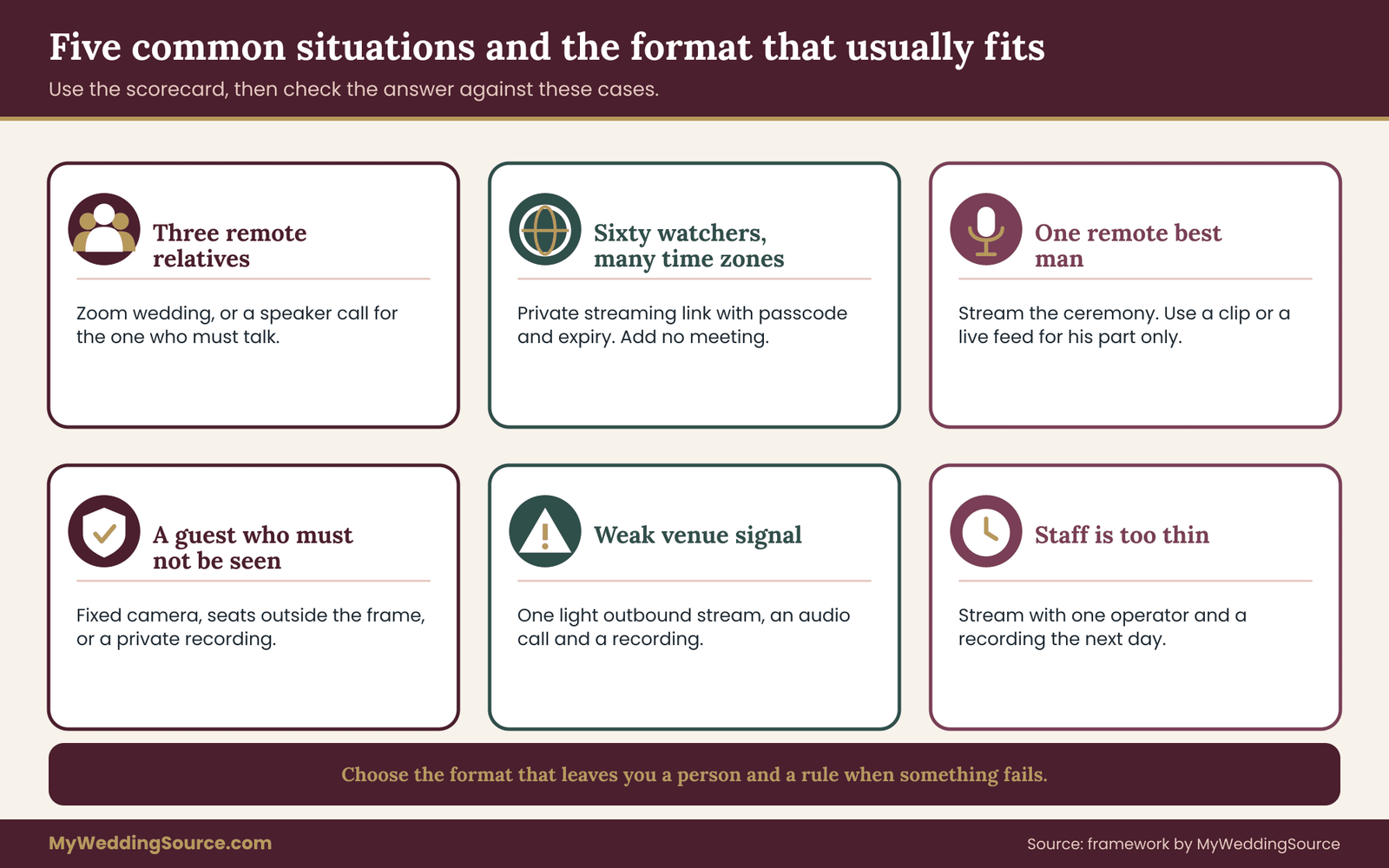
The scorecard works best with an example, so here are five common situations and how the reasoning runs.
A very small wedding with three remote family members.
Two are watchers and one is an elderly parent who wants to speak. Seat: either. Door: meeting, because the list is tiny. Window: depends on the room. A Zoom wedding with a moderator or, even simpler, a call on speaker for the parent, is enough.
A large wedding with many remote guests across time zones.
Sixty remote watchers, no speakers. Seat: stream. Door: stream, with passcode and expiry. A private streaming link, one operator and a recording the next day. Adding a meeting would add work and noise for no gain.
A wedding with a remote best man.
One participant with a large role. Seat: either, leaning to meeting if the role is long. A pre-recorded toast or a live feed for his part only, with the ceremony streamed. Do not turn the whole event into a meeting for one speech.
A wedding with a guest who must not be seen.
A guest has a safety concern. The Window and the Door matter most. A stream from a fixed camera with seats outside the frame, or a recording shared privately afterward, is safer than a meeting in which faces are shown. If a safety concern exists, the guest’s wishes decide.
A venue with unreliable connection.
A Zoom wedding in a weak-signal room is the clearest case where the simpler format wins.
Both formats are at risk. Choose the lighter load: a single outbound stream on a wired or bonded connection, or an audio call and a recording. A Zoom wedding with live video from several remote guests is a poor fit for a weak link.
When to stop and choose the simpler format
There is a point where complexity stops paying for itself. If you find yourself arguing about screen placement, buying a second laptop and recruiting a fourth volunteer, ask whether the closeness is worth the weight. A single stream with a recording the next day will serve most remote guests. A short phone call can serve the one person who needs more.
Simplicity is not a lesser choice. It is the one most likely to leave you free to be present at your own wedding. The couple’s attention is the scarcest resource on the day, and a format that spends it on moderation is a format that needs a hired moderator.
A final test.
Imagine the worst ten minutes of the ceremony: the connection drops, a guest is unmuted, and the officiant is waiting. Which format leaves you with the clearer next step, a person and a rule, rather than a surprise? Pick that one, staff it and write the rule down.
Writing the decision down
Before you tell anyone, write a half-page decision note. It has five lines. The format you chose and the three scorecard marks behind it. The number of remote guests and how many need to speak. The names of the host, moderator, room liaison and guest helper, or the operator for a stream. The stop rule and the fallback ladder. The recording decision: yes or no, where it lives and when it is deleted.
This note is not paperwork for its own sake. It settles arguments. When a relative asks on the day why the aunt is not on screen, the note answers. When a vendor proposes an add-on, the note shows whether it serves the decision. And when a moderator leaves, a replacement can read it in two minutes.
Talking with family who want more
Some relatives will ask for a full Zoom wedding because it sounds warmer, or push for a public stream because it is easy to share. A calm sentence helps. You might say that you chose a format to protect the ceremony and everyone’s privacy, that remote guests will see everything that matters, and that there will be a short video gathering afterward. Offer the alternative, not an argument.
If a relative insists on posting the ceremony, say plainly that the link is private and that you ask guests not to share it. If the relative cannot agree, remove their access to the live link and send a recording later. Boundaries stated early are kinder than a removal on the day.
What to ask a hired producer
If you hire a video producer or a tech-savvy planner, ask questions that reveal how they think about both formats. How many weddings have they run with remote participants, and which format did they recommend? Who moderates a meeting, and is that person on site? What is the plan when the venue network fails? Who owns the recording and how long do they keep it? What does the quote include and exclude? A confident producer answers in plain terms and puts the answers in writing.
Accessibility and language
If a remote guest speaks a different language, consider printed translations of the ceremony, or a second audio channel where the platform supports it. If a guest needs captions, test the captions in rehearsal. If a guest uses a screen reader, send the link and instructions in plain text and avoid images with embedded text. These steps cost little and make a remote seat real.
Children in the remote audience
Children may watch from a living room, and they may wander in front of a camera. In a Zoom wedding, ask parents to keep cameras off unless the child has a role. In a stream, there is no such risk, but there is a recording risk if parents capture the screen. A line in the invitation covers it: please keep your child’s participation private, and do not post screenshots.
Your next steps
If you are still undecided between a Zoom wedding and a stream, return to the scorecard first.
This week, sort your remote guest list into watchers, responders, participants and guests of guests, and count how many people need to speak. Score the Seat, the Door and the Window, and write the result down. If the result is mixed, sketch the hybrid in two sentences. Whichever format wins, a Zoom wedding or a private link, name the person who will run it and the person who can stop it.
In the next few weeks, check with the venue about upload capacity, wired ports, filming rules and any technology fee. Ask guests about their devices and any access needs. Decide on recording, write the invitation line and choose the passcode approach. If you hire a producer, send the questions in writing and compare quotes for the same scope.
In the last two weeks, hold a rehearsal with every participant, finish the cue sheet and print the stop rule and fallback ladder. Send the link a day ahead and an hour ahead, with time zones written out. On the day, start early, test sound once more and trust the people you named. The ceremony belongs to the room, and the remote guests are there as guests, not as an audience to manage.
FAQ
Is a Zoom wedding better than a livestream?
Neither is better in general. A Zoom wedding suits a small remote group where several guests must speak or be seen, and where someone can moderate. A private streaming link suits larger or mixed audiences who mainly watch. Score the Seat, the Door and the Window, and many couples find a hybrid fits best.
Can anyone watch a private streaming link?
Anyone who holds the link, and the passcode if you set one, can usually watch. A private or unlisted link stays out of search results, but guests can forward it. Use a passcode, set an expiry date, turn off public comments and ask guests not to share it.
Do I need a moderator for a Zoom wedding?
Yes, in practice. Someone must admit guests from the waiting room, mute and unmute, spotlight speakers and answer technical messages. That person should not be a member of the wedding party with other duties. A backup moderator and a guest helper phone number reduce stress on the day.
Should I record a Zoom wedding or a stream?
Recording is a separate choice from format. If you record, tell remote guests in the invitation and again at the start, keep the file private and decide in advance when it will be deleted. Some places require consent from everyone recorded, so check local rules and the platform’s policy.
Will music be a problem in either format?
It can be. Meeting tools tend to suppress music, and streaming platforms may mute or remove material they detect as protected. Use music you have the right to use, test it in rehearsal, and keep any replay private. The U.S. Copyright Office publishes general guidance, and the platform’s own policy states what it allows.
Can a remote guest be a legal witness?
That depends on the place where you marry, and it is not decided by the video format. Ask your officiant and the office that issues the marriage license whether a remote witness is allowed and how it must be done. If it is not allowed, the witness needs to be in the room.
What if the internet fails during the ceremony?
Use a fallback ladder decided in advance: restart the feed, switch to a backup connection such as a phone hotspot, move remote guests to an audio call, then stop the live feed and promise a recording. Name one person who may call each step, and prepare three short messages for guests.
How do I protect guests who do not want to be on camera?
Tell in-room guests where the camera points and set aside a few seats outside the frame. In a Zoom wedding, let remote guests join with cameras off. For a guest with a safety concern, use a fixed-camera stream or a private recording sent afterward, and follow that person’s wishes.
Sources
- U.S. Copyright Office
- Federal Communications Commission, Consumers
- Federal Trade Commission, Consumer Advice
- Cybersecurity and Infrastructure Security Agency
- National Institute of Standards and Technology
- W3C Web Accessibility Initiative
- ADA.gov, U.S. Department of Justice
- YouTube Help, Google
- Zoom Support
- Vimeo Help Center