

Digital wedding invitations work well when the format matches your wedding’s formality and your guests’ habits, go out on the same 6-to-8-week clock as paper, and come with a printed fallback for the few people who need one.
You have a guest list of roughly 100 to 120 people, a stationer’s quote that makes you wince, and a free e-vite template that looks surprisingly nice on your phone. The question is not really “paper or screen.” It is whether the people on your list will see the invitation, understand it, answer it on time, and feel invited rather than processed. Digital wedding invitations can do all of that, and they can also land in a spam folder, get forwarded to people you did not invite, or leave a great-aunt wondering whether anyone actually asked her.
This guide covers the practical side of going digital: when an e-vite is a reasonable choice, how formality and etiquette sources disagree, what platforms charge and what to verify before you pay, how to reach older or less-digital guests, how to track replies, and how to protect guest privacy. We keep the wording itself short because our wedding invitation wording guide covers host lines and templates, and we leave envelope addressing and guest-list rules to the wedding invitation etiquette guide. Reply-by dates, follow-up scripts and the caterer’s headcount live in our wedding RSVP etiquette guide.
Platform prices and features change often, so treat every dollar figure here as a snapshot to confirm on the vendor’s own page before you pay.

Should you send digital wedding invitations at all?
What etiquette sources say, and where they split
Emily Post still prefers paper, and says so plainly
Emily Post’s guidance on wedding email says printed invitations are preferred because of their personal nature, and it reserves email invitations for highly unusual circumstances. The same guidance is more relaxed about everything around the invitation: email is fine for save-the-dates, for pre-wedding events such as showers and engagement parties when the guests use email regularly, and for offering guests the option to reply by email. Its general test is whether you would be comfortable extending the invitation by phone. That is a useful standard because it separates the formal invitation, which carries the weight of the occasion, from the smaller messages that surround it.
Digital platforms and The Knot take a more permissive view
The Knot’s page on digital invitation options says it is okay to send digital invitations as long as they are personalized and include all the essential details, although it adds that digital invitations do feel less formal and suggests pairing them with paper ones or using them for pre- and post-wedding events. Greenvelope, a digital-invitation company, calls digital invitations an accepted, mainstream choice and argues that “formality lives in the design, the wording, and the care taken with names, not in the paper stock.”
Joy, another digital platform, says digital invitations are now considered appropriate for casual, semi-formal and most formal weddings, with black-tie and ultra-formal events as the exception. The companies have a commercial interest in that view, so read their position as perspective rather than as an etiquette ruling.
What the disagreement means for your decision
The sources disagree about how much weight to give tradition, but they converge on three practical points. Personalization matters, because a message with each guest’s name beats a visible group email every time. Completeness matters, because a digital invitation that leaves out the venue address or reply-by date creates more work than it saves. Fit matters, because a casual animated card for a black-tie dinner sends a mixed message about the evening.
Since no authority says digital is forbidden for a typical wedding and no authority says it is required, the decision is yours, and it is best made by looking at your own event and your own list rather than at an abstract rule.
How formality, guests and timeline shape the choice
Formality of the event
Think of formality as a signal the invitation sends before anyone reads a word. A black-tie ballroom wedding, a religious ceremony with strong traditions, or a family that will keep the invitation in a drawer for 40 years all point toward paper, with digital reserved for save-the-dates and logistics. A backyard dinner, a courthouse ceremony followed by a party, or a micro wedding with 30 guests can work happily with a well-designed digital invitation.
The middle ground is large, and in it design choices do the work: restrained typography, a plain envelope animation or none, and full names in the greeting read as formal on a screen, while confetti and emoji read as casual.
Who is on your guest list
The guest mix usually matters more than the dress code. If most of your list is under 50 and already in your phone, a digital send reaches nearly everyone, and you will probably get replies faster. If your list includes grandparents, long-lost cousins whose email you would have to hunt for, or family members who share one account, a printed invitation for those households costs little and prevents a lot of confusion. The Knot’s digital invitation page flags less tech-savvy guests and invitations landing in junk folders as the main drawbacks, and it suggests sending paper to older guests or anyone who prefers traditional mail.
How much time and money you have
Digital wedding invitations shine when time or budget is tight. They deliver instantly, avoid international postage, and let you shorten the reply window, and The Knot notes they can help when a wedding is set at the last minute and paper might arrive too late. They also cost far less per household than a custom printed suite, a point we put numbers on in the cost section. Their weakness is the keepsake factor: the Knot’s page notes the email “just isn’t the same” as a card guests can display, so couples who care about that should price a small printed run rather than skipping paper entirely.
Digital, print or hybrid: how do the formats compare?
A side-by-side comparison
What each format does well
Print gives you texture, formality, a keepsake and a physical reminder that sits on a counter, which is why it still anchors formal weddings. Digital gives you speed, low cost, built-in reply tracking, links to your wedding website, maps and hotel information, and easy corrections if something changes. Hybrid gives you most of both, at the price of managing two channels. The table below compares them on the points couples ask about most, using the etiquette and platform sources cited in this guide plus the published postage rates from USPS Notice 123.
| Factor | Print only | Digital only | Hybrid |
|---|---|---|---|
| Formality signal | Strongest; expected at black-tie | Depends on design and wording | Strong for the paper recipients |
| Reaches non-email guests | Yes | Not reliably | Yes |
| Lead time | Order 12 to 14 weeks out (The Knot) | Days, once the design is final | Set by the print run |
| Reply tracking | Manual unless replies go online | Built in on most platforms | Manual entry for paper replies |
| Cost drivers | Stationery, postage for every household | Per-guest or per-event platform fee | Small print run plus platform fee |
| Main risk | Mailing errors, late replies | Spam folders, forwarded links | Mismatched details between versions |
Where digital falls short
Digital invitations depend on contact data you may not have, and collecting email addresses and phone numbers for every household is more work than most couples expect. The Knot’s guidance points out that households may share one inbox, so a single email can hide a teenager or an adult child. Messages can be filtered into promotions or spam tabs, and a guest who ignores one email has no physical card to find on the fridge three weeks later. There is also the quieter risk that a digital send feels less like an invitation and more like a notification, especially if it arrives as a bare link from an unfamiliar sender.
Digital save-the-dates are a lower-stakes starting point
If you are not sure how guests will respond to a digital invitation, a digital save-the-date is a gentle test. The Knot’s page on online save-the-dates says digital cards should follow the same timeline as paper, six to eight months before the wedding, with six months as the latest it recommends. It also advises sending one card per household with each invitee’s name listed, so teens and other guests are not missed or lost in a spam folder, and linking to your wedding website so guests can find more details.
Our save-the-date timing guide covers when these cards are worth sending at all, and the response you get to a digital save-the-date tells you which households will need a paper invitation later.
Building a hybrid that does not confuse anyone
Sort guests by how they will actually receive it
A hybrid works best when you decide who gets what with a simple rule instead of agonizing over each name. Joy’s guide suggests a split such as 120 digital and 30 printed invitations for 150 guests, with friends, coworkers and comfortable email users on the digital list and grandparents, non-email users and special family members on the print list. That example is Joy’s illustration, not a survey finding, but the logic holds up. Ask yourselves one question for each household: “If this arrived only by email, would they see it, understand it and reply without help?” If the answer is no or maybe, the household goes on the print list.
Keep one date, one website and one deadline
The danger in a hybrid is two versions of the truth. If the paper invitation says “Reply by September 18” and the e-vite says “Reply by September 20,” you will be fielding questions for weeks. Use the same design and the same wording across both versions, list the same wedding website on each, and set a single reply-by date. Joy suggests mailing printed invitations within a day or two of sending the digital ones, so that no group hears about the wedding noticeably earlier or later than another.
If a few households receive both, a short line on the digital version such as “A printed invitation is also on its way” prevents duplicate replies.
Send in a sensible order
A few couples send the digital version to friends and coworkers a little early to build reply momentum, as Joy suggests, while family members who are waiting on paper may feel they are the last to know. We would lean toward simultaneous delivery for close family and staggered delivery only for outer-circle guests, because early notice for some and late notice for others can read as a ranking.
Timing details follow The Knot’s guidance: paper RSVPs work best near the eight-week mark, while digital RSVPs, such as a card with a QR code to a wedding website, can go out nearer six weeks. For destination weddings or overseas guests, follow the longer windows in our destination wedding invitations guide.
What do digital wedding invitations actually cost?
How platforms price digital invitations
Per-guest and coin systems
The most common model charges per recipient. Paperless Post’s pricing page lists per-guest card prices of $0.50 for Basic, $1.05 for Premium and $1.44 for All Access, with the per-guest price falling as the guest count rises, and says its free feature set covers the first 50 invitations sent by email or phone number. The page also explains that a “guest” is counted each time you invite someone by email or text, so 117 individual addresses cost more than 75 household addresses.
That counting rule is worth testing before you design a list: if you can list two adults on one household invitation, you pay once, and if the platform insists on one email per person, you pay twice.
Per-event packages, subscriptions and flat fees
Other platforms charge per event or per year. The Knot’s digital invitation options page lists Evite single events from $17.99 to $99.99, Evite Pro at $249.99 per year, Greenvelope starting at $19 per occasion, Punchbowl starting at $2.99 per month, and Bliss & Bone at $0.70 to $1.20 per invite depending on the number of recipients. Paperless Post also sells an annual subscription for frequent senders, with 250 guests at $250 per year on its pricing page, and says subscriptions are non-refundable.
Etsy templates work differently, with a one-time design fee and no sending tool, which means you email each guest yourself. Treat those figures as a snapshot of the market, not a price list, because several of them come from a roundup rather than from each vendor’s current page.
What “free” usually includes
Free tiers exist and can be a sensible fit for a short guest list, but “free” tends to come with trade-offs such as fewer designs, platform branding, advertising or a cap on the number of guests. Joy says its digital invitations are free to send to all guests, which is promotional language you should verify against the current terms when you sign up. Before you build a design you love, find out whether it is on the free tier, what happens after the event, and whether you must keep paying to access your guest responses.
A short test send to your own email and to a friend with a different email provider will show you how the invitation looks and where it lands.
Comparing total costs for an illustrative wedding
The scenario and its assumptions
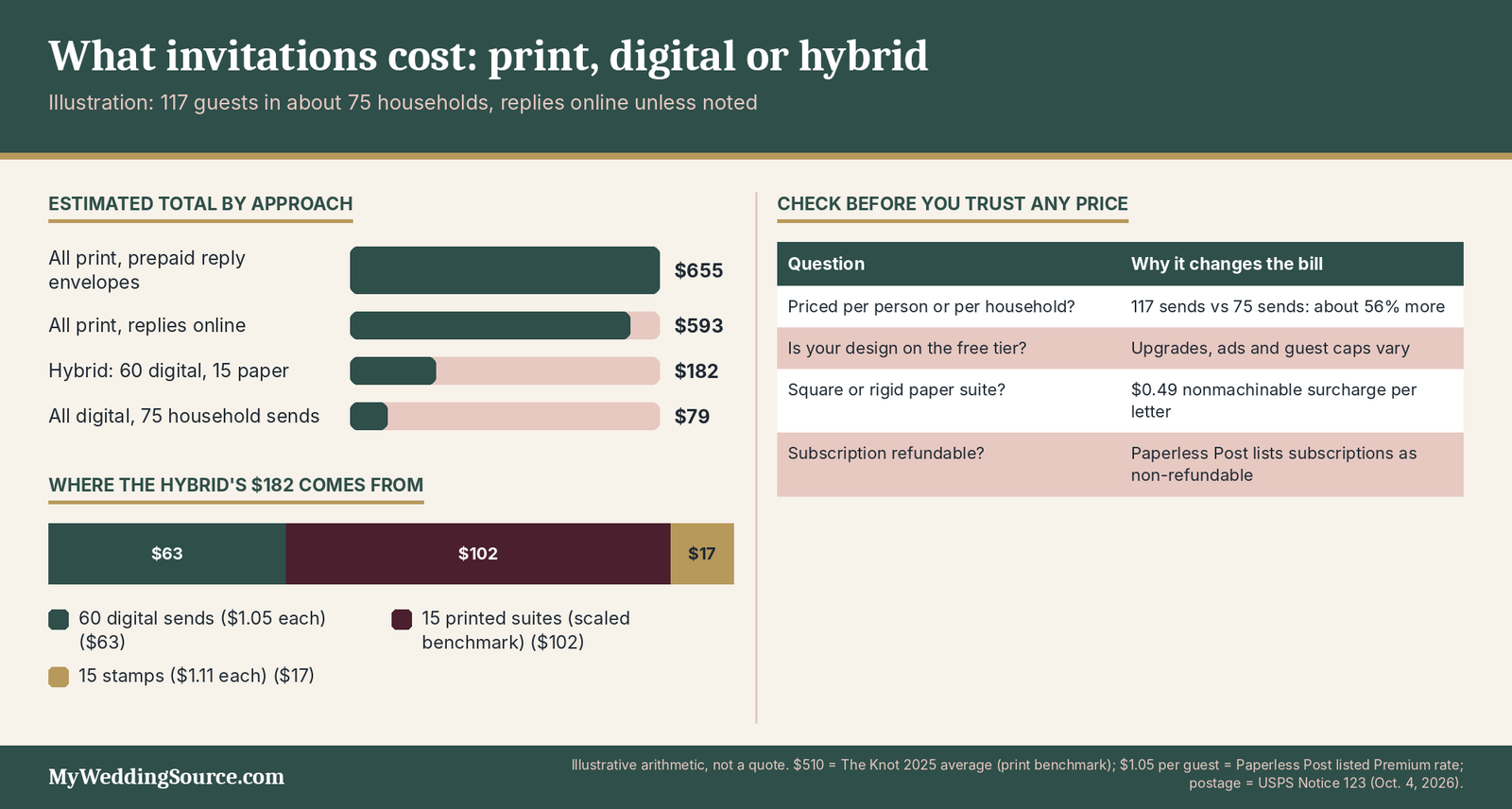
To show how the formats compare in dollars, take an illustrative wedding with 117 guests in about 75 households, the average guest count in The Knot’s 2025 Real Weddings Study. That study of 10,474 couples married in 2025 found an average of $510 spent on invitations and stationery, and the figure is used here only as a national benchmark for a print suite, not as a quote. Digital pricing uses Paperless Post’s listed Premium rate of $1.05 per guest for 75 household invitations, with volume pricing possibly lowering it.
Postage uses USPS Notice 123 rates: $1.11 for a 2-ounce letter, with a reply envelope at $0.82 where used. The small print run for the hybrid scales the $510 benchmark straight-line, which understates real cost because printers often have minimums and setup fees.
| Scenario (illustrative, 75 households) | Stationery or platform | Postage | Estimated total |
|---|---|---|---|
| All print, prepaid reply envelopes | $510 benchmark | $144.75 ($1.93 x 75) | $654.75 |
| All print, replies online | $510 benchmark | $83.25 ($1.11 x 75) | $593.25 |
| All digital, 75 household sends | $78.75 ($1.05 x 75) | $0 | $78.75 |
| Hybrid: 60 digital, 15 paper, replies online | $63 digital + about $102 print | $16.65 ($1.11 x 15) | $181.65 |
What the numbers do and do not say
The comparison shows that the postage and printing gap is large, but it leaves out costs on the digital side. A wedding website, address collection, a printed backup, and any upgrade to a platform tier would add to the digital total, and if a platform counts each of 117 individual addresses instead of 75 households, the all-digital line rises to about $122.85 at the same rate.
Joy claims digital invitations cost 70% to 90% less than print, an unsourced figure from a vendor, and the illustrative math above lands near the top of that range for a fully digital send, which is plausible but should not be treated as a guarantee. The more useful takeaway is that a hybrid captures most of the savings while protecting the households who need paper.
Extras that change the total
Several choices push either version up. A square or rigid printed invitation can trigger the $0.49 nonmachinable surcharge in USPS Notice 123, so weigh a complete sample before buying stamps. Joy suggests ordering 15 to 20% extra printed invitations to cover errors and late additions, though a small hybrid run needs fewer. On the digital side, extras include premium animations, custom domains for a wedding website, and subscription tiers that add co-hosts, guest tags and analytics. None of this is a reason to avoid digital, only a reason to price the whole package rather than the card alone. Our wedding budget guide shows where invitations sit in the larger picture.
Which platform should you use, and what should you verify first?
Three kinds of tools, and what each is good at
Invitation-card services
Paperless Post, Greenvelope, Evite and Punchbowl are built around a designed invitation that arrives by email or text, often with an animated envelope, and each has some form of reply tracking. They suit couples who want the invitation itself to look like stationery. The Knot’s roundup describes Paperless Post as offering realistic designs with envelopes and paper texture, and Greenvelope describes its own product as offering individually addressed delivery, real-time response and meal-choice tracking, and automatic reminders sent only to guests who have not replied. Those features are vendor descriptions, so test them with a trial send before relying on them.
Wedding websites with built-in RSVP
The Knot, Zola and Joy all offer wedding websites with guest lists and RSVP forms, and The Knot’s pages describe its own RSVP feature as user-friendly and recommend it for collecting replies. A website-based approach lets you put logistics, registry details and a schedule in one place, which keeps the invitation itself short. It also means the invitation can be a simple email or a printed card with a link or QR code, and the website does the work of collecting answers. This is the route many couples take, particularly in combination with paper. Our wedding RSVP cards guide covers what to print when replies happen online.
Template and do-it-yourself options
Etsy sellers offer editable templates for a one-time fee, and you send the file yourself by email or text. This is the cheapest route and the one with the most manual work: you must collect addresses, track replies in a spreadsheet, and send reminders yourself. It also puts more weight on the quality of your own email habits, since a message sent to 117 recipients in one blast can look like spam to a mail provider. A do-it-yourself send can work well for a small list of 30 to 50 people who already text you daily, and it gets harder as the list grows.
A verification checklist before you pay
Features to confirm
Before choosing a platform, run through the features that determine whether it fits a wedding rather than a birthday party. You want to know whether the reply form lists each invited guest by name, whether it handles meal choices and dietary notes, whether it allows plus-ones only where you have granted them, and whether it can collect a mailing address. You also want to know whether guests must create an account to reply. The questions in the table below are the ones worth answering from the vendor’s own pages or support team, and the answers can change, so note the date you checked.
| Question to ask | Why it matters | Where to check |
|---|---|---|
| Is pricing per person, per household or per event? | Can raise the cost by about half on the same list | Pricing page |
| Does the form list each invited name? | Prevents uninvited guests and wrong counts | Test invitation |
| Do guests need an account to reply? | Friction for less-digital guests | Test with a friend |
| Can I export all responses? | Protects your data if the link expires | Help center |
| What happens after the event or subscription ends? | Responses may become unavailable | Terms or support |
| Are reminders sent only to non-responders? | Avoids annoying guests who replied | Feature page |
Delivery, data and terms
Two less obvious questions deserve a look. First, how does the platform deliver messages: from an authenticated sending domain, from your own email address, or through a shared link? Google’s email sender guidelines say that unauthenticated messages might be marked as spam or rejected, and that recipients marking a message “not spam” helps future delivery, which is one reason a reputable platform’s send can behave differently from a mass email you build yourself. Second, how does the platform handle your guest data, and can you delete it afterward?
We cover privacy more fully later, and the quick version is to read the privacy terms, download your responses and delete the event when you are done.
A short test send settles most questions
Pricing pages and feature lists will answer most of the checklist, but a test send answers the rest. Create the invitation, send it to yourself and to two people with different email providers, and ask them where it landed, how it looked on a phone, and whether the reply form made sense without instructions. Ask one of them to open it on an older device or a small screen, because layout problems tend to show up there first. If something fails, you have found it while the cost of fixing it is zero.
How do you send digital invitations so guests actually see them?
Collecting contacts and building the list
One invitation per household, with every name listed
The Knot’s guidance on digital save-the-dates recommends one card per household with each invitee’s name listed, so that teens and other guests are not missed, and the same logic applies to invitations. Greenvelope’s etiquette page says to address each guest individually and to avoid a visible group email or long CC line. Those two ideas are compatible if you send one message per household, addressed to the named adults and listing any invited children, and never place guests’ addresses in a shared field where everyone can see them.
A reply form that shows each invited name with its own yes-or-no choice is the strongest protection against a guest quietly adding a plus-one.
Gathering emails and phone numbers without a mess
Collect contact information in one place, once. A short form on a wedding website, or a shared spreadsheet that each family fills in for their own side, works better than chasing addresses by text one at a time. The Knot’s pages mention tools for collecting addresses, and many platforms offer an address-collection form that guests fill in themselves. Decide up front which address is the contact for the household, and note who prefers text over email, because the same invitation may need to go out by email to one guest and by text to another.
If you are gathering mailing addresses for the print recipients at the same time, ask for them in the same form so you do not have to message people twice.
Households, children and shared inboxes
Shared email accounts are common among couples who have been together for decades, and an invitation to a shared inbox may be seen by one person only. When you know a household shares an address, add a line such as “Please reply for all invited guests listed below,” or ask for a second contact. Teen and adult children who are invited individually should get their own invitations, as The Knot’s save-the-date guidance suggests. When in doubt, a quick text to confirm who will handle replies is faster than discovering a missing guest in the final headcount.
Our guest list problems guide covers the harder cases where family and guest-list politics collide.
Timing, delivery and reminders
When to send
Digital delivery is instant, but guests still need notice. The Knot’s guidance is six to eight weeks for invitations whether paper or digital, with paper RSVPs working best near eight weeks and digital RSVPs near six. Overseas guests need nine to 10 weeks, according to The Knot, and holiday weddings about eight weeks or up to three months. A sensible rule is to send digital wedding invitations at the earlier end of that range if you also have printed ones going out, so the mailed pieces and the digital ones arrive together, and to set the reply-by date at least two weeks before your caterer’s final-count deadline.
Getting past spam filters
Even a well-made invitation can end up in a spam or promotions folder, and the filters you cannot control. A few habits improve the odds: send from the platform’s authenticated system or from a recognizable personal address, use the guest’s real name in the greeting, avoid all-capital subject lines, and keep the subject line plain, such as “Wedding invitation from Maya and Chris.” Tell guests to expect it with a short text a day or two ahead, so they know the sender’s name and look for it.
Google’s guidance says even compliant senders may see some legitimate messages marked as spam, so a heads-up text is not overkill. For guests who say they did not receive it, ask them to check spam and promotions folders before you resend.
Reminders without nagging
Greenvelope’s etiquette page says two reminders is the polite maximum: one about a week before the reply-by date and a brief final note at the deadline, sent only to guests who have not replied. That matches common practice and keeps the tone light. After the deadline, a personal text or phone call works better than a third automated message, particularly for older relatives and close family.
Joy cites unsourced figures of 20% to 30% of guests missing the deadline, and The Knot cites studies putting yes-rates at about 83% with a range of 60% to 85%, so plan for some stragglers whichever format you use. Follow-up scripts for the stragglers are in the RSVP etiquette guide linked earlier.
How do you make digital invitations work for older and less-digital guests?
Who actually needs paper
What the data says about internet use, and its limits
Pew Research Center’s 2025 survey of 5,022 U.S. adults found that 96% say they use the internet, 78% have home broadband and 91% own a smartphone, so most of your guests can receive a digital invitation. The gaps are concentrated among older adults and people who rely on a smartphone alone. Pew’s 2021 survey of 1,502 adults found that 75% of adults 65 and older used the internet and 61% owned a smartphone, which is older data than the 2025 figures and is shown here only to indicate the direction of the gap.
National numbers say little about your grandmother, who may text daily or may not own a phone at all, so use them to calibrate your expectations rather than to sort individual guests.
Access is not the same as comfort
A guest can own a smartphone and still find a link-based invitation confusing. Some people are wary of clicking unfamiliar links, which is the sensible advice the FTC gives about phishing messages, and others struggle with small text or reply forms that scroll on a narrow screen. Hearing or vision differences, a shared device, limited data plans and unreliable email all affect whether a digital invitation works for a specific person. These are practical reasons rather than generational stereotypes, and they apply to some 30-year-olds as well as some 80-year-olds.
Ask instead of assuming
You do not need to guess who prefers paper. When you collect addresses, add a simple question such as “Would you like a printed invitation, too?” and let households tell you. Emily Post’s guidance on weddings recommends printed invitations as the norm, and Greenvelope’s etiquette page suggests meeting uncomfortable guests where they are with texts, printed copies or phone calls. Some guests will take you up on the offer and others will not, but everyone will notice that you asked, which is a kindness in itself. Anyone who opts for paper goes on the print list, and you record their replies manually.
Making the invitation readable and easy to answer
Text size, contrast and plain details
The Web Content Accessibility Guidelines from the W3C set a minimum contrast ratio of 4.5:1 for normal text and 3:1 for large text, where large means at least 18 point or 14 point bold. You do not need to audit your design to the standard, but the principle helps. Light gray script on a cream background may look elegant on a designer’s monitor and be unreadable on a phone in sunlight. Choose a legible font for the details, put the date, time and address in real text rather than inside an image so that screen readers and search work, and test the invitation at a larger text size.
Put the essentials in the message itself
Some platforms show the invitation as an image or require an extra click to open the card. Put the essentials in the email or text body as plain text: the couple’s names, the date, the city and venue, the reply-by date and the website link. A guest who sees only the preview then knows what the message is, and a guest who cannot open the card can still reply. This also helps if a spam filter strips images. For guests who use screen readers, an invitation with real text and a clear reply link works better than a flat graphic.
Offer a human way to reply
The most accessible reply option is a person. Print a phone number or an email address, ideally belonging to a family member or a friend who has agreed to be the reply contact, and say that you will enter replies yourself. Emily Post’s guidance says it is acceptable to offer guests the option of replying by email and to print the address on the response card, which carries over naturally to a hybrid plan. If you also include a reply card in the paper invitation, keep its reply-by date and contact details identical to the digital version.
A guest who phones in a reply should get a confirmation text or note back, so they know it was received.
How do you track digital RSVPs and keep the data clean?
What the dashboard does, and what it leaves to you
Household totals and mismatched counts
Most platforms show who has replied, who has declined and who has not responded, and many show meal choices and notes. That dashboard is useful, but it is only as accurate as the list you loaded and the form you built. If your reply form lets a guest add names, you may see “party of 4” from a household of two invited adults, and you will have to decide what to do about it.
A form that shows the invited names and asks only for yes or no for each name avoids most of those conversations, and we cover how to handle the rest in the RSVP etiquette guide linked earlier.
Meal choices, allergies and notes
Reply forms are a good place to ask about dietary needs, but they are a poor place to discover a severe allergy at the last minute. Ask a plain question such as “Any dietary needs we should pass to the caterer?” and follow up personally with anyone who mentions a serious allergy. Export the meal and dietary data in a format that your caterer can use, and ask the caterer which format they prefer, since some want a simple list with names and choices. A platform that stores these answers is only helpful if you can get them out again.
Reminders that go only to non-responders
Automatic reminders save time when they work as described. Check that reminders are not sent to people who already replied, because a second “please reply” to a guest who answered three weeks ago creates its own awkward messages. Set the schedule yourself where you can, in line with the two-reminder maximum above. If the platform’s tone is more breezy than yours, edit it so the reminder sounds like you, and add a line with the phone number for anyone who prefers to reply by voice.
Keeping one master list
One source of truth, exported regularly
Even if your platform tracks replies, keep a master spreadsheet with one row per guest and columns for household, contact method, format received, reply status, meal choice, dietary notes and table. Export the platform’s data weekly during the reply window and at the deadline, and save the file somewhere you control. That protects you if a link expires, a subscription lapses or a platform changes its terms. It also makes the final headcount to the caterer a matter of checking a sheet rather than logging into three systems.
Entering paper and phone replies
In a hybrid plan, replies arrive through different channels, and each should be entered promptly. When a paper reply comes by mail, a text from a relative, or a voicemail, add it to the master list the same day and mark the source. If the platform lets you record a response on a guest’s behalf, do so, so that the dashboard and your sheet agree. A weekly 10-minute reconciliation is enough, and it prevents the situation where the dashboard says 82 yes while your own notes say 91.
Forecasting the count from partial replies
Replies arrive faster on digital platforms, which helps early forecasting. Joy reports unsourced figures of 80% to 90% of replies within two weeks for digital RSVPs, compared with 50% to 60% for paper at the same point, a vendor claim worth treating as a ballpark. For attendance, The Knot cites studies putting yes-rates at about 83% with a range of 60% to 85%, and its editor suggests planning around 20% declining as a starting point, adjusted for season and travel distance. For an invited list of 117, a 20% decline rate implies about 94 guests, but your list, your location and your date will move that number.
How do you protect guest privacy and avoid scam confusion?
What data you are collecting, and who can see it
Names, addresses and phone numbers
A digital invitation workflow collects more personal information than a paper one: email addresses, phone numbers, mailing addresses, dietary notes, sometimes accessibility needs. That information is held by the platform, and possibly by your wedding website provider and your vendors. Collect only what you need, tell guests how you will use it, and avoid asking for sensitive information such as health details beyond what the caterer needs. Our wedding website privacy guide goes into settings and risks in more detail.
Shared links and forwarded invitations
Greenvelope’s etiquette page warns against posting invitations in group chats or on social media when the guest list is defined, because shared links spread past the list. The same applies to wedding invitations: a link that works for anyone can be forwarded to a coworker, posted in a family group chat or indexed by a search engine. If the platform offers individual links, password protection or an option to hide the guest list, use it, and read what each setting does. Emily Post’s guidance suggests assuming emails can be shared, which is a sensible default when you write the message.
Avoid putting information in the invitation you would not want strangers to read.
Keeping the details you publish proportionate
Some couples include a home address as the reply address or list family names and relationships on a public website. A public wedding website can show your venue, schedule and photos to anyone with the link, so decide how much to share and whether to add a password. Keep children’s names and full home addresses off public pages unless you have a reason. When the wedding is over, download what you need, delete or archive the site and the platform event, and note that deleting does not erase copies other people have saved.
Spam, phishing and lookalike messages
Why a real invitation can look like a scam
A digital wedding invitation often arrives as an unexpected message from an unfamiliar sender with a link, which is also the shape of many phishing messages. The FTC says phishing messages often tell a story to trick you into clicking, with warning signs including generic greetings and requests to confirm personal or payment information. If the guest does not recognize the sender, they may hesitate or delete the message. That hesitation is healthy, and your job is to make the real thing recognizable: a personal greeting, the couple’s names, a short heads-up text from you beforehand, and a message that never asks for payment or passwords.
Be cautious with QR codes
QR codes on paper invitations or save-the-dates are convenient, and they are also a known vector for scams. The FTC warned in December 2023, as reported by CNBC, that scammers hide harmful links in QR codes, and advised people to check the web address before opening it and to be wary of unexpected messages with QR codes. If you print one, also print the plain web address next to it, so guests can type it in. Never put a QR code in a message that asks guests to pay, log in or send personal information, and do not stick QR codes on top of other codes in public places.
What to tell guests, and what to do if a fake appears
A single sentence in your first communication does a lot: “You will get an invitation from [platform or email address] on [date]. We will never ask you for payment details or passwords.” If a guest reports a suspicious message that claims to come from you, reply by phone or text with a link to the real website, and do not click anything in the suspect message. The FTC advises reporting phishing emails to the Anti-Phishing Working Group, forwarding phishing texts to 7726 and reporting to ReportFraud.ftc.gov.
A message that asks anyone for money in your name is a scam rather than an invitation, and guests appreciate a quick note telling them so.
What can go wrong with digital invitations, and how do you fix it?
Delivery and reply problems
Messages that never arrive
The most common problem is a guest who says they never received it. The cause is usually a spam or promotions folder, a mistyped address or a shared inbox. Ask the guest to check those folders, confirm the address spelling, and offer to resend or text the link. If several guests at the same email provider report the same problem, send from a different address or platform, and consider telling those guests by text. Keep a list of guests who needed a resend, because they are also likely to need a reminder.
Forwarded links and uninvited replies
If an invitation link is forwarded, you may see a reply from a name you did not invite. Do not scold the guest; thank them and tell the person kindly that space is limited. Use the platform’s settings to restrict replies to named guests, and write a short script in advance for situations like this one. The wedding invitation etiquette guide linked earlier covers uninvited guests and plus-ones in depth.
Replies that arrive by text or in person
A guest who texts “we’re in!” instead of using the form has still replied, and your job is to enter it. Reply with a friendly confirmation and a nudge to submit the form if you need meal choices, and treat the form as a convenience rather than a test. A guest who tells you at a family gathering that they will be there should get the same follow-up. The goal is an accurate list, not perfect compliance.
Changes after you send
A typo, a date change or a venue change
A mistake in an invitation is easier to fix digitally than in print, but the fix still needs care. Send a short correction message to everyone, put the corrected detail first in the subject line, and update the wedding website and any printed pieces. If you have already mailed printed invitations with the error, send a printed correction or a text to those households. Do not rely on the platform’s edit function alone, because guests who already opened the invitation may not see the change.
When a link expires or a platform changes
Platforms change pricing, retire features and sometimes close. Save a PDF or image of the final invitation, export the guest list and responses, and keep your own copies of any guest-facing information on your website. If a link is tied to a subscription, note the renewal date, and remember Paperless Post’s pricing page says subscriptions are non-refundable. A guest who opens the invitation a year later to find the date should still be able to do so.
Risks at a glance
The table below summarizes the most common problems and what to do first. It assumes a hybrid or all-digital plan, and the actions are general suggestions rather than rules.
| Problem | Likely cause | First action |
|---|---|---|
| Guest never received it | Spam folder, typo, shared inbox | Ask to check folders, confirm address, text the link |
| Reply from an uninvited name | Forwarded link, open form | Thank them, restrict replies to named guests |
| Guests think it is a scam | Unfamiliar sender, link-only message | Send a heads-up text, add a plain web address |
| Dashboard and master list disagree | Replies by text or phone | Reconcile weekly, enter manual replies same day |
| Detail changed after sending | Venue, date or typo | Send correction to all, update site and print |

FAQ: digital wedding invitation questions
Etiquette and format questions
Are digital wedding invitations tacky?
Not by any current etiquette consensus we could find, though sources differ on how far they go. Emily Post’s guidance still prefers printed wedding invitations and reserves email for unusual circumstances, while The Knot says it is okay to send digital invitations if they are personalized and complete, and digital platforms call them mainstream. The difference usually comes down to formality and execution: a polished, individually addressed invitation for a casual or semi-formal wedding rarely raises eyebrows, while a bare link for a black-tie dinner might. If you are unsure, send paper to the guests whose opinion you would worry about and digital to everyone else.
Can I send digital invitations to some guests and paper to others?
Yes, and it is one of the most practical approaches. Use the same design, wording, website and reply-by date on both versions, and send them within a day or two of each other so that no group feels informed late. Joy’s example of 120 digital and 30 printed invitations for 150 guests shows the idea, though your split depends on your list. Ask guests who prefer paper to tell you, rather than guessing from their age.
Should I send a digital save-the-date before a printed invitation?
That is a common and low-risk pattern. The Knot recommends sending digital save-the-dates six to eight months before the wedding, one per household with each invitee’s name listed, and linking to your wedding website. A digital save-the-date also shows you which households respond easily and which may need paper later. Our guide to save-the-date timing explains when these cards are worth sending at all.
Cost, replies and privacy questions
How much do digital wedding invitations cost?
It depends on the platform and how it counts guests. The Knot’s roundup describes digital invitations as typically under $2 per invite, and Paperless Post lists Premium cards at $1.05 per guest, with the price falling as the guest count rises. In our illustrative example, 75 household sends at that rate cost about $79, compared with about $655 for a printed suite with prepaid reply envelopes using The Knot’s $510 average and USPS Notice 123 postage. Confirm the current price and the counting rule on the vendor’s page, because both change.
How do I know guests received their digital invitations?
Most platforms show whether an invitation was delivered or opened, but opened-status tracking is not reliable, since some mail apps block it or preload images. The better test is replies: after a week or so, check who has not responded and text or call those households rather than assuming the message arrived. Ask guests to check their spam and promotions folders, and send a short heads-up text before the invitation goes out so they know which sender to look for.
Is it safe to put wedding details on a digital invitation?
It is safe if you share only what guests need and control who can open the link. The invitation will carry your names, the date and the venue, and a public wedding website can show more than you intend, so add a password or use individual links where possible. Do not ask guests for payment details or passwords in an invitation, and tell guests to expect a message so they can tell it from phishing. Our wedding website privacy guide has more on settings.
Your next steps
This week
Decide the format by guest, not by wedding
Open your guest list and add a column called “Format.” Mark each household as digital, paper or undecided using the question “Would they see it, understand it and reply without help?” Add a second column for each household’s best contact method. Counting the paper households will tell you whether you are planning an all-digital, hybrid or mostly paper send, and the count drives your costs and lead time.
Price three options with your own numbers
Use the illustrative table in this guide as a template and replace the assumptions with yours: your household count, a real quote from a stationer, and the current price of one or two platforms. Weigh a complete sample invitation at the post office if you are mailing any paper. Check the platform’s counting rule for guests, because it can change the bill by half. Note the date you checked each price.
Before you pay a deposit or send anything
Run the platform checklist and a test send
Answer the six questions in the platform table from the vendor’s own pages, then create a test invitation and send it to yourself and two friends on different email providers. Ask whether it arrived in the inbox, looked clear on a phone and could be answered without help. Confirm you can export all responses, and save the date of your check. If a platform cannot answer a question, move on to one that can.
Lock the dates, text and website before the first send
Agree on one reply-by date that is at least two weeks before your caterer’s final-count deadline, one wedding website, and one set of wording for both formats. Send a heads-up text to guests a day or two before the digital send, schedule two reminders, and set a calendar alert to reconcile your master list weekly. Keep an export of your guest list and a PDF of the final invitation in a folder you control. If you are building the larger schedule around this, our wedding planning timeline shows where invitations fit.
Sources & methodology
- Emily Post, wedding email dos and don’ts — printed invitations preferred, email for save-the-dates, informal events and optional email replies, BCC for group notes.
- The Knot, digital invitation options — etiquette view, platform list and listed prices, pros and cons, older guests.
- The Knot, online save-the-dates — digital save-the-date timing, one card per household, platform notes.
- The Knot, when to send wedding invitations — 6 to 8 weeks, paper vs digital RSVP timing, overseas and holiday windows.
- The Knot, how many people RSVP no — yes-rate figures and the 20% decline starting point.
- The Knot, average wedding cost — 2025 averages: $34,200 total, 117 guests, $510 invitations and stationery, 10,474 couples.
- Greenvelope, are digital wedding invitations tacky — vendor view on acceptability, hybrid sends and older guests.
- Greenvelope, digital invitation etiquette — individual addressing, group-email and shared-link cautions, two-reminder maximum (vendor guidance).
- Joy, digital vs print wedding invitations — hybrid example, production lead times, vendor cost and response-speed claims (unsourced).
- Paperless Post, pricing — per-guest card prices, free tier, subscription terms and guest-counting rule.
- USPS Notice 123 — stamped letter, nonmachinable surcharge and postcard prices effective October 4, 2026.
- Pew Research Center, internet and broadband fact sheet — 2025 internet use and home broadband among U.S. adults.
- Pew Research Center, mobile fact sheet — 2025 smartphone ownership among U.S. adults.
- Pew Research Center, tech users 65 and older — 2021 internet use and smartphone ownership among adults 65 and older.
- W3C, WCAG 2.2 contrast (minimum) — 4.5:1 and 3:1 text contrast thresholds.
- FTC, how to recognize and avoid phishing scams — phishing warning signs and where to report.
- CNBC, FTC warns QR codes may be a gateway to identity theft — report of the FTC’s December 2023 QR code alert.
- Google, email sender guidelines — authentication and spam handling for messages to Gmail accounts.
Methodology: Postage rates are published USPS prices, averages and yes-rates are survey findings from The Knot, and internet and smartphone figures are survey findings from Pew Research Center. The cost table is illustrative arithmetic built from those figures plus Paperless Post’s listed Premium rate and The Knot’s $510 average used as a print benchmark; it is not a quote and omits wedding websites, minimums and setup fees. Platform prices from The Knot’s roundup are listed as reported and may be out of date.
Etiquette sources disagree, vendor claims about response speed and savings are unsourced, and the hybrid-sorting, accessibility and privacy suggestions are editorial judgment rather than legal or security advice.
Freshness note: Platform prices, free tiers and features change often, so recheck each vendor’s pricing page and terms before you pay, and check USPS Notice 123 when postal rates change. Recheck The Knot’s Real Weddings Study each February and the Pew fact sheets each year. Review this page each October.