

A wedding payment calendar is the dated list of everything you owe, to whom, and what each payment depends on. This guide shows how to build one so that when the wedding date moves, the payment calendar rewrites itself from a few anchors instead of forcing you to rebuild every deadline from scratch.
Give every payment in your payment calendar an anchor: the event date, a fixed calendar date, a delivery milestone, or a fee that only a change can trigger. Event-anchored payments move when the date moves. Calendar-anchored ones do not. Map which payments depend on which milestones, test the map against four reschedule scenarios, then get each vendor’s new dates and fees in writing before you pay anything under the new schedule.
Most couples build a payment schedule once, in the first excited weeks after booking a venue. It is usually a list: deposit here, balance there, a few dates scattered through the year. It works fine as long as nothing moves. Then a family illness, a venue problem, a job change or a weather season forces the date to shift, and the list turns out to be a pile of numbers with no logic behind them.
The trouble is not the money itself. It is that nobody wrote down why each payment falls where it does. A florist balance that is due “thirty days before the event” will move on its own. A photographer retainer that was paid on the day you signed will not move at all, and it may not come back either.
A caterer’s final headcount deadline might shift with the date or might stay tied to a payment calendar quarter. Without that reasoning on paper, you end up phoning twelve vendors in a panic.
A scope note before we start. This is general information, not legal, tax or financial advice, and contract terms, deposit rules and payment protections differ by contract and by state. Where a rule matters, this guide points you to the agency or the contract clause that settles it, so you can confirm the current version yourself.
Here is the plan. First you will see why ordinary schedules fail under a date change. Then you will build the payment calendar properly: the fields it needs, the four anchors that explain every line, and a milestone dependency map that shows which payments cascade from which. After that come contract reading, four reschedule scenarios, a fully worked example with an invented couple, the wording for vendor confirmations, and the payment-method and cash-reserve questions that decide how painful a change will be.
Why a payment calendar breaks when the wedding date moves
A typical wedding payment calendar is really a to-do list wearing a payment calendar’s clothes. It records dates but not causes. When you move a wedding, causes matter far more than dates, because the cause tells you whether a given date shifts, stays put, or gets replaced by something new.
Think about what actually sits behind a handful of ordinary line items. The venue deposit was due at signing, which is a fixed past date. The venue’s second payment is due six months before the event, which is tied to the event. The photographer’s retainer was paid in cash on booking day, and it buys a held date, not a service.
The cake balance is due two weeks before the wedding, tied to the event again. The invitation printer was paid in full at order, tied to a design proof, with no reference to the date at all.
Five lines, four different logics. A payment calendar that shows only the dates cannot tell you that moving the wedding by four months will shift two of those payments, strand one, and possibly cancel another. You only discover that by reading each contract again, one at a time, when you are already stressed.
The three ways a date change hits your money
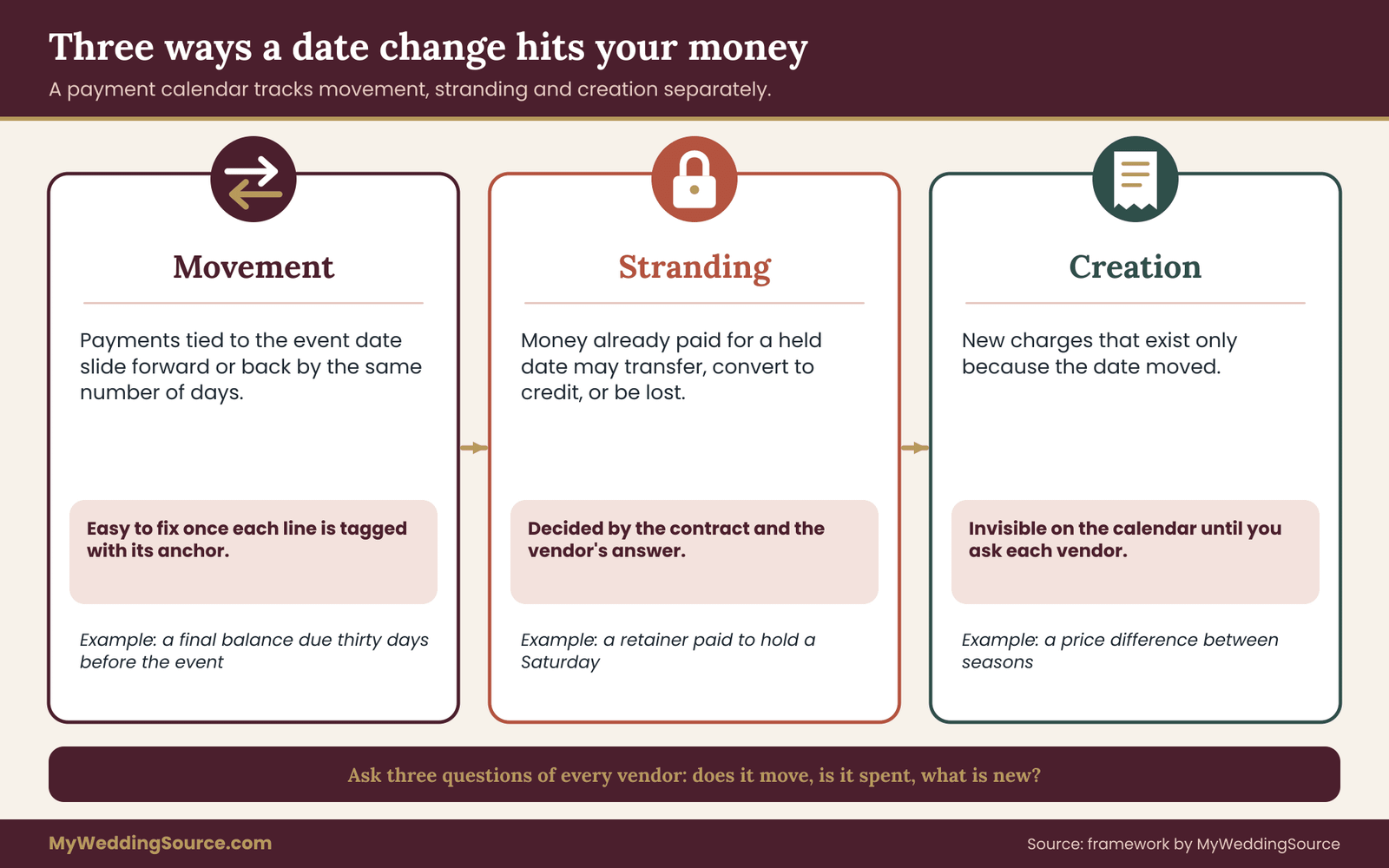
When a wedding date moves, money is affected in three separate ways, and a good payment calendar tracks each one separately.
The first is movement. Payments tied to the event date slide forward or back by the same amount. These are the easy ones, as long as you know which they are, because the arithmetic is simple.
The second is stranding. Payments already made for a held date, such as retainers, deposits and non-refundable holds, may be lost, transferred to the new date, or partly credited, depending on the contract. Stranded money is the biggest source of avoidable loss, and it is entirely a matter of what the contract says and what the vendor agrees to.
The third is creation. A date change can trigger new charges: a rebooking fee, a re-proofing charge for printed items, a price difference if the new date falls in a higher-demand season, a change administration fee, or a rush fee if the new date is sooner than the original production lead time allows. These do not exist on your payment calendar until the moment the date moves, so they cannot be seen in advance unless you read for them.
Why guessing fails
It is tempting to assume that every vendor will simply slide everything by the same number of days. Some will, gladly. Others work from capacity: a photographer who has already declined three other inquiries for your original date may treat a move as a new booking. A caterer’s pricing might change with the season. A venue may have no other open Saturday for months.
None of that is bad faith. It is how small businesses with limited dates work. But it means your payment calendar should hold two columns for every line from the start: what happens to this payment if the date moves, and how sure you are of that answer. The second column matters. A line marked “confirmed in writing” and a line marked “assumed” belong in different risk categories, and when a date change arrives, the assumed lines are the ones to chase first.
What a calendar that survives a change looks like
The goal is modest. You are not trying to predict a date change or make it painless. You are trying to make sure that if one happens, you can answer four questions within an hour: which payments move, which are already spent, which new fees might appear, and what cash you need on hand in the next sixty days.
To get there, the payment calendar needs a clear structure, and the structure is the milestone dependency calendar this guide is built around. Instead of listing dates, you list milestones, such as contract signed, design approved, headcount locked and event completed, and then attach each payment to the milestone it depends on. Dates become a calculation. When the event milestone moves, everything downstream recalculates, and you can see at a glance what the moving date touches.
Do not worry yet about spreadsheets or software. A notebook page can hold a milestone calendar if the logic is written down. The point is the discipline of recording the reason for every payment, not the tool that stores it.
If you want the wider money picture first, the wedding cash-flow planning guide explains how deposits, final balances and reserves fit together across the whole planning period. This article stays narrower: what happens to those payment dates, specifically, when the day itself changes.
What your payment calendar needs to record
A payment calendar that can survive change needs more fields than most couples keep. The extra effort at the start is small, perhaps an evening, and it replaces many hours of reconstruction later. Here is what each line should capture, and why each field earns its place.
The basic identity of each payment
Start with the plain facts: the vendor, what the payment is for, the amount, and the due date. Every calendar has these. Add the contract date and the version of the contract or amendment that created the obligation. If a vendor has issued two versions of a contract, the date and version tell you which one governs.
Add the payer and the method too. If one partner pays the venue by bank transfer and the other pays the florist by card, you will want to know instantly which account is affected when a due date moves. The method also matters later, when you consider refunds and disputes, because different payment methods carry different protections and time limits.
The reason field: what triggers the due date
This is the field most calendars lack. In a sentence, write why the payment is due when it is. Use the vendor’s own wording where you can. “Due at signing.” “Thirty days before the event date.” “Upon approval of final proof.” “Final headcount due fourteen days before event; balance due same day.”
Writing the trigger in words forces you to read the contract line by line, and it exposes the vague ones. If a contract says “balance due prior to the event,” you have found a line that needs a clarifying email before any date change happens, because “prior” can mean anything from the morning of to six months out.
The anchor type
Next to the reason, record the anchor: event, calendar, delivery or trigger. The next section explains each type in detail. For now, know that this single label lets you filter the whole calendar in seconds. When the date moves, you sort by anchor type and immediately see which payments are affected by that move and which are not.
The status and the refundability
Record whether each payment is scheduled, paid, partly paid or disputed. For paid items, add a refundability note taken straight from the contract: refundable, refundable minus a fee, transferable to a new date, credit only, or non-refundable. Quote the clause number. If you cannot find the clause, write “unclear” and treat it as a question for the vendor.
Refundability notes are where the true cost of a date change hides. Two couples can each have paid five thousand dollars in deposits. If one couple’s deposits are all transferable and the other’s are all non-refundable and non-transferable, a date change costs those couples very different amounts, even though their payment calendars look identical.
The change terms
The last working field is what the contract says about changing the date. Some contracts have a clause giving a set number of free reschedules with a minimum notice period. Some charge a fee per change. Some say nothing, which is its own piece of information, because silence usually means the vendor decides case by case.
Write down the notice period, the fee if any, and any limits such as “subject to availability” or “must be rescheduled within twelve months.” These terms feed straight into the reschedule scenarios later in this guide.
A note on proof and confidence
For each line, add one more small field: a confidence mark. Use three levels. “Confirmed” means a vendor has told you in writing how this payment behaves under a date change. “Contracted” means the contract states it clearly but you have not asked the vendor. “Assumed” means you are guessing from habit or from how a different vendor behaved.
A payment calendar full of “assumed” is a payment calendar waiting to fail. A payment calendar where every line is at least “contracted” lets you act quickly and with fewer surprises. The goal over the next few weeks is to move as many lines up that ladder as you reasonably can, starting with the biggest dollar amounts.
Keeping it small enough to use
None of this needs to be elaborate. Ten to twenty vendor lines with eight or nine fields each is a normal size for a wedding of ordinary scale. If your payment calendar grows past what you can scan in a minute, you are likely recording detail that belongs in the contract folder instead.
Keep the payment calendar for decisions, and keep the documents in the documents folder. The wedding budget guide is a good place to hold the broader cost picture, so the payment calendar can stay focused on timing.
The four anchors that decide how each payment moves
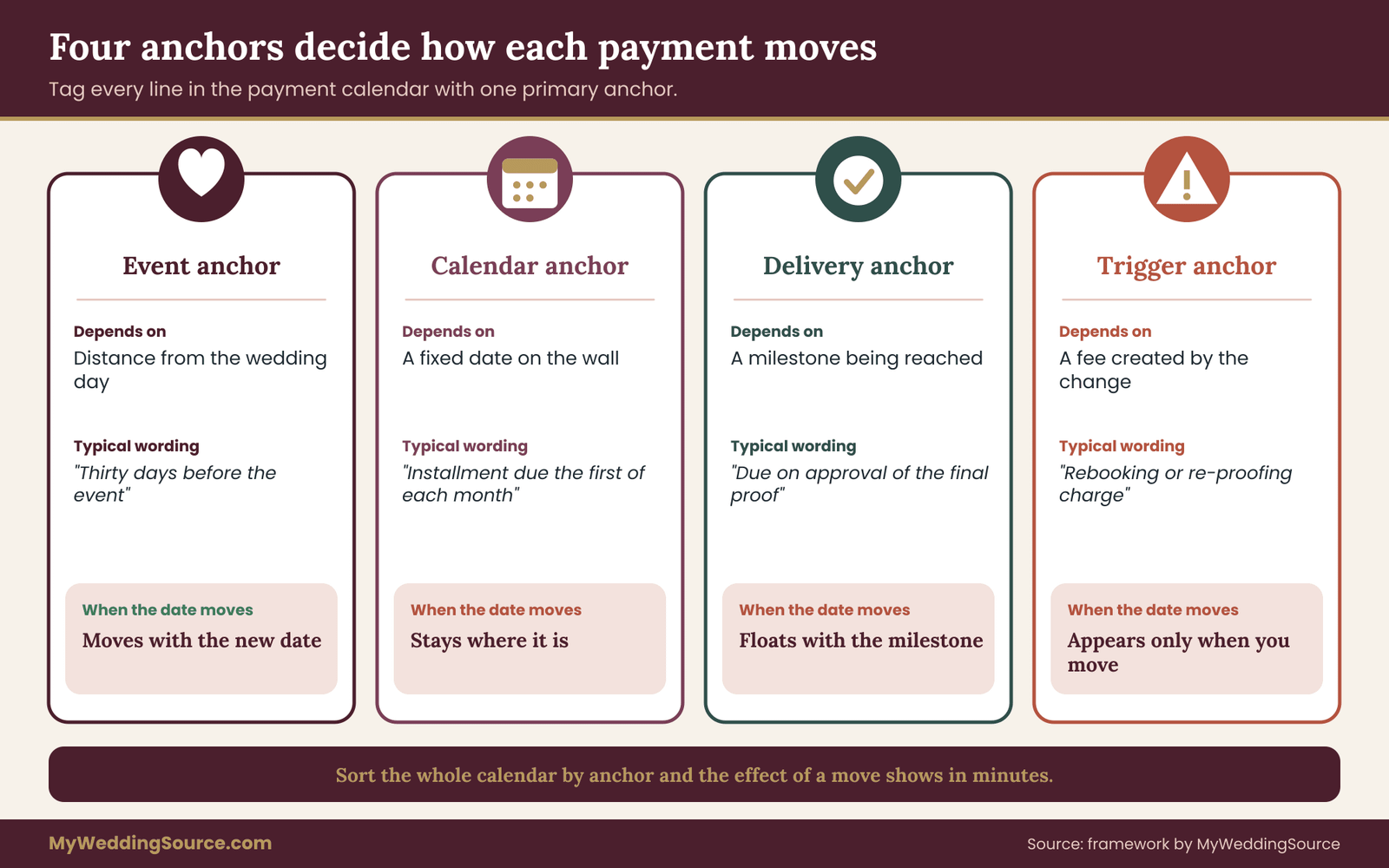
Every line in a payment calendar can be explained by one of four anchors. Learn these four and you can sort any contract in a few minutes. They also tell you exactly what to ask a vendor when the contract is unclear.
Event anchors: the payment moves with the date
An event-anchored payment is defined by distance from the wedding day. “Thirty days before the event.” “Due on the day of the event.” “Final balance seven days before.” These payments move automatically when the event date moves, and the arithmetic is simple: new event date minus the stated number of days.
Most final balances are event-anchored, and so are final headcount deadlines, tip envelopes and many catering and rental payments. They are the easiest part of the payment calendar to update, which is why it is worth marking them clearly. One filter and you can recalculate a dozen lines in a few minutes.
A small trap: some contracts mix an event anchor with a hard floor. “Balance due thirty days before the event, but no later than the first of the month.” If the new date falls close to the floor, the later of two rules may decide the real due date. Read these lines twice.
Calendar anchors: the payment stays where it is
A calendar-anchored payment is tied to a fixed date, regardless of the wedding date. “Second installment due March 1.” “Payment plan runs on the fifth of each month.” The wedding date can move a year and these dates will not.
Calendar anchors matter for two reasons. First, they may leave you paying for a longer period if the wedding moves later, for example a payment plan that now ends well before the event, or begins to feel disconnected from the service. Second, they can leave you with less cash flexibility if the wedding moves earlier, because installments that were meant to finish before the original date now overlap with a much closer event.
Payment plans are the classic example. A plan with twelve equal monthly installments looks flexible, but it is a payment calendar anchor. If your date moves earlier by four months, you either pay the remaining installments sooner or the vendor accelerates the balance. Ask which in advance.
Delivery anchors: the payment depends on a milestone being reached
A delivery-anchored payment depends on something being finished or approved, not on a date. “Due upon approval of the final design proof.” “Balance due on delivery.” “Second payment due when the alterations fitting is complete.” The due date floats until the milestone happens.
Delivery anchors are the quietest source of trouble in a date change, because the milestone itself may move. If you pushed the wedding back and the dress will be ordered later, the delivery-anchored payment for the dress moves with the order, not with the wedding. If you pulled the wedding earlier, the production deadline may arrive before the payment normally would, and the vendor may demand the milestone payment early to start work.
For delivery anchors, the question is always the same: when does the milestone now happen, and who controls its timing? If the vendor controls it, you may be at their mercy. If you control it, such as approving a proof, a quick approval can accelerate a payment you were not planning to make yet.
Trigger anchors: fees that exist only because of the change
A trigger-anchored payment does not exist until a specific event creates it. Date change fee. Rebooking charge. Rush production surcharge. Re-proofing cost. Difference in price between seasons. Administrative fee for transferring a deposit.
These lines are not on your payment calendar today. The method here is to list, for each vendor, which triggers the contract defines, and to give each a placeholder amount or a note that says “unknown.” When a date change comes, you convert the placeholders into real lines. Having them listed means you will remember to ask about them instead of discovering them on an invoice.
Why four anchors is enough
You might expect more categories, such as refundable, tax, tips and so on. But those describe properties of a payment, not what makes it move. Anchors answer only the question that matters when a date changes: what does this line depend on?
When you review your contracts, assign each payment one primary anchor. Some payments will have two. A final balance might be event-anchored but also contain a delivery condition. Record the primary anchor and note the second in the reason field. That is enough to sort and filter, and it keeps the system light.
A fast sorting exercise
Try this with the three biggest vendors you have. For each, list every payment, write the vendor’s wording for the due date, and assign an anchor. Most people find the exercise takes about twenty minutes per vendor the first time, and finds at least one line where the wording was unclear. Those unclear lines are your first questions, and they are worth asking now, while the date is still stable and the vendor has no reason to be defensive.
Building the milestone dependency map
The anchors tell you how each payment behaves. The milestone dependency map shows how payments relate to each other and to the events that produce them. This is the part that turns a list into a system that survives change.
What a milestone is
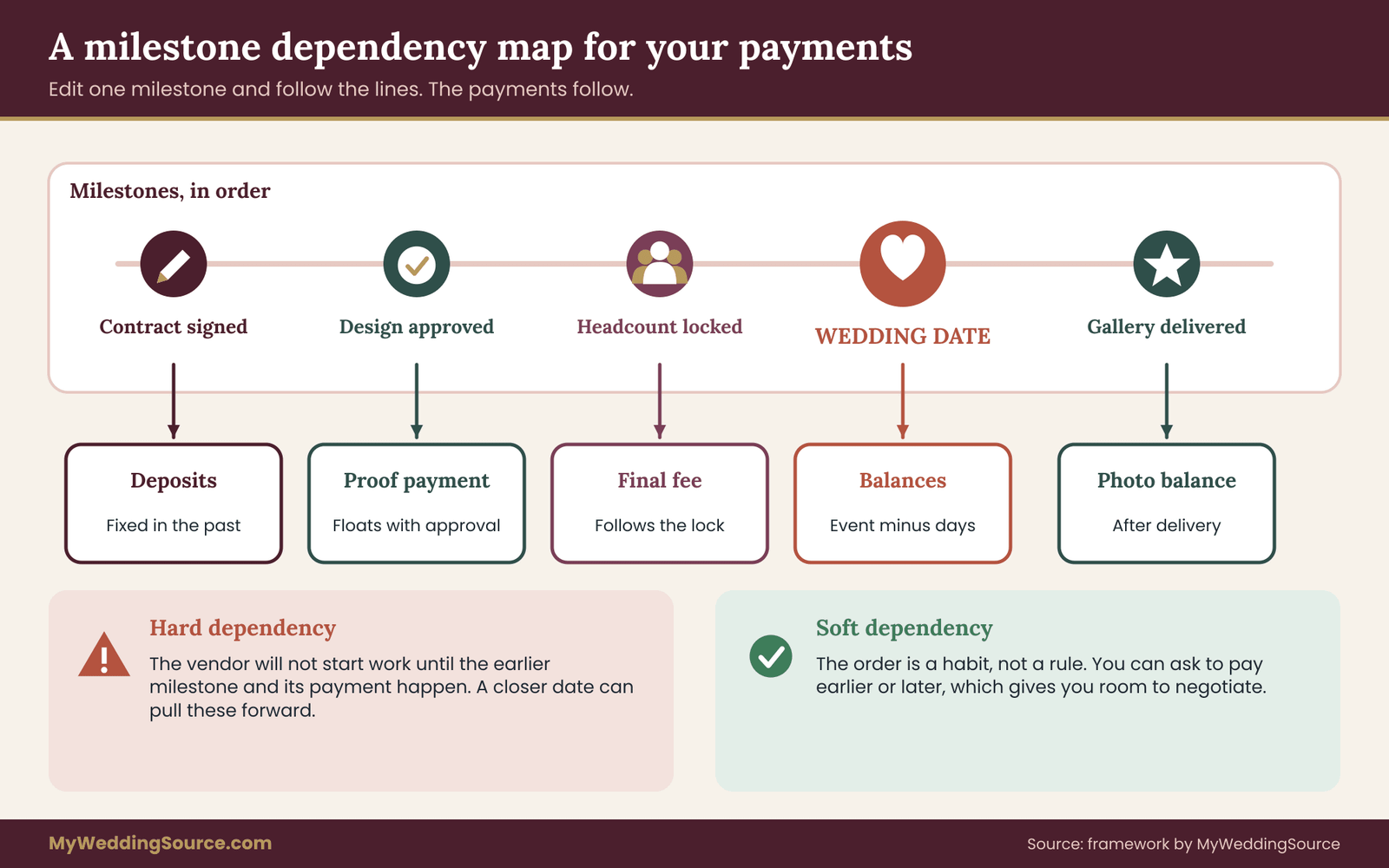
A milestone is a moment that matters to money. The wedding date is the obvious one, but most weddings have a dozen others. Contract signed. Venue hold confirmed. Guest count locked. Menu approved. Design proof approved. Fitting completed. Rehearsal held. Event completed. Vendor final invoice issued. Photographs delivered.
Each payment hangs off a milestone. The deposit hangs off “contract signed.” The final balance hangs off “event minus thirty days.” The photography balance might hang off “gallery delivered.” Seeing payments as attached to milestones, rather than floating on a payment calendar, is the central change in how you think about this.
Drawing the map
Take a large sheet of paper or a blank document. Put the wedding date in the middle. To the left, place the milestones that happen before it, in order. To the right, place the milestones that follow. Then draw a line from each payment to the milestone it depends on.
You will quickly see clusters. Almost everything with an event anchor connects directly to the wedding date. Delivery-anchored payments connect to milestones that sit between signing and the event. Calendar-anchored items float at the edges, connected to nothing but a date on the wall.
Then add the dependencies between milestones themselves, because these are the hidden chains. The guest count lock depends on RSVPs, which depend on invitations being mailed, which depend on the date being final, which depends on the venue. If the date moves, the whole chain slides. A payment attached to “invitations mailed” has moved even though no contract mentions it.
Reading the cascade
Once the map exists, a date change becomes a simple exercise. Pick up the wedding date milestone, move it, and follow every line outward. Each payment you reach is one that moves, strands or creates a charge. Each payment you do not reach is untouched.
This is where the map pays for itself. Suppose a couple pushes the date back by five months. The event-anchored balances move automatically. The invitation printer’s calendar-anchored payment plan keeps running on its original dates. The dress alterations, a delivery anchor tied to a fitting that has not happened, simply wait. The venue deposit, already paid for the old date, becomes the question mark. In a few minutes, the couple has a picture of which items to chase.
Two kinds of dependency to mark
When you draw the map, mark two kinds of dependency in different colors. The first is a hard dependency: payment B cannot happen until milestone A does, because the vendor will not start work without it. The second is a soft dependency: payment B is normally paid after A, but nothing stops you from paying it earlier or later if the vendor agrees.
Hard dependencies are where a date change creates real risk, because they can force payments earlier than planned. If the new date is closer, a vendor might need a proof approved and a payment made sooner to meet a production deadline. Soft dependencies are where you have negotiating room, because the order is a habit rather than a rule.
Turning the map into a calendar
When the map is complete, convert it into calendar lines. Each line carries the payment, the milestone it hangs off, the offset from that milestone, and the resulting date. A balance with an event anchor of thirty days becomes “event date minus 30 days.” In a spreadsheet, this is a formula. On paper, it is a note you recalculate by hand.
The key habit is that you edit the milestone, not the payment. If the wedding moves, you change one cell or one number. The payments follow. When something stays fixed, such as a calendar-anchored installment, it stays fixed because you marked it that way, not because you forgot to update it.
For wider context on how the wedding date itself should be chosen, so that a move is less likely in the first place, see the guide on choosing a wedding date around guest availability, vendor capacity and travel disruptions. A well-chosen date reduces the chance that the payment calendar is ever tested, but it does not remove the need for one.
Checking the map with a stranger
A useful test of any dependency map is to hand it to someone who has not seen it, such as a parent, a friend or your planner, and ask them one question: “If the wedding moved four months later, which payments change?” If they can answer from the map alone, in a few minutes, the map is working. If they have to ask you what a line means, the reason field needs clearer wording.
This also protects you. Weddings are stressful, and a date change tends to arrive when you are least able to think clearly. A map that a helper can read means you can hand off the arithmetic to someone steady while you focus on the harder conversations.
Reading contracts for date-change terms
The payment calendar is only as good as the contract terms it is built from. Most couples read a contract once, at signing, looking for price and date. A date change forces a different kind of reading: you are looking for what the contract says happens when the one thing it was built around moves.
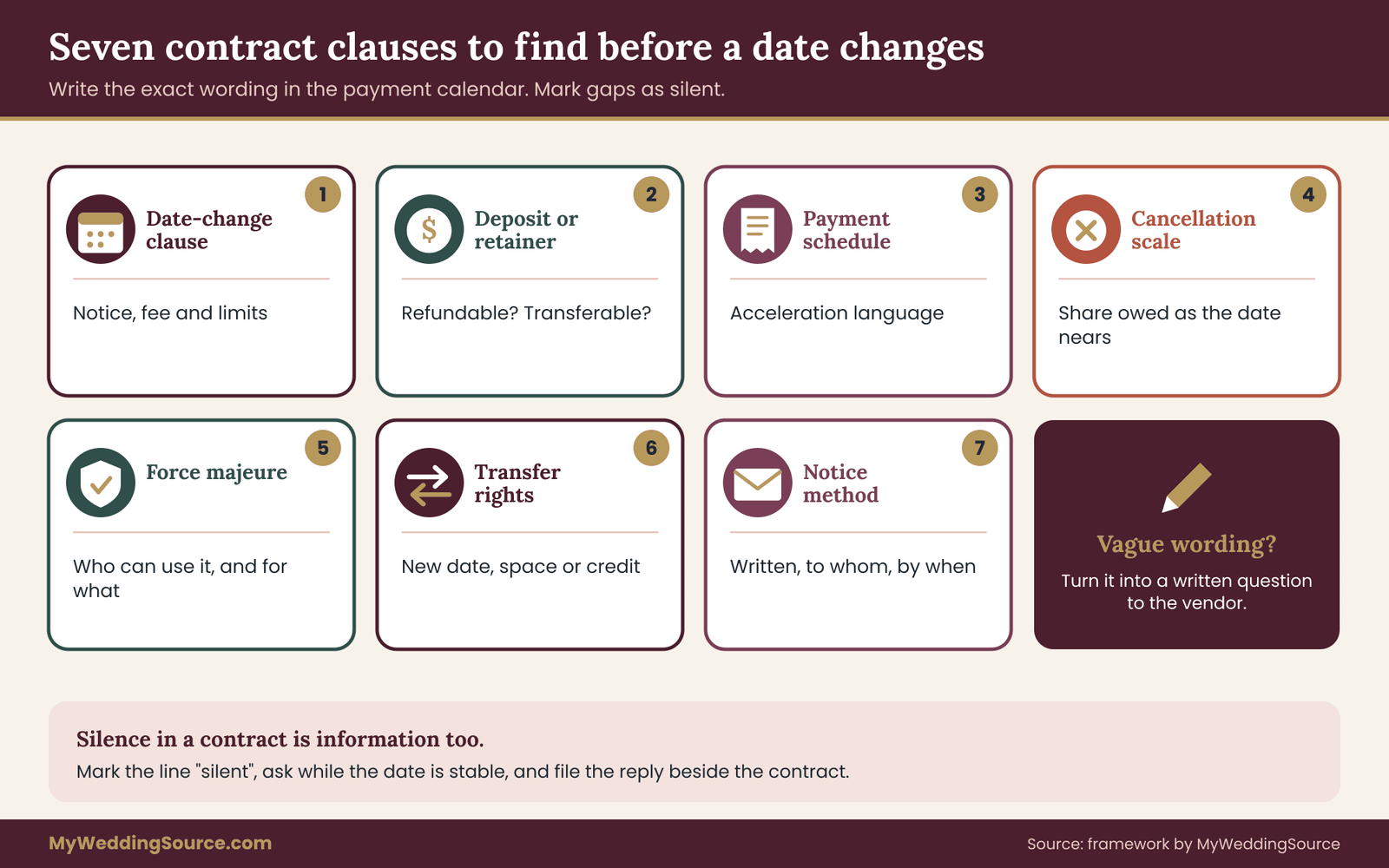
Go through each vendor contract with a highlighter and a notebook. You are hunting for seven kinds of clause. Not every contract has all of them, and the absence of a clause is worth writing down.
Clause one: the reschedule or date-change clause
Some contracts address changes directly. Look for words such as “reschedule,” “change of date,” “postponement” or “transfer.” The clause may promise a number of free changes, require a minimum notice, charge a fee, or say that a change is “subject to availability.”
Record three details: how much notice is needed, what it costs, and what limits apply. A common limit is a window, for example “within twelve months of the original date.” If the new date falls outside the window, the clause may not apply and the vendor treats it as a new booking.
If the contract has no such clause, do not assume it forbids changes or allows them. Mark it “silent” and plan to ask. Silence is common in smaller vendors’ agreements, and the answer usually comes down to the vendor’s capacity and goodwill.
Clause two: deposit and retainer terms
Deposits and retainers sound alike but can do different jobs. A deposit is usually a part payment toward the total, which may be refundable or credited. A retainer often pays to hold a date or reserve a person’s time and may be explicitly non-refundable. The wording matters, and the same word is not always used the same way across vendors.
Find the sentence that says what happens to the money if you cancel or change the date. Is it refundable, partly refundable, transferable to a new date, convertible to credit, or forfeited? Write the exact phrase in your payment calendar. If it says “non-refundable,” look for whether it also says “non-transferable.” Those are separate ideas, and a non-refundable deposit that is transferable to a new date is a very different thing from one that is simply lost.
For a deeper look at how retainers and deposits differ in contract language, the site’s wedding vendor contract guide is a good companion to this step.
Clause three: payment schedule and acceleration
Find the payment schedule and any language about what happens if the schedule is disrupted. Some contracts include an acceleration clause: if you miss a payment or cancel, the entire remaining balance becomes due. Others state that a date change does not alter the payment schedule. Others tie the schedule to the event date explicitly.
These words decide how much of your payment calendar moves. Read them slowly, and look for any sentence that begins “if the event date changes.” If you find one, copy it into the reason field, and mark the line as confirmed by contract.
Clause four: cancellation terms
A date change is not a cancellation, but vendors sometimes treat a change that they cannot accommodate as one. Read the cancellation clause so you know what happens if a reschedule fails. Many contracts use a sliding scale, where the share of the total owed rises as the event gets closer.
Write the scale in your notes. If a vendor cannot accommodate the new date, this scale shows you the cost of walking away. It also tells you the cost of delaying the decision: if you wait three weeks to decide and that crosses a threshold in the scale, the delay itself has a price.
Clause five: force majeure and disruption language
Some contracts include a clause about events outside anyone’s control, such as severe weather, government orders, venue closures or illness. Language varies widely. Some clauses allow rescheduling without penalty. Some excuse the vendor but not you. Some only address the vendor’s inability to perform.
Read the clause for what it covers, who can invoke it, and what remedy follows. Do not assume it covers a personal reason for moving the date, such as a change in your schedule. It usually does not. Whether a given event qualifies is a legal question for the contract and local law, and if real money depends on it, a contract attorney can read the clause against your facts.
Clause six: substitution and transfer rights
Look for any language about transferring the contract to a new date, a new venue, or even a new person. Some venues allow a booking to be moved to a different space on the same property. Some planners allow credit toward a future event. Some rental companies let you swap items without a fee.
Transfer rights turn stranded money into movable money, which is why they get their own line in the payment calendar. If a transfer right exists, record any deadline for using it, since credits often expire.
Clause seven: notice requirements
Finally, find how and when you must give notice. Some contracts require written notice by email or mail, to a named address, within a set period. Some count days from receipt, others from sending. A change request made by phone may not count.
Notice requirements are easy to miss and costly to get wrong. Put the requirement in your payment calendar, and when you request a date change, follow the exact method the contract names, then keep a copy of what you sent.
What to do with unclear wording
You will find vague language. “Reasonable fee.” “As availability permits.” “Prior to the event.” Do not try to interpret these yourself and do not assume the best or worst case. Write the vague phrase in your notes and turn it into a question for the vendor, in writing, before any date change is on the table.
Asking while the date is stable has two advantages. The vendor answers from policy rather than from a reaction to a specific request, and the answer sits in your records. A vendor who replies “we usually move couples to the next open Saturday at no charge” has told you something you can rely on far more than a verbal assurance given during a crisis.
When to involve a professional
Contract language is a legal matter, and this guide cannot tell you how a clause will be interpreted in your state. If a contract involves a large amount of money, if a clause is genuinely ambiguous, or if a vendor disputes your reading, a contract attorney can review the document. The Consumer Financial Protection Bureau and your state attorney general’s consumer protection office publish general information about consumer rights, and they are a sensible starting point for understanding what protections exist where you live.
The vendor due diligence process in the vendor due diligence checklist also helps you catch weak contract terms before you sign.
Four reschedule scenarios for your payment calendar
A payment calendar earns its keep when you stress-test it. Rather than waiting for a real date change, run four scenarios against the payment calendar while everything is calm. Each scenario moves the date a different way and exposes a different weakness. You will not predict which one you face, but practicing all four means the first hour of a real change is mostly arithmetic.
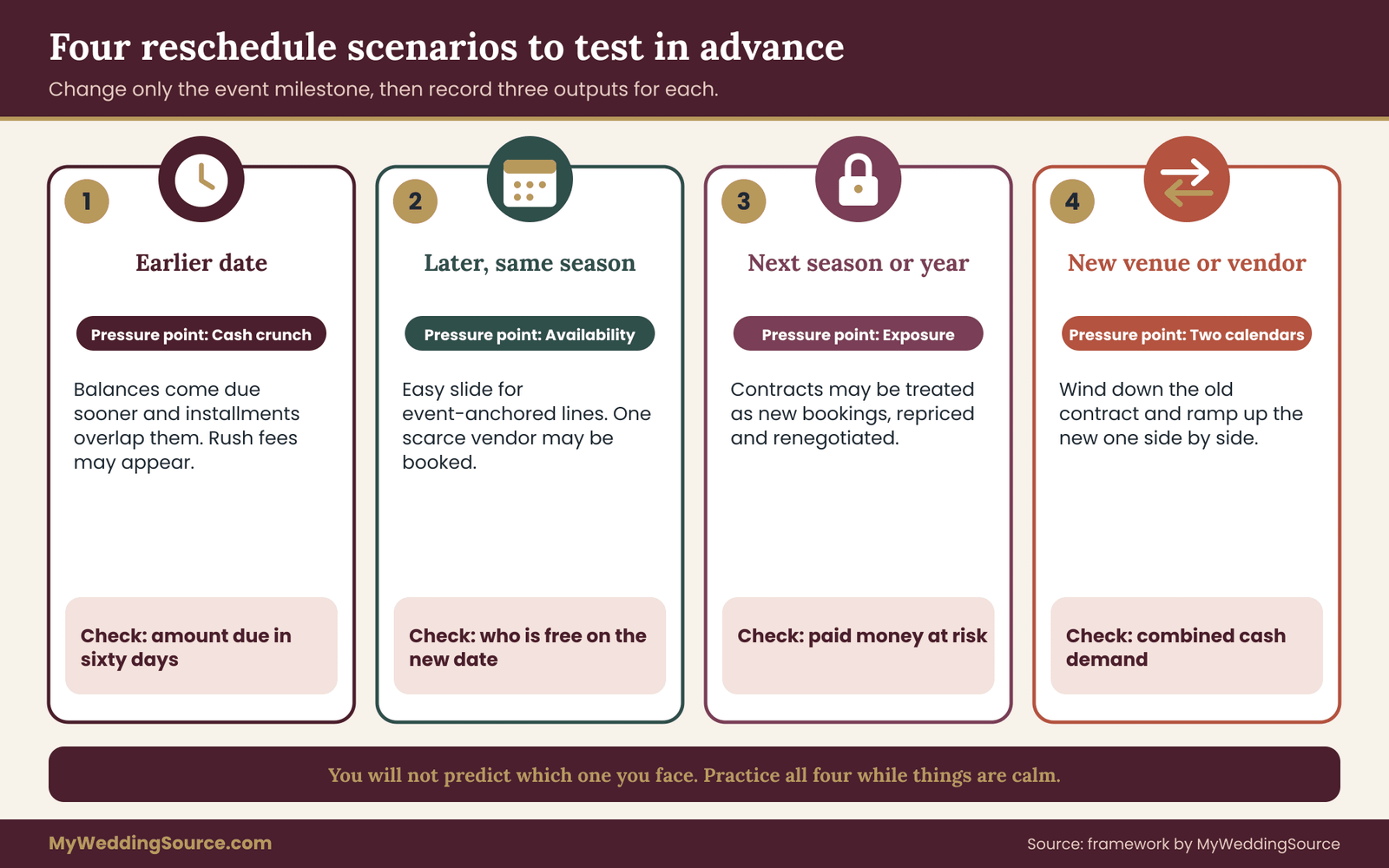
Scenario one: the date moves earlier
Moving earlier is the least common change, but it is the most cash-intensive. Suppose your wedding moves from October to July. Event-anchored balances come due sooner, and the money has to be available earlier than your savings plan expected.
On your payment calendar, change the event milestone and watch which payments jump forward. Total the amounts due in the next sixty days. If that total exceeds your cash on hand, you have found the scenario’s pressure point. Check whether any calendar-anchored installments will now overlap with event-anchored balances, because that overlap is where the cash crunch usually hits.
Also check production lead times. Printed invitations, custom attire and special-order items may need weeks that an earlier date no longer gives. A trigger-anchored rush fee may appear. List these as “possible new charges” with a placeholder.
Scenario two: the date moves later within the same season
A shift of a few weeks inside the same season is the gentlest change and often the cheapest, but it still has traps. Event-anchored payments slide forward by the same number of days, which is generally welcome. Calendar-anchored payments stay put, which means you may now be paying installments for longer before the service.
The real risk here is availability. A new date three weeks later might be open at the venue but booked for your photographer. In that case the dependency map shows a break: one vendor can move and another cannot. The question becomes whether to move the vendor, find a replacement, or choose a different date that more vendors can meet. Your payment calendar should show, for each major vendor, whether you have asked about alternative dates.
Check also whether the new date changes pricing. A Saturday in September can cost more than a Saturday in early October at the same venue. Add a line for “price difference, new date” with a note that it must be verified.
Scenario three: the date moves to a different season or year
This is the largest change and the one where the payment calendar either holds together or comes apart. Moving by a year or more means most contracts will be treated as new bookings, repriced and renegotiated. Deposits may transfer, convert to credit or be lost. Pricing may rise. Some vendors may no longer be available, and a few may retire or close.
For this scenario, the useful column in your payment calendar is refundability and transferability of money already paid. Add up the paid amount for each vendor, then mark how much would likely transfer, how much might be credited and how much is at risk. You are looking for the total exposure, the amount you could lose if every vendor took the strictest reading.
Be honest about this number. It is uncomfortable, but it is the figure that decides whether a date change is affordable and how hard to negotiate with each vendor. It also sets your reserve target, which the final part of this guide covers.
Scenario four: the date change forces a new venue or vendor swap
Sometimes the new date works for you but not for the venue. Then the change is no longer a date change at all, but a replacement of a major contract. The old venue contract may be cancelled under its own terms, with a cancellation scale and a possible forfeited deposit. The new venue brings a new deposit, a new payment schedule and new terms.
Treat this as two parallel calendars. One is the wind-down of the old contract: what is refundable, what is forfeited, what is owed under the cancellation scale. The other is the ramp-up of the new contract: deposit, schedule, new anchors. Your payment calendar should show both for the transition period, so you can see the combined cash demand, which is often the highest point of the whole planning cycle.
Running the scenarios
For each scenario, make a copy of your payment calendar and change only the event milestone. Do not touch the vendors’ terms or the amounts yet. Note three outputs: the payments that moved, the amount due in the next sixty days, and the exposure on money already paid. That is a ten-minute exercise per scenario once the payment calendar is built correctly.
Do this once, soon after the payment calendar exists, and again if you add a large contract. The outputs are not predictions. They are a map of where your plan is strong and where it depends on a vendor’s goodwill. Compare the four results and pick the scenario that scares you most. Then work first on improving the lines that scenario exposes, which usually means getting a written answer from one or two key vendors.
The twelve-month wedding checklist and the wedding vendor timeline are useful reference points when you are judging how much lead time a given vendor typically needs, since those lead times determine which scenarios are realistic.
A scoring rule for every vendor line
Scenarios show the shape of your risk. A scoring rule turns the shape into an order of work. For each vendor, ask three questions and give a plain answer to each: Will they be available on a new date? Will the money already paid come with us? Could the price change? Score each answer as green, yellow or red.
Green means confirmed in writing. Yellow means the contract suggests an answer but the vendor has not confirmed it. Red means the contract points the wrong way, the vendor has said no, or you simply do not know. A vendor with three greens needs no action. A vendor with a red on money is the first call you make, especially if the amount is large.
Ordering your outreach by size and scarcity
You rarely have time to contact every vendor at once, so order the work. Start with the vendors who are both expensive and scarce: usually the venue, the photographer and any performer who books a single date per day. The venue first, because almost everything else depends on it. If the venue cannot move, every other conversation is premature.
Then contact vendors whose availability is limited but whose payments are small, since a vendor you cannot replace is a problem even if the amount is low. Finish with vendors who are replaceable and whose money is modest, such as a stationery printer or a rental company with plenty of stock. This order protects both your cash and your options.
Edge cases worth a line in your calendar
Some situations do not fit the standard scenarios. A wedding with a ceremony and reception on separate days has two event milestones, and a payment anchored to the wrong one will move incorrectly. Label each event-anchored line with the specific event it follows.
Weddings that involve travel add another layer. Flights, rooms and transport are often governed by different rules, such as airline credit terms, hotel cancellation windows and group block deadlines. They are anchored to their own calendars, and many are calendar-anchored or tied to the travel date, not the wedding date. Keep them in the payment calendar as separate lines with their own change terms. The wedding planning checklist is a good place to see how travel items fit alongside the rest of the planning work.
When more than one person pays, such as parents contributing to the venue, add the payer’s name and note whose consent a date change needs. A move that one payer supports and another does not is a relationship problem before it is a payment problem, and it helps to know early.
If you work with a planner, check how the planner is paid. A flat fee may be unaffected by a move, while a fee tied to the event date may restart or change. Add the planner’s fee as its own line, with its anchor.
Finally, remember the plain case where the wedding date does not move but the venue changes, or the guest count changes sharply. These are not date changes, but the same calendar helps, because each change moves some payments and strands others. The method is the same. Change the milestone, follow the lines, and note the new exposure.
A worked example: the Alvarez and Brennan payment calendar
The following couple is invented, and every amount is illustrative, not a market price or a typical cost. The example exists to show the method working from start to finish, so you can copy the steps and substitute your own numbers.
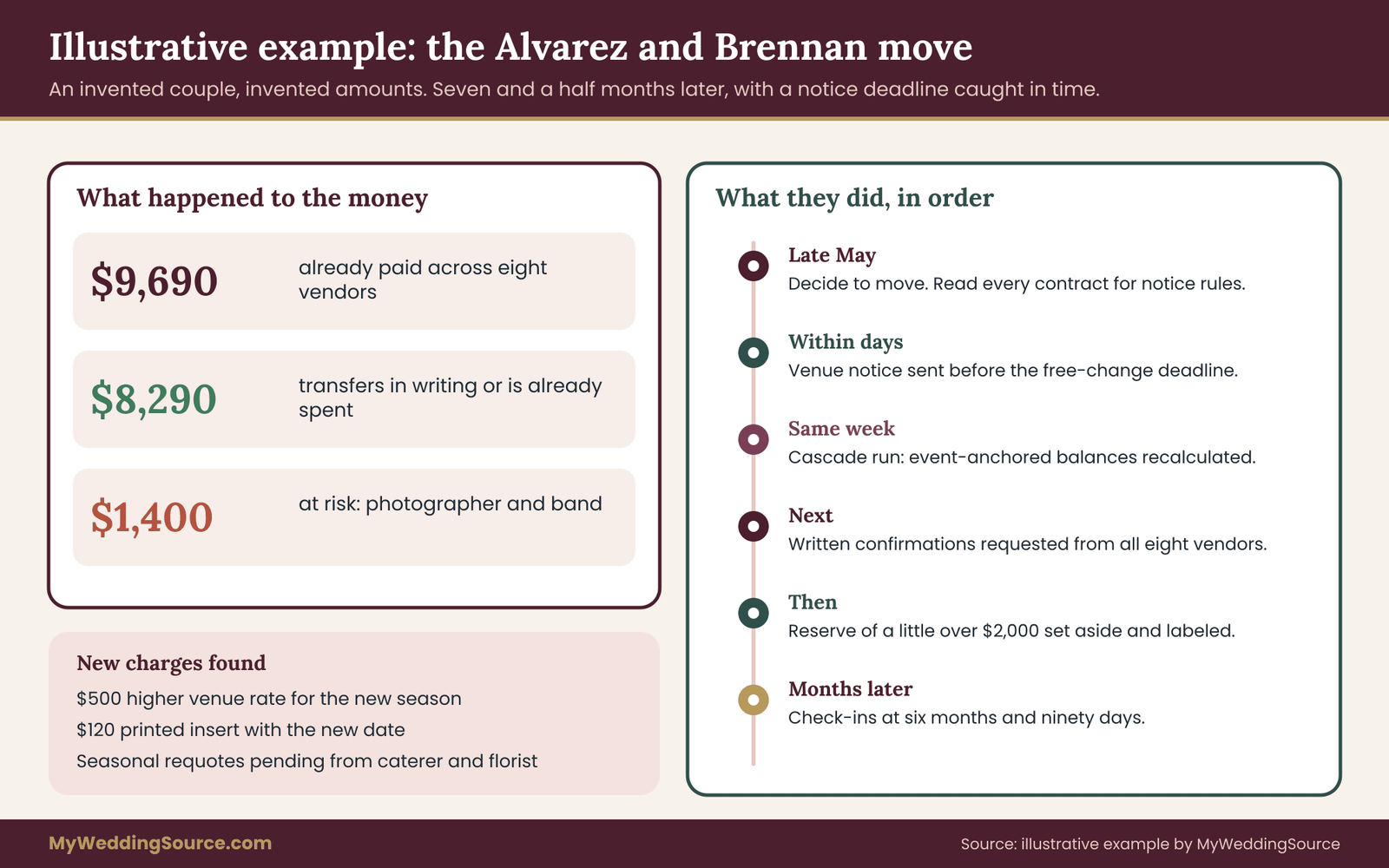
Dana Alvarez and Chris Brennan booked a Saturday in early October. In late May of the same planning year, a family health situation makes an October wedding unrealistic. They decide to move to a Saturday in mid-May of the following year, a shift of about seven and a half months. They already have a payment calendar, built from their contracts a few months earlier. Here is what it showed, and what they did with it.
The calendar as it stood
Their eight vendor lines, with the amounts invented for this example, looked like this in words rather than a grid. The venue contract totals nine thousand dollars: two thousand paid at signing, three thousand paid at one hundred eighty days before the event, and four thousand due thirty days before. The caterer’s estimate is seven thousand two hundred dollars, with one thousand paid at signing, headcount due fourteen days out and the balance seven days out.
The photographer’s package is thirty-six hundred dollars. Nine hundred was paid as a retainer described as non-refundable, with the balance due fourteen days before the event. The florist’s package is twenty-four hundred, with six hundred paid and the balance due thirty days out. The dress is eighteen hundred, with nine hundred paid at order and the balance on arrival, plus three hundred fifty for alterations at the final fitting.
The invitations cost six hundred forty dollars and were paid in full at proof approval. The band’s fee is twenty-two hundred, with a five hundred dollar deposit and the balance on the day. The bakery’s order is six hundred fifty, with one hundred fifty paid and the balance due fourteen days out.
Step one: tag every line with its anchor
Dana and Chris sort the lines. Event-anchored: the venue’s final payment, the caterer’s headcount and balance, the photographer’s balance, the florist’s balance, the band’s day-of balance, the bakery’s balance. Delivery-anchored: the dress balance and alterations. Calendar-anchored: nothing, because they chose pay-at-milestone terms, not installment plans. Already paid and now a question mark: the venue’s first two payments, the caterer’s deposit, every retainer and deposit, the dress payment and the invitations.
Total paid so far is ninety-six hundred ninety dollars. That is the number that frames every conversation to come: what portion moves with them, and what portion might not.
Step two: look for the notice deadline
Reading the venue contract again, Dana finds a clause allowing one date change at no charge with at least one hundred twenty days of notice, subject to availability. One hundred twenty days before the original October date is the second week of June. The couple has about two weeks.
This is the most useful discovery in the whole exercise. A notice period is an event-anchored deadline that runs backward from the original date. It is a payment calendar entry even though no money is attached to it, because missing it would turn a free change into a negotiated one. Dana adds it as a line: “Venue change notice deadline, written notice by email.” The couple sends the request that week.
Every other contract gets the same look. The caterer needs ninety days. The photographer’s contract is silent. The florist’s says changes are allowed with sixty days of notice. The band’s contract says changes are subject to availability and the retainer is transferable once. All are now written into the payment calendar as lines with dates.
Step three: run the cascade
Chris changes the event milestone to the new May date and the payment calendar recalculates. The venue’s final payment moves to about thirty days before the new date, in April of the following year. The florist’s balance moves with it. The caterer’s headcount and balance move to the first and second weeks of May. The photographer’s and bakery’s balances move to early May.
Next come the stranded and created items. The venue confirms the date is open, transfers the entire five thousand dollars already paid, and notes that the May rate is five hundred dollars higher than the October rate, so the final payment rises to forty-five hundred. That is a trigger-anchored line: a price difference caused by the move.
The invitations were printed with the October date. The couple decides to send a small printed insert with the new date instead of reprinting, and the printer quotes one hundred twenty dollars. That is another trigger-anchored line, now converted from a placeholder to a real number.
Step four: find the exposure
The photographer is already booked on the new date. The retainer is described as non-refundable, and the contract is silent on transfers. That leaves nine hundred dollars in question. The band says they are free on the new date and will transfer the deposit, but that has only been said by phone. Dana marks it “assumed” until she has it in writing.
Chris totals the amounts that depend on a vendor’s goodwill: nine hundred for the photographer, five hundred for the band. Fourteen hundred dollars is at risk, a little under fifteen percent of what they have paid. That is not a catastrophe, but it is enough to justify a careful written request to both vendors, rather than a hopeful phone call.
Everything else is either transferring with written confirmation or already spent with a known small cost. The couple also notes what the figures do not capture: seasonal price changes on the caterer’s menu and the florist’s flowers, which both vendors say they will requote.
Step five: rebuild the calendar and check the cash
The new calendar is much quieter than the old one for the next several months. Nothing is due between the move and the following spring except the alterations, which sit on a delivery anchor and will happen when the dress is next fitted. The long gap is both a relief and a warning.
It is a relief because the cash that would have gone to October balances is free. It is a warning because a long gap is exactly when a vendor can quietly reprice or change terms, and when a couple can forget that deposits are sitting with a business that may not exist in a year. Dana schedules a check-in with each vendor at the six-month mark and again at ninety days, both written into the payment calendar as dated actions.
They also set aside a reserve covering the fourteen hundred dollars at risk, the five hundred dollar price difference and the one hundred twenty dollar insert, which comes to a little over two thousand dollars. That reserve is held outside the main wedding fund, so it cannot be spent on other items while the vendor answers are pending.
What the example shows
Three habits made the difference. They tagged each payment with an anchor, so the cascade took minutes. They read for notice deadlines as well as dollar amounts, so they caught a free-change window with days to spare. And they separated confirmed answers from assumed ones, so they knew which two vendors needed written follow-up. None of that required special software, only a clear record of why each payment sat where it did.
Asking vendors to confirm in writing
A payment calendar only becomes reliable when the vendor’s answers are written down. Phone calls and chats are helpful for getting started, but they leave no record, and memories shift under stress. The goal of every vendor conversation is a short written statement that you can attach to the line in your payment calendar.
The first message: ask while the date is stable
The best time to ask about date changes is before you need one. A neutral message, sent a few weeks after booking, does not signal that anything is wrong. You can send the same note to every vendor. Something like this works:
“We are building a payment calendar for our wedding and want to make sure we understand your policies. If we needed to change the event date, what notice would you need, what would the process be, and would our deposit and payments transfer to the new date? Please also let us know about any fees. Thank you.”
Keep it short, polite and open-ended. Avoid any hint of doubt about the date, since that tends to complicate the conversation. Many vendors answer within a day or two, and their replies give you a clean, dated record.
The second message: when a real change is under consideration
When the date is actually in question, your message needs to be specific. State the current date, the proposed new date, the amounts paid so far, and exactly what you are asking for. For example:
“We are considering moving our event from October 9 to May 20 of the following year. We have paid a total of $X to date. Before we decide, could you tell us whether you are available on May 20, whether our payments would transfer in full, whether any fee or price change would apply, and by what date you would need our written confirmation?”
The final question matters. A vendor’s answer is useful only if you know how long it holds. If they say “yes, we’re free,” ask for how long they will hold the date while you decide. That hold period becomes a dated line in your payment calendar.
The confirmation message: restate what was agreed
After any phone call or meeting, send a short note restating what you understood. “Thanks for speaking with us today. To confirm, you said that our payments of $X would transfer to May 20 with no fee, and that the balance would be due thirty days before the new date. Please reply if any of that is incorrect.” This takes two minutes and turns a conversation into a record.
If the vendor does not reply, that is information too. Follow up once, politely. If you still hear nothing, mark the line “unconfirmed” and treat the item as at risk.
What a good written confirmation contains
A confirmation worth attaching to your payment calendar covers five things. The new date and whether it is held. The amount that transfers, in dollars. Any new fee or price change, in dollars. The new due date for each remaining payment. And the date by which the vendor needs your final yes. Where one is missing, ask for it.
Ask for an amended contract, or a short addendum, when the change is large. An email can show intent, but an addendum signed by both sides is the strongest record, and it replaces the old dates in the contract itself, so there is no conflict between versions. Smaller vendors may be happy to send a one-page addendum if you ask politely.
Handling a vendor who says no
Some vendors will refuse to transfer a retainer or will be unavailable on the new date. You have options, in rough order. Ask whether they offer credit toward a future event or a different service. Ask whether they can refer another vendor and whether a portion of the retainer would be applied to that referral. Ask whether a different date, close to your target, would work for them.
If none of this helps, compare the vendor’s refusal against the contract. If the contract clearly says non-refundable and non-transferable, the vendor may be within its rights, and the practical choice is to weigh the lost amount against the cost of a different date. If the contract is unclear or the vendor’s position seems to conflict with it, the consumer protection office in your state can explain what recourse exists, and a contract attorney can advise on a specific dispute.
Keep your tone calm throughout. Vendors remember couples who stayed courteous, and their goodwill is often worth more than the amount in question.
Keeping the conversation organized
Keep every vendor message in one place, such as a shared folder or a labeled email thread per vendor. In the payment calendar, add a link or a note pointing to the confirmation. Over time, the confirmations column fills in and the confidence marks move from “assumed” to “confirmed.” When a real change arrives, you will be glad of every message you saved.
Payment methods, reserves and the cash side of your payment calendar
Everything so far has been about timing. This section covers the money behind the timing: how you paid, what protections that creates, how much cash to hold in reserve, and how to decide whether a date change is worth its cost. These choices change how painful a move will be, so they belong in the payment calendar from the first entry.
Record how each payment was made
The payment method decides what you can do later if something goes wrong. A credit card payment, a debit card payment, a bank transfer, a check, cash and a payment app all behave differently when a vendor fails to deliver, closes, or refuses a refund. Rules and time limits differ by method, by card network, by bank and by state, so this guide cannot give you a single answer.
What it can do is tell you to record the method, because you cannot use a protection you did not know you had.
The Consumer Financial Protection Bureau explains how billing disputes work for credit cards in plain language, including the written-notice windows that apply. Those windows are short, usually measured in weeks or a couple of months, so they matter most for charges you may want to challenge soon after they appear.
They are generally poor tools for a dispute that only becomes visible many months later, such as a vendor that stops responding after a date change. Read the agency’s current guidance and your card agreement, since both can change.
Add a column to the payment calendar for “method” and another for “last day to dispute,” if the method has one. For payments already made, the second column often reveals that a window closed long ago. That is useful to know before you count on a card protection that no longer applies.
Why traceable payments help in a date change
When a date moves, you will probably exchange emails and addenda with vendors about money. A traceable payment, one that leaves a clear record in a statement, gives you proof of exactly what you paid and when. Cash gives you only a receipt, and a receipt can be vague or lost.
Whatever the method, ask for a receipt that states the amount, the date, the vendor name and what the payment is for. File it with the contract. The same contract guide covers what a solid contract and its attachments should include, which is the paper trail your payment calendar points to.
Payment plans, financing and new installments
Some vendors offer installment plans, and some couples use financing for the wedding. This guide does not advise on borrowing, and you should read the terms of any plan carefully, ideally with a qualified financial professional. For the payment calendar, the point is narrow. An installment plan is a payment calendar anchor, which means it does not move with the wedding date.
Before you accept or keep a plan, ask what happens to it if the date moves. Does the plan continue on its schedule, or can it be re-cut to match the new date? Does a change trigger a fee? Does the vendor release the final installments if you cancel, or does the full balance become due? The answers belong on the payment calendar as confirmed lines.
If a plan runs through a third-party lender, the vendor may have no power to change the schedule, and a date change with the vendor does not alter what you owe the lender. Keep those obligations as separate lines, because they do not move together.
Vendor risk and money held for a long time
A date change often stretches the time between payment and service, sometimes by a year or more. Over that period a vendor’s circumstances can change. A business might raise prices, close, be sold, or reorganize. The longer a deposit sits with a business, the more the payment calendar should treat it as exposure.
You cannot eliminate this risk, but you can reduce it. Keep the vendor’s contact details and contract in a place you can reach. Check in at set intervals, as the example couple did. If the vendor is a larger company, note who holds your deposit. If it is a small business, ask whether deposits are held in a separate account. Few will say yes, but the question signals that you take the arrangement seriously.
Where a payment is large, consider whether the vendor can provide proof of insurance or a business registration. The vendor due diligence checklist covers how to check, and those checks matter more when your money will sit with a business for longer than expected.
The cash reserve: sizing it from your exposure
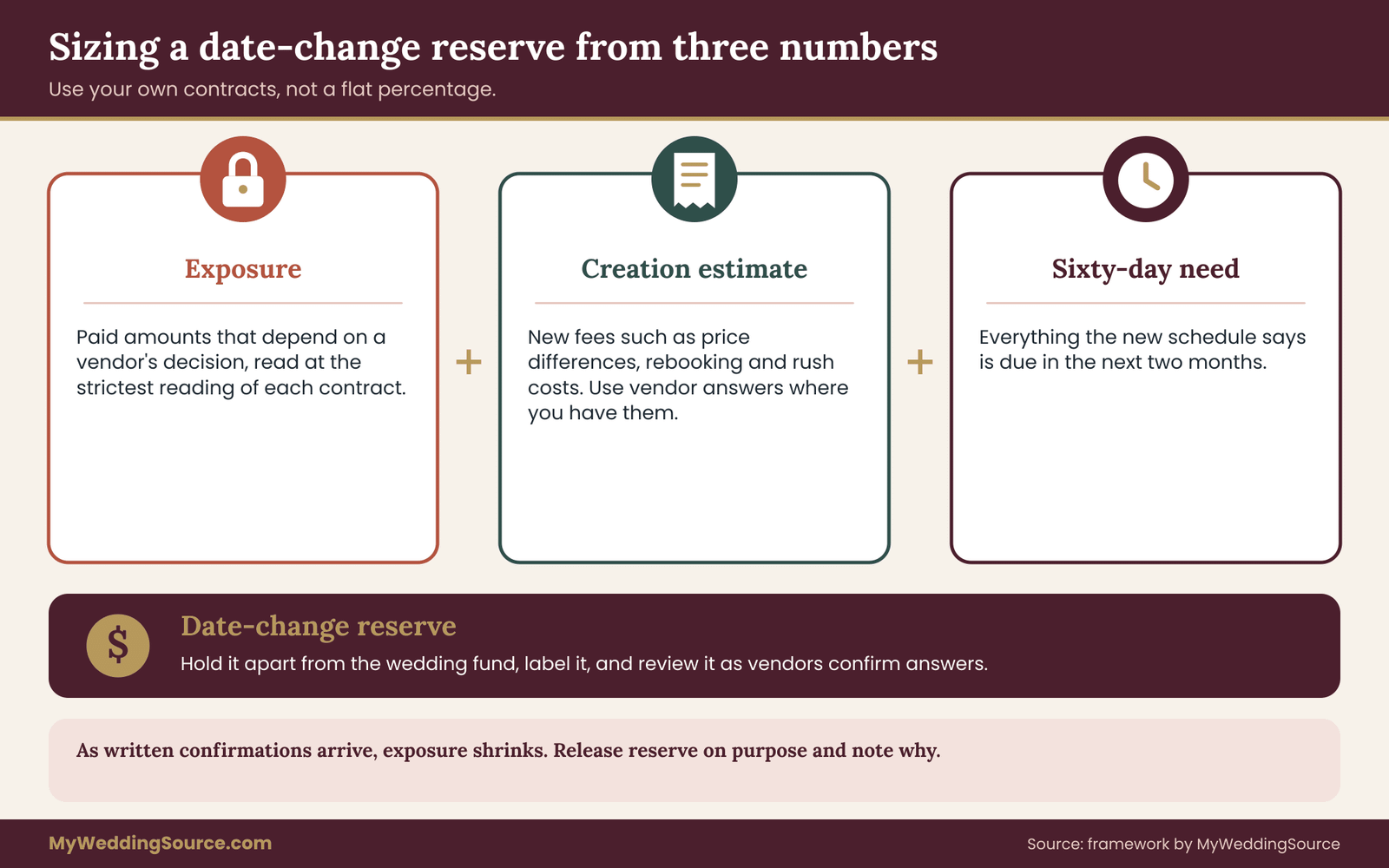
A reserve is the money you keep available for date-change costs. The payment calendar gives you the numbers to size it, instead of picking a round figure.
The three numbers
Take three figures from your payment calendar. First, the exposure: the total of paid amounts whose transfer or refund depends on a vendor’s decision, taken at the strictest reading of each contract. Second, the creation estimate: the total of trigger-anchored lines such as price differences, rebooking fees and rush costs, using vendor answers where you have them and placeholders where you do not.
Third, the sixty-day need: the sum of everything the payment calendar says is due in the next two months under the new schedule.
The exposure is the worst realistic loss. The creation estimate is the likely new spending. The sixty-day need is the cash that must be on hand soon. Together, they tell you how much cash you need to move the date without borrowing and how much you would have to cover if vendors took hard lines.
Why not just use a percentage
Advice columns sometimes suggest setting aside a flat percentage of the wedding budget. That is a rough start, but it ignores how your contracts are written. A couple with transferable deposits might need very little. A couple with non-refundable, non-transferable deposits at three large vendors might need much more. Basing the reserve on your own exposure turns a guess into a figure you can defend, and it shows you which contracts to improve first.
The wedding cash-flow guide explains reserve timing across the whole planning period, including how reserves interact with final balances. Use it alongside this one when you decide how much to set aside and where to keep it.
Where to hold it and how to label it
Keep the reserve separate from the main wedding fund, in an account where it will not be spent on other items. Give it a clear name, such as “date change reserve.” A reserve that is mixed into general wedding money tends to disappear into upgrades and last-minute purchases.
Record the reserve on the payment calendar as its own line, with the amount, the account and the review date. When the exposure shrinks, because vendors have confirmed transfers in writing, release part of the reserve deliberately and note why. When the exposure grows, such as when a new contract is signed, top it up before the next payment.
Deciding whether to move the date at all
When a date change is a choice, not a necessity, the payment calendar helps you decide. List the cost of moving: the creation estimate, plus the exposure you might lose in the worst case. List the cost of staying, which may be nothing in dollars and a great deal in other ways. Then ask whether the difference is acceptable.
This is an honest, quiet calculation. A move that costs two thousand dollars in fees and risk may be worth it for a family reason and not worth it for a minor scheduling inconvenience. Only you can weigh that. What the payment calendar provides is the cost side, in dollars, so the decision is made on facts and not on dread of the unknown.
Timing the decision
Delay has a price. Notice periods run out, vendors fill other dates, and cancellation scales step up as the event approaches. Put the next three threshold dates from your contracts beside the decision, and ask whether you can decide before the earliest one. If you cannot, ask the relevant vendor for a short written extension, which many will give when asked early and politely.
A late decision is not a failure, but it should be a deliberate one. Knowing the cost of waiting, in dollars and in lost options, lets you choose to wait with your eyes open.
Keeping the payment calendar current
A payment calendar built once and never touched becomes unreliable. Set three review points. Update it whenever you sign or amend a contract. Review it every quarter, checking that due dates match the contracts and that the confidence marks are accurate. And review it immediately whenever anything threatens the date, even before you decide to move.
Share the payment calendar with the person who would act if you could not, a partner, a parent or your planner, and tell them where the contracts are. A payment calendar that only one person understands is a single point of failure. Keep it free of passwords and account numbers; it needs vendor names, amounts, dates, anchors and notes, not login details.
Limits of this method
A payment calendar organizes information. It does not change contract terms, make a vendor agree to anything, or replace advice from a professional. Local law governs deposits, cancellation rights and consumer protections, and those rules vary. Vendors can change policies, and current figures and fees should always be checked with the vendor and the relevant agency. If a dispute involves serious money, a contract attorney or a consumer protection office can tell you more than any guide.
Within those limits, the method is useful because it replaces vague worry with specific questions. Which payments move? Which are spent? Which new charges might appear? How much cash do we need? Those four questions have answers, and the payment calendar is where you keep them.
Your next steps
Start with an evening, not a weekend. List every vendor and every payment you have made or owe. For each line, write the reason the payment falls when it does, tag it with one of the four anchors, and note what the contract says about changing the date. Mark each line as confirmed, contracted or assumed.
Next, send the neutral policy question to your three largest vendors and file their replies against the matching lines. Then run the four scenarios on a copy of the payment calendar and note the amounts due in sixty days and the exposure on money already paid. Size a reserve from those numbers, and put your next review date on the payment calendar.
After that, work through the lines marked red or yellow, largest and scarcest first. Over a few weeks the payment calendar stops being a list of dates and becomes a plan you can trust, which is the quiet kind of protection a date change calls for.
FAQ
What is a wedding payment calendar?
It is a dated list of every payment you owe or have made to wedding vendors, with a note on why each falls when it does. The reasons matter most. When the wedding date moves, those notes tell you which payments shift automatically, which stay fixed and which might create new charges, so you can update everything quickly.
Do all wedding payments move when I change the date?
No. Payments tied to the event date, such as most final balances, move with it. Payments tied to a fixed calendar date, such as installment plans, usually stay put. Payments tied to a delivery milestone follow that milestone instead. Your contract wording decides each case, so check it line by line.
Will I lose my deposits if I change the wedding date?
It depends on each contract. Some deposits transfer to a new date, some convert to credit, some are partly refundable, and some are non-refundable and non-transferable. Read the deposit and change clauses, then ask each vendor to confirm in writing what happens to your money before you commit to a new date.
How much notice do vendors usually need for a date change?
It varies by vendor and contract, and this guide cannot give a standard figure. Some contracts state a notice period and a fee. Others are silent and leave it to the vendor. Look for the notice clause now, record the deadline in your payment calendar and ask any vendor whose contract does not say.
What new fees can a date change trigger?
Common possibilities include a rebooking or administration fee, a price difference if the new date is in a pricier season, extra costs to reprint or re-proof printed items, and rush charges if the new date is soon. Your contracts may list some of these. For the rest, ask each vendor directly and record the answers.
How much cash should I keep in reserve for a date change?
Base it on your own contracts, not on a flat percentage. Add the paid amounts that depend on a vendor’s decision, the new fees you expect, and the payments due in the next sixty days under the new schedule. That total shows what you could need, and it shrinks as vendors confirm transfers in writing.
Does paying by credit card protect me if a vendor will not move my deposit?
Not automatically. Card dispute rights usually apply to billing errors or services not delivered, and they come with short written-notice windows. A refusal that follows your own contract terms may not qualify. Read your card agreement and the Consumer Financial Protection Bureau’s current guidance, and ask the card issuer about your situation.
Should I ask a lawyer about a date change?
If a large amount of money is at stake, a clause is unclear or a vendor disputes your reading, a contract attorney can review the documents. This guide is general information, not legal advice. Your state attorney general’s consumer protection office can also explain general rights and complaint options where you live.
Sources
- Consumer Financial Protection Bureau
- How do I dispute a charge on my credit card bill?, Consumer Financial Protection Bureau
- Consumer advice, Federal Trade Commission
- Federal Trade Commission
- State consumer protection offices, USAGov
- National Association of Attorneys General
- Consumer resources, Board of Governors of the Federal Reserve System
- Consumer resources, Federal Deposit Insurance Corporation