
A monogram font license is the written permission that says how you may use the letterforms in your wedding monogram: on paper, on signs, on cut or engraved pieces, on a website or on screen. This guide gives you a plain way to check that permission before you order printed decor, so a pretty set of initials does not turn into a reprint, a takedown notice or an awkward call with a vendor.
Treat every monogram as four layers: the monogram font software, the artwork someone drew from it, the template it sits in, and your finished design. For each printed item, ask four questions. Where did the letters come from? What will they be used for? Who will handle the file? And do we have the permission in writing? If the monogram font came with a clear commercial license that covers print and engraving, you are usually fine. If it says personal use only, came from a free-download site, or was drawn by a designer without a written agreement, pause and fix that first.
Couples tend to pick a monogram early and for good reasons. Two initials look tidy on an invitation suite, a welcome sign, napkins, a cake topper, a dance floor decal and a website header. Because the same letters show up on so many things, the monogram becomes the visual signature of the day. That is exactly why the permission question matters more here than for a one-off sign. A monogram font gets copied into more files, handed to more vendors and printed in more places than almost any other design choice you make.
Most couples never think about the license, and most of the time nothing happens. But “nothing usually happens” is a weak plan when a printer can refuse a file, a designer can ask you to stop using their lettering, or a template marketplace can pull a listing. A short check done before the order costs an hour. A reprint of invitations, napkins and signs costs far more, and it arrives when you have the least time to deal with it.
A note on scope. This is general information, not legal advice. Copyright, trademark and contract rules differ by country and by situation, and each font company writes its own terms. Where a rule matters, this guide points you to the source that issues it so you can read the current version yourself.
What a monogram font license actually covers
Start with the plain meaning of the words, because “font” is used loosely. A font, in the sense that matters here, is a piece of software. It is a file on your computer that tells programs how to draw each letter. The shapes it draws are the typeface design. The software that stores and renders them is the monogram font file. People talk about both as “the monogram font,” but the law and the paperwork often treat them differently.
When you download or buy a font, you almost never buy the monogram font. You buy a license to use it under stated conditions. The conditions live in a document called an end-user license agreement, often shortened to EULA, or in a shorter license page on the seller’s site. Those conditions might cover how many computers can install the monogram font, what kinds of output you may make, whether the monogram font may be embedded in a document or website, and whether you may hand it to another person.
So a monogram font license is not one thing. It is a bundle of permissions attached to the particular font and the particular place you got it. Two fonts that look nearly identical can come with very different permissions. One may allow printing on anything, including items sold to others. Another may allow printing only for personal, non-commercial projects. A third may allow printing but forbid converting the letters into artwork for engraving. You cannot tell which you have by looking at the letters.
The idea of “commercial use” in a wedding
The phrase that trips people up is “commercial use.” A wedding is a personal event, so many couples assume a “personal use only” font is fine. Sometimes it is. But the picture is more tangled than that, because a wedding involves businesses touching your files.
Think about who actually makes your printed decor. A print shop sets your invitation. A sign maker cuts your welcome board. A baker or cookie maker may press initials into sugar. A venue may display your monogram on a screen. Each of those vendors is a business doing paid work, and some font licenses distinguish between you using the monogram font for yourself and a business using it to produce work for a client. Others treat the whole thing as personal because the end product is for a private event.
There is no single answer, which is the point. The license text decides, and you can read it. A good habit is to separate three situations in your own mind:
You, personally, typing your initials and printing a card at home. Your designer or a template seller creating artwork that you then use. A vendor producing finished goods for you from a file you supply. Each can fall under different terms, and a license written for the first may say nothing helpful about the third.
What a license usually does not cover
Even a generous license has edges. Most do not let you share the monogram font file with other people, even friends doing you a favor. Most do not let you resell the monogram font or include it in something you sell as a font. Many limit the number of devices. Some restrict embedding the monogram font in apps, e-books or websites. Some allow printing but not the use of the monogram font in a logo or trademark. And nearly all of them say nothing about whether the shapes of your finished monogram are legally protected, because that is a separate question about the artwork, which comes next.
Because wedding monograms are often built from two or three overlapping letters, tweaked by hand and set inside a frame or wreath, the finished artwork is usually a new design that sits on top of a font. Who made that new design, and under what terms, is its own layer. We will take them one at a time.
The four layers of ownership behind a wedding monogram
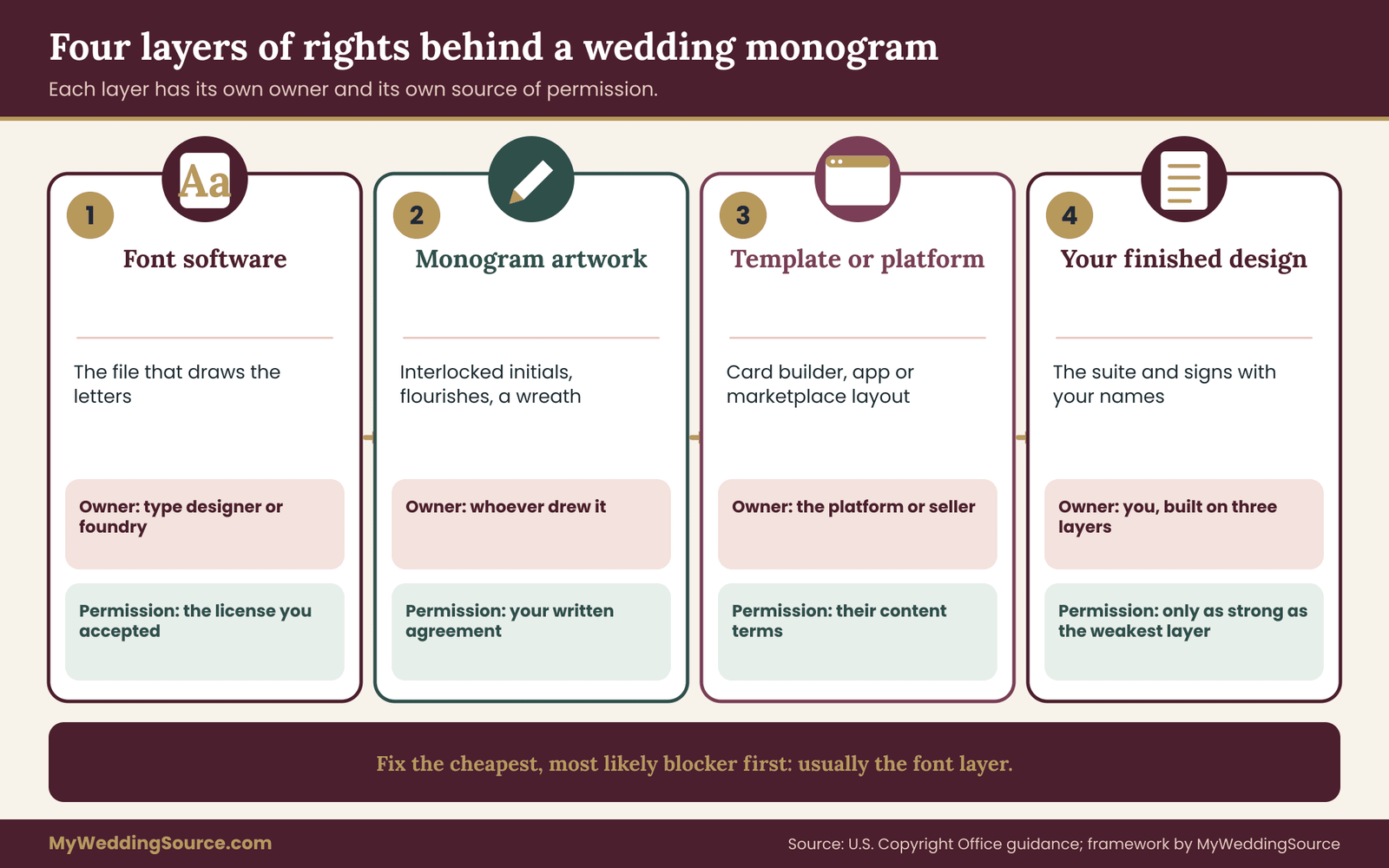
A monogram that looks like a single graphic often has four separate sets of rights stacked inside it. Pulling them apart is the most useful thing you can do before asking any question of a vendor, because each layer has a different owner and a different source of permission.
Layer one: the monogram font software. This belongs to the type designer or the foundry that sells it, or to the open-source project that released it. Your permission comes from the license you accepted when you downloaded or bought it. This is the layer a monogram font license speaks to directly.
Layer two: the monogram artwork. If a designer interlocked your initials, flourished the tails, added a wreath or redrew letters by hand, that artwork is a creative work made by that designer. Unless there is a written agreement saying otherwise, the person who drew it generally keeps the rights to it, even though you paid for the job. Your permission comes from your agreement with the designer.
Layer three: the template or platform. If you started from a template on a marketplace, a card builder, an online invitation site or a design app, the template has its own license, and so does anything the platform supplies inside it, including its fonts. Your permission comes from the platform’s terms.
Layer four: your finished design. The combination you end up with, the particular suite of cards and signs with your names and date, is the thing you actually want to use. Your right to use it depends on all three layers underneath, which is why a gap in any one of them can reach the finished piece.
The U.S. Copyright Office explains in its public guidance that the design of a typeface, as a set of letter shapes, is generally not protected by copyright in the United States, while the software that renders a font may be. That distinction is one reason font licensing runs on contracts. It is also a reason not to relax if a font’s shapes seem “free to copy.” Other countries treat typeface designs differently, and the license you accepted is a contract either way. If you or a vendor are working outside the United States, assume the rules may be stricter and read the terms.
Why the layers matter in practice
Picture a couple who downloaded a free script font from a download site and asked a cousin to build the monogram in a design app. The font layer may be personal use only. The artwork layer was made by a cousin with no written agreement, which is fine because family favors rarely need paperwork, but it means the cousin could reuse it elsewhere. The platform layer is the app, with its own terms about printing. The finished design then goes to a print shop, which now has to be allowed to print it.
Nothing in that chain is unusual, and in many cases no one will ever look. But if the print shop reads the font license, sees “personal use only” and declines the job, the couple discovers the gap with a deadline attached. Knowing the layers lets you find the weak one in advance, while you still have choices.
Which layer to fix first
Fix the layer that is cheapest to change and most likely to block you. For most couples, that is the monogram font layer, because swapping to a font with a clear commercial license often changes the look very little and costs little or nothing. The artwork layer comes next, because a short written note from a designer settles it. The template layer is usually settled by reading the platform’s terms once. The finished-design layer then takes care of itself.
If your wedding signage runs through the same visual system, the guide to wedding signage as a system shows how a monogram fits alongside readability, placement and venue permissions. This article stays on the permission side of the monogram, so that your sign work and your stationery work can share one set of letters without surprises.
Where a monogram font shows up on printed wedding decor
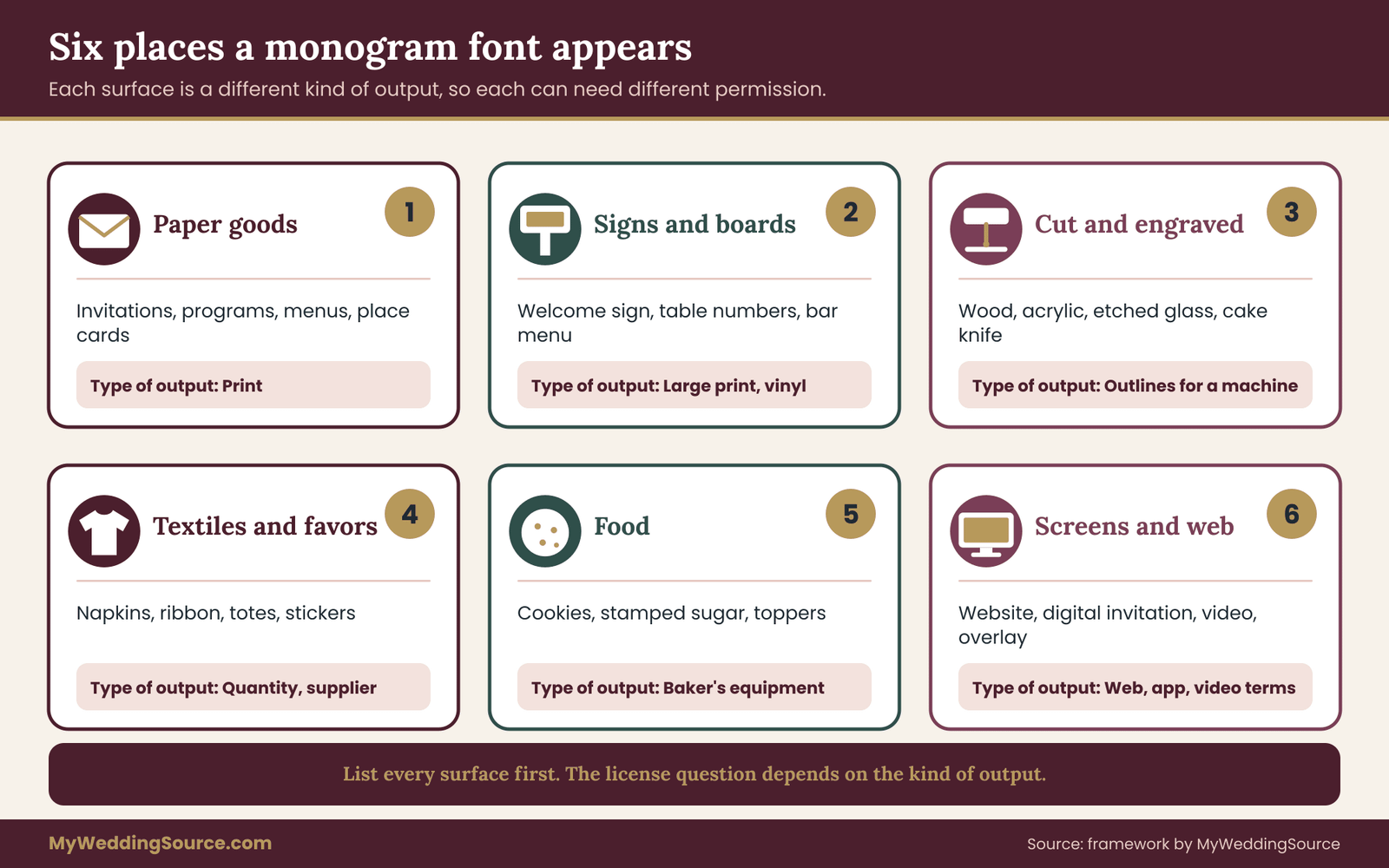
Before you can check a license, you need a list of the places the letters will go. Couples usually underestimate this list, and the license question depends on it, because each use is a different kind of output. Walk through the whole event and write down every surface.
Paper goods. Save-the-dates, invitations, response cards, envelope liners, programs, menus, place cards, thank-you notes. This is standard offset or digital printing, and it is the use that almost every license anticipates.
Signs and boards. Welcome signs, seating displays, bar menus, table numbers, directional signs. These may be printed on foam board, mounted on easels or produced on acrylic, wood or mirror. The printing side is similar to paper, but large sizes and unusual materials sometimes involve outside sign shops.
Cut, etched and engraved pieces. Laser-cut wood, acrylic cake toppers, etched glassware, engraved keepsake boxes, vinyl decals on a dance floor or mirror. Here the letters are converted into outlines that a machine follows. Some licenses treat that conversion differently from printing.
Textiles and favors. Napkins, ribbon, tote bags, koozies, embroidered handkerchiefs, stickers, matchboxes, candle labels. These are often made in quantity by a promotional-products supplier, which is a third party handling your file.
Food. Monogram cookies, stamped sugar, custom chocolate molds, cake toppers, printed edible sheets. The baker needs a file in a form their equipment can use, and the monogram font may be part of it.
Screens and the web. A wedding website header, a digital invitation, an animated welcome slide, livestream graphics, a photo-booth overlay, a text-message image. These are digital uses. The license rules for them are different from print rules, and they are the ones people overlook most.
Why the output type matters
A single monogram font license may have separate permissions for print, for web, for apps and for video. The reason is simple: a foundry prices and protects those uses differently. Printing a card makes a copy that cannot be reused as a font. Putting a font on a website, or inside an app, can expose the file or its data to anyone who looks. Burning letters into a video can involve motion-graphics terms that older licenses never imagined.
So when you build your list, add a column in your head for the kind of use: ink on paper, machine cutting, web page, on-screen video, or merchandise in quantity. You do not have to memorize the categories. You just need to notice when an item sits in a different category from the others, because that is where a simple “personal use” label starts to feel shaky.
The hidden second use: your vendors’ portfolios
Many vendors photograph finished work and post it online. That is their normal business, and it is usually covered in their contract. But it creates a second use of your monogram that you did not plan. If your monogram font is licensed only for your own private use, the vendor’s marketing photo may be a use that your license never covered. In practice this almost never causes trouble, but it explains why careful print shops ask about font sources up front, and why a license that clearly allows commercial printing makes their life simpler.
If your contract with a vendor includes a clause about showing your work, read it alongside the monogram font terms. The guide on wedding vendor contracts covers the usual clauses and what to ask to change. For monograms, the useful addition is a single sentence saying that the vendor may display the finished piece, and that you have supplied the monogram under a license that allows the printing they are doing.
A quick scan for risk by item
Not every item carries the same risk, and it is worth sorting them so your effort lands in the right place.
Low risk: a single printed card made by you at home from a font whose license plainly permits it, or any item where the monogram font is an open license that allows commercial use.
Medium risk: printed goods made by outside vendors from a font whose license mentions “commercial” without defining it, or items made in larger quantities, such as favors for a large guest list.
Higher risk: anything that converts the letters to outlines for engraving or cutting from a font whose terms are silent on that conversion; anything embedded in a website or app; and anything you or a vendor might sell, even a few items, such as tote bags sold to raise money for a charity.
This sort is rough, but it tells you where to start the questions. Spend your effort on the medium and higher items, and let the low-risk ones ride on a quick read of the license.
The four-gate monogram font check
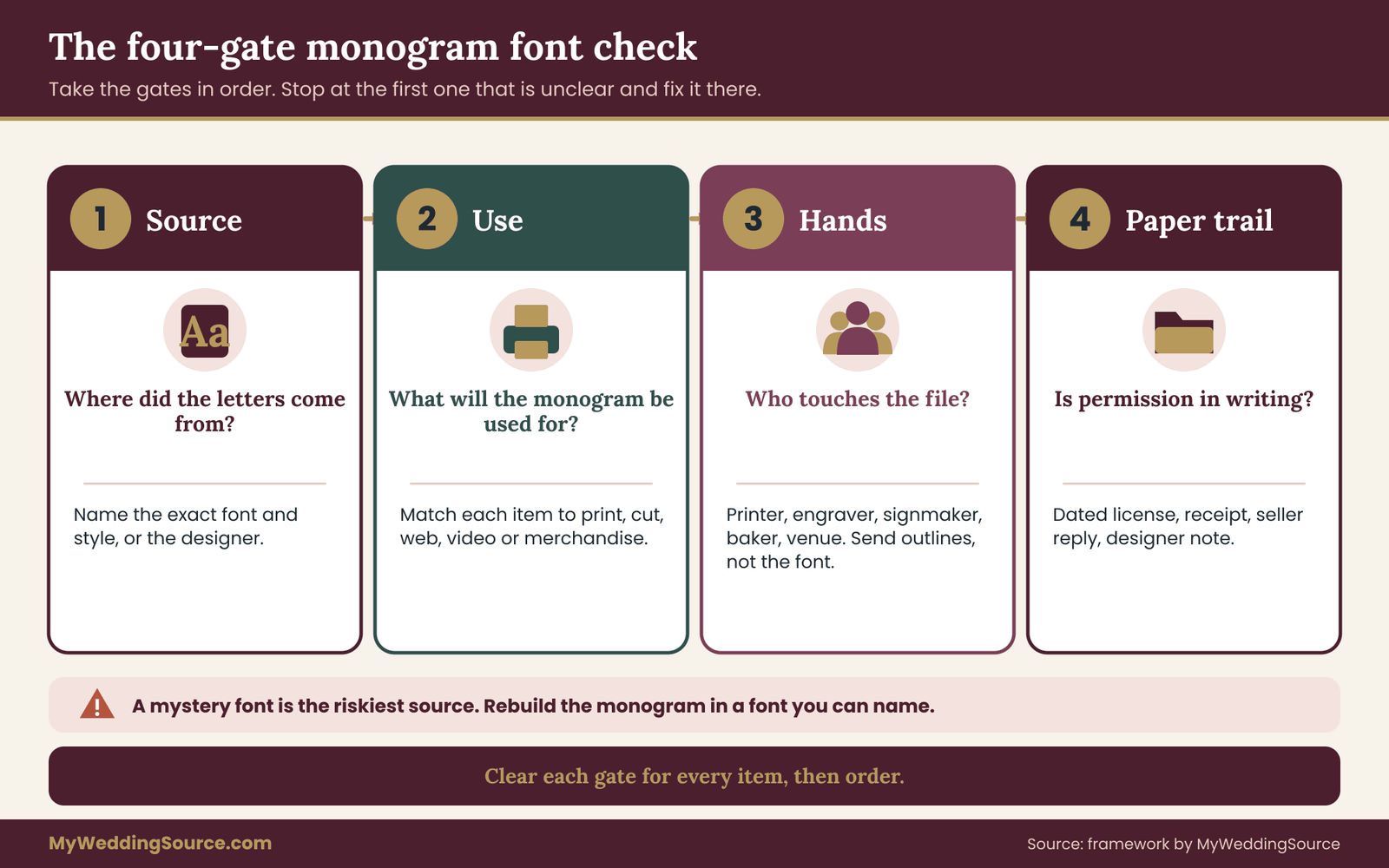
Here is the process this guide recommends for every monogram, and every item the monogram appears on. It is four gates, taken in order. If a gate is not clear, you stop there, fix it, then move on. The point of the order is that each gate is quick when it is clear and cheap to repair when it is not.
Gate one: source. Where did these letters come from? Name the exact font, the exact file or the exact designer. “A script font I found” is not a source. “Font X from foundry Y, bought on this date, order number Z” is.
Gate two: use. What will the monogram be used for? Take your list of surfaces from the section above and match each to a kind of output: print, cut or engrave, web, video, merchandise in quantity.
Gate three: hands. Who will touch the file between you and the finished item? You, a designer, a print shop, a signmaker, a baker, a promotional-products supplier, a venue. Each is a person you may be giving the monogram font or its outlines to.
Gate four: paper trail. Do you have the permission in writing, saved somewhere you can find it? A license page screenshot, a receipt, a designer’s note, a vendor’s reply.
Gate one in detail: pin down the source
Open the file you are using and look for the monogram font’s name. In most design programs, selecting the text shows the font name. Write it down exactly, including the style, such as Regular, Bold or Italic, because licenses are sometimes per style. Then find where it came from. A few common sources look like this:
A font you bought directly from a foundry or a font marketplace. You should have an order confirmation and a license document.
A font that came bundled with your computer, your word processor or a design subscription. Its terms are in that product’s license, not in a separate font license.
A font offered through an open-license collection such as Google Fonts, where each family lists its license.
A font from a free-download site. These vary widely, and many are labeled “free for personal use” while hiding commercial terms behind a link.
A font inside a template. The template’s seller or platform should say what fonts are supplied and how they may be used.
A hand-lettered or custom monogram that is not a font at all. Then gate one is really a question about the designer, which the custom monogram section covers.
If you cannot find where the monogram font came from, that is useful information. A mystery font is the highest-risk source, and the simplest remedy is to rebuild the monogram in a font whose source you can name.
Gate two in detail: match the use to the license
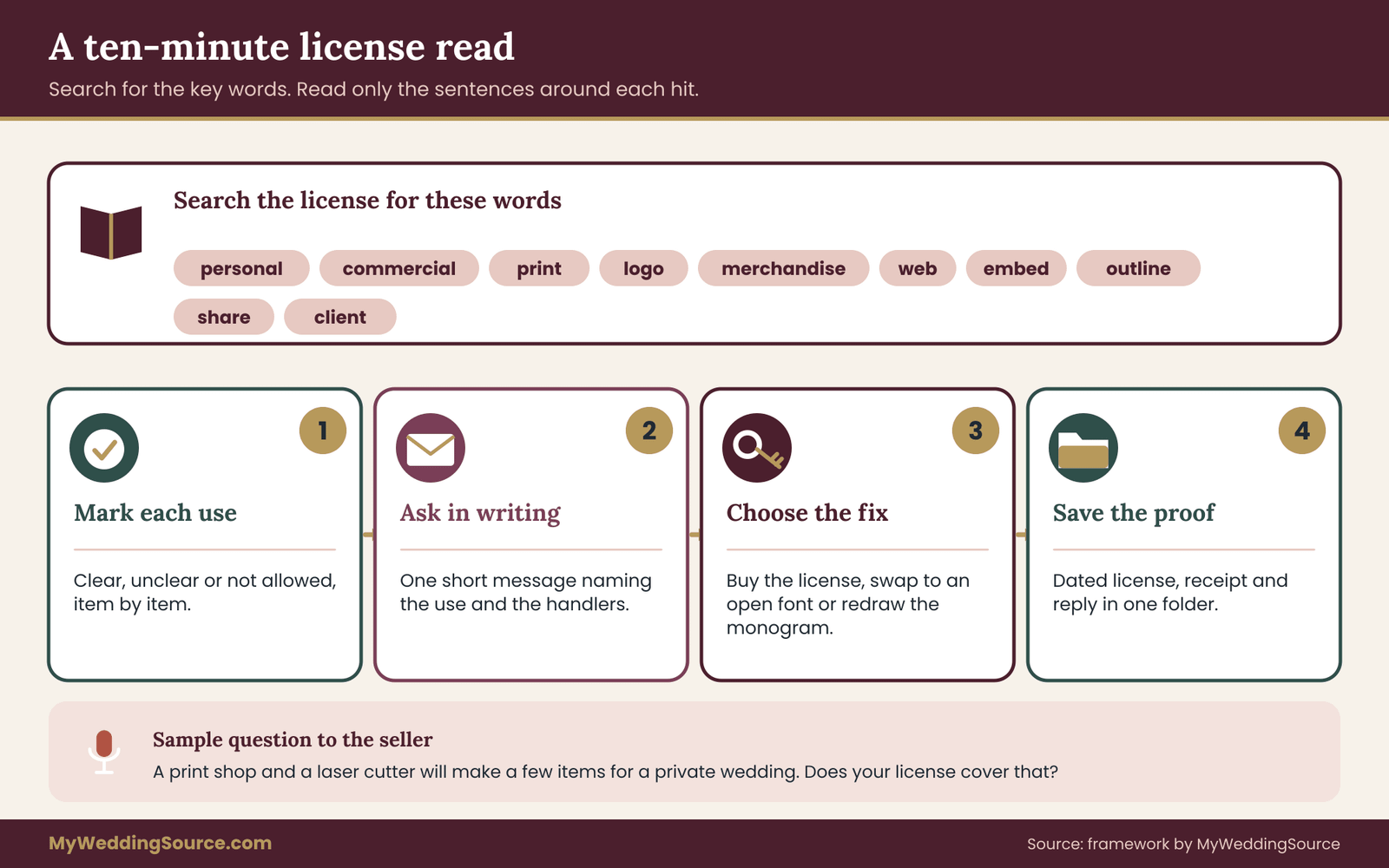
Once you know the source, find the license and read the sections that mention uses. You are hunting for a few words: print, commercial, merchandise, logo, web, embed, app, video, outlines, convert, vector. Do not read the whole agreement the first time. Search for those words and read the sentences around them.
You are looking for a match between what the license grants and what your list needs. If the license says printing for personal or commercial use is permitted, your paper goods are covered. If it says nothing about converting text to outlines, you have a gap for laser cutting. If it forbids web embedding, your website header needs a different approach, such as using the monogram as an image made by a licensed process, or choosing a web font that is licensed for the web.
Keep your scoring simple. For each item, mark it clear, unclear or not allowed. Clear items need nothing more. Unclear items need a question to the font seller. Not-allowed items need a different font or a different method.
Gate three in detail: follow the file
Fonts rarely travel alone. Your monogram font passes from your computer to someone else’s, and licenses care about that handoff. The simplest rule is that the monogram font file itself should not leave your hands unless the license says it may. What you send instead is usually one of three things.
Outlined artwork. A vector file where the letters have been converted to shapes, so no font is needed to display them. Many print shops prefer this. Whether you may produce it depends on the license, and some foundries expressly allow outlining for printed output while others restrict it for logos or for sharing the outlines.
A PDF with the monogram font embedded. The font data travels inside the PDF so the printer sees the right letters. Font files carry a setting that says whether embedding is allowed and in what mode, such as print-and-preview only or editable. A license that allows printing normally allows print-and-preview embedding, but check the wording.
The font file itself. Rare, and only when the vendor holds their own license or the monogram font is under an open license that allows redistribution. Never send a purchased font file to a vendor on the assumption that a quick favor is harmless.
The question to ask at this gate is plain: who needs to have the monogram font installed to make the item, and do they have their own license? If the answer is “nobody, we send outlines or a PDF,” confirm that your license permits that output. If the answer is “the print shop will need it,” ask the shop whether they hold a license or want you to supply the file, and then ask the font seller whether that is allowed.
Gate four in detail: keep the proof
Permission you cannot find later is nearly as useless as no permission. For each monogram, keep a small folder with the font name and style, the source and purchase date, a saved copy of the license text as it read when you accepted it, any email where a seller answered a question, and any note from a designer. Licenses change over time, and the version you accepted is the one that matters for your project.
Save the license as a PDF or a screenshot, with the date visible. If the seller’s page changes next year, you still have what applied on the day you bought. This folder belongs with the rest of your wedding paperwork. The guide on organizing wedding records after the event shows where a folder like this fits and how long to keep it.
Putting the gates together
The four gates are not a bureaucratic ritual. They are four short questions that expose almost every common problem. A monogram that passes all four is safe to order. A monogram that fails one has a specific, named problem with a specific fix. That is a better position than guessing.
Here is how the gates sort a few everyday situations.
You buy a script font from a foundry with a license covering print and engraving for personal and commercial work: all four gates clear once you save the license. You download a free font labeled “personal use” and want to hand it to a print shop: gate two is unclear because the shop’s work is commercial, and gate three is a problem because you would be sending the file. You use a monogram your friend designed as a gift: gate one is a person, gate four is a short message from your friend confirming you may use it for the wedding and have it printed by vendors.
Reading a monogram font license: the terms that matter
Most font licenses follow a few common patterns, and learning the vocabulary makes a ten-minute read enough. This section walks through the terms in the order they usually appear. You do not need to be a lawyer to follow them, but you do need to read the actual text for your monogram font, because the examples here are patterns, not promises.
The grant: what you are allowed to do
The grant paragraph says what the license lets you do. Look for phrases like “install on up to X computers,” “use for personal and commercial projects” or “use for non-commercial purposes only.” The first tells you the device limit. The second and third tell you the type of use. A grant that mentions only “personal” is narrow. A grant that mentions “commercial” is broader, and you then check what the license defines commercial use to include.
The definitions: personal, commercial, end product
Better licenses define their terms. “Personal use” may mean use by an individual for non-business purposes, with no income. “Commercial use” may mean use in work for clients, in products for sale, or in marketing. An “end product” may mean the finished thing made with the monogram font, such as a printed card or a sign. When a license defines end product, it often says whether you can make end products for others. That one clause answers a lot of wedding questions.
Restrictions: what is off-limits
The restrictions section usually bans redistribution of the monogram font file, resale, modification and renaming for resale, and use in a logo or trademark. Some ban converting text to outlines for any use other than output. Some ban embedding in apps, e-books or websites without a separate license. If your monogram will be used as a logo for a wedding business, such as a wedding planner using their own initials, the logo restriction matters more than for a couple’s one-time monogram.
Output limits: counts and sizes
Some licenses cap the number of copies of an end product, for example a limit on how many printed units you can make before upgrading. Others cap web page views or app downloads. A wedding rarely hits a print cap, but a couple ordering several hundred favors or stickers should check whether the license has one.
Embedding and conversion
Font files contain a setting for embedding permissions. A restricted setting means the monogram font cannot be embedded in a document. A print-and-preview setting lets a PDF carry the monogram font so it displays and prints but cannot be edited. An editable setting lets the recipient edit text using the monogram font. Your license may say which mode you may use. If it is silent, sending outlines or flattened images is the conservative route.
Termination, updates and subscriptions
Subscription services such as design suites often license fonts for as long as the subscription runs, and the terms for what happens to existing work after cancellation differ. Finished printed items are normally fine, but editing the source files later may require the subscription again. If you plan to reorder napkins or tweak a sign next spring, keep the license active, or save outlined artwork and a proof of the license from the time you made it.
Jurisdiction and disputes
Almost every license names a governing law and a place for disputes. This is rarely relevant to a couple, but it explains why a foundry in another country may enforce terms differently. It is also a reason to avoid sources that give no company name or contact. A license from an anonymous download site cannot be checked and cannot be relied on.
A reading routine that takes ten minutes
Open the license and search for each of these words in order: personal, commercial, print, logo, merchandise, web, embed, outline, convert, share, client. Read the sentence around each hit. Note which of your uses are covered, which are unclear and which are barred. Then write one short message to the seller about the unclear ones. Sellers answer these questions every day, and a clear reply in writing is gold for gate four.
A sample message can be plain: “I am using the monogram font in your family for a private wedding. A professional print shop will print invitations and signs, and a laser cutter will cut a sign using outlines of two initials. Does your license cover that? Please confirm in writing.” No jargon is needed. The question names the use and the handlers, which is what the seller needs to answer.
Free, open, subscription, purchased: where the monogram font comes from
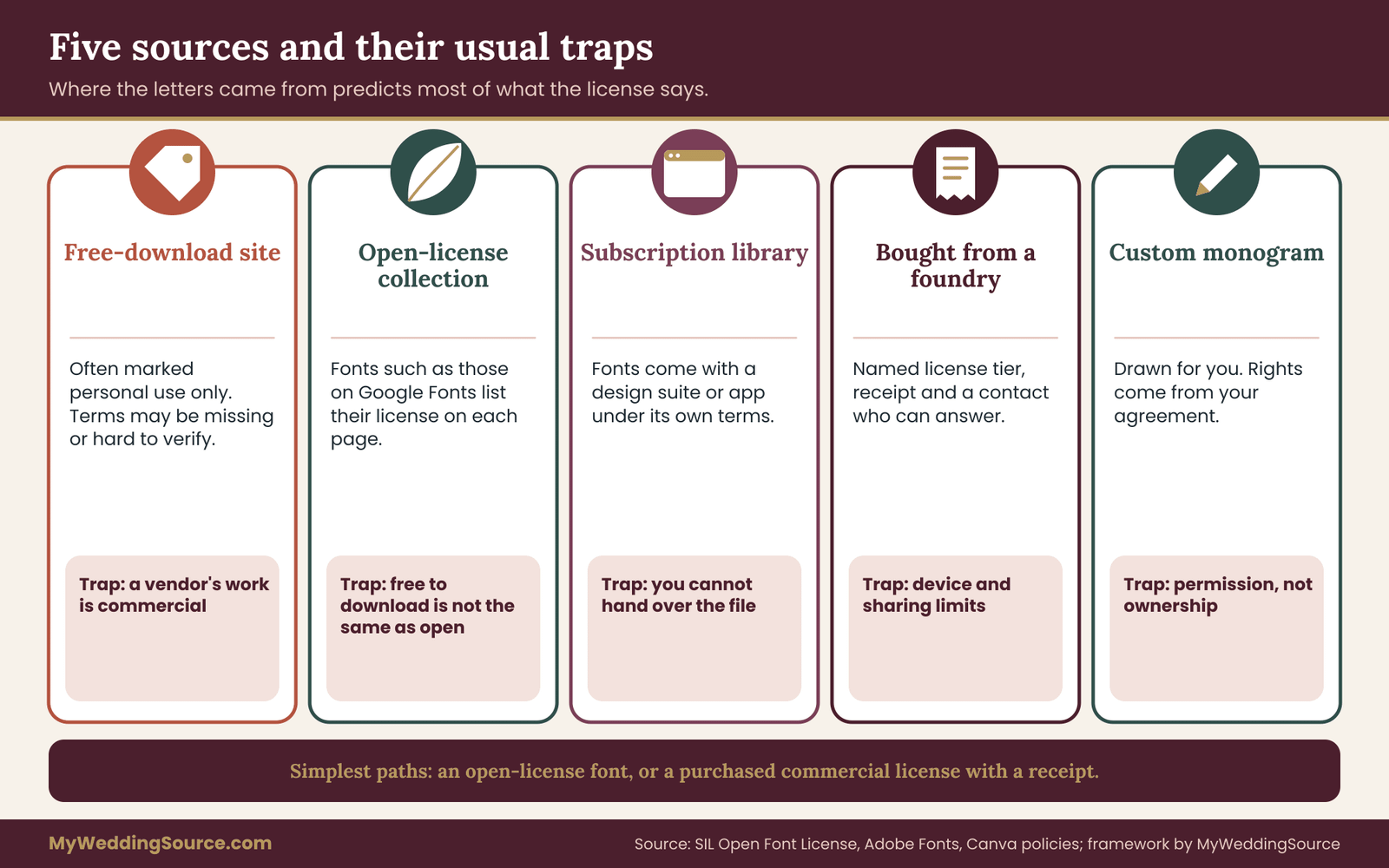
The source of a monogram font predicts most of what the license will say. Five sources cover almost every case, and each has a typical pattern and a typical trap. The patterns below are general. Always read the specific terms for the specific font.
Free-download sites
These sites host thousands of script and display fonts uploaded by designers around the world. Many are marked free for personal use, with a link to buy a commercial license. That marking is the heart of the issue. For a wedding, “personal use” can feel like a match, since the event is personal. The difficulty is that your printed decor is made by a business, and some personal-use licenses were written to exclude work done by or for a business.
The traps are specific. The license may be a short text file inside the download that you never opened. The site may host a font that the uploader did not have the right to share. The font may be a copy of someone else’s design under a new name. And the seller may be impossible to contact. A font from a free-download site is not forbidden, but it is the source that deserves the most careful reading and the earliest backup plan. If the commercial license is cheap, buying it is often the least stressful route.
Open-license collections
Collections such as Google Fonts publish fonts under open licenses, commonly the SIL Open Font License. The Open Font License is public and its authors explain it on their site. In general terms, it lets you use, study, modify and redistribute the monogram font, including in commercial work, with some conditions, such as not selling the monogram font by itself and keeping the license text with copies you distribute. Each family lists its license on its page.
For a couple, an open-licensed monogram font is the simplest path. Printing, engraving, web use and sending the monogram font to a printer are usually all allowed. The trap is mistaking “free to download” for “open license.” Many free fonts are not open licensed. Look for the license named on the monogram font’s page, and keep a copy. Also note that a small number of open-license fonts have restrictions on the font name, which matters only if you modify and redistribute the monogram font file.
The selection in open collections skews toward practical text faces, but there are many script, calligraphy and display fonts that work well as monograms. If you can find a design you love among them, you have cleared gate one and most of gate two.
Subscription libraries
Design suites and font subscriptions give you access to a large library for a monthly or annual fee. Adobe Fonts, for example, is part of Adobe’s Creative Cloud plans and has its own terms page. Canva and similar platforms include fonts inside the app, under the platform’s content license. Cutting-machine software and some website builders also supply fonts.
The pattern here is permission that comes with the product. You can usually use the fonts for the work the product is designed to do, including commercial work in many cases, but the terms often restrict sharing the monogram font files and sometimes limit what you can do after the subscription ends. The trap is the handoff. Because you do not have the monogram font file to give anyone, you must send an outlined or flattened version, or use the platform’s own print service. Confirm in the platform’s terms that exporting a print-ready file is allowed.
If you choose a subscription font, make the export now, while your plan is active, and keep it. A finished PDF with outlined letters will outlast the subscription.
Fonts purchased from a foundry or marketplace
Buying a font directly gives you the clearest paper trail. You get a receipt, a named license tier and usually a plain-language license page. Tiers are common: a desktop license for print and general use, a web license for websites, an app license for software, and sometimes an enterprise or broadcast tier.
For a wedding, a desktop license covering print is the main thing you need, plus anything that extends it to cutting or engraving if relevant. Read the tier descriptions carefully. Some foundries say printing on products for sale needs an extended license, which your wedding favors almost certainly do not, but your vendor’s own use might. When in doubt, ask the foundry. Boutique foundries tend to answer these questions quickly, and they appreciate being asked.
The trap with purchased fonts is the device count and the sharing limit. A license for one or two computers does not cover a designer, a printer and your cousin all installing the monogram font. If more than one person needs to edit files, either each person needs a license or one person needs to do the work and send outlines.
Custom lettering and bespoke monograms
A designer who draws a monogram for you is not selling you a font license. They are creating artwork, and possibly using a font as a starting point. The rules here come from your agreement with the designer and from the underlying fonts they used, if any. This is its own section later in the guide, because the questions are different. The short version: ask whether the monogram is built from licensed fonts, and ask for the rights to use the finished artwork across print, signage, web and merchandise for your wedding.
Which source to prefer
If your priority is simplicity, prefer an open-licensed font or a purchased font with a clear commercial license. If your priority is a particular look found only in a personal-use font, pay for the commercial license or commission a designer to draw something similar. If your priority is budget, an open-license font plus a designer’s flourishes can look distinctive without any licensing question at all.
What you should avoid is the middle ground: a font you love, a license you did not read, and a print date approaching. That is the situation in which people make hurried choices.
Quick answers on monogram font questions couples ask
Before going on, it helps to answer a few questions that come up in nearly every conversation about this topic. The answers are general and depend on the license in front of you.
Can we use a personal-use font for a private wedding? Often yes for items you make yourself, with doubts about items made by a vendor. The only reliable way to know is the license text, or a written reply from the font seller. If the license is ambiguous, ask or switch.
Does buying one font license cover everyone who works on the monogram? Usually not. Most desktop licenses are tied to a number of computers or users. A designer, a printer and a signmaker may each need to be covered, either by their own license or by receiving outlined artwork.
Is a monogram made from two letters in a font different from the monogram font? The artwork is a new layer, but it still depends on the monogram font layer. If the font license restricts a use, the monogram built from it generally carries that restriction.
What if the font license is lost? If you bought it, the seller can usually resend it. If you downloaded it free from a site that has vanished, you lack proof. Replace the monogram font before you commit to large print orders.
Does the wedding date change anything? Not directly. But a deadline makes fixes expensive. Do the license check as soon as you pick a monogram, and well before the first proof.
These answers lean on one habit: asking in writing and saving the reply. A short email to a font seller costs nothing, and a reply is often all you need.
Custom monograms and working with a designer
A custom monogram, drawn or arranged for you by a designer or calligrapher, solves many licensing problems and creates a few new ones. It solves them because a well-run commission gives you a single contact, a single agreement and a single artwork file. It creates new ones because most couples never discuss rights with a designer, and the default rules are not the ones people expect.
Who owns what by default
In the United States, a person who creates an original work generally owns the copyright in it unless they transfer it in writing or the work qualifies as a work made for hire under the statute. A freelance designer working for you is usually not an employee, and a monogram commission usually does not fit the narrow categories where a written work-for-hire agreement applies. The practical result is that you commonly receive permission to use the artwork, not ownership of it, unless the contract says otherwise.
That is not a problem for most couples. You do not need to own a monogram to use it. You need a clear, written permission that covers every use you plan. The U.S. Copyright Office publishes plain-language information on how copyright ownership and transfers work if you want the general rules. For your wedding, the important sentence in your agreement is the one describing what you may do with the artwork.
The permission sentence to ask for
Ask for a short statement that covers the uses on your list. It can be written in the designer’s own words, but it should say: that you may use the monogram for your wedding and related events; that you may reproduce it in print, on signs and engraved or cut items, on merchandise and favors, on your website and in digital and video use; that outside vendors may reproduce it to make those items; and that the designer’s artwork was made without infringing anyone else’s rights, including any fonts used.
If the designer used a licensed font as a base, ask which font and which license. The designer’s artwork layer sits on top of the monogram font layer. A designer who knows what they are doing will answer straight away, and many deliver outlined, redrawn versions that no longer depend on a font file at all.
Exclusivity
You might also care whether the monogram is yours alone. Some designers sell the same monogram design to others, particularly for stock initials. Others will make a one-off. If you want the design not to appear on another couple’s invitations, ask for exclusivity within a stated scope, such as no resale of this exact artwork. Exclusivity usually adds to the price. Consider whether it matters to you. A monogram of two common initials in a standard script is unlikely to stay unique no matter what the contract says.
Files and formats
Ask for the files you will need. A vector file, such as a PDF or SVG with outlined letters, is the most flexible, because it can be scaled for a napkin or a banner and handed to vendors without a font. Ask for a version in one color and a version in reversed color for dark backgrounds. Ask for a plain image version for web use, and a small, simple version for tiny uses such as a stamp or a favicon. If you plan laser cutting or engraving, ask for a clean outline with no overlapping paths and no tiny gaps, which a machine can follow.
Some designers keep the editable source file and provide only exports. That is normal. If you want to change your names or date later, agree in advance whether the designer will make changes for a fee, and how long they keep your files.
Revisions and approvals
Custom work involves proofs and approvals. Agree on how many rounds of changes are included, and who signs off. Because monograms use letters, check each letter carefully, including the order of initials. Couples choose different conventions for the order of names, and a monogram with the wrong order is awkward once it is on two hundred napkins.
The accessibility side deserves a quick look, too. A monogram that is decorative and tightly interlocked can be hard to read at a distance, which matters on signs. Ask the designer for a simplified, high-contrast version for signs and a more ornate version for stationery. The W3C Web Accessibility Initiative and similar bodies give general guidance on contrast and legibility, which transfers to physical signs as a good habit.
When a friend or relative makes it
A gift from a talented friend is a lovely thing, and it deserves the same small piece of paper. A text message works: “You are welcome to use the monogram I made for your wedding, including having it printed by any vendor on any item.” That sentence settles gate four. It also protects the friendship if the friend later sees the monogram somewhere unexpected.
If the friend used a font they happened to have, check it. A friend’s computer may hold a pile of fonts of uncertain origin. It is kinder to ask early than to discover the issue at the print stage.
Hand lettering and calligraphy
If a calligrapher writes your initials by hand, there is no font layer at all, which is a real advantage. The artwork is still the calligrapher’s, so the same permission sentence applies. You also need a digital version of the lettering, made by scanning or tracing, and you need the right to have vendors reproduce that digital version. Ask the calligrapher to include that in the agreement.
Templates, Canva and the vendors who supply the monogram font
Many couples never touch a font file. They pick a template in an invitation site, an editor app or a print vendor’s design tool, type their initials and order. In that case the permission comes from the platform, and the work is to read its terms rather than a foundry’s.
Marketplace templates
Templates sold on marketplaces often come with a seller’s license, such as personal use only, or a small-business license with a print-run cap. The seller may also list the fonts used, and may tell you to buy them separately, because the template does not include them. This is a frequent source of confusion. You paid for the layout, not for the fonts in it. If the template needs a monogram font that you must download separately, you are back to gate one for that monogram font.
Read the listing and the license file. Note what the seller allows for printing by a third party. If the license says personal use only and forbids sharing the files, find out whether having a print shop print the file counts as sharing. Many sellers expressly allow it. If it is not stated, ask.
Design apps and card builders
Online design tools bundle fonts and images under a content license. Canva publishes its terms on its policies pages, and other platforms have their own. In general, such licenses let you create and print designs for your own use, including through the platform’s printing service, and some allow external printing of exported files. The traps are specific uses the terms treat separately, such as using fonts in a logo, selling products, or making trademarked designs.
If you intend to export a file and send it to an outside printer, check the export rules. Platform-supplied fonts are typically embedded or outlined in the exported PDF, which is the safe form to give to a print shop. Download the print-ready file, keep it, and do not rely on being able to reopen the editor in a year.
Print vendors’ own design tools
Online printers often provide a design tool with a font menu. Fonts in that menu are licensed for use in that vendor’s products. If you pick one for your monogram and print through that vendor, you are covered for that print job. If you later want the same monogram on a sign from a different vendor, the permission does not travel with the letters. This is a common surprise. Pick the monogram font you want to keep, not just the monogram font the first vendor offers.
The guide to wedding invitation print production covers proofing, quantities and printer questions in more detail. For monograms, add one question to your printer list: “If I use your font menu, may I use the same letters elsewhere?” The answer is often no, and it is better to know before the first proof.
Cutting machines and craft software
Home cutting machines and their software come with libraries of fonts and designs, and their terms often describe what you may make and what you may sell. A couple making signs, tags or cake toppers at home for their own wedding is usually within the plain meaning of personal use. A couple making extras for friends or for sale needs to read more closely. If you give your monogram design file to a cousin who owns a different machine, you may be breaking the sharing rules even though the cousin is helping for free.
A short rule for platforms
Every platform has a content license. Read three parts: what you may print, who may print it, and what happens to your files if you cancel. Save the terms as they stood on the day you made your design. That is all gate four requires, and it often resolves the problem in five minutes.
Handing monogram files to printers, engravers and signmakers
Once the monogram font or artwork is cleared, the next risk is the handoff. A printer, laser cutter or sign shop has to turn your file into a physical object, and they have their own habits about fonts. A few plain questions keep this step smooth.
What printers usually want
Most professional printers want a PDF with fonts embedded or converted to outlines, because it prevents font substitution. If the monogram is already outlined artwork, there is no font problem at the print stage. If it is live text in a font, the printer needs that monogram font installed or embedded. Print shops that handle many clients tend to have a policy: they either hold licenses for common fonts, or they ask clients to supply outlined files and confirm they have the right to use them.
Do not be offended by a printer asking where a font came from. It is a sign of a careful shop. Answering “this is an open-licensed font” or “I bought the commercial license from this foundry, here is the receipt” ends the conversation. Answering “I found it on a website” does not, and a good shop will ask you to replace it.
What engravers and laser shops want
Cutting and engraving work from vector outlines. The shop converts your artwork to a path that a machine follows. If the artwork came from a font, then the license question is whether outlining and machine reproduction are allowed. Some foundries say yes for finished goods. Some say yes only with an extended license. Some are silent. Ask the foundry or choose an open-licensed font. If your monogram was drawn by a designer and delivered as outlines, you have already cleared the monogram font layer.
Engraved and etched items are permanent. A glass etched with a font whose license later turns out not to cover it cannot be fixed by a reprint, only replaced. For that reason, put engraved and cut items near the top of your checking order.
What signmakers want
Large format printing, acrylic and mirror signs, and vinyl cutting are usually handled by commercial sign shops, which are used to client artwork. They often ask for vector files and will not use fonts that the client cannot prove they hold. Signs add one more concern that is not about licensing: readability. A decorative monogram with thin strokes can disappear at a distance. The signage guide’s sections on readability and placement for wedding signs explain how distance, finish and glare affect legibility, and the monogram on a sign deserves the same test.
A handoff script you can reuse
When you contact a vendor, give them the same four facts each time, so they can answer quickly.
“The monogram uses [font name and style], which I obtained from [source] on [date] under [license name or tier]. I am supplying it as [outlined vector file or embedded PDF]. The item is [description, quantity]. Please tell me if you need anything further to be comfortable printing or cutting it.”
This short message covers gates one through three. Their reply, saved, covers gate four. A vendor who answers with a request for a different file format is not blocking you, just clarifying. A vendor who answers that they cannot use the monogram font is giving you a gift, because you learn it now.
Quantity and merchandise
If you plan favors in quantity, such as two hundred printed koozies, the promotional-products supplier is producing merchandise from your monogram font. Many suppliers use an artwork review step and may ask you to confirm that you have the rights to the design. This is routine. Where the license mentions merchandise, read that clause. Some licenses allow merchandise for free distribution but not for sale. A wedding favor is normally given away, which is a different thing from selling. If you intend to sell anything, even to raise funds for a cause, apply the stricter reading.
Digital hand-offs
Digital items need extra care. A wedding website uses a font on the page, which usually means a web font license, or a font from a service whose terms cover that use. A simple fix is to render the monogram as an image from licensed outlines and use the image on the page, remembering to give it text alternatives for readers using screen readers. If a livestream or video features the monogram as an on-screen graphic, check whether the license covers video. Where unsure, use outlines of a font whose license is open, or artwork that a designer has cleared for digital use.
If your venue or a vendor will display the monogram on a screen, for example in a slide loop during cocktail hour, supply an image file rather than a font. It protects you and keeps your file from being edited.
Trademarks, lookalikes and crests
The font layer and the artwork layer are copyright and contract issues. A third kind of issue, trademark, matters for monograms in a particular way. A trademark protects a mark that identifies a business or product, and many luxury and fashion brands use interlocked initials as part of their identity. A couple’s monogram that closely resembles one of those, especially if used on products made for sale, can create problems that have nothing to do with fonts.
How a monogram might resemble a brand
Two letters in a particular arrangement can echo a well-known logo. The arrangement may be interlocked initials, a single letter within a circle, or a pattern of repeating letters. The risk is highest when the same letters, the same interlocking and the same style are used on goods that look like the brand’s goods. A couple whose initials happen to match a famous brand and who are making a few napkins for their own wedding is in a very different position from a seller offering tote bags with a lookalike pattern.
It is simple to avoid trouble. If your initials match a famous brand, choose a layout that differs clearly: vertical rather than interlocked, a different framing, or a distinct typeface. A designer will usually do this without being asked, and many will warn you.
Names and logos used as decor
Other things that appear in wedding decor, such as a team’s logo on a groom’s cake, a studio’s character on a sign or a brand’s name on a bar menu, belong in the same category. They are not font questions, but they are permission questions. A private party with a handful of items is rarely a problem, though a vendor producing a large quantity may decline. If something looks like a logo, assume it needs its own thought.
Checking a mark
The United States Patent and Trademark Office offers public search tools for registered and pending marks, and its website explains what trademarks do. If you are unsure whether a design resembles a registered mark, a quick search can ease your mind, and a trademark attorney can advise on a particular case. For most couples the useful action is simpler: make the monogram clearly your own.
Crests, coats of arms and cultural symbols
Family crests, regional emblems and religious symbols are another area. They are generally not covered by the font license, and some are protected by law as official insignia in certain places. When a monogram includes such an element, make sure the version you use is one you may use, and confirm with the family or community where appropriate. A short question to the person who knows the tradition goes a long way.
A worked example: Priya and Tomas order their printed decor
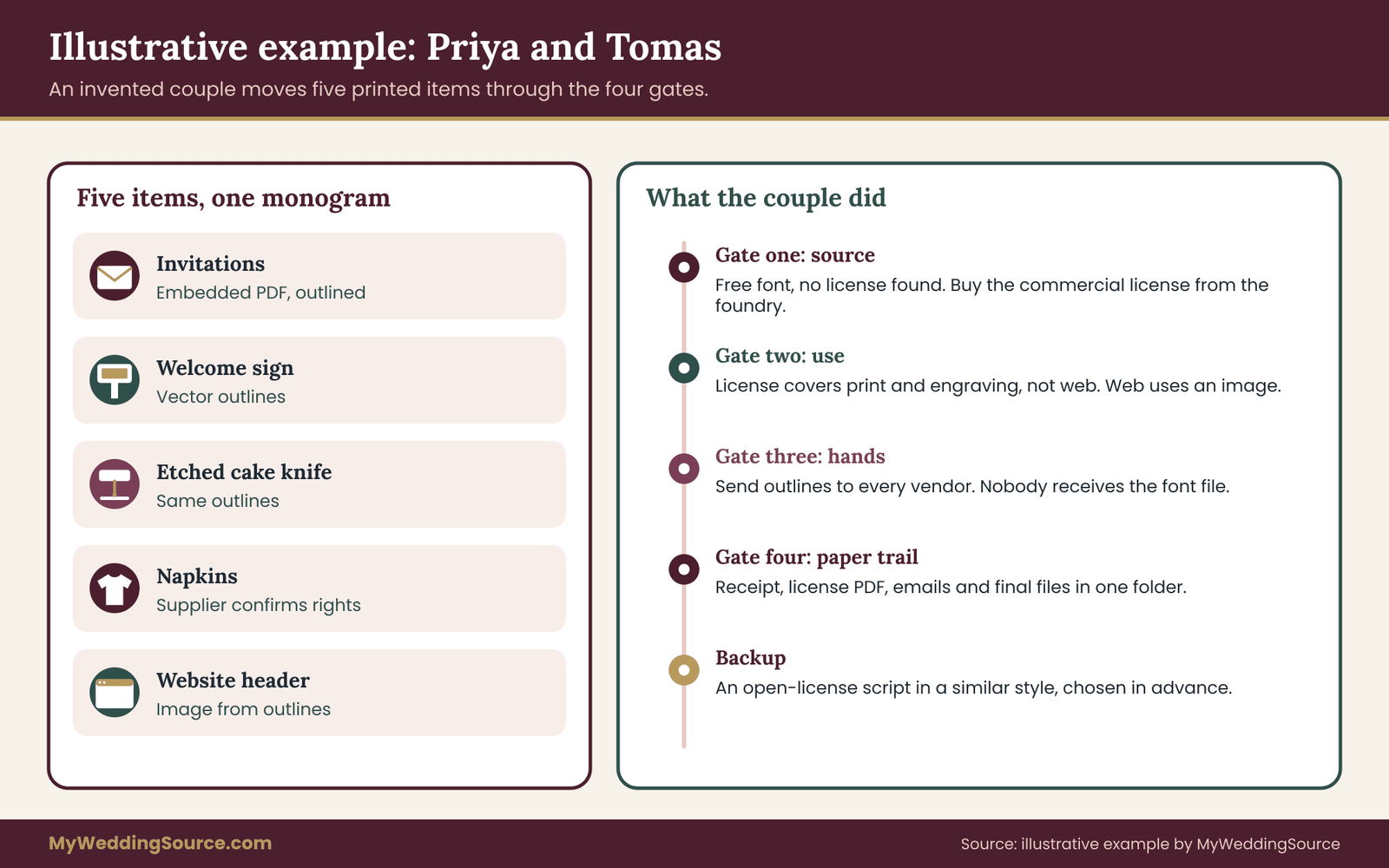
An invented example shows the process from start to finish. Priya and Tomas are planning a spring wedding with about one hundred and twenty guests. They like an interlocked P and T in a flowing script, and they want it on invitations, a welcome sign, an etched cake knife, napkins and a wedding website.
Gate one: source
Priya built the first version using a script font she downloaded from a free-download site a year ago. She cannot find the license file. She remembers the site said “free for personal use.” That is the highest-risk source, so the couple decides to either buy a commercial license or replace the monogram font.
They find that the foundry that originally drew the monogram font sells a license covering print and engraving. The price is modest. They buy it, save the receipt and the license PDF, and write the order date in a note.
Gate two: use
Their list: printed invitations, a foam-board welcome sign, an etched cake knife, napkins in quantity and a website header. The license covers print and engraving but not web embedding. So the website header will use an image made from outlined letters, and Tomas will add a text alternative for screen readers.
Gate three: hands
The invitations go to an online printer, which allows PDF uploads with embedded fonts. Priya will export a print-ready PDF with the monogram outlined, and she checks the printer’s terms for supplying artwork. The sign goes to a local sign shop, which wants vector outlines. The cake knife goes to an engraver, who will work from the same outlines. The napkins come from a promotional-products supplier that asks the couple to confirm they have the rights.
Because the license allows commercial printing and engraving, the couple does not hand over the monogram font file at all. They send outlines to every vendor. The engraver’s question about conversion is answered by the license wording and a short email to the foundry.
Gate four: paper trail
Priya saves a folder with the receipt, the license PDF, the foundry’s reply, the vendors’ confirmations and the final outlined files. She files it with the rest of the wedding paperwork. The whole process takes an evening and a few short emails.
What changed
Nothing visible changed. The monogram looks the same. The difference is that every vendor received a file with a clear origin, and nothing hinges on a license nobody read. If a vendor had balked, the couple had time to switch to an open-licensed script that looked similar, which they had picked as a backup. That backup is the simplest advice in this guide: when you choose a monogram font, choose a second one that is open-licensed and close in style.
When to settle the license, and what to do if something goes wrong
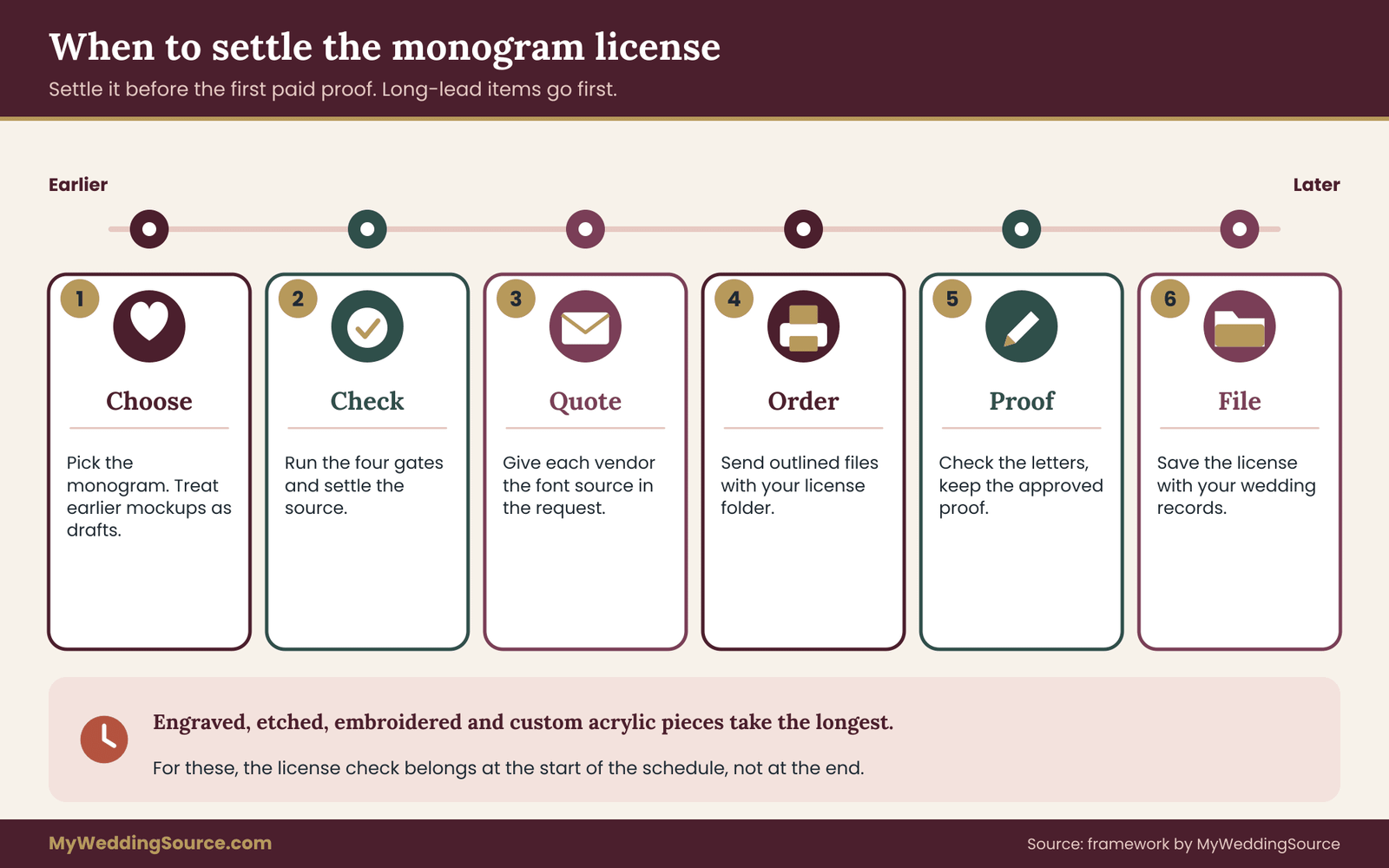
Timing decides whether a licensing problem is a small errand or a crisis. The best moment to check a monogram is right after you choose it, before it has spread into proofs, templates and orders. The second best moment is before the first paid proof. After that, every fix has a cost.
A sensible order of work
Early in planning, when you are exploring looks, you can use any font for mockups. Treat those files as drafts. The day you decide on a monogram, run the four gates and settle the source. That might mean buying a license, picking an open-licensed replacement or commissioning a designer. Do it before you spend money on any print or on a sign.
When you gather quotes from print vendors and signmakers, include the monogram font source in the request, so each vendor can tell you what they need. Choose vendors who are comfortable with outlined files. When you place orders, attach the outlined file and your license folder reference. At proof stage, check the letters, not only the layout, and keep the approved proof. After delivery, file the paperwork.
Some items have long lead times. Engraved and etched pieces, custom acrylic and embroidered goods often take several weeks. If these are on your list, the license check belongs at the start of the schedule, not at the end. The guide to wedding vendor due diligence offers a general approach for asking vendors the right questions before you commit, and the monogram question fits in alongside the insurance, deposit and backup questions.
If a vendor refuses the monogram font
A refusal is useful information, not an accusation. Ask them what they need: a license copy, a different file type, or a different font. If the monogram font really cannot be used, you have three options. Buy the right license. Switch to an open-licensed font with a similar feel. Or ask a designer to redraw the monogram so it does not depend on the monogram font. The cost of each is usually small compared with the cost of a rushed reprint.
If a font seller contacts you
Rarely, a foundry or its agent may send a message saying a font was used outside its license. Stay calm. Read the message and your records. Do not ignore it, and do not argue from memory. If you hold a license, send it. If you do not, ask what the seller proposes, which is often a purchase of the proper license. If the claim is large or confusing, a lawyer who works with intellectual property can explain your position. Having a tidy folder makes every one of these conversations shorter.
If a designer objects to how the artwork is used
Reread your agreement. If it covers the use, point to the sentence. If it does not, ask politely for an extension in writing. Most designers are reasonable and will say yes, often for little or nothing, because the use is a wedding and they appreciate being asked. Keep the reply.
If you already printed everything
Do not panic and do not rush to destroy things. Run the gates now. If the monogram font turns out to be fine, file the proof and move on. If it is not, the likely fix is buying the missing license after the fact, which many sellers will arrange. That is not an admission of anything. It is a way to make your records tidy. The cost of a license is usually far lower than the cost of replacing printed goods.
After the wedding
After the event, keep the license folder with your records, and consider whether you plan to reuse the monogram for an anniversary, a baby announcement or a home sign. A license for wedding use may not extend to those uses. Read the terms again before you reuse the monogram in a new setting, especially for items you will sell or give widely.
Your next steps
You can finish most of this guide in one evening. Here is the sequence to follow.
- List every place your monogram will appear, from paper to screens.
- Open the file and write down the exact font name and style, or the designer’s name.
- Find the source and the license. If you cannot, plan to replace the monogram font.
- Search the license for the words personal, commercial, print, outline, web and share, and mark each item clear, unclear or not allowed.
- Send one short email to the seller or designer about each unclear item, and save the reply.
- Decide what each vendor receives: outlined artwork or an embedded PDF, never the monogram font file unless allowed.
- Pick a backup font with an open license in a similar style.
- Save the license, receipts, replies and final files in one folder with your other wedding paperwork.
If you are also deciding how names and numbers appear on seating displays, the wedding seating chart page covers layout choices, and a clear monogram font will make those pieces feel consistent. For choosing the colors that sit behind your monogram, the wedding color palette guide is a useful companion.
FAQ
Do I need a commercial license for a monogram font if my wedding is private?
Not always, but it depends on the license text and on who makes your items. Many personal-use licenses cover items you make yourself. A print shop or engraver is a business doing paid work, and some licenses treat that differently. Read the grant and definitions, ask the seller if it is unclear, and keep the answer in writing.
Can a print shop use my monogram font without owning a license?
It depends on the monogram font and the shop. Many shops ask clients for outlined artwork or an embedded PDF so no installed font is needed. Whether your license allows you to supply that output is the question. If the license is silent, ask the font seller. A vendor who requests proof of rights is following normal practice.
Is a free font from a download site safe for wedding decor?
It can be, but it is the source that needs the most checking. Many free fonts are labeled for personal use only, and the commercial terms may be hidden or missing. If you cannot find clear terms and a contact, choose an open-licensed font or buy a commercial license for a similar one.
Who owns a monogram a designer makes for me?
By default in the United States, the designer usually keeps the copyright unless the contract transfers it in writing. You normally receive permission to use the artwork. Ask for a short written statement that covers print, signs, engraving, favors, web and vendor reproduction, so you can use it everywhere you planned.
Can I send the monogram font file to my printer or cousin?
Usually not, unless the license allows redistribution, as many open licenses do. Most desktop licenses limit installation to specific computers and bar sharing. Safer options are to send outlined artwork or an embedded PDF, if your license permits that output, or to ask the person to obtain their own license.
Do I need a different license for my wedding website?
Often yes. Many foundries sell separate web licenses, and desktop licenses may not allow embedding a font on a page. A common solution is to place the monogram as an image made from licensed outlines, with a text description for accessibility. Alternatively, choose a font whose license covers web use.
Can my monogram resemble a famous brand’s logo?
Interlocked initials can echo a well-known logo, which raises trademark questions, mostly when used on goods for sale. For a private wedding with a few items the practical risk is small, but a clearly different layout avoids doubt. If you are unsure, search the USPTO’s public database or consult an attorney.
What should I save after I pick a font or designer?
Save the exact font name and style, the order receipt, a dated copy of the license, any emails from the seller or designer, and the final outlined files. Add vendor confirmations and approved proofs. Store them with your other wedding records so you can find them quickly if a question arises.
Sources
- U.S. Copyright Office: public guidance on copyright, registration and ownership.
- U.S. Copyright Office circulars: plain-language information circulars, including on works not protected by copyright.
- U.S. Patent and Trademark Office, trademarks: trademark basics and public search tools.
- SIL Open Font License: the text and FAQ of the open font license.
- SIL International: publisher of the Open Font License.
- Google Fonts: font families with license information on each page.
- Adobe Fonts: subscription font library and its licensing information.
- Canva policies: content license and terms for fonts and designs in the app.
- W3C Web Accessibility Initiative: contrast and legibility guidance.