
A wedding signage name spelling audit is a short, repeatable check that follows every guest name from the guest list to the final print file, so that the welcome sign, seating chart, escort cards and table signs all show each name the way the guest writes it. This guide gives you a single-source name register, a two-person print proof, and the freeze dates that keep both honest.
Keep one name register, one row per guest or household, and treat it as the only place a name is ever edited. Export every sign from that register, never from a second spreadsheet. Before anything is printed, have two different people check the final file against the register, one reading aloud and one following along. Set a freeze date, log every change after it, and ask the printer to confirm the exact file version they will print. Name spelling mistakes on signs are cheap to prevent and slow to fix.
Wedding signs are unforgiving in a way that most wedding paperwork is not. A typo in an email can be corrected in a minute. A typo on a laser-cut acrylic seating chart, a hand-lettered welcome sign or a hundred printed escort cards is permanent the moment the order ships. It also sits in public, in front of the exact person whose name is wrong, usually during a photo.
Most name spelling problems on signs are not careless mistakes made at the last minute. They are small differences that built up quietly over months: a guest who typed her name one way on the RSVP and another way on the address card, a spreadsheet that dropped an accent, a font that swapped an apostrophe for a box. By the time the sign file reaches the printer, nobody remembers which version was the right one.
This article is about stopping that drift. It is general information, not legal, tax or financial advice, and it is about name spelling, not identity documents, so nothing here replaces the rules of any agency. Where a rule matters, such as postal formatting for invitation envelopes, the article points you to the issuing source so you can confirm the current version yourself.
Why name spelling on wedding signs needs its own audit
You may already proofread. Most couples read their sign files once or twice before ordering. The trouble is that casual proofreading checks whether a sign looks right, and a name that looks plausible passes that test. “Catherine” and “Katherine” both look right. So do “Sean” and “Shawn”, “Meyer” and “Meier”, “Nguyen” and “Nguyen” without its diacritic marks, or “Ana” and “Anna”. Only the guest knows which is correct, and only a comparison against a trusted record can catch it.
That is the difference between proofreading and an audit. Proofreading asks, “Does this look right?” An audit asks, “Does this match the record we agreed was correct, and who confirmed that record?” The audit in this guide has three parts.
The first part is the name register, a single list where every guest name lives in a confirmed form. The second part is the sign file export, where each sign pulls names from the name spelling register and nowhere else. The third part is the two-person print proof, where two people check the final file against the register before it goes to the printer or sign maker.
What this audit covers and what it leaves out
The name spelling audit covers names that appear on printed or fabricated items at the wedding: the welcome sign, the seating chart, escort cards, place cards, table names that include guest names, memorial or reserved-seat signs, the guest book station and any thank-you cards you plan to print for later. It also covers the names of the couple and the wedding party if they appear on signs, programs or menus.
It does not replace the guidance on how to word invitations or how to address envelopes. For tone, titles and formal forms of address, the wedding invitation etiquette guide is the better place to start. The audit is narrower. It starts after you have decided how each guest should be addressed and asks only whether the final file carries that decision correctly.
It also does not cover correcting a printed run after a mistake is found. That is a separate repair problem, and the print production guide covers proofing, quantities and printer handoffs more broadly. Here the goal is to avoid needing a repair at all.
What a signage name spelling error actually costs
No statistics are needed to see the cost logic. Every error has up to four costs, and they stack.
There is the reprint cost: materials, setup, and often a rush fee. There is the time cost: the days between spotting the error and getting a corrected item, which at the end of a wedding timeline may not exist. There is the guest cost: a person who sees their name misspelled in public may say nothing and feel slightly overlooked. And there is the photo cost: signs appear in pictures, and a wrong name stays in the album.
The name spelling audit costs a few evenings of work and one extra reader. Compared with a reprint of acrylic or printed boards, that is a very low price, and the work spreads out across the planning calendar rather than landing in the final week.
Where name spelling errors enter the guest list
Before you build a register, it helps to know where wrong name spellings come from. If you know the six common sources, you can design the name spelling register to close them off.
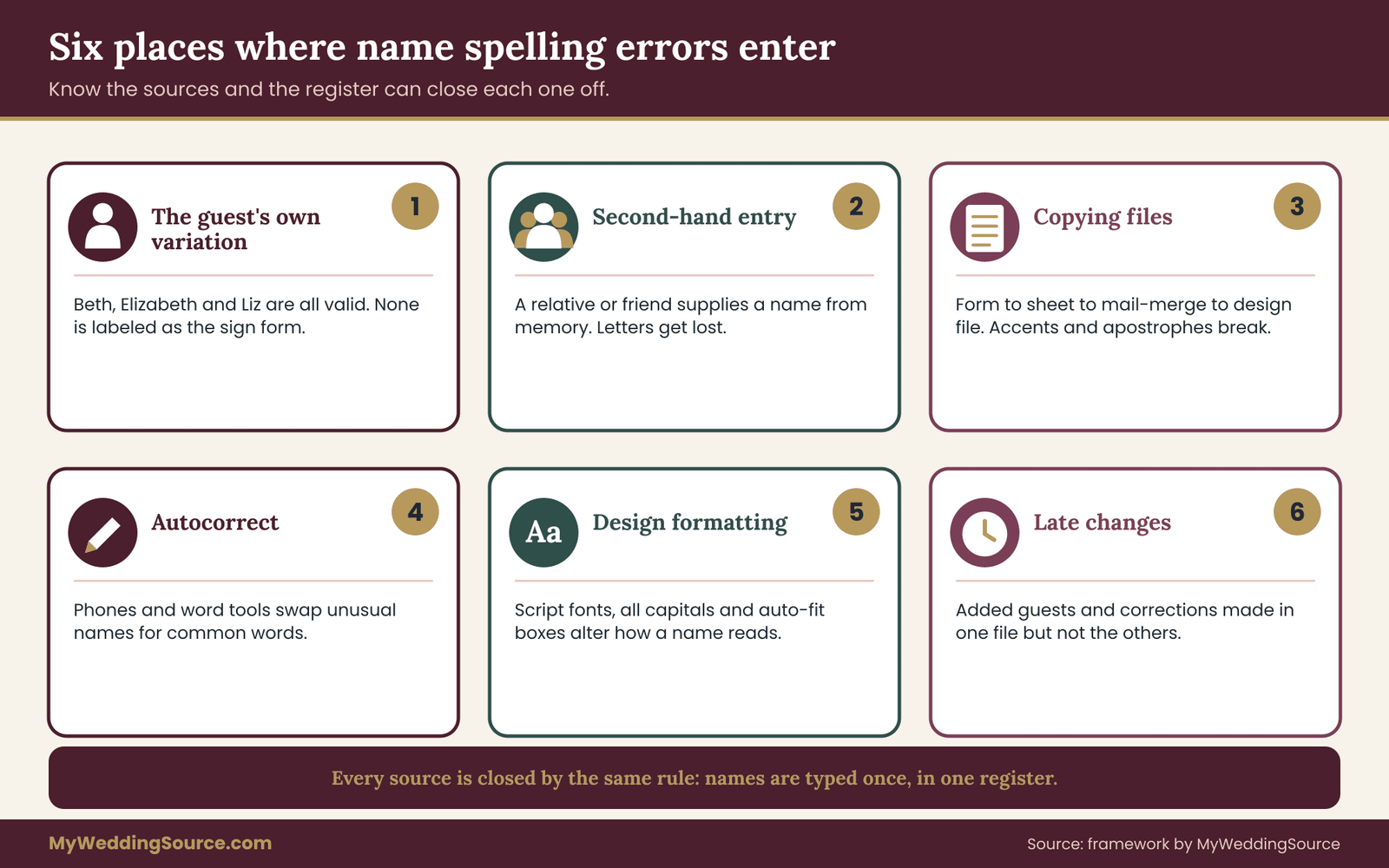
Source one: the guest’s own variation. People spell their own names differently in different settings. A guest who goes by “Beth” on a social account is “Elizabeth” on a passport, “Liz” to coworkers, and “E. Hartwell” on a business card. When you collect names from several channels, you collect several valid versions, and none of them is labeled as the one the guest wants on a sign.
Source two: second-hand entry. A parent gives you the names of relatives. A friend sends a list of the people in a group. A spouse types names from memory while the other partner dictates. Every handoff is a chance to lose a letter, and second-hand names are much more likely to be wrong than names the guest typed.
Source three: copying between tools. A name moves from an RSVP form to a spreadsheet to a mail-merge file to a design program. Each step can change it. Text encoding can drop accents. A spreadsheet can autocorrect a name it thinks is a typo. A design file can replace a straight apostrophe with a curly one, or the reverse, and a font that lacks a character can show a blank box.
Source four: autocorrect and autocomplete. Phones and word processors silently change unusual names into common words. “Siobhan” becomes “Sibyl”, and “Aoife” becomes “Wife”. You will not see this unless you read each name slowly.
Source five: design formatting. Setting names in all capitals can change how some letters look. Script fonts often make “n” and “u”, or “r” and “v”, hard to tell apart, and some do not include accented letters at all. Auto-fitting text in a template can also silently cut off long names.
Source six: late changes. A guest list changes constantly until the final week. Added guests, a corrected surname after a conversation, a married-name update, a nickname preference: each late edit is made quickly, often in one file but not in the others, and these edits cause a large share of the mistakes that survive to print.
Why a second spreadsheet is the usual culprit
Nearly every couple ends up with more than one guest file: the main list, the address list for invitations, the seating spreadsheet and a version the venue or planner has. They begin identical and drift apart. A name corrected in one is not corrected in the others, and nobody knows which is current.
The single-source rule exists to end this. There is one register. The seating chart, the address list and the sign files all pull from it. If you correct a name, you correct it once, in the register, and then regenerate anything that depends on it. If your household address list is already well organized, you can build the name spelling register as an extension of it rather than starting over. The rest of the guest-list work is covered in the wedding guest list guide.
A first test of how exposed you are
You can estimate your exposure in ten minutes. Pick any ten guests with names that are not standard English given names or common surnames. Look up how each is spelled in your RSVP responses, in your address list and in your seating draft. Write down every difference you find, including accents, hyphens, spacing and capitalization.
If you find none, your records are in good shape, and the register will be quick to build. If you find even two or three differences, you have just seen the problem the audit solves, and you have not yet looked at the sign files. Keep that list; it will become the first set of items for the name spelling register’s “needs confirmation” status.
One more point before moving on. Signs fail more visibly than invitations because a guest sees a sign alongside other guests. A mistake that a person might never mention in a private envelope becomes a public mistake on a seating chart. That raises the standard for signs above the standard for most printed paper, and it is the reason this audit is worth a few evenings.
Build the single-source name register for name spelling
The register is the center of the whole process, and it does not need special software. A shared spreadsheet that only two people can edit works. A database is unnecessary. What matters is the discipline: one row per guest or household, one column per fact, and one rule that all edits happen here.
The eight fields that matter
You can keep as few or as many columns as you like, but eight carry the weight for name spelling on signs.
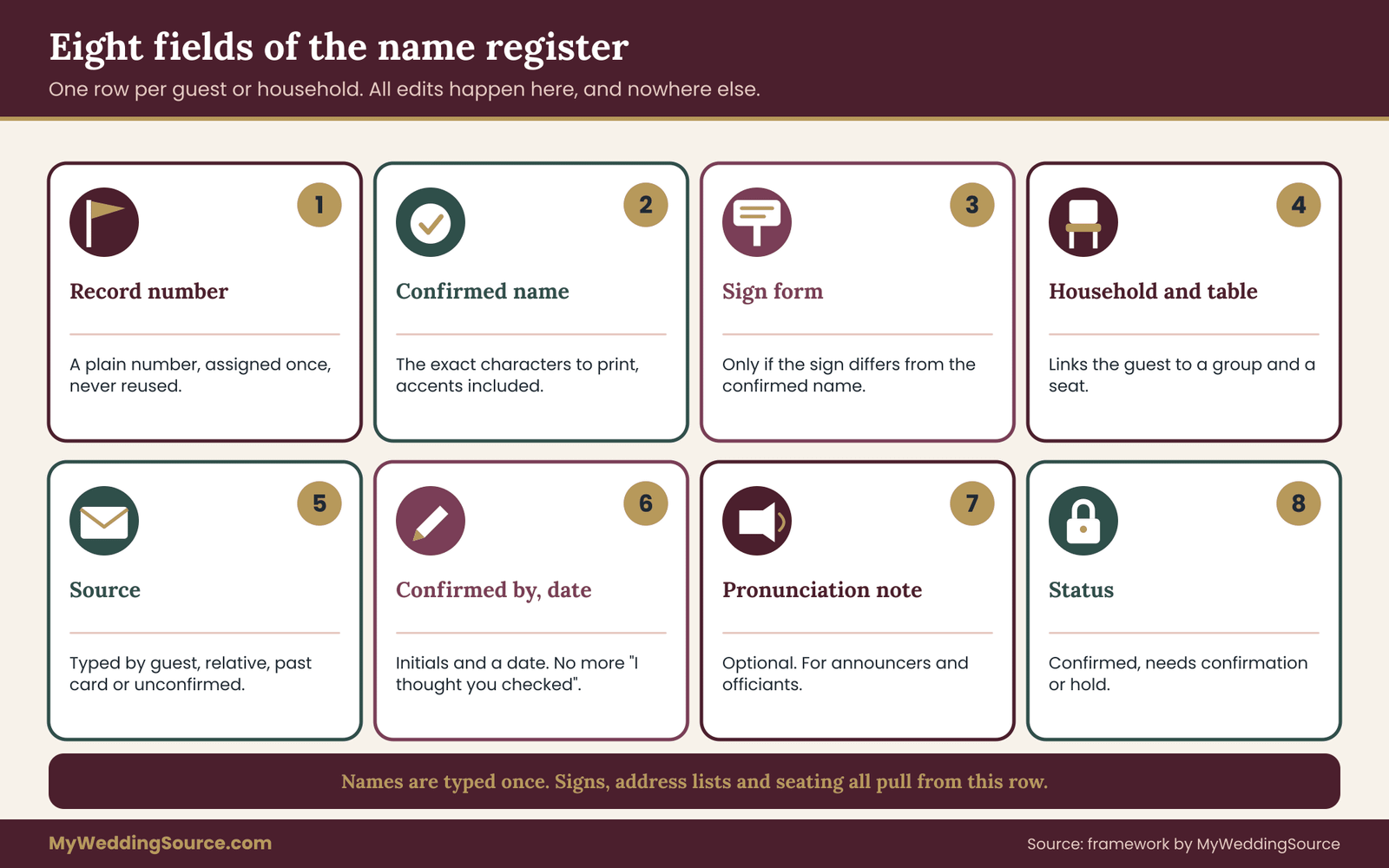
Record number. A plain running number, assigned once and never reused. Names change; the number does not. When a guest list gets reordered or a household splits, the number is how you still know which row is which.
Confirmed name. The exact characters you will print, including accents, hyphens, apostrophes, capitals and spacing. This is the field every sign uses. If a name is “María José Peña-Ortiz”, that is typed here once, with the accents.
Sign form. How the name appears on signs when it differs from the confirmed name. A guest may be “Elizabeth Hartwell” on the invitation and “Beth Hartwell” on the escort card. If they are the same, leave the field blank and let the sign pull the confirmed name. Do not retype names into this field; copy and paste so the name spelling cannot drift.
Household and seating link. Which household the guest belongs to, and which table. This lets you check that the sign shows the right people together without re-entering names.
Source of confirmation. How you know the name spelling is right. The options are short: typed by the guest on the RSVP, confirmed in a message from the guest, confirmed by a close relative, copied from a past card the guest sent, or unconfirmed. Unconfirmed is allowed, but it is a status, not a default.
Confirmed by and date. The initials of whoever verified the name and the date. This is the field that prevents the “I thought you checked” problem.
Pronunciation or note. Optional, and only if the guest or family volunteered it. Useful if an announcer, officiant or DJ will read names aloud.
Status. One of three values: confirmed, needs confirmation, or hold. “Hold” is for guests whose plus-ones are not yet named or whose attendance is unsettled.
The rule that makes the register work
There is exactly one rule. Names are typed into the name spelling register once. Every other file receives them by copy, link or export. Nobody edits a name on a sign file directly.
This feels slow at first. It is worth it, because a direct edit on a sign file is the single most common way for the register and the sign to disagree. If a guest sends a correction while you are working in the design program, you stop, fix the name spelling register, and then bring the corrected name into the design file by the same route as every other name.
In practice, most couples do this with one spreadsheet tab for the register and other tabs that pull from it with simple formulas. If the formulas look intimidating, the alternative is manual: correct the name spelling register, then paste the corrected name into each sign file and add a line to the change log. Either method works. The mistake is skipping the register.
Who owns the register
Name one owner, usually the partner who already manages the guest list, and one backup. The owner is the only person who edits confirmed names. Everyone else sends corrections to the owner. Parents, planners and bridesmaids can suggest changes, but the owner makes them and records the source.
This ownership rule protects you from the helpful relative who “fixes” a name spelling in the shared file without telling anyone. It is also a simple answer to a common question about helpers: you can let people see the name spelling register and still keep editing in one pair of hands.
How to confirm names without making it awkward
Confirmation is the part couples tend to skip, because asking a guest “how do you spell your name?” can feel strange. There are gentler ways, and they work better than guessing.
Use the RSVP itself. If your RSVP form or reply card has a line for each guest’s name as it should appear, guests will typically write it as they want it. This is the best source because it comes from the person. If you collect RSVPs online, a field labeled “Name as you would like it to appear on seating and signs” is clear and does not sound like a quiz.
For guests who replied by phone or message, copy the name from their message rather than from your memory. If a name is unusual, reply with a brief check: “Just confirming we have your name spelled the way you like it: Siobhán Ní Bhriain?” Most people appreciate the care.
For guests you cannot ask directly, such as an elderly relative or a friend of a parent, ask the person who invited them, and mark the source as “confirmed by relative”. That is a lower level of certainty than self-confirmation, and the register should show it, so that the name spelling audit later pays extra attention to those rows.
For names you cannot confirm at all by the freeze date, decide in advance what to do. The usual choices are to use the name spelling from the most reliable source and mark it as unconfirmed, to use a version without the doubtful element, or to leave a blank card in the guest’s place settings to be written by hand on the day. Do not guess silently.
“We are finalizing signs next week. Could you reply with your name exactly as you would like it printed, including any accents or hyphens?”
What not to put in the register
The name spelling register holds names and the minimum needed to place them. It does not need dates of birth, identity numbers, full home addresses beyond what the invitation requires, or notes about relationships and family disputes. Names are personal data, and the fewer details a file holds, the less harm if it is shared by mistake. The privacy section later in this article covers what to send to each vendor.
Keep dietary notes and accessibility needs in a separate working document that is shared only with the caterer or venue contact. Mixing them into the register means every vendor who receives a name list also receives details they do not need.
Cleaning the register before you trust it
Once the name spelling register exists, run three passes before any sign is built. These are fast, and they catch the errors that are most likely to repeat.
The first pass checks for duplicates. Sort by surname and look for two rows that are the same person under different name spellings, such as “Katherine Reyes” and “Kathryn Reyes” at the same table. If a household appears twice, merge the rows and keep the record number of the earlier one.
The second pass checks for invisible differences. Look for double spaces, trailing spaces, tabs, and names typed in all capitals or all lowercase. A name that is entirely in capitals in the register will print in capitals, and capitalization is part of how a name looks, so decide on a rule: the name spelling register keeps the name in its natural capitalization, and any design capitalization is applied only in the sign file.
The third pass checks for characters that tools tend to damage. Search for letters with accents, apostrophes, hyphens, and anything outside the basic English alphabet. List each one and look at it in the register itself, then again in an exported copy. If an exported file shows a question mark or a box where a letter should be, you have found an encoding problem to fix before the sign file depends on it.
A small example of the register working
Suppose your RSVP shows “Jose Pena” for a guest, but the household’s address card from a past event shows “José Peña”. Neither is flagged as wrong, because both look plausible. In the name spelling register, the row for this guest has source set to “unconfirmed”, and a note says “two versions in records”. Because the status is not confirmed, the audit forces a question: you message the guest, learn the preferred form is “José Peña”, enter it, mark it confirmed by you with today’s date, and every sign pulls the right version from then on.
Without the register, that guest might have seen “Jose Pena” on the seating chart and “José Peña” on the escort card, and nobody would have noticed until the day. The name spelling register does not make you better at spelling. It makes the question visible, early, while there is still time to ask it.
Name spelling patterns that break sign files
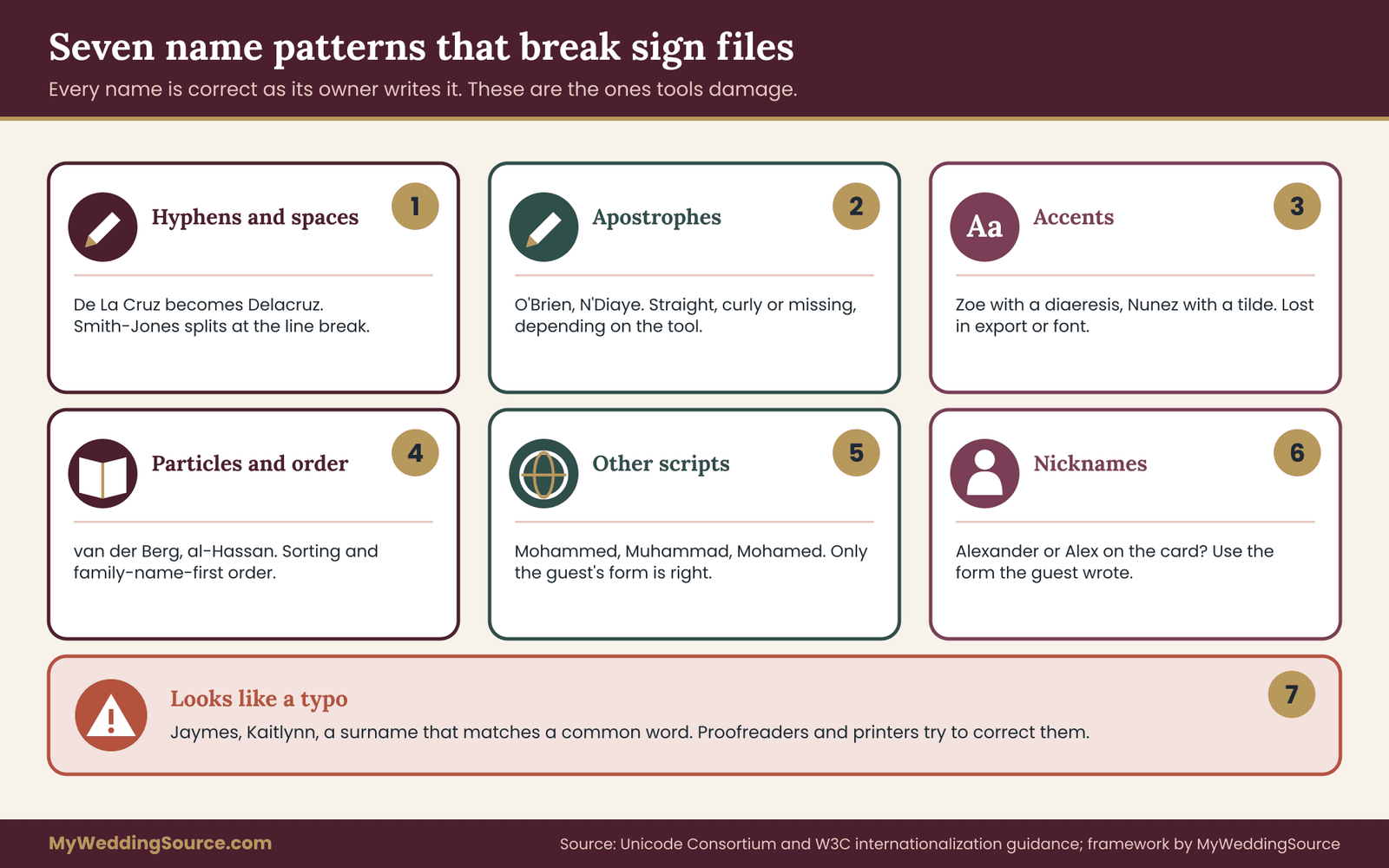
Some names are far more likely to be damaged on the way to a sign. If you know the patterns, you can pull those rows out for extra attention instead of giving every name the same level of review. The seven patterns below cover most of what goes wrong. They are described here as name spelling problems, not as problems with the people who carry the names. Every name is correct as its owner writes it.
Hyphens, spaces and double surnames
Hyphenated surnames, double surnames written with a space, and surnames the guest writes as two separate words are all easy to alter. A tool may merge “De La Cruz” into “Delacruz”, split “Smith-Jones” into two words, or drop the hyphen when the name wraps at the end of a line. People who have a hyphenated name usually have strong feelings about it, since they have corrected it many times.
For the register, type the name exactly as the guest does and copy it. On the sign, check where the line breaks. A seating chart that breaks a hyphenated name across two lines, with the hyphen at the end of the first line, looks like a normal hyphenation, and a reader may take it for two names. If a name is long, shorten the font or widen the box, rather than letting the layout decide where to split.
Be careful with couples where the partners have different surnames, or where one partner has two surnames. A sign that says “The Okafor-Lindqvist Family” is a different statement from “Okafor and Lindqvist”. The name spelling register should record whether the sign shows individuals, a couple or a household, since the right form depends on what the guests expect.
Apostrophes and quotation marks
Names such as O’Brien, D’Angelo, N’Diaye or Ka’ahumanu contain an apostrophe, and software handles this character unevenly. A straight apostrophe may become a curly one, or a left-facing quote, depending on settings. Some fonts render a curly apostrophe as a closing quote in the wrong direction at the start of a name, as in “’Alvarez” for a name that begins with a modifier letter.
The practical step is to pick one form, usually the straight or typographic apostrophe that looks right in your chosen font, and check every apostrophe name in the final sign file at full size. Do this visually, not only in the text. Zoom in and look at the shape.
Also check names where the apostrophe is part of the guest’s name spelling in one record and absent in another. Some families write O’Neill and others write ONeill, and which one is right can only be learned from the family. The same goes for “Mc” and “Mac” prefixes and for capital letters inside a name, such as McDonald, MacArthur, DeLuca and LaPointe. Auto-capitalization tools often flatten these to “Mcdonald” or “Deluca”.
Accents and other diacritics
Accented letters are the most common way for a name to change silently. José, Zoë, Müller, François, Núñez, Søren, Łukasz, Dvořák and Siobhán all contain characters that older systems, some spreadsheet exports and some fonts do not handle well.
There are three separate places where diacritics can be lost. The first is in storage: a file saved in an older text format may replace accented letters with question marks. The second is in transfer: copying names into a web form or email can strip them. The third is in the font: even if the text is correct, a font without the glyph will show a box or fall back to a different typeface, which looks wrong on a sign.
The Unicode Consortium maintains the standard that most modern software uses to represent characters from many languages, and the W3C’s internationalization pages explain how to work with names across scripts. You do not need to learn the standard. You only need to know that modern tools can handle these letters if every step in the chain uses a current text encoding, and that you should test it.
The test is simple. Take your most difficult names, export them the way you will send them to the sign maker, open the exported file, and read them. If they are right in the file, send that file. If they are damaged, ask the sign maker which format they prefer, or send a PDF where the characters are already fixed in place.
Some guests drop accents in English-language settings and some insist on them. Do not decide for them. If the guest wrote the accent on the RSVP, print it. If they wrote it without, either print it without or check. A missing accent that the guest does use is a name spelling error to them, while an added accent they do not use is also an error.
Particles, prefixes and name order
Many surnames include a particle or a prefix: van der Berg, de la Rosa, von Trapp, al-Hassan, bin Said, O’, Mac, Saint. Capitalization and spacing vary by family and tradition. Some write “van der Berg” in lowercase mid-name, but capitalize “Van” at the start of a sentence or in a list. Others always capitalize. A sorting tool will place “van der Berg” under V or B, and seating charts sorted alphabetically will not agree with the family’s expectations.
Name order is a second issue. In several traditions the family name comes first, as in many East Asian naming conventions. A register that has “First name” and “Last name” columns can force the wrong order, and a sign built from them will reverse the name. Ask the guest how they want it shown and record the confirmed name as a whole in the order they chose, rather than assembling it from two columns.
If your guest list is alphabetized on the seating chart, decide how you will sort these names before you begin, and write the rule down. For example, “sort by the first capital letter of the surname as written”. The point is consistency, not any particular rule.
Non-Latin scripts and transliteration
Guests whose names are written in Arabic, Chinese, Korean, Hebrew, Hindi, Russian, Greek or another script may use a Latin-letter version of the name in English settings. That version, called a transliteration, can be spelled several ways, and different systems exist. “Mohammed”, “Muhammad” and “Mohamed” are all common, and none is wrong. The only correct one for your sign is the one the guest uses.
If you plan to include the name in its original script, perhaps on a bilingual sign, treat that as a separate content item with its own confirmation. Do not copy it from a translation tool. Ask the guest or a family member who reads the script, and ask a printer if they can reproduce it, because many sign systems cannot display every script. A box or a missing character on a sign is a real risk with scripts the software was not built for. For event language more broadly, the guidance on bilingual materials in the print production material may help.
Nicknames, short forms and preferred names
A guest’s legal name, invitation name and everyday name may all differ. Someone invited as “Alexander Ruiz” may be “Alex” to everyone who knows them and may prefer that on the place card. Someone else may prefer the full formal name on every sign.
The register’s “sign form” field handles this. For each guest whose preferred display differs from the invitation form, record it and note where it came from. Do not assume that a nickname is welcome. If you are not sure, use the form the guest wrote on the RSVP, or ask.
Children and teenagers deserve the same care. A child’s preferred name may have changed since the last time you saw them, and parents are usually glad to be asked.
Names that look like typos but are not
The last pattern is the reverse of the others. Some names look like mistakes to a reader or a spell-checker, and a well-meaning proofreader “fixes” them. Examples include a surname that matches a common word, a given name with an unusual spelling such as “Jaymes” or “Kaitlynn”, or a name with a repeated letter. A reviewer who has not seen the name spelling register is likely to change these, and so is a printer’s own proofreading step.
This is the reason the two-person print proof compares against the register and not against the readers’ sense of what is right. It also explains why you should tell the sign maker plainly: “Please do not correct any names. Spellings are intentional.”
Turning the patterns into a watch list
After you review the name spelling register, add a short watch list as a separate tab or a column called “extra check”. Mark every row that falls into one of the seven patterns. These rows get the full treatment in the print proof, with an additional visual check at full size, while the ordinary rows get the standard read-through.
A typical guest list of one hundred and twenty people may have fifteen to twenty such rows. That is a manageable number for an extra check, and it focuses effort where errors are most likely. It also tells you where to be careful when anyone, including a vendor, changes the layout or font late in the process.
From register to sign file: protecting name spelling in the export
With a confirmed register, the next risk is the export. This is the point where names leave your control and enter a design program, a template, a calligrapher’s order form or a sign shop’s upload page. Each of these can alter a name, so the goal is to make the path as short and as testable as possible.
Pick the route and keep it short
There are three common routes from register to sign. Choose one for each sign type and write it down.
The first route is a direct export. The register exports a text or CSV file, and the design tool imports it. This is the shortest path and the least likely to introduce typing errors, but it is where encoding problems appear, so test it with your watch-list names.
The second route is copy and paste. A person copies names from the name spelling register into the sign file. This is simple and works well for small lists, such as one welcome sign or ten reserved-seat signs. Its weakness is people: a pasted name that is later edited by hand can drift.
The third route is vendor entry. You send a list to the vendor, who types or imports it. This is the riskiest route, because you no longer control the step. It is common for calligraphers and some sign shops. If you use it, the print proof must include the vendor’s own proof, and you must treat the vendor’s file as a new document to audit, not as a copy of yours.
Whichever route you pick, the rule is the same: after any export, copy or vendor entry, the names on the result are checked against the register, not against the previous step.
Test with a sample before the real run
Before you generate all the signs, build a test sheet with a dozen rows: five ordinary names and seven or eight from the watch list. Run it through the real route and look at the result at full size. This trial costs a few minutes and tells you whether accents survive, whether hyphenated names wrap well, and whether any character comes out as a box.
If your trial fails, fix the route, not the names. Change the file format, pick another font, or switch to a PDF handoff, then repeat the test. Only when the test sheet is perfect should you generate the full set.
Fonts and name spelling
Font choice affects name spelling in a way that is easy to underestimate. A decorative script font can make a correctly spelled name look wrong, and some fonts lack the characters you need.
Check three things for every font you consider. First, does it include all the accented and special letters in your guest list? Print a test line with each of those letters. Second, are similar letters distinct? In some scripts, “rn” can look like “m”, a lowercase “l” can resemble a capital “I”, and “a” and “o” blur at small sizes. Third, how does it look in capital letters, since some script fonts are hard to read in all caps and a few do not have capital forms that suit names.
When a font fails on a single name, the fix is not to change the guest’s name but to choose a different font or to use a fallback font for the problem letter. Some design programs will substitute a different font for a missing character without telling you. Look for any letter whose shape differs from its neighbors.
If you are using hand lettering, the equivalent step is to give the calligrapher a clear, printed list of names with accents marked, and to ask for a proof of the harder names before they write the full set. A calligrapher can letter any accent they are told about, but they cannot know a name has one if the list drops it.
File formats that protect names
How you hand over a file affects what can go wrong.
A PDF locks the appearance of each name. The text cannot change, fonts are embedded, and the page looks the same everywhere. It is the safest format for final approval. Its downside is that the printer cannot easily edit it, which is a feature when you want to stop silent changes.
An editable design file lets the vendor adjust layout but also lets them accidentally change names, replace fonts or reflow text. Send editable files only when the vendor needs to produce the layout, and ask them to return a PDF proof for your approval.
A spreadsheet or text list is the usual way to send names. Send it as a plain file saved in a modern text encoding, and open it yourself before sending to confirm the accents are still there. If you can, send both the list and a PDF showing how the names should look. That gives the vendor a reference for the intended result.
An image file is the right choice for fixed artwork, but it cannot be edited and any error is permanent in the file. Never send names only as an image if the vendor has to retype them.
Ask the vendor three questions
Before you order, ask each sign vendor three short questions, and keep the answers with your order records.
First: “Will you print names exactly as supplied, with no spelling or capitalization changes?” Some shops have automatic proofing steps that correct what they think are typos. You want that switched off for names.
Second: “Will you send a proof showing every name before production, and can I approve it in writing?” A written proof is both a check and a record of what was agreed. If a vendor will not provide a proof for a seating chart, that is useful information about the risk you are taking.
Third: “What happens if there is a name spelling error: whose responsibility is it, and what is the deadline for corrections?” The honest answer is usually that the shop is responsible only if it deviates from your approved file. That is why the approved file version matters, and why the name spelling audit exists. The wedding vendor contract guide explains how to read the terms around approvals, changes and remakes.
What to put in the order itself
Write the order so there is no room for misreading. Include the file name and version, the number of names or signs, the font and size, and a plain sentence stating that name spellings are intentional and not to be corrected. Include the date by which any change must be received. If the order form has a free-text field, use it.
Then add one more line that few couples think of: ask what the shop will do if a name does not fit its box. Auto-shrink can make a long name much smaller than the others, and auto-truncate can cut letters. You would rather be told that a name does not fit than discover that it was shrunk or clipped.
Different signs, different risks
Not every sign carries the same risk, and it helps to rank them so that your effort matches the cost of failure.
Seating charts and place cards carry the most names and the most consequences. A wrong name here is seen by the guest and by the table. They are also the most likely to change late as guests are added or moved.
Escort cards are individual, so an error affects a single guest, but each one is a separate piece. They are cheap to reprint in small numbers if you catch the error early.
Welcome signs and the couple’s names carry only a few names but they are the most photographed. These deserve the strictest check of all, because a mistake in the couple’s own name or in the date appears in every photo. Check them against the marriage license application or the documents you plan to use, since the sign should match the name form you will use on the day.
Memorial and reserved-seat signs carry names of people who are no longer present or who are honored in some way. They are sensitive. A wrong name spelling here is more than a printing error, so confirm with a close family member and, if possible, ask them to review the final text.
Table names or numbers with guest names and bar or menu signs rarely carry guest names, but check them anyway if they include dedications or toasts.
Handing off hand-lettered and engraved items
If any item is hand-lettered, engraved, laser-cut or otherwise made in a way that cannot be undone, the stakes are higher and the proof should be stricter. These processes usually have a point of no return when the material is cut or the ink is applied. Ask the vendor exactly when that point is, and schedule your final approval at least a few days before it.
For laser-cut acrylic or wood, the only way to correct a name is to make a new piece. For engraved items, the same applies. This makes a written proof with every name visible essential. It also makes a second proof reader, as described in the next section, much cheaper than a remake.
Keep a record of what was sent
Save a copy of every file you send to a vendor, with the date and file name. Save the name spelling proof you receive and your written approval. If a dispute arises, this folder shows what was approved and by whom, and it will keep the conversation calm and factual. It also lets you reuse the files for related items, such as programs or thank-you cards, without starting over.
The two-person print proof for name spelling
The name spelling register stops names from drifting. The print proof stops errors from passing through the final file. It is the last gate before money is spent on production, and it is built on a simple observation: the person who built a file is the worst person to check it. They see what they meant to write.
Why two different people
A single reader tends to skim. The brain fills in expected letters and skips the rest. Two readers checking in a structured way catch a different set of errors than either would alone, because they cannot both slip at the same place for the same reason, especially when one reads aloud and the other follows with their eyes.
The two people should not be the person who built the file or the person who maintains the register. Ideally one is a partner and the other is someone with fresh eyes, such as a parent, a close friend or the planner. They do not need to know the guests. They need to follow a procedure and compare characters.
The five steps
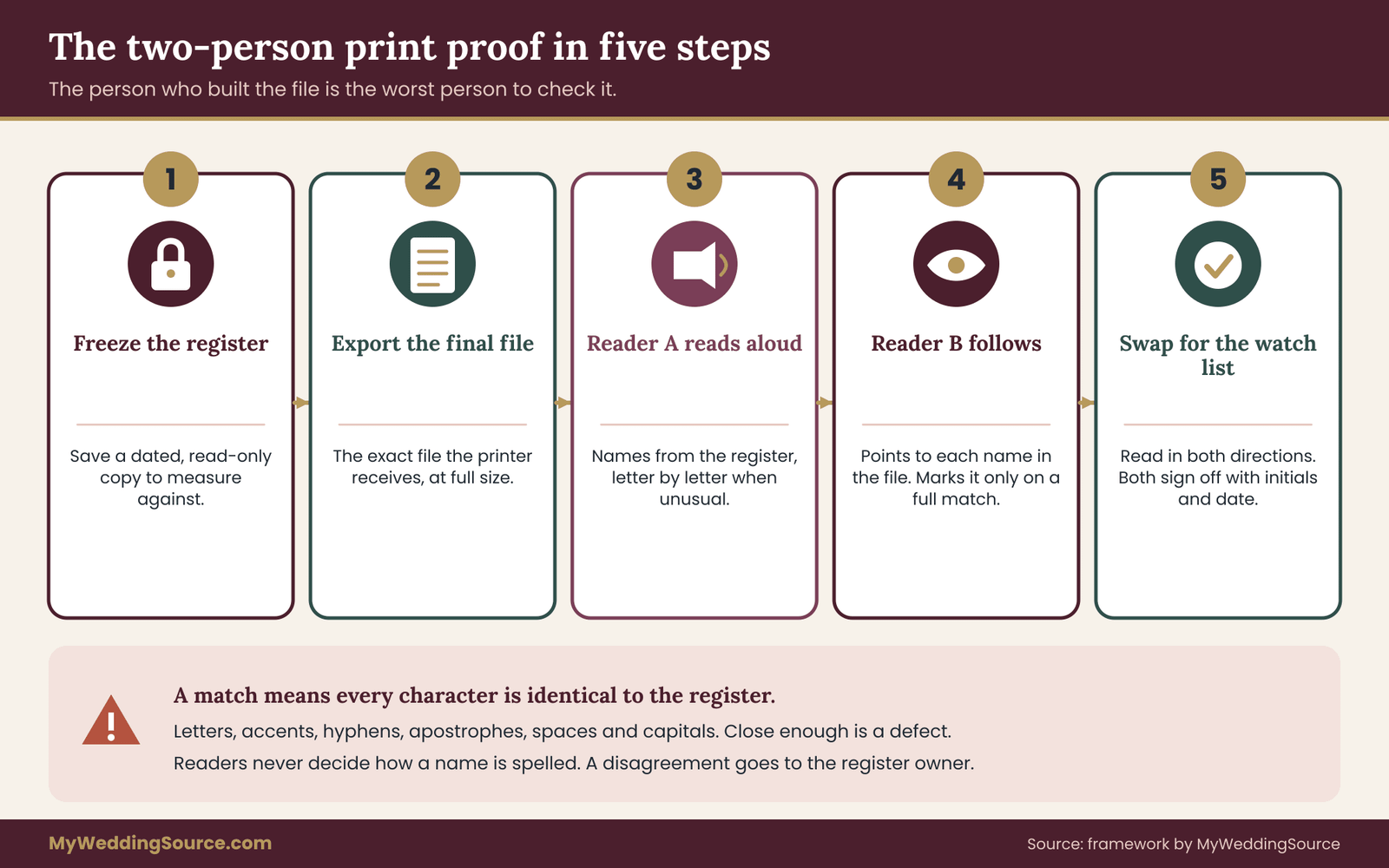
The proof has five steps, and they take about as long as a long lunch for a guest list of around a hundred and twenty.
Step one: freeze and print the name spelling register. Pick the register version that will be used for the name spelling proof. Save it with the date in its name, and print it or lock it as a read-only copy. This is what the sign file will be measured against. If a correction is made later, the proof starts again.
Step two: export the final sign file as it will be sent. Use the exact file the printer or sign maker will receive, in its final format, at full size. Do not proof a screenshot or an earlier draft. If the vendor will retype the names, proof their proof instead.
Step three: reader A reads from the name spelling register, aloud, slowly. Reader A reads each confirmed name from the frozen register, letter by letter when a name is unusual. For a name like “Siobhán Ní Bhriain”, this means reading “S, i, o, b, h, á, n” and noting the accent. It sounds tedious and it works.
Step four: reader B follows the sign file and marks each name. Reader B has the final file and a pen or a cursor. As each name is read, they point to it in the file and mark it checked only if every character matches. They do not look at the register. This separation is the key: A is the source of truth, and B is the test.
Step five: swap and repeat for the watch list. Swap roles for the rows on the watch list. Now reader B reads aloud from the name spelling register and reader A checks the file. Reading in both directions catches errors that one direction hides.
At the end, both readers sign off. The sign-off can be as simple as initials and a date on the name spelling proof sheet. The point is that two people have taken responsibility, and that the record shows which version was approved.
What counts as a match
Be strict. A match means every letter, accent, hyphen, apostrophe, space and capital is identical to the register. A name that is “close enough” is not a match.
Some differences are tempting to ignore. A curly apostrophe where the name spelling register has a straight one may be fine if you have decided on a typographic rule, but a missing apostrophe is not. A different space between two words may be acceptable, but a merged word is not. Capitalization changes that come from a design choice, for example setting all names in small capitals, are acceptable if you chose them. Anything unplanned is a defect.
Write each defect on the proof sheet with the row number, the register form and what the file shows. Do not fix names in the file while reading. Fix them after both readers finish, then re-proof the corrected items.
Check more than spelling
While the file is open, use the same two readers to check the other facts that live on a sign, because the same type of mistake happens there.
Check grouping: Are the right people at the right table? A seating chart can have every name spelled correctly and still seat a guest with the wrong household. Compare the table lists against the name spelling register’s seating link.
Check counts: Does the number of names on the chart match the number of confirmed attendees, and does each table have the number of names you expect? A missing name is as much a mistake as a wrong one.
Check order: If names are alphabetized, is the order right according to the rule you wrote down earlier? Are particles and prefixes sorted the way you decided?
Check the couple’s names and the date: Compare them with the documents and with the invitation. These items are the most photographed and the easiest to overlook, because everyone assumes they are right.
Check special notations: reserved signs, accessibility markers, names that carry a role such as “Officiant” or “Parent of the groom”, and any dedications. These are often added late and are rarely in the register.
Reading aloud, done well
Reading aloud is what makes the name spelling proof different from proofreading, so it is worth doing properly.
Read at a pace that lets the other person track, about one name every few seconds. For ordinary names, read the whole name. For watch-list names, spell out the letters that are unusual: accents, double letters, silent letters, hyphens and apostrophes. Say “hyphen” and “apostrophe”, and for capital letters inside a name, say “capital”.
If a reader is unsure how a name is pronounced, that is fine. The check is about characters, not about pronunciation. The reader can say the letters without saying the name.
Take breaks. Attention declines after about twenty or thirty minutes of this kind of work, and errors that were caught at the start of a session are missed at the end. Splitting the list into three sections with a short break between them is better than doing the whole thing in one go.
Proofing physical items before they are used
Even after the final file is approved, the physical result can differ from the file. Fonts can substitute, a laser can cut differently, a printer can crop. If you get a physical sample, a first piece or a small test print, treat it as a final check.
When the finished items arrive, run a short second pass before the day. This is a delivery check, not a full audit: take the box, open it, compare each piece against the approved file or the name spelling register, and look for damage, wrong pieces and any name that was altered in production. If anything is wrong, you know several days before the wedding, and you can contact the vendor with your approved file as evidence.
For a few hundred small cards, the delivery check can be split among helpers: each takes a stack, compares each card to the register and sets aside any that do not match. A pile of mismatches can be fixed by hand if the error is minor, or flagged for replacement.
Proofing a vendor-made file
If a vendor typed or placed the names, do not assume your approved list matches. Treat their proof like a new document. Compare it to the name spelling register in full, not just on the names you changed. Vendors sometimes retype whole lists and introduce new errors even where the earlier draft was right.
When you approve, say what you approved, for example “Approved: seating chart proof version three, dated the first of the month, matching register version dated the twenty-eighth.” That wording ties the approval to specific versions, so that nobody can later say you approved something else.
What to do when readers disagree
Occasionally the readers disagree about whether a name matches. Do not argue about it. The register is the authority. If the file does not match the name spelling register, the file is wrong. If the register itself looks wrong, such as an obvious typo, that is a question for the name spelling register owner, who confirms the correct form with the guest or the source, updates the register, and then the proof for that row starts again.
This keeps the process honest. Readers are never asked to decide how a name should be spelled. They are asked only whether two sources agree, and any disagreement goes back to the one place where names are decided.
How long the proof really takes
For a typical list, the first full pass takes an hour or two with two readers. The watch-list pass is shorter. Corrections and re-checks add another short session. If you build the name spelling register early and run the name spelling proof in two stages, a draft proof when the design is first built and a final proof when the file is frozen, you spread the work out and you rarely face a rush.
The final proof is not a formality. It is the one point in the whole process where someone other than the file’s builder looks at every name against a trusted record. Everything earlier in this guide exists to make that check quick and its result reliable.
Freeze dates and change control for name spelling
A register and a proof protect you only if the names stop moving. Guest lists change right up to the wedding, and every change is a chance for a new name spelling problem. The answer is not to stop changes but to control them with dates and a log.

Work backward from the vendor’s deadline
Start with the latest date the sign maker or printer can accept final names and still deliver on time. Ask for it in writing, along with the production time and any shipping window. Then build a timeline backward from that point.
A workable shape has five milestones. The first is the register start, when you create the register and begin confirming names. This should be early, as soon as you have a guest list that is mostly settled. The second is the confirmation deadline, the date by which guests’ preferred names should be in. Everything unconfirmed by then is handled by your fallback rule. The third is the draft proof, when you build the first full sign file and run a proof on it. The fourth is the freeze, when the name spelling register is locked and the final file is generated. The fifth is the final proof and order, when two readers sign off and the order goes out.
Leave a buffer between the final proof and the vendor’s deadline. A few days is enough for a small correction and a re-proof. If the buffer is zero, any error found in the last check becomes a rush job or a defect you accept.
You do not need exact numbers of weeks here, because they depend on the vendor, the material and the season. Ask the vendor for production time, then count backward and add your own buffer. If you plan to send invitations with a reply card, the same logic applies earlier in the schedule, and the wedding vendor timeline gives a general sense of how deadlines stack.
What a freeze means
At the freeze, the register is locked for sign purposes. Nobody edits it without the owner’s approval, and every change after that point is treated as an exception.
An exception has a short routine. The person who wants a change sends it to the name spelling register owner with the reason and the source. The owner decides whether the change is worth making. If it is, the owner records it in the change log, updates the register, notes the new version, and tells whoever builds the signs. Then the affected sign is rebuilt and re-proofed by two people.
This sounds heavy for a one-letter correction. It is not. It takes about five minutes, and it is exactly what prevents the situation where the name spelling register says one thing, the sign file says another, and nobody knows which one is right.
The change log
The change log is a simple list with five columns: date, record number, old form, new form, reason and source, and who approved. It can sit on its own tab of the register spreadsheet.
Two things make the log useful. The first is that it records the reason, such as “guest replied with correction” or “married-name update confirmed by guest”. The second is that it records the version that now applies. When you send an updated file to a vendor, the log tells you exactly what changed, so you can point it out in your message instead of sending a new file and hoping nobody misses the difference.
Keep the log even after the wedding. If a name appears wrongly on a thank-you card or a printed album, the log helps you see where it went wrong, and it saves you from repeating the problem on later printed items.
Late adds and plus-ones
Late additions are the biggest threat to a locked register. A plus-one is named a week before the wedding. A guest brings a new partner. A relative decides to come after all. Each new name is unconfirmed, usually comes from a quick message, and needs to be placed on several signs.
Decide in advance how you will handle them. One approach is a late-add rule: names received after the freeze are handled by hand-written place cards or small separate cards, not by reprinting the main sign. This avoids rebuilding the seating chart for a single name, and it keeps the main file stable.
If you do need the seating chart to include a late guest, treat it as an exception: confirm the name spelling with the guest or the person who invited them, add it to the name spelling register with its source, rebuild the chart, and run the proof again for that table and for the order and counts.
For plus-ones whose names are not known, do not write “Guest of…” in a way that locks you into a sign. Use a neutral placeholder on the chart, such as the host’s name with “and guest”, and plan to handwrite the name on the card if it arrives.
Married-name and name-change updates
Some guests, and occasionally the couple themselves, may have a name that changes close to the wedding. This is a name spelling question on signs, not a legal one. A guest who recently married may use a new surname on social media but still be listed under the previous name in your records. Ask which form they want, record it in the register, and use that form.
For the couple, be careful and consistent. The names on the welcome sign, the programs and the other printed items should match the forms you intend to use on the day. If either partner is planning a legal name change after the wedding, which agencies handle separately, the signs for the wedding should still show the name as they wish it to appear then. Specific steps for official changes belong with the issuing agencies, such as the Social Security Administration, and are outside this audit.
A note on privacy and sharing the register
A register is a list of people’s names, tied to your guest list and seating. Treat it with proportionate care.
Share the minimum with each vendor. A sign maker needs the names that appear on the signs, and possibly the table assignments. They do not need dietary notes, relationships, phone numbers or the full register. Export only the columns the vendor needs, and give them only the guests they must produce.
Send files by a method you trust. Avoid posting a full guest list in a public place or a widely shared link. If you use a shared cloud folder, set access to specific people instead of anyone with the link, and remove access when the work is done. The Federal Trade Commission publishes general guidance on protecting personal information for small businesses, and its principles of collecting less, protecting what you keep and disposing of it properly apply well to a couple’s guest list. The Cybersecurity and Infrastructure Security Agency also publishes plain guidance on account security.
If you intend to display names on a public sign, such as a welcome board that lists the full guest list, or to post pictures of seating charts online, consider whether every guest would be comfortable with that. Some people prefer not to be named in public settings. When in doubt, ask or avoid posting.
After the wedding, delete copies of the name spelling register held by vendors if you can ask them to, and tidy your own shared folders. Keep one master copy and the change log in a safe place for as long as you may need them.
Worked example: the Delgado-Whitfield wedding
The following example is invented to show how the pieces fit. It is not a real couple or a real result, and the numbers are chosen for illustration.
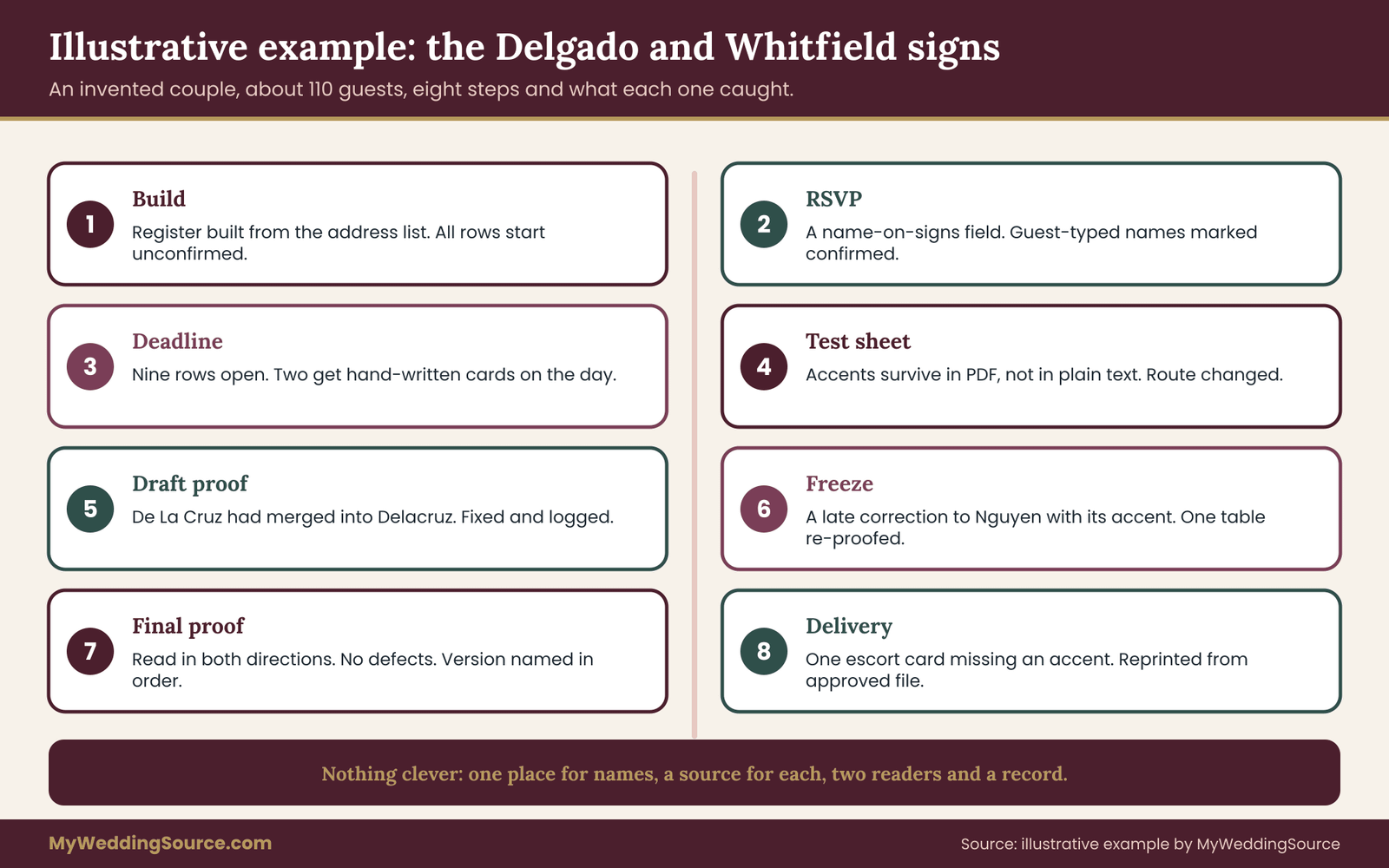
Imagine a couple, Marisol Delgado and Tom Whitfield, planning a wedding for about a hundred and ten guests. They have an acrylic welcome sign, a printed seating chart on a board, and printed escort cards. The seating chart and escort cards come from a local print shop. The welcome sign comes from a laser-cutting studio.
Early on, Marisol builds a register from her household address spreadsheet. She adds the eight fields, sets every row to “needs confirmation”, and adds a status column. Tom’s family list arrives as an email from his mother, which Marisol copies into the register with the source marked “relative”.
During RSVP season, the online RSVP form includes a field asking for each guest’s name as they would like it on signs. As replies arrive, Marisol copies the names, sets the source to “guest”, and marks them confirmed. Replies by phone and message are entered with the same care. For two guests who sent no preference, she sends the short confirmation message.
At the confirmation deadline, nine rows are still unconfirmed. Seven belong to guests of Tom’s relatives. Marisol asks Tom’s mother, who confirms five. Two remain unconfirmed, and under the fallback rule they get hand-written place cards on the day, with no names on the printed chart.
The watch list has seventeen rows: three hyphenated surnames, four with accents, two with apostrophes, three with particles, two with transliterated names, and three with nicknames. Marisol runs a test sheet with those names through the print shop’s file route and finds that the accents survive in a PDF but not in the plain text export she planned to send. She switches to PDF for the seating chart and sends a text file in a modern encoding for the escort cards, then tests again.
At the draft proof, Marisol and her friend Dana run the five-step proof. Dana finds that the chart shows “Delacruz” where the name spelling register has “De La Cruz”, because the design program merged the words. They fix the file and log the correction.
At the freeze, the register is locked. A week later, a guest replies that her surname is spelled “Nguyễn” and not “Nguyen”. Marisol logs it, updates the name spelling register, confirms the font includes that letter, and rebuilds the table. Because the change affects one name, the two readers run a short re-proof of that table, the counts, and the order.
At the final proof, Tom and his sister read the full file in both directions. They find no defects. The shop’s own proof matches. The order goes out with the file version named and a note that name spellings are intentional.
At delivery, a helper checks the escort cards and finds one card with a missing accent that the shop’s printer dropped. Because the approved file is on record and shows the accent, the shop reprints the one card at no charge. The wedding proceeds with no wrong name on a sign.
The example is simple on purpose. Nothing in it is clever. Every save came from the same few habits: one place for names, a source for each confirmation, a test with hard names, two readers and a record of what was approved.
When name spelling goes wrong anyway: limits and repairs
No audit removes every risk, and it is better to say so plainly. The method in this guide reduces errors a great deal, but it has real limits, and a few things are outside your control.
What the audit cannot do
The audit cannot tell you how a guest wants their name spelled. It can only make sure that whatever you recorded reaches the sign. If the register holds a wrong name spelling that nobody questioned, the sign will show the wrong name spelling faithfully. This is why the source and confirmation fields exist: they tell you which rows are trustworthy and which need a question.
The name spelling audit cannot guarantee a vendor’s equipment or process. A laser cutter may mis-handle a character, a printer may substitute a font, and a calligrapher may misread a handwritten list. The name spelling proof of the physical item and the delivery check are your protection against that, and they only help if there is time to act.
The audit does not cover the postal side of invitations. Envelope addressing, address formatting and mailing standards follow the rules of the United States Postal Service, and those rules and fees change. If any of your name lists also feed envelopes or mailed items, check the current Domestic Mail Manual and addressing guidance at the source. The invitation etiquette guide covers how names and titles are written on the envelope itself.
Finally, the name spelling audit is a process for ordinary guest lists. Very large events, events with names in several scripts, and events where a planner or several family members all edit the list may need more structure, such as a formal approval step for each change, or a short training session for helpers.
If you find an error before printing
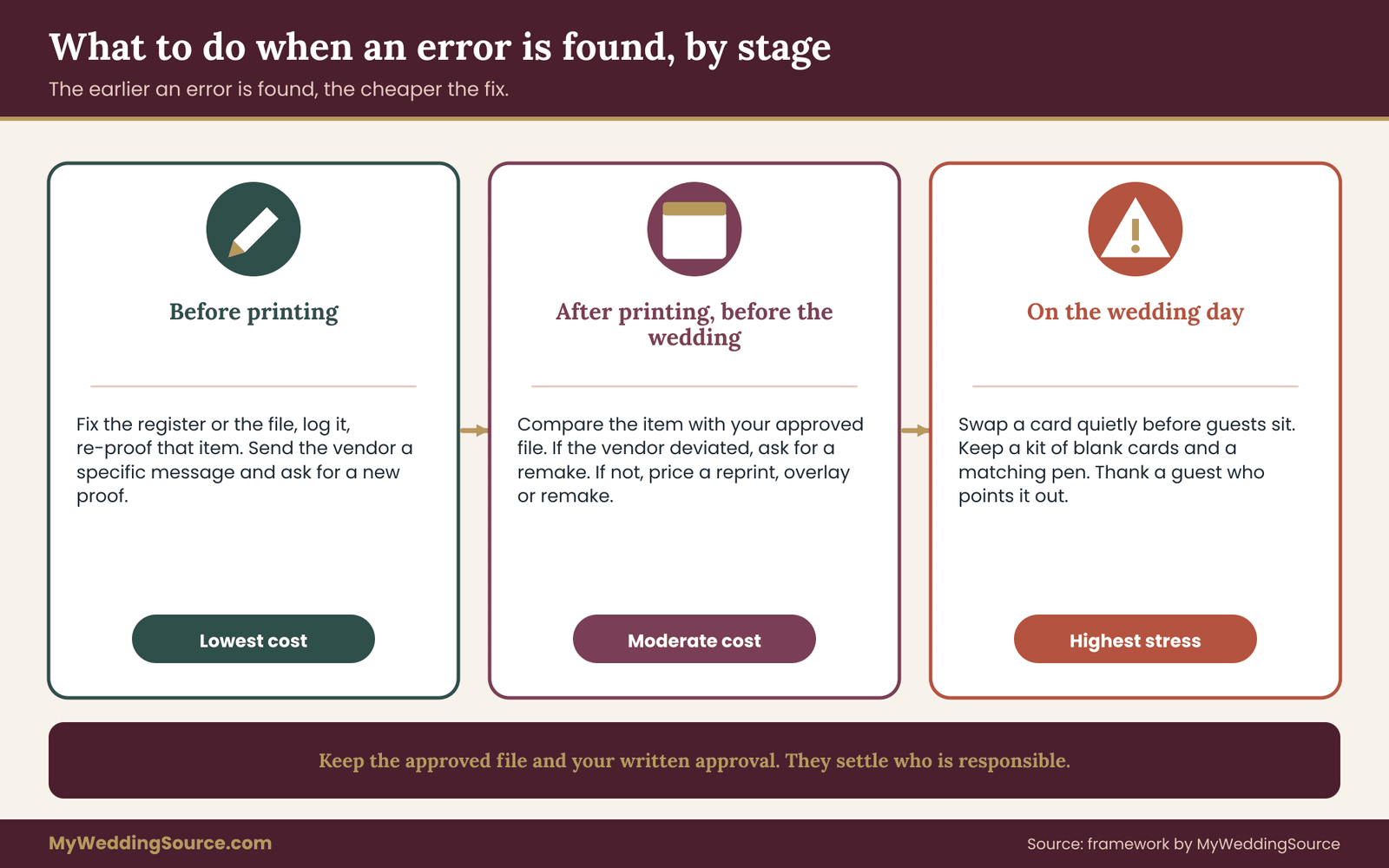
This is the good outcome, and it is the reason for the proof. Correct the name spelling register first if the register was wrong, or correct the file if the file was wrong. Log it. Re-proof the changed item. If the vendor has already received the old file, send the new one with a clear message about what changed and ask for a new proof.
Do not rely on the vendor catching the change from a revised file with no explanation. Say, for example, “Table six, guest three: please change ‘Meyers’ to ‘Meyer’. No other changes.” A specific message is far less likely to be misread.
If you find an error after printing but before the wedding
Check the vendor’s terms and your approved file. If the item differs from what you approved, the vendor is usually responsible for a remake, and your written approval is the evidence. If the item matches the approved file, the error was yours, and a remake is likely a new order at a cost.
Then compare the cost of a remake against the alternatives, which depend on the item.
For a printed card or a small sign, a corrected print may be quick and cheap. For a seating chart on a board, a small overlay label with the corrected name can work if it is neat. For acrylic or engraved items, a remake is often the only clean solution, and you should ask the vendor how quickly they can do it and whether a rush is possible.
When the error is minor and the item cannot be remade in time, you can sometimes reduce its visibility. A neat, well-made correction by a calligrapher or a careful reprint of a single name card is better than a visible handwritten fix. Whatever you choose, tell the affected guest or their family member in advance if the error is on a sign that will be seen, with a short apology. People tend to be kind about small mistakes that are acknowledged early.
If you find an error on the day
On the day, the aim is to protect the guest’s comfort and avoid drawing attention. Ask a trusted helper to correct it quietly, for example by replacing a card at a table before guests are seated, or by turning a sign away from view if it cannot be fixed.
If a guest points out their own name has been misspelled, thank them, tell them it will be corrected, and avoid long explanations. A calm “Thank you for telling us, I am sorry about that” is enough. Afterward, write down the error in the change log, so the same name is right on any later item such as thank-you cards.
Keep a small kit for the day: blank cards, a fine pen or marker that matches your card stock, a few extra blank place cards and a copy of the name spelling register. This turns a stressful moment into a two-minute fix.
Be fair to yourself
Perfection is not the standard. A small mistake on one escort card, handled kindly, will be forgotten by everyone but you. The audit exists so that mistakes are rare and recoverable, not so that every sign is flawless. If you have done the register, run the two-person proof and kept the records, you have done what a careful professional would do.
How often to revisit the process
The name spelling audit is a method, so review it after your wedding and before any similar event. Note which source of errors appeared most, which step caught problems, and which route from register to sign gave trouble. If you plan another event, such as a rehearsal dinner or a family celebration, you can reuse the name spelling register and the log, and the next audit will be shorter.
If you work as a planner, a stationer or a sign maker, the same method works as a client-facing process. Giving a couple a one-page proof sheet and a clear approval step is a service in itself, and it reduces disputes about who approved what.
Your next steps
You can begin the audit in a single evening. Work through these actions in order, and stop when you have done the ones that apply to your wedding.
- Create the register with the eight fields and mark every guest row as “needs confirmation”.
- Choose one owner and one backup, and tell helpers that corrections go to the owner.
- Add a name field to your RSVP, worded so guests know it will be used on signs.
- Confirm unconfirmed names by message, and record who confirmed each one and when.
- Mark the watch-list rows, then run a test sheet through your real export route.
- Ask each sign vendor the three questions and record the answers with your order.
- Set a freeze date backward from the vendor’s deadline, and start a change log.
- Run the two-person proof, in both directions, and sign off on a specific file version.
- Check the delivered items against the approved file before the wedding.
- Keep the name spelling register and the log, and delete vendor copies when the work is done.
If you want a broader view of how signs fit into the day, the wedding signage system guide shows how the pieces work together. For layout of the tables themselves, the wedding seating chart guide covers the decisions that come before you put names on a sign. And for the printer side of the work, the print production guide goes further into proofing and handoffs.
FAQ
What is a wedding signage name spelling audit?
It is a short process that checks every guest name on your signs against one trusted record. You keep a single register of confirmed names, export every sign from it, and have two people compare the final file to the register before printing. The goal is that each name matches what the guest wants, in every place it appears.
How many people should check name spelling before printing?
At least two, and neither should be the person who built the file. One reads each name aloud from the name spelling register, and the other follows along in the final sign file and marks each match. Then they swap roles for the names most likely to go wrong. This catches mistakes a single reader tends to skip.
Should I ask guests to confirm how they spell their names?
Yes, when you can. The easiest way is a line on the RSVP asking how the name should appear on seating and signs. For guests you cannot ask directly, confirm through the person who invited them and note that source in your register. Guessing silently is the most common route to a wrong name on a sign.
How do I keep accents and apostrophes from disappearing?
Test the exact route your names will take. Export a short sample with your hardest names, open the exported file, and read it. If characters are damaged, change the file format, use a font that includes them, or send a PDF. Check final sign files visually at full size, since text can look right in a list and wrong on the page.
When should I freeze the guest list for signs?
Work backward from the sign maker’s latest accepted date for final names and leave a buffer of a few days for a correction and a re-proof. Ask the vendor for that deadline in writing. After the freeze, changes go through an owner and a change log, and late additions can be handled with hand-written cards.
What should I tell a printer about name spelling?
Say that all names are intentional and must be printed exactly as supplied, with no automatic corrections. Ask for a proof of every name, approve it in writing with the file version, and ask what happens if a name does not fit its box. Keep the name spelling proof and your approval with your order records.
Who pays if a printed name is wrong?
It depends on the vendor’s terms and on your approved file. If the item differs from the file you approved, the vendor is typically responsible for fixing it. If it matches your approved file, the error is usually yours to bear. Read the contract language on approvals and remakes before ordering, and keep your written approval.
What should I do if a name is misspelled on the wedding day?
Fix it quietly if you can, such as swapping a card before guests sit, and keep a small kit of blank cards and a matching pen for this. If a guest notices, thank them and apologize briefly. Then record the correct name spelling in your register so it is right on thank-you cards and later items.
Sources
- Domestic Mail Manual, Mailing Standards of the United States Postal Service, USPS
- Publication 28, Postal Addressing Standards, USPS
- United States Postal Service
- The Unicode Standard and character encoding, Unicode Consortium
- Internationalization, personal names around the world, W3C
- Protecting personal information and privacy and security guidance for business, Federal Trade Commission
- Cybersecurity and Infrastructure Security Agency
- Social Security Administration
- USAGov