A multilingual wedding RSVP is a multilingual wedding RSVP form that guests can read, understand and complete in the language they are most comfortable with, and that still gives you clean, usable answers. This guide is a field-by-field checklist for building one: what each label, hint and error message must say, what to store behind the scenes, and how to test the result before a single invitation goes out.
For every field on the form, write three strings in every language you offer: a label, a short hint and an error message. Keep the answers you collect language-neutral (a number, a yes or no, a coded meal choice) so you can count them without translating. Let guests switch language at any step, and never make them re-enter anything when they do. Have a fluent reader of each language try the multilingual wedding RSVP on a phone, including every error. Keep a paper or phone fallback for anyone the form fails.
Most couples who offer a multilingual wedding RSVP form in two or more languages translate the invitation text carefully and then translate the multilingual wedding RSVP in an afternoon. That is where the trouble starts. The invitation is read once, calmly, at a kitchen table. The form is used under mild pressure, on a small screen, often by a relative who is helping a grandparent. A vague label or a cold error message does not just look clumsy. It produces a wrong headcount, a missing allergy or a guest who gives up and calls you at midnight.
A good multilingual wedding RSVP is less about perfect translation than about fewer ways to be wrong. This article is built around that idea. It gives you a way to audit who needs which language, three build options with honest trade-offs, a field-by-field specification, an error message checklist, a worked case and a testing routine with clear failure conditions.
A note on scope. This is general planning information, not legal advice, and a machine translation is never an authoritative translation of anything with legal or ceremonial weight. Where accessibility, privacy or language-access rules might matter to you, the article points to the agency that publishes them so you can read the current version yourself.
What a multilingual wedding RSVP form actually has to do
It helps to be precise about the job. A multilingual wedding RSVP form has five duties, and a translated one has to perform all five in every language, not just the one you speak best.
First, it has to identify the guest or household. Second, it has to record attendance for each person. Third, it has to capture the details you need to plan, such as meal choice, allergies, access needs and transport. Fourth, it has to confirm what was received so the guest knows the reply worked. Fifth, it has to leave you with data you can total, sort and act on without translating each row by hand.
The fifth duty is the one couples forget. If guests type free-text answers in four languages into a single “dietary needs” box, you now own a translation job on the week of your caterer’s final count. The design choices later in this guide exist to prevent that.
Where translated forms usually fail
Failures cluster in a few places, and they are rarely the obvious ones. The headline text is usually fine because someone checked it. The failures sit in the small strings that nobody reviews.
A date field that accepts day-first in one language and month-first in another. An error that says “Invalid input” in English and a literal, stiff rendering of it in Spanish that no one would ever say aloud. A button that reads “Submit” in one language and something that suggests the guest is filing a legal document in another. A dropdown sorted alphabetically in one language, so the English order and the Portuguese order no longer match the data underneath. A confirmation email that arrives in English because the guest’s language choice was not saved.
None of these is hard to fix once you can see it. The trick is to build a process that makes you look at them, which is what the checklist sections do.
What this guide does not cover
The broader question of when to send invitations, how to word a reply deadline and what to do about guests who do not respond is covered in the site’s guide to wedding RSVP etiquette. Wording, paper, printing and mailing for invitations in two languages sit with the invitation material, and the general rules for who gets invited and how are in the wedding invitation etiquette guide. This article stays on the multilingual wedding RSVP form itself: its fields, its strings, its errors and its testing.
Start with a guest language audit before you build anything
Before choosing software or a layout, find out which languages your guests actually need. Guessing produces two opposite mistakes. One is offering six languages because the guest list looks varied, then maintaining six untested versions. The other is offering one extra language and discovering that three of your oldest relatives read a third.
Build a language column in your guest list
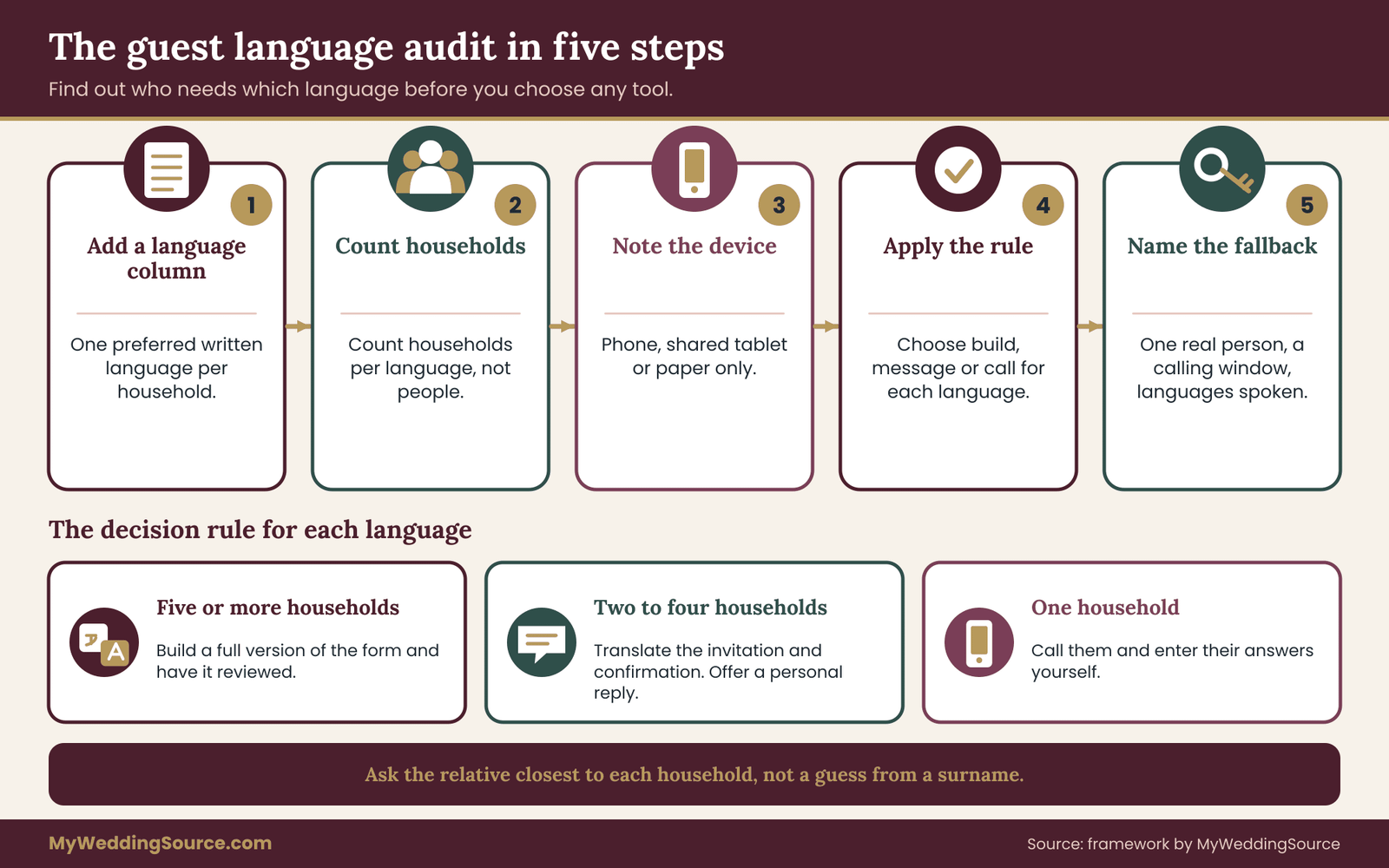
Add one column to your guest spreadsheet: preferred language for written replies. Fill it in household by household, not guest by guest, because a household usually replies once. If you are not sure, ask the person in the family who is closest to them. A direct question works well: “Which language would be easiest for your aunt to read a form in?” That phrasing avoids implying that she cannot read English, which can sting.
Leave a second column for spoken language, because it is different. A guest who reads English comfortably may still prefer to phone in a reply in another language. That column tells you whether a phone fallback needs a speaker of a particular language.
Count households, not just people
For each language, count the households that need it. A language needed by one household of two people is a candidate for a personal phone call or a printed reply card, not a fully built form. A language needed by eight households is a candidate for a real translation. The line between the two is a judgment call, and the decision rule in the next section helps you draw it.
Do not rely on surnames, countries of origin or assumptions. People with the same family name read different languages, and people who were born abroad often prefer to read in English. Ask, or let guests choose for themselves on the first screen of the multilingual wedding RSVP.
Note reading level and device, not only language
Two more facts change the design. Reading comfort varies inside a language, so a form written in plain, short sentences serves more guests than one written in formal prose. And devices vary. Some guests will only ever open the link on a phone, some will use a shared family tablet and some will print and mail a card. The guide to wedding guest lists covers how to build the underlying list; here you only need the language and device notes added to it.
A quick decision rule for each language
Use this rule for each language on your list. If at least five households need it and you can find a fluent reader to review the full form, build it. If between two and four households need it, build the invitation and the confirmation message in that language and offer a personal phone or message option for the reply. If one household needs it, call them, and record their answers yourself. This keeps the number of fully built versions small enough to review properly, which matters far more than the number you advertise.
Three ways to build a multilingual wedding RSVP, and when each one fails
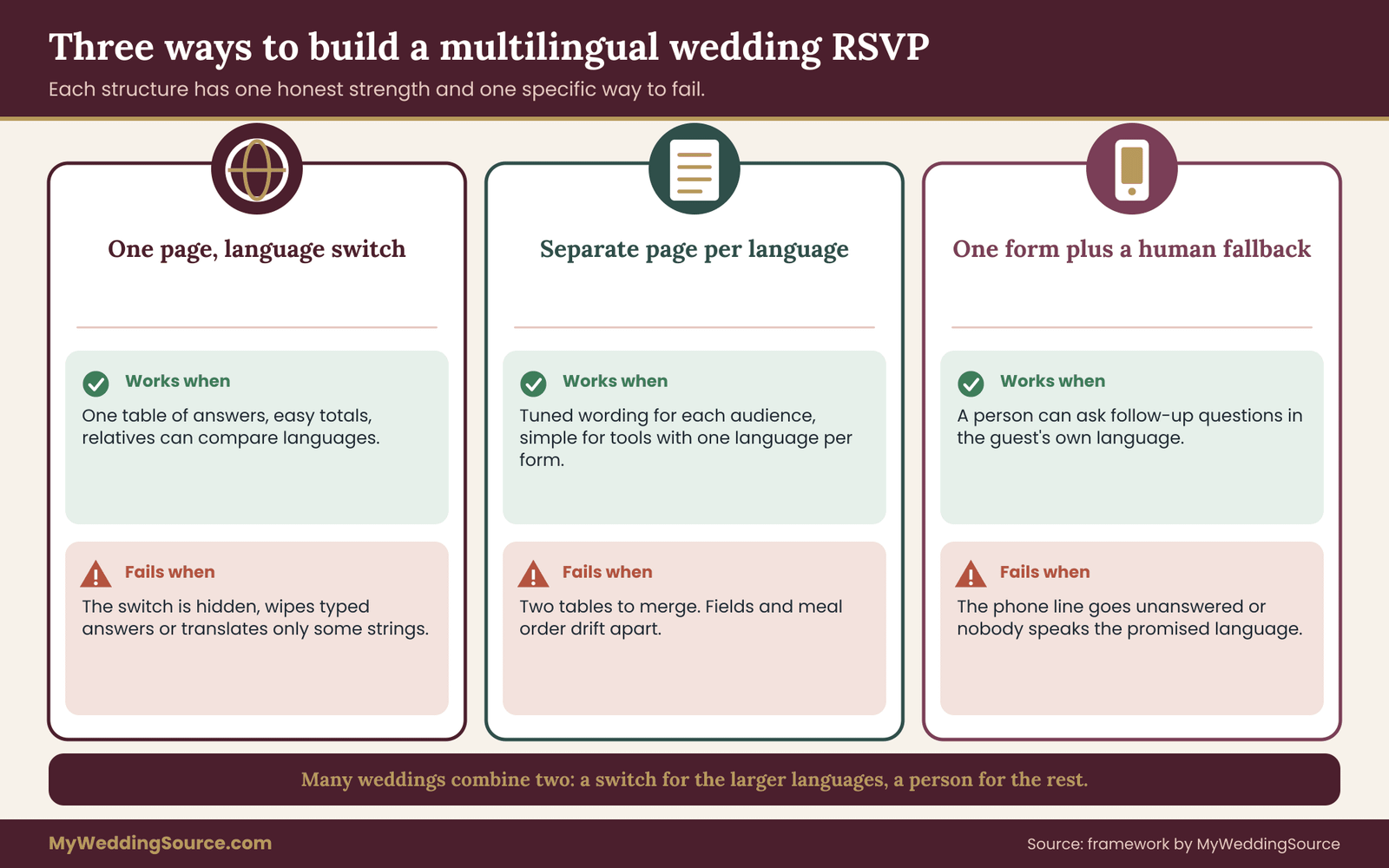
There are three realistic structures for a multilingual wedding RSVP. Each has a place, and each has a specific way of going wrong. Pick the one whose failure you can best tolerate and monitor.
Option one: a single page with a language switch
One form, one web address, and a visible language selector at the top. The guest picks a language and the labels, hints and errors change in place. All answers land in one table with one set of fields.
This is the best structure for most couples because the data stays clean. Every guest answers the same questions in the same shape, so totals are simple. It also lets a bilingual household help each other, because one person can flip to the other language to check a question.
It fails when the switch is hidden, when the switch reloads the page and wipes what the guest typed, or when the tool only translates some strings and leaves others in the default language. Test the switch at every step, not just on the first screen.
Option two: separate pages for each language
A different web address per language, each with its own form. The guest receives the link for their language, often on a printed card or inside a language-specific message.
This works when your tool cannot switch languages cleanly, or when two sides of a family would rather not see each other’s version. It also lets you tune wording for a specific audience.
It fails in the data. Two forms means two tables to merge, and small differences creep in: one form has a field the other lacks, the meal options are ordered differently, a household replies on both. Plan for a merge step, and use identical field codes in every version so the merge is a paste rather than a puzzle.
Option three: a form in one language plus a human fallback
Offer the form in your main language, and offer a printed reply card, a phone number or a trusted relative as the path for everyone else. This is not a lesser choice. For a small number of guests it is the most respectful and the most accurate, because a person can ask a follow-up question in the guest’s own language.
It fails when the fallback is not staffed. A phone number that goes to voicemail in a language nobody checks is worse than no number. Name a real person, give a calling window, and say which languages that person speaks.
Mixing options without making a mess
Many weddings combine two of these. A common mix is option one for the languages with enough households, and option three for the rest. State the combination plainly in the invitation insert so no guest has to guess which route is meant for them. If you are combining, keep one master list of replies and record every reply in it, whatever the route, on the day it arrives.
Choosing by constraint, not by taste
Some constraints push the choice. If your invitation suite is printed in two languages on one card, a single page with a switch matches it. If you are using a free form tool that offers one language per form, option two is the practical route. If most of your guests are older and less comfortable online, option three should carry more weight than the multilingual wedding RSVP does. The question is always the same: which structure gives you the fewest wrong or missing answers for your actual guests?
For invitation printing, bilingual layouts and mailing, the site’s invitation print production guide covers proofing and printer handoffs, which is where the web address for your form usually first appears in print.
The string triplet: label, hint and error for every field
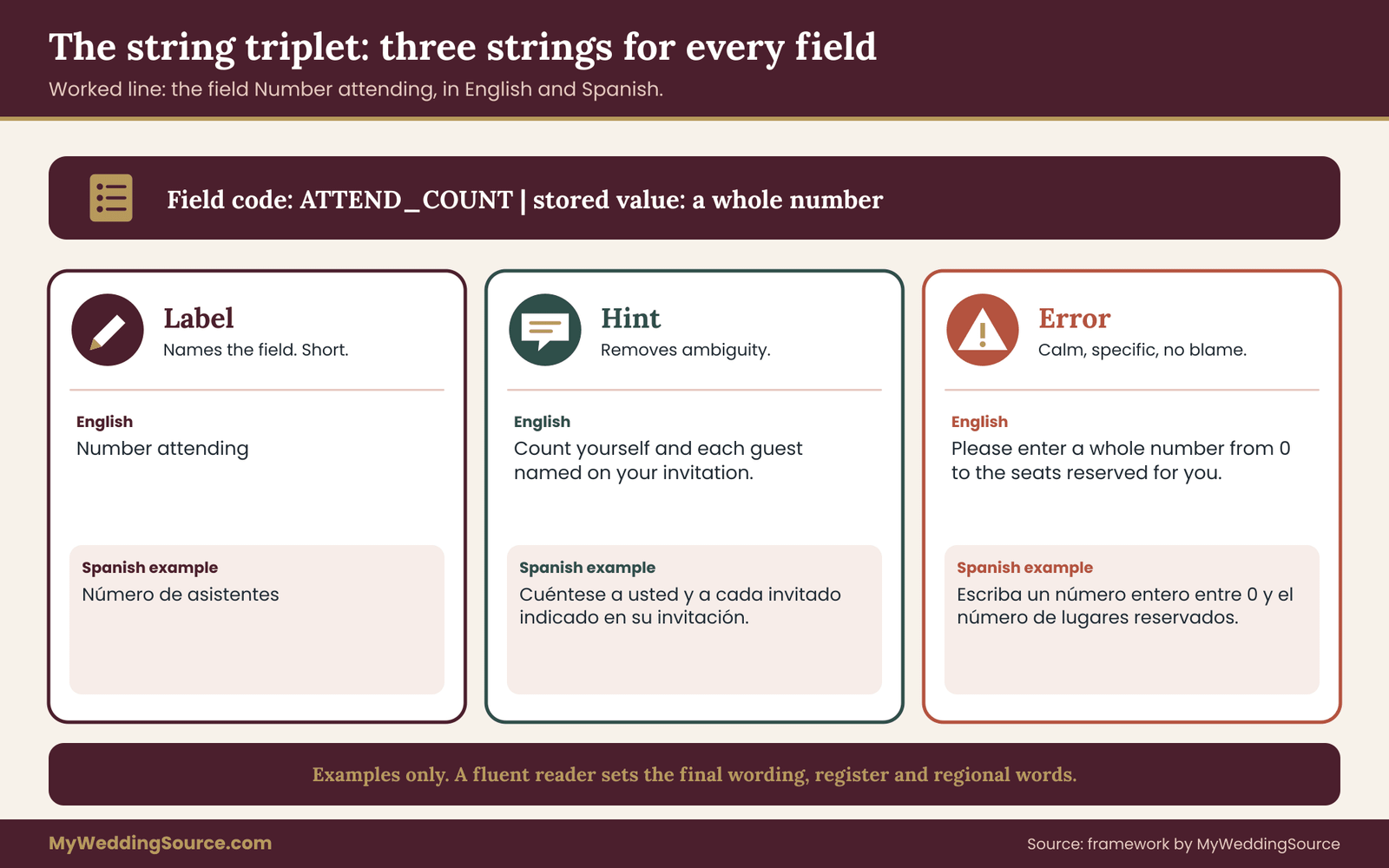
The central idea of this guide is the string triplet. Every field on the multilingual wedding RSVP needs three pieces of text in every language: a label, a hint and an error message. Most translated forms translate the label and nothing else with care.
What each string does
The label names the field. It should be short and noun-like, such as “Number attending” or “Meal choice.” The hint explains how to fill it in, such as “Include yourself and the guests named on your invitation.” The error tells the guest what went wrong and how to fix it, such as “Please enter a number from 0 to 4.”
Written this way, the three strings have different jobs, and they translate differently. Labels translate well as short phrases. Hints need full sentences in a natural register. Errors need calm, specific, blame-free wording, and they are the strings most likely to be left as a literal translation of the original.
Why the hint matters more in translation
A label that is obvious in English can be ambiguous in another language. “Guests” might read as “visitors” or as “invited people.” “Party” can read as a celebration, a political group or a group of travelers. The hint is where you remove the ambiguity. In a multilingual wedding RSVP the hint often does more work than the label, so it should never be skipped for the sake of a tidy layout.
Keep a string inventory
Make a simple list, in a spreadsheet or a plain document, with one row per string: the field code, the string type (label, hint, error), the English version and each translation. Add a column for who reviewed it and a column for the date. This is your string inventory, and it is the single most useful document in the project.
The inventory solves three problems at once. It shows you at a glance which strings still lack a translation. It gives each reviewer a clear list to check instead of a form to wander around. And when you change a field, it tells you exactly which strings to update in every language, so the Spanish version does not quietly keep an old question.
Do not build sentences from fragments
A common technical shortcut is to assemble messages from pieces, for example “You have” plus a number plus “guests” plus “on your invitation.” That works in English and breaks elsewhere, because word order, number agreement and articles differ across languages.
Write each message as one complete string with a placeholder for the number, and translate the whole sentence. If your tool cannot do this, write each variation as its own string. Plurals are the usual trap: some languages have different word forms for one, a few and many, and a message that handles only singular and plural will read wrongly for some numbers.
A short worked line
Take the field “Number attending.” In English: label “Number attending,” hint “Count yourself and each guest named on your invitation,” error “Please enter a whole number between 0 and the number of seats reserved for you.” In Spanish, a careful version would be: label “Número de asistentes,” hint “Cuéntese a usted y a cada invitado indicado en su invitación,” error “Escriba un número entero entre 0 y el número de lugares reservados para usted.” These are examples of the three strings, not authoritative translations; a fluent reader should adjust register and regional wording before they go live.
The register choice in that example, formal “usted” versus informal “tú,” is a real decision. It is better to make it once, write it in the inventory and apply it everywhere. A form that mixes the two reads as careless to the people it was meant to welcome.
Field-by-field specification for a multilingual wedding RSVP
This section walks through the fields most reply forms use, in the order a guest meets them. For each one it gives the decision to make, the stored value and the translation risk. Treat it as the core of your multilingual wedding RSVP specification, and copy it into your string inventory.
Field one: language choice
The first field should be the language selector, shown in each language’s own name, such as “English,” “Español” and “Français,” rather than all in English. A guest who cannot read the English word “Spanish” should still be able to find “Español.” Do not use flags, which stand for countries, not languages, and which many guests find confusing or unwelcome.
Store the choice as a short code, such as en, es or fr, in its own column. This one value later drives the language of the confirmation message and any reminder, so a missed save here causes problems downstream.
Field two: finding the household
Most forms ask guests to find themselves on the list by typing a name. This is the single riskiest step in a multilingual wedding RSVP, because names do not behave like ordinary words. A guest may type a name with accents, without accents, in a different order, with a married name or with a nickname.
Make the match forgiving. Ignore accents and capital letters when comparing. Accept the family name in either order. Offer a short list of near matches rather than a flat “not found” message. If the tool cannot do any of that, assign each household a short code printed on the invitation, and let guests enter the code instead of a name. A code such as a four-character household code works in every language and avoids spelling altogether.
Field three: names as the guest wants them written
If you need names for place cards, name tags or a seating chart, ask for them directly and let guests correct them. The guest knows how their own name is spelled and how they prefer to be addressed. The point for the multilingual wedding RSVP is to store the name exactly as typed and not to “fix” it.
Do not force a first-name and last-name split. In some cultures the family name comes first, some people have a single name and some have several family names. A single “full name as it should appear” field avoids guessing. If your venue or caterer needs a legal name for security or a ticket, ask for that separately and say why.
Field four: attendance for each person
Ask attendance per person, not per household, with a clear yes or no for each named guest. The labels “Will attend” and “Cannot attend” are safer than “Accept” and “Decline,” which can sound like a formal contract in some languages. A neutral phrase such as “Joyfully accepts” belongs on a printed card, not as the only option on a form.
Store the answer as a value that does not depend on language: Y or N, or 1 and 0. The label shown to the guest can be in any language, but the data is the same. This is what lets you total all replies in one column without translating.
Field five: number attending versus named guests
There are two designs. In the first, the form lists each invited person with a yes or no. In the second, the multilingual wedding RSVP asks for a number attending. The first is more precise and works better with meal choices, because each person gets their own row. The second is quicker but loses the link between a person and their meal.
For a multilingual wedding RSVP, the named-guest design is usually safer, because a number field invites the very ambiguity that translation makes worse: does “guests” include me, include children, include a plus-one I was not told about? Named rows remove the question.
Field six: plus-ones and unnamed guests
If a household may bring a guest who is not named on the invitation, the multilingual wedding RSVP needs a way to collect that guest’s name and meal. Write the hint carefully: “Your invitation includes one additional guest. Please enter their name.” If the invitation does not include a guest, the multilingual wedding RSVP should not show the row at all. Showing it and then rejecting it with an error is a bad experience in any language.
Field seven: meal choice
Meal choice is covered in more detail in the next section. For now, the rule is to store a code for each option, such as BEEF, FISH or VEG, and display the translated name. Never store the translated name, because the same dish will have different spellings across languages and you will end up with five labels for one meal.
Field eight: allergies and access needs
These are the fields where free text is most tempting and most dangerous. A tick-box list plus an optional note gives you data you can count and a way for the guest to say something you did not anticipate. The next section treats this in detail.
Field nine: contact for changes
Ask for one reliable way to reach the household: an email address or a mobile number. State clearly how it will be used, for example “We will use this only to confirm your reply and to send updates about the wedding.” Do not ask for more than you need. If you plan to send text messages, keep the wording simple and always include a way to stop.
Field ten: a final free-text note
End with one optional box: “Anything else we should know?” This box catches the things no list could. Tell guests they may write in any language. That small sentence removes a barrier, and you can translate the occasional note yourself or with a friend. What matters is that the free-text box is for exceptions and that the critical information, attendance, meals and allergies, sits in structured fields.
Names, titles and addresses in a multilingual wedding RSVP
Names and addresses cause more quiet errors than any other part of a multilingual wedding RSVP form. They are also the part where good intentions, such as tidying or standardizing, do the most harm.
Accept every character your guests use
Test the form with names that include accents, apostrophes, hyphens, spaces and non-Latin scripts. A name like “Zoë,” “O’Brien,” “Nguyễn” or “Søren” should be stored and shown exactly as entered. If the multilingual wedding RSVP strips an accent, rejects an apostrophe or turns a character into a question mark, the guest will notice, and some will take it personally.
If your invitation printer needs plain letters for envelopes or place cards, handle that conversion yourself later, from the stored original. Never ask the guest to change their own name to suit your tool.
Titles and forms of address
Titles differ widely. A form that offers only “Mr.,” “Mrs.” and “Ms.” excludes guests who use other titles, a professional title or no title. Make the title field optional and free-text, or leave it out. If you need it for formal envelopes, ask in the printing step, not in the multilingual wedding RSVP form.
In some languages, titles interact with grammar, so a title chosen in the form can make a later message grammatically wrong. Free text avoids guessing, and the confirmation message can simply use the full name the guest entered.
Address fields that fit different countries
If you collect mailing addresses on the multilingual wedding RSVP, remember that the order of address lines, the placement of the postal code and even the presence of a state or province differ between countries. A form that demands a “State” with a dropdown of fifty US states cannot be completed by a guest in Mexico, Poland or Japan.
Use one or two flexible address lines, a city, an optional region, a postal code with no fixed format and a country selector. Do not validate postal codes against a US pattern. If the invitation or thank-you card will be mailed within the United States, the United States Postal Service publishes its addressing standards, which are worth checking before you decide what to require. Keep the addresses in the same spreadsheet as your language column so one row describes one household.
Phone numbers
Accept a plus sign, spaces, hyphens and parentheses in phone numbers, and ask for the country code, or add a country selector. A rule that accepts only ten digits in a specific pattern will reject valid numbers from many countries. Write a hint such as “Include your country code if you are outside the United States,” and translate it.
Dates and times shown on the form
Every date on the multilingual wedding RSVP should be written in an unambiguous way, with the month spelled out, such as “June 14.” A numeric date like 6/7 means June 7 to one guest and 6 July to another. When you show the reply deadline, spell the month in each language and include the year if it could be unclear. If your guests are in several time zones, add the time zone to any deadline with a clock time, or use a date only.
Layout, length and script problems in translated forms
A multilingual wedding RSVP has to work on a small screen in every language, and languages do not take up the same space. Spanish, French and German labels are often noticeably longer than their English equivalents. A button that fits “Send” may not fit “Enviar mi respuesta” without wrapping or cutting off. Leave room in every label, button and dropdown, and check each language on the narrowest phone you can borrow.
Some scripts read right to left, including Arabic and Hebrew. If you plan to offer one, the whole layout, not only the text, should mirror: labels, checkboxes, progress indicators and the order of fields. A form that shows right-to-left words inside a left-to-right layout is hard to use and looks like an afterthought. Many general-purpose tools handle this poorly, which is a good reason to ask a tool about it before you promise the language.
For languages written in other scripts, make sure the fonts used by the page include the characters, so that nothing appears as an empty box.
Regional variants and the register decision
A language is not one thing. Spanish spoken in Mexico, Spain and Argentina shares a core and differs in everyday words and in how formal people are with strangers. French in France and in Quebec, Portuguese in Brazil and in Portugal and Chinese written in simplified or traditional characters all show the same pattern. Ask the household which variety they use, and choose the version your reviewer actually speaks. A fluent reader from the wrong region will not catch the words that sound off to your guests.
Then decide the register once. Formal address is a safe default for older relatives and for anyone you do not know well, and a warm, plain tone can still sit inside it. Write the decision at the top of the string inventory so every reviewer follows it. This choice, more than any single word, is what makes a multilingual wedding RSVP sound like it came from the couple rather than from a tool.
Names of the language choices and the first screen
The first screen deserves its own review, because it is the only part of the multilingual wedding RSVP that every guest sees before they have chosen a language. Show a short welcome line in each offered language, side by side, and make the language buttons large. Do not place the language choice behind a small icon or a menu. A guest who cannot read the default language must be able to find their own without help, so each option is written in its own language, and the page works without scrolling on a phone.
Meal and allergy fields without mistranslation
Food questions look simple and carry the highest stakes on any multilingual wedding RSVP. A mistranslated dish is an inconvenience. A mistranslated allergy is a safety problem. The design goal is to remove interpretation from the chain wherever you can.
Name dishes by what is in them
Menu names are often poetic or local, and they translate badly. “Chef’s seasonal plate” tells a guest nothing in any language. Describe each option by its main ingredient and the way it is prepared: “Roasted chicken with potatoes,” “Baked salmon with rice,” “Vegetable and bean stew, no animal products.” Then translate the plain description, not the menu name.
The site’s guide to wedding menu planning covers how to build a menu for different ages and diets; for the form, the rule is only that each option needs a plain description and a stored code.
Use codes, show translations
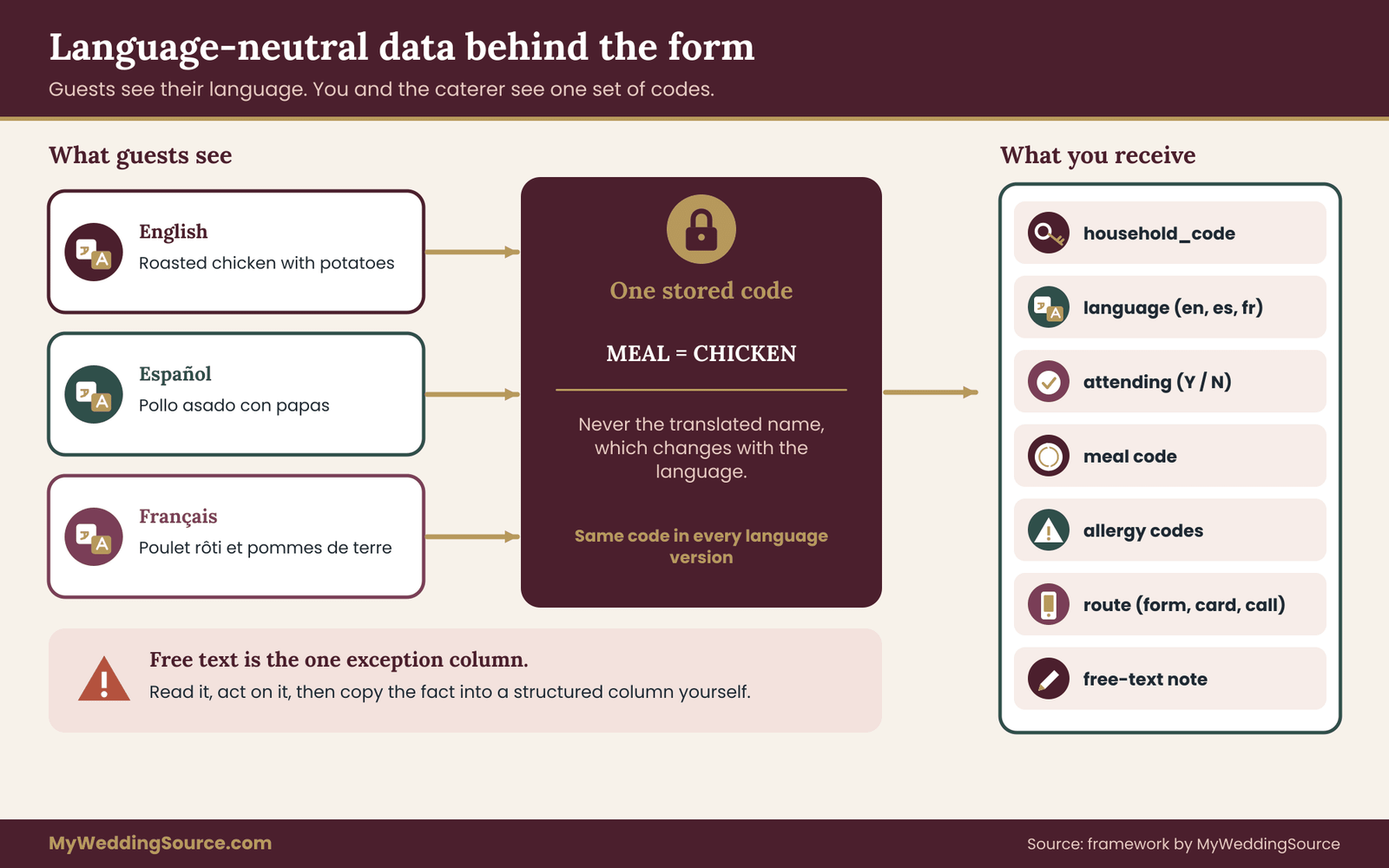
Behind the multilingual wedding RSVP, store BEEF, FISH, VEG and KIDS, or whatever codes you choose. The guest sees the translated description in their language, and your caterer receives a single list in one language. This is the point of a language-neutral data layer. A caterer should never have to read “pollo,” “poulet” and “chicken” and work out that they mean one dish.
If the form lets a guest choose a meal in a language and later change their language, the choice must stay selected. Test this specifically, because a language switch that clears a dropdown is a common and silent bug.
Allergies: structured first, free text second
Offer a short list of tick boxes for common allergens, then an optional text box for anything else. For the United States, the Food and Drug Administration publishes the list of major food allergens that packaged foods must declare, which is a sensible starting point for your boxes. Confirm the current list with the agency, and ask your caterer which categories they can actually accommodate.
The hint above the allergy field should say what happens to the information: “We will share this with our caterer so they can plan safely.” Guests are more likely to be honest and complete when they know why you ask. A hint should also tell guests what not to do, for example “If an allergy is severe, please also tell us by phone.”
Do not paraphrase an allergy
If a guest writes an allergy in free text in a language you do not read, do not guess at it and do not pass a machine translation to the caterer as if it were reliable. Send the original text, and then ask the guest, in their language if possible, to confirm in a few words. A short follow-up message costs far less than a reaction at the wedding.
For a single severe allergy, a phone call is better than any form. Treat the multilingual wedding RSVP as the first step and the call as the confirmation.
Dietary rules and religious or cultural food needs
Terms like “halal,” “kosher,” “vegetarian,” “vegan” and “pescatarian” are understood differently by different people. Ask what the guest does and does not eat, in plain words, rather than relying on the label. A guest who writes “vegetarian” may still eat fish or eggs depending on their tradition, and the same word can mean different things in different countries. Offer a box with a short description beside each label, and an open note for anything further.
Children’s meals and age bands
Ask the age of each child, or an age band such as “under 4,” “4 to 12,” and “13 and older,” rather than a bare “child.” Age bands differ in meaning across languages if you simply write “child” and “adult,” because the cutoff varies. Spell the age range out in the hint. For the form, you only need the band and the meal code.
Access needs and seating
Access fields work like allergy fields: tick boxes first, text second. A few plain options such as “I use a wheelchair,” “I need step-free access,” “I need a seat near an exit,” “I use a hearing aid,” and “I would like large-print materials” cover most needs. State that you will contact them privately. Do not require guests to explain a disability or give a medical reason. Ask only what you need to plan, and say what you will do with it.
The error message checklist for a multilingual wedding RSVP
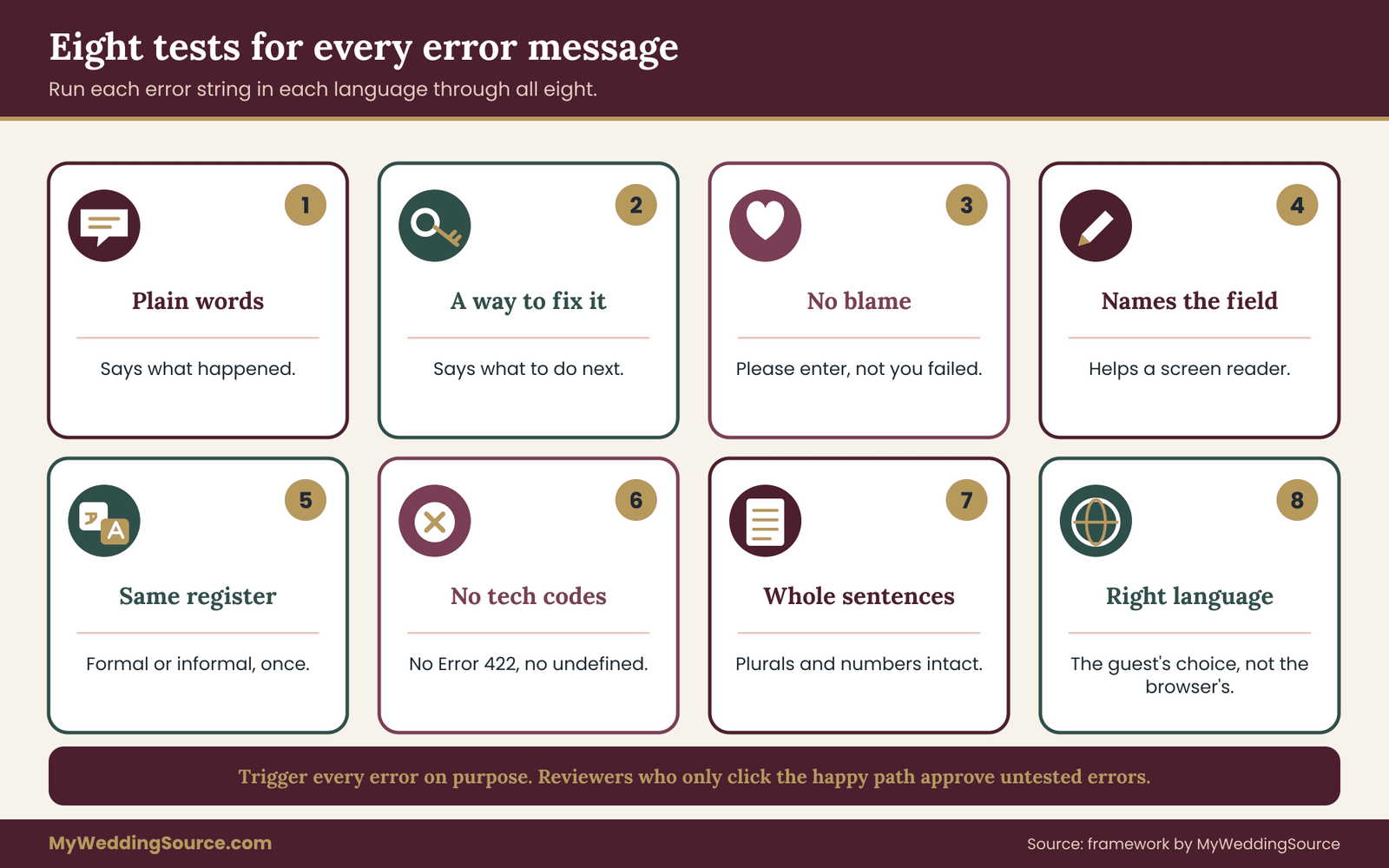
Error messages are where a translated form feels warm or cold. They appear when the guest is already confused, so wording matters more than anywhere else. Use this checklist on every error string in every language.
Eight tests for each error message
- It says what happened in plain words. “We could not find that name” is better than “Invalid entry.”
- It says how to fix it. “Try the name as it appears on your invitation, or use the code printed on the back.”
- It does not blame the guest. Avoid “You did not enter” and “Your mistake.” Use “Please enter” or “We need.”
- It names the field. “Please enter a number of guests between 0 and 4” beats “Please correct the highlighted field,” especially for a screen reader.
- It uses the same register as the rest of the multilingual wedding RSVP. If the form says “usted,” the error says “usted.”
- It does not leak a technical code. A guest does not need “Error 422” or “undefined.”
- It handles plurals and numbers as full sentences. No fragments joined by code.
- It appears in the language the guest chose. Not in the browser’s language and not in the default.
A string that passes all eight is almost always fine. A string that fails one is worth rewriting, and the failures most often come from the last test, which is a software setting, not a wording problem.
The core set of errors to write
Nearly every multilingual wedding RSVP form needs the same dozen error messages. Write each one in every language, using the tests above.
- Required field empty (name, attendance, language).
- Name or code not found.
- Name or code already used, meaning this household has replied.
- Email address not in a valid format.
- Phone number not in a valid format.
- Number attending is higher than the seats reserved.
- Meal not selected for a guest who is attending.
- Reply deadline has passed.
- A session has timed out and the answers were not saved.
- The multilingual wedding RSVP could not be sent because of a connection problem.
- A file or text is too long.
- A general server problem, with a way to reach you.
Three examples, written well
For “household already replied,” a poor version is “Duplicate submission.” A better version is “It looks like a reply has already been sent for this household. If you need to change it, please contact us at the number below, or use the link in your confirmation message.” A careful Spanish version would be: “Parece que ya se envió una respuesta para este hogar. Si necesita cambiarla, comuníquese con nosotros al número que aparece abajo o use el enlace de su mensaje de confirmación.” Have a fluent reader check the regional wording.
For “deadline passed,” a poor version is “Form closed.” A better version is “The reply deadline was June 1. If you still need to reply, please call us, and we will do our best to help.” That wording is calm, specific and offers a path forward. It matters because a flat “closed” message can read as a door shut on a family member.
For “connection problem,” the message must tell the guest that their answers may not have been saved: “We could not send your reply. Please check your connection and try again. Your answers have not been saved yet.”
Where errors should appear
Place each error next to the field it concerns and also in a short summary at the top of the multilingual wedding RSVP, so that a guest using a screen reader or a small phone screen sees it. Do not rely on color alone to mark errors; use text and an icon. This also helps guests with color vision differences and is consistent with the accessibility guidance covered later.
Keep a record of every error string
Add the errors to the same string inventory as labels and hints. When a reviewer checks the multilingual wedding RSVP, ask them to trigger every error on purpose: leave a field empty, type nonsense into the email box, enter a code that does not exist. Reviewers who only click through the happy path will approve a form whose errors have never been read.
Language-neutral data: what to store behind a multilingual wedding RSVP
A translated form is only half of the job. The other half is the table of answers it produces. If that table is a jumble of languages, you will translate it by hand in the busiest week of your planning. A multilingual wedding RSVP should collect language-neutral data from the start, so that totals, seating and catering counts need no translation at all.
The columns that never change
Plan a fixed set of columns and give each a short code that is the same in every language version. A workable set is: household code, guest name as entered, language code, attending (Y or N), meal code, allergy codes, access codes, contact, free-text note and reply date. The labels the guest sees change by language; the column names and values do not.
This is also why option two, separate pages per language, needs identical codes. If the Spanish form stores “VEG” and the English form stores “Vegetarian,” the merge becomes a manual cleanup.
Free text is the exception column
Keep exactly one column for free text per topic, and treat it as unstructured. Do not count on it for totals. Read it, act on it and, where it changes a plan, copy the fact into a structured column yourself. For example, if a guest writes in French that they cannot eat shellfish, add the shellfish code in the allergy column after you have confirmed it with them.
Store the language with the reply
Save the language code with each reply, not only on the first screen. A guest might start in English and finish in Spanish. The last language they used is usually the one to use for the confirmation message. Test the case where the guest switches halfway, because this is where a stored value is often lost.
Consider what you collect and why
Every field you add is something you must protect and, eventually, delete. Collect only what you will use. The Federal Trade Commission publishes general guidance on protecting personal information, and the same habits apply to a wedding multilingual wedding RSVP form: collect less, say why, store it somewhere secure and delete it when the event is over. The site’s guide to wedding day digital contingency planning covers backup, permissions and what to do if a tool fails.
Confirmation messages, reminders and the paper fallback
A guest who submits a form wants proof that it worked. A confirmation message in the right language is the cheapest way to prevent doubt, duplicate replies and phone calls.
The confirmation message
Send a confirmation immediately after the form is submitted, in the language the guest chose. Include the household name, a plain list of who is attending, the meal choices, any access needs recorded and the date by which changes can be made. Say how to change a reply. Keep it short enough to read on a phone without scrolling much.
Translate the subject line too. A subject line left in English can send a confirmation to the spam folder of a guest who never reads English mail, or cause them to ignore it. Check that special characters in the guest’s name display correctly in the subject and the body.
Reminders
If you send reminders, make them rely on the stored language code and test them with a real address. A reminder that arrives in the wrong language feels worse than none, because it tells the guest that the multilingual wedding RSVP forgot them. Write the reminder as a gentle nudge, give the deadline in an unambiguous date format and include one clear link or phone number.
For households that have not replied by a week before the deadline, a personal message or call usually works better than a second automated one, especially for older relatives. A phone call in their language, from a family member, is more effective than any template.
Printed reply cards as a bridge
Some guests will never complete an online form, and that is not a problem to solve with a better design. Include a printed reply card, in the guest’s language, with the same fields as the multilingual wedding RSVP in the same order. A prepaid return envelope or a clear instruction to give the card to a named relative removes the last barrier.
When the cards come back, enter them into the same table the multilingual wedding RSVP feeds. Use the same codes. Record the date received and mark the route, “card,” so you know which replies came in which way. If a card is written in a language you do not read, do not guess at ambiguous marks or handwriting. Ask someone fluent, or call the guest.
The phone fallback
Offer a phone number or a messaging contact with a stated calling window. If the person answering does not speak a guest’s language, say so on the card and name who does. A phone fallback should be staffed by someone who has the string inventory in front of them and can read the same questions aloud, in the same order, in the same words. That keeps the data consistent with the form.
A single source of truth
Whatever the route, one table is the truth. When a card, a call and a form disagree, the most recent written reply from the guest wins, and you note the date. Do not let three partial lists build up in three different notebooks. For the timing of when to send invitations and when to start chasing replies, the site’s twelve-month wedding checklist places the reply deadline within the whole plan.
Accessibility, privacy and language access on a multilingual wedding RSVP
A form that works in four languages but cannot be used with a screen reader or on a slow connection is not truly multilingual. This section covers the points that matter most for a small private event.
What accessibility rules apply to a wedding
The Americans with Disabilities Act applies to businesses open to the public and to state and local governments. A private wedding website is not usually covered in the same way, but your venue, vendors and a hotel are, and the principles are worth following because they make the multilingual wedding RSVP better for everyone. The Department of Justice publishes ADA guidance at ada.gov, including material about web accessibility. Check the current text there rather than relying on a summary. Nothing here is a legal opinion.
The Web Content Accessibility Guidelines, published by the World Wide Web Consortium, are the usual technical reference. The parts that matter most for a multilingual wedding RSVP form are simple to state.
Practical accessibility checks for the form
Every field has a visible label, not just placeholder text that disappears. Errors are announced in text, not color alone. The multilingual wedding RSVP works with a keyboard only. Text is large enough and has strong contrast. Buttons are big enough to tap. The page language is declared in the code so that screen readers pronounce the text correctly, and when a section changes language, that change is declared too. If your tool allows only one declared language per page, test with a screen reader whether the switch updates it.
The W3C also publishes plain explanations of how to mark the language of a page, which a web helper can follow in minutes. If you do not have a developer friend, choose a multilingual wedding RSVP tool that supports language switching and accessibility, and ask the vendor in writing which of these it handles.
Plain language is an accessibility feature
Short sentences, common words and one idea per instruction help guests with limited reading skill, guests who are tired or stressed and guests reading in a second language. The federal government publishes plain-language guidance at plainlanguage.gov that is useful even for a private form. Write the English first in plain words, then translate the plain version. Translating an elaborate sentence produces an elaborate sentence in the other language.
Language access: the principle, not the legal duty
Federal agencies use the term language access to mean helping people who have limited English proficiency use services. The federal interagency site lep.gov explains the idea. A wedding is not a federal program, so these rules do not bind you, but the underlying habits apply: offer the information in the languages your guests use, use qualified bilingual people instead of guesses and do not use a child as an interpreter for adult matters. Those habits are the same ones that make a multilingual wedding RSVP work.
Privacy and retention
Tell guests what you collect, who sees it and when it will be deleted. A short privacy sentence at the end of the multilingual wedding RSVP, translated, is enough: “We use your answers only to plan the wedding and will delete them after the event.”
Then do it. Delete the multilingual wedding RSVP data, remove the link and turn off any reminders once the wedding is over. If you use a free form tool, read its terms to see who owns the data and where it is stored. The same cautions that apply to guest photos, covered in the guide to wedding photography consent, apply to guest data: ask first, use it narrowly and let people say no.
A worked case: one multilingual wedding RSVP for three reading groups
This example is invented, to show the process end to end. Elena and Marcus are planning a wedding for 120 guests. Elena’s side reads mostly Spanish, Marcus’s side reads English, and three households on Marcus’s mother’s side read French. No real couple, vendor or tool is described, and every number below is made up for the illustration.
Step one: the audit
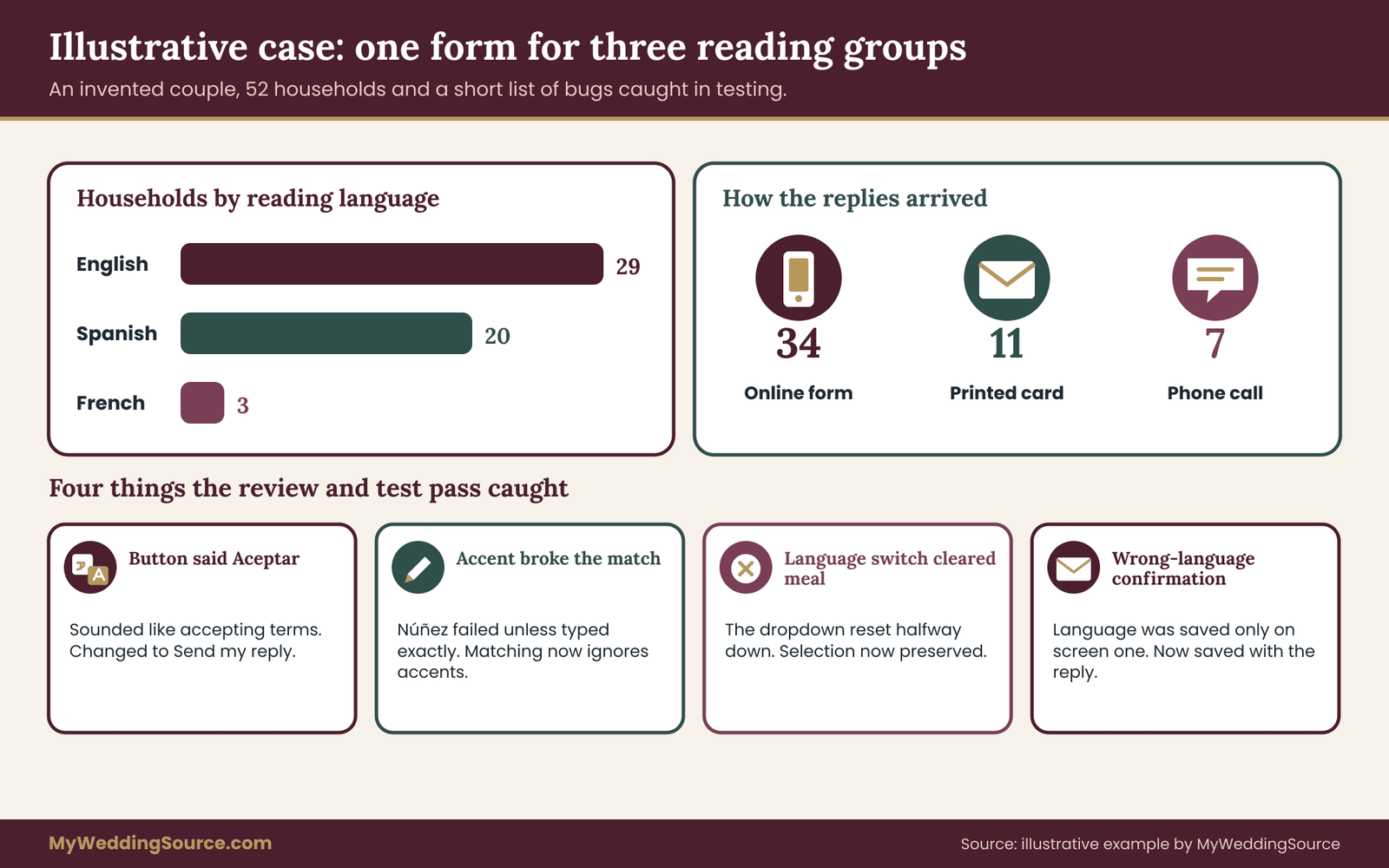
Elena fills in the language column with her mother’s help, household by household. The result is 52 households. Of those, 29 read English most comfortably, 20 read Spanish and 3 read French. Two of the Spanish-reading households include grandparents who rarely use the internet. One of the French-reading households is a single older woman who prefers to reply by phone.
Applying the decision rule from earlier, Spanish clears the threshold of five or more households, so a full Spanish version is built. French falls in the two-to-four range, so the invitation insert and the confirmation message are translated into French, and the three households are offered a call from Marcus’s cousin, who reads and speaks French. Nobody builds a third form.
Step two: the structure
Elena and Marcus choose option one, a single page with a language switch, plus option three for the French households and the grandparents. They write one line on the invitation insert in all three languages: “Reply online in English or Spanish, or call us, or return the card.” Each household also receives a printed household code.
Step three: the string inventory
They create a spreadsheet with about 33 rows, one each for the label, hint and error of eleven fields. A Spanish-speaking friend, a teacher, reviews the Spanish column. During the review she flags four things.
First, the button reads “Aceptar” in a draft, which she says sounds like agreeing to terms and conditions. It is changed to a phrase meaning “Send my reply.” Second, the draft hint for the allergy field uses a clinical word that her grandmother would not use, so it is rewritten in everyday language. Third, the error for a household that already replied reads like a warning. It is softened and now ends with a phone number. Fourth, the draft uses informal “tú” in labels and formal “usted” in errors, so all of it is moved to “usted.”
Step four: the test pass
Elena and her friend each complete the form on their own phones, then on a laptop. They find three problems that no one had noticed.
Typing a name with an accent, such as “Núñez,” fails to match the household unless the accent is typed exactly. The fix is to make matching ignore accents, and to tell guests they can use the printed code instead. Switching from English to Spanish halfway down the multilingual wedding RSVP clears the meal dropdown, so the tool is configured to preserve the selection. And the confirmation email arrives in English for a Spanish reply, because the language code was saved only on the first screen. They correct the setting and send themselves a new test.
Step five: the replies
Replies arrive over six weeks. Thirty-four households use the multilingual wedding RSVP, fourteen of them in Spanish. Eleven return cards, including both grandparent households. Seven are collected by phone, including the three French households. Marcus’s cousin reads each question aloud in French and enters the answers using the same codes. Everything lands in one table, with a column marking the route.
The table shows meal codes and allergy codes in one language, so the caterer receives a clean list. One note, written in Spanish in the free-text box, mentions an allergy not on the list. Elena phones that guest, confirms it in Spanish, and adds the code to the structured column herself.
What the example shows
The worked case succeeds because of choices made early and checked on purpose. The decision rule kept the number of built languages to two. The string inventory made review concrete. The test pass included an accent, a mid-form language switch and a real confirmation email. And the data layer stayed language-neutral, so the caterer never needed a translation. None of it required special software, only a spreadsheet, a few phones and two careful readers.
Testing a multilingual wedding RSVP with native readers, and the failure conditions that stop a launch
Testing is where a multilingual wedding RSVP goes from plausible to dependable. A fluent reader catches what no translation tool can: tone, register, regional word choices and the small phrases that sound wrong. Build the test into the schedule, not into the last evening.
Pick the right reviewers
For each language, find a fluent reader who reads that language daily and, if possible, comes from the same region as your guests. A bilingual relative is a good start. A professional translator is better for anything long. If you pay for professional help, ask for a review of the actual form, on a screen, not only a document of strings.
Machine translation is a useful first draft for a short form, but it is not a substitute for review and it should never be presented as authoritative. Registers, regional vocabulary and politeness levels are exactly where it slips. If a guest could be confused or offended by a phrase, someone fluent must read it.
Four review passes
Run four passes, each with a different goal. Do not try to do all of them at once.
Pass one, strings in a list. The reviewer reads the string inventory without the multilingual wedding RSVP, checking meaning, tone, grammar and consistency. This is the quick pass.
Pass two, the form on a phone. The reviewer completes the multilingual wedding RSVP, start to finish, on a phone, as a guest would. They watch for truncated text, wrapped labels, buttons that cannot be tapped and anything that looks different on a small screen.
Pass three, every error on purpose. The reviewer triggers each of the dozen errors deliberately and reads each message in place. This pass most often finds missing or untranslated errors.
Pass four, the messages that leave the form. The reviewer reads the confirmation email, the reminder and the printed card in the same language, and checks that the household name, a special character and a date display correctly.
What to give the reviewer
Give each reviewer the string inventory, the multilingual wedding RSVP link, a list of the test cases and a plain request: “Tell us anything that sounds odd, cold, formal, informal or confusing. You do not need to fix it, only tell us.” That invites honest criticism. Ask for specific rewrites only where they volunteer them. Record every change in the inventory with the reviewer’s initials and the date.
Test cases that find real bugs
Use a set of test cases that includes a name with an accent, a name with an apostrophe, a household with a child, a household with a plus-one, an allergy in free text, a very long note, a reply after the deadline and a duplicate reply. Include a language switch at three points: on the first screen, halfway down and just before submit. Submit once on a slow connection if you can, and see what the guest sees.
How many reviewers is enough
One fluent reviewer per language is the minimum. For a language with many households, two reviewers from different generations are better, because older and younger guests may not share the same everyday words. If the reviewers disagree, choose the version closest to how the guest’s own family would say it, and note the choice in the inventory.
Keep the test results
Save the date of each test, who ran it, which device they used and what they found. Your records may seem like overkill for a wedding. They are not, because the multilingual wedding RSVP will change as the guest list changes, and you will want to know whether the last test covered the new field. When the link first reaches guests determines how much time you have for these passes, so work backward from the day invitations go out.
A short script for asking a relative to review the form
Many couples hesitate to ask relatives for review, because it can feel like an imposition or an admission that the translation might be wrong. A direct, warm request works better than an apology. You might say: “We built a reply form in your language and we want to be sure it sounds natural. Could you fill it in on your phone and tell us anything that sounds strange? It should take about fifteen minutes, and we will thank you properly.”
Give them a deadline that leaves room to fix problems, and a simple way to send comments, such as a shared note or a phone call. Thank them in the same language afterward. Reviewers who feel respected tend to catch more, and they often become the quiet helper who explains the form to older relatives later, which is worth more than any template.
Failure conditions: when to stop and fix before sending
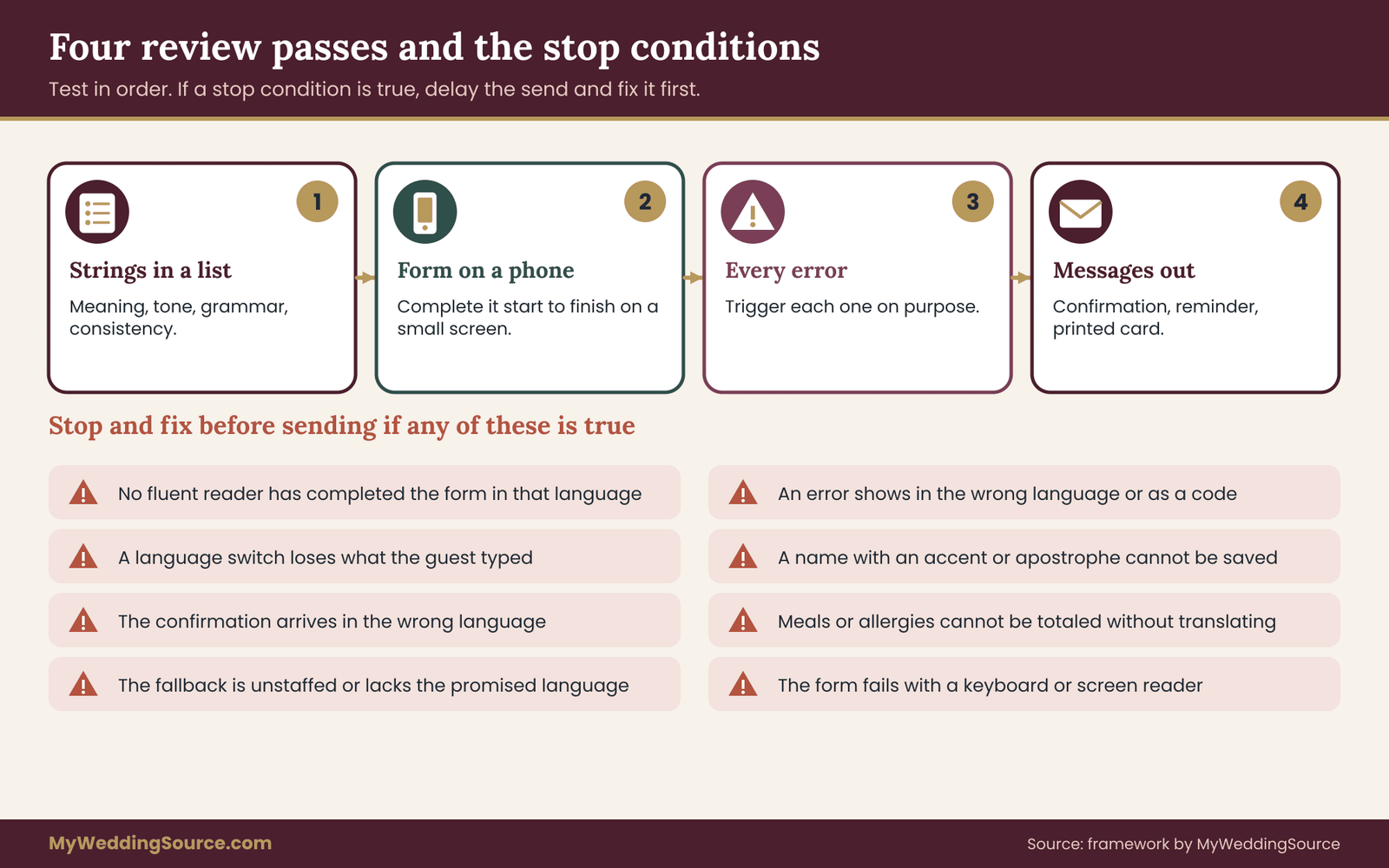
Write the failure conditions down before you test, so that you cannot talk yourself out of them afterward. A multilingual wedding RSVP is not ready to send if any one of the following is true.
- A fluent reader has not completed the form in that language. An unreviewed language is an untested language, and you should not advertise it.
- Any error message appears in the wrong language, or as a code. One stray English error in a Spanish form shows the guest that the translation is only skin deep.
- A language switch loses what the guest typed. This breaks trust and produces silent data loss.
- A name with an accent or an apostrophe cannot be found or saved. You will lock out the guests you most wanted to include.
- The confirmation arrives in the wrong language, or not at all. Guests who do not get proof will reply twice or call.
- The meal or allergy data cannot be totaled without translating. The data layer is not language-neutral.
- There is no human fallback, or the person behind it does not speak the language promised.
- The multilingual wedding RSVP cannot be completed with a keyboard or read by a screen reader.
If one of these holds on the day you planned to send, delay the send, not the fix. A week of delay costs very little against a month of corrections.
Failure conditions after launch
Watch the first days of replies.
If a language shows far fewer replies than its share of the guest list, ask a guest in that language to try the multilingual wedding RSVP. A low reply rate in one language is often a bug, not a lack of interest. If a field gets the same wrong answer repeatedly, the label or hint is unclear, and fixing the string is cheaper than correcting thirty rows. If more than a handful of guests call because they could not complete the multilingual wedding RSVP, add a plainer instruction to the invitation and consider a card for that group.
When you change a string after launch, update the inventory, change it in every language and have the reviewer look again. Never change only the English and leave the others behind, because the versions will slowly drift into asking different questions.
Alternatives, costs and tool questions for a multilingual wedding RSVP
Not every couple needs a custom-built multilingual wedding RSVP. Here are the alternatives, with honest limits, and the questions to ask any tool before you commit.
Alternatives that can work
A shared spreadsheet that guests or relatives fill in by phone call is the simplest option, and for under thirty households it can beat any form. A plain email with a short list of questions, sent in each language, works for small groups, though it needs manual entry. A wedding website with a built-in reply feature may offer a language setting, but check what it translates, because many tools translate the page and leave the reply fields in a single language.
A general-purpose survey tool offers more control over fields and often supports several languages, but you build the structure yourself.
None of these is automatically better. The right choice depends on how many guests need each language and on how comfortable your helpers are with the tool.
Questions to ask any form tool
Ask these in writing and keep the answers.
- Does it support more than one language in a single form, with a visible switch?
- Can I translate labels, hints, errors, buttons and confirmation emails, or only some?
- Does it save the guest’s language choice and use it for later messages?
- Does it preserve answers when the language changes?
- Does it accept names, addresses and phone numbers from other countries?
- Can I export all the answers with stable codes, not just translated labels?
- Where is the data stored, who owns it and how do I delete it?
- Is it usable with a keyboard and a screen reader?
A tool that cannot answer plainly is not ready for a multilingual wedding RSVP that has to work in more than one language. Wording for deadlines and follow-up is a separate job that you will still need regardless of the tool.
Cost logic, without invented prices
Prices for form tools, translators and reviewers change often and vary widely, so check current prices with each provider instead of trusting a figure in an article.
The cost logic is the same everywhere. A free tool costs your time in workarounds. A paid tool saves time only if it handles language switching, exports and confirmations properly. A professional review of a short form is usually a small expense compared with the cost of a wrong catering count or a guest turned away by a bad message. Ask a translator for a quote based on the number of strings in your inventory, which is a number you now have.
When to simplify
If the review reveals more problems than you can fix, reduce the scope. Fewer fields means fewer strings, fewer errors and fewer places to be wrong. Cut optional fields, merge questions and move detailed questions, such as song requests, to a later and separate message. A short, correct multilingual wedding RSVP beats a long, uneven one every time.
Common mistakes to avoid
Treating the invitation translation as proof that the form is translated. Letting a browser auto-translate the multilingual wedding RSVP for guests, which can change field names and break the answers. Using flags to choose languages. Letting the translation drift away from the English after a late change. Asking for more personal data than the plan needs. Forgetting the confirmation email. Skipping the fallback because “everyone is online.” And, perhaps most often, running the test only on the happy path.
FAQ
Do we need a translator, or can a bilingual friend review the form?
A fluent friend can review a short form well, especially if they read the language daily and know your guests. Use a professional translator for anything long, formal or ceremonial, or when no fluent reader is available. Either way, review the multilingual wedding RSVP on a screen, trigger every error, and never rely on machine translation alone for allergies, deadlines or anything with legal weight.
How many languages should a multilingual wedding RSVP form offer?
Offer as many as you can review properly, which is usually two. Use the household count for each language: five or more households justify a built version, two to four households suit a translated message plus a personal reply, and a single household is best handled by a call. A smaller set of tested languages serves guests better than a long list of untested ones.
Should we use a browser’s automatic translation instead?
Automatic browser translation is not a safe substitute. It can change field labels, alter button text and sometimes break the form so answers are saved wrongly. It also gives you no control over tone or register. Offer your own reviewed versions, and treat browser translation as something guests might use for the rest of your website, not for the multilingual wedding RSVP form.
What is the best way to handle allergy information in several languages?
Use structured tick boxes with stored codes, plus an optional free-text note. Tell guests that you will share the information with the caterer. If a note is written in a language you do not read, do not rely on a machine translation. Ask the guest to confirm in a few words, ideally by phone, and add the confirmed code to your table yourself.
How do we handle names with accents or non-Latin characters?
Accept and store every character exactly as typed. Make name matching ignore accents and capital letters, and let guests use a printed household code instead of typing a name. Test with names that include accents, apostrophes and other scripts. If a printer needs plain letters later, convert from your stored original, not by asking guests to change their names.
Is a printed reply card still worth including?
Yes, especially for older guests, guests with limited internet access and households that prefer paper. Print the card in the guest’s language with the same fields in the same order as the multilingual wedding RSVP. Enter returned cards into the same table, using the same codes, and mark the route so you know how each reply arrived.
Do accessibility laws apply to our wedding multilingual wedding RSVP form?
The Americans with Disabilities Act covers certain businesses and public entities, and a private wedding site is not usually in that group. Your venue and vendors may be. Check ada.gov for the current guidance, and follow the basics anyway: visible labels, text errors, keyboard use, good contrast and a declared page language. This is general information, not legal advice.
What should we delete after the wedding?
Delete the form data, remove or disable the link, stop reminders and delete exports you no longer need. Keep only what you have a reason to keep, such as a thank-you list. If you used a third-party tool, check its settings for deleting responses, and read its terms to understand where the data is stored.
Your next steps
This week, add a language column to your guest list and count households per language. Apply the decision rule to choose which languages get a built version, which get a translated message plus a personal reply and which get a call. Then pick a structure: a single page with a switch, separate pages or a form plus a human fallback.
Next, start the string inventory with one row per field and three strings each. Write the plain English first, store codes for every answer, and book a fluent reader for each language. Run the four review passes, fix what they find and test the confirmation email. Then send the link with a printed fallback, watch the early replies and keep every correction in the inventory. A multilingual wedding RSVP built this way is calmer for guests and far easier for you to count.
For the wider picture of how invitations, replies and deadlines fit together, read the guide to RSVP etiquette and the invitation etiquette hub alongside this checklist.
Sources
- Americans with Disabilities Act, U.S. Department of Justice
- Web Content Accessibility Guidelines overview, World Wide Web Consortium
- Forms tutorial, Web Accessibility Initiative, World Wide Web Consortium
- Internationalization resources, World Wide Web Consortium
- Plain language guidelines, plainlanguage.gov
- Limited English proficiency, LEP.gov, Federal Interagency Working Group
- Food allergies, U.S. Food and Drug Administration
- Protecting personal information, Federal Trade Commission
- Addressing standards, United States Postal Service
- Section 508 accessibility resources, GSA