
A virtual bridal shower is a celebration held over video, and the ones that work are built around the honoree and the guests rather than around a platform. This guide covers the setup choices (platform, time zones, roles), a facilitation script for the call, activities that feel personal, and a mail kit and gift shipping plan that arrives on time.
Plan a virtual bridal shower in three layers. First, Reach: map where every guest lives, how comfortable they are with video, and which start time works across time zones. Second, Rhythm: run a tight call of about ninety minutes with short segments, one facilitator and one person who handles the technology. Third, Parcel: send a small mail kit and plan gift shipping early, with the honoree’s address kept private. Choose activities that use real stories and real objects, and test each one against a two-second audio delay.
A shower on video has a reputation problem. People picture a grid of tiles, a muted aunt, a game nobody understands, and an hour that feels longer than it is. Those outcomes are not caused by the format. They come from copying an in-person shower onto a screen without changing anything, then hoping goodwill covers the gaps.
A virtual bridal shower has real advantages. The guest list can include a college friend who lives overseas, a grandparent who cannot travel, and a cousin on a night shift. Nobody pays for a flight or a hotel. The honoree can look at every face for the whole event, which rarely happens in a crowded room. The trade-off is that the host has to build the warmth deliberately, because a screen will not generate it on its own.
This article is about that deliberate building. It does not repeat the full planning sequence for any virtual bridal shower, and for guest-budget questions and general hosting etiquette you can lean on the site’s broader material, including the wedding etiquette guide. Here the focus is narrow: what changes when the room is a video call and the gifts travel by mail.
A note on scope. This is general planning information, not legal, tax or financial advice. Carrier rules, customs requirements and platform features change, so where a detail matters the article points you to the company or agency that publishes it.
What a virtual bridal shower is, and when it fits
The term covers several different events, and choosing the right one early prevents a lot of rework. There are four common shapes.
The full-call virtual bridal shower. Everyone joins one video call at the same time and the host runs a structured program. This is what most people mean by a virtual bridal shower, and it is the format the rest of this guide assumes unless it says otherwise.
The hybrid virtual bridal shower. A small group gathers in one home while remote guests join on a screen or a tablet. This format is harder than it looks, because the people in the room naturally talk to each other and the remote guests become an audience. If you choose it, assign one person in the room to be the remote guests’ advocate, whose only job is to include them.
The two-session virtual bridal shower. The same program runs twice at different hours, so guests in far-apart time zones can attend a session that falls in daylight. The honoree attends both, or the second session is shorter and replays highlights. It doubles the host’s effort but can save a guest list that would otherwise lose a third of its members.
The asynchronous virtual bridal shower. Guests contribute on their own schedule: they record short videos, send photos, or write notes, and the host assembles a package the honoree opens at a set time. There is no live call at all, or only a brief one at the end. This works well when time zones are extreme or when the honoree dislikes being the center of a live audience.
When a virtual shower is the right call
Several situations point toward video. Guests live in different regions or countries. A key guest has health, mobility or caregiving constraints that make travel unrealistic. The wedding itself is far from where most people live, so the virtual bridal shower is the only chance many will have to celebrate before the day. The couple prefers a smaller carbon and cost footprint. Or the honoree simply wants a gentler event.
Video is a weaker fit in a few cases. If most guests live within a short drive and are comfortable gathering, an in-person event usually carries more warmth for less effort. If the guest list includes several people who find video calls stressful, you may be asking them to attend an event that makes them feel more distant, not less. And if the virtual bridal shower is meant to be the first time two families meet, a screen may not give them enough room to talk.
The honest test is to picture the three guests most likely to feel left out. If a call includes them better than a living room would, choose the call. If not, consider the asynchronous version or a smaller in-person gathering.
Who decides, and who is invited
Before any setup, settle two questions with the honoree and any co-hosts. Who is on the guest list? And does the honoree actually want a video event? Some people agree to a virtual bridal shower to be polite, then spend the week dreading it. Ask directly, and accept a plain answer.
A message such as “Would you rather have a live call, a small in-person tea, or a package of messages you open on your own?” gives the honoree three real options and no pressure to pick the one that seems expected.
Keep the guest list to people who would have been invited to an in-person shower. A video event makes it easy to invite everyone you know, because there is no venue limit, and that is exactly how a warm event turns into a crowded one. Large calls make personal activities hard. As a working range, smaller groups allow every guest to speak at least once, while larger ones need breakout rooms or pre-recorded contributions. The planning sections below show how to handle either size.
Also decide early whether the virtual bridal shower is a gift occasion. Many guests feel pressure to send a present because the invitation arrives by email and a registry link looks like a bill. Say plainly in the invitation whether gifts are welcome, whether they are optional, and how to send them. The later sections on shipping and the mail kit take this up in detail, and registry choices are covered later in this guide.
Start with the guest map: Reach, Rhythm and Parcel
Most planning guides begin with a theme. For a video event, begin with a guest map, because almost every later decision depends on it: the platform, the start time, the length, the activities and the mailing plan.
The framework used throughout this guide has three layers, and each layer answers one question.
Reach asks who can actually be there. It covers location, time zone, device, internet quality, comfort with video, hearing and vision needs, language, and caregiving or work schedules.
Rhythm asks what happens minute by minute. It covers call length, segment order, the energy curve, who speaks, and how the call moves from one activity to the next.
Parcel asks what travels by mail and what it costs. It covers the kit, the gifts, shipping lead times, address privacy, customs for international guests, and who pays.
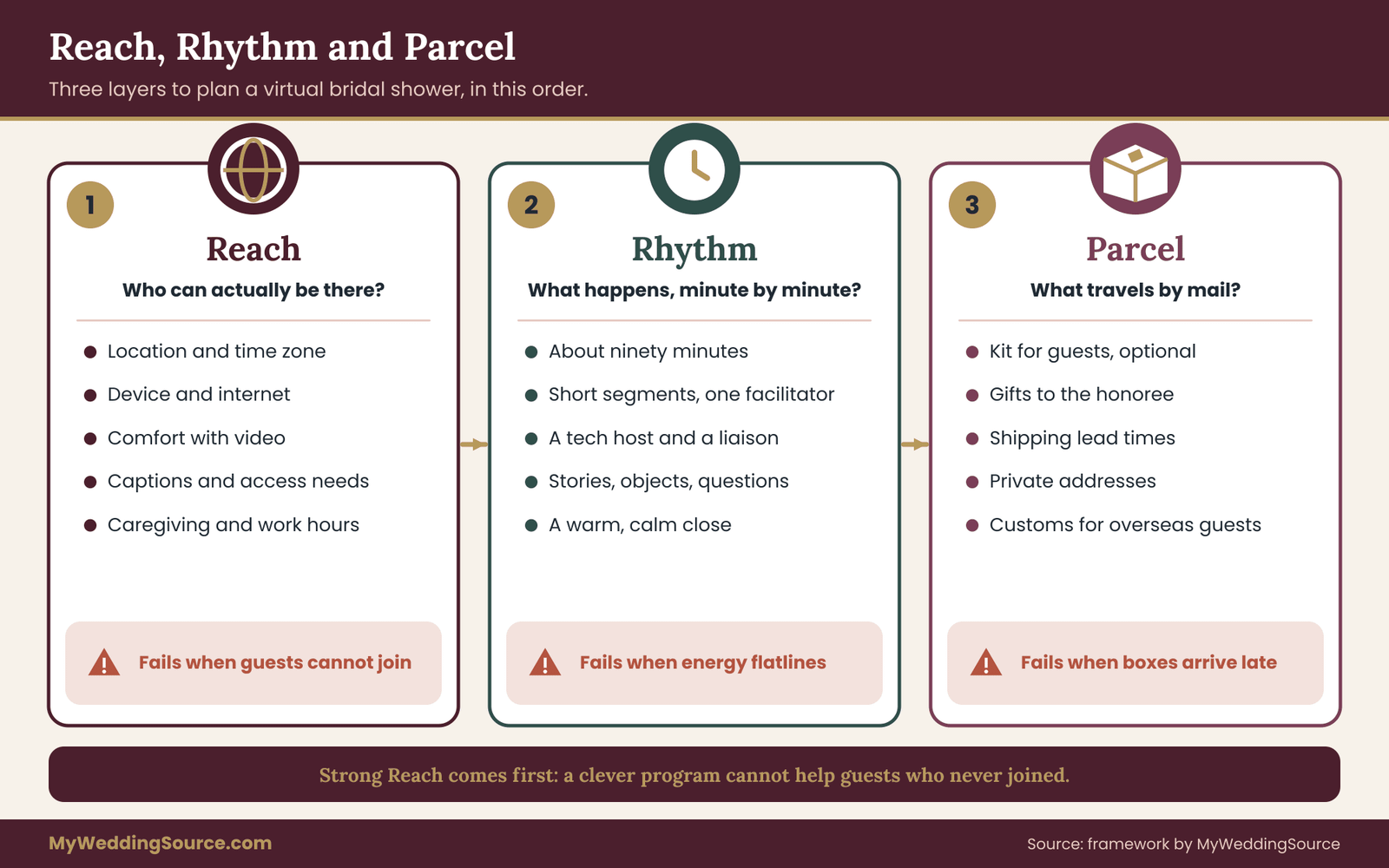
The layers run in order. If Reach is weak, a clever Rhythm will not help, because half the guests will not be on the call. If Parcel is late, the best activity falls flat, because the box arrives the day after the virtual bridal shower.
Building the guest map
Make a simple list with one line per guest, kept somewhere only the hosts can see. For each person, note five things.
First, the city or region and the usual time zone. Second, the device they are likely to use: a laptop, a phone, a tablet in the kitchen. Third, a comfort rating for video calls, which can be as plain as comfortable, fine with help, or nervous. Fourth, any access need you know about, such as captions, a sign language interpreter, a quiet room, or a short attention span for long calls. Fifth, whether they are likely to want a mail kit and whether you have a mailing address for them.
You do not need to ask guests to explain themselves. Ask co-hosts and family members what they already know, and put one open question in the invitation: “Is there anything that would make joining easier for you?” Guests who need captions or an earlier start time will usually answer a question like that and stay silent otherwise.
Reading the map
When the list is finished, three patterns usually show up. A cluster of guests in one or two time zones sets the start time. A handful of guests who are nervous about video decides how much hand-holding the invitation needs and how simple the platform must be. And a few guests who live outside the country decide how early the mail kit has to ship, because international delivery takes the longest and has the most uncertainty.
Resist the urge to design for the average guest. The average guest does not exist, and a plan built for her tends to fail the people at the edges. Instead, find the two or three guests for whom the virtual bridal shower is hardest, and make sure the plan works for them. If it does, it will work for everyone else.
A second use of the guest map is the privacy check. The map holds home addresses, phone numbers and notes about access needs. Share it only with co-hosts who need it, keep it in a document with limited sharing, and never paste it into a group chat. If you later keep the virtual bridal shower records, the guidance in the wedding planning checklist on keeping guest information organized applies to this list too.
A short example of the map at work
Imagine a virtual bridal shower for an honoree named Dana, with twenty guests. Six live in the same city, four are in another time zone two hours behind, three are overseas, five are relatives who rarely use video, and two are friends with young children who go to bed early. The map immediately says several things.
The overseas guests may need an asynchronous contribution rather than a live seat. The relatives need a one-tap join link and a phone call from a family member before the virtual bridal shower. The early-bedtime parents need a start time before dinner in their zone, which pulls the start earlier for everyone.
Without the map, the host might have picked a Saturday evening, and four categories of guest would have been quietly shut out. With it, the host picks an early-afternoon start on a Saturday, sends the overseas guests a recording prompt, and assigns a cousin to phone the relatives on Friday. Nothing about this required a bigger budget. It required knowing the guests before planning the program.
Choosing a platform for your virtual bridal shower
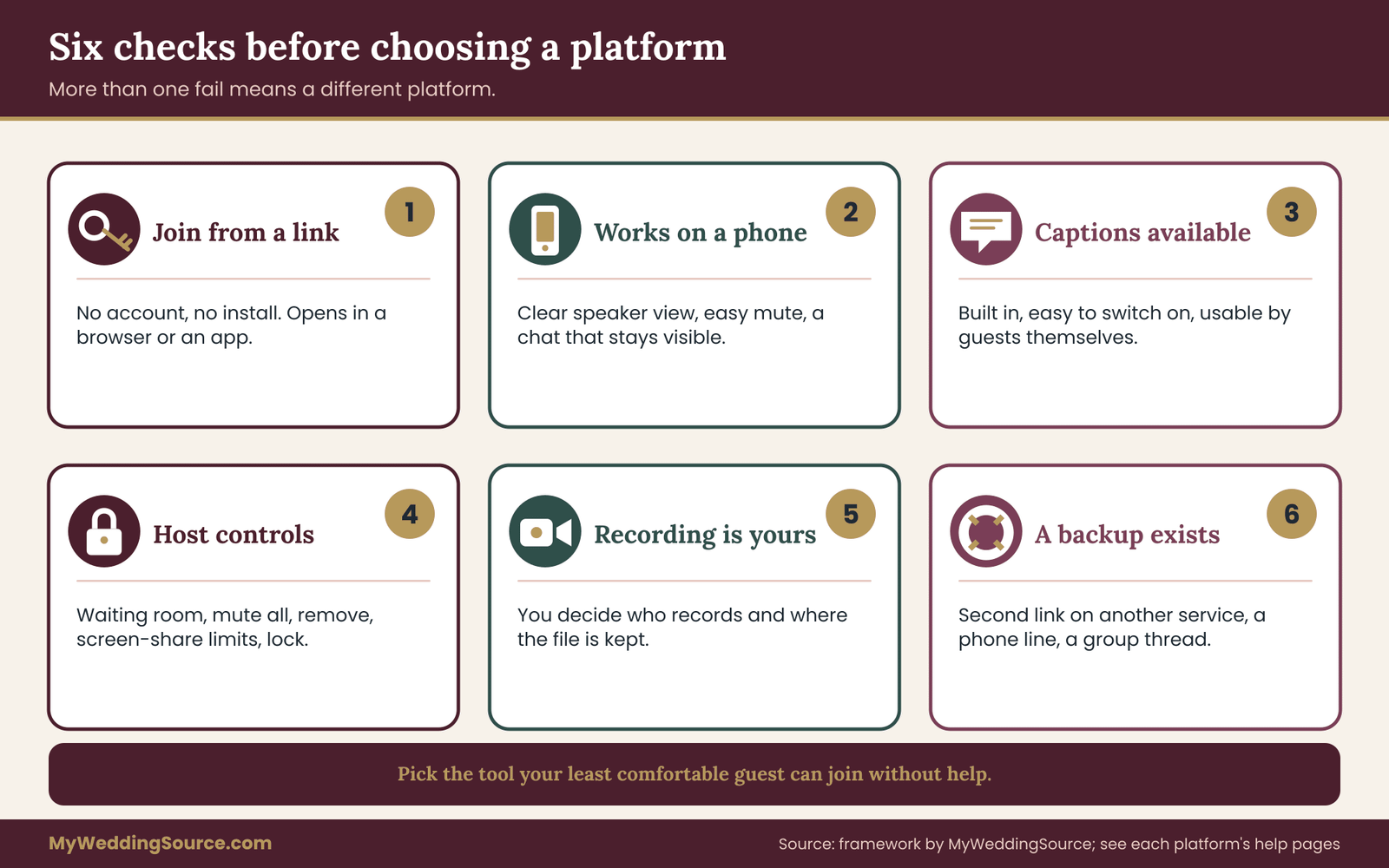
The best platform is the one your least comfortable guest can join without help. Features matter much less than that. A tool with breakout rooms and polls is useless if your grandmother cannot get past a sign-in screen.
Start with the platforms your guests already use. Many families have used one or two video services for work, school or family calls, and a link to a familiar tool removes the biggest barrier.
Free tiers, call length limits, participant caps and feature sets change often, so check the help pages of the service you are considering rather than trusting an old article. The support pages of Zoom and Google Meet are the official sources for those limits, and the same goes for any other service. Do not rely on a memory of what a free plan allowed last year.
Six checks before you commit
Run each candidate platform through six questions. A platform that fails more than one of them should not host your virtual bridal shower.
Can guests join from a link, with no account? The ideal link opens in a browser on a laptop or in an app on a phone, asks for a name, and goes straight to the call. If guests must create an account or install special software at the last minute, expect a late start.
Does it work well on a phone? Many guests will join from a phone propped against a mug. Check that the phone view shows the speaker clearly, lets guests mute and unmute without hunting, and does not hide the chat.
Are captions available? Live captions help guests who are deaf or hard of hearing, guests who are not fluent in the main language, and anyone in a noisy room. Find out whether captions are built in, whether the host has to switch them on, and whether guests can turn them on for themselves.
What can the host control? Look for a waiting room, the ability to mute everyone, a way to remove a disruptive participant, a choice about who can share a screen, and a lock for the meeting once it begins. These are the same controls that protect a virtual bridal shower from uninvited visitors.
Who controls recording? Decide whether you want a recording at all, and see who can start one and where the file is stored. The privacy section later in this guide covers consent, and the recording and privacy section later in this guide explains the reasoning behind asking before capturing people’s faces.
What is the backup? Every platform has a bad day. Know in advance what you will do if the service has an outage: a second link on a different service, a phone number guests can dial, or a group message thread you can use to move everyone.
Choosing the plan tier
If the virtual bridal shower will run longer than the free-tier call length, or if you want breakout rooms or more than a few dozen guests, you may need a paid plan for a month. Compare that cost to the cost of an interrupted call. Paying for one month of a plan and cancelling afterward is usually cheaper than ending a ninety-minute event at forty minutes. When you pay, put the cost in the budget along with the mail kit, and decide who covers it before anyone buys anything.
Watch for auto-renewing trials. If you start a trial to access a feature, set a calendar reminder for the day before it renews and cancel it in the same sitting that you finish the virtual bridal shower. This is a small habit that prevents a surprise charge.
Setting up the room before the day
Treat the call setup as a short checklist of its own. Create the meeting well ahead, and write down the link, the dial-in number if one exists, and the host controls you plan to use. Turn on the waiting room or a passcode. Decide whether guests may unmute themselves on entry, and whether the chat is open to everyone or limited to the host. Name the co-hosts in the platform so that they have the controls they need, because a co-host without permissions cannot rescue a call.
Set the default layout. A gallery view of all faces works for groups up to a modest size, while a speaker view helps when one person is telling a story and the others should watch them. Show the host how to pin the honoree’s video so that the honoree stays visible to everyone throughout.
Last, rehearse. A twenty-minute test call with the co-hosts, using the actual link, catches most problems: a link that opens a different meeting, a screen share that cannot show sound, a laptop camera that points at the ceiling. Do this at least a few days before, so there is time to fix what the test turns up.
Time zones and the start time
For a guest list that spans regions, the start time is the most important single choice in the whole plan. A good one lets people attend awake, fed and not in the middle of work. A poor one quietly deletes guests from the virtual bridal shower.
The window method
Do not pick a time and then discover who is excluded. Work from the guest map in a fixed order.
First, list the time zones where guests live, with the number of guests in each. Second, mark a reasonable waking window for each zone. For most people, a late morning to late afternoon start falls inside it, and an evening start for the host’s zone may land in the middle of the night for someone else. Third, find the overlap between windows. If the zones are close together, a wide overlap exists and the choice is easy. If they are far apart, the overlap shrinks to a narrow slice or disappears.
When the overlap exists, choose the time that keeps the most guests inside it, and then protect the people at the edges. If one guest lands at the early edge, tell them privately that they may arrive late or leave early without any awkwardness. If the overlap does not exist, move to one of the other shapes: two sessions, or an asynchronous contribution for the far-away guests.
Worked example: four zones and one start time
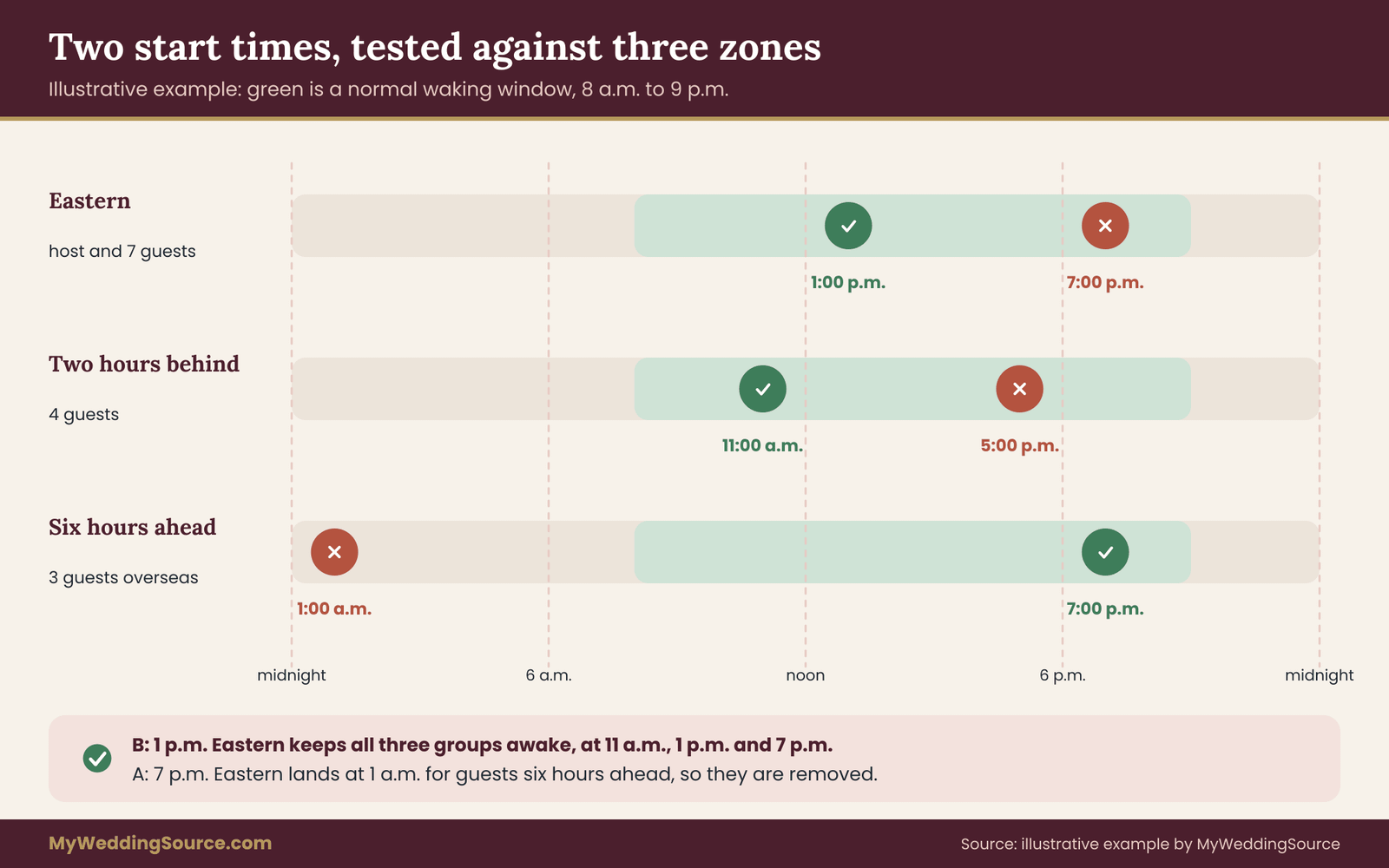
Take the invented guest list from the earlier example. The host and six guests are in the Eastern time zone. Four guests are two hours behind. Three guests live in a zone six hours ahead of the host. The remaining guests are scattered across the country in the Central and Mountain time zones.
An evening start at 7 p.m. Eastern is 1 a.m. for the three guests six hours ahead of the host, so an evening start removes them from the call entirely. It also lands at dinner time for the guests two hours behind. A start at 1 p.m.
Eastern is 7 p.m. for the overseas guests, a reasonable evening hour, and 11 a.m. for the guests two hours behind, a reasonable morning hour. That single time keeps everyone inside a normal waking window, though it is a little early for some and a little late for others. The host chooses it, notes the zones in the invitation, and offers the one guest who works a night shift a short asynchronous contribution instead.
The calculation shows the habit worth keeping: always convert the proposed time into every guest zone and write the results down before sending the invitation.
Writing the time so nobody misreads it
Time zone mistakes are the most common reason a guest misses a virtual event. Prevent them in four ways.
Write the start time with the zone name in plain words, and list a local time for each major group of guests. For example: “Saturday at 1 p.m. Eastern, which is 12 p.m. Central, 10 a.m. Pacific.” Send a calendar invitation with the time attached, since most calendar tools convert the time into each guest’s own zone. The official U.S. time source at time.gov is a reliable place to check the current time in each U.S. zone, and a quick check there confirms your conversions before you send.
Be careful near the dates when daylight saving time begins or ends, because a few regions change on different dates from each other, and some places do not change at all. In the United States the change happens in the spring and in the autumn.
Since this guide is written in November, a virtual bridal shower planned for early the next spring may cross a clock change for some guests but not others. When guests are in countries that change on different dates, convert the time for the specific date, not for the day you are writing the invitation.
Finally, repeat the time in the reminder message the day before, with the same zones listed. A virtual bridal shower held on a weekend often attracts guests who plan to check the details at the last minute, and the reminder is where they will look.
Choosing the day
Weekends are common for virtual bridal showers, but a weekend morning in one zone can be a weekend night in another. If many guests have children, early afternoon in their zone often works better than a late evening. If guests include shift workers or people who work weekends, a weekday evening may serve them better.
Avoid dates that collide with major religious observances, school events, or holidays that matter to the guests, and check the honoree’s family calendar before fixing the date. The site’s general planning material offers a general timeline for fitting a virtual bridal shower around other pre-wedding events, and the same logic applies here: the virtual bridal shower should not compete with an engagement party or a family travel weekend.
The two-session shortcut
If the window method returns no overlap, resist squeezing everyone into one terrible time. Run two sessions. The first can be the full program, held at a time that suits the larger group. The second can be a shorter session, around forty-five minutes, held at a time that suits the other group, with the honoree present and a handful of highlights from the first session. Record nothing without permission, and let each group see the same activities in a compressed form so that nobody feels they attended the lesser event.
Alternatively, ask the far-away guests for a short recorded message or a photo with a note, and play those on the main call. This keeps one live event and still includes the people who could not attend it live. It is often warmer than a late-night appearance by someone who is half asleep.
Roles on the call: who does what
In a living room, one host can greet people, pour tea, run a game and keep time, because everyone can see what is happening. On a call, the same person doing all of that will lose the thread within ten minutes. The fix is to split the work into named roles, each with one clear job. A small virtual bridal shower can combine roles, but even then the person should know which hat they are wearing at each moment.
The facilitator runs the program. This person welcomes guests, introduces each segment, keeps time, and moves the call along. The facilitator speaks a lot and listens carefully, and should be comfortable with a short silence.
The tech host handles the platform: admitting guests from the waiting room, muting noise, fixing audio, spotlighting the right video, managing breakout rooms and starting any shared screen. The tech host does not run the program and should stay out of the conversation unless asked.
The honoree’s liaison is a close friend or relative who knows the honoree well. This person watches the honoree’s face and energy, steps in with a question if the honoree seems overwhelmed, and quietly signals the facilitator to slow down or speed up.
The scribe records the contributions the honoree will want later: who said what, which stories were told, which gifts were mentioned. The scribe can also build the thank-you list as the call goes on. Chat messages and spoken moments both belong in the scribe’s notes.
The chat moderator watches the text chat, reads out good comments, answers practical questions such as “can you hear me?” and nudges quiet guests with an easy question. This role is often folded into the scribe’s, but on a larger call it is better split.
Handing out the roles
Ask people for roles before the virtual bridal shower, and choose them based on temperament rather than seniority. The best facilitator is not always the maid of honor or the host’s mother. It is the person who can speak warmly without taking over, who can handle a silence without rushing to fill it, and who is comfortable asking a quiet guest a direct question. The best tech host is calm under pressure and does not mind being invisible.
Write a one-page role sheet and give each person a copy. For each role, list three things: what the person does before the call, what they do during it, and what they do if something breaks. Even a short sheet prevents the situation where two people each assume the other is admitting guests.
Co-host permissions and the waiting room
Before the call, give co-hosts the platform permissions they need. A co-host who cannot admit guests or mute a noisy line is a spectator. Turn on a waiting room so the tech host can admit guests one by one, and have a plan for a stranger who joins by accident. A short line in the invitation, such as “Please join with the name we know you by, so we can let you in,” helps the tech host recognize guests quickly.
If a guest joins late, the tech host admits them silently and messages a short welcome in the chat rather than having the facilitator stop and greet them aloud. Interruptions break the rhythm, and the fix costs nothing.
Protecting the honoree
The honoree is the guest of honor and also the person most at risk of being put on the spot. Agree in advance what the honoree will and will not do on camera. Some people love opening gifts and being toasted. Others find that exhausting. The liaison should know the honoree’s limits and be ready to redirect. A simple signal, agreed beforehand, lets the honoree ask for a pause without announcing it to forty people.
The ninety-minute run of show for a virtual bridal shower
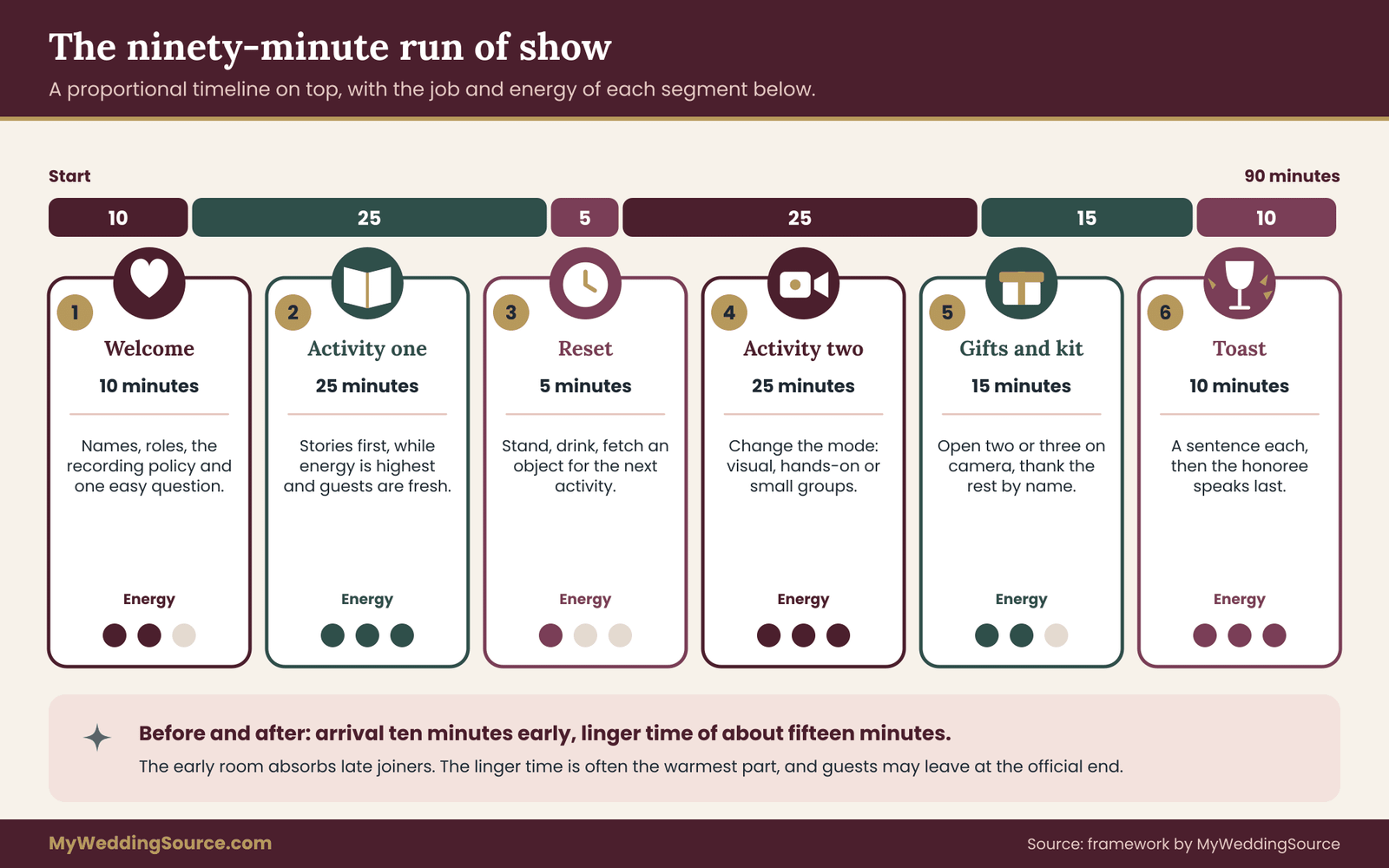
Attention on video fades faster than attention in a room. People are alone in their own spaces, sitting still, and sharing a single flat channel. A strong virtual bridal shower respects that limit by staying short, changing activity often, and giving each guest a reason to speak or move. For most groups, about ninety minutes works well. Shorter is fine for large groups. Longer sessions need a real break, and few people want one.
The run of show below is a template, not a rule. Adjust the segment lengths to your group, but keep the shape: a soft opening, a warm center, a short stretch, and a gentle close.
The segments
Arrival, ten minutes before the start. The tech host opens the room early. Guests drift in, check sound, and see their own video. The facilitator greets people by name as they arrive and plays quiet music or shows a slide with the plan. This stretch absorbs the late arrivals and the technical hiccups that always occur, so the virtual bridal shower itself can begin on time.
Welcome and framing, about ten minutes. The facilitator thanks everyone, explains in two sentences how the call will work, and names the roles. A plain sentence on how to use the chat, how to unmute, and how to ask for help prevents confusion later. The facilitator also states the recording policy here, repeating what the invitation said. Then one easy opening question: “Say your name, where you are, and how you know the honoree.” In a big group, limit each answer to one sentence, or use the chat.
The first personal activity, about twenty-five minutes. Place the most story-driven activity early, while energy is highest. Options are described in the next section. The key is that guests contribute something specific to the honoree, not just a generic greeting.
A short stretch and reset, about five minutes. Ask everyone to stand, get a drink, or fetch an object for the next activity. This is a real break for the eyes and the ears. It also gives the tech host time to set up breakout rooms or a shared slide.
The second activity, about twenty-five minutes. This one should change the mode of the first. If the first was spoken stories, make the second visual or hands-on. If the first involved the whole group, the second can happen in small groups. Variation keeps people alert.
Gifts and the kit moment, about fifteen minutes. If the honoree opens anything on camera, keep it short. Opening ten gifts on a call is a long, slow stretch for everyone but the honoree. A good alternative is to open two or three on camera and thank the rest by name. If the virtual bridal shower includes a mail kit, this is the moment guests use it.
The toast or closing circle, about ten minutes. Invite a few chosen guests to say a sentence each, then the honoree responds. End with the honoree’s own words, not the host’s. Finish before the call becomes tired. A virtual bridal shower that ends while people still wish it had a little longer leaves a better memory than one that trails off.
Linger time, optional. Keep the room open for fifteen minutes after the official end. Some guests will stay and talk, and that unplanned part is often where the warmest moments happen. Tell people they are free to leave at the official end.
The energy curve
The segments are arranged around an energy curve. Energy starts moderate as guests settle in, rises during the first activity, dips at the reset, rises again in the second activity, softens during gifts, and ends with a warm, calm peak at the toast. If you plot your own run of show with a simple low-medium-high marker for each block, you can see immediately whether the energy flatlines, or whether two high-energy blocks sit back to back and leave nobody a rest.
Place the quietest segment, usually gifts, in the middle of the second half, not at the very end. People are still present and attentive, yet the slower pace gives voices a rest before the toast.
Adjusting the run of show for group size
The same ninety-minute template bends to fit different guest counts, and a virtual bridal shower of eight people should not feel like one of forty. With a small group, every guest can speak in the opening round, so the welcome segment can run a little longer and the activities can rely on spoken turns. With a medium group, shorten each turn and lean on the chat for the quick replies, keeping spoken turns for the stories that matter most.
With a large group, the virtual bridal shower needs structure that a small one can skip. Pre-collect contributions, use breakout rooms for the story segment, and assign each room a named host who knows the honoree. Bring everyone back for short reports of one sentence each. A large virtual bridal shower also benefits from a firm rule about the chat: the chat moderator reads out the best lines so that written contributions are heard by everyone, not only by the people who happen to be scrolling.
Whatever the size, test the run of show by reading it aloud with a timer a few days before. Most facilitators discover that two segments are longer than they planned, and that is the right moment to cut a segment rather than rush on the day.
Scripts for the facilitator
A few lines, prepared in advance, make the difference between a confident call and an awkward one. These are examples to adapt in your own words.
For the opening: “Welcome, everyone. We have about ninety minutes together, and we planned this so that every one of you gets a chance to say something to the honoree.”
For a quiet guest: “I would love to hear from you next, if you are happy to share. If you would rather type it in the chat, that is just as good.”
For a long speaker: “Thank you, that is lovely. I want to make sure everyone gets a turn, so let us keep going.”
For a technical problem: “We are fixing a small sound issue. While that happens, everyone take a breath, and tell the person on your left in the gallery one thing you remember about the honoree.”
The last line works because it gives guests something to do during a delay. A problem handled with a task feels like part of the program.
Keeping time without sounding like a clock
Set a visible timer for the facilitator alone, and tell co-hosts to message the facilitator privately if a segment runs long. Avoid announcing the time out loud. Instead of saying “we have two minutes left,” move on with a sentence such as “Let us hear from two more people, then we will switch.”
Decide beforehand which segments are flexible and which are fixed. The toast and the close are fixed. A story round can stretch if the stories are good. Drop the least important activity if you are running late, and keep that decision with the facilitator, who then does not need to ask anyone.
Virtual bridal shower activities that feel personal
“Personal” is easy to promise and hard to define. A practical definition is this: an activity feels personal when it could not be run, unchanged, at a different honoree’s virtual bridal shower. A generic game fails that test. A game built from the honoree’s own history passes it.
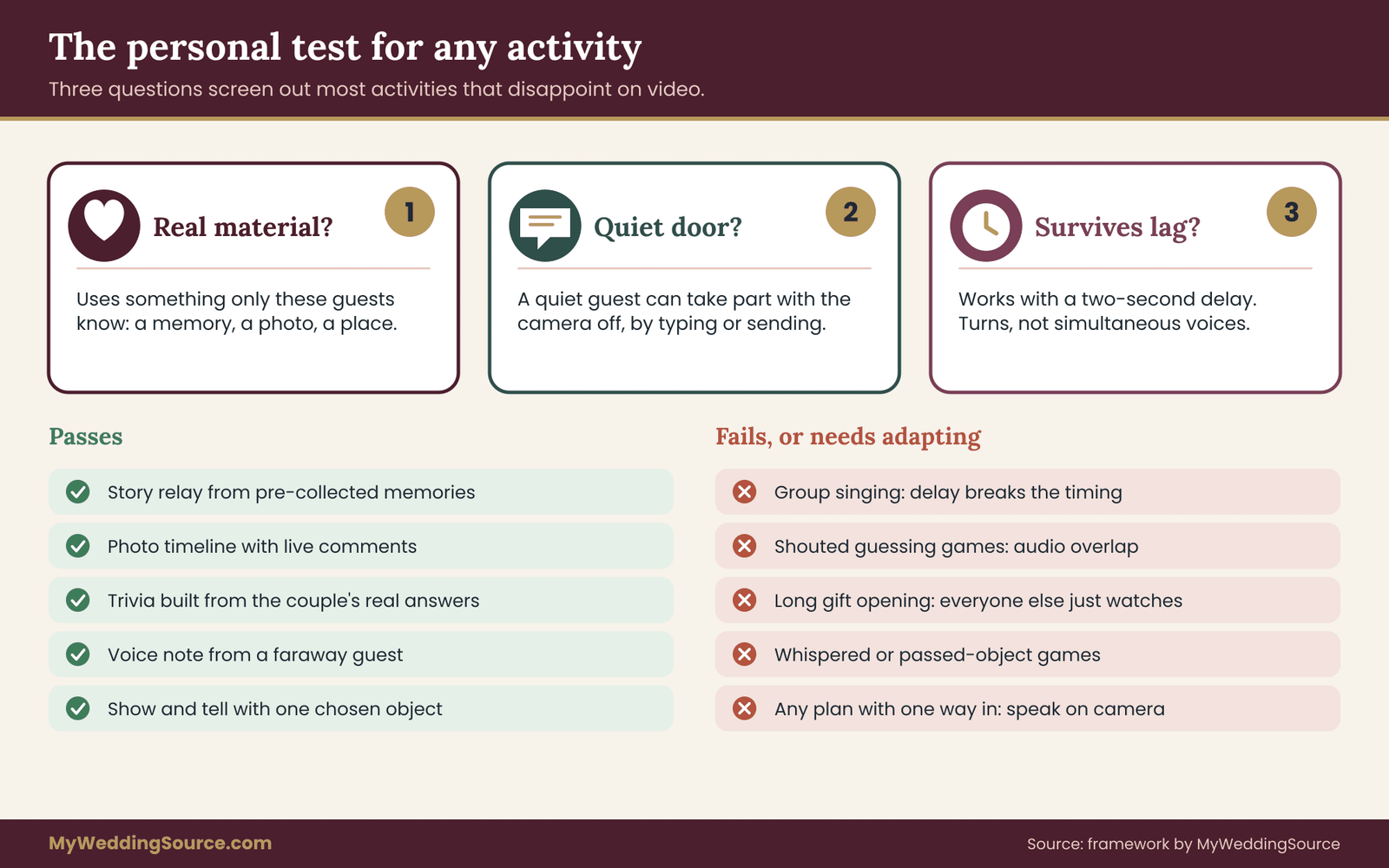
Before choosing anything, run each candidate through three questions. They take less than a minute and screen out most of the activities that disappoint on video.
Does it use something only these guests know? A real memory, a shared joke, a place, a photo, a recipe from a grandparent. If the activity works just as well with strangers, it is filler.
Can a quiet guest take part with the camera off? A good activity offers more than one way in: speaking, typing, holding up an object, or sending something beforehand. If the only way to take part is to perform on camera, some guests will sit it out.
Does it survive a two-second delay? Video calls lag. Anything that depends on split-second timing, such as guessing games with a shared buzzer, singing together, or talking over one another, falls apart. Activities that take turns work, and activities that need simultaneous voices do not.
Story-led activities
The story relay. Before the call, ask each guest for one short memory of the honoree and, if they like, a photo. The facilitator reads them aloud, or the guests tell their own, one after another. The honoree guesses who wrote each one, or simply listens. The pre-collection step matters, because it lets shy guests contribute without improvising. With a larger group, keep each memory to about thirty seconds and run the story relay in two rounds.
One sentence of advice, or none. Instead of the traditional advice cards, ask guests for a single sentence of something they have actually learned about relationships, or a line of encouragement if they would rather not give advice. Collect them ahead of time and read a handful aloud. Giving guests permission to send an encouraging line rather than advice keeps the exercise from becoming a lecture, and it respects guests who are single, divorced or simply uncomfortable giving marriage advice.
The photo timeline. Gather photos from guests and arrange them chronologically in a shared slide deck or video. The facilitator walks through it while guests add comments in the chat or unmute to explain a picture. Check that you have permission to use each photo and that nobody pictured would mind it appearing on a call. Keep the timeline short enough that it ends while people are still interested, and put the funniest photo near the middle, not the end.
A voice note from far away. For guests who cannot attend live, ask for a thirty-second recorded voice or video message. Play two or three during the call and gather the rest into a folder the honoree can open later. Spoken messages carry tone in a way that a typed note cannot, and they give distant relatives a real seat at the virtual bridal shower.
Object-led activities
Show and tell with a purpose. Ask each guest to bring one object to the call that connects to the honoree: a mug from a trip they took together, a book the honoree lent them, a photograph in a frame. Each guest holds it up and says in two sentences why they chose it.
Because everyone has to find something beforehand, the activity starts before the call and gives guests a reason to think about the honoree during the week. Offer a fallback for those who cannot find an object: they can describe one instead.
The mystery item. The facilitator holds up an item connected to the couple, such as a ticket stub or a recipe, and guests guess its meaning in the chat. The couple reveals the answer and tells the short story. This works because the answer is a real story, and guessing in the chat avoids audio overlap.
Craft together. If you send a small kit with simple materials, guests can make something at the same time: a card, a paper flower, a decorated envelope. A short craft stretch provides a relief from the faces on the screen, and people chatting while their hands are busy often relax. Keep the craft simple enough to finish in fifteen minutes, because a project that needs focus will silence the call.
Question-led activities
Trivia built from real answers. Write ten questions about the couple, such as where they met, what each of them orders at a favorite restaurant, or who proposed the first date. Ask both partners ahead of time for their true answers.
Guests answer in the chat or on a form, and the facilitator reveals the answers with the couple’s comments. This is far more personal than trivia on wedding traditions, and it tends to produce laughter because the couple’s answers are often unexpected. Keep the questions kind, and avoid anything that would embarrass either partner or reveal private matters.
Finish the sentence. The facilitator starts a sentence such as “The moment I knew the honoree was a good friend was when…” and guests complete it, aloud or in the chat. It is quick, requires no preparation, and brings out real stories. Because it invites short answers, it suits large groups.
Wishes for the first year. Each guest names one small wish for the couple’s first year: a quiet weekend, a good meal, a trip. These are collected in a shared document or spoken. They are light, and every guest can contribute, including those who do not know the couple well.
Movement and shared-space activities
A scavenger hunt at home. The facilitator calls out categories, such as “something blue,” “something older than you are,” or “something that reminds you of a wedding,” and guests dash to find an item and return in sixty seconds. It gets people out of their chairs, and the pace is good for the dip in energy that follows the first story round. It only takes a few minutes, so use it as a reset.
A shared playlist. Ask guests to add a song that reminds them of the honoree to a shared playlist before the day, then play a few seconds of each on the call and let the contributor say why. Do not play full songs over the call, since compressed audio sounds poor and music licensing can matter if you record. Short clips with spoken explanations are enough.
A toast circle. Guests raise whatever they are drinking while the facilitator names a quality of the honoree. This is more like a ritual than a game, and it provides a natural closing moment.
Pairing activities so the call has range
A good virtual bridal shower uses activities from different families, because variety is what keeps attention. One pairing that works well is a story-led segment first, when guests are fresh and ready to listen, followed by an object-led or movement segment after the reset. Another is a question-led segment such as trivia in the middle, then a quiet toast circle at the end. Avoid putting two voice-heavy activities back to back, and avoid ending the virtual bridal shower on a loud game that leaves no room for a warm close.
Match the pairing to the guests as well. If the guest map shows many older relatives, favor stories and photos, which need no device skills. If the map shows many guests in their twenties and thirties who are used to video, a scavenger hunt and a shared playlist will land well. A mixed group does best with one of each, and a virtual bridal shower built that way gives every generation something to enjoy.
Adapting activities for time zones
Some activities need guests to prepare ahead, and guests in distant time zones may have a very different week from yours. Send prompts early, in the same message that confirms the time, and accept contributions in any form: a text, a photo, a voice note. When a story relay includes entries from guests who cannot attend, the facilitator can say the guest’s name and the place they are writing from, so the virtual bridal shower still feels like one gathering across many places.
What to do with a large group
Calls with more than a modest number of faces make individual contributions hard. Use breakout rooms of four to six guests for a story-led activity, with a pre-assigned host in each room and a clear time limit, then bring everyone back for a one-sentence share from each room. If your platform lacks breakout rooms, use the chat for contributions, or use pre-recorded messages. Large groups also benefit from segments that prefer short answers over long ones.
What fails on video
Some in-person favorites do not translate. Group singing fails because of the delay. Games that need physical contact or a shared object, such as passing a prize around, fail without clever adaptation. Long speeches fail because attention drifts. Games that rely on overheard whispers, or on one person guessing while others shout hints, collapse into noise. A long gift-opening session fails, because everyone but the honoree watches a person unwrap in silence.
When you want to keep an in-person tradition, adapt it. Turn a shouted guessing game into a chat-based one. Turn a passed prize into a prize chosen by a random draw. Turn the long speech into three short toasts. If an adaptation does not keep the point of the activity, drop the activity.
Inclusive choices
Avoid activities that assume everyone is married, partnered, a parent, or comfortable giving advice about marriage. Avoid anything that tests how well guests know the couple’s finances, bodies or private life. The same care about honoring different guests applies here that the site’s broader etiquette advice for hosts and guests describes for the wedding itself, and for a guest list that includes people of different backgrounds and ages, it pays to ask the honoree to review the activity list before it is announced. A five-minute review prevents the one awkward moment that guests remember.
The mail kit and gift shipping plan
Everything physical about a video event travels through the postal system, and the postal system keeps its own calendar. A parcel plan that starts the week before the virtual bridal shower will leave some guests empty-handed. This section covers two separate shipping streams that people often confuse: the kit that the host sends to guests, and the gifts that guests send to the honoree.
Stream one: the kit that goes to guests
A mail kit is a small package that gives each guest something to hold during the call. It is optional, and a virtual bridal shower can be personal without one. A kit earns its cost when it supports an activity, such as a craft, a tasting, or a shared moment of opening something together.
Good kit contents are light, flat, inexpensive and useful on the call. A card with a short program and the join link. A small craft supply. A tea bag or a wrapped sweet. A printed photo of the honoree with the couple. A sealed note to open at a specific moment. A small keepsake the guest can keep. Skip anything fragile, perishable in warm weather, or requiring assembly, since a broken item is worse than none.
Decide what the kit is for
Before buying anything, write one sentence completing: “The kit exists so that guests can ________ during the call.” If the sentence cannot be finished, skip the kit and spend the money on something else. A kit full of items that nobody opens during the call is a gift disguised as a program.
Keep the number of items small. Three well-chosen pieces are better than eight forgettable ones. Guests will use the items on camera, so consider what looks good on a small screen: bright paper, clear labels, a single warm color.
Counting the cost
A kit has four cost lines, and the total scales with the guest count. Use this working formula and fill it in with real quotes: items per guest, plus packaging per guest, plus postage per guest, multiplied by the number of guests who will receive a kit, plus a small reserve for replacements.
Get the postage figure from the carrier’s own price tool for a sample package of the real weight and size, because rates depend on weight, size, speed and destination. The USPS shipping pages are the official place to check current options and prices for domestic mail, and the same site covers international mail.
Do not guess the total. Weigh a finished sample kit on a kitchen scale, box it, and price that exact package. A difference of a few ounces can move a package into a more expensive tier. If the cost is higher than expected, shrink the kit before cutting the guest list.
Decide who pays. Many hosts cover the kit as part of the virtual bridal shower, which is the simplest path. If co-hosts share the cost, agree on the split in writing before ordering, so nobody is surprised later. Do not ask guests to pay for a kit they did not request, and do not attach a charge to the invitation.
If the total is out of reach, send kits only to guests who would otherwise lack what they need to take part, and give the rest the option of a printable page. For budget logic that applies to the whole wedding, the wedding budget guide shows how to track costs and avoid drift.
The lead-time countdown
Work backward from the virtual bridal shower date. This is the sequence that matters, and the dates depend on where guests live.
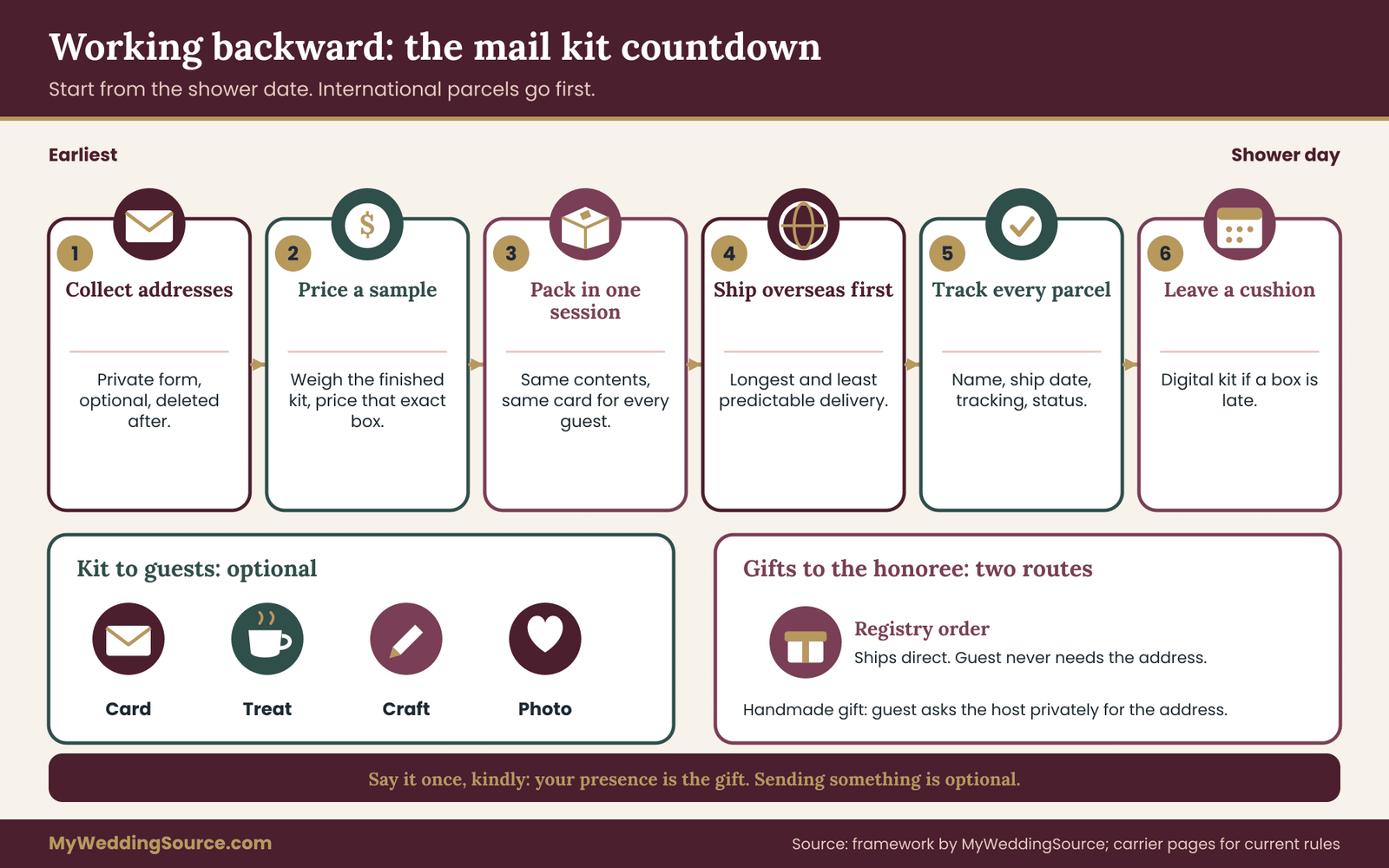
Begin by collecting mailing addresses. Ask guests through a private form, never in a group chat, and explain the address will be used only for the kit and deleted afterward. Allow a week for responses and a gentle reminder.
Order supplies and, if you print anything, allow time for the printer. Assemble and weigh a sample before the full run. Pack all kits in one session so they are consistent. Ship international kits first, because they take longest, then domestic ones. Leave a generous cushion between the expected delivery date and the virtual bridal shower, so a delay does not mean the box arrives afterward.
Track every package using the tracking numbers. A short spreadsheet with the guest name, the ship date, the tracking number and the delivery status lets the host see problems early. If a box has not arrived a few days before the virtual bridal shower, send a digital substitute: a printable page and a note explaining what the box would have contained.
Keeping the kit personal
A kit can feel like a corporate swag bag if every item is generic. Add one touch that only this honoree’s friends would recognize: a line from a joke the group shares, a small drawing, a color the honoree loves. A handwritten sentence on each card, signed by the host, takes a few minutes per guest and changes how the box feels when it is opened. Guests who open a kit during the virtual bridal shower should feel that someone thought of them in particular.
If you want a script for the card, keep it short and warm: “Thank you for being part of this day. Open this when the host says it is time, and bring it to the call.” The instruction to open the item at a set moment gives the virtual bridal shower a small shared ritual, because everyone opens something at the same time in different places.
What to leave out of the kit
Leave out anything that requires guests to buy additional supplies, anything that needs hot water or a stove, and anything that could cause an allergic reaction for a guest whose needs you do not know. If you include food, label ingredients clearly and keep it sealed.
Do not include items that carry a brand message or a sales pitch, and do not include anything that obliges a guest to do something afterward, such as posting online. The kit supports the virtual bridal shower and the honoree, and it should never ask a guest for anything in return.
International guests
Sending a parcel across a border adds rules. Customs forms, restrictions on food, plants and certain materials, possible duties, and longer, less predictable delivery all apply. Before packing anything for an overseas guest, check the destination country’s rules and your carrier’s international page. In the United States, the U.S.
Customs and Border Protection site explains what travelers and importers should know, and the destination country’s own customs agency states what it will accept. When in doubt, send overseas guests a digital kit: a printable card, a short video from the host, and an invitation to contribute a recorded message. Nobody is left out, and nobody pays a customs fee for a gift they did not expect.
Stream two: gifts for the honoree
Gifts travel in the other direction. Guests send something to the honoree, and the host’s job is to make that easy, optional and private.
State the gift policy in plain words. Some virtual bridal showers are gift-free. Others welcome gifts but treat them as optional. Others are built around a theme, such as a favorite recipe or a book. Whatever the policy, say it once, clearly, and say it kindly. A line such as “Your presence is the gift. If you would like to send something, here is how” removes the pressure without forbidding a gesture.
For guests who want to send a gift, offer two routes. A registry purchase ships directly from the retailer to the honoree, and the guest never needs the address. For a handmade or personal gift, the guest asks the host for a shipping address by private message. This keeps the honoree’s home address out of the invitation and out of a group chat. The site’s wedding registry ideas guide covers registry types, including options for couples who prefer experiences or contributions to objects.
Timing the gifts
Tell guests a ship-by date that gives gifts time to arrive before the virtual bridal shower if the honoree plans to open any on camera. Say the date in the invitation and again in the reminder. Make clear that late gifts are welcome too, since many guests will decide after the call.
If the honoree wants to open gifts live, ask guests to mark the outside of the package clearly with the sender’s name, and to send a short note in the box. If the honoree prefers to open gifts privately, say so, and have guests send a message instead of a live reveal. Either choice is fine. The one choice that is not fine is to leave the honoree guessing who sent what.
Tracking gifts for thank-you notes
Open a simple gift log before the first package arrives. Record the date received, the sender, what the item is, and whether the thank-you note has gone out. Photograph the card with each gift before the packaging is discarded. If a gift arrives damaged, photograph the box and the item, keep the packaging, and contact the carrier or the seller promptly, since claim windows are short and differ by carrier. Keep the log with the rest of your wedding paperwork, and slot the follow-up tasks into a full wedding planning timeline; the same habits that protect receipts and vendor files apply.
A virtual bridal shower with many guests and many shipments quickly creates a pile of boxes, and a log kept from the start is far easier than reconstructing the list weeks later from memory.
The invitation, the RSVP and the reminder sequence
A virtual bridal shower depends on guests receiving the right information at the right time, and the invitation carries more weight than a paper one does. It has to deliver the link, the time in several zones, the gift policy, the address request and the access options, all without becoming a wall of text.
What the invitation must say
Keep the top of the message short: the honoree’s name, the date, the time with the zone, and a sentence on what the virtual bridal shower is. Below that, give the details guests need in a clear order.
State how to join: the link, whether it needs an account, and a phone option if there is one. State the length, so guests can plan around it. Say whether guests should keep the camera on, and make clear that camera-off is fine. Name the gift policy in one plain sentence.
Explain the mail kit: whether one is coming, why you are asking for an address, and how the address will be handled. Tell guests how to ask for captions, an earlier start or any other help, and give them one person to contact. For general wording and sequencing of invitations, the site’s wedding invitation etiquette guide explains the customs that carry over, even though the format here is digital.
The RSVP
Ask for a reply by a fixed date, and tie that date to the kit. The deadline must come early enough to allow ordering, packing and shipping. If you ask for addresses in the same reply, say that the address field is optional and explain what happens to guests who skip it. A guest who says yes but does not provide an address should still be welcome, and should receive the digital version of the kit.
Offer three reply options rather than two: attending live, sending a recorded message, or unable to attend but sending good wishes. The third option gives people a graceful way to take part without guilt. The wedding RSVP etiquette guide covers how to follow up on guests who do not respond, and the same tone applies to a digital virtual bridal shower: a single polite nudge, not repeated pressure.
The reminder sequence
Send reminders at set points, each with a clear purpose. A week before: confirm the time in each zone, remind guests about the kit and the ship-by date for gifts, and resend the link. The day before: repeat the time, share the link again, and give the phone number guests can use if they have trouble. About an hour before: a short message with the link only. People will click it from their phone without reading anything else.
Keep each message short and consistent. Put the link in the same place every time, so guests learn where to look. Do not change the time after sending the invitation unless unavoidable, and if it must change, say so plainly and apologize once.
Guest list size and who is asked
Be thoughtful about who receives an invitation. A virtual bridal shower makes it technically easy to invite everyone, but the same principles that guide any guest list apply.
The site’s wedding guest list guide describes how to decide who is invited and why, and those decisions matter more when the virtual bridal shower is remote, because a guest who is invited to a virtual bridal shower and then not to the wedding may feel the difference more sharply. Check the virtual bridal shower list against the wedding list before sending invitations, and settle any gaps with the couple first.
Accessibility, privacy and recording
A virtual bridal shower is a gathering of people with different needs, and a video call can either remove barriers or add them. A few choices made early make the event usable for more people.
Accessibility basics
Turn on live captions and tell guests they are available. Speak at a steady pace and describe visuals aloud, since a guest using a screen reader or a phone with the screen off will miss anything shown only on screen. Share written versions of any slides or prompts in the chat or by message.
Avoid flashing images, and do not rely on color alone to carry meaning. If a guest uses sign language, arrange an interpreter in advance and keep the interpreter visible on the screen. Ask the guest what setup works best rather than guessing.
The ADA.gov site explains the legal framework for accessibility in the United States, mostly aimed at businesses and public entities, and the W3C Web Accessibility Initiative publishes practical guidance on making digital content usable. A private virtual bridal shower is not a business, so the point is not compliance but consideration. The guidance there still gives helpful, plain-language ideas for the host.
Give guests choices about how to participate. Camera on or off, speaking or typing, live or recorded. Make each choice normal. When the facilitator says “type it in the chat if you prefer,” the guest who prefers it does not feel singled out.
Privacy of the people on the call
A video link is a doorway, and anyone who has the link can walk through it unless the host takes steps. Use a waiting room or a passcode, send the link only to invited guests, and ask guests not to forward it.
Turn off screen sharing for everyone except the host and tech host, so that nobody can display something unexpected. Lock the meeting once the virtual bridal shower begins. The Cybersecurity and Infrastructure Security Agency, at cisa.gov, publishes general guidance on securing online meetings, and it is worth a quick read before hosting.
Protect personal information in the invitation and on the call. Do not show the honoree’s home address on screen, and be careful with a shared screen that reveals bookmarks, notifications or other open windows. Before sharing any screen, close what you do not need. Use a clean virtual background only if it does not cause audio or visual problems for the guest’s device.
Children and other household members may appear on camera. Tell guests they are welcome to turn their cameras off or move to a private space if they want, and that nobody needs to explain.
Recording: ask first, decide clearly
Decide before the virtual bridal shower whether it will be recorded. A recording can be a keepsake for the honoree, but it captures faces and voices of people who may not want to be preserved. Say in the invitation whether recording will happen, and repeat it at the start of the call.
If a guest objects, honor that: either pause recording while they speak, or offer them another way to take part. Where laws about recording conversations differ by place, ask the platform and, for any doubt, a local legal source. The reasoning behind asking before capturing people’s images is explained in the site’s wedding photography consent guide, and the same courtesy applies here.
If you record, decide where the file will live and who may see it. Store it in a private folder, share a link only with the honoree and the people who attended, and set a date to delete or archive it. Screenshots deserve the same rule: ask before taking a group screenshot, and do not post it publicly without every person’s agreement. Some guests will have good reasons to stay out of public photos.
Photos of the shower
If the honoree wants a group photo, take it deliberately. Ask guests to pose for a few seconds with cameras on, and let anyone sit it out. Tell guests that the photo goes to the honoree and the group only, and that nobody should post it elsewhere unless everyone agrees.
When the technology fails: a backup ladder
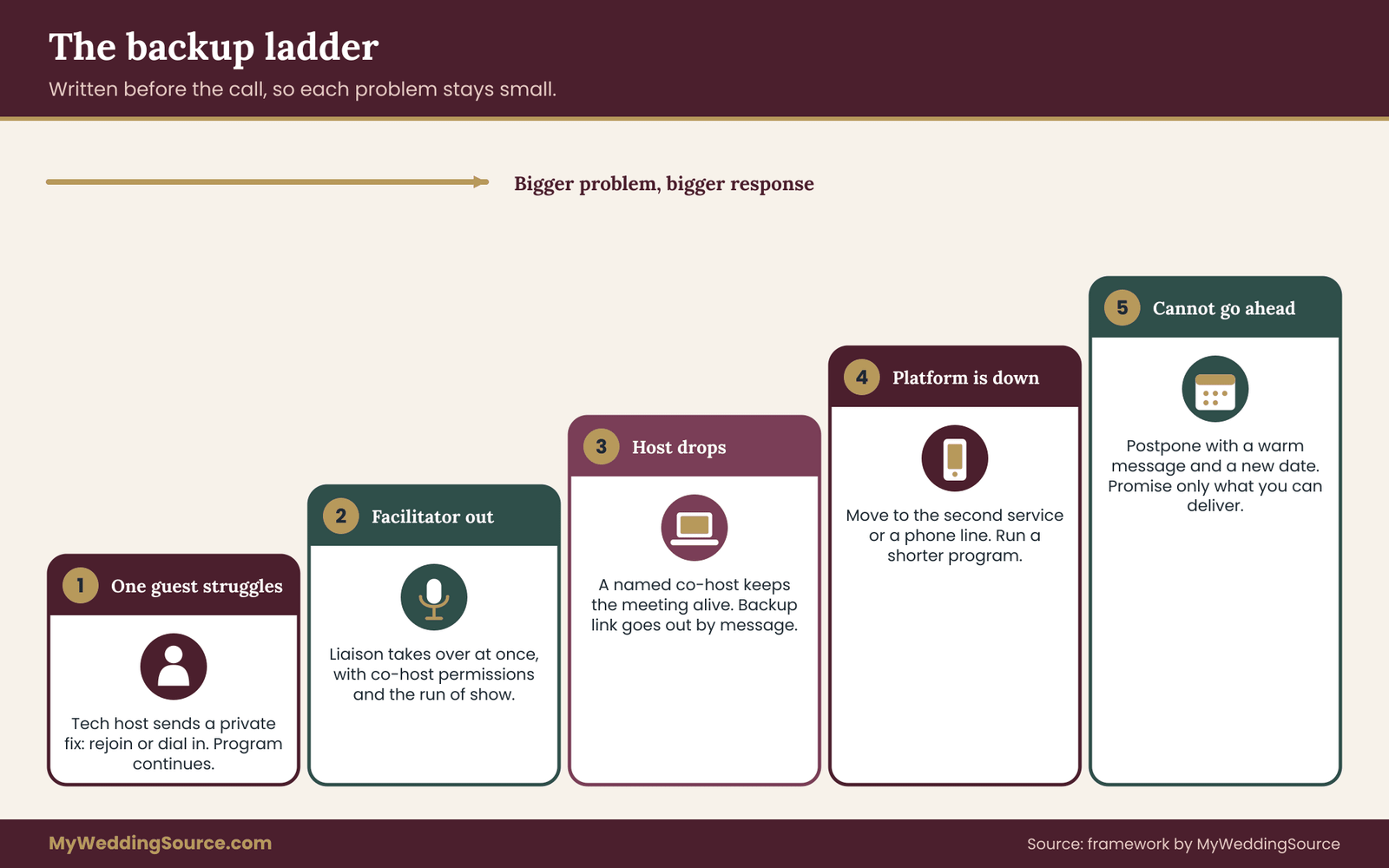
Something will go wrong at some point. A guest’s microphone will not work, the host’s internet will drop, or the platform will slow down. The aim is not to prevent every problem but to make each one small. A short, written ladder of responses turns a crisis into a routine.
The five rungs
Rung one: one guest has trouble. The tech host sends a private message with the simplest fix, such as leaving and rejoining or switching from audio to a phone dial-in. The facilitator keeps the program going. The guest should never be the reason everyone waits.
Rung two: the facilitator’s audio or video fails. The designated second facilitator, usually the honoree’s liaison, takes over at once while the first rejoins. This is why the second person should hold co-host permissions and have the run of show open in front of them.
Rung three: the host’s connection drops completely. In a call where the host has left, some platforms end the meeting unless a co-host is present. Appoint a co-host in advance so the call continues. If the call ends, the tech host sends the backup link in the group message thread within a minute.
Rung four: the platform is down. Move to the second service you identified earlier. Send the new link by text and email, and give guests a minute to move. If guests cannot rejoin, switch to a phone conference line, a group voice call, or a shared message thread, and run a shortened program.
Rung five: the virtual bridal shower cannot happen. Postpone it. Send a warm message right away with a new date, and promise nothing you cannot deliver. A rescheduled virtual bridal shower with a clear apology is better than a broken one that drags on.
Rehearsal checks that prevent most failures
Test the exact link, the screen share, the shared slides, any audio clips and the recorded messages. Test the lighting and the sound on the honoree’s setup, especially if the honoree will be in a room with a window behind them or a ceiling fan overhead. Ask co-hosts to join from the devices they will use on the day. Prepare a one-page sheet with the key phone numbers, the backup link and the run of show, and print it, because a screen that fails may take your notes with it.
Charge devices, plug in laptops, and close other programs. Use a wired connection if you can. Ask others in the household to avoid heavy downloads during the call, since a shared connection slows when someone streams a film in the next room.
A worked example: eighteen guests, four time zones
The following case is invented to show how the framework works in practice. The names are fictional, and the numbers show how a plan is built, not a typical virtual bridal shower.
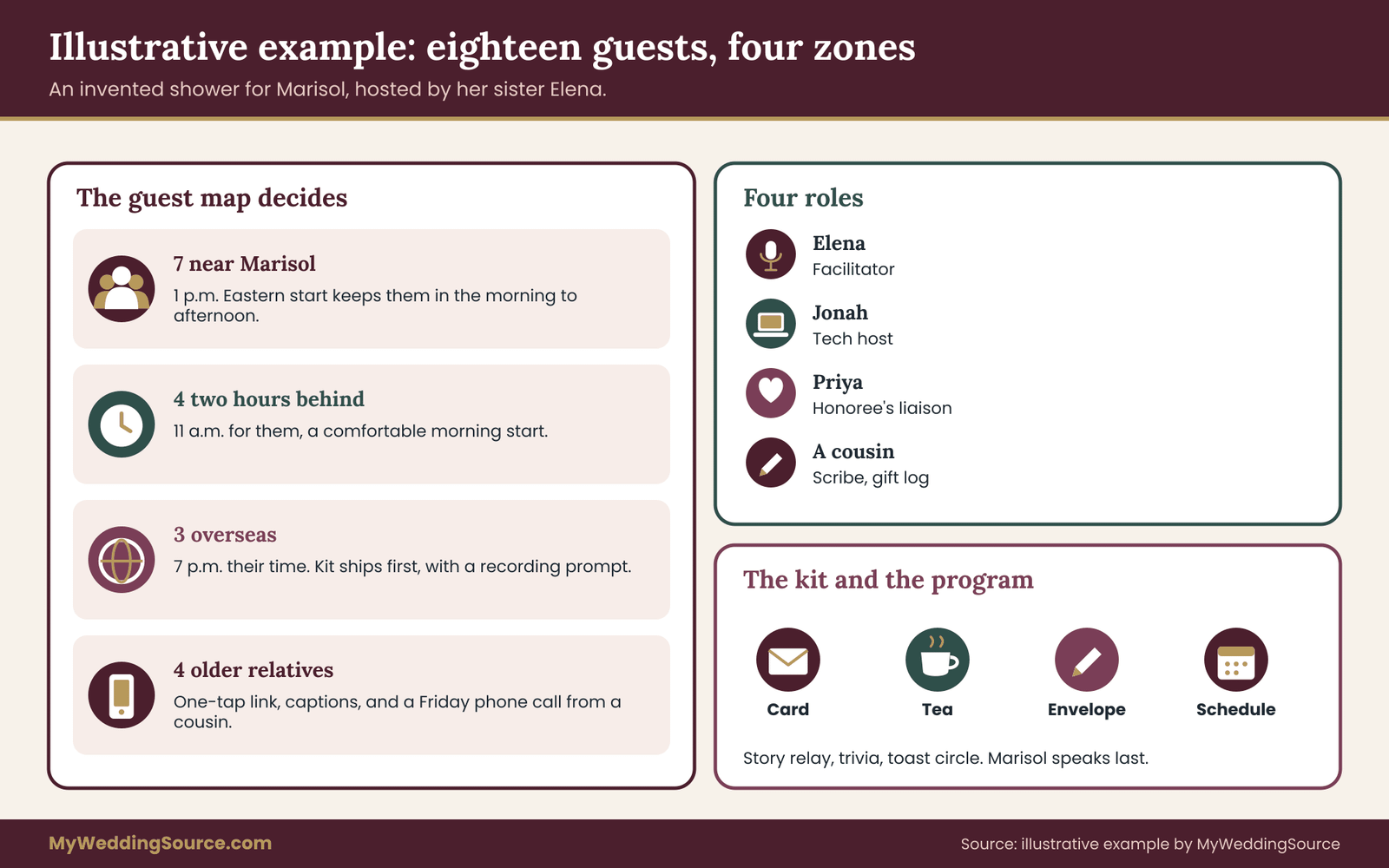
Marisol is the honoree, and her sister Elena is the host. Eighteen guests are invited. Seven live near Marisol. Four live two hours behind. Three live overseas, six hours ahead. Four are older relatives who rarely use video.
Reach
Elena builds the guest map and finds three problem areas. The overseas guests cannot attend at a reasonable hour if the start is in the evening. The four older relatives need a simple join method. And two guests with young children cannot join after dinner. Elena chooses a 1 p.m.
Eastern start on a Saturday, which falls at 11 a.m. for the guests two hours behind and 7 p.m. for the overseas guests. She asks a cousin to phone each older relative on Friday and walk through joining on the phone. She uses a platform that allows joining by link without an account, and she enables captions.
Rhythm
Elena asks her friend Jonah to be the tech host and Marisol’s close friend Priya to be the liaison. She runs ninety minutes, with a ten-minute arrival window. The first activity is a story relay with pre-collected memories. The second is trivia built from answers Marisol and her partner supplied separately. Gifts are limited to two items opened on camera. The close is a toast circle, with Marisol speaking last. A cousin acts as scribe.
Parcel
Elena decides the kit exists so that guests can write a note to Marisol during the call. Each kit contains a blank card, an envelope, a small packet of tea and a printed card with the join link and the schedule. She weighs a finished sample and prices it with the carrier’s tool. Overseas kits ship first, with a long cushion, and domestic kits follow. Two overseas guests are unable to receive a kit in time, so Elena sends them the printable version and asks for a recorded message.
For gifts, the invitation says that attendance is the gift, and that anyone who wishes to send something can use the registry or ask Elena for a private address. Elena keeps a gift log and photographs each card.
During the call itself, the virtual bridal shower runs close to the plan. The arrival window absorbs two late joiners. Jonah admits them quietly and posts a welcome in the chat. The story relay runs five minutes long because the stories are good, so Elena drops one round of the scavenger hunt, a decision she made in advance.
A guest’s audio fails in the second activity, and Jonah sends her a private message with the phone dial-in. The call continues without a pause. At the toast, Marisol speaks last, as planned, and the virtual bridal shower ends on time with a handful of guests lingering for another quarter hour.
What the example shows
The plan did not require extra money or special skill. It required about two evenings of structured thinking, and the choices came from the guest map. Every decision that could have excluded someone was made with that person in mind. The host used one activity that depended on pre-collection, one that used the chat, and one that used a physical object, so every guest had a way to join in that suited them. And the backup ladder was written before anyone needed it.
After the call
The work ends when the thank-yous are sent, not when the call ends. Within a day or two, Elena sends a short message to every guest thanking them for coming, with one detail from the call. Marisol writes thank-you notes for each gift, using the log. The scribe’s notes become the source for personal details, so that each note mentions something specific. If the call was recorded with permission, Elena shares the file with the honoree only, and sets a date to delete it.
Collect the recorded messages and photos into one folder for Marisol, so that the virtual bridal shower becomes a keepsake she can find years from now. Then close the loop on the practical matters: cancel any paid trial, delete the address list once the kits have arrived, and note what worked and what did not for the next event.
Your next steps
Start with the guest map this week. Write one line per guest, with location, device, comfort with video and any access need. From the map, pick the start time using the window method, and check it against every zone. Decide whether the honoree wants a live call, a two-session event or an asynchronous package.
Next, choose the platform with the six checks, name the five roles, and write the run of show. Pick two or three activities that pass the personal test. Then plan the parcel: decide what the kit is for, weigh and price a sample, and work backward from the date.
Send the invitation with the time in several zones and the gift policy in a plain sentence, rehearse with the co-hosts, and print the backup ladder. A calm, well-prepared virtual bridal shower leaves guests feeling close to the honoree, wherever they happen to be.
FAQ
How long should a virtual bridal shower last?
Most work well at about ninety minutes, with a short arrival window beforehand. Large groups can do well in sixty minutes, since attention fades faster on video. If you want longer, build in a real break and offer a casual linger period after the formal end, so guests can leave when they need to. Ending while people still wish for more is the better outcome.
What is the best time to hold a virtual bridal shower across time zones?
List the time zones, mark a reasonable waking window for each, and pick the start that keeps the most guests inside it. Convert the time for every zone and write each one in the invitation. If no overlap exists, run two sessions or collect recorded messages from distant guests, so nobody has to join in the middle of the night.
Which platform is easiest for guests who are not comfortable with video?
Choose the tool they already use, or one that opens from a link without an account and works on a phone. Check captions, host controls and a phone dial-in option. Test the exact link with a few less confident guests before the day, and have a family member call each of them beforehand to walk through joining.
Do guests have to send a gift to a virtual shower?
No. Say in the invitation whether gifts are welcome, and make clear that attending is enough. If guests want to send something, offer a registry route that ships directly to the honoree and a private way to request an address. Never put the honoree’s home address in a group message or on a public page.
Should we send a mail kit, and who pays for it?
A kit is optional, and it helps only when it supports an activity on the call. Weigh a finished sample, price it with the carrier’s own tool, and ship early, starting with international guests. The host or co-hosts usually cover it, and the split should be agreed in writing before ordering. Do not ask guests to pay for a kit they did not request.
Can we record the call?
You can, but ask first. Say in the invitation whether the call will be recorded and repeat it at the start. If anyone objects, pause the recording during their turn or offer another way to take part. Store the file privately, share it only with the honoree and attendees, and set a deletion date. Check the platform’s help pages for how recording works.
What if the technology fails during the shower?
Use a written backup ladder. Handle one guest’s problem privately, have a second facilitator ready to step in, name a co-host so the call survives a host dropout, keep a second platform link ready, and be willing to postpone if needed. Rehearse with the actual link a few days before, and keep a printed copy of the run of show and key phone numbers.
How do we keep a large virtual shower personal?
Use pre-collected stories, short written or recorded contributions, and breakout rooms of four to six guests with a named host in each. Keep spoken turns short, use the chat for quick replies, and pick activities built from the honoree’s real history. A clear way for quiet guests to take part, such as typing or sending something in advance, also keeps a big call feeling warm.
Sources
- Zoom support center, Zoom Video Communications
- Google Meet Help, Google
- Shipping and mailing, United States Postal Service
- International mail and shipping, United States Postal Service
- U.S. Customs and Border Protection
- Americans with Disabilities Act, U.S. Department of Justice
- Web Accessibility Initiative, World Wide Web Consortium
- Cybersecurity and Infrastructure Security Agency
- Official U.S. time, National Institute of Standards and Technology
- Wedding planning advice, The Knot