

A multilingual seating chart only works when every guest can find a name they recognize, spelled the way they spell it, in a script they can read, on a sign that prints cleanly. This guide gives you a name matching and print proof sheet, a four-pass proofing routine, a worked example and the failure conditions to check before anything goes to the printer.
Build one proof row per guest that records the name exactly as the guest writes it, the script, the Latin spelling the guest prefers, the sort key and the table. Draft the display lines from that row, never from memory. Then run four passes: capture, match, render and read-aloud. A native reader checks the print proof at actual size, and a small change log is frozen a few days before pickup. A reader who knows the script is a check that software cannot replace.
A multilingual seating chart looks simple. A list of names, a table number, a frame. Then a guest whose family name is written first, a guest whose name has a letter the printer’s font does not contain, and a guest who reads right to left all arrive at the same easel, and the display becomes the first place a wedding quietly gets someone’s name wrong.
This guide is for couples whose guest list includes people who read different alphabets: Latin, Arabic, Cyrillic, Chinese characters, Devanagari, Hebrew, Korean and others. It covers the narrow job of getting names, order and numbers right on multilingual seating signs. It does not repeat how to build a seating plan; the wedding seating chart guide covers who sits where, and this article starts after that plan exists.
A note on scope. This is general planning information, not legal advice. Accessibility rules for signs and venues vary, so where a rule might apply, the article points you to the agency that publishes it.
What a multilingual seating chart has to get right
Before any design choices, name the three jobs the multilingual seating display must do. People tend to blend them together, and each one fails differently.
The first job is recognition. A guest walks up to a frame or a table of cards and scans for something familiar. If your aunt reads Arabic script and the chart shows only a Latin spelling she has never used, she may scan past her own name. Recognition on a multilingual seating chart depends on the guest’s own form of the name appearing somewhere she will look.
The second job is correctness. A name is not decoration. A dropped accent, a swapped letter or a family name placed in the wrong position reads to the guest as carelessness, and in some families as a small disrespect. Correctness is checked against the guest’s own preference, not against what a website or app suggests.
The third job is findability at speed. Eighty people arrive within a few minutes of each other. They need to locate a table number quickly, without queuing at a single easel. This is a layout and ordering problem, and it is where script differences cause the most hidden trouble, because the usual alphabetical order stops working when names come from different alphabets.
What this article does not try to do
The site already has guides for neighboring problems, and this one stays out of their way. The wedding signage system guide covers readability, placement and venue permissions across all signs. A separate piece on name spelling audits covers checking the guest list against final files in general. Here the focus is narrower: the extra decisions that appear when the names themselves come in more than one script, and a single worksheet that keeps those decisions in one place.
You will not need to speak any of the languages involved. You do need a person who reads each script, and a habit of treating the guest’s own form of the name as the source of truth. The rest is process.
Who should use the sheet for a multilingual seating chart
The sheet is worth building when at least a handful of guests read a script other than the one on the rest of the multilingual seating display, or when the same guests will see their names printed on more than one item: escort cards, a welcome sign, a menu, a program. If the whole guest list reads the same alphabet but a few names carry accents or hyphens, a lighter version works: keep the guest-supplied form, the sort key and the proof date, and skip the rest.
For a mixed list it pays off quickly. One couple’s invented example appears later in this article, with about a hundred guests and four scripts. The sheet took the couple a few evenings. Fixing a printed chart the morning of the wedding, in a venue with no printer, would have taken considerably more.
Where names go wrong between script and print
Names travel through at least five stages before they reach a sign, and an error can enter at any of them. Knowing the stages makes the proofing routine feel less abstract, because each pass in the routine guards one stage.

Stage one: the guest’s own form. A guest knows how her name is written in her own script and also how she writes it in Latin letters for forms and flights. These can differ, and some guests use more than one Latin spelling depending on the situation. Nothing on your list is correct until you know which form the guest wants on a sign.
Stage two: the guest list. Names get typed into a spreadsheet, often by a relative, often from a phone. Letters with marks above or below them get flattened to the nearest plain letter. Family and given names get swapped. A name written in a non-Latin script may be pasted in and survive, or turn into question marks depending on how the file was saved.
Stage three: translation or transliteration tools. A person who does not read a script sometimes runs the name through a free tool to get a version. Names are not meant to be translated, and tools that treat a name as a sentence can return a meaning instead of a name. Even when a tool transliterates, it picks one of several standards, and the result may not be the spelling the guest uses. Later sections return to this, because it is the most avoidable source of error.
Stage four: the design file. The names go into a design program or a template. Fonts that look fine for English may not contain the characters for other scripts. When a character is missing, some programs substitute a different font silently, and others print an empty box. Text that runs right to left may display in the wrong order if the software does not handle it.
Stage five: the printer. The file leaves your hands. If fonts were not embedded or converted to outlines, the printer’s computer may substitute again. If the printer re-keys text instead of using your file, a new typing error enters. And a proof, when there is one, is often checked by a person who reads only one of the scripts on it.
The common failure pattern on a multilingual seating chart
Most errors on a multilingual seating chart are not dramatic. They are a missing accent, a surname in the wrong place, two spellings of one name on two different signs, a table number that jumped to the wrong end of a line, a small-print line that nobody could read from where guests stand. The sheet in the next section is designed to catch exactly this class of error, at the stage where it enters.
Notice also that the guests most likely to be affected are often the ones who already feel slightly outside the room: relatives who traveled, family friends from another community, colleagues who know only a few other people. A multilingual seating display that gets their names right is a small welcome. One that gets them wrong is a small reminder. That is reason enough to spend a few evenings on the sheet.
Why alphabetical order does not carry over
On a one-script list, alphabetical order is the default and it works because every guest knows the alphabet. On a list that mixes scripts, there is no single alphabet. A Latin alphabet list cannot place a name written in Arabic letters unless you put its Latin form in the sort. Chinese characters have no letters at all; they are ordered by sound or by character structure depending on the reference. The sorting section later in this guide offers four workable alternatives, and you pick based on who will be reading the multilingual seating display.
The name matching and print proof sheet
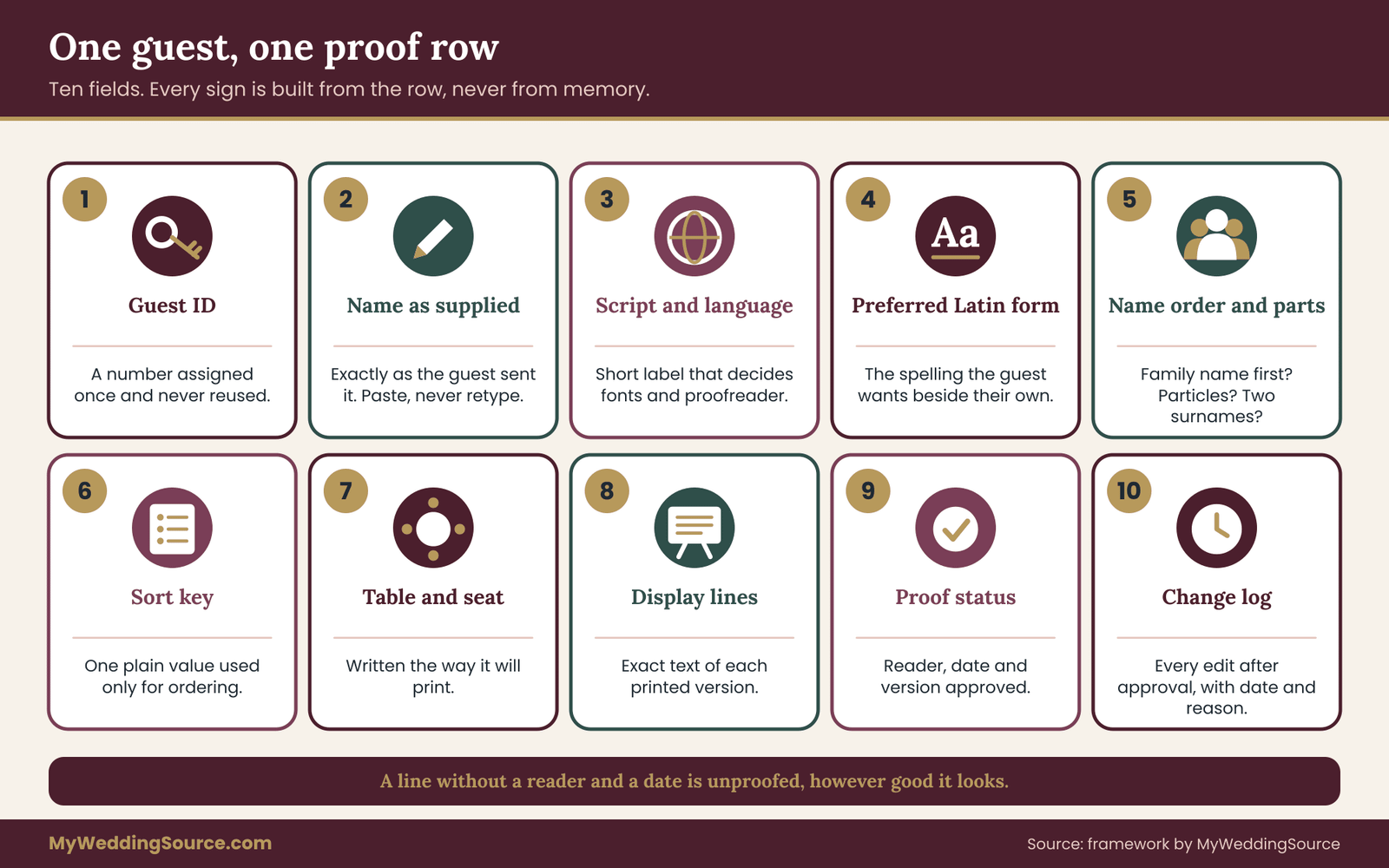
The proof sheet for a multilingual seating chart is a single record per guest. You can keep it in a spreadsheet, a shared document or even index cards for a small list. What matters is that every printed item is built from it and nothing else.
The sheet exists because of one principle: the guest’s own form of the name is the source of truth, and everything else is derived. Display lines, sort keys and table numbers are derived. They are recalculated if the source changes. Nobody edits a display line by hand without changing the source field first.
Here are the fields, in the order a row is filled in.
Field one: guest ID. A simple number, assigned once and never reused. It stays attached to the guest even if the name spelling changes. The ID is what lets you match the sheet to the seating plan and the RSVP records without comparing names.
Field two: name as supplied. Copy the form the guest sent you, exactly, including punctuation and spacing. If the guest sent it in a message, paste from the message. Do not retype. If you had to ask someone else, such as a parent, write who supplied it.
Field three: script and language. One short label, such as “Arabic, Lebanese family” or “Chinese characters, simplified” or “Latin with accents, Polish”. The label matters later, when you pick fonts and find a proofreader. Language is more useful than script alone, since some scripts serve many languages and fonts and conventions differ.
Field four: preferred Latin form. The spelling the guest wants if a Latin version is shown. This is the field that guards against tool-generated spellings. Many guests have a travel-document spelling and a family spelling; ask which belongs on a sign.
Field five: name order and parts. Record which part is the family name, whether it comes first in the guest’s own form, and whether there are two family names, a particle such as “al” or “van,” or a patronymic. This feeds the sort key.
Field six: sort key. One text value used only for ordering. The sorting section explains how to choose it.
Field seven: table and seat. From the seating plan, with the number written the way it will appear on the sign.
Field eight: display lines. The exact text of each printed version. If the sign shows two scripts, there are two display lines, kept side by side.
Field nine: proof status. Who read the line, when, against which printed or on-screen version, and whether they approved it. A line without a reader and a date is unproofed, whatever it looks like.
Field ten: change log. Any edit after the first approval, with a date and the reason.
A note on privacy for any multilingual seating chart. The sheet contains guest names, travel details sometimes, and family relationships. Keep it where only the couple and a small number of helpers can open it. Do not paste the whole sheet into a free online translation or font tool to speed things up; share one name at a time when you need outside help, and not the list.
Collecting names for a multilingual seating chart
Names for a multilingual seating chart should come from the people who own them. That sounds obvious, but the usual pattern is the opposite: one relative collects the whole family’s names into a single text message and the couple copies it. For a multilingual seating chart, the extra step of asking each household directly, or asking one trusted person per household to confirm in writing, saves the most corrections later.
A short capture message for multilingual seating
Keep the request small and specific, so a busy guest can answer in one reply. A version that works for a printed multilingual seating display might read like this:
“We are preparing the multilingual seating display and want your name to appear the way you would write it. Could you send it exactly as you like it written, in your own script if you read one, and tell us which Latin-letter spelling you would like beside it, if any?”
Notice what the message avoids. It does not ask the guest to translate anything, and it does not offer a spelling for approval first. Offering a spelling anchors the answer: many guests will say “fine” to a spelling they would not have chosen, simply to be polite. Ask for the guest’s own version first, then compare it with what you already have.
Where the reply should arrive
Ask for replies as text typed into a message, not as a photo of handwriting, whenever possible. Typed text can be pasted into the sheet without retyping. If a guest sends a handwritten note or an image of a card, record it as received, then ask a reader of that script to type it and confirm the typed version with the guest. That way, the guest has approved the exact characters that will be printed.
If you collect names through a wedding website form, check that the form accepts non-Latin characters and does not strip accents. Submit a test entry with a few accented letters and one line in another script, then read the stored version in the exported file. Some forms accept the characters but export them as question marks. If that happens, collect by message instead. The site’s RSVP etiquette page covers the wording and timing of RSVPs; this step only concerns what the form does to the characters.
Guests who cannot be asked directly about multilingual seating
Some guests are difficult to reach: an elderly relative with no email, a guest of a guest, a child. For these, ask the person who invited them, record the source in the “name as supplied” field, and mark the row as “second-hand.” Second-hand rows get an extra check later: ask the guest in person at the welcome gathering or the rehearsal, if there is one, and fix the sign before the day if needed.
For children, ask the parent which form of the name the child uses. A nickname that is how everyone knows a child may be the right choice for a place card, and a formal form is the right choice for a program. The preferred form depends on the item, and the sheet can carry two display lines if it must. Which name belongs on which item deserves its own thought, but the sheet handles it with the same fields.
What to do when a guest does not answer a multilingual seating request
For a multilingual seating chart, set a date. Two weeks before the print deadline is a reasonable choice, because it leaves room for one reminder. After that date, use the best available form, mark the row “unconfirmed,” and plan to fix it by hand if a guest points it out. An unconfirmed row is acceptable if it is labeled. An unlabeled guess is what causes trouble.
Sorting a multilingual seating chart so guests can find names
Once the rows are filled in, the next decision is how the multilingual seating display is ordered. This is where a mixed-script list differs most from an ordinary one.
On a single-script chart, guests scan alphabetically by family name. Alphabetical order works because the reader knows the alphabet and expects it. On a multilingual seating chart, one ordering rule rarely serves every reader, so you choose based on who is looking and how many names there are.
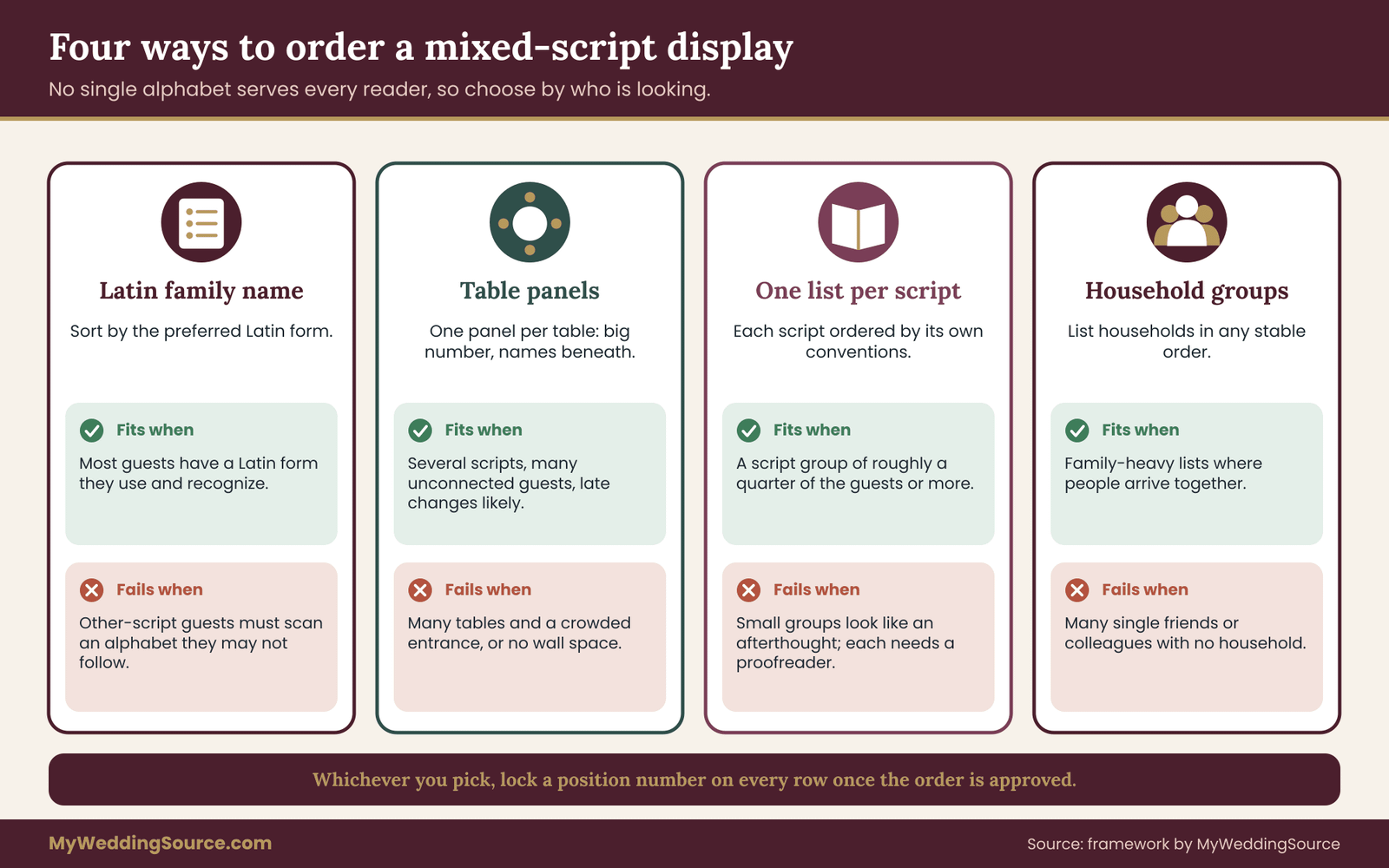
Option one: order by the Latin form of the family name
Use the preferred Latin form from field four and sort it alphabetically. Guests who read Latin find names easily. Guests who read another script find their name by looking for the Latin form, which they may or may not recognize, or by scanning for their own script beside it.
This approach to multilingual seating works best when every guest has a Latin form they use and recognize, such as a spelling on a passport. It fails when the Latin form is a courtesy spelling that the guest does not use. It also pushes all other-script names into positions determined by an alphabet their readers may not follow.
Option two: group a multilingual seating chart by table, not by name
Instead of an alphabetical list, print one panel per table, with the table number large and the guests listed beneath it. Guests find their table by scanning panels for their own name. The order inside each panel matters less, because the panels are small enough to scan.
This option is the most forgiving for mixed scripts. A reader of Arabic script looks for their own name across the table panels, without depending on any alphabet. The drawback is that guests must scan every panel, so it suits fewer tables or guests who are patient. Table panels are also easy to reprint one at a time if a name changes late.
Option three: one list per script, sorted its own way
Print a section for each script, ordered by that script’s own conventions. The Latin list sorts by Latin letters. The Cyrillic list sorts by the Cyrillic alphabet. A Chinese-character list might sort by pronunciation spelled in Latin letters, or by a stroke-based order, depending on what the readers expect.
This gives each reader a list that feels native. It needs more panels and a proofreader for every sorting convention, so it suits weddings where a script group is large enough to justify its own panel, such as thirty guests in one language. It is a poor fit for three guests who read a different script, because a separate panel for three names looks like an afterthought.
Option four: order by household
Group guests by household or family unit, and list households in any stable order. A household panel carries each member’s name in whatever form that member prefers. Guests who arrive as a family find their group quickly, and the sort key matters less.
This is a good fit for family-heavy guest lists. It does not suit lists with many unconnected individuals or with large friend groups, where “household” stops describing the people.
Choosing a sort key for multilingual seating
Whatever option you pick, the sort key is one value per row, written in a script the sorting software handles.
For a Latin sort, use the family name in the preferred Latin form, lowercase, with any particle handled by a consistent rule. For example, decide once whether “al-Hamdan” sorts under A or H and apply that rule to every name with a particle. For Spanish and Portuguese double surnames, decide whether the sort uses the first family name or both. For names that begin with family names in East Asian order, make sure the sort key follows the family name, not the first word typed.
Sorting rules differ by language
A spreadsheet sorts using the language and region settings of the computer. The same list can come out in a different order on a different machine, because languages place accented letters differently. Some languages treat letters with marks as their own letters that come after the plain ones, and others fold them in. If a printed list is sorted by software, check the order by eye for the names with marks, and have a reader of that language confirm the order looks normal to them.
For safety, many couples make the sort key a plain Latin-letter value and lock the order by writing a “position” number on each row once it is approved. After approval, the position number is the order, and a later sort by a different machine cannot change it.
A quick decision rule for multilingual seating
If fewer than ten percent of guests read a script different from the majority, and each of them has a Latin form they use, order by the Latin form of the family name and show the second script beside it. If a clear minority group is large, give it its own section. If many guests would struggle to find names in any single order, choose table panels and keep each panel small. Revisit the choice after the first proof, since a proofreader will often tell you in two minutes which order feels natural.
Direction, numbers and mixed lines on a multilingual seating chart
Direction is the part of a multilingual seating chart that surprises first-time designers most. Arabic, Hebrew, Persian and Urdu are written right to left. Most other scripts on a typical guest list run left to right. A multilingual seating display needs to mix them with table numbers, which are written with digits, and that is where lines go wrong.
Why a mixed line breaks on a multilingual seating chart
When a right-to-left name and a number share a line, the software has to decide the visual order of every piece. Most modern design programs follow a standard algorithm for this, but only when text is entered and marked correctly and when the program has right-to-left support turned on. If support is off or partial, a line can show letters in reverse order, punctuation on the wrong side, or a number jumping to the other end of the line.
The World Wide Web Consortium’s internationalization pages explain the basic idea of bidirectional text and why direction should be declared, not guessed. You do not need the technical detail. You need two habits: keep each script’s text in its own text box, and look at the proof as the reader would.
Keep names and numbers apart in multilingual seating layouts
The simplest reliable layout for mixed direction is to separate the pieces. Put the table number in its own large box. Put each guest name in a separate line or box. Do not build a single line such as a name followed by a dash and a number. Separate boxes let each piece sit in its natural direction, and the layout decides where the number goes, not the text algorithm.
For a table panel, this means a large number at the top, with the names listed beneath. For a list ordered by name, it means two columns, a name column and a table column, with enough space between them that the eye can follow a row across. Add a thin line or alternating tint so that the row is visually tied together, since a long gap can make readers lose their place.
Place the number on the side where the reader starts
A reader of a right-to-left script starts at the right edge. A table number at the far left of a row may be the last thing that reader sees. If a display has a section for a right-to-left language, mirror the layout in that section: name on the right, number on the left, and the row ties together visually between them. This looks odd in an English-only review, which is why a reader of that script must check it.
If you mirror the layout, label the sections consistently. A guest who reads both directions should not be confused by one panel putting the number first and another putting it last. A good compromise for a small number of right-to-left names is to keep one standard layout and have the reader confirm that each row reads clearly, without mirroring the whole display.
Digits and numerals
Table numbers are usually written with the digits most people on a US guest list know. Some scripts also have their own digit shapes. A guest who reads Arabic script may be comfortable with either set, depending on country and habit. Ask the proofreader rather than guessing. If in doubt, using the familiar digits in a large size and adding the table name or a symbol that is the same for everyone avoids any confusion.
A table name or a small symbol, such as a flower, a tree or a color, helps when digits might be unclear. It also gives guests who cannot read the digits shown a second way to identify the table. Make sure the symbol appears on the table itself and on the multilingual seating display, in the same position.
Name order and parts in the display line
The display line should follow the guest’s own convention. In several East Asian naming traditions the family name comes first. In some cultures a family name is written with a particle that is part of the name. Some guests have two family names, and some have no family name at all.
If the guest’s own form is shown in their script, show the order they use in that script. If the Latin form is shown beside it, ask whether they prefer the same order in Latin letters or the reversed order used in English-language forms. Some guests will say the order on passports, others the order in conversation. The answer goes in field five of the sheet, and the multilingual seating display follows it every time.
Fonts, glyphs and the file handoff
A name written correctly in a message can still break when it meets a font. This section covers what to check before the file goes to the printer.
Does the font contain the letters for multilingual seating?
Every font contains a limited set of characters. A font made for English may have no characters for Arabic or Chinese, and may lack some Latin letters with marks, such as those used in Polish, Czech, Vietnamese or Turkish. When a character is missing, the program may substitute another font quietly, print an empty box, or print nothing.
The Unicode Consortium maintains the standard that assigns every character a code and publishes information on scripts. A font that claims to support a script should show every letter of the guests’ names, not only the common ones. The only reliable test is to set each actual name in the chosen font and look at it.
Use a font family that covers the scripts you need
If a display mixes scripts in one design, choose fonts that were designed to sit together, with matching weight, height and color. A decorative script font for Latin names and a system font for another script will look mismatched, and the second script may look like an afterthought. Many font families designed for multiple scripts exist; check the license of any font you use for print, since licenses for commercial printing and for embedding differ. The general guide to signage covers how type affects readability; the point here is coverage.
A decorative display typeface rarely exists in every script. Where the style of the wedding calls for a decorative look in Latin letters, consider a plain, well-made typeface for the other scripts, sized so that it reads as equal in importance. A plain face with correct letters beats a decorative face that mangles them.
Regional forms of the same character
Characters used in Chinese, Japanese and Korean share many shapes, and the same character can have slightly different forms depending on the language and region. A font designed for one language may draw a character in a form that a reader of another language finds unfamiliar or wrong. Choose a font made for the guest’s language, and have a native reader of that language approve it.
The same applies to Latin letters in different languages. A Polish reader expects a particular shape for the barred L, and a Turkish reader expects a dotted and a dotless I that are distinct letters, not variants. A name typed in a program that applies “smart” capitalization can turn one into the other. Check capital and lowercase forms of such names.
Joined and complex scripts
Some scripts do not place each letter independently. Arabic letters change shape according to their position in a word and connect to each other. Devanagari letters join with a line and combine into clusters. Software that does not handle these properly shows separate letters, wrong shapes or misplaced marks. The result may look plausible to someone who does not read the script and look broken to someone who does.
This is the main reason a reader of each script must look at the real file. A screenshot from a phone can be enough for a quick check, but the check that counts is the one against the print proof.
Combining characters and matching in the sheet
A letter with a mark can be stored in two ways: as a single character, or as a plain letter plus a separate mark. They look the same on screen and are different in a spreadsheet, which means a search for one will miss the other. If a name will not match between the guest list and the seating file, this is a common cause. A consistent way to avoid it is to type or paste from one source and to run a visible check: compare the lengths of two cells that look identical.
You do not need to learn the technical term. If two cells that look the same do not match, copy the name again from the original message into both places.
Handing the multilingual seating file to the printer
When you send the file, send what the printer needs to reproduce it. Embed fonts or convert text to outlines in the final file, so the printer’s computer cannot substitute. Include a plain PDF made from the final design and ask the printer to match it. Ask whether the printer will retype or edit any text; if so, ask them to leave text untouched and call you with questions.
Ask the printer to send a proof, ideally a physical one at actual size, and to tell you what stock it will print on. Proof colors and fine strokes can look different on a screen and on paper, and thin strokes in some scripts disappear on textured stock. The invitation printing guide on this site covers proofing and handoffs in general, and the questions there apply to signs as well.
A few extra details help for a multilingual seating file: list the languages on the job ticket so the printer knows what to look for, supply a reference sheet showing each name in each script, and ask who at the printer will handle the file. A printer who has done similar work will usually say so, and a printer who has not will often welcome the reference sheet.
Keep a copy of every file you send and of every version the printer returns. If a mistake appears in the printed result, the sent file shows who introduced it, which matters both for fixing it and for any conversation about a reprint.
The four-pass proof routine for multilingual seating signs
The sheet holds the information. The routine is how you check that the printed multilingual seating chart matches it. Four passes, each aimed at one stage where errors enter. Each pass has an owner, an input and an output, and you do not move to the next pass until the current one is clean.
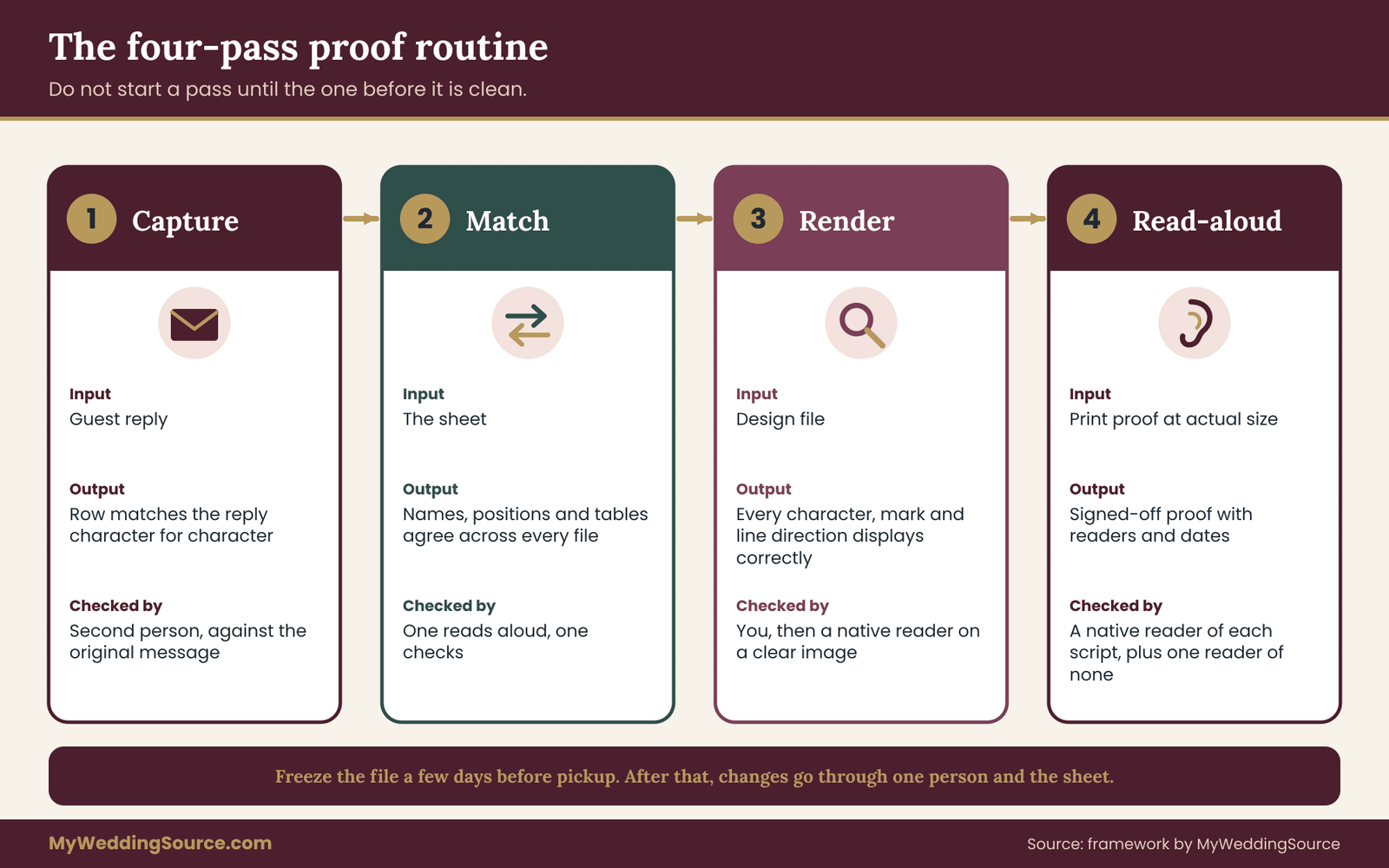
Pass one: capture check
The input is the guest’s reply. The output is a sheet row whose “name as supplied” field matches the reply character for character. A second person reads the row against the original message, or pastes the message beside the cell and compares.
This pass sounds trivial and catches more than people expect, because the most common slip is a retype. A helper who retypes “Wójcik” without checking may produce “Wojcik,” and nothing later in the process will flag it, since every later pass checks against the sheet, not against the guest. Pass one is the only pass that checks against the guest.
Pass one is also when you resolve doubts about which form to use. If a guest sent two forms, ask which belongs where. If a guest has not replied, mark the row. At the end of the pass, every row has a source, a form, and a status of confirmed, second-hand or unconfirmed.
Pass two: match check
The input is the sheet. The output is a seating file in which every name, sort position and table number matches the sheet and the seating plan. This pass keeps a multilingual seating chart consistent across documents; it needs no script knowledge.
Check four things. Every guest ID in the seating plan appears once in the sheet. Every table number in the sheet matches the plan. Every display line is derived from the supplied name, with no hand edits. And no guest appears under two spellings in two places, such as a welcome sign and an escort card.
A practical method is to sort the sheet by guest ID and read down both documents together, one person calling out a name and table, and another checking. It takes a long time for a large list, and it catches the small mismatches that creep in when two people edit two files. The wedding guest list guide covers how to keep the master list clean before it reaches this stage; the match check assumes that list is already settled.
Late changes are the main threat here. If a guest cancels, a plus-one is added or a table is rebalanced, the sheet changes first, then the display lines, then the proof. Never change a display line directly. The change log field records the date and reason.
Pass three: render check
The input is the design file. The output is a file in which every character displays correctly in the chosen fonts and every line has the right direction and order.
You can do much of this without reading any of the scripts. Look for empty boxes, question marks, letters that look like they belong to another font, lines that are cut off, and numbers in odd positions. Compare the number of names in the design with the number of rows in the sheet. Zoom in to a size larger than print and look at accents and small marks, which are the first things to disappear or move.
For a reader-based check, send each reader a clear image or a PDF of the relevant section only, not the whole file. Ask a specific question: “Does every name here look correct and complete in this script, with the right letters in the right order?” A general question such as “does this look okay?” tends to receive a polite yes.
Pass four: read-aloud and print check for multilingual seating
The input is a physical proof at actual size, ideally on the actual paper or board. The output is a signed-off proof with a date and the name of each reader.
A reader of each script reads every name in that script aloud, or silently while pointing, against the sheet. They check the letters, the order of name parts, and the line’s direction. They also check whether the name would be recognized at a glance by the person it belongs to. A reader may notice that a spelling is correct but unusual, and say “my aunt would write it this way instead.” That is a signal to ask the guest, not to overrule the sheet.
At the same time, someone who reads none of the scripts walks the proof the way a guest will. Stand at the distance a guest will stand. Look for glare, thin strokes that vanish, lines too close to read, and a table number that is hard to find. A person unconnected to the planning is best, since they will find what a familiar eye skips.
Who counts as a proofreader for multilingual seating
A good proofreader reads the script natively and is comfortable with names, not only with textbook vocabulary. They do not need to be a professional translator, though for large or formal displays a paid review is worth considering.
A bilingual friend or relative is the usual choice, and a good one. Choose someone who is not also a guest on the list whose name is being checked, if possible, since their own name may get less attention than the rest. Give them a clear task, a deadline and the sheet, not the whole design brief. Thank them in a concrete way.
For paid help, ask a translator or bilingual event coordinator for a review of names and layout, and ask exactly what they will check, how long it will take and how they will mark changes. Ask for a quote in writing before work begins, and do not assume a price; rates and scope vary with the language and the volume. The vendor contract guide on this site has the general questions to ask any paid service before you agree.
This site does not rank or test proofreading services. The point is to hire for the language and the task, and to get the scope in writing.
Using translation and transliteration tools safely
Software can help as a second opinion and should not be the first. Three rules keep it useful.
First, a tool never overrides the guest. If the tool’s output differs from what the guest supplied, the guest’s version stands. Second, never present machine output as an authoritative translation of anything ceremonial or legal, and a seating sign is neither, but the same habit protects the rest of the wedding. Third, share one name at a time, not the list.
When a tool does suggest a different spelling, treat it as a question for the guest, such as “Would you like it written this way?” That question is polite and rarely offends. A silent change is what causes harm.
Transliteration, which converts letters from one script to another, follows published systems. The Library of Congress publishes romanization tables for many languages, and international standards bodies publish others. Different systems give different Latin spellings for the same name, so a tool or a person using a system that is not the guest’s own will produce a spelling the guest does not use. That is why field four exists.
What to do when two readers disagree
Sometimes two readers of the same script disagree about a spelling or a font form. Do not average the answers. Ask the guest, since names belong to people, and note the answer in the sheet. If the guest cannot be reached, choose the form that the family uses in its own documents, and mark the row for a quick follow-up at the welcome gathering.
When a reader says “this is not wrong, but it is unusual,” treat that as useful information about how the guest will experience the sign. Weigh it against how many people will look at it. A sign seen by two hundred guests is different from a card seen by one person.
How long the multilingual seating routine takes
The time a multilingual seating chart takes depends on list size and the number of scripts. For a small number of non-Latin names, the four passes may take a couple of evenings spread over a few weeks, mostly waiting for replies. For a list in which a quarter of the guests read other scripts, plan several weeks, with proofreader time booked early, since helpers are busy too. Work backward from the printer’s deadline and add a week of slack for one round of reprints.
A worked case: a multilingual seating chart for ninety-six guests
The following example is invented to show the sheet and the routine in motion. The couple, the guests and the problems are illustrative, not a report of a real wedding or a real study. Any resemblance to real people is accidental.
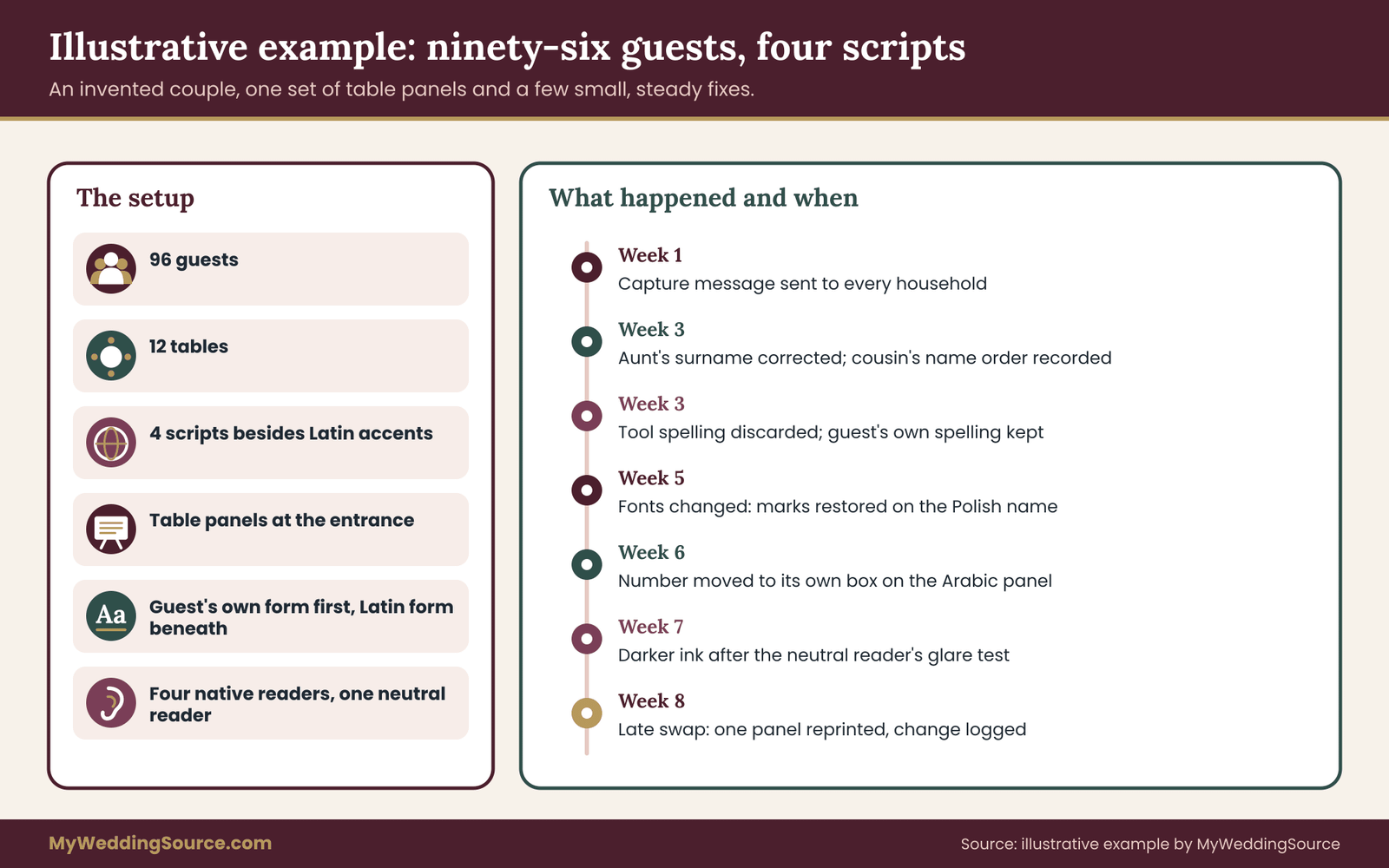
Noor Haddad and Daniel Lin need a multilingual seating chart for a dinner for ninety-six guests at twelve tables. Most guests read Latin letters. Haddad relatives and family friends include a group who read Arabic script. Lin relatives include a group who read Chinese characters. Two friends are Ukrainian and read Cyrillic, and one college friend has a Polish name with letters that carry marks. The couple wants a multilingual seating display at the entrance and no separate place cards.
Step one: decide the display format
The couple has four scripts and roughly thirty percent of guests reading something other than Latin letters. An alphabetical list by Latin family name would work for most, but several guests have no Latin spelling they use. A separate list per script would give some scripts only two or three names. They choose table panels: twelve panels, each with a large number and the names of the guests at that table. This is option two from the sorting section, and it fits a venue entrance with a wide wall.
Each guest line shows the guest’s own form first, in the guest’s script, and the preferred Latin form beneath it in a slightly smaller size. Guests who read Latin letters have one line. Guests who read another script have two. The panels are ordered by table number, so nobody has to find their name in an alphabet.
Step two: collect the names
The couple sends the short capture message to each household. Replies arrive over two weeks. The sheet fills in. Three rows need attention.
Hanan Haddad, Noor’s aunt, replies in Arabic script, with a Latin spelling. The guest list the couple had was typed from a family chat and spelled the surname with one letter fewer. The sheet records the aunt’s own form in field two, and the Latin form she asked for in field four. The guest list entry is corrected.
Yuchen Lin, Daniel’s cousin, is listed in one file as “Yuchen Lin” and in another as “Lin Yuchen.” The family writes the family name first in Chinese characters. The cousin says that in Latin letters he writes the given name first on forms. Field five records both facts. The display line shows the characters, with family name first, and the Latin form given name first. The sort key is “lin.”
Oksana Melnyk, a friend of Noor, replies in Cyrillic. A helper had run the name through a free tool to produce a Latin version, and the tool returned a different last letter than the one Oksana uses. Oksana prefers the spelling she uses on her travel documents. The sheet records her version. The tool’s suggestion is discarded.
Step three: sort and number
Because the couple chose table panels, each guest’s table number matters more than the sort key. The sort key is still recorded for the backup list the couple will keep at the welcome desk, ordered by Latin family name. The sheet records a position number for each row once the order is approved, so a later sort on another computer cannot rearrange it.
The couple also lists a plain-language table name for each panel, a color and a small flower symbol, in case any guest cannot read the digits shown. The symbols appear on the panels and on the table centerpieces.
Step four: render check
The first design uses a decorative serif font for Latin names. When the couple sets the Arabic, Chinese and Cyrillic names in the same design, the Arabic and Chinese lines appear in a fallback font, and the name “Łukasz Wójcik” appears as “Lukasz Wojcik” with the marks missing.
They fix it in three moves. They choose one font family built to cover Latin, Cyrillic and Arabic, a second family for Chinese characters made for simplified forms because the Lin relatives use simplified characters, and a plain Latin face for the Polish name that contains the barred L. All three are checked for print licensing. They set each panel again and zoom in to confirm each mark.
Step five: the table number problem
In the Arabic panel, the couple’s first layout put the number on the same line as the name, after a dash. A reader of Arabic script, Hanan’s cousin, looks at the first proof and says the line reads out of order: the number sits at the wrong end and the punctuation has flipped. The couple moves the number to its own large box above the names and keeps each name in its own line. The cousin confirms the revised proof reads naturally.
The couple also notices that the same fix helps the other panels. Table numbers are now in the same place on every panel, so a guest who is not sure which language to look for can still find the number first.
Step six: print proof and sign-off for the multilingual seating chart
The printer returns a physical proof at actual size on the chosen board. The couple asks four people to read it: a reader of Arabic script, a reader of Chinese characters, a reader of Cyrillic, and a Polish speaker. Each reads their own names aloud against the sheet. A fifth person, a neighbor who knows none of these scripts, stands at the distance a guest will stand and reports that the gold ink on the cream board is hard to read near the window.
The couple changes the ink to a darker color. The printer sends a second proof, and the readers approve it. The sheet records the readers, the dates and the proof version. The file is frozen, with the change log open for emergencies only.
Step seven: the last-week change
Four days before pickup, a guest cancels and another guest takes the seat. The couple updates the sheet first: new name, new source, a short capture message to the new guest. The new guest, a reader of Cyrillic, replies within a day. The sheet is updated and the proof for that one panel is reprinted. The change log records the date and the reason.
Because panels are separate boards, the reprint covers one panel, not the whole display. That is a practical benefit of the table-panel layout the couple chose.
What the multilingual seating example shows
Three lessons stand out. The guest’s own form beats any tool. The proof is checked by readers of the script, and by one reader of none. And the layout was chosen with the proof in mind: separate panels make a late change cheap.
Notice also what the example leaves out. The couple did not translate anything, did not pay for a full translation service and did not need to speak any of the languages. They asked the guests, they checked the files and they gave readers a specific job. The cost was mostly time.
Adapting the multilingual seating example
If the guest list were smaller, with only four or five non-Latin names, the couple could keep a single alphabetical list and show a second line only for those guests. If a script group were much larger, a dedicated panel in that script, ordered by that script’s own conventions, would make more sense. The proof sheet and the four passes stay the same in each case; the layout changes.
A couple whose venue provides its own display boards should ask the venue what file format and size the boards accept, and whether staff will place printed panels or expect the couple to. A mismatch there can undo careful proofing on the morning of the event.
Choosing a multilingual seating display: five layouts compared
The right layout for a multilingual seating chart depends on how many guests read each script, how the venue is laid out and how late changes are likely to be. Each of the five options below has a situation where it is the best choice and a condition under which it fails. None is correct for every wedding.
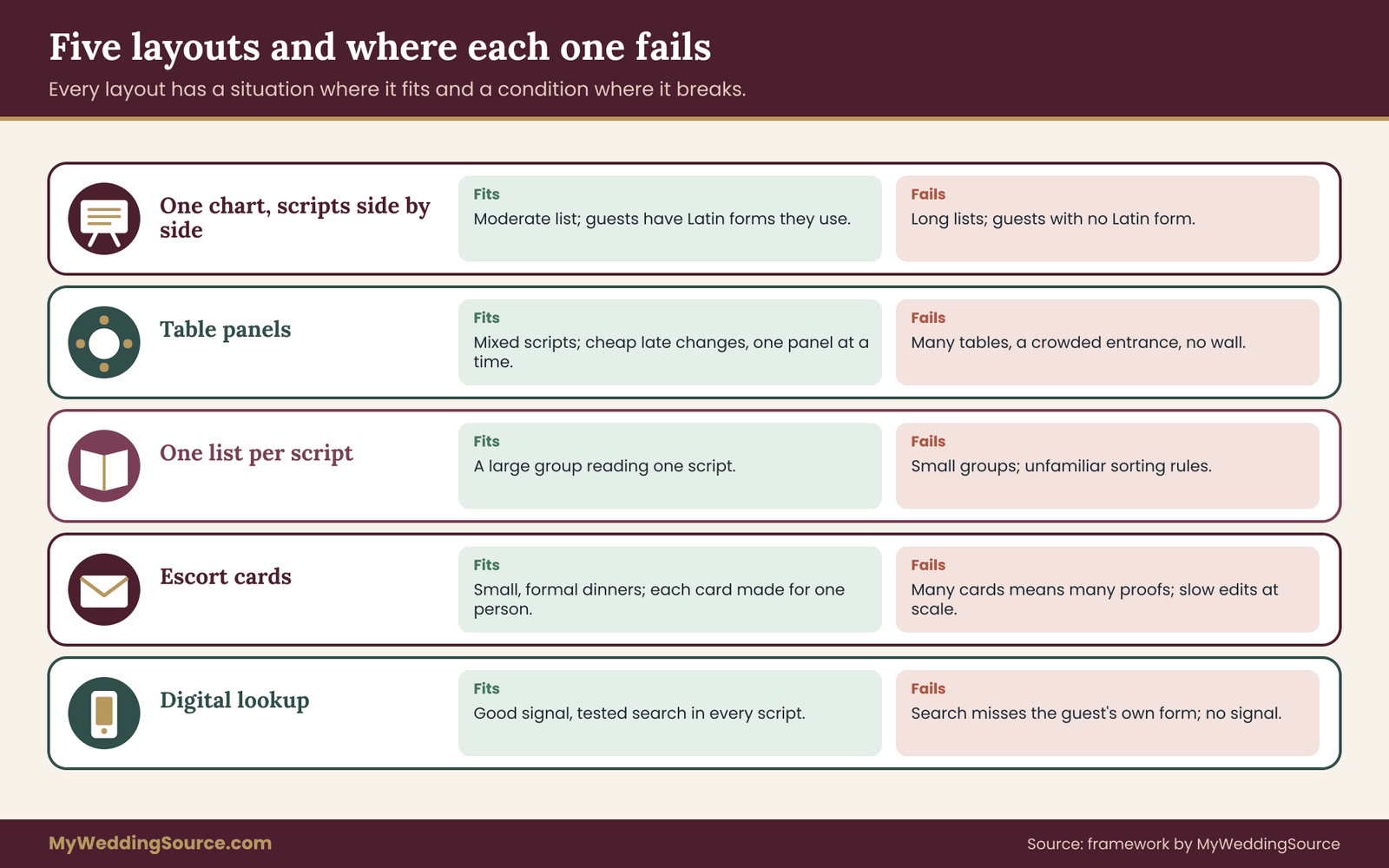
Layout one: one multilingual seating chart, scripts side by side
A single large display lists every guest, with the guest’s own form and the Latin form beside each other, ordered by the Latin family name. It works when most guests have a Latin form they recognize and the list is of moderate length. Guests need to look at only one place, and the multilingual seating display is easy to photograph and reprint.
It fails when the list is long, because a reader of another script cannot scan a Latin alphabet quickly, and it fails when several guests lack a Latin form they use. It also makes a late change expensive, since the whole board is reprinted or patched.
Layout two: table panels
Separate panels, one per table, each with a large number and the guests listed beneath. It suits mixed lists with unconnected scripts, because no alphabet is required to scan. It makes late changes cheap, since only one panel changes.
It fails when there are many tables and a crowded entrance, since guests must look at every panel. It also requires a wall or a row of easels. If the venue does not have the space, a hybrid with a short alphabetical index on a single board can send guests to the right panel.
Layout three: one list per script
Each script gets its own section, ordered by that script’s conventions. This feels native to each reader and works when a script group is large, such as a quarter of the guests or more.
It fails when a group is small, since a section with three names looks like an afterthought, and when the sorting convention of a script is unfamiliar to the people proofing it. It also requires more panels and more proofreaders.
Layout four: escort cards
Each guest picks up a small card with their name and table, laid out alphabetically or by table on a long table. The guest’s name is in whichever script they prefer, since each card is made for one person. This is the most personal option and the most forgiving for scripts, because no guest has to find a name in a long list.
It fails when the cards are many and the proof burden multiplies: every card is a separate proof item. It also fails when cards are laid out in an order only the couple understands. Late changes are cheap for one card and slow for twenty. A short note in the sheet about each card’s source keeps the work manageable.
Layout five: a digital lookup alongside the print
A phone or tablet lookup lets guests search their name and see a table. It copes with different scripts only if the search handles them, which depends on how the tool stores characters and how it matches accents. It also needs signal at the venue and a plan for guests without phones. The site’s guide on the reception guest flow covers the entry area and where a queue forms, which matters for any lookup.
It fails when search does not match the guest’s own form. A guest who types a name in their own script and gets no result will not try again. Treat a digital lookup as an add-on to a printed display, not a replacement, unless you have tested it with every script on the list.
Which layout for which situation
Fewer than ten non-Latin names, all with Latin forms the guests use: layout one, with a second line for those guests. A mixed list with several scripts and many tables: layout two. A large group reading one script: layout three for that group, layout one or two for everyone else. A small, formal dinner: layout four, with each card proofed. A venue with strong phone signal and a tested lookup: layout five as a supplement.
Combining multilingual seating layouts
Couples often combine two layouts in a multilingual seating chart. A common pair is table panels at the entrance with escort cards for a few guests who need special handling, such as guests with a large print need or guests seated with a family. Another pair is a single alphabetical index and a set of table panels. The sheet supports any combination, because every layout is built from the same rows.
If you combine layouts, keep the same form of each name in each place. A guest whose name appears with one spelling on an index and another on a card will trust neither. The sheet’s display-lines field exists to prevent this.
Cost logic for multilingual seating without prices
Cost follows the number of printed items and the number of proof rounds. Panels and a single board cost less in printing than a stack of individually printed cards, but cards are cheaper to correct. A long single board is cheap to print once and costly to reprint. Ask your printer to quote for a reprint of one panel or one card up front, in writing, so you know what a late change costs before you choose a layout. Do not rely on a general price list; quotes vary by printer, material and quantity.
Readability and access at the entrance
A correct name that cannot be read is still a failure on a multilingual seating chart. This section covers the physical side: size, contrast, placement and access.
Test the multilingual seating chart at actual size
The simplest rule is to print a proof at actual size and read it where it will stand. On a screen, everything looks readable. On a board at the entrance, with a queue behind you and a window behind the board, small, thin or low-contrast text fails first. This applies to every script, and some scripts have fine details that vanish when printed small.
Make the smallest text on the multilingual seating display no smaller than the smallest text a guest needs to read to find their name. Names and table numbers are the working text. Decoration and the couple’s names are not.
Contrast and finish
Dark text on a light, matte background reads best. Glossy boards and acrylic reflect light and can make a display unreadable at certain angles. Gold and pale ink on cream is a common failure. Ask the printer for a sample on the actual material and look at it near a window and under indoor light.
The U.S. Department of Justice’s ADA site and the Access Board publish guidance on accessible design, including the legibility of signs. The ADA’s sign requirements apply chiefly to permanent room and space signs, and temporary event signs are a different matter, but the principles of contrast, non-glare finish and readable type are a useful yardstick. Ask the venue whether it has its own accessibility requirements for displays, and refer to the agencies for the current rules.
Height and placement
Place the multilingual seating display where a person using a wheelchair, a person of short stature and a person who is tall can all read it. A flat board on an easel can be tilted toward guests. A wall mount at eye level for a standing adult may be too high for a seated reader. Leave clear floor space in front, so a guest can come close without blocking the entrance.
Light the multilingual seating display evenly, without a glare spot. Avoid placing it where a door will block it or where a queue will form across a walkway. A display near the coat check or the bar draws traffic that competes with the line.
A second way to find the table
Some guests will not find their name, whatever the layout. Staff or a friend stationed beside the multilingual seating display, holding a printed backup list, solves most of these cases in seconds. Brief them on the sheet: how names are ordered, which scripts appear and how to say the table numbers. A host who can say “Table nine, by the window” in plain words helps more than any sign.
Give the helper a printed copy of the sheet’s essential columns: name, preferred Latin form, table. Keep the sheet’s private notes off that copy. If a guest asks about a spelling or an order, the helper can note the request and pass it on, and the couple can fix it after the event. That kind of record is part of the care taken with the whole display, and the helper does not need to resolve it on the spot.
Failure conditions for multilingual seating signs, and what to do
A process is useful when you know how it fails, and a multilingual seating chart has predictable weak points. These are the conditions that most often undermine a multilingual seating chart, with a plain response to each. Check the list against your sheet one week before the print deadline and again after the proof comes back.
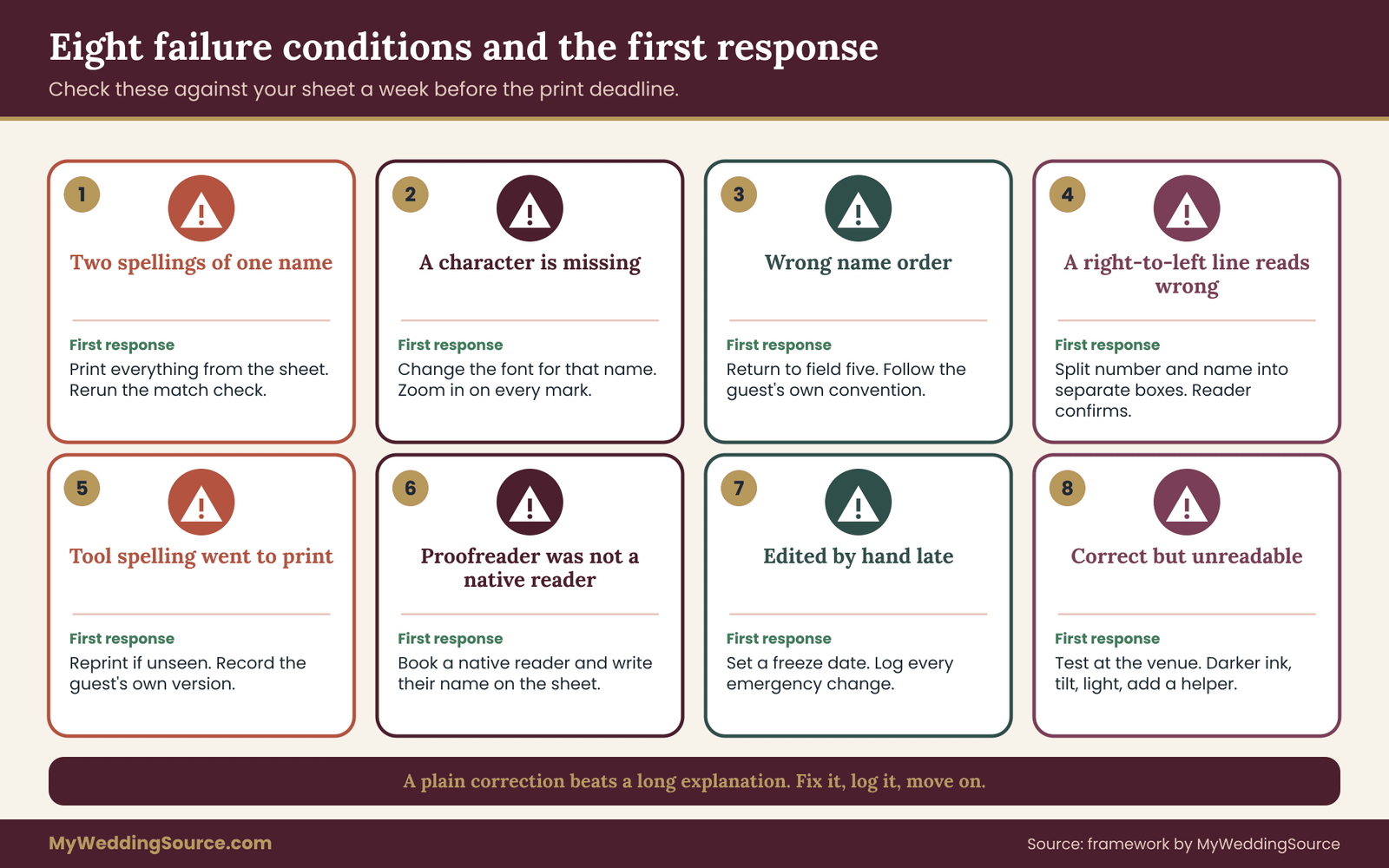
A name appears with two spellings
The same guest is spelled one way on the welcome sign and another on the multilingual seating display. Cause: two files edited separately, or a helper retyping. Response: stop editing display lines directly, make every printed item pull from the sheet, and run the match check again. If a printed item is already wrong, fix the one that is more visible first.
A character is missing or wrong
An accent is gone, a letter is replaced or a line shows empty boxes. Cause: a font without the character, or a program substituting a font. Response: change the font for that name or that script, set the name again, and look at it zoomed in. Do not accept a substituted font because it looks acceptable to you; the guest may see a different letter.
Names are in the wrong order
A family name is placed after the given name when the guest writes it first, or a particle is separated from the name. Cause: copying a Latin-style order into every script. Response: return to field five, confirm the guest’s convention, and correct the display line. If the guest uses a different order in different settings, show the one they chose for signs.
A right-to-left line reads wrong
The number sits at the wrong end, or punctuation flips. Cause: a number and a name sharing a line, or software without right-to-left support. Response: split the line into separate boxes and have a reader of the script confirm the new proof.
The tool-generated spelling went to print
A transliteration tool produced a spelling the guest does not use, and it was printed. Cause: skipping field four. Response: if the guest has not seen it, reprint the item. If the guest has seen it, apologize briefly and fix it where you can. A plain correction is better than an explanation. Add the guest’s version to the sheet.
The proofreader was not a native reader
A well-meaning helper who knows some of the language approved the proof, and a native reader later finds an error. Cause: the wrong person doing pass four. Response: have a native reader of the script check the real proof, and write the reader’s name on the sheet each time. Where no native reader can be found, ask the guest to confirm the line directly.
A late change is made by hand
Someone fixes a name on the board with a pen, or edits a file without telling anyone. Cause: no freeze rule. Response: set a freeze date a few days before pickup, after which changes go through one person and the sheet, and agree that emergency fixes are logged. A pen correction on a printed board looks worse than a reprinted card.
The printer retyped the file
The printed result differs from the file. Cause: the printer re-keyed text, or substituted a font. Response: ask for a proof of the actual output before approving, and keep your original file and the printer’s returned proof. Next time, send outlines and a plain PDF and say in writing that text must not be edited.
The display is correct and unreadable
The names are right, and guests still cannot find them: ink fades against the board, glare covers the top rows, the multilingual seating display stands in a doorway. Cause: no test at the location. Response: move the display, tilt it, add a light or reprint in a darker color, and put a helper beside it. Test again at the same time of day as the event if you can.
A guest does not recognize their own name
The sign is accurate by the sheet but not by the guest. Cause: the guest’s form was never confirmed or the row was second-hand. Response: keep a short list of unconfirmed rows, ask at the welcome gathering, and fix what you can. Accept that one or two names may still be wrong and have a kind, ready sentence for the moment. A host who says “Thank you, we will fix that tonight” has handled it well.
The multilingual seating list outgrew the layout
More guests were added than the layout can hold, or a script group grew. Response: switch to table panels, where adding a guest changes one panel, or add a second board. Revisit the layout choice when the guest count changes by more than a few.
Name forms across invitations, programs and multilingual seating signs
The multilingual seating display is only one place where a guest’s name appears. The invitation envelope, the program, the place card and the thank-you note carry it too. A guest who sees one spelling on the invitation and another on the multilingual seating display will notice.
Use the sheet as the shared reference for every item. The wedding invitation etiquette guide covers how names, titles and addresses are written on invitations. When an invitation has already gone out with a spelling the guest does not use, do not reprint everything. Decide which items the guest will keep and look at closely, such as a place card or a program, and use the guest’s preferred form there.
If the printed invitation used a different form on purpose, for example a formal form for a family member, the seating sign can still use the form the guest prefers day to day. Ask the guest which form they want at the table, and note the answer.
Keeping one source of truth for multilingual seating
The principle behind the whole sheet is that names should be typed once. When the invitation list, the RSVP records, the seating plan and the signs all copy from one place, an error is fixed in one place. When they are copied by hand, each copy carries its own errors.
The broader wedding seating chart guide explains how to build the plan itself. Once the plan exists, the sheet attaches each guest’s name and script to a seat, and the multilingual seating display is built from it.
Your next steps
Work through these multilingual seating steps in order. Each one is small, and together they fit into a few evenings spread across several weeks.
- Open a copy of your guest list and add the sheet fields: guest ID, name as supplied, script and language, preferred Latin form, name order, sort key, table, display lines, proof status and change log.
- Mark the guests whose names use accents or a script different from the majority. They are the rows that need proof.
- Send the short capture message to each of those households and set a reply date two weeks before the print deadline.
- Choose a layout from the five options and write down why. Revisit the choice after the first proof.
- Pick fonts that cover every character and check the license for print. Set every name and zoom in.
- Book a native reader for each script before you need one. Tell them the deadline now.
- Ask the printer how it handles non-Latin text, what a one-panel reprint costs, and what file it wants. Get the answers in writing.
- Run the four passes and sign off with names and dates. Freeze the file a few days before pickup.
- Print a backup list for the person beside the multilingual seating display, and brief them.
A multilingual seating chart is finished when every row has a reader and a date. If a step stalls, the likeliest cause is a missing reply or a missing reader. Both are solved by asking one more person.
FAQ
Do I need to translate guest names for a multilingual seating chart?
No. Names are written, not translated. Use the form the guest gives you, in their script if they read one, and add a Latin spelling only if the guest wants one. Avoid tools that convert a name into a meaning. If a guest has more than one spelling, ask which belongs on a sign and record the answer in the sheet.
How do I sort names when guests read different alphabets?
Pick one rule and apply it to everyone. Common choices are the Latin family name, table panels with no alphabetical order, one list per script, or household groups. Table panels work best for mixed lists because no alphabet is needed. Whatever you choose, record a position number once the order is approved so a later sort cannot move names.
Can I use a free online tool to convert names into another script?
You can use one as a second opinion, never as the final word. Tools pick one transliteration system, and it may not match the spelling the guest uses. Share one name at a time instead of pasting the whole list, and let the guest’s own version win if the two differ. A native reader should still check the proof.
Who should proofread the printed signs?
A native reader of each script on the multilingual seating display, ideally someone comfortable with names, not only vocabulary. A bilingual friend is a common choice, and a paid translator or bilingual event coordinator is worth considering for large displays. Also ask one person who reads none of the scripts to check legibility from guest distance.
What if a font does not support a guest’s name?
Change the font for that name or that script rather than accepting a substitute. Test every actual name in the chosen font and zoom in on marks and joins. Look for empty boxes, missing accents or letters that appear to come from a different typeface. Check the font license for commercial printing before you send the file.
How should I handle right-to-left names and table numbers?
Keep the table number in its own box and each name on its own line, so neither is forced into the other’s direction. Ask a reader of that script to check the proof, including punctuation. If you mirror the layout for a right-to-left section, make sure all sections remain easy to follow. A large number and a table symbol help every guest.
What if a guest says their name is wrong after printing?
Thank them, note the correct form and fix what you can. A pen correction on a printed board looks worse than a clean fix, so for small items reprint the card or panel, and for large ones add a neat label. Add the guest’s form to the sheet. Keep a calm sentence ready for the moment so the correction is brief.
Do accessibility rules apply to temporary wedding signs?
The ADA sign requirements apply chiefly to permanent room and space signs, so temporary event signs are generally a different matter, but the legibility principles are still a useful guide. Venues may have their own rules. Check the current requirements with the agencies listed in the sources and ask your venue what it expects.
Sources
- ADA.gov, U.S. Department of Justice: information and technical assistance on the Americans with Disabilities Act
- U.S. Access Board: accessibility guidelines and standards, including signage
- Unicode Consortium: the Unicode Standard, scripts and character support
- W3C Internationalization: bidirectional text and language on the web
- Library of Congress: romanization tables for non-Latin scripts
- International Organization for Standardization: transliteration standards
- U.S. Department of State, Travel.State.Gov: passport and travel document information
- LEP.gov: federal interagency resources on language access
- U.S. Postal Service: address standards and mailing information