
Video messages from wedding guests are short recordings of friends and relatives speaking to the couple, and they only stay a joy if you set up permission, recording and storage before the first guest presses record. This guide gives you a release-and-handoff chain you can run from the invitation stage to the day you pass the files to long-term storage.
Treat video messages as a small production with six links: ask, record, release, review, hand off and archive. Tell guests in advance what happens to their clip, collect a short written or on-camera release before or at recording, keep clips private until you have watched them, and give one named person the job of moving the files into storage within two weeks. Keep three copies on two kinds of storage, one of them away from home, and write down who may see each clip. Minors, bystanders and anything sensitive need an extra step.
A guestbook full of handwriting is easy to keep. A folder of two hundred video clips is not. Video messages arrive as large files, in different formats, recorded on borrowed phones, a tablet on a stand or a vendor’s booth. Some come with a quiet backstory: a grandmother who tells a story the couple has never heard, a cousin who says something that is lovely to the couple and awkward to everyone else, a child who is not supposed to appear online at all. Each clip is a small piece of someone’s voice and face, and it comes with a small obligation.
Most couples plan the fun part, the prompt cards and the booth, and leave the rest to chance. Then a vendor’s gallery expires, a guest asks for their clip to be deleted, or one partner learns that a recording stored in a free app is now governed by terms nobody read. None of this is dramatic. It is simply avoidable, and the fix is mostly a matter of order. Ask first, record second, decide what happens to the clip third.
This article stays on that single job. It does not explain how to photograph a wedding or write your whole privacy policy; for the wider picture of guest boundaries and image use, see our guide to wedding photography consent. Here the focus is narrower: how to collect, permit, review, share and preserve video messages without surprising anyone, including your future selves.
A note on scope. This is general planning information, not legal, tax or financial advice, and recording and privacy rules differ by state, by venue and by platform, so confirm anything that matters with the issuing agency or a qualified professional.
What video messages from wedding guests are for
Before choosing equipment, decide what job your video messages are supposed to do. The job shapes the length, the prompts, who sees them and how long they are kept. Couples usually want one of four things, and sometimes two at once.
A keepsake for the couple. The clips are watched privately, maybe on the first anniversary, maybe on a hard day. The audience is two people. This is the most forgiving use, because the guests mostly expect that audience, and a short release is enough.
A gift back to the guests. The couple edits a highlight reel and sends it to everyone who recorded. Now every guest is also an audience member, and the release needs to say so. A guest who recorded something personal may be glad for the couple to hear it but not glad for the other hundred guests to hear it.
A screening at the event. Clips from absent guests, or from the cocktail hour, play during dinner. Anything played in a room is public in the practical sense that anyone can hear it. That calls for review before the day and a way for guests to say “private, please.”
A message for the future. Some couples ask guests to record advice for a first anniversary, a tenth anniversary or a child who does not exist yet. These clips are meant to sit unwatched for years, which means storage is the whole project.
If you cannot decide, ask this: who is the first person other than the couple who will ever see a given clip? If the answer is nobody, keep the process light. If the answer is “all the guests” or “the dinner crowd,” you need the full chain.

The release-and-handoff chain at a glance
The framework used through the rest of this article has six links. Each link has one owner and one output, and a missing output is the early warning that something will go wrong later.
The first link is ask: tell guests ahead of time that video messages are coming, what they will be used for, and that saying no is fine. The output is a short note on the invitation website or the reply card.
The second is record: set up the place, the device, the prompts and the helper so that recording is easy and the background is safe. The output is a clip with sound and a visible face.
The third is release: capture the guest’s yes, in writing or on camera, with the scope they agreed to. The output is a release record attached to the clip.
The fourth is review: someone you trust watches every one of the video messages before anyone else, flags problems and routes sensitive clips to a private folder. The output is a status for each clip: approved, private or on hold.
The fifth is hand off: one named person moves the originals from the booth, tablet or app into your own storage and confirms that every one of the video messages opens. The output is a complete folder and a checked count.
The sixth is archive: you name, back up, caption and periodically test the files so they still play in twenty years. The output is a dated archive note.
Everything else in this guide expands one of those links. If a link is weak, the whole chain is weak, and you will usually find out about it at the least convenient moment.
A useful test is to picture a guest, five years from now, asking what happened to the video messages they recorded for you. If you can answer in two sentences, who watched them and where they are kept, the chain held. If you would have to guess, a link was missing.
Who this guide is written for
It is written for couples who want to collect messages themselves or through a vendor, for the friend or family member who has been asked to run a recording station, and for planners who want a repeatable process. It assumes a wedding of any size. A fifteen-person wedding can do the whole chain in a spreadsheet with one tablet. A two-hundred-guest wedding needs the same chain but with a helper, a script and a review schedule.
One thing to settle now is who owns the process after the wedding. Newlyweds are tired, and the week after is when clips get lost. Name a person, a date and a place before the wedding day. A handoff checklist that nobody is assigned to is only a document.
Choosing a format for video messages
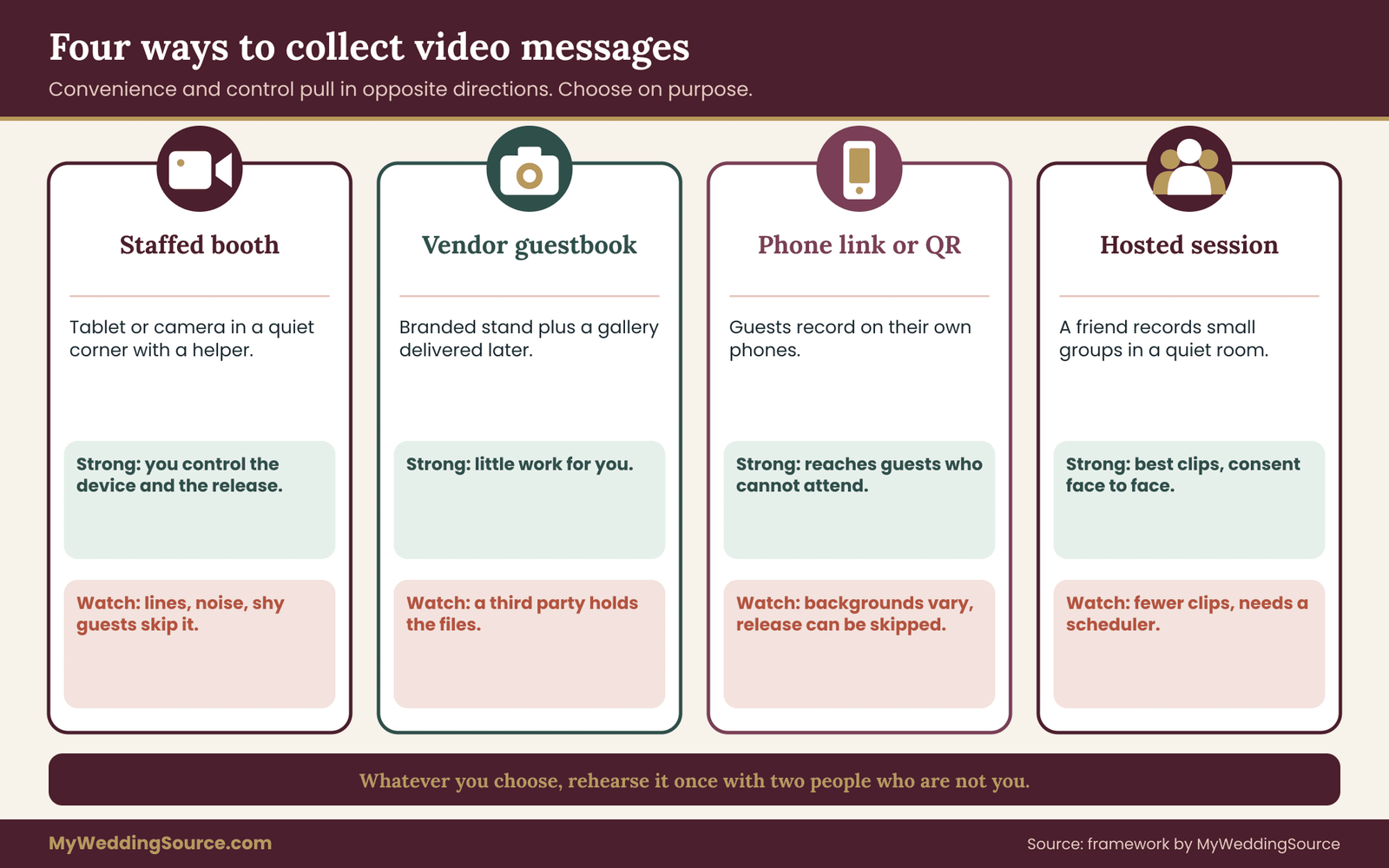
There are four common ways to collect video messages. Each trades convenience against control, and the right choice depends on how comfortable your guests are with technology and how much you care about who holds the files.
A staffed booth or tablet station
A booth is a tablet or camera on a stand in a quiet corner, often with a prompt sign and a helper. The big advantage is that you control the device. The clips land in one place, the helper can read the release aloud, and the person recording is standing in front of a deliberately chosen background. The disadvantages are cost, a line of guests during cocktail hour and the risk that quiet, shy guests skip it entirely.
If you use a booth, plan its position with the same care you would give a bar or a gift table. Keep the booth away from the formal portrait schedule too, since the wedding family photo list already asks relatives to be in several places at once. A corner near the entrance of the room can create a queue that blocks traffic. Our guide to wedding reception guest flow covers how to place stations so they do not choke the room.
A vendor-run video guestbook
Several vendors and apps offer a video guestbook: a branded stand with a tablet, sometimes with a staff member, plus a gallery of clips delivered afterward. This takes work off you. It also adds a third party to your process, which means a contract, terms of service and a delivery date. Questions to ask any vendor are collected later in this article, because the answers decide who controls the files after the wedding.
A phone link or QR code
Here guests record on their own phones through a web link or an app, usually found on a table card or the wedding website. This works well for out-of-town guests who cannot attend. It has the lowest cost and the least staffing. It also has the least control: backgrounds vary, bystanders appear, clips can be recorded in a car or a bathroom, and the release is only as strong as the page the guest tapped through.
Because the guest is recording alone, the release needs to be inside the flow, before the record button. A release that arrives afterward by email is much easier to ignore.
A hosted or scripted session
The fourth option is a short, planned session: a friend with a camera sits with the grandparents, the wedding party or a small group and records messages in a quiet room during the weekend. It produces the best clips and the fewest of them. It also allows you to ask permission face to face, which is the strongest form of consent in practice.
A decision rule
If you want video messages from most guests, use a booth or a phone link, and put the release at the start. If you want video messages from a handful of important people, use a hosted session. If you want a gift reel for all guests, make sure your release covers sharing with other guests, and use a booth or a vendor you trust with the files. If you want messages that will sit for years, choose whichever format delivers original files, not just a compressed web link.
A last practical point: whichever format you pick, test it with two people who are not you before the wedding. A booth that works in your living room can fail in a loud ballroom, and a link that works on your phone can fail on an older guest’s browser. A five-minute rehearsal with a relative who does not like technology tells you more than any vendor demo.
Rehearse the whole path once, from the guest pressing record to a file opening on your own computer. Many problems with video messages only show up at the end of that path, for example a clip that records without sound or a download that returns a smaller file than expected.
Starting with permission: what guests should know before they record
Permission begins before the camera. When guests find out about video messages for the first time at the booth, they are deciding under social pressure, which is not real choice. You want them to learn about it ahead of time, in plain words, from you.
What to say in advance
A short note on the invitation website works. It should cover four things: that you are collecting video messages, what the video messages will be used for, who will see them, and how long you plan to keep them. It should also say that participation is optional and that a guest can ask for a clip to be removed afterward. The wording can be warm and brief.
“We are collecting short video messages at the wedding. Only the two of us will watch them at first. If you would like yours to stay private, or not to be recorded at all, just tell us. No reason needed.”
That is about forty words, and it does most of the work. It sets the audience, offers an exit, and removes the pressure to explain. If you plan to share a highlight reel with other guests, say so in the same note, because that changes what guests are agreeing to.
Why advance notice matters more than the form
A signed form at the booth proves that a guest tapped “agree.” Advance notice makes the agreement real. A guest who has had a week to think can decide whether to record something personal or something lighthearted. A guest who is told at the booth, with a glass in hand and three people waiting, tends to agree to everything or to walk away from the station entirely. Neither outcome is good for you.
Plan the notice as part of the invitation process, not as an afterthought. Video messages feel casual to the couple, but guests take them seriously once they realize a recording of their face and voice will exist for years.
It also helps the guests you do not know well. A coworker of a parent, a plus-one, a child of a family friend: they have no history with you, and a short written notice gives them the information a close friend would already have.
Guests who should be asked in person
A few categories deserve a personal conversation, before or at the event, instead of a general notice. These include any guest you know is protective of their image for safety or work reasons, any guest who has said something about privacy on a form or in a note, and the parents of minors who will be recording. The conversation can be two sentences. You are not cross-examining anyone; you are showing that you thought about it.
If a guest says no, thank them and move on. Do not reopen the question later, and do not frame the refusal as a favor you are granting.
Keep a short list of guests who prefer not to appear in video messages at all, and share it with the helper and with any vendor so nobody has to repeat the conversation. Keep that list private, and remember that people who opt out of the camera are often glad to write a card instead. People who feel pressured tend to record something stiff, resent it, or leave. People who feel respected tend to say yes more freely next time.
What you should not promise
Be careful with promises you cannot keep. “Only we will ever see this” is a promise that fails the moment a vendor, a cloud service or a family member gains access to the folder. A safer promise is narrower and checkable: “Only the two of us will watch it, and we will tell you before sharing it with anyone else.” If a vendor’s platform keeps copies, say so, or choose a platform that does not.
Do not promise that a clip can be deleted “everywhere” unless you control every copy. A guest who asks for removal later should hear what you can do, which is delete your copies, ask the vendor to delete theirs and tell you when that is done. The release section later in this article builds this into the text itself.
Who holds the rights in video messages
Rights questions sound heavy, but for video messages they come down to three plain facts. The guest is a person who appears on camera. The guest, or whoever holds the camera, may own the copyright in the recording. And the clip may contain other people’s material: music, other guests, artwork, a venue’s branding. A good release deals with all three in a sentence or two each.
The guest on camera
A person’s face and voice are theirs to share or withhold in everyday life. A guest who records a message for the couple is choosing to give the couple a copy. They are not automatically agreeing to a public post, a reel for other guests or a promotional use by a vendor. The release is what turns a vague “sure, I’ll say something” into a specific, recorded permission with limits.
This is also why video messages deserve a little more care than a casual group photo. A photo captures a moment, while a message is a person choosing words, often personal ones, and speaking them to you in particular.
Different places treat likeness and privacy differently, and the details change, so this guide does not try to summarize every state. What stays constant is the practical principle: the narrower and clearer the use, the less likely anyone is surprised.
Who owns the recording
Copyright generally attaches to a recording from the moment it is made, and the person who creates it is usually the starting owner. When a guest records on a tablet you supply, the setup decides what happens. When a guest records on their own phone and uploads it, they are plausibly the creator. When a vendor’s staff member films the guest, the vendor may be the creator and may hold rights unless the contract says otherwise.
For the couple this matters less than people fear, because ownership is not the thing you want. You want permission to keep the clip, watch it, copy it for backup, edit it into a reel if you plan one, and share it with specific people. The U.S. Copyright Office explains how copyright and ownership work, and its site is the place to confirm current rules instead of relying on summaries. For your purposes, a release should say in plain terms that the guest allows the couple to keep, copy and share the clip as described, and that the guest keeps whatever rights they have beyond that.
If a vendor films or hosts the video messages, the vendor contract is where ownership is settled. Our guide to wedding vendor contracts explains how to read clauses about deliverables and usage, and the same questions apply to a company that sells a video guestbook.
Other people’s material inside a clip
A guest may sing a song, hold up a framed painting, or stand in front of a mural. Background music from a venue speaker may be captured without anyone noticing. These are small matters for a private keepsake and larger ones if the video messages go into a public reel. If you plan to post anything outside a private circle, review each clip for music, logos and recognizable bystanders first. The edge cases get their own section later, and the practical rule is simple: if a clip cannot stay private, fix the music and the background before it goes anywhere else.
What a release is, and what it is not
A recording release is a short statement, signed or spoken on camera, in which the guest agrees to a described use of their clip. It is not a contract that makes a guest answerable for anything, and it is not a legal shield that covers every future use. Think of it as a record of what you told the guest and what they said yes to. If a question comes up in three years, the release is the evidence that you were clear.
Because rules differ, a couple who plans to publish clips commercially, for example in an advertisement or a paid product, should talk to a qualified attorney before relying on a casual form. A private keepsake or a screening for friends is a very different situation from a public marketing use, and this guide stays on the private end.
Writing the recording release for video messages
The best release for video messages is short enough to read in the time it takes to walk up to the booth. A page of legal text does not get read, and a form nobody reads proves little. Aim for plain wording that covers eight points, in this order.
The wording matters less than the habit. A guest who reads three honest sentences about their video messages is better informed than one who skims a page of dense text.
The eight points a good release covers
Who is recording. Name the couple and, if a vendor runs the station, the vendor. A guest should know who is holding the camera.
What is being recorded. A short video message with sound. If you also record photos or stills from the clip, say so.
Who will see it first. “The couple only” is the usual answer, and it is the answer that most guests expect.
Who else may see it. If you plan a highlight reel for guests, a screening at the wedding or a share with a parent, list each of those. If you do not plan any, say “no one else without asking you.”
Public posting. A clear yes or no. The safest default is no. A guest who wants to allow posting can tick a separate box.
How long you will keep it. For a keepsake, “indefinitely, for the couple’s personal archive” is honest. If a vendor deletes files after a period, say that too.
How to change your mind. Give a way to ask for removal, and say what you can do. “Contact the couple and we will delete our copies and ask any vendor to delete theirs.”
Guests under eighteen. A parent or guardian agrees on behalf of the child, and the release says so. The minors section later explains the practical routine.
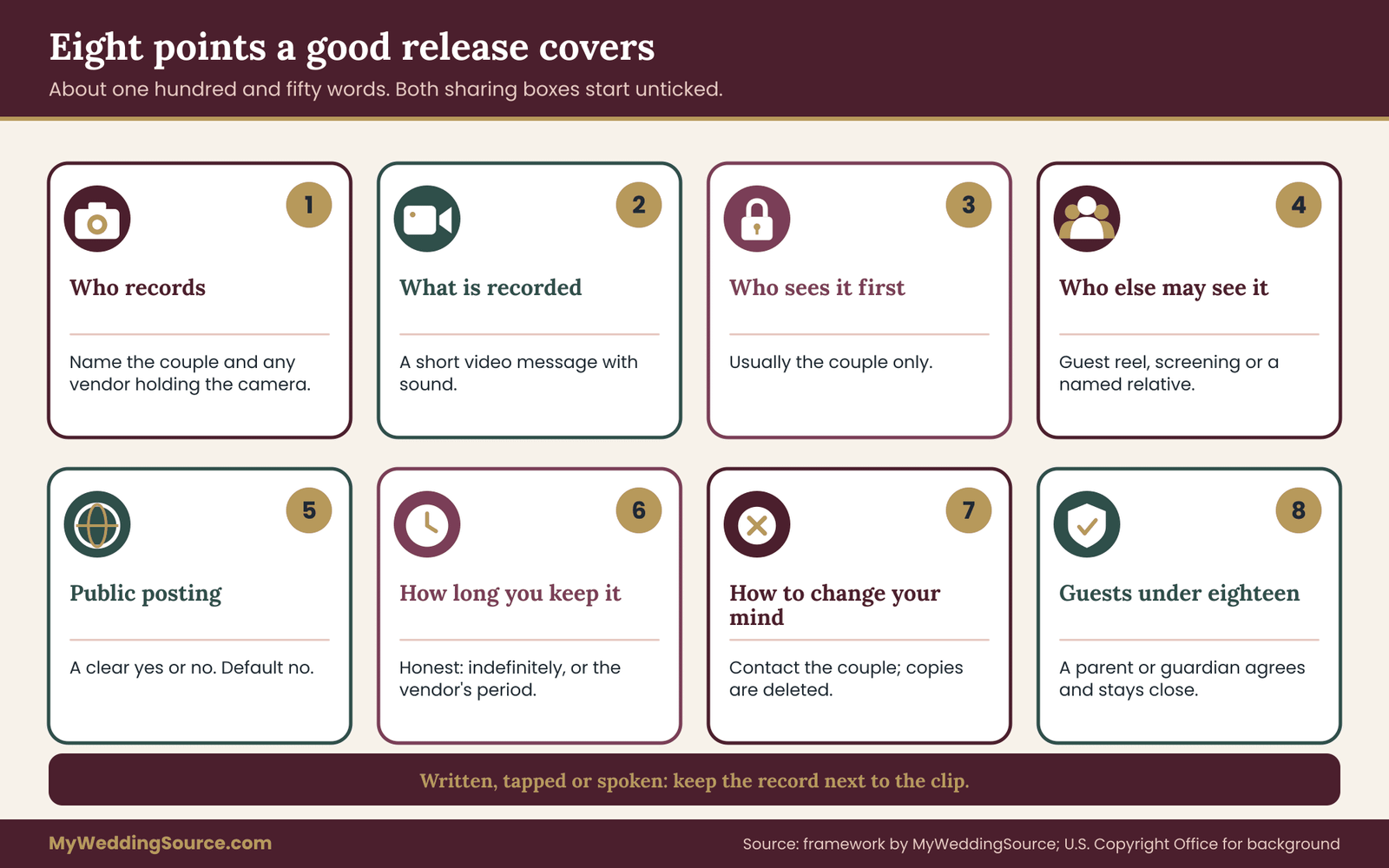
Those eight points fit in about a hundred and fifty words. If you cannot say what you mean in that space, the plan itself may be too complicated.
A sample release, in plain words
The text below is an example of the shape, not a legal form. Adjust it to your own plans, and have a professional look at it if your use goes beyond a private keepsake.
“I am recording a video message for the couple. They may keep it, copy it for backup and watch it privately. They will not share it with others or post it online unless I tick the box below. I can ask them to delete it at any time.”
Below the text, add two tick boxes. One reads “You may include my clip in a private highlight reel shared with wedding guests.” The other reads “You may post my clip publicly.” Leave both unticked by default. A guest who does nothing has said no, and that default protects you as much as it protects them.
Written, tapped or spoken
There are three ways to capture the yes, and each fits a different format.
A written release works for a hosted session or a booth with a helper. The guest signs or initials a card. It is simple, and the card lives in a folder next to the video messages.
A tapped release works for tablet booths and phone links. The guest reads the short text on screen and taps “I agree” before the record button becomes active. Make sure the platform stores the time and the wording the guest saw. If it does not, take a screenshot of the screen as a record of the text at that date.
A spoken release is the guest saying on camera, at the start or end, something like “I am happy for the couple to keep this and share it privately.” It is the least formal and the easiest to lose, since it only exists inside the clip. It is useful as a backup, not as a main method. If you use it, write the phrase on a prompt card so guests say it consistently.
Keeping the release attached to the clip
A release that lives in one place and the clip that lives in another will drift apart. The simplest fix is a log: one row per clip with the guest’s name, the file name, the date, the format of consent and the choices they ticked. A spreadsheet is enough. Our wedding records after the event guide shows how to file contracts, receipts and release records together, and the same filing habit applies here.
Add one more column for “status”: approved, private, on hold or removed. That column becomes the working tool at the review stage, and later it becomes the proof that a removal request was handled.
The limits of a release
A release does not remove every problem. It does not make it kind to share a clip that exposes someone’s private story. It does not turn a casual yes from a guest who was nervous into enthusiastic permission. And it does not cover a use that you did not describe. If you later decide to cut a reel for a family event that you never mentioned, go back and ask.
A good habit is to treat the release as the minimum. If you have any doubt about whether a clip should be shared more widely, ask the guest by message. A text that says “Your clip made us cry. May we show it at the anniversary dinner with Dad’s side of the family?” takes ten seconds and almost always gets a warm yes, or a gentle no that you needed to hear.
Setting up the recording station for video messages
A good clip is mostly the result of good setup. People record better when the place is quiet, the prompt is clear and the device does the thinking. The same setup choices also protect privacy, because they decide what appears behind the guest.
Picking the spot
Choose a corner that is quiet and well lit but not in a path. Wedding rooms are loud, and a booth next to speakers will record the DJ as much as the guest. If the venue has a side room, a hallway alcove or a lounge, that is often better than a corner of the ballroom. Visit at the same time of day as the wedding, if you can, and check three things: noise, light and what is visible behind a person standing at the mark.
Light matters more than equipment. A window behind the guest turns them into a silhouette. A window in front, or soft light from the side, works well. Avoid placing the station under a spotlight that will be switched on during dinner. Ask the venue what the lighting does between the cocktail hour and the first dance.
Choosing the background deliberately
A plain wall, a curtain or a fabric backdrop is the safest background. It hides the rest of the room, so other guests do not appear in the clip without knowing it. It also makes every one of the video messages look consistent when you edit later.
Avoid backgrounds that show a bar, a coat check, a kitchen door or the dance floor. These contain bystanders, and bystanders are people who agreed to attend a wedding, not to appear in someone else’s recording. A neutral background solves this without extra effort.
If the setup is outdoors, check what is visible behind the guest: parking, neighboring property, guests in motion. A tree line or a blank fence is better than a view of the next venue’s patio.
Sound
Most clips fail on sound. A tablet microphone picks up room noise first and the guest’s voice second. If the booth must sit in a lively room, put a small barrier behind it, such as a folding screen or a curtain, and ask guests to stand close and speak at normal volume. If you have a small clip-on or directional microphone, use it, but only if you can test it. A microphone that cuts out halfway through the night is worse than none.
Before the guests arrive, record a test clip, play it back at the volume you would use for a screening and fix what you hear. A five-minute sound check is the highest-value task in the whole station setup.
The device and the helper
Use a device that stays charged. A tablet on a stand with a power cable, or a battery pack you swap at the cocktail hour, will outlast a phone at fifteen percent. Disable notifications so a text does not pop up mid-clip, and put the device in a mode that prevents guests from opening other apps.
A helper, even a teenager with clear instructions, makes the station work. The helper welcomes guests, points at the release, presses record if needed, reads the prompts and checks that the sound is not muted. The helper is also the person who notices a child alone at the booth, a guest who is visibly upset, or a line that is blocking the aisle.
Give the helper a one-page script. It should say what to tell guests, what to do if a guest says no, whom to call if the device freezes and where to put the card with the release. A helper without a script improvises, and improvising around consent is how misunderstandings start.
Prompts that produce good video messages
Blank-camera panic is real. Guests who are asked to “say something” often say “congratulations” and leave. A few good prompts produce clips that are worth keeping.
Short prompts that work
Keep each prompt specific and easy to answer in under a minute. Examples include: a favorite memory with one of you, one piece of advice for a first year, something you hope for them in ten years, a short story about how you met the couple, or a one-sentence wish. Offer three options on a card and let guests pick.
Avoid prompts that invite a performance or a roast. A prompt like “tell an embarrassing story” works on a stage but risks a clip that is painful in private. If you want funny, ask for “a favorite funny moment,” and the guest will filter it.
Setting a time limit
Ask for thirty to ninety seconds. Short clips are watched, and long clips are skipped. For a hundred guests, ninety seconds each is about two and a half hours of footage. That is a lot to watch and a lot to store, so a time limit helps both the viewer and the archive. If a guest wants to say more, they can record a second clip or write a note.
Prompts for guests who cannot attend
Remote guests, such as relatives overseas, can record in advance. Send the same release text, the same prompts and a deadline a week or two before the wedding. A short clip arriving early gives you time to review it and, if you like, play it at dinner. Make it plain that the video message is optional and that the guest can send a written note instead.
Prompts for guests who dislike cameras
Some guests will not record. Offer a written alternative: a card, a postcard or a typed note on the wedding website. A guest who says no to the camera is not saying no to the couple. If you treat the alternative as equally valued, you avoid the quiet resentment that comes from being pressured into a format.
Accessibility and comfort when guests record video messages
Not every guest can use a booth the same way, and a station that works for most can exclude a few. A little planning keeps video messages open to the people you care about.
Physical access
Check that the station can be reached without stairs, that a wheelchair user can get to the mark, and that the device can be lowered or tilted. If the screen is mounted high on a stand, make the height adjustable or offer a handheld option. A guest who uses a cane or walker should not have to stand for a long time, so a stool or chair nearby is a small courtesy.
Hearing, speech and vision
A guest who is deaf or hard of hearing may prefer to sign, and a guest with a speech difference may want more time. Do not enforce a time limit that makes these guests rush. Ask whether the booth can record a signing guest in clear light with the hands in frame. For guests with low vision, make the prompts readable in large print, and have the helper read them aloud on request.
When you later review or share clips, plan for captions. The Web Accessibility Initiative of the W3C explains why captions and transcripts matter and how to prepare them. A transcript also helps you search your own archive in years to come, which is a quiet benefit for the long-term storage work later in this article.
Language and comfort
Offer the release and the prompts in the languages your guests use.
If you expect video messages in several languages, say so on the invitation site and ask the helper to speak the release aloud in the language the guest prefers. A grandmother who speaks mostly another language should not sign something she cannot read. Allow clips in any language, and consider a short translated note beside the file name if you plan to share with the full guest list.
Some guests simply feel exposed on camera. A kind helper, a promise that a retake is allowed and a moment of privacy go a long way. Tell guests that they can record again, and that you will not watch the first take in front of them.
Minors, bystanders and sensitive guests in video messages
Three groups need extra care: children, people who appear in the background, and guests whose circumstances make visibility risky. None of them is a reason to drop the idea of video messages. Each is a reason to add a short step.
Children and teenagers
A child cannot give permission in the same way an adult does. A parent or guardian decides for them, and the release should say so. The simplest routine is this: the adult signs the release for the child, the adult stands nearby during recording, and the clip is kept private unless the adult agrees to more. For public posting, many families prefer a flat no, and that preference should simply be honored.
Teenagers can have opinions about their image that deserve respect. If a sixteen-year-old does not want to record, accept it. If a teenager does want to record and the parent agrees, the clip should still be kept within the same limits as the parent’s.
Online services collect information about children, and U.S. rules on that exist for good reason. The Federal Trade Commission explains how its children’s privacy rule applies to online services directed at children under thirteen. A wedding booth is not a children’s website, but the principle that children’s data deserves extra caution is a useful guide. Keep children’s clips out of public platforms, and avoid apps that ask a child to create an account.
Treat video messages from children as private by default, and share them with the family only when the parent says yes. Our guide to wedding guest care planning covers how to look after children at a wedding more broadly, including who is responsible for them during the event.
If a child appears in a clip with an adult, check whether the child’s guardian has agreed. A grandfather who records with a grandchild on his lap should be asked whether the child’s parent is comfortable.
People in the background
Bystanders are the quiet problem of video messages. A guest says a lovely message, and over their shoulder a person crosses the frame, drinks from a glass, or looks at the camera in confusion. For a private keepsake this is harmless. For a shared reel or a public post, it is not, because that person never agreed.
The first fix is the plain backdrop mentioned earlier. The second is a review step: whoever watches each clip notes any recognizable bystander and decides whether to crop, blur or keep the clip private. If a clip is otherwise perfect and you want to share it, a quick message to the bystander is often enough: “You appear briefly in the back of a clip. Are you fine with that, or should we crop it?”
Guests with safety or privacy reasons
Some guests have reasons to avoid appearing in recordings that travel. A person who has left an unsafe relationship, a witness in a legal matter, a guest whose employer has strict rules about social media: these are real examples, and you may never be told. A flat statement in your advance note that anyone can decline, or ask for private handling, with no reason needed, protects them without requiring them to explain.
For these guests, “private” should mean a status you can honor: stored in a folder that only the couple can open, left out of any reel, left out of any cloud sync that other people can see. If a vendor holds a copy, ask the vendor to delete it, and ask for confirmation in writing.
If you have already collected a photo privacy form from guests, as described in our guide to guest boundaries and image use, reuse that information here. A guest who asked not to be published in photos almost certainly feels the same about video.

Words that can hurt later
Not every risk is visual. A guest may mention a diagnosis, a family estrangement, a past relationship, someone’s immigration status or a rumor. They may do this out of love, with no sense that the information is sensitive. A review step catches these, and a “private” label keeps them from being shared at dinner.
Tell the helper what to do if a guest begins to say something that sounds as if it should not be recorded. The simplest option is to say gently, “Let’s stop here and try that again, or save it for a card.” Most people are grateful for the exit.
Collecting video messages: platforms, terms and where the files land
The recording is only half the story. Where the clip goes the moment a guest presses stop decides who can reach it, who holds a copy and how long it survives. This is the part of video messages that most couples never look at, and the part that causes the most grief later.
Follow one clip from the booth to your folder
Pick any single clip and trace its path. On a tablet booth, the video message is saved to the tablet, then perhaps uploaded to a vendor’s server, then made available through a link, then downloaded by you. On a phone link, it goes from the guest’s phone to a web service, then to a gallery, then to you. On a hosted session, it goes from a camera card to a laptop to your storage.
At each step, ask three questions. Who can see it here? Who holds a copy? What happens if the service closes, changes its terms or expires the link? The answers differ widely between products, and the only reliable way to learn them is to read the vendor’s terms and ask direct questions.
What to look for in terms of service
You do not need to read every word, but a few points are worth finding. Look for what the service says about who owns uploaded content, whether the service may use clips for its own marketing or product training, how long files are kept, what happens to files if you stop paying or the account lapses, and how deletion works. Look also for whether guests must create an account or agree to the service’s own terms. A guest who has to sign up for something to record a message for you is being asked to agree to more than your release says.
If the terms are unclear, ask in writing and keep the reply. Our guide on how to read a wedding vendor contract is useful here as well, because a video guestbook company is a vendor like any other and deserves the same attention to deliverables, deadlines and refunds.
Free apps and shared albums
Free tools are tempting: a shared cloud album, a group chat, an upload form. They work, with caution. The risk is not that they are unsafe. It is that they are casual. A shared album may be viewable by anyone with the link, which means a link that a guest forwards becomes a door. A group chat may compress video and lose quality. A free account may be tied to one person’s email, which makes handoff awkward if that person changes address.
If you use a free tool, set the sharing mode to restricted wherever possible, turn off public link access, and treat it as a temporary collection point, not a home. The files should move to your own storage within a couple of weeks.
Compression, quality and original files
Many services compress video to make it easier to stream. That is fine for viewing. It is not ideal for keeping, because the compressed version has lost detail that cannot be restored. When you choose a platform, ask whether you can download the original file and whether the download is the same quality as what the guest recorded. If the answer is “only a compressed version,” decide whether that is acceptable for a keepsake. For many couples it is, and for a screening or a long-term archive, the original is better.
Who gets access during collection
Limit access while clips are arriving.
Video messages are most at risk in the first few days, when they sit on a device or a vendor’s server that nobody has checked yet. The couple should have access, and one helper, if needed, for the handoff step. Do not give the whole wedding party a login to the collection folder so that everyone can watch clips as they arrive. A clip that a guest recorded for the couple should not be seen by a bridesmaid before the couple has watched it. That is a courtesy, and it also reduces the number of people who might forward a clip.
If a vendor staffs the booth, ask who at the vendor can see the video messages and under what rules. A small business may have two staff members with access. A larger one may have a team that handles moderation or customer support. Either is acceptable if you know about it.
Reviewing video messages before anyone else sees them
Review is the quiet protection in the chain. It costs a few evenings and prevents the clip that would have embarrassed a guest, offended a relative or exposed a bystander.
The first watch
The couple, or one trusted person they choose, should watch every one of the video messages before anything is shared. Plan this as an event: an evening at home, a glass of something, a notebook for flags. Do not plan to review clips on the wedding night. Do it within the first week or two, while memories are fresh and while you still have a chance to ask a guest a question.
For each clip, note four things in the log: whether it plays properly with sound, whether it contains anything sensitive, whether any bystander or music is visible or audible, and the guest’s release choices. Then assign a status.
Three statuses
Approved means the clip can be used as the guest’s release allows. It is safe, complete and appropriate for the audience the guest agreed to.
Private means the video message is kept for the couple only. This is the right status for clips with personal revelations, video messages from guests who ticked no on sharing, clips with bystanders you cannot crop and video messages from minors whose parents did not agree to sharing.
On hold means the clip needs a question answered before you decide. Maybe a guest mentioned a name, or the audio is unclear, or the release is missing. Hold is a temporary status, and every one of the video messages on hold should have a note on what is needed and who will ask.
What to do with a clip that is wonderful but sensitive
Some clips are beautiful and risky at the same time. A guest says something moving about a late parent, in front of the parent’s surviving spouse. A friend tells a story that includes an ex. A clip that is perfect for the couple and complicated for others should be private by default. If you want to share it, ask the guest, and possibly the other person involved, before you do.
You can also offer to cut it. A short, edited version that keeps the loving part and removes the complicated part may be a good compromise.
Editing video messages is a small act of care, and it deserves the guest’s permission. Ask the guest for permission to edit, because an edit changes what they said. A message that begins “Would you be comfortable if we trimmed the second half?” is respectful and usually welcomed.
When a guest regrets a clip
Occasionally a guest who recorded a message later asks you not to keep it. Perhaps they feel awkward about what they said, or their situation changed. Treat the request seriously and quickly. Delete your copies, remove the clip from any reel, ask any vendor holding it to delete it and write down the date. Tell the guest what you did, without drama.
Do not argue, and do not explain that the clip was lovely. The point of a release that includes a way to change one’s mind is that you honor it. If you made a reel that included the clip and have already shared it, tell the guest honestly what has been shared and offer to ask recipients to delete. Most guests are satisfied when they see that you took the request seriously.
Moderating a live feed
If you display clips during the wedding, for example on a screen at the entrance, the review step has to happen before the clip plays. That means no live, unreviewed display. A helper can approve clips as they come in, but only if the helper knows the criteria. Give them a short card: no one under eighteen unless a guardian agreed, no clips with other guests in the background, nothing about anyone’s health, family disputes or past relationships, and no music playing in the background. Anything uncertain waits.
A screening at the wedding is a nice idea in theory, and in practice it is the single most reliable source of awkward moments in a video messages plan. If you want one, use only clips that have been reviewed ahead of time, and use only those from guests who ticked yes for a reel.
The handoff: moving video messages into your own storage
The handoff is the step where most clips are lost. Wedding weekends end with exhaustion, vendor accounts expire, and a booth tablet goes back to a rental company with clips still on it. A planned handoff removes that risk.
Who does it and when
Name one person and give them a date. The person can be a partner, a relative or the planner, and it helps if they know what the video messages are for. The date should be within two weeks of the wedding. Write both on the handoff card and share it with the vendor if there is one.
If the booth device is rented or borrowed, make the handoff the same night or the next morning, before the device is returned. Ask the helper to copy the video messages to a laptop or a drive as part of closing the station. Do not rely on a vendor’s later delivery as the only copy.
The handoff checklist
The handoff has a short list of tasks that fits on a card.
Count the video messages on the device or platform, and write the number down. Copy every file to a folder on your own computer and count again. Open at least five at random and watch the first ten seconds, including a few from the beginning, middle and end of the night. Rename the folder with the date and a short description. Copy the folder to a second device and a third location, following the storage plan in the next section. Ask the vendor, in writing, to confirm what they will delete and when. Only then clear the booth device.
Note that the vendor may keep clips in a gallery, and that gallery may expire. Put the expiry date in your calendar and download before it. The advice in our guide to wedding records after the event about downloading every gallery within the first weeks applies equally here.
Checking the count
A matching count is the simplest check.
Counting video messages sounds trivial, and it is, which is why it works. If the booth log says ninety-four clips and your folder has ninety-one, find the missing three before the device is returned. Sometimes they are saved in a separate folder, sometimes they are partial recordings, and sometimes they are really gone. It is far better to find out in the week after than a year later.
When a vendor holds the only copy
If a vendor runs the booth and offers only a gallery link, treat it as a short-term loan. Download every clip, using the highest quality the service offers. If the service offers a bulk download, use it. If it offers only individual clips, set aside an evening and do them one by one. Check the file sizes, since a very small file for a long clip often means a compressed version.
If the vendor goes out of business or loses the files, the couple has no recourse unless the contract gave one. This is not common, but it is why a copy in your own hands is the real handoff.
What to do with the device afterward
Once the video messages are safe, wipe the booth device or ask the vendor to do it. Guests recorded their messages for the couple, not for the next customer. If the device is yours, remove the app, clear the cache and reset the sharing links. If a link remains public after the wedding, anyone with the address can still reach clips, and public links are easy to forget.
Naming, organizing and storing video messages for the long term
A folder of files named “IMG_4021” and “video-final-2” is an archive in the same way a drawer of loose keys is a locksmith. Naming and structure decide whether you can find a clip in ten years, and whether anyone else can.
A naming pattern that holds up
Choose one pattern and use it for every clip. A reliable one runs date, then guest surname, then guest first name, then a short number. For example, a clip recorded on the wedding day by a guest might be named with the wedding date, the surname, the first name and the number one. Use dashes or underscores, avoid spaces and special characters, and keep names short.
Why this order? Files sorted alphabetically will group by date, then by family, which suits a wedding because families usually record together. If you may later add messages recorded for the first anniversary, a date at the front keeps them separate from the wedding batch.
If a guest has more than one clip, add a counter. If a clip is a retake that replaced an earlier one, keep only the better one unless the guest asks otherwise.
Folder structure
Keep the structure shallow. A parent folder for the wedding, a subfolder for original clips, a subfolder for edited versions and reels, a subfolder for releases and the log, and a subfolder for private clips. Four or five folders are enough.
The private folder is the important one. It holds clips marked private in review, and it is the folder you do not sync to a shared cloud space or hand to a relative. Put the rule in a text file inside the folder, so that anyone who finds it understands the status.

The log as an index
The spreadsheet log you started at the release stage becomes the index. Keep one row per clip, with the file name, the guest, the date, the release choices, the review status, the format and the storage locations. If you add a column for a short description, such as “Aunt Maria, story about the cake,” you can find a clip without opening ten others.
Save the log in a plain format that any future program can read, such as a basic spreadsheet or a plain text file with comma-separated values. Keep a copy beside each backup of the video messages. A set of clips without the log is much less useful, and a log without the video messages is a list of regrets.
Captions and transcripts
Captions make clips usable by guests who are deaf or hard of hearing, and a transcript makes the archive searchable. For a hundred clips, you do not need to transcribe everything. Choose the video messages most likely to be shared, such as grandparents, absent guests and the wedding party, and caption those. Automatic captioning tools exist, and their output usually needs a quick read-through, since names and unusual words are often wrong.
Store the caption file next to the clip with the same base name. A caption file kept separately from its video becomes confusing in a few years.
Metadata worth keeping
Video files carry hidden information, such as the date and time of recording, the device and sometimes the location. When you share a clip outside a private circle, location data can reveal where a guest was. If you plan to publish anything, remove location data first, and check what your editing software preserves. For files that stay in your archive, the metadata is useful, so keep the originals untouched and work on copies.
Long-term storage for video messages
Video is large and fragile.
Long-term storage for video messages is mostly a habit of copying and checking, not a technical project. Hard drives fail, accounts lapse and file formats fall out of use. The Library of Congress runs a long-standing program on keeping personal digital files, and its advice is plain: keep copies, check them and do not trust any single device. The same goes for wedding video messages, which are irreplaceable in the way most family recordings are.
The three-two-one rule
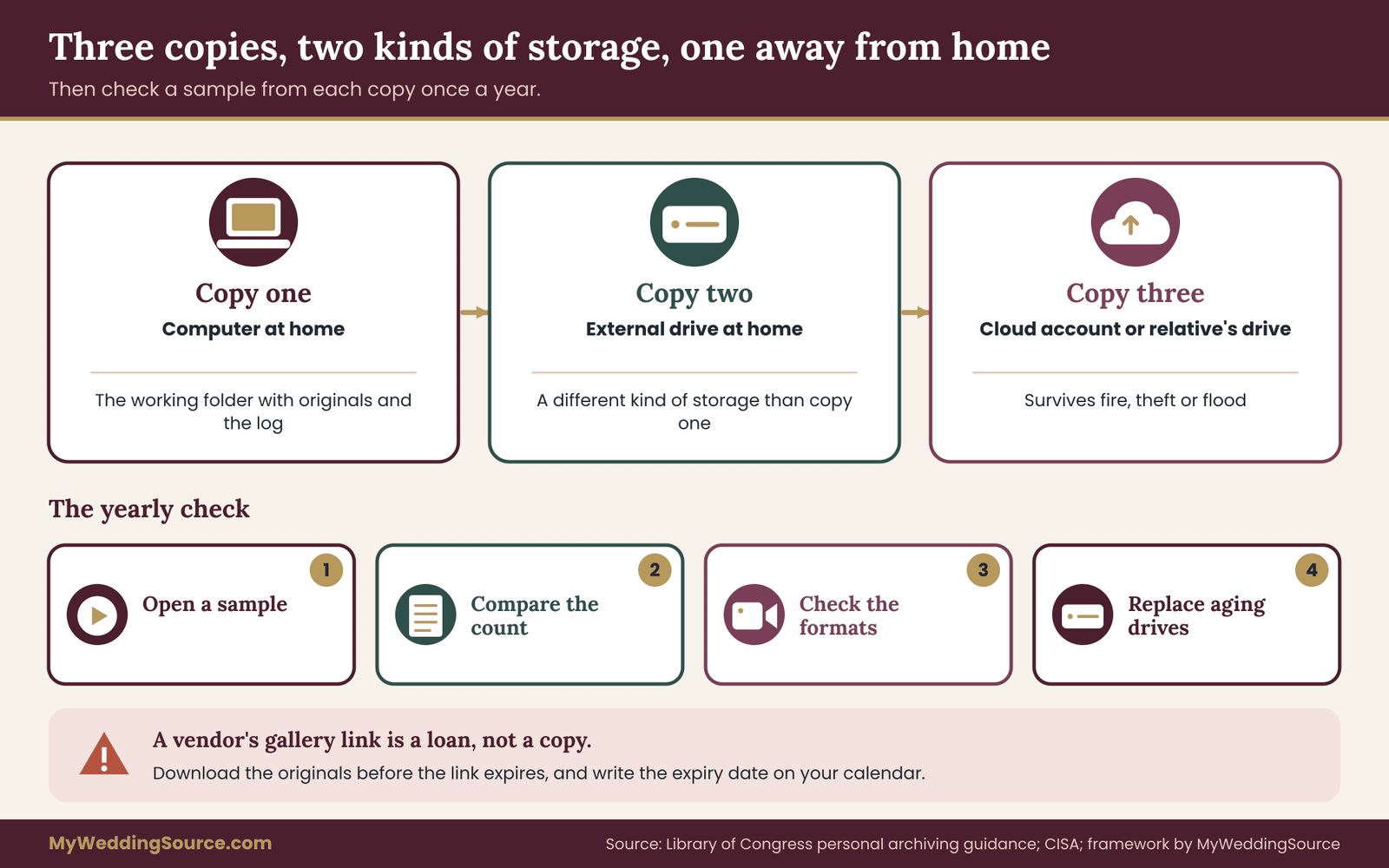
A well-known guideline is to keep three copies of any important file, on two different kinds of storage, with one copy in a different place. For video messages, that could be the main folder on your computer, an external drive at home and a cloud account or a drive kept at a relative’s house. The U.S. Cybersecurity and Infrastructure Security Agency also advises regular backups, tested and stored separately from the original.
The rule exists because different things go wrong in different ways. A drive can fail, a laptop can be stolen, a house can flood, an account can be suspended. Three copies in two places with one away from home covers most of those events.
Estimating how much space you need
Video files vary, but a rough planning method works. Take the average file size of a few clips and multiply by the number of clips, then add room for edits and growth. A hundred clips of a minute each, recorded on a modern phone, can take up several gigabytes. A tablet booth may compress more. You do not need an exact number, only a sense of whether the archive fits on a small drive or needs a larger one.
Cloud storage has a monthly or annual fee, and a drive is a one-time cost that wears out. Over twenty years, a plan that renews every few years is likely to cost more than a drive replaced every five, but the cloud copy protects against fire and theft. Decide which risk worries you more, and use a mix.
Choosing storage kinds
Spinning hard drives are inexpensive and good for a home backup but they fail with age. Solid-state drives are faster and sturdier, but if left unplugged for years they can lose data. Optical discs can last long if stored carefully, but fewer computers can read them now. Cloud accounts are convenient and offsite, but depend on a company and a payment.
A mix is the sound answer. A home external drive, a cloud account and one archival copy on a different device, perhaps a small drive kept with a relative, protects you from any single weakness. Label each drive with what it holds and the date of the last check.
Formats
Choose formats that will still play.
Video messages recorded today will be watched on devices that do not exist yet, so favor common formats and keep the originals. For viewing, a widely used container such as MP4 is a safe choice at the moment. For keeping, retain the original file as delivered, since converting can lose quality. If you convert, save the converted version separately and keep the original. A guide on file formats from the Library of Congress explains how institutions think about format choice, and it is worth a read if you want more detail.
Do not rely on a format that needs a special app from a single vendor. If a clip plays only inside one booth company’s player, export it to a standard format while you can.
Checking and migrating
Backups that are never tested are hopes. Once a year, on the anniversary or on a fixed date, open a sample of video messages from each copy, check that they play with sound and compare the file count with your log. Every few years, check whether the storage kinds you use are still common. If a type of drive or a format is falling out of use, copy the archive to something current.
The annual check takes half an hour. Put it on the calendar with the same weight as a smoke alarm battery.
Passwords and the problem of access
A clip stored in an account that only one partner can open is at risk if that person loses access.
Both partners should be able to open the video messages without asking anyone, from at least two copies. Keep the account details in a password manager that both partners can open, and name a trusted person who knows where the physical drives are and how to reach the cloud copy. This is the quiet side of archiving, and it matters more than people expect. Our guide to the wedding day digital contingency plan discusses shared access for the digital side of the wedding, and the same habits apply here.
Who inherits the archive
Video messages can become family history. Some couples leave a short note in their records saying who should receive the archive and how. That note does not need to be formal. A paragraph in the archive notes, saying where the copies are, how the log works and who the couple would like to hold the video messages if something happens, is enough to start.
Sharing video messages: reels, screenings and private links
Sharing is the moment a private keepsake becomes something else. A couple can watch a clip alone and nobody is affected. A clip played to a room or sent to a family group chat has an audience that the guest may not have imagined. The rule that keeps everyone comfortable is simple: share no wider than the guest’s release allows, and when in doubt ask.
Four levels of sharing
It helps to think in levels, from narrow to wide.
Couple only. The clip stays in the archive and is watched by the two of you. This is the default for every clip until its status says otherwise.
Named people. You share a clip with a specific person, such as the guest’s own family or a grandparent who could not attend. Ask the guest if you can, especially when the clip speaks about others.
Guests as a group. You send a highlight reel or a private link to everyone who attended or recorded. This requires that each clip in the reel has a yes for that level.
Public. The clip is posted on a social feed, a website or a vendor’s portfolio. This requires a clear yes, a review for bystanders and music, and a willingness to remove it on request.
Most couples never need the last level.
Many guests record video messages expecting only the couple to watch them, and they are right to expect it unless they have said otherwise. A private reel for guests is generally the widest sharing that people expect, and many couples find that couple-only is more than enough.
Building a highlight reel
If you decide to make a reel, build it only from clips marked approved and ticked for a guest reel. Keep it short, since a reel of ten minutes is far more watchable than one of an hour. Add captions, since many people watch with the sound off. Avoid background music unless you have the right to use it. If you use a licensed track from an editing tool, read the license terms for the kind of sharing you plan.
Give each guest in the reel a heads-up before you send it. A message such as “Your clip is in the guest reel we are sending on Sunday. Tell us if you would like it removed” is considerate and gives guests a window to speak up. Send the reel through a private link, set to expire if the tool allows, and avoid platforms that make downloading or re-sharing easy unless you are comfortable with that.
Screenings and anniversary dinners
A screening in a room is shared in the broadest sense, even when everyone in the room is a friend. At a wedding, a screening works best for video messages from absent guests or from the wedding party who agreed to it. At an anniversary dinner or a family gathering later, the audience may be older relatives who were not at the wedding, and clips that were fine for the couple may be less fine for that room.
Watch the whole reel ahead of time, in the room’s context. Check the sound level and be ready to skip a clip that does not suit. A second person controlling the playback, who knows which clips to skip, is more useful than any piece of equipment.
Sending clips back to the guest
A guest may ask for a copy of their own clip. This is usually easy to grant, and it fits the spirit of the release. Send it through a private link or a direct message. Do not send other guests’ clips along with it unless they agreed.
Posting online
If you want to post a clip, treat it as a new decision, not an automatic extension of the release. Look at the guest’s choice. Check the clip for bystanders, music, location clues and anything that was fine at the wedding but looks different online. Think about who the video message will reach: a public post reaches people the guest has never met.
Then tell the guest which clip, where and when. A short message works. If you are not sure, do not post. A clip that stays private costs you nothing, and a clip that is posted without care can cost a friendship. Our guide on guest boundaries and image use in photography treats the same decision in more detail, and its logic transfers cleanly to video.
When someone else posts a clip
Occasionally a guest or relative who has a copy of a clip posts it without telling you. The kind approach is to message the person, explain that the clip was shared in confidence, and ask them to remove it. Most people comply without argument. If the clip includes a guest who did not agree to public posting, say so, because it gives the person a reason that is not about you.
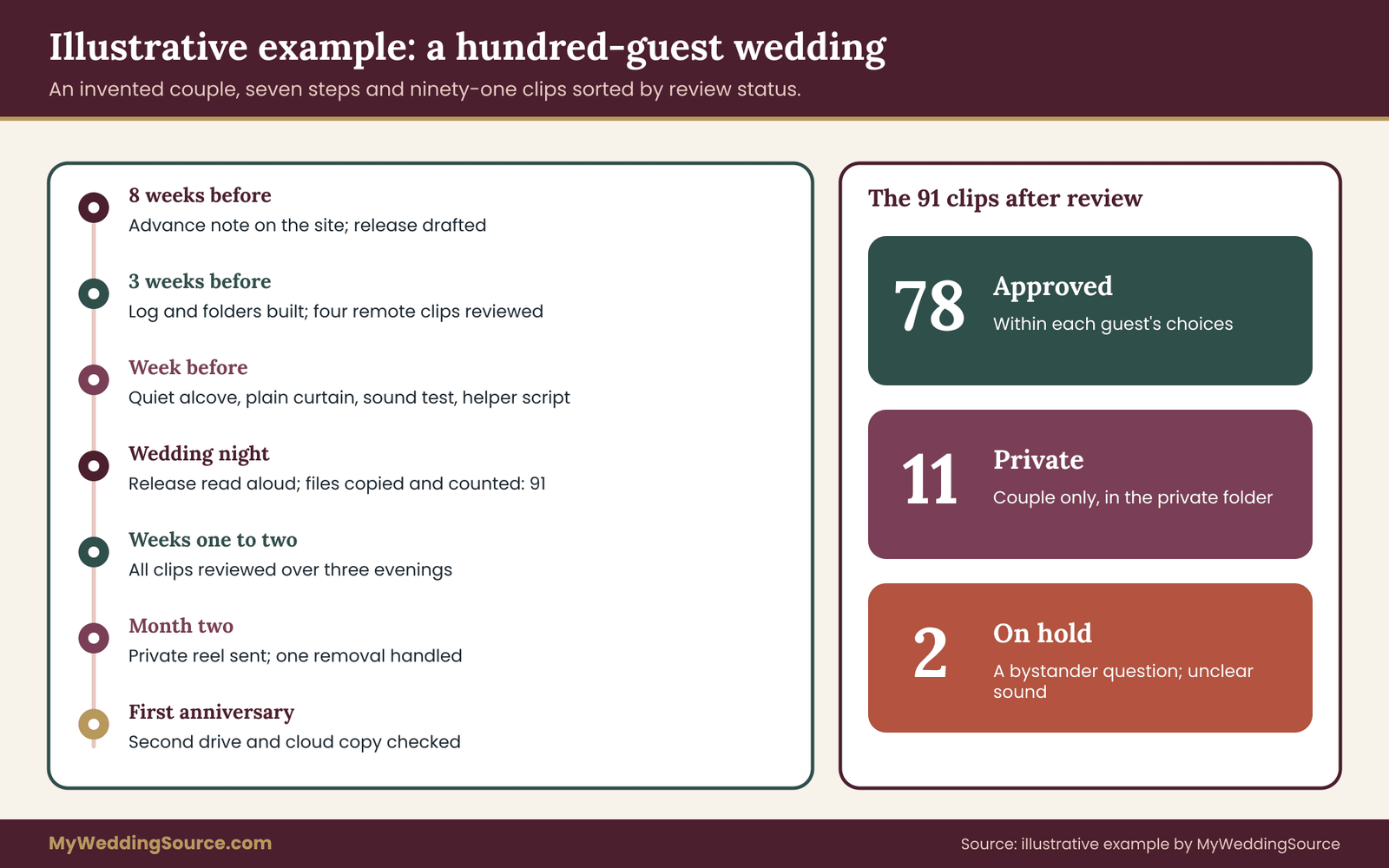
Worked example: a hundred-guest wedding and its video messages
The following is an invented example, offered to show the chain at work. The couple, the guests and the details are made up, and the point is the order of steps, not the numbers.
The setup
Dana and Marcus are planning a wedding for roughly a hundred guests. They want a keepsake of messages from friends and family, and they would like to send a short reel to attending guests a few weeks later. They decide to use a tablet booth run by a friend, plus a phone link for six relatives who cannot travel.
Eight weeks before
They add a short note to their wedding website. It says they are collecting video messages, that clips are watched privately first, that a guest reel is possible, and that anyone can say no or ask for a clip to be removed. They add a line asking parents to contact them about children recording.
Dana drafts a release in about a hundred and fifty words, with two unticked boxes: one for a private guest reel, one for public posting. She asks a friend who works in the legal field to read it, and the friend suggests a line saying that the couple will delete their copies on request and ask vendors to do the same. They add it.
Three weeks before
They build the log spreadsheet with columns for file name, guest, date, release type, reel choice, public choice, status and storage locations. They create the folder structure on a laptop. Marcus sends the phone link, with the release at the start, to the six remote relatives and gets four clips back within a week. Dana watches them with a notepad and marks one as private, because a cousin talks about a family illness.
The week before
They visit the venue and choose a quiet hallway alcove with a plain curtain behind it. The friend running the booth tests sound and finds that the DJ’s speaker is too loud a few steps away, so they move the booth around a corner. The friend gets a one-page script with the release text, the prompts, what to do if a guest says no and a note on children.
The wedding day
The friend reads the release aloud to anyone who asks, and guests tap agree on the tablet before recording. Two guests decline and write cards. Three parents sign for their children and stay beside them. At the end of the night, the friend copies the video messages to a laptop before returning the tablet and counts ninety-one clips on both.
The first two weeks
Dana and Marcus watch all ninety-one clips over three evenings. They mark seventy-eight approved, eleven private and two on hold. One on-hold clip has a bystander in the background who is a guest’s partner; they message the partner, who says it is fine. The other has unclear sound, and they decide to keep it private.
Their helper asks the booth vendor to confirm in writing that files have been deleted after the download. The vendor replies within a few days.
The first months
They send the private reel link to attending guests who ticked yes, after a short heads-up message. One guest asks to be removed, and Dana removes the clip, remakes the reel and sends a note to the guests who already had the first version. They set a reminder for the annual archive check.
The first anniversary
They copy the archive to a second drive and a cloud account, check ten video messages from each copy and update the archive note with the storage locations. They also watch a few clips together, which is, after all, why they collected them.
What the example shows
Several things stand out. The release was short, the advance note existed, and the booth was set up deliberately. The review step caught two uncertain clips and one sensitive one. The handoff happened the same night, with a count. The sharing followed the guest’s choices. And the archive checks were scheduled, not remembered.
None of it was costly or elaborate. The effort was mostly in the order.
The video messages themselves were ordinary, a cousin’s story, a friend’s advice, a child’s wave. What made the project work was that everyone knew in advance how the video messages would be used.
Edge cases and mistakes with video messages
Some situations do not fit the neat chain. A few of the most common are worth thinking about ahead of time.
A guest who has since died
Clips from relatives who later die become precious. They also raise questions about who may hold and share them. If a guest’s clip is shared with their family after their death, consider asking the closest relative, and do not assume that the original release extended that far. If the guest’s family wants a copy, give it freely, and keep the original in your archive. The point of a good release is to prevent a hard decision from being made in a hurry.
Separation or divorce
A couple who separates may disagree about who keeps the archive. It is a sad topic, but a thoughtful couple can settle it early with a line in their archive note: both hold complete copies, and neither may share clips beyond the original release without telling the guest. This also protects guests, who recorded messages for a couple, not for one half of a former couple.
Guests who record on their own phones during the event
At a wedding, many guests record clips for their own social feeds. That is not the same as a message for the couple, and a release does not cover it. If you have an unplugged ceremony or a no-posting request, apply the same principle here: tell guests the rule before the event, not at the door.
A vendor wants to use the video messages
A vendor that runs the booth may ask to use clips in its portfolio. Treat this as a separate decision from the keepsake. Ask for the request in writing, decide clip by clip, and require each guest’s permission. A couple can say no to a vendor on this point without loss, and many vendors will not mind. The same attention is needed for the vendor’s right to keep copies; write down, in the contract, what they may keep and for how long.
Clips recorded while the guest had been drinking
This is common. A clip recorded late in the evening may include comments that the guest would not choose to share sober. Your review step is the guard. If a guest seems uncomfortable the next day, offer to delete the clip. A graceful solution costs nothing and builds trust.
Missing release
Sometimes a clip arrives without a release: a guest forwarded a video by text, or a phone link skipped the agreement. Do not guess. Treat the clip as private, message the guest, explain what you plan to do with it and ask for a yes. If the guest does not reply, keep it private.
Too many clips
A busy wedding can produce more clips than anyone can use. You do not have to keep everything. Keep what you want in the archive and ask yourself honestly about duplicates and accidental recordings. Deleting a test clip or a ten-second blank is fine. Deleting a guest’s message that you simply did not feel like watching is something to consider carefully, and ideally tell the guest you will keep it unwatched if they prefer.
The worst mistakes, in order
The most frequent problems are, in rough order: no copy beyond the vendor’s gallery, a public link left open, no record of what the guest agreed to, a reel shared more widely than the guest expected, and no one assigned to the handoff. Each is avoidable by one step in the chain. If you can only do a few things, do these: write the release, hold the review, make the handoff on time and keep three copies.
Vendor questions and a one-page checklist for video messages
If anyone other than you handles the video messages, a few direct questions will tell you whether the arrangement fits your chain. Ask them by email so the answers are on record, and keep the replies with your contract.
Questions for a video guestbook vendor
Who owns the video messages, and what permission does the vendor keep? Can the vendor use clips in marketing, and does that require my approval for each clip? Where are the files stored, for how long, and what happens when the storage period ends? Can I download original files in full quality, and in bulk? Do guests need an account, and what terms do they agree to? How do you handle a removal request, and how quickly? Who on your team can see the video messages? What is your policy for minors? If your company closes, how will I get my files?
A good vendor answers most of these without hesitation.
Put the answers about video messages in an email, so the details survive a change of staff. A vendor who cannot say where the files go or who deletes them is telling you something about how they run the rest of the job.
Questions for the venue
Some venues restrict filming, set rules about lighting and electrical use, or require approval for equipment. Ask whether recording is permitted in the spaces you plan to use.
Ask whether there is a quiet room, whether power outlets are available near the booth, and whether any other event will share the building. A neighboring event can matter, and so can the venue’s recording rules, because a booth near a shared space may record guests from another party. Ask also whether the venue has Wi-Fi that can handle uploads, since a phone link or a vendor tablet that uploads clips on the spot will stall on a weak connection. If the connection is poor, ask the vendor to record locally and upload afterward.
Questions for your own helper
Does the helper know the release text? Do they know what to do if a guest says no, if a child arrives alone, or if a guest begins to talk about something private? Do they have your phone number, or the number of someone who can answer? Do they know who copies the files at the end of the night, and where? A helper who can answer these in a sentence each is ready.
A one-page checklist for the whole chain
The chain is easier to hold in your head when it is condensed. Here it is, link by link, in the order you will do it.
For ask, write a short advance note, include it on the wedding website, offer a written alternative for guests who dislike cameras and talk to any guest with a particular concern. For record, pick the format, choose a quiet spot with a plain background, test sound, brief a helper and prepare three prompts on a card. For release, write the eight-point release, keep the sharing boxes unticked by default, record the guest’s choices in the log and keep proof of what they saw.
For review, watch every clip within two weeks, assign approved, private or on hold, flag bystanders, music and sensitive content, and ask guests about doubtful clips. For hand off, name the person and the date, copy all files, count them, test a sample and confirm vendor deletion in writing. For archive, name the files by a fixed pattern, keep the log, caption the video messages you will share, keep three copies on two kinds of storage with one away from home and check the copies once a year.
If you do only the first and last links well, you will already be ahead of most couples. If you do all six, the people who recorded for you will feel that you took their words seriously, and that is the point of the whole exercise.
Video messages are small, personal gifts, and a careful process is the best way to thank the people who made them.
Your next steps
Start with an hour this week. Write the advance note for your wedding website and the release in about a hundred and fifty words. Decide which format of video messages you will use, and ask any vendor the questions above in writing.
Then, in the month before the wedding, set up the log, test the booth with two people who are not you, brief your helper and name the person who will do the handoff. After the wedding, copy the files within two days, review them within two weeks and make three copies of the archive.
Finally, put one reminder on your calendar for the first anniversary: open a few video messages from each copy and check that they play. That small check is what turns a pile of files into an archive, and it keeps your guests’ voices ready for the day you want to hear them again.
FAQ
Do I need a signed release for video messages at my wedding?
A signed or tapped release is the clearest way to record what each guest agreed to, and it is easy to do at the booth. The law varies by place, so this is not legal advice, but a short statement covering who sees the clip, how long you keep it and how a guest can ask for removal protects both sides. For private use among friends, keep it simple and keep the records.
Can I post guest video messages on social media?
Only if the guest has clearly agreed to public posting, which is why a separate unticked box is useful. A release for a private keepsake does not automatically cover a public post. Before posting, check the clip for bystanders, music and location clues, tell the guest which clip you plan to use and be ready to remove it if they ask later.
What about children who record video messages?
A parent or guardian should agree on the child’s behalf, and the adult should be nearby during recording. Keep children’s clips private by default, and avoid apps that ask a child to create an account. The Federal Trade Commission explains its rule on children’s online privacy for services aimed at children under thirteen, and the same caution is sensible at a wedding.
Who owns a video message recorded at my wedding?
It depends on who created the recording and what agreements say. A guest recording on their own phone is usually the creator, while a vendor’s staff member filming may leave the vendor with rights unless the contract says otherwise. What the couple needs is permission to keep, copy and share the clip as described. The U.S. Copyright Office explains the basics, and your vendor contract settles the rest.
How long should I keep video messages?
Many couples keep them indefinitely as part of their personal archive, since the video messages are meant to be treasured. If a vendor deletes files after a set period, download everything before then. Decide in advance how you will handle removal requests from guests, and check the archive once a year so the files still play and the copies match your log.
How should I store video messages so they last?
Keep three copies on two different kinds of storage, with one copy away from your home, such as a home drive, a cloud account and a drive at a relative’s house. Keep original files, use a clear naming pattern and a log, and test a sample from each copy every year. The Library of Congress and CISA both offer practical guidance on personal digital backups.
What if a guest asks me to delete their video message?
Do it promptly and without argument. Delete your copies, remove the clip from any reel, ask any vendor that holds it to delete theirs, and note the date in your log. Tell the guest what you did. If a reel containing the clip has already been shared, be honest about that and offer to ask recipients to delete their copies.
Is it better to use a vendor or run the booth myself?
A vendor saves effort and can give a polished result, but adds terms, deadlines and a third party who holds files. Running it yourself gives control, but needs a helper and a plan. Either works if the release, the review and the handoff are in place. Ask any vendor who owns the video messages, where they are stored and how deletion works before you sign.
Sources
- Copyright basics and registration information, U.S. Copyright Office
- Copyright frequently asked questions, U.S. Copyright Office
- Children’s online privacy, Federal Trade Commission
- Personal archiving: preserving your digital memories, Library of Congress
- Digital preservation, Library of Congress
- Back up business data, Cybersecurity and Infrastructure Security Agency
- Making audio and video media accessible, W3C Web Accessibility Initiative
- Information and technical assistance on the Americans with Disabilities Act, U.S. Department of Justice
- Digital preservation, National Archives and Records Administration
- Consumer information, Federal Trade Commission