
Preferred names on wedding place cards and programs are the names your guests actually answer to, which are not always the names on your guest list. This guide gives you an opt-in way to ask guests how they want to be named, a short protocol for recording and printing those answers, and privacy safeguards so a name choice never reaches a printer, a relative or a stranger unless the guest agreed.
Ask every guest the same optional question on the RSVP: “How would you like your name to appear on printed materials?” Store the answer in its own column, separate from legal or envelope names. Send each guest a short confirmation of what will be printed. Give the printer and calligrapher only the final print names, never the notes behind them. Delete the extra naming data after the wedding. Applied to all guests, the same steps protect the person who goes by a nickname, a chosen name or a name from another language.
Place cards look like a small job. A name, a table number, maybe a menu choice. Then the first card goes down in front of a guest who has used a different first name for ten years, and the day gets a little awkward. Sometimes it is only a nickname: Margaret has been Peggy since childhood and has not answered to Margaret since. Sometimes it is more serious, such as a guest whose chosen name is not known to half the family seated at the same table. The card is a public object. Everyone at the table reads it.
Programs are the same problem at a larger scale. A program lists the wedding party, the readers, the musicians, the people being thanked and sometimes a memorial line for relatives who have died. Every name in it is printed once, in a few hundred copies, and cannot be fixed after the day. Using preferred names there takes more thought, because the program is read by far more people than the place cards are.
This guide covers the specific job of deciding, collecting, verifying and printing the names guests prefer. It does not repeat the full process of ordering invitations; the guide to wedding invitation print production already covers proofing, quantities and handoffs to the printer. It also stays out of general etiquette about addressing envelopes, which the wedding invitation etiquette hub covers. Here the question is narrower: once a guest has told you how they want to be named, how do you honor those preferred names on paper without creating a privacy problem?
A note on scope. This is general information, not legal, tax or financial advice. Rules for mail, data handling and consumer privacy vary by place and change over time, so where a rule matters, the article points to the agency or standard that publishes it and asks you to check the current version.
What preferred names mean on place cards and programs
The phrase “preferred names” covers more than nicknames. Before you design any process, it helps to separate three layers of naming, because most mistakes come from treating them as one.
The mailing name. This is the name on the invitation envelope: usually the household or the formal name of the person receiving the mail. It exists to get paper to the right door, and the postal service cares about the address far more than about the style of the name line. If you want the postal side of this, the U.S. Postal Service publishes its addressing standards, and you should read the current version rather than rely on a blog post, this one included.
The display name. This is the name printed on the place card, the escort card, the seating chart and the program. It is the name a guest would want strangers at their table to use. This is where preferred names matter most, since the display name is shown to other people.
The spoken name. This is the name the DJ, emcee, officiant or toast-giver says aloud. It can differ from the display name: a guest might want “Dr. Okonkwo” on a card and be introduced to the room as “Chidi’s mother.” Spoken names are the ones people forget to collect, and they are the ones a nervous emcee gets wrong.
Most couples collect only the mailing name, then reuse it everywhere. That works until it does not. A tidy way to prevent trouble is to decide, for each guest, which layer a request applies to. A guest who writes “please call me Sam” is asking for a display name and a spoken name. They may not care what is on the envelope, and they may have reasons to keep the envelope formal, for instance because it goes to a parent’s house.
Where preferred names actually show up
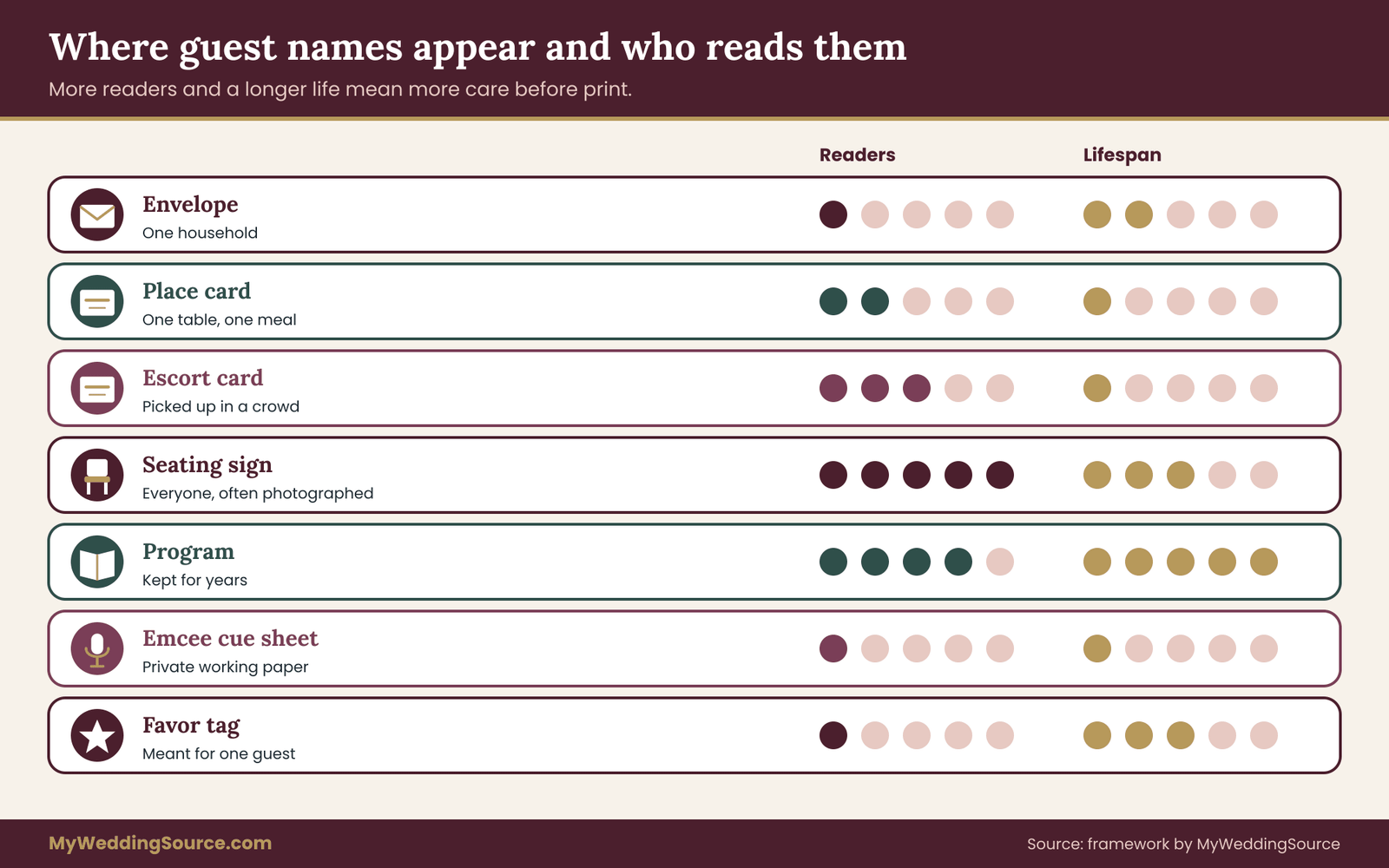
Print a mental map of every surface that carries a guest name. The common ones are the envelope, the place card or escort card, the seating chart sign, the program, the menu card when it is personalized, favor tags, the cue sheet that the emcee reads from, and the thank-you notes afterward. Some of these are public and permanent. Others are private and replaceable. A preferred name that is perfect on a place card might be unwelcome on a program that gets mailed home to a relative who does not know about it.
The sorting question for preferred names on each surface is: who will see this, and for how long? A place card is seen by one table for one meal and then thrown away or kept by the guest. A framed seating chart is seen by everyone, maybe photographed and posted. A program is kept for years. A guest who is comfortable with a name on a place card may be less comfortable with the same name in a keepsake that gets passed around the extended family.

What goes wrong with preferred names, and when it matters
If a guest is called by the wrong nickname, the cost is a moment of mild embarrassment, handled with a smile. If a guest is called by a name they have worked to leave behind, in front of colleagues or relatives, the cost can be real and lasting. You will rarely know which case you are in. That uncertainty is the reason to make the whole thing opt-in and to write the process down. A short, consistent protocol protects everyone, and it keeps you from having to guess about anyone’s private life.
Why a protocol for preferred names beats good intentions
Couples are often tempted to handle this informally. They know most guests, they will notice who goes by a nickname, and they will fix the rest at the proofing stage. That approach fails for three predictable reasons.
First, memory is selective. You remember the names of the people you talk to weekly. You do not remember that your cousin’s new husband goes by his middle name, or that your college friend’s mother has always used her maiden name at work. Second, informal fixes leave no record. Two weeks before the wedding, nobody can say who asked for what, and the person who handled it may be a parent or a friend who has since moved on to another task. Third, informal handling tends to guess. Guessing about names is where well-meant efforts produce the worst results.
A written protocol replaces memory and guessing with a simple routine. It also gives you something to hand to a helper. If your sister is assembling the program, she can follow the same steps you would, without needing to ask you about each guest.
What a preferred names protocol is meant to do
A good protocol for preferred names has four jobs. It lets a guest say how they want to be named, if they care to say so. It stores that answer where only the people who need it can see it. It checks the answer with the guest before anything is printed. And it ends with the data being deleted once the event is over. Each job exists because a different thing can go wrong: a guest who is never asked, a note that circulates too widely, a mistaken assumption that reaches print, and a spreadsheet that quietly lives on in a shared drive for years.
Notice what the protocol avoids. It does not ask guests to explain themselves. It does not request legal names, birth names or former names, because the printed result is all you need, and anything beyond that is information you would then have to protect. It does not ask only certain guests; the question goes to everyone, so no one is singled out. And it does not promise things you cannot deliver, such as a perfect pronunciation guide or a guarantee that every table will use a name correctly.
How preferred names differ from guest list basics
Your guest list already has columns: names, addresses, plus-ones, meal choices, relationships. The wedding guest list guide on this site covers how to build and trim that list. The protocol for preferred names adds a few narrow fields to it. The difference is the intent of those fields. A guest list column answers “who is invited and where do we send the invitation.” A naming column answers “what would this person like printed.” Keeping the two apart, even in one spreadsheet, prevents the common mistake of overwriting an envelope name with a display name or the reverse.
In the next section you will see how the protocol works step by step, with wording you can copy and adapt. Before that, a quick word about the limits of any naming process. You will not be able to honor every request. A guest may ask for a name that does not fit on a place card, or for a character your printer cannot set in the chosen font, or for a spelling you cannot confirm. Part of handling preferred names well is deciding in advance what you will do in those cases, so the answer is calm and consistent rather than improvised under deadline pressure.
The five-step protocol for collecting preferred names
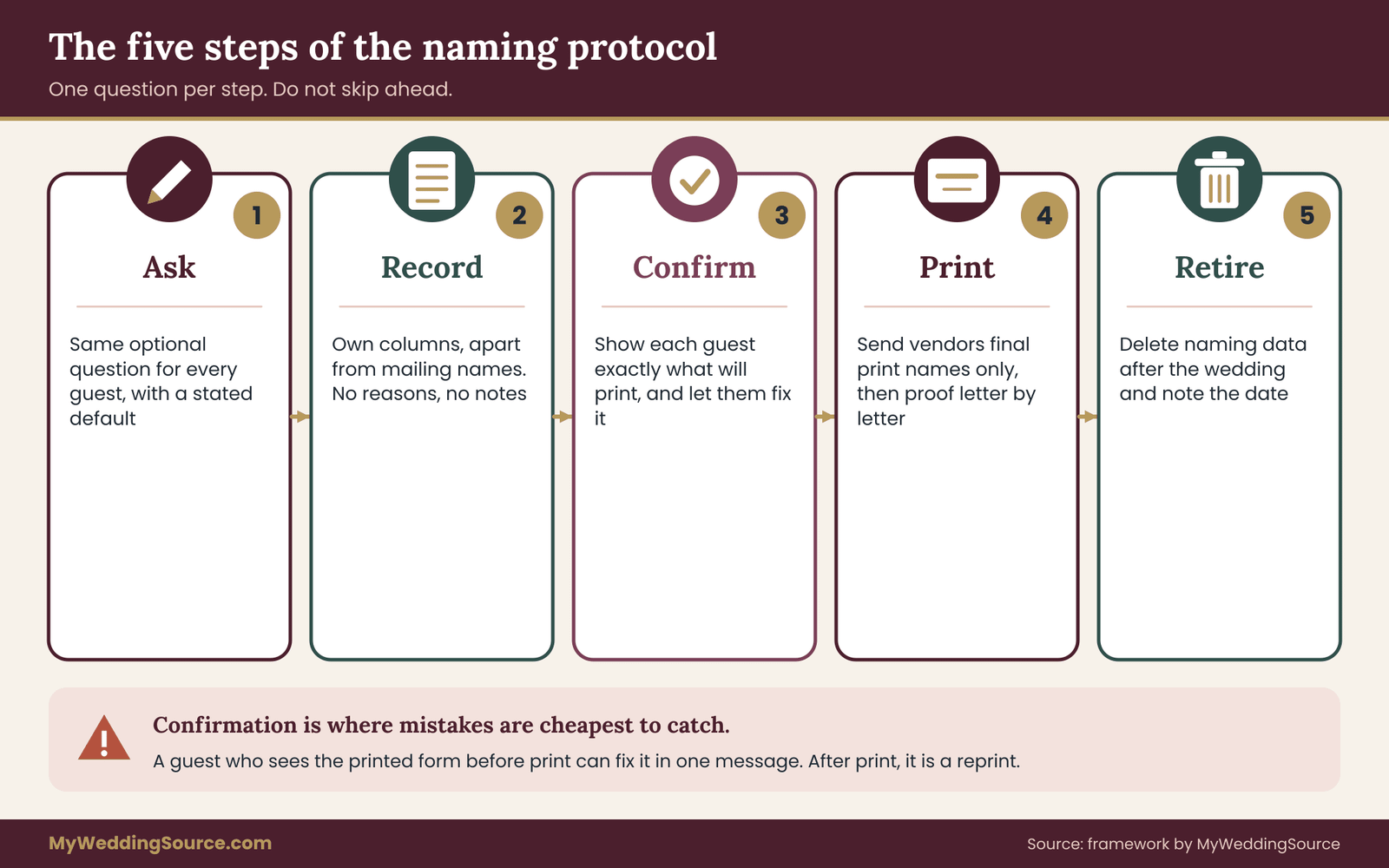
The protocol for preferred names has five steps, and each one answers a single question. Call it the Name Line protocol if you want a label for your own notes: Ask, Record, Confirm, Print, Retire. The steps are in order. Skipping ahead is how errors get printed.
Step one, Ask. Give every guest the same optional prompt, in the same place, with the same wording. The prompt should explain what the answer will be used for and promise nothing beyond that.
Step two, Record. Put each answer in dedicated columns in your guest spreadsheet. Keep it apart from the mailing name and mark who can see the column.
Step three, Confirm. Before print, show each guest who answered exactly what will appear, and let them correct it. Confirmation is where mistakes get caught cheaply.
Step four, Print. Send only final print names to vendors, in a clean file that has no notes, no reasons and no former names. Proof the output against the confirmed list, not against memory.
Step five, Retire. After the wedding, delete the naming columns and the confirmation messages, keeping only what you would keep for any guest list.
The rest of this section works through step one in detail, because most failures begin with a poorly framed question. The later sections cover the other steps.
Asking for preferred names: framing the question
The wording of the question controls the quality of the answers. A vague question such as “Any name preferences?” invites jokes and silence. A pointed question such as “What is your legal name?” is intrusive and collects the wrong thing. The best prompts are short, optional and about the output.
A workable prompt reads: “How would you like your name to appear on place cards and in the program? Leave blank if the name on your invitation is fine.” That sentence does four things. It names the two surfaces. It defines the answer as a display name. It makes the field optional. And it gives a clear default, so a blank answer is a complete answer rather than a gap you have to chase.
If you want to include the spoken name, add a second short field: “Is there a name you would like us to use if someone introduces you out loud? Leave blank to use the same name.” Many couples skip this field, then regret it when the emcee reads a formal name nobody uses. Include it only if you will have an emcee, an announced entrance or toasts that name guests. If the reception has none of these, the second field is clutter.
Where to ask for preferred names
You can ask in three places, and they differ in reach and privacy.
An online RSVP form reaches the most guests and gives you structured data. It also puts the question in front of guests privately, which matters, because a guest who wants a chosen name used would rather type it than say it to a relative standing nearby. The wedding RSVP etiquette guide covers response cards and deadlines; this protocol simply adds a field to whichever form you use.
A paper response card works if your invitation suite already includes one. The field is smaller, and handwriting leads to transcription errors, so a paper card needs a follow-up confirmation more than an online form does. Also remember that a card travels through the mail and may be read by anyone in the household.
A direct message works for the guests who did not answer, or for a handful of people you already suspect may care. If you use direct messages, send the same text you used on the form, to the guest alone, rather than posting in a group chat. Names are personal enough that a group chat is the wrong room.
Ask everyone, not just the people you think need it
One rule matters more than the rest: ask all guests. If you only ask the guests you suspect have a naming preference, you reveal your assumptions to them, and you will guess wrong about some of them. A uniform question treats everybody alike. The guest who goes by a nickname fills it in and nobody thinks about it. The guest with a more private reason fills it in and nobody can tell why. The guest who does not care leaves it blank. The uniformity itself is the privacy protection.
What to say about preferred names in the invitation materials
You do not need a long explanation. A single line on the response card or form is enough. Avoid wording that sounds like a legal form, and avoid phrases that make a name choice sound like a special accommodation. Names are not accommodations; they are how a person is called.
Here are three versions of the ask, in different tones, that you can adapt.
A warm version: “We want your place card to say what your friends call you. Tell us how you would like your name printed, or leave it blank and we will use the name on your invitation.”
A plain version: “Name for place card and program (optional). If blank, we will use the name on your invitation.”
A formal version: “Kindly indicate the name you wish to appear on printed materials, should it differ from the name on your invitation.”
All three share the same structure: purpose, optional, default. If you hold to that structure, the tone is up to you.
Guests who skip the preferred names question
Some guests will not respond to the naming question. Most of them have no preference about preferred names. A few overlook it. Do not chase every blank. The default is the name on the invitation, which is the right choice for the large majority, and the confirmation step later in the protocol gives overlooked guests a second chance. A good rule is to follow up personally only where you have a specific, known reason, and to do it quietly and briefly.
For example, if a close friend told you in conversation that they have changed their name, you do not need them to repeat it on a form. You can say, “I want to make sure your place card is right. How would you like it printed?” Then record exactly what they say. Do not pass the information to anyone else, and do not mention it to mutual friends. A short private message is enough.
Preferred names for plus-ones, children and households
Preferred names for guests who did not respond themselves need a rule. A plus-one you have not met cannot be asked until the main guest has named them, and many hosts never collect the plus-one’s name at all. Decide early whether the plus-one will get a printed name. If you do not know the name, a blank card with a handwritten name at the welcome table is better than a guess. If you are printing names for plus-ones, ask the invited guest to supply the preferred name in the same form, and let the plus-one confirm it when they receive their own message.
For children, the parent or guardian answers. Many children use a short form of their name at school and a longer one at home. Let the adult decide, and keep it simple: one print name per child. For households that share an invitation, keep each person’s naming answer separate. A couple might want “Dana and Lee” on a place card but separate preferred names in the program’s thank-you list. The spreadsheet should have one row per person for naming, even if the envelope goes to one address.
A short script for the questions you will actually get
Guests will ask you things, and having a calm answer ready prevents long conversations. If a guest asks, “Why do you want to know?” you can say, “We want the place cards and program to match how you like to be called.”
If they ask, “Who will see this?” you can say, “Only the two of us and the person printing the cards, and we delete it after the wedding.” If they ask, “Can I use a different name than the one on the invitation?” the answer is “Yes, whatever you would like us to print.” Do not ask follow-up questions about why. If they volunteer a reason, listen, thank them and record only the print name.
A guest may also ask whether the name you print will appear anywhere else, such as on the wedding website or in photos. Answer honestly, and tie your answer to the protocol. If you plan to show a seating chart online, tell them, and let them say whether the preferred name should appear there or a different name. If you do not know yet, say you will confirm before anything is published. The guide to guest photo boundaries and image use is a useful companion here, because the same instinct, asking before you display someone, applies to both photos and names.
What a request for preferred names should never include
Keep these out of every prompt, form and follow-up message: any request for a legal name, birth name or former name; any question about why someone uses a particular name; any requirement to provide proof or documentation; and any free-text box that invites guests to explain personal circumstances. The point of collecting preferred names is that a person can state a print name and nothing more. Asking for more would turn a courtesy into a data-collection exercise, and it would put you in the position of holding information you do not need and may not be able to protect well.
With step one settled, the next question is where the answers go and who can see them. That is the job of step two, which is also where privacy either holds or fails.
Recording preferred names with privacy safeguards
Once guests answer, you hold a small dataset of preferred names about real people. It is not sensitive in the way medical or financial records are, but it can be personal, and the habits you build here are the same ones you would want for any guest information. Think of step two as a short list of safeguards rather than a technical project.
Keep preferred names in their own columns
In your guest spreadsheet, add three columns next to the existing ones: Print name, Spoken name and Status. Print name is what goes on place cards, escort cards and the program. Spoken name is optional and is for the emcee. Status tracks where each guest is in the protocol: not asked, asked, answered, confirmed, printed. Leave the original mailing name untouched. If a guest’s preferred names differ from the invitation name, nothing in the mailing columns should change.
There is a reason to keep the mailing name and the print name apart even when they match. When they match, you copy one into the other once, on a date you note. When they differ, nobody has to remember which is which. The envelope printer reads one column. The place card printer reads another. Neither accidentally uses the other’s data.
Do not add a column for the reason behind a name, a former name, or any note beyond the print form. If a guest tells you something personal, you can listen without writing it down. A spreadsheet is much easier to share by accident than a conversation is to repeat.
Decide who can see the preferred names columns
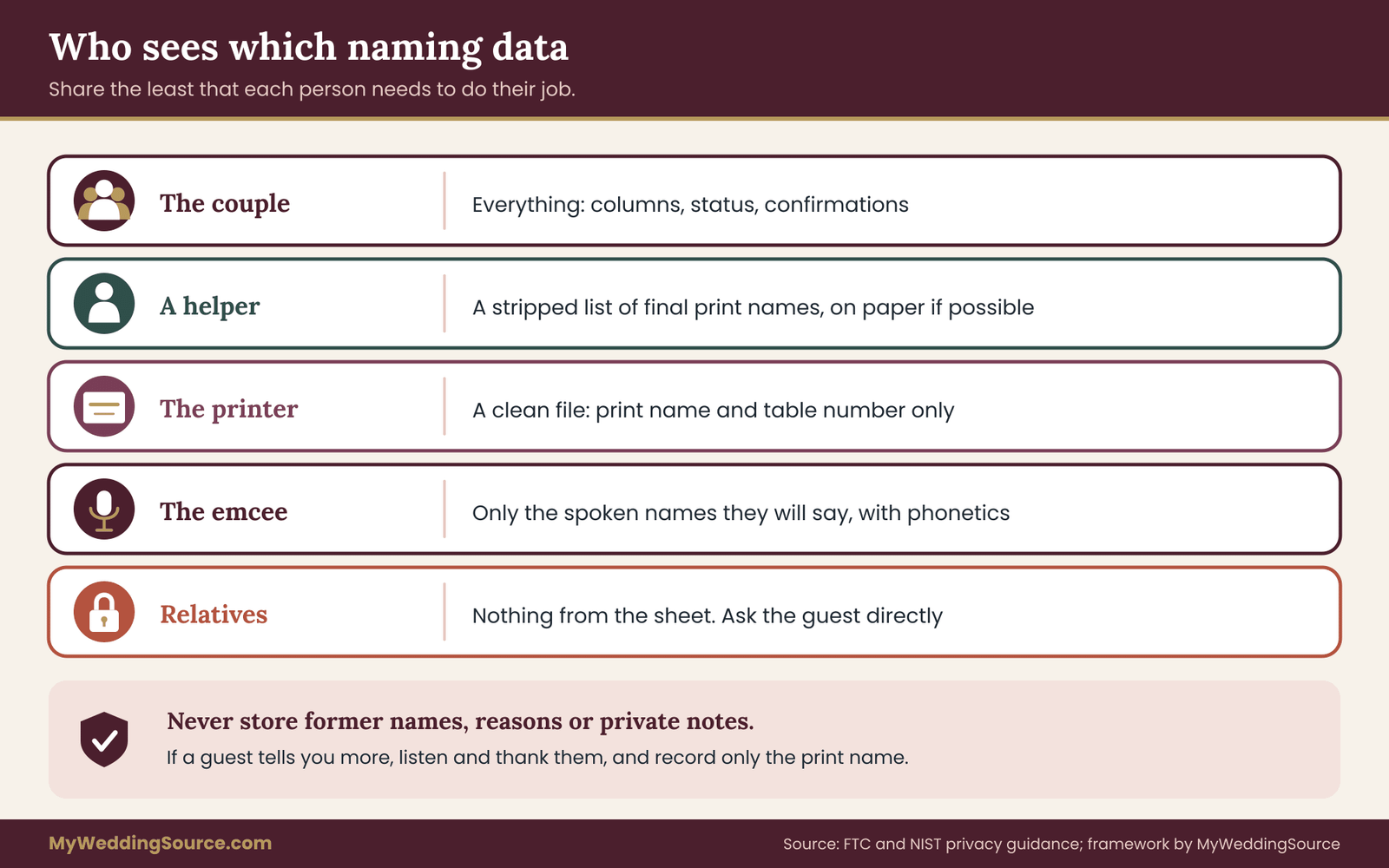
The simplest safeguard for preferred names is also the most effective: limit who can open the file. Most couples need exactly two or three people to see the naming data. The two of you, plus whoever physically assembles the place cards or program, if that is not you. Everyone else, including parents who want to help, vendors, bridesmaids and the person addressing envelopes, does not need the naming columns.
If you share a spreadsheet, share it with named individuals, not with a link that anyone can open. Check the sharing settings once a month, since helpers change. If a relative offers to proofread the guest list, give them a copy that omits the naming columns, or a printout of the final names only. Remember that a spreadsheet link in a group message can be forwarded without your knowledge.
The Federal Trade Commission publishes plain-language guidance on protecting personal information, which is written for businesses but is a useful checklist for anyone holding other people’s data. Its core ideas, which are to take stock of what you hold, keep only what you need, protect it and dispose of it properly, map directly onto the five steps of this protocol. The National Institute of Standards and Technology publishes a privacy framework built around similar ideas. You do not need to read either in full for a wedding, but skimming the FTC page is time well spent.
Keep the confirmation trail for preferred names small
Step three involves sending messages to guests, and those messages are records too. When you confirm a guest’s print name, you are sending their name back to them. Do that by direct message, to the person alone. Keep the text short: “We will print your name as: Sam Reyes. Reply if anything should change.” Do not copy other guests, do not post it in a shared chat, and do not include the invitation name unless the guest asked for the two to be compared.
When a guest replies, record only the outcome: confirmed, or the corrected print name. You do not need to keep the whole thread. If your phone or email keeps threads automatically, that is fine, but do not forward them or paste them elsewhere. When the wedding is over, they go in the deletion pass described near the end of this guide.
When a guest wants preferred names kept private
Some guests will ask that their chosen name not be shared with certain people. They may want it printed on their place card, since it is seen only at their table, but not in the program that goes home with relatives. Or the reverse. Treat this as a normal request about two different surfaces, because it is one.
The practical approach is to record the print name per surface. Add a second print column, “Program name,” only if a guest actually needs a different name there. Do not add it for everyone. If a guest asks for a name on the place card but not in the program, you can simply omit them from the program’s guest-related sections, if there are any, or print the name that appears on the invitation. Tell them exactly what you will do, so they are not surprised. Then follow through.
If you notice that seating puts someone beside people who could be harmed by learning a private name, raise it quietly with the guest rather than adjusting the table without telling them. They know their own situation. Your role is to give them control, not to manage their disclosure for them.
Who else needs preferred names: vendors, helpers and parents
Three kinds of people tend to want the preferred names, and each needs a different answer.
Vendors such as a stationer, calligrapher or printer need the final print names to produce the cards. They do not need the original invitation names, the notes or the status column. Send them a clean file with a single column of names and, if relevant, table numbers. Ask them to delete the file after delivery, and ask in writing. A reputable vendor will answer without fuss. If a vendor’s contract or terms say that they keep files, read the clause and decide whether it is acceptable. Check the data-handling lines in any vendor contract before you sign.
Helpers who assemble the cards need to read the names, so give them a printed list or a stripped copy. They do not need edit access to the master file.
Parents and relatives often want to add names or correct them. Accept their input as input. A parent may tell you that a grandfather goes by his middle name; you can ask the grandfather directly, in a short message, using the same prompt as every other guest. Do not print a preferred name on someone else’s word alone if it is easy to ask the person.
A short privacy checklist for preferred names
Before you move to confirmation, check the following in plain terms. The naming columns exist separately from the mailing names. Only named people can open the file. No former names, reasons or private notes are stored. Messages to guests were sent individually. Any copy shared with a helper omits the columns that helper does not need. And you have written down, even in one line in your notes, when you plan to delete all of this.
That last item sounds trivial, but it is the one most often skipped. Putting a date on it, such as “two weeks after the wedding,” turns a vague intention into a task you will actually do. The date also makes the earlier promise to guests, that you delete the data afterward, something you can keep.
Why preferred names deserve less data than you think
It is tempting to collect more because collecting is easy. A form can hold a dozen fields at no cost. But every field is a promise to protect something. For preferred names, the only fields that earn their place are the ones that change what gets printed: the print name, the optional spoken name, and the status. A phonetic spelling field might also be worth adding if you have an emcee and a guest with a name that is hard to read aloud. That is a pronunciation aid, not personal information, but keep it optional and let the guest decide whether to supply it.
The honest summary is that collecting less is both kinder to guests and easier for you. A guest who sees a short, purposeful form trusts it. A guest who sees a long form asking about their background reasonably wonders why. A spreadsheet with four naming columns is a spreadsheet you can audit in a minute. One with fifteen is a project.
Where preferred names should not go
A few places are tempting but wrong. Do not store preferred names in the notes field of a public wedding website builder. Do not put the naming data in a shared album description or a group chat’s pinned message. Do not paste it into an email to a vendor along with unrelated planning questions. Do not keep a second, informal copy on a phone note that syncs to a family tablet. Each of these creates a second copy you may forget to delete, and a second place where the data can be seen by someone who was never meant to see it.
If you use an online seating tool, check what it does with names. Some tools publish a guest-facing search page or a shareable link. If a guest’s preferred name is in the tool, it may be visible to anyone with the link. Review the tool’s privacy and sharing settings before you upload any preferred names, and decide whether the tool should receive display names only. A seating tool needs the name that will appear on the chart, nothing else. The wedding seating chart guide explains how to build the chart itself; apply the same data minimization when you enter names.
Applying preferred names to each printed surface
Step three, confirmation, comes before print, and step four, print, is where each surface gets its own decisions. Taking preferred names one surface at a time keeps you from applying a place card choice to a program, or a program choice to an envelope. The confirmation message is covered at the end of this section, since it depends on what you plan to print.
Preferred names on place cards and escort cards
A place card sits in front of one person, so it carries the preferred name the guest chose, usually the first name alone or the first and last. Decide your house style and apply it to everybody. Some couples print first and last names. Some print first names only, because a table of friends does not need surnames. Some print formal titles for older guests and nothing for others, which can create unevenness. Uniform style is fairer than ad hoc style.
Escort cards, the small cards guests pick up on the way in to find their table, are handled in a crowd. Everyone sees the name on the card in the hands of the person ahead of them. Preferred names matter slightly more on escort cards, because the card is picked from a display, read aloud by others and often photographed. Use the same print name on the escort card and the place card, and check that the two match when you proof. A guest who is “Sam” at the door and “Samuel” at the table will notice.
If you use a seating chart that guests read from a large sign, the name there is the most public of all. Treat it as the same print name, but double-check any guest who asked for a name on the card only. The wedding signage guide explains how to proof and place large signs, including the readability points that matter when names are printed in small type.
Preferred names in the program
The program carries three kinds of names, and each needs its own handling. The first is the wedding party and family members who have roles. The second is the people who read, perform or officiate. The third is the thank-you or memorial lines.
For the wedding party, ask each person the same naming question you asked the guests, even if you think you know the answer. Brothers called “Rob” in the family and “Robert” at work, a friend with a shortened name nobody uses on paper: these are the people whose names will be read by the most guests. Print the name they chose, in the role listing, and use the same name in the cue sheet your officiant reads. The guide to wedding ceremony cue sheets shows where names tend to be spoken, such as the introduction of readers, so that the printed and spoken versions agree.
For readers, musicians and officiants, check titles and styles. A guest who is a judge or a clergy member might want a title; a guest who is a doctor of philosophy might not want “Dr.” in a social setting. Do not decide. Ask. A short note to each such person, “How would you like to be listed in the program?”, is better than a guess either way.
For thank-you and memorial lines, the stakes are different. A thank-you line names people who contributed, such as parents who hosted a dinner or friends who made music. A memorial line names someone who has died. In both, the names are printed once and read by many. Use the name each family member would want printed. For a memorial, ask a close relative of the person who died; do not rely on the name from an old invitation or a legal document. Names on a memorial line carry feeling, and a small error can sting.
Preferred names on menu cards and favor tags
Personalized menu cards, which carry each guest’s name and meal choice, combine naming and dietary information. The name can be the preferred one; the meal choice is a separate matter. If you print both, make sure the card cannot be read by the next person in a way that exposes information the guest might prefer to keep private, such as a medical dietary need. Some couples use a code or table-level labels instead. If your caterer needs the dietary data, a caterer’s own process is the better place to handle it; this protocol only governs the name part.
Favor tags and cocktail napkins with a guest’s name follow the same rule: use the print name, once, on the item that is meant for that guest alone. A favor with a name on it is a small, private object. If the preferred name differs from the invitation name, the favor tag is a low-risk place to honor it.
Spoken preferred names and the emcee’s cue sheet
The spoken name needs its own handling because it moves through a person’s mouth. If a guest gave a spoken name, put it on the cue sheet next to the print name, and add a phonetic spelling when you have one. Keep the cue sheet private: it is a working document for the emcee, DJ or officiant, and it can contain the spoken names for every guest who gave one.
A practical step is to give the emcee only the names they will actually say. For most receptions that is the wedding party, parents, a few toasters and perhaps the people who will cut a cake or lead a dance. You do not need to hand over the full guest list. That also protects privacy: the emcee sees only the people they must name, and the rest of the naming data stays with you.
Rehearse once if you can. Read aloud the names that are unusual to you, and let the emcee hear them. A two-minute call before the event beats a mispronounced name at the microphone.
How surface choices change the answer
The same guest can have a different right answer on different surfaces. Think of a grandmother who is “Margaret” on an invitation, “Peg” on a place card and “Grandma Peg” in the spoken introduction. None of these are wrong. They are each correct for the surface. The protocol handles this by collecting a print name and an optional spoken name, and by letting you add a program name only when needed.
A common pitfall is deciding that one preferred name should rule everywhere because it is simpler. It is simpler, and it is sometimes wrong. A guest might want a nickname at the table but a formal name in the program that a distant relative will read. Ask rather than assume, and when a guest gives a single answer, use it everywhere unless they tell you otherwise.
The confirmation message for preferred names
Confirmation is the step that catches most errors. After you have collected answers and before anything is printed, send each guest who gave a preferred name a short message with what you will print. For guests who left the field blank, you can send a lighter version only if you have a reason to think the invitation name might not match their wishes; do not send confirmations to everyone, since it creates noise and invites questions that are not needed.
A confirmation can be as short as: “Quick check before we print: your place card and program will say Sam Reyes. Reply with any change by the date below.” Include a deadline that sits a week or two before your printer’s cutoff. State clearly that silence means yes, if that is your rule, and then make sure that rule is stated in the original ask, so nobody is surprised.
If a guest replies with a different name, update the print name and send a second, shorter confirmation only if the change is significant, for instance a name that is spelled in an unusual way. Record the outcome. Move the guest’s status to confirmed.
Proofing preferred names in two passes
Proofing happens in two passes. The first pass compares the confirmed list to the file you send to the printer: every print name should match its confirmed value, character for character. The second pass compares the printer’s proof to the same list. Different people reading catches more errors than one person reading twice, so ask a helper to read names aloud from the proof while you tick them off the list. The proofing and printer handoff guide describes proofing in more detail, including how to mark corrections and what to ask the printer about reprints.
Check accents, hyphens, apostrophes and capital letters in this pass. Names with an apostrophe in the middle, a hyphen, or a lowercase particle, such as “de la Cruz” or “van der Berg,” are the ones that autocorrect and some design software change without telling you. The next section looks at those cases and several others where preferred names need special care.
Special situations when printing preferred names
Most preferred names are simple: a nickname, a middle name, a shortened form. A smaller group of cases needs more thought, because the name is tied to identity, culture, language or family structure. In each case the rule is the same one that runs through the whole protocol: the guest decides what is printed, you record the print name and nothing else, and you check the result with them.
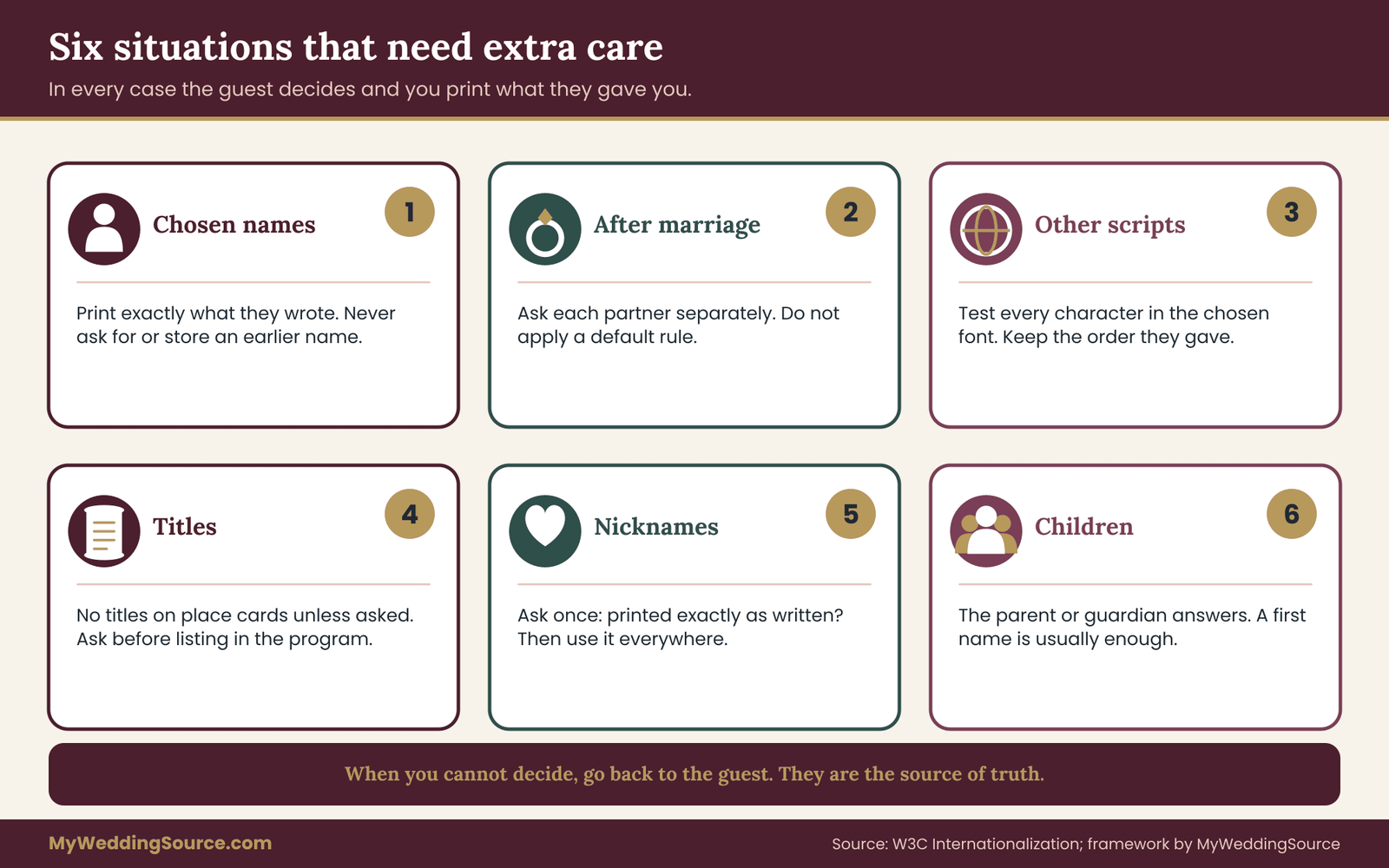
Chosen names as preferred names
Some guests use a name that differs from the one they were given at birth. The reasons vary and are theirs to keep. For the wedding, you need only the name to print. If a guest gives you a chosen name on the form, print exactly that on every surface they approved, and use it in every message to them. Do not ask what the earlier name was. Do not include it in notes. Do not mention it to other guests or to family who may still use it.
The practical risks are three. A family member who helps with the guest list may know only the older name and may supply it from memory. An online tool that syncs contacts may fill in the older name from an address book. And a vendor who gets an unedited export may print the wrong one. Each risk is closed by the same habits described earlier: one master list, only print names go to vendors, and confirmation before printing.
If a guest has a mailing name that you know differs from their chosen name, check how they would like the envelope handled. The envelope is the one place where the name might be read by people at a shared address, so ask the guest which they prefer. Some guests will want the chosen name there too, some will not. The postal service delivers mail on the basis of the address, so a different name line does not usually affect delivery, but check the current addressing standards if you need more detail.
Preferred names after marriage, divorce or family change
A guest who recently married, divorced or changed a surname may use a name that differs from what you have on file. This is the most common reason for a preferred name, and the one most likely to catch hosts out. A married guest might use one name at work and another at family gatherings. A guest might use a hyphenated surname on the invitation and want only one part on a place card.
Do not assume anything about preferred names. Do not apply a rule such as “wife takes husband’s name” or “use the name on the previous invitation.” Ask in the same neutral form and print what they give you. For couples who share a household invitation, collect the two answers separately, since the two partners might prefer different formats. For example, one might want “Alex Moreno-Hale” and the other “Jordan Hale.”
Stepfamilies need particular care. Children and stepchildren may use different surnames in the same household, and a printed “The Hale Family” or “Mr. and Mrs. Hale and Family” may misdescribe them. If the household includes people with different surnames, print individual names or a household label chosen by the household, not by you.
Preferred names in other languages and scripts
Many guests have a name in one language and a second name used in English-speaking settings. Many also have a name that is not written in the Latin alphabet. Preferred names here can mean the name in the guest’s own script, an English form, or both. The World Wide Web Consortium publishes a plain explanation of how personal names differ across cultures, such as the order of family and given names and the fact that some people have only one name. That page is a helpful reference when your guest list includes names that do not fit a “first name, last name” pattern.
Ask, then print what they say, since these preferred names belong to the guest. If a guest provides a name in a script your design or font cannot set, tell the printer early. Not every decorative font includes accented letters, diacritics or non-Latin characters, and a substitution that you do not see can turn a name into a string of boxes. Test the exact characters in the exact font before you commit. If the font cannot handle a name, change the font for the whole set, not for one guest, so the cards remain consistent.
Order of names matters too. A guest may want the family name first, as is common in several East Asian conventions, or may have written the name in the Western order on a form to avoid confusion. Do not reorder names to match your house style. Ask which order they want, and keep it. A single-name guest, known by one name only, should be printed with that one name and no placeholder, even though a spreadsheet may insist on a last name. Leave the surname field blank, and set your print name field to the full name as they gave it.
Pronunciation is part of the same job. If a name is likely to be mispronounced and the guest is willing, ask for a phonetic spelling or a short audio clip for the emcee. Make this optional and make clear that the clip will be used only for the event and then deleted.
Titles and honorifics next to preferred names
Titles are a form of naming. A guest who is a physician, professor, judge, member of the clergy, military officer or elected official may or may not want the title on a card. Some guests want it on formal materials and not on a place card. Others reverse that. Do not decide from the invitation alone.
A fair rule for preferred names is to default to no titles on place cards, so everyone is treated alike, and to honor requests when a guest asks. For the program, follow the guest’s preference, since the program is more formal. Where a guest uses a gender-neutral title or none at all, print the name without a title. Do not add a title because the style guide says so.
Nicknames as preferred names
A nickname is the easiest preferred name, and it is the one most likely to be overused by the host. A guest who is “Bobby” to their family and “Rob” to their friends may want “Rob” on a card that sits at a table of friends. A guest who writes “Bubba” may be delighted to see it on a place card, or may have written it as a joke. When a nickname looks informal for a formal event, ask once: “Do you want that printed exactly as written?” The question lets a guest say yes with enthusiasm or change to something plainer without embarrassment.
For the wedding party, nicknames in the program can be charming, and they can also confuse older relatives who do not know them. If you want both, a common approach is to print the formal name with the nickname in quotation marks only if the person asks for it. Otherwise print one name.
Preferred names for children and teens
Parents or guardians answer for children. For teens, ask the teen alongside the parent when it is reasonable to do so, since teens often have strong views about the name they use. Do not publish a child’s full name in a widely shared document without the family’s agreement, even though a place card is usually harmless. A first name is enough for most children’s cards. The broader point about children’s images and information is covered in the guest photography consent guide, and the same caution applies to names in programs that may be photographed and posted.
Guests who want no preferred name printed at all
Some guests prefer not to appear on printed materials beyond the place card. A guest with safety concerns, a public profile or a private reason may ask to be left out of the program’s guest-related sections, or out of any online seating chart. Honor this without asking for reasons. If a guest asks to have no name printed anywhere, offer a blank card with the seat number or table number only, and hand it to them personally. This is a small accommodation that costs almost nothing and removes a real worry.
The same applies to online tools. A guest might be comfortable with a card but not with an indexed seating search that anyone can view. Choose a tool that lets you hide or restrict names, or skip the online chart.
Errors that look like preferred names
A few apparent preferences are really errors. A guest who typed their name in all capital letters on a form may not want it printed that way. A guest whose name was auto-corrected by a phone may have sent an altered spelling. A guest who provided a preferred name for a plus-one may have transposed letters. You cannot tell from the form alone. This is one more reason for the confirmation step: it asks the guest to look at the printed form and say yes or no.
When you are unsure whether something is an error, ask a neutral question, “Is this exactly how you would like it printed?”, and avoid questions that suggest a correction. Guests are generally glad to be asked, and a quick check costs far less than a reprint.
A rule for when you cannot decide
Sometimes a request creates a conflict you cannot resolve neatly. A guest asks for a name that does not fit the card. Two guests at a table want the same name. A parent insists on a name the guest has declined. The rule is to return to the guest. They are the source of truth about their own name, and any decision you make without them is a guess. If the guest is unreachable before the deadline, print the name on the invitation and tell the guest at the door that you will gladly handwrite a card on the spot.
A worked example of preferred names, start to finish
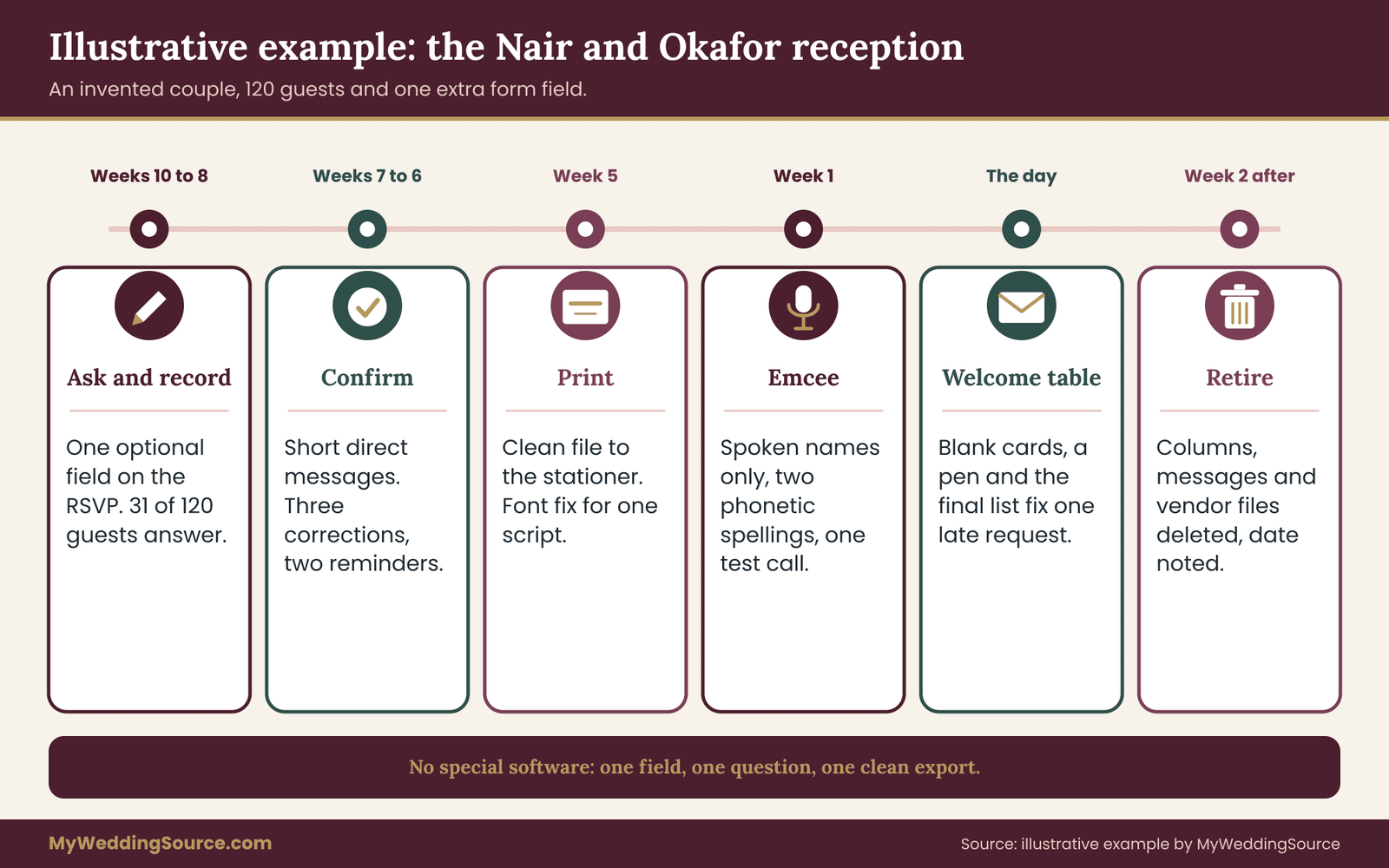
The following example is invented, and it is here to show how the five steps fit together over a few weeks. Any resemblance to real people is accidental. The couple, Priya Nair and Daniel Okafor, are hosting a reception for 120 guests with printed place cards, escort cards and a four-page program.
Weeks ten to eight before the wedding: Ask and Record
Priya builds the RSVP form to collect preferred names. In addition to attendance and meal choice, it has one optional field: “Name for place card and program (leave blank to use the name on your invitation).” A second optional field asks for a spoken name for the emcee, with the line “Only needed if you will be introduced aloud.” Priya sends the form to everyone, including the wedding party.
By the response deadline, 31 of 120 guests have given preferred names in the first field. Most of the entries are nicknames or shortened names. A few are different in kind.
One guest wrote a first name that does not match anything on the invitation. One wrote a name in two scripts. One wrote only a surname. Priya copies each entry into a Print name column, marks Status as answered, and leaves the mailing names untouched. She does not add notes. When a cousin texts, “Just so you know, that is not what he used to go by,” Priya replies, “Thanks, I will print what he wrote on the form,” and does not pass the comment on.
Daniel’s mother asks to see the list “to make sure it is right.” Priya offers a printed list of final print names after confirmation, not the spreadsheet, and explains that she is checking each name with the guest first. His mother agrees.
Weeks seven to six: Confirm
Priya sends each of the 31 guests a short direct message: “Before we print, your place card and program will read: [name]. Please reply by the 15th if anything should change.” She sends nothing to the other 89 guests.
Within a week, 26 reply with a thumbs up or a yes. Three ask for changes: one wants a hyphen, one prefers a different spelling of a short name, and one asks to be left out of the program’s thank-you list but kept on the place card. Priya records each change and updates the status to confirmed.
Two guests do not reply. Priya sends one reminder to each, a week later, with the same wording. One answers. The other stays silent, so Priya prints the invitation name for that guest and makes a note to handwrite a card at the welcome table if the guest says anything on the day.
Week five: Print
Priya exports a clean file with three columns: table number, print name and seat label. It has no status column and no notes.
She sends it to the stationer along with a short message: “The names are final and approved by each guest. Please keep the spellings exactly as written and tell me if any character will not set in the chosen font.” The stationer replies that the second script on one card will not render in the script font, and offers two alternatives: a different font for all place cards, or a printed card in the second script as a separate line. Priya asks the guest which they prefer. The guest chooses the second option.
When the proof arrives, Priya checks it against the confirmed list. She reads each print name aloud while her sister ticks the matching row. They find one typo: a doubled letter in a surname. The stationer corrects it at no charge, because the proof matched the file. Priya notes in her records that this kind of error is exactly what the proof step is for.
Week one: the emcee and the cue sheet
Priya gives the emcee a cue sheet with only the spoken names the emcee will say: the wedding party, parents, and four people giving toasts. She adds a phonetic spelling for two names that the guests supplied. The emcee reads them aloud on a short call and asks about one of them. Priya confirms with the guest by message and gets an answer within an hour.
The day: spare cards and a quick fix
At the welcome table, Priya has a small box with blank cards, a pen and a printed list of final print names. A guest arrives and says that her name on the escort card is “right, but my husband’s is not.” The list shows the husband had not replied to the confirmation. A volunteer writes a new card on the spot, using the name he asks for. Nobody else notices. The volunteer notes the new name so that the thank-you note can use it.
After: Retire
Two weeks after the wedding, Priya deletes the print name columns from her spreadsheet, the confirmation messages from her phone, and the clean file from her email. She asks the stationer in writing to delete the file they received. The stationer confirms. Priya keeps a one-line note in her records: “Naming data deleted on [date].” She sends thank-you notes using the names guests supplied, which she copied before deleting the sheet into the thank-you list that she planned to use anyway.
What the example shows about preferred names
The couple did not need special software to handle preferred names. They needed one extra field, one uniform question, one short confirmation message and a clean export. They did not ask anyone to explain a name. They did not give the naming data to people who did not need it. And they planned a quick fix for the day itself, since some names would not be right no matter what the process looked like.
It also shows that the volume is manageable. Thirty-one of 120 guests is roughly a quarter. Even if half your guests answer, confirmation messages are short and can be sent in one sitting. If your guest list is larger, split the work by section of the list, and bring in one helper who sees only the final print names, not the original answers.
Verifying preferred names with the printer, calligrapher and mail
Preferred names have a technical side too: fonts, characters, line lengths, and how names relate to mail. This section covers what to check with each vendor and what to confirm with official sources.
Printer and stationer checks
Ask the printer or stationer three questions before sending any preferred names. First, will the chosen font support every character in the final list, including accents, apostrophes, hyphens and non-Latin characters? Second, how long can a name line be before the design breaks or shrinks the type? Third, how are corrections handled: how much time, what cost, and what counts as a vendor error versus a client change? Put the answers in writing. If a name has to be shortened to fit, tell the guest before print, not after.
Ask also what happens to your files. Printers typically keep design files for reprint purposes. For a list of guest names, ask whether they will delete it after delivery and whether they will confirm in writing. If their terms say they retain customer files, decide whether that is acceptable for a list of names and tables. Most couples accept it. Some prefer a version with first names only. The decision is yours; the point is to make it knowingly.
Calligrapher checks for preferred names
A calligrapher writes by hand, so spelling errors are written in ink. Provide the list in a clear, typed form with each name on its own line and any unusual spelling marked as confirmed. Ask the calligrapher to call or message you with any doubt, not to guess. Allow time for corrections: a hand-written card cannot be changed by editing a file. If a guest changes a name late, a spare blank card and a pen at the welcome table is often the more practical fix than a rush job.
Calligraphy also has aesthetic limits. Some scripts struggle with certain letter combinations or very long names. A calligrapher who sees these difficulties early can propose a solution, such as a slightly different size or a line break, and you can check with the guest. Treat a name that is hard to write as a reason to adjust the design, never a reason to alter the name.
Envelopes and the postal service
Envelopes are a separate job from place cards. The postal service delivers mail by address, and its addressing standards define how the address block should look, including the placement of the recipient line, the delivery address line and the city, state and ZIP Code line.
The Domestic Mail Manual, which the Postal Service publishes online, is the official source for mailing standards, and its addressing publication covers format details. Because those standards are updated, check the current text directly instead of relying on any summary, including this one. If your envelopes are unusual in size or shape, the guide to wedding invitation print production and your printer will help you check the postage and machinability rules.
For naming, the useful point is this: the name line on an envelope is for the human reader at the address, and a preferred name on it is a courtesy rather than a mailing requirement. If a guest told you a name they use, you may use it on the envelope. If they asked you not to, do not. When you are unsure, address the household in a way the household would recognize, and rely on the confirmation step to correct anything that looks off.
Preferred names in translations and bilingual materials
If your program is bilingual, preferred names pose an extra question: should a name be translated, transliterated or left as is? Names are not usually translated. A name written in one script and rendered in another is a transliteration, and there may be several acceptable ones. Let the guest choose the form they use and ask whether they want both forms. A professional translator or a bilingual friend can review the program text, but the names should come from the guests themselves, not from the reviewer.
Final checks on preferred names before print
Before the final print order, run through a short list. Confirm that the preferred names in the print file match the confirmed list. Confirm that the font supports every character. Confirm that the envelope format meets the current postal standards, if you are mailing anything with preferred names on it. Confirm that no vendor file contains notes or former names. And confirm what each vendor will do with your files afterward. This is not complicated, and it takes less than an hour. It is also where a surprising number of avoidable errors are caught.
Limits and failure points for preferred names
No protocol removes every error. Knowing where this one is weak helps you decide how much effort each step deserves and what to do when something slips.
What a preferred names protocol cannot do
It cannot make every guest answer. A fair share of guests will leave the field blank, and some of them would have wanted a different name. The confirmation step and the day-of spare cards reduce that, but they do not eliminate it. It cannot control what guests do with the information. A guest who sees another person’s card can read the name, remember it and repeat it. The protocol limits what you print, not what people say. It cannot verify that a name is correct; you are relying on the guest’s word, which is the right standard, but it means you will sometimes print something that surprises a relative.
It also cannot protect a name once it is in a photograph posted by a guest. If a place card or seating chart appears in an image, the name in it is as public as the image is. That is one reason to treat large public surfaces with extra care, and to tell any guest who asked for privacy exactly where their name will and will not appear. The same logic is behind the consent steps in the wedding photography consent guide.
Common failure points with preferred names
Five failures show up repeatedly.
The first is the mixed list: a spreadsheet where print names, mailing names and notes sit in one column. The fix is to separate them from the start and never merge them.
The second is the leaked file: a spreadsheet or message that reaches someone who should not have seen it. The fix is to share only final names, with named people, and to delete the file afterward.
The third is the silent change: a vendor or helper who “fixes” a name to match a style guide, an autocorrect suggestion or an older list. The fix is to ask for exact spellings in writing, proof character by character and treat any change as a question to the guest.
The fourth is the late request: a guest who asks for a change a day before the wedding. The fix is a policy stated early, such as “changes after the 10th will be handwritten at the welcome table,” and a spare box of blank cards.
The fifth is the forgotten deletion: data that sits in a shared drive for years. The fix is the dated deletion task. If you only do one thing from this section, put a date on it.
When one of the preferred names is wrong on the day
A wrong name on a place card is a small problem that can be solved quickly and quietly. The right response is the same for every kind of error: replace the card, apologize briefly, and do not make a point of the mistake. Your welcome-table helper should have blank cards, a pen and the final list. If a guest points out a mistake, thank them, write a new card and place it. Do not ask them to explain.
If the error is in the program, which cannot be replaced, a short, private word is best. Do not announce a correction. A guest who sees their name misprinted will usually appreciate a sincere “I am sorry, we will make sure it is right in the thank-you note” more than a long explanation. If the error was yours, say so. If it was a vendor’s, handle it with the vendor afterward, using the written proof approvals as your record. The guide to wedding invitation etiquette covers the tone of apologies and corrections in more general terms.
When a request is impractical
Occasionally a request is hard to meet. A guest wants a long phrase as a name, a name that includes an unsupported symbol, or an arrangement of names that does not fit the card. Offer the closest workable version and explain briefly why. For example, “The card has room for about twenty-five characters in this font. Would you like to shorten it, or should we use a smaller size for your card only?” The guest chooses. Most requests that seem impractical turn out to have a workable middle ground.
If a request creates a safety or comfort issue for another guest, such as a name that would identify someone to a person they are avoiding, talk to the guest privately and look for a solution that does not require disclosure. This is rare, and it is not something a form can solve. It is a conversation.
What preferred names cost in time and money
Collecting preferred names costs time, not money. A form field, a column, a few dozen short messages and a clean export are all free. The real costs are the hours you spend sending confirmations and the possible reprint cost if a mistake reaches the printer. A proof pass that catches one wrong name on a set of place cards typically saves more than the protocol cost in effort, though the exact amounts depend on your printer’s terms and are worth asking about in advance.
If you have a limited budget of time, spend it in this order: proof the final names carefully, confirm names with guests who gave unusual answers, and only then confirm the rest. If you have more time, add the phonetic spelling field for the emcee and a rehearsal call.
Retiring the data on preferred names after the wedding
The last step for preferred names is deleting. A wedding creates a pile of personal information, and the naming data is the easiest part to get rid of, since you no longer need it once the thank-you notes are written.
Make a short deletion list. Remove the preferred names columns (Print name, Spoken name and Status) from your spreadsheet. Delete any confirmation messages and attachments from email and phone. Delete the export you sent to vendors from your sent mail and downloads. Ask the printer, stationer and calligrapher in writing to delete their copies, and keep their replies. Remove any seating tool accounts or links that contain guest names. Check shared drives, cloud storage and the trash folders where deleted files may still sit.
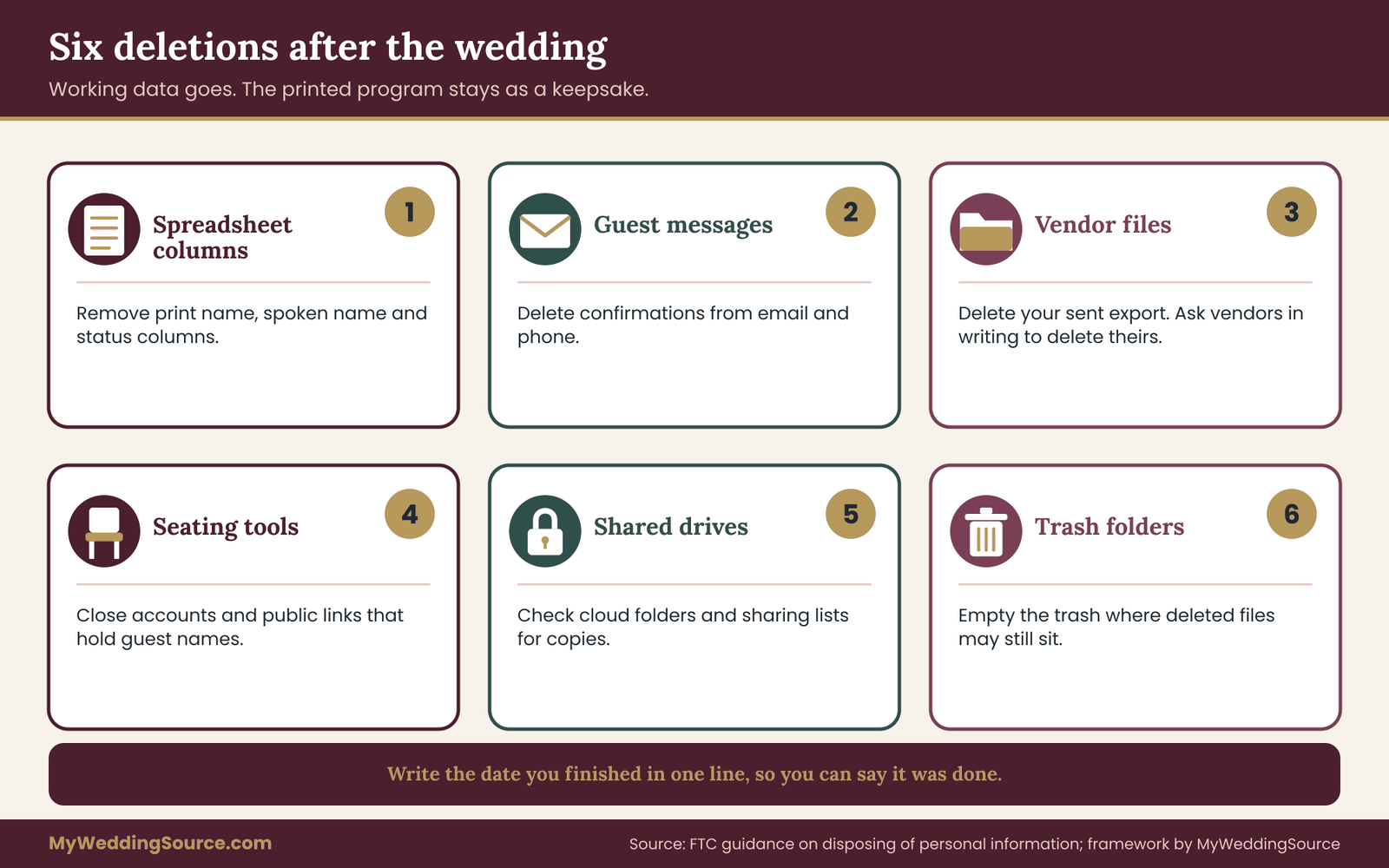
Keep what you need. You might keep a final guest list with mailing names for thank-you notes and holiday cards, and a copy of the program as a keepsake. If a guest’s preferred name appears in the program, that is already a printed, shared document, and it does not need to be destroyed. The point is the working data, not the keepsakes.
Tell guests what you did if they ask. “We deleted the naming information after the wedding” is a simple, honest answer, and it is true only if you did it. If you plan to reuse the list for another event, such as an anniversary party, ask the guests before you keep their preferred names.
Your next steps
- Decide which surfaces will carry preferred names, and sort them by who sees them and for how long.
- Add the optional question about preferred names to your RSVP form or response card, with the default stated.
- Create separate columns for preferred names (print name, spoken name and status), apart from the mailing names.
- Limit access to the preferred names columns to the people who need them, and check the sharing settings.
- Send a short, direct confirmation message to each guest who gave preferred names before anything is printed.
- Send vendors a clean file of final preferred names, and ask in writing what they will do with it.
- Prepare a spare box of blank cards, a pen and a list for the welcome table.
- Put a deletion date for the preferred names on your calendar for two weeks after the wedding.
FAQ
Should we ask every guest for preferred names, or only some?
Ask every guest, with the same optional question in the same place. Asking only the guests you suspect have a preference reveals your assumptions and will miss people. A uniform question also protects privacy, because no one can tell why a particular guest filled it in. Guests who have no preference leave it blank, and the name on the invitation is used.
Do we need to know a guest’s legal or former name?
No. The only information you need is the name to print, which is what preferred names are for. Asking for a legal or former name collects data you do not need and may not be able to protect well. If a guest volunteers more, listen and thank them, but record only the print name. Keep notes out of the spreadsheet and out of anything sent to vendors.
Can preferred names differ between the place card and the program?
Yes. A place card is seen by one table, while a program is kept and shared more widely, so a guest may want different names on each. Record a separate program name only when a guest asks for one. Otherwise use a single print name. Tell the guest what will appear on each surface so there are no surprises.
What should we send the printer or calligrapher?
Send a clean file of final print names, with table numbers if needed, and nothing else. Leave out notes, former names, status columns and the reasons behind any name. Ask about font support for accents and non-Latin characters, how corrections are handled and whether the file will be deleted after delivery. Get the answers in writing.
What if a guest does not answer the naming question?
Use the name on the invitation. Most guests who leave the field blank have no preference. Do not chase every blank. Follow up only where you have a specific reason, with a short private message. Keep a spare box of blank cards at the welcome table so a card can be rewritten on the spot if a guest asks.
How do we handle a name our printer’s font cannot set?
Tell the printer early and test the exact characters in the exact font. If the font cannot support a name, change the font for the whole set rather than altering the name or singling out one card. Offer the guest the choice between a different font and a separate printed line. The name stays as the guest wrote it.
Should the invitation envelope use the preferred name too?
Ask the guest, because envelopes are read by anyone at the address. The postal service delivers by address, so the name line is a courtesy rather than a delivery requirement. Use the preferred name if the guest wants it and leave it off if they do not. Check the current addressing standards from the Postal Service for format details.
When should we delete the naming information?
Set a date about two weeks after the wedding, once thank-you notes are written. Delete the naming columns, confirmation messages and the export sent to vendors, and ask vendors in writing to delete their copies. Keep the printed program as a keepsake and a basic mailing list if you need it. Note the date you finished.
Sources
- U.S. Postal Service, Domestic Mail Manual (DMM 300, addressing and mail preparation)
- U.S. Postal Service, Publication 28: Postal Addressing Standards
- Federal Trade Commission, Privacy and Security business guidance
- Federal Trade Commission, Protecting Personal Information: A Guide for Business
- National Institute of Standards and Technology, Privacy Framework
- W3C Internationalization, Personal names around the world
- Unicode Consortium
- Social Security Administration
- U.S. Department of State, Travel