Planning around medical appointments is a scheduling problem, and you can solve it without turning your health into a group topic. This guide shows how to protect your medical appointments on the wedding calendar, share the dates and limits other people actually need, and keep the reasons to yourselves.
Keep one private calendar that holds every one of your medical appointments, and build a second, shared calendar from it that shows only blocks: a date, a time window, a buffer and how flexible it is. Share the block, never the reason. Give each person only the layer they need to act, offer vendors two or three workable dates instead of an explanation, and decide in advance which situations would justify sharing more.
A wedding is built from dates. A venue is held for one, a caterer needs a count by another, a florist needs a delivery window, and a photographer needs a timeline. Most of those dates are set by other people’s calendars. Your own medical appointments are different, because they are not up for negotiation in the same way. A scan, a treatment session, a follow-up visit or a recurring check-in lands where the clinic puts it, and it often cannot move without a delay of weeks.
That creates a quiet pressure. When a date has to protect one of your medical appointments, the people around you start asking why. Vendors want a reason for a rescheduled tasting. Relatives want to know why you cannot do the weekend before. A friend offers to “just move it.” Each question is kind, and each one invites you to explain more of your health than you planned to.
Good planning removes most of those questions before they are asked. The method in this article is simple to state. Separate what you know from what you share. Share the schedule effect, not the cause. And write down in advance who gets which level, so you are not improvising under pressure in a vendor’s inbox.
A note on scope. This is general planning information, not legal, medical or financial advice, and nothing here replaces the guidance of your own treating professionals, who are the only people who can tell you what is safe for you. Rules about leave, accommodation and privacy differ by employer and by state, so confirm the current version with the agency that issues it. The same caution applies to every claim here about medical appointments: check the current rule yourself.
What planning around medical appointments asks of you
It helps to be exact about the task, because “keep it private” can mean several different things. Planning around medical appointments asks you to do three separate jobs at once.
The first job is protecting the appointments themselves. Your medical appointments have to stay where your care team put them, or move only on your terms. That means every wedding decision gets tested against a calendar that is, for practical purposes, fixed.
The second job is protecting the wedding. Vendors, venues and guests need dates, times and decisions from you by deadlines. If your medical appointments are the reason you are slow, uncertain or asking for flexibility, the wedding side needs a workable substitute for the explanation.
The third job is protecting your privacy about your medical appointments. You decide who knows what, when, and in what words. This job is the one that most often fails, because it is ongoing. Every new vendor, every shared document and every family group message is another place where details can leak.
What this guide does and does not cover
This article is about scheduling and disclosure. It gives you a way to hold your medical appointments, translate them into neutral calendar blocks and decide who sees what. It does not discuss any condition, treatment or prognosis, and it does not assume that you have any particular one. The same method suits someone with a routine specialist schedule, someone in a long course of care, a caregiver who attends a partner’s visits, or a couple managing appointments for a parent.
It also does not cover how much energy a wedding takes from someone with limited stamina. That is a different question with its own planning tools, and it belongs in a separate guide. Here the question is narrower: how to fit a wedding around medical appointments you cannot move, while telling other people as little as they need to know.
Why privacy is a planning tool, not only a preference
You might want privacy because the topic is hard to talk about, because you dislike being treated differently, or because a decision about your health belongs to you. Those are all good reasons. There is also a purely practical one.
Information about medical appointments that spreads cannot be recalled. Once a relative knows the reason for a date, that reason can show up in a toast, a seating comment or a well-meant call to another relative. Once a vendor has a long explanation, it sits in an email thread that several staff members can read. Keeping the reason out of the conversation is the only dependable way to keep control of it.
There is a second practical benefit. A neutral block is easier for other people to work with than a story. “Thursday afternoons are unavailable through April” can be scheduled around. “Thursdays are hard because of a thing, and we are not sure how it will go” produces worry, offers and follow-up questions, none of which help the caterer.
The three questions behind every disclosure
Before you tell anyone anything about your medical appointments, ask three questions in order.
First: what does this person need to do? A florist needs to know which delivery windows will work. A parent coordinating travel needs to know which weeks to avoid. A bridesmaid planning a shower needs to know which weekends are out. The answer is always an action.
Second: what is the smallest piece of information that lets them do it? Usually it is a date range, a time window and a note about flexibility. Rarely is it a reason.
Third: what happens if they do not get it? If the answer is “nothing important,” share nothing. If the answer is “the date fails,” share the block. If the answer is “I could be unsafe or unsupported on the day,” share a functional need with the specific person who has to act on it. The rest of this guide is built on that ladder.
Disclosure is a dial, not a switch
Most people think of privacy around medical appointments as two states: tell or do not tell. That framing forces a bad choice, because “tell” feels like handing over everything and “do not tell” feels like hiding. A dial works better, because it has settings in between, and the middle settings are where nearly all wedding planning happens.
This guide uses five settings. They are labeled by what the other person receives, not by how you feel about it.
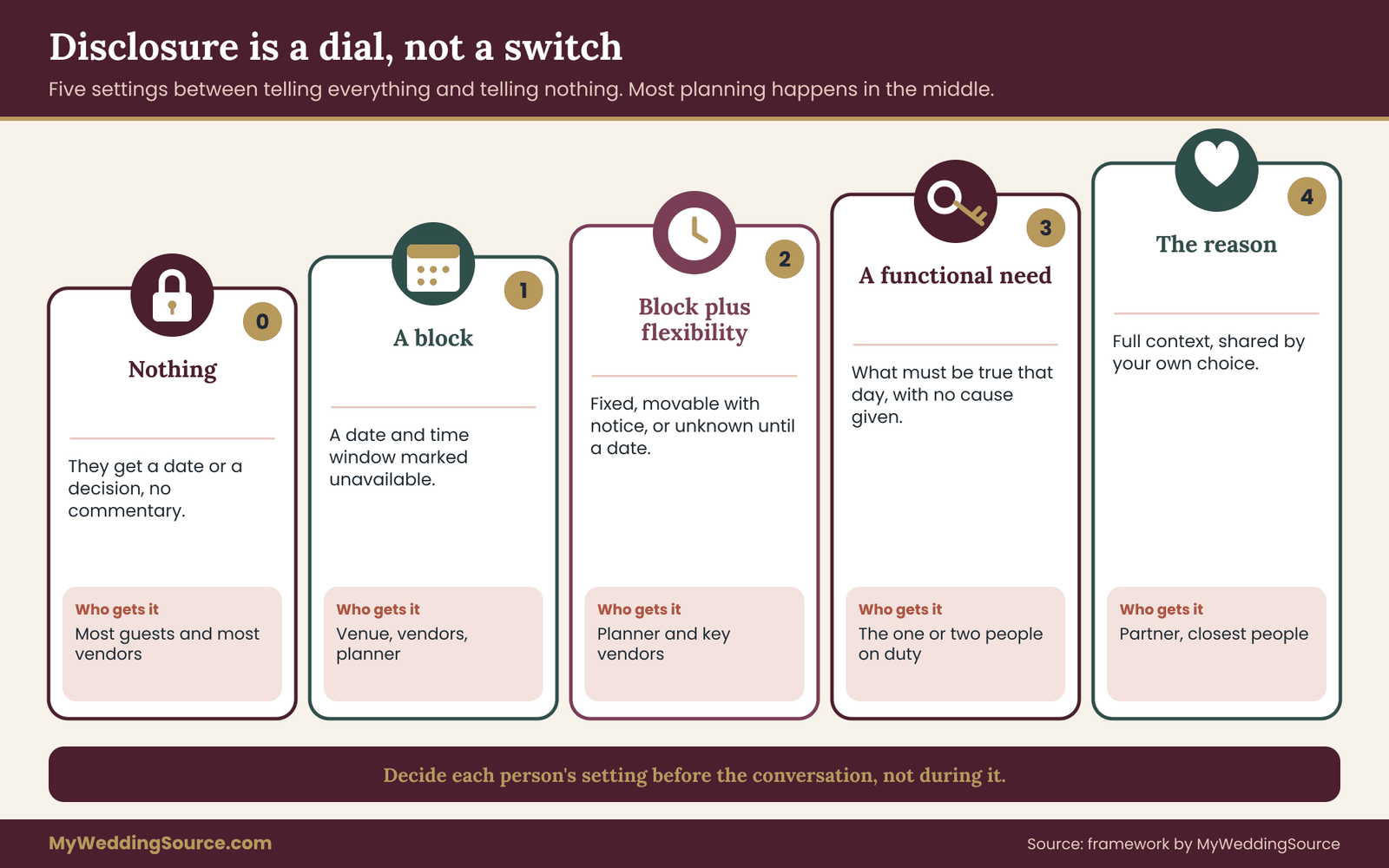
Setting zero: nothing. The person receives no information about any of your medical appointments. They get a date or a decision with no commentary. Use this whenever the person has no action to take, which covers most guests, most acquaintances and most vendors for most questions.
Setting one: a block. The person receives a date and a time window marked as unavailable. “We cannot do Thursday the 12th between noon and five.” There is no reason and no category. This is the workhorse setting for vendors, venues and planners.
Setting two: a block with flexibility. The same block, plus a note on whether it can move. “Fixed” means it cannot, “movable with three weeks’ notice” means it can, and “unknown until the end of the month” means you are waiting on someone else. This lets a planner build a schedule with the right amount of slack.
Setting three: a functional need. The person receives a practical requirement without its cause. “I need a quiet room for twenty minutes at three o’clock.” “I need to be seated near an exit.” “I cannot be the last one to leave.” It names what must be true on the day, and it is the setting for the few people who are responsible for the day itself.
Setting four: the reason. The person knows why. This is for the people you would tell anyway: a partner, a parent, a close friend, perhaps the planner or the person who will stand beside you. It is also the setting an employer or an official body may require for certain leave or accommodation requests, which the failure-conditions section covers.
How to choose a setting for each person
Run each person through the three questions from the previous section and match the answer to a setting. A caterer with a tasting that clashes with one of your medical appointments needs setting one or two. A planner coordinating the entire timeline probably needs setting two, and may need setting three for the wedding day. A person who will physically help you on the day needs setting three. A partner and your closest people may sit at setting four by their own choice.
Settings are per person and per topic, not permanent. You might give your mother setting four for one of your medical appointments and setting one for another. You might tell a planner the reason once, then ask them to keep using the block form with everyone else. Nothing about the dial is a promise to keep sharing or to keep hiding.
The most common mistake: sliding up the dial under pressure
The usual way privacy fails is not a leak. It is a slow slide upward. A vendor asks politely why a date will not work. You feel you owe an answer, so you give a category. They ask a follow-up, so you add detail. By the end of the exchange you have told a stranger more than you told some of your family.
The fix is to decide the setting before the conversation, and to carry a short script that holds the line kindly. Later sections give scripts for vendors, family and guests. The principle is simple: the person asking is entitled to a schedule that works, not to the reason it has to be that way. You can say, “That date is a fixed commitment on our side, so could we look at the following week?” and mean every word.
Where the dial meets the law, briefly
Some of these decisions touch legal rights. The Americans with Disabilities Act, explained by the Department of Justice at ada.gov, covers certain businesses open to the public and certain employers, and the Equal Employment Opportunity Commission explains the employment side. Federal health privacy rules, described by the Department of Health and Human Services, generally govern health care providers and health plans, not wedding vendors or friends. In other words, a florist is not bound by those rules to keep what you tell them private. Your own discretion is the protection, which is a strong reason to tell vendors less.
The first step in all of this is practical, not legal: decide which medical appointments are fixed, what the buffers around them are, and which people need which setting. The next section builds the structure that makes those decisions easy to keep.
The three-layer calendar for medical appointments
The central tool in this guide is a calendar split into three layers. Each layer has a different audience and a different level of detail, and information only ever flows one way: from the private layer outward, through a filter, never back.
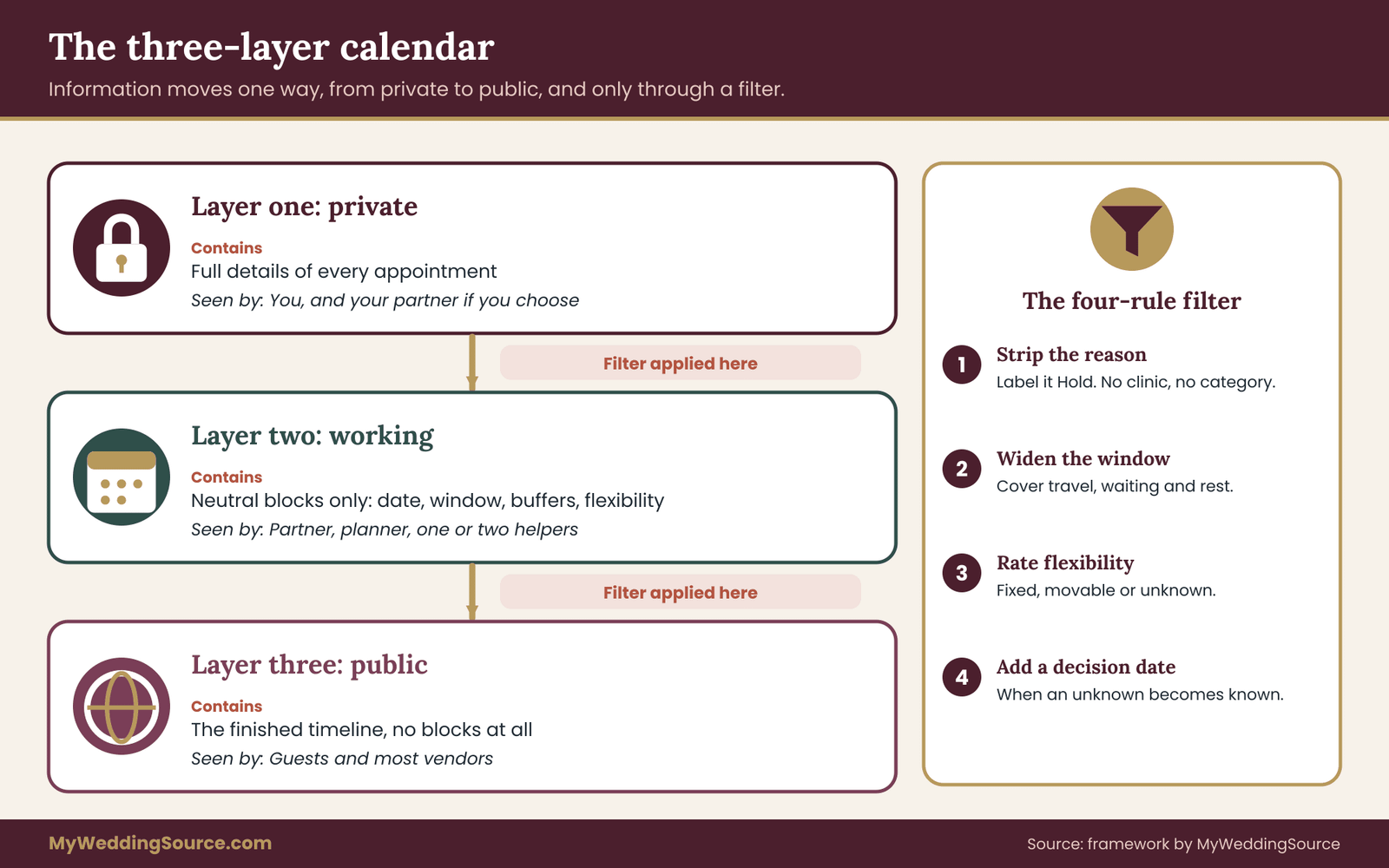
Layer one is the private layer. It is yours, and your partner’s if you choose. It holds all of your medical appointments with their real details: the clinic, the time, the preparation, the follow-up, the notes you need to remember. Nobody else has access. It lives wherever you already keep health information, whether that is a paper planner, a locked notes app or a calendar account that is not linked to anything else.
Layer two is the working layer. This is the calendar you build for the wedding. It contains blocks only. Each block has a neutral label, a date and a time window, a buffer before and after, a flexibility rating and a decision date. It is shared with the people who run the wedding: your partner, a planner if you have one, and perhaps the one or two people coordinating on your behalf.
Layer three is the public layer. It contains no blocks at all. It contains the output of the planning: the date, the timeline, the vendor schedule, the guest-facing details. Guests and most vendors never see a calendar. They see the result of decisions that already worked around the blocks.
Why three layers and not two
Two layers seem simpler, one private and one shared. The trouble is that a single shared calendar tends to become the place where everything leaks. People who can see a label for medical appointments on Thursday start asking about Thursday. People who can see the full wedding schedule start inferring from the gaps.
The third layer exists to break that chain. By publishing only the finished timeline, you give people a schedule they can follow without a record of what shaped it. A guest looking at the weekend itinerary has no way to know that the welcome reception moved to Friday evening because of an appointment, and no reason to ask.
The filter between the layers
Each time you move something from layer one to layer two, you pass it through a filter with four rules.
Rule one: strip the reason. The block says “unavailable,” “hold” or a similarly neutral word. Never the words medical appointments, never a clinic name, never a category such as “follow-up.”
Rule two: widen the window. If the visit is at one o’clock and lasts an hour, the block might run from eleven until four, to cover travel, waiting and recovery. A wide block hides the true length of the visit, and it is also simply more realistic.
Rule three: rate the flexibility. Mark every block as fixed, movable or unknown. This is the only information about your medical appointments that the planner really needs.
Rule four: add the decision date for any block marked unknown. If you will learn on the fifteenth whether one of your medical appointments moves, say so, so the planner can leave room until then and no later.
Naming blocks so they do not invite questions
The label on medical appointments matters more than people expect. A label like “Dr. visit” invites a question the moment someone reads it. A label like “Hold” does not. A few neutral labels work well: “Hold,” “Unavailable,” “Fixed commitment,” “Protected time” and “Travel and rest.” They say the time is spoken for without describing what for.
Use the same label for everything. If every block is called “Hold,” nobody can tell a routine visit from a significant one, and that sameness is the point. A planner who sees five identical “Hold” entries has no signal about which one is serious. They can only see which ones are fixed.
Who sits on which layer
Your partner usually sits on layer one and layer two, because they live inside the plan. A planner sits on layer two. Vendors sit on layer three, plus occasional one-off blocks passed to them by you or the planner. Parents and wedding party members sit on layer three, with a layer-two block only when they are responsible for a task that the block affects.
Anyone who sits on layer one should be a deliberate choice, made once and revisited, because that layer is the full record of your medical appointments. Because the private layer is the only one with the reasons in it, adding a person to it is the equivalent of telling them everything.
Building the template: fields, labels and standard blocks
The template below is the original piece of this guide. It is a set of fields you copy for each block on layer two. You can keep it in a spreadsheet, a shared calendar with notes, a paper planner or a document. The format does not matter. The fields do, and they work the same way for one visit or for a long run of medical appointments.
Every block carries eight fields.
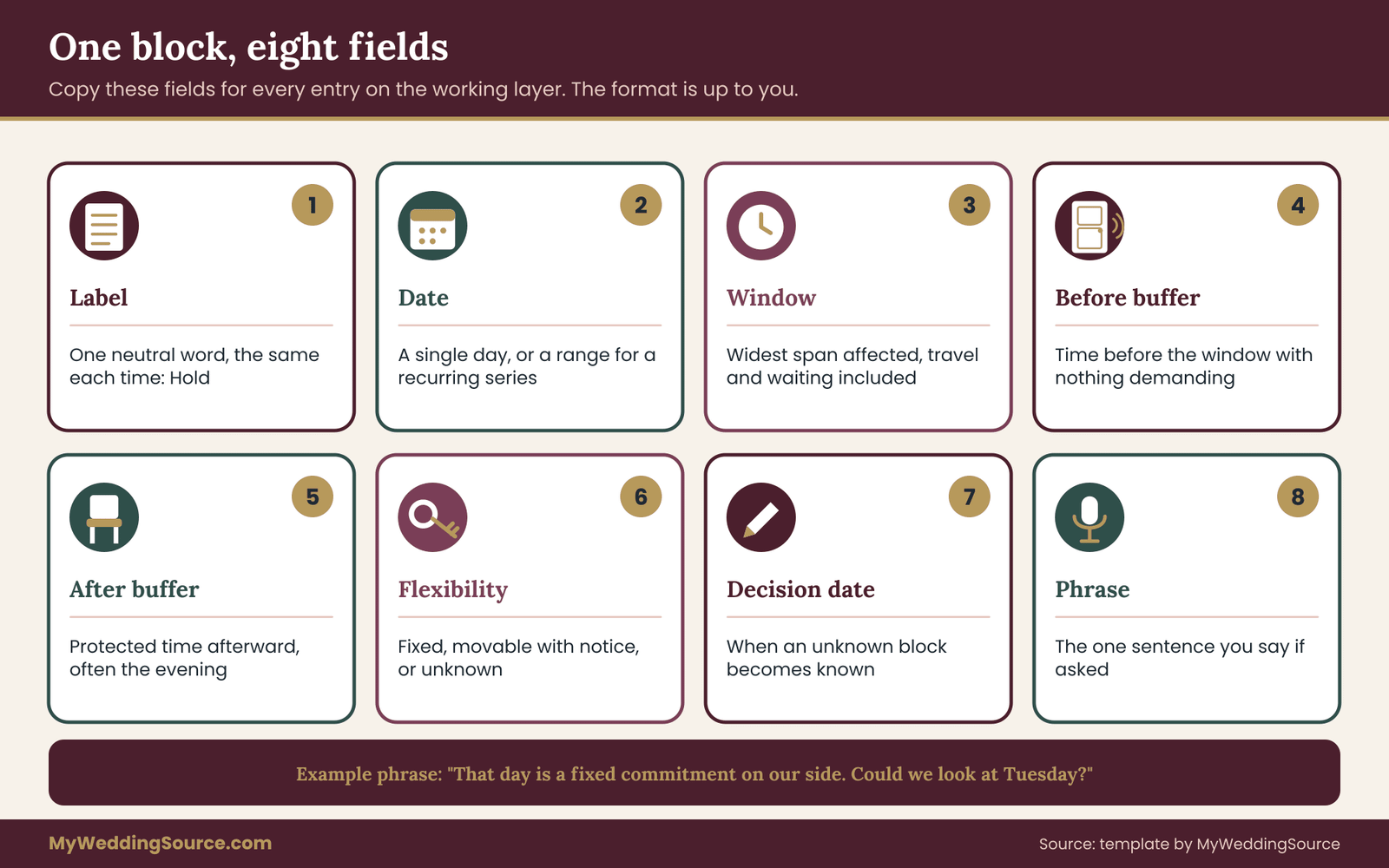
- Label. One neutral word, the same for every block. “Hold” works.
- Date. The calendar date, or a range for something recurring.
- Window. The widest span that could be affected, including travel and waiting. Write it as a clock range, not as a single time.
- Before buffer. How long before the window starts that you cannot take on anything demanding. This is often zero, and sometimes a morning.
- After buffer. How long after the window ends you want protected. Many people find this the more important of the two.
- Flexibility. Fixed, movable with a stated amount of notice, or unknown until a stated date.
- Decision date. For unknown blocks, when you will know. For movable blocks, the last day you could move it.
- Phrase. The exact sentence you will use if someone asks. Writing it down in advance is what keeps you from improvising.
What a filled-in block looks like
Here is an invented example, written in prose so it is easy to see how the fields connect. Label: Hold. Date: every second Thursday from March through June. Window: noon to five. Before buffer: none. After buffer: the rest of the evening. Flexibility: movable with two weeks’ notice, but only to the following Tuesday or Wednesday. Decision date: none. Phrase: “That day is a fixed commitment on our side, so can we look at Tuesday or Wednesday instead?”
Nothing in that block reveals what the medical appointments are, how serious it is, or whether it is one visit or a series of them. It still gives a planner everything needed to schedule around it: the recurrence, the safe alternative days and the evening to leave free.
Standard blocks worth creating in advance
Some blocks for medical appointments come up in nearly every wedding, and it is worth setting them up before anyone asks.
The recurring block. If you have a series of medical appointments, set a recurring “Hold” with an end date and a flexibility rating. A single recurring block is far easier to work with than ten separate dates, and it also reveals less.
The tentative block. If you are waiting to hear when something will be scheduled, create a “Hold” with a wide window, a flexibility of “unknown” and a decision date. This lets the planner leave a loose region on the calendar instead of treating the whole month as blocked.
The recovery block. If you know you will need time after something, make it its own block. Recovery is a scheduling need even when you would rather not describe it, and a separate block keeps it from being negotiated away.
The travel block. If an appointment is far from the venue or from home, include the travel in the window rather than mentioning it separately. The planner sees a long block, not a long journey.
The wedding-week block. Create an empty protected span covering the final days before the wedding, even if nothing is scheduled yet. This is a defensive block: it stops vendors from booking last-minute fittings or tastings into days you may need free.
Keeping the template honest
A template only helps if it matches reality. Review layer two against layer one after every change, and do it on a schedule, such as the first of each month and the day after any new one of your medical appointments is made. Drift between the layers is how someone gets double-booked or told the wrong thing.
Keep the phrase field short and kind. The goal is a sentence you can say in a normal voice, not a defense. “That is a fixed commitment, so could we look at the following week?” is complete. If you find yourself writing a phrase with the word “because,” rewrite it.
Finally, link the template to the larger plan. A couple working through the wedding planning checklist can add a “Check layer two” line to each phase, and a couple with a longer runway can attach the same habit to each month of the schedule so that the blocks are reviewed alongside every other planning task.
Choosing a date around medical appointments
The date is the first and largest decision, and it is where medical appointments cause the most worry. Treat the date as the first test of your system for medical appointments. The broader work of picking a date, including guest availability, vendor capacity and travel, is covered in the guide to choosing a wedding date. This section adds one layer to that: how to test candidate dates against a calendar you do not want to explain.
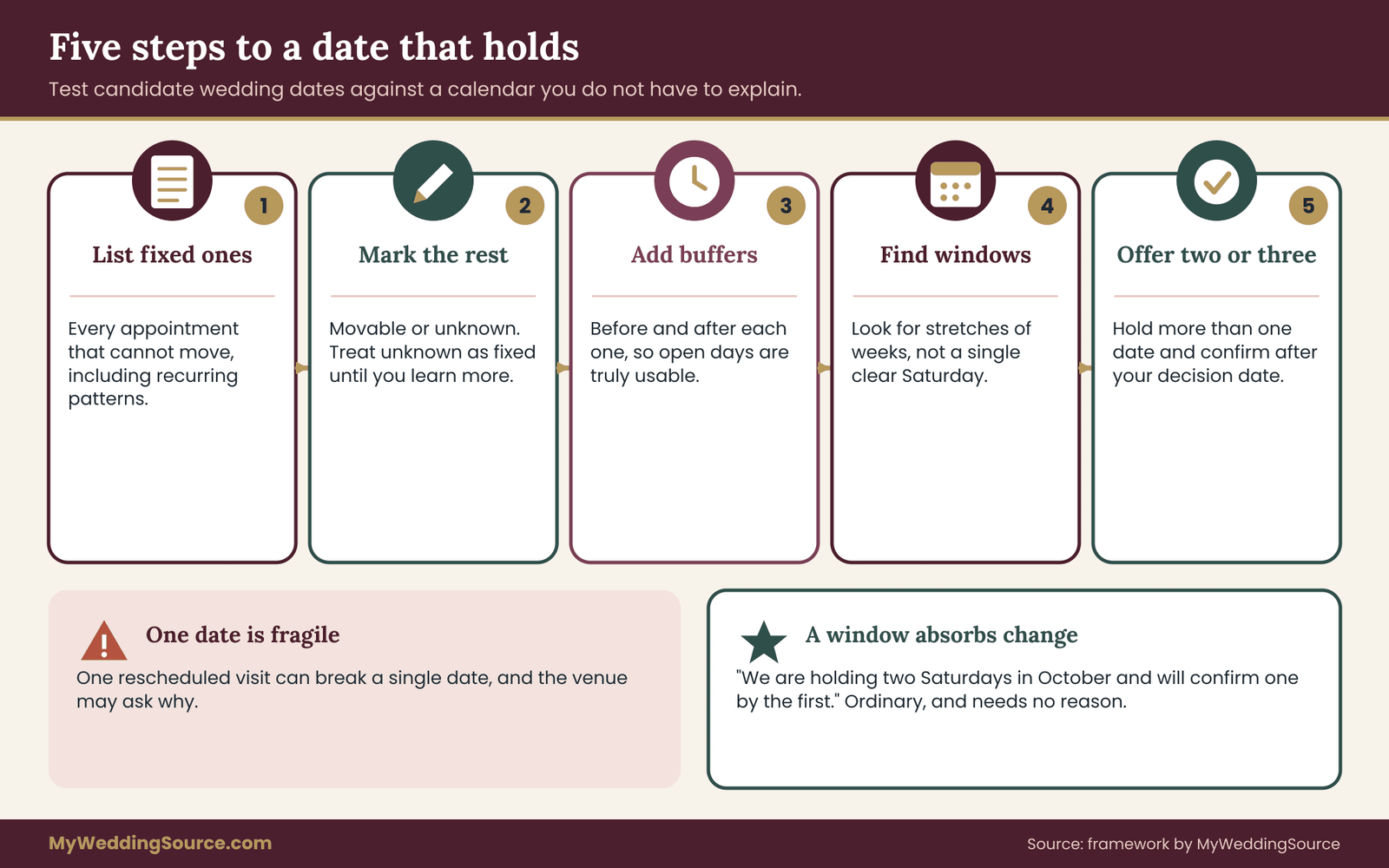
The method has five steps, and you can do it in an evening with your layer-one calendar open.
Step one: list the fixed appointments. Write down every one of your medical appointments that cannot move, now through a month after the earliest date you are considering. Include recurring ones as a pattern, such as “every second Thursday.” This is your raw material: the complete list of medical appointments before any filtering.
Step two: mark the movable and unknown ones. Some of your medical appointments can shift with notice, and some are waiting on a result or a clinic’s availability. Mark each one. Treat unknown medical appointments as fixed until you learn otherwise, because planning around a hope is how dates break.
Step three: add buffers. For each of the medical appointments, add the before and after buffers from the template. A date that sits one day after a fixed appointment is technically free but may not be usable. Buffers turn a technically open calendar into a realistically open one.
Step four: find the clear windows. Look for stretches that stay clear after buffers: not just a single date, but a window of several weeks. A single clear Saturday is fragile. A clear four-week window around it gives you room if something shifts.
Step five: offer two or three dates. Take the clear windows to your vendors and venues, and offer more than one date. This is the single most useful habit in the whole method, and the next section explains why.
Why a window beats a date
A date can be lost to one rescheduled visit. A window can absorb it. If your clear stretch is the whole of October, a clinic moving a visit by a week does not break anything. If your only candidate is the third Saturday, it breaks everything.
This also changes how you ask for flexibility. Instead of telling a venue, “We might need to move the date because of something,” you can say, “We are holding two Saturdays in October and will confirm one by the first of the month.” That is an ordinary request. Venues hear it constantly, and it needs no explanation.
Choosing the season and day of the week
Medical appointments often follow weekday patterns. If your care team schedules on Tuesdays and Thursdays, a Saturday wedding is naturally clear, and a Friday evening one might need a buffer from Thursday. If your visits cluster at certain times in the year, such as before a clinic’s busy season, take that into account when you look at months.
Lean toward dates with a clear stretch before as well as after. The days before a wedding are crowded with fittings, deliveries and final calls. If one of your medical appointments falls in that stretch, it competes with tasks that cannot move. A date with a quiet week before it is worth a great deal.
Using a holding date
A holding date is a provisional one. Many venues will hold a date for a short, stated period, often for a deposit or a signed option. If you are waiting on a medical schedule that will be set in a few weeks, ask the venue what a hold costs and how long it lasts. You do not need to say why you are asking. “We are confirming one more detail on our side and would like to hold the date for two weeks” is complete.
Be careful with holds that convert automatically into binding commitments. Read the terms, and keep the hold period shorter than the period you actually need only if the venue allows a short extension. The guide to the wedding vendor contract explains the clauses worth reading before you sign, including cancellation and date-change terms.
A date-change clause is a privacy tool
The most useful sentence in a venue or vendor contract may be a clause that lets you move the date once, with a stated deadline and a stated fee. It is a privacy tool because it removes the need to explain. If you hold the right to move the date, you can use it without telling anyone why.
When you negotiate, ask for it in neutral terms. “Can we include a one-time date change, with notice by a stated date?” is a standard request. Vendors who agree are giving you slack, and the price of that slack is usually far smaller than the cost of an emergency explanation.
What to do when a date has to move
Sometimes a clear window closes. A clinic changes a schedule, a series extends, a result changes the plan. When that happens, the date-change clause and the two-date habit are what protect you.
Move early. The sooner you tell a venue and vendors that the date is changing, the more alternatives they can offer. Use the block language: “Our schedule has changed on one fixed commitment, so we need to move to one of the other two dates we discussed.” You are reporting a change, not describing a crisis.
Then update layer two, check every downstream date and tell vendors in the order they are most affected. Venue first, then the vendors whose work depends on the venue date, then everyone else. The sequence matters because a late message to the caterer costs more than a late message to the DJ.
Telling vendors what they need, without the reason
Vendors are the group most likely to ask about your medical appointments, and the group with the least claim to an answer. They are also the people with whom a calm, consistent script pays off most. The aim is to make scheduling around medical appointments ordinary, so nobody feels the need to ask.
What vendors actually need
A vendor needs five things from you: a date, a time, a deadline for decisions, a way to reach you and a sense of how firm each of those is. They do not need to know why a date is firm. They need to know that it is.
Most vendor questions about timing are really requests for certainty. “Can you confirm by Friday?” means they want to plan. “Is that your final date?” means they want to know whether to turn away other couples. You can answer both with the template’s flexibility rating, and with no explanation.
Scripts for common situations
Here are phrases that hold the line kindly. Adapt the wording to your own voice.
When a vendor proposes a tasting or meeting at a time that clashes: “That day is not available on our side. Could we do Tuesday or Wednesday that week?” There is no “unfortunately,” no apology and no story.
When a vendor asks why: “It is just a fixed commitment on our calendar. Which of the other days would suit you?” Say it once, warmly, and move to the alternatives. People move on quickly when the question has been answered with a solution.
When a vendor pushes: “I would rather keep the details private, but I can promise we will confirm by the fifteenth.” This sentence does two jobs. It states a boundary and it offers the thing the vendor actually wants, which is certainty.
When you need a longer lead time: “We need to confirm in two stages, and we will have the final answer by the first of next month. Could you hold the slot until then?” This is a normal request and needs no cause.
When you are late replying: “Thank you for waiting. We are confirming Thursday the twelfth.” You do not need to apologize for the delay in terms that invite questions about it.
Handling the vendor who is simply curious
Some vendors ask out of kindness. They may have heard that a couple is dealing with something, or they sense stress in your messages and offer to help. Thank them, and keep the response short. “That is kind of you. We have it handled, and the best help is a firm timeline.” This turns the offer into something useful without opening the door.
If a vendor persists, route the conversation through one person. Many couples ask their planner or a trusted friend to handle vendor communication for a period. The vendor then has a single, professional contact who answers scheduling questions without commentary, and your inbox stays clear.
Putting scheduling rules in writing
Where a vendor’s work depends on your availability, put the scheduling rules in the contract or in a confirming email. State the fixed dates, the notice for changes and the process for rescheduling. These are ordinary clauses. Written in neutral terms, they protect you if a date has to move.
For vendors with long lead times, such as a dress maker, align the fittings with your clear windows at the start and write the fitting dates down. The wedding vendor timeline is a useful reference for what vendors typically need and when, and you can lay your layer-two blocks over it to spot clashes months ahead.
When a vendor requires a reason
A small number of vendors will insist. Some require a documented reason for a cancellation or date change before they refund a deposit. In that case, ask exactly what they accept, in writing, before you offer anything. Many accept a general statement of a personal circumstance without detail. A few require documentation under an insurance or cancellation policy.
If the policy does require detail, share the smallest amount that meets it, send it to one named person, and ask how long they keep it and who can see it. If they cannot answer, treat that as information about how much to share. The failure-conditions section returns to this situation.
Keeping vendors on layer three
A useful discipline is to treat vendors as a layer-three audience by default. They receive the finished schedule and the specific blocks that affect their work, passed on as neutral entries. They do not receive access to your calendar, a shared document with notes, or a group thread that includes personal conversations.
When a vendor asks for a shared calendar, offer a calendar of their own. Create an event for each vendor-facing date, with only the date, time and place in it. The event is a record of what they are doing, not of what you are managing. That keeps medical appointments off every vendor’s screen without any awkwardness.
Guests, family and the wedding party: who sees what
Guests are the largest group and the one that needs the least. For most of them, medical appointments never need to come up. Almost no guest needs to know anything about your medical appointments. They need a date, a place, a time and a way to respond. Family and the wedding party are closer, and they are the people most likely to notice a pattern, offer help or ask questions. This section gives each group its setting on the dial.

The need-to-know test, applied to people
The figure above sets out the test as a sequence you can run for anyone. Ask what the person must do, what the smallest piece of information is that lets them do it, and what happens if they do not receive it. The answer sets the dial.
A guest who is travelling in needs a date, a venue and a hotel block. Setting zero. A cousin who is hosting a rehearsal dinner needs the evening before to be free. Setting one. A sibling who will be your point of contact on the day needs to know when you need a quiet half hour. Setting three. A close friend you want beside you through all of it may sit at setting four, by your choice.
The test also tells you when to say nothing. If a person has no action to take, extra information only gives them something to carry. Telling a wide circle about your medical appointments does not build support. It builds a group of people who each feel they should check in.
Guests and the invitation
Invitations, save-the-dates and the wedding website are public-layer documents. They should contain the same information every guest receives, and nothing that reflects the planning behind it. If the date was chosen around a block, the invitation simply carries the date.
Be careful with the wedding website. A page with a “schedule” section, a detailed note about why the reception starts late, or an “accessibility” section that discusses specific needs can reveal more than you meant to. If you list accommodations, describe them in general terms that apply to anyone, such as step-free access, seating and a quiet space. The guide to wedding etiquette is a good reference for the usual conventions around what hosts do and do not explain to guests.
When a guest asks directly about timing, such as why the ceremony is in the morning, answer the logistics: “We wanted a relaxed afternoon, so we chose the morning.” You do not owe the truth of a private reason to a question about the schedule, as long as you do not invent a false one. A short, accurate, incomplete answer is honest and sufficient.
Parents and close family
Parents are the hardest group, because they often have the strongest wish to be involved and the strongest instinct to ask. They may also be paying for part of the wedding, which creates a sense of entitlement to information.
Decide as a couple, in advance, what setting parents get. Then tell them in a way that sets expectations rather than inviting follow-up. “We are working around a few fixed dates on our calendar, so we will share the plan once the date is set” is clear and sufficient. If a parent wants to help, give them a task that has nothing to do with your calendar: collecting addresses, researching hotels, arranging a family dinner.
If you do choose to tell a parent more, tell them once, in a private conversation, and ask directly for what you need. “We would like to keep this between us and not discuss it with other relatives” is a normal request. Be ready for the possibility that it will not hold, and tell them only what you can live with others knowing.
The wedding party
The wedding party is a group where you can choose each person’s setting individually. A maid of honor or best man who plans the shower or bachelor weekend needs the blocks, so they do not schedule events over them. They do not need the reasons.
Give each wedding party member a layer-two excerpt, not the whole calendar. For example, a bridesmaid planning a shower in June needs to know that two Thursdays and one weekend in June are unavailable. She does not need the other months, and she does not need the labels. Send exactly those dates in a short message.
One person in the party may become your day-of ally. Choose them for steadiness, not for closeness alone. This is the person who will receive the setting-three requests, such as “I may need to step away at three for twenty minutes, and I would like you to cover for me.” They need to be able to act without asking for a story.
Group chats and shared documents
Group chats are where private information tends to leak. A message sent to ten people is, in practice, sent to ten sets of friends. Keep the wedding party chat strictly logistical, and move anything sensitive to a one-to-one message. If someone mentions your calendar in the group, answer briefly and redirect: “We have the dates sorted, thank you. The next thing to decide is the shower menu.”
Shared documents have the same risk. A planning spreadsheet that includes a column for medical appointments is a record that anyone with access can read, copy and forward. Build the shared document from layer two, so the only entries in it are neutral blocks, and review who has access each month. Remove access promptly for anyone whose task is finished.
Responding to questions you did not expect
Even with careful planning, someone will ask. The reply that works in nearly every case has three parts: thanks, a boundary and a redirect. “Thank you for asking. We are keeping that part private, and what would help most is knowing whether you can make the rehearsal dinner.”
Practice saying it aloud once. The first time you say a boundary sentence in real life, it tends to come out with an explanation attached. Having said it already, even to a mirror, makes it easier to leave the explanation off.
Wedding week and the day: medical appointments and buffers
The final week is where a plan that held for months can crack, and where medical appointments are most likely to collide with other work. Deliveries, fittings, rehearsals and travel crowd in, and any medical appointments that fall inside the week compete with all of them. This section covers how to protect that stretch and the day itself.
The wedding-week block
Create the wedding-week block early, before any medical appointments are added to that stretch. It is a protected span, usually from about a week before the wedding until the morning after, marked “Hold” on layer two and shared with the planner and the people running the weekend. Its purpose is to keep other commitments from drifting in.
If one of your medical appointments must fall inside the week, move it out if the clinic allows. When that is not possible, mark it as fixed, give it a generous before and after buffer and build the rest of the week around it. A fitting or a rehearsal can move. Medical appointments may not. Treat the week as a schedule with one immovable item and arrange the movable ones around it.
Medical appointments in the days after the wedding
Do not forget the days that follow. If you have a recurring series, the first of your medical appointments after the wedding may be only days away, and it competes with travel for a honeymoon or a family visit. Check the honeymoon dates against layer one before you book anything non-refundable. A trip planned across fixed medical appointments is easy to fix on paper and expensive to fix after it is booked.
The after buffer applies here too. Leave the day after the wedding free of travel if you can, and book the honeymoon to start after any fixed visit instead of before it. Most couples find that a slower first week after the wedding is a gift they are glad they planned.
Building the day-of timeline with buffers
The day-of timeline is a layer-three document, and it should contain the buffers without naming them. Where you want rest, schedule an activity that gives it: a photo session with a generous gap, a longer cocktail hour, a private “first look” that doubles as quiet time. A longer cocktail hour is a natural place to leave breathing room in the schedule.
Add buffers between each major block of the day: getting ready, travel, ceremony, photos, reception entrance. A timeline that is tight on paper becomes tighter on the day. A planner will usually add padding without being asked, and you can request more simply by saying, “We would like more time between each stage.” That sentence needs no explanation, and nobody will ask.
The quiet half hour
Plan a protected period during the day, however brief, that belongs to you and your partner. It can be labeled “portraits,” “couple time” or “sunset break.” The label is public and ordinary, and the time is yours to use however you need.
If you need to step away for a particular reason, such as a dose of something, a rest or a private call, the quiet half hour gives you cover. A designated helper knows to keep people away from it. You do not announce anything, and no one needs to ask what the break is for, because every wedding includes one.
Appointments the week before: practical rules
Three practical rules apply to the last week.
First, no new medical appointments in the week before the wedding unless they are necessary. If a clinic offers a convenient slot, decline it for now and ask for the week after.
Second, confirm every fixed appointment inside the week, in writing if the clinic allows, a few days ahead. A last-minute change from the clinic’s side is far easier to handle if you hear about it early.
Third, share the week’s schedule only with the people who need it. The planner gets the blocks. Your day-of ally gets the quiet-time plan. Everyone else gets the public timeline.
What the planner should and should not do
A planner is a trusted professional, and a good one will handle this smoothly. Share the blocks and the quiet-time plan with them, and tell them exactly how you want them to answer questions from others. For example: “If anyone asks about our schedule, say we have a few fixed commitments, and refer them to us.”
A planner can also act as a buffer for people who might ask. They answer vendors, coordinate the family and hold the line, so you are not the one repeating the boundary. If you hire one, put this in the first meeting: what they know, who they tell and what they say. The guide to wedding vendor due diligence lists the questions worth asking any professional before you share sensitive information with them, including how they store and share client details.
A worked case: one invented couple, six decisions
The easiest way to see the template work is to follow one case from start to finish. The couple below is invented for illustration. They are not real people, the details are made up, and nothing here is a prediction or a recommendation about anyone’s care. The point is the sequence of decisions, and how little they reveal about the medical appointments behind them.
Marisol and Ben want to marry in the autumn. Marisol has a series of recurring medical appointments every second Thursday from March through June, and a longer visit that her clinic has not yet scheduled, which she expects to learn about by the end of August. Ben drives his father to a monthly visit on the first Monday of each month. Neither wants to discuss any of this with vendors or most of their families.

Decision one: build layer one and layer two
Marisol and Ben put every appointment into a private calendar that only the two of them can open. Then they build layer two from it. The recurring series becomes one block: “Hold,” every second Thursday from March through June, noon to five, with the evening after protected, movable with two weeks’ notice to the following Tuesday or Wednesday.
The unscheduled visit becomes a tentative block: “Hold,” a wide window across September and early October, flexibility unknown, decision date the thirty-first of August. Ben’s monthly drive becomes a recurring block marked fixed, first Monday of each month, morning to mid-afternoon.
None of the three blocks mentions a clinic, a doctor or a reason, and none says that they cover medical appointments at all. That is the filter working as intended.
Decision two: find the clear windows
With buffers added, the couple looks for clear stretches in October. The tentative block runs into early October, so the first two weekends are risky. The last two Saturdays of October clear every fixed block, with a full week of quiet before each.
They also note that waiting to learn the decision date would leave only two months to plan, which is tight for some vendors. So they hold two dates: the third and fourth Saturdays of October. They decide to confirm one by the first of September, the day after the decision date.
Decision three: tell the venue
The venue offers a two-week hold on a date for a small deposit. The couple asks for holds on both Saturdays, and the venue agrees to hold one at a time. They choose the third Saturday first and ask, in neutral words, to include a one-time date change to the fourth Saturday with notice by the first of September.
The venue asks why they might move. Marisol replies, “We are confirming one more detail on our side and will know by the first of September.” The venue notes it and goes on. No further explanation is needed. The deposit terms follow the practices described in the wedding cash flow planning guide, so the couple knows when each payment falls and which one would be lost if they moved the date.
Decision four: vendors and the planner
The couple hires a planner for the last three months and brings her the layer-two blocks in the first meeting. They tell her exactly what to say if asked: “A few fixed commitments on the couple’s side; please refer questions to them.” She agrees and notes that she will route all vendor scheduling through one shared email.
Fittings and tastings are booked on Tuesdays and Wednesdays, which are clear in every block. The caterer asks for the final count on a Thursday, and the couple counters with the following Tuesday, saying only that Thursdays do not work. The caterer agrees without a question.
Decision five: family and the wedding party
Ben’s mother asks why the date is not settled yet. Ben says, “We have a few fixed dates on our calendar to work around, and we will let everyone know as soon as it is set. Could you help by collecting the addresses for the invitations?” She does, and the question does not return.
The maid of honor is planning a shower in June. Marisol sends her three dates that are clear and nothing else. The shower is set for a Saturday with no commentary. The wedding party chat never contains an appointment.
Decision six: the day itself
The timeline includes a longer cocktail hour and a “sunset portraits” slot placed in the middle of the afternoon. Marisol’s sister is the day-of ally. Marisol tells her one thing in advance: “At around three, I may need twenty minutes to rest somewhere quiet. If I give you a sign, please keep people away.” The sister agrees without asking why.
The venue has a small room off the reception hall. When the couple asks whether they can use it for “a private moment,” the venue says yes. The guide to accessible wedding venue red flags lists the physical features worth checking on a walkthrough, including quiet rooms, step-free routes and seating, so the couple confirmed all three before signing.
What the case shows
By the end, the couple has shared no reasons with any vendor, one rest request with one person and a handful of dates with a handful of others. The wedding is on the fourth Saturday, because the unscheduled visit ended up in mid-September, which the couple learned on the twenty-eighth of August. They used the date-change clause on the first of September and no one asked why.
Three things made it work for these medical appointments. They held two dates instead of one. They put the flexibility rating, not the reason, into every conversation. And they decided in advance who would say what. None of it required any special skill, only preparation.
Alternatives when the standard template does not fit
The three-layer calendar is a strong default for medical appointments, but it is not the only way. Some couples find it too formal, and some situations call for a different shape. Here are the main alternatives, with the trade-offs of each.
Alternative one: a trusted proxy
A proxy is one person who holds the calendar and answers questions on your behalf. It might be a planner, a sibling or a close friend. You give them layer two and a script, and they field every scheduling request. The benefit is that you are not the one repeating a boundary. The cost is trust: the proxy knows enough to answer well, and they may have to improvise.
Choose a proxy who is calm, discreet and not easily pressured. Give them written instructions, including the phrases to use and the situations in which they should come back to you. Review the arrangement after a few weeks, and release them from it when the busiest stretch passes.
Alternative two: a single shared “holds” calendar
Some couples skip layer two and keep a shared calendar that contains only “Hold” entries, with no notes. It is simpler to maintain, because there is one calendar to update. The trade-off is that it merges the working layer with whatever else is on the shared account, and it is easier to expose by accident. If you choose this option, use a dedicated account that holds nothing else, and share it with as few people as possible.
Alternative three: disclose to one professional
Instead of a calendar, you might simply tell one professional the reason and let them manage everything else. A wedding planner, an officiant who is also a friend or a venue coordinator can sometimes hold that role. The advantage is that they can make better decisions with more information. The disadvantage is that you rely on their discretion without any enforcement, because a wedding professional is not bound by health privacy rules the way a clinic is.
Ask the professional how they handle client information before you share, and share only as much as they need to do the job. If they hesitate to answer, share less.
Alternative four: buy flexibility instead
You can sometimes solve the scheduling problem with money and contract terms rather than information. A longer hold, a flexible date clause, a refundable deposit or a venue that accepts a change of date for a small fee can all reduce the need to explain. These cost something, so compare the price to the value of keeping the details private and the value of the flexibility itself.
Look especially for vendors with generous rescheduling terms, and ask about them at the outset. A vendor whose standard contract includes a date change is saving you a conversation later.
Alternative five: a smaller or simpler event
If the calendar is crowded enough that every date is fragile, a smaller or simpler wedding can remove most of the pressure. A civil ceremony at a courthouse, a weekday ceremony with a casual dinner, or a small gathering at home needs fewer vendors and fewer fixed dates. You can then hold a larger celebration later, when the calendar clears.
This is not a lesser choice. Many couples who go this route say, in their own words, that they felt relieved. Whether it suits you depends on your family, your budget and what you want the day to feel like. It is an option to consider, not a recommendation.
Choosing among the alternatives
A short decision rule helps. If your main difficulty is repeating a boundary, choose a proxy. If your main difficulty is keeping a calendar tidy, choose the shared holds calendar. If your main difficulty is a vendor who needs reassurance, choose one professional. If your main difficulty is uncertain dates, buy flexibility. If everything feels fragile, consider a smaller event. Many couples combine two of these, and that is fine.
When medical appointments force a bigger disclosure
A disclosure-minimal method for medical appointments has limits, and it is better to know them in advance than to discover them mid-crisis. This section lists the conditions under which sharing the block and not the reason stops being enough. Each one is a failure condition: a situation where the method, used as written, will not do the job.

Failure condition one: a safety need on the day
If anyone’s safety depends on another person knowing something, the privacy rule gives way. A person who has to respond if you become unwell needs to know what to do, even if they do not need to know why. Whatever the details, this is the clearest case for moving someone up the dial.
The answer is not to tell everyone. It is to choose one or two people, tell them what they need to act, and ask them to keep it between you. Your treating professionals are the right people to ask what a helper should know and do. This guide cannot answer that for you, and nobody else should guess.
Failure condition two: an official body that requires documentation
Some situations require paperwork. An employer may ask for documentation to approve leave or an accommodation. The Department of Labor explains how the Family and Medical Leave Act works for covered employers and employees, and the Equal Employment Opportunity Commission explains how disability and accommodation rules apply at work. A venue or an insurer may also ask for documents before they refund a deposit or pay a claim.
In each case, ask the organization exactly what it requires and why, in writing. Offer the minimum that meets the requirement, send it to a named person and ask how it will be stored. The Job Accommodation Network offers free, confidential guidance on workplace accommodations, and a treating professional can often help you decide what to include. None of this is a reason to share more with vendors, whose requirements are contractual and negotiable.
Failure condition three: the calendar is too crowded
If your clear windows are tiny or nonexistent, no amount of careful wording will fix the arithmetic. When every candidate date collides with a fixed block, the method tells you something useful: the date range you are considering is wrong. Widen the range, consider a different season or consider the smaller-event alternative.
Watch for the temptation to solve a crowded calendar by moving the medical appointments. That is a decision for you and your care team, not for the wedding, and it is outside the scope of any planning guide. If you are tempted, speak to your clinic before you speak to a venue.
Failure condition four: a leak has already happened
Sometimes the information is already out. A relative has told another relative, a vendor has overheard, or a message was sent to the wrong thread. Once that has happened, the aim shifts from preventing disclosure to limiting its spread and controlling the story.
Start by asking the person who knows to keep it to themselves, kindly and specifically. Then decide what you want others to understand, and say it once, in your own words. “Some of you may have heard that we are working around some medical appointments. We are fine with it, we are handling it, and we would be glad if you did not bring it up.” A calm, brief statement often ends the speculation.
Failure condition five: the schedule keeps changing
If your appointments shift repeatedly, the cost of constantly updating layer two and answering vendors can exceed the benefit of the method. At that point, consider a proxy, a longer hold or a postponement decision. A planning method that costs more energy than it saves has stopped serving you.
Set a threshold in advance. For example: “If the schedule changes more than twice in a month, we will pause vendor commitments and talk to the venue about a longer hold.” The threshold is a kind of safeguard, because it gives you a decision rule at a moment when you may be tired and less able to reason.
Failure condition six: a partner who wants a different setting
A couple does not always agree on what to share. One partner may want to tell people, and the other may want complete privacy. The method assumes you have agreed on the dial, and it breaks down when you have not.
Have the conversation early and write the result down. Agree on a default setting for each group, a way to change it and a rule that neither of you discloses the other’s information without asking. If the disagreement is deep, ask a counselor or a trusted third party to help. A wedding is a poor place to discover that you disagree about privacy.
Failure condition seven: a vendor who will not accept a block
Some vendors refuse to work without a reason. They may be inflexible, or their policy may truly require it. This is a business decision, and you can answer it with a business decision. Ask whether another approach would satisfy their policy. If it does not, consider a different vendor. Your medical appointments are not a reason to accept bad terms.
A vendor’s willingness to use neutral scheduling language is a fair thing to test.
Reading the failure conditions together
Notice that most of the failures involving medical appointments do not call for telling everyone. They call for telling the right person, at the right time, in the right amount. The dial still applies. Even in an emergency, the correct move is usually to raise one person’s setting, not to publish.
The best method still fails if the private layer is easy to see. Most accidental disclosure of medical appointments is not malicious. It happens through a lock screen, a shared tablet or an automatic calendar sync. This section covers the practical hygiene that keeps layer one closed.
Separate the accounts
The strongest protection is to keep layer one in a place that nothing else touches. A separate calendar account, a paper planner or a password-protected note is far safer than a calendar that is already shared with a partner, a family or a workplace. Many people already share a family calendar, a work calendar or a joint household account. Medical appointments should not live on any of them.
If you use a calendar app, check what each calendar is shared with, and check whether sharing is set to show details or only free and busy time. Many apps default to showing event titles to anyone with access. The setting is usually in the calendar’s sharing options, and it is worth a few minutes to confirm it.
Watch the notifications
Notifications are a quiet leak. A reminder that appears on a lock screen, a smartwatch or a shared tablet can display the title of one of your medical appointments to anyone nearby. Change the notification settings so reminders show a neutral title or no details, and turn off previews on the lock screen for any calendar or email app that holds sensitive entries.
Also consider where reminders go. A reminder emailed to a shared inbox, a work address or a family account will be read by whoever has access. Use a private address for anything connected to layer one.
Paper has its own risks
Paper avoids many digital problems, but it can be found. A planner left on a table at a vendor meeting is open to anyone who glances at it. A printed schedule in a bag can fall out. If you use paper, carry only layer two to meetings, and keep layer one at home. A paper planner with two separate sections, one that you show and one that stays in a drawer, works well.
Email and messages
Email subject lines and previews can show more than you intend. Avoid describing medical appointments in the subject or first line of any message. Use “Thursday schedule” in place of anything more descriptive, and keep the details out of any thread that includes a vendor or a group.
Be careful with forwarding. When you forward a thread, the original messages go with it, including anything that was said earlier. Before you forward anything to a vendor or a planner, scroll to the bottom and check what is attached.
Shared documents and links
A shared document with a link anyone can open is a document anyone can read. Prefer sharing with named people over sharing by link, and check the permissions before you send anything. Set an expiry date on shared access if your tool allows it, and remove people when their task ends.
The Federal Trade Commission publishes consumer guidance on protecting personal information, and the Cybersecurity and Infrastructure Security Agency publishes guidance on strong passwords and account security. Both are worth a look if you are setting up a new calendar account for this purpose.
Photos, posts and the wedding website
Public posts are the last place a leak can appear. A photo that includes a hospital bracelet, a prescription bag or a clinic waiting room, posted to a story or a shared album, tells people more than a calendar ever would. Check photos before you post or share them, and ask friends to do the same during the wedding weekend if you are concerned.
If you use a shared photo album, review who can add pictures. Setting a simple photo rule for the weekend, such as no posting before the couple does, covers most of the risk.
A monthly privacy check
Put a monthly check in your calendar, ideally on the same day you review layer two. It takes ten minutes. Look at who has access to each calendar and document, check the notification settings, scan recent messages for anything that said more than you meant, and remove anyone who no longer needs access.
The monthly check is boring on purpose. A routine that you do every time is far more reliable than a vow to be careful, and it catches small leaks before they become large ones.
Your next steps
Start with one evening and four tasks. First, gather all of your medical appointments, from now until a month after the earliest wedding date you would consider, and put them on a private calendar that only you and your partner can open. Second, build the working layer: one neutral “Hold” block per series of medical appointments, with a widened window, buffers, a flexibility rating and a decision date where you are waiting.
Third, agree on the dial with your partner. For each group, such as vendors, parents, the wedding party and guests, write down the setting and the sentence you will use. Fourth, find your clear windows and choose two or three candidate dates, then take those to your venue instead of a single date.
After that, keep the habits small. Review layer two against layer one on the first of each month, run the ten-minute privacy check, and write down every setting change. If you are still choosing a date, the guide to choosing a wedding date pairs well with the clear-window method. If a failure condition appears, return to the failure section and raise one person’s setting, not everyone’s.
Plan the wedding around your medical appointments and the care you need, and keep the story of that care yours to tell, when you choose and to whom you choose.
FAQ
Do I have to tell my vendors why a date does not work?
No. A vendor is entitled to a schedule that works, not to the reason behind it. A neutral sentence such as “That day is a fixed commitment on our side, could we look at the following week?” is a complete answer. The exception is a contract or insurance policy that requires documentation for a refund. In that case, ask what it accepts and share the minimum.
What should I call medical appointments on a shared calendar?
Use one neutral label for every entry, such as “Hold” or “Unavailable,” and never a clinic name, a category or the word appointment. Identical labels mean a viewer cannot tell a routine visit from a significant one. Better still, keep the real entries on a private calendar and share only a separate calendar of blocks.
How far ahead should I block time around my medical appointments?
Block for the whole span that could be affected: travel, waiting, the visit and recovery. Many people find that a wide window, with a protected evening afterward, is more realistic than the visit time alone. Your treating professionals can tell you what is sensible for your own care, and no planning guide can replace that advice.
What if my medical appointments are not scheduled yet?
Create a tentative block with a wide window, mark its flexibility as unknown and write down the date you expect to learn more. Then hold two or three candidate wedding dates instead of one, and confirm after the decision date. Ask your venue for a short hold and a one-time date-change clause in neutral terms.
How do I handle relatives who keep asking?
Use three parts: thanks, a boundary and a redirect. For example, “Thank you for asking. We are keeping that part private, and it would help to know whether you can make the rehearsal dinner.” Give relatives a useful task so their concern has somewhere to go, and practice the sentence aloud once so it comes out without an explanation attached.
Who actually needs to know about my medical appointments on the wedding day?
Usually only one or two people, and often only a functional need, such as a quiet half hour or a place to sit. Choose someone steady, tell them what to do rather than why, and ask for discretion. Your treating professionals can say what a helper should know if there is any safety concern.
Are wedding vendors required to keep health information private?
Federal health privacy rules, explained by the Department of Health and Human Services, generally cover health care providers and health plans, not florists, caterers or planners. A vendor may keep things private by habit or policy, but those rules do not promise it. Treat anything you tell a vendor as information you cannot take back.
When is it right to share more?
Share more when someone’s safety depends on it, when an employer or official body requires documentation, or when a close person can offer real support. Raise one person’s setting at a time, not everyone’s. Ask the organization exactly what it needs, give the minimum, and ask how it will be stored and who can see it.
Sources
- ADA home page, Americans with Disabilities Act, U.S. Department of Justice
- Health information privacy for individuals, HIPAA, U.S. Department of Health and Human Services
- Disability discrimination and employment, U.S. Equal Employment Opportunity Commission
- Family and Medical Leave Act, Wage and Hour Division, U.S. Department of Labor
- Job Accommodation Network, U.S. Department of Labor, Office of Disability Employment Policy
- Questions are the answer, Agency for Healthcare Research and Quality
- MedlinePlus, National Library of Medicine, National Institutes of Health
- Consumer advice on protecting your personal information, Federal Trade Commission
- Secure our world, Cybersecurity and Infrastructure Security Agency
- Government benefits and services for people with disabilities, USAGov