
A bilingual wedding website is a wedding site that lets guests who read two different languages find, understand and act on the same facts without asking someone to translate for them. This guide gives you a page-by-page audit for building one: how to lay out the navigation, how to check every translation before it goes live, and how to prove that a guest can actually finish the task they came for.
Build a page pair ledger before you translate a word: list every page, say which language is the source, and mark each page as matched, summarized or missing in the second language. Put the language switch where a guest sees it on the first screen, and keep the guest in their language on every link. Then run a four-pass check on each page (freeze, translate, back-check, field test) and finish with a path test that walks a real reader from the home page to a submitted RSVP.
Most couples who want a bilingual wedding website start in the wrong place. They open the site builder, find a toggle or a spare page, and begin pasting text into a translation tool. Two weeks later the home page reads well in both languages, the schedule is half translated, the RSVP form still asks its questions in one language, and the confirmation email arrives in the wrong one. Nobody made a bad decision. The work simply had no map.
This article gives you the map. It treats the bilingual wedding websitengual wedding website as a set of pages, each with a job, and asks one question about each: can a reader of the second language complete that job without help? The method is a short audit you can finish in an evening, a navigation test you can run on your phone, and a quality check that does not require you to be fluent in both languages yourself.
A note on scope. This is general planning information, not legal advice. Machine translation is useful for drafts and for checking your own understanding, but it should not be treated as an authoritative translation of anything ceremonial, contractual or tied to a legal step. Where a rule matters, the article points to the organization that publishes it so you can confirm the current version.
The article stays on the bilingual wedding website. Planning the whole wedding for two languages, from invitations to toasts, belongs in a wider guide, and the invitation suite has its own detailed rules. Here the question is narrower: how to organize, translate, test and maintain a bilingual wedding website so that it does its job for both groups of guests.
What a bilingual wedding website actually has to do
A bilingual wedding website is not a brochure. It is a small working tool, and most of what guests do on it is practical. They check a date, find a hotel, decide how to get from the airport, learn what to wear, answer the RSVP and come back on the morning of the event to find the address. Those five tasks are the real test of a bilingual wedding website, and each of them needs both languages to be equally clear.
It helps to name the jobs the bilingual wedding website performs. There are five. The bilingual wedding website informs, by stating the facts of the event. It routes, by sending each guest to the right page. It collects, by taking RSVPs, meal choices and contact details. It holds, by keeping information stable and findable for months. And it repairs, by carrying the correction when a time, a venue or a shuttle changes.

A page can fail at any of these jobs in only one language. The schedule can inform in English and fail in the second language because the times are written in a format the reader does not use. The menu can route well in one language and strand a reader in the other because a button label was never translated.
The form can collect everything in one language and silently drop answers typed in the other. The audit in this guide is built around those five jobs, because a failure in any of them costs the couple the same thing: a guest who is confused, a late reply or a phone call that should not have been necessary.
Parity of decisions, not parity of words
The most useful idea for a bilingual wedding website is a plain one. Aim for equal ability to decide and act, not equal word count. Two languages rarely take the same amount of space for the same meaning, and a literal match of every sentence is often worse than a clear, shorter version that carries the same facts. A page does not need to be a mirror image of the other language. It needs to answer the same questions, in the same order, with the same level of certainty.
This changes what you check. You are not asking whether the second language page has the same number of paragraphs. You are asking whether a reader of that language can learn what time to arrive, where to park, whether children are welcome and when the RSVP closes, and whether they will reach the same answer as a reader of the first language. Where the answer is yes, a different layout is fine.
Who you are actually writing for
Every wedding has a few kinds of readers, and a bilingual wedding website serves more than two. There are guests who read both languages comfortably and will use whichever the bilingual wedding website shows first. There are guests who read only one. There are guests who read one language well and the other only with effort, who will often start in their weaker language out of politeness and then give up.
And there are guests who never open the bilingual wedding website themselves, because a grandchild or a neighbor opens it for them and reads parts aloud.
The last group matters more than couples expect. If an older relative depends on a younger one to relay the bilingual wedding website, the relative’s language page is read in short bursts, often on a phone, and often forwarded as a screenshot. Pages that survive a screenshot (clear headings, dates written out, the address in one block) are better for everyone. Keep that reader in mind when you decide what goes at the top of each page.
For the invitations that send guests to the bilingual wedding website in the first place, the wedding invitation etiquette guide covers wording and the way a web address should appear on the card. This article starts where the card ends, with the guest who has typed the address into a phone.
The page pair ledger: the audit behind a bilingual wedding website
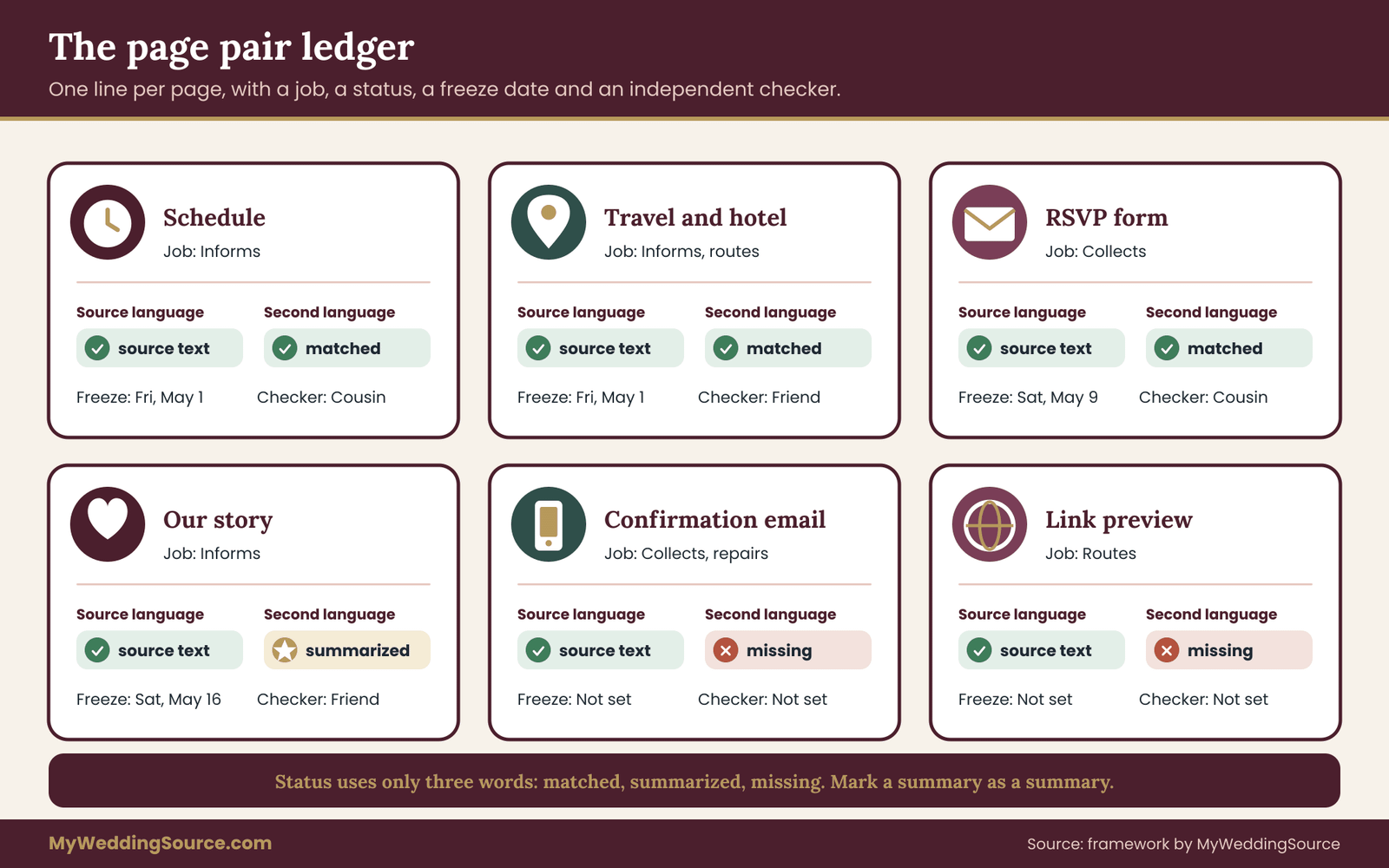
The page pair ledger is a list you keep in a notes app or a spreadsheet, with one line for every page or section of the bilingual wedding website. It is the working document of the audit. Without it, translation turns into a series of favors done at random times, and nobody can say which pages are finished.
Each line records six things. The page name is the label guests will see, in both languages. The job is which of the five jobs the page performs, because a page that only informs can be handled differently from one that collects. The source language is the language in which the facts were first written, which is also the language you should treat as the reference when the two versions disagree.
The status says whether the second language version is matched, summarized or missing. The freeze date is the day the source text stops changing. And the checker is the person who will read the second language version independently, which is not the person who translated it.
The three statuses
Use only three statuses so that the ledger stays honest.
Matched means the second language version carries every fact of the source page and has passed the four-pass check described later. Summarized means the second language page carries the facts a guest must act on and links or points to the source page for the rest. Missing means no second language version exists, and the page is either low-priority or still on the list.
Summarized is not a failure. For pages such as the couple’s story, the photo gallery or a long registry list, a short summary in the second language, with the key facts in full, is a reasonable and honest choice. What you should avoid is a page that looks matched but is really summarized without saying so, because a reader will assume the omitted parts do not exist.
Mark a summary as a summary, in the reader’s own language, with one sentence such as “This page is shorter than the English version; the full story is on the English page.”
Building the ledger in one sitting
Start with the bilingual wedding website as it exists today, even if it is nearly empty. Open it on your phone, tap every menu item, and write down each page in the order a guest meets it. Include the things builders hide: the confirmation page after the RSVP, the “page not found” message, the footer, the cookie or privacy notice if there is one, and the page title that shows in a browser tab and in a shared link.
Then add the pages that are not on the bilingual wedding website but are part of the same guest journey: the email a guest receives after replying, any text message you will send, the QR code that links from a printed sign, and the link preview that appears when someone shares the address in a chat. These are all surfaces where one language can leak through unnoticed, and the audit treats them as pages of the bilingual wedding website.
When the list is complete, number the lines and rank them by the job they do. Pages that collect and pages that inform about time, place and money come first, because an error there has a cost. Pages that tell a story or show photographs come last. The ranking tells you where the four-pass check must be strict and where a lighter check is enough, and the next sections use it constantly.
What goes in the notes column
The ledger needs one free-text column, and it earns its place. Use it for things that are true of a specific page and might otherwise be forgotten: a name with an accent that must not be altered, a place name that should stay in the local language, a phrase the couple has decided to leave untranslated on purpose, or a note that a particular sentence is a joke that will not carry across and needs a different one.
Decisions made here save arguments later. When a translator asks whether to translate the name of the venue, the notes column has the answer. When a relative suggests changing a phrase, the notes column shows whether it was chosen deliberately. The ledger is, in that sense, the memory of the project.
Navigation is the part of a bilingual wedding website that guests notice only when it fails. A reader who lands on the wrong language and cannot find the way out will often close the page. The navigation audit has five checks, and each one can be tested in a few minutes with a phone and a person who has never seen the bilingual wedding website.
Check one: the switch is visible on the first screen
On a phone, the first screen is all many guests will ever see before deciding whether the bilingual wedding website is for them. The language switch belongs there, not in a footer and not behind a menu icon that is itself labeled in one language. Put it in the same place on every page, usually the top right or the top of the menu, so that a guest who has found it once never needs to look for it again.
Label each choice in its own language. A button that says “Español” and “English” is understood by the reader who needs it. A button that says “Spanish” in English is not, because the reader who needs it may not read the word. Avoid flags. A flag stands for a country, not a language, and many languages are spoken in several countries and written differently in each. If the couple has chosen a regional form, such as Mexican or Peninsular Spanish, say so in the translation notes, not on a flag.
Check two: the switch keeps you on the same page
This is the most common structural fault. A guest reading the travel page in English taps the other language and lands on the home page in the second language. They now have to find the travel page again. After a second or third time, they stop switching.
The switch must go to the equivalent page, not to the top of the bilingual wedding website. If a page has no second-language version, the switch should say so honestly, in the reader’s language, and offer the nearest page or the summary. Test it on every page in the ledger. Tap the switch from the schedule, from the travel page, from the RSVP and from the gallery, and write down where each one lands.
Check three: the site remembers the choice
A guest who chose the second language on the home page should not be returned to the first language on the next tap. Every link inside the bilingual wedding website, including links inside paragraphs, buttons at the end of a page and the menu items themselves, must point to the page in the language the guest chose. Builders that duplicate pages manually are especially prone to this, because a link written in a paragraph on the second-language page often still points to the first-language page that was copied from.
The test is simple and tedious. Open the second-language home page, and follow every link in the page, one by one, to see whether the address you end up on is in the right language. Do the same for every page in the ledger that carries links. Record any link that leaks in the notes column and fix it before moving on.
Check four: menu labels are parallel and short
Menu labels should do the same job in both languages and should be about the same length, because a menu that wraps onto two lines in one language and stays on one in the other will break on small screens. Choose plain nouns that a reader will recognize: the schedule, the travel page, the RSVP, the questions page. Do not rename sections with clever names in one language that have no match in the other.
Keep the order of the menu the same in both languages. Guests who share screenshots or talk about the bilingual wedding website by phone will say “it is the third item,” and that only works if the third item is the same page. A different order may seem harmless, but it makes support calls harder for whoever in the family acts as the helper.
Check five: the first screen sets the right expectation
Decide what the first screen should do for a guest who has not yet chosen a language. There are three defensible patterns. The first is a neutral landing page with two large language choices and nothing else. The second is a default language chosen by the couple, with the switch clearly visible. The third is a home page that shows the key facts (names, date, place) in both languages together, with the switch for everything deeper.
The third pattern suits most weddings with two real language groups, because the guest learns the date and place at once, in a language they read, and then chooses where to continue. Whichever pattern you choose, avoid automatic redirection based on the browser’s language setting as the only method. Browser settings are often wrong for a given person, and a guest who is sent to the wrong language with no obvious way back is worse off than one who sees a clear choice.
Navigation edge cases worth testing
Test the bilingual wedding website the way guests really use it, not the way you built it. Open a deep link, such as the RSVP page, directly from a text message, and see which language appears and whether the switch is still there. Open the bilingual wedding website in a private browser window, so that nothing is remembered.
Use the browser’s back button after switching language, and see whether it returns to a sensible place. Share a page link in a chat app and look at the preview that appears, which often shows a title and a short description in only one language.
Also test the pages nobody thinks about. The “page not found” message appears when a guest mistypes an address, and it is often left in the builder’s default wording. The password page, if you use one, is the very first thing a guest sees and is frequently the only page left in one language. If the bilingual wedding website has a password, state the password and the reason for it in both languages on the invitation or in the message that carries the link.
The wedding guest list guide helps when you need to sort households by the language they read, since the same sorting tells you who needs the password instructions in which language.

Architecture choices for a bilingual wedding website: one site, two sites or one page
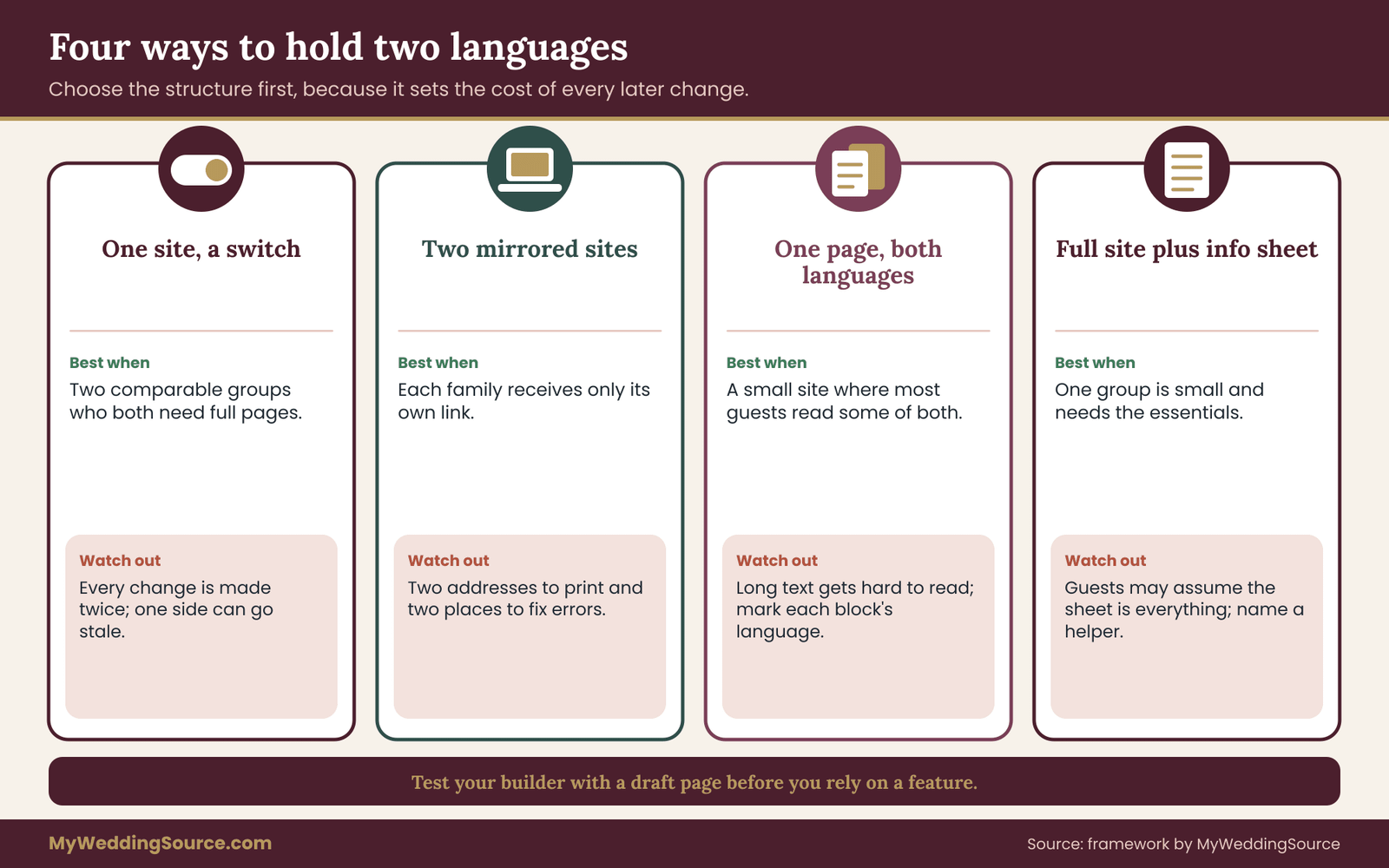
Before building anything, choose how the two languages will live together. This is an architecture decision, and it affects the cost of every later change. There are four common structures, and each has a situation where it works and a situation where it fails.
Structure one: one site with a language switch
The bilingual wedding website holds two versions of each page, linked by a switch. A guest chooses a language and stays in it. This is the most common structure and the best fit when the two groups of guests are of comparable size and both need full pages.
Its strength is that each reader sees only their language, which keeps pages short and clean. Its weakness is upkeep. Every change must be made twice, and one of the two versions is always at risk of being out of date. It works well when a named person owns each language and when the ledger records the freeze date of each page.
Structure two: two mirrored sites
Some couples build two separate sites, one in each language, with separate addresses. This can be appropriate when two families will each be sent only their own link and will never need to see the other. It gives complete control over layout in each language and removes the risk of a switch that sends people to the wrong page.
The costs are real. There are two addresses to print, two sets of settings and two places to fix an error. A guest who is forwarded the wrong link has no easy way across. If you choose this structure, put a small, clear link to the other site at the top of every page, labeled in the other language, and keep a single list of changes so that both sites are updated in the same sitting.
Structure three: one page with both languages together
On a single page, the two languages appear together, either side by side or one after the other. This suits a small wedding with a short site, where the schedule and the travel notes fit on one screen, and where most guests read at least some of both languages.
It is the cheapest to maintain, because there is only one place to edit and the two versions are always in view of each other. It becomes hard to read when the text is long, and it is poor for screen readers when the languages alternate line by line without being marked. Keep each language in its own block with a clear heading, and avoid interleaving single sentences.
Structure four: a full site in one language plus a short information sheet in the other
If most guests read one language and a small group reads another, a full translation may not be worth the effort. Build the full site in the main language and add one carefully checked page for the second language, covering the date, the place, the schedule, the travel notes, the RSVP instructions and a contact person.
This is the honest answer for many weddings, and it is often better than a half-translated site. A single page that is entirely correct beats a dozen pages that are mostly correct. The risk is that guests assume the short page is everything, so the page should say plainly that more detail exists on the main site and name a person who can help.
How to choose
Three questions settle most cases. How many households read each language, according to your guest list? Who will maintain each language after launch, and how often will facts change? And what does your site builder actually support, as shown on its current help pages? Do not assume a feature exists; open a test page and try it. Builders differ in whether they offer a language switch at all, whether it links equivalent pages, and whether the RSVP form can be shown in two languages.
If the groups are close to equal and both need full pages, structure one is usually right. If a family will only ever receive their own link, structure two can work. If the bilingual wedding website is tiny, structure three is enough. If one group is small, structure four respects their time and yours. Write your choice and the reason at the top of the ledger, so that anyone helping later knows the logic and can work with it.
For the print side, the wedding invitation printing guide explains how to proof the address and any code that appears on the card, which matters here because a mistyped address on a printed invitation cannot be changed after mailing.
Translation QA: a four-pass check before any page goes live
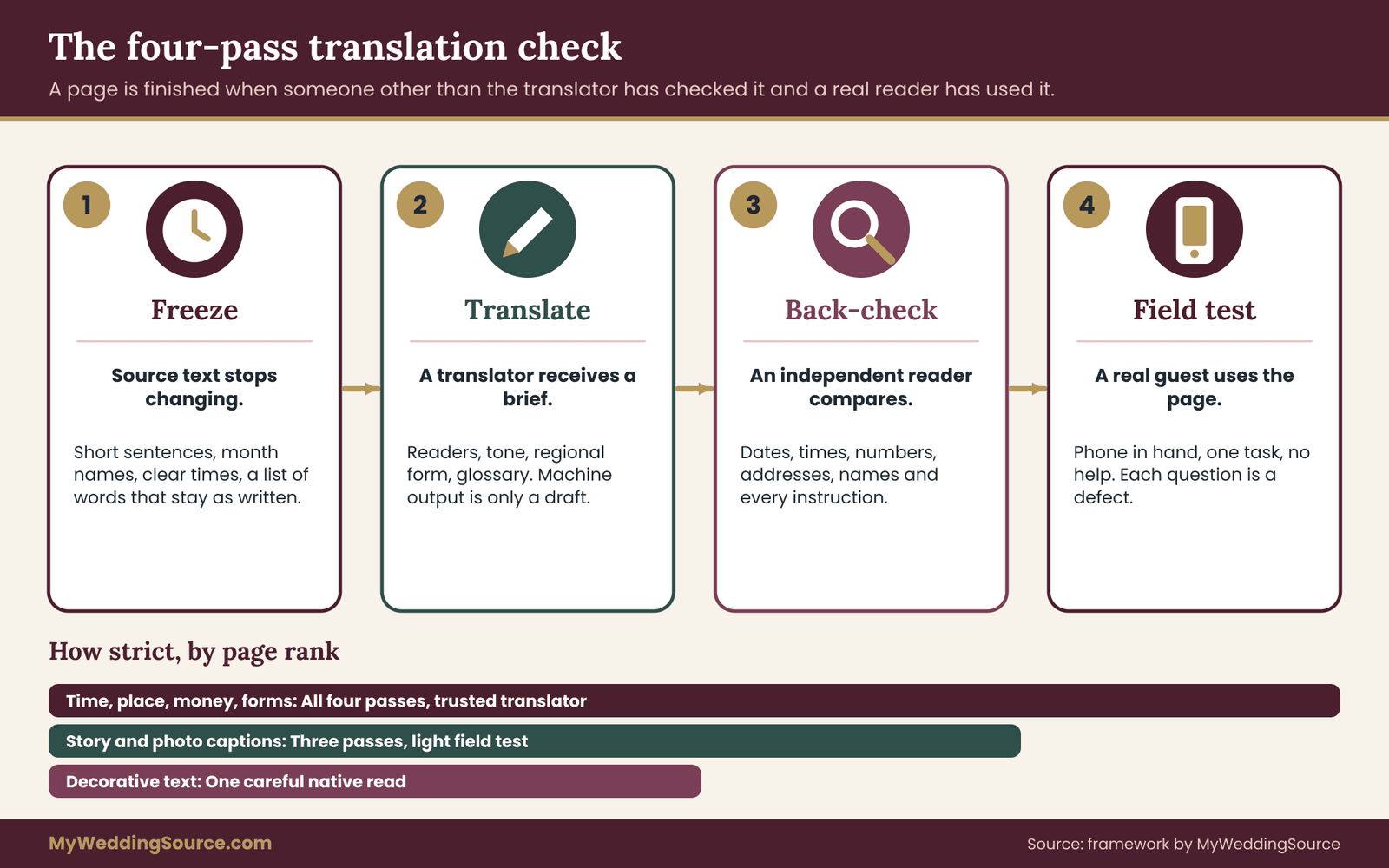
Translation quality assurance sounds like something a company does, but the idea is simple enough for a couple. A translation is not finished when it is written. It is finished when someone other than the translator has compared it with the source, and when a real reader has used it. The four passes are freeze, translate, back-check and field test, and every page on the ledger goes through them in that order. The strictness of each pass depends on the page’s rank.
Pass one: freeze the source
Translation done on moving text is wasted. If the venue changes the arrival time after the second language page is written, the pages disagree, and nobody knows which is right. So the first pass is to finalize the source text and record the freeze date in the ledger. Nothing is translated until the source page has stopped changing.
Freezing also gives you a chance to make the source easier to translate, and this is where couples save the most time. Write short sentences. Put one fact in each. Avoid idioms, puns and phrases that depend on a shared culture, such as “come dressed to impress” or “a cocktail hour.” Spell out dates with the month as a word, because “04/05” means April fifth in some countries and the fourth of May in others.
Give times with a clear am or pm, or in twenty-four hour form, and say which time zone applies if guests travel from far away.
Decide at this stage what must not be translated. Names of people, the name of the venue, the names of streets and the names of the couple’s own traditions often stay as written, sometimes with a short explanation in parentheses. Record these in the notes column. A translator who has the list will not guess.
Pass two: translate with a short brief
Who translates is a decision with a cost and a risk on each side, and the right answer differs by page. A professional translator, such as a member of the American Translators Association, can provide credentials, ask about context and take responsibility for accuracy. That is the right choice for pages with legal, financial or ceremonial weight, and for any page you cannot check yourselves.
A bilingual relative or friend is a reasonable choice for lighter pages, such as the couple’s story, provided the person writes in the target language regularly and not only speaks it. Speaking and writing are different skills, and a person who is warm and fluent in conversation may still produce stiff or incorrect written text. Ask for a sample before you rely on someone.
Machine translation is useful as a first draft and as a way to understand a page in a language you do not read. It is a poor final answer. It can change a negative into a positive, mishandle names and choose a register that sounds rude or oddly formal. Treat the output as a draft that a human reader must correct, and never publish raw machine output for a page whose errors would cost a guest money, time or understanding.
Whoever translates should receive a short brief, not just the text. A good brief fits on one page and says who the readers are, what tone the couple wants, which regional form of the language to use, which words stay untranslated, and which pages are frozen. A simple message works:
“Here is the frozen schedule page. Readers mostly read Spanish and may open it on a phone. Please keep sentences short and use the formal ‘you.’ Names stay as written. Flag anything unclear instead of guessing.”
That last request is valuable. A translator who is invited to flag unclear source text will often find the sentence that needed fixing in the original, and fixing it improves both versions at once.
Pass three: back-check by an independent reader
The back-check is the heart of the process. A second person, who did not translate and has not seen the source, reads the translated page and then compares it with the source for facts. The checker should be a native or near-native reader of the target language and, ideally, someone who can also read the source.
Give the checker a plain list of what to compare: every date, every time, every number, every address, every proper name, every instruction that starts with a verb, and every yes-or-no statement. These are the items where a mistake changes meaning. Tone and style come second. A page that is slightly stiff but accurate is a good page; a page that sounds lovely and has the wrong date is not.
Reverse translation, which means translating the second-language page back into the first language by a third person, is sometimes used. It can reveal a gross error, but it has limits. A reverse translation can read smoothly even when the forward translation chose the wrong meaning for a word, because both steps pass through the same ambiguity. Use it as an extra signal on important pages, not as a replacement for a reader who knows the target language.
Pass four: the field test
The field test puts a real reader in front of the real page on a real phone and asks them to do the page’s job. For the schedule, ask the reader to tell you when to arrive and when the ceremony starts. For the travel page, ask where to park or which station is nearest. For the RSVP, ask them to submit a test reply. You are watching for hesitation, a misread word or a question that the page should have answered.
Choose a tester who resembles an actual guest, not a language expert. A cousin who reads the language but has never seen the bilingual wedding website is better than a translator who has read it three times. Do not explain anything while they work. When they ask a question, write it down; each question is a defect in the page. Ten minutes with one tester per language will usually reveal two or three fixes that no amount of re-reading would have found.
Translation traps that show up on a wedding site
Certain kinds of text cause trouble again and again, and knowing them in advance makes the back-check faster. The first is formality. Some languages have formal and informal ways of addressing a reader, and a page that mixes them sounds careless. Choose one register for the whole bilingual wedding website, usually the one a respectful younger relative would use with an older one, and record the choice in the ledger so every translator follows it.
The second trap is gender and family terms. Words for relatives, titles and roles may carry gender in one language and not in the other. A sentence that says “partner” in English may force a choice of gendered word in the second language. Ask the translator how the second language handles it, and decide with the couple which wording they want, before the page is written, not after.
The third trap is numbers and units: decimal marks, thousands separators, currency symbols and measurement systems. A reader who sees “1.500” may read one thousand five hundred or one and a half. Where money appears, such as a hotel rate or a charge for a shuttle seat, write the amount with the currency name in words in both languages, and say who sets the price.
The fourth trap is humor and warmth. A joke in the couple’s story may not survive translation, and a literal version may land flat or, worse, strange. Rewrite such a line for the second language, with the same feeling and a different phrase, and note in the ledger that the two lines are intentionally not identical. A bilingual wedding website can carry two different jokes if each is kind and each works for its reader.
The last trap is a page the translator never sees: text that lives in image banners, calendar files, downloadable documents and buttons. Include these in the ledger as their own lines, so that a PDF schedule attached to the page is checked as carefully as the page itself.
How strict should each pass be?
Use the ledger’s ranking. For pages that inform about time, place and money, and for every page that collects information, use all four passes with a professional or highly trusted translator, an independent back-check and a field test. For pages that tell a story or show photographs, three passes can be enough, with a lighter field test. For decorative text, a single careful read by a native reader is usually proportionate.
The cost logic is straightforward. A professional translator charges for the work, and the price depends on the length and the languages, so ask for a quote and do not assume a figure. A page with three hundred words of facts costs little to check properly; a page with the same words and a mistake can cost a guest a missed ceremony. Spend where an error would hurt, and save where it would not.
For the point where a single sentence from the bilingual wedding website reaches printed matter, the same checking applies. A shuttle time that appears on the bilingual wedding website and on a sign must say the same thing, so the person who checks one should check the other, and the wedding signage system guide covers proofing for printed signs.
The pages where errors cost the most: schedule, travel, RSVP and dress
Not every page of a bilingual wedding website deserves the same effort. A wrong word on the couple’s story is a small embarrassment. A wrong time on the schedule page can mean a guest misses the ceremony. This section walks through the four pages that carry the most risk and says what the audit should look for on each one.
The schedule page
The schedule is a list of times and places, which makes it look easy to translate and easy to get wrong. The risks are in the small things. A time written as “7” in one language and “19:00” in the other is not an error, but a reader who is used to one convention may misread the other. Pick one clear format for both languages, and add a short label such as “ceremony begins” next to each time so that no one has to guess which time is which.
Words such as “reception,” “cocktail hour” and “doors open” do not map neatly. A guest may take “doors open” to mean the start of the event, when the couple meant that guests may enter and wait. Replace these terms with a plain description in both languages: “Guests may arrive from 4:30. The ceremony begins at 5:00.” If the day has a gap between ceremony and dinner, say so, and say whether guests are expected to stay at the venue.
State the time zone and the date in full if any guests travel from elsewhere. Spell the date with the month as a word in both languages, and write the day of the week as well, because a date and a weekday that do not agree is an easy way to catch a typo during the back-check.
The travel page
The travel page carries addresses, transport options, parking details and lodging. Addresses should be written exactly as they appear on a map, in the local form, even in the second-language version. A translated street name is of no use to a driver or a taxi. If the address uses accents or characters that a keyboard might not reproduce, include them, and check that the bilingual wedding website displays them correctly.
Directions are better as short steps than as paragraphs, and distances need a unit the reader uses. Many readers think in kilometers and many in miles, so give the one used locally, and if guests are flying in from elsewhere, add the other in parentheses. Label map links in the guest’s language: “Open in maps” and its equivalent, not a bare address.
Lodging details are time-sensitive. A hotel block usually has a cutoff date, and a guest who reads the date wrongly may lose the rate. Write the cutoff in full in both languages and state what happens after it. The wedding guest hotels guide explains how to present lodging options across different budgets and mobility needs, which is a useful companion when you decide how much detail the second language needs.
Accessibility details belong on this page in both languages. Say whether the venue has step-free access, where accessible parking is, and who to ask for help. A guest with a mobility need should not have to write to the couple to learn this, and a guest who reads only the second language should not have to ask a relative to find out.
The RSVP page
The RSVP is the page that collects, and it deserves the strictest audit on the bilingual wedding website. Every label, every choice and every message must exist in both languages: the question text, the meal options, the field for dietary needs, the plus-one question, the deadline and the confirmation. The wedding RSVP etiquette guide covers what to ask and how to phrase it politely; the audit here asks whether a reader of the second language can answer each question correctly.
Meal choices and allergens need special care. Use the name of the dish and its main ingredients in both languages, and name the common allergens in plain words. A guest who is allergic to nuts or shellfish should not have to interpret a poetic dish name. If the caterer’s menu is in one language, ask the caterer to confirm the second-language descriptions, since the caterer knows what is in the dish.
Provide a free-text box for anything the form does not anticipate, and decide who will read the answers in each language. If a guest writes in the second language and the only person checking replies reads one language, the note will sit unread. Name a reader for each language in the ledger, and set a day each week for checking.
Finally, say what happens after a reply. A confirmation message in the guest’s language, stating the choices they made and how to change them, saves a great many follow-up messages. On a bilingual wedding website this matters twice over, because a guest who sees an English confirmation after answering in another language will wonder whether the answers were recorded correctly.
The dress code and etiquette notes
Dress code language is tricky because the words carry cultural weight. “Black tie optional,” “cocktail attire” and “festive” are understood within a certain culture and mean little elsewhere. Describe the dress code in terms of clothing, such as a suit or a long dress, and mention practical points: whether the ceremony is outdoors, whether the ground is uneven and whether shoes will be removed at any point.
If the wedding includes religious or cultural customs that guests are expected to know, such as head coverings, silence at a particular moment or a ritual meal, explain them briefly and respectfully in both languages. Have the explanation reviewed by someone from that tradition, not only by the translator. A short, warm sentence on what guests may do, and what they are welcome to skip, serves guests of both languages.
Pages that can be summarized
A few pages can safely be summarized in the second language: the couple’s story, the gallery captions, the registry list and the page of general information about the city. Give the key facts in full and mark the page as shorter than the original. If you offer a registry, make sure the instructions for gifting are clear in both languages and that any note about customs, such as a preference for cash gifts or experiences, is worded with care.
The wedding registry ideas page covers the options, and it is worth reading before you decide how much of the registry the second language needs.
Forms, emails and links that quietly stay in one language
The pages of a bilingual wedding website are only part of what a guest meets. Every reply, reminder and shared link comes from a system that was built with default settings, and defaults are usually in one language. This is where a bilingual wedding website most often leaks. The audit treats each of these surfaces as a page of its own and gives it a line in the ledger.
The confirmation email
When a guest submits the RSVP form, most builders send a confirmation message, and most send it in a single fixed language chosen in the account settings. Check whether your builder lets you choose the language of the message by the language the guest used. If it does not, the options are to write one message that carries both languages, with the guest’s own language first if the builder allows a choice, or to turn the automatic message off and send a short reply yourselves.
A message that contains both languages should be short. State the thanks, the choices the guest made and the date by which they can change them, once in each language, with a clear heading above each. Do not make the guest scroll through paragraphs of the other language to find their own. Test the message by submitting a reply in each language and reading the confirmation on a phone.
Form fields, error messages and placeholders
A form has more text than its questions. It has placeholder text inside the boxes, error messages such as “this field is required,” date pickers, drop-down menus and a button that says “Submit.” Builders translate some of these automatically based on the guest’s browser and not on the language of your page, so a guest may see a page in one language with an error message in the other.
Test the error paths on purpose. Leave a required field empty and read the message. Type a phone number in the local format and see whether the form accepts it. Enter a name with an accent, a hyphen or two surnames and see whether the form saves it as typed. Names are the single most common casualty of forms. A field that strips accents or rejects a second surname will produce a guest list that is wrong in ways that the guest will notice on the place card.
If a form cannot be shown in two languages, add a short instruction above it in each language and keep the form’s own text as plain and as international as possible: names, a yes-or-no choice and a number. A form built from simple choices is easier to understand across languages than one built from sentences.
Texts, reminders and updates
Reminders by text message or messaging app are part of the same journey. Write each reminder in both languages, or segment your guest list so that each household receives its own language. The segmentation works only if the ledger, or a linked list, records which household reads which language, which is another reason to keep that list tidy. Do not guess a guest’s language from their surname.
When something changes, the update must reach both groups at the same time and in the same form. A correction posted in one language on the bilingual wedding website and sent by text in the other is a recipe for one group knowing less. For a venue change or a shuttle change, post the notice on the bilingual wedding website in both languages, then send the same notice by whichever channel you used for the original.
The wedding day digital contingency guide explains how to keep communication working if a phone, a bilingual wedding website or a service fails, which is worth reading alongside this section.
Link previews and shared addresses
When a guest shares your site address in a chat, the app shows a small preview with a title, a short description and sometimes a picture. These come from the page’s settings, not its visible text, and they are usually written once, in the language in which the bilingual wedding website was first set up. If the first guest to share the link is a relative who reads the second language, the preview will show text they cannot read.
Check what appears when you paste each language’s address into a chat. If your builder lets you set the title and description for each page, write them in the right language. If it does not, choose a preview text that is short, uses names and the date, and works in both languages, such as “Ana and Tomás, 14 June.” A neutral preview is better than a preview in the wrong language.
QR codes and short addresses
A QR code on a printed item, such as a sign or a program, sends a guest to a page, and the page it opens must be in a language the guest chose. A code that points to the first-language home page and offers a switch in a hard-to-see place is a small trap. Create one code for each language where the printed item carries both, label each with the language name in its own language, and test them on a phone before printing.
Also check the short address printed on the invitation. A short, memorable address should lead to a landing page that offers both languages, or to a page with both languages on the same screen. A printed address that opens the first-language site automatically and hides the switch will serve one group of guests worse than the other.
Accessibility and technical basics for a two-language site
A bilingual wedding website must also work for people who read it with assistive technology, and the way a bilingual wedding website declares its language is a technical detail with a human effect. Screen readers use the language setting of a page to choose the pronunciation rules. If a Spanish page is marked as English, the reader will pronounce the words with English rules, and the result can be close to unintelligible.
Declare the language of every page and every block
The Web Content Accessibility Guidelines published by the World Wide Web Consortium include two related ideas: the language of the page should be set in the page’s code, and passages in a different language within a page should be marked as such. On a bilingual wedding website where each page is in one language, this means the page setting must match the visible text. On a page that carries both languages, each block should be marked with its own language.
You may never touch the code. Many builders hide it. What you can do is check the builder’s settings for a page language option, and ask the builder’s support whether pages in the second language can be marked. If the builder cannot do this, you have found a limit of the tool, and you should record it in the ledger as a known issue and choose structure four or structure three, where fewer pages depend on the setting.
Use the right language code for the regional form you chose. Language tags are standardized, and a tag can include a region, such as Mexican Spanish, where the builder allows it. The Web Content Accessibility Guidelines and the W3C’s guidance on language tags explain the basics, and they are listed in the sources below.
Text size, contrast and plain structure
A guest reading in a second language, or reading in a hurry, benefits from the same design choices that help readers with low vision or a reading difficulty. Use headings in order, short paragraphs and a text size that is comfortable on a phone. Keep strong contrast between text and background, and avoid putting key facts into an image, because a picture of a schedule cannot be translated, searched or read aloud by a screen reader.
If you do use an image for an artistic invitation or a map, add a text version in both languages next to it. Describe the image in the alt text in the page’s language. A schedule or an address that exists only as a picture fails guests who cannot see it and guests who cannot copy it into a translation tool.
Fonts and special characters
Some decorative fonts do not include accented letters or characters from other writing systems, and a page can quietly replace a missing character with a box or a different font. Test every page with the real names and the real place names, including accents, and view the page on a phone and on a computer. If the couple wants a script font for the names, use it only for display text, and keep the facts in a plain, readable font.
Does the law apply to a wedding site?
The Americans with Disabilities Act website publishes guidance on how the law applies to businesses and to state and local governments. Whether a private couple’s wedding site falls under a particular rule is a legal question that this article cannot answer, and it varies with the facts. What you can do is follow the accessibility guidelines as good practice, because the same steps make the bilingual wedding website easier for guests, and they cost little when done at the start.
Search engines and privacy
Many couples keep the bilingual wedding website private with a password or an unlisted address, and for those sites search engine settings matter little. If your bilingual wedding website is public and you want each language to be found, search engines publish guidance on marking pages as language versions of one another. If it is private, skip that and focus on the guest experience.
Do keep privacy in mind in both languages. If the bilingual wedding website collects addresses, phone numbers or dietary information, say plainly who sees them and when they will be deleted, in both languages. The guide to invitation manners explains how guests expect to be addressed and approached, and the same courtesy applies to how you ask for personal details online.
A worked case: one invented couple and a bilingual wedding website audit
The example below is invented to show the method. The couple, the guest numbers and the findings are made up for illustration, and none of it describes a real wedding or a real test. What matters is the order of the decisions and the kind of defects an audit tends to find.
Ana reads Spanish and English. Tomás reads English and a little Spanish. About half of the invited households read mainly English, and about a third read mainly Spanish, mostly Ana’s older relatives. The rest read both comfortably. The wedding is a Saturday afternoon ceremony followed by dinner, with a hotel block for guests who travel. The couple has a site builder with a language switch, and they have asked a cousin and a family friend, each a careful native reader, to check the pages.
Step one: the structure and the ledger
Ana and Tomás choose structure one, a single site with a language switch, because both groups need full pages for the schedule, the travel notes and the RSVP. They choose the home page pattern that shows the names, date and place in both languages, with the switch at the top. For the couple’s story, the gallery captions and the registry notes, they choose summaries in Spanish, each marked as shorter than the English page.
They build the ledger with twelve lines, including the confirmation page, the page-not-found message, the confirmation email, the text reminders and the link preview. Ana is the owner of the Spanish text and Tomás of the English. Each line has a freeze date, and the schedule and the RSVP are ranked first.
Step two: the four passes
The schedule, travel and RSVP pages go through all four passes. Ana writes the English source with short sentences and a clear time format. A professional translator turns the pages into Spanish after receiving the brief and the glossary: names, venue and the family’s word for a traditional dish stay as written. The cousin back-checks every date, time and address against the English. The family friend, who has not seen the pages before, performs the field test on a phone.
The story page and the gallery captions go through three passes with a light field test. The registry page goes through a single read by the cousin.
Step three: the path test
The path test is the last step of the audit and the most revealing. It walks a real reader along the full journey of a guest: open the shared link, find the language, read the date and place, find the hotel, find the schedule, submit an RSVP, read the confirmation and open the bilingual wedding website again from the QR code on a program mock-up. The tester follows each path in each language and reports where they hesitate.
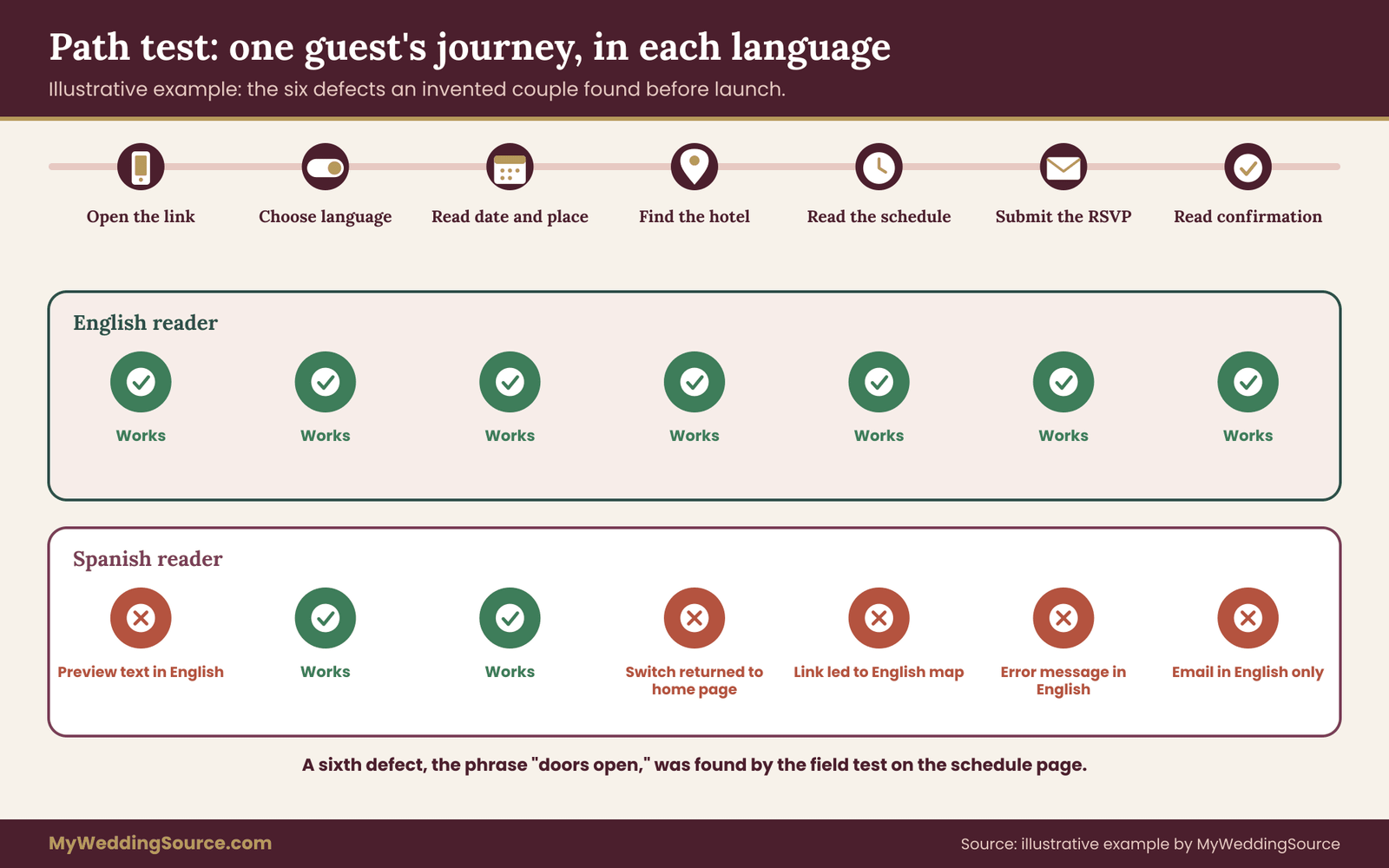
The test turns up six defects. First, the language switch on the travel page returns to the Spanish home page and not to the Spanish travel page. Second, a link inside the Spanish schedule page, copied from the English page, still points to the English map page. Third, the RSVP form shows its error message in English even on the Spanish page.
Fourth, the confirmation email arrives in English only. Fifth, the shared link preview shows the English description. Sixth, the schedule says “doors open at 4:30,” which the Spanish translation rendered as a phrase that suggested the event itself began then.
Step four: the fixes
None of the defects is large, and each has a clear fix. The builder’s help pages show how to link the switch to the equivalent page, so the couple rebuilds the switch for the three affected pages. They correct the stray link. They cannot change the language of the error message, so they add a short instruction in Spanish above the form and simplify the form to names and choices. They rewrite the confirmation email to carry both languages, each under its own heading, and set a plain bilingual preview text.
For the schedule, they replace “doors open” with a plain sentence in both languages, “Guests may arrive from 4:30. The ceremony begins at 5:00.” Then they retest every path that failed. Only two of the six had been visible to the couple before the test, and the others were found by the family friend, who was not a translator and had no stake in the pages.
Step five: the release rule
Before launch, the couple sets a rule: no page changes without a note in the ledger, and no change to an English page is complete until the Spanish page is updated or marked as pending. They keep a short change log with the date, the page, the change and who updated each language. This takes two minutes per change and has one purpose, which is to prevent the quiet drift of one language falling behind the other.
What the worked case shows
The audit did not require anyone to be a professional. It required a list, a few honest testers and a habit of checking each path in each language. It also showed that most defects live in the joins between pages, such as the switch, the form and the email, and not in the translated text. That is why a translation check alone would have missed most of what the path test found.
Failure conditions and alternatives for a bilingual wedding website
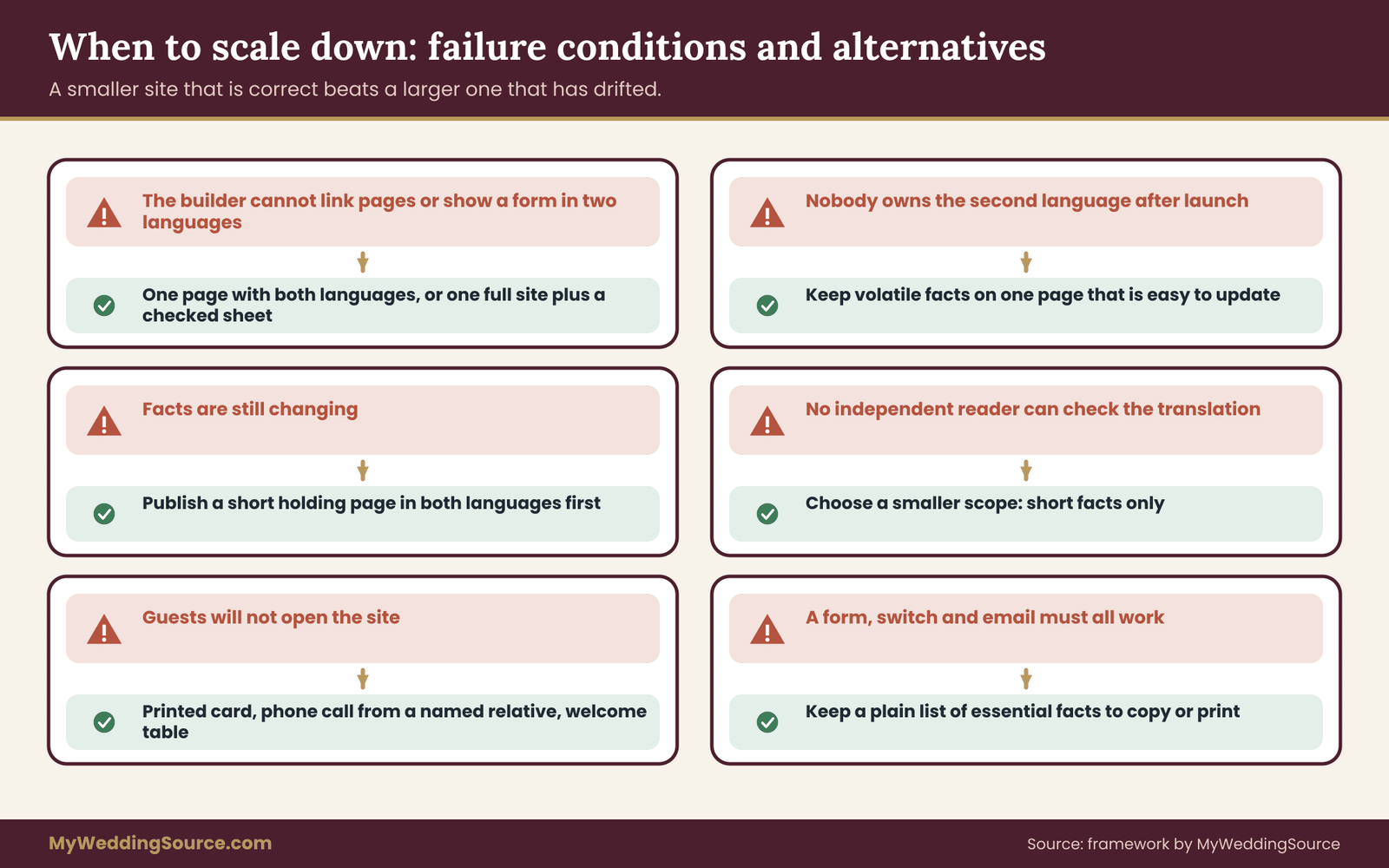
An audit is useful partly because it tells you when to stop. There are conditions under which a full bilingual wedding website is the wrong plan, and a clear-eyed couple will recognize them early. Here are the main failure conditions, each paired with an alternative.
The builder cannot support the structure. If the builder cannot link equivalent pages, cannot show a form in two languages or cannot set a page language, the structure you wanted may not be possible. The alternative is structure three or four: one page with both languages, or a full site in one language plus a single carefully checked page in the other.
Nobody owns the second language. A bilingual site needs an owner for each language, with time to maintain it until the wedding. If the person who translated is unavailable after launch, the second language will go stale. The alternative is to reduce the bilingual wedding website to the pages that rarely change and to put volatile information, such as shuttle times, on one page that is easy to update in both languages.
Facts are still changing. If the venue, the date or the guest list is not settled, translation work will be redone. The alternative is to publish a short holding page in both languages with the date, the place and a promise to update, and to translate the rest after the freeze. The wedding RSVP etiquette page covers how to word a reply deadline so that guests are not left waiting for details that are still moving.
The translator cannot be checked. If you cannot find an independent reader for the second language, you cannot verify the text. In that case, choose a smaller scope, such as a short information sheet, and ask the translator to write only facts in short sentences. Do not publish long, unverified text on a page where errors would cost a guest something.
Guests will not use the bilingual wedding website. Some guest groups, including older relatives who do not use a smartphone, may never open the bilingual wedding website. The alternative is a printed information card in the second language, a phone call from a named relative and a person at the welcome table. The bilingual wedding website remains useful, but it is not the only channel.
The page works only when everything else does. A site that depends on a form, a switch and an email chain has several points of failure. The alternative is to keep a plain list of essential facts, in both languages, that can be copied into a message or printed. If a link or a service fails, the facts still exist elsewhere.
When a smaller site is the better site
It is tempting to treat a long bilingual site as proof of care. It is not. A bilingual wedding website with five pages, each correct in both languages and tested, serves guests better than a bilingual wedding website with twenty pages in which a third have drifted out of date. The audit gives you permission to cut. A page that no guest needs, in a language nobody will read, is a page you can leave out without apology.
Change control after launch: keeping two languages in step
Launching is the midpoint of the work, not the end. A bilingual wedding website lives for months, and facts change: a shuttle schedule, a hotel cutoff, a dress code note after a weather forecast, a new contact person. Each change is a chance for the two languages to drift apart. Change control is the habit that keeps them in step, and for a bilingual wedding website it is the difference between a site that stays trustworthy and one that slowly contradicts itself.
The change log
Keep a short log, in the same document as the ledger. Each entry has four parts: the date, the page, what changed and who updated each language. Add a fifth column in your head, which is whether the second language has been checked. A change is complete only when both languages say the same thing and the second language has been read by a person who reads it.
The log is not a bureaucracy. It takes a minute to write and saves an hour of confusion when a guest asks why the page says one thing and the text message says another. It also answers the question every couple eventually faces, which is which version was right on a given day.
One source of truth for the facts
Most contradictions come from the same fact being typed in several places. The shuttle time may live on the schedule page, the travel page, the FAQ, a printed sign and a reminder text. Pick one place as the source of truth, usually the schedule page, and make the others point to it or copy from it at fixed moments. When the shuttle time changes, you change the source first and then walk through the list of places that repeat it.
Write the list of repeated facts at the top of the ledger. It is short: the date, the arrival time, the ceremony time, the address, the shuttle times, the hotel cutoff, the RSVP deadline, the dress note and the contact person. These nine or so facts account for most of what guests act on, and they are the ones to check in both languages whenever anything changes.
Weekly rhythm and owners
Set a weekly check in the last two months before the wedding. Fifteen minutes is enough: open the bilingual wedding website in each language on a phone, read the schedule, travel and RSVP pages, and compare the repeated facts. Name an owner for each language, and make sure each owner can edit the bilingual wedding website or knows who can. If the owner of one language is traveling during a critical week, name a backup in advance.
Replies and questions from guests are a second source of information. When a guest asks about something that the bilingual wedding website already covers, treat the question as a signal. Either the page does not say it clearly, or the guest could not find it. Fix the page, then reply with the link. Do this in both languages, and watch whether the same question comes from one language group more than the other.
Last-minute changes
A change in the final week, such as a venue entrance, a parking restriction or a delay, needs a short notice that works in both languages and arrives at the same time. Write the notice once in the source language, translate it with the same four passes on a smaller scale, and publish it on the bilingual wedding website’s home page where guests will see it first. Keep the wording short and factual, and say what to do, not just what happened.
Then send the notice through the channel you used before. A guest who cannot read the second language should not learn of a change from a relative’s secondhand message. If time is too short for a full check, use the simplest wording possible, ask the best available reader to check the numbers and times, and note it in the log for a fuller review later.
After the wedding
Once the event is over, decide what the bilingual wedding website should do. Some couples keep it up for a few weeks to share photos and thank guests. Others take down pages that carry personal details, such as addresses and phone numbers, soon after the event. Make that decision in both languages and say so on the bilingual wedding website, so that a guest who returns finds a clear message and not a stale schedule.
If you keep photographs or guest messages on the bilingual wedding website, remember that guests read the thanks in the language they use. A short thank-you in each language, written by someone who reads it well, is a better ending than a long page that was translated in a hurry.
Your next steps
Start with a single evening and three tasks. Open the bilingual wedding website on your phone, tap every page and write the ledger: page, job, source language, status, freeze date and checker. Choose your structure and write the reason at the top. Then rank the pages by the cost of an error, which puts the schedule, travel and RSVP pages first.
Over the next few weeks, work through the four passes for the top-ranked pages, run the path test with one real reader per language and fix the joins: the switch, the form, the email and the link preview. Set the change log and the weekly check before launch. If you remember one rule, make it this one: a bilingual wedding website is finished when a reader of each language can complete each task without asking anyone for help.
FAQ
How many languages should a bilingual wedding website include?
Two is the meaning of bilingual, and two is usually enough. If a small group needs a third language, a single printed or online information sheet with the date, venue, schedule, lodging and a contact is more practical than a third full site. Give the sheet a named helper, and make sure the facts match the main pages exactly.
Can we use machine translation for the website?
Use it as a draft and as a way to understand text you cannot read. Do not publish it unchecked, especially for the schedule, the travel page, the RSVP or any ceremonial text. Machine output can change a meaning, mishandle names and choose an awkward tone. A native reader should correct and verify every page that guests act on.
Should the language switch show flags?
Flags are better avoided. A flag represents a country, not a language, and many languages are used across several countries. Label each choice with the name of the language written in that language, such as English or Español, and place the switch in the same spot on every page so guests can find it quickly.
What is the cheapest reliable way to check a translation?
Ask a native reader who did not translate the page to compare it with the source for dates, times, numbers, addresses and names. Then have one person who resembles a real guest do the page’s task on a phone. These two checks cost time, not much money, and they catch most errors that matter.
Do we need a professional translator?
Not for every page. A professional is the safer choice for pages with legal, financial or ceremonial weight, and for any page you cannot check yourselves. A careful bilingual relative can handle lighter pages if they write well in the target language. Ask for a sample first and always arrange an independent back-check.
What if our site builder has no language feature?
Check its current help pages and test a draft page before deciding. If there is no switch, choose one page with both languages in separate blocks, two mirrored sites with clear links between them, or a full site in one language plus a checked information sheet in the other. Record the limit in your ledger.
How do we keep the two versions from drifting apart?
Keep a change log and a single source of truth for repeated facts, such as the schedule page. After any change, update both languages before calling it done, and have the second language read by someone who knows it. A short weekly check in the last two months catches drift before guests do.
Does a bilingual wedding website have to meet accessibility rules?
Whether a private wedding site falls under a specific legal rule is a question for a qualified professional. As good practice, follow the Web Content Accessibility Guidelines: set the page language, use headings and strong contrast, avoid putting facts only in images and provide text alternatives. These steps help every guest, in both languages.
Sources
- Americans with Disabilities Act, U.S. Department of Justice
- Understanding Success Criterion 3.1.1: Language of Page, W3C Web Accessibility Initiative
- Understanding Success Criterion 3.1.2: Language of Parts, W3C Web Accessibility Initiative
- Declaring language in HTML, W3C Internationalization
- Language tags in HTML and XML, W3C Internationalization
- Localized versions of your site, Google Search Central
- Web Accessibility in Mind (WebAIM)
- American Translators Association
- Federal Plain Language Guidelines, plainlanguage.gov
- Limited English Proficiency resources, LEP.gov