
A wedding DJ do not play list is a short, couple-owned list of songs that must never reach the speakers, and it works best when guests can still make requests through a clear triage policy. This guide shows how to keep your vetoes firm, give every request a fair answer, and line up backup songs so a “no” never leaves the dance floor empty.
Keep the do not play list short and make the couple the only owners of its vetoes. Add a separate caution list for songs that are fine at the right moment or in a clean edit. Then give every guest request one of four outcomes: play now, play later, swap for a backup, or decline. Pair each likely decline with a backup song that matches its tempo and energy, collect requests through one channel, and write the whole policy into the DJ’s run sheet before the wedding.
Most couples meet the idea of a do not play list in one of two ways. Either a DJ questionnaire asks for it three weeks out and they scramble to type a dozen songs, or a stressful moment at the reception teaches them they needed one. Both routes lead to the same two mistakes. The do not play list gets written in a rush and fills up with half-formed dislikes, or it gets written so strictly that the DJ is told to refuse every request and the guests quietly stop having fun.
A better approach treats the do not play list as one piece of a small system. The do not play list protects the couple’s real limits. A request policy gives guests a voice. Backup songs keep the energy up when a request has to be turned down. Together they cost an evening of planning and save a lot of awkward moments on the night.
A note on scope. This is general planning information, not legal advice, and music licensing, venue rules and contract terms differ by place and by vendor, so confirm the details that matter with the venue, the DJ and the agencies named in the sources at the end.
What a do not play list is, and what it protects
A do not play list is exactly what it sounds like: songs, artists or categories of music that the couple does not want played at any point during the event. It is separate from the playlist of must-play songs, and it is separate from a general taste profile. A taste profile says “we like soul and older country.” A do not play list says “never this one, no matter who asks.”
The do not play list protects four things, and it helps to know which one you are protecting before you add a song.
Emotional limits. A song tied to a loss, a breakup, a family conflict or a hard year can pull the room somewhere you did not choose. If a song would make either of you leave the floor, it belongs on the list.
Cultural and family respect. Some songs or genres land badly with a particular relative, a faith community or a generation. Sometimes the couple holds the sensitivity, and sometimes they are protecting a guest who would be hurt.
Content limits. Explicit lyrics, slurs, violent themes or jokes that do not suit a mixed-age room. A single song can be fine in a radio edit and unwelcome in the original.
The shape of the night. A few songs are not offensive at all, they are simply wrong: a novelty track that has ruined every wedding dance floor you have attended, or a three-minute slow song that would stall the room at the busiest point.
Notice that only the first three are about the song’s content or meaning. The fourth is about flow, and flow problems are better handled by the caution list described later in this guide. Sorting entries by reason now will save you from a list so long that nobody, including the DJ, can remember it.
Why a flat “no requests” rule usually backfires
Some couples respond to the fear of a bad song by banning requests entirely. The reasoning is understandable: if nobody can ask, nobody can ask for the wrong thing. In practice, three things tend to happen.
First, guests ask anyway. A cousin walks up to the booth, a grandparent sends a note through the caterer, a friend leans over to the DJ during dinner. Without a policy, the DJ has to improvise a refusal each time, and a refusal delivered on the spot lands harder than one delivered through a card or a form.
Second, the room loses information. Guests who dance know what is working on the floor. A request is often a signal that a particular group is ready to move, and a flat ban throws that signal away.
Third, the DJ becomes the villain. When the couple’s rule is vague, the DJ is the one saying no, and guests remember the person at the booth rather than the couple who wrote the policy.
The goal is not to stop requests. It is to decide in advance, together, how requests will be received and what happens to them. That is the framework this guide builds, and it is the piece most do not play list articles skip.
The three lists that work together
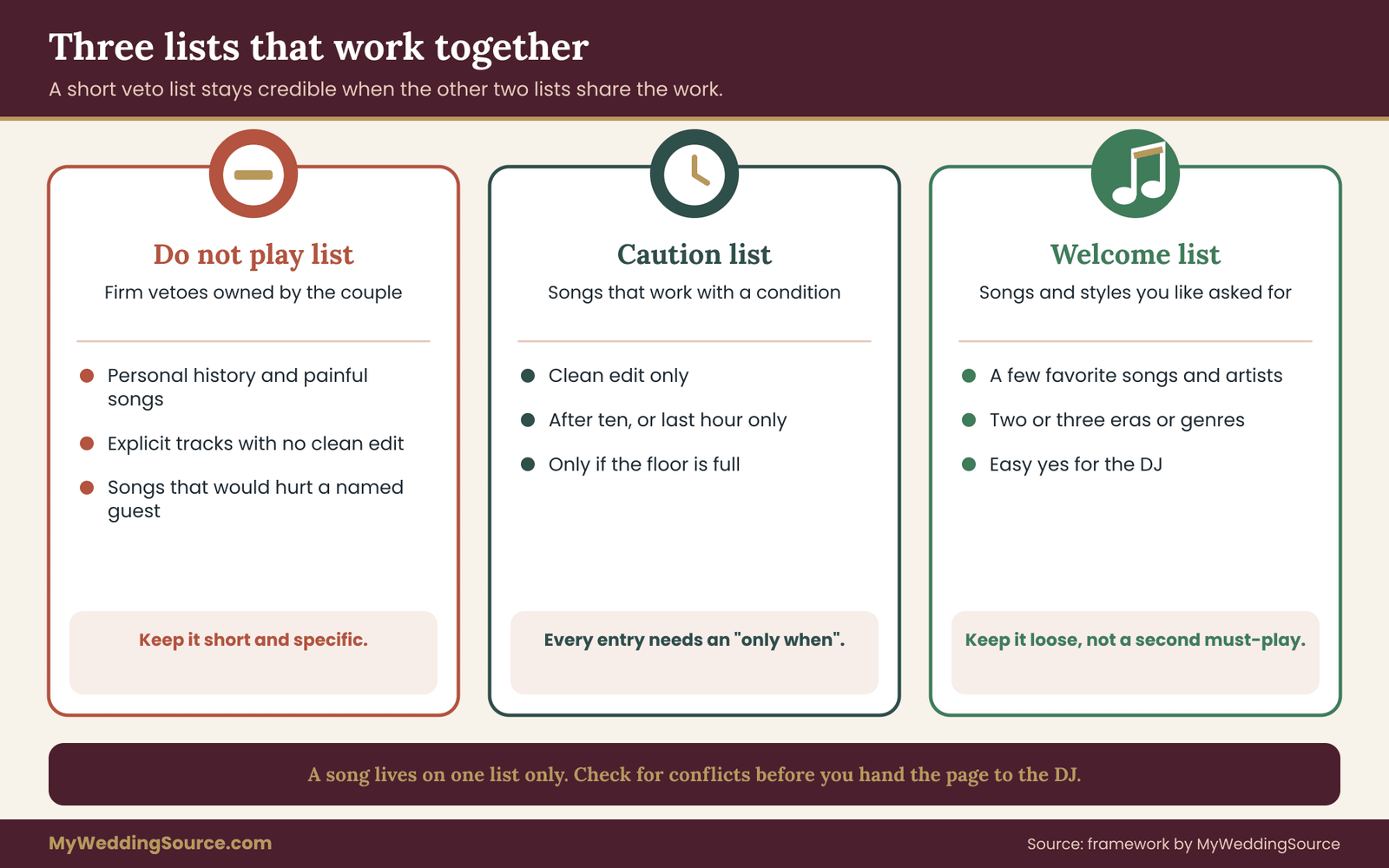
Instead of one list, think in three. Each does a different job, and keeping them separate is what stops the do not play list from growing out of control.
The do not play list holds the firm entries on the do not play list. Nothing on it gets played, even if the couple’s own parent asks, even late at night. It stays short, because every veto is a decision that someone has to remember and enforce.
The caution list holds songs that can work with conditions: a clean edit only, after a certain hour, only if the floor is full, only if a particular guest has left. These are the songs where “it depends” is the honest answer, and giving them their own list means they stop crowding the vetoes.
The welcome list holds songs and styles you are glad to hear requested. It is easy to forget this one. It tells the DJ which requests to say yes to quickly, and it gives guests a kind of map of what is likely to be played.
If you want the broader picture of how a night of music fits together across generations and dance styles, the guide to programming reception music covers set order, genres and pacing. This article stays on the narrower question of what to block, what to allow, and how to decide in between.
How a do not play list differs from a vendor playlist brief
Many DJ questionnaires bundle everything into one form, so it is worth drawing a clear line. A playlist brief describes what you want. A do not play list describes what you refuse. They are used differently during the event.
During the event, the DJ reads the room and picks from a huge pool of music. The brief shapes that pool: genres, eras, a few anchor songs. The do not play list removes items from the pool. If you only give a brief, the DJ will fill gaps with their own judgment, and your limits will be guessed. If you only give vetoes, the DJ knows what to avoid but not what to aim for, and the night can drift toward safe, bland choices.
Give both. The do not play list tells the DJ where the walls are, and the brief tells them what the room can look like inside those walls. The best DJs will ask you for both, and many will ask follow-up questions. A DJ who never asks about your limits is a reason to ask more yourself, which the wedding vendor contract guide helps you do when you review terms.
Who owns what
One reason do not play lists cause trouble is that nobody agrees on who gets to add to them. Parents add songs they dislike. A bridesmaid adds an artist who once played at a bad party. The partner who is less invested in music adds nothing, and then feels surprised on the night.
A clean rule helps: the couple owns the vetoes. Family members, the wedding party and guests can offer suggestions, and you can take them seriously, but the final do not play list belongs to the two people being married. That does not mean ignoring everyone. It means one place where a decision is made and recorded, so the DJ never has to referee a family disagreement at the booth.
The DJ owns the floor. They decide in the moment whether a request fits the energy, whether a transition works, and whether the volume and tempo are right. The couple should trust that judgment inside the lines they have drawn.
Guests own their requests, and nothing more. They get a fair hearing, not a guarantee. Making that distinction explicit, in the request card and in the DJ’s own words, is what lets you keep vetoes firm without making guests feel dismissed.

Later sections turn these roles into a written policy and a set of scripts. First, though, it helps to build the lists themselves, because the policy depends on what is on them.
Building your do not play list: what belongs on it
The hardest part of a good do not play list is deciding what earns a place. Almost every song has someone who dislikes it, so a list built from dislikes grows forever. A better list is built from reasons, and it uses a small test to keep itself honest.
The three-question test for every entry
Before a song goes on the do not play list, run it through three questions. If it fails the first, it is probably a preference and not a veto. If it passes all three, it stays.
Would this song change how one of us feels at our own wedding? Not whether you dislike it in the car. Whether hearing it in that room, in that dress or suit, with those people watching, would pull you out of the day. A song you merely find annoying passes the “would I skip it” test but fails this one. A song linked to a former partner or a family loss usually passes.
Would this song hurt or exclude a specific guest? Think of real people, not hypothetical guests. A grandparent who left a country that a song mocks. A friend in recovery and a song that glorifies drinking. A coworker the lyrics would single out. If you can name the person, the entry is strong. If you are imagining an offended stranger, it may belong on the caution list instead.
Can a clean version, a different moment or a smaller slot solve it? If yes, the song is a caution entry, not a veto. A song that is wrong at dinner but fine at the end of the night is a timing problem. A song with one bad verse that exists in a radio edit is a version problem. Reserve the do not play list for songs where no version and no moment works.
Writing the answer to each question next to the song, even in a few words, makes the do not play list easier to defend later. When a parent asks why a favorite is blocked, you have a reason ready, and the reason is almost always kinder than “we just don’t like it.”
Categories that often show up
Couples tend to veto in a handful of recurring categories. These are not rules, only prompts for your own thinking.
- Songs with personal history. Anything tied to a past relationship, a painful family event or a stressful period. These are the most clearly justified entries and need no further explanation.
- Explicit or slur-heavy tracks. The lyrics may be fine in a club and out of place when a ring bearer and a great-grandmother share the room. Many tracks exist in clean edits, which is a caution-list decision.
- Songs that have become dance-floor jokes. Not every party standard has to stay. If you find a group-participation song embarrassing and know your guests will not enjoy it, you can say so.
- Breakup, death and funeral songs. Hard to hear at a celebration, even when the melody is beautiful. This is also where a sentimental request can accidentally land badly, which the triage policy later handles.
- Genre-wide limits. Sometimes the honest entry is a style, not a song, such as “no death metal” or “no 1980s hair ballads.” That is acceptable, though broad entries are harder for a DJ to enforce, so they work best with two or three examples attached.
- Songs that only exist to be requested. A track a particular guest will definitely demand because it is their joke at every party. If you would not want it at your wedding, it is fine to say so before the night.
Resist adding entire artists unless there is a real reason. An artist ban silently blocks every song they have ever recorded, including ones that might fit perfectly, and it is the entry type most likely to produce a dispute when a guest asks for something obscure.
How long should the list be?
There is no correct number, and no research behind any particular figure, so treat any rule of thumb as a starting point. A practical way to size the do not play list is to ask how many entries the DJ can hold in their head, and how many the couple can defend. Most couples find that fewer than about fifteen firm vetoes is plenty, with additional lines on the caution list. If your do not play list runs to fifty, the likely truth is that you are listing preferences, and the DJ will either ignore the bottom half or spend the night anxious.
A useful trick is to rank entries by how bad the outcome would be if the song played. Mark the top handful as “never, under any circumstances” and the rest as “please avoid.” That gives the DJ a sense of which limits cannot bend, and it gives the couple a chance to notice that most of their list is really “please avoid.”
Getting both partners to agree
Two people almost never have identical lists. One of you may not care about music, and the other may have strong opinions about every genre. Settle the list with a short conversation, not a long argument.
Each partner writes their own list privately first, with a reason for each entry. Then compare. Songs that appear on both lists go straight on the do not play list. Songs that appear on one list get a quick conversation: if the other partner can live without hearing it, it can stay. If the other partner loves it, move it to the caution list and decide on conditions. This takes about half an hour and prevents a disagreement from reaching the DJ.
If one partner genuinely has no preferences, say so out loud and agree that their silence means “trust my partner on this,” not “nothing matters.” People are sometimes surprised later when a song plays that they would have blocked had anyone asked them.
Input from family without losing control
Parents and family members often have opinions, and sometimes good reasons. A grandfather may hold a sensitivity about a certain song. A mother may know that a particular tune was played at the funeral of someone the couple has not mentioned. Treat family input as information, not as instructions.
A simple way to do this is to ask one question at one time, in one place: “Is there any song you would find hard to hear at our wedding?” Ask it once, as part of a short note or a conversation, and make it clear that you are gathering information and will decide yourselves. Anyone with a real reason will tell you. Anyone who only wants to shape the music will likely send a long list, and you can sort it with the three-question test.
For help with how to share decisions across the families without losing your own, the wedding etiquette guide covers the general principles of who gets a say in which choices.
Writing entries so a DJ can use them
A veto is only useful if the DJ can act on it quickly and without guessing. Compare these two entries.
“Nothing sad.” This is a mood, and the DJ has to interpret it. Is a slow dance sad? Is a love song about distance sad? The DJ will likely make cautious choices and play fewer slow songs than you wanted.
“Do not play any song about a death, including the 1990s tribute ballad that opens with piano.” This is concrete. The DJ knows the category and has one example to anchor it.
For each entry, include the exact song title and artist when the song is specific. If you mean a category, give two or three examples. If you mean only the original and not the clean edit, say so. If the entry is about a particular moment, say “not during dinner” or “not before the first dance.” Specific entries take thirty seconds to write and prevent a lot of misunderstanding.
When you list a song title, check the spelling and version on the streaming service you actually use. Many popular songs have remixes, live versions and covers, and a veto on the original does not necessarily block a remix that a guest may request. Mention the versions you also mean to block, or say “all versions.”
A short pause before you finalize
Once you have a draft, leave it for a day or two and come back. Read the do not play list as if you were the DJ seeing it for the first time and ask three things. Can I tell what to do with every entry? Are any entries in conflict, such as a veto on a song that also appears on the welcome list? Is there anything here that I would be embarrassed to explain to the person it affects? Adjust, and then move on to the next layer, which is where most of the real flexibility lives.
The caution list: where the do not play list ends and judgment begins
Not every uncomfortable song deserves a permanent ban. A second list, which holds songs that are acceptable under conditions, is what lets you keep the do not play list short and still protect the room. This is the part of the system that gives the DJ room to say yes.
A caution entry always has a condition attached. A caution entry without a condition is just a veto in disguise, and the DJ will treat it as one. The common conditions fall into five types.
Version conditions. “Only the radio edit.” Many songs exist in a clean version that removes one or two lines. If the song is a crowd pleaser and the lyrics are the only problem, this resolves it. Ask the DJ whether they own the clean edit, and do not assume a request will be edited on the fly.
Time conditions. “Not before ten” or “only in the last hour.” Some songs are perfect when older guests have gone home and poor choices when grandparents are at the front table. Others are the opposite: a gentle slow song that suits cocktail hour and would stall a full dance floor.
Audience conditions. “Only if the floor is more than half full” or “only if the children have left.” These depend on reading the room, which is the DJ’s job, and the condition gives them permission to use it.
Count conditions. “One song from this genre per hour.” A genre can be fine in measured doses. A count limit lets the DJ honor requests without letting one group of guests take over the night.
Source conditions. “Only if the couple’s parents ask” or “only if the request comes through the card, not the booth.” A small number of songs have meaning only when a particular person asks, and the source condition lets the DJ tell the difference.
A well-built caution list reads like a list of small instructions rather than a list of fears. When you find yourself writing “avoid,” ask whether you could write “only when” instead. Most of the time you can.
Why the caution list protects the do not play list
The do not play list stays credible when it is small. Every time a firm veto is broken, even by an understandable accident, the couple loses trust in the whole list. A DJ who sees fifty vetoes will treat many as soft, and the two or three that truly matter get lost.
The caution list absorbs the gray areas. When a guest requests a song on it, the DJ does not have to refuse and does not have to guess. They check the condition: is it after ten, is the floor full, is a clean edit available? If yes, play. If no, offer a backup or a later slot. That is far easier to carry out than a vague “please avoid.”
The welcome list and why it matters
The third list is the easiest one to skip and the one that most improves the night. A welcome list names the songs, artists or styles you are glad to hear requested. It gives guests a sense of what is likely to work and gives the DJ a quick yes.
A welcome list does three useful things. It gives guests who are unsure what to ask for a safe set of ideas, which cuts down on random or risky requests. It signals to the DJ that requests are welcome, which changes the tone of the whole booth. And it lets you balance the do not play list, so the DJ does not read your boundaries as a mood of general suspicion.
Keep it loose. A handful of favorite songs, three or four artists, and a few genres with decades attached is enough. Do not turn it into a second must-play list with obligations, or the DJ will feel boxed in from the other side.
Backup songs: the bridge for every no
Here is the piece that turns a firm veto into a smooth moment. When a guest asks for a song and the DJ has to decline, the guest’s real goal is not that particular recording. It is usually a feeling: they want to dance, they want to hear something from their youth, they want to share a song with a friend. A backup song gives them that feeling in a form that fits your limits.
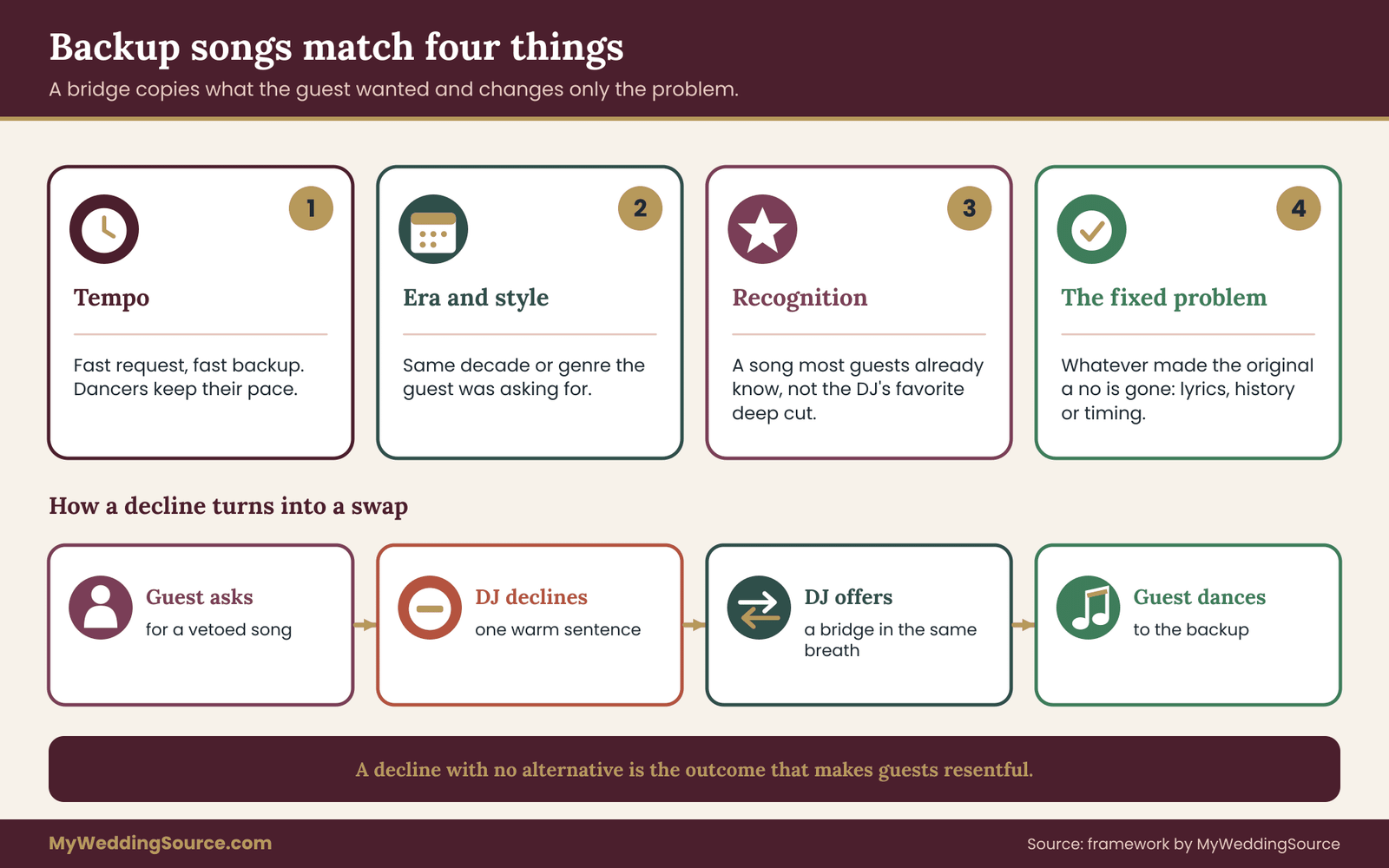
A backup song, or bridge, is a song the DJ can offer in place of a blocked or delayed request. It is chosen to match the blocked song on the dimensions that make the request appealing, and to differ on the dimension that made it a problem.
What makes a good bridge
Think of a bridge as matching four things.
Tempo. If the guest asked for a fast, high-energy dance song, a slow ballad is not a replacement. Match beats per minute closely enough that the dancers on the floor can keep their pace.
Era and style. A guest asking for a 1970s disco favorite will be happier with another disco track from the same years than with a modern pop song, even if the tempos match.
Recognition. The bridge should be a song that guests are likely to know. An obscure track that the DJ loves will not feel like a fair swap.
The fixed problem. The bridge should not share whatever made you block the original. If you blocked the original for explicit lyrics, the bridge should be a clean song. If you blocked it for personal history, the bridge should have no connection to it.
When you write backup songs into your plan, pair them with the type of request they replace, not with a single title. “If someone asks for any of the slow breakup ballads, offer one of these three love songs from the same decade” works better than a one-to-one table, and it gives the DJ the flexibility to pick whichever fits the current moment.
Building the bridge list in about an hour
You do not need to do this for every veto. Focus on the vetoes and caution songs that guests are most likely to request. A quick approach:
First, scan your lists and mark the ten songs a guest is most likely to ask for. These are usually well-known party songs, nostalgic favorites and songs that are famous among a specific age group.
Second, for each one, write the reason it is blocked in a few words: explicit, painful, wrong moment, wrong version.
Third, for each, write one to three bridges that fix that reason while keeping tempo and style. If you are not sure what fits, ask the DJ to propose bridges in their questionnaire reply. Good DJs do this naturally, and the proposals show how well they understand your taste.
Finally, send the bridge list to the DJ and ask whether they own all of the songs. A bridge the DJ cannot play is not a bridge. If you are using a service where the DJ plays from streaming, ask which service and what happens if the connection drops, since a bridge is most useful exactly when pressure is highest.
Bridges for moments, not just songs
Sometimes the problem is not a specific song but a gap. A guest asks for something, the answer is no, and the DJ needs a moment to cue the next track. A generic bridge, like a reliable crowd-pleaser that works on almost any floor, covers that gap. Ask the DJ for two or three of these that suit your guests. They are the songs the DJ turns to when the floor is in a transition and nothing on the plan quite fits.
This is also where tempo changes matter. If the floor is full and the request would drop the energy, the DJ can offer a bridge that keeps the energy up and promise to play the slower request later. Guests tend to accept a “later” more easily when they hear a good song right now.
Keeping the lists consistent
With three lists and a bridge plan, a few conflicts are likely, so check for them. A song cannot appear on two lists. A bridge cannot be a veto. A welcome-list artist should not have all of their songs blocked. A genre on the welcome list that also shows up as a count condition needs a clear limit. Print all four items together on one page, and read them as one policy. Anything that feels contradictory will be a source of confusion for the DJ and a gap during the event.
The page that results is short enough to hand to the DJ and to the person who will hold the plan on the day. Later sections cover how to build the system around the page: the request triage that applies the lists, the channel for taking requests, and the contract language that makes it all official.
Request triage: four checks and four outcomes
This is the center of the whole approach. A request triage policy is a short, written decision path that the DJ applies to every request. It exists so that the answer to a guest does not depend on the DJ’s mood, the guest’s persistence or the couple’s availability. It also exists so that the do not play list does the work you built it for without making every request feel like a trial.
The policy has four checks and four outcomes. The DJ asks the questions in order, and the first check that stops the song decides the outcome.
The four checks
Check one: is it on the do not play list? If yes, the answer is decline, and the DJ moves straight to a backup. The DJ does not need to explain the couple’s reasons. A warm, brief script is enough, and several appear later in this guide.
Check two: does it fit the room right now? The DJ looks at the dance floor, the time, who is present and what is playing. A song that would stall a full floor, or one that would be too loud while guests are still eating, may be a “later” and not a “no.” This check is the DJ’s judgment, and the couple’s job is to trust it.
Check three: is the content right for the audience? This covers explicit lyrics, mixed-age rooms and anything on the caution list with a condition. If a clean edit exists, the DJ can use it. If not, the answer may be a swap or a later slot, such as “after ten when the children have gone.”
Check four: does it keep the overall plan intact? A request that would hijack the night, such as a ten-minute extended mix or a third song from one genre in a row, can be shortened, spaced out or declined. This is the count condition from the caution list in action.
The four outcomes
Every request ends in one of four outcomes, and the DJ should know exactly which one they have chosen.
Play now. The song passes all four checks, and the floor is ready. This should be the most common outcome. A policy that says no to most requests has failed, however firm its vetoes are.
Play later. The song is fine but the moment is wrong. The DJ gives the guest a specific time frame, such as “I’ll fit it in after the next two songs,” or “I’ll play it in the last hour.” Saying a time is kinder and more honest than saying “maybe.” If the DJ cannot place it, the answer should be a swap.
Swap. The DJ offers a backup song that matches the energy of the original. Guests often accept a swap gladly, especially when it is an artist from the same era. A swap is the main tool for turning a veto into a good experience.
Decline. The song is on the do not play list, or it simply cannot be played. The DJ says so briefly and kindly, offers a swap in the same breath and does not argue. A decline without an alternative is the outcome that makes guests resentful, so a decline should almost never arrive alone.

A worked pass through the checks
Imagine four requests arriving in the first hour of dancing. The couple has a do not play list with eleven songs, a caution list that includes “only the clean edit” for one popular party track, and a bridge plan.
The first request is a long-time favorite that is on the welcome list. It passes every check, and the floor is warming up, so the DJ plays it now.
The second is a well-known breakup ballad. It is on the do not play list, so the DJ stops at check one. They tell the guest, “That one is off the couple’s list, but I have a great slow song from the same era, and I’ll play it next.” That is a decline with a swap, delivered in one breath.
The third is a fast party song that exists in an explicit original and a clean edit. The couple listed it as “clean edit only.” The DJ has the edit, plays it a few songs later when the floor is full, and tells the guest it will be coming up. That is a play-later outcome, with a version condition satisfied.
The fourth is a request for a genre the couple does not like, from a guest who is clearly enjoying herself. The genre is not on the do not play list, and the floor has just emptied, so the DJ passes it through check two and four. They play one song from that style, watch whether the floor responds and keep going if it does. That is a play-now outcome, with the DJ using the room-reading judgment they were hired for.
In four requests, the do not play list stopped one song, the caution list shaped another, and two went through without any friction. That ratio is typical of a policy that works, and it is why a short list matters.
Who decides, and who can override
Every policy needs a rule about overrides. If the DJ has to call a couple halfway through the reception to ask about a song, the policy has failed. Decide before the event who has authority.
For vetoes on the do not play list, the couple has authority, and the DJ should treat them as final. If a request is for a song on the list, the DJ declines no matter who asks. If the couple wants to lift a veto during the night, they tell the DJ directly, and the DJ may ask them to confirm.
For caution entries, the DJ has authority to decide whether the condition is met.
For everything else, the DJ decides, using the four checks.
Name one person as the contact if the DJ needs a ruling. This is often a planner, a day-of coordinator or a trusted friend, and not the couple, who will be busy. If you have a day-of coordinator, the wedding vendor timeline explains how vendor contacts and handoffs are usually arranged, and the DJ’s contact belongs in the same sheet.
Requests from the couple’s own family
One of the most common stress points is a request from a parent, a grandparent or a bridesmaid for a song the couple has vetoed. Because these guests know the couple, they may assume they have extra authority. Decide in advance what you want.
Some couples prefer one clean rule: the do not play list applies to everybody, including family, so the DJ never has to judge who counts. Others make narrow exceptions, such as allowing a parent’s own request for a song with personal meaning for them, as a caution entry with the source condition described earlier. Either choice is reasonable, as long as the DJ knows the rule and can apply it the same way each time.
When a family member pushes, a short phrase from the DJ usually works: “The couple asked me to keep that one off, but I’d love to play this one for you instead.” This puts the decision where it belongs, and the family member can take it up with the couple later if they choose.
Requests that show up more than once
When several guests ask for the same song, that repetition is information. It may mean a group is ready to dance to it, or that a song has become a running joke. If the song is not vetoed, a repeated request is a good sign to move it up. If it is on the do not play list, repetition does not change the outcome, though a DJ may mention it to the couple’s contact if they think the veto deserves a second look.
A useful guideline is that the DJ should never let one guest dominate the queue. One song per person per hour is an easy rule, and it prevents a single enthusiastic friend from steering the night. Make it explicit in the policy so the DJ does not have to improvise.
Requests during dinner and cocktail hour
Not all of the evening is dance time. During cocktail hour and dinner, the DJ is usually playing background music, and requests for high-energy songs are better placed as “play later.” Guests often do not realize this, and a short note on the request card, such as “Dance requests are held for the dance set,” prevents most of the friction. The wedding cocktail hour guide explains how this stretch of the evening usually works, which helps you decide which requests belong where.
A policy the DJ can carry in their head
The final test of the triage policy is whether the DJ can recite it. Four checks, four outcomes, one rule about authority, one rule about repeated requests, one rule about family. If the policy takes a page, it is the right length. If it takes four pages, the DJ will not read it during the event, and it will be applied inconsistently.
Setting up the request channel without opening the floodgates
A triage policy needs a way for requests to arrive. The channel matters as much as the rules, because it decides how many requests come in, how well they are worded and how much pressure lands on the DJ. The aim is one clear, friendly channel that guests can find without effort and that gives the DJ a bit of breathing room.
Choose one main channel and one backup
Couples often offer too many ways to ask. A request line on the RSVP, a card on the table, a QR code, a chat with the DJ and a note to the bartender all produce messy, duplicated or lost requests. Pick one primary channel and one fallback.
Pre-event request form. A short form on the wedding website or in a message lets guests send a song or two ahead of time. This is the best channel for control, because you and the DJ can sort requests before the night. It also catches the guests who like to plan and would otherwise approach the booth. The downside is that people forget, and it only captures what guests think of in advance.
Request cards on the tables. A small card with space for a song, an artist and a name, collected by a coordinator or dropped at the booth. Cards are low-tech and friendly. They slow the flow of requests slightly, which is a benefit, because the DJ can read them in batches. They also give a written trace that the request was seen.
A QR code that opens a form. Similar to the pre-event form, but available at the event. It works well for younger crowds and poorly for guests who do not carry a phone to dinner. If you use one, keep the form short, and make sure the venue has reliable service, which the DJ can confirm during the technical review of the room.
The booth. Guests will always walk up. The question is whether you encourage it. A DJ who is open to booth requests can read the mood quickly, but also faces a line of people at the worst moments. Many couples treat the booth as a fallback, and ask the DJ to redirect repeat visitors to a card.
A good default is the pre-event form as the main channel for planning, and a card at the tables during the event for anything that comes up on the night. The booth stays available without being advertised.
What the request form should ask
A request form is a small piece of design, and it shapes what you get. Keep it to a few fields.
Song title and artist. Both are needed, since many songs share titles.
A short reason or moment. An optional line such as “this was our song in college” helps the DJ choose the moment and understand why the song matters. Sometimes the story reveals that a swap would please the guest just as well.
A “dance or not” tick. Guests often submit songs they love but would not dance to. A simple choice between “for the dance floor” and “for background” helps the DJ place it.
A name, optionally. Names help the DJ credit a request on the night, which guests enjoy, but they also make it harder for guests to submit risky requests, which is a minor benefit.
Avoid asking for a ranking, a list of ten songs or a long story. The more effort the form takes, the fewer people complete it, and the ones who do are usually the ones with the most elaborate demands.
Add one line at the top that sets expectations: “We would love your ideas. We will play as many as fit the night, but we cannot promise every one.” That single sentence reduces the sense of entitlement that can build when guests think a request is a contract.
Timing: when requests are open and closed
Requests have a natural rhythm, and a short window plan saves the DJ from a flood at the wrong time.
Before the event, the form is open from the time you send invitations until a week or two before the wedding. Close it then, so the DJ can sort, check availability and prepare edits. Many DJs need a few days to find clean versions or to prepare transitions.
During cocktail hour and dinner, requests are collected but not played unless they fit background music. The DJ marks which ones belong to the dance set.
During the dance set, requests are active. The DJ should work through cards in batches, aiming to play the most suitable request at natural breaks in the floor.
In the last hour, requests tend to become more emotional and less strategic. Guests are tired, a little loose and eager for a particular song. The DJ’s judgment matters most here, and the couple may want to reserve a final few songs for themselves.
The wedding planning checklist is a handy place to set these dates among the other vendor deadlines, since the music form usually closes around the same time as the final headcount.

Handling the ceremony and special dances
The do not play list applies to the whole event, but the request policy usually does not. During the ceremony, music is chosen by the couple and the officiant, not by guest requests. Special dances, such as the first dance and parent dances, are also set in advance. Make this clear in your documents so the DJ does not interpret a general “requests are welcome” as covering these moments.
The ceremony music plan belongs in the same set of documents as the cue sheet for the processional and recessional, and the ceremony cue sheet guide shows how those cues are usually written. Include your vetoes in that sheet as well, since a ceremony musician who is not your DJ will not have seen your list otherwise.
Live musicians and a second source of music
If the evening includes a live band, a string quartet or a friend with a guitar, the do not play list needs to reach them too. Live performers often take requests from the floor in ways a DJ does not, and a band leader may agree to a song without knowing it is blocked.
Share the do not play list in writing with every person who will make music. Ask whether they have a set list, whether they take requests and whether they can follow the same four outcomes. If a band will take over from a DJ at some point, the handoff should include a verbal reminder of the list, not just a document. A short note on how they will handle swaps is a good sign that they understand the system.
Volume, hearing and the guests who cannot ask
One more point belongs in any request plan: not every guest will request a song, and some cannot.
A guest who is hard of hearing, a guest who is overwhelmed by noise or a guest who does not want to approach a stranger will not appear in the request pile at all. The DJ’s volume choices matter for them. Official health guidance, including that from the U.S. National Institute on Deafness and Other Communication Disorders and the Centers for Disease Control and Prevention, explains that loud sound over time can damage hearing, which is a reason to agree on a sensible volume ceiling for dinner and a quieter corner or a break area for dancing hours.
This is also a good place to think about the shape of the room. The guest flow guide covers how to place tables, the dance floor and quiet areas so that guests who want to talk are not forced into the loudest part of the room. A reasonable do not play list cannot fix a layout problem, but a layout that respects quiet makes the whole request plan work better.
Moderating requests without becoming the bad guy
Someone has to read the requests, and it should not be you. On the night, the couple should not be responsible for the cards, the form or the conversations. Choose a person, either the DJ, a coordinator or a trusted friend, to take that role.
If a friend holds the role, give them a short written brief: the four checks, the lists, the rule about repeated requests and the phrases to use for declines and swaps. A friend who has the plan in hand can say, “The DJ is going to try to fit that in” or “That one is off the couple’s list, but here is something similar,” without escalating.
Make sure the person is comfortable saying no. People-pleasers make poor request moderators, because they will agree to things the DJ cannot do. It is better to choose someone who is warm and calm and can hold a boundary kindly.
What not to do with requests
A few patterns cause avoidable trouble, so it is worth naming them.
Do not promise guests that their song will be played. Promise that it will be considered. A promise that the DJ cannot keep makes the DJ look bad and leaves the guest disappointed.
Do not publish your do not play list. A public list invites debate, makes guests curious about what is on it and can embarrass anyone whose favorite song appears. Share it with the DJ, the coordinator and any live musicians, and with no one else.
Do not let requests accumulate unread. A pile of cards that nobody looks at is the same as no channel at all, and guests notice.
Do not use requests as a way to shift your own taste decisions to others. If you have strong feelings about the music, state them in your brief. A request form is not the place to ask the room what you should like.
Putting the do not play list in writing: contract, run sheet and DJ questions
A list that lives only in a conversation will not survive the night. People forget, staff change and a substitute DJ may arrive who never heard it. The policy becomes real when it is written in places that the DJ, the venue and your day-of contact can find.
Where the policy should appear
There are three places to put it, and each does a different job.
The contract or its attachments. Most DJ agreements include a music-planning section or refer to a questionnaire. Ask that the final do not play list and request policy be attached as an addendum or listed as part of the planning materials. You are not trying to turn the do not play list into a legal trap. You are making sure that the DJ has formally acknowledged it, and that a replacement DJ, if one is needed, receives the same document. The wedding vendor contract guide explains which terms deserve attention, including substitution rights and cancellation terms.
The run sheet. This is the document the DJ and coordinator use on the day. It should include the list in short form, the four outcomes, the name of the person who can rule on edge cases and the times for special dances. Keep it to one page, with the vetoes in one block and the caution conditions in another.
A short pre-event call or message. About a week before, confirm that the DJ has the final version, that they have read it and that they have asked any questions. A short written reply from the DJ, even one line, is useful evidence that the do not play list was received.
Questions worth asking the DJ
Before you sign and again during planning, a few questions reveal how the DJ approaches requests and limits. You do not need all of them, and a good DJ will welcome the conversation.
- How do you handle requests on a couple’s do not play list? A good answer includes a script, an alternative offer and a point about not arguing.
- Do you carry clean edits of popular songs, and how do you find them if a request comes in that you do not have?
- How do you treat requests that arrive from the couple’s family when the couple has set a veto?
- If you play from a streaming service, what happens when the connection fails, and do you carry a local library as well?
- Who from your company will be at the event, and do they receive the planning documents directly?
- What is your usual approach when a guest becomes insistent, or when someone who has been drinking pushes for a request?
- Do you ever make exceptions to the list, and if so, under what circumstances?
The last question deserves attention. A DJ who says “I never make exceptions” gives you reliability. A DJ who says “I will follow your do not play list unless you tell me otherwise on the night” gives you flexibility. A DJ who says “I use my judgment” without a clear framework may be setting you up for a surprise. Neither of the first two is wrong, but you should know which you are hiring.
A one-page run sheet
A good run sheet, written out in plain prose or a short outline, includes these parts in this order.
First, the do not play list, with titles, artists and any version notes. If an entry has a reason that helps the DJ decide, add it in a few words.
Second, the caution list, with each entry’s condition in plain language.
Third, the request policy: how requests arrive, the four checks, the four outcomes, one rule about repeated requests and one rule about family.
Fourth, the bridges: a short list of backup songs by category, with a few generic crowd-pleasers.
Fifth, the contact person with a phone number and a note on when to call them.
Sixth, the fixed moments: ceremony cues, first dance, parent dances, toasts and the final song.
That is one page if you keep each entry short. If it runs longer, you are probably adding preferences that belong in the playlist brief.
Licensing, venue rules and what the DJ cannot promise
The do not play list is about taste and respect. A separate set of questions is about permission. Playing recorded music in public involves copyright, and weddings are not exempt. This section describes the general picture and points to the right places to confirm the details, because the specifics depend on your venue, your DJ and your own plans.
Public performance licenses in general
In the United States, music is protected by copyright, and the public performance of copyrighted music generally requires a license. Those licenses are usually handled by performing rights organizations, which include ASCAP, BMI, SESAC and Global Music Rights. Venues, restaurants and event spaces often hold blanket licenses with some or all of them. Many professional DJs also carry their own arrangements, though practices differ.
You cannot assume that a given arrangement covers your event. Whether the venue holds the licenses, whether the DJ has them or whether neither does is a question for the venue and the DJ, and the answer may be in the contract. A direct and polite question is enough: “Does the venue hold public performance licenses, and does the DJ’s agreement cover what they play at our event?” If the answers are unclear, the licensing organizations explain their requirements on their websites, and the U.S. Copyright Office provides general information on copyright.
This is not a reason for worry, and it is not a reason to ask a DJ to avoid popular music. It is a reason to ask one question and to accept that the answer is outside your control. You are not responsible for licensing an event you did not organize as a performer. If the venue or the DJ cannot answer, that is information about how they run their business.
Recording, livestreaming and posting
Public performance is one matter. Recording is another. If the wedding is livestreamed, or if a videographer’s film includes recognizable popular music, posting it on a social platform may trigger the platform’s own music rules, and videos may be muted or removed. Platforms change their policies often, so check the current terms of the service you plan to use, and ask your videographer how they handle music in the final film. Some use licensed or royalty-free tracks for the edit and leave the live audio out of the final cut.
This is relevant to the do not play list because a couple sometimes wants a song both on the do not play list and in the video, or vice versa. Decide separately: what plays in the room and what appears in the film are two decisions.
Venue rules that limit the music
Venues often impose rules that the do not play list cannot override. Common examples include sound-level limits, end times for amplified music, restrictions on outdoor speakers and policies about outside vendors. A venue may also have a policy about content, such as a ban on explicit lyrics, which can be useful because it gives the DJ a reason to decline that does not rest on the couple’s preferences.
Ask the venue for its sound rules in writing, and pass them to the DJ. If the venue has a house policy on explicit lyrics, mention it in your request card or in the DJ’s script. Guests often accept a venue rule more easily than a couple’s preference, and it removes the couple from the conversation.
What the DJ cannot promise
Even a skilled and cooperative DJ has limits, and it is better to know them than to discover them at the event.
A DJ cannot guarantee that no guest will ever hear a blocked song from another source, such as a guest’s phone, a speaker in another room or a band. They control their own system.
A DJ cannot guarantee that every song on the welcome list will be played. Time and the floor decide.
A DJ cannot be sure that every clean edit exists. Some songs have no radio version, and some edits are poor. If a guest requests such a song, the DJ will likely offer a swap or decline.
A DJ cannot control the speech of an emcee, a toast giver or a guest who takes the microphone. If a speaker is likely to cause a problem, address it separately with that person.
A DJ cannot fix a poor request plan. If you have no channel and no policy, even an excellent DJ will be forced to improvise.
Knowing these limits helps you set expectations for yourselves and your families, and it explains why the written policy matters.
When a veto gets tested: scripts and judgment on the night
Even with the best planning, someone will push. Having a few short phrases ready makes the difference between a smooth moment and an awkward one. These scripts are for the DJ, the coordinator or a friend holding the plan. They are written in a calm, friendly tone, and they are short enough to say while a song is playing.
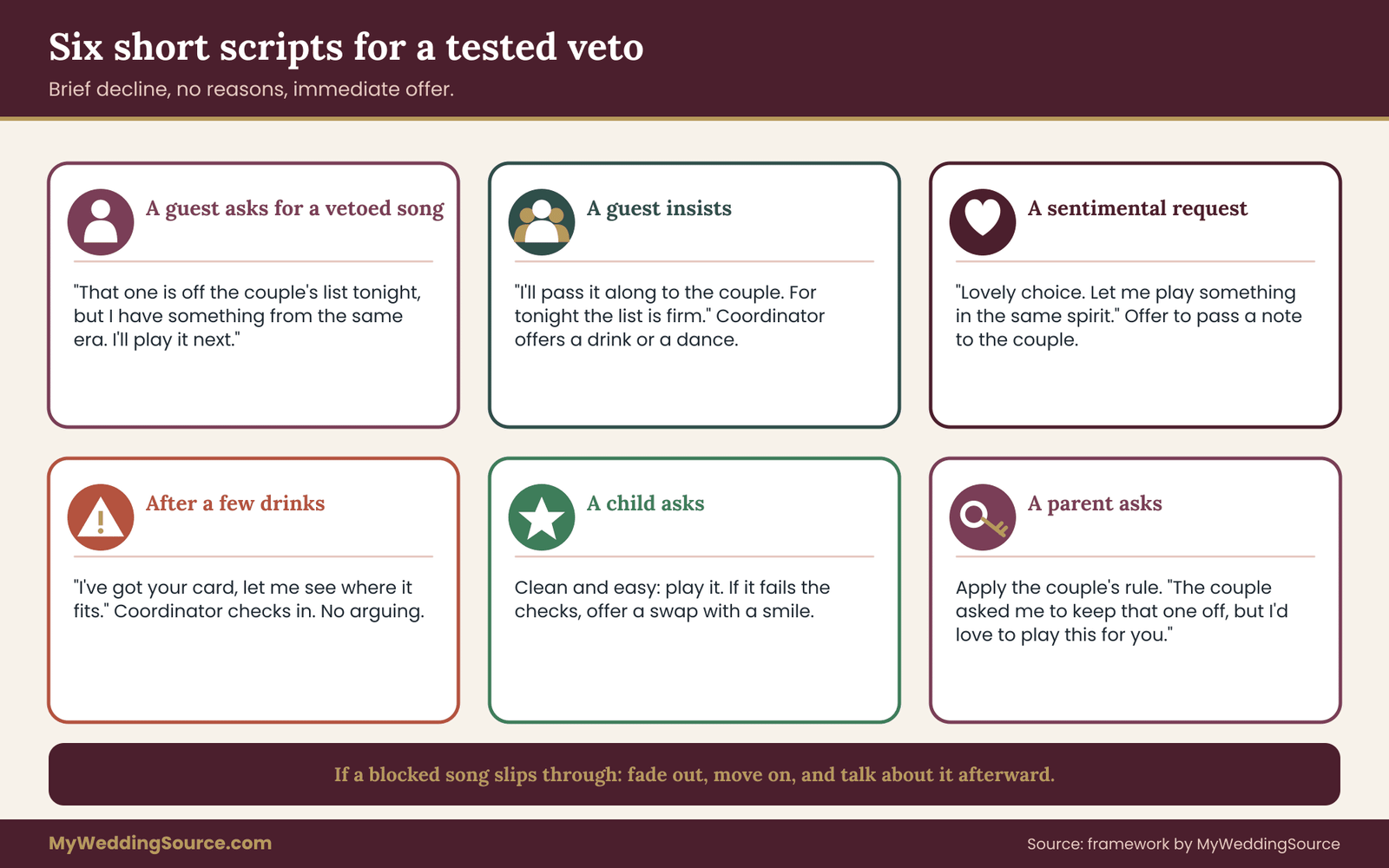
A guest asks for a vetoed song
“That one is off the couple’s list tonight, but I have something from the same era that I think you will like. Let me put it on next.”
The structure is the same each time: brief decline, no reasons, immediate offer. Do not explain the veto. Do not apologize extensively. Do not say “I wish I could.” Each of these invites a debate.
A guest insists
“I understand, and I will pass your request along to the couple. For tonight, the list is firm, and I want to keep it that way for them.”
The point is to stay warm and end the discussion without a fight. If the guest persists, the coordinator can step in with a short, friendly redirect: a drink, a dance partner, a photo opportunity. A change of subject usually works better than a counterargument.
A request that is sentimental
Some requests are tender: a song for a late spouse, a tune a guest danced to at their own wedding. If the song is on the do not play list, these are the hardest to decline. A short, caring response helps: “That is a lovely choice. The couple asked me to keep that one off, but I would like to play something that fits the same spirit.” If the guest is clearly moved, the coordinator can offer to pass a note to the couple, who may choose to make an exception. The decision stays with them.
A request from someone who has been drinking
Alcohol makes requests louder and more persistent. The DJ should not argue, and should not treat the person as a problem. A simple “I have got your card, let me see where it fits” buys time. If the guest returns, the DJ can offer to play a swap and ask the coordinator to check in. The goal is to protect the room and the guest’s dignity at once.
A request from a child
Children ask for songs from films and games, and these can be a delight. If a child’s request passes the checks, play it, since it is often an easy joy. If it fails, such as explicit lyrics in a popular song, the DJ can offer a swap with a smile and perhaps a shoutout. Parents are usually grateful for a clean approach.
A request from the couple’s own parent
If a parent asks for a vetoed song, the DJ should apply the rule the couple chose. If the couple said “no exceptions,” a short script works: “The couple asked me to keep that one off, but I would be glad to play this one for you.” If the couple allowed a narrow exception, the DJ can check the condition and act. Either way, the DJ should not decide on the spot to override the do not play list on the strength of a parent’s authority.
The DJ plays a vetoed song by mistake
It happens, and the response matters more than the mistake. The DJ should stop the song as quickly and gracefully as possible, fade or cut to a safe transition and move on without drawing attention. The couple’s contact can acknowledge the error briefly after the event, and the DJ should be informed that a mistake occurred so that the process improves. Nobody needs a scene.
After the event, if a mistake caused real distress, a calm message to the DJ is reasonable. Refer to the written list, state what happened and ask how they will respond. Your contract and the notes in the run sheet make that conversation concrete.
A worked example: one invented couple, one evening
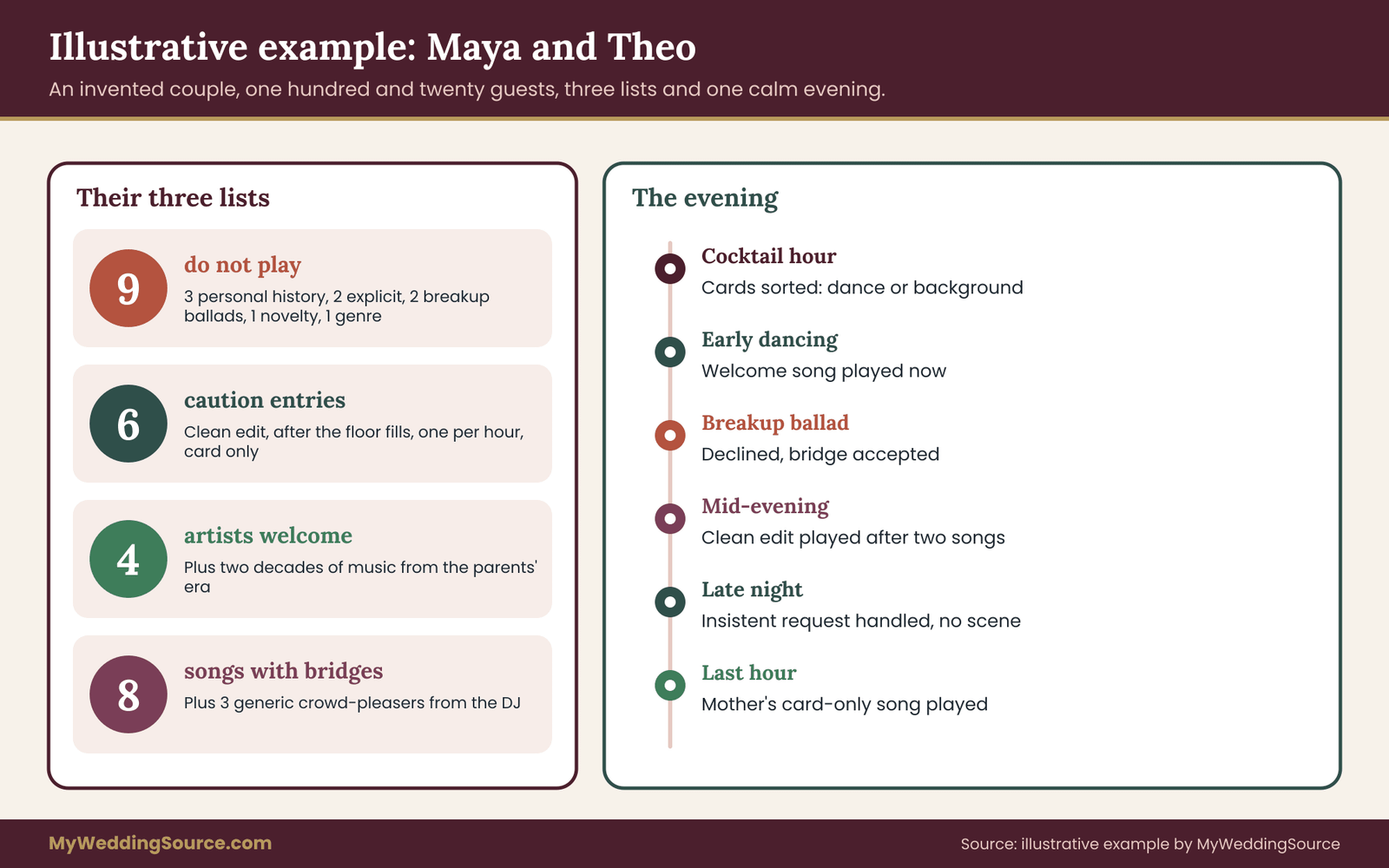
The example below is made up to show how the pieces fit. It describes an imaginary couple, Maya and Theo, who are planning a reception for about one hundred and twenty guests, with a broad age range from young cousins to great-grandparents. It does not describe a real wedding, and the choices are illustrations, not recommendations for your own list.
The lists
Maya and Theo each wrote a private list with reasons, then compared. Nine songs appeared on both lists or were strong on one and accepted by the other. That became their do not play list. Three were tied to personal history, two had explicit lyrics that no clean edit solved, two were breakup ballads, one was a group-participation novelty song and one was a genre-wide entry limited to a single style with two examples.
Their caution list had six entries. A popular party song was allowed only as a clean edit. Two slow songs were allowed only after the dance floor was full. One song with a religious theme was allowed only if Theo’s grandmother had left the room, a condition she had cheerfully agreed to when asked. One song was allowed only if it came from a card and not from the booth, and one genre was limited to one song per hour.
Their welcome list had four artists and two decades, plus a note that guests were welcome to request anything from the era their parents danced to.
The bridges
They marked the eight songs guests were most likely to ask for. For each, they wrote the reason and one or two bridges. For the two breakup ballads, the bridges were warmer slow songs from the same years. For the explicit party songs, the bridges were clean songs with the same tempo. For the novelty song, the bridge was a different participation song they liked. Their DJ added three generic crowd-pleasers for any floor in transition.
The channel
They chose a short form on their wedding website, open until two weeks before the event, and a card on each table for anything that came up later. The form asked for a title, an artist and an optional one-line story. The top of the form said that requests were welcome and would be played as the night allowed. A cousin who was a trusted friend of both held the cards on the night and had a one-page brief.
The contract and run sheet
The DJ’s agreement included an addendum listing the do not play list and the request policy. The run sheet had the lists, the four outcomes, the bridges, the cousin’s phone number and the fixed moments. The DJ replied to the final version with a short confirmation. They also asked the venue whether it held public performance licenses and received a plain answer, which they recorded in the file next to the contract.
The evening
During cocktail hour, about a dozen cards arrived. The cousin sorted them into dance requests and background requests, and the DJ played two background songs from the form that fit the mood. Dinner brought a few more cards, which went into the pile for the dance set.
When the dancing began, the DJ worked through the pile in batches. A request for a fast song from Maya’s college years passed every check and was played right away. A request for one of the breakup ballads, from a guest at the second table, hit the do not play list. The cousin delivered the short script and offered a bridge, and the guest laughed and asked for the bridge instead.
Around the middle of the evening, an uncle asked for the explicit party song at the booth. The DJ played the clean edit, warned the uncle that it would come after the next two songs, and kept the promise. A few guests asked for the genre that Theo’s family loves, and the DJ held it to one song an hour so that the floor stayed mixed.
Late in the night, a guest who had clearly been enjoying the bar asked repeatedly for a vetoed song. The DJ said they had the card and would see where it fit, and the cousin walked the guest to the photo booth. Nothing escalated, and nobody remembered it the next day.
In the last hour, Theo’s mother asked for a song that was on the caution list with a source condition. The DJ checked the condition, saw that it applied, and played it. The couple had agreed to that exception in advance, and nobody was surprised.
What the example shows
Notice how little drama there was. The do not play list stopped a handful of songs, none of them in a way that guests resented. The caution list gave the DJ ways to say yes. The bridges softened every decline. The channel kept requests organized. The written policy meant the DJ never called the couple. The pattern of the evening followed the plan, which is exactly what a plan is for.
Edge cases the example does not cover
A few situations deserve a quick thought if they apply to you.
If the venue provides its own sound system and operator, the policy still works, but you must deliver it to that person and confirm that they follow it. A venue technician may not have the same training as a professional DJ, so keep the list simple and give them a card with the decline script.
If you are using a playlist instead of a DJ, the do not play list becomes a filter on the playlist. Remove the songs yourself, check shuffled and autoplay features, and be aware that streaming services may add songs on their own. Turn off any setting that adds recommendations.
If your guests speak several languages, or if you want music in more than one language, the do not play list should include entries in each language and should be reviewed by someone who understands the lyrics. A song that sounds harmless in an unfamiliar language can have a meaning that surprises the room.
If a faith community or a cultural tradition shapes part of the event, ask the officiant or a trusted elder about music limits for specific moments. This is often a matter of timing as much as content.
If your event spans several days, apply the policy to each event separately. A rehearsal dinner, a welcome party and a farewell brunch may each need their own list.
Your next steps
Work through these in order. Each takes less time than the one before.
- Each of you writes a private list of songs you would not want to hear, with a reason beside each one.
- Compare lists, run each entry through the three-question test and keep only the firm ones. Aim for a short do not play list.
- Write the caution list with a condition for every entry, and a short welcome list.
- Pick the ten most likely requests and write a bridge or two for each.
- Choose your request channel, write the form or card, and add the line that sets expectations.
- Name the person who will handle requests on the night, and give them a one-page brief.
- Ask the DJ the questions in this guide, and attach the final do not play lists and policy to the contract or planning file.
- Ask the venue about sound rules and licensing, and write the answers down.
- Send the run sheet to everyone who makes music, confirm receipt and hold a short check-in a week before.
If you want to go back to the larger picture afterward, the guide on planning reception music for different generations covers genre mixing, pacing and the shape of the dance floor across the whole evening.
FAQ
Is it rude to give a wedding DJ a do not play list?
No. DJs expect it, and many ask for it in their planning questionnaire. A list is a professional tool that tells the DJ where your limits are. It becomes a problem only when it is very long or when it is presented as an order without any room for judgment. Keep it short, explain the reasons if asked, and trust the DJ with the rest of the night.
How many songs should be on a do not play list?
There is no correct number. A practical aim is a list short enough that you can defend each entry and the DJ can remember it, which for many couples means fewer than about fifteen firm vetoes. Put conditional songs on a separate caution list. If your list is very long, you are probably listing preferences, and a longer list tends to be ignored.
Can I still let guests make requests if I have a do not play list?
Yes, and it usually works better that way. The do not play list covers the songs you refuse. Everything else stays open, subject to the DJ’s reading of the room. Give guests a clear channel, such as a form or table cards, and tell them requests are welcome but not promised. A request plan with swaps keeps guests feeling heard.
What should the DJ say when someone requests a blocked song?
Something brief, kind and immediate: that the song is off the couple’s list for the night, and that here is something similar to play instead. The DJ should not debate, apologize at length or reveal the reasons. A decline paired with a backup song almost always ends the moment. If the guest keeps pushing, a coordinator can step in.
Should I tell guests about the do not play list?
Generally no. Share it with the DJ, your day-of contact and any live musicians. Publishing it invites debate and may embarrass someone whose favorite song is on it. It is better to give guests a welcome list or a few hints about the music you love, and let the DJ handle declines privately during the event.
Does a DJ need a license to play music at my wedding?
Public performance of copyrighted music generally requires licensing in the United States, usually through organizations such as ASCAP, BMI, SESAC and Global Music Rights. Venues often hold licenses, and DJs may have their own arrangements, but practices vary. Ask both the venue and the DJ what is covered, and see the agencies’ websites and the U.S. Copyright Office for details.
What if the DJ plays a song I blocked?
Stay calm. Ask your day-of contact to speak with the DJ quietly so the song is stopped or the set moves on. Afterward, refer to the written list in your contract or run sheet and ask how the DJ will respond. A written record makes the conversation specific and fair, which is why attaching the list to your planning file matters.
Can I change the do not play list during the wedding?
Yes, because the couple owns the vetoes. If you want to lift one, tell the DJ directly, and expect them to confirm so a guest or family member cannot change the do not play list on your behalf. Decide beforehand whether you will allow exceptions at all, since having a clear rule makes the night calmer for everyone.
Sources
- U.S. Copyright Office — general information on copyright and public performance of music.
- ASCAP — performing rights organization; licensing information for venues and music users.
- BMI — performing rights organization; licensing information for music users.
- SESAC — performing rights organization; licensing information.
- Global Music Rights — performing rights organization; licensing information.
- National Institute on Deafness and Other Communication Disorders — information on noise and hearing health.
- Centers for Disease Control and Prevention — guidance on loud noise and hearing loss prevention.
- Federal Trade Commission — consumer information on contracts, advertising and vendor disclosures.
- ADA.gov — information on accessibility for events and public spaces.