

Venue internet speed decides whether a wedding livestream plays smoothly or stalls during the vows, and the only reliable way to know it is to measure it at the camera position, at the ceremony hour, before the wedding. This guide gives you a repeatable on-site test, a log to fill in, a pass-or-fail rule for the numbers, and a plan for what to do when the venue fails.
Do not trust the number a venue quotes or a quick test in the lobby. Measure upload speed, not download, at the exact spot where the encoder will sit, at the same day and hour as the ceremony. Run it for at least ten minutes and judge the worst run, not the average. Then repeat the test over a cellular connection from the same spot. If the worst-run upload is not at least double the stream’s bitrate on either path, change the plan before the wedding, not during it.
Most couples who add a livestream ask the venue one question: “Do you have good Wi-Fi?” The answer is almost always yes, and almost always useless. Good for a hotel guest checking email is not the same as good for sending a steady video stream out of a ballroom for forty-five minutes while two hundred phones join the same network.
Measuring venue internet speed is not technical wizardry. It is a short, structured test with a written record. A single person with a laptop and a phone can run it in about an hour. The result of checking venue internet speed this way is a log you can hand to your video producer, your planner or the venue, and a clear verdict about whether the venue’s line can carry the stream.
A note on scope. This is general planning information, not legal, technical-support or financial advice. Network policies, carrier coverage and platform settings change, so confirm current details with the venue, your carrier and the streaming platform before you rely on any number here.
This article is about measurement. It does not cover which camera to buy, how to mic the officiant or how to write the invitation. Those decisions sit elsewhere on the site, and the broader backup thinking lives in the guide to wedding day digital contingency planning. Here the question is narrower: how do you find out, with evidence, whether the room can send video out?
What venue internet speed means for a wedding stream
Internet speed is really three separate things that people squeeze into one word. Venue internet speed matters for a stream only through the first and third of them.
Upload capacity. A livestream is an upload. The encoder sends video up to a platform, and viewers pull it down from there. The venue’s download number, the big figure on most speed tests, says almost nothing about this. Many connections, especially cable and some wireless ones, are built with far more download than upload. A venue can advertise a very fast line and still have a modest upload.
Latency. This is the delay for a small message to travel out and back. It matters less for a one-way stream than for a video call, but high or erratic latency is often a symptom of congestion, and congestion is what kills streams.
Stability. This is the question of whether the speed holds. A line that tests well for ten seconds and then collapses is worse than a slower line that stays level. A stream does not need a spike. It needs the same modest amount, every second, for the whole ceremony.
So when this guide says venue internet speed, it means sustained upload capacity at a specific location, measured over time, with stability checked. A single peak number from a single run is the weakest evidence you can collect.
Who this test is for
A venue internet speed test is useful whether the video comes from a professional crew, a friend with a tripod or a phone on a stand. A crew will often run their own checks, and a good one will welcome a log from you. If you are hiring a video producer, send them your results early. If they have their own bonded or cellular gear, they can tell you what it adds, and the test will show whether it is needed at all.
Knowing the venue internet speed is also useful when you are choosing between venues. If a livestream matters to you, one hour of measurement during a site visit costs less than any other part of the process and can change the shortlist. The wedding venues guide covers the wider selection questions. Remote access is one more criterion on that list, and it is one you can check with numbers.
What a stream actually asks of the line
A stream sends video and audio at a set rate, called the bitrate, measured in megabits per second. Platforms publish recommended ranges for different resolutions, and those ranges change, so check the platform’s current help page rather than relying on a figure in an article. Your encoder or producer picks a bitrate within that range.
Venue internet speed has to cover that bitrate continuously, plus overhead, plus whatever else is using the connection. Crews commonly want sustained upload of around twice the stream bitrate so there is room for dips. That rule of thumb is a planning habit, not a law, and the log in this guide builds it in as a clear threshold you can change if your producer prefers a different margin.
For example, with a stream set to a bitrate of 6 Mbps, the double-headroom rule asks for 12 Mbps of sustained upload from the worst run. Those numbers are illustrations. Your producer will give you the real bitrate.
Why a lobby test misleads
People test internet in the easiest place to test it: in the lobby, in the parking lot with a phone, or at a desk during a tour. Each of those shortcuts produces a number that has little to do with what the stream will experience. There are five common ways the shortcut test lies.

It measures the wrong place. Venue internet speed varies by spot, and Wi-Fi strength falls off with distance and walls. The access point in the lobby may be excellent, while the altar, forty meters and three walls away, sits at the edge of coverage. The test has to happen where the encoder will actually be, and the encoder often sits at the back of the room or near a stage, not near the front desk.
It measures the wrong hour. A venue at two in the afternoon on a Tuesday is quiet. The same venue at four on a Saturday has guests in rooms, a rehearsal dinner in the restaurant, staff on radios and perhaps another event next door. Hotels and resorts share one line among all of those uses. A test taken when the building is empty tells you what the line can do at its best.
It measures the wrong direction. Free speed-test sites lead with download. Unless you read the upload figure, you have not tested the thing the stream needs.
It measures too briefly. A browser speed test lasts a handful of seconds. It captures a burst, and bursts are the easy case. Streams fail on the long, slow decline, on a captive portal that logs the device out after thirty minutes, or on a neighbor’s backup job starting at the quarter hour.
It measures a different network than the one you will use. Guest Wi-Fi, staff Wi-Fi and a wired port are often three different paths with three different limits. If the guest network has per-device caps or filtering, the stream may be throttled while the venue manager’s laptop on the staff network looks fine.
None of these means the venue is hiding anything. Most venue staff honestly believe their internet is fine, because for their normal uses it is. Your use is unusual: continuous upload, from one fixed spot, at a moment you cannot repeat.
The real cost of skipping the test
Misjudging venue internet speed is not catastrophic in the way a missing officiant is. The ceremony still happens. But the remote guests are often the grandparent who could not fly, the sibling serving abroad or the friend with a newborn. For them the stream is the wedding. A frozen picture at the first kiss is the kind of failure that gets remembered.
There is also a money angle, with no invented figures needed. If a video crew arrives and the line cannot carry the stream, you will pay for their time while they improvise, or pay again for an on-site cellular rental, or pay for a second recording session. Knowing a month early lets you plan the cheaper fix, such as moving the encoder, requesting a wired drop or booking a cellular router in advance.
What a good test gives you
A good venue internet speed test produces four things. First, a verdict you can state in one line, such as “the venue’s wired port passes, its Wi-Fi at the altar fails, cellular on carrier B passes.” Second, a written log with dates, times and places, so the result can be checked or repeated. Third, a list of conditions the venue must keep true on the day, such as “no other event on the same line” or “portal timeout disabled for the encoder.” Fourth, a fallback chosen in advance, with a trigger that tells the crew when to switch.
The next section lays out the method that produces all four, using three gates that a venue line must pass in order.
The three-gate method for venue internet speed
The method below turns the vague question “is the internet good?” into three yes-or-no gates for venue internet speed. A connection has to pass them in order. If it fails a gate, there is no point measuring the next one until that failure is understood. This is the original framework of this guide, and the log later on is built from it.

Gate A: Path
The first gate asks whether a usable connection reaches the encoder’s exact position. It is about presence, not speed. Walk to the spot where the camera or encoder will sit, which you should have from the venue technical walkthrough, and see what is there.
Is there a wired Ethernet port within cable reach, or a drop that the venue can activate? Is the Wi-Fi signal at that spot strong and steady, or does it flicker as you move a few steps? Does the phone show good cellular bars on at least two carriers? A venue with a strong signal in the hallway and a dead zone behind the stage fails this gate, and no speed result from elsewhere can rescue it.
Record the spot by name and by a rough distance from the nearest access point or port. Take a photo of the position and of any visible access point. Those notes matter when the crew arrives and wants to know exactly where you measured.
Gate B: Capacity
The second gate asks whether the connection, at that spot, can carry the stream’s bitrate with room to spare. This is where venue internet speed, specifically upload, matters. You measure sustained upload several times and take the lowest result, not the best.
The pass rule is simple: the lowest sustained upload must be at least double the stream bitrate. If the producer plans a 6 Mbps stream, the worst run must show at least 12 Mbps. If the producer plans to run a lower-quality stream for safety, the threshold falls with it. The doubling is a planning margin for dips, and your producer may want more or less. Write down whichever margin they choose, and apply it to the same worst-run number.
Venue internet speed has a second half, which is how much other traffic will share the line on the day. A test in an empty building overstates what will be left. Part of the method is estimating that load, through venue questions and a test at the right hour.
Gate C: Stability
The third gate asks whether the capacity holds for the whole ceremony. A ten-minute sustained test is the minimum. You watch for drops, for speed that decays over time, for rising latency and for any interruption such as a sign-in page appearing.
A line can pass Gate B on a thirty-second run and fail Gate C because the venue’s router throttles heavy users after a few minutes, or because a captive portal expires the session. These problems only show up in long runs, which is why the long run is not optional.
Stability also covers how the venue’s network behaves when you are not looking: scheduled reboots, bandwidth rules that apply after a threshold of data use, and any policy that limits streaming traffic. These come out in the questions you ask the venue, covered next.
How the gates combine
The verdict on venue internet speed for each path comes from the three gates together. A path that passes all three is a primary candidate. A path that passes Path and Capacity but wobbles on Stability is a conditional pass, usable only with named fixes. A path that fails any gate cannot be the sole route to the audience.
You test at least two paths: the venue’s connection, and an independent cellular one. A single passing path still leaves you with one point of failure. The decision of how to combine paths is a producer’s call, but the test supplies the evidence. For deeper backup rules once you know the numbers, see the failover guidance later in this article.
What to ask the venue before you test
Your venue internet speed test will go better, and may be easier to schedule, if you ask the venue a handful of questions first. Send them in writing, ideally to the person who manages the building’s technology, not only the event coordinator. Coordinators know the room. A facilities or IT contact knows the line.
Written answers also protect you. If the venue says in an email that the guest network has no bandwidth limits and the ballroom has a wired drop available, you have something to point to if that turns out to be wrong.
The questions that matter
Ask what kind of connection serves the building, and what its upload capacity is, since that sets the ceiling on venue internet speed. The venue may not know the upload figure, but the internet provider’s plan does, and the manager can often check an invoice or a portal. The aim is a ballpark, not a guarantee.
Ask whether the building has a dedicated line for events, separate from guest rooms and offices, or one shared connection. A shared connection is not a deal-breaker, but it raises the importance of testing at the right hour.
Ask whether wired ports exist in or near the room, who can activate them, and whether there is a fee. Ask about the guest network: any per-device limit, any block on streaming or video services, any time-out or sign-in page, and whether a vendor network or staff network exists that your crew can use with permission.
Ask whether other events or bookings will be on the property at the same time, and how many guests are expected to be connected. Ask what happens if the line fails on the day, and whether the venue has a contact who can respond during the event.
Finally, ask for permission to test. Say when you would like to come, what you will do, and how long it will take. You will be running sustained uploads, which is a heavier use than browsing, and a courteous request avoids a misunderstanding about unusual traffic.
“We plan to livestream the ceremony and would like to test upload speed in the ballroom for about an hour. Could we schedule it on a Saturday afternoon and have someone show us the wired ports?”
How to read the answers
Treat vague reassurance about venue internet speed as unverified. “We have fiber” tells you the type of line, which is promising, but it does not tell you the plan’s upload cap or how many rooms share it. “Our Wi-Fi is great, we stream movies in the lobby” describes one location and one kind of use.
Treat specific, checkable statements as useful but still to be tested. “The ballroom has two wired ports behind the DJ table, on a separate network from guest Wi-Fi” is exactly what you want to hear, and exactly what the test should confirm.
Treat a refusal to discuss the network with suspicion only if it comes with a refusal to let you test. Some venues have a policy that technical details go to a named staff member, which is reasonable. Others may have a contract clause about outside equipment or network access. The wedding vendor contract guide explains how to read clauses like these, and an outside video crew’s access to the network is the kind of term worth finding before you sign, not after.
What to do when the venue cannot answer
Many small venues, historic houses, farms and restaurants have a consumer broadband line and no technical staff at all. That is fine. It means the venue internet speed results matter more, not less, because there is nobody who can vouch for the line. In these cases, plan on cellular as the likely primary path and treat the venue’s line as a bonus to be verified.
Some outdoor sites have neither. A field, a beach or a park may have only cellular coverage, and sometimes poor coverage at that. The cellular section of this guide covers how to test it, and the same gates apply: path, capacity, stability, with the carrier signal replacing the access point.
Putting the answers in your log
Copy each answer into the venue internet speed log with the date and the name of the person who gave it. The log in a later section has a space for each. It looks fussy, but it makes handoffs easy. If your planner, producer or a family member needs to pick up the task, the file is complete. The earlier question of which vendors need access, and when, fits naturally into the timing guidance in the wedding vendor timeline.
Choosing the test slot
Choose the slot using what the venue tells you about load, because venue internet speed moves with it. If you can, test on the same weekday and at the same hour as the ceremony. A Saturday four o’clock ceremony is best tested on a Saturday afternoon. If the venue is busy only on weekends, a weekday test overstates venue internet speed, and you should say so in the log and adjust your margin upward.
If you can only visit once, pick the time that most resembles the ceremony load, even if it is inconvenient. If you can visit twice, do one test at a quiet time to find the line’s ceiling and one at the ceremony hour to find its working level. The gap between the two numbers is itself information: a large gap means the line is shared and heavily used.
Tools for measuring venue internet speed
You do not need professional gear to measure venue internet speed. You need a laptop, a phone with a data plan, a charger, a long Ethernet cable and a few free tools. The skill is in how you use them, not in what they cost.
What to bring
Bring a laptop that is not your daily work machine if you can, or at least close every other application before testing, because background syncing steals bandwidth and muddies the result. Bring a short and a long Ethernet cable, and a small USB-to-Ethernet adapter if your laptop has no port. Bring a phone, ideally one on each of two carriers if you and your partner use different ones, and a notepad or the log printed out.
A power bank is useful. So is a small tripod or stand, so you can photograph the test position. If a video producer has already told you which encoder they plan to use, ask whether you can run the same device on the venue network. It is the most faithful test there is.
Browser-based speed tests
A browser test is the quick, free starting point for venue internet speed. It reports download, upload and often latency. Several providers offer them, including Ookla’s Speedtest, Cloudflare’s speed test and Netflix’s fast.com. Each uses its own servers and method, so their numbers will differ somewhat from each other. That is normal.
Use one tool consistently during a visit so you are comparing like with like, and run it more than once. Treat the upload figure as the headline venue internet speed number. If you want a second opinion, the Measurement Lab project runs an open test whose data and methods are published, which can help when a venue disputes a result.
The weakness of browser tests is duration. Most run for seconds. They are good for finding the range and for catching an obviously weak line. They are not enough to pass Gate C.
Sustained upload tests
For a longer venue internet speed test, you need something that pushes data continuously. There are three practical options, listed from simplest to most thorough.
The simplest is to repeat a browser test back to back for ten minutes and record each result. It is crude, but it exposes a line that falls off after the first run.
A better option is to upload a large file to a cloud storage account while watching the transfer rate. Pick a file big enough to take at least ten minutes at the speed you expect, and watch whether the rate holds or sags. Delete the test file from the account afterward, and do not upload anything private.
The most faithful option is a test stream. Set up a private or unlisted stream on the platform you plan to use, send video from the real encoder or a laptop with similar settings, and watch the result from a second device on a different network, such as a phone on cellular. If the picture stays clean for fifteen minutes, you have tested the whole chain: venue line, encoder, platform and playback. Platform rules about unlisted or test streams vary, so read the platform’s help pages first.
Measuring stability
Venue internet speed alone does not show stability, so add two small measurements. Latency and packet loss show whether the connection is dropping data. The built-in ping command in your computer’s terminal sends small test messages to a server and reports the round-trip time and any lost replies. Running it for a few minutes while a sustained upload is in progress shows how the line behaves under load.
If ping times jump from low and steady to high and erratic when the upload runs, the line is saturating, and a stream will probably stutter. If replies go missing, you have packet loss, which is a stronger warning than a modest speed number. You do not need to interpret details. Write the typical, the highest and any lost replies in the log, and let the producer read them.
A note on technical depth
If you are comfortable with the command line, a tool such as iperf3 can measure sustained throughput between your laptop and a server you control. It is accurate and repeatable. It also needs a second machine to act as the server, usually at home or on a rented cloud machine, and a bit of setup. Most couples should skip it and let a producer use it if they want it. The browser tests, the long file upload and the private test stream cover nearly everything a couple needs.
Where not to cut corners
Do not use the venue’s connection for anything beyond the venue internet speed test, and do not try to bypass sign-in pages, filters or limits. If the guest network blocks something, that is information for the log, and the fix is a conversation with the venue, not a workaround. Respecting the venue’s network policy also protects your relationship with the people who will help you on the day. If the building belongs to someone else, such as a museum or a park authority, check their rules on bringing outside equipment before you test.
Running the on-site test, step by step
This is the working procedure for testing venue internet speed. Allow about an hour. Bring someone to help if you can, because holding a stopwatch, a phone and a laptop at once is awkward.
Step one: set the scene
Arrive at the agreed time with the log. Greet the staff contact, confirm what you will do and ask whether anything unusual is happening on the property. Note the number of events and guests that day. Take a photo of the room, the spot where the encoder will sit and any visible access points or ports.
Write the date, the day of the week, the time and the weather. Weather is not a network factor for the building’s line, but it matters for outdoor cellular and for fixed wireless connections, which some rural venues use.
Step two: walk Gate A
Stand at the encoder position. Check what is available: a wired port, Wi-Fi bars, cellular bars on each carrier. If you have a Wi-Fi analyzer app, note which network names appear and how strong they are, and whether the strongest one is the one you are allowed to use. Walk five meters in each direction and see whether the signal changes sharply. A spot that is strong at one chair and weak at the next is fragile, and the encoder could be moved a short distance to fix it.
Note which path the producer plans to use. Many crews prefer a wired connection when it exists, because it removes the wireless variable entirely. If a wired port is available, test it first. If the venue can add one, ask how long that takes and who approves it.
Step three: baseline runs
Run the browser venue internet speed test three times, a minute apart, on the primary path. Record each result. If one run is far lower than the others, do not discard it. The worst run is the number that matters. Then run a ping test for a minute without any other load, to record the quiet baseline for latency.
If the venue internet speed results look healthy and fairly consistent, go on. If the first run is already far below your threshold, stop and note it. Running the rest only to confirm a failure wastes time you could spend on the fallback.
Step four: the long run
Start the sustained test and keep it going for at least ten minutes. During it, do three things. Watch the transfer rate or test stream and note any dip, with the time. Run ping in a second window and note any spike or lost reply. Look at the screen for signs that the network has asked you to sign in again or has shown a notice.
If you are running a test stream, watch it on a phone on a different network and note any buffering, quality drops or freezes. At the end, write the lowest and the typical figure. If you can, keep the long run going through any quiet gap in the venue’s activity and any busy moment, such as a shift change, a delivery or a group arriving, to see how the line responds.
Step five: repeat on every path
Repeat the sequence on each path you might use: the wired port, the guest Wi-Fi, any vendor or staff network you are allowed to use, and cellular from the same spot. Each path gets its own line in the log. The cellular test has its own method, described in the cellular section below.
It is common to find that venue internet speed differs a lot between paths. The wired port may be steady and the Wi-Fi erratic, or the other way round. That difference is the finding, and it tells the producer which path should lead and which should wait in reserve.
Step six: stress the edges
Two quick extra checks add confidence. First, if guests will be allowed on the Wi-Fi, ask a few friends or staff to stream video or upload photos on the same network during one run, to see how load affects the test. Do not ask strangers or guests of another event to take part. Second, if you have a choice of where to place the encoder, test the best and the second-best position. A well-placed encoder can turn a failing signal into a passing one.
Step seven: close out
Before leaving, note the open items: what the venue promised to do, who is responsible and by when. Thank the staff and tell them what you found, in neutral terms. If the results are poor, say so factually and ask what options the venue has, such as a wired drop or a different access point. Staff often know an easy fix once they hear the problem.
Photograph the final log, or send it to yourself, before you leave the building. It is the one record of the visit and it is easy to lose.
Reading venue internet speed results: headroom and worst runs
Once the venue internet speed test is done you have a pile of numbers. This section turns them into decisions. The rules are deliberately plain, so a planner, a parent or a video producer can apply them without help.
Rule one: judge the worst sustained run
Averages hide failures. If three runs show 40, 38 and 9 Mbps of upload, the average looks comfortable and the line is not. A stream experiences the 9, not the 29. So the figure that goes into the log as the venue internet speed result is the lowest sustained upload you measured on that path, at the ceremony hour.
If you ran only brief tests at a quiet time, label the venue internet speed number as a ceiling, not a working level, and cut it down before you rely on it. A common planning step is to assume the ceremony-hour figure will be noticeably lower than a quiet-hour figure, and to confirm that with a second visit if the stream matters a great deal.
Rule two: apply the headroom rule
Compare the worst sustained venue internet speed, meaning upload, to the stream’s bitrate. The pass line is double. The reasoning is simple. The stream needs its bitrate every second. The line will wander above and below its average. Double leaves room for the wander, for protocol overhead and for the other things the encoder sends, such as audio, a second camera feed or a recording upload to the cloud.

Work an example with invented numbers. The producer plans a 6 Mbps stream. The worst sustained upload at the ceremony hour is 14 Mbps. That passes the double rule, with 2 Mbps to spare. If the worst run is 10 Mbps, it fails the double rule, but a lower-quality preset at 4 Mbps would pass it with 2 Mbps to spare. The decision then is whether the lower preset is acceptable, which is a picture-quality judgment that belongs to the couple and the producer.
If the producer wants to send more than one stream, such as a main feed and a backup, the bitrates add up, and so does the threshold. Ask the producer for the total, not only the main figure.
Rule three: check how the speed behaved over time
For Gate C, look at the shape of venue internet speed over the long run, not just the lowest point. Three shapes are common. A flat line near the top is a clean pass. A line that starts high and slides down over several minutes suggests throttling, a cache filling up or a shared line filling with other users, and it fails or conditionally passes depending on where it levels off. A line with sharp, brief dips suggests interference or competition on a wireless path, and a producer may tolerate it if the encoder has a buffer.
A dip that coincides with a visible event, such as a sign-in page, is a policy problem, not a capacity problem. It can often be solved by asking the venue to exempt the encoder’s device from the portal. Write down what you saw and when.
Rule four: read latency and loss as warnings
Latency and loss are secondary evidence, but strong ones. If ping times stayed steady during the long upload, that supports a pass. If they rose steeply as the upload ran, the line was saturated even if the upload figure looked fine, and the margin is thinner than it appears. Any lost replies during a ten-minute test should be written down and shown to the producer. A clean line should not drop any.
You do not need exact thresholds for latency. A producer can interpret it. Your job is to record it honestly and mention anything odd.
Rule five: respect what the test did not measure
A venue internet speed test captures one moment. It does not capture the venue’s changes between now and the wedding. A new tenant, a renovation, a switched internet provider or a new guest-network policy can all change the result. If months pass between the test and the wedding, schedule a shorter recheck close to the date. The final section covers the day-of version.
Also remember that the test did not measure the crowd. A wedding with two hundred guests, many of them checking phones and uploading photos, puts a load on the guest network that your test did not reproduce. If the stream will run on guest Wi-Fi at all, treat the result with extra caution. A wired or vendor network that is separate from guest use is much safer.
Turning numbers into a short statement
End the reading of venue internet speed with one sentence per path. For example: “Wired port behind the DJ table: worst sustained upload 22 Mbps, steady, no portal. Passes at 6 Mbps stream.” Or: “Guest Wi-Fi at the altar: worst sustained upload 7 Mbps, drops at minute eight. Fails.” The sentence goes at the top of the log, where a reader will see it first.
Testing the cellular failover
A second path that depends on the same venue line is not a second path. The independent path is usually cellular: a phone hotspot, a dedicated cellular router, or crew equipment that combines several connections. The cellular test uses the same three gates for venue internet speed, with different tools.

Why test cellular at all
Cellular coverage at a venue is often better than expected in the lobby and poor in the ceremony space, especially in thick stone buildings, basements, barns with metal roofs and wooded valleys. Coverage maps give a general picture, not a measurement of a particular chair. The only way to know is to stand at the encoder spot and measure.
Carriers also differ by location. One carrier may give three bars and strong upload at the altar while another gives one bar. That is a primary reason to test more than one carrier if you can. For wedding use, the carriers that matter are the ones your crew or your rental router will use, so ask the producer which carriers their gear supports.
Gate A for cellular: signal at the spot
Stand at the encoder position and check the signal indicator on each carrier’s phone. Note the bars, and if the phone offers a field-test or detailed signal display, note the signal strength reading. Do this with the phone held at about the height of the encoder, not in a pocket. Move a short distance and see whether a better position exists. A router placed near a window or on a stand can do much better than one on the floor.
If there is no usable signal at the spot on any carrier, cellular fails Gate A there. The fixes are a cable run to a spot with signal, an external antenna on some routers, or accepting that the venue’s own line is the only path and arranging a stronger plan for it.
Gate B for cellular: upload capacity
Run the same venue internet speed test on each carrier, three times, a minute apart, and record the worst. Cellular speeds vary with time of day and network load, as the line is shared with everyone nearby. A venue next to a busy road or a stadium may see heavy load at some hours. The same worst-run, double-headroom rule applies. A cellular path that offers only a little more than the stream bitrate is a thin safety net.
Check the plan too. Some data plans slow down after a usage threshold, and a streamed ceremony of an hour can use more data than a person expects. The simple sizing rule in the next paragraph helps with that.
Sizing data use
A stream’s data use equals its bitrate times its duration. For a 6 Mbps stream running 45 minutes, that is 6 megabits times 2,700 seconds, which is 16,200 megabits, or about 2,025 megabytes, roughly 2 gigabytes. Add the rehearsal, the test stream, the cocktail hour if it is included and any backup, and the total grows. Check the data plan’s allowances and any slowdown rule with the carrier, using the carrier’s own published terms.
The numbers here are examples. Your producer’s bitrate and your run time will differ, so recompute with your own.
Gate C for cellular: stability
Run the sustained test for ten minutes on each carrier, as with the venue internet speed test. Cellular tends to show gentler variation than a crowded Wi-Fi network, but it can have sudden drops when the phone switches towers. Note any drop. If you are using a hotspot, also note battery drain and heat. A hotspot running a long upload can overheat or run its battery down, and it should be plugged in on the day.
If your producer uses a bonded or multi-carrier device, ask them to run their own test and share the log. A bonded device can combine paths and may mask a single weak one, but it can also hide the fact that one path is dead. You want the evidence, not just the reassurance.
Cellular test limits to write into the log
Cellular conditions on the day can differ from the test day, especially at a venue near a big event. If something is happening that draws crowds, such as a festival or a sports game, the network can saturate. The log should say what else was happening on the test day, and the day-of check should look again.
Also note any policy that affects cellular. Some venues restrict outside equipment, and some limit where antennas or routers can be placed. Ask before you set up. If cellular is the primary path, put it in the vendor agreement so that nobody is surprised.
Deciding which path leads
After testing, choose which path is primary and which is the backup. If the wired port passes and cellular passes, the wired path usually leads and cellular follows, as it is less exposed to crowd load. If only cellular passes, it leads, and the plan needs a lower-quality fallback and a recording safeguard. If neither passes, the plan has to change, and the verdicts section describes the options.
The venue internet speed test log
The venue internet speed log is the deliverable. It is the one document that turns an afternoon of testing into something other people can use. It should fit on two pages, be readable by someone who was not there, and say plainly whether each path passes.

You can keep the venue internet speed log as a note on your phone, a spreadsheet or a printed sheet. What matters is that every venue internet speed test visit fills in the same fields, in the same order.
Part one: the header
Start with the basics. Write the venue name and the room, the date of the test, the day of the week, the start and end time, who ran the test and who at the venue helped. Write the date and time of the planned ceremony, so a reader can see how close the test hour was. Write what else was happening on the property that day, with a rough guest count if the venue shared it.
Add the stream plan: the platform, the planned bitrate, the headroom margin and the resulting pass line. For example, “6 Mbps, double, pass line 12 Mbps.” If the producer has not chosen yet, put in a provisional figure and mark it as provisional.
Part two: the position
Describe the encoder position in words and add a photo. Include the distance to the nearest port or access point, the nearest power outlet and any obstacle that might block a signal. State whether the position is final or likely to move. This part answers Gate A for every path.
If you tested more than one position, give each its own entry with a short label, such as “back left, near sound desk” and “stage right.” Mark the preferred one.
Part three: one entry per path
Each path gets a venue internet speed block with the same fields: the path name, the network name or carrier, the Gate A result, the three baseline upload runs, the lowest sustained upload from the long run, the typical figure, the ping range during the long run, any lost replies, anything unusual, and the verdict.
Use plain verdict words: Pass, Conditional or Fail. A conditional verdict needs a named condition, such as “pass if the venue exempts the encoder from the sign-in page.” If the condition is not met by a specific date, the verdict becomes Fail.
Part four: venue answers
Copy the venue’s answers to the questions listed earlier, with the name of the person who answered and the date. Add the promises the venue made on the day of the test: a wired drop installed, a portal exemption, a quiet network at the ceremony hour. Each promise gets an owner and a due date.
Part five: the decision
Finish with the decision in three short lines: primary path, backup path, and the trigger that tells the crew to switch. For example, “Primary wired port, backup cellular on carrier B, switch if upload falls under the pass line for sixty seconds.” The next section covers triggers in detail.
Sign and date the log. If someone else, such as a producer, reviews it, they initial it. It sounds formal, but a log that has been read by the people who rely on it is far more likely to be followed.
Keeping the log honest
A venue internet speed log is only as good as its entries. Avoid rounding up. Avoid deleting a bad run because it looks like a fluke. If you could not complete a step, write that you did not. A reader will trust an incomplete honest log more than a complete tidy one, and the producer will plan around what is real.
If your numbers surprise you, repeat the test rather than adjusting it. Surprising numbers, in either direction, are most often caused by a mistake in setup, such as testing the wrong network or a background download. Fix the cause and rerun.
Sharing the log
Send the venue internet speed log to the video producer and the planner within a day. If the venue promised changes, send a short, friendly summary back to the venue contact, with the promises and dates. Keep the same file in your records, alongside the contracts, so it is easy to find if there is a dispute. The wedding vendor due diligence checklist covers other facts worth checking before you commit, and the test log fits naturally into that file.
If remote guests will see their faces on screen or be recorded, remember that consent and privacy are separate from speed. The guidance on wedding photography consent covers how to set guest boundaries for images, and it applies to video as well.
A worked case: venue internet speed at the Harbor Room
The case below is invented. The venue, the numbers and the people are made up to show how the log works. It is not a report of a real test, and your own numbers will differ.
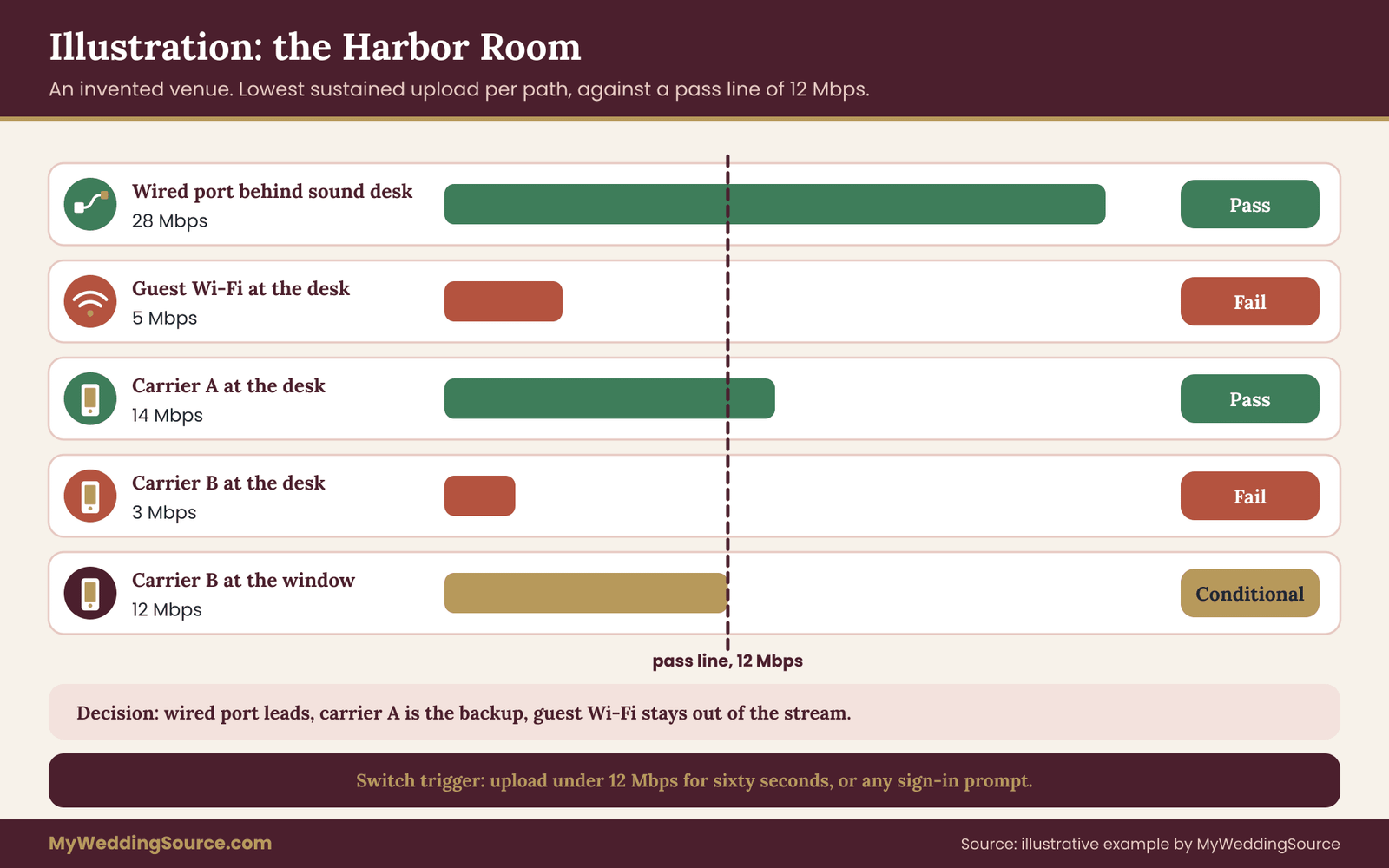
A couple plan a Saturday ceremony at four o’clock in a waterfront hall called the Harbor Room. They want a single-camera livestream for about forty remote relatives. Their video producer plans a 6 Mbps stream and wants the double-headroom margin, so the pass line is 12 Mbps of sustained upload.
The visit
The couple email the manager and ask for a Saturday venue internet speed test slot. The manager replies that the building has “fiber” shared across the hall, a small hotel wing and a cafe, and that a wired port sits behind the sound desk. The guest Wi-Fi has a sign-in page that renews every hour.
The couple visit two Saturdays before the wedding at half past three. A cafe event is already under way, and the hotel wing is busy. They log the date, the time, and the context. They set the encoder position behind the sound desk, near the wired port.
Gate A results
The wired port is present and live. The guest Wi-Fi signal at the sound desk is moderate, and drops when someone stands in front of the access point. Cellular shows three bars on carrier A and one bar on carrier B at the desk. They note that carrier B improves to three bars by the window, about six meters away.
Gate B and C results on the wired port
Three browser runs show uploads of 31, 29 and 30 Mbps. The long run lasts twelve minutes and shows a steady 28 to 31 Mbps. The lowest sustained figure is 28 Mbps. Ping stays low and steady, with no lost replies. The wired port passes the pass line of 12 Mbps with plenty of room. Verdict: Pass.
Results on the guest Wi-Fi
Browser runs show 18, 11 and 6 Mbps. The long run begins at about 14 Mbps and falls to about 5 Mbps by minute eight, then recovers. The lowest sustained figure is 5 Mbps, below the pass line. A sign-in page appears at minute eleven. Verdict: Fail.
Results on cellular
Carrier A at the desk gives uploads of 19, 16 and 17 Mbps, with a ten-minute low of 14 Mbps. Carrier B at the desk gives 3 Mbps and fails. Moved to the window, carrier B gives 15, 13 and 14 Mbps with a low of 12 Mbps, which meets the pass line exactly and leaves no margin. Verdicts: carrier A Pass, carrier B Conditional at the window only.
The decision
The producer reads the log and decides. Primary path: the wired port behind the sound desk. Backup: carrier A on a router on the desk, plugged into power. The guest Wi-Fi is not used for the stream. The switch trigger is upload under 12 Mbps for sixty seconds, or any sign-in prompt. Carrier B is kept as a spare, not a plan.
The log also records two promises from the manager: the wired port will be kept free of other devices on the day, and the hotel wing will not run a scheduled backup during the ceremony. Both have a name and a date. Nothing else is promised, and the log says so.
What the example shows
The wired port alone would have carried the stream. The venue internet speed test still produced three useful things. It showed that the guest Wi-Fi, the path most couples would assume, was the weak one. It found that carrier B only worked at the window. And it turned the manager’s casual reassurance into two specific commitments. The couple spent about an hour and spent nothing else.
Notice also that the venue internet speed test happened with a cafe event already running. That made the result more realistic, not less. A quiet building would have overstated the venue internet speed of the Wi-Fi, and the couple would have chosen a worse path.
Verdicts and failure conditions for venue internet speed
A venue internet speed test is only useful if it leads to action. This section lists what each verdict triggers, and the conditions under which you should stop trying to make a weak venue line work and change the plan.

What each verdict means
Pass on a path means that path met all three gates with the margin the producer asked for. It can be primary. It still needs a backup, because a pass is evidence, not a promise.
Conditional means the path nearly passed and one named fix would complete it. The fix needs an owner and a date. If the fix is not confirmed by the date, treat the verdict as Fail and move to the next option.
Fail means the path cannot be trusted as a route to the audience. A failed path may still be used for something small, such as a monitoring feed for the crew, but it carries no part of the main stream.
The decision after testing
Look at the full set of venue internet speed verdicts. There are five likely situations, and each has a standard response.
If the venue line passes and cellular passes, use the venue line first, cellular as backup, and keep both written in the log with the switch trigger.
If the venue line passes and cellular fails at the spot, the venue line is the only route. Ask the venue to confirm that the line will be protected on the day, and think harder about a recording safeguard so a drop does not lose the ceremony. The wider backup ideas are in the digital contingency plan for the wedding day.
If the venue line fails and cellular passes, use cellular first. Add a power supply for the router and a lower-quality preset for any dip. Keep the venue line out of the stream.
If both are conditional, pick the cheaper fix. A wired drop the venue can install is usually simpler than a new antenna.
If both fail, you have a venue internet speed problem, not a settings problem. The options are in the next part.
When both paths fail
Several options remain, in rough order of cost and disruption.
Move the encoder. A short move to a spot with better signal, or a cable run to a window, door or another room, may be all it takes. Ask the producer whether longer cables are possible.
Ask the venue for a dedicated line. Some venues can order a temporary upgrade or a separate connection for an event, though lead times and fees vary and the venue will tell you what applies. Ask early, because it often needs weeks.
Lower the stream quality. A lower bitrate and resolution fit into a smaller line. A smaller picture that plays is better than a larger one that freezes. Agree on this with the producer and the couple before the wedding.
Record and publish later. If a live stream cannot be made reliable, record the ceremony locally and share the video within hours. Remote guests lose the live moment but see everything. Say so on the invitation, so no one waits at a blank screen. Wording for guest notices is covered in the site guides on invitations.
Change the venue or the format. If the livestream matters a great deal and the venue internet speed cannot support it, this is a real option. It is rarely necessary, but if a signed contract does not yet exist, the test result is a fair reason to continue the search.
Failure conditions to write down
The venue internet speed log should list the specific conditions under which the plan changes. They are not hard to define. Each is a fact you can observe during the ceremony, with a time and an action.
A numeric trigger: venue internet speed below the pass line for a set time, such as sixty seconds, means switch paths.
A policy trigger: a sign-in page, a throttle notice or a disconnect means switch paths, then call the venue contact.
A hardware trigger: an encoder crash, a cable pulled out or a router restart means switch, then repair after the ceremony.
A last-resort trigger: both paths down for a set time, say two minutes, means stop trying to fix it live, keep recording, and post the short holding message to remote guests.
These triggers need a named owner, usually the producer or a designated friend, so the couple never has to decide anything during the vows. Everyone knows who acts and what they do.
Conditions where testing should not go ahead
There are cases where you should postpone or skip part of the venue internet speed test. If the venue is hosting another event and asks you not to run heavy traffic, reschedule rather than pushing. If the building belongs to a third party, such as a park authority or a museum, and has rules on outside equipment, get permission first. If your test would disturb guests, staff or an event in progress, choose another time.
Also stop if you find a safety issue, such as a cable that would cross a walkway without covering. Cables are a trip hazard, and the venue’s rules on cable runs and tape apply. A reliable network is not worth a fall.
What to put in the vendor agreement
If the venue internet speed test shows the venue needs to do something, such as activate a wired port, keep it free of other devices or exempt the encoder from a portal, get that in writing, ideally in the venue’s contract or in a signed addendum. A promise made at the test visit by a person who may not be on shift on the wedding day is fragile.
If a video vendor will supply their own cellular or bonded gear, the contract should say what happens if the gear cannot connect on the day, and whether the fee changes. A vendor contract guide explains the sorts of clauses to look for, including liability limits and what counts as a delivered service.
Recording is the safeguard that does not depend on venue internet speed
One point deserves repeating. A local recording on the encoder or a camera card does not depend on venue internet speed. If the stream fails, the recording still holds the ceremony. A failed upload then means a late video, not a lost one.
Check that the recording is running before the ceremony, and check the storage space and battery. Keep a human accountable for that check. It costs nothing in bandwidth and it makes every failure above survivable.
Platform and rights notes
Sending a stream raises a few issues that sit beside the network. Check the streaming platform’s current rules on music, because background songs and live performances can trigger automated claims or muted audio. The U.S. Copyright Office publishes general information on copyright, and the platform’s own help pages set the practical rules, so read both. Playing a recorded song under the vows is a different matter from the venue’s own music license, and both matter if the stream is public.
Remote viewers deserve notice. If the stream is private, use a link that is not posted publicly, and tell guests plainly that it is a livestream and that others may be recording it. Guests in the room should know a camera is running. Short wording on a sign or in the program is enough.
Keeping the verdict current
A verdict has a shelf life. Venues change providers, get renovated and book events. If your venue internet speed test was months ago, or the venue has told you of any change, run a shorter recheck two to three weeks before the wedding. It will use the same log, with a new date, and compare the worst run to the earlier one. If the numbers hold, the plan stands. If they have fallen, you have time to act.
Day-of recheck and handoff
The last venue internet speed test happens at the venue on the wedding day. It is short, and it is run by the person the log names, usually the producer. The goal is to confirm that the numbers from your test visit still hold, to catch last-minute changes and to be sure every switch works. A good venue internet speed test log makes this check quick, because the person knows what to look for.
The one-hour check
About an hour before the ceremony, the producer or helper repeats a compressed version of the test, on the real encoder, in the real position. The steps are few.
First, confirm that the planned path is connected and that the encoder is sending a test stream or at least a speed test. Check venue internet speed, meaning upload, against the pass line in the log. If it passes, note the time and the figure.
Second, check the backup path. Confirm the cellular router has power, signal and a working upload. Check that the switch works and that it takes the time the log says it does.
Third, check the venue promises. Is the wired port free of other devices? Is the portal exemption in place? Is the hotel wing quiet? A short word with the venue contact settles each.
Fourth, check the recording: start it, check the file, confirm storage and battery.
Fifth, a final look at the remote link. Open the stream on a phone on a different network and make sure it plays. Confirm that any private link or password works for a guest who has never seen it.
Who does what
The check needs named people. The producer or a designated assistant owns the technical steps. A planner or a coordinator owns the conversation with the venue contact. The couple owns nothing on the day beyond showing up. This division was agreed earlier, and the log holds it.
If the stream is run by a friend rather than a professional, pick someone who is calm, who will not be in the wedding party and who has practiced the switch once. A friend who is also a groomsman will not be at the back of the room with a laptop when it matters.
Common surprises on the day
Experienced crews report a handful of recurring surprises, and they are worth anticipating without claiming that any of them will happen to you. A second event may have started that was not mentioned on the visit. A staff member may have unplugged a cable that looked unused. The guest network may have a new password. A guest hotspot may be interfering with the Wi-Fi in a crowded room. A delivery may block the cellular router’s line of sight to a window.
Almost all of these are cured by someone at the venue who knows your plan. That is why the visit, the written promises and the contact name matter. Keep the contact’s phone number in the log, next to the room measurements from the technical walkthrough of the venue, saved in the producer’s phone, and tell the contact when the ceremony starts.
Keeping guests informed
If the stream has a problem, remote guests need a short message. Prepare one in advance: where to look for updates and when to expect the recording. A text message from a trusted contact is better than a silent screen. The key is to prepare it while nothing is going wrong.
After the wedding
When the day is over, update the venue internet speed log with what actually happened: the numbers at the day-of check, any switch and how long it took, and any gap. It is a useful record if you hire the same venue or crew again, or if you want to share the experience with another couple. Keep it with the rest of your records. The guidance on organizing wedding records shows where a document like this belongs.
If the venue’s network performed well, tell the venue and the producer. Positive feedback helps the next couple, and a venue that hears specific details is more likely to keep a wired port available.
Your next steps
Work through these in order. Each step takes a short time and leads to the next.
- Ask your video producer for the planned bitrate and headroom margin, and compute the pass line.
- Email the venue’s technical contact with the questions in this guide and ask for a Saturday venue internet speed test slot at the ceremony hour.
- Print or copy the venue internet speed log, and pack the laptop, cables, phones and a power bank.
- Visit the venue and measure venue internet speed with the three gates on every path: wired, Wi-Fi and cellular.
- Write the verdict for each path in plain words, and name the primary path, the backup and the switch trigger.
- Get the venue’s promises in writing, with names and dates.
- Send the log to the producer and the planner, and schedule a short recheck two to three weeks before the wedding.
- Plan the day-of one-hour check, name who runs it, and prepare a short message for remote guests.
FAQ
How fast does venue internet speed need to be to stream a wedding?
It depends on the stream’s bitrate, which your producer sets. Platforms publish recommended ranges, and they change, so check the current help page. A common planning rule is sustained upload of about double the bitrate, measured in the worst run at the ceremony hour. Upload matters far more than download, so ignore the big download number a speed test shows first.
Is the venue’s Wi-Fi good enough for a livestream?
Sometimes, but guest Wi-Fi is usually the weakest option. It is shared with guests, may have limits or sign-in pages, and can be crowded at the ceremony hour. A wired port on a separate network is more reliable. Test the Wi-Fi at the encoder position for ten minutes, and treat a failing result as a reason to use another path.
When should I test the venue internet speed?
Test on the same day of the week and at the same hour as the ceremony, because the building’s load changes. If you can only go once, choose the time that looks most like the wedding. Plan a shorter recheck two to three weeks before the date, and a quick check on the wedding day itself.
Which speed test should I use?
Any reputable browser-based test works for a first look, such as Ookla Speedtest, Cloudflare’s test or fast.com. Use the same one throughout a visit, read the upload figure and repeat it several times. Then add a ten-minute sustained test or a private test stream, because short tests miss slow declines and sign-in timeouts.
What if the venue refuses to let us test?
Ask again, in writing, explaining what you will do and for how long, and offer to work with their schedule. If they still refuse, treat that as missing evidence and plan on cellular and recording as your main safeguards. It may also be a reason to weigh another venue if the livestream matters a great deal.
Do we need cellular backup if the venue has a wired connection?
It is wise. A wired line can still fail, be unplugged or be shared with other events. Cellular is independent of the building’s line, so it covers more failures. Test it from the encoder spot on at least one carrier, using the same worst-run rule, and make sure the router is plugged into power.
How much data will the livestream use?
Multiply the bitrate by the running time. A 6 Mbps stream for 45 minutes sends about 2 gigabytes. Add the rehearsal, test streams and any backup feed. These figures are examples, so recompute with your producer’s settings, and check any cellular plan’s allowance and slowdown rules with the carrier.
What should we do if the stream fails during the ceremony?
Follow the written triggers. Switch to the backup path if upload falls below the pass line for the agreed time or a sign-in prompt appears. Keep the local recording running no matter what. If both paths fail, send the prepared holding message to remote guests and share the recording afterward.
Sources
- U.S. Federal Communications Commission, consumer broadband information
- U.S. Copyright Office, copyright basics for music and video
- Federal Trade Commission, consumer guidance on online services
- Cybersecurity and Infrastructure Security Agency, home and small-network security guidance
- Measurement Lab, open internet measurement platform
- YouTube Help, live streaming encoder and bitrate guidance
- Zoom Support, bandwidth and network requirements
- Internet Engineering Task Force, standards for latency and packet loss
- National Institute of Standards and Technology, networking and measurement resources