

Livestream audio is everything a remote guest hears when they watch your wedding on a screen: the vows, the readings, the music, the laughter and, unfortunately, the wind. This guide explains why the microphone built into a camera is often not enough, and gives you a feed sheet and a soundcheck script so every voice reaches the viewer on purpose.
A camera microphone hears the room from the camera’s position, not the speaker’s. At the back of a ceremony space it records echo, murmurs and wind, with the vows arriving faint and far away. Good livestream audio starts with a feed sheet: one line for every voice, naming the microphone or sound-system feed, the path to the stream, the person who controls the level and the backup. Then run a short soundcheck with a real listener on a real device, in the real room, before guests arrive.
Remote guests are usually the people who care most about hearing the ceremony. A grandmother who cannot fly, a sibling on a night shift, a friend who could not afford the trip: these viewers lean toward the screen and listen for one voice. If they can see the officiant’s lips moving and hear nothing but a hiss, the picture does not matter.
Livestream audio is the part of a broadcast that viewers judge first and forgive last. Most couples spend their attention on the camera and treat sound as something the camera does by itself.
It does, in the way a phone does when you hold it up at a concert. The result is recognizable and not very good. This article is about the gap between “the camera records sound” and “a viewer can understand every word”, and about the small, boring decisions that close it.
It does not repeat the full shopping list or the full production runbook. For the gear, the livestream equipment checklist covers cameras, encoders and power. For consent, rights, delivery and show control across the whole broadcast, the wedding livestream planning runbook is the place to start. Here the subject is narrow: the voices, the microphones, the paths and the test.
A note on scope. This is general planning information, not legal, tax or financial advice, and it does not replace a quote from a live-event audio technician. Radio rules, recording laws, platform settings and music licenses change, so where one matters the guide points you to the agency or company that publishes the current version.
Why a camera microphone is rarely enough for livestream audio
A microphone hears what is near it far better than what is far away. That sounds obvious until you place a camera at the back of a hall to get a clean wide shot of the ceremony. The camera sits where the picture is best, and the picture is best from a distance. The microphone is attached to the camera, so it listens from the same distance. The two goals pull in opposite directions.
In open air, sound loses strength steadily as it travels. A common rule of thumb in acoustics is that every doubling of distance from the source lowers the level by about six decibels in free space. You do not need the arithmetic. You need the consequence. A microphone thirty feet from the officiant hears the officiant at a fraction of the strength of a microphone worn on the officiant’s lapel.
The room’s noise, however, does not care where the camera stands. The air conditioning, the rustle of programs, the child two rows ahead and the building’s echo reach the camera microphone at roughly the same strength either way.
The ratio that matters
The ratio is the first idea in livestream audio worth knowing.
Audio people talk about a signal-to-noise ratio, which is just a way of asking how loud the voice is compared with everything else. A close microphone gives a high ratio: the voice is loud and the room is background. A distant microphone gives a low ratio: the voice and the room arrive at similar strength. Turning up the level does not fix this, because it raises both together.
Viewers experience a low ratio as effort. They can follow the ceremony if they concentrate, and they tire quickly. Many give up and read the subtitles, if there are any, or simply stop paying attention. A remote guest who gives up has not been included, whatever the stream statistics say.
Four things a camera microphone cannot do
Each of these limits shows up in livestream audio as a specific complaint from viewers.
First, it cannot move. The officiant walks to the couple, the reader approaches the lectern, the couple turns to face each other and lowers their voices. A camera microphone stays where the camera is.
Second, it hears the room’s reflections. Hard walls, stone floors and high ceilings return sound to the microphone slightly late, which smears consonants. This is why a stone church can feel majestic in person and sound muddy on a stream. People in the room hear the officiant mostly through direct sound and learn to ignore the tail. A microphone and a viewer cannot.
Third, it has built-in automatic controls on many cameras and phones. Automatic gain raises the level during quiet moments and lowers it during loud ones. During the hush before the vows, the automatic control can lift the room noise into prominence. Some devices also apply wind reduction that thins out voices.
Fourth, it records one thing: the room as heard from the camera. It cannot carry the officiant’s microphone through the venue’s loudspeakers, a string trio recorded through a different mic, and a pre-recorded reading, each at the right level. It has one input, which is the air in front of it.

When the camera microphone is the right answer
None of this makes the camera microphone useless. It is a safety track, a record of the room and sometimes the whole solution. A short civil ceremony in a small room, where everyone sits within a few feet of the officiant and the camera stands near them, can sound perfectly acceptable. The decision is a distance and a noise question, not a matter of taste. The last section of this guide gives plain rules for when to stop at the camera microphone and when to hire help.
For now, hold on to one sentence: a stream should hear the speaker, not the camera’s seat. Everything that follows is a way of getting that sentence done at a wedding, where the speakers are different people, in different places, at different volumes.
The four feeds behind livestream audio
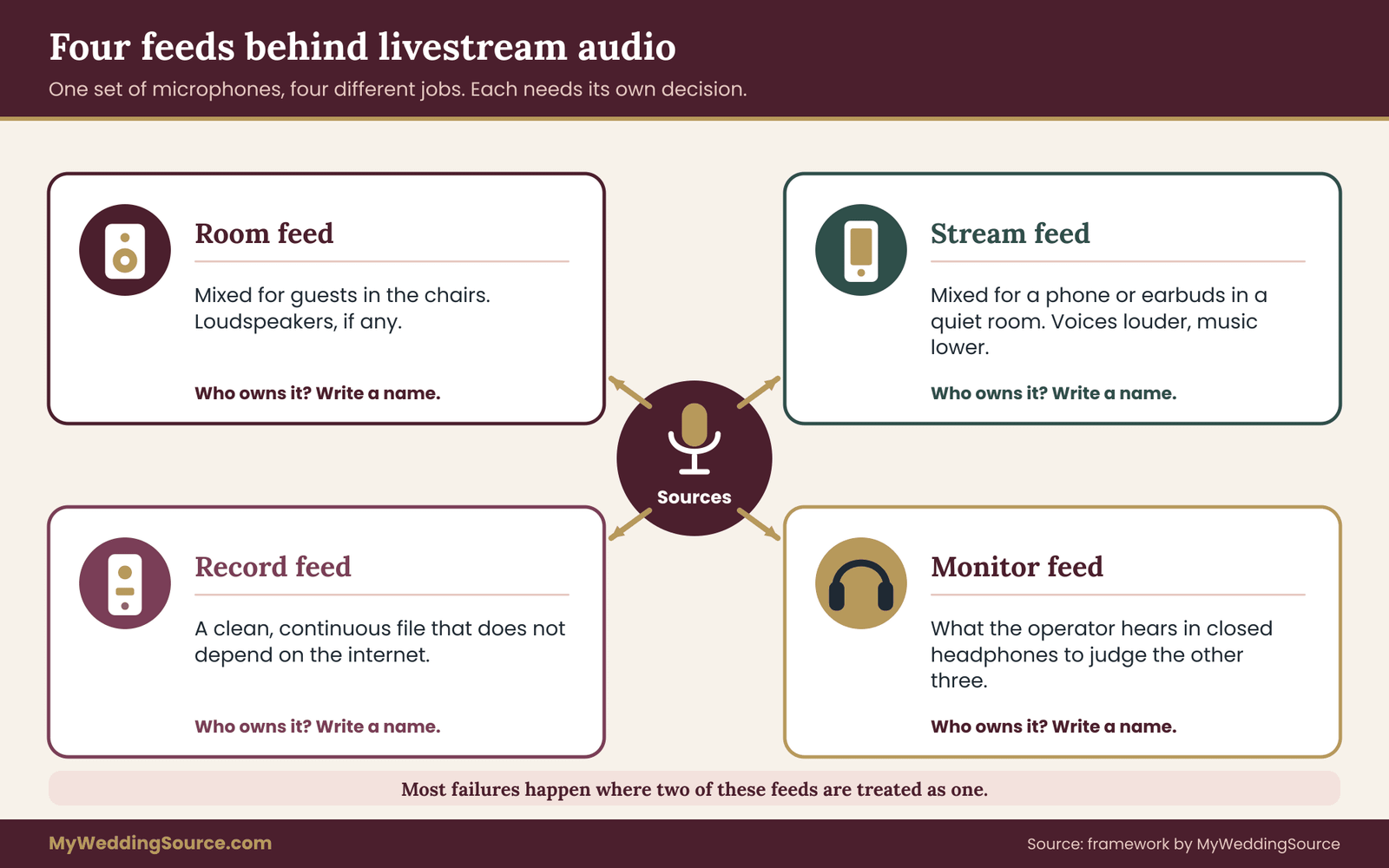
Most people picture one wire leading from “the microphone” to “the stream”. A wedding has several signals traveling at once, and treating them as one is the cause of many failures. It helps to name four separate feeds.
The room feed. This is what guests in the room hear through loudspeakers, if there are any. It is mixed for the people sitting there. It may include the officiant’s microphone, a musician’s amplifier and a playlist, with loudness set for the space. A room can be loud, with reinforcement for the back rows, or silent, with no loudspeakers at all.
The livestream audio feed. This is what remote viewers hear. It should be mixed for a person wearing earbuds or using a phone speaker, in a quiet room, who cannot lean closer. It usually needs the voices louder relative to the music and the room than the room feed does. The livestream audio feed is a separate mix, even if it starts from the same microphones.
The record feed. This is the recording that stays after the day: the video file, a separate audio file of the vows and the ceremony. It should be clean and continuous, and it should not depend on the stream surviving. A recording made at the same time protects you when the internet fails, and it becomes the version people replay in thirty years.
The monitor feed. This is what the person running the sound hears in headphones. It exists so a human can judge the other three. Without it, the operator is steering by a meter alone.
Why the separation matters
Livestream audio goes wrong most often where two of these feeds are confused.
Imagine the venue’s sound technician sets the room mix so the string trio is warm and the officiant sits comfortably above it for people in the room. If you feed the stream from that same mix, remote viewers get a balance designed for an acoustic space they are not in.
The trio may be fine in the room because the room adds its natural reverberation and the music reaches listeners from all around. On the stream, the same trio can wash over the speech. The stream often needs more voice and less everything else.
The reverse can also happen. If you take the stream from microphones that are only on the officiant, remote viewers will hear nothing of the music or the guests’ reactions, and the broadcast feels strangely empty, like a conversation in a vacuum. The livestream audio mix is a decision about what a person far away should feel: clear speech, a hint of the room and music at a polite level.
How the feeds connect
The wiring of livestream audio can be very small or quite involved.
In the simplest wedding, a single small mixer sits behind the officiant. It receives the microphones, makes the livestream audio mix with its own level controls, and sends that mix to the camera or the capture device. A separate output goes to the loudspeakers. A recorder takes a copy. The operator wears headphones.
In the simplest case of all, there is no mixer. A wireless microphone receiver connects directly to the camera’s audio input. That works for one voice and no music. It stops working as soon as a second voice or a second source is added, because one receiver and one input have no way to balance two things.
Seeing the four feeds on paper before the wedding is what turns “someone will figure out the sound” into a plan. The feed sheet in the next section is the paper.
The feed sheet: a one-page worksheet for livestream audio
The livestream audio feed sheet is a single page with one line per voice or sound source. It is the heart of this guide. Its purpose is to make every decision about livestream audio visible to the people who will carry it out, including the ones who were not in the planning conversations. A videographer, a venue technician, an officiant and a cousin with a laptop should be able to read the same page and agree about who is responsible for what.
You can draw the sheet by hand or build it in any document. It does not need a table to work; a list with the same labels under each voice is fine. The labels matter more than the layout.
The seven labels for each line
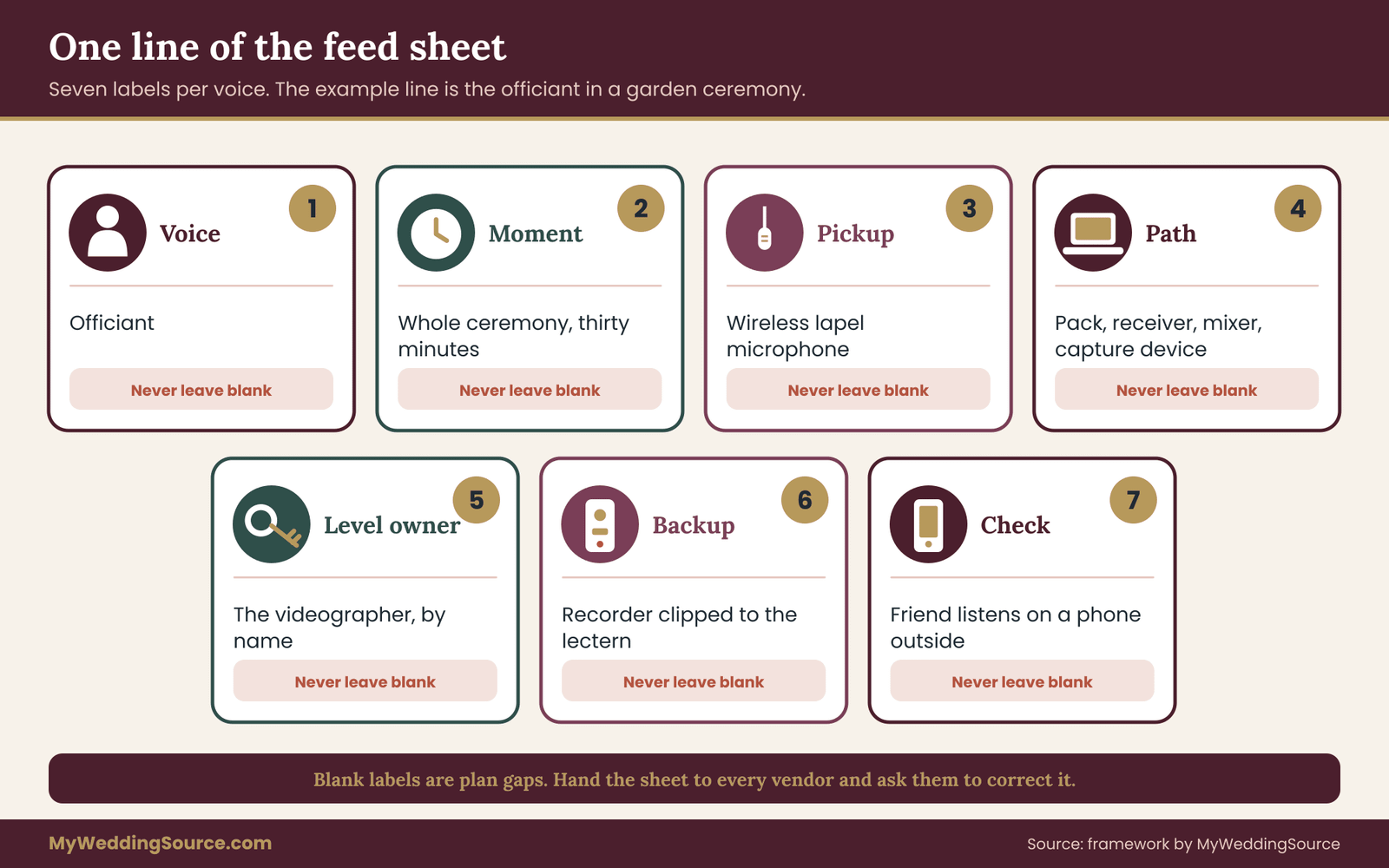
Every line of the sheet carries the same seven labels, so the livestream audio plan reads the same way from top to bottom.
1. Voice or source. Name it plainly: officiant, partner one, partner two, first reader, second reader, string trio, processional recording, guest toast, parent welcome. If a person speaks in two places, such as at the lectern and in front of the arch, list them twice. The location changes the microphone.
2. Moment and length. When does this source speak or play, and for how long? “Processional, three minutes” and “vows, four minutes” are different needs from “officiant, entire ceremony”. A source that is live for only ninety seconds can use a simpler, riskier method than one that must carry thirty minutes.
3. Pickup. What captures it? A lapel microphone on the officiant, a handheld on a stand, a feed from the venue’s sound desk, a recorder on the lectern, a microphone on the camera, a line feed from a playlist player. If the answer is “the camera microphone”, write that, because it is a choice and should look like one.
4. Path. How does the signal travel from the pickup to the stream? Name the stages: wireless pack, receiver, mixer channel, mixer output, capture device, streaming software. If you cannot name the stages, the path is not designed yet. This is the label most often left blank and the one that causes the most trouble.
5. Level owner. Which person adjusts this source while the ceremony runs? Not a role, a name. “The audio operator” is acceptable if a person is attached to it. “Someone from the venue” is not.
6. Backup. What happens to this line if the pickup fails? An alternative microphone, a recorded track, a different position, or a decision to accept camera microphone audio for that source. Backups may be modest. They may not be blank.
7. Check. How will you know it works before the guests arrive? Which person will listen, on which device, and what will they listen for? The check is what the livestream audio soundcheck in a later section carries out.
A sample line
One filled line shows how the livestream audio sheet works in practice.
Here is how one line might look for the officiant. Voice: the officiant. Moment: entire ceremony, thirty minutes, including a short pause for the couple’s own words. Pickup: wireless lapel microphone, with the venue’s lectern microphone as the second source. Path: lapel pack to a receiver at the sound desk, then the desk’s stream output to the capture device.
Level owner: the venue technician for the room mix, the videographer for the livestream audio mix. Backup: a recorder clipped to the lectern, running throughout. Check: the couple’s friend listens on a phone in the parking lot during the rehearsal.
Notice how little technical knowledge the line demands. Nothing in it requires you to know what a preamp is. It requires you to ask who and where.
The moments inventory: how to find the lines
Couples often miss lines because they think in terms of “the ceremony” rather than the moments inside it. Walk through the ceremony cue sheet and list every moment in which a sound matters to a remote guest. The wedding ceremony cue sheet guide describes how to build the cue sheet itself; here you only need to read down it and mark each cue that has a sound.
A typical walk-through produces these entries:
- Pre-ceremony music as guests are seated, and any announcements by an usher or the officiant.
- The processional, which may be live music, a recording or silence.
- A welcome, spoken by the officiant or a parent.
- Readings, given by people who may be nervous, quiet or unfamiliar with microphones.
- The officiant’s remarks, usually the longest speaking stretch.
- The vows, spoken softly and often turned away from the audience.
- The ring exchange and its short phrases.
- The pronouncement and the kiss, followed by applause that can overwhelm a level setting.
- The recessional and any music over the exit.
Each of those becomes a line, or is grouped with a neighbor that uses the same source. A welcome and remarks by the same officiant at the same lectern can share one line. A reading by a different person standing in a different place needs its own.
Quiet moments deserve their own line
The vows are the moment remote guests most want to hear, and they are the hardest to capture because the couple often speaks quietly to each other. Give the vows a line of their own, even if the couple stands with the officiant. Ask yourselves where your faces will be. If the two of you face each other and the officiant’s lapel microphone is on the side, your voices may arrive well below the officiant’s own.
A small second microphone near the couple, a handheld that the officiant tilts toward each speaker, or a lectern microphone placed at chest height can make the difference. Decide this on paper before the rehearsal, not during it.
Keeping the sheet honest
A sheet for livestream audio is only useful while it matches the ceremony.
Three habits keep the sheet useful. First, write it before you book vendors, then send it to each vendor and ask them to mark it up. A venue technician can usually tell you in five minutes whether a feed from the sound desk is possible and what connector it provides. The answer changes the sheet.
Second, give the sheet a version date. If the officiant changes, a reader is added, or the string trio becomes a soloist, the line changes. A sheet with no date tends to be wrong in a way that nobody notices until the ceremony.
Third, print one copy to keep with the sound operator, and put the same version in the shared folder. During a stream, a person will stand beside a mixer reading the page at a glance. If the page requires a laptop to open, it will be unavailable when needed.
What the sheet is not
The sheet has limits, and it helps to state them.
The feed sheet is not an equipment list, and it does not replace a conversation with whoever runs the sound. It is a set of questions with answers that can be checked. When you hand it to a technician, they may rewrite half of it, and that is the point: your version tells them what you need, and their edits tell you what is possible. A sheet that comes back unchanged is usually a sheet nobody read closely.
It is also not a script for the speakers. Do not hand it to an officiant or a reader. They need a short, human instruction: stand here, speak toward the front, wait for the signal before starting. The next section moves from the sheet to the choices it forces you to make.
Choosing a pickup for each voice
With the lines written, the next question is which pickup suits each one. There is no single best microphone. There is a best match between a voice, a place and a risk. Five pickups cover nearly every wedding ceremony, and each has a character worth knowing.
A feed from the venue’s sound system. If the venue or the officiant already uses microphones through loudspeakers, a technician can often send a copy of the mix, or of selected channels, to your stream. The microphones are already placed, the person running them knows the room, and nothing new is attached to the speakers.
The cost is dependence: you need the technician’s agreement, a compatible output and a conversation about who controls the level. Ask for a separate output for the stream rather than a copy of the room mix, so the stream can be balanced for the viewer.
A wireless lavalier. A small clip-on microphone, worn near the chest, with a transmitter pack on a belt or in a pocket. It follows the speaker and keeps a constant distance from the mouth, which makes the voice stable as the person walks, turns or looks down at notes. Its weaknesses are practical: clothing rustle, a pack that needs somewhere to sit on a dress, battery life, and radio interference. It is the usual choice for an officiant when no sound system exists.
A fixed microphone on a stand or lectern. Reliable, cheap and simple, and it needs no battery in a wired version. It demands that the speaker stand where the microphone expects them. A reader who steps back from it is almost gone. A couple who face each other and turn from it are lost. It suits readings, welcomes and toasts where the speaker will stay put.
A recorder near the action. A small handheld recorder placed on the lectern or arch captures a clean track of whatever happens within a few feet. It is mostly a recording tool and backup, though some can feed a line output to a mixer. It is a good insurance policy for the vows, since it needs no radio link, and it produces the file you will keep.
A shotgun or other on-camera microphone. A directional microphone on the camera hears more from the front and less from the sides than a built-in one does. It is a real improvement on the camera’s own capsule and still sits at the camera’s distance. Use it as an addition, a way of capturing room atmosphere, applause and the sense of place, not as the source for vows.
Match the pickup to the speaker
For livestream audio, assign a pickup to each voice according to what that voice will do.
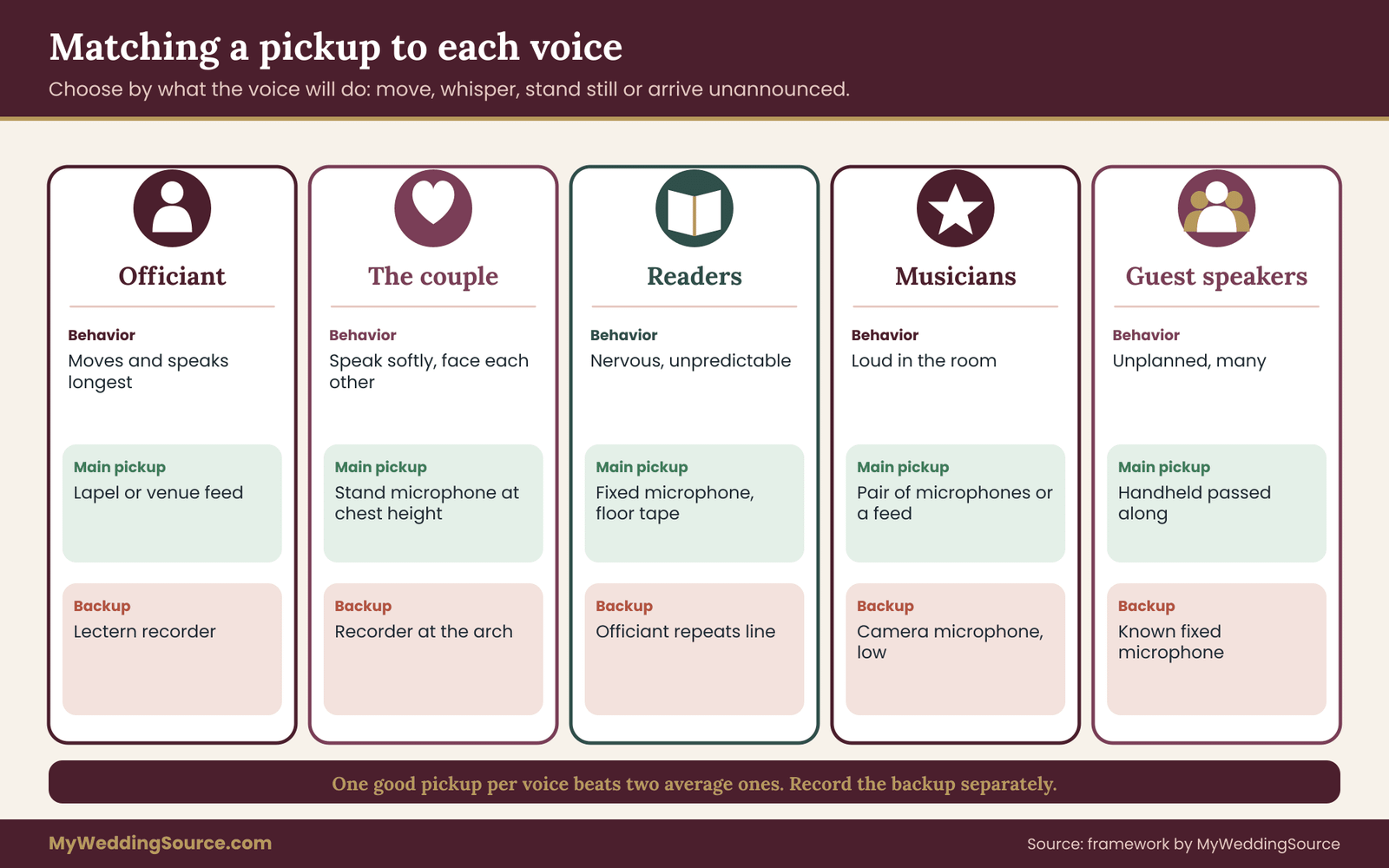
Rather than choosing one pickup for the whole ceremony, assign them to the voices according to what each voice will do.
The officiant moves, speaks for the longest stretch and usually carries the structure of the ceremony. Use a lavalier or the venue’s microphone as the primary pickup, and a lectern or recorder as the second. If the officiant already uses a handheld or a headset in their own work, ask to use that equipment, because it is a pickup they know how to hold.
The couple speaks briefly and often quietly. Rather than clipping microphones to both of them, which adds packs and clothing complications, consider one well-placed microphone near them, or a handheld the officiant holds between them. A second option is a lavalier on one partner with the other speaking in a shared position. Whatever you choose, make sure it works with the couple’s real faces and the veil, hat, flower arrangement or collar that may interfere.
Readers are the unknown. They may have never used a microphone, may be older, may be young, may stand at an angle or a distance. A fixed microphone at lectern height, set up at the start, works if you can get them to stand where it is. Mark the spot on the floor with tape that matches the surface. Give each reader a thirty-second instruction at the rehearsal: stand on the tape, speak to the back row, and wait for a nod.
Musicians are captured differently from speakers. A string trio or a soloist may have their own microphones, or none. A feed from the venue’s sound system may include them. If not, a pair of microphones placed a few feet from the players can give a natural result for the stream. A guitar or keyboard with an output can be connected directly. If the musicians are loud in the room, you may need to lower them in the livestream audio mix, since the stream does not have the room’s natural balance.
Guest speakers at a toast or a welcome are the least predictable of all. For a ceremony, you can usually avoid them or move them to a known microphone. For a reception, a handheld microphone passed from person to person is the usual compromise. Order and timing belong to your toast plan; for the stream, the point is that each speaker needs to be heard, and the pass-around handheld is both the most flexible and the least reliable method.
A rule for choosing between two pickups
Two simple rules cover most livestream audio choices.
When two pickups are both available, choose the one that is closer to the mouth and further from the loudspeakers. Closer to the mouth raises the voice relative to the room. Further from the loudspeakers avoids a pickup hearing its own amplified sound, which produces echo or squeal. When those two goals disagree, the first one wins for the stream and the second one is managed by placement.
A second rule: prefer one good pickup per voice over two average ones. Two microphones on the same voice, at different distances, combine in a way that can make the sound hollow or thin, because the same sound reaches them at slightly different times. If you want a backup for a voice, record the backup separately, rather than blending it into the stream. The backup earns its keep when the main pickup fails, not before.
The ask you make of the venue
Many venues have in-house sound, and many have rules about it. Some insist that only their technician touches their system. Some charge for a feed. Some do not have a usable output. Find out early, in writing, by asking four plain questions: Is there a sound system that will be used in the ceremony space?
Who operates it? Can a separate livestream audio feed be provided from it, and what connector and signal does that feed use? Is there a fee, and when must we confirm? The venue technical walkthrough describes how to cover power, access and equipment questions in a visit, and sound belongs on that list.
Getting the sound from the pickup to the stream
Many livestream audio failures happen between the microphone and the stream, in cables, connectors and settings that nobody thought about. You do not need to become an engineer. You do need to understand the handful of ideas that decide whether a path works.
Mic level and line level
The first idea in livestream audio wiring is the difference between two signal strengths.
A microphone produces a very weak electrical signal, called mic level. A mixer, a playlist player or a sound desk output produces a much stronger one, called line level. Inputs are built for one or the other. Plugging a line-level signal into a microphone input makes it harsh and distorted.
Plugging a mic-level signal into a line input makes it so faint that turning it up brings noise. A mixer’s channels usually have a preamp to handle mic level, and many have a switch or a different jack for line level.
The practical instruction: for every connection on your sheet, write whether the signal at that point is mic level or line level, and make sure the input it plugs into expects the same. When you ask a venue technician for a feed, ask which one it is. If they reply “line”, your sheet should send it to a line input.
Balanced and unbalanced cables
Long runs in a venue are usually carried on balanced cables, which use three conductors and a locking connector often called XLR. They resist picking up hum and radio interference. Short consumer cables, such as headphone-style plugs, are unbalanced. They are fine across a table and prone to buzz across a room. If your path includes a long run, such as from the sound desk to a camera across the hall, use a balanced cable and convert to the camera’s input near the camera.
Phantom power
Some microphones, usually condenser types, need a small voltage supplied through the cable. This is called phantom power, and mixers and recorders provide it with a switch. Dynamic microphones do not need it, and modern ones tolerate it. A condenser without it is silent. Check each microphone’s requirement and the switch on the input it uses, and write the answer on the sheet.
Gain: the level at the start of the path
Gain is the setting that most often decides whether livestream audio is clean or harsh.
The first control a signal meets is gain, which sets how strongly the input is amplified. Set it too low and the voice sinks into the mixer’s own noise. Set it too high and loud moments distort, and distortion cannot be removed afterward. Many mixers show a meter or a clipping light; the operator sets gain while the speaker talks at the volume they will use, so that ordinary speech sits comfortably in the middle of the range and the loudest moments stay clear of the top.
Then the gain is left alone, and the stream level is adjusted later in the chain with a different control.
The wedding-specific hazard is that people speak louder at a rehearsal than they will on the day, or quieter. A reader who is brisk at the rehearsal can whisper at the ceremony. Plan some headroom, and keep a person at the controls for the ceremony itself.
Mono, stereo and the sample rate
For speech, one channel is plenty. A mono stream avoids the odd effect of voices appearing in only one ear, which happens when a mono source is sent into one side of a stereo path. Check that your streaming software treats the incoming audio as you intend. Music benefits from stereo, but a mono mix of speech and music is a better default if the stream will be heard on phone speakers.
Digital equipment also works at a particular sample rate, the number of times per second it measures the sound. Video work commonly uses 48 kilohertz, while some consumer devices default to 44.1 kilohertz. A mismatch between devices can cause a slow drift of the sound against the picture, or occasional clicks. You do not need to understand it. You need to look in the livestream audio settings of the mixer interface, the capture device and the streaming software, and make them all say the same number.
Delay between sound and picture
Sound that arrives later or earlier than the picture shows up as lips that do not match words. A wireless microphone system, a digital mixer, a capture device and streaming software can each add a tiny delay, and together they sometimes add enough to see. Check it during the livestream audio soundcheck by watching a person clap or speak a sharp word and comparing the picture with the sound.
Streaming software usually lets you shift the livestream audio by a few milliseconds to correct it. Fix it once, write the number on the sheet and leave it.
Wireless microphones, radio rules and batteries
Wireless microphones are the most useful and the most fragile part of wedding livestream audio. They free the speaker, and they replace a cable with a radio link that can be disturbed by distance, bodies, walls and other transmitters. Treat them as a system with four parts: the microphone, the transmitter pack, the receiver and the batteries.
The legal part is not optional
Wireless microphones use radio frequencies, and in the United States the Federal Communications Commission regulates which frequencies may be used and by whom. Over the past years the rules have changed, and some older wireless microphones operate in bands that are no longer permitted or that are shared with other services. The FCC publishes information for people who use wireless microphones, and that page is the source to check, not a forum post or a seller’s description.
If a microphone system comes from a rental house or a working audio technician, they should know the current rules and be able to confirm that the system is suitable for your region. If a friend lends you a system, ask the same question and check the model against the FCC’s information.
A second concern is interference, which is not the same as legality. A system can be lawful and still collide with another system at the same event, such as a band’s wireless gear, a venue’s in-house system or a nearby production. Experienced technicians scan the available frequencies at the venue, assign each transmitter a clear channel, and avoid overlap. If you have more than one wireless microphone, or if the venue already uses them, ask who coordinates the frequencies.
Where the pack goes
A transmitter pack is roughly the size of a deck of cards. It needs a place to sit and an antenna that is not squeezed against the body. On a jacket it clips to a belt or sits in an inner pocket. On a dress it is harder: a pocket sewn in, a garter-style strap, a waistband under the bodice or a clip on a seam, and a lavalier cable that runs under fabric to the neckline.
A dress without a good place for a pack is a reason to choose a handheld or a fixed microphone for that person rather than force a poor arrangement.
If the officiant is wearing a robe, a stole or layers, put the lavalier where it will not brush against fabric. Rustle is the usual lavalier flaw. A technician will use a small piece of tape or a mount that holds the microphone away from the cloth, and will place it about a hand’s width below the chin, aimed toward the mouth, avoiding jewelry and necklaces that can tap against it.
Batteries are a named responsibility
Dead batteries are the most preventable cause of lost livestream audio.
Wireless packs run on batteries, and batteries die at inconvenient times. A reasonable practice has five steps. Install fresh batteries before the livestream audio soundcheck, not before the ceremony alone. Note the time they were installed. Check the pack’s battery indicator again just before guests are seated. Keep a spare set within reach of the operator, not in a bag at the hotel. Give one person the single job of doing these checks, and write that name on the sheet.
Never assume a pack with a battery meter showing “half” will last. Meters differ between models and chemistries. If the ceremony and the soundcheck share a pack, change batteries between them.
Microphones that are on when they should not be
A wireless microphone hears everything within its reach, including the whispered comment during the processional, a word to the best man or a joke to the photographer. The officiant’s microphone should be live when the officiant begins speaking and muted when the ceremony ends. In the stream, a muted channel is a polite silence; an open one is a decision somebody did not make.
This is partly a privacy matter. Recording laws regarding conversations differ by state, and some require the consent of everyone in a conversation. The FCC’s consumer guidance on recording telephone conversations touches the same family of rules for calls, and your state’s law is the one that governs a ceremony. If you have a concern, ask the venue or a local attorney. A simple practice solves most of the practical problem: microphones are live for the ceremony and muted outside it, and a named person does the muting.
A wired fallback for the key moment
Because radio links are the most fragile part of the chain, many technicians keep one wired source for the single moment that cannot be repeated. A lectern microphone on a cable, or a recorder running next to the arch, will keep capturing the vows if a wireless link drops. It will not be pretty if the couple wanders away from it, and it does not need to be. A usable recording of the vows is worth more than a perfect recording of the processional.
Music, readings and rights in livestream audio
Sound that is acceptable in a room can be a problem on a stream, because a stream is a transmission to a platform that handles audio differently. Three situations come up at weddings: live music, recorded music and recited text.
Live music
Live music is the easiest source of livestream audio to capture and the easiest to over-balance.
A live performer is the simplest case for the stream: the sound is created in the room and captured by a pickup. Two questions matter. How loud will the performance be compared with the voices, and who decides? A trio in a stone church can overpower a lavalier. On the stream, you want the music audible and the voices clear.
If the musicians have their own amplification, ask them to keep levels modest during speaking and give the livestream audio mix operator a feed from them. If they play acoustically, a pair of microphones near them gives you control; a distant camera microphone does not.
Acoustics matter, too. The ceremony acoustics guide for live music covers how a room’s surfaces and shape affect performers and sound, and the same features affect your microphone choices: a very reverberant room favors microphones close to the speaker and away from the room.
The performance itself can have rights questions. A musician playing a composition that is still under copyright is, in general terms, performing it, and permissions for that may be handled by the venue’s licenses or by the performer. A stream is a transmission, and the platform may have its own rules. The safest course is to ask the musician what they play, ask the platform how it treats live performances, and prefer original or public-domain works for the ceremony.
Recorded music
Recorded music is where livestream audio most often meets an automatic filter.
A recorded song played in the room and carried into the stream is the most frequent cause of unplanned muting. Platforms scan for protected recordings. If one is detected, they may mute the livestream audio, block the replay or restrict the video. This happens whether or not anyone meant harm, and it can happen in the middle of the vows if the song runs under them.
You have three clean options. Use music you have a license to use on a stream, which usually means music made for that purpose, with terms you can read. Use live music or your own recordings. Or, in the livestream audio mix, drop recorded music out and let remote guests hear the room instead during those songs. A short silence for the processional is better than a muted ceremony.
The guide to wedding music licensing questions explains the vocabulary of performing and recording rights in more detail, and the U.S. Copyright Office publishes general information on how copyright works. The Office does not tell you how a given platform will react, and only the platform can answer that.
Readings, poems and text
A reading is a spoken performance of someone else’s words. Short quotations and old public-domain texts are usually easier than a recent poem read in full. If a reading is a modern work, and you intend to stream or record it, it is sensible to check whether the author or publisher has stated terms for use, and if you are unsure, to choose a different text or ask the rights holder.
The Copyright Office’s circulars and FAQ give general background. For streaming purposes there is a practical point: a reading is a moment of pure speech with no music under it, so it is the easiest moment to capture cleanly.
A decision for each music cue
Add one column to the feed sheet for every music cue. It has three possible entries: in (the music goes into the stream as is), out (the stream is faded to the room’s natural sound or silence), or replace (the stream plays a licensed alternative). Mark it before the livestream audio soundcheck and test each entry. The person who sets the livestream audio mix should know the entry for the processional before the processional begins, not when the first note plays.
Who watches for muting
If a platform mutes a stream because of music, the operator may not know unless they watch the stream itself. Put a second person, with the stream open on a separate device, in charge of reporting a mute or a drop. A message such as “audio is gone” is worth more than a perfect mix that nobody is hearing. The role belongs on the sheet next to the music cue.
The soundcheck: five passes before the guests arrive
A soundcheck for livestream audio is different from a soundcheck for a room. In a room, the question is whether the people in the chairs can hear. On a stream, the question is whether a person who is not in the room can hear, on a device you do not control. That second question needs a different test, and it is the one most weddings skip.
The soundcheck for livestream audio below has five passes. Each has one question, one person responsible and a clear way to pass. Together they take about forty-five minutes with a small crew. A larger venue or more voices needs more time. Do not squeeze it into the ten minutes before the processional. Book the time with the venue in advance, and ask the officiant and readers to arrive early enough to take part.
Pass one: power and silence
The first pass asks whether everything is on and quiet. Turn on every transmitter, receiver, mixer, recorder and the streaming software. Check that each has fresh batteries or mains power and that the meter for each channel moves when someone taps or speaks into the microphone. Then ask everyone to be quiet for thirty seconds and listen on headphones to the livestream audio mix with nobody speaking. You are listening for hum, buzz, hiss, a fan, a refrigerator in the next room, the air conditioning and radio crackle.
Silence is the pass that finds ground hum, bad cables, a dimmer on the lights, a laptop charger that buzzes through the livestream audio, or a phone that is too close to an input. Unplug and move things one at a time until the noise stops. Write the cause on the sheet so the fix is repeatable.
Pass two: each voice, at the volume of the day
The second pass takes each line on the feed sheet in turn. Ask the actual speaker to stand in the actual place and say the actual words, at the volume they plan to use. For the officiant, a few sentences from the script. For readers, their first lines. For the couple, a line of the vows. Set gain while they speak, then ask them to speak a little quieter and a little louder, to see how the signal behaves.
Do not use “check, one two” for this pass. It tells you very little about how a person’s voice sounds when they are reading a sentence of their own. Use real text. If a reader is shy, ask them to read the first line twice and thank them. Their nervousness today is the reason to check, and getting it right now will let them relax on the day.
Move the speaker through the places they will occupy. The officiant at the lectern, then at the arch. The couple facing each other and then facing the guests. The reader walking up and standing on tape. Listen for the point where the voice drops in the headphones, and fix it with placement, a different microphone or a different position.
Pass three: the room against the stream
The third pass tests the livestream audio mix against the room mix. If loudspeakers will be used in the room, switch them on at the level they will have on the day, then listen to the livestream audio feed for echo, feedback and a delayed double of the voice. Move a microphone away from a loudspeaker if it hears it. A voice that comes back a fraction of a second late is a sign that the pickup is hearing the room’s amplified sound as well as the speaker.
Then check the balance between speech and music. Play a segment of the processional or ask the musicians to play a few bars while the officiant speaks, and adjust so that the voice stays on top in the stream. The room mix and the livestream audio mix are separate feeds, which is why this adjustment does not change what guests in the room hear.
Pass four: a listener on a real device
This pass tests livestream audio the way a remote guest receives it.
The fourth pass is the one that matters most and is the one almost nobody does. Start a private test stream, using the same account, platform, settings and network that you will use on the day. Ask a person who is not in the room to watch and listen, on a phone with the speaker and then with earbuds, and to tell you what they hear. A friend in another room, a relative in another city or a helper in the parking lot will do.
Ask them specific questions. Can they understand every word of a sentence you have spoken at normal volume? Do they hear any hiss, hum or echo? Is the level comfortable, or do they need to turn the volume up? Does the sound match the picture? When the music plays, is the voice still clear? Do not accept “sounds fine”. Ask them to repeat back a sentence.
The listener catches problems that the operator’s headphones hide. Headphones in a quiet room are generous. A phone speaker on a sofa is not. Platform processing also changes the sound, because streaming services compress audio and may apply their own adjustments. The listener hears the final result. Streaming platforms publish guidance on audio settings and recommended encoding, such as YouTube’s help pages for live encoders, and the settings in the streaming software should follow the platform’s current guidance.
Pass five: the backups and the rehearsal of failure
The fifth pass checks that the safety nets work. Confirm the recorder is running and has storage. Confirm the camera’s microphone is recording on the camera. Pull a cable on purpose, or switch a wireless microphone off, and watch what the operator does. Ask whoever will watch for muting to practice saying the words they will use. A fault that has been rehearsed takes seconds to fix. One met for the first time during the vows can take a minute and a bad decision.
If time is short, drop the extra detail from the other passes, not this one. A drill with a deliberately unplugged microphone shows whether the page, the people and the backups agree.
The order and the clock
Run the passes in order, because each assumes the previous one is solved. A rough clock for a small ceremony: ten minutes for power and silence, fifteen for the voices, five for the room against the stream, ten for the remote listener and five for the failure drill. Add time for each extra pickup and each extra location. If the officiant, readers or musicians cannot attend an early check, write down which lines were not tested and give the operator a note about them.

What to say to the people you are testing
A soundcheck is partly a social event. People who are about to speak at a wedding are nervous, and an engineer holding a clipboard can make it worse. A few short sentences help. To the officiant: “We are going to hear you read a few lines so the people watching at home can hear you as clearly as the room does.” To a reader: “Stand on the tape and speak to the back row.
If we ask you to repeat a line, it is the equipment, not you.” To the couple: “We would like to hear a sentence of your vows at the volume you plan to use.” Keep the tone calm and practical.
Ask each person for one small thing, and thank them. People who are told what is happening, and why, are far more likely to stand where they should and speak at the right volume on the day.
Keep a short soundcheck log
A written record turns one afternoon of livestream audio testing into a plan others can repeat.
At the end, write four lines: what was tested, what was changed, what remains uncertain and the settings that must not be touched. Include gain positions, sample rates, the sound delay number and the names of the people who held each role. If the ceremony is delayed or the equipment is moved after the livestream audio soundcheck, the log tells the operator what to retest.
The log also protects relationships. If a problem turns up on the day, a written note saying that a certain reader could not attend the soundcheck, or that a certain microphone was changed late, replaces blame with a fact.
A worked case of livestream audio: the Hartley and Nwosu garden ceremony
The couple below is invented, and so is the venue. The example shows how the feed sheet changes livestream audio decisions, not what any real wedding sounded like. Names, numbers and outcomes are illustrative.
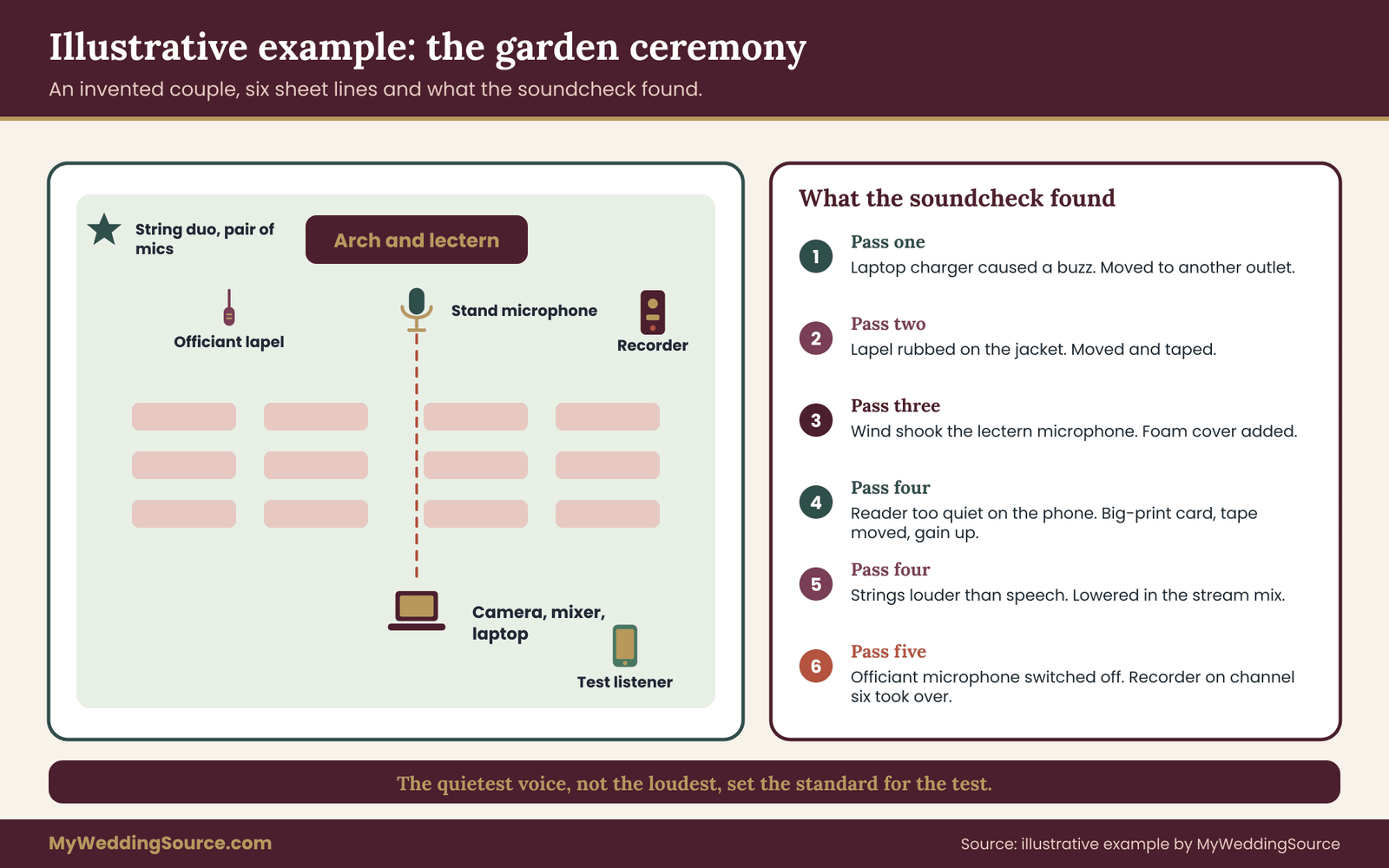
Imagine Mara Hartley and Tobias Nwosu, marrying in a walled garden with a covered terrace. About seventy guests will sit in rows on grass. About twenty-five more, including two grandparents and Tobias’s brother on a night shift, will watch from home. The ceremony lasts about thirty minutes. The couple has hired a videographer who owns one camcorder, a laptop and a small mixer. The garden has no sound system, and a hedge along one side faces a road.
The first draft: what the couple assumed
The couple’s first idea of livestream audio was one line long.
Mara and Tobias had assumed that the videographer’s camera would “pick up the sound”. The camera was going to stand near the back, about thirty-five feet from the arch, to avoid blocking anyone’s view. When the videographer was shown the feed sheet and asked to fill it in, the first line she wrote on the officiant was, “Camera microphone at thirty-five feet, not recommended.” The couple had not considered that the camera’s position and the microphone’s position were the same decision.
The feed sheet, filled in
The sheet had six lines.
Officiant. Thirty minutes. Pickup: wireless lapel microphone on the officiant’s jacket. Path: pack to a receiver beside the camera, receiver to mixer channel one, mixer stream output to the camera’s input and to the capture device. Level owner: the videographer. Backup: recorder clipped to the lectern. Check: pass two in the garden, pass four from the terrace.
Mara and Tobias. Vows, about four minutes. The couple would face each other beside the officiant. Pickup: a small stand microphone placed at chest height just in front of the arch, with the officiant also holding a handheld microphone ready to tilt toward each partner. Path: both into mixer channels two and three. Level owner: the videographer. Backup: the recorder at the lectern, which is only a few feet away.
Readers. Two readings, one by Mara’s sister and one by Tobias’s friend. Pickup: the same stand microphone, moved to the lectern position for the readings. A piece of garden-colored tape on the paving marks where to stand. Path: mixer channel two. Backup: the officiant repeats the first line if the reader is too quiet.
String duo. Processional and recessional, with a short piece in the middle. Pickup: a pair of small microphones in front of the players, at about arm’s length from each, placed by the videographer. Path: mixer channels four and five. Level owner: the videographer, with the musicians asked to avoid playing during speech.
Recorded cue. One recorded song, a modern track, for the walk out. Decision: out. The stream fades the song out and the remote guests hear the garden and the applause instead. The couple will tell remote guests in the viewing page note that the exit music is for the room.
Room atmosphere. The camera’s own microphone, left on at a low level on its own track, to give the stream a sense of place. It is also the safety track.
What the livestream audio soundcheck found
At pass one, the receiver beside the camera produced a faint buzz. The videographer moved the laptop charger to another outlet, and the buzz stopped. At pass two, the officiant’s lavalier rubbed on a jacket lapel. The videographer moved it two inches down and added a small piece of tape. At pass three, a nearby wind gust pushed the lectern microphone off level, and a foam cover went on.
At pass four, the test listener in the parking lot, using a phone, reported that Tobias’s friend was clear but Mara’s sister was too quiet. Mara’s sister had a soft voice and had stepped a foot back from the microphone to look at her page. The fix was threefold: a printed card in larger type, so she did not need to step back; the tape moved nearer the lectern; and a higher gain setting, which the videographer logged as “reader channel, up three notches”.
The same listener noticed that the strings were louder than the officiant during the short piece in the middle, because the officiant stood in the same area and began speaking while the duo finished. The videographer lowered the string channels in the stream and the couple agreed that the officiant would wait for a nod before speaking.
At pass five, the officiant’s microphone was switched off on purpose. The videographer noticed within three seconds, because the meter stopped moving, and switched the recorder feed into the stream on channel six. Remote guests would have heard a poorer voice for a short time, then the main microphone returned. The listener confirmed it.
What happened on the day, as a hypothetical
On the day, the sheet and the log did their work in small ways. The officiant’s microphone battery was checked at the start. The wind rose slightly and the lectern’s foam cover held. The sister stood on the tape and read from the big-type card. The recorded exit song faded out of the stream and the remote guests heard applause and birdsong. Nothing dramatic happened, which is the aim. A hypothetical ceremony in which the sound passes unnoticed is the best result a stream can have.
What the example shows
The example carries five lessons about livestream audio.
First, a camera that cannot be moved needs a different source, and the choice of source belonged on the same page as the choice of camera position. Second, the quietest voice on the sheet, not the loudest, set the standard for the test. Third, the remote listener found three problems that the operator’s headphones had hidden. Fourth, every line had a backup, even if the backup was only an instruction to the officiant. Fifth, a music cue carried a decision, not a hope.
The example also shows what the sheet does not guarantee. A wind gust, a late guest or an unexpected siren can disrupt any ceremony. The sheet makes sure that when something happens, the operator knows what that line was meant to do and what the next best option is.
Failure conditions and the fallback ladder for livestream audio
Plans for livestream audio fail in predictable ways, and a good plan says in advance what the operator will do. Every line on the feed sheet has a fallback, and those fallbacks form a ladder. When the top rung fails, the operator steps down one rung rather than improvising.
The ladder in four rungs
Rung one: the planned feed. The microphone or sound-system feed you designed, in the mix you tested. This is where the stream runs for most of the ceremony.
Rung two: the second pickup. For each voice, the second microphone or the recorder channel on the sheet. The operator switches to it, or brings its fader up, and tells the officiant if they need to move closer or repeat a line.
Rung three: the camera microphone. Always recording, always available, and always worse. Raise it in the livestream audio mix, accept the distance and keep going. A poor but intelligible stream is better than a perfect silence. If the camera has to carry the vows, ask the officiant to say each vow phrase aloud with a pause, which helps the camera microphone along.
Rung four: the room, plus words afterward. If the livestream audio is gone entirely, the stream can show a still image or keep the picture, with a caption or a message from a helper stating that the sound is being fixed. The ceremony is recorded locally, and the full audio is sent to remote guests afterward. This is an unwelcome option and an honest one.

Common faults and the first move for each
A few faults account for most failures, and the first move for each is usually simple.
The meter is flat on a wireless microphone. Check the mute switch on the pack, then the battery, then the receiver. Many dead microphones are muted ones. If the first two checks do not help within ten seconds, step to rung two.
The voice is distorted. The level is too high at some point in the chain. Lower the gain of that channel a notch, and ask the speaker to move back a few inches. Distortion cannot be fixed later.
There is a hum or a buzz. Something has been plugged in or moved. Check the last thing changed, such as a charger, a light or a cable. If it began when a person moved a cable, move it back.
There is feedback, a loud ringing or squeal. A microphone is hearing a loudspeaker. Lower the loudspeaker, or mute the offending channel briefly, and move the pickup away from the speaker.
The sound is delayed against the picture. Use the correction recorded during the soundcheck. If the software changed, shift the livestream audio by the same number.
The platform has muted the stream. Treat this as a music problem. Fade the recorded music out of the mix, tell the helper to restart the stream if necessary, and post a short message to viewers.
The stream has stalled and the livestream audio is choppy. This is usually a network problem, not an audio one. The venue internet speed guide for wedding streams explains how to test the venue’s connection, and the wedding livestream backup guide covers a second path for the stream itself.
Monitoring: who listens, and to what
A failure is only a failure if nobody notices it quickly. Monitoring is the habit of listening to the right thing. The operator listens to the livestream audio mix in closed headphones, which keeps the room’s sound out and shows what viewers hear. A second person watches the actual stream on a separate device, with the sound on, preferably on a phone.
The second person has one job: to say “audio gone”, “audio quiet”, “echo” or “out of sync” as soon as it happens, and to say “good” every few minutes when it is.
The delay of a live stream, usually several seconds, means the second person hears the problem a few seconds after it happens. Agree on that in advance. The operator should not assume a fault was not real because the stream was fine a few seconds earlier.
Protect the operator’s hearing too. Headphones turned up to overcome a noisy room can reach levels that are unsafe if worn for long. The National Institute for Occupational Safety and Health publishes information about noise and hearing. A moderate level and a good seal on the ear are better than a high level with a poor fit.
The stop condition
Every livestream audio plan needs one sentence about when to stop trying.
Decide before the ceremony what the stop condition is. If audio is lost for more than a minute and the ladder has not restored it, what does the couple want? Some want the stream to continue with the picture only and a message. Others want it paused and resumed. A few prefer to end it and send a recording. Choose one, tell the operator, and give the helper permission to carry it out without waiting for the couple, who will be at the altar.
When a camera microphone is enough, and who should run livestream audio
The honest answer to the title question is sometimes, and it depends on how your livestream audio will be used. A camera microphone is enough when three conditions hold together, and not enough when any one of them fails. The conditions are distance, noise and stakes.
Three conditions for stopping at the camera microphone
Distance. Everyone who will speak stands or sits within a few feet of the camera, and the camera is close to them. A registry office, a small living room or a courtroom-style room with a short aisle can meet this. A camera on a tripod beside the officiant’s desk is a different thing from a camera at the back of a hall.
Noise. The room is quiet and the space is small. No wind, no road, no fans, no echoing stone. Nobody is talking over the ceremony. A garden with a breeze fails this condition even if the distance is short, because wind on a microphone is loud and difficult to remove.
Stakes. The people watching are fine with understanding most of what is said. If the remote audience includes people for whom hearing is the whole point, such as a grandparent who will watch only this one event, or guests who rely on the livestream audio for language reasons, the stakes are higher. When a viewer must hear every word, the camera microphone is a risk you should not take without a safety net.
If all three hold, a cheap improvement is still worth making: place a recorder or a small wired microphone close to the speaker, and run the camera microphone as a backup track. That costs little and removes the single point of failure.
A rule for deciding how much to add
Think in steps rather than a shopping list. Each step adds cost and removes a particular risk.
Step one: a recorder at the lectern. Small cost, removes the risk that the vows are inaudible. It records only; it does not stream.
Step two: a feed from the venue’s system or a lavalier on the officiant. Moderate cost or favor, and it removes the risk that the main voice is lost in the room. This step often turns a poor stream into an acceptable one.
Step three: a small mixer and an operator. Adds the ability to balance several voices and music, and to watch the meter. It also adds a person. This is the step at which most multi-voice ceremonies improve the most.
Step four: a technician with a full setup and a listener. For large rooms, multiple locations, many wireless microphones or a reception with toasts. The cost is a professional’s day rate and the logic is the same: the more voices and places, the more value in a person who handles only sound.
Choose the step by looking at your feed sheet. Count the lines. One voice in one place suggests step one or two. Three or more voices, music and a room with echo suggest step three. Anything with several locations, a long reception or special languages suggests step four. Do not buy from a list. Buy from the lines.
Who runs it
Someone must own livestream audio on the day.
The person who handles livestream audio on the day must not also be a guest, a bridesmaid or the couple’s cousin who is also taking photographs. A stream needs a person with attention and permission to leave their seat. Three arrangements are common. The videographer takes it on, which works if the videographer’s contract says so and they have a mixer and experience with it.
The venue’s technician takes it on, which works if the venue permits a separate livestream audio feed. Or a hired audio technician takes it on, which costs more and gives the most control.
Whichever it is, the contract or the written agreement should name the duties. The wedding livestream planning runbook explains how to divide the work between vendors, friends and the couple across the whole broadcast. For sound, make sure it says who attends the livestream audio soundcheck, who owns the batteries, who runs the mix, who holds the recording and who decides the stop condition.
Questions to ask any vendor about livestream audio
Written answers settle most livestream audio disputes before the day.
Ask these in writing, and keep the answers with the feed sheet.
- What microphones will you use for the officiant, the couple and the readers, and where will each be placed?
- Do you take a feed from the venue’s sound system, or do you bring your own microphones?
- Do you bring a mixer, and does a person operate it during the ceremony?
- How many wireless microphones do you use, and how do you check the frequencies at the venue?
- Do you record a separate audio file as a backup, and will I receive it?
- Will you attend a soundcheck with the officiant and readers, and how long do you need?
- What happens if a microphone fails during the ceremony?
- Who listens to the stream on a separate device while it is running?
A vendor who answers these quickly and specifically has done this before. A vendor who says “the camera has a great microphone” for a ceremony at the back of a large hall has told you something useful, too.
The money logic, without invented prices
Prices for audio help vary by region and by how much a day requires, so this guide does not quote any. The logic holds without them. The first rule: pay to protect the thing you cannot repeat. The vows happen once. A recorder is cheap compared with the cost of regret. The second rule: pay for a person before you pay for equipment.
A modest setup in the hands of a person who watches the meter beats an expensive one left unattended. The third rule: ask for the cost of the soundcheck separately, so that you do not drop it when the quote is cut. A soundcheck is a part of the service, not an extra, and it is the first thing a tight schedule removes.
The livestream equipment checklist shows how audio fits among the other parts of a single-camera ceremony, and it can help you find where the budget is thinnest.
Your next steps
Start with a single evening of livestream audio planning. Open a blank page and list every voice and sound that matters in your ceremony, one per line. For each, write a pickup, a path, a person, a backup and a check. Mark every blank. Send the page to your videographer, your venue and your officiant, and ask each to fill in what they know and to correct what is wrong.
Next, book the livestream audio soundcheck. Ask the venue for a time before guests arrive, ask the officiant and readers to attend, and find one friend who will listen to a test stream on a phone from another room. Then decide, line by line, what happens to each music cue and who watches for a muted stream.
The week before, fix the sheet’s version, print it and hand a copy to the operator. On the day, check the batteries, run the five passes, write the log and let the ceremony happen. If everything has gone right, nobody will mention the livestream audio, and your remote guests will have heard every word.
FAQ
Is the microphone on a camera ever good enough for wedding livestream audio?
Sometimes. It can work in a small, quiet room where the camera and the speakers are within a few feet of each other, such as a registry office or a living room. It struggles in large rooms, outdoors and in echoing spaces, where it hears the room more than the voices. Even when it is enough, keep a separate recorder near the speaker as a backup.
What is the cheapest improvement to livestream audio?
Put a small recorder or a wired microphone near where the officiant and the couple will stand, and keep the camera microphone running as a second track. That protects the vows without adding a radio link or a mixer. For live streaming rather than only recording, a feed from the venue’s sound system or a lavalier on the officiant is the next step.
Can I take livestream audio from the venue’s sound system?
Often, yes, but it depends on the venue. Ask whether the ceremony space has a system, who operates it, whether a separate output can be provided for the stream, what connector and signal level it uses, and whether there is a fee. A separate output is better than a copy of the room mix, because the stream needs its own balance.
Do wireless microphones for livestream audio need to follow any rules?
Yes. In the United States, the Federal Communications Commission regulates the radio frequencies that wireless microphones may use, and some older systems operate in bands that are no longer allowed. Check the FCC’s wireless microphone information, and ask a rental house or technician to confirm that the system is suitable. Also have the frequencies scanned at the venue to avoid interference.
Why does livestream audio sound different from what guests in the room hear?
The room has its own natural balance, loudspeakers and reverberation that help listeners who are present. A stream carries only what the microphones pick up and what the mix sends, heard on a phone or earbuds in a quiet room. It usually needs more voice and less music than the room does, which is why it has its own mix.
What should I do about music in my livestream audio?
Decide for each music cue whether it goes into the stream as it is, fades out of the stream, or is replaced by something licensed. Platforms may mute or block a stream when they detect protected recordings. Live music, original works and music licensed for streaming are the lowest-risk choices. Check the platform’s current policy and the Copyright Office’s general information.
How long does a soundcheck for livestream audio take?
For a small ceremony with a few voices, about forty-five minutes is a sensible allowance: silence and power, each voice at the volume of the day, the room against the stream, a listener on a real device, and a drill for failures. More voices, more locations or music add time. Do not combine it with the last ten minutes before guests are seated.
Who should listen to the livestream audio while the ceremony is happening?
Two people. The operator listens in closed headphones to the livestream audio mix, which shows what viewers should hear. A second person watches the actual stream on a separate device with the sound on, and calls out audio gone, too quiet, echo or out of sync. Allow for the stream’s delay of several seconds when they report a fault.
Sources
- Wireless microphones, Federal Communications Commission
- Recording telephone conversations, Federal Communications Commission
- Copyright basics and general information, U.S. Copyright Office
- Frequently asked questions, U.S. Copyright Office
- Choose live encoder settings, bitrates and resolutions, YouTube Help
- Knowledge base, OBS Project
- Zoom support, Zoom Video Communications
- Noise and hearing loss prevention, National Institute for Occupational Safety and Health
- Music licensing information, ASCAP
- Music licensing information, BMI