

Remote wedding readings work when the room, the reader and one calm moderator follow the same cue sheet, and when everyone accepts that a video link adds a delay that no one can talk their way around. This guide gives you a moderated cue and timing sheet, a way to measure your own delay, a worked case and the failure conditions that tell you when to switch plans.
For remote wedding readings, stop using the officiant’s spoken introduction as the signal for the reader to begin. Put a moderator on a separate channel, measure the delay in rehearsal, send a “standby” and a “go” cue ahead of the moment the room needs the reader, and agree on a fixed closing word so the officiant knows when to continue. Keep a recorded backup of every reading, and write down the exact condition that triggers it.
Most couples who add a reader on a screen expect a technology problem. What they usually get is a timing problem. The officiant says a name, nothing happens, the officiant says it again, the reader starts speaking at the same moment, and two people talk over each other in front of a hundred guests. Ten seconds later the reader finishes, but the room cannot tell whether the reading is over or the connection froze.
None of that is anyone’s fault. A live video link carries sound and picture through several steps, and each step adds a small wait. The waits add up to a gap that is short enough to ignore in a casual call and long enough to wreck a ceremony cue. The fix is not a better microphone. It is a sheet of paper that tells each person what to do, in what order, with how much pause.
A note on scope. This is general planning information, not legal advice, and it does not replace the help pages of the platform you use or the rules your venue sets. Where a rule matters, the article points to the organization that publishes it so you can check the current version yourself.
The approach here is narrow on purpose. If you are still deciding whether to broadcast your ceremony at all, or which camera and microphone to buy, those are separate decisions that other guides on this site cover.
This article only covers what happens at the moment a person who is not in the room reads, speaks or answers during a ceremony, and how to keep that moment from feeling awkward. If you want the wider frame for a full ceremony script, the wedding ceremony cue sheet guide explains officiant, music, reader and processional timing for people who are all in one place.
What remote wedding readings are, and why they go wrong
A reading, in this context, is any passage that someone other than the officiant delivers during the ceremony: a poem, a passage of scripture, a letter, a blessing, a few words about the couple. Remote wedding readings are the ones delivered by a person who is not physically present, usually a grandparent who cannot travel, a sibling on another continent, a friend with a new baby, or a relative who is unwell.
There are three common shapes. In the first, the reader joins a live video call and speaks in real time. In the second, the reader records a video or audio file ahead of time and someone plays it at the right moment. In the third, someone in the room reads the words on the absent person’s behalf, sometimes with a photo or a short recorded greeting. Each shape has a different failure pattern, and the later sections compare them. This applies to every one of your remote wedding readings, not only the first.
The live shape is the one that creates awkward delays, and it is also the one people want most, because it feels warmer than a recording. A relative reading in real time, watching the couple’s faces, is a different experience from a file played from a laptop. That feeling is worth protecting, which is why the plan below is built around making live readings dependable rather than steering everyone toward recordings.
The three places awkwardness comes from
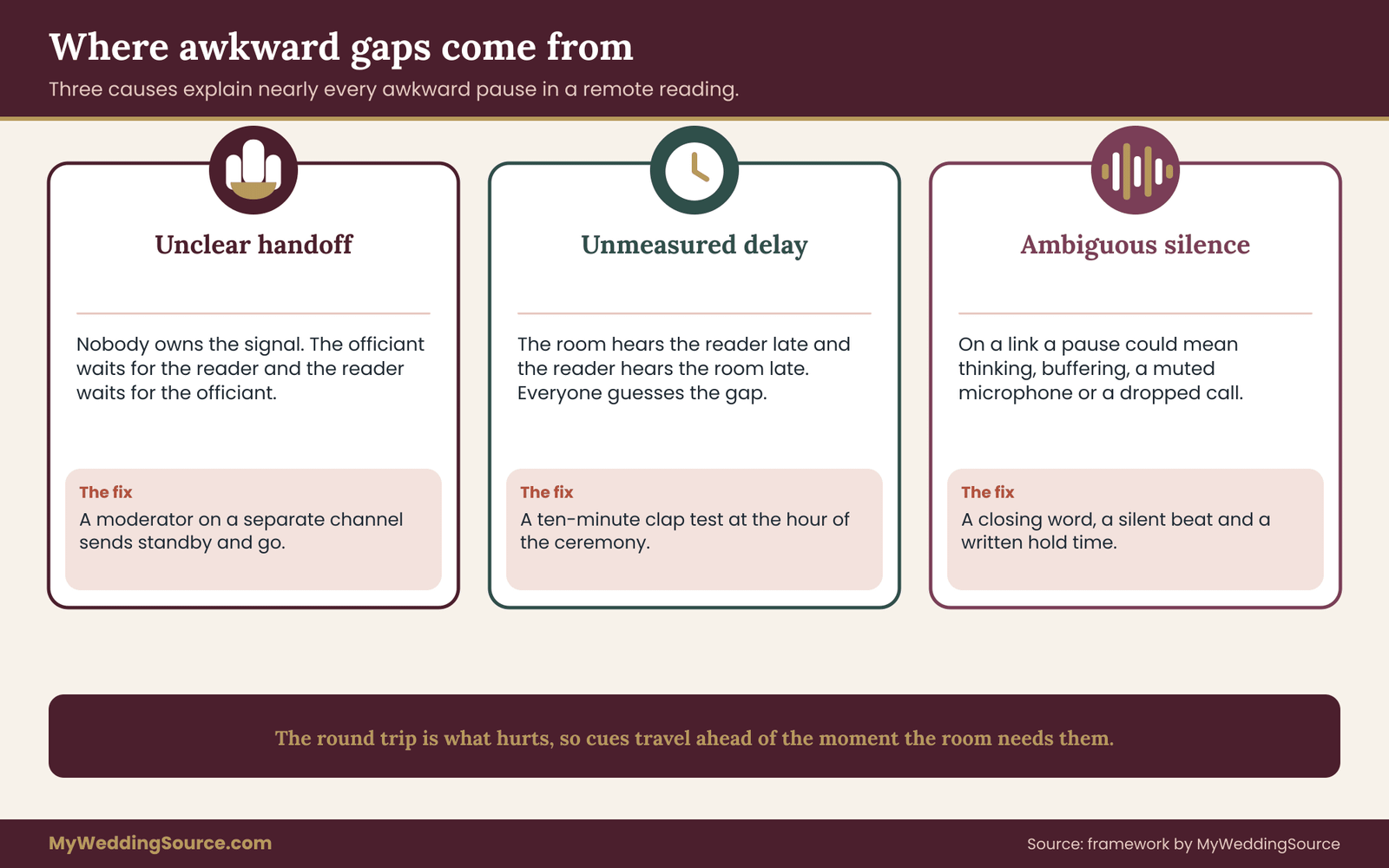
Awkward moments around remote readings almost always trace back to one of three causes.
Unclear handoffs. Nobody knows who gives the signal. The officiant looks at the screen, the reader looks at the officiant’s face on a small window, and each waits for the other. This is a cueing problem, and a written cue sheet solves it.
Unmeasured delay. The room hears the reader a beat or two late, and the reader hears the room a beat or two late. If the team has never measured that gap, everyone guesses, and guesses differ. A short test in rehearsal replaces the guessing with a number.
Ambiguous silence. In a room, a pause means the speaker is thinking. On a link, a pause might mean thinking, buffering, a muted microphone or a dropped connection. The room cannot tell which, so the pause feels longer than it is. A fixed closing word and a pre-agreed hold time turn ambiguous silence into a known quantity.
What this approach does not try to do
This guide does not promise a perfect link. Home internet, venue wireless and mobile coverage all vary, and no cue sheet can repair a connection that keeps dropping. What it does is make sure that when something goes wrong, the people in the room already know the next step, and the guests see a smooth ceremony rather than a technical scramble. That is why failure conditions get their own section near the end. Write the answer on the sheet so it is settled before the day for all remote wedding readings.
The delay budget: where the seconds hide in remote wedding readings
Before building any cue sheet, it helps to understand where the waiting comes from. You do not need an engineering background. You only need to know that the gap is the sum of several small parts, that you control some of them, and that you can measure the total in about ten minutes.
Think of one spoken word traveling from the reader to the guests. It is captured by the reader’s microphone, compressed by the reader’s device, sent across the reader’s home network and the internet, received by the platform’s servers, forwarded to the venue’s computer, decoded, played through the room speakers, and then it travels through the air to a guest’s ear. The picture follows a similar path, and picture and sound do not always arrive at the same time. It is a small step, and it protects the remote wedding readings that matter most to you.
Each hop is small. Together they produce what people experience as lag. The International Telecommunication Union, the standards body for telecommunications, has long treated roughly one hundred fifty milliseconds of one-way delay as comfortable for voice conversation, and it describes noticeably worse interaction as delay grows beyond that. Video calls between people on ordinary home connections often exceed that comfortable range for brief periods, which is why conversation on a call feels slightly stilted. Check the ITU for the current wording of its recommendation rather than relying on this summary.
The round trip is what hurts
The important point for ceremonies is that the awkward gap is not the one-way delay. It is the round trip. When the officiant says “please welcome Aunt Lena” and then waits for her to begin, the officiant’s words travel to the reader, the reader reacts, and the reader’s voice travels back.
Both legs of the delay, plus the human reaction time, happen before the room hears anything. Even a modest one-way delay can become a visible pause in the room once a person has to hear a cue and respond to it. Treat this as a standing rule for remote wedding readings.
This is why the standard instinct, which is to introduce the reader and wait for them to start, is the wrong tool. It places the whole round trip inside the silence that the guests watch. The cue sheet below replaces that instinct with cues that travel ahead of time on a separate channel, so the reader is ready before the room needs them.
The parts you can control
Of all the pieces in the chain, a few are in your hands.
The reader’s connection matters most. A reader on a wired network connection, or at least close to the router with nothing else streaming in the house, will add far less delay than a reader on a phone in a crowded building. Ask them to close other apps, and to ask people in their home to avoid large downloads during the reading. Planning remote wedding readings this way leaves fewer surprises for the day itself.
The venue’s connection matters second. If you are using the venue’s wireless network for the video call, find out whether it is shared with other events, whether it is limited, and whether a wired port exists near the screen. A separate guide on this site covers venue technical walkthroughs, including how to ask about network and power before you commit to a ceremony location.
The platform settings matter third. Video platforms offer options such as turning off unnecessary video effects, choosing a lower picture resolution and controlling how audio is processed. Settings names and locations change over time, so use the platform’s own help pages, such as those published by Zoom, Google Meet and Microsoft Teams, for the current steps. This article deliberately does not describe button locations because they change. Check it again before the day, because remote wedding readings depend on small details.
Measuring your own delay in ten minutes
You can measure the gap without special equipment. Set up the same devices, rooms and network you will use on the day. Put the moderator in the ceremony space with the room microphone and speakers on, and put the reader at their real location.
The moderator claps once near the room microphone while holding a stopwatch, and starts timing at the clap. The reader says “heard” the moment they hear the clap through the call. The moderator stops timing when the word “heard” comes out of the room speakers. The number on the stopwatch is the round trip, including the reader’s reaction time. Run it five or six times and write down the longest result, not the average.
Half of the round trip is a reasonable estimate of the one-way delay. Reaction time inflates the figure slightly, which errs on the safe side. You will use both numbers on the cue sheet: the round trip tells you how long the room would wait if you used a spoken handoff, and the one-way estimate tells you how far ahead of the moment the cue must go out. The same habit helps with any remote wedding readings added later.
Do not publish these numbers or compare them with someone else’s. They are specific to your devices, your rooms and the hour of the test. The point is not the number itself. The point is that your team stops arguing about whether the delay is “small” and starts planning around a measured value. Test again at the same hour the ceremony will take place, because networks are often busier in the evening.
The moderated cue and timing sheet for remote wedding readings
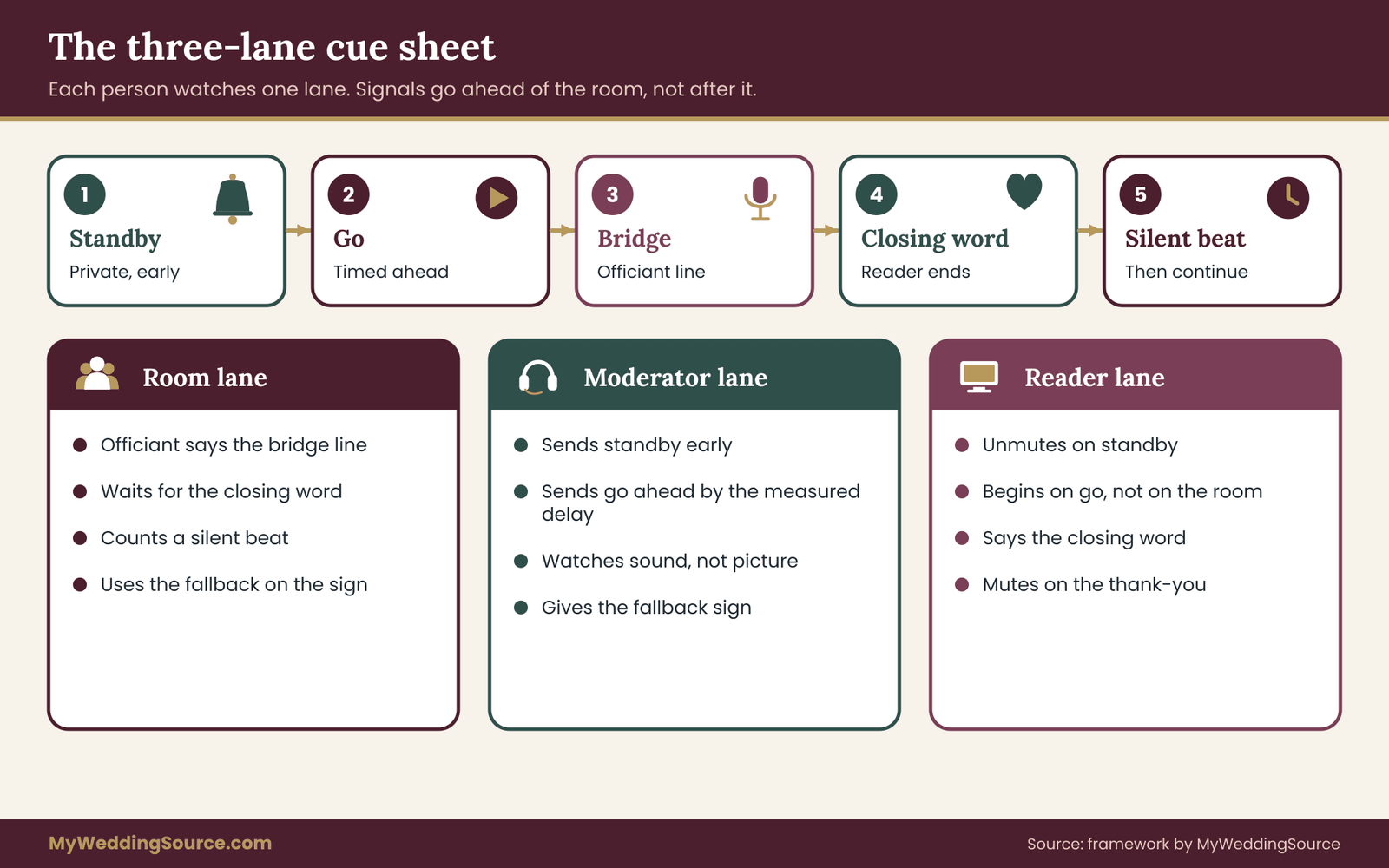
The core of this guide is a sheet that you fill in once, rehearse twice and hand to four people. It has three lanes, one for the room, one for the moderator and one for the reader, and it runs along a line of numbered cues. Everything else in the article supports this sheet. That is the core habit behind calm remote wedding readings.
The three lanes of the remote wedding readings sheet
The room lane belongs to the people physically present: the officiant, the couple and anyone operating the room’s screen and sound. The moderator lane belongs to one person whose only job is to manage the link. The reader lane belongs to the remote reader and whoever sits beside them at their location.
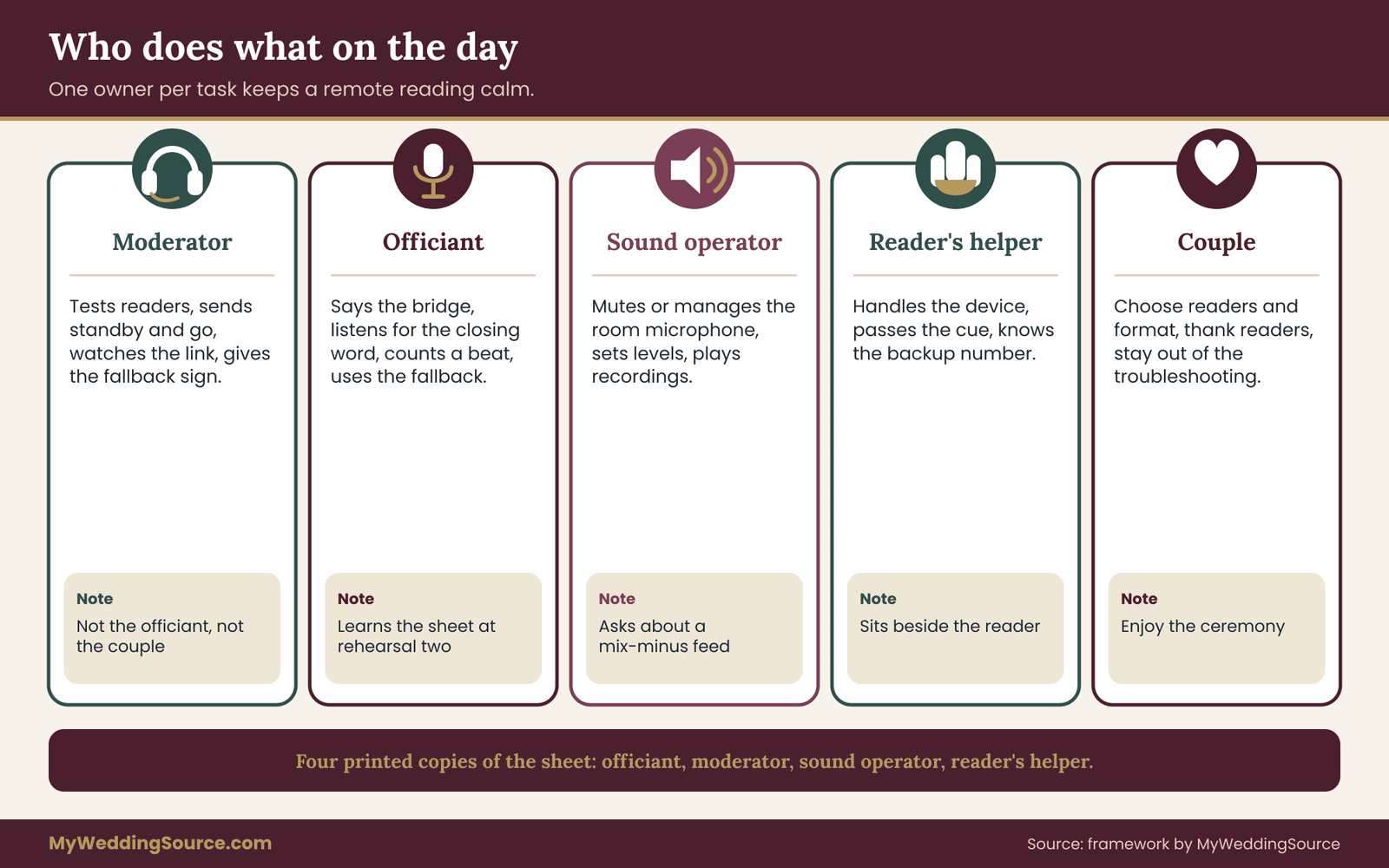
The moderator is the person who makes remote wedding readings calm. This person is not the officiant, not a member of the couple and not the audio vendor who is busy with the whole room. They sit near the screen with a headset or a quiet earpiece, a copy of the sheet and a stopwatch, and they speak to the reader on a channel the guests cannot hear. A trusted friend who is comfortable with technology works well. A paid operator works too.
The lanes matter because each person only needs to watch their own column. The officiant does not have to read the reader’s face. The reader does not have to interpret the officiant’s body language. The moderator is the one who sees both screens and decides when things go. Keep the note short, since remote wedding readings reward plain wording.
The columns of the sheet
Each cue on the sheet has the same seven fields, written out on one line or one card.
First, the cue number and name, such as “Cue 3, second reading, Aunt Lena.” Second, the room trigger, which is the exact event in the room that starts the countdown, such as “the officiant finishes the welcome” or “the music reaches the last line.” Third, the moderator action and timing, which says what the moderator does and when, measured from the trigger.
Fourth, the reader action, which says what the reader does on each cue. Fifth, the officiant bridge, which is the short line the officiant says while the link settles. Sixth, the closing word, which is the fixed phrase that ends the reading. Seventh, the hold time and fallback trigger, which says how long the room waits and what happens if the reading does not arrive.
That is the whole sheet. It fits on one page for a ceremony with two or three readers. The rest of this section explains each field and gives example wording.
Cue timing for remote wedding readings: standby, go and bridge
Every reading uses three signals in order. They are simple, and they are the answer to the round-trip problem.
Standby. Well before the reading, the moderator tells the reader privately that the reading is next. This message travels on a separate channel, such as a private chat window or a phone call between the moderator and the reader’s helper, and it goes out early enough to arrive long before the reader needs to act.
The reader’s response is small: they confirm they are ready, check their notes and unmute only when told. A good standby leaves several minutes of margin, not seconds. You can send it at the start of the previous reading or at the start of the ceremony segment before it.
Go. The go cue is the signal to begin. The moderator sends it ahead of the moment the room needs the reader to start, by the measured one-way delay plus a small margin. If the rehearsal showed that the room hears the reader about two seconds after the reader speaks, the moderator sends “go” about two seconds before the officiant finishes the bridge. The reader begins on “go,” not on anything they hear from the room. The trick is that “go” is a timed command, not a reaction to what the reader sees.
Bridge. The bridge is the line the officiant says while the delay clears. It is a short sentence with a clear ending, such as “Our next reading comes to us from across the ocean,” followed by a pause of a few seconds. The bridge gives the room something to listen to while the reader’s first words travel. The officiant does not say the reader’s name as a question and does not ask “can you hear us?” Those lines invite a round-trip reply, which is exactly what the sheet is designed to avoid.
Why the reader never waits for the room
It is natural for a reader to wait until they hear the officiant finish. On a link that is a poor rule, because what the reader hears is already late. If the reader waits for the officiant’s last word to arrive in their ear, and the officiant’s words took the one-way delay to reach them, and the reader’s words will take the one-way delay to come back, the silence in the room equals the full round trip plus reaction time.
When the reader starts on the moderator’s “go,” the reader’s first words arrive in the room only a moment after the officiant’s bridge ends. The wait has been paid in advance, out of sight. The guests see a smooth transition. The officiant does not have to do anything clever. The sheet does the work. Ask the same question for each of your remote wedding readings.
The closing word in remote wedding readings
The room cannot reliably tell when a reading ends over a link. A reader who finishes a poem and then looks up may be mistaken for a frozen picture, and the officiant may hesitate, or may speak too soon over the last line.
The fix is a closing word that the reader says at the end of the reading and that nobody says by accident. It can be something natural, such as “With all our love,” “Amen,” “Thank you,” or the couple’s names. It should be the same for every reader, or fixed per reader and written on the sheet. The officiant listens for the closing word, counts a silent beat and continues with the next line of the ceremony.
The reason for a silent beat is that the officiant also hears the closing word late. The beat leaves room for the reader’s last syllable and for any applause or reaction the room may want to give. If the reader is expected to say nothing after the reading, the closing word may be a visible gesture, such as placing a hand on the heart, but spoken words are easier to detect through sound alone, and the sound crew can use them. It costs little, and it is easy to forget until the remote wedding readings are underway.
Hold time and the fallback trigger
Every cue has a hold time, which is the longest the room will wait for the reading to begin after the go cue. A reasonable hold time is the measured delay plus a generous cushion, set by the officiant and the moderator together. Choose it in rehearsal, not on the day.
If the hold time passes and the reader has not begun, the moderator signals the officiant with a discreet agreed sign, such as a raised hand at a spot only the officiant sees, or a note on a card.
The officiant then triggers the fallback named on the sheet, which might be playing a recorded version of the reading, reading the passage themselves from a printed copy, or moving to the next element and returning to the reader later. The guests never see an argument. They hear the officiant calmly say a short line and the ceremony continues. Put it in writing for everyone who handles the remote wedding readings.
The following is a model for how each cue could be written, with every field filled in. It is a template, not a script for your ceremony. Change every number and phrase to match your own measurements.
Cue 2. Second reading, Aunt Lena. Room trigger: first reading ends and the music cue finishes. Moderator: send standby at the start of the first reading; send go at the officiant’s second-last sentence of the bridge. Reader: unmute on standby, begin on go, say “With all our love” to finish. Bridge: “Our next reading comes to us from across the ocean.” Closing word: “With all our love.” Hold time: set in rehearsal. Fallback: officiant reads the printed copy.
Keep the fallback and hold time on the sheet even when you are confident. They do not take space, and they are the reason the officiant can remain calm.
Who holds the sheet
Four people each need a printed copy: the officiant, the moderator, the audio operator for the room and the person who sits beside the reader. Give the reader a simplified version that includes only their own cue, their standby behavior, the closing word and what to do if the link drops. Readers do not need to see the full ceremony order, and a long sheet can make them nervous.
Print the sheet. A paper copy does not freeze, does not need power and can be passed around. If you want to share a digital version as well, store it somewhere everyone can open without logging in, and make sure the printed copy is the one people follow on the day. Revisit it after each rehearsal of the remote wedding readings.
Two special cues: the opening of the call and the end of the call
Two moments sit outside the readings but belong on the sheet.
The opening cue covers when the reader joins, when they are first seen and heard, and when they are muted. A reader who joins fifteen minutes before the ceremony can be tested and then muted, so that their side noise does not reach the room. The moderator checks them one last time before the processional.
The release cue covers the end of the reader’s involvement. After the reading, the reader remains on the link as a guest, and may stay muted, or may leave. Decide this in advance. A reader who waits unmuted through the rest of the ceremony can cause feedback or interrupt vows with household noise. A polite message from the moderator after the reading, such as “Thank you, please stay muted and enjoy the ceremony,” keeps things clean. Small choices like this decide how the remote wedding readings feel to guests.
Adding responses and group moments
Some ceremonies include a call and response, where a reader or family member says something and the room answers. A group reading, a shared blessing or a spoken response to a question are all harder than a solo reading, because the response has to travel the whole round trip in real time.
For those moments, avoid asking for a live response across the link. Instead, treat the remote person as a reader and keep the response in the room. The reader gives the blessing, says the closing word, and the room answers after the officiant’s beat. The reader hears the room’s response a moment late, but they do not need to react to it. This applies to every one of your remote wedding readings, not only the first.
Choosing who reads remotely, and what they read
Before the sheet can be rehearsed, the couple needs to choose readers and passages with the link in mind. Some people and some texts suit a screen better than others, and picking well removes half the risks.
Matching the reader to the link in remote wedding readings
A remote reading asks a person to do four things at once: read aloud, look at a camera, manage their own device and stay calm while a room full of people watches a screen of their face. Some people thrive in that situation. Others find it tiring, particularly older relatives who do not use video often.
Ask the reader how they feel about the idea before you assign anything. A direct, kind question works: “Would you like to read live, or would you rather record it so you can do it again if it goes wrong?” Offering both gives the reader a choice and often reveals a preference they would not have volunteered.
Some will say they want to see the couple’s faces at the moment, and that answer settles it. Others will quietly say they would like a second take, and that answer settles it differently. Write the answer on the sheet so it is settled before the day for all remote wedding readings.
Consider also the reader’s environment. Someone who lives in a shared apartment with a thin wall, or travels on the day, may not have a quiet place with steady internet. If the person is in a hospital, a care home or a hotel, ask what the network is like, and ask whether staff can help them set up. A reader who must borrow a tablet from a nurse may be better served by a recording made earlier, when conditions are calmer.
Matching the passage to the format
The length and style of the passage change how the link behaves.
Short readings, about a minute or less, are easiest. There is less time for a connection to wobble, less to remember and less for the room to endure if something goes wrong. A reading that runs several minutes raises the chance of a freeze in the middle and makes any fallback more awkward. It is a small step, and it protects the remote wedding readings that matter most to you.
Plain, steady text works better than text with long dramatic pauses. A poem with deliberate silences can be mistaken for a dropped connection. If the passage includes pauses, tell the room by letting the officiant or the program note say so, or choose another passage.
Text in another language raises the stakes on audio clarity, because guests who rely on translation cannot lean on the picture to fill in what they miss. If the passage is in a language that part of the room does not speak, plan for a printed translation in the program and decide with the officiant where translated moments sit in the ceremony.
Passages from copyrighted works carry another question: whether you have permission to read, display or record them. The U.S. Copyright Office, at copyright.gov, publishes general information about copyright and fair use. Poems that are still protected may need permission before they are shown on a screen or recorded in a video.
A short spoken reading at a private ceremony is a different situation from a recorded, shared video, and the answers can differ, so check the Copyright Office’s guidance and ask the rights holder or publisher if you plan to distribute the recording. Many couples avoid the question by choosing public-domain texts, original writing or a passage in the reader’s own words. Treat this as a standing rule for remote wedding readings.
Giving the reader the text in a form they can use
Send the reading in a single file well before the date. Use a large, plain font and generous spacing. Number the pages if there is more than one, and put the closing word in bold at the end. Ask the reader to print it, because looking down at a paper is more natural than scrolling a screen that may drift out of the camera’s view.
Ask the reader to practice reading it aloud at a steady, slightly slower pace than they would use in conversation. Delay and room echo make quick speech hard to follow, and a slower pace helps the room hear every word. A pace that feels a little too slow to the reader usually sounds right in the room. Planning remote wedding readings this way leaves fewer surprises for the day itself.
If the reader’s text includes names, dates or words that are hard to pronounce, include a short pronunciation note. A reader who stumbles on a name will tense up and may lose their place.
Live, recorded, hybrid or proxy: choosing the format
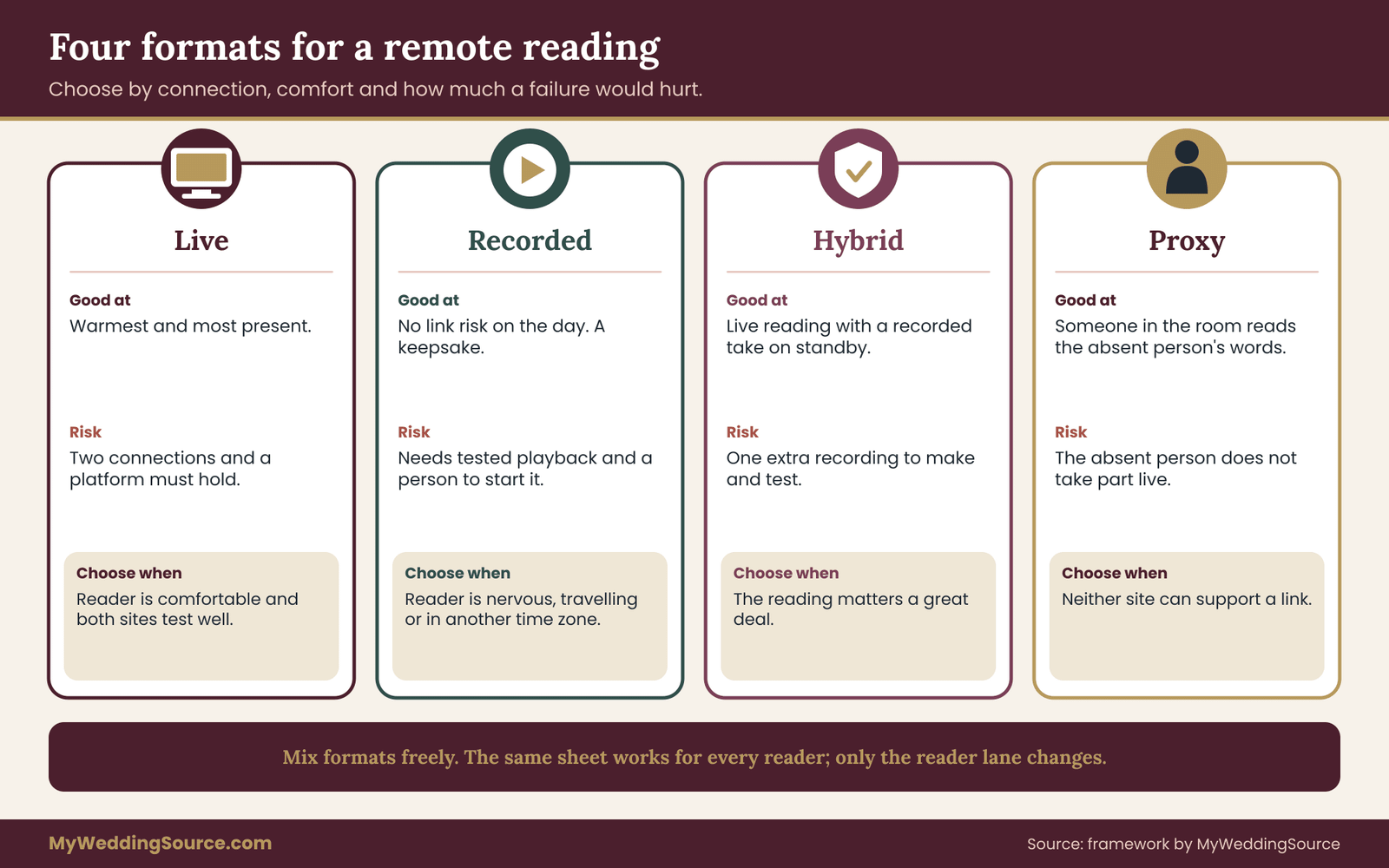
Not every reading needs to be live. The best format depends on connection quality, on the reader’s comfort and on how much risk the couple will accept. Here are the four formats, what each is good at, and when it fails.
Live remote wedding readings
A live reading is the warmest and the riskiest. The reader sees the ceremony as it happens, the couple can see them, and the moment is shared. It depends on the reader’s connection, the venue’s connection and the platform. It benefits most from the cue sheet above, and it needs a backup.
Choose it when the reader is comfortable with video, has a reliable connection, and the venue can support a stable link at the ceremony location. Skip it when the venue’s network is unknown, when the reader’s location is unreliable or when the reading is long and important enough that a freeze would hurt. Check it again before the day, because remote wedding readings depend on small details.
Recorded remote wedding readings
A recorded reading is made ahead of time, by the reader, and played at the right moment from a laptop or a phone connected to the room’s sound. It removes the link risk during the ceremony. It adds a different risk: the file must be tested with the room’s equipment, the playback must be cued by a person and the reader’s quality must be acceptable the first time, or retaken.
Recorded readings suit readers who are nervous, in an unreliable place, or in a different time zone where the hour of the ceremony is the middle of the night. They also give the couple a keepsake. They lose the feeling of presence, which can be partly restored by having the reader record a short, personal greeting at the start, spoken directly to the couple. The same habit helps with any remote wedding readings added later.
Plan the playback. A person, usually the moderator or the audio operator, starts the file on a cue from the officiant. The file should begin with about two seconds of silence, so the start is clean, and should end with the closing word. Test it on the room speakers, since quiet files can be too soft in a large room and loud files can distort.
Hybrid remote wedding readings
A hybrid reading combines the two. The reader attends live and reads live, and a recorded version of the same reading waits on standby on the moderator’s laptop. If the live link fails, the moderator plays the recording, and the officiant continues without a break. If the live link works, the recording is never used. That is the core habit behind calm remote wedding readings.
Hybrid is the most dependable choice for important readings, and it costs only one extra step: the reader records a take before the wedding. Most readers are happy to do so, because it also gives them a rehearsal. The recording should be of the same reading, in the same clothes and setting if possible, so the switch to the recording does not look like a different person. Tell the reader in advance that the recording exists, and that its use is no reflection on them.
Proxy remote wedding readings
In a proxy reading, someone in the room reads the absent person’s words, sometimes with a photo on the screen, sometimes with a short recording of the absent person saying a line or two. It removes all link risk. It gives the guests a familiar voice in the room, and it can be quietly moving, especially if the proxy is a relative who looks and sounds like the absent person. Keep the note short, since remote wedding readings reward plain wording.
The tradeoff is that the absent person does not participate in real time. Some readers feel left out. Others feel relieved. Ask them honestly, and do not present the proxy as the fallback they have already accepted.
A decision rule for choosing the format
If you are unsure which format fits, answer three questions in order.
First, can the reader’s location support a steady connection, and has it passed a test at the same hour as the ceremony? If the answer is no, choose recorded or proxy.
Second, can the ceremony location support a steady connection, preferably wired, with someone responsible for it? If the answer is no, choose recorded or proxy, and tell the reader why, so they do not feel they failed a test.
Third, how much would the couple mind if the reading failed in the moment? If the answer is “a great deal,” choose hybrid, with a recorded take on standby. If the answer is “we would manage,” choose live with a fallback of the officiant reading the printed text.
You can make a different choice for each reader. A couple might have one live reader, one recorded reader and one proxy reader in the same ceremony. The cue sheet handles all three; only the reader lane changes.
Mixing formats without confusing the room
When formats mix, the officiant’s bridge lines should be neutral. A line like “Our next reading comes from across the ocean” works for a live reader and for a recording. The room does not need to know which it is. If the format switches to the fallback mid-ceremony, the officiant says nothing about technology, and the transition feels like the plan. Ask the same question for each of your remote wedding readings.
A courtesy to guests: if a reading is recorded, a short note in the printed program, such as “Recorded by Aunt Lena in Lisbon,” prevents disappointment and invites guests to appreciate the effort. A note that says “Reading by video” can set the right expectation for a live reader. These notes also tell the guests where to look.
The reader’s choice and the couple’s comfort
Sometimes the reader prefers live and the couple would prefer a recording, or the other way around. A conversation usually resolves it. The couple can explain that the sheet and the recording are designed to protect the reader from a bad moment, not to replace them. The reader can explain what matters to them. Neither needs to win. If the reader insists on live, hybrid gives both of them what they need. It costs little, and it is easy to forget until the remote wedding readings are underway.
Setting up the room, the reader and the sound for remote wedding readings
Once the format is chosen, the technical setup becomes a series of small decisions. None are difficult, but each one affects whether the delay on the sheet is the delay you measured.
The room: screen, camera and sightline
Place the screen where the reader’s face is visible to the couple, the officiant and the guests, ideally near the officiant’s position and at a height that does not block anyone else. Guests in the back rows should be able to see the reader’s face on a screen that is large enough for the room. A small laptop screen on a table is not enough for a hundred guests.
A camera on the ceremony space lets the reader see the couple. The camera should face the couple and the officiant, not the guests, and it should stay still. The reader needs to see the faces and reactions; they do not need a moving feed. If the ceremony is being streamed for other guests as well, this camera may be the same as the stream camera, and the guide to stream consent and photography covers how to tell guests that cameras are in use.
Think about the reader’s eye line. If the reader sees the couple on a screen but the camera that captures the reader is a few inches off, the reader appears to look away. Ask the reader to look at the camera lens when reading, and to glance at the screen only at the beginning and end. A strip of tape or a small sticker near the lens helps them remember. Put it in writing for everyone who handles the remote wedding readings.
Sound without feedback in remote wedding readings
Sound is where most live readings fail quietly. Two problems account for most of it: echo and feedback.
Echo happens when the reader hears their own voice come back after a delay. It occurs when the room’s speakers play the reader’s voice, the room’s microphone picks it up and the platform sends it back to the reader. The reader hears themselves a second or so later, which is deeply distracting, and many people stumble or stop. Feedback is the shriek that happens when a speaker’s output re-enters a microphone in a loop.
Both have the same cure: keep the sound that comes from the reader out of the microphone that goes to the reader. In practice, there are three ways to do it, in rising order of effort.
The simplest is to mute the room microphone that feeds the link whenever the reader is speaking. The reader still hears the officiant before and after, but not during. The moderator can make this a step on the sheet. It works when the room microphone is only there for the link and not for a live stream of the whole ceremony. Revisit it after each rehearsal of the remote wedding readings.
The second is to place the link’s microphone and the room speakers so that the speakers face away from the microphone and the distance between them is large. A cardioid or directional microphone near the officiant, pointing away from the speakers, helps. This is a job for the audio operator or the venue’s sound technician.
The third is a feature on a mixing board often called a mix-minus, which sends the reader a version of the room sound without their own voice in it. If your audio vendor offers it, ask for it by name. Do not try to set it up yourself on the day. Mention it in your conversation with the vendor, and confirm it in rehearsal. Small choices like this decide how the remote wedding readings feel to guests.
If none of those is available, give the reader headphones and ask them to keep the volume low. Headphones keep the reader’s speakers from feeding their own microphone, and they reduce echo on their end.
The reader’s kit
Readers do better when the setup is easy. A one-page kit sent a week ahead can cover most of it.
Ask them to use a laptop or a tablet on a stand rather than a phone held in the hand. A device that sits still looks calmer and avoids shaky video. Ask them to place the camera at eye level, which may mean propping a laptop on a stack of books. Ask for a light source in front of them, such as a window or a lamp, rather than behind them, because backlight turns a face into a silhouette.
Ask them to choose a quiet room, close the door, silence phone notifications and tell the household not to run noisy appliances. Ask them to plug in their device so that the battery does not die in the middle of the reading, and to restart it the evening before so that updates do not appear on the day. This applies to every one of your remote wedding readings, not only the first.
Ask them to use a wired headset or earbuds with a microphone if available. A close microphone makes the voice clearer and reduces room echo on their end, and it is usually a bigger improvement than a better camera.
Ask them to use the same platform account on the same device they tested. A new device on the day is a common source of problems, such as permission prompts for the camera and microphone.
Provide a backup phone number for the moderator, and a second person on the reader’s side if possible, who can help with technical problems and who knows how to reach the moderator.
The reader’s backdrop and appearance
The reader does not need a special background, but a few choices help the guests. A plain, tidy wall or a bookshelf is fine. Avoid virtual backgrounds, which can make a person’s outline flicker and can distort their face if the connection slows. Avoid very bright windows behind them.
Ask them to dress as they would for the wedding if that feels natural. Some readers enjoy dressing up, and it adds to the sense of occasion. Others prefer comfort, and that is fine. The couple can tell them either is welcome.
The venue’s connection and remote wedding readings
A video link needs a steady connection at the ceremony site. The first question is whether the venue has a connection at all. Outdoor sites, rural venues, historic buildings and some tents have weak or no coverage. The next question is whether the connection is shared with guests, vendors and other events. A venue that offers guest wireless may be fine for browsing but poor for a live video call when everyone is posting photos. Write the answer on the sheet so it is settled before the day for all remote wedding readings.
Ask the venue three direct questions. What kind of connection do you have at the ceremony spot? Can we use a wired port, or a dedicated network, for the link? Who can help us on the day if it fails? The answers go on the sheet. If the answers are vague, plan for a recorded or hybrid format. The related guide on digital contingency planning for the wedding day covers what to do when the venue’s network and your phone coverage both disappoint.
If the venue has no reliable connection, a mobile hotspot from a phone with good coverage may help, but test it at the ceremony spot, at the hour of the ceremony, with the whole guest list present if you can. Crowds can reduce mobile capacity at an event. It is a small step, and it protects the remote wedding readings that matter most to you.
Power, cables and a second device
Put every device that matters on power, and run a cable to it before guests arrive. Cover cables where people walk. Bring a spare charger and an extension cord. If the link depends on a single laptop, bring a second device logged into the same account and ready to take over, with the platform’s camera and microphone already permitted. Keep it muted and off to the side. The moderator should know exactly where it is and how to switch.
A second device also protects against something people rarely plan for: an update or restart. A laptop that decides to install an update at the wrong time is a more common failure than a camera that breaks.
Video settings that help the sheet
A few platform choices make life easier. Name the moderator’s device clearly on the call, for example “Moderator” and not the name of the room’s laptop, so that nobody confuses it with a guest. Put the reader’s tile in a fixed place, using the platform’s feature to pin or spotlight a person, so that the screen at the ceremony shows the reader and nothing else. Disable the feature that rearranges the screen based on who is speaking, which can jump to a guest who coughs. Treat this as a standing rule for remote wedding readings.
Set guests, if any are on the same link, to join muted. If the remote readers are on a larger call with other remote guests, who are watching the ceremony, consider using a separate link for the readers, so that the readers’ call is small and controlled, and the guest stream is a different feed. This keeps the readers away from guest chatter, accidental unmuting and notifications. The couple’s guide to a private watch link covers the guest side; this article only deals with the reader side.
Check the platform’s current help pages for the steps. Menu names and locations change often. Zoom, Google Meet and Microsoft Teams each maintain support sites with instructions for pinning, muting and managing participants.
Captions and accessibility for remote wedding readings
Some guests may need captions to follow the readings, and some remote readers may be hard to hear in a large room. Live captions, which most major platforms offer in some form, can help, but they are not always accurate, and the quality varies with accents, names and audio quality. Check what the platform offers and test the captions in rehearsal. Planning remote wedding readings this way leaves fewer surprises for the day itself.
If a guest is deaf or hard of hearing, ask them what works for them. Some prefer captions on a screen, some prefer a printed copy of the readings in the program, and some use assistive listening devices at the venue. A printed copy of each reading in the program takes little effort and serves many guests.
The W3C Web Accessibility Initiative and the U.S. Department of Justice’s ADA site publish general guidance on captions and effective communication; the Sources section lists them. Rules that apply to a private event differ from those that apply to public services, so treat these as guidance for good practice and ask the venue about its own accommodations.
Lighting the screen end of the room
The screen needs to be readable. A screen facing a bright window or a spotlight washes out. Ask the venue or lighting vendor to keep the area around the screen dim enough that the picture is visible, while still lighting the officiant and the couple. If the ceremony is outdoors in daylight, a small monitor is hard to see, and a larger screen with a shade, or a speaker-only recording with a printed photo, may suit better. Check it again before the day, because remote wedding readings depend on small details.
Rehearsing remote wedding readings: two runs and a clock
A cue sheet that has not been tried aloud is a draft. The rehearsal turns the draft into a plan, finds the places where it breaks, and gives the reader practice. Two runs are enough for most weddings, and a third is useful for ceremonies with several remote readers.
Run one: the technical check
Hold the first run at least a week before the wedding, at a time when you can make changes. The people who must be there are the moderator, the reader and the audio operator or whoever manages the room’s sound. The officiant is welcome but not required for this run.
The purpose is to measure the delay, check the sound and test the reader’s setup. Work through these steps in order.
Measure the round trip with the clap test described earlier, five or six times, and write down the longest result. Check the reader’s picture and sound, including how they look in the room’s screen and how they sound in the speakers.
Test the echo by having the moderator speak in the room while the reader listens, and by having the reader speak while the room’s microphone is live and muted in turn. Test the phone fallback by having the reader hang up and call the moderator’s backup number, or by switching to a second device. The same habit helps with any remote wedding readings added later.
Then fix what you found. Move a camera, move a microphone, change a setting, change the network, change the reader’s location. Run the clap test again after any change and update the numbers on the sheet.
Run two: the full cue run for remote wedding readings
Hold the second run closer to the date, ideally within a few days, with the officiant present. Use the real sheet and the real wording. The goal is to hear how the cues sound, to adjust the bridge lines, and to let the officiant practice waiting for the closing word.
Walk through each reading from the room trigger to the officiant’s next line, with the reader in place. The moderator sends standby and go on their real channel. The reader unmutes on standby and begins on go. The officiant delivers the bridge and listens for the closing word.
A person with a stopwatch times the gap between the end of the bridge and the start of the reader’s voice in the room. If the gap is awkward, shift the go cue earlier. If the reader starts before the bridge ends, shift it later. That is the core habit behind calm remote wedding readings.
Then rehearse one failure. Ask the reader to freeze, or ask the moderator to mute them, and watch what happens. The officiant should see the agreed sign, say the fallback line and move on. A rehearsal of failure is the single most useful part of the day, because the first time a team handles a failure should not be in front of guests.

The clock on the day
On the wedding day, the moderator starts the clock earlier than anyone expects. About an hour before the ceremony, the reader joins and runs a short check on sound and picture. About twenty minutes before, the moderator confirms the reader is on the call with the right settings and the reader is muted. About ten minutes before, the sound operator confirms the room is ready. About five minutes before, the officiant and moderator exchange a nod or a thumbs up. The sheet goes on the moderator’s lap. Keep the note short, since remote wedding readings reward plain wording.
If any step shows trouble, the moderator has time to switch to the backup. The worst moment to find a problem is the moment the reader is meant to start. The second-worst is thirty seconds earlier. The clock above moves most discoveries to a time when the couple is not yet at the aisle.
The moderator: the role that makes remote wedding readings calm
A moderator is the single most useful addition to a ceremony with remote participants, and the easiest to overlook. Couples tend to assume the officiant will manage the screen, or that the photographer or the audio vendor will. Each of those people has a full-time job already. Handing them one more task usually means that task is done late. Ask the same question for each of your remote wedding readings.
What the moderator does, and does not do
The moderator has five duties. They greet and test each remote reader before the ceremony. They send the standby and go cues on the sheet. They watch the reader’s connection and decide when to trigger the fallback. They manage the room’s microphone and screen settings for the link, or work with the person who does. And they make a quick, quiet call to the reader after the reading to say thank you and to confirm the reader should stay muted or leave.
The moderator does not give the guests instructions, does not speak during the ceremony and does not need to be visible. They sit where they can see the screen and the officiant, and where the officiant can see them. A seat at the side of the ceremony space, near a wall, works well. It costs little, and it is easy to forget until the remote wedding readings are underway.
Choose someone who stays calm when the unexpected happens, who is organized and who is not a significant member of the wedding party. A bridesmaid who has to walk down the aisle cannot also run the link. A couple’s friend who works with video calls, a cousin who is comfortable with devices or a paid operator are good choices. If the venue’s audio technician is willing and has time, they can take the role, but confirm the role in writing, so that it is not forgotten when the room gets busy.
The moderator’s tools
Keep the kit small. A printed sheet, a stopwatch or a phone timer, a headset or earbud connected to a device on a private channel with the reader’s helper, a second device on standby, a charger and a card with the backup phone numbers. A pen is helpful for marking times on the sheet. Put it in writing for everyone who handles the remote wedding readings.
If the moderator uses a headset, they should keep one ear free for the room. A headset that covers both ears makes them miss the officiant’s signal. A single earbud works better.
The private channel for remote wedding readings
The standby and go cues need a way to reach the reader that the guests do not hear. There are three common choices.
A private text or chat message to the reader’s helper is simple. The helper sits beside the reader and shows them a card or nods. The reader does not need to read anything on screen during the reading, which keeps their eyes on the camera. The drawback is that messages can arrive late or be missed.
A separate phone call between the moderator and the reader’s helper, with the helper on speaker low or in an earpiece, is more direct. The moderator can say “standby” and “go” quietly. The drawback is that another audio source in the reader’s room may leak into the call, so the helper should use an earpiece. Revisit it after each rehearsal of the remote wedding readings.
A visual signal is also possible. The helper holds up a hand or a card on the moderator’s cue. This works when the helper and moderator are on the same call, since the moderator can see the helper at all times. It is silent and clear.
Whichever you choose, rehearse it. The channel should be one that the reader’s helper can use without looking at a screen for too long. Do not use the main call’s chat for private messages unless you are sure the settings keep it private; some platforms show chat to everyone or save it to a transcript. Check the platform’s help pages for how chat visibility works. Small choices like this decide how the remote wedding readings feel to guests.
Scripts for the moderator and the officiant
Wording matters because it sets the tone. These examples are starting points. Adjust them to your voices.
For the moderator to the reader, at standby: “Standby for the second reading. Please unmute and look at the camera. I will say go.” At go: “Go.” After the closing word: “Thank you. Please mute and stay on to watch.”
For the officiant, the bridge line, spoken calmly with a clear ending: “Our next reading comes to us from across the ocean, from Maya’s grandmother.” Then a short pause for the delay. After the closing word, a beat, then: “Thank you.” Then the next ceremony line.
For the officiant, if the fallback is triggered: “We have a copy of this reading, and I would like to share it on her behalf.” No mention of technology, no apology, no explanation. The room accepts what it is told.
For the reader’s helper: “Thirty seconds to go. Remember the closing word. Look at the little green light.” Whatever works for the reader, in their own words.
Moderating more than one reader
If there are two or three remote readers, ask whether they can join the same call, or use separate calls. The same call is easier for the moderator, because there is one place to manage. A separate call for each reader is easier for the readers, since they hear and see only what they need, but adds work for the moderator and the room.
When there is more than one reader, keep each reader muted and off camera until their standby. A reader who sits unmuted through someone else’s reading can cause audio problems and can distract the room if their picture is on the screen. A good rule is that a reader is only unmuted and on screen between their standby and their release. This applies to every one of your remote wedding readings, not only the first.
If the readers are in different time zones, put each one’s local time on the moderator’s sheet, along with the wedding time converted for them. Misreading the time zone is a classic mistake, and it is easy to make when the wedding date and the reader’s date differ. Use a plain time-zone converter and write the result on the sheet, with the date, since the reader’s calendar day may differ from yours.
Situations that change the sheet
A few situations deserve their own plan, because the usual sheet needs a small change.
A reader in a hospital, care home or travel
If the reader is in a hospital or a care home, the first step is to ask the staff what is allowed. Many facilities have rules about recording, about devices in shared rooms and about visitors. Respect them. Offer a recorded reading as the main plan if conditions are uncertain, and ask the reader whether they want a person with them.
A recorded reading made on a good day can be a gift that does not depend on how they feel on the wedding day. Write the answer on the sheet so it is settled before the day for all remote wedding readings.
If the reader is traveling, assume the connection will be unreliable. Ask for a recording made before the trip, and treat a live reading as a bonus, not the plan.
A child reader
A child who reads remotely needs a grown-up beside them, a short passage, and a simple closing word. Practice more than once. Children are often natural on camera, and they also tire quickly, so keep the setup brief. Ask the grown-up to handle the device and the cue, and to hold the printed text at the child’s eye level.
A reader who speaks a different language from the room
If the reader will read in another language, the officiant can introduce the reading in both languages and the program can print a translation. Delay adds to the strain of understanding another language, so ask the reader to speak slowly and clearly.
If an interpreter is part of your ceremony, the interpreter should hear the reader through the same channel as the guests and follow the same cue sheet. The guide to wedding ceremony scripts shows how readings fit into a ceremony order if you need to see an example of a plain structure. It is a small step, and it protects the remote wedding readings that matter most to you.
A reader who cannot hear or see well
Some readers need extra help. A reader who is hard of hearing may need a larger picture of the couple and the sound turned up in their headphones. A reader with low vision needs a large-print copy of the text and a well-lit page. Ask what they need rather than guessing.
A surprise reading
Some couples want to surprise a spouse with a reading from a faraway person. A surprise raises the stakes, because the reader will not be able to ask questions of the person on the other side. Have the moderator brief the reader, run the full cue sheet and keep the surprise to the spouse, not to the team. The team should know the sheet. Treat this as a standing rule for remote wedding readings.
A reading in the middle of the vows
A reading that comes in the middle of a sequence, such as between the vows and the ring exchange, is harder to cue, because the room’s mood is delicate and the hold time feels longer. Keep such readings short, record them and play them from the room. Save live readings for the parts of the ceremony where a pause has a natural place.
When the reader is also a guest of the stream
If the reader will watch the ceremony after their reading, as part of a larger group of remote viewers, plan the transition. The reader should be moved to the viewer feed, muted, and any special settings, such as pinned video, should be switched off. A short message from the moderator can confirm this. Planning remote wedding readings this way leaves fewer surprises for the day itself.
A worked case: Maya, Dev and two remote readers
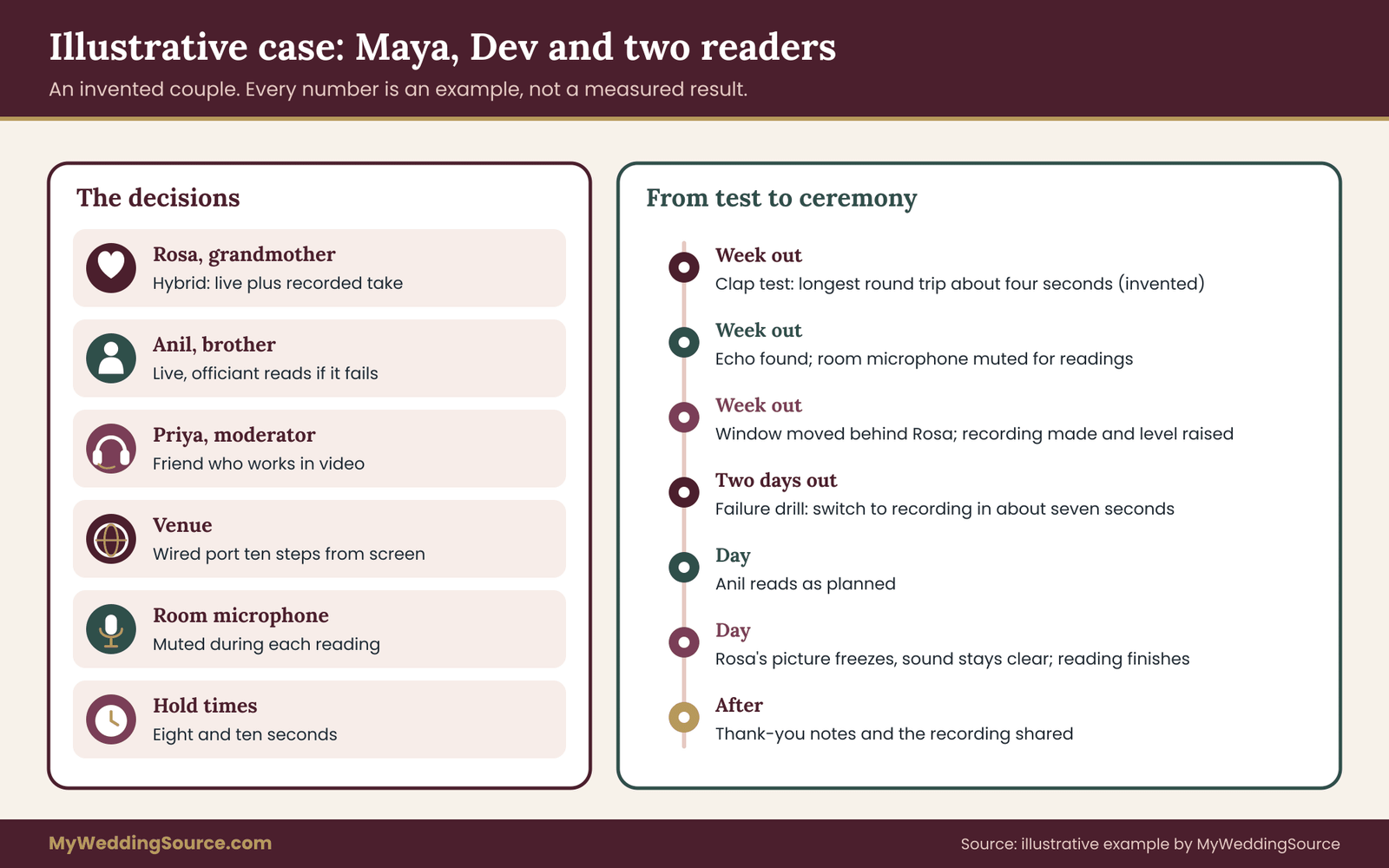
This example is invented for illustration. The couple, the readers and the numbers are made up to show how the sheet works, and they are not results from a real wedding or a study. Replace every figure with your own measurements.
Maya and Dev are planning an outdoor afternoon ceremony for about eighty guests. Maya’s grandmother, Rosa, lives overseas and cannot travel. Dev’s brother, Anil, will be on a work trip and expects to be in a hotel on the wedding day. They want both to read live, if possible, and they want to avoid a pause that guests notice.
The decisions
They chose a hybrid format for Rosa, because her reading is the emotional center of the ceremony, and a live reading for Anil with the officiant reading his printed text as the fallback. They asked their friend Priya, who works in video production, to be the moderator. They asked the venue for a wired network connection near the ceremony spot and learned that one was available at the pavilion’s edge, about ten steps from the screen. Check it again before the day, because remote wedding readings depend on small details.
Run one
A week before the wedding, Priya ran the clap test with Rosa, who had a tablet on a stand and a wired headset. In this invented example, the longest of six round trips was about four seconds, and Priya wrote down four. She halved it, for a one-way estimate of about two seconds, and added one second of margin. She noted that when the room microphone was live during Rosa’s reading, Rosa heard an echo, so the team agreed to mute the room microphone feeding the link for the length of each reading.
They also found that Rosa’s picture was dark because she sat with a window behind her. She moved her chair, and the picture improved. Rosa recorded a take on her tablet, and the file was tested on the venue’s speakers, where it was too quiet. The audio operator raised the level and made a note. The same habit helps with any remote wedding readings added later.
The sheet
Priya’s sheet had two cues. For Cue 1, Anil’s reading, the room trigger was the end of the processional music. Standby went out when the guests were seated. Go went out three seconds before the officiant finished the bridge. The closing word was “Cheers to you both.” The hold time was eight seconds, and the fallback was the officiant reading Anil’s printed text.
For Cue 2, Rosa’s reading, the room trigger was the end of the first reading. Standby went out as soon as Anil said his closing word, and go went out three seconds before the officiant finished the bridge, which said: “Our next reading comes from a woman who has loved Maya from the first day.” The closing word was “With all my love.” The hold time was ten seconds, and the fallback was the recording of Rosa’s reading, played by Priya from a laptop. That is the core habit behind calm remote wedding readings.
The second run
Two days before the wedding, the group ran the sheet with the officiant. The officiant tried to wait for Rosa’s picture to move before speaking, and the team pointed out that the point of the sheet was not to wait for a picture. The officiant practiced relying on the closing word instead. In the rehearsal of failure, Priya muted Rosa during a test reading. The officiant saw Priya’s raised hand, said the fallback line and Priya started the recording. The whole switch took about seven seconds. The group said the pause felt like a natural beat.
The day
On the day, Anil’s reading went as planned. Rosa’s connection held for the first half of her reading and then the picture froze while the sound continued. Priya watched the picture and the audio, decided the audio was clear and let the reading finish. After the closing word, the officiant waited the silent beat and continued. The guests did not know the picture had frozen, because the sound was clear and the beat was natural.
This ending is not the point of the example. The point is that every decision was made before the day, on paper, by people who had rehearsed. The picture could have frozen at the start, and the sheet would have sent the team to the recording. Keep the note short, since remote wedding readings reward plain wording.
Failure conditions: when to switch plans during remote wedding readings
A plan is only as good as its failure rules. Without them, people hesitate, argue or hope. With them, the moderator makes the call in a second, and the officiant carries it out. Write the rules on the sheet, and agree on them before the day.
The four triggers
Most failures fall into four types, and each has its own trigger.
The reader does not start. The go cue was sent, the hold time has passed, and no sound has reached the room. The trigger is the hold time on the sheet. When it passes, the moderator gives the agreed sign, and the officiant uses the fallback. The moderator then tells the reader privately that the team is moving on, so they do not start in the middle of the next line.
The reader starts and the sound breaks. The reader begins, and the sound drops out, becomes robotic or becomes unintelligible. The trigger is a defined stretch of unclear sound. A reasonable rule is that if the room cannot understand the reader for a set number of seconds, the moderator switches. The number is agreed in rehearsal, since it depends on the passage. A short break in a long reading may be tolerable, and a break in the first sentence of a short reading is not.
The picture freezes but the sound continues. This is the easiest failure to survive. If the sound is clear, the reading can continue, and the picture will often recover. The moderator watches the sound, not the picture. The rule is that sound decides. Guests listen to a reading more than they watch it.
The sound is clear but the reader is wrong. The reader reads the wrong passage, starts too early or does not stop. This is a human problem, not a technical one. The moderator can send a message to the helper to prompt the reader, and the officiant can step in gently with a line of thanks. It is rare, and the best prevention is the printed text and the closing word.
The fallback ladder for remote wedding readings
A fallback ladder lists what happens in what order. Most ceremonies need only three rungs.
The first rung is the recording, if one exists. It is the closest match to what the room was expecting, and it keeps the reader present. The moderator starts it and the officiant continues.
The second rung is the officiant reading the printed text, with a short line such as “I would like to read this on her behalf.” The officiant needs the text in a form they can read comfortably, and should practice it once in rehearsal.
The third rung is moving on. The officiant says a short line of thanks for the reader, and the ceremony continues. The reading can be shared later, in a toast, in the program or in a message to guests after the wedding. This rung is rarely needed, but it is the one that makes the others feel safe. A team that knows it can move on without damage does not panic. Ask the same question for each of your remote wedding readings.

Who decides
In the room, one person should decide, and it should be the moderator. The officiant needs to focus on the ceremony and the couple. The couple should not make decisions during their own ceremony. The moderator gives the sign, and the officiant acts on it. If the moderator and officiant disagree, the officiant’s lead wins, because they are in front of the guests. Agree on this before the day, so it does not become a negotiation in the moment.
What the couple should say to the reader beforehand
A reader who knows the rules can relax. A message from the couple, a few days before, can say something like this: “We have a plan for every kind of glitch, so please do not worry if anything goes wrong. We will move smoothly to a backup, and it will not change how much it means that you are part of the day.” Readers often worry about spoiling the ceremony, and a line like this removes the pressure. It costs little, and it is easy to forget until the remote wedding readings are underway.
After a failed reading
If a reading fails and the fallback is used, the couple should contact the reader after the ceremony, with warmth, and let them know the moment was well handled. Offer to share the recording, to send a photo of the screen with the reader’s face or to read the passage at the reception. A short message, a phone call or a video clip of the room’s reaction can mean a lot.
Do not blame the reader or the technology. A failed link is a normal event, and the plan worked as designed. If the failure repeats across readers, ask the venue and the audio vendor what went wrong, and use the answer for the next event. Put it in writing for everyone who handles the remote wedding readings.
Alternatives to a live reading altogether
If the rehearsals show that a live reading is unlikely to work, there are alternatives that preserve the reader’s presence.
A recorded reading played at the ceremony, with a note in the program, is the closest. A recorded reading played at the reception, in a toast slot with a different pace, avoids the ceremony’s tight timing. A letter read by the officiant or a family member, with a photo of the writer in the program, brings a person into the ceremony without any technology. A message from the reader, delivered after the ceremony to the couple alone, is private and unpressured.
Choosing an alternative is not a defeat. Many couples find that a recorded reading gives the reader the chance to say exactly what they mean, in their own time, and the couple the chance to keep the recording. A live reading is one way to include a person. It is not the only way. Revisit it after each rehearsal of the remote wedding readings.
Consent, rights and good manners around remote wedding readings
A remote reading involves a real person’s face and voice, and often a recording. That brings small but real questions about consent, privacy, copyright and courtesy. None needs a lawyer, and all are easier to settle before the wedding than after.
Consent to be seen, heard and recorded in remote wedding readings
Tell each reader how their image and voice will be used. Will the ceremony be streamed to other guests? Will it be recorded by the videographer? Will their reading be shared after the wedding, and with whom? Ask for a yes or a no on each. A short message that asks the reader to confirm is enough, and keep the reply with your wedding records.
Some readers will be comfortable with a recording that stays among the couple and a few relatives and not a public post. Respect that. Platform recording features may notify people when a recording starts. The platforms’ help pages describe how and when. Do not record the reader secretly, even if the platform allows you to. Small choices like this decide how the remote wedding readings feel to guests.
If the reader is a child, ask a parent or guardian. If the reader is in a care home or a hospital, ask whether other residents or patients could appear in the picture, and avoid capturing them.
The wider topic of consent to photography and video at a wedding, including guests and vendors, is covered in the site’s guide to wedding photography consent, and the principles there apply to the reader’s side as well.
Music and recorded material
If the reader’s recording includes background music, or if the ceremony plays music under a live reading, music rights may come into play. Many platforms mute or block copyrighted music on a call, and a recording shared online may be flagged. The U.S. Copyright Office publishes general information on copyright, and the platforms publish their own rules. Where possible, choose music that is clearly licensed for the use, or no music at all under a reading. A quiet room is easier to hear.
Readings and copyright
As noted earlier, a passage you read aloud may be protected. Reading aloud at a private ceremony is one thing, and sharing a recording is another. If you plan to post a ceremony video, check the rights to the texts, or choose texts you can use freely. The Copyright Office’s site is the primary source, and a publisher can often grant permission quickly if you ask. Keep a note of the source of each text on the sheet, so you can answer questions later. This applies to every one of your remote wedding readings, not only the first.
Courtesy to the reader
Remote readers give up time, sometimes in the middle of the night, to be part of a ceremony. A few courtesies help. Tell them the time in their own time zone. Offer a short check-in call earlier in the week. Send a thank-you note and a photo afterward. If they are not on camera, tell them what the guests saw and heard. If the reading went wrong, tell them it was handled well. If it went right, tell them what it meant.
Courtesy to the guests
Guests should know what to expect. A line in the program, such as “Readings today include two by video,” helps. The officiant’s bridge line sets the tone. Ask guests to remain quiet and to keep phones away from the screen, so that the reader’s voice is clear and no one blocks the reader’s picture. If you have asked for an unplugged ceremony, the wording should cover remote participants too. Write the answer on the sheet so it is settled before the day for all remote wedding readings.
Courtesy to the officiant
The officiant should hear about the plan early, not on the day. Share the sheet, ask for their opinion on the bridge lines and the closing word and invite them to the second rehearsal. Some officiants have rules about readings, such as approval of texts, which are covered in the guide to wedding officiant requirements. Ask early so that remote readers are part of the approved ceremony order.
An eight-week timeline and the common mistakes in remote wedding readings
Good remote wedding readings are mostly the result of early, small decisions. This timeline spreads the work over eight weeks, and it fits alongside the rest of your planning. If you keep a master schedule, the wedding vendor timeline is a useful place to add the dates for audio, video and venue tasks.
The timeline
Eight weeks out. Decide who reads and ask each person how they feel about live, recorded or proxy. Ask the venue about network, power and sound. Name the moderator and confirm the role in writing.
Six weeks out. Choose the passages and check the officiant’s rules and any rights questions. Send each reader the text in large type and a short kit with the camera, light and sound tips. Ask for a recorded take from every live reader whose reading you care most about.
Four weeks out. Run the first technical test with each reader and write down the delay numbers. Fix what you find. Decide the format for each reader with the three-question rule. Draft the sheet.
Two weeks out. Hold the second run with the officiant, the moderator and the sound operator. Rehearse one failure. Finalize the bridge lines and closing words. Print the sheet. Send the readers their one-page versions.
One week out. Confirm times in each reader’s time zone. Test the recording on the venue’s equipment, if the venue allows. Confirm the backup phone numbers. Send the readers a reassuring note about the fallback.
The day before. Ask each reader to restart their device, charge it and close other programs. Check the weather if the ceremony is outdoors, since wind and glare affect screens and sound. Pack the moderator’s kit.
The day. Start the clock an hour early, as described in the rehearsal section. Keep the sheet on the moderator’s lap, and keep the fallback ready.
After. Thank the readers, share the recording if they agree, and file the sheet, the consent replies and the final recordings with your wedding records.
The common mistakes in remote wedding readings, listed
Some mistakes recur in almost every plan that goes wrong.
Letting the officiant cue the reader. An introduction followed by waiting puts the whole round trip in front of the guests. Use the moderator’s go cue instead.
Skipping the measurement. A guess that the delay is “about a second” is usually wrong, and a wrong guess shifts every cue. Do the clap test at the right hour.
Testing on a different device or network. A reader who tests on a laptop at home and reads on a tablet at a hotel has not tested. Test what you will use.
Leaving the room microphone live. The reader hears an echo and either stumbles or stops. Mute the link’s room microphone during each reading, or ask the vendor for a mix-minus.
No closing word. The officiant jumps in too early or waits too long. Choose a word and write it down.
No fallback written down. Under stress, nobody agrees on what to do. Write a recording, a printed copy and a move-on line.
Making the reader responsible for the technology. A reader should read. A helper at their end, and the moderator at yours, handle devices.
A moderator who has another job. A person who is also a bridesmaid, a photographer or a family host cannot watch the link. Give the role to someone who is free.
A screen too small for the room. Guests in the back cannot see the reader’s face, and the moment loses its warmth. Size the screen for the room.
Making the reading too long. A long reading raises the chance of failure and tests the guests’ patience. A short reading read well beats a long one read badly.
Treating a recorded reading as a lesser choice. A good recording, played with care, can be more moving than a shaky live link. Choose on merit.
A one-page checklist in prose
If you want to check your plan quickly, read these questions aloud. Do you have a named moderator who is not the officiant or the couple? Have you measured the round trip at the hour of the ceremony? Does every reading have a room trigger, a standby, a go, a bridge, a closing word, a hold time and a fallback? Does every important reading have a recording?
Have you muted or managed the room microphone to avoid echo? Does the reader have a printed text, a quiet room, a charged device and a helper? Have you rehearsed one failure? Does the officiant know the sheet? Have the readers agreed to how they will be recorded? If the answer to any of these is no, that is the next task.
For a ceremony outline that these cues fit into, the step-by-step ceremony guide shows the usual order of a ceremony, and the cue sheet guide covers the in-room cues for officiant, music and processional timing that the remote cues must sit beside.
FAQ
How long is the delay on a video call, and does it matter for a ceremony?
It varies with each person’s devices, networks and platform, so measure your own. Ordinary video calls often add a noticeable gap, and the gap is longest on a round trip, such as a question and a reply. It matters for a ceremony because a spoken introduction followed by silence puts that whole gap in front of guests. A moderator who sends cues ahead of time avoids it.
Should the officiant introduce a remote reader by name?
Yes, but as a statement, not a question, and without waiting for a reply. A line such as “Our next reading comes to us from across the ocean” works, followed by a short pause. The reader should already have started on the moderator’s go cue, so the officiant is not waiting on them. Avoid asking the reader whether they can hear the room.
What is a closing word, and why use one?
It is a fixed phrase, such as “With all our love,” that the reader says at the end of the reading. On a link, silence is ambiguous, because it might mean the reading is over or the connection froze. A closing word tells the officiant and the room that the reading is finished. The officiant then waits a silent beat and continues.
Is a recorded reading a poor substitute for a live one?
Not necessarily. A live reading feels warmer, but it depends on two connections and a platform. A recorded reading removes that risk, lets the reader take a second try and gives the couple a keepsake. Many couples use both: the reader reads live, and a recorded take waits on standby. Choose the format that suits the reader’s comfort and the venue’s connection.
Who should be the moderator?
Choose a calm, organized person who is free during the ceremony, such as a friend who works with video, a comfortable relative or a paid operator. It should not be the officiant, the couple or a member of the wedding party with duties. The moderator sends the standby and go cues, watches the link and gives the sign for the fallback.
How do we stop the reader hearing an echo?
Keep the reader’s own voice out of the sound that returns to them. The simplest way is to mute the room microphone that feeds the call while the reader speaks. Better is to ask the audio vendor for a mix-minus feed. If neither is possible, ask the reader to use headphones at low volume. Test it in the technical rehearsal, not on the day.
Do we need the reader’s permission to record or stream them?
Ask. Tell each reader whether the ceremony will be streamed or recorded, who will see it and how long it will be kept, and ask them to confirm in writing. Some platforms notify participants when recording begins. For a child, ask a parent or guardian. Keep the replies with your wedding records. Rules differ by place, so check your local requirements if you are unsure.
What if the connection fails during the reading?
Follow the fallback on the sheet. If a recording exists, the moderator plays it. If not, the officiant reads the printed text on the reader’s behalf, or moves on with a short line of thanks. Decide the trigger in advance, such as a set number of seconds of unclear sound, so that the moderator can act at once and guests see a calm ceremony.
Your next steps
Start with three small tasks this week. First, ask each person you hope will read how they would like to take part, and offer live, recorded and proxy as real choices. Second, name your moderator and ask your venue three questions about network, power and sound. Third, copy the cue fields from this guide onto one page and fill in what you already know.
Over the following weeks, measure your delay with the clap test, rehearse twice, rehearse one failure and print the sheet. If the plan feels too complicated for one reading, shrink it: a short recorded reading with a clear closing word, played from a laptop, is still a way to include someone, and the same sheet will serve you well. Whatever the format, the goal is the same, and it is modest. When the reader speaks, the room should hear them without a visible gap, and the ceremony should simply carry on.
Sources
- Copyright basics and fair use information, U.S. Copyright Office
- Zoom Support, help center for audio, video and participant settings
- Google Meet Help, Google
- Microsoft Teams support, Microsoft
- Recommendations on one-way transmission time, International Telecommunication Union
- Captions and subtitles guidance, W3C Web Accessibility Initiative
- Effective communication guidance, ADA.gov, U.S. Department of Justice
- Consumer guides on internet access and broadband, Federal Communications Commission
- Consumer information on recording and privacy, Federal Trade Commission