
Wedding time zones become a real planning problem once your guest list spans five or more of them. This guide gives you one repeatable method, a clock anchor map, for choosing the clock every announcement uses, converting each event for every guest group, deciding who attends live, and scheduling the invitations, reminders and virtual sessions that keep far-away guests included without waking anyone at three in the morning.
Quick answer
Pick one anchor clock, normally the venue’s local time, and state it on everything. List every one of your wedding time zones, convert each event once, and sort each guest group and event into green (7 a.m. to 10 p.m. local), amber (5 to 7 a.m. or 10 p.m. to midnight) or red (midnight to 5 a.m.). Red pairs get a replay or a second, separate virtual moment instead of a live invitation. Send the schedule early, repeat the anchor zone in every message, and test one conversion with a guest in the farthest zone before you print anything.
A wedding with guests in two or three zones can be handled with a footnote. A wedding with guests in Honolulu, Chicago, New York, London, Lagos, Mumbai and Sydney cannot. At that spread, the same ceremony lands on different calendar days for different people, and some of them are asleep when it happens. Nobody is being careless; it is simply arithmetic that has to be done on purpose.
The good news is that the arithmetic is small. You need a list of places, a list of events, and a conversion for each pair. What takes effort is the decision layer on top: which events are worth attending live, which can be recorded, which deserve a duplicate session, and how to word all of it so a grandmother in another hemisphere reads one clear time and not four competing ones.
This article is built around that decision layer. It uses a single original tool, the clock anchor map, and a worked example with an invented couple. It does not try to repeat how to invite international guests in general, or how to handle clock changes on the wedding weekend. Those topics have their own guides on the site, and this one stays focused on the spread of wedding time zones across the guest list.
A note on scope. This is general planning information, not legal, tax, immigration or financial advice. Time rules, travel documents, and vendor terms vary and change, so where a fact matters, the article points to the source that sets it and tells you what to confirm yourself.
What wedding time zones change about a weekend
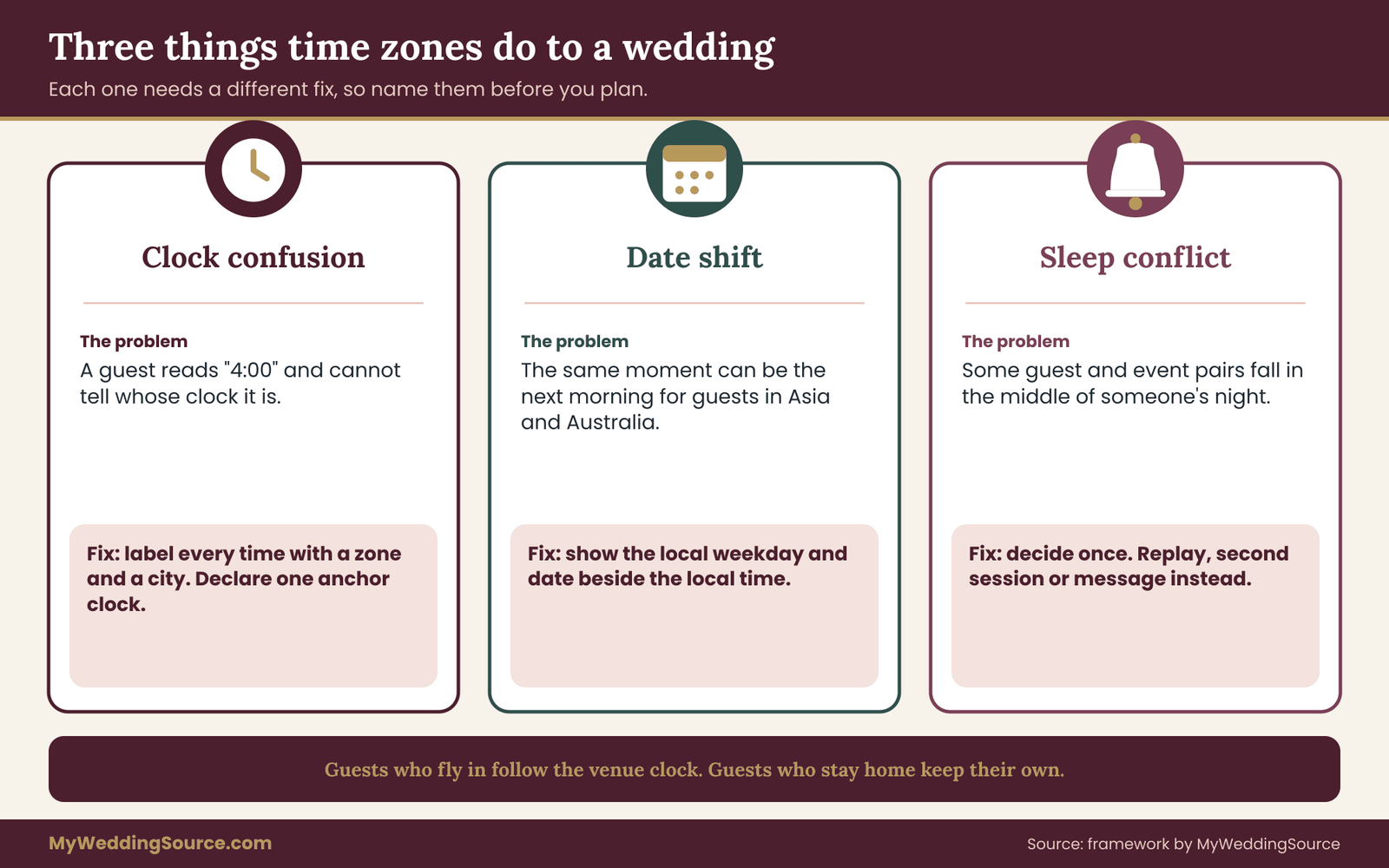
Wedding time zones do three different things to a wedding, and it helps to separate them because each one needs a different fix.
The first is confusion about the clock. A guest reads “ceremony at 4:00” and has to guess whether that is their time or yours. The fix is labeling: every time you publish carries its zone, and one zone is declared the anchor.
The second is the date shift. When your ceremony is late afternoon in Chicago, it is already the next morning in Sydney and Tokyo. A guest there may plan around the wrong day. The fix is to show the local date next to the local time for any guest group where the date differs.
The third is the sleep problem. Some pairings of guest and event simply fall in the middle of someone’s night. No wording solves that. The fix is a decision: record it, replay it, hold a second moment at a friendlier hour, or accept that the person will join a different part of the weekend. Most of this guide is about making that decision once, early, and explaining it kindly.
It also helps to be honest about who is affected by your wedding time zones. Guests who fly to the venue move onto the venue clock soon after arrival, though their bodies take longer to follow. Guests who stay home keep their own clock and watch from a distance. The first group needs arrival planning, and the guide to guest hotels across budgets and mobility needs covers the lodging side of that. The second group needs a scheduling map. Many weddings have both, and the two groups should never share an unlabeled schedule.
One more distinction matters. A time zone is a rule about offsets from a shared reference, and the world’s reference time is Coordinated Universal Time, kept by international standards bodies. In any set of wedding time zones, your guests’ clocks differ from each other by whole hours in most places and by half hours or forty-five minutes in a few, such as India and Nepal. That is why a guess made by counting on your fingers is risky, and why you will build your map from a trustworthy converter, not from memory.
Choosing one anchor clock for your wedding time zones
The anchor clock is the single zone, among all your wedding time zones, in which your master schedule is written. Everything else is a conversion of that schedule. Picking it is the first decision, and it is nearly always the venue’s local time, because the venue, caterer, photographer, officiant and band all run on that clock. If any of them quote times in another zone, the mistakes begin there.
There are three reasonable anchors, and one that sounds reasonable but is not.
The venue clock. This is the default and the right choice for almost every couple. Vendors, transportation and in-person guests all use it. Remote guests convert from it.
The couple’s home clock. This matters only when the couple lives in a different zone from the venue, which happens with destination weddings. Even then, avoid writing the schedule in it. Use it only as a second label in private planning, such as “venue time, which is two hours ahead of our home time.”
Coordinated Universal Time. Some groups of friends who work with international teams like UTC. It is precise, but most wedding guests do not think in it, and a grandmother will not convert from it comfortably. Keep it for your own spreadsheet and as a hidden column, not as a published label.
The guest majority clock. This is the tempting trap. If most remote guests live in one zone, couples sometimes publish the schedule in that zone to be kind. The result is that vendors and in-person guests now convert, which pushes the error rate onto the people who actually have to be somewhere on time.
A short rule works: the anchor is the zone where people must physically be on time. Remote guests can look up their conversion in a calendar link; in-person guests cannot afford to be wrong.
Writing the anchor into every document
Once you choose the anchor, name it the same way everywhere. “Central Time” is fine, but “Central Daylight Time” or “CDT” is more exact in summer, and adding the city removes doubt: “4:00 p.m. Central Time (Chicago).” Pick one version of the label and copy it everywhere, including the invitation, the website, the shuttle schedule, the ceremony program, text messages and the vendor timeline.
Daylight saving is the other detail to settle early. The anchor zone may be on daylight time or standard time on your date. Countries also change on different dates, so a gap of five hours in July might be six in late March. If your wedding falls near a clock change in any guest country, check the exact dates with that country’s government source. For this article, assume the guest-zone offsets are checked for your specific date, not for the month in general.
Telling vendors the anchor
Send the anchor clock to every vendor in writing, and ask each to confirm it in their reply. A line such as “All times in the attached timeline are Central Time at the venue; please confirm” costs nothing. It matters most for vendors who travel from another zone, and for any vendor who handles remote guests, such as a streaming provider. Your vendor timeline is the place where the anchor lives as the authority, and the guide to the wedding vendor timeline shows how to structure that document.
A streaming vendor has a particular risk. Their dashboard may display times in their own account zone, which can differ from the venue. Ask them to set the event in the venue’s zone and to send you a test link with the displayed time. That single test often catches the only error in the system.
Building the clock anchor map for wedding time zones
The clock anchor map is a one-page working document with a short list of your guests’ wedding time zones down the side, your events across the top, and a converted local time and day in each cell. You build it in a spreadsheet or on paper, and you use it to make decisions, not to publish. The version guests see later is a simplified extract.
Build it in five steps. They are short, and the order matters.
Step one: list the wedding time zones, not the guests. Group your guest list by the place where each person will be when the event happens.
A guest who lives in Lagos but is flying to Chicago on Thursday belongs to Chicago for the weekend. A guest who lives in Toronto but will be traveling for work on the wedding day belongs to wherever the work trip is. Keep the list to distinct clocks, so a guest list of two hundred may reduce to eight or nine wedding time zones and a handful of rows. If the list itself is still in flux, the wedding guest list guide shows how to settle it first.
Step two: list the events that include remote people. Not every event needs a conversion. A private vendor setup at noon does not matter to anyone outside the venue. List the welcome gathering, the ceremony, the reception toasts, the send-off and any brunch or farewell event. Add every virtual touchpoint you plan: a stream, a video call, a recorded message, a group chat moment.
Step three: convert once, from a reliable source. Use a standards-based converter or your calendar program’s built-in time zone feature, and enter the exact date. Do the conversion for each event and zone, then write the local time and the local weekday into the cell. Do not convert by counting hours in your head and do not copy from a general chart, because offsets change with daylight saving.
Step four: color each cell. Use the green, amber and red bands defined below.
Step five: write a decision in every amber and red cell. The decision can be “attend live,” “watch the replay,” “join the second session,” or “send a message instead.” A cell with no decision is the map’s most common failure.
The three comfort bands for wedding time zones
The bands are a planning rule of thumb, not a scientific measure, so adjust them to your own guests. Treat green as local time from 7 a.m. to 10 p.m., when most adults are awake and able to join something. Amber covers 5 to 7 a.m. and 10 p.m. to midnight; people will join for something they care about, but it costs them. Red is midnight to 5 a.m.; it is a request that should be made only by a person who asks for it.
Adjust for your actual guests. A group of night-shift nurses in Manchester may find ten at night perfectly easy. A great-aunt in her nineties may not manage anything after eight in the evening. The bands are defaults you tune, and the tuning is a short conversation, not a survey.
The ceremony and the toasts get the strictest treatment because they are the moments people most want to share. For a welcome mixer, amber might be fine. For the ceremony, a red cell is the one you worry about.

What the finished map tells you about wedding time zones
When the map is done, three patterns usually appear. First, a cluster of cells in one band for a given zone, for instance a zone that is amber for everything. That is a signal to schedule a second session for that region instead of trying to bend the main schedule.
Second, an event that is red for several wedding time zones at once. That is the event to record, because a second live session would need to be repeated several times. Third, a zone with only one or two guests where red cannot be fixed. Handle that person individually, with a call or a recorded message, instead of designing the weekend around them.
The map also shows a dependency that people miss: if the ceremony moves by an hour for a vendor reason, every converted cell moves with it, and some cells change band. A map kept in a spreadsheet with the conversion done by formula or by reference to one cell makes the change a ten-second job. A map made of hand-typed numbers makes it an evening of errors. If you use a spreadsheet, keep the anchor time in one cell and compute the others from it.
Half-hour offsets, date shifts and clock-change traps in wedding time zones
Most of the errors in weddings with many wedding time zones come from a handful of predictable traps. Learning them in advance turns each one into a quick check.
Half-hour and forty-five-minute offsets. Not every zone differs by whole hours. India uses an offset with a half hour, and Nepal uses one with forty-five minutes, and some other places use half-hour offsets as well. A converter handles this automatically; a mental count does not. If you have guests in such a place, the local start time may read as, say, 2:30 in the morning, and a printed “five hours ahead” note would be wrong.
The date shift. When your event falls in the late afternoon in the Americas, the same moment is the next morning in much of Asia and Australia. If you show only a time, a guest in Tokyo or Sydney might read “6:00 a.m.” as the day of the wedding, when it is the following morning. Whenever the date differs from the anchor date, show the local weekday and date: “Sunday 13 June, 6:00 a.m. in Tokyo.” Use weekday names, not only numbers, because date order differs between countries. Writing the month in words avoids the 6/7 and 7/6 confusion.
Clock changes on different dates. The United States and many other countries change clocks on different days, and the Southern Hemisphere changes in the opposite season. A gap between two places can shift by an hour for a few weeks of the year. The effect is concentrated in March, April, October and November. If your date is near those months, verify the offset for each of your wedding time zones for your exact date using official government time sources, and re-check a few weeks before the wedding, since rules can change.
Places that do not change clocks. Some places stay on one time all year. Hawaii is the common example for American weddings, and Arizona is another with a well-known exception on tribal lands. That means the gap to a place that does change clocks is different in summer than in winter. This is also why you convert for the specific date and not for the season.
Split wedding time zones inside one country. Several countries have more than one zone, and some states or provinces are split. A guest saying “I’m on Eastern time” may live where that is correct or may be in a border county that follows a neighboring zone. For guests in large countries, ask for the city, not the zone name.
Abbreviations for wedding time zones that collide. Three-letter abbreviations are not unique. “CST” can mean Central Standard Time in North America, China Standard Time or Cuba Standard Time, and “IST” can mean Indian, Irish or Israel Standard Time. If your guests are international, spell wedding time zones out in words and add a city. “Central Time (Chicago)” is longer, and it cannot be misread.
Midnight and noon. Twelve a.m. and twelve p.m. confuse people in every language. Avoid writing “12 a.m.” for a deadline. Say “11:59 p.m. Friday” for a cutoff, and say “noon” or “midnight” in words.
A quick check on the converted times
After you finish the map, run three spot checks. Pick the farthest-east zone and the farthest-west zone and verify them with a second tool. Pick a zone with a half-hour offset and verify it. Then ask one real guest in the farthest zone to look at their line and tell you if it matches what their phone says. If the three checks agree, the rest of the map is almost certainly right. If one fails, find the cause before you publish anything, because the same error is probably in every cell.
Keep a short “assumptions” note at the bottom of the map: the date used, whether each of the wedding time zones is on daylight or standard time on that date, and the converter you used. When someone asks six months later why the time looks off, the note tells you in one look whether a rule change or a typo is the cause. It also makes it easy for a trusted helper, such as a sibling or a planner, to audit the map without redoing all of it.
Invitation wording for wedding time zones
A printed invitation is the worst place to carry many conversions. It is small, permanent and expensive to reprint. The sound approach is to keep the paper simple and push the detail to a place you can update. The broader rules for wording and timing live in the invitation etiquette guide; this section covers only what changes when your guests live across many clocks.
What goes on the paper invitation when wedding time zones differ
Print the anchor time with its zone and city, once, in the line where the time normally goes. “Ceremony at four o’clock in the afternoon, Central Time” is enough for local guests. Do not try to add a column of conversions. If a printed insert helps, make it a small card that says where the full schedule lives, and give the address of your wedding website.
For guests in far zones, consider a separate version of the invitation, digital or printed, that adds one extra line for their region: “That is 10:00 p.m. in London.” A line of this kind shows that you thought about them, and it saves them a lookup. Keep each regional line to a single conversion for the event that matters most to that guest, normally the ceremony. Putting every event on every card turns the card into a table, and guests stop reading.
Avoid wording that mixes two clocks in a single phrase. “Four o’clock Chicago time, which is nine at night in London time” is correct but heavy. Write the anchor in the main line and put the regional line on its own row, in plain smaller text or on the digital version.

Digital invitations and calendar files for wedding time zones
If you send digital invitations, attach a calendar event for each event that remote guests may attend. A well-formed calendar invitation carries the event’s real moment in time, and a calendar program shows it in each recipient’s own zone. That removes the conversion for anyone who accepts the invite. Test this by sending the invite to a friend in a different zone and asking what time shows on their screen before you send it to everyone.
Write the zone in the event title as well, for example “Wedding ceremony, 4:00 p.m. Central.” If a guest’s calendar ignores the zone, or they copy the text into a message, the label still travels with it. Put the venue address and a link to the website in the event description.
Some guests will not use calendar files, and that is fine. The text and the website are the backup. Never rely on a calendar attachment as the only record of the time.
Wording the date across wedding time zones
For guests whose local date differs from the anchor date, the extra line must carry the weekday. “Saturday 12 June, 4:00 p.m. Central, which is Sunday 13 June at 6:00 a.m. in Tokyo.” A short script helps when you send individual messages: “Heads up, the ceremony is on Sunday morning for you, not Saturday.” People appreciate being told in plain words that the day changes.
Avoid saying “tomorrow” or “tonight” in group messages. Those words depend on where the reader is standing. “Friday evening Central” is stable for everyone.
Saying who is invited to what, live or recorded
Many couples create confusion by inviting remote guests to “join us” without saying what that means. Decide and state, for each event, which of three roles applies: in-person guest, live remote guest, or replay guest. A replay guest is a full guest; the word is about how they attend, not how much they matter. A line such as “We will share a recording on Sunday for anyone who can’t join live” sets expectations and removes any sense that the late watcher is a second-class guest.
If the live link is limited by capacity or by privacy, say so in the same line. Many couples limit the stream link to people who RSVP for it, and they share it by message close to the event. The guide to a wedding day digital contingency plan deals with backup communication and the technical side. Here the point is only the wording: the invitation says what is offered, the website says how to join, and the reminders say when.
RSVP and website pages that respect many time zones
The RSVP is where the map turns into data. You are no longer only asking “will you attend?” You are asking how, and in which zone. A few extra fields make the rest of the planning much easier, and the broader RSVP method is covered in the guide to RSVP etiquette.
RSVP fields that capture wedding time zones
Ask for three things beyond attendance. The first is the guest’s city for the wedding weekend, so you can place them on the map. The second is their intended mode of attendance for each event, with three choices: in person, live online, or replay. The third is an optional note, in a free text box, for anything that affects timing, such as “I work nights and can join at 3 a.m. for the ceremony.”
Do not ask for more than that. A long form reduces completion, and guests in distant wedding time zones are often the most careful about answering. Keep the form short and test it on a phone, because far-away guests often answer from one.
Ask for an answer to the “city” question as a city, not as a zone name. Guests do not always know their zone label, especially around clock changes, and a city lets you look up the conversion on your own. You will need only a short list of unique cities, and you can look each one up once.
A schedule page that explains wedding time zones
The website is the authority. It should have a single schedule page, with the anchor time stated first and prominently, and a short, clearly marked section for remote guests. A common failure is scattering time information across several pages, so that a change has to be made in five places. Keep one source and link to it.
Organize the page in this order. First, the anchor clock: “All times are Central Time at the venue in Chicago.” Second, the in-person schedule in a simple list. Third, the remote section, which lists each virtual event with the anchor time and a small number of conversions for the main guest regions. Fourth, how to join: the link, the password if any, the date it opens, and who to contact on the day.
Most website builders offer a time zone selector or let you embed a converter. These are helpful, but they should supplement the written conversions, not replace them. A guest who has a poor connection or a printout will not see the widget. Write the key conversions in plain text even if a tool also exists.
Keeping the website and the map in sync
Once the website carries conversions, it is another copy of the map and can drift away from it. Choose one master. The map in your spreadsheet is the master; the website is an extract. When a time changes, change the map first, copy the new extract to the site, then send the update message. Do this in the same order every time, and one person should own it. If two people edit the site, versions will diverge, usually at the worst moment.
Put an “updated on” line at the bottom of the schedule page, with the date and the anchor zone. A guest who sees an update date can tell at a glance whether their saved screenshot is stale. When a change is made, add one sentence about what changed so that guests do not have to compare the old and new versions.
Plain language for guests in other wedding time zones
When guests in several countries read English as a second or third language, short and literal sentences win. Use the 12-hour clock with “a.m.” and “p.m.” only if your guests commonly read it, and consider the 24-hour clock, with a plain explanation, in the guest-region lines. Put weekdays in words. Avoid idioms such as “bright and early” and “the following morning,” which translate poorly. If a close relative can check a translated line for a particular group, ask them; it takes a minute and prevents a misreading.
Virtual communication windows across wedding time zones
Remote guests can take part in four ways, and each fits a different kind of cell on the map. Knowing the options by name makes the decision faster and the explanation to guests simpler.
Live attendance. The guest watches or joins at the moment it happens. This suits green cells and, for the ceremony, many amber ones. It is the only option that lets a guest react in real time.
Replay. A recording is shared after the event, usually within a day. It suits red cells and guests who prefer to watch calmly. Replays are underrated: a person who watches the ceremony at breakfast on a day they chose often enjoys it more than someone who forced themselves awake.
A second session. A separate virtual moment is scheduled at a time that works for the cluster of wedding time zones that miss the main event. It might be a short video call with the couple, a toast, or a group reading. It is the most generous option and the most expensive in effort, so use it when several guests share the same difficult cell.
A message exchange. A recorded greeting from the couple, a voice note, or a guest video message sent in the other direction. It suits one or two guests in a zone where nothing else fits. For ideas on collecting recordings from far-away guests, a short request with a clear deadline and an upload link is enough.

Matching the option to the event and the wedding time zones
Assign each event a default option for each color band, and then override the defaults only when you have a reason.
For the ceremony, a green or amber cell means live attendance and a red cell means live attendance offered but replay recommended. For the reception, a toast or first dance is the part that matters to remote guests, and the full reception rarely is. Offer a live window for the toasts and dances, in the form of a short, announced slot, and tell guests when it will happen in anchor time. A four-hour party stream is demanding to watch and to produce.
For the welcome event, a replay is usually unnecessary. Treat it as in-person only, and put the virtual energy into a separate session. For the brunch or farewell, which sits at the end of the weekend, check the cells again, because the date shift has usually pushed them deeper into a remote guest’s night.
Making a second session useful for distant wedding time zones
In a spread of wedding time zones, a second session works best when it has its own purpose, not when it is a replay in disguise. A short toast and a Q and A with the couple, a favorite family recipe cooked on camera, or a guided video call to tour the venue can all work. The session should be short, with a clear start and end in a window that is green for the zones it targets. Thirty to forty-five minutes is a sensible length for most such gatherings.
Say plainly who the session is for, so the guests in other wedding time zones do not feel they are missing out. “This one is scheduled for guests in Asia and Australia, and everyone is welcome” works better than silence. Record it too; the people who cannot join will want a link.
Technical choices that interact with wedding time zones
Several technical choices determine whether the virtual plan survives contact with real life. Tool choice is its own topic; the zone-specific points are these.
First, set the event time on the platform in the venue’s zone and read the displayed time back. Many platforms show times in the account holder’s zone, and a stream organizer in another zone can create the event an hour or more off.
Second, send the join link with the time written out in the anchor zone and the guest’s zone, so the link message never depends on the platform. Third, decide who is monitoring the chat and in what language, since a host in Chicago at 4 p.m. may be talking to a guest in London at 10 p.m. who writes in a different style and wants a different kind of help.
Fourth, assign one person at the venue, not the couple, to start and stop the stream and to answer remote messages.
Plan a backup for the case where the stream fails: a recording to share later, and a short message to remote guests saying so. The best protection is to tell remote guests in advance that the replay is the dependable version, and the live stream is a bonus.
A worked case: seven clocks and wedding time zones in one weekend
To see the method end to end, take an invented couple, Imani and Theo, who are marrying in Chicago on Saturday 12 June 2027. This example is illustrative, not a real wedding, and the offsets are standard ones that you should always re-verify for your own date with an official time source.
Their guest list has remote groups in Honolulu, Los Angeles, New York, London, Lagos, Mumbai, Tokyo and Sydney. Some Honolulu and Los Angeles relatives will fly to Chicago, others will stay home. They hold three events: a Friday welcome dinner at 7:00 p.m. Central, the Saturday ceremony at 4:00 p.m. Central, and a Sunday brunch at 11:00 a.m. Central. Chicago is on daylight time in June, which is one hour behind New York and five hours ahead of Honolulu’s fixed offset.
Step one: the conversions for each of the wedding time zones
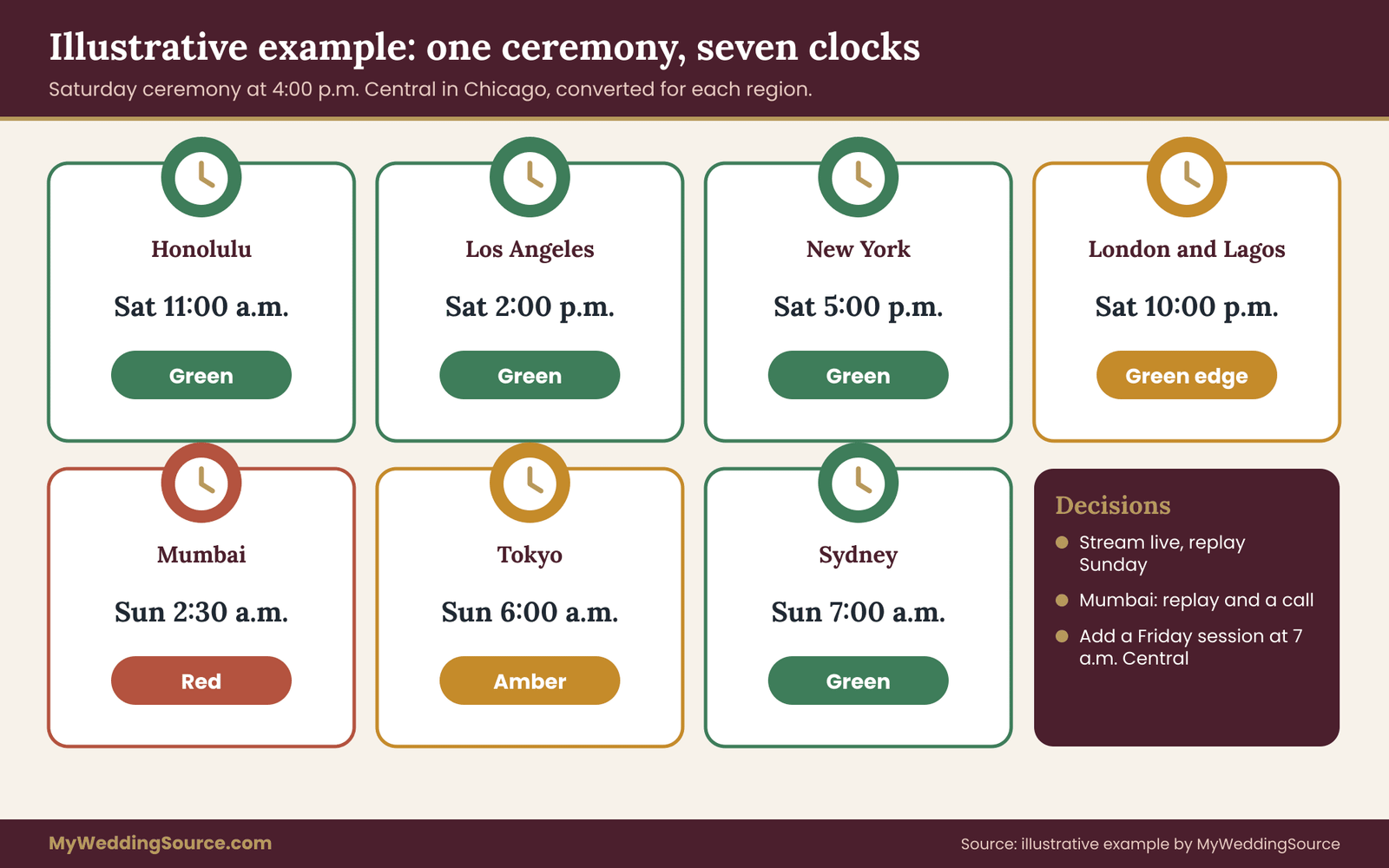
Converted from Central Daylight Time, the ceremony at 4:00 p.m. on Saturday falls as follows. In Honolulu it is 11:00 a.m. the same day, and in Los Angeles it is 2:00 p.m. In New York it is 5:00 p.m. In London and Lagos, both on the same clock offset in June, it is 10:00 p.m. In Mumbai it is 2:30 a.m. on Sunday. In Tokyo it is 6:00 a.m. on Sunday, and in Sydney it is 7:00 a.m. on Sunday.
The welcome dinner at 7:00 p.m. Friday gives a different pattern. It is 2:00 p.m. Friday in Honolulu, 5:00 p.m. in Los Angeles and 8:00 p.m. in New York. In London and Lagos it is 1:00 a.m. on Saturday, in Mumbai it is 5:30 a.m. on Saturday, in Tokyo 9:00 a.m. and in Sydney 10:00 a.m., all on Saturday.
The Sunday brunch at 11:00 a.m. is 6:00 a.m. in Honolulu, 9:00 a.m. in Los Angeles and noon in New York. In London and Lagos it is 5:00 p.m., in Mumbai 9:30 p.m., in Tokyo 1:00 a.m. on Monday and in Sydney 2:00 a.m. on Monday.
Step two: the bands across the wedding time zones
For the ceremony, Honolulu, Los Angeles, New York are green. London and Lagos at 10:00 p.m. sit at the edge of green and amber. Tokyo at 6:00 a.m. and Sydney at 7:00 a.m. are amber and green respectively, and Mumbai at 2:30 a.m. is red.
For the welcome dinner, only New York, Los Angeles and Honolulu are green, with London and Lagos red at 1:00 a.m., Mumbai amber at 5:30 a.m., and Tokyo and Sydney green but on a different day.
For the brunch, Honolulu is amber at 6:00 a.m., while Los Angeles, New York, London, Lagos and Mumbai are all green. Tokyo and Sydney are red.
Step three: the decisions
Imani and Theo review the map and make five decisions. The ceremony is streamed live, with a replay on Sunday morning Chicago time. Mumbai guests are told that the live window is in the middle of the night and that the replay is ready by their Sunday afternoon. The welcome dinner stays in-person only, and a short photo update goes out afterward. The brunch is offered live to the wedding time zones where it is green, and Tokyo and Sydney guests receive a replay link.
Then they notice that Tokyo, Sydney, Mumbai and London guests will not have a live moment with the couple at a friendly hour.
So they add a second session: a 40-minute video call on Friday at 7:00 a.m. Central, which is 12:00 UTC. That is 8:00 a.m. in New York, 1:00 p.m. in London and Lagos, 5:30 p.m. in Mumbai, 9:00 p.m. in Tokyo and 10:00 p.m. in Sydney, all on Friday. It is red for Los Angeles and Honolulu at 5:00 and 2:00 a.m., but those guests are mostly in Chicago for the weekend, and the few staying home are told in the invitation that the call is recorded.
Step four: the test
Before printing anything, Theo asks his cousin in Sydney to check the converted time against her phone. The cousin reads “Sunday 13 June, 7:00 a.m.” and confirms. Imani asks an uncle in Mumbai about the half-hour offset, and he confirms 2:30 a.m. as well. Both checks pass, and the website goes live with the schedule page and a remote section.
The example shows the method’s real value, which is not the arithmetic. It is that a single review found a hole, the cluster without a friendly live moment, and filled it with one inexpensive session instead of four awkward conversations.
Choosing the ceremony hour when wedding time zones pull apart
The ceremony start time is usually set by the venue, the light, the season and the vendors, and those constraints come first. Still, within the range the venue allows, a shift of an hour or two can move several guest groups from red to green. The map lets you test that in minutes. This is the one place where the map is a design tool and not only a checking tool.
The method for choosing among wedding time zones is a simple count. Write down each plausible start time the venue could accept. For each one, mark every remote guest group green, amber or red. Then count, for each start time, how many remote guests land in each color. If your list is large, count guests, not wedding time zones; one zone with forty guests matters more than three zones with two each.
Give green a full point and amber half a point, and red zero. The start time with the highest total is a candidate, and then you apply judgment. Do not let the count decide alone, because it knows nothing about the person whose attendance matters most to you.
The count on the worked case across seven wedding time zones
For Imani and Theo, five candidate ceremony times on the Chicago clock are 9:00 a.m., 11:00 a.m., 2:00 p.m., 4:00 p.m. and 6:00 p.m. Working through the same eight regions, the groups come out like this.
At 9:00 a.m., four regions are green (Los Angeles, New York, London and Lagos together, and Mumbai), one is amber (Tokyo at 11:00 p.m.), and two are red (Honolulu at 4:00 a.m. and Sydney at midnight). At 11:00 a.m., the same four are green, Honolulu is amber at 6:00 a.m., and Tokyo and Sydney are red.
At 2:00 p.m., Honolulu, Los Angeles, New York and London and Lagos are green, Sydney is amber at 5:00 a.m., and Mumbai and Tokyo are red. At 4:00 p.m., Honolulu, Los Angeles, New York, London and Lagos, and Sydney are green, with London and Lagos right at the 10:00 p.m. edge, Tokyo is amber at 6:00 a.m., and Mumbai is red. At 6:00 p.m., Honolulu, Los Angeles, New York, Tokyo and Sydney are green, while London, Lagos and Mumbai are red or close to it.
The 4:00 p.m. time keeps the broadest spread of green cells, which happens to match the couple’s plan for a late-afternoon ceremony. The count confirmed a choice they were already leaning toward, and it also showed them that the tradeoff is Mumbai. That is a useful finding: they now know exactly who the replay and the second session are for.
When the count conflicts with the venue and the wedding time zones
Sometimes the best time on the map is impossible for the venue. A ceremony in a garden may need to happen before sunset, or a church may have a fixed Saturday window. In that case, leave the time alone and use the map to design the alternatives. Moving the ceremony by two hours to please a time zone, while giving up the light you booked a photographer for, is rarely a good trade.
A small rule helps with such conflicts: the venue and vendor constraints are hard, the in-person guests’ comfort comes next, and remote guests’ comfort is the flexible variable. That ordering is not a ranking of love. It reflects the fact that remote guests have the replay and the second session available as substitutes, while the in-person guests and the vendors do not.
The guest who matters most
The count treats guests equally, and real lists do not. A grandparent who cannot travel and whose attendance is emotionally central to the couple should be given weight that overrides the numbers. If a grandmother in Mumbai is the person you most want watching live, you may choose a time that is green for her even if it reduces the total score. Decide that deliberately, and tell the other guests nothing unless they ask. The reasoning is yours, and it is a perfectly good one.
If the key guest’s cell is red at every plausible start time, consider a smaller, separate live moment with them: a private video call before or after the ceremony at a friendly hour, with a shared recording of the ceremony itself. For a person who values time with you more than the broadcast, that is often better than a stream at 2:30 a.m.
When the map shows a wide spread of red cells for the ceremony, there are several structures to consider. None is the best; each fits a different set of constraints. Weigh them against your guests, your vendors and your budget.
One ceremony, streamed live, with a replay. This is the default. It is the least work and the least expensive. Its weakness is that the guests in red cells get a recording, not a live experience. Choose it when the red cells are few and the affected guests are comfortable with a replay.
One ceremony, recorded, with a scheduled watch party. The ceremony happens at the venue time, and a hosted watch session is scheduled later at a friendlier time for the red wedding time zones, with a relative or friend in the region hosting. It gives a sense of a shared moment, and it turns the replay into an event. It requires a host who will organize it, and it works best for clusters of guests who already know each other, such as a family branch in one city.
A separate virtual toast or blessing session. This is the second session described earlier. It is the best choice when the problem is one cluster of wedding time zones and the ceremony itself is a fixed point. The session need not replicate the ceremony; its purpose is contact with the couple.
A split event. Some couples hold the legal ceremony privately or with a few people, then hold a larger celebration at a more flexible hour. This is a structural choice that goes well beyond wedding time zones, and it has implications for vendors, cost and family expectations. Mention it only if you are already considering it for other reasons. Wedding time zones alone rarely justify it.
A pre-recorded greeting in place of live attendance. For one or two guests in an impossible zone, a short recorded message from the couple, and one from the guest, creates a personal connection that a stream cannot. It costs almost nothing and is often remembered.
No remote attendance at all. Some couples decide that the wedding is for people who are present, and they send photos afterward. That is a legitimate choice. If you make it, say so plainly and kindly in the invitation so guests do not wait for a link that will not come.
How to explain the choice to guests in far wedding time zones
Remote guests read the plan for signs of how much you want them there. A short, warm explanation does more than a perfect schedule. Something like, “The ceremony is at four in the afternoon our time, and for you it will be the middle of the night, so we will send the recording by morning and we’d love to have a call with you on Friday.” This tells the guest what happens, why, and what you are offering instead, in three short sentences. It avoids apology and avoids pressure.
Do not ask a guest in a red cell to wake up for the ceremony unless they have offered. A request like that puts them in a position where refusing feels rude. Instead, offer the choice and let them tell you. Many will say they will set an alarm anyway, and then you can simply thank them.
Travelers: jet lag and the first night
Guests who travel to the wedding from far wedding time zones are a different planning group from the remote viewers. They experience the gap between wedding time zones in their bodies, and the main risk is a welcome event that lands in the middle of their night, or a morning ceremony after a long flight.
The public health guidance on jet lag, such as that from the CDC’s travel health pages, treats it as temporary and manageable, with some practical measures around light, sleep and timing. You do not need to give medical advice to guests, and you should not. What you can do is shape the schedule so that it does not punish the long-haul traveler.
Several schedule choices help. Avoid putting a mandatory event on the day a long-haul group arrives; a casual drop-in event is kinder. Keep the first morning after arrival free of obligations. Make sure a quiet room, food and a place to rest are available at the welcome event for people who are fading. And give arrivals a plain line in the travel information: “If you are coming from far away, plan to arrive at least a day early.” Align the hotel plan with that advice, including early check-in.
Travelers from the east and the west tend to feel different things, and recovery varies widely between people, so give a general buffer and not a formula. A traveler who arrives two days ahead has room to adapt, and a traveler who lands the night before is gambling. Tell guests the tradeoff and let them choose.
A reminder calendar for guests across wedding time zones
Reminders are where weddings with many wedding time zones quietly fail. A message that says “tomorrow at four” is wrong for half the recipients. A message sent at 9 a.m. Chicago time arrives in the middle of the night for guests in Asia and may be buried by morning. A reminder plan decides when each message goes out, what it says, and which clock it uses.
The cadence below is a starting point, not a rule. Scale it down for a small list and adjust it for your guests’ habits.
Save the date and website launch, several months ahead. Include the date, the venue city and the anchor zone. Mention that remote participation is planned, without detail yet. This lets far-away guests check their calendars and, for some, book travel.
Invitations and the full schedule, about two to three months ahead. Include the anchor time, the regional lines for the main guest regions, the RSVP fields described earlier, and the link to the schedule page. The guest who cannot be live learns the plan early, and the one who wants to fly in has time to arrange it.
A schedule confirmation, about three to four weeks ahead. Send a message that restates the converted times, flags any change since the invitation, and invites replies about problems. Ask guests to tell you if the converted time looks wrong on their phone. This is the best moment to catch an error, because there is still time to fix the map.
The week-before message. A short note with the schedule for each event, the join link for remote events, who to contact on the day, and a reminder about the replay. Write each time as anchor time plus the guest’s local time. For a group message, put regional lines on separate rows.
The day-before message. Short and practical. It names the event, the anchor time with weekday, and the local conversion. It avoids “tomorrow” and “tonight.” Send it at a time that is reasonable in more than one zone, which usually means mid-morning in the Americas or early evening in Europe, and accept that some guests will see it later.
The post-event message. Thank guests, share the replay link when it is ready, and say how long the link will remain available. The replay is the one promise remote guests will hold you to, so make the delivery date specific and keep it.

Choosing the send time for group messages across wedding time zones
There is no perfect send time for a list spanning eight wedding time zones. A simple method: group guests by region and send each regional batch at a morning hour local to them. Many email and messaging tools support scheduled sends, and a few support sending by recipient zone. If yours does not, a manual schedule of three or four batches is enough. The first messages matter more than the rest; reminders on the final day can be sent once, with the conversions in the text, and sent when it suits you.
Do not use a group chat as the primary channel for time-critical information if members are in very different wedding time zones. Messages from the other side of the world arrive at odd hours, scroll away, and train people to mute the chat. Use the chat for warm conversation, and keep the schedule in the website and the dated messages.
Running the weekend: day-of roles for wedding time zones
On the weekend itself, assign two roles that are easy to forget. The first is a remote-guest host, a friend or relative who answers questions from far-away guests, posts the join link, and keeps an eye on the chat. The second is a time keeper, a person who watches the anchor clock and sends the “starting in fifteen minutes” message to remote guests. Neither should be a member of the wedding party, and neither should be the couple.
Prepare three short messages in advance and keep them on a phone: one for “we are starting in fifteen minutes,” one for “we are running late, new time is,” and one for “the stream has a problem, the recording will arrive by.” A late start is common, and a message with a revised time in the anchor zone saves a flood of questions. The site’s guide to digital contingency planning covers the backup channels for when a message does not get through.
After the ceremony, send the first photo or a short note to the remote guests who were not live. It need not be polished. A single picture sent within a few hours does a lot to make a person in a distant night feel included.
Failure conditions for wedding time zones plans
A plan is only as good as its failure modes, and a plan with many wedding time zones fails in specific, repeatable ways. Knowing them in advance lets you add a check for each. Treat this list as the final review before you publish the schedule.
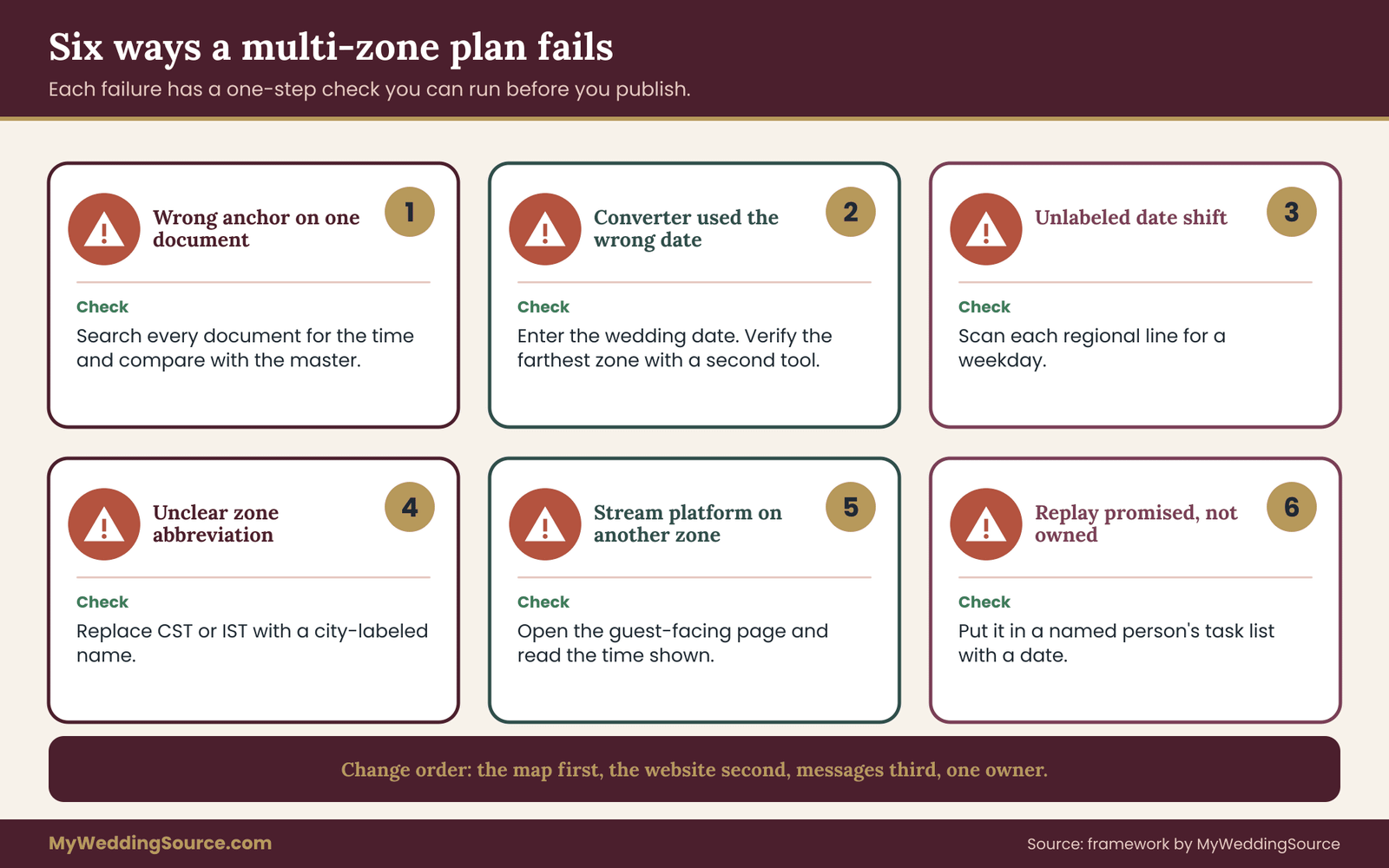
The wrong anchor on one document. One vendor, one program or one printed card is written in a different zone from the rest. The check is a single search through all documents for the time, comparing each against the master.
The converter used the wrong date. A converter set to today’s date, not the wedding date, gives an offset that is wrong near a clock change. The check is to enter the wedding date explicitly and to verify the farthest zone with a second tool.
The date shift is unlabeled. A guest reads Saturday for what is Sunday. The check is a scan of every regional line for a weekday.
An abbreviation is ambiguous. “CST” or “IST” appears without a city. The check is to replace every abbreviation with a city-labeled name.
The platform shows the wrong zone. The stream platform displays times in another zone, so the link email and the stream disagree. The check is to open the live event page from a guest’s view and read the time.
The replay is promised but not owned. Everyone assumes someone else will upload it. The check is to put the replay in a named person’s task list with a date.
A change reaches only part of the list. The ceremony moves by an hour and the update reaches the website but not the text list. The check is a change procedure: map first, website second, messages third, with one owner.
The key guest’s cell is red and nobody noticed. The check is to read the finished map once from the point of view of the five people you most want present.
A rule changes after publication. A country changes its clock rules close to the date. The check is to re-verify guest-zone offsets a few weeks before the wedding using government time sources.
What to do when a wedding time zones failure happens anyway
If a time error reaches guests, correct it in one message that states the right time in both the anchor zone and the guest’s local zone, and says plainly that the earlier message was wrong. Do not send three partial corrections. Pin the message in the chat and update the website. If a guest has already missed something because of the error, call them. A short personal note is worth more than a perfect schedule.
If a live stream fails, the failure plan is in the order described earlier: tell remote guests the recording will follow, give a time, and keep that promise. Most guests forgive a technical failure that is explained promptly. They are less forgiving of silence.
Effort, cost and ownership when wedding time zones multiply
Planning for wedding time zones has a cost, but it is mostly effort and not money. Knowing where the effort goes lets you spend it where it matters and skip the rest.
The cheapest items are the ones with the largest effect: the anchor clock, the map, labeled times and a written change procedure. These cost an evening or two and prevent nearly all the serious errors. The next tier is the replay, which costs whatever your recording arrangement costs and a small amount of editing or file sharing time. The most expensive item is a second live session, which costs a host’s time, a platform and the couple’s evening or early morning.
Where money is involved, such as a streaming vendor, a videographer, or extra hours, take the quote from the vendor and do not assume. Ask whether the stream and the replay are included, how long the replay link stays available, who owns the files, and whether the vendor’s schedule is written in the venue’s zone. The vendor timeline is the place to attach those answers to the master schedule.
Who owns what in a plan with many wedding time zones
Multi-zone weddings often fail from diffuse ownership. Three jobs need names next to them.
The first is the map owner, one person who keeps the spreadsheet, makes every conversion, and publishes every change. It is often the couple’s most spreadsheet-comfortable friend or relative, or a planner. The second is the website owner, who copies extracts from the map to the site and sends updates. The third is the replay owner, who makes sure the recording is shared on the date promised and the link works in each region. One person can hold two of these roles, though not all three on the wedding weekend, when the map owner will be busy.
Write the three names in the vendor timeline so everyone knows who to ask. When a vendor has a question about a time, they go to the map owner, who answers from the map, and not to whoever happens to be nearby.
Guest privacy and location for wedding time zones
The RSVP fields ask guests where they will be. That is personal information, even if it only names a city, and it should be used for planning only. Do not publish a list of guests by city on the website, and do not share the map with people who do not need it. Share individual conversions with the individual guest. If a guest prefers not to say where they live, accept a general answer such as the nearest large city.
Edge cases in wedding time zones worth settling early
A few cases do not fit the standard steps. Each takes a short decision, and each is easy to handle if you see it coming.
A clock-change weekend in one of the wedding time zones
If a guest country changes its clocks on or near your wedding weekend, the conversions for that country may differ between Friday and Sunday. Convert each event separately with the exact date. State on the schedule which events fall before and after the change, in plain words, and consider adding one line to the affected guests: “Your clocks change on Sunday morning, so the brunch time for you is different from the ceremony offset.” Verify the date with the government source for that country, and re-check closer to the wedding.
A guest whose wedding time zones change
Guests move: they travel for work, take a holiday, or relocate during the planning period. Ask guests in the confirmation message to tell you if their location for the weekend changes. A one-line reply is enough, and the map owner updates the row. Do not try to track guests’ movements beyond that.
A hybrid ceremony with a live reading from afar
Some couples invite a remote relative to read or give a blessing live during the ceremony. This is the one case where a remote guest must be live at an exact moment, so the cell for that person matters more than all the others. Check their cell first. If it is red, offer a recorded reading played at the ceremony, and invite them to watch the replay. If it is amber, ask them directly and let them decide. In either case, run a technical rehearsal at a time that suits both sides, and confirm the clock used for the rehearsal.
A weekend that crosses the date line
When guests are in the Pacific, a few places can be a full calendar day apart from the Americas. A wedding in Honolulu with guests in New Zealand or Samoa, for example, can mean the guest’s weekday is a day ahead of the venue’s. Show the weekday in every regional line and, for these guests, add a sentence that says plainly: “It is already Sunday for you when we are at the ceremony on Saturday.” This is the one situation where a short plain explanation is better than a conversion alone.
Dates for guests who observe a different weekend
In some countries the working week and the weekend fall on different days. A Saturday evening ceremony in the venue’s zone may be a work or school day for some guests. This is not a problem of wedding time zones, but the map exposes it, and you should check the cells for local calendar conflicts, such as school terms or public holidays. The guide to choosing a wedding date covers the larger question of guest availability.
When a guest list is very large
With a large remote list, a map by guest is unrealistic. Group by region (see how to sort a large guest list), pick the three or four biggest groups, and design the schedule around them, giving the smaller groups the replay. It is better to do a good job for the main groups than a thin job for everyone.
Keeping it kind across wedding time zones
Behind all of the arithmetic is a social question: how it feels to be a guest far away. Guests in distant wedding time zones often worry about being a burden. The warmest tone is matter-of-fact and specific, and it makes clear that you thought about their situation. “Here is exactly what you can watch, when, and what we would love to share with you afterward” is better than any elaborate scheme. The invitation guide on wedding invitation etiquette offers more on tone, and your own voice will do the rest.
Scripts for messages about wedding time zones
Wording is where many couples freeze, so here are plain scripts you can adapt. Each one is short, names the anchor clock and keeps the tone warm.
To a guest in a red cell for the ceremony: “Our ceremony is at 4:00 p.m. Central on Saturday, which is the middle of your night. We will send the recording by Sunday morning our time, and we would love a short call with you on Friday at a time that suits you. Tell us what works.” This respects the guest’s sleep, offers something specific, and asks for their preference without pressure.
To a guest who says they will wake up: “That means a lot. If you change your mind the night before, the replay will be just as good, and nobody will think less of you.” Releasing the promise in advance protects the guest from feeling trapped by their own generous offer.
To a whole region at once: “For guests in Asia and Australia, the ceremony falls on Sunday morning your time. We have added a short video call on Friday, and the recording will follow.” Naming the region keeps the message short and lets people self-select without a long list of conversions.
To a vendor: “All times in the timeline are Central Time at the venue in Chicago. Please confirm that your own schedule and any stream platform use the same zone, and send a test link showing the displayed time.” This one line covers most of the vendor risk in wedding time zones that differ from the vendor’s home base.
To the whole list after a change: “Update: the ceremony now begins at 4:30 p.m. Central, thirty minutes later than first announced. Your local times on the website have been updated. Nothing else has changed.” State what changed and what did not, so that nobody rereads the whole schedule hunting for differences.
A review before you publish the wedding time zones schedule
Before the schedule goes live, give it one slow read from the point of view of three different guests. The first is a guest in the farthest east zone. Do they see the right weekday, and does the page say what they can watch live and what comes as a replay? The second is a guest in the farthest west zone, who may be at the venue by then or may be watching from home. Does the page make clear which role applies to them?
The third is a guest who reads English as a second language. Are the sentences short, the weekdays in words, and the zone names spelled out with a city?
Then check the plumbing. Search every document for the anchor time and confirm that each one matches the map. Open the live event page as a guest would, and read the time shown. Send the calendar invite to a friend in another zone and ask what it shows. Confirm that the replay owner has the date and the task in writing. Finally, confirm that the map owner has a copy of the map that nobody else edits, since a second copy is where wedding time zones errors tend to start.
Keep the review short and repeat it after every change. A schedule that was correct on the day you published it can be wrong a month later if one vendor moves a time and the change never reaches the map.
What the map does not solve
The clock anchor map organizes wedding time zones, and it will not decide how much you owe distant guests. Some guests would rather be left alone than be asked to do anything at an odd hour. Some would rather be called at three in the morning than miss a moment. The map shows what is possible, and the conversation with each guest shows what they want. If a guest’s answer surprises you, change the plan and the map follows.
It also does not replace advice from the agencies that set rules for travel. If a guest needs documents to travel, that is a separate matter, and the issuing authority is the source. The wedding time zones plan simply makes sure that once a guest is on their way, the schedule they see is correct.
Your next steps
- Choose the anchor clock, normally the venue’s local time, and write it into the vendor timeline with a request that each vendor confirm it.
- List every guest zone by city, using the place where each guest will be during the weekend. Note which guests are in person and which are remote.
- Build the clock anchor map in a spreadsheet, with the anchor time in one cell and every conversion computed from it, using the exact wedding date.
- Color each cell green, amber or red, and write a decision in every amber and red cell.
- Test the ceremony start time options by counting green and amber cells, then apply judgment for the guests who matter most.
- Verify the farthest east and west wedding time zones with a second tool, check any half-hour offset, and ask one real guest in the farthest zone to read back their local time.
- Draft the invitation line, the website schedule page, the RSVP fields and the reminder calendar, and name the map, website and replay owners.
- Re-verify clock rules for every guest country a few weeks before the wedding, using official government time sources.
FAQ
What is the first thing to decide when guests live in many time zones?
Decide the anchor clock, the single time zone in which your master schedule is written. Almost always it is the venue’s local time, because vendors and in-person guests must be on time there. Everything else, including remote guests’ local times, is a conversion of that schedule. Write the anchor zone, with a city, on every document, and ask each vendor to confirm it in writing.
How should I show times on an invitation for guests in several zones?
Print the anchor time with its zone and city once, in the usual place. Keep conversions off the main card, because a long list is hard to read and costly to reprint. Put the full schedule on your wedding website and, if you wish, add one regional line for far-away guests, such as the local ceremony time and weekday. Always show the weekday when the date differs.
Is it fair to expect guests to join a ceremony in the middle of the night?
Make it an invitation, not an expectation. Mark the cell red, offer a replay and, if possible, a separate live moment at a friendlier hour. Let guests tell you whether they plan to wake up; many will, and some will prefer to watch calmly later. Say plainly that a replay guest is a full guest, so nobody feels they chose second best.
Should I use Coordinated Universal Time on my schedule?
Usually not for guests. It is precise, but most guests do not think in it and may convert it wrongly. Keep it in your own spreadsheet as a hidden reference column if you like. On anything guests read, use the venue’s local time with a city, plus a short local conversion for each main guest region.
How do I check my conversions are correct?
Enter the exact wedding date in a reliable converter or calendar program, not today’s date, because offsets change with clock changes. Verify the farthest east and west wedding time zones with a second tool, check any half-hour or forty-five-minute offset, and ask a real guest in the farthest zone to compare your line with their phone. If those checks agree, the rest of the map is very likely right.
When is a second virtual session worth the effort?
When several guests share the same difficult cell for the main event and a live moment with you matters to them. A short call or toast at a friendly hour for that cluster of wedding time zones is the most generous option. If only one or two guests are affected, a recorded message or private call costs less effort and often feels more personal.
What if the platform for the stream shows a different time than my invitation?
Fix it before anyone sees it. Set the event in the venue’s zone on the platform, open the guest-facing page, and read the displayed time against your schedule. Then put the time in words, with the anchor zone and the guest’s zone, in the message that carries the link, so the message never depends on what the platform displays.
Do I need to worry about clock changes if my wedding is in summer?
Check anyway. Countries change clocks on different dates and the Southern Hemisphere changes in the opposite season, so offsets can differ near spring and autumn. Even in midsummer, some places keep one time all year, and the gap to them depends on whether you are on daylight time. Verify each of the wedding time zones for your exact date with an official government time source, and recheck a few weeks before the wedding.
Sources
- U.S. Department of Transportation, time zones in the United States
- NIST and U.S. Naval Observatory official U.S. time
- NIST Time and Frequency Division
- International Bureau of Weights and Measures, Coordinated Universal Time
- IANA Time Zone Database
- UK Government, when the clocks change
- CDC Travelers’ Health, jet lag guidance
- CDC sleep and sleep health
- U.S. Department of State, travel information
- Zoom support, scheduling and time zone settings