

A wedding rsvp data export is the file that turns weeks of guest replies into a headcount and a meal count for your caterer, so it pays to know what the file leaves out, how a meal choice can vanish between a guest’s phone and your spreadsheet, and how to check the totals before anyone orders food.
Quick answer
Treat every wedding rsvp data export as a snapshot taken at one moment, not as the final record. Export after your reply deadline, keep an untouched original, and open a working copy with spreadsheet conversions turned off. Then run one simple test: the number of attending guests must equal the sum of every meal choice plus every guest who needs no plated meal. If the two numbers differ, you have found a lost or duplicated choice, and it is far cheaper to find it now than at the venue. Test the guest-facing form on a phone first, then rehearse your wedding rsvp data export with dummy guests, and share only the columns your caterer needs.
What a wedding rsvp data export actually contains
Most couples meet their guest replies on a dashboard that looks tidy and complete. A wedding rsvp data export is different. It is a flat file, usually a spreadsheet or a comma-separated text file, and it carries only what the platform decided to put into columns. Understanding that gap is the first protection against lost meal choices.
An export is a snapshot, not the source of truth
Your live dashboard changes whenever a guest edits a reply, and your downloaded file does not. That sounds obvious, yet many of the worst meal-count surprises come from someone working happily from a file that was a week old.
The moment of export matters
A wedding rsvp data export records the replies that existed at the second you clicked download. A guest who changes an entree on Tuesday will not appear in the file you saved on Monday. Put the date and time in the file name, and treat any file older than your last reply as out of date. When you send a count to a vendor, write the export date beside it so everyone knows which version of the truth they are reading.
Where the live record actually lives
The platform’s database is the live record, and the wedding rsvp data export is a copy. If the copy and the dashboard disagree, the dashboard is usually right, but not always: a platform can display a cleaned-up view that hides a blank answer or an unusual value. When your wedding rsvp data export and the dashboard disagree, look at the individual guest record on the platform before you decide which one is wrong.
Which fields matter for meals
A full export can run to dozens of columns, and most of them have nothing to do with dinner. Knowing which columns carry meal information helps you check the right ones and ignore the rest.
The core meal fields
For a plated dinner you need, at minimum, one row per person, a clear attending status for each person, the meal choice for each person, and a place for allergy or dietary notes. Add a household or party identifier if the platform groups guests, because that is how you will trace a missing choice back to the people who can answer for it. Add the event name too if you hold more than one event, such as a welcome dinner and a reception.
Fields you can leave behind
Phone numbers, street addresses, gift records, private notes, and the unique reply links that some platforms include are useful to you but rarely to a caterer. A smaller wedding rsvp data export is easier to check and safer to share, a point we return to in the privacy section below.
What platforms say they export
Each platform describes its wedding rsvp data export differently, and the descriptions change over time. The summaries below come from the companies’ own help pages, which we read while preparing this guide, so treat them as the vendors’ statements rather than as a test of the products. Check your own account, because features vary by plan and over time.
One platform’s RSVP export
Zola’s help center says you can export your guest list, a list of addresses for invitations, or your RSVPs, and that the RSVP export includes meal choices for your caterer. It says the export is done from a desktop computer rather than the mobile app, and it describes the RSVP file as available in a CSV or Excel format. The practical lesson is to look for the RSVP-specific export, not just the general guest list download, because the two files can hold different things.
Two more examples of how exports differ
WedSites says its guest export is a CSV file, that you can export the full list, a selection of guests, or a filtered group, and that the file carries columns for items such as RSVP status, dietary requirements, household, and responses to custom RSVP questions. It also notes that if you edit the file and re-upload it, you should keep the ID column so each row updates the correct guest. RSVPify’s support community describes a Meal Preferences report with an export button, and says meal preferences also appear in seating chart exports. Notice the pattern: the same meal data can sit in more than one place, so confirm which file is the complete one before you rely on it.
How meal choices get lost
Meal choices rarely disappear in one dramatic failure. They leak out at small joints along the path from a guest’s thumb to your caterer’s order sheet. Naming those joints makes them much easier to inspect.

Lost at the form
The earliest losses happen before a guest even presses submit, which means no wedding rsvp data export, however careful, can recover them. The form is where a choice is either captured cleanly or never exists.
Radio buttons that do not say whose meal it is
If a household form shows a single set of entree options above a list of names, a guest cannot tell whether the answer applies to one person or everyone. Each person needs a clearly labeled question of their own, and each set of options needs a group label that names the person. This is the same labeling principle that the W3C’s form guidance describes: related controls belong in a group with a visible and programmatic label, and every control needs its own label.
Skipped questions and silent defaults
Two quieter problems cost couples the most. The first is an optional meal question that a guest scrolls past on a small screen, which exports as a blank. The second is a pre-selected default, which exports as a confident-looking answer that nobody actually chose. If your platform allows it, make the meal question required for guests who say yes, and leave it unselected so a missing answer is visible as missing.
Lost in the export
Even a perfect form can produce a misleading file if the wedding rsvp data export is scoped wrongly. These problems are easy to avoid once you know to look for them.
The wrong scope
A wedding rsvp data export can be filtered, selected, or tied to one event. If you tick a few guests, filter by a side of the family, or export from a page that covers only one event, the file will be shorter than your guest list and will not tell you so. Before you trust any total from a wedding rsvp data export, compare the number of rows in the file with the number of guests you expect to see in that scope. A mismatch of even one row deserves an explanation.
One row per household versus one row per person
Some exports give one row per household with the meal choices crammed into several columns. Others give one row per guest. Both can be correct, but they require different checks. A household row with three attending guests and two meal values has a missing choice that a quick glance at the row total will not reveal. Decide early which shape your file has, and reshape it into one row per person before you count, so every guest has exactly one meal cell to check.
Lost in the spreadsheet
Once a file reaches a spreadsheet, the software can quietly rewrite what it sees. A wedding rsvp data export is plain text, and a spreadsheet application is eager to interpret plain text as numbers, dates, and formulas.
Automatic conversions
Microsoft’s support documentation explains that Excel can convert entries when you open a CSV file or paste data: it can strip leading zeros, shorten very long numbers to fifteen digits, turn text with an E between digits into scientific notation, and read text that looks like a date, such as JAN1, as a date. For a guest list, this matters most for table numbers, ZIP codes, phone numbers, and meal codes that look like numbers or dates. Microsoft describes settings, under the Data options on Windows, that let you switch these conversions off so the entries stay as text.
Commas, quotes, line breaks, and character sets
CSV files separate fields with commas, so a free-text note such as “no shellfish, no nuts” must be wrapped in quotes or it will split into two columns and push the rest of the row sideways. RFC 4180, the document that describes the common CSV format, says fields containing commas, double quotes, or line breaks should be enclosed in double quotes, and it notes that no formal specification existed before it, which is why programs behave differently. Accented names can also turn into odd symbols if the program guesses the wrong character set. A row that looks shifted by one column is nearly always a quoting problem, not a missing guest.
Set up the form so the export is clean
The cheapest time to fix a lost meal choice is before the first guest replies. A few decisions about how you write the questions will make the export easier to read, easier to check, and easier to share.
Write meal questions that export cleanly
Think about the spreadsheet while you write the form, because your wedding rsvp data export will mirror every choice you make here. Each question becomes a column header, and each answer becomes a cell value, so clear wording on the form becomes clear data in the file.
One person, one question
Ask the meal question once per attending person, and put that person’s name in the question. A question such as “Meal choice for Jordan Rivera” exports as a column or a value you can trace to a person. A generic “Entree” repeated three times down a household form leaves you guessing which cell belongs to whom.
Short, fixed answer values
Keep the answer labels short, distinct, and stable. “Braised short rib,” “Roasted salmon,” and “Wild mushroom risotto” are easy to count. If you later rename an option, older replies may keep the old label and your counts will split into two groups that are really one. Avoid leading symbols such as an equals sign, plus sign, minus sign, or at sign at the start of any label or note, a point the security section explains.
A single place for “no meal needed”
Young children, infants, and guests who will not eat the plated dinner still need a row and still need an answer, or they will look like blanks. Offer an explicit option such as “No plated meal,” or a clearly labeled children’s meal, so a blank always means the same thing: the guest has not answered.
Handle plus-ones, children, and households
The guest who does not appear as an individual in your data is the guest most likely to lose a meal choice. Households, plus-ones, and children are where this happens.
Name every attending person
If an invitation lets a guest bring a plus-one, the form should collect that person’s name, or at least a placeholder, before the meal question appears. A meal choice with no person attached cannot be reconciled later. Our guide to RSVP etiquette covers how to word the invitation so guests know who is included, and our notes on RSVP wording show how to phrase the reply card or form so the answers come back complete.
Let one person answer for a household
Many households prefer that one adult respond for everyone. That is reasonable, but it makes the form longer and the wedding rsvp data export wider, so test both on a phone and in a spreadsheet. The more people in a household, the more important it is that each person has a separate, labeled meal question and that the form shows a short review step before submission, which the W3C’s form tutorial recommends as a way to let people check data before they confirm it.
Capture allergies separately from preferences
A guest who does not like mushrooms and a guest who has a life-threatening allergy should not share one free-text box. Separating them protects people and makes your export easier to act on.
Keep a dedicated allergy field
Ask for allergies and medical dietary needs in a field of their own, apart from the meal choice. The U.S. Food and Drug Administration lists nine major food allergens recognized in the United States: milk, eggs, fish, crustacean shellfish, tree nuts, peanuts, wheat, soybeans, and sesame. Offering a short checklist of those categories, plus an “other” box, gives you structured data you can filter. This is a planning aid, not medical advice, and guests with serious allergies should still speak directly with the caterer. Our guide to wedding dietary restrictions goes further into menu planning.
Make sure the caterer sees it
An allergy that lives in a column nobody sends to the kitchen protects no one. When you build the file you will send to your caterer, include the allergy column and the guest’s name on the same row, and confirm with the caterer how they want that information delivered. Our overview of wedding catering and the guide to catering service planning explain what to settle with the caterer before the final count is due.
A mobile, contrast, and form test plan for your RSVP page
Most guests will answer on a phone, often in a hurry, often with one hand, and whatever they tap ends up in your wedding rsvp data export. A form that looks fine on your laptop can hide a meal question below the fold, make a tiny radio button hard to tap, or show an error only in a color some people cannot see. This test plan borrows from the Web Content Accessibility Guidelines published by the W3C. It is a practical checklist for a couple, not a formal audit, and a platform may already handle some items. For a deeper look at the site around the form, see our wedding website accessibility audit.
Test on a real phone
An emulator on a computer is a start, but a real device tells you things a screenshot cannot. Borrow one or two phones of different sizes and ask a friend who has never seen the form to try it while you watch quietly.
Complete a household reply with one thumb
Hold the phone in one hand and answer for a household of three, including a plus-one and a child. Note where your thumb stretches, where the page jumps, and whether the meal question for the last person is easy to reach. If you find yourself pinching to zoom to hit a button, the form is asking too much of a guest’s fingers.
Check the size of tap targets
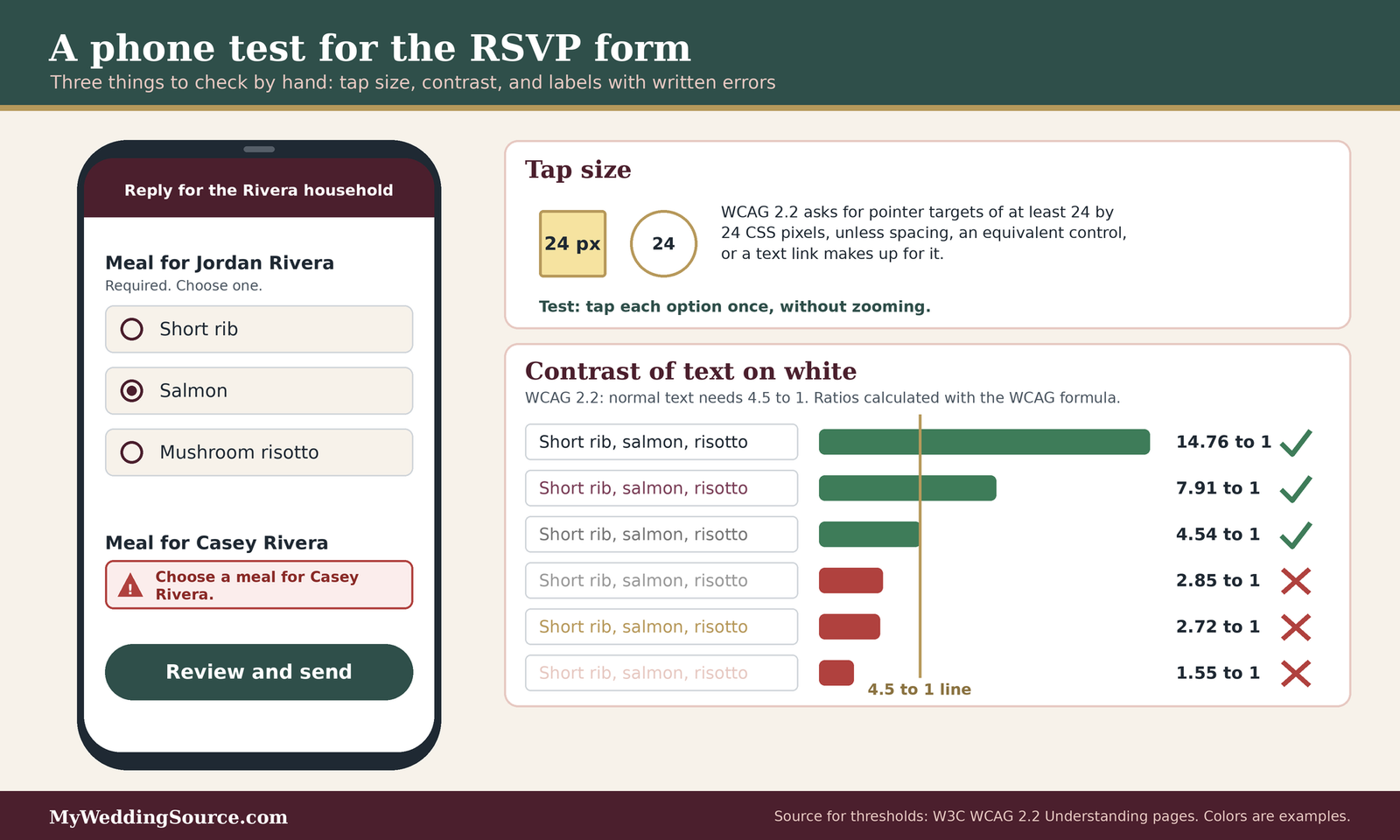
WCAG 2.2 sets a minimum pointer target size of 24 by 24 CSS pixels, with exceptions for targets that have enough empty space around them, for links inside sentences, and for controls the browser draws at its default size. The W3C explains that people using one hand, people on a moving train, and people with limited fine motor control can struggle with small controls. For your form, the simple test is whether you can tap each meal option on the first try without zooming in, and whether two options are ever so close together that a neighbor gets selected by mistake.
Test contrast and readability
A pale gray hint on a white background looks elegant on a designer’s monitor and disappears in sunlight. Meal options and error messages are the text a guest most needs to read.
Read the form outdoors
Take the phone outside, turn the screen brightness down to a normal level, and read the meal question and its options. If you squint, a guest in a car or at a kitchen counter will too. This is an informal check that catches the worst cases quickly.
Check the contrast ratio
WCAG 2.2 asks for a contrast ratio of at least 4.5 to 1 for normal text against its background, and 3 to 1 for large text, which it defines as at least 18 point, or 14 point if bold. Disabled controls and pure decoration are exempt. Free contrast checkers let you paste two colors and read the ratio. The figure below shows ratios we calculated with the standard WCAG formula for a few common color pairs, so you can see how quickly a light gray falls short.
Test labels, groups, and error messages
Labels and errors are where a form either explains itself or leaves a guest guessing. They are also where a skipped meal question is caught or let through.
Check that every control has a visible label
The W3C’s labels criterion says any content that accepts input needs labels or instructions, whether the field is required or optional. A placeholder that vanishes when a guest starts typing is not a label. For radio buttons, each option needs its own label, and the group needs a heading that says what the choice is for, ideally with the guest’s name. When you test, cover the placeholders with your hand and see whether the form still makes sense.
Make errors specific and written out in words
If a guest leaves the meal question blank, the form should say which question is missing and what to do. WCAG 2.2’s error identification guidance says the field at fault should be identified and the error described in text, and that color or an icon may help but cannot be the only signal. Try submitting a household with one meal left blank. A message such as “Choose a meal for Jordan Rivera” is useful; a red outline alone is not.
Let autofill help where it can
WCAG 1.3.5 asks that fields collecting information about the user declare their purpose, using standard autocomplete values for things such as name and email, so browsers can fill them in. The benefit is real for people with memory or motor difficulties. It applies to details about the person filling in the form, and a meal choice is not one of those, but contact details are.
Run a dummy-guest rehearsal
The most reliable test of a wedding rsvp data export is to send test replies through the real form and look at the resulting file. This catches problems in the form and in the export at the same time.
Create six test personas
Use clearly fake names so you can delete them afterward. One persona should be a single guest who declines. One should be a single guest with a meal choice and an allergy. One should be a household of three with a plus-one and a child. One should leave the optional note blank. One should put a comma, a quotation mark, and an apostrophe in the note. One should be a late reply that edits an earlier answer. This set exercises most of the places where a choice can go missing.
Compare the file to what you typed
Export the test replies and compare them to your notes, row by row. Check that every persona appears once, that the meal values match what you chose, that the note with commas stayed in one cell, and that the edited reply shows the new answer. Then delete the test guests and confirm they are gone from the live list so they do not inflate your final count.
| Test | How to run it | Pass looks like | Why it matters |
|---|---|---|---|
| One-thumb reply | Answer for a household of three, holding the phone in one hand | No pinching, no hidden meal question | Guests rarely answer at a desk |
| Tap targets | Tap each meal option without zooming | Right option every time, about 24 px or more or well spaced | Prevents wrong selections |
| Contrast | Read text outdoors and check colors with a ratio checker | Normal text at 4.5 to 1 or better | Unreadable options become blanks |
| Visible labels | Hide placeholders and read the form | Each field and group still makes sense | Prevents unlabeled answers |
| Blank meal | Submit with one meal left empty | Written message names the person and the question | Catches skipped choices |
| Review step | Look for a summary before final submit | Guest can confirm names and meals | Catches typos and mix-ups |
| Odd characters | Enter commas, quotes, and an accented name in a note | Same text appears in the export cell | Protects the file structure |
| Edit after submit | Change an answer and export again | Export shows the newest answer | Exposes stale data |
Export day: a careful step-by-step run
When your reply deadline passes, the wedding rsvp data export becomes the working document for your caterer, your seating chart, and your budget. A calm, repeatable routine keeps it from becoming a source of mistakes.
Freeze the data, then export
A moving target is hard to count. Pick a moment, stop the changes, and take a clean copy.
Choose the moment for your wedding rsvp data export on purpose
Run your wedding rsvp data export after your stated reply deadline, and if possible after you have followed up with late responders. If your platform lets guests edit replies indefinitely, consider turning off edits or noting in your invitation when the form closes. A fixed cutoff gives you a version of the data that stays still while you check it. Our guide to invitation etiquette discusses reasonable deadlines to print on the card.
Name the file so it explains itself
Name every wedding rsvp data export with the date, the time, and the purpose, such as rsvp-export-2026-11-12-1830-raw. When you later make a cleaned version, add a different ending. This habit sounds fussy until the evening you have four files on your desktop and a caterer asking which one the count came from.
Open the file without letting the software rewrite it
The safest way to open a CSV is to import it as text instead of double-clicking it, because double-clicking invites the automatic conversions described earlier.
Import as text and switch off conversions
In Excel, you can use the import options, or turn off the automatic data conversions in the Data settings that Microsoft documents for leading zeros, long numbers, scientific notation, and date-like text. In Google Sheets, use the import option instead of double-clicking; Google’s help page says the import dialog lets you pick the separator, such as a comma, rather than guessing. After opening, scan the columns that should be text, such as table numbers and codes, and confirm nothing was converted.
Be careful with formulas hiding in guest text
OWASP describes a risk called CSV injection, also known as formula injection: if a cell begins with an equals sign, plus sign, minus sign, or at sign, a spreadsheet program may treat it as a formula. Guests type their own notes into your form, so this is a small but real possibility, and OWASP says no single clean-up method is safe in every program. The sensible habit is to open exports in a program that asks before running anything, be wary of any cell that starts with one of those characters, and not enable macros or external links in a file that came from a form.
Keep an untouched original
Spreadsheet tidying is where information gets lost, so protect the original wedding rsvp data export.
Store the raw wedding rsvp data export read-only
Save the raw export in one folder and do not edit it. Mark it read-only if your system allows. If you later wonder whether a cleaning step changed a guest’s meal, you can compare against the original in a minute.
Work in a copy and log your changes
Make a copy for cleaning and keep a short log of what you changed, such as “split household row into three people” or “corrected spelling of Wild mushroom risotto.” The log doubles as a handoff note if a planner or family member needs to pick up the work.
The reconciliation worksheet
This is the heart of the guide: a method to prove that your meal counts match your attending guests before you give numbers to a caterer. It works on any wedding rsvp data export and needs only a spreadsheet and about an hour for a mid-sized guest list. The example numbers are illustrative, invented to show the method, and are not data from any wedding or platform.
The headcount identity
The core idea is one sentence: every attending guest must have exactly one meal value. If that is true, the sum of the meal counts equals the number of attending guests. If it is not true, something is missing or doubled.
The equation to check
Count attending guests from the attending column. Count each meal value from the meal column among attending guests only. Add the meal counts, plus any explicit “no plated meal” values. The two totals should match. Any difference is the number of choices you need to chase.
A worked example with made-up numbers
Imagine one hundred attending guests. The file shows forty-one with the short rib, thirty-three with salmon, seventeen with the mushroom risotto, six with a children’s meal, and three blank. Forty-one plus thirty-three plus seventeen plus six is ninety-seven, and three blanks make one hundred. The identity holds only after you name the blanks as a separate group. The point is not the numbers; it is that the blanks are visible instead of hiding inside a total of ninety-seven.

Five checks to run on the file
After the identity, run these five quick checks. Each one targets a specific way that a choice goes missing.
Check one: blanks among attending guests
Filter for attending guests whose meal cell is empty. Each one is a guest to contact, or a household whose single reply left someone out. Do not guess on their behalf.
Check two: duplicates and conflicts
Sort by name and look for the same person twice, which can happen when a guest replies twice or when a plus-one appears as both a named guest and a household member. If a person has two different meal values, the later reply usually reflects their wishes, but confirm before changing anything.
Check three: unknown values
List the distinct values in the meal column. You should see only your menu options, your “no plated meal” value, and blanks. A stray value such as “chikcen” or an old label from before you renamed an option is a counting error waiting to happen. Fix them in your working copy and note the change in your log.
Check four: household totals
For each household, compare the number of attending people to the number of meal values. A household that says four are attending but lists three meals needs a follow-up. This is the check that catches the guest who is attending but absent from the meal data.
Check five: allergy and dietary flags
Filter for any non-empty allergy or dietary note and read each one. Match each flagged guest to a specific meal and confirm with your caterer that the dish is suitable, or that a separate plate is needed. This is a coordination task, not a medical judgment.
Keep a discrepancy log
A short log turns a scramble into a process. It also protects you if a guest remembers a conversation differently than your notes.
What to record
Use one row per problem, with the guest name, what the file shows, what you believe is true, who confirmed it, the date, and the resolution. Even a few columns are enough. When a number changes between two versions of your count, the log tells you why.
Who resolves what
Decide in advance who contacts guests. One person asking everyone avoids contradictory messages. If a planner or a family member helps, give them the log and a short script so guests hear a consistent request.
Follow up with guests kindly
A guest who forgot to choose a meal is not being difficult. A friendly, specific message gets better results than a general reminder.
Ask for exactly one thing
Write something like “We are finalizing the dinner count and do not have a meal choice for you yet. Could you reply with your choice by Friday?” Name the missing item and give a date that works with your caterer’s schedule. Our guide to wedding vendor meals also reminds you to count your photographer, planner, and band, who often need a meal too.
Close the loop
When the choice arrives, update the working copy, log the change, and, if the platform allows it, update the guest’s record there as well so the live data and the file stay aligned. Then re-run the identity check.
What a lost choice can cost
Here is a simple estimate, using a hypothetical price of $85 per plate that is not a quote from any caterer. If six guests arrive without a recorded choice and the kitchen prepares extras to be safe, that is six plates, or about $510, and it may also mean the wrong dish for a guest with an allergy. Your caterer’s pricing, minimums, and policies on late changes will differ. Ask them in writing how and when counts can change, and what fees apply. Our guide to cost per guest shows how to see the real price of each plate.
Keep the exported file private and safe
A wedding rsvp data export is a directory of your friends and family: names, who is coming, what they can eat, and often phone numbers and addresses. It deserves the same care you would give any list of personal details. This section is general consumer guidance, not legal advice. For the wider picture of your wedding site, see our guide to wedding planning website privacy and security.
Treat the file like a guest directory
The Federal Trade Commission’s guide to protecting personal information is written for businesses, but its five ideas translate well to a couple handling a guest list. We are adapting it, not quoting a rule that applies to weddings.
Take stock and scale down
Know where every copy of the file lives: the download folder, an email attachment, a shared drive, a phone, a printout. The FTC’s guide advises keeping only what you need, and for only as long as you need it. For your export, that means deleting columns you do not need before sharing, and planning to delete old copies after the wedding.
Lock it and pitch it
The FTC’s guide recommends protecting data with strong passwords, limited access, and encryption where possible, and disposing of it securely when you are done. In practice: keep the file in an account protected with a strong, unique password and two-step sign-in, do not leave it on a shared family computer, and shred printed lists you no longer need. We will cover password habits in more depth in our guide to wedding planning password sharing.
Share only what each helper needs
Your caterer needs names, meals, and allergies from the wedding rsvp data export, and nothing else. They do not need phone numbers or gift records. Your seating-chart helper needs names, households, and meals. They do not need email addresses.
Build a vendor-ready copy
Create a copy of the cleaned wedding rsvp data export that has only the needed columns: guest name, table or household if relevant, meal, and allergy or dietary note. Check the file name and the document properties for stray details. Send it through a method you can control, such as a shared link you can switch off, and not as an open link posted in a group chat. Our notes on guest spreadsheet permissions will cover viewer and editor access in more detail.
Give the vendor a single contact and a single version
Tell the vendor which file is current and whom to ask about changes. If two relatives send two counts, the kitchen will have to guess. Ask the vendor to confirm the count in writing, reading it back to you, so you can compare it with your final reconciled numbers.
Watch for requests that are not what they seem
Wedding details are public in places, which makes couples a target for messages that pretend to be a vendor or a guest.
Be wary of unexpected requests for the list
The FTC’s scams hub advises caution with impersonators and with unexpected links, and it describes urgent, pressured requests as a common tactic. If someone claiming to be your caterer, photographer, or venue emails asking for the full guest list or for payment through an unusual method, contact them using the phone number or address from your signed contract, not from the message. Our upcoming guide on wedding website scam messages will go through typical patterns.
Delete test data and old exports
Remove your test guests, delete downloads you no longer need, and clear the shared links you created. After the wedding, decide what you need to keep, such as the final seating plan or a thank-you list, and remove the rest. For gifts, our wedding gift tracking guide covers a separate list that deserves its own care.
Questions and edge cases to settle before your wedding rsvp data export
Not every situation fits a neat file. Settling a few questions early prevents the awkward ones later.
Questions to ask your platform and your caterer
The answers to these questions are specific to your account and your contract, so ask rather than assume.
Questions to ask before you rely on the export
- Does the RSVP export include meal choices for every attending person, or only for the primary guest on each reply?
- Which file is the complete one: the guest list download, the RSVP export, or the meal report?
- Does the export reflect edits guests make after submitting, and is there a time stamp on each reply?
- Can I export a single event, or all events together, and how do I tell them apart?
- Can I turn off guest edits after my deadline?
- What file format is the export, and how are notes with commas or line breaks handled?
- What does the caterer need: a count, a named list, or both, and in what format?
- By what date can the final count change, and what happens to a change after that date?
Asking the platform
Use the support chat or help center to ask how its wedding rsvp data export works, and keep the answer. A platform’s own statement of what its export includes is more reliable than a forum post, and it protects you if the file turns out to be missing something. If the answer is unclear, run the dummy-guest rehearsal described above and let your own wedding rsvp data export answer for itself.
Asking the caterer
Ask how they want the counts delivered, whether they need names with meals, and how they handle allergies. Ask what the last day is for changes and what extra charges apply. Write down the answers, and confirm the date and the numbers by email so both sides share the same record.
Edge cases worth planning for
Even a careful process meets a few situations that do not fit the form.
Late replies and late changes
A guest who replies after your wedding rsvp data export, or who changes a meal after you have sent a count, is the most common source of drift. Decide how you will handle it: a separate “after export” list that you add to the final count, a re-export on a fixed day, or a rule that changes after a certain date go to the caterer by one named person. Whichever you choose, keep the log current.
Guests who do not use the website
Some guests, including older relatives, will phone, text, or mail a card. Enter their answers into the platform yourself, or add them to your working copy with a note that says how the reply arrived. Do not leave them in a notebook. Our guide to accessible guest experience explains how to make replying easier for guests who find websites difficult.
Children, vendors, and special meals
Children’s meals, vendor meals, and meals for guests with specific needs often sit outside the standard menu. Give each a clear label in the file and count them in the identity check. If you hold a rehearsal dinner or a welcome event, keep each event’s counts separate.
When the platform has no good meal export
Some tools give you a list of guests but no tidy meal report, so the wedding rsvp data export has to be assembled by hand. You can still build the worksheet yourself.
Build your own sheet
Create a spreadsheet with one row per attending person and columns for name, household, event, meal, allergy or dietary note, source, and date confirmed. Copy the names from the platform, then add meals from the replies. It is more work, but it makes you read every reply once, which catches problems early.
Check against the seating chart
If your platform ties meals to a seating chart, as the RSVPify community describes, compare the meal totals on the chart against your worksheet. Differences point to a seat without a guest or a guest without a seat. Our guide to the wedding seating chart shows how to build one that stays consistent with the guest list.
FAQ: wedding rsvp data export questions
Before you export
When should I do my wedding rsvp data export?
Run the wedding rsvp data export after your reply deadline and after you have chased late responders, so the file reflects the guest list you will actually serve. If your platform lets guests edit replies, note the export date and time in the file name, and run a fresh export whenever you hear of a change.
What should a good export include for meals?
For a useful wedding rsvp data export, you want at minimum one row per attending person, the person’s attending status, the meal choice, and a separate field for allergies or dietary needs. A household or event column helps you trace missing answers. Check your platform’s own help pages, because each tool decides which columns it exports.
Do I need the whole guest list for the caterer?
Usually not. For a wedding rsvp data export meant for the kitchen, most caterers need names, meal choices, and allergy notes, and some only need counts. Send the smallest file that does the job, leave out phone numbers and addresses, and confirm with the caterer which format they prefer before you send anything.
Cleaning and checking
Why do my meal columns look shifted or merged?
The most common cause is a note containing a comma that was not wrapped in quotes, which splits one cell into two. Importing the file as text, with the comma as the separator, usually fixes the display. Compare the row count and a few guest rows with the live dashboard.
How do I know whether the meal counts are right?
Use the headcount identity: the number of attending guests should equal the sum of all meal values plus any “no plated meal” values. Name the blanks as their own group. If the totals differ, filter for blanks, duplicates, unknown labels, and households whose meal count does not match their size.
Can a spreadsheet change my data on its own?
Yes. Microsoft documents that Excel can strip leading zeros, shorten long numbers, convert some text to scientific notation, and read date-like text as dates when it opens a CSV file. Import as text or switch off automatic conversions, then check any code or number columns.
Privacy and safety
Is it safe to email the exported file?
When you share a wedding rsvp data export, it is safer to send a limited copy through a link you can turn off than to attach the full file to a message. Remove columns the recipient does not need, protect your accounts with strong passwords and two-step sign-in, and delete shared links and old copies after the wedding.
What if a vendor asks me for the full guest list urgently?
Pause. The FTC warns that urgency and unexpected requests are common in scams. Contact the vendor using the phone number or email on your signed contract, ask what exactly they need and why, and share only those columns. A real vendor will be fine with a short delay.
Your next steps
Before the invitations go out
Test the form on a phone
Run the mobile, contrast, and form test plan on one or two real phones and fix what fails. Then send six dummy guests through the form and compare the export to your notes. Pair this with our RSVP wording guide so the questions are clear from the first line.
Settle the vendor questions
Ask your platform and your caterer the questions listed above, and write down the answers and the final-change date. Add the date to your calendar and to your wedding planning checklist.
After the deadline
Export, reconcile, and log
Run the wedding rsvp data export once, keep the raw file untouched, and work in a copy. Run the headcount identity and the five checks, record each discrepancy, and chase the blanks with one specific message.
Share, confirm, and clean up
Send the caterer a limited, versioned file, ask for written confirmation of the count, and delete test data and old copies when the day is over. For the wider plan, see our wedding planning guide.
Sources & methodology
How we built this guide
What we relied on
This guide draws on the W3C’s published accessibility guidance for forms, contrast, target size, labels, error messages, and input purpose; the FTC’s guide to protecting personal information and its consumer scams hub; the NIST Privacy Framework page; the FDA’s list of major food allergens; the RFC that describes the CSV format; OWASP’s description of CSV injection; Microsoft’s documentation of Excel’s automatic data conversions; and the help pages of three wedding platforms. Statements about what a platform exports are the platform’s own, as published when we checked, and your account may differ. The worksheet, the worked example, the contrast ratios, and the plate estimate are our own illustrations and arithmetic, and they are estimates. Sources were last checked on November 12, 2026.
What we did not do
We did not test any platform’s export, audit any guest-facing form, or contact any vendor. We did not give legal, medical, or security-compliance advice. Features, plans, and policies change, so confirm details in your own account and your own contract, and speak with your caterer directly about allergies.
Source list
Government, standards, and security sources
- W3C Web Accessibility Initiative, Forms tutorial: https://www.w3.org/WAI/tutorials/forms/
- W3C, Understanding Success Criterion 1.4.3, Contrast (Minimum): https://www.w3.org/WAI/WCAG22/Understanding/contrast-minimum.html
- W3C, Understanding Success Criterion 2.5.8, Target Size (Minimum): https://www.w3.org/WAI/WCAG22/Understanding/target-size-minimum.html
- W3C, Understanding Success Criterion 3.3.1, Error Identification: https://www.w3.org/WAI/WCAG22/Understanding/error-identification.html
- W3C, Understanding Success Criterion 3.3.2, Labels or Instructions: https://www.w3.org/WAI/WCAG22/Understanding/labels-or-instructions.html
- W3C, Understanding Success Criterion 1.3.5, Identify Input Purpose: https://www.w3.org/WAI/WCAG22/Understanding/identify-input-purpose.html
- Federal Trade Commission, Protecting Personal Information: A Guide for Business: https://www.ftc.gov/business-guidance/resources/protecting-personal-information-guide-business
- Federal Trade Commission, Consumer Advice, Scams: https://consumer.ftc.gov/scams
- NIST, Privacy Framework: https://www.nist.gov/privacy-framework
- U.S. Food and Drug Administration, Food Allergies: https://www.fda.gov/food/nutrition-food-labeling-and-critical-foods/food-allergies
File format and spreadsheet sources
- IETF, RFC 4180, Common Format and MIME Type for CSV Files: https://www.rfc-editor.org/rfc/rfc4180
- OWASP Community, CSV Injection: https://community.owasp.org/attacks/CSV_Injection
- Microsoft Support, Set automatic data conversions: https://support.microsoft.com/en-us/excel/set-automatic-data-conversions
- Google Docs Editors Help, Import data sets and spreadsheets: https://support.google.com/docs/answer/40608?hl=en
Wedding platform help pages (vendor statements)
- Zola Help Center, Can I export my guest list from Zola: https://www.zola.com/faq/115002148892-Can-I-export-my-guest-list-from-Zola-
- WedSites Help, Exporting guests: https://help.wedsites.com/en/articles/14456047-exporting-guests
- RSVPify Community, Where do I see my guests’ meal selections and can I export the list: https://community.rsvpify.com/hc/en-us/community/posts/17760677316244-Where-do-I-see-my-guests-meal-selections-and-can-I-export-the-list